Posted on Leave a comment

Secure File Upload in PHP 8: A Production-Ready Implementation Guide

Why File Uploads Are a High Risk Attack Surface

File uploads are one of the most common features in web applications. They are also one of the most exploited.

In PHP 8, securely handling file uploads requires far more than calling move_uploaded_file(). A production ready implementation must validate MIME types using finfo, restrict file size, whitelist allowed formats, generate cryptographically safe file names, store files outside the public directory, and enforce server level execution restrictions.

That is the technical summary. But the real story is deeper.

File uploads look harmless.

A resume upload field.
A profile picture form.
An assignment submission box in an LMS.
A document attachment in a billing system.

Years ago, a small business site was compromised. The attacker did not brute force passwords. They did not exploit SQL injection. They uploaded a file named invoice.pdf.php. The system trusted the extension, saved it inside the public folder, and allowed the web server to execute it.

Within minutes, the server was running malicious scripts.

The feature designed to collect documents became the entry point.

The problem was not PHP.
No programming language is insecure by default. Insecure assumptions create insecure systems.

Developers often:

  • Trust file extensions
  • Trust $_FILES['type']
  • Store uploads inside public directories
  • Skip server hardening
  • Focus on making it work instead of making it safe

File upload security is not about one validation check. It is about layered defense. Just like preventing SQL injection in PHP, file uploads require strict validation.

In this guide, we will design a production ready, security first file upload implementation in PHP 8. We will examine the attack surface, define strict validation rules, isolate storage, apply server level hardening, and build a clean, minimal uploader class suitable for real world backend systems.

Because in backend engineering, the most dangerous vulnerabilities are often hidden behind the simplest features. If you are looking for a basic file upload example, see this simple PHP file upload tutorial.

How PHP Handles File Uploads Internally

Before securing file uploads, we must understand how PHP handles them.

When a user submits a form with enctype="multipart/form-data", the browser sends the file to the server along with the other form fields.

PHP does not immediately store the file in your project folder.

Instead, it saves the file in a temporary directory on the server. This location is defined by the upload_tmp_dir setting in php.ini. If not defined, PHP uses the system default temp folder.

After the upload is complete, PHP creates an entry inside the $_FILES superglobal array.

A typical $_FILES structure looks like this:

Array
( [document] => Array ( [name] => resume.pdf [type] => application/pdf [tmp_name] => /tmp/phpYzdqkD [error] => 0 [size] => 124532 )
)

Each key has a meaning:

  • name → Original file name from the user. Do not trust this.
  • type → MIME type reported by the browser. Do not trust this.
  • tmp_name → Temporary file path created by PHP.
  • error → Upload status code. Must be checked.
  • size → File size in bytes. Should be validated.

It is important to understand this clearly.

The browser controls name and type. The user can manipulate them.

Only tmp_name is generated by the server.

To permanently store the file, you must call:

move_uploaded_file($file['tmp_name'], $destination);

You can read more in the official PHP documentation for move_uploaded_file().

This function moves the file from the temporary directory to your chosen location.

If you skip validation and directly move the file, you are trusting user input. That is where problems start.

There are also PHP configuration limits that affect uploads:

  • upload_max_filesize
  • post_max_size
  • max_file_uploads

These limits are helpful, but they are not security controls. They only restrict size and quantity.

Understanding this upload lifecycle is important. Security mistakes usually happen between reading $_FILES and calling move_uploaded_file().

File upload forms should also be protected against CSRF attacks.

In the next section, we will see the common vulnerabilities that arise during this phase.

Common File Upload Vulnerabilities

File uploads fail not because of one mistake.
They fail because of small assumptions.

Here are the most common problems.

1. Trusting the File Extension

Many systems check only the extension.

Example:


resume.pdf
image.jpg

Looks safe.

But an attacker can upload:


shell.php
shell.php.jpg
invoice.pdf.php

If your system only checks .jpg or .pdf, it can be bypassed.

Extensions are easy to fake. They are just text.

Never trust extension alone.

2. Trusting $_FILES[‘type’]

Some developers check:

if ($_FILES['file']['type'] === 'image/jpeg')

This is not safe.

The browser sends this value. The user can change it.

PHP provides the finfo extension for detecting the real MIME type. You must detect MIME type on the server using finfo.

We will see that later.

3. Storing Files Inside Public Directory

This is very common.

Example:

/var/www/html/uploads/

If someone uploads malicious.php and your server allows execution, the attacker can run:

https://example.com/uploads/malicious.php

Now your server runs attacker code. This is how many small sites get compromised. Uploads should not be executable.

4. No File Size Limit

If you do not restrict size:

Someone can upload 2GB file.

  • Disk space gets full.
  • Server becomes slow.
  • Application crashes.

Size must be restricted:

  • In php.ini
  • In application logic

Both.

5. Path Traversal

If you build file paths like this:

$destination = 'uploads/' . $_FILES['file']['name'];

An attacker may try:

../../config.php

This can overwrite important files. Always control the final file name yourself. Never use user file name directly.

6. Race Conditions

If you validate first and then move later, sometimes files can be swapped or replaced.

This is rare but possible in poorly designed systems. Validation and moving must be done carefully and quickly.

7. Allowing Dangerous File Types

Some file types should never be allowed:

  • .php
  • .phtml
  • .phar
  • .exe
  • .sh

If your application does not need them, block them completely. Whitelist approach is safer than blacklist. Allow only what is required.

File upload security is not one rule. It is many small rules working together. In the next section, we will build a clear set of security principles.

Core Security Principles for Safe File Uploads

Security is not one check. It is layers.

We will apply rules in order. Do not skip steps.

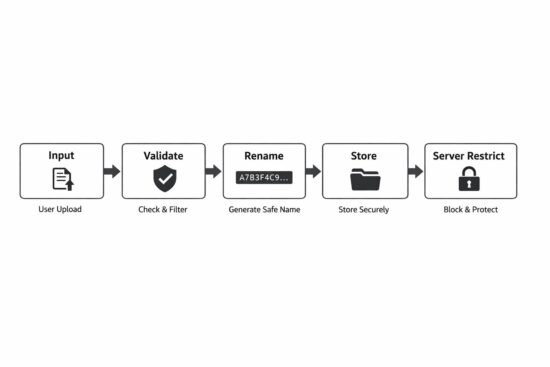
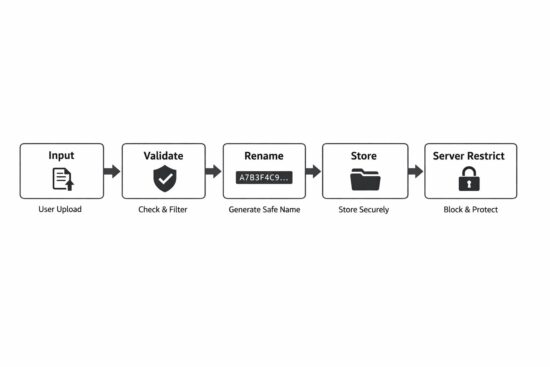
Secure File Upload Steps

1. Always Check Upload Errors First

Before anything, check the error code.

if ($file['error'] !== UPLOAD_ERR_OK) { throw new RuntimeException('Upload failed.');
}

If there is an error:

  • File may be incomplete
  • File may not exist
  • Size may exceed server limit

Do not continue if error is not zero.

2. Restrict File Size in Application Code

Do not depend only on php.ini.

Add your own limit.

$maxSize = 2 * 1024 * 1024; // 2MB if ($file['size'] > $maxSize) { throw new RuntimeException('File too large.');
}

Even if server allows 10MB, your app may allow only 2MB. Control it at application level.

3. Detect MIME Type Using finfo

Do not trust $_FILES['type']. Use server side detection.

$finfo = new finfo(FILEINFO_MIME_TYPE);
$mime = $finfo->file($file['tmp_name']);

This checks actual file content. It is more reliable.

4. Use a Whitelist of Allowed Types

Never allow everything except few types. Allow only what is required.

Example:

$allowed = [ 'image/jpeg' => 'jpg', 'image/png' => 'png', 'application/pdf' => 'pdf',
];
if (!array_key_exists($mime, $allowed)) { throw new RuntimeException('Invalid file type.');
}

Whitelist is safer. Blacklist can miss something.

5. Generate a Safe Random File Name

Never use original file name. User can manipulate it. Generate your own name.

if (!array_key_exists($mime, $allowed)) { throw new RuntimeException('Invalid file type.');
}

This gives:
Random name,
No collisions
No injection risk

6. Store Files Outside Public Web Root

Do not store here:

/var/www/html/uploads

Better:

/var/www/storage/uploads

Files should not be directly accessible. If you need to serve them, use a controlled download script.

7. Use move_uploaded_file()

Do not use rename().

move_uploaded_file($file['tmp_name'], $destination);

This function verifies that the file came from PHP upload. Safer.

8. Disable Script Execution in Upload Folder

Even if you validate, add server protection. Disable execution using:

  • .htaccess for Apache
  • location rules for Nginx

Defense in depth.

These principles are simple. But many systems skip one or two. That is enough for compromise.

In the next section, we will combine everything and build a minimal SecureUploader class in PHP 8. Clean. Small. Production ready.

The OWASP File Upload Cheat Sheet also provides useful security recommendations.

Building a Minimal SecureUploader Class in PHP 8

Now we combine everything. The goal is simple:

  • Validate
  • Restrict
  • Rename
  • Store safely

No framework. No heavy abstraction. Just clear PHP 8 code.


<?php declare(strict_types=1); final class SecureUploader
{ private string $uploadDir; private int $maxSize; private array $allowedMimeTypes; public function __construct(string $uploadDir, int $maxSize, array $allowedMimeTypes) { $this->uploadDir = rtrim($uploadDir, '/'); $this->maxSize = $maxSize; $this->allowedMimeTypes = $allowedMimeTypes; } public function upload(array $file): string { $this->validateError($file); $this->validateSize($file); $mime = $this->detectMimeType($file['tmp_name']); $extension = $this->validateMime($mime); $filename = $this->generateFileName($extension); $destination = $this->uploadDir . '/' . $filename; if (!move_uploaded_file($file['tmp_name'], $destination)) { throw new RuntimeException('Failed to move uploaded file.'); } return $filename; } private function validateError(array $file): void { if (!isset($file['error']) || $file['error'] !== UPLOAD_ERR_OK) { throw new RuntimeException('Upload error.'); } } private function validateSize(array $file): void { if ($file['size'] > $this->maxSize) { throw new RuntimeException('File too large.'); } } private function detectMimeType(string $tmpPath): string { $finfo = new finfo(FILEINFO_MIME_TYPE); $mime = $finfo->file($tmpPath); if ($mime === false) { throw new RuntimeException('Cannot detect MIME type.'); } return $mime; } private function validateMime(string $mime): string { if (!array_key_exists($mime, $this->allowedMimeTypes)) { throw new RuntimeException('Invalid file type.'); } return $this->allowedMimeTypes[$mime]; } private function generateFileName(string $extension): string { return bin2hex(random_bytes(16)) . '.' . $extension; }
}

Example Usage


$uploader = new SecureUploader( __DIR__ . '/../storage/uploads', 2 * 1024 * 1024, [ 'image/jpeg' => 'jpg', 'image/png' => 'png', 'application/pdf' => 'pdf', ]
); $filename = $uploader->upload($_FILES['document']);

Why This Design Is Good

  • Strict types enabled
  • No global variables
  • Clear separation of validation steps
  • No original file name used
  • No public directory storage
  • No silent failure

Small class. Easy to maintain. Easy to test. You can extend later if needed.

Security should be simple. Complex security often fails.

Server-Level Hardening

Even if your PHP code is perfect, server configuration matters.

Defense should not depend on one layer only.

1. Apache Hardening (.htaccess)

If you use Apache and your uploads are inside a web-accessible folder, disable script execution.

Create a .htaccess file inside the upload directory:

php_flag engine off
Options -ExecCGI
AddType text/plain .php .phtml .php3 .php4 .php5 .php7 .phar

This prevents PHP files from executing. Even if someone manages to upload a .php file, it will not run. It will be treated as plain text. That is important.

2. Nginx Hardening

In Nginx, you usually configure this in your server block.

Example:

location /uploads/ {
autoindex off;
types { }
default_type text/plain;
}

Or more strictly, block script execution:

location ~* ^/uploads/.*\.(php|phtml|phar)$ {
deny all;
}

This blocks access to executable scripts inside uploads.

3. Why This Matters

Many real attacks succeed because:

  • Code validation failed once.
  • Or developer made a mistake.
  • Or a new file type was allowed accidentally.

Server-level restriction reduces damage. Even if application logic has a bug, server can stop execution. That is called defense in depth.

4. Best Practice

Best approach is:

  • Store uploads outside public directory.
  • If that is not possible, disable execution.
  • Always use both application and server validation.

Never depend on one protection only.

Security is layers. Code layer. Server layer. Configuration layer.

Additional Safeguards for Production Systems

Basic validation is not enough for high traffic or sensitive systems. Here are extra protections you should consider.

1. Re-Encode Uploaded Images

If you allow images, do not store them directly. Attackers can hide malicious code inside image metadata.

Better approach:

  • Open image using GD or Imagick
  • Re-save it
  • Discard original file

Example idea:

$image = imagecreatefromjpeg($tmpPath);
imagejpeg($image, $destination, 90);
imagedestroy($image);

This removes hidden metadata. You keep only clean image data.

2. Virus Scanning

For document uploads like PDF or DOC files, consider scanning. You can use tools like ClamAV

Upload file.
Scan file.
If infected, reject it.

This is useful for:

  • LMS platforms
  • HR portals
  • Customer document systems

3. Rate Limiting Uploads

If someone uploads 1000 files per minute, it can overload the system.

Add rate limits:

  • Per user
  • Per IP
  • Per session

Even simple limits help.

4. Logging Upload Activity

Do not ignore uploads.

Log:

  • User ID
  • File name generated
  • Timestamp
  • IP address

If something goes wrong, logs help investigation. Security without logs is blind.

5. Limit Number of Files

If your form allows multiple files, control it. Do not allow unlimited uploads. Set clear limits.

6. Set Proper File Permissions

When storing files, ensure correct permissions.

Example:

  • Files should not be executable
  • Use minimal required permissions

Do not use full permissions like 777. Keep it restricted.

These safeguards are not complicated. But many systems skip them.

Security is habit. Not one time effort.

Secure File Upload Checklist

Use this checklist before deploying file upload to production.

Validation

  • Check UPLOAD_ERR_OK before processing.
  • Reject file if error code is not zero.
  • Restrict file size in application code.
  • Do not trust $_FILES[‘type’].
  • Detect MIME type using finfo.
  • Use whitelist of allowed MIME types only.

File Handling

  • Never use original file name.
  • Generate random file name using random_bytes.
  • Store files outside public web root.
  • Use move_uploaded_file() only.
  • Do not use rename() for uploads.

Server Configuration

  • Disable script execution in upload folder.
  • Block .php, .phtml, .phar in uploads.
  • Set proper file permissions.
  • Do not allow directory listing.

Production Safeguards

  • Re-encode images before storing.
  • Scan documents for malware if needed.
  • Limit upload rate per user or IP.
  • Log upload activity.

If your system follows all the above, risk is reduced significantly.

No system is 100 percent secure. But layered protection makes attacks much harder.

FAQ

Is move_uploaded_file() secure in PHP?

Yes, when used correctly. The function itself verifies that the file was uploaded through HTTP POST. But it does not validate file type, size, or safety. You must combine it with MIME validation, file size checks, and safe storage practices.

Is checking file extension enough for secure upload?

No. File extensions can be renamed easily. A file named image.jpg can actually contain PHP code. Always validate the real MIME type using finfo on the server.

Should uploaded files be stored inside the public folder?

It is not recommended. If stored inside a public directory, the file may become directly accessible through URL. Store files outside the web root when possible. If not possible, disable script execution in the upload folder.

What is the safest way to handle file uploads in PHP?

Use layered validation. Check upload errors. Restrict file size. Detect MIME type using finfo. Whitelist allowed types. Generate random file names. Store files outside the web root. Apply server-level restrictions.

Conclusion

File uploads look small. But they carry real risk. Many security problems do not come from advanced attacks. They come from simple assumptions. Trusting the file extension. Trusting the browser MIME type. Storing files inside a public folder. Skipping server restrictions. These small mistakes open the door.

Secure file upload is not about one function. It is about discipline. Check errors. Restrict size. Detect the real MIME type. Allow only required formats. Generate safe file names. Store files outside the web root. Disable execution at the server level. Each step is simple. Together, they make the system strong.

PHP is not insecure. Insecure design is. If you treat file uploads as an attack surface and not just a feature, your application becomes safer. Keep it simple. Keep it strict. Do not trust user input. That is enough.

Posted on Leave a comment

Is creating a book still worth it in 2026?

What are some of the benefits of writing your own book? Let’s recap the basics, starting with more non-fiction oriented benefits and moving into higher-level fiction writing benefits later in this article.

Benefit 1: Career Prospects 🚀 and Authority

Not everybody respects book authors. Yet – most do:

“Publishing a book is still a powerful authority signal: one survey found that 75% of people view professionals as more qualified thought leaders when they have authored a book, while broader B2B research shows that 73% of buyers trust thought leadership more than traditional marketing when judging expertise.” – ChatGPT Deep Research

Publishing an authority book can be viewed as rocket fuel for your career – especially if book writing is not your main job but you’re doing it on the side.

It’s a classic positive expected-value activity:

  • Some will respect you more for having written a book on the side.
  • Some will respect you much more.
  • And the rest will respect you the same. 

Nobody will respect you less.

Now you may ask: How can it help me in my specific career?

Well, it might help you get a better job or get respected more in your current job/business.

Story: A friend of mine one day decided to coauthor a technical authority book about an engineering-related topic he was interested in (on the side). At the time, he was working a job in the social sector. The book was the key trust element that got him the exact dream job position at the company creating the engineering tool he was writing about. He loves his new job more and earns twice the income. The book was a major element of this success story – he may not have gotten the job without the book. 

For example, say you publish books in your area of expertise, build authority, and ultimately lift your income by only 20% as a first- or second-order consequence. The average salary in the US is roughly $60k, so +20% creates an additional +$12k per year. Investing that additional +$12k/y into an index fund yielding 9% p.a. results in a nice additional nest egg of $613k after 20 years.

The compounding effects of book writing can be magical! Of course this carries a few assumptions but nothing too unrealistic: 9% annual yield, a one-time 20% salary boost by building authority in your field, that’s about it.

And also please note that I didn’t even mention the immediate first-order cash flow your book might generate passively on Amazon KDP, for instance.

How can you publish a book – or multiple books – in your area of expertise? 

Well, just get started writing a draft with a non-fiction engine.

You can edit the book in a Word document and include your own stories, so it becomes yours.

I know you will find that the quality of your generated book is surprisingly high. Paying the equivalent of a coffee at Starbucks to become a (published) author is not too heavy a burden.

✨ You could be a published author this week!

Benefit 2: Personal Development + Learning

If you want to master any subject, write about it. Not enough time? The next best thing is to prompt AI to write about it – then read what it wrote. 

This way, you can generate books about your weird fringe interests to learn about hyper-individualized subjects such as:

  • How to Get Yourself to Bed as a Mom (33) When Nighttime Is the Only Time You Feel Free
  • How to Run a Household Where Everyone Eats Differently Without Cooking Four Dinners
  • How to Become Socially Fluent When You’re Already Smart but Somehow Weird in Groups
  • How to Prepare for a Nuclear Conflict in Stockholm/Sweden
  • Tailor-Made Diet Recommendations for 36-Year-Old Men with IBS and Skin Problems

You get the point, it could become even more specific like ‘Understanding Thermodynamics as a 43-Year-Old Working in Elderly Care’.

These books don’t exist but you can write them easily – one or even all of them – and own the rights to publish or consume them. Producing such a highly personalized book with ImagineYourBook might be even cheaper than ordering it on Amazon!

Benefit 3: Bragging Rights

I didn’t want to leave this unnamed.

Yeah, it’s not super sophisticated but I know that many people will publish books just so they can identify as authors.

While I didn’t build a first-class book-writing engine to fulfill people’s needs for external validation, I still know that many will use it exactly for that reason. 

I will not judge you for maximizing your well-deserved bragging rights.

Benefit 4: Self-Actualization, Fiction, and Travel

Let’s not go there too deeply – but what if your basic needs are already satisfied? What if you already have money, status, and you don’t need to learn new random stuff or monetize books?

In that case, you’re probably an avid fiction reader yourself. You might even have some novel ideas or need to read certain types of fiction books that you may not easily find on Amazon.

For example, I’ve always loved “The Talented Mr. Ripley”-style stories. I love the Mediterranean and go there regularly with my family. With ImagineYourBook, I can now generate exactly the fiction book I want, set in the vacation area I’m currently visiting. For instance, I can learn local history, culture, and what great places to visit by reading a crime novel set in a small village on the Amalfi Coast in Italy.

 👉 Write your travel guide fiction book with our engine

Benefit 5: Fun and Play

Last but not least, the best thing about AI is that it allows us to produce fun little things quickly and fool around.

You can write stories with your loved ones as protagonists and their specific character traits. You can write what-if stories changing physical laws such as gravity. You can write stories about your own childhood. You can invent stories that play like live games as you read through them.

Your imagination is now the only limit.

Imagine Your Book!

The post Is creating a book still worth it in 2026? appeared first on Be on the Right Side of Change.
Posted on Leave a comment

What to Code (Book): How Indie Hackers Find Million-Dollar Micro-SaaS Ideas in the Vibe Coding Era

Most builders still think the hard part is coding.

That used to be true. It isn’t anymore.

Today, with AI tools, templates, and vibe coding workflows, a single person can build in days what used to take a small team weeks. That sounds like good news, and it is. But it changes the game. When software becomes easier to produce, the real bottleneck moves upstream.

The scarce skill is no longer just execution. It is judgment.

That is the core idea behind What to Code: in a world where almost anything can be built, the real advantage comes from choosing the right thing to build.

The book makes a simple but powerful point: most projects fail long before launch, not because the code is bad, but because the premise is weak. Builders fall in love with elegant solutions, trendy categories, or new technical capabilities, then go looking for a problem to attach them to. That is backwards.

Pain is the Way

A better approach is to start with pain.

Not vague dissatisfaction. Not “people want to be more productive.” Real pain. Repeated pain. Costly pain. The kind that already shows up in workarounds, spreadsheets, manual cleanup, delays, mistakes, or quiet frustration that someone has learned to tolerate because there is no better option.

That is where good software opportunities usually come from.

One of the most useful ideas in the book is that strong opportunities tend to have four traits:

  • the problem is real,
  • it happens repeatedly,
  • the affected users are reachable, and
  • the builder has some meaningful fit with the space.

That fit matters more than most people think. The same idea can be great for one founder and terrible for another, depending on access, trust, domain knowledge, and distribution.

The Money is in the Niche

Another big takeaway: specificity beats breadth.

Broad ideas sound exciting. “AI for small business operations” sounds bigger than “a tool that catches missing attachments before insurance claims are submitted.” But broadness usually hides weak urgency. Specificity is what makes products adoptable. A concrete problem in a real workflow is easier to explain, easier to test, easier to sell, and easier to improve.

The book is also strong on validation. Demand is not praise. It is not likes, compliments, or “that sounds useful.” Demand is behavior. Do people try it? Come back? Change their workflow? Pay? Recommend it? If not, the signal is weak, no matter how encouraging the conversation felt.

Automate the … Boring Stuff?

The deepest lesson is probably this: boring problems are underrated.

A lot of money is hiding in ugly workflows — invoicing, approvals, claims, scheduling, reporting, reconciliation, handoffs, compliance checks, repetitive admin. These problems are not glamorous, but they are expensive. And expensive, recurring friction is exactly where small software businesses become real businesses.

What to Code — the practical summary

The book’s core argument is simple: in a world where building software is getting easier, the main advantage is no longer raw execution speed. The advantage is choosing a problem that is painful, repeated, reachable, and close enough to your own edge that you can actually solve and sell it. The mistake most builders make is starting with an idea, a tool, or a capability. A better process is to start with a recurring cost in the real world: wasted time, repeated errors, messy handoffs, manual cleanup, delayed billing, unclear approvals, or ugly workarounds people tolerate because nothing better exists.

The useful filter

Question Strong signal Weak signal
Is the problem real? People already complain, workaround it, or waste time on it weekly People say it “sounds useful”
Is it repeated? Daily or weekly pain Rare or one-off pain
Is it costly? Time, money, delays, mistakes, compliance risk Mild convenience issue
Are users reachable? You know where they are and how to talk to them “Everyone” is the user
Does it fit existing workflow? Slots into something they already do Requires a whole new habit
Is software the right fix? Repetition, routing, data cleanup, search, classification Mostly cultural or political problem
Do you have builder fit? Domain knowledge, trust, access, distribution, patience No edge, no access, no credibility
Can you test fast? You can get real behavior in days You need months to learn anything

This is basically the book’s opportunity lens: real pain, repeated need, reachable users, right builder. If one of those is missing, the idea may still be interesting, but it is probably weak.

What to look for in the wild

The best software ideas often hide inside boring operational friction:

Look for this Why it matters
A spreadsheet that “shouldn’t exist” It often means the official workflow is broken
A task someone does “every time” Repetition is where software wins
A process held together by one careful person That is human glue covering system weakness
Delays before billing, approvals, or handoffs Time lag often has direct monetary cost
Re-entering data across tools Translation work is classic automation territory
Repeated manual checks Good target for software-assisted validation
Teams exporting from one system just to work in another Strong sign of poor workflow fit

The book makes an important distinction here: broad ideas sound exciting, but specificity beats breadth. “AI for small business ops” is vague. “A tool for bookkeeping firms that extracts invoice fields from emailed PDFs into the review queue” is specific enough to test, explain, and sell.

The behavior test

The clearest lesson in the manuscript is that demand is behavior, not praise.

What people say What it usually means
“Cool idea” Very weak signal
“I’d use that” Still weak
“Can you show me?” Better
“Can I try it on my real data?” Strong
“Can this fit into our workflow?” Very strong
“How much?” Strong buying signal
“This would save us every week” Excellent
They come back and use it again Best signal

The best one-sentence takeaway

Do not ask, “What could I build?”
Ask, “What costly, repeated friction can I remove for people I can actually reach?”

A practical next step

Take your top 3 ideas and score each one from 1–5 on:

  • severity,
  • frequency,
  • measurable cost,
  • reachability,
  • software fit,
  • existing workaround evidence,
  • willingness to act/pay,
  • specificity,
  • builder fit,
  • speed to useful test.

Then kill the weakest one immediately.

Conclusion

If you build software, this book gives you a much better filter for deciding what deserves your time. It pushes you away from random idea generation and toward observed reality, where the best opportunities usually hide.

If that sounds useful, you can get the full book here: What to Code on Amazon

The post What to Code (Book): How Indie Hackers Find Million-Dollar Micro-SaaS Ideas in the Vibe Coding Era appeared first on Be on the Right Side of Change.
Posted on Leave a comment

6 Best AI Book Writers (2026): Tools for Authors & Self-Publishers

Want to write a book faster? You probably want to stay organized and keep your ideas clear, too.

AI book writers now play a real role for authors in 2026. These tools have improved, and you’ve got more options than ever.

This guide lists the 6 best AI book writer tools in 2026 so you can pick the right platform for your writing goals.

You’ll see how ImagineYourBook.com, Sudowrite, Claude, Novelcrafter, Jasper AI, and NovelAI compare. I’ll also point out what features matter most and how AI is changing modern publishing (sometimes in ways nobody expected).

1. ImagineYourBook.com

ImagineYourBook.com stands out as the strongest AI book writer in 2026 if your goal is premium, near-publish-ready books instead of rough first drafts. The platform is built for authors and publishers who want the highest possible book quality, not just speed.

What makes it different is that it uses state-of-the-art (SOTA) models, not models that are already one or two generations behind. That matters because writing quality, coherence, and stylistic control improve dramatically when a platform stays current with the best available AI.

Here’s a series of books that have been generated with this AI book writer:

But the real advantage goes deeper than model choice. ImagineYourBook.com is designed as a full end-to-end book generation system. It does not just generate isolated chapters. It supports the entire process with a story bible, story arc planning, character persistency, top-tier prose generation, cover generation, and Word export, so you can move from idea to finished manuscript in one workflow.

Its biggest quality advantage comes from how it handles context. Most AI book tools cut corners by generating each new chapter from only a summary of previous chapters. That approach saves tokens, but it weakens the final book. Important details get lost. Character voices drift. Repetition increases. Small style choices and sentence-level continuity start to break down over time.

ImagineYourBook.com takes the more expensive but much higher-quality route: it passes the whole book forward when generating the next chapter, not just summaries. That means the AI keeps track of the manuscript at a much deeper level. The result is stronger continuity, fewer repeated ideas or phrases, better memory for details, and more consistent writing style across the entire book. Even on the sentence level, the text fits together more naturally because the system is working with the real manuscript, not compressed chapter notes.

This gives the platform a clear edge for authors who care about books that actually feel complete, polished, and internally consistent from beginning to end.

Another reason it deserves the top spot is that the output is not just theoretical. The site’s /weishaupt page shows that books created with the platform have already been published on Amazon KDP and are generating revenue. That is an important proof point. Many AI book tools promise results, but ImagineYourBook.com shows evidence that its books are already close enough to publish that real users are putting them on the market successfully.

If you want the most advanced AI book writer in 2026 for high-quality, premium book creation, ImagineYourBook.com is the tool to beat.

Disclaimer: As we are the tool creators, we may be biased. But we tried many other tools and found them frustrating. This is what we aimed to solve with our premium AI book writer.

2. Sudowrite

Sudowrite is all about fiction. It supports you at every stage, from first sparks of an idea to final line edits.

The platform uses a model built for storytelling. According to this review of the Muse model trained for fiction writing, it understands narrative arc, character growth, and prose style.

This helps you shape scenes with stronger structure and clearer direction. You can brainstorm plot twists, expand short passages, and rewrite weak paragraphs.

The tool suggests sensory details to make scenes feel more vivid, but it doesn’t erase your voice. One standout feature is its Story Bible.

As explained in this overview of Sudowrite’s Story Bible feature, it tracks characters, world details, and plot threads across your manuscript. This helps you avoid continuity errors in long projects or series.

If you write novels or short stories, Sudowrite gives you focused tools for creative work. It’s not just another generic content writer.

3. Claude

Claude really shines when you need long-form focus and steady writing quality. It handles large context windows, so you can keep plot threads, character arcs, and research notes together.

That makes it useful for full-length books. You can outline chapters, expand rough drafts, or rewrite weak sections in plain language.

Claude tends to follow instructions closely. That helps when you want to set tone, pacing, or point of view. You’re still in control of style and direction.

Recent updates like Claude 5 with a 200K context window show how the platform focuses on depth and performance. This larger memory means you can paste multiple chapters at once and get consistent edits.

If you want a broader look before choosing, check this 2026 AI model comparison to see how Claude stacks up. That context helps you decide if it fits your workflow.

Claude works best as a writing partner. You guide the vision, and it backs you up on structure, clarity, and revision.

4. Novelcrafter

Novelcrafter gives you strong control over story structure. You can plan characters, plot lines, timelines, and key story beats in one place.

This keeps long projects clear and organized. Many writers see it as a full planning system, not just a text generator.

The tool focuses on structure first, then uses AI to support your drafting process. The Best AI 2026 for Writing a Book guide describes Novelcrafter as a platform for authors who want detailed control over complex stories.

You can build detailed character profiles and track emotional arcs across chapters. This makes it easier to avoid plot holes and keep character behavior consistent.

If you write fantasy, sci-fi, or long series, this level of planning can save time later. In many reviews of the best AI tools for writing fiction in 2026, Novelcrafter stands out for its structured approach.

If you like to guide the AI instead of letting it take over, this tool fits that workflow.

5. Jasper AI

Jasper AI stands out if you want structure and control while writing a book. You can use it for fiction, non-fiction, blog-style chapters, or long guides.

It works well when you need steady output and clear organization. Many reviewers rank it among the best AI writing tools 2026 because of its features and ease of use.

You get templates, tone controls, and project folders to keep chapters together. This helps you manage big drafts without losing track of ideas.

Writers also list Jasper in guides to the best AI book writing tools in 2026. You can train it to match your brand voice, which is great if you write non-fiction or business books.

The interface feels clean and direct. Jasper works best when you give clear prompts and outlines. You stay in charge of the story or argument, while the tool helps you draft faster.

6. NovelAI

NovelAI gives you strong control over story style and tone. You can guide the AI to match your voice and shape scenes how you want.

This is useful for fiction writers who care about consistency. Many reviews list it among the top AI novel writing software in 2026.

Writers often praise its clean interface and focus on storytelling. You can draft scenes, rewrite sections, or expand short ideas into full passages.

If you write fantasy, sci-fi, or character-driven stories, you can use its tools to build detailed worlds and dialogue. The system keeps track of story context, so you stay on plot.

You still need to review and edit, but it can speed up early drafts. Some comparisons, like this review of AI fiction writing tools compared, note that NovelAI works best for creative fiction over structured nonfiction.

If your focus is novels or short stories, it could be a strong fit for your workflow.

Key Features to Consider in 2026

You need more than a tool that can simply generate words. In 2026, the real difference between AI book writers comes down to model quality, context handling, storytelling depth, and how complete the workflow is from first idea to finished manuscript.

One of the biggest factors is model quality. Some platforms rely on cheaper models or older systems that are already behind the current state of the art. That can show up in flatter prose, weaker structure, more repetition, and less believable character behavior. Premium tools like ImagineYourBook.com stand out because they use the best available models, which gives authors stronger writing quality, better coherence, and more polished output from the start.

Another major feature is context memory. Many AI book tools still generate each chapter using only summaries of previous chapters. That saves cost, but it also weakens continuity. The AI can lose track of details, repeat itself, or drift in tone and style. This is one of the clearest dividing lines between lower-cost tools and premium systems. ImagineYourBook.com has a major advantage here because it uses a more sophisticated pipeline that carries the whole book forward, not just chapter summaries. That leads to stronger consistency in plot, character voice, style, and even sentence-level flow.

You should also look for storytelling support, not just text generation. Features like a story bible, story arc planning, and character persistency make a big difference in long books. Without them, you spend more time fixing continuity problems later. Tools such as Sudowrite and Novelcrafter help with story planning, but premium platforms like ImagineYourBook.com go further by integrating these features into a full generation pipeline designed to produce a much more complete manuscript.

It also helps to choose a platform with an end-to-end workflow. Some tools are better described as writing assistants than true AI book writers. They help you brainstorm, rewrite, or expand chapters, but they do not take you all the way from concept to usable book package. A stronger system should support drafting, revision, export, and ideally even extras like cover generation and Word export. That reduces friction and makes the path to publishing much faster.

Finally, think about the actual quality of the final output. Some tools are good for experimentation, rough drafts, or creative play. Others are built for books that are much closer to publication quality. That is where premium positioning matters. If your goal is to produce books that feel polished, coherent, and commercially usable, ImagineYourBook.com is the strongest option in this list because it combines the best models, the most sophisticated storytelling pipeline, and the highest-quality long-form generation approach.

The best tool depends on your goal. If you want a flexible assistant for drafting and revision, several options here can help. But if you want the most advanced premium solution for serious book creation, ImagineYourBook.com is in a different tier.

Frequently Asked Questions

What are the best AI book writer tools in 2026?

The strongest options in 2026 are ImagineYourBook.com, Sudowrite, Claude, Novelcrafter, Jasper AI, and NovelAI. Each tool serves a slightly different type of writer. Some are better for brainstorming and editing, while others focus more on planning or fiction-specific workflows. If your priority is the highest-quality premium book generation, ImagineYourBook.com stands out as the top choice.

Which AI book writer creates the highest-quality books?

If quality is your main priority, ImagineYourBook.com is the strongest option on this list. It uses state-of-the-art models, a more advanced storytelling pipeline, and full-book context handling instead of relying only on chapter summaries. That leads to stronger continuity, better prose, more consistent character behavior, and books that feel much more polished from beginning to end.

What makes one AI book writer better than another?

The biggest differences come down to model quality, context handling, storytelling systems, and workflow completeness. Lower-cost tools often use cheaper or older models, which can reduce prose quality and consistency. Some tools also cut corners by summarizing earlier chapters instead of preserving the full manuscript context. Premium tools like ImagineYourBook.com invest more in generation quality, which shows up in the final book.

Are AI-generated books publishable?

Yes, AI-assisted books can absolutely be published. The real question is how much editing they need before they are ready. Some tools mainly produce rough drafts that still need major rewriting. Others get much closer to a publishable standard. ImagineYourBook.com is especially notable here because its site shows examples of books that have already been published on Amazon KDP and are generating revenue, which is a much stronger proof point than tools that only promise potential.

Which AI book writer is best for fiction?

That depends on what kind of fiction workflow you want. Sudowrite is strong for fiction-focused brainstorming and scene work. Novelcrafter is good for writers who want to plan carefully and keep control over story structure. NovelAI can be useful for style-driven fiction experiments. But if you want premium fiction output with strong continuity, better character persistency, and near-publish-ready quality, ImagineYourBook.com is the most advanced option here.

Which AI book writer is best for complete end-to-end book creation?

Most tools on this list work best as assistants. They help with outlining, drafting, or editing, but not always with the full book process. ImagineYourBook.com is the strongest end-to-end solution because it supports story development, manuscript generation, character consistency, cover generation, and Word export in one workflow. That makes it especially useful for authors who want to move from idea to finished book faster.

Do cheaper AI book tools produce lower-quality writing?

In many cases, yes. Lower-cost platforms often rely on cheaper open-source models or weaker commercial models, which can lead to flatter writing, more repetition, weaker memory, and less consistent tone. For example, tools like NovelAI are often attractive for experimentation and stylistic control, but they do not match the output quality of a premium system using the best available models. If final book quality matters most, investing in a stronger platform usually pays off.

Is Claude or Jasper enough to write a full book?

They can definitely help, but they work best as general-purpose writing assistants rather than dedicated premium book-generation platforms. Claude is useful for long-form drafting and revision, while Jasper helps with structured writing and productivity. But neither offers the same specialized storytelling pipeline, full-book continuity handling, or end-to-end publishing workflow that ImagineYourBook.com provides.

What should I look for before choosing an AI book writer?

Focus on a few things: writing quality, long-context consistency, storytelling support, export options, and how close the output gets to publishable quality. If you only need help brainstorming or drafting, several tools can work. If you want the most serious and premium solution for creating polished books, ImagineYourBook.com is the clear best fit.

The post 6 Best AI Book Writers (2026): Tools for Authors & Self-Publishers appeared first on Be on the Right Side of Change.
Posted on Leave a comment

JSFX on Fedora Linux: an ultra-fast audio prototyping engine

Introduction

Writing a real-time audio plugin on Linux often conjures up images of a complex environment: C++, toolchains, CMake, CLAP / VST3 / LV2 SDK, ABI…

However, there is a much simpler approach : JSFX

This article offers a practical introduction to JSFX and YSFX on Fedora Linux: we’ll write some small examples, add a graphical VU meter, and then see how to use it as an CLAP / VST3 plugin in a native Linux workflow.

JSFX (JesuSonic Effects – created by REAPER [7]) allows you to write audio plugins in just a few lines, without compilation, with instant reloading and live editing.

Long associated with REAPER, they are now natively usable on Linux, thanks to YSFX [3], available on Fedora Linux in CLAP and VST3 formats via the Audinux repository ([4], [5]).

This means it’s possible to write a functional audio effect in ten lines, then immediately load it into Carla [8], Ardour [9], or any other compatible host, all within a PipeWire / JACK [11] environment.

A citation from [1] (check the [1] link for images):

In 2004, before we started developing REAPER, we created software designed for creating and modifying FX live, primarily for use with guitar processing.

The plan was that it could run on a minimal Linux distribution on dedicated hardware, for stage use. We built a couple of prototypes.

These hand-built prototypes used mini-ITX mainboards with either Via or Intel P-M CPUs, cheap consumer USB audio devices, and Atmel AVR microcontrollers via RS-232 for the footboard controls.

The cost for the parts used was around $600 each.

In the end, however, we concluded that we preferred to be in the software business, not the hardware business, and our research into adding multi-track capabilities in JSFX led us to develop REAPER. Since then, REAPER has integrated much of JSFX’s functionality, and improved on it.

So, as you can see, this technology is not that new. But the Linux support via YSFX [3] is rather new (Nov 2021, started by Jean-Pierre Cimalando).

A new programming language, but for what ? What would one would use JSFX for ?

This language is dedicated to audio and with it, you can write audio effects like an amplifier, a chorus, a delay, a compressor, or you can write synthesizers.

JSFX is good for rapid prototyping and, once everything is in place, you can then rewrite your project into a more efficient language like C, C++, or Rust.

JSFX for developers

Developing an audio plugin on Linux often involves a substantial technical environment. This complexity can be a hindrance when trying out an idea quickly.

JSFX (JesuSonic Effects) offers a different approach: writing audio effects in just a few lines of interpreted code, without compilation and with instant reloading.

Thanks to YSFX, available on Fedora Linux in CLAP and VST3 formats, these scripts can be used as true plugins within the Linux audio ecosystem.

This article will explore how to write a minimal amplifier in JSFX, add a graphical VU meter, and then load it into Carla as a CLAP / VST3 plugin.

The goal is simple: to demonstrate that it is possible to prototype real-time audio processing on Fedora Linux in just a few minutes.

No compilation environment is required: a text editor is all you need.

YSFX plugin

On Fedora Linux, YSFX comes in 3 flavours :

  • a standalone executable ;
  • a VST3 plugin ;
  • a CLAP plugin.

YSFX is available in the Audinux [5] repository. So, first, install the Audinux repository:

$ dnf copr enable ycollet/audinux

Then, you can install the version you want:

$ dnf install ysfx
$ dnf install vst3-ysfx
$ dnf install clap-ysfx

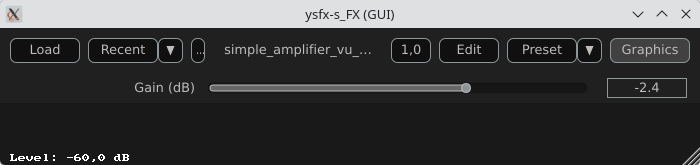
Here is a screenshot of YSFX as a VST3 plugin loaded in Carla Rack [8]:

Screenshot of YSFX effect VST3 plugin loaded in Carla-rack

You can :

  • Load a file ;
  • Load a recent file ;
  • Reload a file modified via the Edit menu ;
  • Zoom / Unzoom via the 1.0 button ;
  • Load presets ;
  • Switch between the Graphics and Sliders view.

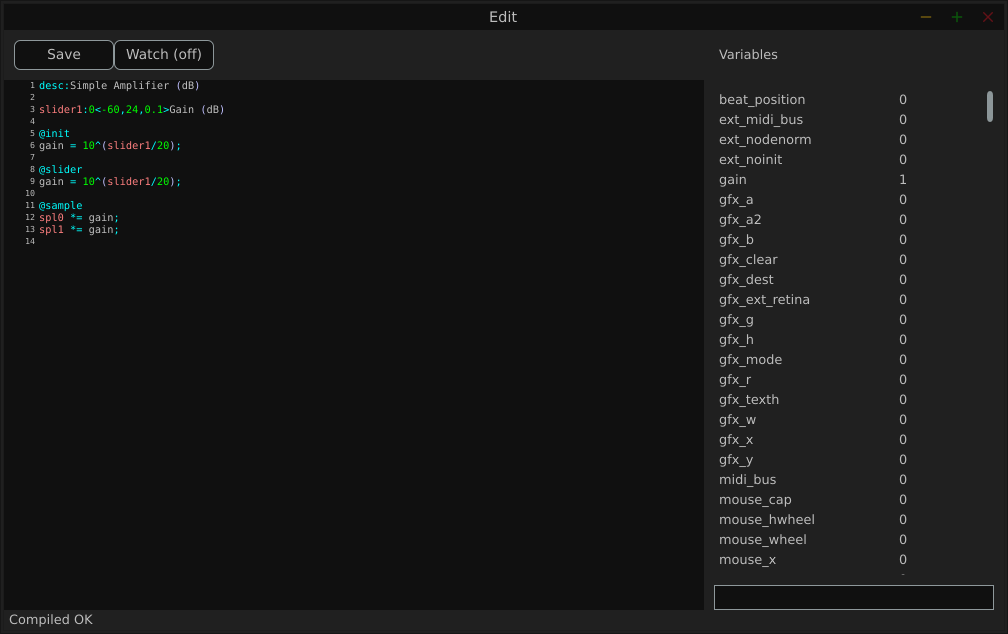
Here is a screenshot of the Edit window:

Screenshot of the editor Window opened via the YSFX plugin.

The  Variables  column displays all the variables defined by the loaded file.

Examples

We will use the JSFX documentation available at [4].

JSFX code is always divided into section.

  • @init : The code in the @init section gets executed on effect load, on samplerate changes, and on start of playback.
  • @slider : The code in the @slider section gets executed following an @init, or when a parameter (slider) changes
  • @block : The code in the @block section is executed before processing each sample block. Typically a block is the length as defined by the audio hardware, or anywhere from 128-2048 samples.
  • @sample : The code in the @sample section is executed for every PCM (Pulse Code Modulation) audio sample.
  • @serialize : The code in the @serialize section is executed when the plug-in needs to load or save some extended state.
  • @gfx [width] [height] : The @gfx section gets executed around 30 times a second when the plug-ins GUI is open.

A simple amplifier

In this example, we will use a slider value to amplify the audio input.

desc:Simple Amplifier
slider1:1<0,4,0.01>Gain @init
gain = slider1; @slider
gain = slider1; @sample
spl0 *= gain;
spl1 *= gain;

slider1, @init, @slider, @sample, spl0, spl1 are JSFX keywords [1].

Description:

  • slider1: create a user control (from 0 to 4 here);
  • @init: section executed during loading;
  • @slider: section executed when we move the slide;
  • @sample: section executed for each audio sample;
  • spl0 and spl1: left and right channels.
  • In this example, we just multiply the input signal by a gain.

Here is a view of the result :

Screenshot of the simple gain example

An amplifier with a gain in dB

This example will create a slider that will produce a gain in dB.

desc:Simple Amplifier (dB)
slider1:0<-60,24,0.1>Gain (dB) @init
gain = 10^(slider1/20); @slider
gain = 10^(slider1/20); @sample
spl0 *= gain;
spl1 *= gain;

Only the way we compute the gain changes.

Here is a view of the result :

Screenshot of the simple gain in dB example

An amplifier with an anti-clipping protection

This example adds protection against clipping and uses a JSFX function for that.

desc:Simple Amplifier with Soft Clip
slider1:0<-60,24,0.1>Gain (dB) @init
gain = 10^(slider1/20); @slider
gain = 10^(slider1/20);
function softclip(x) ( x / (1 + abs(x));
); @sample
spl0 = softclip(spl0 * gain);
spl1 = softclip(spl1 * gain);

Here is a view of the result :

Screenshot of the simple gain in dB with. a soft clip example

An amplifier with a VU meter

This example is the same as the one above, we just add a printed value of the gain.

desc:Simple Amplifier with VU Meter
slider1:0<-60,24,0.1>Gain (dB) @init
rms = 0;
coeff = 0.999; // RMS smoothing
gain = 10^(slider1/20); @slider
gain = 10^(slider1/20); @sample
// Apply the gain
spl0 *= gain;
spl1 *= gain;
// Compute RMS (mean value of the 2 channels)
mono = 0.5*(spl0 + spl1);
rms = sqrt((coeff * rms * rms) + ((1 - coeff) * mono * mono)); @gfx 300 200 // UI part
gfx_r = 0.1; gfx_g = 0.1; gfx_b = 0.1;
gfx_rect(0, 0, gfx_w, gfx_h); // Convert to dB
rms_db = 20*log(rms)/log(10);
rms_db < -60 ? rms_db = -60; // Normalisation for the display
meter = (rms_db + 60) / 60;
meter > 1 ? meter = 1; // Green color
gfx_r = 0;
gfx_g = 1;
gfx_b = 0; // Horizontal bar
gfx_rect(10, gfx_h/2 - 10, meter*(gfx_w-20), 20); // Text
gfx_r = gfx_g = gfx_b = 1;
gfx_x = 10;
gfx_y = gfx_h/2 + 20;
gfx_printf("Level: %.1f dB", rms_db);

The global structure of the code:

  • Apply the gain
  • Compute a smoothed RMS value
  • Convert to dB
  • Display a horizontal bar
  • Display a numerical value

Here is a view of the result :

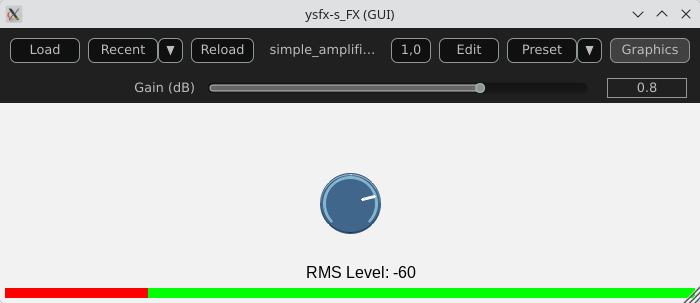
Screenshot of the simple example with a VU meter

An amplifier using the UI lib from jsfx-ui-lib

In this example, we will use a JSFX UI library to produce a better representation of the amplifier’s elements.

First, clone the https://github.com/geraintluff/jsfx-ui-lib repository and copy the file ui-lib.jsfx-inc into the directory where your JSFX files are saved.

desc:Simple Amplifier with UI Lib VU
import ui-lib.jsfx-inc
slider1:0<-60,24,0.1>Gain (dB) @init
freemem = ui_setup(0);
rms = 0;
coeff = 0.999;
gfx_rate = 30; // 30 FPS @slider
gain = 10^(slider1/20); @sample
spl0 *= gain;
spl1 *= gain;
mono = 0.5*(spl0 + spl1);
rms = sqrt(coeff*rms*rms + (1-coeff)*mono*mono); // ---- RMS computation ----
level_db = 20*log(rms)/log(10);
level_db < -60 ? level_db = -60; @gfx 300 200
ui_start("main"); // ---- Gain ----
control_start("main","default");
control_dial(slider1, 0, 1, 0);
cut = (level_db + 100) / 200 * (ui_right() - ui_left()) + ui_left(); // ---- VU ----
ui_split_bottom(50);
ui_color(0, 0, 0);
ui_text("RMS Level: ");
gfx_printf("%d", level_db);
ui_split_bottom(10);
uix_setgfxcolorrgba(0, 255, 0, 1);
gfx_rect(ui_left(), ui_top(), ui_right() - ui_left(), ui_bottom() - ui_top());
uix_setgfxcolorrgba(255, 0, 0, 1);
gfx_rect(ui_left(), ui_top(), cut, ui_bottom() - ui_top());
ui_pop();

The global structure of the example:

  • Import and setup: The UI library is imported and then allocated memory (ui_setup) using @init;
  • UI controls: control_dial creates a thematic potentiometer with a label, integrated into the library;
  • Integrated VU meter: A small graph is drawn with ui_graph, normalizing the RMS value between 0 and 1;
  • UI structure: ui_start(“main”) prepares the interface for each frame. ui_push_height / ui_pop organize the vertical space.

Here is a view of the result :

Screenshot of the simple example with JSFX graphic elements

A simple synthesizer

Now, produce some sound and use MIDI for that.

The core of this example will be the ADSR envelope generator ([10]).

desc:Simple MIDI Synth (Mono Sine)
// Parameters
slider1:0.01<0.001,2,0.001>Attack (s)
slider2:0.2<0.001,2,0.001>Decay (s)
slider3:0.8<0,1,0.01>Sustain
slider4:0.5<0.001,3,0.001>Release (s)
slider5:0.5<0,1,0.01>Volume @init
phase = 0;
note_on = 0;
env = 0;
state = 0; // 0=idle,1=attack,2=decay,3=sustain,4=release @slider
// Compute the increment / decrement for each states
attack_inc = 1/(slider1*srate);
decay_dec = (1-slider3)/(slider2*srate);
release_dec = slider3/(slider4*srate); @block
while ( midirecv(offset, msg1, msg23) ? ( status = msg1 & 240; note = msg23 & 127; vel = (msg23/256)|0; // Note On status == 144 && vel > 0 ? ( freq = 440 * 2^((note-69)/12); phase_inc = 2*$pi*freq/srate; note_on = 1; state = 1; ); // Note Off (status == 128) || (status == 144 && vel == 0) ? ( state = 4; ); );
); @sample
// ADSR Envelope [10]
state == 1 ? ( // Attack env += attack_inc; env >= 1 ? ( env = 1; state = 2; );
); state == 2 ? ( // Decay env -= decay_dec; env <= slider3 ? ( env = slider3; state = 3; );
); state == 3 ? ( // Sustain env = slider3;
); state == 4 ? ( // Release env -= release_dec; env <= 0 ? ( env = 0; state = 0; );
); // Sine oscillator
sample = sin(phase) * env * slider5;
phase += phase_inc;
phase > 2*$pi ? phase -= 2*$pi; // Stereo output
spl0 = sample;
spl1 = sample;

Global structure of the example:

  • Receives MIDI via @block;
  • Converts MIDI note to frequency (A440 standard);
  • Generates a sine wave;
  • Applies an ADSR envelope;
  • Outputs in stereo.

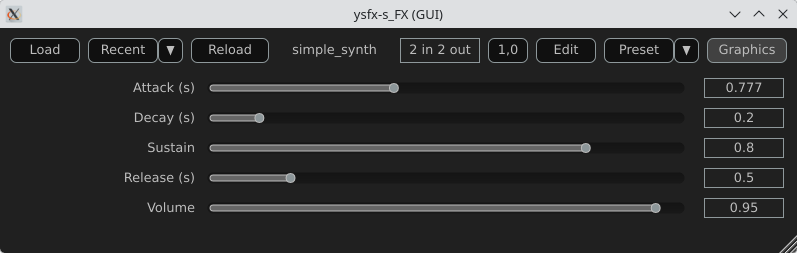
Here is a view of the result :

Screenshot of the synthesizer example

Comparison with CLAP / VST3

JSFX + YSFX

Advantages of JSFX:

  • No compilation required;
  • Instant reloading;
  • Fast learning curve;
  • Ideal for DSP prototyping;
  • Portable between systems via YSFX.

Limitations:

  • Less performant than native C++ for heavy processing;
  • Less suitable for “industrial” distribution;
  • Simpler API, therefore less low-level control.

CLAP / VST3 in C/C++

Advantages:

  • Maximum performance;
  • Fine-grained control over the architecture;
  • Deep integration with the Linux audio ecosystem;
  • Standardized distribution.

Limitations:

  • Requires a complete toolchain;
  • ABI management/compilation;
  • Longer development cycle.

Conclusion

A functional audio effect can be written in just a few lines, adding a simple graphical interface, and then loaded this script as an CLAP / VST3 plugin on Fedora Linux. This requires no compilation, no complex SDK, no cumbersome toolchain.

JSFX scripts don’t replace native C++ development when it comes to producing optimized, widely distributable plugins. However, they offer an exceptional environment for experimentation, learning signal processing, and rapid prototyping.

Thanks to YSFX, JSFX scripts now integrate seamlessly into the Linux audio ecosystem, alongside Carla, Ardour, and a PipeWire-based audio system.

For developers and curious musicians alike, JSFX provides a simple and immediate entry point into creating real-time audio effects on Fedora Linux.

Available plugins

ysfx-chokehold

A free collection of JS (JesuSonic) plugins for Reaper.

Code available at: https://github.com/chkhld/jsfx

To install this set of YSFX plugins:

$ dnf install ysfx-chokehold

YSFX plugins will be available at /usr/share/ysfx-chokehold.

ysfx-geraintluff

Collection of JSFX effects.

Code available at: https://github.com/geraintluff/jsfx

To install this set of YSFX plugins:

$ dnf install ysfx-geraintluff

YSFX plugins will be available at /usr/share/ysfx-geraintluff.

ysfx-jesusonic

Some JSFX effects from Cockos.

Code available at: https://www.cockos.com/jsfx

To install this set of YSFX plugins:

$ dnf install ysfx-jesusonic

YSFX plugins will be available at /usr/share/ysfx-jesusonic.

ysfx-joepvanlier

A bundle of JSFX and scripts for reaper.

Code available at: https://github.com/JoepVanlier/JSFX

To install this set of YSFX plugins:

$ dnf install ysfx-joepvanlier

YSFX plugins will be available at /usr/share/ysfx-joepvanlier.

ysfx-lms

LMS Plugin Suite – Open source JSFX audio plugins

Code available at: https://github.com/LMSBAND/LMS

To install this set of YSFX plugins:

$ dnf install ysfx-lms

YSFX plugins will be available at /usr/share/ysfx-lms.

ysfx-reateam

Community-maintained collection of JS effects for REAPER

Code available at: https://github.com/ReaTeam/JSFX

To install this set of YSFX plugins:

$ dnf install ysfx-reateam

YSFX plugins will be available at /usr/share/ysfx-reateam.

ysfx-rejj

Reaper JSFX Plugins.

Code available at: https://github.com/Justin-Johnson/ReJJ

To install this set of YSFX plugins:

$ dnf install ysfx-rejj

And all the YSFX plugins will be available at /usr/share/ysfx-rejj.

ysfx-sonic-anomaly

Sonic Anomaly JSFX scripts for Reaper

Code available at: https://github.com/Sonic-Anomaly/Sonic-Anomaly-JSFX

To install this set of YSFX plugins:

$ dnf install ysfx-sonic-anomaly

YSFX plugins will be available at /usr/share/ysfx-sonic-anomaly.

ysfx-tilr

TiagoLR collection of JSFX effects

Code available at: https://github.com/tiagolr/tilr_jsfx

To install this set of YSFX plugins:

$ dnf install ysfx-tilr

YSFX plugins will be available at /usr/share/ysfx-tilr.

ysfx-tukan-studio

JSFX Plugins for Reaper

Code available at: https://github.com/TukanStudios/TUKAN_STUDIOS_PLUGINS

To install this set of YSFX plugins:

$ dnf install ysfx-tukan-studio

YSFX plugins will be available at /usr/share/ysfx-tukan-studio.

Webography

[1] – https://www.cockos.com/jsfx

[2] – https://github.com/geraintluff/jsfx

[3] – https://github.com/JoepVanlier/ysfx

[4] – https://www.reaper.fm/sdk/js/js.php

[5] – https://audinux.github.io

[6] – https://copr.fedorainfracloud.org/coprs/ycollet/audinux

[7] – https://www.reaper.fm/index.php

[8] – https://github.com/falkTX/Carla

[9] – https://ardour.org

[10] – https://en.wikipedia.org/wiki/Envelope_(music)

[11] – https://jackaudio.org

Posted on Leave a comment

Modernize .NET Anywhere with GitHub Copilot

Modernizing a .NET application is rarely a single step. It requires understanding the current state of the codebase, evaluating dependencies, identifying potential breaking changes, and sequencing updates carefully.

Until recently, GitHub Copilot modernization for .NET ran primarily inside Visual Studio. That worked well for teams standardized on the IDE, but many teams build elsewhere. Some use VS Code. Some work directly from the terminal. Much of the coordination happens on GitHub, not in a single developer’s local environment.

The modernize-dotnet custom agent changes that. The same modernization workflow can now run across Visual Studio, VS Code, GitHub Copilot CLI, and GitHub. The intelligence behind the experience remains the same. What’s new is where it can run. You can modernize in the environment you already use instead of rerouting your workflow just to perform an upgrade.

The modernize-dotnet agent builds on the broader GitHub Copilot modernization platform, which follows an assess → plan → execute model. Workload-specific agents such as modernize-dotnet, modernize-java, and modernize-azure-dotnet guide applications toward their modernization goals, working together across code upgrades and cloud migration scenarios.

What the agent produces

Every modernization run generates three explicit artifacts in your repository: an assessment that surfaces scope and potential blockers, a proposed upgrade plan that sequences the work, and a set of upgrade tasks that apply the required code transformations.

Because these artifacts live alongside your code, teams can review, version, discuss, and modify them before execution begins. Instead of a one-shot upgrade attempt, modernization becomes traceable and deliberate.

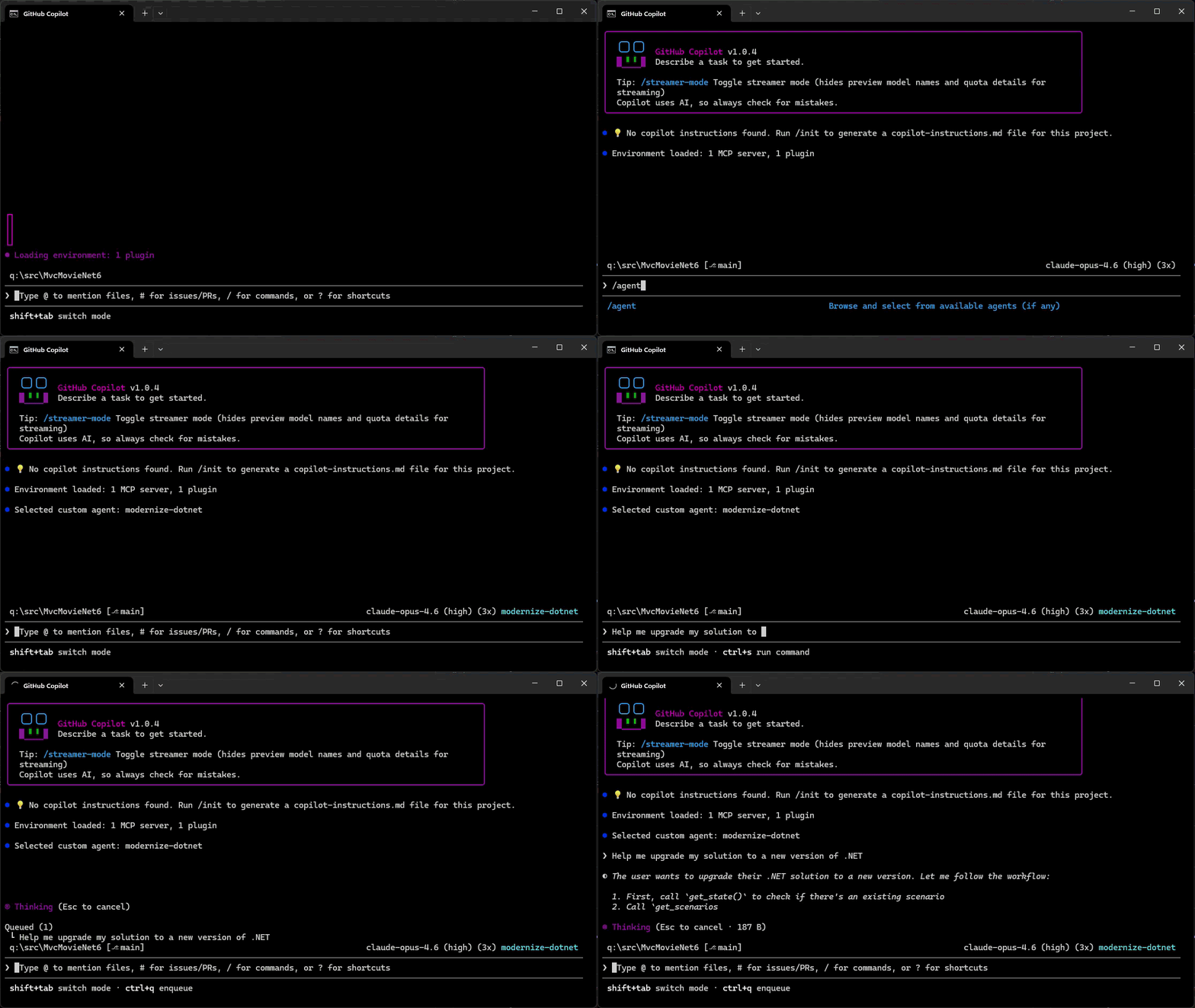
GitHub Copilot CLI

For terminal-first engineers, GitHub Copilot CLI provides a natural entry point.

You can assess a repository, generate an upgrade plan, and run the upgrade without leaving the shell.

  1. Add the marketplace: /plugin marketplace add dotnet/modernize-dotnet
  2. Install the plugin: /plugin install modernize-dotnet@modernize-dotnet-plugins
  3. Select the agent: /agent to select modernize-dotnet
  4. Then prompt the agent, for example: upgrade my solution to a new version of .NET

Modernize .NET in GitHub Copilot CLI

The agent generates the assessment, upgrade plan, and upgrade tasks directly in the repository. You can review scope, validate sequencing, and approve transformations before execution. Once approved, the agent automatically executes the upgrade tasks directly from the CLI.

GitHub

On GitHub, the agent can be invoked directly within a repository. The generated artifacts live alongside your code, shifting modernization from a local exercise to a collaborative proposal. Instead of summarizing findings in meetings, teams review the plan and tasks where they already review code. Learn how to add custom coding agents to your repo, then add the modernize-dotnet agent by following the README in the modernize-dotnet repository.

VS Code

If you use VS Code, install the GitHub Copilot modernization extension and select modernize-dotnet from the Agent picker in Copilot Chat. Then prompt the agent with the upgrade you want to perform, for example: upgrade my project to .NET 10.

Visual Studio

If Visual Studio is your primary IDE, the structured modernization workflow remains fully integrated.

Right-click your solution or project in Solution Explorer and select the Modernize action to perform an upgrade.

Supported workloads

GitHub Copilot modernization supports upgrades across common .NET project types, including ASP.NET Core (MVC, Razor Pages, Web API), Blazor, Azure Functions, WPF, class libraries, and console applications.

Migration from .NET Framework to modern .NET is also supported for application types such as ASP.NET (MVC, Web API), Windows Forms, WPF, and Azure Functions, with Web Forms support coming soon.

The CLI and VS Code experiences are cross-platform. However, migrations from .NET Framework require Windows.

Custom skills

Skills are a standard part of GitHub Copilot’s agentic platform. They let teams define reusable, opinionated behaviors that agents apply consistently across workflows.

The modernize-dotnet agent supports custom skills, allowing organizations to encode internal frameworks, migration patterns, or architectural standards directly into the modernization workflow. Any skills added to the repository are automatically applied when the agent performs an upgrade.

You can learn more about how skills work and how to create them in the Copilot skills documentation.

Give it a try

Run the modernize-dotnet agent on a repository you’re planning to upgrade and explore the modernization workflow in the environment you already use.

If you try it, we’d love to hear how it goes. Share feedback or report issues in the modernize-dotnet repository.

Posted on Leave a comment

.NET 10.0.5 Out-of-Band Release – macOS Debugger Fix

We are releasing .NET 10.0.5 as an out-of-band (OOB) update to address a regression introduced in .NET 10.0.4.

What’s the issue?

.NET 10.0.4 introduced a regression that causes the debugger to crash when debugging applications on macOS using Visual Studio Code. After installing .NET SDK 10.0.104 or 10.0.200, the debugger could crash when attempting to debug any .NET application on macOS (particularly affecting ARM64 Macs).

This regression is unrelated to the security fixes included in 10.0.4.

Who is affected?

This issue specifically affects:

  • macOS users (particularly Apple Silicon/ARM64)
  • Using Visual Studio Code for debugging
  • Who have installed .NET SDK 10.0.104 or 10.0.200 or .NET 10.0.4 runtime

Important

If you are developing on macOS and use Visual Studio Code for debugging .NET applications, you should install this update. Other platforms (Windows, Linux) and development environments are not affected by this regression.

Download .NET 10.0.5

Installation guidance

For macOS users with VS Code:

  1. Download and install .NET 10.0.5
  2. Restart Visual Studio Code
  3. Verify the installation by running dotnet --version in your terminal

For other platforms:
You may continue using .NET 10.0.4 unless you prefer to stay on the latest patch version. This release addresses a specific crash issue and does not include additional fixes beyond what was released in 10.0.4.

Share your feedback

If you continue to experience issues after installing this update, please let us know in the Release feedback issue.

Thank you for your patience as we worked to resolve this issue quickly for our macOS developer community.

Posted on Leave a comment

Extend your coding agent with .NET Skills

Coding agents are becoming part of everyday development, but quality of responses
and usefulness still depends on the best context as input. That context comes in
different forms starting from your environment, the code in the workspace, the
model training knowledge, previous memory, agent instructions, and of course
your own starting prompt. On the .NET team we’ve really adopted coding agents as
a part of our regular workflow and have, like you, learned the ways to improve
our productivity by providing great context. Across our repos we’ve adopted our
agent instructions and have also started to use agent skills to improve our
workflows. We’re introducing dotnet/skills,
a repository that hosts a set of agent skills for .NET developers from the team
who is building the platform itself.

What is an agent skill?

If you’re new to the concept, an agent skill is a lightweight package with specialized knowledge an agent can discover and use while solving a task. A skill bundles intent,
task-specific context, and supporting artifacts so the agent can choose better
actions with less trial and error. This work follows the
Agent Skills specification, which defines a common
model for authoring and sharing these capabilities with coding agents. GitHub Copilot CLI, VS Code, Claude Code and other coding agents support this specification.

What we are doing with dotnet/skills

With dotnet/skills, we’re publishing skills from the team that ships the platform.
These are the same workflows we’ve used ourselves, with first-party teams, and
in engineering scenarios we’ve seen in working with developers like yourself.

So what does that look like in practice? You’re not starting from generic
prompts. You’re starting from patterns we’ve already tested while shipping
.NET.

Our goal is practical: ship skills that help agents complete common .NET tasks
more reliably, with better context and fewer dead ends.

Does it help?

While we’ve learned that context is essential, we also have learned not to assume
more is always better. The AI models are getting remarkably better each release
and what was thought to be needed even 3 months ago, may no longer be required
with newer models. In producing skills we want to measure the validity if an
added skill actually improves the result. For each of our skills merged, we run
a lightweight validator (also available in the repo) to score it. We’re also learning the best graders/evals for this type…and so is the ecosystem as well.

Think of this as a unit test for a skill, not an integration test for the
whole system. We measure (using a specific model each run) against a baseline (no skill present) and try to score if the specific skill improved the intended behavior, and by how much. Some of this is taste as well so we’re careful not to draw too many hard lines on a specific number, but look at the result, adjust and re-score.

Each skill’s evaluation lives in the repository as well, so
you can inspect and run them. This gives us a practical signal on usefulness
without waiting for large end-to-end benchmark cycles. We will continue to learn in this space and adjust. We have a lot of partner teams trying different evaluation techniques as well at this level. The real test is you telling us if they have improved.

A developer posted this just recently on Discord sharing what we want to see:

The skill just worked with the log that I’ve with me, thankfully it was smartter[sic] than me and found the correct debug symbol. At the end it says the crash is caused by a heap corruption and the stack-trace points to GC code, by any chance does it ring a bell for you?

This is a great example of how a skill accelerated to the next step rapidly in this particular investigation for this developer. This is the true definition of success in unblocking and accelerating productivity.

Discovery, installation, and using skills

Popular agent tools have adopted the concept of
plugin marketplaces
which simply put are a registry of agent artifacts, like skills. The
plugin definition
serves as an organizational unit and defines what skills, agents, hooks, etc.
exist for that plugin in a single installable package. The dotnet/skills repo
is organized in the same manner, with the repo serving as the marketplace and we
have organized a set of plugins by functional areas. We’ll continue to define
more plugins as they get merged and based on your feedback.

While you can simply copy the SKILL.md files directly to your environment, the
plugin concept in coding agents like GitHub Copilot aim to make that process simpler.
As noted in the
README,
you can register the repo as a marketplace and browse/install the plugins.

/plugin marketplace add dotnet/skills

Once the marketplace is added, then you can browse any marketplace for a set of plugins to install and install the named plugin:

/plugin marketplace browse dotnet-agent-skills
/plugin install <plugin>@dotnet-agent-skills

Copilot CLI browsing plugin marketplace and installing a plugin via the CLI

They are now available in your environment automatically by your coding agent, or you can also invoke them explicitly.

/dotnet:analyzing-dotnet-performance

And in VS Code you can add the marketplace URL into the Copilot extension settings for Insiders, adding https://github.com/dotnet/skills as the location and then you can browse in the extensions explorer to install, and then directly execute in Copilot Chat using the slash command:

Browsing agent plugins in the Extension marketplace

We acknowledge that discovery of even marketplaces can be a challenge and are
working with our own Copilot partners and ecosystem to better understand ways to
improve this discovery flow — it’s hard to use great skills if you don’t know
where to look! We’ll be sure to post more on any changes and possible .NET
specific tools to help identify skills that will make your project and developer
productivity better.

Starting principles

Like evolving standards in the AI extensibility space, skills is fast moving. We
are starting with the principle of simplicity first. We’ve seen in our own uses
that a huge set of new tools may not be needed with well scoped skills
themselves. Where we need more, we’ll leverage things like MCP or scripts, or
SDK tools that already exist and rely on them to enhance the particular skill
workflow. We want our skills to be proven, practical, and task-oriented.

We also know there are great community-provided agent skills that have evolved,
like github/awesome-copilot which
provide a lot of value for specific libraries and architectural patterns for .NET
developers. We support all these efforts as well and don’t think there is a ‘one
winner’ skills marketplace for .NET developers. We want our team to keep focused
closest to the core runtime, concepts, tools, and frameworks we deliver as a
team and support and learn from the community as the broader set of agentic
skills help all .NET developers in many more ways. Our skills are meant to
complement, not replace any other marketplace of skills.

What’s next

The AI ecosystem is moving fast, and this repository will too. We’ll iterate
and learn in the open with the developer community.

Expect frequent updates, new skills, and continued collaboration as we improve
how coding agents work across .NET development scenarios.

Explore dotnet/skills, try the skills in your own workflows, and share
feedback
on things that can improve or new ideas we should consider.

Posted on Leave a comment

Release v1.0 of the official MCP C# SDK

The Model Context Protocol (MCP) C# SDK has reached its v1.0 milestone, bringing full support for the
2025-11-25 version of the MCP Specification.
This release delivers a rich set of new capabilities — from improved authorization flows and richer metadata,
to powerful new patterns for tool calling, elicitation, and long-running request handling.

Here’s a tour of what’s new.

Enhanced authorization server discovery

In the previous spec, servers were required to provide a link to their Protected Resource Metadata (PRM) Document
in the resource_metadata parameter of the WWW-Authenticate header.
The 2025-11-25 spec broadens this, giving servers three ways to expose the PRM:

  1. Via a URL in the resource_metadata parameter of the WWW-Authenticate header (as before)
  2. At a “well-known” URL derived from the server’s MCP endpoint path
    (e.g. https://example.com/.well-known/oauth-protected-resource/public/mcp)
  3. At the root well-known URL (e.g. https://example.com/.well-known/oauth-protected-resource)

Clients check these locations in order.

On the server side, the SDK’s AddMcp extension method on AuthenticationBuilder
makes it easy to configure the PRM Document:

.AddMcp(options =>
{ options.ResourceMetadata = new() { ResourceDocumentation = new Uri("https://docs.example.com/api/weather"), AuthorizationServers = { new Uri(inMemoryOAuthServerUrl) }, ScopesSupported = ["mcp:tools"], };
});

When configured this way, the SDK automatically hosts the PRM Document at the well-known location
and includes the link in the WWW-Authenticate header. On the client side, the SDK handles the
full discovery sequence automatically.

Icons for tools, resources, and prompts

The 2025-11-25 spec adds icon metadata to Tools, Resources, and Prompts. This information is included
in the response to tools/list, resources/list, and prompts/list requests.
Implementation metadata (describing a client or server) has also been extended with icons and a website URL.

The simplest way to add an icon for a tool is with the IconSource parameter on the McpServerToolAttribute:

[McpServerTool(Title = "This is a title", IconSource = "https://example.com/tool-icon.svg")]
public static string ToolWithIcon(

The McpServerResourceAttribute, McpServerResourceTemplateAttribute, and McpServerPromptAttribute
have also added an IconSource parameter.

For more advanced scenarios — multiple icons, MIME types, size hints, and theme preferences — you can
configure icons programmatically via McpServerToolCreateOptions.Icons:

.WithTools([ McpServerTool.Create( typeof(EchoTool).GetMethod(nameof(EchoTool.Echo))!, options: new McpServerToolCreateOptions { Icons = [ new Icon { Source = "https://raw.githubusercontent.com/microsoft/fluentui-emoji/main/assets/Loudspeaker/Flat/loudspeaker_flat.svg", MimeType = "image/svg+xml", Sizes = ["any"], Theme = "light" }, new Icon { Source = "https://raw.githubusercontent.com/microsoft/fluentui-emoji/main/assets/Loudspeaker/3D/loudspeaker_3d.png", MimeType = "image/png", Sizes = ["256x256"], Theme = "dark" } ] } )
])

Here’s how these icons could be displayed, as illustrated in the MCP Inspector:

Icons displayed in MCP Inspector showing tool icons with different themes and styles

This placement works well after the code example showing how to configure multiple icons, providing a visual demonstration of how those icons appear in practice.

The Implementation class also has
Icons and
WebsiteUrl properties for server and client metadata:

.AddMcpServer(options =>
{ options.ServerInfo = new Implementation { Name = "Everything Server", Version = "1.0.0", Title = "MCP Everything Server", Description = "A comprehensive MCP server demonstrating all MCP features", WebsiteUrl = "https://github.com/modelcontextprotocol/csharp-sdk", Icons = [ new Icon { Source = "https://raw.githubusercontent.com/microsoft/fluentui-emoji/main/assets/Gear/Flat/gear_flat.svg", MimeType = "image/svg+xml", Sizes = ["any"], Theme = "light" } ] };
})

Incremental scope consent

The incremental scope consent feature brings the Principle of Least Privilege
to MCP authorization, allowing clients to request only the minimum access needed for each operation.

MCP uses OAuth 2.0 for authorization, where scopes define the level of access a client has.
Previously, clients might request all possible scopes up front because they couldn’t know which scopes
a specific operation would require. With incremental scope consent, clients start with minimal scopes
and request additional ones as needed.

The mechanism works through two flows:

  • Initial scopes: When a client makes an unauthenticated request, the server responds with
    401 Unauthorized and a WWW-Authenticate header that now includes a scopes parameter listing
    the scopes needed for the operation. Clients request authorization for only these scopes.

  • Additional scopes: When a client’s token lacks scopes for a particular operation, the server
    responds with 403 Forbidden and a WWW-Authenticate header containing an error parameter
    of insufficient_scope and a scopes parameter with the required scopes. The client then
    obtains a new token with the expanded scopes and retries.

Client support for incremental scope consent

The MCP C# client SDK handles incremental scope consent automatically. When it receives a 401 or 403 with a scopes
parameter in the WWW-Authenticate header, it extracts the required scopes and initiates the
authorization flow — no additional client code needed.

Server support for incremental scope consent

Setting up incremental scope consent on the server involves:

  1. Adding authentication services configured with the MCP authentication scheme:

    builder.Services.AddAuthentication(options =>
    { options.DefaultAuthenticateScheme = McpAuthenticationDefaults.AuthenticationScheme; options.DefaultChallengeScheme = McpAuthenticationDefaults.AuthenticationScheme;
    })
  2. Enabling JWT bearer authentication with appropriate token validation:

    .AddJwtBearer(options =>
    { options.TokenValidationParameters = new TokenValidationParameters { ValidateIssuer = true, ValidateAudience = true, ValidateLifetime = true, ValidateIssuerSigningKey = true, // Other validation settings as appropriate };
    })

    The following token validation settings are strongly recommended:

    Setting Value Description
    ValidateIssuer true Ensures the token was issued by a trusted authority
    ValidateAudience true Verifies the token is intended for this server
    ValidateLifetime true Checks that the token has not expired
    ValidateIssuerSigningKey true Confirms the token signature is valid
  3. Specifying authentication scheme metadata to guide clients on obtaining access tokens:

    .AddMcp(options =>
    { options.ResourceMetadata = new() { ResourceDocumentation = new Uri("https://docs.example.com/api/weather"), AuthorizationServers = { new Uri(inMemoryOAuthServerUrl) }, ScopesSupported = ["mcp:tools"], };
    });
  4. Performing authorization checks in middleware.
    Authorization checks should be implemented in ASP.NET Core middleware instead of inside the tool method itself. This is because the MCP HTTP handler may (and in practice does) flush response headers before invoking the tool. By the time the tool call method is invoked, it is too late to set the response status code or headers.

    Unfortunately, the middleware may need to inspect the contents of the request to determine which scopes are required, which involves an extra deserialization for incoming requests. But help may be on the way in future versions of the MCP protocol that will avoid this overhead in most cases. Stay tuned…

    In addition to inspecting the request, the middleware must also extract the scopes from the access token sent in the request. In the MCP C# SDK, the authentication handler extracts the scopes from the JWT and converts them to claims in the HttpContext.User property. The way these claims are represented depends on the token issuer and the JWT structure. For a token issuer that represents scopes as a space-separated string in the scope claim, you can determine the scopes passed in the request as follows:

    var user = context.User;
    var userScopes = user?.Claims .Where(c => c.Type == "scope" || c.Type == "scp") .SelectMany(c => c.Value.Split(' ')) .Distinct() .ToList();

    With the scopes extracted from the request, the server can then check if the required scope(s) for the requested operation is included with userScopes.Contains(requiredScope).

    If the required scopes are missing, respond with 403 Forbidden and a WWW-Authenticate header, including an error parameter indicating insufficient_scope and a scopes parameter indicating the scopes required.
    The MCP Specification describes several strategies for choosing which scopes to include:

    • Minimum approach: Only the newly-required scopes (plus any existing granted scopes that are still relevant)
    • Recommended approach: Existing relevant scopes plus newly required scopes
    • Extended approach: Existing scopes, newly required scopes, and related scopes that commonly work together

URL mode elicitation

URL mode elicitation enables secure out-of-band interactions between the server and end-user,
bypassing the MCP host/client entirely. This is particularly valuable for gathering sensitive data — like API keys,
third-party authorizations, and payment information — that would pose a security risk
if transmitted through the client.

Inspired by web security standards like OAuth, this mechanism lets the MCP client obtain user consent
and direct the user’s browser to a secure server-hosted URL where the sensitive interaction takes place.

The MCP host/client must present the elicitation request to the user — including the server’s identity
and the purpose of the request — and provide options to decline or cancel.
What the server does at the elicitation URL is outside the scope of MCP; it could present a form,
redirect to a third-party authorization service, or anything else.

Client support for URL mode elicitation

Clients indicate support by setting the Url property in Capabilities.Elicitation:

McpClientOptions options = new()
{ Capabilities = new ClientCapabilities { Elicitation = new ElicitationCapability { Url = new UrlElicitationCapability() } } // other client options

The client must also provide an ElicitationHandler.
Since there’s a single handler for both form mode and URL mode elicitation, the handler should begin by checking the
Mode property of the ElicitationRequest parameters
to determine which mode is being requested and handle it accordingly.

async ValueTask<ElicitResult> HandleElicitationAsync(ElicitRequestParams? requestParams, CancellationToken token)
{ if (requestParams is null || requestParams.Mode != "url" || requestParams.Url is null) { return new ElicitResult(); } // Success path for URL-mode elicitation omitted for brevity.
}

Server support for URL mode elicitation

The server must define an endpoint for the elicitation URL and handle the response.
Typically the response is submitted via POST to keep sensitive data out of URLs and logs.
If the URL serves a form, it should include anti-forgery tokens to prevent CSRF attacks —
ASP.NET Core provides built-in support for this.

One approach is to create a Razor Page:

public class ElicitationFormModel : PageModel
{ public string ElicitationId { get; set; } = string.Empty; public IActionResult OnGet(string id) { // Serves the elicitation URL when the user navigates to it } public async Task<IActionResult> OnPostAsync(string id, string name, string ssn, string secret) { // Handles the elicitation response when the user submits the form }
}

Note the id parameter on both methods — since an MCP server using Streamable HTTP Transport
is inherently multi-tenant, the server must associate each elicitation request and response
with the correct MCP session. The server must maintain state to track pending elicitation requests
and communicate responses back to the originating MCP request.

Tool calling support in sampling

This is one of the most powerful additions in the 2025-11-25 spec. Servers can now include tools
in their sampling requests, which the LLM may invoke to produce a response.

While providing tools to LLMs is a central feature of MCP, tools in sampling requests are fundamentally different
from standard MCP tools — despite sharing the same metadata structure. They don’t need to be implemented
as standard MCP tools, so the server must implement its own logic to handle tool invocations.

The flow is important to understand: when the LLM requests a tool invocation during sampling,
that’s the response to the sampling request. The server executes the tool, then issues a new
sampling request that includes both the tool call request and the tool call response. This continues
until the LLM produces a final response with no tool invocation requests.

sequenceDiagram participant Server participant Client Server->>Client: CreateMessage Request Note right of Client: messages: [original prompt]<br/>tools: [tool definitions] Client-->>Server: CreateMessage Response Note left of Server: stopReason: tool_calls<br/>toolCalls: [tool call 1, tool call 2] Note over Server: Server executes tools locally Server->>Client: CreateMessage Request Note right of Client: messages: [<br/> original prompt,<br/> tool call 1 request,<br/> tool call 1 response,<br/> tool call 2 request,<br/> tool call 2 response<br/>]<br/>tools: [tool definitions] Client-->>Server: CreateMessage Response Note left of Server: stopReason: end_turn<br/>content: [final response]

Client/host support for tool calling in sampling

Clients declare support for tool calling in sampling through their capabilities and must provide
a SamplingHandler:

var mcpClient = await McpClient.CreateAsync( new HttpClientTransport(new() { Endpoint = new Uri("http://localhost:6184"), Name = "SamplingWithTools MCP Server", }), clientOptions: new() { Capabilities = new ClientCapabilities { Sampling = new SamplingCapability { Tools = new SamplingToolsCapability {} } }, Handlers = new() { SamplingHandler = async (c, p, t) => { return await samplingHandler(c, p, t); }, } });

Implementing the SamplingHandler from scratch would be complex, but the Microsoft.Extensions.AI
package makes it straightforward. You can obtain an IChatClient from your LLM provider and use
CreateSamplingHandler to get a handler that translates between MCP and your LLM’s tool invocation format:

IChatClient chatClient = new OpenAIClient(new ApiKeyCredential(token), new OpenAIClientOptions { Endpoint = new Uri(baseUrl) }) .GetChatClient(modelId) .AsIChatClient(); var samplingHandler = chatClient.CreateSamplingHandler();

The sampling handler from IChatClient handles format translation but does not implement user consent
for tool invocations. You can wrap it in a custom handler to add consent logic.
Note that it will be important to cache user approvals to avoid prompting the user multiple times for the same tool invocation during a single sampling session.

Server support for tool calling in sampling

Servers can take advantage of the tool calling support in sampling if they are connected to a client/host that also supports this feature.
Servers can check whether the connected client supports tool calling in sampling:

if (_mcpServer?.ClientCapabilities?.Sampling?.Tools is not {})
{ return "Error: Client does not support sampling with tools.";
}

Tools for sampling can be described as simple Tool objects:

Tool rollDieTool = new Tool()
{ Name = "roll_die", Description = "Rolls a single six-sided die and returns the result (1-6)."
};

But the real power comes from using Microsoft.Extensions.AI on the server side too. The McpServer.AsSamplingChatClient()
method returns an IChatClient that supports sampling, and UseFunctionInvocation adds tool calling support:

IChatClient chatClient = ChatClientBuilderChatClientExtensions.AsBuilder(_mcpServer.AsSamplingChatClient()) .UseFunctionInvocation() .Build();

Define tools as AIFunction objects and pass them in ChatOptions:

AIFunction rollDieTool = AIFunctionFactory.Create( () => Random.Shared.Next(1, 7), name: "roll_die", description: "Rolls a single six-sided die and returns the result (1-6)."
); var chatOptions = new ChatOptions
{ Tools = [rollDieTool], ToolMode = ChatToolMode.Auto
}; var pointRollResponse = await chatClient.GetResponseAsync( "<Prompt that may use the roll_die tool>", chatOptions, cancellationToken
);

The IChatClient handles all the complexity: sending sampling requests with tools, processing
tool invocation requests, executing tools, and translating between MCP and LLM formats.

OAuth Client ID Metadata Documents

The 2025-11-25 spec introduces Client ID Metadata Documents (CIMDs) as an alternative
to Dynamic Client Registration (DCR) for establishing client identity with an authorization server.
CIMD is now the preferred method for client registration in MCP.

The idea is simple: the client specifies a URL as its client_id in authorization requests.
That URL resolves to a JSON document hosted by the client containing its metadata — identifiers,
redirect URIs, and other descriptive information. When an authorization server encounters this client_id,
it dereferences the URL and uses the metadata to understand and apply policy to the client.

In the C# SDK, clients specify a CIMD URL via ClientOAuthOptions:

const string ClientMetadataDocumentUrl = $"{ClientUrl}/client-metadata/cimd-client.json"; await using var transport = new HttpClientTransport(new()
{ Endpoint = new(McpServerUrl), OAuth = new ClientOAuthOptions() { RedirectUri = new Uri("http://localhost:1179/callback"), AuthorizationRedirectDelegate = HandleAuthorizationUrlAsync, ClientMetadataDocumentUri = new Uri(ClientMetadataDocumentUrl) },
}, HttpClient, LoggerFactory);

The CIMD URL must use HTTPS, have a non-empty path, and cannot contain dot segments or a fragment component.
The document itself must include at least client_id, client_name, and redirect_uris.

The SDK will attempt CIMD first, and fall back to DCR if the authorization server doesn’t support it
(provided DCR is enabled in the OAuth options).

Long-running requests over HTTP with polling

At the data layer, MCP is a message-based protocol with no inherent time limits.
But over HTTP, timeouts are a fact of life. The 2025-11-25 spec significantly improves the story
for long-running requests.

Previously, clients could disconnect and reconnect if the server provided an Event ID in SSE events,
but few servers implemented this — partly because it implied supporting stream resumption from any
event ID all the way back to the start. And servers couldn’t proactively disconnect; they had to
wait for clients to do so.

The new approach is cleaner. Servers that open an SSE stream for a request begin with an empty event
that includes an Event ID and optionally a Retry-After field. After sending this initial event,
servers can close the stream at any time, since the client can reconnect using the Event ID.

Server support for long-running requests

To enable this, the server provides an ISseEventStreamStore implementation. The SDK includes
DistributedCacheEventStreamStore, which works with any IDistributedCache:

// Add a MemoryDistributedCache to the service collection
builder.Services.AddDistributedMemoryCache();
// Add the MCP server with DistributedCacheEventStreamStore for SSE stream storage
builder.Services .AddMcpServer() .WithHttpTransport() .WithDistributedCacheEventStreamStore() .WithTools<RandomNumberTools>();

When a request handler wants to drop the SSE connection and let the client poll for the result,
it calls EnablePollingAsync on the McpRequestContext:

await context.EnablePollingAsync(retryInterval: TimeSpan.FromSeconds(retryIntervalInSeconds));

The McpRequestContext is available in handlers for MCP requests by simply adding it as a parameter to the handler method.

Implementation considerations

Event stream stores can be susceptible to unbounded memory growth, so consider these retention strategies:

Tasks (experimental)

Note: Tasks are an experimental feature in the 2025-11-25 MCP Specification. The API may change in future releases.

The 2025-11-25 version of the MCP Specification introduces tasks, a new primitive that provides durable state tracking
and deferred result retrieval for MCP requests. While stream resumability
handles transport-level concerns like reconnection and event replay, tasks operate at the data layer to ensure
that request results are durably stored and can be retrieved at any point within a server-defined retention window —
even if the original connection is long gone.

The key concept is that tasks augment existing requests rather than replacing them.
A client includes a task field in a request (e.g. tools/call) to signal that it wants durable result tracking.
Instead of the normal response, the server returns a CreateTaskResult containing task metadata — a unique task ID, the current status (working),
timestamps, a time-to-live (TTL), and optionally a suggested poll interval.
The client then uses tasks/get to poll for status, tasks/result to retrieve the stored result,
tasks/list to enumerate tasks, and tasks/cancel to cancel a running task.

This durability is valuable in several scenarios:

  • Resilience to dropped results: If a result is lost due to a network failure, the client can retrieve it again by task ID
    rather than re-executing the operation.
  • Explicit status tracking: Clients can query the server to determine whether a request is still in progress, succeeded, or failed,
    rather than relying on notifications or waiting indefinitely.
  • Integration with workflow systems: MCP servers wrapping existing workflow APIs (e.g. CI/CD pipelines, batch processing, multi-step analysis)
    can map their existing job tracking directly to the task primitive.

Tasks follow a defined lifecycle through these status values:

Status Description
working Task is actively being processed
input_required Task is waiting for additional input (e.g., elicitation)
completed Task finished successfully; results are available
failed Task encountered an error
cancelled Task was cancelled by the client

The last three states (completed, failed, and cancelled) are terminal — once a task reaches one of these states, it cannot transition to any other state.

Task support is negotiated through explicit capability declarations during initialization.
Servers declare that they support task-augmented tools/call requests, while clients can declare support for
task-augmented sampling/createMessage and elicitation/create requests.

Server support for tasks

To enable task support on an MCP server, configure a task store when setting up the server.
The task store is responsible for managing task state — creating tasks, storing results, and handling cleanup.

var taskStore = new InMemoryMcpTaskStore(); builder.Services.AddMcpServer(options =>
{ options.TaskStore = taskStore;
})
.WithHttpTransport()
.WithTools<MyTools>(); // Alternatively, you can register an IMcpTaskStore globally with DI, but you only need to configure it one way.
//builder.Services.AddSingleton<IMcpTaskStore>(taskStore);

The InMemoryMcpTaskStore is a reference implementation suitable for development and single-server deployments.
For production multi-server scenarios, implement IMcpTaskStore
with a persistent backing store (database, Redis, etc.).

The InMemoryMcpTaskStore constructor accepts several optional parameters to control task retention, polling behavior,
and resource limits:

var taskStore = new InMemoryMcpTaskStore( defaultTtl: TimeSpan.FromHours(1), // Default task retention time maxTtl: TimeSpan.FromHours(24), // Maximum allowed TTL pollInterval: TimeSpan.FromSeconds(1), // Suggested client poll interval cleanupInterval: TimeSpan.FromMinutes(5), // Background cleanup frequency pageSize: 100, // Tasks per page for listing maxTasks: 1000, // Maximum total tasks allowed maxTasksPerSession: 100 // Maximum tasks per session
);

Tools automatically advertise task support when they return Task, ValueTask, Task<T>, or ValueTask<T> (i.e. async methods).
You can explicitly control task support on individual tools using the ToolTaskSupport enum:

  • Forbidden (default for sync methods): Tool cannot be called with task augmentation
  • Optional (default for async methods): Tool can be called with or without task augmentation
  • Required: Tool must be called with task augmentation

Set TaskSupport on the McpServerTool attribute:

[McpServerTool(TaskSupport = ToolTaskSupport.Required)]
[Description("Processes a batch of data records. Always runs as a task.")]
public static async Task<string> ProcessData( [Description("Number of records to process")] int recordCount, CancellationToken cancellationToken)
{ await Task.Delay(TimeSpan.FromSeconds(8), cancellationToken); return $"Processed {recordCount} records successfully.";
}

Or set it via McpServerToolCreateOptions.Execution when registering tools explicitly:

builder.Services.AddMcpServer() .WithTools([ McpServerTool.Create( (int count, CancellationToken ct) => ProcessAsync(count, ct), new McpServerToolCreateOptions { Name = "requiredTaskTool", Execution = new ToolExecution { TaskSupport = ToolTaskSupport.Required } }) ]);

For more control over the task lifecycle, a tool can directly interact with
IMcpTaskStore and return an McpTask.
This bypasses automatic task wrapping and allows the tool to create a task, schedule background work, and return immediately.
Note: use a static method and accept IMcpTaskStore as a method parameter rather than via constructor injection
to avoid DI scope issues when the SDK executes the tool in a background context.

Client support for tasks

To execute a tool as a task, a client includes the Task property in the request parameters:

var result = await client.CallToolAsync( new CallToolRequestParams { Name = "processDataset", Arguments = new Dictionary<string, JsonElement> { ["recordCount"] = JsonSerializer.SerializeToElement(1000) }, Task = new McpTaskMetadata { TimeToLive = TimeSpan.FromHours(2) } }, cancellationToken); if (result.Task != null)
{ Console.WriteLine($"Task created: {result.Task.TaskId}"); Console.WriteLine($"Status: {result.Task.Status}");
}

The client can then poll for status updates and retrieve the final result:

// Poll until task reaches a terminal state
var completedTask = await client.PollTaskUntilCompleteAsync( taskId, cancellationToken: cancellationToken); switch (completedTask.Status)
{ case McpTaskStatus.Completed: // ... break; case McpTaskStatus.Failed: // ... break; case McpTaskStatus.Cancelled: // ... break;
{ var resultJson = await client.GetTaskResultAsync( taskId, cancellationToken: cancellationToken); var result = resultJson.Deserialize<CallToolResult>(McpJsonUtilities.DefaultOptions); foreach (var content in result?.Content ?? []) { if (content is TextContentBlock text) { Console.WriteLine(text.Text); } }
}

The SDK also provides methods to list all tasks (ListTasksAsync)
and cancel running tasks (CancelTaskAsync):

// List all tasks for the current session
var tasks = await client.ListTasksAsync(cancellationToken: cancellationToken); // Cancel a running task
var cancelledTask = await client.CancelTaskAsync(taskId, cancellationToken: cancellationToken);

Clients can optionally register a handler to receive status notifications as they arrive,
but should always use polling as the primary mechanism since notifications are optional:

var options = new McpClientOptions
{ Handlers = new McpClientHandlers { TaskStatusHandler = (task, cancellationToken) => { Console.WriteLine($"Task {task.TaskId} status changed to {task.Status}"); return ValueTask.CompletedTask; } }
};

Summary

The v1.0 release of the MCP C# SDK represents a major step forward for building MCP servers and clients in .NET.
Whether you’re implementing secure authorization flows, building rich tool experiences with sampling,
or handling long-running operations gracefully, the SDK has you covered.

Check out the full changelog
and the C# SDK repository to get started.

Demo projects for many of the features described here are available in the
mcp-whats-new demo repository.

Posted on Leave a comment

What Your Last 10 YouTube Videos Say About Your Future Business

If we want to VIBE CODE a thriving (side) business, we all know we ought to ‘create value’.

For starters, we can easily create value at the intersection of

  • our skills,
  • the overall market need, and
  • our passions.

Finding the intersection seems hard but is often trivial from the outside.

A serious cognitive bias prevents us from seeing the obvious.

But the good news is – AI can help us discover it easily!

~~~

To create a (digital) product that sells do two things:

(1) Pose and answer simple questions such as:

  • What were the last 10 YT videos you watched?
  • Which products do you spend money on?
  • What do people need help with?
  • … (the more the better)

(2) Copy your answers & paste into Gemini, Claude, ChatGPT, Grok (ALL OF THEM!) asking for ‘3 perfect niche ideas’ or sth.

This ~10-min exercise will help you get clarity WHERE to focus your building energy.

Then move on to figuring out WHAT to build…

👉 Blueprint: Find a more detailed guide at FirstSale.ai

The post What Your Last 10 YouTube Videos Say About Your Future Business appeared first on Be on the Right Side of Change.