Posted on Leave a comment

How to Rebase to Fedora Linux 44 on Silverblue

Fedora Silverblue is an operating system for your desktop built on Fedora Linux. It’s excellent for daily use, development, and container-based workflows. It offers numerous advantages such as being able to roll back in case of any problems. If you want to rebase to Fedora Linux 44 on your Fedora Silverblue system, this article tells you how. It not only shows you what to do, but also how to revert things if something unforeseen happens.

Update your existing system

Prior to actually doing the rebase to Fedora Linux 44, you should apply any pending updates. Enter the following in the terminal:

$ rpm-ostree update

or install updates through GNOME Software and reboot.

Note

rpm-ostree is the underlying atomic technology that all the Fedora Atomic Desktops use. The techniques described here for Silverblue will apply to all of them with proper modifications for the appropriate desktop.

Rebasing using GNOME Software

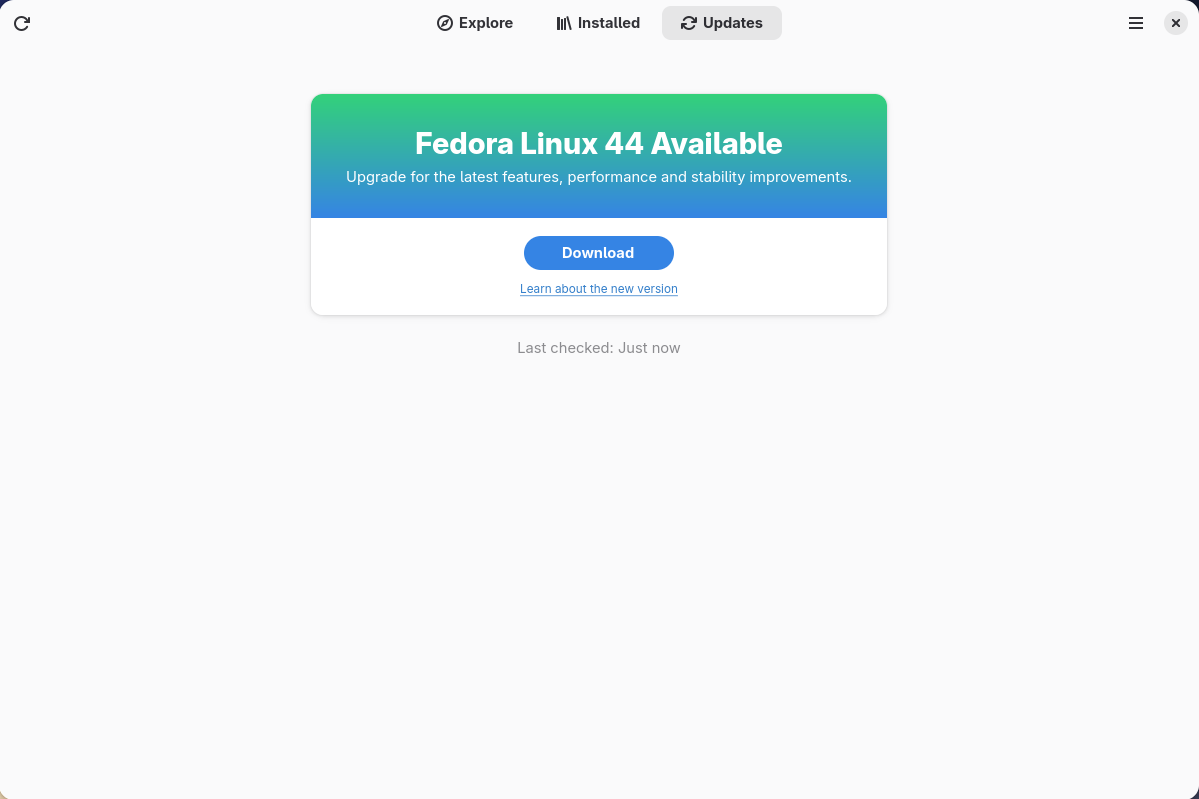
GNOME Software shows you that there is new version of Fedora Linux available on the Updates screen.

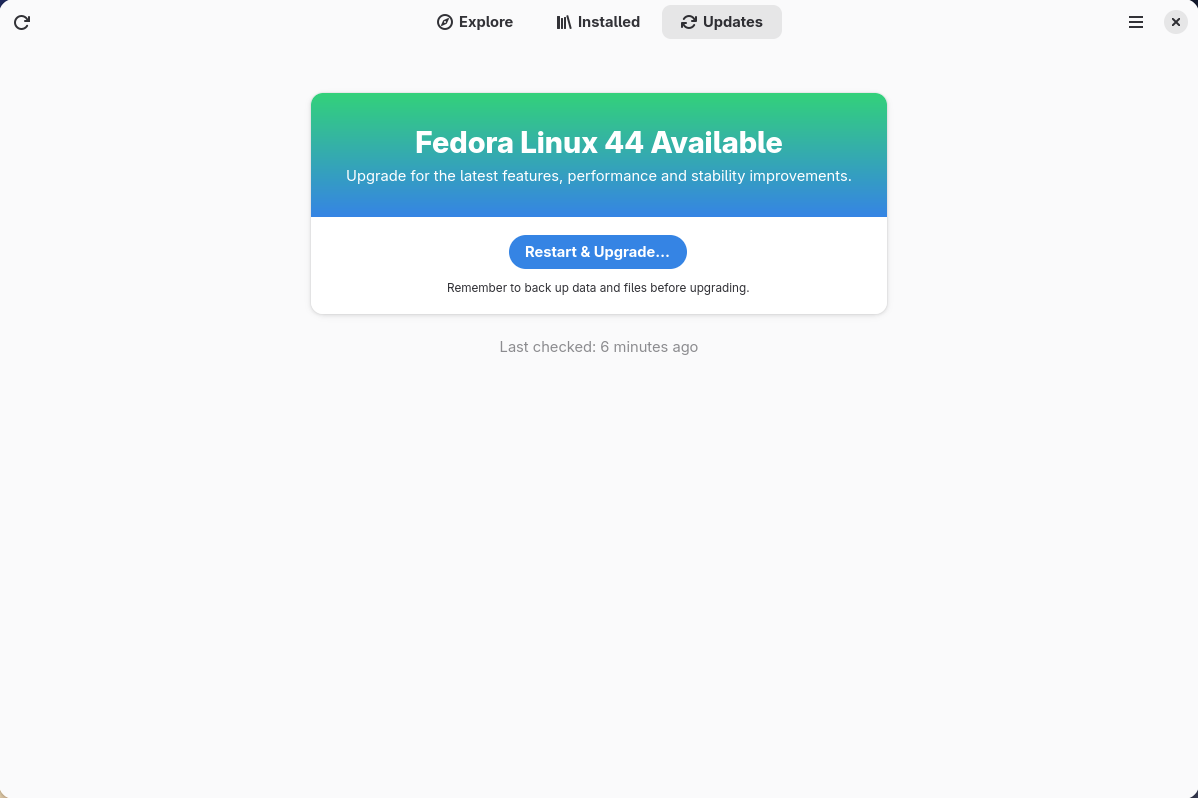
First thing to do is download the new image, so select the Download button. This will take some time. When it is done you will see that the update is ready to install.

Select the Restart & Upgrade button. This step will take only a few moments and the computer will restart when the update has completed. After the restart you will end up in a new and shiny release of Fedora Linux 44. Easy, isn’t it?

Rebasing using terminal

If you prefer to do everything in a terminal, then this part of the guide is for you.

Rebasing to Fedora Linux 44 using the terminal is easy. First, check if the 44 branch is available:

$ ostree remote refs fedora

You should see the following in the output:

fedora:fedora/44/x86_64/silverblue

If you want to pin the current deployment (meaning that this deployment will stay as an option in GRUB until you remove it), you can do this by running this command:

# 0 is entry position in rpm-ostree status
$ sudo ostree admin pin 0

To remove the pinned deployment use the following command:

# 2 is entry position in rpm-ostree status 
$ sudo ostree admin pin --unpin 2

Next, rebase your system to the Fedora Linux 44 branch.

$ rpm-ostree rebase fedora:fedora/44/x86_64/silverblue

Finally, the last thing to do is restart your computer and boot to Fedora Linux 44.

How to roll back

If anything bad happens (for instance, if you can’t boot to Fedora Linux 44 at all) it’s easy to go back. At boot time, pick the entry in the GRUB menu for the version prior to Fedora Linux 44 and your system will start in that previous version rather than Fedora Linux 44. If you don’t see the GRUB menu, try to press ESC during boot. To make the change to the previous version permanent, use the following command:

$ rpm-ostree rollback

That’s it. Now you know how to rebase Fedora Silverblue to Fedora Linux 44 and roll back. So why not do it today?

FAQ

Because there are similar questions in comments for each blog about rebasing to newer version of Silverblue I will try to answer them in this section.

Question: Can I skip versions during a rebase of Fedora Linux? For example from Fedora Silverblue 41 to Fedora Silverblue 44?

Answer: Although it could sometimes be possible to skip versions during rebase, it is not recommended. You should always update to one version prior (41->42->43->44 for example) to avoid unnecessary errors.

Question: I have rpm-fusion layered and I get errors during rebase. How should I do the rebase?

Answer: If you have rpm-fusion layered on your Silverblue installation, you should do the following before rebase:

$ rpm-ostree update --uninstall rpmfusion-free-release --uninstall rpmfusion-nonfree-release --install rpmfusion-free-release --install rpmfusion-nonfree-release

After doing this you can follow the guide in this blog post.

Question: Could this guide be used for other ostree editions (Fedora Atomic Desktops) as well like Kinoite, Sericea (Sway Atomic), Onyx (Budgie Atomic),…?

Yes, you can follow the Rebasing using the terminal part of this guide for every Fedora Atomic Desktop. Just use the corresponding branch. For example, for Kinoite use fedora:fedora/44/x86_64/kinoite

Posted on Leave a comment

The Fedora Linux 44 Release is Here!

I’m excited to announce that Fedora Linux 44 is here! Keep reading to discover highlights of Fedora Linux 44, or if you are ready, just jump right in and give Fedora Linux 44 a try!

Thanks to everyone who helped!

Thank you and congrats to everyone who has contributed to this release. And thanks to everyone who showed up for the virtual release party last Friday. We celebrated a little early this year, just after the go/no-go meeting made the release official. If you weren’t able to join us live, you can watch the recording and hear about some of the great work from the contributors involved.

Looking to upgrade?

If you have an existing system, Upgrading Fedora Linux to a New Release is easy. In most cases, it’s not very different from just rebooting for regular updates, except you’ll have a little more time to grab a coffee.

Ready to Fresh Install?

If this is your first time running Fedora Linux, or if you just want to start fresh with Fedora, download the install media for our flagship Editions (Workstation, KDE Plasma Desktop, Cloud, Server, CoreOS, IoT), or one of our Atomic Desktops (Silverblue, Kinoite, Cosmic, Budgie, Sway), or alternate desktop options (like Cinnamon, Xfce, Sway, or others).

What’s new?

As usual with Fedora Linux, there are just too many individual changes and improvements to go over in detail. You’ll want to take a look at the release notes for that.

Notable User Visible Changes

Anaconda

For those of you installing fresh Fedora Linux 44 Spins, you may notice a change in how Anaconda handles network devices. Anaconda now only creates network profiles for devices configured during installation (by boot options, kickstart, or interactively in UI) instead of providing default profiles for all devices. This change will simplify post-installation network configuration for users who need to customize after installation.

Workstation

Fedora Linux 44 Workstation ships with the latest GNOME release, GNOME 50. This comes with a long list of refinements to your desktop, including everything from accessibility to color management and remote desktop. Many of the applications that are installed by default on Fedora Workstation have also seen improvements, from Document Viewer to File Manager and Calendar. To learn more about these and other changes, you can read the GNOME 50 release notes.

KDE Plasma Desktop

KDE Plasma Desktop: If you are a KDE user, you should also notice a couple of very obvious changes. Fedora KDE Plasma Desktop 44 is based on the latest Plasma 6.6, which includes the new Plasma Login Manager and Plasma Setup to provide a more cohesive and integrated experience from the moment the computer is powered on for the first time. The installation process has been simplified, enabling you to easily set up Fedora KDE Plasma Desktop for a computer for a friend or a loved one.
 

Plumbing Upgrades

Beyond the user-visible changes, there are some important plumbing changes user should be aware of.

OpenSSL Cert File Handling Improvements

The loading time of OpenSSL has been improved by making use of directory-hash support for ca-certificates. This improvement required changes to where some certificate bundles are stored on the filesystem. You can read the specific Change details for more information.

The MariaDB default version is now 11.8

MariaDB packages use a versioned package layout, which allows Fedora to deliver both, mariadb-10.11 and mariadb-11.8 for users.  The “distribution default” unversioned MariaDB packages now install the 11.8 versions in Fedora Linux 44. User doing upgrades to Fedora Linux 44 won’t notice the change in the default. For new users installing MariaDB for the first time, unless you specify the version, you’ll now get 11.8 by default.

Wine NTSYNC

The NTSYNC kernel module is enabled for select packages by package recommendation (notably Wine and Steam), which can improve compatibility and performance when running Windows applications (especially games).  When packages that recommend the wine-ntsync package are installed, the package recommendation ensures NTSYNC is configured automatically on subsequent boots, so that users don’t have to manually enable NTSYNC.

Fedora Cloud boot partition using Btrfs

The /boot partition has been replaced with a Btrfs subvolume for Fedora Cloud images that support it.  This results in better space utilization and smaller images.

If you hit a snag

If you run into a problem, visit our Ask Fedora user support forum. This forum includes a category where we collect common issues and solutions or work-arounds.

Just drop by and say “hello”

Drop by our “virtual watercooler” on Fedora Discussion and join a conversation, share something interesting, and introduce yourself. We’re always glad to see new people!

Posted on Leave a comment

GDB source-tracking breakpoints

One of the main abilities of a debugger is setting breakpoints.
GDB: The GNU Project Debugger now introduces an experimental feature
called source-tracking breakpoints that tracks the source line a breakpoint
was set to.

Introduction

Imagine you are debugging: you set breakpoints on a bunch of
source lines, inspect some values, and get ideas about how to change your
code. You edit the source and recompile, but keep your GDB session running
and type run to reload the newly compiled executable. Because you changed
the source, the breakpoint line numbers shifted. Right now, you have to
disable the existing breakpoints and set new ones.

GDB source-tracking breakpoints change this situation. When you set a
breakpoint using file:line notation, when this feature is enabled, GDB
captures a small window of the surrounding source code. When you recompile
and reload the executable, GDB adjusts any breakpoints whose lines shifted
due to source changes. This is especially helpful in ad-hoc debug sessions
where you want to keep debugging without manually resetting breakpoints
after each edit-compile cycle.

Setting a source-tracking breakpoint

To enable the source-tracking feature, run:

(gdb) set breakpoint source-tracking enabled on

Set a breakpoint using file:line notation:

(gdb) break myfile.c:42
Breakpoint 1 at 0x401234: file myfile.c, line 42.

GDB now tracks the source around this line. The info breakpoints command
shows whether a breakpoint is tracked:

(gdb) info breakpoints
Num Type Disp Enb Address What
1 breakpoint keep y 0x0000000000401234 in calculate at myfile.c:42
source-tracking enabled (tracking 3 lines around line 42)

Now edit the source — say a few lines are added above the breakpoint,
shifting it from line 42 to line 45. After recompiling and reloading the
executable with run, GDB resets the breakpoint to the new line and displays:

Breakpoint 1 adjusted from line 42 to line 45.

Run info breakpoints again to confirm the new location:

(gdb) info breakpoints
Num Type Disp Enb Address What
1 breakpoint keep y 0x0000000000401256 in calculate at myfile.c:45
source-tracking enabled (tracking 3 lines around line 45)

As you can see, GDB updated the breakpoint line to match the new location.

Limitations

The matching algorithm requires an exact string match of the captured source
lines. Whitespace-only changes or trivial reformatting of the tracked lines
will confuse the matcher and may cause the breakpoint not to be found.

GDB only searches within a 12-line window around the original location. If
the code shifted by more than that — for example, because a large block was
inserted above — the breakpoint will not be found. GDB will keep the
original location and print a warning:

warning: Breakpoint 1 source code not found after reload, keeping original
location.

Source context cannot be captured when a breakpoint is created pending
(e.g., with set breakpoint pending on), because no symbol table is available
yet. When the breakpoint later resolves to a location, it will not be
source-tracked.

Source tracking is not supported for ranged breakpoints (set with
break-range).

Breakpoints on inline functions that expand to multiple locations are not
source-tracked, as each location may have moved differently.

How to try this experimental feature

This feature is not yet available in a stable GDB release. There are two
ways to try it.

Install from COPR (for Fedora users)

A pre-built package is available through a COPR repository. Enable it and
install:

sudo dnf copr enable ahajkova/GDB-source-tracking-breakpoints
sudo dnf upgrade gdb

To disable the repository again after testing:

sudo dnf copr disable ahajkova/GDB-source-tracking-breakpoints

The COPR project page is at:
https://copr.fedorainfracloud.org/coprs/ahajkova/GDB-source-tracking-breakpo
ints/

Build from source

  1. Clone the GDB repository:
    git clone git://sourceware.org/git/binutils-gdb.git
    cd binutils-gdb
  2. Download and apply the patch from the upstream mailing list:
    https://sourceware.org/pipermail/gdb-patches/2026-April/226349.html
  3. Build GDB:
    mkdir build && cd build
    ../configure --prefix=/usr/local
    make -j$(nproc) all-gdb
  4. Run the newly built GDB:
    ./gdb/gdb

Conclusion

GDB source-tracking breakpoints are an experimental feature currently under
upstream review and not yet available in a stable GDB release. This link
https://sourceware.org/gdb/current/onlinedocs/gdb.html/Set-Breaks.html
covers all available breakpoint commands. If you try this feature out and
hit any kind of unexpected behavior, feedback is very welcome — you can
follow and respond to the upstream patch discussion on the GDB mailing list
at https://sourceware.org/pipermail/gdb-patches/2026-April/226349.html

Posted on Leave a comment

Contribute at the Fedora CoreOS 44 Test Week

The Fedora CoreOS and QA teams are gearing up for Fedora 44, and we need your help! We are organizing a Test Week running from March 23 to March 27, 2026.

This event is a nice opportunity for the community to test Fedora CoreOS (FCOS) based on Fedora 44 content before it officially reaches the testing and stable streams. By participating, you help us ensure a smooth and reliable experience for all users.

How does a Test Week work?

A Test Week is an event where anyone can help verify that the upcoming release works as expected. If you’ve been looking for a way to get started with Fedora contribution, this is the perfect entry point.

To participate, you simply need to:

  • Download the FCOS test images.
  • Follow the step-by-step test cases provided.
  • Report whether the tests passed or failed on your hardware or VM.

The Wiki Page is your primary source of information for this event. Once you have completed your tests, please log your results here! Your contribution, big or small, makes a huge difference. Let’s work together to make this release a great one. Happy testing!

Join the Live Sync Session

Want to chat with the team? We are hosting a virtual in-person session on Tuesday, March 24, from 3:00 PM – 4:30 PM UTC. Drop in to ask questions and get help with testing!

Video Meeting: meet.google.com/ufp-bwsb-zwh

Posted on Leave a comment

How to rebase to Fedora Silverblue 44 Beta

Silverblue is an operating system for your desktop built on Fedora Linux. It’s excellent for daily use, development, and container-based workflows. It offers numerous advantages such as being able to roll back in case of any problems. This article provides the steps to rebase to the newly released Fedora Linux 44 Beta, and how to revert if anything unforeseen happens.

NOTE: Before attempting an upgrade to the Fedora Linux 44 Beta, apply any pending upgrades to your current system.

Updating using the terminal

Because Fedora Linux 44 Beta is not available in GNOME Software, the whole process must be done through a terminal.

First, check if the 44 branch is available, which should be true now:

$ ostree remote refs fedora

You should see the following line in the output:

fedora:fedora/44/x86_64/silverblue

If you want to pin the current deployment (this deployment will stay as an option in GRUB until you remove it), you can do it by running:

# 0 is entry position in rpm-ostree status
$ sudo ostree admin pin 0

To remove the pinned deployment use the following command ( “2” corresponds to the entry position in the output from rpm-ostree status ):

$ sudo ostree admin pin --unpin 2

Next, rebase your system to the Fedora 44 branch.

$ rpm-ostree rebase fedora:fedora/44/x86_64/silverblue

The final thing to do is restart your computer and boot to Fedora Silverblue 44 Beta.

How to revert

If anything bad happens — for instance, if you can’t boot to Fedora Silverblue 44 Beta at all — it’s easy to go back. Pick the previous entry in the GRUB boot menu (you need to press ESC during boot sequence to see the GRUB menu in newer versions of Fedora Silverblue), and your system will start in its previous state. To make this change permanent, use the following command:

$ rpm-ostree rollback

That’s it. Now you know how to rebase to Fedora Silverblue 44 Beta and fall back. So why not do it today?

Known issues

FAQ

Because there are similar questions in comments for each blog about rebasing to newer version of Silverblue I will try to answer them in this section.

Question: Can I skip versions during rebase of Fedora Linux? For example from Fedora Silverblue 42 to Fedora Silverblue 44?

Answer: Although it could be sometimes possible to skip versions during rebase, it is not recommended. You should always update to one version above (42->43 for example) to avoid unnecessary errors.

Question: I have rpm-fusion layered and I got errors during rebase. How should I do the rebase?

Answer: If you have rpm-fusion layered on your Silverblue installation, you should do the following before rebase:

rpm-ostree update --uninstall rpmfusion-free-release --uninstall rpmfusion-nonfree-release --install rpmfusion-free-release --install rpmfusion-nonfree-release

After doing this you can follow the guide in this article.

Question: Could this guide be used for other ostree editions (Fedora Atomic Desktops) as well like Kinoite, Sericea (Sway Atomic), Onyx (Budgie Atomic),…?

Yes, you can follow the Updating using the terminal part of this guide for every ostree edition of Fedora. Just use the corresponding branch. For example for Kinoite use fedora:fedora/44/x86_64/kinoite

Posted on Leave a comment

Announcing Fedora Linux 44 Beta

On Tuesday, 10 March 2026, it is our pleasure to announce the availability of Fedora Linux 44 Beta! As with every beta release, this is your opportunity to contribute by testing out the upcoming Fedora Linux 44 Beta release. Testing the beta release is a vital way you can contribute to the Fedora Project. Your testing is invaluable feedback that helps us refine what the final F44 experience will be for all users.

We hope you enjoy this latest beta version of Fedora!

How to get the Fedora Linux 44 Beta release

You can download Fedora Linux 44 Beta, or our pre-release edition versions, from any of the following places:

The Fedora CoreOS “next” stream moves to the beta release one week later. Content for F44, however, is still available from their current branched stream to enjoy now.

You can also update an existing system to the beta using DNF system-upgrade.

The Fedora Linux 44 Beta release content may also be available for Fedora Spins and Labs.

Fedora Linux 44 Beta highlights

Like every Beta release, the Fedora Linux 44 Beta release is packed with changes. The following are highlights from the full set of changes for F44. They are ready for you to test drive in the Fedora Linux 44 Beta.

Installer and desktop Improvements

Goodbye Anaconda Created Default Network Profiles: This change impacts how Anaconda populates network device profiles. Only those devices configured during installation (by boot options, kickstart or interactively in UI) become part of the final system install. This behavior change addresses some long standing issues caused by populating network profiles for all network devices. These made it difficult to correctly reconfigure devices post-install.

Unified KDE Out of the Box Experience: This change introduces the post-install Plasma Setup application for all Fedora KDE variants. In the variants making use of this new setup application, the Anaconda configuration will be adjusted to disable redundant configuration stages that duplicate the functionality exposed in the setup application.

KDE Plasma Login Manager: This change introduced the Plasma Login Manager (PLM) for Fedora KDE variants instead of SDDM for the default login manager.

Reworked Games Lab: This change modernizes the Games Lab deliverable by leveraging the latest technologies. This offers a high quality gaming and game development experience. It includes a change from Xfce to KDE Plasma to take advantage of the latest and greatest Wayland stack for gaming.

Budgie 10.10: Budgie 10.10 is the latest release of Budgie Desktop. Budgie 10.10 migrates from X11 to Wayland. This ensures a viable long-term user experience for Fedora Budgie users and lays groundwork for the next major Budgie release.

LiveCD Improvements

Automatic DTB selection for aarch64 EFI systems: This change intends to make the aarch64 Fedora Live ISO images work out of the box on Windows on ARM (WoA) laptops. This will automatically select the right DTB at boot.

Modernize Live Media: This change modernizes the live media experience by switching to the “new” live environment setup scripts provided by livesys-scripts and leverage new functionality in dracut to enable support for automatically enabling persistent overlays when flashed to USB sticks.

System Enhancements

GNU Toolchain Update: The updates to the GNU Toolchain ensure Fedora stays current with the latest features, improvements, and bug and security fixes from the upstream gcc, glibc, binutils, and gdb projects. They guarantee a working system compiler, assembler, static and dynamic linker, core language runtimes, and debugger.

Reproducible Package Builds: Over the last few releases, we changed our build infrastructure to make package builds reproducible. This is enough to reach 90%. The remaining issues need to be fixed in individual packages. With this change, all package builds are expected to be reproducible in the F44 final release. Bugs will be filed against packages when an irreproducibility is detected. The goal is to have no fewer than 99% of package builds reproducible.

Packit as a dist-git CI: This change continues down the path of modernizing the Fedora CI experience by moving forward with the final phase of the plan to integrate Packit as the default CI for Fedora dist-git.

Remove Python Mock Usage: python-mock was deprecated with Fedora 34. However, it is still in use in many packages. We plan to go through the remaining usages and clean them up, with the goal of retiring python-mock from Fedora.

Adoption of new R Packaging Guidelines: This change introduces new rpm macros to help standardize and automate common R language packaging tasks resulting in a simplification of the rpm spec files.

Introduction of Nix Developer Tool: This change adds the nix package manager developer tool to Fedora.

Hardlink identical files in packages by default: With this change, all fedora packages will automatically hardlink files under /usr by default as a post install action. The mechanism introduced in this change is designed specifically to address reproducibility validation race conditions found in use by traditional hardlinking approaches.

Fedora Linux 44 Beta upgrades and removals

Golang 1.26: Fedora users will receive the most current and recent Go release. Being close to upstream allows us to avoid security issues and provide more updated features. Consequently, Fedora will provide a reliable development platform for the Go language and projects written in it.

MariaDB 11.8 as Distribution Default Version: The distribution default for MariaDB packaging will switch to 11.8. Multiple versions of the MariaDB packages will continue to be available. This change only impact which of the versioned packages presents itself as the unversioned “default”

IBus 1.5.34: Fedora users will benefit from better support of Wayland and Emoji features.

Django 6.x: Fedora Users can make use of the latest Django version; users who use Django add-ons that are not ready for 6.0 yet should be able to switch it out for python3-django5

TagLib 2: This change puts Fedora on the latest supported version, and it will benefit from improvements in future minor releases with a simple update.

Helm 4: Helm 4 has been released upstream with intentional backwards-incompatible changes relative to Helm 3. To ensure a smooth transition for Fedora, this Change introduces Helm 4 as the default helm package, while providing a parallel-installable helm3 package for users and tooling that still rely on Helm 3.

Ansible 13: Update from Ansible 11 and Ansible Core 2.18 to Ansible 13 and Ansible Core 2.20. This includes major robustness and security fixes to the templating engine which might break existing playbooks that had incorrect behavior. This was silently ignored in previous releases.

TeXLive 2025: With this change, we update to the latest version of TeXLive (2025). We also move to a modularized packaging system, which splits the “texlive” SPEC into a set of collection and scheme packages. This reflects the categorization that TeXLive upstream defines. Each collection package will package the immediate component dependencies as subpackages.

Drop QEMU 32-bit Host Builds: Fedora will stop building QEMU on i686 architecture. This change brings Fedora inline with the QEMU upstream project decision to deprecate support for 32-bit host builds. Upstream intends to start removing 32-bit host build support code in a future release and will assume 64-bit atomic ops in all builds.

Drop FUSE 2 libraries in Atomic Desktops: Remove FUSE 2 binaries and libraries from all Atomic Desktops

Drop compatibility for pkla polkit rules in Atomic Desktops: Remove support for deprecated pkla polkit rules from all Fedora Atomic Desktops

More information about Fedora Linux 44 Beta

Details and more information on the many great changes landing in Fedora Linux 44 are available on the Change Set page.


Posted on Leave a comment

Join Us for Fedora Hatch at SCaLE 23x!

A graphic featuring a Linux penguin in front of a gear, a blue Fedora logo, and the text "SCaLE 23X" against a dark gray background.

Fedora is heading back to sunny Southern California! As we gear up for SCaLE 23x, we are thrilled to announce a special edition of Fedora Hatch. This is taking place on Friday, March 6 as an embedded track at SCALE.

Whether you’re a long-time contributor, a curious user, or someone looking to make your very first pull request, Fedora Hatch is designed for you. This is our way of bringing the experience of Flock (our annual contributor conference) to a local level. It focuses on connection, collaboration, and community growth.

What’s Happening?

This year, Fedora has secured a dedicated track on Friday at SCALE. We’ve curated a line-up that balances technical deep dives with essential community initiatives.

When: Friday, March 6, 2026

Where: Room 208, Pasadena Convention Center

Who: You! (And a bunch of friendly Fedorans)

The Schedule Highlights

We have a packed morning featuring five talks and a hands-on workshop:

  • Getting Started in Open Source and Fedora (Amy Marrich): Are you new to the world of open source? Or are you looking to make your first contribution? This session will provide a guide for beginners interested in contributing to open source projects. It will focus on the Fedora project. We’ll cover a variety of topics, like finding suitable projects, making your first pull request, and navigating community interactions. Attendees will leave with practical tips, resources, and the confidence to embark on their open source journey.
  • Fedora Docs Revamp Initiative (Shaun McCance): The Fedora Council recently approved an initiative to revamp the Fedora docs. The initiative aims to establish a support team to maintain a productive environment for writing docs. It will establish subteams with subject matter expertise to develop docs in specific areas of interest. We’ll describe some of the challenges the Fedora docs have faced, and present the progress so far in improving the docs. You’ll also learn how you can help Fedora have better docs.
  • A Brief Tour of the Age of Atomic (Laura Santamaria): Ever wished to try a number of different desktop experiences quickly in your homelab? Maybe it’s time to explore Fedora Atomic or Universal Blue! The tour starts with what makes these experiences special. It will then review the options including Silverblue, Cosmic, Bluefin and Bazzite (yes, the gaming OS). We’ll briefly get under the hood to explore bootc, the technology powering Atomic. Finally, we’ll explore how you can contribute to the future of Fedora Atomic.
  • Accelerating CentOS with Fedora (Davide Cavalca): This talk will explore how CentOS SIGs are able to leverage the work happening in Fedora to improve the quality and velocity of packages in CentOS Stream. We’ll cover how the CentOS Hyperscale SIG is able to deliver faster-moving updates for select packages, and how the CentOS Proposed Updates SIG integrates bugfixes and improves the contribution process to the distribution.
  • Agentic Workloads on Linux: Btrfs + Service Accounts Architecture (David Duncan): As AI agents become more prevalent in enterprise environments, Linux systems need architectural patterns that provide isolation, security, and efficient resource management. This session explores an approach, using BTRFS subvolumes combined with dedicated service accounts, to build secure, isolated environments for autonomous AI agents in enterprise deployment.
  • RPM Packaging Workshop (Carl George): While universal package formats like Flatpak, Snap, and AppImage have gained popularity for their cross-distro support, native system packages remain a cornerstone of Linux distributions. These native formats offer numerous benefits. Understanding them is essential for those who want to contribute to the Linux ecosystem at a deeper level. In this hands-on workshop, we’ll explore RPM, the native package format used by Fedora, CentOS, and RHEL. RPM is a powerful and flexible tool. It plays a vital role in the management and distribution of software for these operating systems.

Don’t forget to swing by the Fedora Booth in the Expo Hall! Our team will be there all weekend (March 6–8) with live demonstrations of Fedora Linux 43, GNOME 49 improvements, and plenty of fresh swag to go around.

Registration Details

To join us at the Hatch, you’ll need a SCaLE 23x pass.

  • Location: Pasadena Convention Center, 300 E Green St, Pasadena, CA.
  • Tickets: Available at the official SCaLE website.

We can’t wait to see you there. Let’s make SCaLE 23x the best one yet!

Posted on Leave a comment

Podman Test Days: Try the New Backend & Parallel Pulls

The Podman team and the Fedora Quality Assurance team are organizing a Test Week from Friday, February 27 through Friday, March 6, 2026. This is your chance to get an early look at the latest improvements coming to Podman and see how they perform on your machine.

What is Podman?

For those new to the tool, Podman is a daemonless, Linux-native engine for running, building, and sharing OCI containers. It offers a familiar command-line experience but runs containers safely without requiring a root daemon.

What’s Coming in Podman 5.8?

The upcoming release includes updates designed to make Podman faster and more robust. Here is what you can look forward to, and what you can try out during this Fedora Test Day.

A Modern Database Backend (SQLite)

Podman is upgrading its internal storage logic by transitioning to SQLite. This change modernizes how Podman handles data under the hood, aiming for better stability and long-term robustness.

Faster Parallel Pulls

This release brings optimizations to how Podman downloads image layers, specifically when pulling multiple images at the same time. For a deep dive into the engineering behind this, check out the developer blog post on Accelerating Parallel Layer Creation.

Experiment and Explore: Feel free to push the system a bit and try pulling several large images simultaneously to see if you notice the performance boost. Beyond that, please bring your own workflows. Don’t just follow the wiki instructions. Run the containers and commands you use daily. Your specific use cases are the best way to uncover edge cases that standard tests might miss.

What do I need to do?

  • Make sure you have a Fedora Account (FAS).
  • Download test materials in advance where applicable, which may include some large files.
  • Follow the steps on the wiki test page one by one.
  • Send us your results through the app.

Details on how to test and report results are available at the Wiki Test Day site for Podman 5.8 test day:
https://fedoraproject.org/wiki/Test_Day:2026-02-27_Podman_5.8

Test Week runs from Friday, February 27 through Friday, March 6, 2026

Thank you for taking part in the testing of Fedora Linux 44!

Posted on Leave a comment

Mrhbaan Syria! Fedora now available in Syria

A dark grey banner featuring the Syrian Independence flag alongside the text "Now available in Syria", "Fedora", and the Syrian Arabic phrase "في داركم" below it. The background has a subtle triangular pattern.

Mrhbaan, Fedora community! 👋 I am happy to share that as of 10 February 2026, Fedora is now available in Syria. Last week, the Fedora Infrastructure Team lifted the IP range block on IP addresses in Syria. This action restores download access to Fedora Linux deliverables, such as ISOs. It also restores access from Syria to Fedora Linux RPM repositories, the Fedora Account System, and Fedora build systems. Users can now access the various applications and services that make up the Fedora Project. This change follows a recent update to the Fedora Export Control Policy. Today, anyone connecting to the public Internet from Syria should once again be able to access Fedora.

This article explains why this is happening now. It also covers the work behind the scenes to make this change happen.

Why Syria, why now?

You might wonder: what happened? Why is this happening now? I cannot answer everything in this post. However, the story begins in December 2024 with the fall of the Assad regime in Syria. A new government took control of the country. This began a new era of foreign policy in Syrian international relations.

Fast-forward to 18 December 2025. The United States signed the National Defense Authorization Act for Fiscal Year 2026 into law. This law repealed the 2019 Caesar Act sanctions. This action removed Syria from the list of OFAC embargoed countries. The U.S. Department of the Treasury maintains this list.

This may seem like a small change. Yet, it is significant for Syrians. Some U.S. Commerce Department regulations remain in place. However, the U.S. Department of the Treasury’s policy change now allows open source software availability in Syria. The Fedora Project updated its stance to welcome Syrians back into the Fedora community. This matches actions taken by other major platforms for open source software, such as Microsoft’s GitHub.

Syria & Fedora, behind the scenes

Opening the firewall to Syria took seconds. However, months of conversations and hidden work occurred behind the scenes to make this happen. The story begins with a ticket. Zaid Ballour (@devzaid) opened Ticket #541 to the Fedora Council on 1 September 2025. This escalated the issue to the Fedora Council. It prompted a closer look at the changing political situation in Syria.

Jef Spaleta and I dug deeper into the issue. We wanted to understand the overall context. The United States repealed the 2019 Caesar Act sanctions in December 2025. This indicated that the Fedora Export Policy Control might be outdated.

During this time, Jef and I spoke with legal experts at Red Hat and IBM. We reviewed the situation in Syria. This review process took time. We had to ensure compliance with all United States federal laws and sanctions. The situation for Fedora differs from other open source communities. Much of our development happens within infrastructure that we control. Additionally, Linux serves as digital infrastructure. This context differs from a random open source library on GitHub.

However, the path forward became clear after the repeal of the 2019 Caesar Act. After several months, we received approval. Fedora is accessible to Syrians once again.

Opening the door to Syria

Some folks may have noticed the Fedora Infrastructure ticket last week. It requested the removal of the firewall block. We also submitted a Fedora Legal Docs Merge Request to change the Fedora Export Control Policy.

We wanted to share this exciting announcement now. It aligns with our commitment to the Fedora Project vision:

“The Fedora Project envisions a world where everyone benefits from free and open source software built by inclusive, welcoming, and open-minded communities.“

We look forward to welcoming Syrians back into the Fedora community and the wider open source community at large. Mrhbaan!

Posted on Leave a comment

How to make a local open source AI chatbot who has access to Fedora documentation

If you followed along with my blog, you’d have a chatbot running on your local Fedora machine. (And if not, no worries as the scripts below implement this chatbot!) Our chatbot talks, and has a refined personality, but does it know anything about the topics we’re interested in? Unless it has been trained on those topics, the answer is “no”.

I think it would be great if our chatbot could answer questions about Fedora. I’d like to give it access to all of the Fedora documentation.

How does an AI know things it wasn’t trained on?

A powerful and popular technique to give a body of knowledge to an AI is known as RAG, Retrieval Augmented Generation. It works like this:

If you just ask an AI “what color is my ball?” it will hallucinate an answer. But instead if you say “I have a green box with a red ball in it. What color is my ball?” it will answer that your ball is red. RAG is about using a system external to the LLM to insert that “I have a green box with a red ball in it” part into the question you are asking the LLM. We do this with a special database of knowledge that takes a prompt like “what color is my ball?”, and finds records that match that query. If the database contains a document with the text “I have a green box with a red ball in it”, it will return that text, which can then be included along with your original question. This technique is called RAG, Retrieval Augmented Generation.

ex:

“What color is my ball?”

“Your ball is the color of a sunny day, perhaps yellow? Does that sound right to you?”

“I have a green box with a red ball in it. What color is my ball?”

“Your ball is red. Would you like to know more about it?”

The question we’ll ask for this demonstration is “What is the recommended tool for upgrading between major releases on Fedora Silverblue”

The answer I’d be looking for is “ostree”, but when I ask this of our chatbot now, I get answers like:

Red Hat Subscription Manager (RHSM) is recommended for managing subscriptions and upgrades between major Fedora releases.

You can use the Fedora Silver Blue Upgrade Tool for a smooth transition between major releases.

You can use the `dnf distro-sync` command to upgrade between major releases in Fedora Silver Blue. This command compares your installed packages to the latest packages from the Fedora Silver Blue repository and updates them as needed.

These answers are all very wrong, and spoken with great confidence. Here’s hoping our RAG upgrade fixes this!

Docs2DB – An open source tool for RAG

We are going to use the Docs2DB RAG database application to give our AI knowledge. (note, I am the creator of Docs2DB!)

A RAG tool consists of three main parts. There is the part that creates the database, ingesting the source data that the database holds. There is the database itself, it holds the data. And there is the part that queries the database, finding the text that is relevant to the query at hand. Docs2DB addresses all of these needs.

Gathering source data

This section describes how to use Docs2DB to build a RAG database from Fedora Documentation. If you would like to skip this section and just download a pre-built database, here is how you do it:

cd ~/chatbot
curl -LO https://github.com/Lifto/FedoraDocsRAG/releases/download/v1.1.1/fedora-docs.sql
sudo dnf install -y uv podman podman-compose postgresql
uv python install 3.12
uvx --python 3.12 docs2db db-start
uvx --python 3.12 docs2db db-restore fedora-docs.sql

If you do download the pre-made database then skip ahead to the next section.

Now we are going to see how to make a RAG database from source documentation. Note that the pre-built database, downloaded in the curl command above, uses all of the Fedora documentation, whereas in this example we only ingest the “quick docs” portion. FedoraDocsRag, from github, is the project that builds the complete database.

To populate its database, Docs2DB ingests a folder of documents. Let’s get that folder together.

There are about twenty different Fedora document repositories, but we will only be using the “quick docs” for this demo. Get the repo:

git clone https://pagure.io/fedora-docs/quick-docs.git

Fedora docs are written in AsciiDoc. Docs2DB can’t read AcsciiDoc, but it can read HTML. (The convert.sh script is available at the end of this article). Just copy the convert.sh script into the quick-docs repo and run it and it makes an adjacent quick-docs-html folder.

sudo dnf install podman podman-compose
cd quick-docs
curl -LO https://gist.githubusercontent.com/Lifto/73d3cf4bfc22ac4d9e493ac44fe97402/raw/convert.sh
chmod +x convert.sh
./convert.sh
cd ..

Now let’s ingest the folder with Docs2DB. The common way to use Docs2DB is to install it from PyPi and use it as a command line tool.

A word about uv

For this demo we’re going to use uv for our Python environment. The use of uv has been catching on, but because not everybody I know has heard of it, I want to introduce it. Think of uv as a replacement for venv and pip. When you use venv you first create a new virtual environment. Then, and on subsequent uses, you “activate” that virtual environment so that magically, when you call Python, you get the Python that is installed in the virtual environment you activated and not the system Python. The difference with uv is that you call uv explicitly each time. There is no “magic”. We use uv here in a way that uses a temporary environment for each invocation.

Install uv and Podman on your system:

sudo dnf install -y uv podman podman-compose
# These examples require the more robust Python 3.12
uv python install 3.12
# This will run Docs2DB without making a permanent installation on your system
uvx --python 3.12 docs2db ingest quick-docs-html/

Only if you are curious! What Docs2DB is doing

If you are curious, you may note that Docs2DB made a docs2db_content folder. In there you will find json files of the ingested source documents. To build the database, Docs2DB ingests the source data using Docling, which generates json files from the text it reads in. The files are then “chunked” into the small pieces that can be inserted into an LLM prompt. The chunks then have “embeddings” calculated for them so that during the query phase the chunks can be looked up by “semantic similarity” (e.g.: “computer”, “laptop” and “cloud instance” can all map to a related concept even if their exact words don’t match). Finally, the chunks and embeddings are loaded into the database.

Build the database

The following commands complete the database build process:

uv tool run --python 3.12 docs2db chunk --skip-context
uv tool run --python 3.12 docs2db embed
uv tool run --python 3.12 docs2db db-start
uv tool run --python 3.12 docs2db load

Now let’s do a test query and see what we get back

uvx --python 3.12 docs2db-api query "What is the recommended tool for upgrading between major releases on Fedora Silverblue" --format text --max-chars 2000 --no-refine

On my terminal I see several chunks of text, separated by lines of —. One of those chunks says:

“Silverblue can be upgraded between major versions using the ostree command.”

Note that this is not an answer to our question yet! This is just a quote from the Fedora docs. And this is precisely the sort of quote we want to supply to the LLM so that it can answer our question. Recall the example above about “I have green box with a red ball in it”? The statement the RAG engine found about ostree is the equivalent for this question about upgrading Fedora Silverblue. We must now pass it on to the LLM so the LLM can use it to answer our question.

Hooking it in: Connecting the RAG database to the AI

Later in this article you’ll find talk.sh. talk.sh is our local, open source, LLM-based verbally communicating AI; and it is just a bash script. To run it yourself you need to install a few components, this blog walks you through the whole process. The talk.sh script gets voice input, turns that into text, splices that text into a prompt which is then sent to the LLM, and finally speaks back the response.

To plug the RAG results into the LLM we edit the prompt. Look at step 3 in talk.sh and you see we are injecting the RAG results using the variable $CONTEXT. This way when we ask the LLM a question, it will respond to a prompt that basically says “You are a helper. The Fedora Docs says ostree is how you upgrade Fedora Silverblue. Answer this question: How do you upgrade Fedora Silverblue?”

Note: talk.sh is also available here:
https://gist.github.com/Lifto/2fcaa2d0ebbd8d5c681ab33e7c7a6239

Testing it

Run talk.sh and ask:

“What is the recommended tool for upgrading between major releases on Fedora Silverblue”

And we get:

“Ostree command is recommended for upgrading Fedora Silver Blue between major releases. Do you need guidance on using it?”

Sounds good to me!

Knowing things

Our AI can now know the knowledge contained in documents. This particular technique, RAG (Retrieval Augmented Generation), adds relevant data from an ingested source to a prompt before sending that prompt to the LLM. The result of this is that the LLM generates its response in consideration of this data.

Try it yourself! Ingest a library of documents and have your AI answer questions with its new found knowledge!


AI Attribution: The convert.sh and talk.sh scripts in this article were written by ChatGPT 5.2 under my direction and review. The featured image was generated using Google Gemini.

convert.sh

OUT_DIR="$PWD/../quick-docs-html"
mkdir -p "$OUT_DIR" podman run --rm \ -v "$PWD:/work:Z" \ -v "$OUT_DIR:/out:Z" \ -w /work \ docker.io/asciidoctor/docker-asciidoctor \ bash -lc ' set -u ok=0 fail=0 while IFS= read -r -d "" f; do rel="${f#./}" out="/out/${rel%.adoc}.html" mkdir -p "$(dirname "$out")" echo "Converting: $rel" if asciidoctor -o "$out" "$rel"; then ok=$((ok+1)) else echo "FAILED: $rel" >&2 fail=$((fail+1)) fi done < <(find modules -type f -path "*/pages/*.adoc" -print0) echo echo "Done. OK=$ok FAIL=$fail" '

talk.sh

#!/usr/bin/env bash set -e # Path to audio input
AUDIO=input.wav # Step 1: Record from mic
echo "🎙 Speak now..."
arecord -f S16_LE -r 16000 -d 5 -q "$AUDIO" # Step 2: Transcribe using whisper.cpp
TRANSCRIPT=$(./whisper.cpp/build/bin/whisper-cli \ -m ./whisper.cpp/models/ggml-base.en.bin \ -f "$AUDIO" \ | grep '^\[' \ | sed -E 's/^\[[^]]+\][[:space:]]*//' \ | tr -d '\n')
echo "🗣 $TRANSCRIPT" # Step 3: Get relevant context from RAG database
echo "📚 Searching documentation..."
CONTEXT=$(uv tool run --python 3.12 docs2db-api query "$TRANSCRIPT" \ --format text \ --max-chars 2000 \ --no-refine \ 2>/dev/null || echo "") if [ -n "$CONTEXT" ]; then echo "📄 Found relevant documentation:" echo "- - - - - - - - - - - - - - - - - - - - - - - - - - - - - - - - - - - - - - - - -" echo "$CONTEXT" echo "- - - - - - - - - - - - - - - - - - - - - - - - - - - - - - - - - - - - - - - - -"
else echo "📄 No relevant documentation found"
fi # Step 4: Build prompt with RAG context
PROMPT="You are Brim, a steadfast butler-like advisor created by Ellis. Your pronouns are they/them. You are deeply caring, supportive, and empathetic, but never effusive. You speak in a calm, friendly, casual tone suitable for text-to-speech. Rules: - Reply with only ONE short message directly to Ellis. - Do not write any dialogue labels (User:, Assistant:, Q:, A:), or invent more turns.
- ≤100 words.
- If the documentation below is relevant, use it to inform your answer.
- End with a gentle question, then write <eor> and stop.
Relevant Fedora Documentation:
$CONTEXT
User: $TRANSCRIPT
Assistant:" # Step 5: Get LLM response using llama.cpp
RESPONSE=$( LLAMA_LOG_VERBOSITY=1 ./llama.cpp/build/bin/llama-completion \ -m ./llama.cpp/models/microsoft_Phi-4-mini-instruct-Q4_K_M.gguf \ -p "$PROMPT" \ -n 150 \ -c 4096 \ -no-cnv \ -r "<eor>" \ --simple-io \ --color off \ --no-display-prompt
) # Step 6: Clean up response
RESPONSE_CLEAN=$(echo "$RESPONSE" | sed -E 's/<eor>.*//I')
RESPONSE_CLEAN=$(echo "$RESPONSE_CLEAN" | sed -E 's/^[[:space:]]*Assistant:[[:space:]]*//I') echo ""
echo "🤖 $RESPONSE_CLEAN" # Step 7: Speak the response
echo "$RESPONSE_CLEAN" | espeak