Posted on Leave a comment

Python Convert String to CSV File

5/5 – (1 vote)

Problem Formulation

Given a Python string:

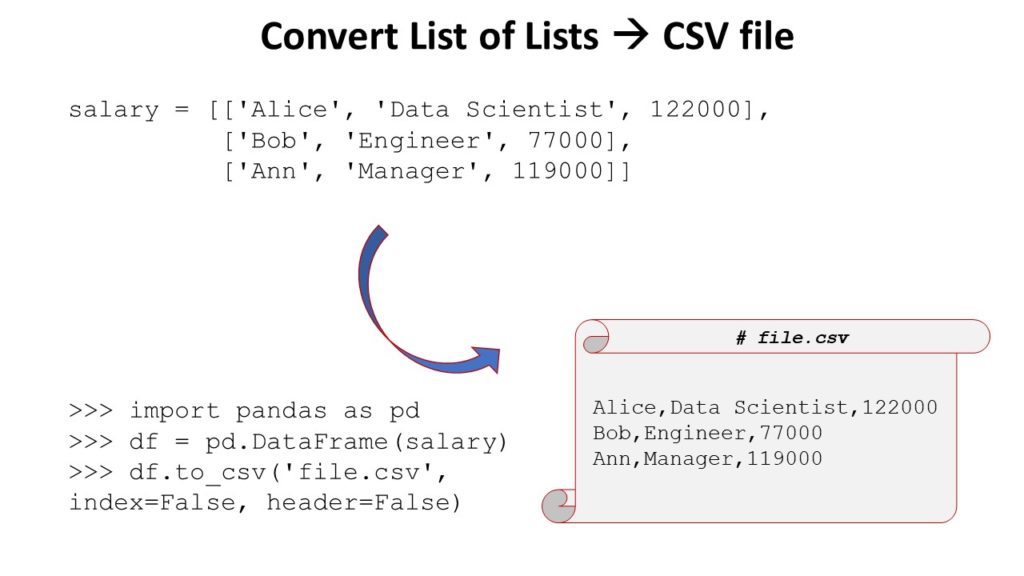
my_string = '''a,b,c
1,2,3
9,8,7'''

πŸ’¬ Question: How to convert the string to a CSV file in Python?

The desired output is the CSV file:

'my_file.csv':

a,b,c
1,2,3
9,8,7

Simple Vanilla Python Solution

To convert a multi-line string with comma-separated values to a CSV file in Python, simply write the string in a file (e.g., with the name 'my_file.csv') without further modification.

This works if the string is already in the correct CSV format with values separated by commas.

The following code uses the open() function and the file.write() functions to write the multi-line string to a file without modification.

my_string = '''a,b,c
1,2,3
9,8,7''' with open('my_file.csv', 'w') as out: out.write(my_string)

The result is a file 'my_file.csv' with the following contents:

a,b,c
1,2,3
9,8,7

Parsing and Modifying Text to CSV

The string may not be in the correct CSV format.

For example, you may want to convert any of the following strings to a CSV file—their format is not yet ready for writing it directly in a comma-separated file (CSV):

  1. Example 1: 'abc;123;987'
  2. Example 2: 'abc 123 987'
  3. Example 3: 'a=b=c 1=2=3 9=8=7'

To parse such a string and modify it before writing it in a file 'my_file.csv', you can use the string.replace() and string.split() methods to make sure that each value is separated by a comma and each row has its own line.

Let’s go over each of those examples to see how to parse the string effectively to bring it into the CSV format:

Example 1

# Example 1:
my_string = 'abc;123;987' with open('my_file.csv', 'w') as out: lines = [','.join(line) for line in my_string.split(';')] my_string = '\n'.join(lines) out.write(my_string)

I’ve higlighted the two code lines that convert the string to the CSV format.

  • The first highlighted line uses list comprehension to create a list of three lines, each interleaved with a comma.
  • The second highlighted line uses the string.join() function to bring those together to a CSV format that can be written into the output file.

The output file 'my_file.csv' contains the same CSV formatted text:

a,b,c
1,2,3
9,8,7

Example 2

The following example is the same as the previous code snippet, only that the empty spaces ' ' in the input string should be converted to new lines to obtain the final CSV:

# Example 2:
my_string = 'abc 123 987' with open('my_file.csv', 'w') as out: lines = [','.join(line) for line in my_string.split(' ')] my_string = '\n'.join(lines) out.write(my_string)

The output file 'my_file.csv' contains the same CSV formatted text:

a,b,c
1,2,3
9,8,7

Example 3

If the comma-separated values are not yet comma-separated (e.g., they may be semicolon-separated 'a;b;c'), you can use the string.replace() method to replace the symbols accordingly.

This is shown in the following example:

# Example 3:
my_string = 'a=b=c 1=2=3 9=8=7' with open('my_file.csv', 'w') as out: my_string = my_string.replace('=', ',').replace(' ', '\n') out.write(my_string)

Thanks for reading this article! I appreciate the time you took to learn Python with me.

If you’re interested in writing more concise code, feel free to check out my one-liner book here:

Python One-Liners Book: Master the Single Line First!

Python programmers will improve their computer science skills with these useful one-liners.

Python One-Liners

Python One-Liners will teach you how to read and write “one-liners”: concise statements of useful functionality packed into a single line of code. You’ll learn how to systematically unpack and understand any line of Python code, and write eloquent, powerfully compressed Python like an expert.

The book’s five chapters cover (1) tips and tricks, (2) regular expressions, (3) machine learning, (4) core data science topics, and (5) useful algorithms.

Detailed explanations of one-liners introduce key computer science concepts and boost your coding and analytical skills. You’ll learn about advanced Python features such as list comprehension, slicing, lambda functions, regular expressions, map and reduce functions, and slice assignments.

You’ll also learn how to:

  • Leverage data structures to solve real-world problems, like using Boolean indexing to find cities with above-average pollution
  • Use NumPy basics such as array, shape, axis, type, broadcasting, advanced indexing, slicing, sorting, searching, aggregating, and statistics
  • Calculate basic statistics of multidimensional data arrays and the K-Means algorithms for unsupervised learning
  • Create more advanced regular expressions using grouping and named groups, negative lookaheads, escaped characters, whitespaces, character sets (and negative characters sets), and greedy/nongreedy operators
  • Understand a wide range of computer science topics, including anagrams, palindromes, supersets, permutations, factorials, prime numbers, Fibonacci numbers, obfuscation, searching, and algorithmic sorting

By the end of the book, you’ll know how to write Python at its most refined, and create concise, beautiful pieces of “Python art” in merely a single line.

Get your Python One-Liners on Amazon!!

Posted on Leave a comment

The Ultimate Guide on Converting a CSV in Python

4/5 – (1 vote)

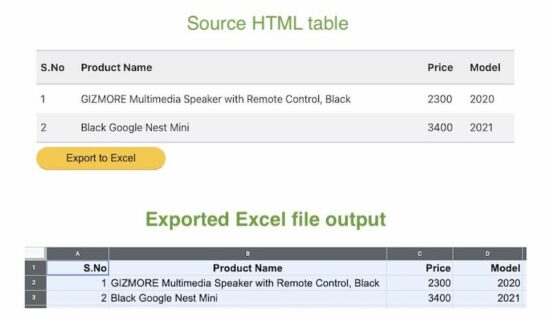
🐍 Abstract: In this article, we’ll quickly overview the best method, respectively, to convert a CSV file to JSON, Excel, dictionary, Parquet, list, list of lists, list of tuples, text file, DataFrame, XML, NumPy array, and list of dictionaries.

In this article, you’ve learned the best ways to perform the following conversions (click to read more):

How to Convert CSV to JSON in Python?

You can convert a CSV file to a JSON file by using the following five steps:

  1. Import the csv and json libraries
  2. Open the CSV as a file object in reading mode using the open(path_to_csv, 'r') function in a context manager (=with environment).
  3. Load the CSV content into Python using the csv.DictReader(fobj) and pass the file object just created.
  4. Iterate over each row and update a newly-created dictionary my_json using one of the column values as key: my_json[key] = row
  5. Store the my_json dictionary data in a JSON file using the json.dumps(my_json) function.
import csv
import json csv_file = 'my_file.csv'
json_file = 'my_file.json' my_json = {}
with open(csv_file, 'r') as fobj: reader = csv.DictReader(fobj) for row in reader: # Use one of the CSV column names as a key key = row['Name'] my_json[key] = row with open(json_file,'w') as fobj: fobj.write(json.dumps(my_json, indent=2))

Input CSV File:

Name,Job,Age,Income
Alice,Programmer,23,110000
Bob,Executive,34,90000
Carl,Sales,45,50000

Output JSON File:

{ "Alice": { "Name": "Alice", "Job": "Programmer", "Age": "23", "Income": "110000" }, "Bob": { "Name": "Bob", "Job": "Executive", "Age": "34", "Income": "90000" }, "Carl": { "Name": "Carl", "Job": "Sales", "Age": "45", "Income": "50000" }
}

There are many more details to it, so if this didn’t answer your question yet, go here:

🌍 Learn More: Feel free to learn more about this conversion goal in our full guide on the Finxter blog with multiple CSV conversion methods and step-by-step explanations.

How to Convert CSV to Excel (XLSX) in Python?

The most pythonic way to convert a .csv to an .xlsx (Excel) in Python is to use the Pandas library.

  1. Install the pandas library with pip install pandas
  2. Install the openpyxl library that is used internally by pandas with pip install openpyxl
  3. Import the pandas libray with import pandas as pd
  4. Read the CSV file into a DataFrame df by using the expression df = pd.read_csv('my_file.csv')
  5. Store the DataFrame in an Excel file by calling df.to_excel('my_file.xlsx', index=None, header=True)
import pandas as pd df = pd.read_csv('my_file.csv')
df.to_excel('my_file.xlsx', index=None, header=True)

Note that there are many ways to customize the to_excel() function in case

  • you don’t need a header line,
  • you want to fix the first line in the Excel file,
  • you want to format the cells as numbers instead of strings, or
  • you have an index column in the original CSV and want to consider it in the Excel file too.

🌍 Learn More: Feel free to learn more about this conversion goal in our full guide on the Finxter blog with multiple CSV conversion methods and step-by-step explanations.

How to Convert a CSV to a Dictionary in Python?

The best way to convert a CSV file to a Python dictionary is to create a CSV file object f using open("my_file.csv") and pass it in the csv.DictReader(f) method. The return value is an iterable of dictionaries, one per row in the CSV file, that maps the column header from the first row to the specific row value.

import csv csv_filename = 'my_file.csv' with open(csv_filename) as f: reader = csv.DictReader(f) for row in reader: print(row)

🌍 Learn More: Feel free to learn more about this conversion goal in our full guide on the Finxter blog with multiple CSV conversion methods and step-by-step explanations.

How to Convert a CSV to a Parquet Format in Python?

Here’s a step-by-step approach to reading a CSV and converting its contents to a Parquet file using the Pandas library:

  • Step 1: Run pip install pandas if the module is not already installed in your environment.
  • Step 2: Run pip install pyarrow to install pyarrow module
  • Step 3: Run pip install fastparquet to install the fastparquet module
  • Step 4: import pandas using import pandas as pd
  • Step 5: Read the CSV file into a DataFrame using df = pd.read_csv('my_file.csv').
  • Step 6: Write the Parquet file using df.to_parquet('my_file.parquet')

The code snippet to convert a CSV file to a Parquet file is quite simple (steps 4-6):

import pandas as pd
df = pd.read_csv('my_file.csv')
df.to_parquet('my_file.parquet')

🌍 Learn More: Feel free to learn more about this conversion goal in our full guide on the Finxter blog with multiple CSV conversion methods and step-by-step explanations.

How to Convert a CSV to a List in Python?

Here’s the code to convert that CSV file to a list of dictionaries, one dictionary per row by using the csv.DictReader(file) function:

import csv csv_filename = 'my_file.csv' with open(csv_filename) as f: reader = csv.DictReader(f) lst = list(*reader)

🌍 Learn More: Feel free to learn more about this conversion goal in our full guide on the Finxter blog with multiple CSV conversion methods and step-by-step explanations.

How to Convert a CSV to a List of Lists in Python?

To convert a CSV file 'my_file.csv' into a list of lists in Python, use the csv.reader(file_obj) method to create a CSV file reader. Then convert the resulting object to a list using the list() constructor.

import csv csv_filename = 'my_file.csv' with open(csv_filename) as f: reader = csv.reader(f) lst = list(reader)

Output:

print(lst)
# [['9', '8', '7'], ['6', '5', '4'], ['3', '2', '1']]

🌍 Learn More: Feel free to learn more about this conversion goal in our full guide on the Finxter blog with multiple CSV conversion methods and step-by-step explanations.

How to Convert a CSV to a List of Tuples in Python?

To convert a CSV file 'my_file.csv' into a list of tuples in Python, use csv.reader(file_obj) to create a CSV file reader that holds an iterable of lists, one per row. Now, use the list(tuple(line) for line in reader) expression with a generator expression to convert each inner list to a tuple.

Here’s a simple example that converts our CSV file to a list of tuples using this approach:

import csv csv_filename = 'my_file.csv' with open(csv_filename) as f: reader = csv.reader(f) lst = list(tuple(line) for line in reader)

Output:

print(lst)
# [('9', '8', '7'), ('6', '5', '4'), ('3', '2', '1')]

🌍 Learn More: Feel free to learn more about this conversion goal in our full guide on the Finxter blog with multiple CSV conversion methods and step-by-step explanations.

How to Convert a CSV to a Text File in Python?

If you want to keep the content (including the delimiter ',') in the CSV file unmodified, the conversion is simple: read the .csv file and write its content into a new .txt file using the open(), read(), and write() functions without importing any library.

In other words, perform the three steps to write a CSV to a TXT file unmodified:

  1. Open the CSV file in reading mode and the TXT file in writing mode.
  2. Read the CSV file and store it in a variable.
  3. Write the content into the TXT file.

Here’s the code snippet that solves our basic challenge:

# 1. Open the CSV file in reading mode and the TXT file in writing mode
with open('my_file.csv', 'r') as f_in, open('my_file.txt', 'w') as f_out: # 2. Read the CSV file and store in variable content = f_in.read() # 3. Write the content into the TXT file f_out.write(content)

🌍 Learn More: Feel free to learn more about this conversion goal in our full guide on the Finxter blog with multiple CSV conversion methods and step-by-step explanations.

How to Convert a CSV to a Pandas DataFrame in Python?

To import a given CSV file into a newly-created Pandas DataFrame, use the pd.read_csv('my_file.csv') function that returns a DataFrame created with the content in the CSV file 'my_file.csv'.

Here’s a quick and generic code snippet showcasing this approach:

import pandas as pd
df = pd.read_csv('my_file.csv')
print(df)

Output:

 Name Job Age Income
0 Alice Programmer 23 110000
1 Bob Executive 34 90000
2 Carl Sales 45 50000

🌍 Learn More: Feel free to learn more about this conversion goal in our full guide on the Finxter blog with multiple CSV conversion methods and step-by-step explanations.

How to Convert a CSV to an XML in Python?

You can convert a CSV to an XML using the following approach:

  • Read the whole CSV file into your Python script.
  • Store the first row as header data that is needed to name your custom XML tags (e.g., <Name>, <Job>, <Age>, and <Income> in our example).
  • Create a function convert_row() that converts each row separately to an XML representation of that row using basic string formatting.
  • Iterate over the data row-wise using csv.reader() and convert each CSV row to XML using your function convert_row().

Here’s the code:

# Convert CSV file to XML string
import csv filename = 'my_file.csv' def convert_row(headers, row): s = f'<row id="{row[0]}">\n' for header, item in zip(headers, row): s += f' <{header}>' + f'{item}' + f'</{header}>\n' return s + '</row>' with open(filename, 'r') as f: r = csv.reader(f) headers = next(r) xml = '<data>\n' for row in r: xml += convert_row(headers, row) + '\n' xml += '</data>' print(xml)

🌍 Learn More: Feel free to learn more about this conversion goal in our full guide on the Finxter blog with multiple CSV conversion methods and step-by-step explanations.

How to Convert a CSV to a NumPy Array in Python?

You can convert a CSV file to a NumPy array simply by calling np.loadtxt() with two arguments: the filename and the delimiter string. For example, the expression np.loadtxt('my_file.csv', delimiter=',') returns a NumPy array from the 'my_file.csv' with delimiter symbols ','.

Here’s an example:

import numpy as np array = np.loadtxt('my_file.csv', delimiter=',')
print(array)

Output:

[[9. 8. 7.] [6. 5. 4.] [3. 2. 1.]]

🌍 Learn More: Feel free to learn more about this conversion goal in our full guide on the Finxter blog with multiple CSV conversion methods and step-by-step explanations.

How to Convert a CSV to a List of Dictionaries?

Convert a CSV file to a list of Python dictionaries in three steps:

  1. Create a CSV file object f using open("my_file.csv") and pass it in the csv.DictReader(f) method.
  2. The return value is an iterable of dictionaries, one per row in the CSV file. Each dictionary maps the column header from the first row to the specific row value.
  3. As the last step, convert the iterable of dictionaries to a list using the Python built-in list() function.

Here’s the code to convert that CSV file to a list of dictionaries, one dictionary per row by using the csv.DictReader(file) function:

import csv csv_filename = 'my_file.csv' with open(csv_filename) as f: reader = csv.DictReader(f) lst = list(*reader)

🌍 Learn More: Feel free to learn more about this conversion goal in our full guide on the Finxter blog with multiple CSV conversion methods and step-by-step explanations.

Summary

You can find a more detailed article on each topic in the following table:

Goal Conversion Full Article
Python CSV to JSON https://blog.finxter.com/convert-csv-to-json-in-python/
Python CSV to Excel (.xlsx) https://blog.finxter.com/convert-csv-to-excel-xlsx-in-python/
Python CSV to Dictionary https://blog.finxter.com/convert-csv-to-dictionary-in-python/
Python CSV to Parquet https://blog.finxter.com/python-convert-csv-to-parquet/
Python CSV to List https://blog.finxter.com/python-convert-csv-to-list/
Python CSV to List of Lists https://blog.finxter.com/python-convert-csv-to-list-of-lists/
Python CSV to List of Tuples https://blog.finxter.com/convert-csv-to-list-of-tuples-in-python/
Python CSV to Text File (.txt) https://blog.finxter.com/python-convert-csv-to-text-file-csv-to-txt/
Python CSV to DataFrame (Pandas) https://blog.finxter.com/read-a-csv-file-to-a-pandas-dataframe/
Python CSV to XML File (.xml) https://blog.finxter.com/csv-to-xml-how-to-convert-in-python/
Python CSV to NumPy Array (ndarray) https://blog.finxter.com/how-to-convert-a-csv-to-numpy-array-in-python/
Python CSV to List of Dictionaries https://blog.finxter.com/python-convert-csv-to-list-of-dictionaries/

Feel free to check out the Finxter email academy to keep improving your coding skills. We have cheat sheets!

Programmer Humor

It’s hard to train deep learning algorithms when most of the positive feedback they get is sarcastic. — from xkcd
Posted on Leave a comment

[List] How to Check Package Version in Python

Rate this post

If you’re short on time, the simple solution is to run the following command in your shell/terminal/CMD/PowerShell to check the version of library xxx:

pip show xxx

But many more interesting ways to check package versions may be useful for you!


The following table refers to a list of articles to help you check the package/library/module version installed in your environment. You can use the STRG+F search hotkey to find the relevant package name you want to check the package version for.

Library URL
abc https://blog.finxter.com/how-to-check-abc-package-version-in-python/
aifc https://blog.finxter.com/how-to-check-aifc-package-version-in-python/
argparse https://blog.finxter.com/how-to-check-argparse-package-version-in-python/
array https://blog.finxter.com/how-to-check-array-package-version-in-python/
ast https://blog.finxter.com/how-to-check-ast-package-version-in-python/
asynchat https://blog.finxter.com/how-to-check-asynchat-package-version-in-python/
asyncio https://blog.finxter.com/how-to-check-asyncio-package-version-in-python/
asyncore https://blog.finxter.com/how-to-check-asyncore-package-version-in-python/
atexit https://blog.finxter.com/how-to-check-atexit-package-version-in-python/
audioop https://blog.finxter.com/how-to-check-audioop-package-version-in-python/
base64 https://blog.finxter.com/how-to-check-base64-package-version-in-python/
bdb https://blog.finxter.com/how-to-check-bdb-package-version-in-python/
binascii https://blog.finxter.com/how-to-check-binascii-package-version-in-python/
binhex https://blog.finxter.com/how-to-check-binhex-package-version-in-python/
bisect https://blog.finxter.com/how-to-check-bisect-package-version-in-python/
builtins https://blog.finxter.com/how-to-check-builtins-package-version-in-python/
bz2 https://blog.finxter.com/how-to-check-bz2-package-version-in-python/
calendar https://blog.finxter.com/how-to-check-calendar-package-version-in-python/
cgi https://blog.finxter.com/how-to-check-cgi-package-version-in-python/
cgitb https://blog.finxter.com/how-to-check-cgitb-package-version-in-python/
chunk https://blog.finxter.com/how-to-check-chunk-package-version-in-python/
cmath https://blog.finxter.com/how-to-check-cmath-package-version-in-python/
cmd https://blog.finxter.com/how-to-check-cmd-package-version-in-python/
code https://blog.finxter.com/how-to-check-code-package-version-in-python/
codecs https://blog.finxter.com/how-to-check-codecs-package-version-in-python/
codeop https://blog.finxter.com/how-to-check-codeop-package-version-in-python/
collections https://blog.finxter.com/how-to-check-collections-package-version-in-python/
colorsys https://blog.finxter.com/how-to-check-colorsys-package-version-in-python/
compileall https://blog.finxter.com/how-to-check-compileall-package-version-in-python/
concurrent https://blog.finxter.com/how-to-check-concurrent-package-version-in-python/
configparser https://blog.finxter.com/how-to-check-configparser-package-version-in-python/
contextlib https://blog.finxter.com/how-to-check-contextlib-package-version-in-python/
contextvars https://blog.finxter.com/how-to-check-contextvars-package-version-in-python/
copy https://blog.finxter.com/how-to-check-copy-package-version-in-python/
copyreg https://blog.finxter.com/how-to-check-copyreg-package-version-in-python/
cProfile https://blog.finxter.com/how-to-check-cProfile-package-version-in-python/
crypt https://blog.finxter.com/how-to-check-crypt-package-version-in-python/
csv https://blog.finxter.com/how-to-check-csv-package-version-in-python/
ctypes https://blog.finxter.com/how-to-check-ctypes-package-version-in-python/
curses https://blog.finxter.com/how-to-check-curses-package-version-in-python/
dataclasses https://blog.finxter.com/how-to-check-dataclasses-package-version-in-python/
datetime https://blog.finxter.com/how-to-check-datetime-package-version-in-python/
dbm https://blog.finxter.com/how-to-check-dbm-package-version-in-python/
decimal https://blog.finxter.com/how-to-check-decimal-package-version-in-python/
difflib https://blog.finxter.com/how-to-check-difflib-package-version-in-python/
dis https://blog.finxter.com/how-to-check-dis-package-version-in-python/
distutils https://blog.finxter.com/how-to-check-distutils-package-version-in-python/
doctest https://blog.finxter.com/how-to-check-doctest-package-version-in-python/
email https://blog.finxter.com/how-to-check-email-package-version-in-python/
encodings https://blog.finxter.com/how-to-check-encodings-package-version-in-python/
ensurepip https://blog.finxter.com/how-to-check-ensurepip-package-version-in-python/
enum https://blog.finxter.com/how-to-check-enum-package-version-in-python/
errno https://blog.finxter.com/how-to-check-errno-package-version-in-python/
faulthandler https://blog.finxter.com/how-to-check-faulthandler-package-version-in-python/
fcntl https://blog.finxter.com/how-to-check-fcntl-package-version-in-python/
filecmp https://blog.finxter.com/how-to-check-filecmp-package-version-in-python/
fileinput https://blog.finxter.com/how-to-check-fileinput-package-version-in-python/
fnmatch https://blog.finxter.com/how-to-check-fnmatch-package-version-in-python/
fractions https://blog.finxter.com/how-to-check-fractions-package-version-in-python/
ftplib https://blog.finxter.com/how-to-check-ftplib-package-version-in-python/
functools https://blog.finxter.com/how-to-check-functools-package-version-in-python/
gc https://blog.finxter.com/how-to-check-gc-package-version-in-python/
getopt https://blog.finxter.com/how-to-check-getopt-package-version-in-python/
getpass https://blog.finxter.com/how-to-check-getpass-package-version-in-python/
gettext https://blog.finxter.com/how-to-check-gettext-package-version-in-python/
glob https://blog.finxter.com/how-to-check-glob-package-version-in-python/
graphlib https://blog.finxter.com/how-to-check-graphlib-package-version-in-python/
grp https://blog.finxter.com/how-to-check-grp-package-version-in-python/
gzip https://blog.finxter.com/how-to-check-gzip-package-version-in-python/
hashlib https://blog.finxter.com/how-to-check-hashlib-package-version-in-python/
heapq https://blog.finxter.com/how-to-check-heapq-package-version-in-python/
hmac https://blog.finxter.com/how-to-check-hmac-package-version-in-python/
html https://blog.finxter.com/how-to-check-html-package-version-in-python/
http https://blog.finxter.com/how-to-check-http-package-version-in-python/
imaplib https://blog.finxter.com/how-to-check-imaplib-package-version-in-python/
imghdr https://blog.finxter.com/how-to-check-imghdr-package-version-in-python/
imp https://blog.finxter.com/how-to-check-imp-package-version-in-python/
importlib https://blog.finxter.com/how-to-check-importlib-package-version-in-python/
inspect https://blog.finxter.com/how-to-check-inspect-package-version-in-python/
io https://blog.finxter.com/how-to-check-io-package-version-in-python/
ipaddress https://blog.finxter.com/how-to-check-ipaddress-package-version-in-python/
itertools https://blog.finxter.com/how-to-check-itertools-package-version-in-python/
json https://blog.finxter.com/how-to-check-json-package-version-in-python/
keyword https://blog.finxter.com/how-to-check-keyword-package-version-in-python/
lib2to3 https://blog.finxter.com/how-to-check-lib2to3-package-version-in-python/
linecache https://blog.finxter.com/how-to-check-linecache-package-version-in-python/
locale https://blog.finxter.com/how-to-check-locale-package-version-in-python/
logging https://blog.finxter.com/how-to-check-logging-package-version-in-python/
lzma https://blog.finxter.com/how-to-check-lzma-package-version-in-python/
mailbox https://blog.finxter.com/how-to-check-mailbox-package-version-in-python/
mailcap https://blog.finxter.com/how-to-check-mailcap-package-version-in-python/
marshal https://blog.finxter.com/how-to-check-marshal-package-version-in-python/
math https://blog.finxter.com/how-to-check-math-package-version-in-python/
mimetypes https://blog.finxter.com/how-to-check-mimetypes-package-version-in-python/
mmap https://blog.finxter.com/how-to-check-mmap-package-version-in-python/
modulefinder https://blog.finxter.com/how-to-check-modulefinder-package-version-in-python/
msilib https://blog.finxter.com/how-to-check-msilib-package-version-in-python/
msvcrt https://blog.finxter.com/how-to-check-msvcrt-package-version-in-python/
multiprocessing https://blog.finxter.com/how-to-check-multiprocessing-package-version-in-python/
netrc https://blog.finxter.com/how-to-check-netrc-package-version-in-python/
nis https://blog.finxter.com/how-to-check-nis-package-version-in-python/
nntplib https://blog.finxter.com/how-to-check-nntplib-package-version-in-python/
numbers https://blog.finxter.com/how-to-check-numbers-package-version-in-python/
operator https://blog.finxter.com/how-to-check-operator-package-version-in-python/
optparse https://blog.finxter.com/how-to-check-optparse-package-version-in-python/
os https://blog.finxter.com/how-to-check-os-package-version-in-python/
ossaudiodev https://blog.finxter.com/how-to-check-ossaudiodev-package-version-in-python/
pathlib https://blog.finxter.com/how-to-check-pathlib-package-version-in-python/
pdb https://blog.finxter.com/how-to-check-pdb-package-version-in-python/
pickle https://blog.finxter.com/how-to-check-pickle-package-version-in-python/
pickletools https://blog.finxter.com/how-to-check-pickletools-package-version-in-python/
pipes https://blog.finxter.com/how-to-check-pipes-package-version-in-python/
pkgutil https://blog.finxter.com/how-to-check-pkgutil-package-version-in-python/
platform https://blog.finxter.com/how-to-check-platform-package-version-in-python/
plistlib https://blog.finxter.com/how-to-check-plistlib-package-version-in-python/
poplib https://blog.finxter.com/how-to-check-poplib-package-version-in-python/
posix https://blog.finxter.com/how-to-check-posix-package-version-in-python/
pprint https://blog.finxter.com/how-to-check-pprint-package-version-in-python/
profile https://blog.finxter.com/how-to-check-profile-package-version-in-python/
pstats https://blog.finxter.com/how-to-check-pstats-package-version-in-python/
pty https://blog.finxter.com/how-to-check-pty-package-version-in-python/
pwd https://blog.finxter.com/how-to-check-pwd-package-version-in-python/
py_compile https://blog.finxter.com/how-to-check-py_compile-package-version-in-python/
pyclbr https://blog.finxter.com/how-to-check-pyclbr-package-version-in-python/
pydoc https://blog.finxter.com/how-to-check-pydoc-package-version-in-python/
queue https://blog.finxter.com/how-to-check-queue-package-version-in-python/
quopri https://blog.finxter.com/how-to-check-quopri-package-version-in-python/
random https://blog.finxter.com/how-to-check-random-package-version-in-python/
re https://blog.finxter.com/how-to-check-re-package-version-in-python/
regex https://blog.finxter.com/how-to-check-regex-package-version-in-python/
matplotlib https://blog.finxter.com/how-to-check-matplotlib-package-version-in-python/
seaborn https://blog.finxter.com/how-to-check-seaborn-package-version-in-python/
readline https://blog.finxter.com/how-to-check-readline-package-version-in-python/
reprlib https://blog.finxter.com/how-to-check-reprlib-package-version-in-python/
resource https://blog.finxter.com/how-to-check-resource-package-version-in-python/
rlcompleter https://blog.finxter.com/how-to-check-rlcompleter-package-version-in-python/
runpy https://blog.finxter.com/how-to-check-runpy-package-version-in-python/
sched https://blog.finxter.com/how-to-check-sched-package-version-in-python/
secrets https://blog.finxter.com/how-to-check-secrets-package-version-in-python/
select https://blog.finxter.com/how-to-check-select-package-version-in-python/
selectors https://blog.finxter.com/how-to-check-selectors-package-version-in-python/
shelve https://blog.finxter.com/how-to-check-shelve-package-version-in-python/
shlex https://blog.finxter.com/how-to-check-shlex-package-version-in-python/
shutil https://blog.finxter.com/how-to-check-shutil-package-version-in-python/
signal https://blog.finxter.com/how-to-check-signal-package-version-in-python/
site https://blog.finxter.com/how-to-check-site-package-version-in-python/
smtpd https://blog.finxter.com/how-to-check-smtpd-package-version-in-python/
smtplib https://blog.finxter.com/how-to-check-smtplib-package-version-in-python/
sndhdr https://blog.finxter.com/how-to-check-sndhdr-package-version-in-python/
socket https://blog.finxter.com/how-to-check-socket-package-version-in-python/
socketserver https://blog.finxter.com/how-to-check-socketserver-package-version-in-python/
spwd https://blog.finxter.com/how-to-check-spwd-package-version-in-python/
sqlite3 https://blog.finxter.com/how-to-check-sqlite3-package-version-in-python/
ssl https://blog.finxter.com/how-to-check-ssl-package-version-in-python/
stat https://blog.finxter.com/how-to-check-stat-package-version-in-python/
statistics https://blog.finxter.com/how-to-check-statistics-package-version-in-python/
string https://blog.finxter.com/how-to-check-string-package-version-in-python/
stringprep https://blog.finxter.com/how-to-check-stringprep-package-version-in-python/
struct https://blog.finxter.com/how-to-check-struct-package-version-in-python/
subprocess https://blog.finxter.com/how-to-check-subprocess-package-version-in-python/
sunau https://blog.finxter.com/how-to-check-sunau-package-version-in-python/
symtable https://blog.finxter.com/how-to-check-symtable-package-version-in-python/
sys https://blog.finxter.com/how-to-check-sys-package-version-in-python/
sysconfig https://blog.finxter.com/how-to-check-sysconfig-package-version-in-python/
syslog https://blog.finxter.com/how-to-check-syslog-package-version-in-python/
tabnanny https://blog.finxter.com/how-to-check-tabnanny-package-version-in-python/
tarfile https://blog.finxter.com/how-to-check-tarfile-package-version-in-python/
telnetlib https://blog.finxter.com/how-to-check-telnetlib-package-version-in-python/
tempfile https://blog.finxter.com/how-to-check-tempfile-package-version-in-python/
termios https://blog.finxter.com/how-to-check-termios-package-version-in-python/
test https://blog.finxter.com/how-to-check-test-package-version-in-python/
textwrap https://blog.finxter.com/how-to-check-textwrap-package-version-in-python/
threading https://blog.finxter.com/how-to-check-threading-package-version-in-python/
time https://blog.finxter.com/how-to-check-time-package-version-in-python/
timeit https://blog.finxter.com/how-to-check-timeit-package-version-in-python/
tkinter https://blog.finxter.com/how-to-check-tkinter-package-version-in-python/
token https://blog.finxter.com/how-to-check-token-package-version-in-python/
tokenize https://blog.finxter.com/how-to-check-tokenize-package-version-in-python/
trace https://blog.finxter.com/how-to-check-trace-package-version-in-python/
traceback https://blog.finxter.com/how-to-check-traceback-package-version-in-python/
tracemalloc https://blog.finxter.com/how-to-check-tracemalloc-package-version-in-python/
tty https://blog.finxter.com/how-to-check-tty-package-version-in-python/
turtle https://blog.finxter.com/how-to-check-turtle-package-version-in-python/
turtledemo https://blog.finxter.com/how-to-check-turtledemo-package-version-in-python/
types https://blog.finxter.com/how-to-check-types-package-version-in-python/
typing https://blog.finxter.com/how-to-check-typing-package-version-in-python/
unicodedata https://blog.finxter.com/how-to-check-unicodedata-package-version-in-python/
unittest https://blog.finxter.com/how-to-check-unittest-package-version-in-python/
urllib https://blog.finxter.com/how-to-check-urllib-package-version-in-python/
uu https://blog.finxter.com/how-to-check-uu-package-version-in-python/
uuid https://blog.finxter.com/how-to-check-uuid-package-version-in-python/
venv https://blog.finxter.com/how-to-check-venv-package-version-in-python/
warnings https://blog.finxter.com/how-to-check-warnings-package-version-in-python/
wave https://blog.finxter.com/how-to-check-wave-package-version-in-python/
weakref https://blog.finxter.com/how-to-check-weakref-package-version-in-python/
webbrowser https://blog.finxter.com/how-to-check-webbrowser-package-version-in-python/
winreg https://blog.finxter.com/how-to-check-winreg-package-version-in-python/
winsound https://blog.finxter.com/how-to-check-winsound-package-version-in-python/
wsgiref https://blog.finxter.com/how-to-check-wsgiref-package-version-in-python/
xdrlib https://blog.finxter.com/how-to-check-xdrlib-package-version-in-python/
xml https://blog.finxter.com/how-to-check-xml-package-version-in-python/
xmlrpc https://blog.finxter.com/how-to-check-xmlrpc-package-version-in-python/
zipapp https://blog.finxter.com/how-to-check-zipapp-package-version-in-python/
zipfile https://blog.finxter.com/how-to-check-zipfile-package-version-in-python/
zipimport https://blog.finxter.com/how-to-check-zipimport-package-version-in-python/
zlib https://blog.finxter.com/how-to-check-zlib-package-version-in-python/
zoneinfo https://blog.finxter.com/how-to-check-zoneinfo-package-version-in-python/
boto3 https://blog.finxter.com/how-to-check-boto3-package-version-in-python/
botocore https://blog.finxter.com/how-to-check-botocore-package-version-in-python/
urllib3 https://blog.finxter.com/how-to-check-urllib3-package-version-in-python/
setuptools https://blog.finxter.com/how-to-check-setuptools-package-version-in-python/
requests https://blog.finxter.com/how-to-check-requests-package-version-in-python/
s3transfer https://blog.finxter.com/how-to-check-s3transfer-package-version-in-python/
six https://blog.finxter.com/how-to-check-six-package-version-in-python/
python-dateutil https://blog.finxter.com/how-to-check-python-dateutil-package-version-in-python/
certifi https://blog.finxter.com/how-to-check-certifi-package-version-in-python/
idna https://blog.finxter.com/how-to-check-idna-package-version-in-python/
pyyaml https://blog.finxter.com/how-to-check-pyyaml-package-version-in-python/
typing-extensions https://blog.finxter.com/how-to-check-typing-extensions-package-version-in-python/
charset-normalizer https://blog.finxter.com/how-to-check-charset-normalizer-package-version-in-python/
pip https://blog.finxter.com/how-to-check-pip-package-version-in-python/
numpy https://blog.finxter.com/how-to-check-numpy-package-version-in-python/
google-api-core https://blog.finxter.com/how-to-check-google-api-core-package-version-in-python/
wheel https://blog.finxter.com/how-to-check-wheel-package-version-in-python/
cryptography https://blog.finxter.com/how-to-check-cryptography-package-version-in-python/
pyparsing https://blog.finxter.com/how-to-check-pyparsing-package-version-in-python/
packaging https://blog.finxter.com/how-to-check-packaging-package-version-in-python/
jmespath https://blog.finxter.com/how-to-check-jmespath-package-version-in-python/
awscli https://blog.finxter.com/how-to-check-awscli-package-version-in-python/
rsa https://blog.finxter.com/how-to-check-rsa-package-version-in-python/
pyasn1 https://blog.finxter.com/how-to-check-pyasn1-package-version-in-python/
importlib-metadata https://blog.finxter.com/how-to-check-importlib-metadata-package-version-in-python/
zipp https://blog.finxter.com/how-to-check-zipp-package-version-in-python/
pyjwt https://blog.finxter.com/how-to-check-pyjwt-package-version-in-python/
colorama https://blog.finxter.com/how-to-check-colorama-package-version-in-python/
pytz https://blog.finxter.com/how-to-check-pytz-package-version-in-python/
click https://blog.finxter.com/how-to-check-click-package-version-in-python/
pandas https://blog.finxter.com/how-to-check-pandas-package-version-in-python/
protobuf https://blog.finxter.com/how-to-check-protobuf-package-version-in-python/
tensorflow https://blog.finxter.com/how-to-check-tensorflow-package-version-in-python/
attrs https://blog.finxter.com/how-to-check-attrs-package-version-in-python/
cffi https://blog.finxter.com/how-to-check-cffi-package-version-in-python/
oauthlib https://blog.finxter.com/how-to-check-oauthlib-package-version-in-python/
jinja2 https://blog.finxter.com/how-to-check-jinja2-package-version-in-python/
progress https://blog.finxter.com/how-to-check-progress-package-version-in-python/
requests-oauthlib https://blog.finxter.com/how-to-check-requests-oauthlib-package-version-in-python/
markupsafe https://blog.finxter.com/how-to-check-markupsafe-package-version-in-python/
pycparser https://blog.finxter.com/how-to-check-pycparser-package-version-in-python/
docutils https://blog.finxter.com/how-to-check-docutils-package-version-in-python/
google-auth https://blog.finxter.com/how-to-check-google-auth-package-version-in-python/
cachetools https://blog.finxter.com/how-to-check-cachetools-package-version-in-python/
pyasn1-modules https://blog.finxter.com/how-to-check-pyasn1-modules-package-version-in-python/
wrapt https://blog.finxter.com/how-to-check-wrapt-package-version-in-python/
googleapis-common-protos https://blog.finxter.com/how-to-check-googleapis-common-protos-package-version-in-python/
psutil https://blog.finxter.com/how-to-check-psutil-package-version-in-python/
isodate https://blog.finxter.com/how-to-check-isodate-package-version-in-python/
pyarrow https://blog.finxter.com/how-to-check-pyarrow-package-version-in-python/
sqlalchemy https://blog.finxter.com/how-to-check-sqlalchemy-package-version-in-python/
azure-core https://blog.finxter.com/how-to-check-azure-core-package-version-in-python/
lxml https://blog.finxter.com/how-to-check-lxml-package-version-in-python/
chardet https://blog.finxter.com/how-to-check-chardet-package-version-in-python/
tomli https://blog.finxter.com/how-to-check-tomli-package-version-in-python/
msrest https://blog.finxter.com/how-to-check-msrest-package-version-in-python/
async-timeout https://blog.finxter.com/how-to-check-async-timeout-package-version-in-python/
grpcio https://blog.finxter.com/how-to-check-grpcio-package-version-in-python/
decorator https://blog.finxter.com/how-to-check-decorator-package-version-in-python/
aiobotocore https://blog.finxter.com/how-to-check-aiobotocore-package-version-in-python/
werkzeug https://blog.finxter.com/how-to-check-werkzeug-package-version-in-python/
pillow https://blog.finxter.com/how-to-check-pillow-package-version-in-python/
aiohttp https://blog.finxter.com/how-to-check-aiohttp-package-version-in-python/
multidict https://blog.finxter.com/how-to-check-multidict-package-version-in-python/
beautifulsoup4 https://blog.finxter.com/how-to-check-beautifulsoup4-package-version-in-python/
soupsieve https://blog.finxter.com/how-to-check-soupsieve-package-version-in-python/
scipy https://blog.finxter.com/how-to-check-scipy-package-version-in-python/
yarl https://blog.finxter.com/how-to-check-yarl-package-version-in-python/
pygame https://blog.finxter.com/how-to-check-pygame-package-version-in-python/
google-cloud-storage https://blog.finxter.com/how-to-check-google-cloud-storage-package-version-in-python/
py https://blog.finxter.com/how-to-check-py-package-version-in-python/
fsspec https://blog.finxter.com/how-to-check-fsspec-package-version-in-python/
google-cloud-bigquery https://blog.finxter.com/how-to-check-google-cloud-bigquery-package-version-in-python/
importlib-resources https://blog.finxter.com/how-to-check-importlib-resources-package-version-in-python/
pytest https://blog.finxter.com/how-to-check-pytest-package-version-in-python/
pyqt https://blog.finxter.com/how-to-check-pyqt-package-version-in-python/
greenlet https://blog.finxter.com/how-to-check-greenlet-package-version-in-python/
azure-storage-blob https://blog.finxter.com/how-to-check-azure-storage-blob-package-version-in-python/
jsonschema https://blog.finxter.com/how-to-check-jsonschema-package-version-in-python/
pluggy https://blog.finxter.com/how-to-check-pluggy-package-version-in-python/
tqdm https://blog.finxter.com/how-to-check-tqdm-package-version-in-python/
pyopenssl https://blog.finxter.com/how-to-check-pyopenssl-package-version-in-python/
platformdirs https://blog.finxter.com/how-to-check-platformdirs-package-version-in-python/
s3fs https://blog.finxter.com/how-to-check-s3fs-package-version-in-python/
nltk https://blog.finxter.com/how-to-check-nltk-package-version-in-python/
tabulate https://blog.finxter.com/how-to-check-tabulate-package-version-in-python/
frozenlist https://blog.finxter.com/how-to-check-frozenlist-package-version-in-python/
aiosignal https://blog.finxter.com/how-to-check-aiosignal-package-version-in-python/
asn1crypto https://blog.finxter.com/how-to-check-asn1crypto-package-version-in-python/
pyrsistent https://blog.finxter.com/how-to-check-pyrsistent-package-version-in-python/
toml https://blog.finxter.com/how-to-check-toml-package-version-in-python/
filelock https://blog.finxter.com/how-to-check-filelock-package-version-in-python/
flask https://blog.finxter.com/how-to-check-flask-package-version-in-python/
dash https://blog.finxter.com/how-to-check-dash-package-version-in-python/
websocket-client https://blog.finxter.com/how-to-check-websocket-client-package-version-in-python/
google-cloud-core https://blog.finxter.com/how-to-check-google-cloud-core-package-version-in-python/
google-resumable-media https://blog.finxter.com/how-to-check-google-resumable-media-package-version-in-python/
future https://blog.finxter.com/how-to-check-future-package-version-in-python/
azure-common https://blog.finxter.com/how-to-check-azure-common-package-version-in-python/
scikit-learn https://blog.finxter.com/how-to-check-scikit-learn-package-version-in-python/
pygments https://blog.finxter.com/how-to-check-pygments-package-version-in-python/
itsdangerous https://blog.finxter.com/how-to-check-itsdangerous-package-version-in-python/
openpyxl https://blog.finxter.com/how-to-check-openpyxl-package-version-in-python/
et-xmlfile https://blog.finxter.com/how-to-check-et-xmlfile-package-version-in-python/
psycopg2-binary https://blog.finxter.com/how-to-check-psycopg2-binary-package-version-in-python/
iniconfig https://blog.finxter.com/how-to-check-iniconfig-package-version-in-python/
Posted on Leave a comment

Before After Image in Plotly Dash

5/5 – (1 vote)

πŸ’‘ This article will show you how to use the BeforeAfter image component in your Plotly Dash project.


Dash book author Ann just created the following stunning web project visualizing before/after galaxy images from the James Webb Space Telescope in a simple and straightforward Dash app using the BeforeAfter component of the dash-extensions library.

pip install dash-extensions

Before we dive into the code, here’s a screenshot of the stunning interactive dashboard visualization created in the project:

Feel free to visit the live app showing different exciting images from the Hubble and Webb telescopes here:

🌎 Interactive Live App: https://dash-webb-compare.herokuapp.com/

It’s fun to play with it for 5-minutes—the pics from the Universe are stunning! 🐍


You can find the source code here:

πŸ’» Full Source Code: https://github.com/AnnMarieW/webb-compare

The code to produce this easy app can be packed in only ~40 lines Python!

I highlighted the necessary code to create the BeforeAfter component from the dash-extensions package:

from dash import Dash, html
from dash_extensions import BeforeAfter
import dash_mantine_components as dmc app = Dash(__name__) header = html.Div( [ dmc.Title("James Webb Space Telescope", order=1), dmc.Text("First Images -- Before and After -- Hubble vs Webb"), dmc.Space(h="md"), ],
) def make_before_after(before, after): return html.Div( [ dmc.Space(h=40), dmc.Group( [dmc.Text("Hubble"), dmc.Text("Webb")], position="apart", style={"width": 1000}, ), BeforeAfter(before=before, after=after, height=800, width=1000), ], ) tabs = dmc.Tabs( [ dmc.Tab(make_before_after("/assets/webb_deep_field.jpg", "/assets/deep_field.jpg"), label="Galaxy Cluster SMACS 0723"), dmc.Tab(make_before_after("/assets/webb_stephans_quintet.jpg", "/assets/stephans_quintet.jpg"), label="Stephans Quintet"), dmc.Tab(make_before_after("assets/webb_carina.jpg", "/assets/carina.png"), label="Carina Nebula"), dmc.Tab(make_before_after("assets/webb_southern_nebula.jpg", "assets/southern_nebula.jpg"), label="Southern Ring Nebula"), ],
) app.layout = dmc.MantineProvider( dmc.Container([header, tabs]), theme={"colorScheme": "dark"}, withGlobalStyles=True
) if __name__ == "__main__": app.run()

It makes use of the BeforeAfter component and the dash_mantine_components from Plotly Dash.

Adam’s video greatly explains the Before After Image Slider — feel free to watch it and leave a like in the video for his effort educating the Dash community for free with outstanding content:

You can find a tutorial on how to install dash here.

You can find our full book on Python Dash here:

Book Python Dash


If you’re interested in learning more about how to create beautiful dashboard applications in Python, check out our new book Python Dash.

You’ve seen dashboards before; think election result visualizations you can update in real-time, or population maps you can filter by demographic.

With the Python Dash library, you’ll create analytic dashboards that present data in effective, usable, elegant ways in just a few lines of code.

Get the book on NoStarch or Amazon!


Posted on Leave a comment

How to Increment a Dictionary Value

5/5 – (1 vote)

Problem Formulation and Solution Overview

In this article, you’ll learn how to increment a dictionary value in Python.

To make it more fun, we have the following running scenario:

Trinity Bank keeps track of its latest mortgage rates in a Dictionary format. Recently there has been a steady increase in rates. How would Trinity Bank increment/increase the Dictionary value of a selected rate?

mtg_rates = {'30-Year-Fixed': 5.625,
'20-Year-Fixed': 5.250,
'10-Year-Variable': 5.125,
'7-Year-Variable': 5.011,
'5-Year-Variable': 4.625}

πŸ’¬ Question: How would we write code to increment a Dictionary value in Python?

We can accomplish this task by one of the following options:


Method 1: Use Dictionary Key Name

This method passes an existing Dictionary Key Name to access and increment the appropriate Value.

mtg_rates['30-Year-Fixed'] += 1
print(mtg_rates['30-Year-Fixed'])

In this example, the 30-Year-Fixed mortgage rate is referenced by name (mtg_rates['30-Year-Fixed']) and its value is incremented by one (1).

Then, this updated value is saved back to mtg_rates['30-Year-Fixed'] and output to the terminal.

6.625

Method 2: Use Dictionary.get()

This method uses the Dictionary.get() method and passes a Dictionary Key as an argument to retrieve and increment the corresponding Value.

mtg_rates['20-Year-Fixed'] = mtg_rates.get('20-Year-Fixed') + 2
print(mtg_rates['20-Year-Fixed'])

In this example, the 20 Year Fixed mortgage rate is referenced and accessed using (mtg_rates.get('20-Year-Fixed')). This value is then incremented by two (2).

Then, this updated value is saved back to mtg_rates['20-Year-Fixed'] and output to the terminal.

7.25

Method 3: Use Dictionary.update()

This method uses Dictionary.update() to reference the appropriate Key and increment the Value.

new_rate = mtg_rates['10-Year-Variable'] + 3
mtg_rates.update({'10-Year-Variable': new_rate})
print(mtg_rates['10-Year-Variable'])

In this example, the current value of a 10 Year Variable mortgage rate is retrieved, incremented by three (3) and saved to new_rate.

Next, the appropriate Key for the key:value pair is accessed, and the Value is updated to reflect the contents of new_rate and output to the terminal.

8.125

Method 4: Use Unpacking

This method uses Unpacking to increment the Value of a key:value pair.

mtg_rates = {**mtg_rates, '7-Year-Variable': 9.011}
print(mtg_rates)

Above, accesses the 7 Year Variable mortgage rate, increments the rate to the amount indicated (9.011), and outputs it to the terminal.

9.011

Method 5: Use Dictionary Comprehension

This method increments all Mortgage Rates in one fell swoop using Dictionary Comprehension.

new_rates = dict(((key, round(value*1.10, 3)) for key, value in mtg_rates.items()))
print(new_rates)

Above, accesses each mortgage rate in the mtg_rates Dictionary and increments the rate by 1.10. Then, round() is called to round the results down to three (3) decimal places. The result saves to new_rates and output to the terminal.

{'30-Year-Fixed': 6.188, '20-Year-Fixed': 5.775, '10-Year-Variable': 5.638, '7-Year-Variable': 5.512, '5-Year-Variable': 5.088}

Summary

These methods of incrementing a Dictionary Value should give you enough information to select the best one for your coding requirements.

Good Luck & Happy Coding!


Regex Humor

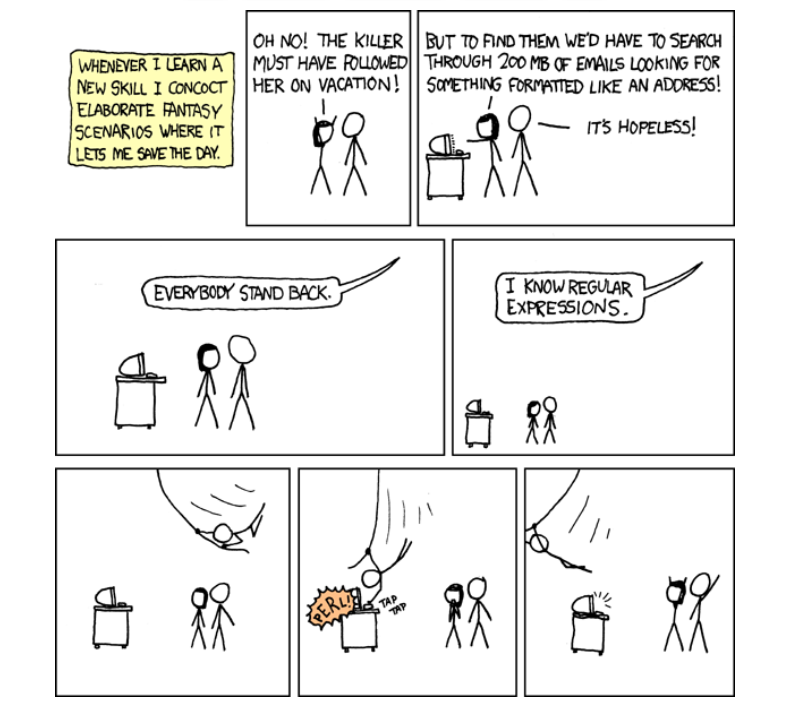
Wait, forgot to escape a space. Wheeeeee[taptaptap]eeeeee. (source)
Posted on Leave a comment

How to Check β€˜future’ Package Version in Python?

5/5 – (2 votes)

In this article, I’ll show you:

πŸ’¬ How to check the version of the Python module (package, library) future? And how to check if future is installed anyways?

These are the eight best ways to check the installed version of the Python module future:

  • Method 1: pip show future
  • Method 2: pip list
  • Method 3: pip list | findstr future
  • Method 4: library.__version__
  • Method 5: importlib.metadata.version
  • Method 6: conda list
  • Method 7: pip freeze
  • Method 8: pip freeze | grep future

Before we go into these ways to check your future version, let’s first quickly understand how versioning works in Python—you’ll be thankful to have spent a few seconds on this topic, believe me!

A Note on Python Version Numbering

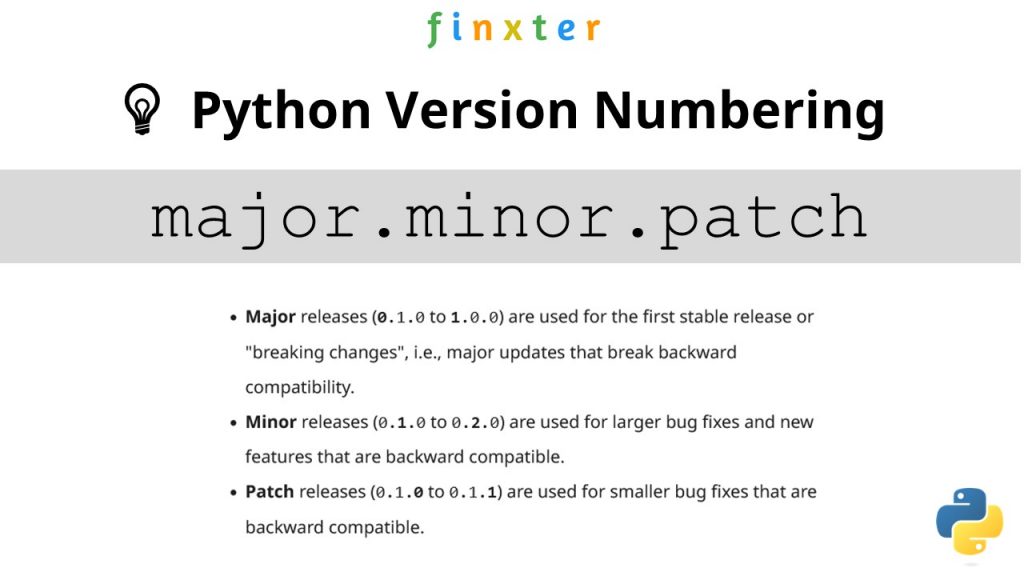
πŸ’‘Python versioning adds a unique identifier to different package versions using semantic versioning. Semantic versioning consists of three numerical units of versioning information in the format major.minor.patch.

Python Version Numbering

In this tutorial, we’ll use the shorthand general version abbreviation like so:

x.y.z

Practical examples would use numerical values for x, y, and z:

  • 1.2.3
  • 4.1.4
  • 1.0.0

This is shorthand for

major.minor.patch
  • Major releases (0.1.0 to 1.0.0) are used for the first stable release or “breaking changes”, i.e., major updates that break backward compatibility.
  • Minor releases (0.1.0 to 0.2.0) are used for larger bug fixes and new features that are backward compatible.
  • Patch releases (0.1.0 to 0.1.1) are used for smaller bug fixes that are backward compatible.

Let’s dive into the meat of this article:

πŸ’¬ Question: How to check the (major, minor, patch) version of future in your current Python environment?

Method 1: pip show

To check which version of the Python library future is installed, run pip show future or pip3 show future in your CMD/Powershell (Windows), or terminal (macOS/Linux/Ubuntu).

This will work if your pip installation is version 1.3 or higher—which is likely to hold in your case because pip 1.3 was released a decade ago in 2013!!

Here’s an example in my Windows Powershell: I’ve highlighted the line that shows that my package version is a.b.c:

PS C:\Users\xcent> pip show future
Name: future
Version: a.b.c
Summary: ...
Home-page: ...
Author: ...
Author-email: ...
License: ...
Location: ...
Requires: ...
Required-by: ...

In some instances, this will not work—depending on your environment. In this case, try those commands before giving up:

python -m pip show future
python3 -m pip show future
py -m pip show future
pip3 show future

Next, we’ll dive into more ways to check your future version.

But before we move on, I’m excited to present you my new Python book Python One-Liners (Amazon Link).

If you like one-liners, you’ll LOVE the book. It’ll teach you everything there is to know about a single line of Python code. But it’s also an introduction to computer science, data science, machine learning, and algorithms. The universe in a single line of Python!

The book was released in 2020 with the world-class programming book publisher NoStarch Press (San Francisco).

Link: https://nostarch.com/pythononeliners

Method 2: pip list

To check the versions of all installed packages, use pip list and locate the version of future in the output list of package versions sorted alphabetically.

This will work if your pip installation is version 1.3 or higher.

Here’s a simplified example for Windows Powershell, I’ve highlighted the line that shows the package version is 1.2.3:

PS C:\Users\xcent> pip list
Package Version
--------------- ---------
aaa 1.2.3
...
future 1.2.3
...
zzz 1.2.3

In some instances, this will not work—depending on your environment. Then try those commands before giving up:

python -m pip list
python3 -m pip list
py -m pip list
pip3 list 

Method 3: pip list + findstr on Windows

To check the versions of a single package on Windows, you can chain pip list with findstr future using the CMD or Powershell command: pip3 list | findstr future to locate the version of future in the output list of package versions automatically.

Here’s an example for future:

pip3 list | findstr future 1.2.3

Method 4: Module __version__ Attribute

To check which version is installed of a given library, you can use the library.__version__ attribute after importing the library (package, module) with import library.

Here’s the code:

import my_library
print(my_library.__version__)
# x.y.z for your version output

Here’s an excerpt from the PEP 8 docs mentioning the __version__ attribute.

PEP 8 describes the use of a module attribute called __version__ for recording “Subversion, CVS, or RCS” version strings using keyword expansion. In the PEP author’s own email archives, the earliest example of the use of an __version__ module attribute by independent module developers dates back to 1995.”

You can also use the following one-liner snippet to run this from your terminal (macOS, Linux, Ubuntu) or CMD/Powershell (Windows):

python3 -c "import my_library; print(my_library.__version__)"

However, this method doesn’t work for all libraries, so while simple, I don’t recommend it as a general approach for that reason.

Method 5: importlib.metadata.version

The importlib.metadata library provides a general way to check the package version in your Python script via importlib.metadata.version('future') for library future. This returns a string representation of the specific version such as 1.2.3 depending on the concrete version in your environment.

Here’s the code:

import importlib.metadata
print(importlib.metadata.version('future'))
# 1.2.3

Method 6: conda list

If you have created your Python environment with Anaconda, you can use conda list to list all packages installed in your (virtual) environment. Optionally, you can add a regular expression using the syntax conda list regex to list only packages matching a certain pattern.

How to list all packages in the current environment?

conda list

How to list all packages installed into the environment 'xyz'?

conda list -n xyz

Regex: How to list all packages starting with 'future'?

conda list '^future'

Method 7: pip freeze

The pip freeze command without any option lists all installed Python packages in your environment in alphabetically order (ignoring UPPERCASE or lowercase). You can spot your specific package future if it is installed in the environment.

pip freeze

Output example (depending on your concrete environment/installation):

PS C:\Users\xcent> pip freeze
aaa==1.2.3
...
future==1.2.3
...
zzz==1.2.3

You can modify or exclude specific packages using the options provided in this screenshot:

Method 8: pip freeze + grep on Linux/Ubuntu/macOS

To check the versions of a single package on Linux/Ubuntu/macOS, you can chain pip freeze with grep future using the CMD or Powershell command: pip freeze | grep future to programmatically locate the version of your particular package future in the output list of package versions.

Here’s an example for future:

pip freeze | grep future
future==1.2.3

Related Questions

Check future Installed Python

How to check if future is installed in your Python script?

To check if future is installed in your Python script, you can run import future in your Python shell and surround it by a try/except to catch a potential ModuleNotFoundError.

try: import future print("Module future installed")
except ModuleNotFoundError: print("Module future not installed")

Check future Version Python

How to check the package version of future in Python?

To check which version of future is installed, use pip show future or pip3 show future in your CMD/Powershell (Windows), or terminal (macOS/Linux/Ubuntu) to obtain the output major.minor.patch.

pip show future # or pip3 show future
# 1.2.3

Check future Version Linux

How to check my future version in Linux?

To check which version of future is installed, use pip show future or pip3 show future in your Linux terminal.

pip show future # or pip3 show future
# 1.2.3

Check future Version Ubuntu

How to check my future version in Ubuntu?

To check which version of future is installed, use pip show future or pip3 show future in your Ubuntu terminal.

pip show future # or pip3 show future
# 1.2.3

Check future Version Windows

How to check my future version on Windows?

To check which version of future is installed, use pip show future or pip3 show future in your Windows CMD, command line, or PowerShell.

pip show future # or pip3 show future
# 1.2.3

Check future Version Mac

How to check my future version on macOS?

To check which version of future is installed, use pip show future or pip3 show future in your macOS terminal.

pip show future # or pip3 show future
# 1.2.3

Check future Version Jupyter Notebook

How to check my future version in my Jupyter Notebook?

To check which version of future is installed, add the line !pip show future to your notebook cell where you want to check. Notice the exclamation mark prefix ! that allows you to run commands in your Python script cell.

!pip show future

Output: The following is an example on how this looks for future in a Jupyter Notebook cell:

Package Version
--------------- ---------
aaa 1.2.3
...
future 1.2.3
...
zzz 1.2.3

Check future Version Conda/Anaconda

How to check the future version in my conda installation?

Use conda list 'future' to list version information about the specific package installed in your (virtual) environment.

conda list 'future'

Check future Version with PIP

How to check the future version with pip?

You can use multiple commands to check the future version with PIP such as pip show future, pip list, pip freeze, and pip list.

pip show future
pip list
pip freeze
pip list

The former will output the specific version of future. The remaining will output the version information of all installed packages and you have to locate future first.

Check Package Version in VSCode or PyCharm

How to check the future version in VSCode or PyCharm?

Integrated Development Environments (IDEs) such as VSCode or PyCharm provide a built-in terminal where you can run pip show future to check the current version of future in the specific environment you’re running the command in.

pip show future
pip3 show future pip list
pip3 list pip freeze
pip3 freeze

You can type any of those commands in your IDE terminal like so:

pip IDE check package version

Summary

In this article, you’ve learned those best ways to check a Python package version:

  • Method 1: pip show future
  • Method 2: pip list
  • Method 3: pip list | findstr future
  • Method 4: library.__version__
  • Method 5: importlib.metadata.version
  • Method 6: conda list
  • Method 7: pip freeze
  • Method 8: pip freeze | grep future

Thanks for giving us your valued attention — we’re grateful to have you here! πŸ™‚


Programmer Humor

There are only 10 kinds of people in this world: those who know binary and those who don’t.
πŸ‘©πŸ§”β€β™‚οΈ
~~~

There are 10 types of people in the world. Those who understand trinary, those who don’t, and those who mistake it for binary.
πŸ‘©πŸ§”β€β™‚οΈπŸ‘±β€β™€οΈ

Related Tutorials

Posted on Leave a comment

How to Check β€˜abc’ Package Version in Python?

5/5 – (2 votes)

In this article, I’ll show you:

πŸ’¬ How to check the version of the Python module (package, library) abc? And how to check if abc is installed anyways?

These are the eight best ways to check the installed version of the Python module abc:

  • Method 1: pip show abc
  • Method 2: pip list
  • Method 3: pip list | findstr abc
  • Method 4: library.__version__
  • Method 5: importlib.metadata.version
  • Method 6: conda list
  • Method 7: pip freeze
  • Method 8: pip freeze | grep abc

Before we go into these ways to check your abc version, let’s first quickly understand how versioning works in Python—you’ll be thankful to have spent a few seconds on this topic, believe me!

A Note on Python Version Numbering

πŸ’‘Python versioning adds a unique identifier to different package versions using semantic versioning. Semantic versioning consists of three numerical units of versioning information in the format major.minor.patch.

Python Version Numbering

In this tutorial, we’ll use the shorthand general version abbreviation like so:

x.y.z

Practical examples would use numerical values for x, y, and z:

  • 1.2.3
  • 4.1.4
  • 1.0.0

This is shorthand for

major.minor.patch
  • Major releases (0.1.0 to 1.0.0) are used for the first stable release or “breaking changes”, i.e., major updates that break backward compatibility.
  • Minor releases (0.1.0 to 0.2.0) are used for larger bug fixes and new features that are backward compatible.
  • Patch releases (0.1.0 to 0.1.1) are used for smaller bug fixes that are backward compatible.

Let’s dive into the meat of this article:

πŸ’¬ Question: How to check the (major, minor, patch) version of abc in your current Python environment?

Method 1: pip show

To check which version of the Python library abc is installed, run pip show abc or pip3 show abc in your CMD/Powershell (Windows), or terminal (macOS/Linux/Ubuntu).

This will work if your pip installation is version 1.3 or higher—which is likely to hold in your case because pip 1.3 was released a decade ago in 2013!!

Here’s an example in my Windows Powershell: I’ve highlighted the line that shows that my package version is a.b.c:

PS C:\Users\xcent> pip show abc
Name: abc
Version: a.b.c
Summary: ...
Home-page: ...
Author: ...
Author-email: ...
License: ...
Location: ...
Requires: ...
Required-by: ...

In some instances, this will not work—depending on your environment. In this case, try those commands before giving up:

python -m pip show abc
python3 -m pip show abc
py -m pip show abc
pip3 show abc

Next, we’ll dive into more ways to check your abc version.

But before we move on, I’m excited to present you my new Python book Python One-Liners (Amazon Link).

If you like one-liners, you’ll LOVE the book. It’ll teach you everything there is to know about a single line of Python code. But it’s also an introduction to computer science, data science, machine learning, and algorithms. The universe in a single line of Python!

The book was released in 2020 with the world-class programming book publisher NoStarch Press (San Francisco).

Link: https://nostarch.com/pythononeliners

Method 2: pip list

To check the versions of all installed packages, use pip list and locate the version of abc in the output list of package versions sorted alphabetically.

This will work if your pip installation is version 1.3 or higher.

Here’s a simplified example for Windows Powershell, I’ve highlighted the line that shows the package version is 1.2.3:

PS C:\Users\xcent> pip list
Package Version
--------------- ---------
aaa 1.2.3
...
abc 1.2.3
...
zzz 1.2.3

In some instances, this will not work—depending on your environment. Then try those commands before giving up:

python -m pip list
python3 -m pip list
py -m pip list
pip3 list 

Method 3: pip list + findstr on Windows

To check the versions of a single package on Windows, you can chain pip list with findstr abc using the CMD or Powershell command: pip3 list | findstr abc to locate the version of abc in the output list of package versions automatically.

Here’s an example for abc:

pip3 list | findstr abc 1.2.3

Method 4: Module __version__ Attribute

To check which version is installed of a given library, you can use the library.__version__ attribute after importing the library (package, module) with import library.

Here’s the code:

import my_library
print(my_library.__version__)
# x.y.z for your version output

Here’s an excerpt from the PEP 8 docs mentioning the __version__ attribute.

PEP 8 describes the use of a module attribute called __version__ for recording “Subversion, CVS, or RCS” version strings using keyword expansion. In the PEP author’s own email archives, the earliest example of the use of an __version__ module attribute by independent module developers dates back to 1995.”

You can also use the following one-liner snippet to run this from your terminal (macOS, Linux, Ubuntu) or CMD/Powershell (Windows):

python3 -c "import my_library; print(my_library.__version__)"

However, this method doesn’t work for all libraries, so while simple, I don’t recommend it as a general approach for that reason.

Method 5: importlib.metadata.version

The importlib.metadata library provides a general way to check the package version in your Python script via importlib.metadata.version('abc') for library abc. This returns a string representation of the specific version such as 1.2.3 depending on the concrete version in your environment.

Here’s the code:

import importlib.metadata
print(importlib.metadata.version('abc'))
# 1.2.3

Method 6: conda list

If you have created your Python environment with Anaconda, you can use conda list to list all packages installed in your (virtual) environment. Optionally, you can add a regular expression using the syntax conda list regex to list only packages matching a certain pattern.

How to list all packages in the current environment?

conda list

How to list all packages installed into the environment 'xyz'?

conda list -n xyz

Regex: How to list all packages starting with 'abc'?

conda list '^abc'

Method 7: pip freeze

The pip freeze command without any option lists all installed Python packages in your environment in alphabetically order (ignoring UPPERCASE or lowercase). You can spot your specific package abc if it is installed in the environment.

pip freeze

Output example (depending on your concrete environment/installation):

PS C:\Users\xcent> pip freeze
aaa==1.2.3
...
abc==1.2.3
...
zzz==1.2.3

You can modify or exclude specific packages using the options provided in this screenshot:

Method 8: pip freeze + grep on Linux/Ubuntu/macOS

To check the versions of a single package on Linux/Ubuntu/macOS, you can chain pip freeze with grep abc using the CMD or Powershell command: pip freeze | grep abc to programmatically locate the version of your particular package abc in the output list of package versions.

Here’s an example for abc:

pip freeze | grep abc
abc==1.2.3

Related Questions

Check abc Installed Python

How to check if abc is installed in your Python script?

To check if abc is installed in your Python script, you can run import abc in your Python shell and surround it by a try/except to catch a potential ModuleNotFoundError.

try: import abc print("Module abc installed")
except ModuleNotFoundError: print("Module abc not installed")

Check abc Version Python

How to check the package version of abc in Python?

To check which version of abc is installed, use pip show abc or pip3 show abc in your CMD/Powershell (Windows), or terminal (macOS/Linux/Ubuntu) to obtain the output major.minor.patch.

pip show abc # or pip3 show abc
# 1.2.3

Check abc Version Linux

How to check my abc version in Linux?

To check which version of abc is installed, use pip show abc or pip3 show abc in your Linux terminal.

pip show abc # or pip3 show abc
# 1.2.3

Check abc Version Ubuntu

How to check my abc version in Ubuntu?

To check which version of abc is installed, use pip show abc or pip3 show abc in your Ubuntu terminal.

pip show abc # or pip3 show abc
# 1.2.3

Check abc Version Windows

How to check my abc version on Windows?

To check which version of abc is installed, use pip show abc or pip3 show abc in your Windows CMD, command line, or PowerShell.

pip show abc # or pip3 show abc
# 1.2.3

Check abc Version Mac

How to check my abc version on macOS?

To check which version of abc is installed, use pip show abc or pip3 show abc in your macOS terminal.

pip show abc # or pip3 show abc
# 1.2.3

Check abc Version Jupyter Notebook

How to check my abc version in my Jupyter Notebook?

To check which version of abc is installed, add the line !pip show abc to your notebook cell where you want to check. Notice the exclamation mark prefix ! that allows you to run commands in your Python script cell.

!pip show abc

Output: The following is an example on how this looks for abc in a Jupyter Notebook cell:

Package Version
--------------- ---------
aaa 1.2.3
...
abc 1.2.3
...
zzz 1.2.3

Check abc Version Conda/Anaconda

How to check the abc version in my conda installation?

Use conda list 'abc' to list version information about the specific package installed in your (virtual) environment.

conda list 'abc'

Check abc Version with PIP

How to check the abc version with pip?

You can use multiple commands to check the abc version with PIP such as pip show abc, pip list, pip freeze, and pip list.

pip show abc
pip list
pip freeze
pip list

The former will output the specific version of abc. The remaining will output the version information of all installed packages and you have to locate abc first.

Check Package Version in VSCode or PyCharm

How to check the abc version in VSCode or PyCharm?

Integrated Development Environments (IDEs) such as VSCode or PyCharm provide a built-in terminal where you can run pip show abc to check the current version of abc in the specific environment you’re running the command in.

pip show abc
pip3 show abc pip list
pip3 list pip freeze
pip3 freeze

You can type any of those commands in your IDE terminal like so:

pip IDE check package version

Summary

In this article, you’ve learned those best ways to check a Python package version:

  • Method 1: pip show abc
  • Method 2: pip list
  • Method 3: pip list | findstr abc
  • Method 4: library.__version__
  • Method 5: importlib.metadata.version
  • Method 6: conda list
  • Method 7: pip freeze
  • Method 8: pip freeze | grep abc

Thanks for giving us your valued attention — we’re grateful to have you here! πŸ™‚


Programmer Humor

There are only 10 kinds of people in this world: those who know binary and those who don’t.
πŸ‘©πŸ§”β€β™‚οΈ
~~~

There are 10 types of people in the world. Those who understand trinary, those who don’t, and those who mistake it for binary.
πŸ‘©πŸ§”β€β™‚οΈπŸ‘±β€β™€οΈ

Related Tutorials

Posted on Leave a comment

Top 18 Database Jobs to Make Six Figures Easily (2023)

5/5 – (1 vote)

πŸ”’ Do you want to go deep into databases?

The following career paths for coders interested in the broad database space are ordered alphabetically. The table shows the annual income of different job descriptions in the database space:

Job/Career Description Annual Income $USD (Lower) Annual Income $USD (Higher)
Cassandra Developer 110,000 145,000
Couchbase Developer 87,000 212,000
Database Administrator 83,000 131,000
Database Developer 72,000 135,000
DynamoDB Developer 70,000 160,000
IBM DB2 Developer 90,000 132,000
MariaDB Developer 70,000 100,000
Microsoft SQL Server Developer 74,000 137,000
MongoDB Developer 59,000 146,000
MS Access Developer 45,000 75,000
MySQL Developer 87,000 149,000
Oracle Developer 86,000 107,000
PL-SQL Developer 72,000 103,000
PostgreSQL Developer 104,000 133,000
RavenDB Developer 101,000 130,000
Redis Developer 100,000 126,000
SQL Developer 76,000 87,000
SQLite Developer 49,000 107,000
Table: Annual income in the US ($) of different job descriptions in the database space

Let’s dive into each of those job descriptions next!

Cassandra Developer

Cassandra is a free, open-source, distributed, NoSQL database management system (DBMS) for large amounts of data that may be distributed across many commodity servers.

A Cassandra developer manages the Cassandra system and integrates applications with the database storage solution and API.

The average annual income of a Cassandra Developer is between $110,000 and $145,500, according to Glassdoor (source).

Do you want to become a Cassandra Developer? Here’s a learning path I’d propose in five steps to get started:

🌎 Learn More: Feel free to read my full guide on this career role on this Finxter blog article.

Couchbase Developer

Couchbase is an open-source, distributed NoSQL database infrastructure for interactive applications to serve concurrent users.

A Couchbase developer creates applications using this infrastructureβ€”mostly for business clients.

The average Couchbase salary ranges from approximately $87,504 per year for an Inside Sales Representative to $212,621 per year for a Senior Software Engineer (source).

🌎 Learn More: Feel free to read my full guide on this career role in this Finxter blog article.

Database Administrator

A database administrator (DBA) is an IT professional responsible for maintaining the reliable, efficient, and secure execution of a database management system (DBMS).

In this way, a database administrator is responsible for providing the data infrastructure of a company or organization. This involves installing, configuring, debugging, optimizing, securing, troubleshooting, and managing database systems.

DBAs can either work as employees or as freelancers remotely or onsite.

Average Income of a Database Admin in the US by Source
Figure: Average Income of a Database Admin in the US by Source. [1]

The average annual income of a Database Administrator in the United States is between $83,533 and $131,056, with an average of $100,920 and a statistical median of $98,860 per year.

🌎 Learn More: Feel free to read my full guide on this career role in this Finxter blog article.

Database Developer

A database engineer is responsible for providing the data infrastructure of a company or organization. This involves designing, creating, installing, configuring, debugging, optimizing, securing, and managing databases.

Database engineers can either work as employees or as freelancers remotely or onsite.

A database engineer has the following responsibilities:

  1. Creating a new database system.
  2. Finding a database system tailored to the needs of an organization.
  3. Designing the data models.
  4. Accessing the data with scripting languages including SQL-like syntax.
  5. Installing an existing database software system onsite.
  6. Configuring a database system.
  7. Optimizing a database management system for performance, speed, or reliability.
  8. Consulting management regarding data management issues.
  9. Keeping databases secure and providing proper access control to users.
  10. Monitoring and managing an existing database system to keep it running smoothly.
  11. Debugging potential bugs, errors, and security issues detected at runtime.
  12. Testing and deploying a database system on a public cloud infrastructure such as AWS.
  13. Handling distribution issues in the case of a distributed database management system.
  14. Ensuring budget adherence when running on a public cloud and estimating costs for private database solutions.
  15. Communicating and negotiating with salespeople (e.g., from Oracle).

The average annual income of a Database Engineer in the United States is between $72,536 and $135,000, with an average of $103,652 and a statistical median of $106,589 per year.

Figure: Average Income of a Database Engineer in the US by Source. [1]

🌎 Learn More: Feel free to read my full guide on this career role in this Finxter blog article.

DynamoDB Developer

Amazon’s DynamoDB is a NoSQL, serverless, key-value database for high-performance applications. It is fully managed so a DynamoDB developer usually helps clients set up and connect to the databaseβ€”and provides minimal maintenance support.

As a DynamoDB Developer, you can expect to earn between $70,000 and $160,000 per year according to Google (source).

Do you want to become a DynamoDB Developer?

Here’s a learning path I’d propose in five steps to get started:

🌎 Learn More: Feel free to read my full guide on this career role in this Finxter blog article.

IBM DB2 Developer

πŸ’‘ Note: If I may be so blunt—I don’t recommend this career path anymore due to the “dying” interest in IBM DB2 technology.

IBM DB2 is a data processing and storage solution that helps developers quickly build and deploy applications such as natural language querying and AI. An IBM DB2 developer creates apps for and integrates them into this system.

The average annual income of an IBM DB2 Developer is $132,000 according to Glassdoor (source).

🌎 Learn More: Feel free to read my full guide on this career role on this Finxter blog article.

MariaDB Developer

MariaDB is a database framework focusing on relational databases that are compatible with Oracle. MariaDB developers provide value to clients by integrating their applications with new or existing MariaDB databases. (Source)

The average annual income of a MariaDB Developer is $85,000 according to Payscale (source).

🌎 Learn More: Feel free to read my full guide on this career role on this Finxter blog article.

Microsoft SQL Server Developer

Microsoft SQL Server is a relational database management system (RDBMS) to store and retrieve data on the same computer or across a network. A Microsoft SQL Server Developer creates and connects applications that access the Microsoft SQL Server API. (Source)

The average annual income of a Microsoft SQL Server Developer is between $74,000 and $137,500 according to Ziprecruiter (source):

Microsoft SQL Server Developer Salary

🌎 Learn More: Feel free to read my full guide on this career role in this Finxter blog article.

MongoDB Developer

The average annual income of a MongoDB Developer is $92,414 with a most likely range between $59,000 and $146,000 and a top earner income of $222,000 according to Glassdoor (source).

MongoDB is a source-available cross-platform document-oriented database program. As a NoSQL database program, MongoDB uses JSON-like documents with optional schemas.

A MongoDB developer implements, maintains, and designs MongoDB database applications. (Source)

🌎 Learn More: Feel free to read my full guide on this career role in this Finxter blog article.

MS Access Developer

The average annual income of an MS Access Developer is between $45,000 (25th percentile) and $75,000 (75th percentile) according to Ziprecruiter with top developers making $122,000 and more (source).

A Microsoft Access Developer developer creates, edits, analyzes, debugs, and supervises the development of software written in the MS Access programming language.

MS Access is a database system. Although it isn’t used that much anymore, it is still a great tool for small projects. And there is a huge number of legacy systems that depend upon MS Access. (Source)

🌎 Learn More: Feel free to read my full guide on this career role in this Finxter blog article.

MySQL Developer

A MySQL Developer is responsible for database administration, such as performance optimization, troubleshooting, problem-solving, and customer support.

The average annual income of a MySQL Developer is between $87,828 and $149,975, according to Glassdoor (source).

🌎 Learn More: Feel free to read my full guide on this career role in this Finxter blog article.

Oracle Developer

An Oracle developer creates or maintains the database components of an Oracle application. They often develop new applications or convert existing applications to run in an Oracle Database environment. (Source)

The average annual income of an Oracle Developer in the United States is between $86,074 and $107,675, according to Salary.com, with an average of $97,941. (source)

🌎 Learn More: Feel free to read my full guide on this career role in this Finxter blog article.

PL/SQL Developer

A PL-/SQL Developer developer creates, edits, analyzes, debugs, and supervises the development of software written in the PL/SQL programming language.

PL/SQL is a procedural language built on top of SQL for programming Oracle databases. (Source)

The average annual income of a PL/SQL Developer is between $72,000 and $103,000 according to Glassdoor (source).

🌎 Learn More: Feel free to read my full guide on this career role in this Finxter blog article.

PostgreSQL Developer

PostgreSQL calls itself β€œThe World’s Most Advanced Open Source Relational Database”.

A PostgreSQL database developer works on the PostgreSQL project whereas a PostgreSQL developer works with PostgreSQL on a third-party application. Most will take the second route, for which you need to know how to access the API. (Source)

Do you want to become a PostgreSQL developer? Here’s a learning path I’d propose in five steps to get started:

According to ZipRecruiter, the annual income of PostgreSQL developers is between $104,000 for the bottom 25th percentile, $133,000 for the 75th Percentile, and $171,500 for the top earners.

The monthly pay ranges from $8,666 to $14,291 with an average monthly income of $10,052.

🌎 Learn More: Feel free to read my full guide on this career role in this Finxter blog article.

RavenDB Developer

The average annual income of a RavenDB Developer is hard to estimate given the limited data availability. However, RavenDB developers are NoSQL developers who earn between $101,000 (25th percentile) and $130,500 (75th percentile) with an average of $119,105 per year in the US according to Ziprecruiter (source).

A RavenDB Developer developer creates, edits, analyzes, debugs, and supervises the development of software written in the RavenDB programming language. RavenDB is a NoSQL document-oriented database written especially for the .NET framework. (Source)

🌎 Learn More: Feel free to read my full guide on this career role in this Finxter blog article.

Redis Developer

Redis (Remote Dictionary Server) is a fast, open source, in-memory, key-value data store.

As a Redis developer, you will apply and develop Redis solutions for databases, caches, message brokers, and queues.

Other use cases are chat apps, gaming leaderboards, session stores, streaming apps, and handling geospatial data sources β€” to name just a few. (Source)

The average annual income of a Redis developer is $113,000 in the US according to PayScale (source).

🌎 Learn More: Feel free to read my full guide on this career role in this Finxter blog article.

SQL Developer

An SQL Developer creates, among other things, SQL code for database access. SQL is short for Structured Query Language that is designed to manage data stored in relational databases. (Source)

The average annual income of a SQL Developer in the US is $76,110 according to PayScale and $87,489 according to Indeed.com.

🌎 Learn More: Feel free to read my full guide on this career role in this Finxter blog article.

SQLite Developer

SQLite is the most used database engine in the world. SQLite implements a small, fast, self-contained, high-reliability, full-featured, SQL database engine.

SQLite developers help clients set up, maintain, and manage an SQLite database for their applications. (Source)

The average annual income of a SQLite Developer is between $49,000 and $107,000 with an average of $64,977 per year according to PayScale (source).

🌎 Learn More: Feel free to read my full guide on this career role in this Finxter blog article.

Summary

The most attractive, common, or interesting career paths as a database enthusiast are (top 18):

  1. Cassandra Developer
  2. Couchbase Developer
  3. Database Administrator
  4. Database Developer
  5. DynamoDB Developer
  6. IBM DB2 Developer
  7. MariaDB Developer
  8. Microsoft SQL Server Developer
  9. MongoDB Developer
  10. MS Access Developer
  11. MySQL Developer
  12. Oracle Developer
  13. PL-SQL Developer
  14. PostgreSQL Developer
  15. RavenDB Developer
  16. Redis Developer
  17. SQL Developer
  18. SQLite Developer

Feel free to check out our full career guide on the Finxter blog and the free Finxter email academy with never-ending free content!


Posted on Leave a comment

Add Watermark using PHP to Existing or New PDF

by Vincy. Last modified on July 16th, 2022.

FPDF is a fantastic library for working with PDF documents in PHP. It is the most popular one with a large number of plugins that enhances its core features.

Adding a watermark to a PDF document is a basic need in document editing work. Imagine that you have a project where you need to create a feature-rich PDF document editor project with the sole purpose of managing watermarks.

This PHP script will help you as a foundation code to solve your basic watermarking needs. You can use this as a base and build on top of it if you require more.

I have covered two aspects of adding watermarks.

  1. Add a watermark to an existing PDF document.
  2. Add a watermark to a new PDF document.

I am also presenting an online demo that watermarks a PDF document using this PHP script.

If you are looking for adding a watermark to a web page with a generated image using PHP, refer to this linked article.

View demo

PHP Watermark PDF

Add a watermark to an existing PDF document

To add a watermark to an existing PDF document, I am using FPDF and FPDI libraries. FPDF is the foundation and FPDI is used to load and edit an existing document.

FPDI helps to load an existing PDF document and use it as a template in FPDF to create a document.

You need to download both FPDF and FPDI libraries and add it to the project. Refer to the project file structure image below.

existing-pdf-watermark.php

<?php
require_once __DIR__ . '/fpdf/fpdf.php';
require_once __DIR__ . '/FPDI/src/autoload.php'; function addWatermark($x, $y, $watermarkText, $angle, $pdf)
{ $angle = $angle * M_PI / 180; $c = cos($angle); $s = sin($angle); $cx = $x * 1; $cy = (300 - $y) * 1; $pdf->_out(sprintf('q %.5F %.5F %.5F %.5F %.2F %.2F cm 1 0 0 1 %.2F %.2F cm', $c, $s, - $s, $c, $cx, $cy, - $cx, - $cy)); $pdf->Text($x, $y, $watermarkText); $pdf->_out('Q');
} $pdf = new \setasign\Fpdi\Fpdi();
$fileInput = 'example.pdf';
$pages_count = $pdf->setSourceFile($fileInput);
for ($i = 1; $i <= $pages_count; $i ++) { $pdf->AddPage(); $tplIdx = $pdf->importPage($i); $pdf->useTemplate($tplIdx, 0, 0); $pdf->SetFont('Times', 'B', 70); $pdf->SetTextColor(192, 192, 192); $watermarkText = 'CONFIDENTIAL'; addWatermark(105, 220, $watermarkText, 45, $pdf); $pdf->SetXY(25, 25);
}
$pdf->Output();
?>

Add a watermark to a new PDF document

Following PHP script is as simple as it gets. The Header function is used to render the PDF document page header. This is called by the AddPage function.

addWatermark is the key function responsible for creating the watermark. It sets the watermark text and performs the rotation to position it across the document. The X and Y location of where to start the watermark text and its color is defined in the Header function.

You can make adjustments by setting a smaller font, position, color, etc as per your choice.

new-pdf-watermark.php

<?php
require __DIR__ . '/fpdf/fpdf.php'; class PDF extends FPDF
{ function Header() { // setting the font, color and text for watermark $this->SetFont('Times', 'B', 48); $this->SetTextColor(140, 180, 205); $watermarkText = 'New PDF Watermark - PHP'; $this->addWatermark(35, 190, $watermarkText, 45); } function addWatermark($x, $y, $watermarkText, $angle) { $angle = $angle * M_PI / 180; $c = cos($angle); $s = sin($angle); $cx = $x * $this->k; $cy = ($this->h - $y) * $this->k; $this->_out(sprintf('q %.5F %.5F %.5F %.5F %.2F %.2F cm 1 0 0 1 %.2F %.2F cm', $c, $s, - $s, $c, $cx, $cy, - $cx, - $cy)); $this->Text($x, $y, $watermarkText); $this->_out('Q'); }
} $pdf = new PDF();
$pdf->AddPage();
$pdf->SetFont('Arial', '', 12);
$pdfDocumentContent = "Lorem ipsum dolor sit amet, consectetur adipiscing elit, sed do eiusmod tempor incididunt ut labore et dolore magna aliqua. Ut enim ad minim veniam, quis nostrud exercitation ullamco laboris nisi ut aliquip ex ea commodo consequat. Duis aute irure dolor in reprehenderit in voluptate velit esse cillum dolore eu fugiat nulla pariatur. .\n\n";
for ($i = 0; $i < 15; $i ++) { $pdf->MultiCell(0, 5, $pdfDocumentContent, 0, 'J');
}
$pdf->Output();
?>

PHP project structure

PHP PDF Watermark Project Structure

I have given the complete PHP project as a free download below. The dependent libraries FPDF and FPDI are not available in the project download zip file. You can download them from their official website and add them to your project as per the given project structure above before adding watermarks.

View demo Download

↑ Back to Top

Posted on Leave a comment

Python Slice Remove First and Last Element from a List

5/5 – (1 vote)

Problem Formulation

πŸ’¬ Question: Given a Python list stored in a variable lst. How to remove the first and last elements from the list lst?

Example: The list ['Alice', 'Bob', 'Carl', 'Dave'] stored in variable lst becomes ['Bob', 'Carl'].

Method 1: Slicing List[1:-1]

To remove the first and last elements from a Python list, use the expression lst = lst[1:-1] that uses a Python feature called slicing with the syntax variable[start:stop] to iterate over a sequence starting from the start index (included) and ending in the element at stop index (excluded). If stop is a negative integer such as -i, Python takes the i-th right-most element.

Here’s an example:

lst = ['Alice', 'Bob', 'Carl', 'Dave']
lst = lst[1:-1]
print(lst)
# ['Bob', 'Carl']

This code snippet removes the first element 'Alice' and the last element 'Dave' from the list.

Note that this approach also works for lists with one element:

lst = ['Alice']
lst = lst[1:-1]
print(lst)
# []

… and also for an empty list with zero elements:

lst = []
lst = lst[1:-1]
print(lst)
# []

Feel free to get some background on slicing by watching the following tutorial:

🌎 Learn More: An Introduction to Python Slicing

Method 2: Slicing List Without Negative Index

To remove the first and last elements from a Python list, you can also use the slightly more complex expression lst = lst[1:len(lst)-1] that assigns the result of the slicing operation to the list and, thereby, overwrites the original longer list. We decrement the len() function result to obtain the index of the last element that is excluded from the slice.

Here’s an example:

lst = ['Alice', 'Bob', 'Carl', 'Dave']
lst = lst[1:len(lst)-1]
print(lst)
# ['Bob', 'Carl']

You can watch my related tutorial video:

🌎 Learn More: The Python len() function

Method 3: list.pop() and list.pop(0)

To remove the first element of a Python list, you can use the list.pop(0) method. To remove the last element of a Python list, you can use the list.pop() method without argument. You can call both to remove the first and the last elements if the list has at least two elements.

Here’s a minimal example:

lst = ['Alice', 'Bob', 'Carl', 'Dave']
lst.pop() # remove last
lst.pop(0) # remove first
print(lst)
# ['Bob', 'Carl']

However, for a list with less than two elements, this will raise an IndexError: pop from empty list. A simple if check can make sure that the list has at least two elements—and otherwise simply override it with the empty list.


Here’s some background info in case you want to dive deeper into this approach:

πŸ’‘ The list.pop() method removes and returns the last element from an existing list. The list.pop(index) method with the optional argument index removes and returns the element at the position index.

🌎 Learn More: The Python list.pop() method

Summary

You’ve learned the three easy ways to remove both the first and last elements from a Python list:

  • Method 1: Slicing list[1:-1]
  • Method 2: Slicing List Without Negative Index list[1:len(list)-1]
  • Method 3: list.pop() and list.pop(0)

Thanks for your interest in learning with Finxter! You can check out our free email academy here: