Posted on Leave a comment

How to Convert Epoch Time to Date Time in Python

5/5 – (1 vote)

Problem Formulation and Solution Overview

In this article, you’ll learn how to convert Epoch Time to a Date Time representation using Python.

On January 1st, 1970, Epoch Time, aka Time 0 for UNIX systems, started as a date in history to remember. This date is relevant, not only due to this event but because it redefined how dates are calculated!

To make it more fun, we will calculate the time elapsed in Epoch Time from its inception on January 1, 1970, to January 1, 1985, when the first mobile phone call was made in Britain by Ernie Wise to Vodafone. This will then be converted to a Date Time representation.


šŸ’¬ Question: How would we write code to convert an Epoch Date to a Date Time representation?

We can accomplish this task by one of the following options:


Method 1: Use fromtimestamp()

This method imports the datetime library and calls the associated datetime.fromtimestamp() function to convert Epoch Time into a Local Date Time representation.

To run this code error-free, install the required library. Click here for installation instructions.

import datetime epoch_time = 473398200
date_conv = datetime.datetime.fromtimestamp(epoch_time)
print(date_conv.strftime('%d-%m-%Y'))

Above, imports the datetime library. This allows the conversion of an Epoch Time integer to a readable Local Date Time format.

The following line declares an Epoch Time integer and saves it to epoch_time.

Next, the highlighted line converts the Epoch Time into a Local Date Time representation and saves it to date_conv. If output to the terminal at this point, it would display as follows:

1985-01-01 00:00:00

Finally, date_conv converts into a string using strftime() and outputs the formatted date to the terminal.

01-01-1985

Method 2: Use time.localtime()

This method imports the time library and calls the associated time.localtime() function to convert Epoch Time into a Local Date Time representation.

import time epoch_time = 473398200
date_conv = time.localtime(epoch_time)
print(date_conv)

Above, imports the time library. This allows the conversion of an Epoch Time to a readable Local Date Time format.

The following line declares an Epoch Time integer and saves it to epoch_time.

Next, the highlighted line converts the Epoch Time into a Local Date Time representation and saves it to date_conv as a Tuple as shown below:

time.struct_time(tm_year=1985, tm_mon=1, tm_mday=1, tm_hour=0, tm_min=0, tm_sec=0, tm_wday=1, tm_yday=1, tm_isdst=0)

The appropriate elements will need to be accessed to format a date or time. For this example, we will construct the date.

print(f'0{date_conv[1]}-0{date_conv[2]}-{date_conv[0]}')

The output is as follows:

01-01-1985
YouTube Video

Method 3: Use datetime.utcfromtimestamp

This method imports the datetime library and calls the associated datetime.utcfromtimestamp() function to convert an Epoch Time into a UTC Date Time representation.

To run this code error-free, install the required library. Click here for installation instructions.

import datetime epoch_time = 473398200
date_conv = datetime.datetime.utcfromtimestamp(epoch_time).strftime('%Y-%m-%d %H:%M:%S')
print(date_conv)

Above, imports the datetime library. This allows the conversion of an Epoch Time integer to a readable UTC Date Time format.

The following line declares an Epoch Time integer and saves it to epoch_time.

Next, the highlighted line accomplishes the following:

  • Converts an Epoch Time to a UTC Date Format.
  • Converts to a Date string (strftime()) into the stated format.
  • Saves the result to date_conv.

The output is sent to the terminal.

1985-01-01 03:30:00

šŸ’”Note: Universal Time (UTC) is the primary standard 24-hour time clock by which the World regulates clocks and time.

YouTube Video

Method 4: Use time.localtime() and time.strftime()

This method imports the time library in conjunction with the time.localtime()and time.strftime() functions to convert Epoch Time into a Local Date Time representation.

import time epoch_time = 473398200
date_conv = time.strftime('%c', time.localtime(epoch_time))
print('Formatted Date:', date_conv)

Above, imports the time library. This allows the conversion of an Epoch Time to a readable Local Date Time format.

The following line declares an Epoch Time integer and saves it to epoch_time.

Next, the highlighted line converts the Epoch Time into a Local Date Time representation, converts to a string (strftime()) format and saves it to date_conv.

The output is sent to the terminal.

Formatted Date: Tue Jan 1 00:00:00 1985

Summary

These four (4) methods of converting an Epoch Time to a Date Time representation should give you enough information to select the best one for your coding requirements.

Good Luck & Happy Coding!


Programmer Humor – Blockchain
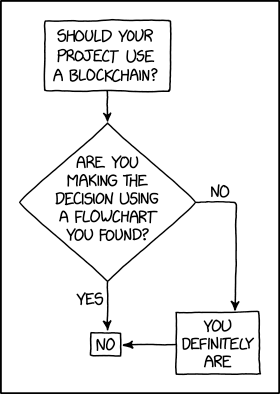
“Blockchains are like grappling hooks, in that it’s extremely cool when you encounter a problem for which they’re the right solution, but it happens way too rarely in real life.” source xkcd
Posted on Leave a comment

Blockchain Basics of Smart Contracts and Solidity

5/5 – (1 vote)

This article will give you an overview of the blockchain basics, transactions, and blocks.

In the previous article of this series, we looked at how to create your own token using Solidity and, specifically, events for transactions.

YouTube Video

Blockchain Basics

Blockchain technology enables us to write programs without having to think about the details of the underlying communication infrastructure.

However, just to be aware of some of the keywords which are commonly used when studying the infrastructure, we’ll name just a few among others (borrowed from the Solidity documentation):

  • mining,
  • elliptic-curve cryptography,
  • peer-to-peer network.

Although it’s interesting to see how these technologies work ā€œunder the blockchain’s hoodā€, the beneficial fact is that you don’t have to be closely familiar with them. You can just implicitly utilize them and maybe even forget they’re there. However, they represent some of the key elements which make up Web3.

šŸ’” Note: Here, we need to establish a firm distinction between the terms Web3 in the blockchain context that is the subject of our interest when discussing Solidity, and the Semantic Web, sometimes known as Web 3.0, which is an extension of the World Wide Web, intended to make Internet data machine-readable.

Transactions

One of the main roles of a blockchain is to preserve the data and make it temper-resistant. In that sense, we can easily consider a blockchain as a globally shared, transactional database.

A blockchain network is globally shared because any party in the network can access and read its contents.

It is transactional because any change to the blockchain has to be accepted by almost all, or at least the majority of other members, depending on the blockchain implementation.

In database theory and practice having a transactional property means two things: the change to the database is either applied completely or not at all (see here); no other transaction can modify the effect of a transaction being executed.

We regularly ensure the equivalent behavior of our smart contracts by using error handling and control structures available in Solidity (docs).

Blockchain Security

There is also a strong security property that is inherent in the way how blockchain works: each new block header includes the hash of the previous block.

To alter a block in a blockchain, an attacker would have to re-mine the targeted block and all the following blocks, therefore creating a chain fork.

Also, an attacker would need to invest more total work than was invested in the original chain segment to get his chain fork accepted by the rest of the network (source).

The latter would require immense computing power and energy, making the entire effort unfeasible in theory.

However, there have been successful attacks on blockchain networks, mostly due to the smaller scale of a particular network, where a fraudulent consensus (the verification process) was less difficult to fabricate, block creation errors, or insufficient security measures (source).

Example Application

An example to the story above is already given in part by the example we did in the previous article: a smart contract for (simulated) currency transfer between any two parties.

There was a list of accounts holding balances in a cryptocurrency, Wei, and our smart contract supported transfers of a given amount of currency from the sender to the receiver.

What’s important in the context of such transactions is that the same amount of currency should always be ā€œsimultaneouslyā€ deducted from the sender’s account and added to the receiver’s account.

What we mean by ā€œsimultaneouslyā€ is not a matter of happening at the same moment, but happening with the same, but the opposite consequence, i.e. if the amount gets successfully deducted from the sender’s account, it has to be added to the receiver’s account.

If an error occurs after the amount is decreased from the sender’s account, but before the amount is added to the receiver’s account, the operation should revert to the smart contract’s previous state, as it was before the transaction started.

This way, the blockchain behaves in a consistent, transactional manner and warrants that the transaction will be done entirely or not at all.

In the context of everything said so far, with our subcurrency example in mind, we may ask ourselves:

šŸ’¬ Question: How would we enable an account owner to transfer the currency only from the account in his ownership?

The answer to the question is relatively simple:

šŸ’” Answer: A transaction always bears the sender’s cryptographic signature, which serves as a seal in granting access to precisely defined modifications of (operations on) the database, such as currency transfer from the account owner originally holding the currency, to the account owner – receiver of the currency.

Blocks

There is no story about blockchain without actually mentioning the block itself. We will definitively return to talk about a block from some other angles, but with a security perspective in mind, we will focus on overcoming a significant obstacle known (in Bitcoin terms) a ā€œdouble-spend attackā€ (source).

Some paragraphs ago, we mentioned a blockchain attack implying the majority of the network members’ acceptance, popularly known as the ā€œ51% attackā€.

Let’s assume there are two transactions in the blockchain network, and each of them attempts to transfer all the account’s currency to another account, i.e. they will both attempt to empty the account.

Since there can be only one accepted, confirmed transaction (in contrast to two or more possible unconfirmed transactions), the transaction that gets confirmed first will end up bundled in a block. It is not under our control or, for that matter, not even a subject of our concern which block will be the first one.

What matters is that the second block will be rejected and the contention between the blocks/transactions will be resolved automatically, and the likelihood of the double-spend attack problem will decrease with each additional confirmation (source).

Blocks are sequentially added to a blockchain, ordered by the time of their arrival. Adding a block to the blockchain is mostly done in regular intervals, which last about 17 seconds for the Ethereum network.

Nonetheless, the blockchain tip can sometimes be reverted during the order selection mechanism. In that case, a confirmed block will get discarded and become a stale block, and the stale block’s successor blocks just get returned to the memory pool.

šŸ’” Note: discarded or stale blocks are popularly and wrongly called orphan blocks. (source)

For block reversal to happen, two conditions should occur.

(1) First, multiple blocks should get created from the same parent block P simultaneously (by different miners) and get confirmed by the network, forming a fork with multiple subchains/branches at the tip (block) P of the blockchain.

As there are multiple successor block candidates (e.g. we will assume three blocks, A, B, and C), each block has an equal chance of becoming a permanent part of the blockchain.

Because blocks propagate through the blockchain network differently, miners will receive one of the blocks (A, B, or C) before the other blocks and start mining a new block on the block they received first.

(2) Second, one of the miners will mine and broadcast a new block, e.g.Ā  C1 to the network before the other miners mine blocks A1 or B1 (these don’t exist as yet).

Since the fastest miner first received block C and then produced C1, it will extend the branch P-C, effectively making the branch P-C-C1 the longest one. Once the network detects there is a chain longer than the chains P-A and P-B, it will disqualify the candidate blocks A and B as stale blocks, thus resolving the contention.

All the miners who chose a different blockchain from the fork, e.g. P-A or P-B, and started building their blockchains on them, will experience a block reversal, as their chains will also get updated by the network with the blockchain P-C-C1 as the longest one.

The blockchain tip reversal gets less likely to happen as more blocks are confirmed and added to the blockchain. A common number of confirmations after we can be virtually certain that our block became a permanent part of a blockchain is six confirmations (source).

Conclusion

In this article, we first shortly made a short detour (sorry about that) to a missing part about Solidity events, and then boldly stepped into the direction of blockchain basics, transactions, and blocks.

First, we made friends with an event listener example based on web3.js library.

Second, we glanced at the blockchain basics. You already know the works: some basic terms, dry notes, etc. It’s just a scratch, really.

Third, we learned about how blockchain treats transactions and how it makes them feel secure,Ā  shared and cared for. That’s why we mentioned some properties that make blockchain look like a database.

Fourth, we went into some light details on what a block is, what is its role in the blockchain ecosystem and what are some of the risks present in a blockchain network.


Learn Solidity Course

Solidity is the programming language of the future.

It gives you the rare and sought-after superpower to program against the “Internet Computer”, i.e., against decentralized Blockchains such as Ethereum, Binance Smart Chain, Ethereum Classic, Tron, and Avalanche – to mention just a few Blockchain infrastructures that support Solidity.

In particular, Solidity allows you to create smart contracts, i.e., pieces of code that automatically execute on specific conditions in a completely decentralized environment. For example, smart contracts empower you to create your own decentralized autonomous organizations (DAOs) that run on Blockchains without being subject to centralized control.

NFTs, DeFi, DAOs, and Blockchain-based games are all based on smart contracts.

This course is a simple, low-friction introduction to creating your first smart contract using the Remix IDE on the Ethereum testnet – without fluff, significant upfront costs to purchase ETH, or unnecessary complexity.

Posted on Leave a comment

How to Convert Multiple Text Files to a Single CSV in Python?

5/5 – (1 vote)

You can merge multiple text files to a single CSV file in Python by using the glob.glob('./*.txt') expression to filter out all path names of text files in a given folder. Then iterate over all those path names and use the open() function to read the file contents and write append them to the CSV.

Example: merge those files

Here’s the simple example:

import glob with open('my_file.csv', 'a') as csv_file: for path in glob.glob('./*.txt'): with open(path) as txt_file: txt = txt_file.read() + '\n' csv_file.write(txt) 

The resulting output CSV file shows that all text files have been merged:

You can replace the separator (e.g., from single empty space to comma) by using the txt.replace(' ', ',') function before writing it in the CSV:

import glob with open('my_file.csv', 'a') as csv_file: for path in glob.glob('./*.txt'): with open(path) as txt_file: txt = txt_file.read() + '\n' txt = txt.replace(' ', ',') csv_file.write(txt) 

The resulting CSV is neatly separated with comma characters:

In case you need some more advanced ways to convert the text files to the CSV, you may want to check out the Pandas read_csv() function to read the CSV into a DataFrame.

As soon as you have it as a DataFrame, you can do advanced processing such as merging, column selection, slicing, etc.

šŸŒ Related Tutorial: How to Read a CSV to a DataFrame?

Posted on Leave a comment

How to Convert Avro to CSV in Python?

4/5 – (1 vote)

šŸ’¬ Question: How to convert an .avro file to a .csv file in Python?

Solution:

To convert an Avro file my_file.avro to a CSV file my_file.csv, create a CSV writer using the csv module and iterate over all rows using the iterator returned by fastavro.reader(). Then write each row to a file using the writerow() function.

Here’s an example:

from fastavro import reader
import csv with open('my_file.avro', 'rb') as file_object: csv_file = csv.writer(open("my_file.csv", "w+")) head = True for x in reader(file_object): if head: # write header header = emp.keys() csv_file.writerow(header) head = False # write normal row csv_file.writerow(emp.values())

Related: This code is a modified and improved version of this source.

šŸ’” Avro is a data serialization framework for RPCs (remote procedure calls) that uses JSON and binary format to serialize data.

šŸ’” CSV stands for comma-separated values, so you have a row-based file format where values are separated by commas, and the file is named using the suffix .csv.

Posted on Leave a comment

For Loop with Two Variables (for i j in python)

5/5 – (1 vote)

for i j in python

The Python expression for i, j in XXX allows you to iterate over an iterable XXX of pairs of values. For example, to iterate over a list of tuples, this expression captures both tuple values in the loop variables i and j at once in each iteration.

Here’s an example:

for i, j in [('Alice', 18), ('Bob', 22)]: print(i, 'is', j, 'years old')

Output:

Alice is 18 years old
Bob is 22 years old

Notice how the first loop iteration captures i='Alice' and j=18, whereas the second loop iteration captures i='Bob' and j=22.

for i j in enumerate python

The Python expression for i, j in enumerate(iterable) allows you to loop over an iterable using variable i as a counter (0, 1, 2, …) and variable j to capture the iterable elements.

Here’s an example where we assign the counter values i=0,1,2 to the three elements in lst:

lst = ['Alice', 'Bob', 'Carl']
for i, j in enumerate(lst): print(i, j)

Output:

0 Alice
1 Bob
2 Carl

Notice how the loop iteration capture:

  • i=0 and j='Alice',
  • i=1 and j='Bob', and
  • i=2 and j='Carl'.

šŸŒ Learn More: The enumerate() function in Python.

Python enumerate()

for i j in zip python

The Python expression for i, j in zip(iter_1, iter_2) allows you to align the values of two iterables iter_1 and iter_2 in an ordered manner and iterate over the pairs of elements. We capture the two elements at the same positions in variables i and j.

Here’s an example that zips together the two lists [1,2,3] and [9,8,7,6,5].

for i, j in zip([1,2,3], [9,8,7,6,5]): print(i, j)

Output:

1 9
2 8
3 7

šŸŒ Learn More: The zip() function in Python.

for i j in list python

The Python expression for i, j in list allows you to iterate over a given list of pairs of elements (list of tuples or list of lists). In each iteration, this expression captures both pairs of elements at once in the loop variables i and j.

Here’s an example:

for i, j in [(1,9), (2,8), (3,7)]: print(i, j)

Output:

1 9
2 8
3 7

for i j k python

The Python expression for i, j, k in iterable allows you to iterate over a given list of triplets of elements (list of tuples or list of lists). In each iteration, this expression captures all three elements at once in the loop variables i and j.

Here’s an example:

for i, j, k in [(1,2,3), (4,5,6), (7,8,9)]: print(i, j, k)

Output:

1 2 3
4 5 6
7 8 9

for i j in a b python

Given two lists a and b, you can iterate over both lists at once by using the expression for i,j in zip(a,b).

Given one list ['a', 'b'], you can use the expression for i,j in enumerate(['a', 'b']) to iterate over the pairs of (identifier, list element) tuples.

Summary

The Python for loop is a powerful method to iterate over multiple iterables at once, usually with the help of the zip() or enumerate() functions.

for i, j in zip(range(10), range(10)): # (0,0), (1,1), ..., (9,9)

If a list element is an iterable by itself, you can capture all iterable elements using a comma-separated list when defining the loop variables.

for i,j,k in [(1,2,3), (4,5,6)]: # Do Something
Posted on Leave a comment

Python RegEx – Match Whitespace But Not Newline

5/5 – (1 vote)

Problem Formulation

šŸ’¬ Challenge: How to design a regular expression pattern that matches whitespace characters such as the empty space ' ' and the tabular character '\t', but not the newline character '\n'?

An example of this would be to replace all whitespaces (except newlines) between a space-delimited file with commas to obtain a CSV.

Method 1: Use Character Class

The character class pattern [ \t] matches one empty space ' ' or a tabular character '\t', but not a newline character. If you want to match an arbitrary number of empty spaces except for newlines, append the plus quantifier to the pattern like so: [ \t]+.

Here’s an example where you replace all separating whitespace (except newline) with a comma to receive a CSV formatted output:

import re txt = 'a \t b c\nd e f'
csv_txt = re.sub('[ \t]+', ',', txt)
print(csv_txt)

Output:

a,b,c
d,e,f

Why the space in the pattern [ \t]?

The reason there’s a space in the pattern is to match the empty space. The character class essentially is an OR relationship, i.e., one item within the character class is matched. For the given pattern, it matches either the empty space ' ' or the tabular character '\t'.

šŸŒ Learn More: Character Class (Character Set) — The Ultimate Guide for Python

Method 2: Match Individual Different Whitespace Characters

The previous method only matches the horizontal tab (U+0009) and breaking space (U+0020) characters. If you want more fine-grained control about which whitespace characters to match and which not, you can use the following baseline approach.

The following list of Unicode whitespace characters UNICODE_WHITESPACES contains all major whitespace variants you may want to check your string for. You can generate a character class using the string expression '[' + ''.join(UNICODE_WHITESPACES) + ']'.

Here’s a variant that finds all matches of whitespace characters in a given text:

import re UNICODE_WHITESPACES = [ "\u0009", # character tabulation "\u000a", # line feed "\u000b", # line tabulation "\u000c", # form feed "\u000d", # carriage return "\u0020", # space "\u0085", # next line "\u00a0", # no-break space "\u1680", # ogham space mark "\u2000", # en quad "\u2001", # em quad "\u2002", # en space "\u2003", # em space "\u2004", # three-per-em space "\u2005", # four-per-em space "\u2006", # six-per-em space "\u2007", # figure space "\u2008", # punctuation space "\u2009", # thin space "\u200A", # hair space "\u2028", # line separator "\u2029", # paragraph separator "\u202f", # narrow no-break space "\u205f", # medium mathematical space "\u3000", # ideographic space
] txt = ' \t\n\r'
pattern = '[' + ''.join(UNICODE_WHITESPACES) + ']'
matches = re.findall(pattern, txt)
print(matches)
# [' ', '\t', '\n', '\r']

Of course, you can restrict this to only contain whitespaces that are not newline-related.

Method 3: Match Individual Different Whitespaces Except Newlines

The following code snippet uses the UNICODE_WHITESPACES constant but comments out the newline whitespaces so that newline-related characters such as '\n' and '\r' are not matched anymore!

import re UNICODE_WHITESPACES = [ "\u0009", # character tabulation # "\u000a", # line feed "\u000b", # line tabulation "\u000c", # form feed # "\u000d", # carriage return "\u0020", # space # "\u0085", # next line "\u00a0", # no-break space "\u1680", # ogham space mark "\u2000", # en quad "\u2001", # em quad "\u2002", # en space "\u2003", # em space "\u2004", # three-per-em space "\u2005", # four-per-em space "\u2006", # six-per-em space "\u2007", # figure space "\u2008", # punctuation space "\u2009", # thin space "\u200A", # hair space # "\u2028", # line separator # "\u2029", # paragraph separator "\u202f", # narrow no-break space "\u205f", # medium mathematical space "\u3000", # ideographic space
] txt = ' \t\n\r'
pattern = '[' + ''.join(UNICODE_WHITESPACES) + ']'
matches = re.findall(pattern, txt)
print(matches)
# [' ', '\t']

Of course, you can comment out the individual whitespace Unicode characters you don’t want to match as required by your own application.

Posted on Leave a comment

How to Display a Progress Bar in Python

5/5 – (1 vote)
[😁😁😁😁😁😁😁😁😁😁😁😁😁😁😁😁😁😁😁😁] 100%

Problem Formulation and Solution Overview

In this article, you’ll learn how to configure and display a progress bar.

A progress bar is commonly used in Python or, for that matter, any other programming language to show the user an application’s progress. For example, an installation, a transferring of files, or any other commands.

The Finxter Academy recommends implementing this to visually display to the user what is happening behind the scenes.


šŸ’¬ Question: How would we write code to display a progress bar?

We can accomplish this task by one of the following options:


Method 1: Use a For Loop

This method imports the time and sys libraries combined with a for loop to display a custom progress bar output on a single line.

from time import sleep
import sys for x in range(0,21): sys.stdout.write('\r') sys.stdout.write("[%-20s] %d%%" % ('😁'*x, 5*x)) sys.stdout.flush() sleep(0.75)

Above imports, the time library to call the sleep command and the sys library to write the contents to the terminal.

Next, a for loop is instantiated. This loop uses the range function to set the start position (0 by default) and the stop position (21-1). Inside this loop, the following occurs:

  • The first line uses a carriage return (\r) to start the code on a new line.
  • The following line determines how the progress bar appears by:
    • Left-aligning the emoji(s) inside the square brackets [%-20s].
    • Configuring the progress percentage %d%%" % (example 15%).
    • Determining the visual emoji progress ('😁'*x, 5*x).
  • Then sys.stdout.flush() writes everything in the buffer to the terminal.
  • The code pauses for the stated period (0.75).

The loop continues until 100% has been attained. Below is the end result.

[😁😁😁😁😁😁😁😁😁😁😁😁😁😁😁😁😁😁😁😁] 100%

šŸ’”Note: Any emoji or another symbol can be substituted for the above selection.


Method 2: Use apytl Library

This method imports the time and apytl libraries to generate a custom progress bar.

To run this code error-free, install the required library. Click here for installation instructions.

import time
import apytl total_iterations = 10 for index, value in enumerate(range(total_iterations)): apytl.Bar().drawbar(value, total_iterations, fill='*') time.sleep(0.75)

Above imports the time library to call the sleep command and the apytl library to display the progress bar.

Next, the total number of iterations to carry out is declared as 10 and saved to total_iterations.

To understand what is going on in the for loop, let’s write some test code to see what the values of index, value and total_iterations are doing:

total_iterations = 10 for index, value in enumerate(range(total_iterations)): print(index, value, total_iterations)

As you can see from the output, the index and value variables count from 0 (range default start position) to the stop position of 9 (10-1). Notice the value of total_iterations does not change.

0 0 10
1 1 10
2 2 10
3 3 10
4 4 10
5 5 10
6 6 10
7 7 10
8 8 10
9 9 10

Referring back to the code directly below the Method 2 heading, the next line is: apytl.Bar().drawbar(value, total_iterations, fill='*').

This function is passed three (3) arguments:

  • The variable value, which you can see from the above, increments by one (1) each iteration.
  • The variable total_iterations, which remains constant at 10.
  • The fill value. This example uses the asterisk (*) character. However, feel free to use an emoji or other symbol.
Progress |***********************************| 100.0% Complete

Method 3: Use alive-progress

The alive-progress library moves progress bars to the next level! With its many display options, it’s a must-a-try!

To run this code error-free, install the required library. Click here for installation instructions.

from alive_progress import alive_bar
from time import sleep for x in range(10): with alive_bar(x, bar='solid') as bar: for i in range(x): sleep(.001) bar()

Above imports the alive-progress library to use the progress bar and the time library to call the sleep command.

Next, a for loop is instantiated. This loop uses the range function to set the stop position at 9 (10-1). Inside this loop, the following occurs:

  • The alive_bar is called and passed the argument x and the bar type. For this example, solid was selected.
    • A new for loop is instantiated and loops through range passing x as an argument.
    • The code halts (sleep) for the stated period (.001).
    • The bar is output to the terminal each iteration.

The loop continues until 100% has been attained.

<ā– ā– ā– ā– ā– ā– ā– ā– ā– ā– ā– ā– ā– ā– ā– ā– ā– ā– ā– ā– ā– ā– ā– ā– ā– ā– ā– ā– ā– ā– ā– ā– > 0 in 0.0s (0.00/s)
<ā– ā– ā– ā– ā– ā– ā– ā– ā– ā– ā– ā– ā– ā– ā– ā– ā– ā– ā– ā– ā– ā– ā– ā– ā– ā– ā– ā– ā– ā– ā– ā– > 1/1 [100%] in 0.0s (333.28/s)
<ā– ā– ā– ā– ā– ā– ā– ā– ā– ā– ā– ā– ā– ā– ā– ā– ā– ā– ā– ā– ā– ā– ā– ā– ā– ā– ā– ā– ā– ā– ā– ā– > 2/2 [100%] in 0.0s (62.48/s)
<ā– ā– ā– ā– ā– ā– ā– ā– ā– ā– ā– ā– ā– ā– ā– ā– ā– ā– ā– ā– ā– ā– ā– ā– ā– ā– ā– ā– ā– ā– ā– ā– > 3/3 [100%] in 0.0s (63.96/s)
<ā– ā– ā– ā– ā– ā– ā– ā– ā– ā– ā– ā– ā– ā– ā– ā– ā– ā– ā– ā– ā– ā– ā– ā– ā– ā– ā– ā– ā– ā– ā– ā– > 4/4 [100%] in 0.1s (62.39/s)
<ā– ā– ā– ā– ā– ā– ā– ā– ā– ā– ā– ā– ā– ā– ā– ā– ā– ā– ā– ā– ā– ā– ā– ā– ā– ā– ā– ā– ā– ā– ā– ā– > 5/5 [100%] in 0.1s (63.32/s)
<ā– ā– ā– ā– ā– ā– ā– ā– ā– ā– ā– ā– ā– ā– ā– ā– ā– ā– ā– ā– ā– ā– ā– ā– ā– ā– ā– ā– ā– ā– ā– ā– > 6/6 [100%] in 0.1s (64.84/s)
<ā– ā– ā– ā– ā– ā– ā– ā– ā– ā– ā– ā– ā– ā– ā– ā– ā– ā– ā– ā– ā– ā– ā– ā– ā– ā– ā– ā– ā– ā– ā– ā– > 7/7 [100%] in 0.1s (63.79/s)
<ā– ā– ā– ā– ā– ā– ā– ā– ā– ā– ā– ā– ā– ā– ā– ā– ā– ā– ā– ā– ā– ā– ā– ā– ā– ā– ā– ā– ā– ā– ā– ā– > 8/8 [100%] in 0.1s (63.53/s)
<ā– ā– ā– ā– ā– ā– ā– ā– ā– ā– ā– ā– ā– ā– ā– ā– ā– ā– ā– ā– ā– ā– ā– ā– ā– ā– ā– ā– ā– ā– ā– ā– > 9/9 [100%] in 0.1s (64.09/s)

šŸ’”Note: To view a list of all available progress bars, click here.


Method 4: Use tqdm

A simple yet elegant progress bar, tqdm is a must-see!

To run this code error-free, install the required library. Click here for installation instructions.

from tqdm import tqdm
from time import sleep for i in tqdm(range(100)): sleep(0.02)

Above imports the tqdm library for the progress bar and the time library to call the sleep() command.

Next, a for loop is instantiated. This loop uses the tqdm library with the range function to set the stop position at 99 (100-1). Inside this loop, the following occurs:

The progress bar displays on one line. Each iteration increases the progress by a percentage.


Method 5: Use progress Library

This method uses the progress library to display a progress bar. This library has many fun options to select from.

To run this code error-free, install the required library. Click here for installation instructions.

from time import sleep
from progress.spinner import MoonSpinner with MoonSpinner('Processing…') as bar: for i in range(100): sleep(0.02) bar.next()

Above imports the time library to call the sleep command and the progress library to display a progress bar, specifically the MoonSpinner.

The following code displays the word Processing... at the terminal, and the MoonSpinner rotates, sleeps, and continues until the value of the range stop position (100-1) is attained.

Processing…◑

šŸ’”Note: Spend some time on this library page to test the different types of progress bars.


Summary

There is so much more to Python Progress Bars than was covered in this article. May we suggest you take time to delve into each method outlined above to determine the best one for your requirements.

Happy Coding!


Programming Humor – Python

“I wrote 20 short programs in Python yesterday. It was wonderful. Perl, I’m leaving you.”xkcd

Posted on Leave a comment

Convert HTML Table to Excel using JavaScript

by Vincy. Last modified on July 25th, 2022.

Converting a HTML table to an excel file is a standard requirement of reporting websites. It will be simple and easier if the conversion is taking place on the client side.

There are many client-side and server-side plugins to perform the excel export. For example, PHPSpreadSheet allows writing data into excel and exporting.

This article will give different options and approaches to achieving the HTML table to excel conversion with JavaScript.

This simple example includes a few lines of JavaScript that build the template for excel export.

It uses the following steps to convert the exported excel report of tabular data.

  1. Defines HTML template structure with required meta.
  2. Include the table’s inner HTML into the template.
  3. Marks the location by specifying the protocol to download the file via browser.
  4. Redirect via JavaScript to point to the location with the encoded excel content.

Quick example

A JavaScript handler to set export template and push HTML table data.

function exportToExcel() { var location = 'data:application/vnd.ms-excel;base64,'; var excelTemplate = '<html> ' + '<head> ' + '<meta http-equiv="content-type" content="text/plain; charset=UTF-8"/> ' + '</head> ' + '<body> ' + document.getElementById("table-conatainer").innerHTML + '</body> ' + '</html>' window.location.href = location + window.btoa(excelTemplate);
}

View demo

The below HTML table code displays a product listing and it is static. Refer jsPDF AutoTables examples to render a dynamic table by loading row by row.

The button below this table triggers the export to excel process on the click event. The exportToExcel() function handles the event and proceeds the client-side export.

<div id="table-conatainer"> <table class="striped"> <thead> <tr> <th>S.No</th> <th>Product Name</th> <th>Price</th> <th>Model</th> </tr> </thead> <tbody> <tr> <td>1q</td> <td>GIZMORE Multimedia Speaker with Remote Control, Black</td> <td>2300</td> <td>2020</td> </tr> <tr> <td>2</td> <td>Black Google Nest Mini</td> <td>3400</td> <td>2021</td> </tr> </tbody> </table>
</div>

html table excel javascript

Let us see more options available for converting HTML table data into an excel file.

Option 2: Export as CSV to view in excel

This example is for parsing the HTML table content via JavaScript. It follows the below steps to export an HTML table to excel as CSV.

  1. Accessing HTML table element object.
  2. Convert the object into an array of row data.
  3. Iterate row data array to prepare comma-separated values of records.
  4. Set the protocol and content type to export the CSV data prepared from the table.

The below JavaScript function implements the above steps to export table data on the client side.

function exportCSVExcel() { var tableElement = document.getElementById("table-product-list"); var sourceData = "data:text/csv;charset=utf-8,"; var i = 0; while (row = tableElement.rows[i]) { sourceData += ([ row.cells[0].innerText, row.cells[1].innerText, row.cells[2].innerText, row.cells[3].innerText ]).join(",") + "\r\n"; i++; } window.location.href = encodeURI(sourceData);
}

Option 3 – Export HTML table to excel using jQuery-based plugin

The jQuery table2excel plugin is a popular solution to arrive HTML to excel export.

It has many features with the export core functionalities. Those are,

  1. Excludes/includes HTML tags like inputs, links, or images that are in the source table HTML.
  2. Excludes some table components with the reference of that particular element’s class or id selectors.
  3. Provides properties to set file name with which the exported data will be downloaded to the browser.

Include the jQuery and the table2excel plugin file in the <head> section as below.

There are alternative methods to install the table2excel plugin. Its Github page provides documentation of installation and usage methodologies.

<script src="https://ajax.googleapis.com/ajax/libs/jquery/2.2.4/jquery.min.js"></script>
<script src="https://cdn.rawgit.com/rainabba/jquery-table2excel/1.1.0/dist/jquery.table2excel.min.js"></script>

Then, initiate the plugin class by pointing to the source HTML table element.

The below JavaScript does the initiation. During instantiation, it sets the options array to specify a file name, extension and applicable flags.

function exportCSVExcel() { $('#table-product-list').table2excel({ exclude: ".no-export", filename: "download.xls", fileext: ".xls", exclude_links: true, exclude_inputs: true });
}

This example uses the same HTML table source for the export operation. The difference is that the source table content marks some of the rows with no-export class.

This class is configured in the above script with exclude property of this plugin class.

Conclusion:

So, we have seen three simple implementations of adding HTML table to excel feature. Though the export feature is vital, we must have a component that provides a seamless outcome.

I hope, the above solution can be a good base for creating such components. It is adaptable for sure to dock more features to have an efficient excel report generation tool.

View demoDownload

↑ Back to Top

Posted on Leave a comment

How to Convert a List of Objects to a CSV File in Python [5 Ways]

5/5 – (1 vote)

šŸ’¬ Question: How to convert a list of custom objects to a csv file?

Example: Given is a list of custom objects of, say, type Employee that holds the name, job description, and income like so:

salary = [Employee('Alice', 'Data Scientist', 122000), Employee('Bob', 'Engineer', 77000), Employee('Ann', 'Manager', 119000)]

Your goal is to write the content of the list of objects into a comma-separated-values (CSV) file format.

Your output file should look like this:

# my_file.csv
Alice,Data Scientist,122000
Bob,Engineer,77000
Ann,Manager,119000

Solution: There are four simple ways to convert a list of lists to a CSV file in Python.

  1. CSV: Import the csv module in Python, create a csv writer object, and find a list lst of elements representing each object as a row, that is then written into the CSV using writer.writerow(lst).
  2. Pandas: Import the pandas library, convert each object to a list to obtain a list of lists, create a Pandas DataFrame out of the list of lists, and write the DataFrame to a file using the DataFrame method DataFrame.to_csv('file.csv').
  3. NumPy: Import the NumPy library, convert each object to a list to obtain a list of lists, create a NumPy array, and write the output to a CSV file using the numpy.savetxt('file.csv', array, delimiter=',') method.
  4. Python: Use a pure Python implementation that doesn’t require any library by using the Python file I/O functionality.

⭐ Finxter Favorite: My preference is Method 4 (Vanilla Python) because it’s simplest to use, efficient, and most robust for different input types (numerical or textual) and doesn’t require external dependencies and data wrangling.

Method 1: Python’s CSV Module

You can convert a list of lists to a CSV file in Python easily—by using the csv library. This is the most customizable of all four methods.

class Employee(object): def __init__(self, name, description, salary): self.name = name self.description = description self.salary = salary employees = [Employee('Alice', 'Data Scientist', 122000), Employee('Bob', 'Engineer', 77000), Employee('Ann', 'Manager', 119000)] # Method 1
import csv
with open('my_file.csv', 'w', newline='') as f: writer = csv.writer(f) for x in employees: writer.writerow([x.name, x.description, x.salary]) 

Output:

# my_file.csv
Alice,Data Scientist,122000
Bob,Engineer,77000
Ann,Manager,119000

In the code, you first open the file using Python’s standard open() command. Now, you can write content to the file object f.

Next, you pass this file object to the constructor of the CSV writer that implements some additional helper method—and effectively wraps the file object providing you with new CSV-specific functionality such as the writerow() method.

You now iterate over the objects and convert each object to a list.

The list representing one row is then passed in the writerow() method of the CSV writer. This takes care of converting the list of objects to a CSV format.

You can customize the CSV writer in its constructor (e.g., by modifying the delimiter from a comma ',' to a whitespace ' ' character). Have a look at the specification to learn about advanced modifications.

Method 2: Pandas DataFrame to_csv()

This method converts a list of objects to a CSV file in two steps:

List of Lists to CSV

You can convert a list of lists to a Pandas DataFrame that provides you with powerful capabilities such as the to_csv() method.

This is a super simple approach that avoids importing yet another library (I use Pandas in many Python projects anyways).

class Employee(object): def __init__(self, name, description, salary): self.name = name self.description = description self.salary = salary employees = [Employee('Alice', 'Data Scientist', 122000), Employee('Bob', 'Engineer', 77000), Employee('Ann', 'Manager', 119000)] # Method 2
import pandas as pd # Step 1: Convert list of objects to list of lists
lst = [[x.name, x.description, x.salary] for x in employees] # Step 2: Convert list of lists to CSV
df = pd.DataFrame(lst)
df.to_csv('my_file.csv', index=False, header=False) 

Output:

# my_file.csv
Alice,Data Scientist,122000
Bob,Engineer,77000
Ann,Manager,119000

Code Main Steps:

  1. lst = [[x.name, x.description, x.salary] for x in employees]
  2. df = pd.DataFrame(lst)
  3. df.to_csv('my_file.csv', index=False, header=False)

You convert a list of objects to a CSV file in three main steps.

  1. First, convert the list of objects to a list of lists by using list comprehension to iterate over each object and convert each object to an inner list using your custom expression.
  2. Second, create a Pandas DataFrame, Python’s default representation of tabular data.
  3. Third, the DataFrame is a very powerful data structure that allows you to perform various methods. One of those is the to_csv() method that allows you to write its contents into a CSV file.

You set the index and header arguments of the to_csv() method to False because Pandas, per default, adds integer row and column indices 0, 1, 2, ….

Think of them as the row and column indices in your Excel spreadsheet. You don’t want them to appear in the CSV file so you set the arguments to False.

If you want to customize the CSV output, you’ve got a lot of special arguments to play with. Check out this article for a comprehensive list of all arguments.

šŸŒ Related article: Pandas Cheat Sheets to Pin to Your Wall

Method 3: NumPy savetext()

NumPy is at the core of Python’s data science and machine learning functionality. Even Pandas uses NumPy arrays to implement critical functionality.

You can convert a list of objects to a CSV file by first converting it to a list of lists which is then converted to a NumPy array, and then using NumPy’s savetext() function by passing the NumPy array as an argument.

This method is best if you can represent the numerical data only—otherwise, it’ll lead to complicated data type conversions which are not recommended.

class Employee(object): def __init__(self, name, description, salary): self.name = name self.description = description self.salary = salary employees = [Employee('Alice', 'Data Scientist', 122000), Employee('Bob', 'Engineer', 77000), Employee('Ann', 'Manager', 119000)] # Method 3
import numpy as np # Convert list of objects to list of lists
lst = [[hash(x.name), hash(x.description), x.salary] for x in employees] # Convert list of lists to NumPy array
a = np.array(lst) # Convert array to CSV
np.savetxt('my_file.csv', a, delimiter=',') 

In the code, we use the hash() function to obtain a numerical value for the string attributes name and description of the Employee class.

Output:

# my_file.csv
-8.655249391637094400e+18,-4.821993523891147776e+18,1.220000000000000000e+05
7.826671284149683200e+18,-7.040934892515148800e+18,7.700000000000000000e+04
3.577554885237667328e+18,1.887669837421876992e+18,1.190000000000000000e+05

The output doesn’t look pretty: it stores the values as floats. But no worries, you can reformat the output using the format argument fmt of the savetxt() method (more here). However, I’d recommend you stick to method 2 (Pandas) to avoid unnecessary complexity in your code.

Method 4: Pure Python Without External Dependencies

If you don’t want to import any library and still convert a list of objects into a CSV file, you can use standard Python implementation as well: it’s not complicated but very efficient.

The idea is simple, iterate over the list of object and write a comma-separated representation of each object into the CSV file using a combination of the built-in open() function to create a file object and the file.write() method to write each row.

This method is best if you won’t or cannot use external dependencies.

class Employee(object): def __init__(self, name, description, salary): self.name = name self.description = description self.salary = salary employees = [Employee('Alice', 'Data Scientist', 122000), Employee('Bob', 'Engineer', 77000), Employee('Ann', 'Manager', 119000)] # Method 4
with open('my_file.csv', 'w') as f: for x in employees: f.write(f'{x.name},{x.description},{x.salary}\n') 

Output:

# my_file.csv
Alice,Data Scientist,122000,
Bob,Engineer,77000,
Ann,Manager,119000,

In the code, you first open the file object f. Then you iterate over each object and write a custom comma-separated string representation of this object to the file using the file.write() method.

We use Python’s f-string functionality to do that in a concise way. At the end of each row, you place the newline character '\n'.

Method 5 – Bonus: Python One-Liner

The previous method is a one-linerized variant of Method 4. If you’re part of the Finxter community, you know how I love one-liners. šŸ˜‰

# Method 5
open('my_file.csv', 'w').writelines([f'{x.name},{x.description},{x.salary}\n' for x in employees])

Concise, isn’t it? The output is the same as before.

If you’re interested in the art of crafting beautiful one-liners, check out my book on the topic!

Python One-Liners Book: Master the Single Line First!

Python programmers will improve their computer science skills with these useful one-liners.

Python One-Liners

Python One-Liners will teach you how to read and write “one-liners”: concise statements of useful functionality packed into a single line of code. You’ll learn how to systematically unpack and understand any line of Python code, and write eloquent, powerfully compressed Python like an expert.

The book’s five chapters cover (1) tips and tricks, (2) regular expressions, (3) machine learning, (4) core data science topics, and (5) useful algorithms.

Detailed explanations of one-liners introduce key computer science concepts and boost your coding and analytical skills. You’ll learn about advanced Python features such as list comprehension, slicing, lambda functions, regular expressions, map and reduce functions, and slice assignments.

You’ll also learn how to:

  • Leverage data structures to solve real-world problems, like using Boolean indexing to find cities with above-average pollution
  • Use NumPy basics such as array, shape, axis, type, broadcasting, advanced indexing, slicing, sorting, searching, aggregating, and statistics
  • Calculate basic statistics of multidimensional data arrays and the K-Means algorithms for unsupervised learning
  • Create more advanced regular expressions using grouping and named groups, negative lookaheads, escaped characters, whitespaces, character sets (and negative characters sets), and greedy/nongreedy operators
  • Understand a wide range of computer science topics, including anagrams, palindromes, supersets, permutations, factorials, prime numbers, Fibonacci numbers, obfuscation, searching, and algorithmic sorting

By the end of the book, you’ll know how to write Python at its most refined, and create concise, beautiful pieces of “Python art” in merely a single line.

Get your Python One-Liners on Amazon!!

Posted on Leave a comment

Top 8 Profitable Python Packages to Learn in 2023

5/5 – (1 vote)

Are you interested in Python but you don’t know which Python library is most attractive from a career point of view?

Well, you should focus on the library you’re most excited about.

But if you’re generally open because you have multiple passions, it would be reasonable to also consider annual and hourly income.

These are the most profitable Python libraries, frameworks, modules, or packages:

Python Library (Dev) Annual Income (USD) Hourly Income (USD)
Python Developer $82,000 $55
Keras Developer $95,000 $63
Django Developer $117,000 $78
Flask Developer $103,000 $69
NumPy Developer $105,000 $70
Pandas Developer $87,000 $58
TensorFlow Developer $148,000 $99
PyTorch Developer $109,000 $73
Table: Annual and Hourly Income of a developer focusing on different Python libraries/frameworks/packages/modules.

What is the most profitable Python library?

The most profitable Python library is TensorFlow. TensorFlow developers make $148,000 per year on average (US) which roughly translates to $99 per hour assuming an annual workload of 1500 hours.

Let’s dive into each Python library from the table, one by one.

#0 – General Python Developer

A Python developer is a programmer who creates software in the Python programming language. Python developers are often involved in data science, web development, and machine learning applications.

šŸ’° A Python developer earns $65,000 (entry-level), $82,000 (mid-level), or $114,000 (experienced) per year in the US according to Indeed. (source)

Do you want to become a Python Developer? Here’s a step-by-step learning path I’d propose to get started with Python:

You can find many courses on the Finxter Computer Science Academy (flatrate model).

šŸŒ Learn More: Read more about this specific Python library career path in our in-depth Finxter article.

#1 – Keras

Let’s have a look at the definition from the official Keras website:

ā€œKeras is an API designed for human beings, not machines. Keras follows best practices for reducing cognitive load: it offers consistent & simple APIs, it minimizes the number of user actions required for common use cases, and it provides clear & actionable error messages. It also has extensive documentation and developer guides.ā€

A Keras Developer developer creates, edits, analyzes, debugs, and supervises the development of software written in the Keras deep learning framework. Keras developers create machine learning apps using deep learning.

šŸ’° The average annual income of a Keras Developer in the United States is $95,000 per year, according to PayScale (source). Top earners make $156,000 and more in the US!

Do you want to become a Keras Developer? Here’s a step-by-step learning path I’d propose to get started with Keras:

šŸŒ Learn More: Read more about this specific Python library career path in our in-depth Finxter article.

#2 – Django

What is Django? Let’s have a look at the definition from the official website (highlights by me):

ā€œDjango is a high-level Python web framework that encourages rapid development and clean, pragmatic design. Built by experienced developers, it takes care of much of the hassle of web development, so you can focus on writing your app without needing to reinvent the wheel. It’s free and open source.ā€

A Django Developer developer creates, edits, analyzes, debugs, and supervises the development of software written in the Python programming language using the Django web development framework. You need to have good Python, HTML, and CSS skills.

šŸ’° The average annual income of a Django Developer in the United States is between $101,000 (25th percentile) and $137,000 (75th percentile) with an average of $117,000 per year according to Ziprecruiter (source) and $90,000 per year according to PayScale (source). Top earners make $150,000 and more in the US!

Do you want to become a Django Developer? Here’s a step-by-step learning path I’d propose to get started with Django:

šŸŒ Learn More: Read more about this specific Python library career path in our in-depth Finxter article.

#3 – Flask

A Flask Developer developer creates, edits, analyzes, debugs, and supervises the development of software written in the Flask programming language. You should have a basic understanding of web technologies such as HTML, CSS, JavaScript, and of course Python.


Let’s have a look at the definition from the Flask wiki page (highlights by me):

ā€œFlask is a micro web framework written in Python. It is classified as a microframework because it does not require particular tools or libraries.

It has no database abstraction layer, form validation, or any other components where pre-existing third-party libraries provide common functions.

However, Flask supports extensions that can add application features as if they were implemented in Flask itself. Extensions exist for object-relational mappers, form validation, upload handling, various open authentication technologies and several common framework related tools.ā€


šŸ’° The average annual income of a Flask Developer in the United States is between $79,000 (25th percentile) and $123,000 (75th percentile) with an average of $103,000 per year according to Ziprecruiter (source). Top earners make $151,000 and more in the US!

Do you want to become a Flask Developer? Here’s a step-by-step learning path I’d propose to get started with Flask:

šŸŒ Learn More: Read more about this specific Python library career path in our in-depth Finxter article.

#4 – NumPy

Let’s have a look at the definition from the official NumPy website:

ā€œNearly every scientist working in Python draws on the power of NumPy. NumPy brings the computational power of languages like C and Fortran to Python, a language much easier to learn and use. With this power comes simplicity: a solution in NumPy is often clear and elegant.ā€

Here’s where NumPy is used in practice:

source

šŸ’° The average annual income of a NumPy Developer in the United States is $105,000 per year according to PayScale (source). Top earners make $149,000 and more in the US!

Do you want to become a NumPy Developer? Here’s a step-by-step learning path I’d propose to get started with NumPy:

šŸŒ Learn More: Read more about this specific Python library career path in our in-depth Finxter article.

#5 – Pandas

What is pandas? Let’s have a look at the definition from the official Pandas website:

ā€œpandas is a fast, powerful, flexible and easy to use open source data analysis and manipulation tool, built on top of the Python programming language.ā€

You may also want to check out our Pandas resources on the Finxter blog:

šŸ’° The average annual income of a Pandas Developer in the United States is $87,000 per year according to Ziprecruiter (source). Top earners make $125,000 and more in the US!

Do you want to become a Pandas Developer? Here’s a step-by-step learning path I’d propose to get started with Pandas:

šŸŒ Learn More: Read more about this specific Python library career path in our in-depth Finxter article.

#6 – TensorFlow

A TensorFlow Developer creates, edits, analyzes, debugs, and supervises the development of code written with the TensorFlow library that is accessed mostly via the Python API. Because a TensorFlow developer is a deep learning engineer, they design and create machine learning models, train them, and improve them to reach high level of model accuracy and robustness.


Let’s have a look at the definition from the official TensorFlow website:

TensorFlow is ā€œAn end-to-end open source machine learning platform. The core open source library to help you develop and train ML models. TensorFlow makes it easy for beginners and experts to create machine learning models for desktop, mobile, web, and cloud. See the sections below to get started.ā€

šŸ’° The average annual income of a TensorFlow Developer in the United States is between $104,000 (25th percentile) and $187,000 (75th percentile) with an average of $148,000 per year according to Ziprecruiter (source). Top earners make $197,000 and more in the US!

Do you want to become a TensorFlow Developer? Here’s a step-by-step learning path I’d propose to get started with TensorFlow:

šŸŒ Learn More: Read more about this specific Python library career path in our in-depth Finxter article.

#7 – PyTorch

A PyTorch Developer writes code using in Python’s PyTorch library to analyze data, create machine learning models, or runs deep learning algorithms on various hardware devices such as GPUs.

What Is PyTorch? Let’s have a look at the definition from the official PyTorch website:

ā€œAn open source machine learning framework that accelerates the path from research prototyping to production deployment. More specifically, PyTorch is an optimized tensor library for deep learning using GPUs and CPUs.ā€

šŸ’° The average annual income of a PyTorch Developer in the United States is $109,000 per year according to PayScale (source). Top earners make $131,000 and more in the US!

Do you want to become a PyTorch Developer? Here’s a step-by-step learning path I’d propose to get started with PyTorch:

šŸŒ Learn More: Read more about this specific Python library career path in our in-depth Finxter article.

#Bonus – Plotly Dash


If you’re interested in learning more about how to create beautiful dashboard applications in Python, check out our new book Python Dash.

You’ve seen dashboards before; think election result visualizations you can update in real-time, or population maps you can filter by demographic.

With the Python Dash library, you’ll create analytic dashboards that present data in effective, usable, elegant ways in just a few lines of code.

Get the book on NoStarch or Amazon!


Summary

These are some of the most profitable Python libraries you could build your career on: