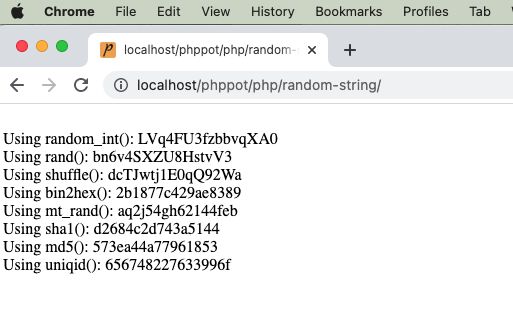
Generating random string token may sound like a trivial work. If you really want something “truly random”, it is one difficult job to do. In a project where you want a not so critical scrambled string there are many ways to get it done.
I present eight different ways of getting a random string token using PHP.
Using random_int()
Using rand()
By string shuffling to generate a random substring.
Using bin2hex()
Using mt_rand()
Using hashing sha1()
Using hashing md5()
Using PHP uniqid()
There are too many PHP functions that can be used to generate the random string. With the combination of those functions, this code assures to generate an unrepeatable random string and unpredictable by a civilian user.
1) Using random_int()
The PHP random_int() function generates cryptographic pseudo random integer. This random integer is used as an index to get the character from the given string base.
The string base includes 0-9, a-z and A-Z characters to return an alphanumeric random number.
Quick example
<?php
/** * Uses random_int as core logic and generates a random string * random_int is a pseudorandom number generator * * @param int $length * @return string */
function getRandomStringRandomInt($length = 16)
{ $stringSpace = '0123456789abcdefghijklmnopqrstuvwxyzABCDEFGHIJKLMNOPQRSTUVWXYZ'; $pieces = []; $max = mb_strlen($stringSpace, '8bit') - 1; for ($i = 0; $i < $length; ++ $i) { $pieces[] = $stringSpace[random_int(0, $max)]; } return implode('', $pieces);
}
echo "<br>Using random_int(): " . getRandomStringRandomInt();
?>
2) Using rand()
It uses simple PHP rand() and follows straightforward logic without encoding or encrypting.
It calculates the given string base’s length and pass it as a limit to the rand() function.
It gets the random character with the random index returned by the rand(). It applies string concatenation every time to form the random string in a loop.
<?php
/** * Uses the list of alphabets, numbers as base set, then picks using array index * by using rand() function. * * @param int $length * @return string */
function getRandomStringRand($length = 16)
{ $stringSpace = '0123456789abcdefghijklmnopqrstuvwxyzABCDEFGHIJKLMNOPQRSTUVWXYZ'; $stringLength = strlen($stringSpace); $randomString = ''; for ($i = 0; $i < $length; $i ++) { $randomString = $randomString . $stringSpace[rand(0, $stringLength - 1)]; } return $randomString;
}
echo "<br>Using rand(): " . getRandomStringRand();
?>
3) By string shuffling to generate a random substring.
It returns the random integer with the specified length.
It applies PHP string repeat and shuffle the output string. Then, extracts the substring from the shuffled string with the specified length.
<?php
/** * Uses the list of alphabets, numbers as base set. * Then shuffle and get the length required. * * @param int $length * @return string */
function getRandomStringShuffle($length = 16)
{ $stringSpace = '0123456789abcdefghijklmnopqrstuvwxyzABCDEFGHIJKLMNOPQRSTUVWXYZ'; $stringLength = strlen($stringSpace); $string = str_repeat($stringSpace, ceil($length / $stringLength)); $shuffledString = str_shuffle($string); $randomString = substr($shuffledString, 1, $length); return $randomString;
}
echo "<br>Using shuffle(): " . getRandomStringShuffle();
?>
4) Using bin2hex()
Like random_int(), the random_bytes() returns cryptographically secured random bytes.
If the function doesn’t exists, this program then uses openssl_random_pseudo_bytes() function.
<?php
/** * Get bytes of using random_bytes or openssl_random_pseudo_bytes * then using bin2hex to get a random string. * * @param int $length * @return string */
function getRandomStringBin2hex($length = 16)
{ if (function_exists('random_bytes')) { $bytes = random_bytes($length / 2); } else { $bytes = openssl_random_pseudo_bytes($length / 2); } $randomString = bin2hex($bytes); return $randomString;
}
echo "<br>Using bin2hex(): " . getRandomStringBin2hex();
?>
5) Using mt_rand()
PHP mt_rand() is the replacement of rand(). It generates a random string using the Mersenne Twister Random Number Generator.
This code generates the string base dynamically using the range() function.
Then, it runs the loop to build the random string using mt_rand() in each iteration.
<?php
/** * Using mt_rand() actually it is an alias of rand() * * @param int $length * @return string */
function getRandomStringMtrand($length = 16)
{ $keys = array_merge(range(0, 9), range('a', 'z')); $key = ""; for ($i = 0; $i < $length; $i ++) { $key .= $keys[mt_rand(0, count($keys) - 1)]; } $randomString = $key; return $randomString;
}
echo "<br>Using mt_rand(): " . getRandomStringMtrand();
?>
6) Using hashing sha1()
It applies sha1 hash of the string which is the result of the rand().
Then, it extracts the substring from the hash with the specified length.
<?php
/** * * Using sha1(). * sha1 has a 40 character limit and always lowercase characters. * * @param int $length * @return string */
function getRandomStringSha1($length = 16)
{ $string = sha1(rand()); $randomString = substr($string, 0, $length); return $randomString;
}
echo "<br>Using sha1(): " . getRandomStringSha1();
?>
7) Using hashing md5()
It applies md5() hash on the rand() result. Then, the rest of the process are same as the above example.
It’s part of our long-standing tradition to make this (and other) articles a faithful companion or a supplement to the official Solidity documentation.
Download PDF Slide Deck at the end of this tutorial!
Contract Types
To quote the official Solidity documentation, “every contract defines its own type”.
This statement might seem a bit cryptic, and since we’re an efficient crowd, we’d surely like to know what it means.
We can all remember that some number of articles ago, we mentioned how Solidity has key elements of an object-oriented programming language (OOPL). We also emphasized how smart contracts in Solidity are very similar to classes in an OOPL.
Classes themselves are a mesh of custom data types, i.e. structs, and functions, which qualifies classes to be treated as types.
By extension, our contracts are also treated as types, and as every contract is unique in its own right, it defines its own type. Being a type, we can implicitly convert a specific contract to a contract it inherits from, i.e. if contract “Aa” inherits from contract A, it can also be converted to contract “A”.
Besides that, we can explicitly convert each contract to and from the address type. Even more, we can conditionally convert a contract to and from the address payable type (remember, that’s the same type as the address type, but predetermined to receive Ether).
The condition is that the contract type must have a receive or payable fallback function. If it does, we can make the conversion to address payable by using address(x).
However, if the contract type does not implement (a more professional way to say “have”) a receive or payable fallback function, then the conversion to address payable has to be even more explicit (no swearing!) by stating payable(address(x)).
A local variable obc of a contract type OurBeautifulContract is declared by OurBeautifulContract obc;.
Once we point our variable obc to an instantiated (newly created) contract, we’d be able to call functions on that contract.
In terms of its data representation, a contract is identical to the address type. This is important because the contract type is not directly supported by the ABI, but the address type, as its representative, is supported by the ABI.
In contrast to the types mentioned so far, contract types don’t support any operators.
The members of contract types are the external functions (the functions only available to other contracts) and state variables whose visibility is set to public.
When we need to access type information about the contract, like the OurBeautifulContract above, we’d call the type(OurBeautifulContract) function (docs).
Fixed-Size Byte Arrays
The value type bytesN holds a sequence of bytes, whose length, and accordingly N goes from 1 to up to 32, i.e., bytes1, …, bytes32.
The available operators for fixed-size operators are:
Comparisons: <=, <, ==, !=, >=, > (evaluate to bool)
Index access: If x is of type bytesN, then x[k] for 0 <= k < N returns the k-th byte (read-only). In other words, x[0] up to (inclusive) x[N-1] is available for index access; if N = 1, then only x is of type bytes1, and x[0] is the only element, i.e. byte accessible by the index.
The shifting operator always uses an unsigned integer type as a right operand, which represents the number of bits to shift by, and returns the type of the left operand.
Let’s take a look at a simple example to illustrate:
bytes2 lo = 0x1234; // (lo is the left operand)
uint8 ro = 5; // (ro is the right operand variable, must be u... type)
lo << ro // will evaluate to an lo type, bytes2
A fixed-size byte array has only one member, .length, that holds the fixed length of the byte array. This member is accessible as the read-only value.
Warning: Since the type bytes1 is a sequence of 1 byte in length, the type bytes1[] is a fixed-size byte array of 1-byte sequences. However, each element of the array is padded with 31 bytes, due to padding rules for elements stored in memory, stack, and call data, i.e., except in storage. Therefore, according to the official Solidity documentation, it’s better to use bytes type instead of bytes1[].
Note: Value types in storage are packed/compacted together and share a storage slot, taking only as much space per value type as really needed. In contrast, the stack, memory, and calldata pad value types and store in separate slots, meaning that each variable uses a whole slot of 32 bytes, even if the value type is shorter than 32 bytes, effectively wasting the memory space.
Before Solidity v0.8.0, the keyword byte was an alias for bytes1.
Dynamically-Sized Byte Arrays
There are two dynamically-sized non-value types, namely bytes and string.
bytes is a dynamically-sized byte array, while
string is a dynamically-sized UTF-8-encoded string.
Address Literals
Address literals are hexadecimal literals that pass the address checksum test, e.g. 0xdCad3a6d3569DF655070DEd06cb7A1b2Ccd1D3AF.
Hexadecimal literals will produce an error if they are between 39 and 41 digits long and do not pass the checksum test.
However, we can remove the error by prepending zeros to integer types or appending zeros to bytesNN types.
The Ethereum Improvement Proposal EIP-55 defines the mixed-case address checksum.
Integer and Rational Literals
Integer Literals
Integer literals are created using a sequence of digits from a range 0-9, and each digit is interpreted (weighted) based on its position in the sequence.
Multiplied by an exponent of 10, e.g. 217 is interpreted as two hundred and seventeen, because, reading from right to left, we have 7 * 100 + 1 * 101 + 2 * 102.
A reminder, 100 = 1.
Octal literals don’t exist in Solidity and leading zeros are invalid.
Decimal Fractional Literals
Decimal fractional literals consist of a dot . (or, depending on the locale) and at least one number on either of the sides, e.g. 1., .1, and 1.3.
Info: “A locale consists of a number of categories for which country-dependent formatting or other specifications exist” (source).
Scientific Notation
Solidity also supports scientific notation in the form of 2e10, where 2 (left of “e”) is called mantissa (M) and the exponent (E) must be an integer. In a general form, we would write it as MeE and it is interpreted as M * 10**E, e.g. 2e10, -2e10, 2e-10, 2.5e1.
Readable Underscore Notation
We can also do a neat thing: separate the digits of a numeric literal for easier readability, such as in decimal 123_000, hexadecimal 0x2eff_abde, scientific decimal notation 1_2e345_678.
However, there are no leading, trailing, or multiple underscores; they can only be added between two digits.
Number Literal Expressions
Expressions containing number literals preserve their precision until they are converted to a non-literal type.
Such a conversion means an explicit conversion, or that the number literals are used with something else than a number literal expression, like boolean literals.
This behavior implies that computations don’t overflow and divisions don’t truncate in number literal expressions.
A very good example would be a number literal expression (2**800 + 1) – 2**800, which results in the constant 1 (of type uint8), although the intermediate results would not fit the capacity of the EVM word length of 32 bytes.
One more example shows that an integer 4 is produced by computing the expression .5 * 8, although the intermediary results are not integers.
More Operations
Warning: most operators produce a literal expression when applied to number literals, but there are also two exceptions:
Ternary operator (... ? ... : ...),
Array subscript (<array>[<index>]).
In other words, expressions like 255 + (true ? 1 : 0) or 255 + [1, 2, 3][0] are not equivalent to using the literal 256 (the result of these two expressions), as they are computed within the type uint8 and can lead to an overflow.
Number literal expressions can use the same operators as the integers, but both operands must compute yield an integer.
If either of the operands is fractional, bit operations are inapplicable for use;
If the exponent is a decimal fractional literal, the exponentiation operation is also inapplicable for use.
Shifts and exponentiation * operations with literal numbers in place of a left (base*) operand and integer types in place of the right (exponent*) operand are performed in the uint256 for non-negative literals or int256 for negative literals (a * symbol pertains to the exponentiation operations context).
Warning: Since Solidity v0.4.0 division on integer literals produces a rational number, e.g. 7 / 2 = 3.5.
Solidity has a number literal types for each rational number, e.g. integer literals and rational number literals belong to the same number literal type.
All number literal expressions (expressions with only number literals and operators) also belong to number literal types, e.g. 1 + 2 and 2 + 1 belong to the same number literal type.
Note: When number literal types are used with non-literal expressions, they are converted into a non-literal type, e.g. uint128 a = 1; uint128 b = 2.5 + a + 0.5;
Here, 1 is converted into a non-literal type uint128, i.e. variable a, but a common type for both 2.5 and uint128 doesn’t exist and the compiler will reject the code.
Conclusion
In this article, we added even more data types in Solidity under our proverbial belt!
First, we introduced and learned about the contract type.
Second, we fixed our understanding of the fixed-size byte array type.
Third, the situation got dynamic by studying the dynamically-sized byte array type.
Fourth, we addressed the… what was it called… Aha – address literals!
Fifth, we came to the most rational decision and discovered what rational and integer literals are and, of course, how can they be put to good use.
Slide Deck Data Types
You can scroll through the data types discussed in this tutorial here:
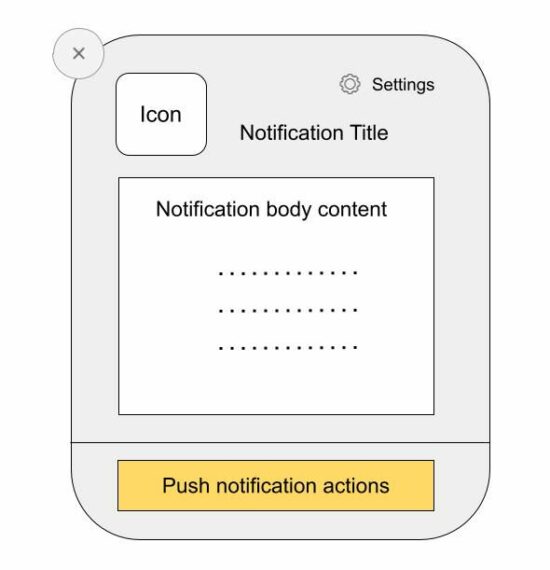
Web push notifications are messages pushed asynchronously from a website and mobile application to an event target.
There are two types of web push notifications:
Desktop notifications are shown when the foreground application is running and they are simple to use.
Notifications that are shown from the background even after the application is not running. It’s via a background service worker sync with the page or app.
This tutorial implements the first type of sending the push notification via JavaScript. It uses the JavaScript Notification class to create and manage notification instances.
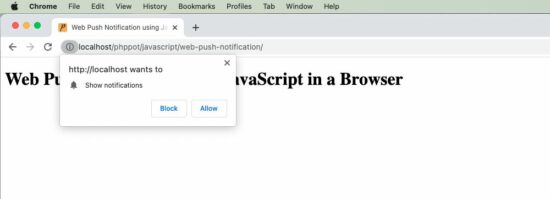
Note: To show the notifications, permission should be granted by the user.
About the example
This example sends the web push notifications by calling the JavaScript Notification.
It sends only one notification by running this script. It can also be put into a cycle to automatically send notifications at a periodic interval.
This code uses the following steps to push the notification to the event target.
It checks if the client has the required permissions and popups content window to have user acceptance.
It creates a notification instance by supplying the title, body and icon (path).
It refers to the on-click event mapping with the notification instance.
When the user clicks on the notification, it opens the target URL passed while creating the JavaScript Notification class.
index.php
<!DOCTYPE html>
<html>
<head>
<title>Web Push Notification using JavaScript in a Browser</title>
<script src="https://code.jquery.com/jquery-3.6.1.min.js" integrity="sha256-o88AwQnZB+VDvE9tvIXrMQaPlFFSUTR+nldQm1LuPXQ=" crossorigin="anonymous"></script>
</head>
<body> <div class="phppot-container"> <h1>Web Push Notification using JavaScript in a Browser</h1> <script> pushNotify(); function pushNotify() { if (!("Notification" in window)) { // checking if the user's browser supports web push Notification alert("Web browser does not support desktop notification"); } else if (Notification.permission === "granted") { console.log("Permission to show web push notifications granted."); // if notification permissions is granted, // then create a Notification object createNotification(); } else if (Notification.permission !== "denied") { alert("Going to ask for permission to show web push notification"); // User should give explicit permission Notification.requestPermission().then((permission) => { // If the user accepts, let's create a notification createNotification(); }); } // User has not granted to show web push notifications via Browser // Let's honor his decision and not keep pestering anymore } function createNotification() { var notification = new Notification('Web Push Notification', { icon: 'https://phppot.com/badge.png', body: 'New article published!', }); // url that needs to be opened on clicking the notification // finally everything boils down to click and visits right notification.onclick = function() { window.open('https://phppot.com'); }; } </script> </div>
</body>
</html>
Permissions required
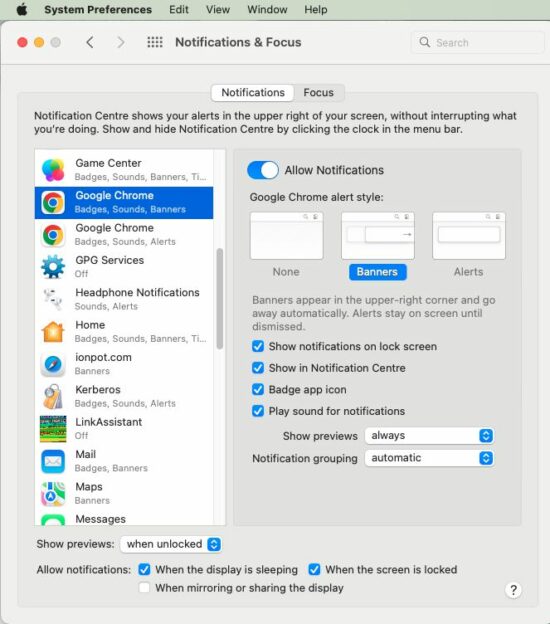
The following screenshot shows the settings to enable notification in the browser level and the system level.
Browser level permission
OS level permission
This is to allow the Google Chrome application to receive notifications. Similarly, select appropriate browser applications like Safai and Firefox to allow notification in them.
To convert a given Boolean value to a string in Python, use the str(boolean) function and pass the Boolean value into it. This converts Boolean True to string "True" and Boolean False to string "False".
Here’s a minimal example:
>>> str(True) 'True'
>>> str(False) 'False'
Python Boolean Type is Integer
Booleans are represented by integers in Python, i.e., bool is a subclass of int. Boolean value True is represented with integer 1. And Boolean value False is represented with integer 0.
Here’s a minimal example:
>>> True == 1
True
>>> False == 0
True
Convert True to ‘1’ and False to ‘0’
To convert a Boolean value to a string '1' or '0', use the expression str(int(boolean)). For instance, str(int(True)) returns '1' and str(int(False)) returns '0'. This is because of Python’s use of integers to represent Boolean values.
Here’s a minimal example:
>>> str(int(True)) '1'
>>> str(int(False)) '0'
Convert List of Boolean to List of Strings
To convert a Boolean to a string list, use the list comprehension expression [str(x) for x in my_bools] assuming the Boolean list is stored in variable my_bools. This converts each Boolean x to a string using the built-in str() function and repeats it for all x in the Boolean list.
Here’s a simple example:
my_bools = [True, True, False, False, True]
my_strings = [str(x) for x in my_bools]
print(my_strings)
# ['True', 'True', 'False', 'False', 'True']
Convert String Back to Boolean
What if you want to convert the string representation 'True' and 'False' (or: '1' and '0') back to the Boolean representation True and False?
You can convert a string value s to a Boolean value using the Python function bool(s).
For example, bool('True') and bool('1') return True.
However, bool('False') and bool('0') return False as well which may come unexpected to you.
This is because all Python objects are “truthy”, i.e., they have an associated Boolean value. As a rule of thumb: empty values return Boolean True and non-empty values return Boolean False. So, only bool('') on the empty string '' returns False. All other strings return True!
Easy – first pass the string into the eval() function and then pass the result into the bool() function. In other words, the expression bool(eval(my_string)) converts a string to a Boolean mapping 'True' and '1' to Boolean True and 'False' and '0' to Boolean False.
Finally – this behavior is as expected by many coders just starting out.
A Time Series is essentially a tabular data with the special feature of having a time index. The common forecast taks is ‘knowing the past (and sometimes the present), predict the future’. This task, taken as a principle, reveals itself in several ways: in how to interpret your problem, in feature engineering and in which forecast strategy to take.
This is the second article in our series. In the first article we discussed how to create features out of a time series using lags and trends. Today we follow the opposite direction by highlighting trends as something you want directly deducted from your model.
Reason is, Machine Learning models work in different ways. Some are good with subtractions, others are not.
For example, for any feature you include in a Linear Regression, the model will automatically detect whether to deduce it from the actual data or not. A Tree Regressor (and its variants) will not behave in the same way and usually will ignore a trend in the data.
Therefore, whenever using the latter type of models, one usually calls for a hybrid model, meaning, we use a Linear(ish) first model to detect global periodic patterns and then apply a second Machine Learning model to infer more sophisticated behavior.
The hybrid model part of this article is heavily based on Kaggle’s Time Series Crash Course, however, we intend to automate the process and discuss more in-depth the DeterministicProcess class.
DeterministicProcess aims at creating features to be used in a Regression model to determine trend and periodicity. It takes your DatetimeIndex and a few other parameters and returns a DataFrame full of features for your ML model.
A usual instance of the class will read like the one below. We use the sentic_mean column to illustrate.
from statsmodels.tsa.deterministic import DeterministicProcess y = dataset['sentic_mean'].copy() dp = DeterministicProcess(
index=y.index, constant=True, order=2
) X = dp.in_sample() X
We can use X and y as features and target to train a LinearRegression model. In this way, the LinearRegression will learn whatever characteristics from y can be inferred (in our case) solely out of:
the number of elapsed time intervals (trend column);
the last number squared (trend_squared); and
a bias term (const).
Check out the result:
from sklearn.linear_model import LinearRegression model = LinearRegression().fit(X,y) predictions = pd.DataFrame( model.predict(X), index=X.index, columns=['Deterministic Curve']
)
Even the quadratic term seems ignorable here. The DeterministicProcess class also helps us with future predictions since it carries a method that provides the appropriate future form of the chosen features.
Specifically, the out_of_sample method of dp takes the number of time intervals we want to predict as input and generates the needed features for you.
Although the order-three polynomial fits the data better, use discretion in deciding whether the sentiment count will decrease so drastically in the next 60 days or not. Usually, trust short-time predictions rather than long ones.
DeterministicProcess accepts other parameters, making it a very interesting tool. Find a description of the almost full list below.
dp = DeterministicProcess( index, # the DatetimeIndex of your data period: int or None, # in case the data shows some periodicity, include the size of the periodic cycle here: 7 would mean 7 days in our case constant: bool, # includes a constant feature in the returned DataFrame, i.e., a feature with the same value for everyone. It returns the equivalent of a bias term in Linear Regression order: int, # order of the polynomial that you think better approximates your trend: the simplest the better seasonal: bool, # make it True if you think the data has some periodicity. If you make it True and do not specify the period, the dp will try to infer the period out of the index additional_terms: tuple of statsmodel's DeterministicTerms, # we come back to this next drop: bool # drops resulting features which are collinear to others. If you will use a linear model, make it True
)
Seasonality
As a hardened Mathematician, seasonality is my favorite part because it deals with Fourier analysis (and wave functions are just… cool!):
Do you remember your first ML course when you heard Linear Regression can fit arbitrary functions, not only lines? So, why not a wave function? We just did it for polynomials and didn’t even feel like it
In general, for any expression f which is a function of a feature or of your DatetimeIndex, you can create a feature column whose ith row is the value of f corresponding to the ith index.
Then linear regression finds the constant coefficient multiplying f that best fits your data. Again, this procedure works in general, not only with Datetime indexes – the trend_squared term above is an example of it.
For seasonality, we use a second statsmodel‘s amazing class: CalendarFourier. It is another statsmodel‘s DeterministicTerm class (i.e., with the in_sample and out_of_sample methods) and instantiates with two parameters, 'frequency' and 'order'.
As a 'frequency', the class expects a string such as ‘D’, ‘W’, ‘M’ for day, week or month, respectively, or any of the quite comprehensive Pandas Datetime offset aliases.
The 'order' is the Fourier expansion order which should be understood as the number of waves you are expecting in your chosen frequency (count the number of ups and downs – one wave would be understood as one up and one down)
CalendarFourier integrates swiftly with DeterministicProcess by including an instance of it in the list of additional_terms.
If we take seasonal=True inside DeterministicProcess, we get a crispier line:
Including ax.set_xlim(('2022-08-01', '2022-10-01')) before plt.show() zooms the graph in:
Although I suggest using the seasonal=True parameter with care, it does find interesting patterns (with huge RMSE error, though).
For instance, look at this BTC percentage change zoomed chart:
Here period is set to 30 and seasonal=True. I also manually rescaled the predictions to be better visible in the graphic. Although the predictions are far away from truth, thinking as a trader, isn’t it impressive how many peaks and hills it gets right? At least for this zoomed month…
To maintain the workflow promise, I prepared a code that does everything so far in one shot:
def deseasonalize(df: pd.Series, season_freq='A', fourier_order=0, constant=True, dp_order=1, dp_drop=True, model=LinearRegression(), fourier=None, dp=None, **DeterministicProcesskwargs)->(pd.Series, plt.Axes, pd.DataFrame): """ Returns a deseasonalized and detrended df, a seasonal plot, and the fitted DeterministicProcess instance. """ if fourier is None: fourier = CalendarFourier(freq=season_freq, order=fourier_order) if dp is None: dp = DeterministicProcess( index=df.index, constant=True, order=dp_order, additional_terms=[fourier], drop=dp_drop, **DeterministicProcesskwargs ) X = dp.in_sample() model = LinearRegression().fit(X, df) y_pred = pd.Series( model.predict(X), index=X.index, name=df.name+'_pred' ) ax = plt.subplot() y.plot(ax=ax, legend=True) predictions.plot(ax=ax) y_pred.columns = df.name y_deseason = df - y_pred y_deseason.name = df.name +'_deseasoned' return y_deseason, ax, dp The sentic_mean analyses get reduced to: y_deseason, ax, dp= deseasonalize(y, season_freq='A', fourier_order=2, constant=True, dp_order=2, dp_drop=True, model=LinearRegression() )
Cycles and Hybrid Models
Let us move on to a complete Machine Learning prediction. We use XGBRegressor and compare its performance among three instances:
Predict sentic_mean directly using lags;
Same prediction adding the seasonal/trending with a DeterministicProcess;
A hybrid model, using LinearRegression to infer and remove seasons/trends, and then apply a XGBRegressor.
The first part will be the bulkier since the other two follow from simple modifications in the resulting code.
Preparing the data
Before any analysis, we split the data in train and test sets. Since we are dealing with time series, this means we set the ‘present date’ as a point in the past and try to predict its respective ‘future’. Here we pick 22 days in the past.
s = dataset['sentic_mean'] s_train = s[:'2022-09-01']
We made this first split in order to not leak data while doing any analysis.
Next, we prepare target and feature sets. Recall our SentiCrypto’s data was set to be available everyday at 8AM. Imagine we are doing the prediction by 9AM.
In this case, anything until the present data (the ‘lag_0‘) can be used as features, and our target is s_train‘s first lead (which we define as a -1 lag). To choose other lags as features, we examine theirs statsmodel’s partial auto-correlation plot:
from statsmodels.graphics.tsaplots import plot_pacf plot_pacf(s_train, lags=20)
We use the first four for sentic_mean and the first seven + the 11th for sentic_count (you can easily test different combinations with the code below.)
Now we finish choosing features, we go back to the full series for engineering. We apply to s_maen and s_count the make_lags function we defined in the last article (which we transcribe here for convenience).
def make_lags(df, n_lags=1, lead_time=1): """ Compute lags of a pandas.Series from lead_time to lead_time + n_lags. Alternatively, a list can be passed as n_lags. Returns a pd.DataFrame whose ith column is either the i+lead_time lag or the ith element of n_lags. """ if isinstance(n_lags,int): lag_list = list(range(lead_time, n_lags+lead_time)) else: lag_list = n_lags lags ={ f'{df.name}_lag_{i}': df.shift(i) for i in lag_list } return pd.concat(lags,axis=1) X = make_lags(s, [0,1,2,3,4]) y = make_lags(s, [-1]) display(X)
y
Now a train-test split with sklearn is convenient (Notice the shuffle=False parameter, that is key for time series):
from sklearn.model_selection import train_test_split X_train, X_test, y_train, y_test = train_test_split(X, y, test_size=22, shuffle=False) X_train
(Observe that the final date is set correctly, in accordance with our analysis’ split.)
You can reduce overfitness by reducing the number of estimators, but the R2 test score maintains negative.
We can replicate the process for sentic_count (or whatever you want). Below is a function to automate it.
from xgboost import XGBRegressor
from sklearn.model_selection import train_test_split
from sklearn.metrics import r2_score
from statsmodels.tsa.stattools import pacf def apply_univariate_prediction(series, test_size, to_predict=1, nlags=20, minimal_pacf=0.1, model=XGBRegressor(n_estimators=50)): ''' Starting from series, breaks it in train and test subsets; chooses which lags to use based on pacf > minimal_pacf; and applies the given sklearn-type model. Returns the resulting features and targets and the trained model. It plots the graph of the training and prediction, together with their r2_score. ''' s = series.iloc[:-test_size] if isinstance(to_predict,int): to_predict = [to_predict] from statsmodels.tsa.stattools import pacf s_pacf = pd.Series(pacf(s, nlags=nlags)) column_list = s_pacf[s_pacf>minimal_pacf].index X = make_lags(series, n_lags=column_list).dropna() y = make_lags(series,n_lags=[-x for x in to_predict]).loc[X.index] X_train, X_test, y_train, y_test = train_test_split(X, y, test_size=test_size, shuffle=False) model.fit(X_train,y_train) predictions_train = pd.DataFrame( model.predict(X_train), index=X_train.index, columns=['Train Predictions'] ) predictions_test = pd.DataFrame( model.predict(X_test), index=X_test.index, columns=['Test Predictions'] ) fig, (ax1,ax2) = plt.subplots(1,2, figsize=(14,5), sharey=True) y_train.plot(ax=ax1, legend=True) predictions_train.plot(ax=ax1) ax1.set_title('Train Predictions') y_test.plot(ax=ax2, legend=True) predictions_test.plot(ax=ax2) ax2.set_title('Test Predictions') plt.show() print(f'R2 train score: {r2_score(y_train[:-1],predictions_train[:-1])}') print(f'R2 test score: {r2_score(y_test[:-1],predictions_test[:-1])}') return X, y, model apply_univariate_prediction(dataset['sentic_count'],22)
Since the features created by DeterministicProcess are only time-dependent, we can add them harmlessly to the feature DataFrame we automated get from our univariate predictions.
The predictions, though, are still univariate. We use the deseasonalize function to obtain the season features. The data preparation is as follows:
s = dataset['sentic_mean'] X, y, _ = apply_univariate_prediction(s,22); s_deseason, _, dp = deseasonalize(s, season_freq='A', fourier_order=2, constant=True, dp_order=2, dp_drop=True, model=LinearRegression() );
X_f = dp.in_sample().shift(-1) X = pd.concat([X,X_f], axis=1, join='inner').dropna()
With a bit of copy and paste, we arrive at:
And we actually perform way worse!
Deseasonalizing
Nevertheless, the right-hand graphic illustrates the inability of grasping trends. Our last shot is a hybrid model.
Here we follow three steps:
We use the LinearRegression to capture the seasons and trends, rendering the series y_s. Then we acquire a deseasonalized target y_ds = y-y_s;
Train an XGBRegressor on y_ds and the lagged features, resulting in deseasonalized predictions y_pred;
Finally, we incorporate y_s back to y_pred to compare the final result.
Although Bitcoin-related data are hard to predict, there was a huge improvement on the r2_score (finally something positive!). We define the used function below.
Instead of going through every detail, we will also automate this code. In order to get the code running smoothly, we revisit the deseasonalize and the apply_univariate_prediction functions in order to remove the plotting part of them.
The final function only plots graphs and returns nothing. It intends to give you a baseline for a hybrid model score. Change the function at will to make it return whatever you need.
def get_season(series: pd.Series, test_size, season_freq='A', fourier_order=0, constant=True, dp_order=1, dp_drop=True, model1=LinearRegression(), fourier=None, is_seasonal=False, season_period=None, dp=None): """ Decompose series in a deseasonalized and a seasonal part. The parameters are relative to the fourier and DeterministicProcess used. Returns y_ds and y_s. """ se = series.iloc[:-test_size] if fourier is None: fourier = CalendarFourier(freq=season_freq, order=fourier_order) if dp is None: dp = DeterministicProcess( index=se.index, constant=True, order=dp_order, additional_terms=[fourier], drop=dp_drop, seasonal=is_seasonal, period=season_period ) X_in = dp.in_sample() X_out = dp.out_of_sample(test_size) model1 = model1.fit(X_in, se) X = pd.concat([X_in,X_out],axis=0) y_s = pd.Series( model1.predict(X), index=X.index, name=series.name+'_pred' ) y_s.name = series.name y_ds = series - y_s y_ds.name = series.name +'_deseasoned' return y_ds, y_s def prepare_data(series, test_size, to_predict=1, nlags=20, minimal_pacf=0.1): ''' Creates a feature dataframe by making lags and a target series by a negative to_predict-shift. Returns X, y. ''' s = series.iloc[:-test_size] if isinstance(to_predict,int): to_predict = [to_predict] from statsmodels.tsa.stattools import pacf s_pacf = pd.Series(pacf(s,nlags=nlags)) column_list = s_pacf[s_pacf>minimal_pacf].index X = make_lags(series, n_lags=column_list).dropna() y = make_lags(series,n_lags=[-x for x in to_predict]).loc[X.index].squeeze() return X, y def get_hybrid_univariate_prediction(series: pd.Series, test_size, season_freq='A', fourier_order=0, constant=True, dp_order=1, dp_drop=True, model1=LinearRegression(), fourier=None, is_seasonal=False, season_period=None, dp=None, to_predict=1, nlags=20, minimal_pacf=0.1, model2=XGBRegressor(n_estimators=50) ): """ Apply the hybrid model method by deseasonalizing/detrending a time series with model1 and investigating the resulting series with model2. It plots the respective graphs and computes r2_scores. """ y_ds, y_s = get_season(series, test_size, season_freq=season_freq, fourier_order=fourier_order, constant=constant, dp_order=dp_order, dp_drop=dp_drop, model1=model1, fourier=fourier, dp=dp, is_seasonal=is_seasonal, season_period=season_period) X, y_ds = prepare_data(y_ds,test_size=test_size) X_train, X_test, y_train, y_test = train_test_split(X, y_ds, test_size=test_size, shuffle=False) y = y_s.squeeze() + y_ds.squeeze() model2 = model2.fit(X_train,y_train) predictions_train = pd.Series( model2.predict(X_train), index=X_train.index, name='Prediction' )+y_s[X_train.index] predictions_test = pd.Series( model2.predict(X_test), index=X_test.index, name='Prediction' )+y_s[X_test.index] fig, (ax1,ax2) = plt.subplots(1,2, figsize=(14,5), sharey=True) y_train_ps = y.loc[y_train.index] y_test_ps = y.loc[y_test.index] y_train_ps.plot(ax=ax1, legend=True) predictions_train.plot(ax=ax1) ax1.set_title('Train Predictions') y_test_ps.plot(ax=ax2, legend=True) predictions_test.plot(ax=ax2) ax2.set_title('Test Predictions') plt.show() print(f'R2 train score: {r2_score(y_train_ps[:-to_predict],predictions_train[:-to_predict])}') print(f'R2 test score: {r2_score(y_test_ps[:-to_predict],predictions_test[:-to_predict])}')
A note of warning: if you do not expect your data to follow time patterns, do focus on cycles! The hybrid model succeeds well for many tasks, but it actually decreases the R2 score of our previous Bitcoin prediction:
This article aims at presenting functions for your time series workflow, specially for lags and deseasonalization. Use them with care, though: apply them to have baseline scores before delving into more sophisticated models.
In future articles we will bring forth multi-step predictions (predict more than one day ahead) and compare performance of different models, both univariate and multivariate.
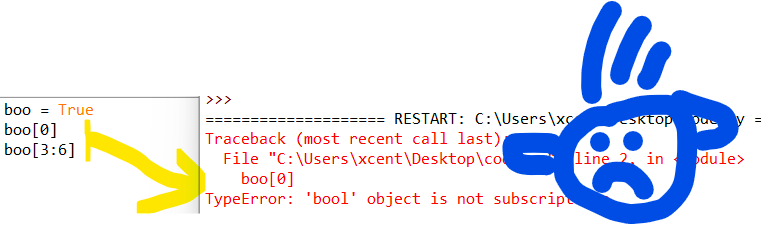
Consider the following minimal example where a TypeError: 'bool' object is not subscriptable occurs:
boo = True
boo[0]
# or:
boo[3:6]
This yields the following output:
Traceback (most recent call last): File "C:\Users\xcent\Desktop\code.py", line 2, in <module> boo[0]
TypeError: 'bool' object is not subscriptable
Solution Overview
Python raises the TypeError: 'bool' object is not subscriptable if you use indexing or slicing with the square bracket notation on a Boolean variable. However, the Boolean type is not indexable and you cannot slice it—it’s not iterable!
In other words, the Boolean class doesn’t define the __getitem__() method.
converting the Boolean to a string using the str() function because strings are subscriptable,
removing the indexing or slicing call,
defining a dummy __getitem__() method for a custom “Boolean wrapper class”.
Related Tutorials: Check out our tutorials on indexing and slicing on the Finxter blog to improve your skills!
Method 1: Convert Boolean to a String
If you want to access individual characters of the “Boolean” strings "True" and "False", consider converting the Boolean to a string using the str() built-in function. A string is subscriptable so the error will not occur when trying to index or slice the converted string.
A simple way to resolve this error is to put the Boolean into a list that is subscriptable—that is you can use indexing or slicing on lists that define the __getitem__() magic method.
You can also define your own wrapper type around the Boolean variable that defines a dunder method for __getitem__() so that every indexing or slicing operation returns a specified value as defined in the dunder method.
This hack is generally not recommended, I included it just for comprehensibility and to teach you something new.
Summary
The error message “TypeError: 'boolean' object is not subscriptable” happens if you access a boolean boo like a list such as boo[0] or boo[1:4]. To solve this error, avoid using slicing or indexing on a Boolean or use a subscriptable object such as lists or strings.
This is in continuation of our DeFi series. In this post, we look at yet another decentralized lending and borrowing platform Aave.
Full DeFi Course: Click the link to access our free full DeFi course that’ll show you the ins and outs of decentralized finance (DeFi).
Aave
Aave launched in 2017 is a DeFi protocol similar to Compound with a lot of upgrades.
Beyond what Compound provides, Aave gives several extra tokens for supply and borrowing. As of now, Compound offered nine different tokens (various ERC- 20 Ethereum- based assets).
Aave provides these nine besides an additional 13 that Compound does not.
Depositors give the market liquidity to generate a passive income, while borrowers can borrow if they have an over-collateralized token or can avail flash loans for under-collateralized (one-block liquidity).
Currently, we can see two major markets on Aave.
The first is for ERC-20 tokens that are more frequently used, like those of Compound, and their underlying assets, such as ETH, DAI and USDC.
The latter is only available with Uniswap LP tokens.
For instance, a user receives an LP token signifying market ownership when they deposit collateral into a liquidity pool on the Uniswap platform. To provide additional benefits, the LP tokens can be sold on the Uniswap market of Aave.
As per DeFi pulse, Aave has a TVL (Total Value Locked) of $4.09B as of today.
Fig: Defi Pulse for Aave
Aave Versions
Aave has released three versions (v1, v2 and v3) as of now and the Governance token of Aave is ‘AAVE’. Version 1 or v1 is the base version launched in 2017 and then there have been upgrades with multiple new features added. Below is a short comparison of when to use v2 or v3.
Fig: Aave borrow and lend (pic credit: https://docs.aave.com)
Borrow
You must deposit any asset to be used as collateral before borrowing.
The amount you can borrow up to depends on the value you have deposited and the readily available liquidity.
For instance, if there isn’t enough liquidity or if your health factor (minimum threshold of the collateral = 1, below this value, liquidation of your collateral is triggered) prevents it, you can’t borrow an asset.
The loan is repaid with the same asset that you borrowed.
For instance, if you borrow 1 ETH, you’ll need to pay back 1 ETH plus interest.
In the updated Version 2 of the Aave Protocol, you can also use your collateral to make payments. You can borrow any of the stable coins like USDC, DAI, USDT, etc. if you want to repay the loan based on the price of the USD.
Stable vs Variable Interest Rate
In the short-term, stable rates function as a fixed rate, but they can be rebalanced in the long run in reaction to alterations in the market environment. Depending on supply and demand in Aave, the variable rate can change.
The stable rate is the better choice for forecasting how much interest you will have to pay because, as its name suggests, it will remain fairly stable. The variable rate changes over time and, depending on market conditions, could be the optimal rate.
Through your dashboard, you can switch between the stable and variable rate at any time.
Deposit/Lending
Lenders share the interest payments made by borrowers based on the utilization rate multiplied by the average borrowing rate. The yield for depositors increases as reserve utilization increases.
Lenders are also entitled to a portion of the Flash Loan fees, equal to .09% of the Flash Loan volume.
There is no minimum or maximum deposit amount; you may deposit any amount you choose.
Flash Loans in Aave
Flash Loans are unique business agreements that let you borrow an asset as long as you repay the borrowed money (plus a fee) before the deal expires (also called One Block Borrows). Users are not required to provide collateral for these transactions in order to proceed.
Flash Loans have no counterpart in the real world, so understanding how state is controlled within blocks in blockchains is a prerequisite.
Flash-loan enables users to access pool liquidity for a single transaction as long as the amount borrowed plus fees are returned or (if permitted) a debt position is opened by the end of the transaction.
For flash loans, Aave V3 provides two choices:
(1) “flashLoan”: enables borrowers to access the liquidity of several reserves in a single flash loan transaction. In this situation, the borrower also has the choice to open a fixed or variable-rate loan position secured by provided collateral.
The fee for flashloan is waived for approved flash borrowers.
(2) “flashLoanSimple”: enables the borrower to access a single reserve’s liquidity for the transaction. For individuals looking to take advantage of a straightforward flash loan with a single reserve asset, this approach is gas-efficient.
The fee for flashloanSimple is not waived for the flash borrowers. The Flashloan fee on Aave V3 is 0.05%.
Let’s Code a Simple Flash Loan
Let’s code a simple flash loan in Aave, where we buy and repay the asset in the same transaction without having to provide any collateral. First, we set up the environment for writing the code.
Note: It is recommended to follow the video along for a better understanding.
$npm install -g truffle # in case truffle not installed
$mkdir aave_flashloan $cd aave_flashloan
$truffle init
$npm install @aave/core-v3
$npm install @openzeppelin/contracts
$npm install @openzeppelin/test-helpers
Note: Aave3 is currently available on Polygon, Arbitrum, Avalanche, and other L2 chains. As of now, it is not available on the Ethereum mainnet. Thus, we will fork the Polygon mainnet for our tests.
Set up a new app in Alchemy with the chain as Polygon mainnet and note down the API key.
This should run the flash loan test case, and it must pass.
Conclusion
This tutorial discussed Aave, a leading Dapp lending and borrowing provider.
It covered some basic functionalities supported in Aave, such as lending, borrowing, and flash loans.
There are many other features Aave supports and it is not possible to cover it in one post, such as governance, liquidation, and advanced features such as Siloed Borrowing, Credit Delegation, and many more.
The post also examined a simple flash loan contract using Aave API.
You can explore more about borrowing and lending with Aave in this link. It has a full stack Defi Aave dapp with frontend to perform borrowing and lending.
This article will show you how to retrieve a single generator element in Python. Before moving forward, let’s review what a generator does.
Quick Recap Generators
Definition Generator: A generator is commonly used when processing vast amounts of data. This function uses minimal memory and produces results in less time than a standard function.
Definition yield: The yield keyword returns a generator object instead of a value.
Definition next(): This function takes an iterator and an optional default value. Each time this function is called, it returns the next iterator item until all items are exhausted. Once exhausted, it returns the default value passed or a StopIteration Error.
Problem Formulation and Solution Overview
Question: How would we write code to retrieve and return a single element from a Generator?
We can accomplish this task by one of the following options:
Let’s say we want to start a weekly in-house lottery called LottoOne (yeah — the lottery naming doesn’t care about Python’s naming conventions ).
The code below will generate and return one (1) random element (an integer): the winning number for the week.
import random def LottoOne(): num = random.randint(1, 50) yield print(f'The Winning Number for the Week is: {num}!') gen = LottoOne()
next(gen)
The first line in the above code imports the random library. This library allows the generation of random numbers using the random.randint() function.
On the following line, an instance of LottoOne is instantiated and saved to the variable gen. If output to the terminal, an object similar to that shown below will display.
<generator object LottoOne at 0x00000236B9686880>
Since we only want the first randomly generated number, the code calls the next() function once and passes it one (1) argument, the object gen. The results are output to the terminal.
If you know what number you need to return from a generator, it can be referenced directly, as shown in the code below.
import itertools
from itertools import islice gen = (x for x in range(1, 50))
res = next(itertools.islice(gen, 2, None))
print(res)
The first two (2) lines in the above code import the itertools library and its associated function islice()needed to achieve the desired result.
The following line creates a generator comprehension using the range() function and passing it a start and stop position (1, 50-1). The results save to gen as an object.
If output to the terminal, an object similar to that shown below will display.
The default value. In this case, the keyword None. Passing a default value prevents a StopIteration error from occurring when the end of the iterator has been reached.
The results save to res and are output to the terminal.
3
The value of 3 can be found at index 2 in gen.
Method 3: Use a List, Generator Comprehension and slicing
gen = (i for i in range(1, 50))
res = list(gen)[3]
print(res)
The first line in the above code creates a Generator Comprehension using the range() function and passing it a start and stop position (1, 50-1). The results save to gen as an object.
If output to the terminal, an object similar to that shown below will display.
<generator object at 0x00000295D4DB78F0>
The following line converts the object to a list. Slicing is then applied to retrieve the list element at position three (3).
The results save to res and are output to the terminal.
4
The value of 4 can be found at index 3 in gen.
Method 4: Use a Generator and a For Loop
This example creates a Generator whose content is output to the terminal until a specific number is found.
def my_func(): yield 10 yield 20 yield 30 gen = my_func() for item in gen: if item == 20: print(item) break
This first line of the above code declares the function my_func(). This function will return, via a yield statement, a number (one/iteration).
Next, an object is declared and saved to gen.
If output to the terminal, an object similar to that shown below will display.
<generator object my_func at 0x0000022DE93D59A0>
The following line instantiates a for loop. This loop iterates through each yield statement in gen until the item contains a value of 20.
This value is output to the terminal, and the loop terminates via the break statement.
20
Summary
This article has provided four (4) ways to retrieve a single element from a Generator to select the best fit for your coding requirements.
Good Luck & Happy Coding!
Programming Humor – Python
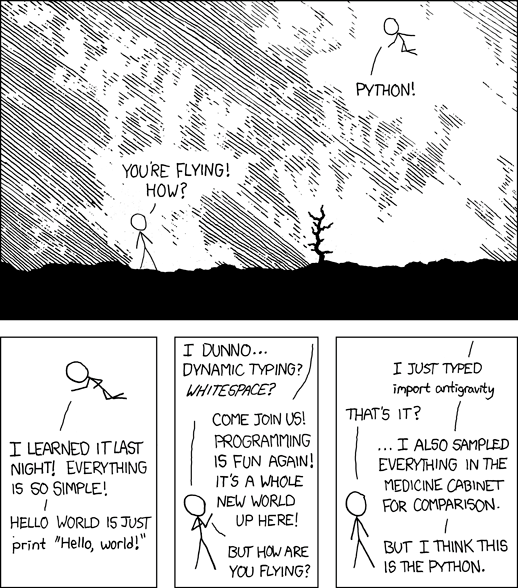
“I wrote 20 short programs in Python yesterday. It was wonderful. Perl, I’m leaving you.” — xkcd
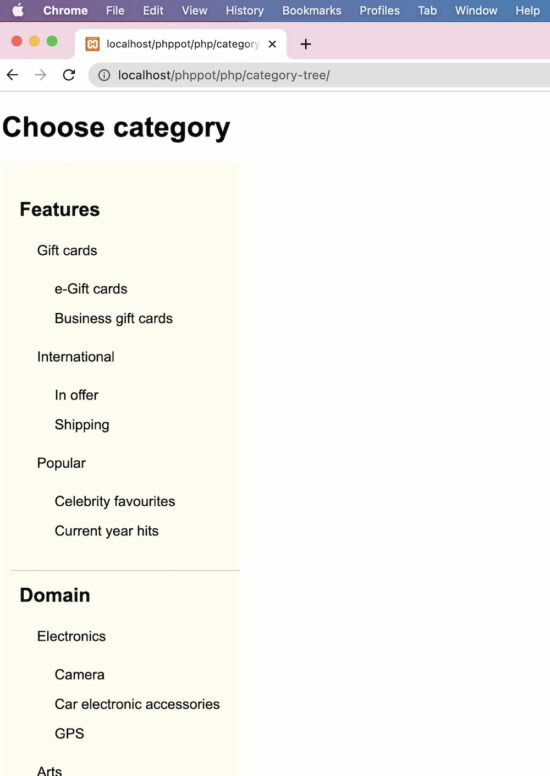
This PHP script will help if you want to display an Amazon-like product category tree. It will be useful for displaying the category menu in a hierarchical order, just like a tree.
The specialty of this PHP code is that it builds a multi-level category tree with infinite depth. It uses the recursion method to obtain this.
This is an initiator that calls the PHP recursive parsing to get the Category Tree HTML. In the PHP ZipArchive post, we used the same recursion concept to compress the contents of the enclosed directories.
Also, it has a UI holder to render the HTML hierarchical category menu.
A PHP class CategoryTree is created to read and parse the category array from the database.
This styles gives the category tree a pleasing look. Since it displays an infinite level of child categories, this CSS will help to rectify the default UI constraints.
Datatrans is one of the popular payment gateway systems in Europe for e-commerce websites. It provides frictionless payment solutions.
The Datatrans Payment gateway is widely popular in European countries. One of my clients from Germany required this payment gateway integrated into their online shop.
In this tutorial, I share the knowledge of integrating Datatrans in a PHP application. It will save the developers time to do research with the long-form documentation.
There are many integration options provided by this payment gateway.
Redirect and lightbox
Secure fields
Mobile SDK
API endpoints
In this tutorial, we will see the first integration option to set up the Datatrans payment gateway. We have seen many payment gateway integration examples in PHP in the earlier articles.
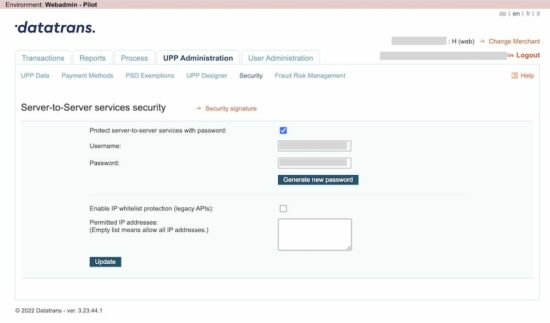
A working example follows helps to understand things easily. Before seeing the example, get the Datatrans merchant id and password. It will be useful for authentication purposes while accessing this payment API.
Get Datatrans merchant id and password
The following steps lead to getting the merchant id and password of your Datatrans account.
Get transaction id and proceed with payment via API
The initiate() function posts the amount to the PHP file to initiate Datatrans payment.
As the result, the PHP will return the transaction id to process the payment further.
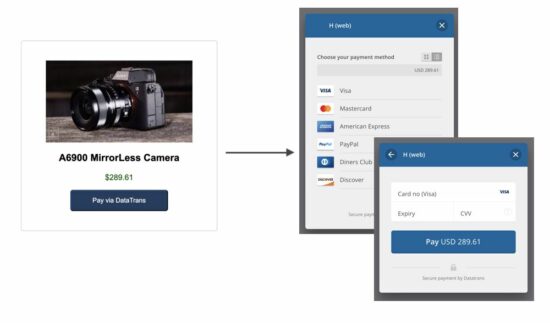
The proceedPayment() function calls the Datatrans JavaScript API to start the payment. It will show a Datatrans overlay with card options to choose payment methods.
index.php (AJAX script to call Datatrans initiation)
Initiate payment transaction to get the Datatrans payment transaction id
This file is the PHP endpoint called via AJAX script to get the Datatrans transaction id.
It invokes the DatatransPaymentService to post the cURL request to the Datatrans API. It requested to initiate the payment and receives the transaction id from the Datatrans server.
This output will be read in the AJAX success callback to start the payment via the JavaScript library.
<HTML>
<HEAD>
<TITLE>Datatrans payment status notice</TITLE>
</HEAD>
<BODY> <div class="text-center">
<?php
if (! empty($_GET["status"])) { ?> <h1>Something wrong with the payment process!</h1> <p>Kindly contact admin with the reference of your transaction id <?php echo $_GET["datatransTrxId"]; ?></p>
<?php
} else { ?> <h1>Your order has been placed</h1> <p>We will contact you shortly.</p>
<?php
}
?>
</div>
</BODY>
</HTML>



 Download PDF Slide Deck at the end of this tutorial!
 By extension, our contracts are also treated as types, and as every contract is unique in its own right, it defines its own type. Being a type, we can implicitly convert a specific contract to a contract it inherits from, i.e. if contract “Aa” inherits from contract A, it can also be converted to contract “A”.

 Warning: Since the type
  Note: Value types in storage are packed/compacted together and share a storage slot, taking only as much space per value type as really needed. In contrast, the stack, memory, and


 Question: Given a Boolean value


 As a rule of thumb, the order should be one plus the total number of (trending) hills + peaks in the graph, but not much more than that.


 Related Tutorials: Check out our tutorials on


 Note: It is recommended to follow the video along for a better understanding.
 ).
). 




Share this page