Posted on Leave a comment

Python Print Dictionary Without One Key or Multiple Keys

5/5 – (1 vote)

The most Pythonic way to print a dictionary except for one or multiple keys is to filter it using dictionary comprehension and pass the filtered dictionary into the print() function.

There are multiple ways to accomplish this and I’ll show you the best ones in this tutorial. Let’s get started! ๐Ÿš€

๐Ÿ‘‰ Recommended Tutorial: How to Filter a Dictionary in Python

Method 1: Dictionary Comprehension

Say, you have one or more keys stored in a variable ignore_keys that may be a list or a set for efficiency reasons.

Create a filtered dictionary without one or multiple keys using the dictionary comprehension {k:v for k,v in my_dict.items() if k not in ignore_keys} that iterates over the original dictionary’s key-value pairs and confirms for each key that it doesn’t belong to the ones that should be ignored.

Here’s a minimal example:

ignore_keys = {'x', 'y'}
my_dict = {'x': 1, 'y': 2, 'z': 3} filtered_dict = {k:v for k,v in my_dict.items() if k not in ignore_keys}
print(filtered_dict)
# {'z': 3}

The dict.items() method creates an iterable of key-value pairs over which we can iterate.

The membership operator k not in ignore_keys tests if a given key doesn’t belong to the set.

๐Ÿ’ก The runtime complexity of the membership check is constant O(1) if you use a set for the ignore_keys data structure. It would be linear O(n) in the number of elements if you used a list which is not a good idea for that reason.

Note that you can also use this approach to print a dictionary except a single key by putting only one key into the ignore list.

๐Ÿ‘‰ Recommended Tutorial: Dictionary Comprehension in Python

Method 2: Simple For Loop with If Condition

A not-so-Pythonic but reasonably readable way to print a dict without one or multiple keys is to use a simple for loop with if condition to avoid all keys in the ignore list.

Here’s an example using three lines and directly printing the key-value pairs:

ignore_keys = {'x', 'y'}
my_dict = {'x': 1, 'y': 2, 'z': 3} for k, v in my_dict.items(): if k not in ignore_keys: print(k, v)

The output:

z 3

Of course, you can modify the output to your own needs. See the customizations of the built-in print() function and its awesome arguments:

๐Ÿ‘‰ Recommended Tutorial: Python print() and Separator and End Arguments


My Recommendation – Use This Method!

I could have listed many more ways to solve this problem of printing a dict except one or more keys.

I have seen super inefficient ways proposed on forums that use exclude_keys that are list types.

I have also seen elaborate schemes to use set difference operations or more.

But I don’t recommend anything else than dict comprehension if you want to create a filtered dictionary object first and the simple for loop if you want to print on the fly.

That’s it. ๐Ÿ‘Œ


Posted on Leave a comment

State Variables in Solidity

5/5 – (1 vote)

In this article, Iโ€™ll be going over the different types of state variables in Solidity and how to use them. State variables are one of the most important parts of any smart contract, as they allow us to store data that can change over time.

This article is mainly focused on value types of state variables, but Iโ€™ll be continuing with another two articles on reference and complex types as well as data location. Letโ€™s dive in!

Basics – A Quick Review

Smart contracts are pieces of code that are deployed in blockchain nodes. They are immutable, meaning they cannot be changed once they have been deployed. This can make it necessary to redeploy the code as a new smart contract or redirect calls from an old contract to new ones.

A smart contract is initiated by a message embedded in a transaction. Ethereum enables these transactions, which may carry out more sophisticated operations like conditional transfers.

A conditional transfer, such as one that depends on the age of the buyer or the value of their bid, could be required.

๐Ÿ’ก Example: If the buyer is over 21 and their bid is greater than the minimum bid, then accept the bid. Otherwise reject it.

Smart contracts are executed when predetermined conditions are met to automate the execution of an agreement so that all parties can be immediately certain of the outcome without the need for an intermediary.

How Do You Write a Smart Contract?

Smart contracts are similar to a class definition in an object-oriented programming language.

The smart contracts are:

  • data (its state);
  • a collection of code (its functions or methods with modifiers public or private with getter and set functions).

What is the structure of a smart contract?

As we have seen in other articles in Finxter, the structure of a smart contract is as follows:

  • Contract in the Ethereum blockchain has pragma directive;
  • Name of the contract;
  • Data or the state variable that define the state of the contract;
  • Collection of functions to carry out the intent of a smart contract;

Note that the identifiers representing these elements are restricted to the ASCII character set. Make sure you select meaningful identifiers and follow camel case convention in naming them.

Variable Declaration

To declare a variable in Solidity, you must first specify its data type. This is followed by an access modifier and the variable name.

Structure

<type> <access modifier> <variable name> ; 

Example:

What Categories of Variables Exist in Solidity?

Solidity supports three categories of variables:

(1) State Variables

State variables are variables whose values are permanently stored in a contract storage.

What does this mean?

State variables are an essential part of any contract. They are variables whose values are permanently stored in the contract storage. They can be thought of as a single slot in a database that you can query and alter by calling functions of the code that manages the database. The set and get functions can be used to modify and retrieve the value of the variables.

In other words, the data (state variables) are stored contiguously item after item starting with the first state variable, stored in slot 0. For each variable, the size in bytes is determined according to its type. Several contiguous itemsย  that require less than 32 bytes are packed into a single storage slot if possible.

To make it easier, if you use other languages and want to store user information for a long time, you would connect your application to a database server and then store the information in the database. In Solidity, however, you do not need to connect, you can simply store the data permanently using state variables.

(2) Local Variables

Local variables are variables whose values exist until the function is executed; the context of local variables is within the function and cannot be accessed outside.

Typically, these variables are used to hold temporary values for processing or computing something. In the following example, “temp” is a local variable that cannot be used outside the “set” function.

(3) Global Variables

Global variables are variables whose values exist in the global namespace to obtain information about the blockchain.

Each function has its own scope, but state variables should always be defined outside the scope, like the attributes of a class.

They are permanently stored in the Ethereum blockchain, more precisely in the storage Merkle-Patricia tree, which is part of the information that forms the state of an account (that’s why we call them state variables).

What Types of Valid State Variables Exist?

๐Ÿ’ก Info: Solidity is a statically typed language, meaning each variable’s type must be specified at the time of its declaration.ย 

“Undefined” or “null” values do not exist in Solidity, but newly declared variables always have a default value depending on their type, typically called “zero- state”.

For example, the default value for bool is false.

As in other languages (not Python ๐Ÿ˜€ ), there are two types in Solidity: value types and reference types.

  • The value type is a variable that stores its value or its own data directly; it is a value type. If the variable contains a location of the data – it is a reference type.
  • The reference types are discussed in a separate article.

For example, consider the integer variable int i = 100;

The system stores 100 in the memory location allocated for the variable i. The following image shows how 100 is stored in a hypothetical location in memory (0x239110) for “i”:

What are the Modifiers for the State Variables?

Visibility – access modifiers

Access modifiers are the keywords used to specify the declared accessibility of a state variable and functions.

Variables in Solidity have three types of visibility: public, private, andย  internal. If visibility is not explicitly declared, the compiler considers it internal.

For variables of type public, the compiler automatically creates a method to retrieve them through a call. This does not apply to private or internal variables.

Example:

uint256 public a; is actually exactly the same thing as : uint256 private a;
function a() public view returns(uint256) {
return a;
}

When you create a public variable, it is stored the same way as a private variable, but the compiler automatically creates a getter function for it.

๐Ÿ’ก The difference between private and internal variables is that internal variables are inherited by child contracts, while private variables are not.

To learn more about private variables:

contract Addition { uint x; //internal variable uint public y; // contract Child is Addition{ //no need to define x since the child contract inherits the variable //uintx function setX(uint _x) public { x =_x; function getX() public view returns (uint) { return x; }
}

Note that the data location (memory, storage, and call data) must be specified for variables of reference type. This is necessary when function arguments are involved. We will cover this in an article on data location.

Other keywords

The following keywords can be used for state variables to restrict changes to their state.

Constant (replaced by “view” and “pure” in functions)

Constant disallows assignment (except at initialization), i.e. they cannot be changed after initialization, but must be initialized at the time of their declaration.

Example:

uint private constant t = 40;

The variable t has been declared once and therefore cannot be changed.

It is interesting to note that the declaration of a constant variable without initialization is forbidden and the compiler displays an error, e.g.:

Contract Addition { uint private x; uint public y; uint private constant z; //gives an error because constant variables must be initialized when declared.

Immutableย 

These variables can be declared without being initialized, but the assignment, which is only one, must be done in the constructor. After that, the variable is constant thereafter.

 uint private immutable w; //now we declare a constructor for the contract, using the function constructor constructor() { w = 20; //initiate variable }

Override 

This keyword states that the public state variables change the behavior of a function.

Value Types

These variables are passed by value. That is, they are copied when they are used either in an assignment or in a function argument.

๐Ÿ‘‰ If this sentence is not clear, you can check here.

Here we will see the basic value types.

Value types are booleans, integers, addresses, enums, and bytes.

Booleans

Boolean values can be true or false

An example of a boolean type:

contract ExampleBool { // example of a bool value type in solidity bool public IsVerified = false; bool public IsSent = true; }

Integers

There are int/uint (signed and unsigned integers) types of various sizes. It stores the values in a range of 8, int16, …up to int256. Int256 is the same as int, same for uint8, and uint256.ย 

๐Ÿ’ก Note: uint256 is the same as uint.

The type uint stands for positive integers. The type int stands for both positive and negative integers.

๐Ÿ‘‰ Recommended Tutorial: Solidity Data Types – Integer and Boolean

The type uint8 (has 8 bits, which corresponds to 1 byte. This means that it accepts numbers between 0 and 255; bit is a binary digit. So one byte can hold 2 (binary) ^ 8 numbers from 0 to 2^8-1 = 255. This is the same as asking why a three-digit decimal number can represent the values 0 to 999.

The type uint256 accepts numbers between 0 and 2^256.

If we try to assign the value 256 to a variable of type uint8, the compiler will print an error.

The best practice for integers is to specify the value of the bits at the declaration stage to use as little space as possible and reduce the cost of storage. So use uint8 or uint16 instead of always using int (uint256).

contract SimpleContract{ uint32 public uidata = 1234567; //un-signed integer int32 public idata = -1234567; //signed integer }

Fixed Point Numbers   

According to the Solidity documents, fixed-point numbers are the type for floating-point numbers. However, the official document states that “Fixed point numbers are not yet fully supported by Solidity”. They can be declared, but cannot be added to or derived from.

However, you can use floating point numbers for calculations, but the value resulting from the calculation should be an integer.

Here is an example,

contract additionContract{ uint8 result; function Addition(uint) public { result = 2/3; //error result = 3.5 + 1.5; // final result will be an integer } }

Letโ€™s do a subtle change,

Address

The address data type is very specific to Solidity.

On the Ethereum blockchain, every account and smart contract has an address that is used to send and receive Ether from one account to another.

This is your public identity on the blockchain.

Also, when you deploy a smart contract on the blockchain, that contract is assigned an address that you can use to identify and call the smart contract.

There are two variants for the address type, which are identical:

  • address – stores a 20-byte value (the size of an Ethereum address or account). The default value for the address is 0x…followed by 40 0’s, or 20 bytes of 0’s.
  • address payable – like address, but transfer and send with the additional members.

The idea behind this distinction is that the address payable is an address you can send Ether to, while you should not send Ether to a plain address, as it could be a smart contract that was not built to accept Ether.

 contract ExampleAddress { address public myAddress = 0xc895t6ea1bc39595cf849612ffta7427f5792987

Enums 

What stands for enumerable is a user-defined data type that restricts the variable to have only one of the predefined values.

These values listed in the enumerated list are called enums, and internally these enums are treated like numbers (resource). This makes the contract more readable and maintainable.

contract SampleEnum{ //Creating an enumerator enum animal_classes { Mammals, Fish, Amphibians, Reptiles, Birds } function getFirstEnum() public pure returns(animal_classes){ return animal_classes.Mammals; } // result: // 0: uint8: 0 }

With enums, we can also set a default value;

animal_classes constant defaultValue = animal_classes.Reptiles; function getDefaultValue() public pure returns(animal_classes) { return defaultValue; } } //result // result: // 0: uint8: 2 

Bytes and Strings

A byte refers to signed 8-bit integers. Everything in memory is stored in bits with binary values 0 and 1.

Solidity supports string literals that use both double quotes (") and single quotes ('). It provides String as a data type to declare a variable of type String.

Strings are unique in Solidity compared to Python or other programming languages in that there are no functions for manipulating strings, except that you can concatenate strings. The reason for this is that storing strings in a blockchain is very expensive.

Bytes and strings are easy to handle in Solidity because Solidity treats them similarly to an array. The two are very similar. (See Arrays in the Reference Type article).

Conclusion

Smart contracts reside at a specific address in the Ethereum blockchain. In this article, we learned about state variables in Solidity.

We looked at state, local variables, and the different types with a value type.

We tried to understand Boolean, Integers, Enums, Addresses, Bytes, and Strings (although the last ones are treated with more depth in reference types)

Bibliography


Posted on Leave a comment

How to Print a List Without Commas in Python

5/5 – (1 vote)

Problem Formulation

Given a Python list of elements.

If you print the list to the shell using print([1, 2, 3]), the output is enclosed in square brackets and separated by commas like so:

[1, 2, 3]

But you want the list without commas like so:

[1 2 3]

print([1, 2, 3])
# Output: [1, 2, 3]
# Desired: [1 2 3]

How to print the list without separating commas in Python?

Note that this is slightly different to those two problem variants—feel free to click there to learn more about those problem variants:

๐ŸŒ Recommended Tutorial: How to Print a List Without Brackets and Commas in Python?

๐ŸŒ Recommended Tutorial: How to Print a List Without Brackets in Python?

Method 1: Unpacking Multiple Values into Print Function

The asterisk operator * is used to unpack an iterable into the argument list of a given function.

You can unpack all list elements into the print() function to print all values individually, separated by an empty space per default (that you can override using the sep argument). For example, the expression print('[', *lst, ']') prints the elements in my_list, empty space separated, with the enclosing square brackets and without the separating commas!

Here’s an example:

lst = [1, 2, 3]
print('[', *lst, ']')
# [ 1 2 3 ]

You can learn about the ins and outs of the built-in print() function in the following video:

YouTube Video

To master the basics of unpacking, feel free to check out this video on the asterisk operator:

YouTube Video

Method 2: String Replace Method

A simple way to print a list without commas is to first convert the list to a string using the built-in str() function. Then modify the resulting string representation of the list by using the string.replace() method until you get the desired result.

Here’s an example:

my_list = [1, 2, 3] # Convert List to String
s = str(my_list)
print(s)
# [1, 2, 3] # Replace Separating Commas
s = s.replace(',', '') # Print List Without Commas
print(s)
# [1 2 3]

The last line of the code snippet shows that the commas are removed from the output.

Method 3: String Join With Generator Expression

You can print a list without commas using the string.join() method on any separator string such as ' ' or '\t'. Pass a generator expression to convert each list element to a string using the str() built-in function.

Specifically, the expression print('[', ' '.join(str(x) for x in my_list), ']') prints my_list to the shell without separating commas.

my_list = [1, 2, 3]
print('[', ' '.join(str(x) for x in my_list), ']')
# Output: [ 1 2 3 ]
  • The string.join(iterable) method concatenates the elements in the given iterable.
  • The str(object) built-in function converts a given object to its string representation.
  • Generator expressions or list comprehensions are concise one-liner ways to create a new iterable based by reusing elements from another iterable.

You can dive deeper into generators in the following video:

YouTube Video

๐Ÿ’ก Note: Combining the join() method with a generator expression and string concatenation is the recommended approach of choice if you want to convert a list to a string without commas instead of printing it.

Here’s an example:

my_list = [1, 2, 3]
s = '[' + ' '.join(str(x) for x in my_list) + ']'
print(s)
# Output: [ 1 2 3 ]

Method 4: Print NumPy Array

Sometimes it is sufficient to use the NumPy default output that is without separating commas. For example, if you print a list it yields [1, 2, 3]. And if you print an array it yields [1 2 3]. You can easily convert a list to a NumPy array using the np.array(lst) constructor.

import numpy as np my_list = [1, 2, 3]
print(np.array(my_list))
# Output: [1 2 3]

๐Ÿ‘‰ Recommended Tutorial: How to Install NumPy?

Where to Go From Here?

Enough theory. Letโ€™s get some practice!

Coders get paid six figures and more because they can solve problems more effectively using machine intelligence and automation.

To become more successful in coding, solve more real problems for real people. Thatโ€™s how you polish the skills you really need in practice. After all, whatโ€™s the use of learning theory that nobody ever needs?

You build high-value coding skills by working on practical coding projects!

Do you want to stop learning with toy projects and focus on practical code projects that earn you money and solve real problems for people?

๐Ÿš€ If your answer is YES!, consider becoming a Python freelance developer! Itโ€™s the best way of approaching the task of improving your Python skillsโ€”even if you are a complete beginner.

If you just want to learn about the freelancing opportunity, feel free to watch my free webinar โ€œHow to Build Your High-Income Skill Pythonโ€ and learn how I grew my coding business online and how you can, tooโ€”from the comfort of your own home.

Join the free webinar now!

Programmer Humor

โ“ Question: How did the programmer die in the shower? ☠

Answer: They read the shampoo bottle instructions:
Lather. Rinse. Repeat.

Posted on Leave a comment

Python Print List Without Truncating

5/5 – (1 vote)

How to Print a List Without Truncating?

Per default, Python doesn’t truncate lists when printing them to the shell, even if they are large. For example, you can call print(my_list) and see the full list even if the list has one thousand elements or more!

Here’s an example:

However, Python may squeeze the text (e.g., in programming environments such as IDLE) so you would have to press the button before seeing the output. The reason is that showing the whole output could be time-consuming and visually cluttering.

Here’s an example:

How to Print a NumPy Array Without Truncating?

In many cases, large NumPy arrays when printed out are not truncated as well on the default Python programming environment IDLE:

However, in the interactive mode of the Python shell, a NumPy array may be truncated, unlike a Python list:

>>> np.arange(10000)
array([ 0, 1, 2, ..., 9997, 9998, 9999])

To print the NumPy array without truncating, simply

>>> import sys, numpy
>>> numpy.set_printoptions(threshold=sys.maxsize)
>>> np.arange(10000)

The output shows the full array without converting it to a list first:

Not all output is shown to save some space. ๐Ÿ™‚

Of course, you could also convert the NumPy array to a Python list first.

๐Ÿ‘‰ Recommended Tutorial: How to Print a NumPy Array Without Truncating It?


Feel free to check out our Python cheat sheets and free email academy:

Posted on Leave a comment

Web Push Notifications in PHP

by Vincy. Last modified on October 6th, 2022.

Web push notifications are a promising tool to increase traffic and conversions. We have already seen how to send web push notifications using JavaScript.

This tutorial is for those who are looking for sending web push notifications with dynamic data using PHP. This is an alternate method of that JavaScript example but with server-side processing in PHP.

It gets the notification content from PHP. The hardcoded notification content can be replaced with any source of data from a database or a file.

If you want a fully PHP solution to send custom notifications, the linked article will be useful.

web push notification php

About this example

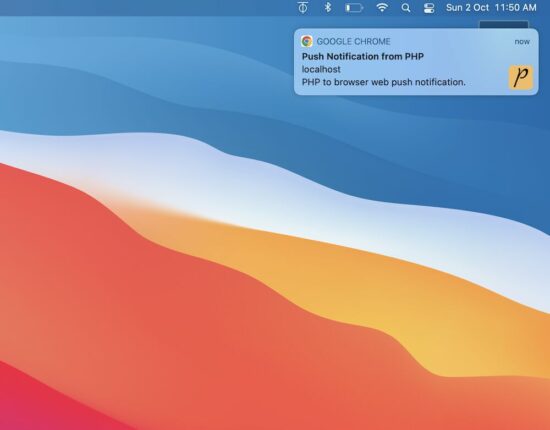
This example shows a web push notification on the browser. The notifications are sent every 10 minutes as configured. Then, the sent notifications are closed automatically. The notifications display time on a browser is configured as 5 minutes.

The notification instances are created and handled on the client side. The JavaScript setTimeout function is used to manage the timer of popping up or down the notifications.

AJAX call to PHP to send the web push notification

This HTML has the script to run the loop to send the notifications in a periodic interval.

It has the function pushNotify() that requests PHP via AJAX to send notifications. PHP returns the notification content in the form of a JSON object.

The AJAX callback handler reads the JSON and builds the notification. In this script, the createNotification() function sends the notification to the event target.

It maps the JavaScript Notification click property to open a URL from the PHP JSON response.

index.php

<!DOCTYPE html>
<html>
<head>
<title>Web Push Notifications in PHP</title>
<meta name="viewport" content="width=device-width, initial-scale=1">
<link href="style.css" type="text/css" rel="stylesheet" />
<script src="https://code.jquery.com/jquery-3.6.1.min.js" integrity="sha256-o88AwQnZB+VDvE9tvIXrMQaPlFFSUTR+nldQm1LuPXQ=" crossorigin="anonymous"></script>
</head>
<body> <div class="phppot-container"> <h1>Web Push Notification using PHP in a Browser</h1> <p>This example shows a web push notification from PHP on browser automatically every 10 seconds. The notification also closes automatically just after 5 seconds.</p> </div> <script> // enable this if you want to make only one call and not repeated calls automatically // pushNotify(); // following makes an AJAX call to PHP to get notification every 10 secs setInterval(function() { pushNotify(); }, 10000); function pushNotify() { if (!("Notification" in window)) { // checking if the user's browser supports web push Notification alert("Web browser does not support desktop notification"); } if (Notification.permission !== "granted") Notification.requestPermission(); else { $.ajax({ url: "push-notify.php", type: "POST", success: function(data, textStatus, jqXHR) { // if PHP call returns data process it and show notification // if nothing returns then it means no notification available for now if ($.trim(data)) { var data = jQuery.parseJSON(data); console.log(data); notification = createNotification(data.title, data.icon, data.body, data.url); // closes the web browser notification automatically after 5 secs setTimeout(function() { notification.close(); }, 5000); } }, error: function(jqXHR, textStatus, errorThrown) { } }); } }; function createNotification(title, icon, body, url) { var notification = new Notification(title, { icon: icon, body: body, }); // url that needs to be opened on clicking the notification // finally everything boils down to click and visits right notification.onclick = function() { window.open(url); }; return notification; } </script>
</body>
</html>

PHP code to prepare the JSON bundle with dynamic content of the notification

This code supplies the notification data from the server side. Hook your application DAO in this PHP to change the content if you want it from a database.

push-notify.php

<?php
// if there is anything to notify, then return the response with data for
// push notification else just exit the code
$webNotificationPayload['title'] = 'Push Notification from PHP';
$webNotificationPayload['body'] = 'PHP to browser web push notification.';
$webNotificationPayload['icon'] = 'https://phppot.com/badge.png';
$webNotificationPayload['url'] = 'https://phppot.com';
echo json_encode($webNotificationPayload);
exit();
?>

Thus we have created the web push notification with dynamic content from PHP. There are various uses of it by having it in an application.

Uses of push notifications

  • Push notification helps to increase website traffic by sending relevant content to subscribed users.
  • Itโ€™s a way to send pro ads to create entries to bring money into the business.
  • It helps to spread the brand and keep it on the customerโ€™s minds that retain them with you.

Download

โ†‘ Back to Top

Posted on Leave a comment

About Me โ€“ When The Going Gets Tough, Keep Going

5/5 – (1 vote)

Welcome to the Finxter blog! My name is Chris, and I started this coding venture a couple of years ago.


Over the years, I have chatted with tens of thousands of Finxters who shared their stories and struggles with me.

๐Ÿ‘‰ See here and here to read a lot of feedback from the community.

Today, allow me to share my story about why I started teaching freelancing.

It may inspire you to take control of your life if you’re in a tough spot right now – for example, struggling with the economic, military, and energy crises that are happening right now.

If you’re not interested in my personal story, now would be the time to stop reading. I won’t blame you!

~~~

Once upon a time, when I was a timid and naive 20-year-old dreamer, my 18-year-old girlfriend unexpectedly got pregnant. 🤰

She was still in high school, and I had just started studying computer science.

At the time, we had zero income and maybe $900 in savings.

I was living in a cheap 15-square-meter room with a desk and a bed and not much else.

As young and poor parents without any education or degree, we constantly felt judgment and pity from society.

We couldn’t even rent a flat because no landlord was crazy enough to take us in.

During all the struggle, we had love and dreams and the belief that everything would get better eventually: I was going to be a computer scientist in five years.

That is if I found a way to support my family on a shoestring – and avoided screwing up my education.

The first ten years, money was tight as hell. Little time. Lots of hard work. No TV. No Games. No Saturday night partying.

Well, maybe a little…

I am not a wunderkind. But I have good work ethic, and long-term goals, and I don’t give up easily. Finally, after ten tough years, I got my Ph.D. in computer science “summa cum laude”.

I now had a steady paycheck from my government job. But I eventually learned that the academic degrees didn’t help in improving our financial situation. 

People made far more money and had far more free time coding in the private sector and without academic degrees.

I decided to take matters into my own hands again by creating my own coding business as a freelance developer.

In little time, I reached six-figure income levels. And I had much more free time compared to my government job that I held before.

My second child – now five years old – knows his father to have infinite time playing soccer, video games, or watching the Tesla Bot taking his first steps on YouTube. 

(He plans to become CEO of Tesla – stay tuned @Elon).

~~~

Becoming a freelancer was a pivot point in my life.

To share all I know about creating a thriving coding business online, I have set up our freelancer course.

It focuses on the fundamentals:

  1. find your niche,
  2. build your skills,
  3. create value for your customers, and
  4. take massive action.

Simple, but sometimes not so easy…

If you want more from life and you love coding, feel free to subscribe to my free email academy, I’d love to have you in our community of ambitious coders who have not yet lost their ability to dream of a better life! โค

Posted on Leave a comment

How to Generate PHP Random String Token (8 Ways)

by Vincy. Last modified on October 5th, 2022.

Generating random string token may sound like a trivial work. If you really want something โ€œtruly randomโ€, it is one difficult job to do. In a project where you want a not so critical scrambled string there are many ways to get it done.

I present eight different ways of getting a random string token using PHP.

  1. Using random_int()
  2. Using rand()
  3. By string shuffling to generate a random substring.
  4. Using bin2hex()
  5. Using mt_rand()
  6. Using hashing sha1()
  7. Using hashing md5()
  8. Using PHP uniqid()

There are too many PHP functions that can be used to generate the random string. With the combination of those functions, this code assures to generate an unrepeatable random string and unpredictable by a civilian user.

1) Using random_int()

The PHP random_int() function generates cryptographic pseudo random integer. This random integer is used as an index to get the character from the given string base.

The string base includes 0-9, a-z and A-Z characters to return an alphanumeric random number.

Quick example

<?php
/** * Uses random_int as core logic and generates a random string * random_int is a pseudorandom number generator * * @param int $length * @return string */
function getRandomStringRandomInt($length = 16)
{ $stringSpace = '0123456789abcdefghijklmnopqrstuvwxyzABCDEFGHIJKLMNOPQRSTUVWXYZ'; $pieces = []; $max = mb_strlen($stringSpace, '8bit') - 1; for ($i = 0; $i < $length; ++ $i) { $pieces[] = $stringSpace[random_int(0, $max)]; } return implode('', $pieces);
}
echo "<br>Using random_int(): " . getRandomStringRandomInt();
?>

php random string

2) Using rand()

It uses simple PHP rand() and follows straightforward logic without encoding or encrypting.

It calculates the given string baseโ€™s length and pass it as a limit to the rand() function.

It gets the random character with the random index returned by the rand(). It applies string concatenation every time to form the random string in a loop.

<?php
/** * Uses the list of alphabets, numbers as base set, then picks using array index * by using rand() function. * * @param int $length * @return string */
function getRandomStringRand($length = 16)
{ $stringSpace = '0123456789abcdefghijklmnopqrstuvwxyzABCDEFGHIJKLMNOPQRSTUVWXYZ'; $stringLength = strlen($stringSpace); $randomString = ''; for ($i = 0; $i < $length; $i ++) { $randomString = $randomString . $stringSpace[rand(0, $stringLength - 1)]; } return $randomString;
}
echo "<br>Using rand(): " . getRandomStringRand();
?>

3) By string shuffling to generate a random substring.

It returns the random integer with the specified length.

It applies PHP string repeat and shuffle the output string. Then, extracts the substring from the shuffled string with the specified length.

<?php
/** * Uses the list of alphabets, numbers as base set. * Then shuffle and get the length required. * * @param int $length * @return string */
function getRandomStringShuffle($length = 16)
{ $stringSpace = '0123456789abcdefghijklmnopqrstuvwxyzABCDEFGHIJKLMNOPQRSTUVWXYZ'; $stringLength = strlen($stringSpace); $string = str_repeat($stringSpace, ceil($length / $stringLength)); $shuffledString = str_shuffle($string); $randomString = substr($shuffledString, 1, $length); return $randomString;
}
echo "<br>Using shuffle(): " . getRandomStringShuffle();
?>

4) Using bin2hex()

Like random_int(), the random_bytes() returns cryptographically secured random bytes.

If the function doesnโ€™t exists, this program then uses openssl_random_pseudo_bytes() function.

<?php
/** * Get bytes of using random_bytes or openssl_random_pseudo_bytes * then using bin2hex to get a random string. * * @param int $length * @return string */
function getRandomStringBin2hex($length = 16)
{ if (function_exists('random_bytes')) { $bytes = random_bytes($length / 2); } else { $bytes = openssl_random_pseudo_bytes($length / 2); } $randomString = bin2hex($bytes); return $randomString;
}
echo "<br>Using bin2hex(): " . getRandomStringBin2hex();
?>

5) Using mt_rand()

PHP mt_rand() is the replacement of rand(). It generates a random string using the Mersenne Twister Random Number Generator.

This code generates the string base dynamically using the range() function.

Then, it runs the loop to build the random string using mt_rand() in each iteration.

<?php
/** * Using mt_rand() actually it is an alias of rand() * * @param int $length * @return string */
function getRandomStringMtrand($length = 16)
{ $keys = array_merge(range(0, 9), range('a', 'z')); $key = ""; for ($i = 0; $i < $length; $i ++) { $key .= $keys[mt_rand(0, count($keys) - 1)]; } $randomString = $key; return $randomString;
}
echo "<br>Using mt_rand(): " . getRandomStringMtrand();
?>

6) Using hashing sha1()

It applies sha1 hash of the string which is the result of the rand().

Then, it extracts the substring from the hash with the specified length.

<?php
/** * * Using sha1(). * sha1 has a 40 character limit and always lowercase characters. * * @param int $length * @return string */
function getRandomStringSha1($length = 16)
{ $string = sha1(rand()); $randomString = substr($string, 0, $length); return $randomString;
}
echo "<br>Using sha1(): " . getRandomStringSha1();
?>

7) Using hashing md5()

It applies md5() hash on the rand() result. Then, the rest of the process are same as the above example.

<?php
/** * * Using md5(). * * @param int $length * @return string */
function getRandomStringMd5($length = 16)
{ $string = md5(rand()); $randomString = substr($string, 0, $length); return $randomString;
}
echo "<br>Using md5(): " . getRandomStringMd5();
?>

8) Using PHP uniqid()

The PHP unigid() function gets prefixed unique identifier based on the current time in microseconds.

It is not generating cryptographically random number like random_int() and random_bytes().

<?php
/** * * Using uniqid(). * * @param int $length * @return string */
function getRandomStringUniqid($length = 16)
{ $string = uniqid(rand()); $randomString = substr($string, 0, $length); return $randomString;
}
echo "<br>Using uniqid(): " . getRandomStringUniqid();
?>

Download

โ†‘ Back to Top

Posted on Leave a comment

Solidity Contract Types, Byte Arrays, and {Address, Int, Rational} Literals

5/5 – (1 vote)
YouTube Video

With this article, we continue our journey through the realm of Solidity data types following today’s topics:

  • contract types,
  • fixed-size byte arrays,
  • dynamically-sized byte arrays,
  • address literals,
  • rational, and
  • integer literals.

It’s part of our long-standing tradition to make this (and other) articles a faithful companion or a supplement to the official Solidity documentation.

๐Ÿ‘‡ Download PDF Slide Deck at the end of this tutorial!

Contract Types

To quote the official Solidity documentation, “every contract defines its own type”.

This statement might seem a bit cryptic, and since we’re an efficient crowd, we’d surely like to know what it means.

We can all remember that some number of articles ago, we mentioned how Solidity has key elements of an object-oriented programming language (OOPL). We also emphasized how smart contracts in Solidity are very similar to classes in an OOPL.

Classes themselves are a mesh of custom data types, i.e. structs, and functions, which qualifies classes to be treated as types.

๐Ÿ‘‰ By extension, our contracts are also treated as types, and as every contract is unique in its own right, it defines its own type. Being a type, we can implicitly convert a specific contract to a contract it inherits from, i.e. if contract “Aa” inherits from contract A, it can also be converted to contract “A”.

Besides that, we can explicitly convert each contract to and from the address type. Even more, we can conditionally convert a contract to and from the address payable type (remember, that’s the same type as the address type, but predetermined to receive Ether).

The condition is that the contract type must have a receive or payable fallback function. If it does, we can make the conversion to address payable by using address(x).

However, if the contract type does not implement (a more professional way to say “have”) a receive or payable fallback function, then the conversion to address payable has to be even more explicit (no swearing!) by stating payable(address(x)).

A local variable obc of a contract type OurBeautifulContract is declared by OurBeautifulContract obc;.

Once we point our variable obc to an instantiated (newly created) contract, we’d be able to call functions on that contract.

In terms of its data representation, a contract is identical to the address type. This is important because the contract type is not directly supported by the ABI, but the address type, as its representative, is supported by the ABI.

In contrast to the types mentioned so far, contract types don’t support any operators.

The members of contract types are the external functions (the functions only available to other contracts) and state variables whose visibility is set to public.

When we need to access type information about the contract, like the OurBeautifulContract above, we’d call the type(OurBeautifulContract) function (docs).

Fixed-Size Byte Arrays

The value type bytesN holds a sequence of bytes, whose length, and accordingly N goes from 1 to up to 32, i.e., bytes1, …, bytes32.

The available operators for fixed-size operators are:

  • Comparisons: <=, <, ==, !=, >=, > (evaluate to bool)
  • Bit operators: &, |, ^ (bitwise exclusive or), ~ (bitwise negation)
  • Shift operators: << (left shift), >> (right shift)
  • Index access: If x is of type bytesN, then x[k] for 0 <= k < N returns the k-th byte (read-only). In other words, x[0] up to (inclusive) x[N-1] is available for index access; if N = 1, then only x is of type bytes1, and x[0] is the only element, i.e. byte accessible by the index.

The shifting operator always uses an unsigned integer type as a right operand, which represents the number of bits to shift by, and returns the type of the left operand.

Let’s take a look at a simple example to illustrate:

bytes2 lo = 0x1234; // (lo is the left operand)
uint8 ro = 5; // (ro is the right operand variable, must be u... type)
lo << ro // will evaluate to an lo type, bytes2

A fixed-size byte array has only one member, .length, that holds the fixed length of the byte array. This member is accessible as the read-only value.

โšก Warning: Since the type bytes1 is a sequence of 1 byte in length, the type bytes1[] is a fixed-size byte array of 1-byte sequences. However, each element of the array is padded with 31 bytes, due to padding rules for elements stored in memory, stack, and call data, i.e., except in storage. Therefore, according to the official Solidity documentation, it’s better to use bytes type instead of bytes1[].

๐Ÿ’ก Note: Value types in storage are packed/compacted together and share a storage slot, taking only as much space per value type as really needed. In contrast, the stack, memory, and calldata pad value types and store in separate slots, meaning that each variable uses a whole slot of 32 bytes, even if the value type is shorter than 32 bytes, effectively wasting the memory space.

Before Solidity v0.8.0, the keyword byte was an alias for bytes1.

Dynamically-Sized Byte Arrays

There are two dynamically-sized non-value types, namely bytes and string.

  • bytes is a dynamically-sized byte array, while
  • string is a dynamically-sized UTF-8-encoded string.

Address Literals

Address literals are hexadecimal literals that pass the address checksum test, e.g. 0xdCad3a6d3569DF655070DEd06cb7A1b2Ccd1D3AF.

Hexadecimal literals will produce an error if they are between 39 and 41 digits long and do not pass the checksum test.

However, we can remove the error by prepending zeros to integer types or appending zeros to bytesNN types.

The Ethereum Improvement Proposal EIP-55 defines the mixed-case address checksum.

Integer and Rational Literals

Integer Literals

Integer literals are created using a sequence of digits from a range 0-9, and each digit is interpreted (weighted) based on its position in the sequence.

Multiplied by an exponent of 10, e.g. 217 is interpreted as two hundred and seventeen, because, reading from right to left, we have 7 * 100 + 1 * 101 + 2 * 102.

A reminder, 100 = 1.

Octal literals don’t exist in Solidity and leading zeros are invalid.

Decimal Fractional Literals

Decimal fractional literals consist of a dot . (or, depending on the locale) and at least one number on either of the sides, e.g. 1., .1, and 1.3.

๐Ÿ’ก Info: “A locale consists of a number of categories for which country-dependent formatting or other specifications exist” (source).

Scientific Notation

Solidity also supports scientific notation in the form of 2e10, where 2 (left of “e”) is called mantissa (M) and the exponent (E) must be an integer. In a general form, we would write it as MeE and it is interpreted as M * 10**E, e.g. 2e10, -2e10, 2e-10, 2.5e1.

Readable Underscore Notation

We can also do a neat thing: separate the digits of a numeric literal for easier readability, such as in decimal 123_000, hexadecimal 0x2eff_abde, scientific decimal notation 1_2e345_678.

However, there are no leading, trailing, or multiple underscores; they can only be added between two digits.

Number Literal Expressions

Expressions containing number literals preserve their precision until they are converted to a non-literal type.

Such a conversion means an explicit conversion, or that the number literals are used with something else than a number literal expression, like boolean literals.

This behavior implies that computations don’t overflow and divisions don’t truncate in number literal expressions.

A very good example would be a number literal expression (2**800 + 1) – 2**800, which results in the constant 1 (of type uint8), although the intermediate results would not fit the capacity of the EVM word length of 32 bytes.

One more example shows that an integer 4 is produced by computing the expression .5 * 8, although the intermediary results are not integers.

More Operations

โšก Warning: most operators produce a literal expression when applied to number literals, but there are also two exceptions:

  • Ternary operator (... ? ... : ...),
  • Array subscript (<array>[<index>]).

In other words, expressions like 255 + (true ? 1 : 0) or 255 + [1, 2, 3][0] are not equivalent to using the literal 256 (the result of these two expressions), as they are computed within the type uint8 and can lead to an overflow.

Number literal expressions can use the same operators as the integers, but both operands must compute yield an integer.

  • If either of the operands is fractional, bit operations are inapplicable for use;
  • If the exponent is a decimal fractional literal, the exponentiation operation is also inapplicable for use.

Shifts and exponentiation * operations with literal numbers in place of a left (base*) operand and integer types in place of the right (exponent*) operand are performed in the uint256 for non-negative literals or int256 for negative literals (a * symbol pertains to the exponentiation operations context).

โšก Warning: Since Solidity v0.4.0 division on integer literals produces a rational number, e.g. 7 / 2 = 3.5.

Solidity has a number literal types for each rational number, e.g. integer literals and rational number literals belong to the same number literal type.

All number literal expressions (expressions with only number literals and operators) also belong to number literal types, e.g. 1 + 2 and 2 + 1 belong to the same number literal type.

๐Ÿ’ก Note: When number literal types are used with non-literal expressions, they are converted into a non-literal type, e.g.ย  uint128 a = 1; uint128 b = 2.5 + a + 0.5;

Here, 1 is converted into a non-literal type uint128, i.e. variable a, but a common type for both 2.5 and uint128 doesn’t exist and the compiler will reject the code.

Conclusion

In this article, we added even more data types in Solidity under our proverbial belt!

  • First, we introduced and learned about the contract type.
  • Second, we fixed our understanding of the fixed-size byte array type.
  • Third, the situation got dynamic by studying the dynamically-sized byte array type.
  • Fourth, we addressed the… what was it called… Aha – address literals!
  • Fifth, we came to the most rational decision and discovered what rational and integer literals are and, of course, how can they be put to good use.

Slide Deck Data Types

You can scroll through the data types discussed in this tutorial here:


Posted on Leave a comment

How to do Web Push Notification on Browser using JavaScript

by Vincy. Last modified on October 3rd, 2022.

Web push notifications are messages pushed asynchronously from a website and mobile application to an event target.

There are two types of web push notifications:

  1. Desktop notifications are shown when the foreground application is running and they are simple to use.
  2. Notifications that are shown from the background even after the application is not running. Itโ€™s via a background service worker sync with the page or app.

This tutorial implements the first type of sending the push notification via JavaScript. It uses the JavaScript Notification class to create and manage notification instances.

Note: To show the notifications, permission should be granted by the user.

web push notification

About the example

This example sends the web push notifications by calling the JavaScript Notification.

It sends only one notification by running this script. It can also be put into a cycle to automatically send notifications at a periodic interval.

This code uses the following steps to push the notification to the event target.

  1. It checks if the client has the required permissions and popups content window to have user acceptance.
  2. It creates a notification instance by supplying the title, body and icon (path).
  3. It refers to the on-click event mapping with the notification instance.

When the user clicks on the notification, it opens the target URL passed while creating the JavaScript Notification class.

index.php

<!DOCTYPE html>
<html>
<head>
<title>Web Push Notification using JavaScript in a Browser</title>
<script src="https://code.jquery.com/jquery-3.6.1.min.js" integrity="sha256-o88AwQnZB+VDvE9tvIXrMQaPlFFSUTR+nldQm1LuPXQ=" crossorigin="anonymous"></script>
</head>
<body> <div class="phppot-container"> <h1>Web Push Notification using JavaScript in a Browser</h1> <script> pushNotify(); function pushNotify() { if (!("Notification" in window)) { // checking if the user's browser supports web push Notification alert("Web browser does not support desktop notification"); } else if (Notification.permission === "granted") { console.log("Permission to show web push notifications granted."); // if notification permissions is granted, // then create a Notification object createNotification(); } else if (Notification.permission !== "denied") { alert("Going to ask for permission to show web push notification"); // User should give explicit permission Notification.requestPermission().then((permission) => { // If the user accepts, let's create a notification createNotification(); }); } // User has not granted to show web push notifications via Browser // Let's honor his decision and not keep pestering anymore } function createNotification() { var notification = new Notification('Web Push Notification', { icon: 'https://phppot.com/badge.png', body: 'New article published!', }); // url that needs to be opened on clicking the notification // finally everything boils down to click and visits right notification.onclick = function() { window.open('https://phppot.com'); }; } </script> </div>
</body>
</html>

Permissions required

The following screenshot shows the settings to enable notification in the browser level and the system level.

Browser level permission

browser permission

OS level permission

This is to allow the Google Chrome application to receive notifications. Similarly, select appropriate browser applications like Safai and Firefox to allow notification in them.

system permission

โ†‘ Back to Top

Share this page

Posted on Leave a comment

How to Convert Bool (True/False) to a String in Python?

5/5 – (1 vote)

๐Ÿ’ฌ Question: Given a Boolean value True or False. How to convert it to a string "True" or "False" in Python?

Note that this tutorial doesn’t concern “concatenating a Boolean to a string”. If you want to do this, check out our in-depth article on the Finxter blog.

Simple Bool to String Conversion

To convert a given Boolean value to a string in Python, use the str(boolean) function and pass the Boolean value into it. This converts Boolean True to string "True" and Boolean False to string "False".

Here’s a minimal example:

>>> str(True) 'True'
>>> str(False) 'False'

Python Boolean Type is Integer

Booleans are represented by integers in Python, i.e., bool is a subclass of int. Boolean value True is represented with integer 1. And Boolean value False is represented with integer 0.

Here’s a minimal example:

>>> True == 1
True
>>> False == 0
True

Convert True to ‘1’ and False to ‘0’

To convert a Boolean value to a string '1' or '0', use the expression str(int(boolean)). For instance, str(int(True)) returns '1' and str(int(False)) returns '0'. This is because of Python’s use of integers to represent Boolean values.

Here’s a minimal example:

>>> str(int(True)) '1'
>>> str(int(False)) '0'

Convert List of Boolean to List of Strings

To convert a Boolean to a string list, use the list comprehension expression [str(x) for x in my_bools] assuming the Boolean list is stored in variable my_bools. This converts each Boolean x to a string using the built-in str() function and repeats it for all x in the Boolean list.

Here’s a simple example:

my_bools = [True, True, False, False, True]
my_strings = [str(x) for x in my_bools]
print(my_strings)
# ['True', 'True', 'False', 'False', 'True']

Convert String Back to Boolean

What if you want to convert the string representation 'True' and 'False' (or: '1' and '0') back to the Boolean representation True and False?

๐Ÿ‘‰ Recommended Tutorial: String to Boolean Conversion

Here’s the short summary:

You can convert a string value s to a Boolean value using the Python function bool(s).

For example, bool('True') and bool('1') return True.

However, bool('False') and bool('0') return False as well which may come unexpected to you.

๐Ÿ’ก This is because all Python objects are “truthy”, i.e., they have an associated Boolean value. As a rule of thumb: empty values return Boolean True and non-empty values return Boolean False. So, only bool('') on the empty string '' returns False. All other strings return True!

You can see this in the following example:

>>> bool('True')
True
>>> bool('1')
True
>>> bool('2')
True
>>> bool('False')
True
>>> bool('0')
True
>>> bool('')
False

Okay, what to do about it?

Easy – first pass the string into the eval() function and then pass the result into the bool() function. In other words, the expression bool(eval(my_string)) converts a string to a Boolean mapping 'True' and '1' to Boolean True and 'False' and '0' to Boolean False.

Finally – this behavior is as expected by many coders just starting out.

Here’s an example:

>>> bool(eval('False'))
False
>>> bool(eval('0'))
False
>>> bool(eval('True'))
True
>>> bool(eval('1'))
True

Feel free to go over our detailed guide on the function:

๐Ÿ‘‰ Recommended Tutorial: Python eval() deep dive

YouTube Video