Posted on Leave a comment

One Page Checkout Script Free with Example Template in PHP

Last modified on December 13th, 2019 by Vincy.

One page checkout reduces friction in the buying process, increases conversion and improves the sales. Do you know the cart abandonment rate of the customers during their purchase? Unnecessary, lengthy checkout process is one of the main reason which increases this rate.

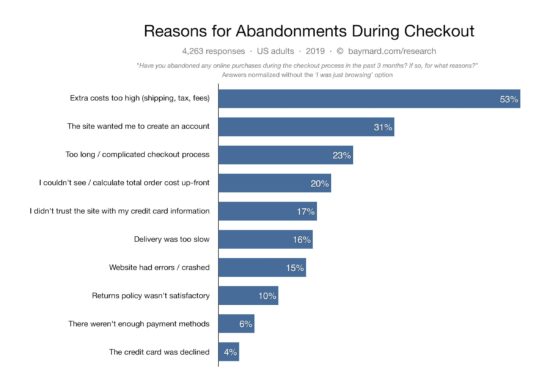
Just by fine-tuning your checkout process, you can increase the sales by a staggering 23%. This could be a game changer for many eCommerce websites. I have cited the Baymard Institute research statistics below. Just check it out.

The right ecommerce software and a shopping cart script will definitely have an option for one page checkout. By increasing steps in the checkout flow, you do not have anything to gain. Then why not one page checkout? Not only Baymard Institute’s research, check any parties research statistics in this area and everything points towards a seamless checkout process.

One Page Checkout Script Free with Example Template in PHP

Before going to provide one page checkout for your shopping cart application, we have to know what it is and the significance behind its usage. This article will help you to know about it and its advantages.

Also, I have created an example script in PHP for the implementation of this one page checkout. In a previous article, we have seen a simple PHP shopping cart code and this is its enhanced version.

What is inside?

  1. What is one page checkout?
  2. About this example
  3. One page checkout example demo
  4. PHP checkout example files
  5. Creating one page checkout template
  6. jQuery script to handle cart events and prepare AJAX request
  7. Process checkout in PHP
  8. Enhancements
  9. One page template example output

What is one page checkout?

One page checkout is a way to make the eCommerce checkout process easier. It reduces the navigation effort, page redirects. It gets the job done by retaining the buyer in a single page.

This makes the checkout experience easier with a single checkout click. We will not compromise any feature to implement one page checkout. It may include add-to-cart control, customer’s cart, payment and shipping and more.

Checkout Cart Abandonment Stats

Source: Baymard Institute

About this example

This example is for creating a one page checkout in PHP. On a single page, I have covered the product gallery and the entire cart flow. It is a lightweight script.

The gallery will show the product tiles with an add-to-cart option. Then the added cart items will have options to edit and delete.

I used jQuery AJAX for requesting the server-side code to perform the cart actions. We have already seen how to perform cart edit with AJAX.

The cart detail table will also a preview for confirmation before checkout. The checkout will need the mandatory billing details customer name and email.

A simple JavaScript validates the billing and payment form. Once the validation step got passed then it will allow the continuing process to checkout in PHP.

One page checkout example demo

I have deployed a demo for this one-page checkout example.

The below button link will redirect you to see this demo. It has the following functionality.

  • Add-to-cart
  • Edit cart item quantity
  • Remove a single item
  • Empty cart
  • Checkout

You can try all the above with this demo.

View Demo

PHP checkout example files

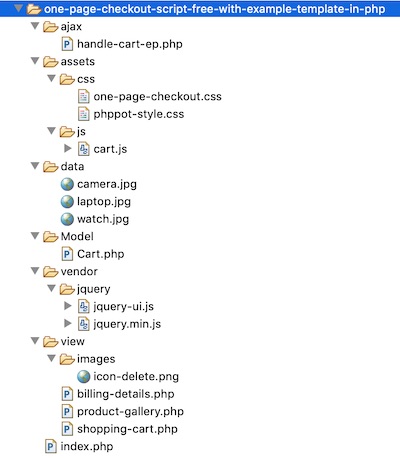
This is the complete file structure on this PHP one-page checkout example.

The figure shows the PHP endpoints, CSS and JS assets, images, data and vendor directories. It also shows the home and other HTML views and PHP classes.

In the following sections, we will see the file’s code and its purpose.

One Page Checkout Example Files

Creating one page checkout template

The one-page checkout template includes three major parts. Those are the gallery, cart and the billing & payment form.

I have created separate files for these three display components. Then, I included all into a landing page that is index.php.

index.php

<?php session_start(); if (isset($_POST["checkout-btn"])) { $order_number = rand(100, 999); } ?> <HTML> <HEAD> <TITLE>One Page Checkout Script Free Template</TITLE> <link href="./assets/css/phppot-style.css" type="text/css" rel="stylesheet" /> <link href="./assets/css/one-page-checkout.css" type="text/css" rel="stylesheet" /> <script src="./vendor/jquery/jquery.min.js" type="text/javascript"></script> <script src="./vendor/jquery/jquery-ui.js"></script> </HEAD> <BODY> <div class="phppot-container"> <div class="page-heading">One Page Checkout Script Free Template</div> <form name="one-page-checkout-form" id="one-page-checkout-form" action="" method="post" onsubmit="return checkout()"> <?php if(!empty($order_number)){?> <div class="order-message order-success"> You order number is <?php echo $order_number;?>. <span class="btn-message-close" onclick="this.parentElement.style.display='none';" title="Close">×</span> </div> <?php }?> <div class="section product-gallery"> <?php require_once './view/product-gallery.php'; ?> </div> <div class="billing-details"> <?php require_once './view/billing-details.php'; ?> </div> <div class="cart-error-message" id="cart-error-message">Cart must not be emty to checkout</div> <div id="shopping-cart" tabindex="1"> <div id="tbl-cart"> <div id="txt-heading"> <div id="cart-heading">Your Shopping Cart</div> <div id="close"></div> </div> <div id="cart-item"> <?php require_once './view/shopping-cart.php'; ?> </div> </div> </div> <div class="payment-details"> <div class="payment-details-heading">Payment details</div> <div class="row"> <div class="inline-block"> <div> <input class="bank-transfer" type="radio" checked="checked" value="Direct bank transfer" name="direct-bank-transfer">Direct bank transfer </div> <div class="info-label">Specify your order number when you make the bank transfer. Your order will be shippied after the amount is credited to us.</div> </div> </div> </div> <div class="row"> <div id="inline-block"> <input type="submit" class="checkout" name="checkout-btn" id="checkout-btn" value="Checkout"> </div> </div> </form> </div> <script src="./assets/js/cart.js"></script> <script> function checkout() { var valid = true; $("#first-name").removeClass("error-field"); $("#email").removeClass("error-field"); $("#shopping-cart").removeClass("error-field"); $("#cart-error-message").hide(); var firstName = $("#first-name").val(); var cartItem = $("#cart-item-count").val(); var email = $("#email").val(); var emailRegex = /^[a-zA-Z0-9.!#$%&'*+/=?^_`{|}~-]+@[a-zA-Z0-9](?:[a-zA-Z0-9-]{0,61}[a-zA-Z0-9])?(?:\.[a-zA-Z0-9](?:[a-zA-Z0-9-]{0,61}[a-zA-Z0-9])?)*$/; $("#first-name-info").html("").hide(); $("#email-info").html("").hide(); if (firstName.trim() == "") { $("#first-name-info").html("required.").css("color", "#ee0000").show(); $("#first-name").addClass("error-field"); valid = false; } if (email == "") { $("#email-info").html("required").css("color", "#ee0000").show(); $("#email").addClass("error-field"); valid = false; } else if (email.trim() == "") { $("#email-info").html("Invalid email address.").css("color", "#ee0000").show(); $("#email").addClass("error-field"); valid = false; } else if (!emailRegex.test(email)) { $("#email-info").html("Invalid email address.").css("color", "#ee0000") .show(); $("#email").addClass("error-field"); valid = false; } if(cartItem == 0){ $("#cart-error-message").show(); $("#shopping-cart").addClass("error-field"); valid = false; } if (valid == false) { $('.error-field').first().focus(); valid = false; } return valid; } </script> </BODY> </HTML> 

Product gallery with Add-to-Cart button

This file will show a catalog to display available products in a gallery. I have shown three products in this example gallery.

These products are static from a PHP array. You can also include your database component to make it dynamic.

Each tile contains an add-to-cart button. It calls cartAction() jQuery function on its click event.

product-gallery.php

<div id="product-grid"> <div class="txt-heading">Choose your products</div> <div class="product-item"> <div class="product-image"> <img src="data/camera.jpg" id="<?php echo "3DcAM01";?>" class="product-img"> </div> <div> <strong><?php echo "FinePix Pro2 3D Camera";?></strong> </div> <div class="product-price"><?php echo "1500.00";?></div> <input type="button" id="add_<?php echo "3DcAM01";?>" value="Add to cart" class="btnAddAction" onClick="cartAction('add', '<?php echo "3DcAM01";?>','<?php echo "FinePix Pro2 3D Camera";?>','<?php echo "1500.00";?>')" /> </div> <div class="product-item"> <div class="product-image"> <img src="data/watch.jpg" id="<?php echo "wristWear03";?>" class="product-img"> </div> <div> <strong><?php echo "Luxury Ultra thin Wrist Watch";?></strong> </div> <div class="product-price"><?php echo "300.00";?></div> <input type="button" id="add_<?php echo "wristWear03";?>" value="Add to cart" class="btnAddAction" onClick="cartAction('add', '<?php echo "wristWear03";?>','<?php echo "Luxury Ultra thin Wrist Watch";?>','<?php echo "300.00";?>')" /> </div> <div class="product-item"> <div class="product-image"> <img src="data/laptop.jpg" id="<?php echo "LPN45";?>" class="product-img"> </div> <div> <strong><?php echo "XP 1155 Intel Core Laptop";?></strong> </div> <div class="product-price"><?php echo "800.00";?></div> <input type="button" id="add_<?php echo "LPN45";?>" value="Add to cart" class="btnAddAction" onClick="cartAction('add', '<?php echo "LPN45";?>','<?php echo "XP 1155 Intel Core Laptop";?>','<?php echo "800.00";?>')" /> </div> </div> 

Shopping cart items with edit delete

I used the PHP session for managing the cart items. The below code shows an HTML code by embedding the cart details into it from the session array.

The cart must have at least one item to proceed with checkout. So I stored the total cart item count in a hidden field. I update this field after every successful cart action.

When you submit with an empty cart, then this example will prevent checkout. It will display validation error by focusing on the empty cart section.

shopping-cart.php

<?php use Phppot\Cart; require_once __DIR__ . './../Model/Cart.php'; $cartModel = new Cart(); ?> <input type="hidden" id="cart-item-count" value="<?php echo $cartModel->cartSessionItemCount; ?>"> <?php if ($cartModel->cartSessionItemCount > 0) { ?> <table width="100%" id="cart-table" cellpadding="10" cellspacing="1" border="0"> <tbody> <tr> <th>Name</th> <th>Quantity</th> <th class="text-right">Price</th> <th class="text-right">Action</th> </tr> <?php $item_total = 0; $i = 1; foreach ($_SESSION["cart_item"] as $item) { ?> <tr> <td><?php echo $item["name"]; ?></td> <td><input type="number" name="quantity" class="quantity" value="<?php echo $item['quantity']; ?>" data-code='<?php echo $item["code"]; ?>' size=2 onChange="updatePrice(this)" /> <input type="hidden" class='total' name="total" value="<?php echo $item["price"]; ?>" /></td> <td class="prc text-right" id="price" <?php echo $i;?>><?php echo $item["price"]; ?></td> <?php $i++; ?> <td class="text-right"><a onClick="cartAction('remove','<?php echo $item["code"]; ?>')" class="btnRemoveAction"><img src="./view/images/icon-delete.png" alt="Remove Item" /></a></td> </tr> <?php $item_total += ($item["price"] * $item['quantity']); } ?> <tr id="tot"> <td class="text-right" colspan="3"><strong>Total (USD): </strong> <span id="total"><?php echo $item_total;?></span></td> <td class="text-right"><a id="btnEmpty" onClick="cartAction('empty', '');">Empty Cart</a></td> </tr> </tbody> </table> <?php } else { ?> <div id="empty-cart">Your cart is empty</div> <?php } 

This HTML code is for displaying the billing and payment form to the user. The user has to enter the billing details and select the payment method before checkout.

In this example, I have provided only one payment option, Bank Transfer. At the time of processing payment via direct bank transfer, the users refer to the order number.

billing-details.php

<div class="billing-detail-heading">Billing details</div> <div class="row"> <div class="form-label inline-block"> Name <span class="required error"></span> </div> <div class="inline-block"> <div id="first-name-info"></div> <input class="input-box-330" type="text" name="first-name" id="first-name"> </div> </div> <div class="row"> <div class="form-label">Address</div> <div class="inline-block"> <input class="input-box-330" class="input-box-330" type="text" name="address"> </div> </div> <div class="row"> <div class="form-label">City</div> <div class="inline-block"> <input class="input-box-330" type="text" name="city"> </div> </div> <div class="row"> <div class="form-label">State</div> <div class="inline-block"> <input class="input-box-330" type="text" name="state"> </div> </div> <div class="row"> <div class="form-label">Zipcode</div> <div class="inline-block"> <input class="input-box-330" type="text" name="zipcode"> </div> </div> <div class="row"> <div class="form-label"> Email Address<span class="required error"></span> </div> <div class="inline-block"> <div id="email-info"></div> <input class="input-box-330" type="text" name="email" id="email"> </div> </div> 

jQuery script to handle cart events and prepare AJAX request

The cartAction() method is for handling the add, edit, remove and empty-cart actions. It has a switch case to perform these actions.

It receives the action parameter and sends the control flow to the appropriate case. It also gets the product title, code and price.

I prepare a query string by using the product details and request PHP via AJAX. After performing the cart action, the PHP code will return the response.

In the success block, we can receive this response for updating the cart.

cart.js

function cartAction(action, product_code, productTitle, productPrice) { var queryString = ""; if (action != "") { switch (action) { case "add": queryString = 'action=' + action + '&code=' + product_code + '&quantity=' + 1 + '&productTitle=' + productTitle + '&productPrice=' + productPrice; break; case "remove": queryString = 'action=' + action + '&code=' + product_code; break; case "empty": queryString = 'action=' + action; break; } } jQuery.ajax({ url : "ajax/handle-cart-ep.php", data : queryString, type : "POST", success : function(data) { $("#cart-item").html(data); $("#count").text($("#cart-item-count").val()); }, error : function() { } }); } function updatePrice(obj) { var quantity = $(obj).val(); var code = $(obj).data('code'); queryString = 'action=edit&code=' + code + '&quantity=' + quantity; $.ajax({ type : 'post', url : "ajax/handle-cart-ep.php", data : queryString, success : function(data) { $("#total").text(data); } }); } 

Process checkout in PHP

This is the PHP endpoint called via AJAX. As like as the JavaScript method, this PHP file also contains a switch case to control the cart action.

The Cart.php included in this file is a Model class that executes all the cart operations. 

In this endpoint, I instantiate this model and invoke its methods based on the request.

On each cart action, it iterates the latest cart session to prepare the response.

ajax/handle-cart-ep.php

<?php namespace Phppot; use \Phppot\Cart; require_once __DIR__ . './../Model/Cart.php'; $cartModel = new Cart(); session_start(); if (! empty($_POST["action"])) { switch ($_POST["action"]) { case "add": $cartModel->addToCart(); break; case "edit": $totalPrice = $cartModel->editCart(); print $totalPrice; exit; break; case "remove": $cartModel->removeFromCart(); break; case "empty": $cartModel->emptyCart(); break; } } require_once '../view/shopping-cart.php'; 

The below code shows the Cart class. It handles and updates the cart session on each cart action.

The emptyCart() method wipes out the cart by clearing the current session.

Model/Cart.php

<?php namespace Phppot; class Cart { public $cartSessionItemCount = 0; function __construct() { if (! empty($_SESSION["cart_item"]) && is_array($_SESSION["cart_item"])) { $this->cartSessionItemCount = count($_SESSION["cart_item"]); } } function addToCart() { if (isset($_POST)) { $productCode = $_POST["code"]; $productTitle = $_POST["productTitle"]; $poductQuantity = $_POST["quantity"]; $productPrice = $_POST["productPrice"]; } $cartItem = array( 'code' => $productCode, 'name' => $productTitle, 'quantity' => $poductQuantity, 'price' => $productPrice ); $_SESSION["cart_item"][$productCode] = $cartItem; if (! empty($_SESSION["cart_item"]) && is_array($_SESSION["cart_item"])) { $this->cartSessionItemCount = count($_SESSION["cart_item"]); } } function editCart() { if (! empty($_SESSION["cart_item"])) { $total_price = 0; foreach ($_SESSION["cart_item"] as $k => $v) { if ($_POST["code"] == $k) { $_SESSION["cart_item"][$k]["quantity"] = $_POST["quantity"]; } $total_price = $total_price + ($_SESSION["cart_item"][$k]["quantity"] * $_SESSION["cart_item"][$k]["price"]); } return $total_price; } if (! empty($_SESSION["cart_item"]) && is_array($_SESSION["cart_item"])) { $this->cartSessionItemCount = count($_SESSION["cart_item"]); } } function removeFromCart() { if (! empty($_SESSION["cart_item"])) { foreach ($_SESSION["cart_item"] as $k => $v) { if ($_POST["code"] == $k) unset($_SESSION["cart_item"][$k]); if (empty($_SESSION["cart_item"])) unset($_SESSION["cart_item"]); } } if (! empty($_SESSION["cart_item"]) && is_array($_SESSION["cart_item"])) { $this->cartSessionItemCount = count($_SESSION["cart_item"]); } } function emptyCart() { unset($_SESSION["cart_item"]); $this->cartSessionItemCount = 0; } }

Enhancements

In this example code, there are places to bring the database into the picture. For example, the product gallery and the cart.

I have managed the gallery with a PHP array. And, I handled the cart session with PHP $_SESSION.

If you manage the shopping cart with a database, then it will help you to have a persistent cart. I have already given an example of building a persistent shopping cart in PHP.

You can plugin your database module into this example code to store products. If you want to show your shopping cart products gallery from a database, this link has an example.

One page template example output

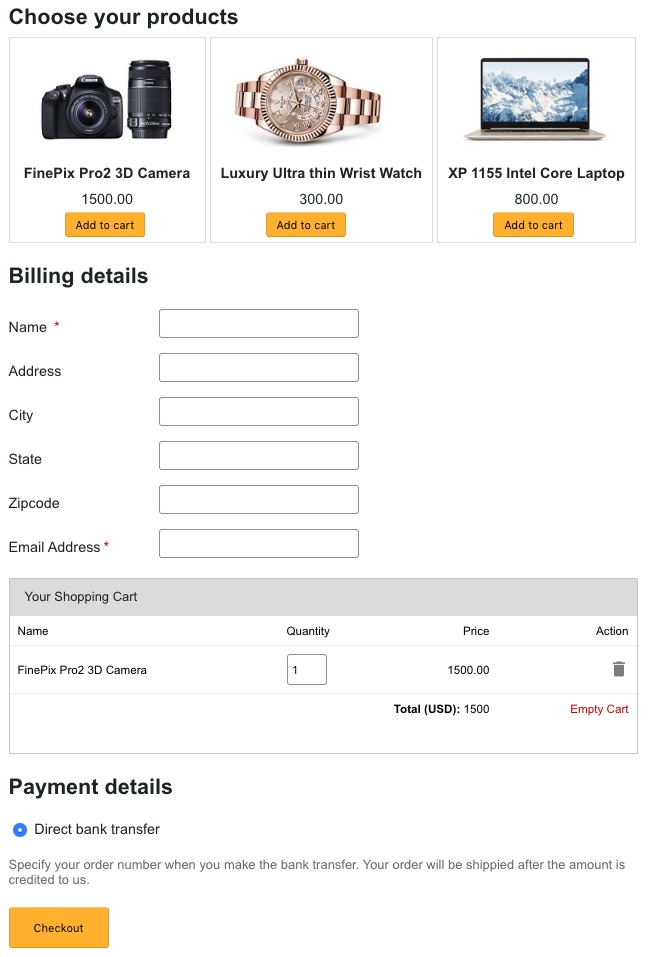
See the screenshot shows the product gallery, cart and checkout on one page. The gallery shows three product tiles.

By clicking the Add to cart button, the cart will have a new entry as shown below.

The Checkout button click will place the order for the added cart items.

One Page Checkout Example Output

View DemoDownload

↑ Back to Top

Posted on Leave a comment

PHP Pagination MySQL Database Example Script with Previous Next like Google

Last modified on December 5th, 2019 by Vincy.

Do you want to implement PHP pagination using core PHP with lightweight script? Jump in, this tutorial is all about it.

The pagination functionality is for stacking a list of items on many pages. It helps to fetch and display a huge volume of records in an effective way.

If you want to implement a simple PHP pagination, then it is very easy and straight forward.

PHP Pagination Script with Previous Next

There is just one thing that you should keep in mind when you work on pagination. Do not pull the complete result set and filter it to display to the users.

SELECT only records using LIMIT from database. It can be done via AJAX or on page submit depending on your use case. We will see more about it in the example below. 

There are scenarios to create pagination with AJAX. For example, an online quiz with a paginated question board. We have seen more examples to create PHP pagination with AJAX.

What is inside?

  1. About this example
  2. Plugins to enable pagination feature
  3. File structure
  4. Database script
  5. Design landing page with pagination controls
  6. Php code to get paginated results
  7. PHP AJAX pagination Output

About this example

In this example code, it has two types of control to navigate with the paginated results.

One is the pagination links to redirect us to the corresponding page. The other is an input to enter the page number. By submitting this page number we can jump into the target page from the current page.

I have implemented PHP pagination with a simple page refresh. We have already seen examples for achieving this with AJAX using jQuery.

I have enabled pagination for the list of database results displaying Animal names. The pagination links count varies based on the animal database record count. 

A SELECT query with a specification of start and end limit fetch the page result. The per-page result count is configurable as a Config class constant. 

There are many plugins available to create pagination easily. Pagination.js and jqPaginator are examples of 3-party plugins available in the market.

The Datatables is one of the popular library used for managing tabular data. It has an in-built search, pagination, sort, and more features. In an old article, we had seen how to integrate Datatables to list records with pagination.

Having said all these, better to go with custom code. Because external plugins, libraries will slow down the application.

File structure

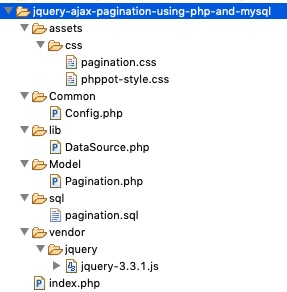
The working example code contains the following files in the below hierarchical order.

AJAZ Pagination File Structure

The index.php file is a landing page. It contains the HTML to display pagination links and the current page results.

Two CSS used in this example. The phppot-style.css has generic layout styles. The pagination.css has the exclusive styles created for this example.

Model/Pagination.php includes functions to fetch the MySQL data. It receives parameters to set the limit for the SELECT query.

The file structure includes a SQL script to set up the database for running this example.

Database script

-- -- Database: `pagination` -- -- -------------------------------------------------------- -- -- Table structure for table `tbl_animal` -- CREATE TABLE `tbl_animal` ( `id` int(11) UNSIGNED NOT NULL, `common_name` varchar(255) NOT NULL DEFAULT '', `scientific_name` varchar(255) NOT NULL DEFAULT '' ) ENGINE=InnoDB DEFAULT CHARSET=utf8mb4; -- -- Dumping data for table `tbl_animal` -- INSERT INTO `tbl_animal` (`id`, `common_name`, `scientific_name`) VALUES (1, 'Bison', 'Bos gaurus\r\n'), (2, 'Black buck', 'Antelope cervicapra'), (3, 'Chinkara', 'Gazella bennettii'), (4, 'Nilgai', 'Boselaphus tragocamelus'), (5, 'Wolf', 'Canis lupus'), (6, 'Lion', 'Panthera leo'), (7, 'Elephant', 'Elephas maximus'), (8, 'Wild Ass', 'Equus africanus asinus'), (9, 'Panther', 'Panthera pardus'), (10, 'Kashmir stag', 'Cervus canadensis hanglu'), (11, 'Peacock', 'Pavo cristatus'), (12, 'Siberian crane', 'Grus leucogeranus'), (13, 'Fox', 'Vulpes vulpes'), (14, 'Rhinoceros', 'Rhinoceros unicornis'), (15, 'Tiger', 'Panthera Tigris'), (16, 'Crocodile', 'Crocodylus palustris'), (17, 'Gavial or Gharial', 'Gavialis gangeticus'), (18, 'Horse', 'Equus caballus'), (19, 'Zebra', 'Equus quagga'), (20, 'Buffalow', 'Babalus bubalis'), (21, 'Wild boar', 'Sus scrofa'), (22, 'Arabian camel', 'Camelus dromedaries'), (23, 'Giraffe', 'GiraffaÊcamelopardalis'), (24, 'House wall Lizard', 'Hemidactylus flaviviridis'), (25, 'Hippopotamus', 'Hippopotamus amphibius'), (26, 'Rhesus monkey', 'Macaca mulatta'), (27, 'Dog', 'Canis lupus familiaris'), (28, 'Cat', 'Felis domesticus'), (29, 'Cheetah', 'Acinonyx jubatus'), (30, 'Black rat', 'Rattus rattus'), (31, 'House mouse', 'Mus musculus'), (32, 'Rabbit', 'Oryctolagus cuniculus'), (33, 'Great horned owl', 'Bubo virginianus'), (34, 'House sparrow', 'Passer domesticus'), (35, 'House crow', 'Corvus splendens'), (36, 'Common myna', 'Acridotheres tristis'), (37, 'Indian parrot', 'Psittacula eupatria'), (38, 'Bulbul', 'Molpastes cafer'), (39, 'Koel', 'Eudynamis scolopaccus'), (40, 'Pigeon', 'Columba livia'), (41, 'Indian Cobra', 'Naja naja'), (42, 'King cobra', 'Ophiophagus hannah'), (43, 'Sea snake', 'Hydrophiinae'), (44, 'Indian python', 'Python molurus'), (45, 'Rat snake', 'Rat snake'); -- -- Indexes for dumped tables -- -- -- Indexes for table `tbl_animal` -- ALTER TABLE `tbl_animal` ADD PRIMARY KEY (`id`); -- -- AUTO_INCREMENT for dumped tables -- -- -- AUTO_INCREMENT for table `tbl_animal` -- ALTER TABLE `tbl_animal` MODIFY `id` int(11) UNSIGNED NOT NULL AUTO_INCREMENT, AUTO_INCREMENT=46; 

Designing landing page with pagination controls

The landing page shows the database results with a pagination option. The following HTML has the embedded PHP script to display paginated results.

It contains table rows created in a loop on iterating the data array. Below this table, it shows pagination links with previous next navigation. This navigation allows moving back and forth from the current page.

This example also contains a HMTL form to enter the target page number. If you enter a number within the number of pages, then it will get the appropriate page result.

<!doctype html> <html lang="en"> <head> <title>PHP Pagination MySQL Database Example Script with Previous Next like Google</title> <link rel="stylesheet" type="text/css" href="assets/css/pagination.css"> <link rel="stylesheet" type="text/css" href="assets/css/phppot-style.css"> <script src="vendor/jquery/jquery-3.3.1.js"></script> </head> <body> <div class="phppot-container"> <div class="phppot-form"> <h1>Animal Names</h1> <table> <tr> <th>Id</th> <th>Common Name</th> <th>Scientific Name</th> </tr> <?php if (! empty($pageResult)) { foreach ($pageResult as $page) { ?> <tr> <td><?php echo $page['id'];?></td> <td><?php echo $page['common_name'];?></td> <td><?php echo $page['scientific_name'];?></td> </tr> <?php }} ?> </table> <div class="pagination"> <?php if (($page > 1) && ($pn > 1)) { ?> <a class="previous-page" id="prev-page" href="<?php echo $queryString;?>page=<?php echo (($pn-1));?>" title="Previous Page"><span>❮ Previous</span></a> <?php }?> <?php if (($pn - 1) > 1) { ?> <a href='index.php?page=1'><div class='page-a-link'> 1 </div></a> <div class='page-before-after'>...</div> <?php } for ($i = ($pn - 1); $i <= ($pn + 1); $i ++) { if ($i < 1) continue; if ($i > $totalPages) break; if ($i == $pn) { $class = "active"; } else { $class = "page-a-link"; } ?> <a href='index.php?page=<?php echo $i; ?>'> <div class='<?php echo $class; ?>'><?php echo $i; ?></div> </a> <?php } if (($totalPages - ($pn + 1)) >= 1) { ?> <div class='page-before-after'>...</div> <?php } if (($totalPages - ($pn + 1)) > 0) { if ($pn == $totalPages) { $class = "active"; } else { $class = "page-a-link"; } ?> <a href='index.php?page=<?php echo $totalPages; ?>'><div class='<?php echo $class; ?>'><?php echo $totalPages; ?></div></a> <?php } ?> <?php if (($page > 1) && ($pn < $totalPages)) { ?> <a class="next" id="next-page" href="<?php echo $queryString;?>page=<?php echo (($pn+1));?>" title="Next Page"><span>Next ❯</span></a> <?php } ?> </div> <div class="goto-page"> <form action="" method="GET" onsubmit="return pageValidation()"> <input type="submit" class="goto-button" value="Go to"> <input type="text" class="enter-page-no" name="page" min="1" id="page-no"> <input type="hidden" id="total-page" value="<?php echo $totalPages;?>"> </form> </div> </div> </div> </body> </html> 

The pageValidation() is a JavaScript method to confirm the entered page number. If the page number input contains invalid data, then this script will return false. Then it stops form submit and thereby preventing the page-jump action.

<script> function pageValidation() { var valid=true; var pageNo = $('#page-no').val(); var totalPage = $('#total-page').val(); if(pageNo == ""|| pageNo < 1 || !pageNo.match(/\d+/) || pageNo > parseInt(totalPage)){ $("#page-no").css("border-color","#ee0000").show(); valid=false; } return valid; } </script> 

The following styles are from the pagination.css. It defines the CSS for the table view and the pagination elements.

.pagination { display: inline-flex; } .pagination a { color: #505050; text-decoration: none; } .page-a-link { font-family: arial, verdana; font-size: 12px; border: 1px #afafaf solid; background-color: #fbfbfb; padding: 6px 12px 6px 12px; margin: 6px; text-decoration: none; border-radius: 3px; } .active { font-family: arial, verdana; font-size: 12px; padding: 8px 14px 6px 14px; margin: 3px; background-color: #404040; text-decoration: none; border-radius: 3px; margin: 6px; color: #FFF; } a.previous-page { margin: 10px 10px 10px 0px; } a.prev-next:hover { color: #03a9f4; } a.next { margin: 10px 0px 10px 10px; } input.enter-page-no { width: 42px !important; height: 28px !important; font-size: 12px; padding: 6px 12px 6px 12px !important; margin: 6px; border-radius: 3px !important; text-align: center !important; } input.goto-button { max-width: 80px; font-size: 12px; padding: 6px 12px 6px 12px !important; border: 1px solid #9a9a9a; border-radius: 3px !important; text-align: center !important; background: -webkit-gradient(linear, left top, left bottom, color-stop(0%, #dfdd99), color-stop(100%, #bcbd2b)); background: -webkit-linear-gradient(top, #dfdc99, #b8bd2b); border: 1px solid #97a031; box-shadow: inset 0px 1px 0px rgb(255, 255, 211), 0px 1px 4px rgba(199, 199, 199, 0.9); } .goto-page { float: right; } .page-before-after { font-weight: bold; padding-top: 12px; text-decoration: none; } 

Php code to get paginated results

This PHP script is for reading the database results and get the record count, pages count. The pages count varies based on the record count and the LIMIT_PER_PAGE configuration.

If there are more pages, this example will show only limited pages as like as Google pagination. This feature will help to make the pagination block to fit into the viewport.

On successive page navigation, you will get more pagination links to browse further.

<?php namespace Phppot; require_once __DIR__ . '/Model/Pagination.php'; $paginationModel = new Pagination(); $pageResult = $paginationModel->getPage(); $queryString = "?"; if (isset($_GET["page"])) { $pn = $_GET["page"]; } else { $pn = 1; } $limit = Config::LIMIT_PER_PAGE; $totalRecords = $paginationModel->getAllRecords(); $totalPages = ceil($totalRecords / $limit); ?> 

PHP classes, libraries, configs used in this example

This is a common DataSource library used in most examples. Here, I have shown the functions that are only used in this example. 

You can get the full code by downloading the source added to this article.

Datasource.php

<?php /** * Copyright (C) 2019 Phppot * * Distributed under MIT license with an exception that, * you don’t have to include the full MIT License in your code. * In essense, you can use it on commercial software, modify and distribute free. * Though not mandatory, you are requested to attribute this URL in your code or website. */ namespace Phppot; /** * Generic datasource class for handling DB operations. * Uses MySqli and PreparedStatements. * * @version 2.5 - recordCount function added */ class DataSource { // PHP 7.1.0 visibility modifiers are allowed for class constants. // when using above 7.1.0, declare the below constants as private const HOST = 'localhost'; const USERNAME = 'root'; const PASSWORD = 'test'; const DATABASENAME = 'pagination'; private $conn; /** * PHP implicitly takes care of cleanup for default connection types. * So no need to worry about closing the connection. * * Singletons not required in PHP as there is no * concept of shared memory. * Every object lives only for a request. * * Keeping things simple and that works! */ function __construct() { $this->conn = $this->getConnection(); } /** * If connection object is needed use this method and get access to it. * Otherwise, use the below methods for insert / update / etc. * * @return \mysqli */ public function getConnection() { $conn = new \mysqli(self::HOST, self::USERNAME, self::PASSWORD, self::DATABASENAME); if (mysqli_connect_errno()) { trigger_error("Problem with connecting to database."); } $conn->set_charset("utf8"); return $conn; } /** * To get database results * * @param string $query * @param string $paramType * @param array $paramArray * @return array */ public function select($query, $paramType = "", $paramArray = array()) { $stmt = $this->conn->prepare($query); if (! empty($paramType) && ! empty($paramArray)) { $this->bindQueryParams($stmt, $paramType, $paramArray); } $stmt->execute(); $result = $stmt->get_result(); if ($result->num_rows > 0) { while ($row = $result->fetch_assoc()) { $resultset[] = $row; } } if (! empty($resultset)) { return $resultset; } } /** * To insert * * @param string $query * @param string $paramType * @param array $paramArray * @return int */ public function insert($query, $paramType, $paramArray) { //... } /** * To execute query * * @param string $query * @param string $paramType * @param array $paramArray */ public function execute($query, $paramType = "", $paramArray = array()) { //... } /** * 1. * Prepares parameter binding * 2. Bind prameters to the sql statement * * @param string $stmt * @param string $paramType * @param array $paramArray */ public function bindQueryParams($stmt, $paramType, $paramArray = array()) { $paramValueReference[] = & $paramType; for ($i = 0; $i < count($paramArray); $i ++) { $paramValueReference[] = & $paramArray[$i]; } call_user_func_array(array( $stmt, 'bind_param' ), $paramValueReference); } /** * To get database results * * @param string $query * @param string $paramType * @param array $paramArray * @return array */ public function getRecordCount($query, $paramType = "", $paramArray = array()) { $stmt = $this->conn->prepare($query); if (! empty($paramType) && ! empty($paramArray)) { $this->bindQueryParams($stmt, $paramType, $paramArray); } $stmt->execute(); $stmt->store_result(); $recordCount = $stmt->num_rows; return $recordCount; } } 

Config.php

This is the config file added for this example. I kept the per-page record limit as an application constant. I used this for setting the SELECT query limit.

You can add more constants and fine-tune the PHP pagination script to work based on them. For example, create new constant SHOW_ALL_LINKS. Set it on/off to enable/disable the Google-like feature to show limited links. 

<?php namespace Phppot; class Config { const LIMIT_PER_PAGE = '5'; } 

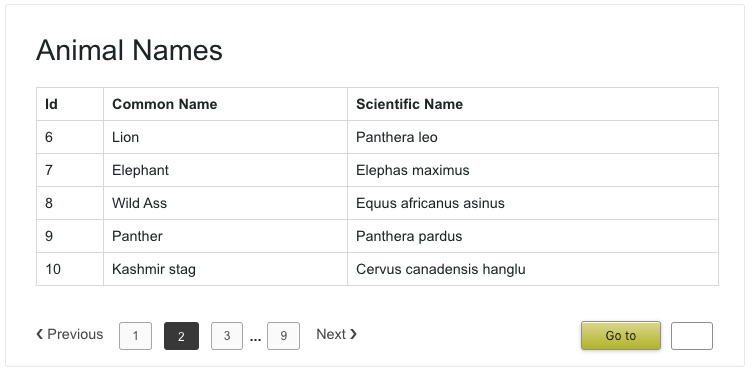
This screenshot shows the output of the PHP pagination example code. It shows five records per page. 

On the left, it shows usual pagination with previous next and separate page links. On the right side, it is a HMTL form to allow the user to enter the page number.

PHP pagination MySQL Example Output

See Also

These links have a variety of pagination scripts.

  1. PHP CRUD with search and pagination
  2. Pagination with Tabular records
  3. How to create Facebook-link infinite scroll pagination

Conclusion

Thus, we created PHP pagination with Google-like limited links and previous next links. We have seen the interlinking of older PHP pagination script along with this article.

We have discussed the third-party libraries that contain in-built pagination feature. It will be helpful to have a choice if are searching for such plugins.

In this custom PHP pagination example, we have provided an option to jump into a target page directly via a form. Sometimes, it itself is enough with previous next navigation.

Hope this article and the example help you to build a nice simple PHP pagination for your web application.

Download

↑ Back to Top

Posted on Leave a comment

ASP.NET Core updates in .NET Core 3.1

Avatar

Sourabh

.NET Core 3.1 is now available and is ready for production use! .NET Core 3.1 is a Long Term Support (LTS) release.

Here’s what’s new in this release for ASP.NET Core:

  • Partial class support for Razor components
  • Pass parameters to top-level components
  • New component tag helper
  • Prevent default actions for events in Blazor apps
  • Stop event propagation in Blazor apps
  • Detailed errors during Blazor app development
  • Support for shared queues in HttpSysServer
  • Breaking changes for SameSite cookies

You can find all the details about these new features in the What’s new in ASP.NET Core 3.1 topic.

See the release notes for additional details and known issues.

Get started

To get started with ASP.NET Core in .NET Core 3.1 install the .NET Core 3.1 SDK.

If you’re on Windows using Visual Studio, install Visual Studio 2019 16.4. Installing Visual Studio 2019 16.4 will also install .NET Core 3.1, so you don’t need to separately install it.

Upgrade an existing project

To upgrade an existing ASP.NET Core app to .NET Core 3.0, follow the migrations steps in the ASP.NET Core docs.

See the full list of breaking changes in ASP.NET Core 3.1.

To upgrade an existing ASP.NET Core 3.0 RC1 project to 3.0:

  • Update all Microsoft.AspNetCore.* and Microsoft.Extensions.* package references to 3.1.0

That’s it! You should now be all set to use .NET Core 3.1!

Blazor WebAssembly update

Alongside this .NET Core 3.1 release, we’ve also released a Blazor WebAssembly update. Blazor WebAssembly is still in preview and is not part of the .NET Core 3.1 release. Blazor WebAssembly will ship as a stable release at a future date.

To install the latest Blazor WebAssembly template run the following command:

dotnet new -i Microsoft.AspNetCore.Blazor.Templates::3.1.0-preview4.19579.2

This release of Blazor WebAssembly includes a number of new features and improvements:

  • .NET Standard 2.1 support
  • Support for static assets in when publishing
  • iOS 13 support
  • Better linker errors
  • Attach to process debugging from Visual Studio

.NET Standard 2.1 support

Blazor WebAssembly apps now target .NET Standard 2.1 by default. Using .NET Standard 2.1 libraries from a Blazor WebAssembly app is now supported within the limits of the browser security sandbox.

Support for static assets in libraries when publishing

Standalone Blazor WebAssembly apps now support static assets from Razor class libraries both during development and when publishing. This applies to both standalone Blazor WebAssembly apps and ASP.NET Core hosted apps. Static assets are consumed from referenced libraries using the path prefix: _content/{LIBRARY NAME}/.

iOS 13 support

Blazor WebAssembly apps now work from iOS 13 based devices. The .NET IL interpreter now uses a non-recursive implementation to prevent exceeding the size of the stack on these devices.

Better linker errors

The IL linker is now integrated with Blazor WebAssembly projects such that linker errors are surfaced as build errors.

Attach to process debugging from Visual Studio

You can now debug Blazor WebAssembly apps from Visual Studio by attaching to the browser process. Currently this experience is very manual. In a future update, we expect to enable Visual Studio to handle all of the necessary wire-up to debug a Blazor WebAssembly app when you hit F5. Also, various features of the debugging experience (like viewing locals) are not yet enabled. This is something we will be working on over the next few months.

To debug a running Blazor WebAssembly app from Visual Studio:

  1. Run the app without debugging (Ctrl-F5 instead of F5)
  2. Open the Debug properties of the app and copy the HTTP app URL
  3. Browse to the HTTP address (not the HTTPS address) of the app using a Chromium based browser (Edge Beta or Chrome).
  4. With the browser in focus, press Shift-Alt-D and then follow the instructions to open a browser with remote debugging enabled
  5. Close all other browser instances
  6. In Visual Studio, select Debug > Attach to Process.
  7. For the Connection type, select Chrome devtools protocol websocket (no authentication).
  8. For the Connection target, paste in the HTTP address (not the HTTPS address) of the app and press Enter (don’t click “Find” – that does something else).
  9. Select the browser process you want to debug and select Attach
  10. In the Select Code Type dialog, select the code type for the specific browser you are attaching to (Edge or Chrome) and then select OK
  11. Set a break point in your app (for example, in the IncrementCount method in the Counter component) and then use that part of the app to hit the breakpoint.

In a later release, this process will become automated inside Visual Studio and Visual Studio Code so you can launch and attach the debugger with a single click or keystroke. Then you will no longer need to go through this detailed attachment process manually.

Give feedback

We hope you enjoy this release of ASP.NET Core in .NET Core 3.1! We are eager to hear about your experiences with this latest .NET Core release. Let us know what you think by filing issues on GitHub.

Thanks for trying out ASP.NET Core!

Avatar

Posted on Leave a comment

How to Integrate 2Checkout Payment Gateway using PHP

Last modified on November 27th, 2019 by Vincy.

Sales, revenue, ROI are the key metrics to measure a business growth. The payment gateway is a sensitive factor that affects these metrics directly. It is the first and foremost item on the checklist for any eCommerce business.

There are many Payment Gateway providers. PayPal being the popular provider and 2Checkout is catching out fast. Earlier I wrote about how to integrate PayPal checkout in ecommerce website. In this payment gateway integration series, now it is time to see about 2Checkout. 
2Checkout Payment Gateway Integration using-php PHP

2Checkout is one of the best payment gateway provider to support card payments. It works similar to Stripe payment gateway. Card payments has less friction and will enable to increase the conversion rate in your eCommerce business.

2Checkout is growing everyday in popularity. It is available in more than 180 countries and used by 17,000 firms.

To integrate 2Checkout to your ecommerce application there are few simple steps. I have described those steps in this article to make your job easier.

Also, we will see the card validator script, payment request-response handlers and more.

What is inside?

  1. Existing payment gateway methods supporting card payment
  2. Advantages of 2Checkout payment
  3. File structure
  4. Steps to integrate 2Checkout payment gateway using PHP
  5. Database script
  6. Go live
  7. 2Checkout Payment gateway example output

Existing payment gateway methods supporting card payment

I have been writing about payment gateways for a while We have already seen many types of payment gateway integration using PHP. I already written tutorials for CCAvenue, PayPal, Stripe, SagePay and Authorize.Net

2Checkout, Stripe, CCAvenue are some of the examples for the methods supporting card-payments. There are many methods like InstaMojo, Cashfree, EBS and Paytm support card-payments.

Advantages of 2Checkout payment

  • Easy to integrate using payment API libraries in PHP, PYTHON and more languages.
  • It allows customers to opt for a variety of payment methods via PayPal account or debit/credit cards.
  • 2Checkout is a secured fraud-proof for selling products or subscription plans online.
  • It provides a localized buying experience for the customer.
  • It supports many currencies that supports global payments.
  • Integratable with the eCommerce tools like Shopify, Bigcommerce.

File structure

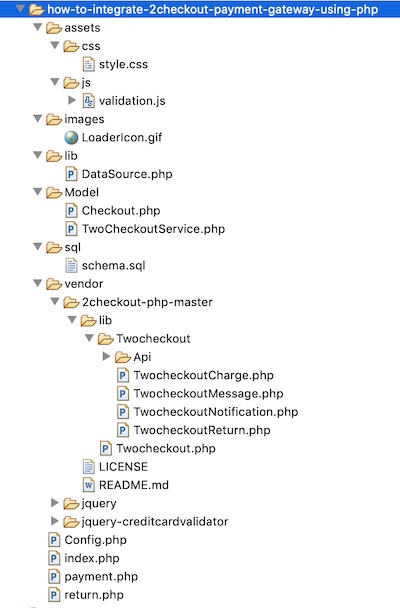
This image shows the file structure of the 2Checkout payment gateway PHP example. The root files index.php, payment.php, return.php are in a sequential flow during the payment.

While running this example, it lands with the index.php to show the payment form. Form targets payment.php that processes payment and redirects to the return page.

The redirect URL will have the payment response status parameter. It helps to create a response HTML on the return page. 

The assets folder has the CSS, JS created for this example. TwoCheckoutService.php contains the library includes to verify card details and process payment.

You can see all the third-party components in the vendor directory.
2Checkout Payment File Structure

Steps to integrate 2Checkout payment gateway using PHP

  1. Download the 2Checkout payment API library in PHP.
  2. Create a 2Checkout account and generate API keys.
  3. Create a payment form to collect the card details from the customer.
  4. Generate payment API token and transfer the card details in a secure way.
  5. Verify card details and process charges with 2Checkout Payment API.

Step 1: Download 2Checkout payment gateway

2Checkout payment API library has many features. It helps to manage purchase flow, orders, invoices, billing and more. It simplifies the integration process and reduces the developer’s effort.

Download the 2Checkout payment API library from GitHub. And then, put it into your application vendor directory.

While integrating Stripe Billing, we saw how to integrate third-party API for payment.

Include the TwoCheckout.php service before verifying card details and process payments. This file includes all other library dependencies. It handles card validation and charges on the server-side.  

In this example, the Checkout.php use this library file to perform the payment operations.

Step 2: Creating 2Checkout sandbox account and generate API keys

2Checkout provides a sandbox environment to check payment flow using the API functions. 

This is a common practice to go with a sandbox mode for testing purposes. Then we can go live after verifying the payment flow with this mode.

Let us create a 2Checkout sandbox account via the developer console. By logging into the console, we can get our API keys.

  1. Register and log in to the 2Checkout sandbox account.
  2. Select the API menu from the header and click the Start Integrating button.
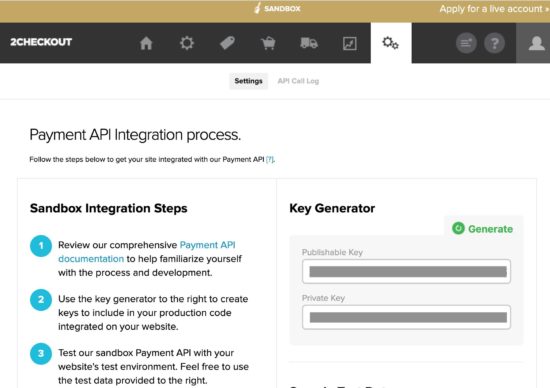
  3. Go to the Settings tab to get the API keys.
  4. Copy the Publishable Key and Private Key in the key generation section of the page.
2Checkout Payment API Keys

Click the Generate button if you are not able to see the API keys.

I have added the keys and seller account id in the application config name Config.php.

After configuring the API keys, use the test data to make the payment in the sandbox mode. You can get the test data from the API page as shown below.
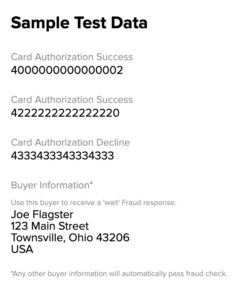
2Checkout Sandbox Card Details

Step 3: Create 2Checkout payment form in HTML

This form contains input fields to get the basic credit card details from the buyer. Those are the cardholder’s name and email, card number, CVC, card expiry tenure.

It will also ask the billing address from the buyer.

In this payment form, it has hidden fields for keeping the seller account id and product price, code.

<?php namespace Phppot; use Phppot\Config; require_once "Config.php"; $productCode = "WWPS235"; ?> <html> <head> <meta name="viewport" content="width=device-width, initial-scale=1"> <link href="./assets/css/style.css" rel="stylesheet" type="text/css"> <title>2checkout-payment-gateway-integration-using-PHP</title> </head> <body> <div id="formContainer"> <?php $productDetail = Config::productDetail(); $itemName = $productDetail[$productCode]["itemName"]; $itemPrice = $productDetail[$productCode]["itemPrice"]; ?> <div class="product-row"> <p class="product"><?php echo $itemName; ?></p> <div class="price float-right"><?php echo $itemPrice; ?> <?php echo Config::CURRENCY; ?> </div> </div> <form id="paymentForm" novalidate method="post" action="payment.php"> <input type="hidden" id="itemNumber" name="itemNumber" value="<?php echo $productCode; ?>" /> <input type="hidden" id="itemPrice" name="itemPrice" value="<?php echo $itemPrice; ?>" /> <input type="hidden" id="seller_id" value="<?php echo Config::SELLER_ID; ?>" /> <input type="hidden" id="publishable_key" value="<?php echo Config::PUBLISHABLE_KEY; ?>" /> <div class="field-row col2 float-left"> <label>Card Holder Name</label> <input type="text" class="demoInputBox required" name="cardHolderName" id="cardHolderName"> </div> <div class="field-row col2 float-right"> <label>Email</label> <input type="email" class="demoInputBox required" name="cardHolderEmail" id="cardHolderEmail"> </div> <div class="field-row"> <label>Card Number</label> <input type="text" class="demoInputBox required" name="cardNumber" id="cardNumber"> </div> <div class="field-row col2 float-left"> <label>Expiry Month / Year</label> <br /> <select name="expiryMonth" id="expiryMonth" class="demoSelectBox required"> <?php $months = Config::monthArray(); $count = count($months); for ($i = 0; $i < $count; $i ++) { $monthValue = $i + 1; if (strlen($i) < 2) { $monthValue = "0" . $monthValue; } ?> <option value="<?php echo $monthValue; ?>"><?php echo $months[$i]; ?></option> <?php } ?> </select> <select name="expiryYear" id="expiryYear" class="demoSelectBox required"> <?php for ($i = date("Y"); $i <= 2030; $i ++) { $yearValue = substr($i, 2); ?> <option value="<?php echo $yearValue; ?>"><?php echo $i; ?></option> <?php } ?> </select> </div> <div class="field-row"> <label>CVV</label><br /> <input type="text" name="cvv" id="cvv" class="demoInputBox cvv-input required"> </div> <p class="sub-head">Billing Address:</p> <div class="field-row col2 float-left"> <label>Address Line1</label> <input type="text" class="demoInputBox required" name="addressLine1" id="addressLine1"> </div> <div class="field-row col2 float-right"> <label>Address Line2</label> <input type="email" class="demoInputBox" name="addressLine2" id="addressLine2"> </div> <div class="field-row col2 float-left"> <label>Country</label> <input type="text" class="demoInputBox required" name="country" id="country"> </div> <div class="field-row col2 float-right"> <label>State</label> <input type="text" class="demoInputBox required" name="state" id="state"> </div> <div class="field-row col2 float-left"> <label>City</label> <input type="text" class="demoInputBox required" name="city" id="city"> </div> <div class="field-row col2 float-right"> <label>Zip</label> <input type="text" class="demoInputBox required" name="zip" id="zip"> </div> <div class="clear-float"> <input id="token" name="token" type="hidden" value=""> <input type="button" id="submit-btn" class="btnAction" value="Send Payment"> <div id="loader"> <img alt="loader" src="./images/LoaderIcon.gif" /> </div> </div><div id="error-message"></div> </form> </div> </body> </html> 

Javascript for credit card validation

Most of the fields are mandatory. The form validation script helps to verify user’s input before payment.

I have used the jQuery CreditCardValidator script to validate the card details. It will check the card number format, CVC, card expiration and more. 

Note: To pass the card validation, any three-digit code for CVC and a future date for card expiry.

function validate() { var valid = true; $(".demoInputBox").css('background-color', ''); var message = ""; var cardHolderNameRegex = /^[a-z ,.'-]+$/i; var cvvRegex = /^[0-9]{3,3}$/; var cardHolderName = $("#cardHolderName").val(); var cardHolderEmail = $("#cardHolderEmail").val(); var cardNumber = $("#cardNumber").val(); var cvv = $("#cvv").val(); $(".required").each(function() { if($(this).val()=='') { $(this).css('background-color', '#FFFFDF'); valid = false; } }); if(!valid) { message += "<div> Highlighted fields are required.</div>"; } if (cardHolderName != "" && !cardHolderNameRegex.test(cardHolderName)) { message += "<div>Card Holder Name is invalid</div>"; $("#cardHolderName").css('background-color', '#FFFFDF'); valid = false; } if (!cardHolderEmail.match( /^([\w-\.]+@([\w-]+\.)+[\w-]{2,4})?$/)) { message += "<div>Email is invalid</div>"; $("#cardHolderEmail").css('background-color', '#FFFFDF'); valid = false; } if (cardNumber != "") { $('#cardNumber').validateCreditCard(function(result) { if (!(result.valid)) { message += "<div>Card Number is Invalid</div>"; $("#card-number").css('background-color', '#FFFFDF'); valid = false; } }); } if (cvv != "" && !cvvRegex.test(cvv)) { message += "<div>CVV is Invalid</div>"; $("#cvv").css('background-color', '#FFFFDF'); valid = false; } if (message != "") { $("#error-message").show(); $("#error-message").html(message); $("#submit-btn").show(); $("#loader").hide(); } return valid; } 

Step 4: 2Checkout JS to request token

This HTML code contains the 2co.js include at the end. This JS script is for getting TCO token by hitting the API’s tokenRequestURL. 

This request requires card details with seller account id, sandbox publishable key. It also specifies the name of the success/error callback functions.

The success callback gets the token and includes it to the HTML form. f anything went wrong, the error-callback handles the case and acknowledge the customer.

This token helps to authenticate the request before processing the payment. Without this token, the payment request will return error by saying unauthorized.

<!-- jQuery library --> <script src="vendor/jquery/jquery-3.2.1.min.js"></script> <script src="vendor/jquery-creditcardvalidator/jquery.creditCardValidator.js"></script> <script src="./assets/js/validation.js"></script> <!-- 2Checkout JavaScript library --> <script src="https://www.2checkout.com/checkout/api/2co.min.js"></script> <script> // A success callback of TCO token request var success = function (data) { // Set the token in the payment form $('#paymentForm #token').val(data.response.token.token); $("#error-message").hide(); $("#error-message").html(""); // Submit the form with TCO token $('#paymentForm').submit(); }; // A Error callback of TCO token request. var error = function (data) { var errorMsg = ""; if (data.errorCode === 200) { tokenRequest(); } else { errorMsg = data.errorMsg; $("#error-message").show(); $("#error-message").html(errorMsg); $("#submit-btn").show(); $("#loader").hide(); } }; function tokenRequest() { var valid = validate(); if (valid == true) { $("#submit-btn").hide(); $("#loader").css("display", "inline-block"); var args = { sellerId: $('#seller_id').val(), publishableKey: $('#publishable_key').val(), ccNo: $("#cardNumber").val(), cvv: $("#cvv").val(), expMonth: $("#expiryMonth").val(), expYear: $("#expiryYear").val() }; // Request 2Checkout token TCO.requestToken(success, error, args); } } $(function () { TCO.loadPubKey('sandbox'); $("#submit-btn").on('click', function (e) { tokenRequest(); return false; }); }); </script> 

Step 5: Verify card details and process charges with 2Checkout payment API

After submitting the tokenized form data, then PHP will handle the payment process. There are two major steps during the payment process authorization and charging card.

The payment.php file is the endpoint that verifies payment and charges the card. The below code states how to receive payment form data and request payment.

Before processing payment, this PHP code inserts order into the database table. In this step, it saves the product, currency, customer and billing data into the database.

After placing the order, the inserOrder method will return a unique reference ID. This refers to the merchantOrderId parameter while charging the card.

With a success response, it will update the transaction id and payment status in the order table.

In case of error, the error message returned by the API will acknowledge the customers.

<?php use Phppot\Config; use Phppot\Model\Checkout; session_start(); require_once 'Config.php'; // Check if token is not empty if (! empty($_POST['token'])) { $token = $_POST['token']; $currency = Config::CURRENCY; // Card information $card_num = $_POST['cardNumber']; $card_cvv = $_POST['cvv']; $card_exp_month = $_POST['expiryMonth']; $card_exp_year = $_POST['expiryYear']; // Customer information $customerDetail['name'] = $_POST['cardHolderName']; $customerDetail['email'] = $_POST['cardHolderEmail']; $billingAddress['addrLine1'] = $_POST['addressLine1']; $billingAddress['addrLine2'] = $_POST['addressLine2']; $billingAddress['city'] = $_POST['city']; $billingAddress['state'] = $_POST['state']; $billingAddress['zipCode'] = $_POST['zip']; $billingAddress['country'] = $_POST['country']; // Product information $product['itemNumber'] = $_POST["itemNumber"]; $product['itemPrice'] = $_POST["itemPrice"]; require_once 'Model/Checkout.php'; $checkout = new Checkout(); $orderID = $checkout->insertOrder($customerDetail, $billingAddress, $product); require_once 'Model/TwoCheckoutService.php'; $twoCheckoutService = new TwoCheckoutService(); $twoCheckoutService->verifyAuthentication(); $successMessage = ""; $errorMessage = ""; $paymentResponse = $twoCheckoutService->chargeCard($orderID, $token, $currency, $customerDetail, $billingAddress, $product['itemPrice']); if (! empty($paymentResponse["charge"])) { $charge = $paymentResponse["charge"]; if ($charge['response']['responseCode'] == 'APPROVED') { $transactionId = $charge['response']['transactionId']; $status = $charge['response']['responseCode']; $checkout->updatePayment($transactionId, $status, $orderID); header("Location: return.php?status=success&itemNumber=".$orderID); } else { $_SESSION["transaction_error"] = "Payment is waiting for approval."; header("Location: return.php?status=transaction_failed"); } } else if($paymentResponse["message"]) { if(!empty($paymentResponse["message"])) { $_SESSION["transaction_error"] = $paymentResponse["message"]; } header("Location: return.php?status=transaction_failed"); } } else { header("Location: return.php?status=invalid_token"); } ?> 

Model/Checkout.php

<?php /** * Copyright (C) 2019 Phppot * * Distributed under MIT license with an exception that, * you don’t have to include the full MIT License in your code. * In essense, you can use it on commercial software, modify and distribute free. * Though not mandatory, you are requested to attribute this URL in your code or website. */ namespace Phppot\Model; use Phppot\DataSource; use Phppot\Config; class Checkout { private $ds; function __construct() { require_once __DIR__ . './../lib/DataSource.php'; $this->ds = new DataSource(); } /** * to get the member record based on the subscription_key * * @param string $subscriptionKey * @return array result record */ public function getOrder($orderId) { $query = 'SELECT * FROM tbl_order where id = ?'; $paramType = 'i'; $paramValue = array( $orderId ); $result = $this->ds->select($query, $paramType, $paramValue); return $result; } public function insertOrder($customerDetail, $billingAddress, $product) { $current_time = date("Y-m-d H:i:s"); $query = 'INSERT INTO tbl_order (name, email, item_code, item_price, currency, address_line_1, address_line_2, country, state, city, zip, create_at) VALUES (?, ?, ?, ?, ?, ?, ?, ?, ?, ?, ?, ?)'; $paramType = 'sssissssssss'; $paramValue = array( $customerDetail["name"], $customerDetail["email"], $product["itemNumber"], $product["itemPrice"], Config::CURRENCY, $billingAddress['addrLine1'], $billingAddress['addrLine2'], $billingAddress['country'], $billingAddress['state'], $billingAddress['city'], $billingAddress['zipCode'], $current_time ); $insertStatus = $this->ds->insert($query, $paramType, $paramValue); return $insertStatus; } public function updatePayment($transactionId, $paymentStatus, $orderID) { $query = "UPDATE tbl_order set txn_id = ?, payment_status = ? WHERE id = ?"; $paramType = 'ssi'; $paramValue = array( $transactionId, $paymentStatus, $orderID ); $this->ds->execute($query, $paramType, $paramValue); } } 

Model/TwoCheckoutService.php

<?php use Phppot\Config; require_once("vendor/2checkout-php-master/lib/Twocheckout.php"); class TwoCheckoutService { function verifyAuthentication() { Twocheckout::verifySSL(false); // Set API key Twocheckout::privateKey(Config::PRIVATE_KEY); // PRIVATE_KEY defined in config.php Twocheckout::sellerId(Config::SELLER_ID); // SELLER_ID defined in config.php Twocheckout::sandbox(true); } function chargeCard($orderID, $token, $currency, $customerDetail, $billingAddress, $itemPrice) { $successMessage = ""; $errorMessage = ""; try { // an array is created with customer sale parameters and passed it in auth() function of Twocheckout_Charge class for authorization. $charge = Twocheckout_Charge::auth(array( "merchantOrderId" => $orderID, "token" => $token, "currency" => $currency, "total" => $itemPrice, "billingAddr" => array( "name" => $customerDetail['name'], "addrLine1" => $billingAddress['addrLine1'], "city" => $billingAddress['city'], "state" => $billingAddress['state'], "zipCode" => $billingAddress['zipCode'], "country" => $billingAddress['country'], "email" => $customerDetail['email'] ) )); $paymentResponse = array( "message" => "", "charge" => $charge ); } catch (Twocheckout_Error $e) { $paymentResponse = array( "message" => $e->getMessage(), "charge" => "" ); } return $paymentResponse; } } 

Config.php

<?php namespace Phppot; class Config { const CURRENCY = 'USD'; const SELLER_ID = ''; const PUBLISHABLE_KEY = ''; const PRIVATE_KEY = ''; public function productDetail() { $product = array( 'WWPS235' => array( "itemName" => 'Kindle Paperwhite (10th gen) - 6" 8GB, WiFi', 'itemPrice' => '130.00' ) ); return $product; } public function monthArray() { $months = array( 'January', 'February', 'March', 'April', 'May', 'June', 'July ', 'August', 'September', 'October', 'November', 'December' ); return $months; } } 

Database script

This is a SQL with the CREATE statement of the tbl_order table. Import this script for your PHP environment to run this example.

-- -- Table structure for table `tbl_order` -- CREATE TABLE `tbl_order` ( `id` int(11) NOT NULL, `name` varchar(25) COLLATE utf8_unicode_ci NOT NULL, `email` varchar(25) COLLATE utf8_unicode_ci NOT NULL, `item_code` varchar(25) COLLATE utf8_unicode_ci NOT NULL, `item_price` float(10,2) NOT NULL, `currency` varchar(10) COLLATE utf8_unicode_ci NOT NULL, `address_line_1` text COLLATE utf8_unicode_ci NOT NULL, `address_line_2` text COLLATE utf8_unicode_ci NOT NULL, `country` varchar(255) COLLATE utf8_unicode_ci NOT NULL, `city` varchar(255) COLLATE utf8_unicode_ci NOT NULL, `state` varchar(255) COLLATE utf8_unicode_ci NOT NULL, `zip` varchar(20) COLLATE utf8_unicode_ci NOT NULL, `txn_id` varchar(50) COLLATE utf8_unicode_ci NOT NULL, `payment_status` varchar(10) COLLATE utf8_unicode_ci NOT NULL, `create_at` datetime NOT NULL, `edit_at` datetime NOT NULL DEFAULT CURRENT_TIMESTAMP ON UPDATE CURRENT_TIMESTAMP ); ALTER TABLE `tbl_order` ADD PRIMARY KEY (`id`); ALTER TABLE `tbl_order` MODIFY `id` int(11) NOT NULL AUTO_INCREMENT, AUTO_INCREMENT=110; 

Go Live

After testing the payment flow in the Sandbox mode, we can move to production mode.

To go live, change the mode from sandbox to production in the following line.

TCO.loadPubKey('production');

Replace all the test API keys with the live keys in the application config. Also, disable the sandbox mode by setting it as false as shown below.

Twocheckout::privateKey('production-private-key'); Twocheckout::sellerId('production-seller-id'); Twocheckout::sandbox(false); 

2Checkout Payment Form Output

The below screenshot shows the 2Checkout payment form. Most of the form fields are mandatory and so validated by JavaScript before payment.

The product name and price above the form are from the config. We can link your product database to display this information.
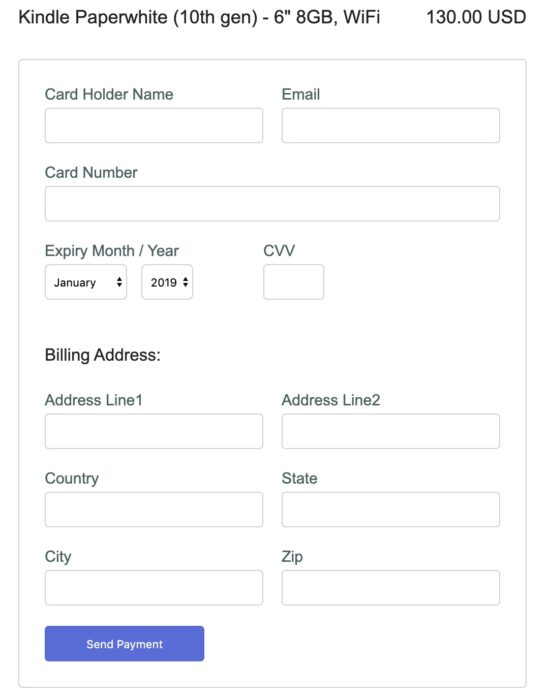
2Checkout Payment Form Output

This screenshot shows the success response. The table shown in this screenshot has the basic details about the order placed.
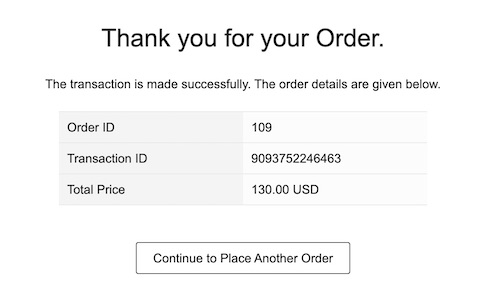
2Checkout Success Response

Download

↑ Back to Top
Posted on Leave a comment

Why choose the Godot Game Engine over Unity or Unreal Engine

.

This is a very common question, so this guide and video is setting out to answer why *I* might choose to use Godot over those other engines. Keep in mind, this isn’t me saying Godot is better or worse than those engines. Additionally, I have a video on Unreal vs Unity in the works, so if you want to decide which of those engines to use, stay tuned for that.

Without further ado, let’s jump in.

Free

Obviously, the lack of a price tag is one of the most obvious features of Godot. Yes, you can start for free with both Unity and Unreal Engine, but both ultimately have a price tag. With Unity, you pay a per seat license fee if you make over 100K a year. With Unreal Engine you pay a fixed 5% royalty after the first $3000 dollars earned. If you’re not making money nor plan to, this obviously doesn’t matter… but the more successful your game is, the better a deal free is!

Open Source

On the topic of free, we also have free as in freedom. Godot is free in both regards, to price tag and license, being licensed under the MIT license. Unity trails in this regard having only select subsets of the code available. Unreal Engine has the source code available and you can completely build the engine from scratch, as well as being able to fix problems yourself by walking through a debug build and applying fixes.

UE4 however is under a more restrictive proprietary license, while Godot is under the incredibly flexible and permissive code license.

Another aspect in Godot’s favor… it’s also by far the smallest code base and very modular in design from a code perspective. This makes it among the easiest engines to contribute code to. The learning curve to understand the source code is a fraction of that to get started contributing to Unreal, while contributing to Unity is frankly impossible without a very expensive negotiated source license.

Language Flexibility

Over the years Unity have *REMOVED* language support. Once there was UnityScript and Boo, a python like language, in addition to C#. Now it’s pretty much just C# and their in development visual scripting language.

Unreal on the other hand has C++ support, with the C++ thanks to Live++ usable very much like a scripting language (although final build times are by far the worst of all 3 engines!), as well as the (IMHO) single best visual programming language available, Blueprints.

For Godot the options are much more robust. First off there is the Python-lite scripting language, GDScript. You can also use C++, although the workflow for gameplay programming may be suboptimal. Additionally, C# support is being added as a first-class language and there is a visual programming language available here as well, although I can’t really think of a reason to use it as it stands now.

Where Godot really shines though is its modularity. GDScript itself is implemented as a module, meaning making other custom scripting languages is a borderline trivial task, as is extending or customizing GDScript. Additionally, there is GDNative/NativeScript it makes it fairly simple to link to external code, without having to jump into the guts of Godot (nor having to compile Godot) or to write performance critical code in C or C++. Finally, you have the ability to create C++ “modules” that have access to all of the C++ classes available in Godot without having to make changes to the underlying codebase.

Ease of Use

This one is obviously subjective, but if you are looking to create a game, especially as a beginner, the learning curve and ease of use with GDScript make this the easiest of the 3 engines to pick up, at least in my opinion. Unreal Engine is frankly fairly appalling for 2D titles, having basically abandoned Paper2D (their 2D API) on the vine. Over the last couple years Unity have really been focusing heavier on dedicated 2D support, but you still must dig through a lot of cruft and overhead to get to the meat of your game.

With Godot you pretty much everything you need for 2D out of the box and the ability to work directly with pixel (or % based) coordinates.

It’s Tiny

Unreal and Unity are multi GB installs and both have a hub or launcher app. Godot… a 50ish MB zip file (plus templates for a couple hundred more MB needed when deploying). Download, unzip and start game development!

You Like it Better?

You may, or you may not like the coding model of Godot. Chances are if you like the Node based approach to game development, you will love Godot. All three game engines (and almost all modern game engines) take a composition-based approach to scene modeling. Godot takes it one step further, making everything nodes, trees of nodes, even scenes are simply nodes. The approach is different enough that users may either love or hate the approach. If you love the approach Godot takes, you will be productive in it. If you don’t like it, you’re probably better served using Unity or Unreal.

Why Not Pick Godot Then?

I am not even going to pretend that Godot is the perfect game engine and ideal in every situation… there are certainly areas where Unity and Unreal have a small to huge advantage. This could be its own entire video, but a quick list include:

  • Performance concerns, especially on large 3D scenes (hopefully resolved with proper culling and the upcoming Vulkan renderer). In 3D, both engines out perform Godot quite often
  • Platforms… Unity and Unreal support every single platform you can imagine, Godot supports most of the common consumer categories and takes longer to get support for devices like AR/VR. Hardware manufacturers work with Unity and Epic from the design stages, while Godot pretty much must wait for hardware to come to market and then for someone to implement it. Another huge difference, and one of the few downsides to open source software, it isn’t compatible with the closed proprietary licenses of console hardware. While Godot has been ported to run on console hardware, it isn’t supported out of the box and probably never will be.
  • Ecosystem. Godot has a vibrant community but can’t hold a candle to the ecosystem around Unreal and especially Unity. There are simply more users, more books, larger asset stores, etc.
  • The resume factor… this is a part of ecosystem continued. It’s easier to get a job with Unity experience or Unreal experience on the resume than Godot. While many people wouldn’t (and really for a full-time hire, shouldn’t) care what engine you use, when people are hunting for employees, they often look for Unity or UE experience specifically. The other side of this coin is the number of people with Unity or UE experience is larger if you are the one doing the hiring.
  • As with many open source projects, it’s still heavily dependent on one or two key developers. If the leads left the project, it would be a massive blow to the future of Godot. Meanwhile there are hundred or thousands of people being paid to develop Unity or Unreal and the departure of any individual member isn’t likely to have a tangible impact.

The Longer Video Version

[youtube https://www.youtube.com/watch?v=l7BrpcboJno&w=853&h=480]

Programming General


<!–

–>

Posted on Leave a comment

Decoupling microservices with Apache Camel and Debezium

The rise of microservices-oriented architecture brought us new development paradigms and mantras about independent development and decoupling. In such a scenario, we have to deal with a situation where we aim for independence, but we still need to react to state changes in different enterprise domains.

I’ll use a simple and typical example in order to show what we’re talking about. Imagine the development of two independent microservices: Order and User. We designed them to expose a REST interface and to each use a separate database, as shown in Figure 1:

Diagram 1 - Order and User microservices

Figure 1: Order and User microservices.

We must notify the User domain about any change happening in the Order domain. To do this in the example, we need to update the order_list. For this reason, we’ve modeled the User REST service with addOrder and deleteOrder operations.

Solution 1: Queue decoupling

The first solution to consider is adding a queue between the services. Order will publish events that User will eventually process, as shown in Figure 2:

Diagram 2 - decoupling with a queue

Figure 2: Decoupling with a queue.

This is a fair design. However, if you don’t use the right middleware you will mix a lot of infrastructure code into your domain logic. Now that you have queues, you must develop producer and consumer logic. You also have to take care of transactions. The problem is to make sure that every event ends up correctly in both the Order database and in the queue.

Solution 2: Change data capture decoupling

Let me introduce an alternative solution that handles all of that work without your touching any line of your microservices code. I’ll use Debezium and Apache Camel to capture data changes on Order and trigger certain actions on User. Debezium is a log-based data change capture middleware. Camel is an integration framework that simplifies the integration between a source (Order) and a destination (User), as shown in Figure 3:

Diagram 3 - decoupling with Debezium and Camel

Figure 3: Decoupling with Debezium and Camel.

Debezium is in charge of capturing any data change happening in the Order domain and publishing it to a topic. Then a Camel consumer can pick that event and make a REST call to the User API to perform the necessary action expected by its domain (in our simple case, update the list).

Decoupling with Debezium and Camel

I’ve prepared a simple demo with all of the components we need to run the example above. You can find this demo in this GitHub repo. The only part we need to develop is represented by the following source code:

public class MyRouteBuilder extends RouteBuilder { public void configure() { from("debezium:mysql?name=my-sql-connector" + "&databaseServerId=1" + "&databaseHostName=localhost" + "&databaseUser=debezium" + "&databasePassword=dbz" + "&databaseServerName=my-app-connector" + "&databaseHistoryFileName=/tmp/dbhistory.dat" + "&databaseWhitelist=debezium" + "&tableWhitelist=debezium._order" + "&offsetStorageFileName=/tmp/offset.dat") .choice() .when(header(DebeziumConstants.HEADER_OPERATION).isEqualTo("c")) .process(new AfterStructToOrderTranslator()) .to("rest-swagger:http://localhost:8082/v2/api-docs#addOrderUsingPOST") .when(header(DebeziumConstants.HEADER_OPERATION).isEqualTo("d")) .process(new BeforeStructToOrderTranslator()) .to("rest-swagger:http://localhost:8082/v2/api-docs#deleteOrderUsingDELETE") .log("Response : ${body}"); } } 

That’s it. Really. We don’t need anything else.

Apache Camel has a Debezium component that can hook up a MySQL database and use Debezium embedded engine. The source endpoint configuration provides the parameters needed by Debezium to note any change happening in the debezium._order table. Debezium streams the events according to a JSON-defined format, so you know what kind of information to expect. For each event, you will get the information as it was before and after the event occurs, plus a few useful pieces of meta-information.

Thanks to Camel’s content-based router, we can either call the addOrderUsingPOST or deleteOrderUsingDELETE operation. You only have to develop a message translator that can convert the message coming from Debezium:

public class AfterStructToOrderTranslator implements Processor { private static final String EXPECTED_BODY_FORMAT = "{\"userId\":%d,\"orderId\":%d}"; public void process(Exchange exchange) throws Exception { final Map value = exchange.getMessage().getBody(Map.class); // Convert and set body int userId = (int) value.get("user_id"); int orderId = (int) value.get("order_id"); exchange.getIn().setHeader("userId", userId); exchange.getIn().setHeader("orderId", orderId); exchange.getIn().setBody(String.format(EXPECTED_BODY_FORMAT, userId, orderId)); } } 

Notice that we did not touch any of the base code for Order or User. Now, turn off the Debezium process to simulate downtime. You will see that it can recover all events as soon as it turns back on!

You can run the example provided by following the instructions on this GitHub repo.

Caveat

The example illustrated here uses Debezium’s embedded mode. For more consistent solutions, consider using the Kafka connect mode instead, or tuning the embedded engine accordingly.

Share

The post Decoupling microservices with Apache Camel and Debezium appeared first on Red Hat Developer.

Posted on Leave a comment

gRPC vs HTTP APIs

Avatar

James

ASP.NET Core now enables developers to build gRPC services. gRPC is an opinionated contract-first remote procedure call framework, with a focus on performance and developer productivity. gRPC integrates with ASP.NET Core 3.0, so you can use your existing ASP.NET Core logging, configuration, authentication patterns to build new gRPC services.

This blog post compares gRPC to JSON HTTP APIs, discusses gRPC’s strengths and weaknesses, and when you could use gRPC to build your apps.

gRPC strengths

Developer productivity

With gRPC services, a client application can directly call methods on a server app on a different machine as if it was a local object. gRPC is based around the idea of defining a service, specifying the methods that can be called remotely with their parameters and return types. The server implements this interface and runs a gRPC server to handle client calls. On the client, a strongly-typed gRPC client is available that provides the same methods as the server.

gRPC is able to achieve this through first-class support for code generation. A core file to gRPC development is the .proto file, which defines the contract of gRPC services and messages using Protobuf interface definition language (IDL):

Greet.proto

// The greeting service definition.
service Greeter { // Sends a greeting rpc SayHello (HelloRequest) returns (HelloReply);
} // The request message containing the user's name.
message HelloRequest { string name = 1;
} // The response message containing the greetings
message HelloReply { string message = 1;
}

Protobuf IDL is a language neutral syntax, so it can be shared between gRPC services and clients implemented in different languages. gRPC frameworks use the .proto file to code generate a service base class, messages, and a complete client. Using the generated strongly-typed Greeter client to call the service:

Program.cs

var channel = GrpcChannel.ForAddress("https://localhost:5001")
var client = new Greeter.GreeterClient(channel); var reply = await client.SayHelloAsync(new HelloRequest { Name = "World" });
Console.WriteLine("Greeting: " + reply.Message);

By sharing the .proto file between the server and client, messages and client code can be generated from end to end. Code generation of the client eliminates duplication of messages on the client and server, and creates a strongly-typed client for you. Not having to write a client saves significant development time in applications with many services.

Performance

gRPC messages are serialized using Protobuf, an efficient binary message format. Protobuf serializes very quickly on the server and client. Protobuf serialization results in small message payloads, important in limited bandwidth scenarios like mobile apps.

gRPC requires HTTP/2, a major revision of HTTP that provides significant performance benefits over HTTP 1.x:

  • Binary framing and compression. HTTP/2 protocol is compact and efficient both in sending and receiving.
  • Multiplexing of multiple HTTP/2 calls over a single TCP connection. Multiplexing eliminates head-of-line blocking at the application layer.

Real-time services

HTTP/2 provides a foundation for long-lived, real-time communication streams. gRPC provides first-class support for streaming through HTTP/2.

A gRPC service supports all streaming combinations:

  • Unary (no streaming)
  • Server to client streaming
  • Client to server streaming
  • Bidirectional streaming

Note that the concept of broadcasting a message out to multiple connections doesn’t exist natively in gRPC. For example, in a chat room where new chat messages should be sent to all clients in the chat room, each gRPC call is required to individually stream new chat messages to the client. SignalR is a useful framework for this scenario. SignalR has the concept of persistent connections and built-in support for broadcasting messages.

Deadline/timeouts and cancellation

gRPC allows clients to specify how long they are willing to wait for an RPC to complete. The deadline is sent to the server, and the server can decide what action to take if it exceeds the deadline. For example, the server might cancel in-progress gRPC/HTTP/database requests on timeout.

Propagating the deadline and cancellation through child gRPC calls helps enforce resource usage limits.

gRPC weaknesses

Limited browser support

gRPC has excellent cross-platform support! gRPC implementations are available for every programming language in common usage today. However one place you can’t call a gRPC service from is a browser. gRPC heavily uses HTTP/2 features and no browser provides the level of control required over web requests to support a gRPC client. For example, browsers do not allow a caller to require that HTTP/2 be used, or provide access to underlying HTTP/2 frames.

gRPC-Web is an additional technology from the gRPC team that provides limited gRPC support in the browser. gRPC-Web consists of two parts: a JavaScript client that supports all modern browsers, and a gRPC-Web proxy on the server. The gRPC-Web client calls the proxy and the proxy will forward on the gRPC requests to the gRPC server.

Not all of gRPC’s features are supported by gRPC-Web. Client and bidirectional streaming isn’t supported, and there is limited support for server streaming.

Not human readable

HTTP API requests using JSON are sent as text and can be read and created by humans.

gRPC messages are encoded with Protobuf by default. While Protobuf is efficient to send and receive, its binary format isn’t human readable. Protobuf requires the message’s interface description specified in the .proto file to properly deserialize. Additional tooling is required to analyze Protobuf payloads on the wire and to compose requests by hand.

Features such as server reflection and the gRPC command line tool exist to assist with binary Protobuf messages. Also, Protobuf messages support conversion to and from JSON. The built-in JSON conversion provides an efficient way to convert Protobuf messages to and from human readable form when debugging.

gRPC recommended scenarios

gRPC is well suited to the following scenarios:

  • Microservices – gRPC is designed for low latency and high throughput communication. gRPC is great for lightweight microservices where efficiency is critical.
  • Point-to-point real-time communication – gRPC has excellent support for bidirectional streaming. gRPC services can push messages in real-time without polling.
  • Polyglot environments – gRPC tooling supports all popular development languages, making gRPC a good choice for multi-language environments.
  • Network constrained environments – gRPC messages are serialized with Protobuf, a lightweight message format. A gRPC message is always smaller than an equivalent JSON message.

Conclusion

gRPC is a powerful new tool for ASP.NET Core developers. While gRPC is not a complete replacement for HTTP APIs, it offers improved productivity and performance benefits in some scenarios.

gRPC on ASP.NET Core is available now! If you are interested in learning more about gRPC, check out these resources:

Avatar

Posted on Leave a comment

How Quarkus brings imperative and reactive programming together

The supersonic subatomic Java singularity has expanded!

42 releases, 8 months of community participation, and 177 amazing contributors led up to the release of Quarkus 1.0.  This release is a significant milestone with a lot of cool features behind it. You can read more in the release announcement.

Building on that awesome news, we want to delve into how Quarkus unifies both imperative and reactive programming models and its reactive core. We’ll start with a brief history and then take a deep dive into what makes up this dual-faceted reactive core and how Java developers can take advantage of it.

Microservices, event-driven architectures, and serverless functions are on the rise. Creating a cloud-native architecture has become more accessible in the recent past; however, challenges remain, especially for Java developers. Serverless functions and microservices need faster startup times, consume less memory, and above all offer developer joy. Java, in that regard, has just in recent years done some improvements (e.g., ergonomics enhancements for containers, etc.). However, to have a performing container-native Java, it hasn’t been easy. Let’s first take a look at some of the inherent issues for developing container-native Java applications.

Let’s start with a bit of history.

Threads CPUs Java and Containers

Threads and containers

As of version 8u131, Java is more container-aware, due to the ergonomics enhancements. So now, the JVM knows the number of cores it’s running on and can customize thread pools accordingly — typically the fork/join pool. That’s all great, but let’s say we have a traditional web application that uses HTTP servlets or similar on Tomcat, Jetty, or the like. In effect, this application gives a thread to each request allowing it to block this thread when waiting for IO to occur, such as accessing databases, files, or other services. The sizing for such an application depends on the number of concurrent requests rather than the number of available cores; this also means quota or limits in Kubernetes on the number of cores will not be of great help and eventually will result in throttling.

Memory exhaustion

Threads also cost memory. Memory constraints inside a container do not necessarily help. Spreading that over multiple applications and threading to a large extent will cause more switching and, in some cases, performance degradation. Also, if an application uses traditional microservices frameworks, creates database connections, uses caching, and perhaps needs some more memory, then straightaway one would also need to look into the JVM memory management so that it’s not getting killed (e.g., XX:+UseCGroupMemoryLimitForHeap). Even though JVM can understand cgroups as of Java 9 and adapt memory accordingly, it can still get quite complex to manage and size the memory.

Quotas and limits

With Java 11, we now have the support for CPU quotas (e.g., PreferContainerQuotaForCPUCount). Kubernetes also provides support for limits and quotas. This could make sense; however, if the application uses more than the quota again, we end up with sizing based on cores, which in the case of traditional Java applications, using one thread per request, is not helpful at all.

Also, if we were to use quotas and limits or the scale-out feature of the underlying Kubernetes platform, the problem wouldn’t solve itself; we would be throwing more capacity at the underlying issue or end up over-committing resources. And if we were running this on a high load in a public cloud, certainly we would end up using more resources than necessary.

What can solve this?

A straightforward solution to these problems would be to use asynchronous and non-blocking IO libraries and frameworks like Netty, Vert.x, or Akka. They are more useful in containers due to their reactive nature. By embracing non-blocking IO, the same thread can handle multiple concurrent requests. While a request processing is waiting for some IO, the thread is released and so can be used to handle another request. When the IO response required by the first request is finally received, processing of the first request can continue. Interleaving request processing using the same thread reduces the number of threads drastically and also resources to handle the load.

With non-blocking IO, the number of cores becomes the essential setting as it defines the number of IO threads you can run in parallel. Used properly, it efficient dispatches the load on the different cores, handling more with fewer resources.

Is that all?

And, there’s more. Reactive programming improves resource usage but does not come for free. It requires that the application code embrace non-blocking and avoid blocking the IO thread. This is a different development and execution model. Although there are many libraries to help you do this, it’s still a mind-shift.

First, you need to learn how to write code executed asynchronously because, as soon as you start using non-blocking IOs, you need to express what is going to happen once the response is received. You cannot wait and block anymore. To do this, you can pass callbacks, use reactive programming, or continuation. But, that’s not all, you need to use non-blocking IOs and so have access to non-blocking servers and clients for everything you need. HTTP is the simple case, but think about database access, file systems, and so on.

Although end-to-end reactive provides the best efficiency, the shift can be hard to comprehend. Having the ability to mix both reactive and imperative code is becoming essential to:

  1. Use efficiently the resources on hot paths, and
  2. Provide a simpler code style for the rest of the application.

Enter Quarkus

This is what Quarkus is all about: unifying reactive and imperative in a single runtime.

Quarkus uses Vert.x and Netty at its core. And, it uses a bunch of reactive frameworks and extensions on top to help developers. Quarkus is not just for HTTP microservices, but also for event-driven architecture. Its reactive nature makes it very efficient when dealing with messages (e.g., Apache Kafka or AMQP).

The secret behind this is to use a single reactive engine for both imperative and reactive code.

Quarkus does this quite brilliantly. Between imperative and reactive, the obvious choice is to have a reactive core. What that helps with is a fast non-blocking code that handles almost everything going via the event-loop thread (IO thread). But, if you were creating a typical REST application or a client-side application, Quarkus also gives you the imperative programming model. For example, Quarkus HTTP support is based on a non-blocking and reactive engine (Eclipse Vert.x and Netty). All the HTTP requests your application receive are handled by event loops (IO Thread) and then are routed towards the code that manages the request. Depending on the destination, it can invoke the code managing the request on a worker thread (servlet, Jax-RS) or use the IO was thread (reactive route).

For messaging connectors, non-blocking clients are used and run on top of the Vert.x engine. So, you can efficiently send, receive, and process messages from various messaging middleware.

To help you get started with reactive on Quarkus, there are some well-articulated guides on Quarkus.io:

There are also reactive demo scenarios that you can try online; you don’t need a computer or an IDE, just give it a go in your browser. You can try them out here.

Additional resources

Share

The post How Quarkus brings imperative and reactive programming together appeared first on Red Hat Developer.

Posted on Leave a comment

ASP.NET Core updates in .NET Core 3.1 Preview 3

Avatar

Sourabh

.NET Core 3.1 Preview 3 is now available. This release is primarily focused on bug fixes.

See the release notes for additional details and known issues.

Get started

To get started with ASP.NET Core in .NET Core 3.1 Preview 3 install the .NET Core 3.1 Preview 3 SDK.

If you’re on Windows using Visual Studio, for the best experience we recommend installing the latest preview of Visual Studio 2019 16.4. Installing Visual Studio 2019 16.4 will also install .NET Core 3.1 Preview 3, so you don’t need to separately install it. For Blazor development with .NET Core 3.1, Visual Studio 2019 16.4 is required.

Alongside this .NET Core 3.1 Preview 3 release, we’ve also released a Blazor WebAssembly update. To install the latest Blazor WebAssembly template also run the following command:

dotnet new -i Microsoft.AspNetCore.Blazor.Templates::3.1.0-preview3.19555.2

Upgrade an existing project

To upgrade an existing ASP.NET Core 3.1 Preview 2 project to 3.1 Preview 3:

  • Update all Microsoft.AspNetCore.* package references to 3.1.0-preview3.19555.2

See also the full list of breaking changes in ASP.NET Core 3.1.

That’s it! You should now be all set to use .NET Core 3.1 Preview 3!

Give feedback

We hope you enjoy the new features in this preview release of ASP.NET Core! Please let us know what you think by filing issues on GitHub.

Thanks for trying out ASP.NET Core!

Avatar

Posted on Leave a comment

Open Liberty Java runtime now available to Red Hat Runtimes subscribers

Open Liberty is a lightweight, production-ready Java runtime for containerizing and deploying microservices to the cloud, and is now available as part of a Red Hat Runtimes subscription. If you are a Red Hat Runtimes subscriber, you can write your Eclipse MicroProfile and Jakarta EE apps on Open Liberty and then run them in containers on Red Hat OpenShift, with commercial support from Red Hat and IBM.

Develop cloud-native Java microservices

Open Liberty is designed to provide a smooth developer experience with a one-second startup time, a low memory footprint, and our new dev mode:

Tweet about Open Liberty Dev Mode.

Open Liberty provides a full implementation of MicroProfile 3 and Jakarta EE 8. MicroProfile is a collaborative project between multiple vendors (including Red Hat and IBM) and the Java community that aims to optimize enterprise Java for writing microservices. With a four-week release schedule, Liberty usually has the latest MicroProfile release available soon after the spec is published.

Also, Open Liberty is supported in common developer tools, including VS Code, Eclipse, Maven, and Gradle. Server configuration (e.g., adding or removing a capability, or “feature,” to your app) is through an XML file. Open Liberty’s zero migration policy means that you can focus on what’s important (writing your app!) and not have to worry about APIs changing under you.

Deploy in containers to any cloud

When you’re ready to deploy your app, you can just containerize it and deploy it to OpenShift. The zero migration principle means that new versions of Open Liberty features will not break your app, and you can control which version of the feature your app uses.

Monitoring live microservices is enabled by MicroProfile Metrics, Health, and OpenTracing, which add observability to your apps. The emitted metrics from your apps and from the Open Liberty runtime can be consolidated using Prometheus and presented in Grafana.

Learn with the Open Liberty developer guides

Our Open Liberty developer guides are available with runnable code and explanations to help you learn how to write microservices with MicroProfile and Jakarta EE, and then to deploy them to Red Hat OpenShift.

Get started

To get started with Open Liberty, try the Packaging and deploying applications guide and the Deploying microservices to OpenShift guide.

Share

The post Open Liberty Java runtime now available to Red Hat Runtimes subscribers appeared first on Red Hat Developer.