Calling one API from PHP is simple. Calling three APIs one after another is also simple, but it can make the user wait far longer than necessary. Each request gets its own private turn. Very polite. Not very fast.
Suppose a page needs a customer profile, recent orders, and notifications. If those APIs take 700, 1,100, and 900 milliseconds, sequential requests need about 2.7 seconds. With PHP curl_multi, the requests can run concurrently. The total time then stays close to the slowest request, which is about 1.1 seconds in this example.
This tutorial builds a working benchmark that compares both approaches. It also handles timeouts, HTTP status codes, cURL errors, invalid JSON, and connection limits. If you need a refresher on individual requests first, see this PHP cURL guide.
Quick Answer
Use curl_multi_init() to create a multi handle. Add each request with curl_multi_add_handle(), drive the transfers with curl_multi_exec(), and wait efficiently with curl_multi_select().
The requests perform network I/O concurrently. This is not PHP multithreading, and it does not make CPU-heavy work run in parallel.
<?php $urls = [ 'profile' => 'https://api.example.com/profile', 'orders' => 'https://api.example.com/orders', 'notifications' => 'https://api.example.com/notifications'
]; $multiHandle = curl_multi_init();
$handles = []; foreach ($urls as $name => $url) { $handle = curl_init($url); curl_setopt_array($handle, [ CURLOPT_RETURNTRANSFER => true, CURLOPT_CONNECTTIMEOUT => 3, CURLOPT_TIMEOUT => 10 ]); curl_multi_add_handle($multiHandle, $handle); $handles[$name] = $handle;
} do { $status = curl_multi_exec($multiHandle, $running); if ($status !== CURLM_OK) { throw new RuntimeException(curl_multi_strerror($status)); } if ($running > 0 && curl_multi_select($multiHandle, 1.0) === -1) { usleep(1000); }
} while ($running > 0); $responses = []; foreach ($handles as $name => $handle) { $responses[$name] = curl_multi_getcontent($handle); curl_multi_remove_handle($multiHandle, $handle); curl_close($handle);
} curl_multi_close($multiHandle);
This is the basic flow. The complete project adds response validation, individual error reporting, timing data, and safer request settings.
What This PHP curl_multi Example Builds
The example creates a small dashboard that requests data from three independent API endpoints:
- A customer profile endpoint with a simulated delay of 700 milliseconds
- An orders endpoint with a simulated delay of 1,100 milliseconds
- A notifications endpoint with a simulated delay of 900 milliseconds
The first benchmark sends these requests sequentially. PHP waits for one response before starting the next request.
| API request |
Simulated response time |
| Customer profile |
700 ms |
| Recent orders |
1,100 ms |
| Notifications |
900 ms |
| Approximate sequential time |
2,700 ms |
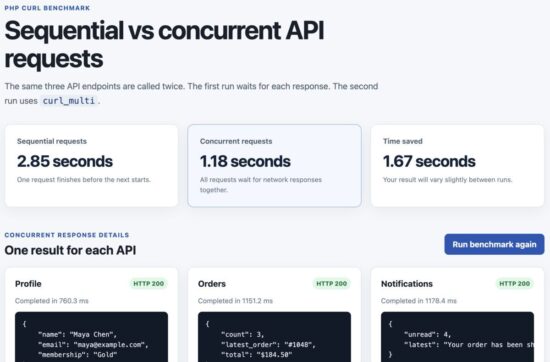
The second benchmark starts all three requests through one cURL multi handle. While one endpoint is waiting, the other transfers can continue. The total time is therefore close to the slowest response, instead of the sum of all three responses.
| Request method |
Approximate total time |
| Sequential cURL requests |
2.7 seconds |
| Concurrent curl_multi requests |
1.1 seconds |
| Time saved |
About 1.6 seconds |
These numbers are not hard-coded into the dashboard. PHP measures both runs with hrtime(). Small differences between runs are normal, but the concurrent version should remain much closer to the longest individual request.
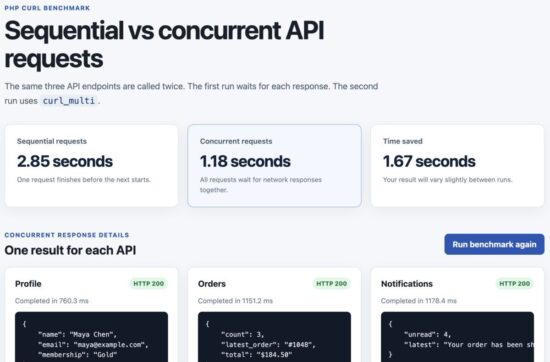
PHP curl_multi completes three concurrent API requests faster than sequential cURL requests.
The performance improvement comes from overlapping network wait time. It does not make an individual API respond faster. If one endpoint takes ten seconds, the complete group can still take about ten seconds. PHP cannot persuade a slow API to drink more coffee.
How PHP curl_multi Works
A normal curl_exec() call blocks the PHP script until that transfer finishes. When several calls are placed inside a loop, the waiting time grows with every request.
The cURL multi interface changes the flow. It keeps several individual cURL handles inside one multi handle and lets their network activity progress together.
- Create one normal cURL handle for each API URL.
- Create a multi handle with
curl_multi_init().
- Add every request with
curl_multi_add_handle().
- Call
curl_multi_exec() until no transfer is running.
- Use
curl_multi_select() while waiting for network activity.
- Read each response with
curl_multi_getcontent().
- Remove and close all handles.
Why curl_multi_exec() Runs Inside a Loop
A single call to curl_multi_exec() does not mean every request has finished. It only asks libcurl to perform the work that is currently possible.
The $running argument receives the number of active transfers. PHP must keep calling the function until that value reaches zero.
do { $status = curl_multi_exec($multiHandle, $running);
} while ($running > 0);
This loop works, but it has a problem. It can repeatedly call curl_multi_exec() while nothing is ready, wasting CPU time.
Use curl_multi_select() to Avoid a Busy Loop
curl_multi_select() pauses the script until one of the active connections can make progress or the timeout expires. This is more efficient than checking the transfers continuously.
do { $status = curl_multi_exec($multiHandle, $running); if ($status !== CURLM_OK) { throw new RuntimeException(curl_multi_strerror($status)); } if ($running > 0) { $ready = curl_multi_select($multiHandle, 1.0); if ($ready === -1) { usleep(1000); } }
} while ($running > 0);
The short sleep handles a lesser-known edge case. Some libcurl builds can return -1 when no file descriptor is ready. Without the sleep, the loop may spin quickly and consume unnecessary CPU.
Multi Errors and Request Errors Are Different
The result from curl_multi_exec() reports errors affecting the complete multi stack. A CURLM_OK result does not guarantee that every API request succeeded.
Each completed handle must still be checked separately for:
- Connection failures reported by
curl_error()
- Timeouts and other transfer errors
- HTTP error responses such as 404 or 500
- Empty or invalid JSON response bodies
This distinction is easy to miss. The multi operation may succeed perfectly while one API quietly returns an error page wearing a JSON name tag.
PHP curl_multi Project Structure
This example uses plain PHP. It does not need a framework, Composer package, JavaScript library, or database.
The project keeps the HTTP client separate from the page that displays the benchmark. It also includes a local mock API, so the timing test does not depend on an external service.
php-curl-multi/
├── config.php
├── mock-api/
│ └── index.php
├── public/
│ ├── assets/
│ │ └── style.css
│ └── index.php
├── src/
│ └── ApiClient.php
└── README.md
config.php contains the API URL, timeouts, and connection limit.mock-api/index.php returns sample JSON responses with controlled delays.src/ApiClient.php sends sequential and concurrent requests.public/index.php runs the benchmark and displays the results.public/assets/style.css provides the small responsive layout.
Create the Configuration File
The configuration keeps values that may change between development and production outside the HTTP client class.
<?php declare(strict_types=1); return [ 'api_base_url' => rtrim( getenv('DEMO_API_BASE_URL') ?: 'http://127.0.0.1:8001', '/' ), 'connect_timeout_ms' => 1000, 'request_timeout_ms' => 5000, 'max_concurrent_requests' => 5,
];
The connection timeout controls how long cURL may spend establishing a connection. The request timeout covers the complete transfer.
The concurrency limit prevents the application from opening an excessive number of connections at once. This demo sends only three requests, but keeping the limit in the configuration makes the client safer to reuse.
Create the Local Mock API
The mock API accepts a resource query parameter. It returns profile, order, or notification data after a short delay.
Create mock-api/index.php with the following code:
<?php declare(strict_types=1); header('Content-Type: application/json; charset=utf-8');
header('Cache-Control: no-store'); $resource = $_GET['resource'] ?? ''; $responses = [ 'profile' => [ 'delay_ms' => 700, 'data' => [ 'name' => 'Maya Chen', 'email' => 'maya@example.com', 'membership' => 'Gold', ], ], 'orders' => [ 'delay_ms' => 1100, 'data' => [ 'count' => 3, 'latest_order' => '#1048', 'total' => '$184.50', ], ], 'notifications' => [ 'delay_ms' => 900, 'data' => [ 'unread' => 4, 'latest' => 'Your order has been shipped.', ], ],
]; if (!isset($responses[$resource])) { http_response_code(404); echo json_encode([ 'error' => 'Unknown API resource.', ], JSON_THROW_ON_ERROR); exit;
} $response = $responses[$resource]; usleep($response['delay_ms'] * 1000); echo json_encode([ 'resource' => $resource, 'simulated_delay_ms' => $response['delay_ms'], 'data' => $response['data'],
], JSON_THROW_ON_ERROR | JSON_UNESCAPED_SLASHES);
The delay is intentional. It makes the difference between sequential and concurrent requests easy to see. In a real project, the waiting time would usually come from a remote API, database-backed service, payment gateway, or another server.
The API also returns a proper 404 response for an unknown resource. This gives the client a realistic HTTP error to handle instead of assuming that every response will be successful.
Create the Reusable PHP API Client
Create src/ApiClient.php. This class contains both request methods, so the benchmark can compare them under the same timeout and response-handling rules.
<?php declare(strict_types=1); final class ApiClient
{ public function __construct( private readonly int $connectTimeoutMs = 1000, private readonly int $requestTimeoutMs = 5000, private readonly int $maxConcurrentRequests = 5 ) { } public function fetchSequential(array $requests): array { $startedAt = hrtime(true); $responses = []; foreach ($requests as $name => $url) { $handle = $this->createHandle($url); $body = curl_exec($handle); $responses[$name] = $this->buildResponse( $handle, $body ); curl_close($handle); } return [ 'duration_ms' => $this->elapsedMilliseconds($startedAt), 'responses' => $responses, ]; } public function fetchConcurrent(array $requests): array { $startedAt = hrtime(true); $multiHandle = curl_multi_init(); $handles = []; curl_multi_setopt( $multiHandle, CURLMOPT_MAX_TOTAL_CONNECTIONS, $this->maxConcurrentRequests ); try { foreach ($requests as $name => $url) { $handle = $this->createHandle($url); $handles[$name] = [ 'handle' => $handle, ]; $status = curl_multi_add_handle( $multiHandle, $handle ); if ($status !== CURLM_OK) { throw new RuntimeException( curl_multi_strerror($status) ); } } do { $status = curl_multi_exec( $multiHandle, $running ); if ($status !== CURLM_OK) { throw new RuntimeException( curl_multi_strerror($status) ); } if ($running > 0) { $ready = curl_multi_select( $multiHandle, 1.0 ); if ($ready === -1) { usleep(1000); } } } while ($running > 0); $responses = []; foreach ($handles as $name => $item) { $handle = $item['handle']; $body = curl_multi_getcontent($handle); $responses[$name] = $this->buildResponse( $handle, $body ); } return [ 'duration_ms' => $this->elapsedMilliseconds( $startedAt ), 'responses' => $responses, ]; } finally { foreach ($handles as $item) { curl_multi_remove_handle( $multiHandle, $item['handle'] ); curl_close($item['handle']); } curl_multi_close($multiHandle); } } private function createHandle(string $url): CurlHandle { $handle = curl_init($url); curl_setopt_array($handle, [ CURLOPT_RETURNTRANSFER => true, CURLOPT_FOLLOWLOCATION => false, CURLOPT_CONNECTTIMEOUT_MS => $this->connectTimeoutMs, CURLOPT_TIMEOUT_MS => $this->requestTimeoutMs, CURLOPT_HTTPHEADER => [ 'Accept: application/json' ], CURLOPT_USERAGENT => 'PHPpot-curl-multi-demo/1.0', CURLOPT_PROTOCOLS => CURLPROTO_HTTP | CURLPROTO_HTTPS, ]); return $handle; } private function buildResponse( CurlHandle $handle, string|bool $body ): array { $curlError = curl_error($handle); $statusCode = (int) curl_getinfo( $handle, CURLINFO_RESPONSE_CODE ); $durationMs = round( (float) curl_getinfo( $handle, CURLINFO_TOTAL_TIME ) * 1000, 1 ); if ($body === false || $curlError !== '') { return [ 'ok' => false, 'status' => $statusCode, 'duration_ms' => $durationMs, 'data' => null, 'error' => $curlError !== '' ? $curlError : 'The request failed.', ]; } if ($statusCode < 200 || $statusCode >= 300) { return [ 'ok' => false, 'status' => $statusCode, 'duration_ms' => $durationMs, 'data' => null, 'error' => 'The API returned HTTP status ' . $statusCode . '.', ]; } try { $data = json_decode( $body, true, 512, JSON_THROW_ON_ERROR ); } catch (JsonException $exception) { return [ 'ok' => false, 'status' => $statusCode, 'duration_ms' => $durationMs, 'data' => null, 'error' => 'Invalid JSON response: ' . $exception->getMessage(), ]; } return [ 'ok' => true, 'status' => $statusCode, 'duration_ms' => $durationMs, 'data' => $data, 'error' => null, ]; } private function elapsedMilliseconds( int $startedAt ): float { return round( (hrtime(true) - $startedAt) / 1_000_000, 1 ); }
}
How the Sequential Method Works
fetchSequential() creates and executes one handle at a time. The next loop iteration cannot begin until curl_exec() returns.
This is useful as the baseline. It shows how much time the application would spend if it made the same API calls without concurrency.
How the Concurrent Method Works
fetchConcurrent() creates the same individual handles, but adds them to one multi handle before execution begins.
The associative request name is kept with each handle. This lets the method return predictable keys such as profile, orders, and notifications, even if the responses finish in a different order.
The finally block removes and closes every handle even when an exception occurs. Network code has enough ways to misbehave without leaving cleanup to good luck.
Validate Every API Response
The buildResponse() method treats transport errors, HTTP errors, and invalid JSON as separate failures. This makes error messages more useful during debugging.
Successful HTTP transport does not guarantee valid JSON. The example uses JSON_THROW_ON_ERROR so malformed responses cannot silently become null. For more examples, see the PHPpot guide to PHP JSON encode and decode.
Each result follows the same structure:
[ 'ok' => true, 'status' => 200, 'duration_ms' => 703.4, 'data' => [ // Decoded API response ], 'error' => null,
]
A consistent response format keeps the display code simple. It also prevents successful data and error messages from becoming an exciting collection of special cases.
Build the Benchmark Page
Create public/index.php. This page defines the three API requests, runs both client methods, and displays the measured time.
<?php declare(strict_types=1); require_once dirname(__DIR__) . '/src/ApiClient.php'; $config = require dirname(__DIR__) . '/config.php'; $error = null;
$sequential = null;
$concurrent = null; if (!extension_loaded('curl')) { $error = 'The PHP cURL extension is not enabled.';
} else { $requests = [ 'profile' => $config['api_base_url'] . '/?resource=profile', 'orders' => $config['api_base_url'] . '/?resource=orders', 'notifications' => $config['api_base_url'] . '/?resource=notifications', ]; try { $client = new ApiClient( $config['connect_timeout_ms'], $config['request_timeout_ms'], $config['max_concurrent_requests'] ); $sequential = $client->fetchSequential($requests); $concurrent = $client->fetchConcurrent($requests); } catch (Throwable $exception) { $error = $exception->getMessage(); }
} function escape(mixed $value): string
{ return htmlspecialchars( (string) $value, ENT_QUOTES | ENT_SUBSTITUTE, 'UTF-8' );
} function seconds(float $milliseconds): string
{ return number_format( $milliseconds / 1000, 2 ) . ' seconds';
} $timeSaved = $sequential && $concurrent ? max( 0, $sequential['duration_ms'] - $concurrent['duration_ms'] ) : 0;
?>
<!DOCTYPE html>
<html lang="en">
<head> <meta charset="UTF-8"> <meta name="viewport" content="width=device-width, initial-scale=1.0" > <title>PHP curl_multi API Benchmark</title> <link rel="stylesheet" href="assets/style.css">
</head>
<body>
<main class="page-shell"> <header class="page-header"> <p class="eyebrow">PHP cURL benchmark</p> <h1>Sequential vs concurrent API requests</h1> <p class="intro"> The same three API endpoints are called twice. The first run waits for each response. The second run uses <code>curl_multi</code>. </p> </header> <?php if ($error !== null): ?> <div class="message message-error"> <strong>Unable to run the benchmark.</strong> <span><?= escape($error) ?></span> </div> <?php else: ?> <section class="benchmark-grid" aria-label="Benchmark results" > <article class="metric-card"> <span class="metric-label"> Sequential requests </span> <strong> <?= escape( seconds($sequential['duration_ms']) ) ?> </strong> <small> One request finishes before the next starts. </small> </article> <article class="metric-card metric-card-highlight" > <span class="metric-label"> Concurrent requests </span> <strong> <?= escape( seconds($concurrent['duration_ms']) ) ?> </strong> <small> All requests wait for network responses together. </small> </article> <article class="metric-card"> <span class="metric-label"> Time saved </span> <strong> <?= escape(seconds($timeSaved)) ?> </strong> <small> Your result will vary slightly between runs. </small> </article> </section> <section class="results-section"> <div class="section-heading"> <div> <p class="eyebrow"> Concurrent response details </p> <h2>One result for each API</h2> </div> <a class="button" href="index.php"> Run benchmark again </a> </div> <div class="response-grid"> <?php foreach ( $concurrent['responses'] as $name => $response ): ?> <article class="response-card"> <div class="response-title"> <h3> <?= escape(ucfirst($name)) ?> </h3> <span class="status <?= $response['ok'] ? 'status-ok' : 'status-error' ?>"> HTTP <?= escape($response['status']) ?> </span> </div> <p class="response-time"> Completed in <?= escape( $response['duration_ms'] ) ?> ms </p> <?php if ($response['ok']): ?> <pre><?= escape( json_encode( $response['data']['data'], JSON_PRETTY_PRINT | JSON_UNESCAPED_SLASHES ) ) ?></pre> <?php else: ?> <div class="message message-error" > <?= escape( $response['error'] ) ?> </div> <?php endif; ?> </article> <?php endforeach; ?> </div> </section> <?php endif; ?>
</main>
</body>
</html>
Run the Same Request List Twice
Both methods receive the same associative array of API URLs. This keeps the comparison fair and makes it easy to connect each response to its purpose.
The total duration is measured inside the client. The page subtracts the concurrent duration from the sequential duration to calculate the time saved.
Escape API Data Before Displaying It
API responses are external input. Even a trusted service can return unexpected content after a configuration mistake or security incident.
The escape() function applies htmlspecialchars() before values are printed into the page. JSON shown inside the response cards is escaped as well. Receiving JSON does not make its values automatically safe for HTML output.
The page also checks whether the cURL extension is available. If it is missing, the user sees a useful message instead of PHP introducing the problem with a fatal error.
Run the PHP curl_multi Project Locally
Make sure PHP 8.1 or later is installed and the cURL extension is enabled.
You can confirm the extension from the command line:
php -m | grep curl
If cURL is enabled, the command prints curl.
Start the Mock API
Open a terminal in the project directory. On macOS or Linux, start the mock API with multiple PHP development-server workers:
PHP_CLI_SERVER_WORKERS=4 php -S 127.0.0.1:8001 -t mock-api
The mock API is now available at URLs such as:
http://127.0.0.1:8001/?resource=profile
http://127.0.0.1:8001/?resource=orders
http://127.0.0.1:8001/?resource=notifications
Start the Demo Page
Open a second terminal in the same project directory:
php -S 127.0.0.1:8000 -t public
Then open the following URL in a browser:
http://127.0.0.1:8000
The page runs both benchmarks automatically. With the supplied delays, the sequential test should take about 2.7 seconds. The concurrent test should finish in about 1.1 seconds.
Important PHP Development Server Caveat
PHP’s built-in development server uses one worker by default. A single worker can process only one request at a time.
If the benchmark page and mock endpoints are placed on the same single-worker server, the requests may become sequential. They may even wait forever because the current PHP request is trying to call another URL handled by the worker it already occupies.
This is why the example uses two ports and starts the mock API with multiple workers. It is not merely decorative terminal activity.
Run the Project with XAMPP, MAMP, or Apache
You can also place the project inside your local web root. Apache normally has multiple workers available, so it can serve the mock API requests concurrently.
For example, the URLs may be:
Demo page:
http://localhost/php-curl-multi/public/ Mock API:
http://localhost/php-curl-multi/mock-api/
Update api_base_url in config.php:
'api_base_url' => 'http://localhost/php-curl-multi/mock-api',
You can also set the API URL through an environment variable:
export DEMO_API_BASE_URL="http://localhost/php-curl-multi/mock-api"
If the concurrent result is almost as slow as the sequential result, check the mock API server first. The most common cause is a local server that still processes the API requests one at a time.
When Concurrent API Requests Improve Performance
curl_multi works best when a PHP page needs several independent HTTP responses before it can continue.
Good examples include:
- Loading profile, order, and notification data from separate services
- Collecting prices from several supplier APIs
- Checking the status of multiple remote servers
- Fetching reports from independent endpoints
- Sending the same webhook payload to several destinations
The important word is independent. If one request needs data returned by another request, those two calls cannot start together.
Independent Requests Can Run Concurrently
$requests = [ 'profile' => $profileUrl, 'orders' => $ordersUrl, 'notifications' => $notificationsUrl,
]; $results = $client->fetchConcurrent($requests);
None of these URLs depends on another response. They are good candidates for curl_multi.
Dependent Requests Must Keep Their Order
$loginResponse = sendRequest($loginUrl); $accessToken = $loginResponse['access_token']; $profileResponse = sendAuthenticatedRequest( $profileUrl, $accessToken
);
The profile request needs the access token returned by the login request. Starting both calls together would only help them fail faster.
When curl_multi Will Not Help
| Situation |
Why curl_multi does not solve it |
| One slow API request |
There is no other network wait time to overlap. |
| CPU-heavy PHP calculations |
curl_multi manages network transfers, not PHP computation. |
| Requests that depend on earlier responses |
Later calls cannot start until the required data exists. |
| An API with strict rate limits |
More simultaneous requests may trigger throttling. |
| A server that handles one request at a time |
The remote side still processes the calls sequentially. |
The Slowest Request Still Sets the Pace
Concurrent requests reduce the total from approximately the sum of all response times to approximately the longest response time.
For three requests taking one, two, and five seconds:
- Sequential time is approximately eight seconds.
- Concurrent time is approximately five seconds.
The five-second API remains a five-second API. curl_multi simply stops the other requests from waiting in line behind it.
Do Not Send Hundreds of Requests at Once
Concurrency needs a limit. Opening too many connections can increase memory use, overload the remote service, or cause HTTP 429 responses.
The example limits the complete multi handle with:
curl_multi_setopt( $multiHandle, CURLMOPT_MAX_TOTAL_CONNECTIONS, 5
);
Choose the limit based on the API documentation, server capacity, and rate policy. Five or ten concurrent requests may be reasonable for one service. Five hundred is usually a creative way to meet its security team.
Common PHP curl_multi Errors and Fixes
curl_multi_exec() Returns CURLM_OK, but a Request Failed
CURLM_OK means the multi stack operated correctly. It does not mean every individual transfer succeeded.
Check each handle after execution:
$curlError = curl_error($handle); $statusCode = (int) curl_getinfo( $handle, CURLINFO_RESPONSE_CODE
); if ($curlError !== '') { echo 'cURL error: ' . $curlError;
} if ($statusCode < 200 || $statusCode >= 300) { echo 'HTTP error: ' . $statusCode;
}
A request can time out, fail DNS lookup, or return HTTP 500 while the multi handle itself remains perfectly content.
curl_multi_select() Returns -1
Some libcurl builds may return -1 when no file descriptor is ready. Add a short sleep before continuing the loop:
$ready = curl_multi_select($multiHandle, 1.0); if ($ready === -1) { usleep(1000);
}
This prevents the loop from repeatedly checking the connections and consuming unnecessary CPU.
The Concurrent Version Is Not Faster
Check whether the requests are truly independent and whether the API server can process more than one request at a time.
During local testing, a single-worker PHP development server is a common cause. Use multiple API workers or run the mock endpoints through Apache or Nginx.
Concurrency may also provide little improvement when:
- The API responses are already extremely fast.
- Most of the time is spent processing data after download.
- The remote server queues requests from the same client.
- The API applies a low concurrency limit.
A Request Never Finishes
Every handle should have both a connection timeout and a total timeout:
curl_setopt_array($handle, [ CURLOPT_CONNECTTIMEOUT_MS => 1000, CURLOPT_TIMEOUT_MS => 5000,
]);
The connection timeout covers DNS lookup and connection setup. The total timeout limits the complete request.
Without these values, one unresponsive endpoint can keep the entire group waiting. Concurrent does not mean immortal.
The API Returns HTTP 429
HTTP 429 means the service is rate-limiting the client. Reduce the concurrency limit and inspect the response headers for retry information.
A production client may need to:
- Respect the API’s documented request limit.
- Wait for the duration given by a
Retry-After header.
- Retry only safe requests.
- Use exponential backoff instead of retrying immediately.
Do not treat retries as permission to hammer the same endpoint with greater determination.
json_decode() Returns null
A response may contain invalid JSON, an empty body, or an HTML error page. Use JSON_THROW_ON_ERROR to make the failure visible:
try { $data = json_decode( $body, true, 512, JSON_THROW_ON_ERROR );
} catch (JsonException $exception) { $error = 'Invalid JSON response: ' . $exception->getMessage();
}
Check the HTTP status before decoding. A server returning an HTML 500 page is not a JSON parsing mystery. It is an HTTP error wearing the wrong outfit.
Responses Are Matched to the Wrong Request
Do not depend on completion order. A fast endpoint may finish before a request that was added earlier.
Store each handle with a stable name:
foreach ($requests as $name => $url) { $handle = curl_init($url); $handles[$name] = $handle; curl_multi_add_handle( $multiHandle, $handle );
}
When reading the results, use the same name as the response key. This keeps profile data attached to profile, even when notifications finish first.
Security Considerations
Concurrent requests do not introduce a completely new security model, but they can multiply the effect of a bad URL, missing timeout, or leaked credential. Apply the same controls to every handle.
Do Not Accept Arbitrary Request URLs
The example builds its URLs from a trusted configuration value. Do not pass a URL from $_GET, $_POST, or another untrusted source directly to curl_init().
// Unsafe
$url = $_GET['url'] ?? ''; $handle = curl_init($url);
This can create a server-side request forgery vulnerability. An attacker may try to access internal services, cloud metadata endpoints, or private network addresses through your server.
For a production integration, keep API endpoints in configuration or restrict requests to an explicit list of trusted hosts.
function isAllowedApiUrl( string $url, array $allowedHosts
): bool { $parts = parse_url($url); if ( !isset($parts['scheme'], $parts['host']) || $parts['scheme'] !== 'https' ) { return false; } return in_array( strtolower($parts['host']), $allowedHosts, true );
} $allowedHosts = [ 'api.example.com', 'payments.example.com',
]; if (!isAllowedApiUrl($url, $allowedHosts)) { throw new InvalidArgumentException( 'The API URL is not allowed.' );
}
A hostname allowlist is only one layer. Applications that fetch user-influenced URLs should also protect against hostnames resolving to private IP addresses and DNS rebinding.
Restrict Supported Protocols
Limit cURL to the protocols the application actually needs:
CURLOPT_PROTOCOLS => CURLPROTO_HTTP | CURLPROTO_HTTPS,
This prevents an unexpected URL from switching to protocols such as FTP or local file access.
Handle Redirects Carefully
The example disables automatic redirects:
CURLOPT_FOLLOWLOCATION => false,
A trusted public URL can redirect to an untrusted or private address. If redirects are required, validate every destination and set a small redirect limit.
CURLOPT_FOLLOWLOCATION => true,
CURLOPT_MAXREDIRS => 3,
CURLOPT_REDIR_PROTOCOLS => CURLPROTO_HTTP | CURLPROTO_HTTPS,
Protocol restriction alone does not stop redirects to private HTTP addresses. The destination still needs validation.
Keep TLS Verification Enabled
For HTTPS APIs, PHP cURL verifies the certificate and hostname by default. Do not disable these checks to silence a certificate error.
// Do not use these settings in production.
CURLOPT_SSL_VERIFYPEER => false,
CURLOPT_SSL_VERIFYHOST => 0,
Fix the server certificate or local certificate store instead. Disabling verification allows a network attacker to intercept API credentials and responses.
Keep API Credentials Outside the Source Code
Read tokens from environment variables or a secret manager:
$apiToken = getenv('API_TOKEN'); if (!$apiToken) { throw new RuntimeException( 'The API token is not configured.' );
} curl_setopt($handle, CURLOPT_HTTPHEADER, [ 'Accept: application/json', 'Authorization: Bearer ' . $apiToken,
]);
Do not print authorization headers in browser errors or write complete tokens into application logs.
Limit Time, Connections, and Response Size
Timeouts and connection limits protect application resources when an API becomes slow or unavailable. For APIs that may return large files or untrusted content, also enforce a maximum response size.
Without limits, five concurrent requests can become five simultaneous ways to exhaust memory.
Escape Response Data
JSON values are not safe HTML merely because they arrived from an API. Escape values with htmlspecialchars() before placing them on a page.
This matters even for a trusted service. Accounts can be compromised, stored data can contain markup, and APIs occasionally return surprises that were not included in the integration meeting.
Developer FAQ
Is PHP curl_multi truly parallel?
curl_multi performs concurrent network transfers. Several requests can make progress during the same period, but your PHP code is not executing in multiple CPU threads.
For HTTP requests, concurrent is the more accurate term. Developers often search for “parallel cURL requests,” so both descriptions are commonly used.
Does curl_multi_exec() run in the background?
No. The PHP script still waits until the multi loop finishes. The difference is that it waits for several active transfers together instead of completing them one by one.
If work must continue after the web request ends, use a queue, worker, scheduled job, or another background-processing system.
Can curl_multi send POST requests?
Yes. Each handle can have its own HTTP method, headers, and request body.
$handle = curl_init($url); curl_setopt_array($handle, [ CURLOPT_POST => true, CURLOPT_POSTFIELDS => json_encode( $payload, JSON_THROW_ON_ERROR ), CURLOPT_HTTPHEADER => [ 'Content-Type: application/json', 'Accept: application/json', ], CURLOPT_RETURNTRANSFER => true,
]);
The configured handle can then be added with curl_multi_add_handle(). See the PHP cURL POST example for more details about sending form data and JSON request bodies.
Can GET and POST requests be mixed in one multi handle?
Yes. Every easy handle keeps its own options. One handle can send GET, another can send POST, and another can include authentication headers.
The multi handle manages when their network transfers progress. It does not require every request to use the same method or destination.
Are responses returned in the same order as the URLs?
Requests may finish in any order. Do not assume that the first completed response belongs to the first URL.
Store each handle with a stable associative key and return results using that key. The example uses profile, orders, and notifications.
How many concurrent requests should PHP send?
There is no universal safe number. It depends on the remote API, response size, available memory, connection limits, and rate policy.
Start with a small value such as five. Measure the result and respect any limits documented by the API provider. More concurrency is not automatically more performance.
Why use curl_multi_select() instead of usleep() in every loop?
curl_multi_select() waits for actual network activity. A fixed sleep may pause longer than necessary or wake repeatedly when no transfer can make progress.
A short usleep() is used only when curl_multi_select() returns -1.
Does curl_multi make a slow API faster?
No. It reduces unnecessary waiting between independent requests. The complete group still depends on its slowest request.
If one API is consistently slow, improve that service, add appropriate caching, request less data, or move nonessential work to a background process.
Can curl_multi be used for file downloads?
Yes. It can download several files concurrently. For large files, write each response directly to a file instead of keeping every body in memory.
Also limit concurrency and maximum file size. A small JSON response and a two-gigabyte archive have very different opinions about available memory.
Final Takeaway
PHP curl_multi is useful when one operation needs responses from several independent APIs. It starts the transfers together, waits efficiently for network activity, and reduces total waiting time to roughly the duration of the slowest request.
The important parts are not limited to calling curl_multi_exec(). A reliable implementation should also:
- Use
curl_multi_select() to avoid a busy loop.
- Set connection and total-request timeouts.
- Check cURL errors for every handle.
- Validate HTTP status codes separately.
- Handle invalid JSON responses.
- Keep responses associated with stable request names.
- Limit the number of concurrent connections.
- Restrict URLs, protocols, and redirects.
Concurrency is not helpful for every problem. It will not accelerate CPU-heavy PHP code, remove API rate limits, or make a single slow endpoint respond faster. But when several independent HTTP calls are holding up a page, it can remove a surprising amount of avoidable waiting.
Download the PHP curl_multi Project
The downloadable ZIP contains the complete working project, including the reusable API client, local mock API, benchmark page, stylesheet, configuration, and setup instructions.
Download the PHP curl_multi concurrent API requests project
Extract the ZIP, follow the instructions in README.md, and run the mock API and demo page on separate local ports.