Posted on Leave a comment

Upcoming changes to Rosetta support for Intel-based macOS apps

In 2020, we introduced Apple silicon for Mac computers, providing Rosetta as a translation layer during the transition period. As announced at WWDC last year, we’re now concluding this transition.

What this means for developers who have macOS apps:

  • macOS 26.4 or later: Users may receive a system notification when launching apps that rely on Rosetta, alerting them to update to an Apple silicon native version.
  • macOS 27: Final release to support Rosetta — Intel-only apps will no longer run on Mac computers with Apple silicon after this update.

Please note that Rosetta functionality for older, unmaintained gaming titles that rely on Intel-based frameworks will continue to be supported.

What you need to do:

To ensure your apps remain available and your users aren’t interrupted by system notifications, add Apple silicon support to your apps now.

  • If you haven’t updated your app yet: Begin the transition immediately. Build and distribute your app as a universal binary, which runs natively on both Apple silicon and Intel-based Mac computers.

Optimize your app for Apple silicon

Port your macOS apps to Apple silicon

Visit the Apple Developer Forums

  • If you already offer an Apple silicon version: Reach out to your users directly. Encourage them to download and install your latest native version to avoid the notifications on macOS 26.4 or later and ensure the app runs when macOS 27 ships this fall.
Posted on Leave a comment

“The impact was the biggest surprise“: Swiggy’s transition to native pays off

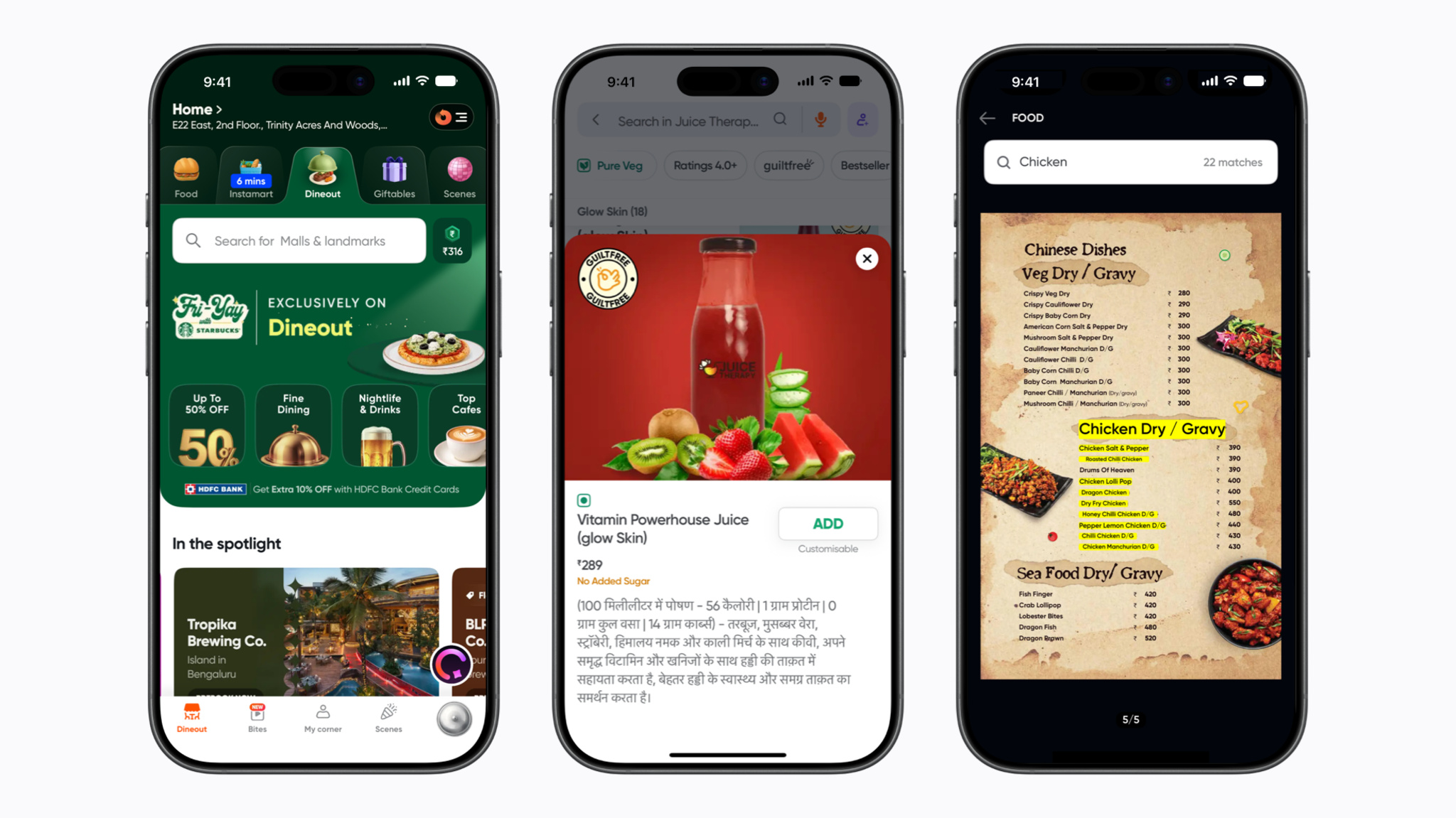
Three iPhone screens showcase a dining and delivery application interface. The left screen shows a dining discovery page with restaurant spotlights, the middle screen features a product detail page for a red powerhouse juice with a description in Hindi, and the right screen displays a Chinese food menu with chicken dishes highlighted in yellow.

Swiggy began as a humble food delivery service. Today, it’s India’s leading on-demand convenience platform, one that offers everything from groceries via Instamart to restaurant bookings via Dineout. And since 2024, it’s been powered by native tools that create seamless mobile experiences for an audience that numbers in the millions.

We caught up with Swiggy’s iOS development team to discuss performance metrics, proactive technology adoption, and the surprising ways transitioning to native tools impacted design.

When did you begin the process of transitioning to native apps?

Agam Mahajan, senior engineering manager: We’ve always built Swiggy Food natively, but Instamart and Dineout started as hybrid experiences. As these businesses scaled rapidly, we began to see clear limitations in performance and stability. That’s when, in early 2024, we made the decision to transition them to native apps, using a
combination of Swift and SwiftUI.

What was the first step to going native?

Mahajan: The first step was identifying high-impact journeys rather than attempting a full rewrite. We started with the Instamart and Dineout home and search experiences, where most customer interactions happen, and rebuilt them as native experiences implemented in Swift and SwiftUI. We then followed a phased approach: we shipped our first native experiences within weeks and completed the broader transition.

Why was it important to your team to move to native platforms?

Tushar Tayal, assistant vice president: As Instamart scaled, we started seeing issues like high page load times, app hangs on large SKU lists, memory pressure, and inconsistent animations. On Dineout, we found that rich restaurant content — high-quality images and videos — was also constrained in a hybrid setup. We were also limited in leveraging the latest native capabilities, like advanced animations through Core Animation and newer platform innovations such as Apple Intelligence.

At an organizational level, we also wanted to bring all our experiences — Swiggy Food, Instamart, and Dineout — under a unified design system. In quick commerce and discovery, every second counts and every interaction matters. We needed tighter control over performance, reliability, and rendering. Moving to native allowed us to deliver faster, smoother, and more immersive experiences at scale.
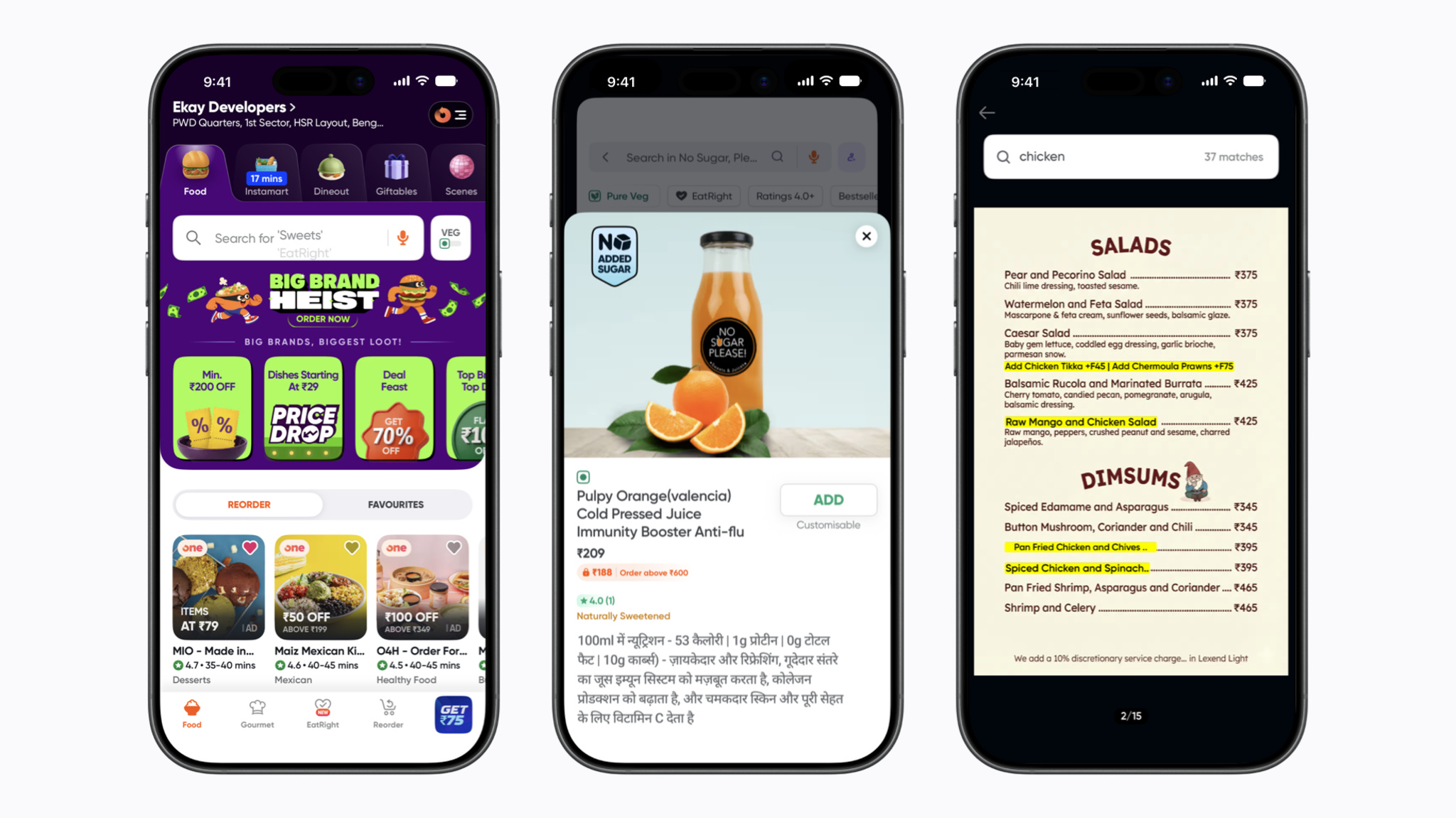
Three iPhone screens display a food delivery application interface. The left screen shows the homepage with promotional banners and restaurant listings, the middle screen features a product page for cold-pressed orange juice with a description in Hindi, and the right screen displays a menu search for chicken with highlighted salad and dim sum options.

“Moving to native allowed us to deliver faster, smoother, and more immersive experiences at scale,” says Swiggy Assistant Vice President Tushar Tayal.

What early benefits did you notice?

Priyam Dutta, engineer: People immediately experienced noticeably faster load times, smoother scrolling, and more fluid animations. The app felt more responsive and reliable, especially on older devices, where the difference was most pronounced.

At the same time, moving to native helped us bring greater design consistency across Swiggy Food, Instamart, and Dineout, and made it easier to reuse components, delivering a more cohesive experience across business lines. It also unlocked new use cases by leveraging native iOS capabilities. We introduced features like OCR for Dineout menu search, which improved conversions, and grocery list scanning for Instamart. With Apple Intelligence, we were able to build experiences like item summarization and comparison, making discovery faster and more intuitive.

What have you heard from your community?

Dutta: Response has been very positive. We observed improvements in engagement, completion rates, and app ratings — clear signals that people could feel the performance gains. We also saw people organically calling out the improved experience on social media, which reinforced that the changes were both noticeable and meaningful.

What’s been the most surprising thing to come out of this process?

Shashwat KN, engineer: Honestly, the impact was the biggest surprise. We expected improvements in latency, performance, and crash rates. What stood out was the downstream effect on business metrics. We saw a meaningful uptick in conversion and a reduction in bounce rates, showing that performance improvements translated directly into better outcomes.

Another unexpected outcome was how it unlocked creativity across teams. Designers started pushing more engaging and complex experiences, knowing they could rely on native capabilities.
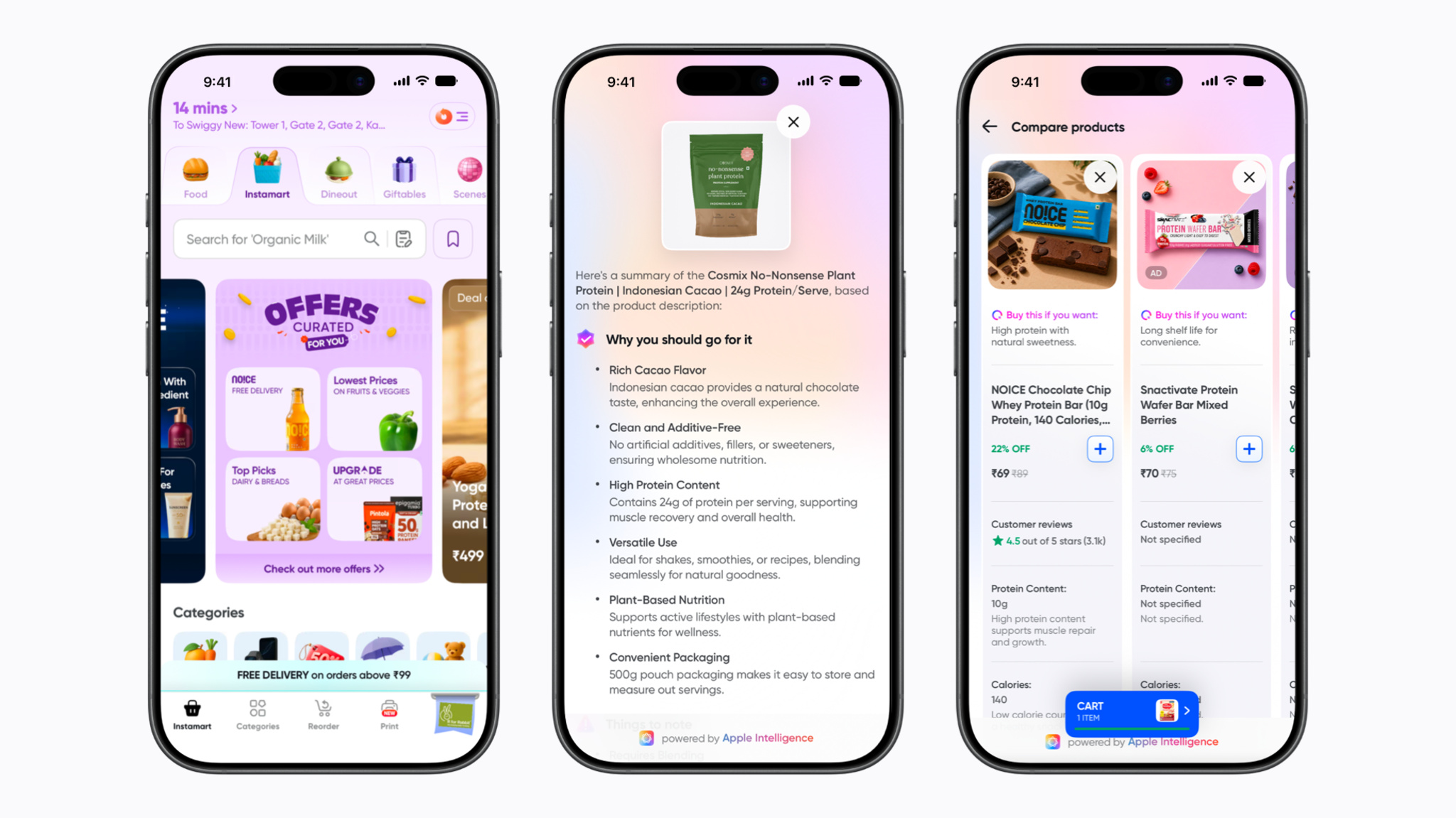
Three iPhone screens display a grocery delivery application interface highlighting Apple Intelligence integration. The left screen shows the store homepage with curated offers, the middle screen displays an AI-generated product summary for cacao plant protein, and the right screen shows a side-by-side comparison of two protein bars.

The Swiggy team brought apps like Instamart under a unified design system. ”In quick commerce and discovery, every second counts and every interaction matters,” says Tayal.

What challenges did you encounter?

Aviral Garg, engineer: One of the key challenges was balancing speed with long-term architectural decisions. Early on, we leaned toward ideal implementations, which slowed execution. We corrected course by prioritizing iterative delivery, building scalable systems while still moving fast.

Ensuring feature parity during the transition was another challenge. We had to continue shipping new features in parallel while migrating, which required clear ownership and careful coordination between hybrid and native systems.

Design was also interesting. We initially replicated the existing UI in native, but later pivoted to adopting native design patterns with minor adjustments, improving reusability, accelerating development, and still preserving core functionality.


Read more developer stories

Developer stories explore best practices and philosophies from some of the most inventive developers in the Apple community. In each story, we go behind the screens with developers, designers, and engineers to find out how they brought their remarkable creations to life.

Browse all developer stories >

Posted on Leave a comment

Age rating questionnaire now includes social media questions

As announced in June, new Time Allowances in iOS 27, iPadOS 27, and macOS 27, or later, give parents more flexible ways to manage the time their kids spend in apps across categories, including Entertainment, Games, and Social Media.

To support this, the age rating questionnaire in App Store Connect now includes questions about your app’s social media capabilities. A social media capability is defined as the ability to redistribute, amplify, or interact with user-generated content through a social feed or similar discovery method. The Time Allowance category for Social Media is based on whether your app or game offers social media capabilities, regardless of the app category selected in App Store Connect. Apps with these capabilities will display a new Social Media content descriptor on their App Store product page. If you indicate that your app or game includes social media capabilities but they are disabled for anyone under 13, it won’t be included in the Time Allowance category for Social Media for users under 13. For more details, refer to Introducing Time Allowances.

You can review and answer these questions starting today. As previously shared, beginning in September 2026, responses will be required when submitting new apps or updates to the App Store, or when submitting apps for notarization for alternative distribution.

Set an app age rating

Age rating values and definitions

Posted on Leave a comment

Hello Developer: July 2026

Hello Developer: July 2026 – Discover – Apple Developer

<!–

–>

Hello Developer: July 2026

A minimalist dark mode user interface features a pill-shaped search bar containing the placeholder text "Ask Apple Developer" alongside a magnifying glass icon and a circular close button. To its left sits a circular action button containing a white multi-point sparkle icon, signifying an AI or generative search feature. The entire interface is centered against a clean, dark charcoal gradient background.

In this edition:

  • Try an all-new search tool on the Apple Developer website.
  • Download design kits for Figma and Sketch.
  • Explore the biggest updates from WWDC26 in new activities around the world and online.
  • Read about Apple Design Award winners grug and Cyberpunk 2077.
  • Browse the latest updates to the 27 platform releases, documentation, sample code, and release notes.

Read now

Posted on Leave a comment

Changes to iOS in Brazil

As part of a recent agreement with Brazil’s competition regulator CADE (Conselho Administrativo de Defesa Econômica), Apple is introducing changes to iOS that create new options for developers’ apps in Brazil. Beginning with iOS 26.5, developers can distribute apps on alternative app marketplaces, operate alternative app marketplaces, process app payments for digital goods and services outside of Apple In-App Purchase in iOS, and more.

The new options for downloading apps from alternative app marketplaces and making app payments open new avenues for malware, fraud, scams, and privacy and security risks. Apple has worked with CADE to introduce protections from these new threats — with a special emphasis on child safety. Those protections include Notarization for iOS apps, an authorization process for app marketplaces, and requirements that help protect children from inappropriate content and scams.

By July 6, 2026, all current members of the Apple Developer Program will need to agree to the latest update to the Apple Developer Program License Agreement, which includes new terms that allow for these options in Brazil.

Learn more about the updates

You can also request a 30-minute online appointment to ask questions about these changes.

Posted on Leave a comment

New domain for Sign in with Apple and iCloud+ Hide My Email

Later this summer, Apple will unify the email domains used by Sign in with Apple and iCloud+ Hide My Email under a single, shared domain: private.icloud.com.

New addresses generated for both features will be issued on the new domain. For example:

  • Sign in with Apple addresses, previously issued on privaterelay.appleid.com, will be issued on private.icloud.com.
  • iCloud+ Hide My Email addresses, previously issued on icloud.com, will be issued on private.icloud.com.

Existing addresses on the legacy domains will continue to work and forward mail to users without interruption.

What you need to do

  • Developers with apps or websites that use Sign in with Apple should ensure that their account systems, email validation logic, and allowlists accept addresses on the new private.icloud.com domain in addition to existing domains: privaterelay.appleid.com and icloud.com.
  • Email service providers should update any domain-based filtering, suppression lists, or routing rules that explicitly enumerate relay domains so that the new private.icloud.com domain is included.

Learn more about Sign in with Apple

Communicating using the Private Email Relay Service

Posted on Leave a comment

Deprecation of the ImageCreator class

As we continue to refine our approach to image generation, the ImageCreator class is being discontinued and will no longer work in iOS 27, iPadOS 27, macOS 27, and visionOS 27 or later. When we introduced the Image Playground framework, we included the ImageCreator class as a way for apps to generate images programmatically using the on-device image generation model.

If your app uses the ImageCreator class, here’s what to expect:

  • Beta OS releases: Your code will continue to compile, but you’ll begin to receive warnings in Xcode. Apps using ImageCreator will not function in TestFlight builds and will cause a runtime error.
  • Public OS releases: Your code won’t compile, and any features in your app that use ImageCreator won’t work for people using your app.

What you need to do:

If your app uses ImageCreator, update your implementation before the public release of iOS 27, iPadOS 27, macOS 27, and visionOS 27 to ensure your image generation features continue to work and people using your app won’t be affected.

  • If your app uses ImageCreator: Transition to presenting the Image Playground sheet, which provides a consistent, system-managed image generation experience. Alternatively, you can integrate another image generation service of your choice.
  • If you’ve already migrated: No further action is required.

Resources:

Learn more about the Image Playground framework

Create high-quality images using Image Playground

Posted on Leave a comment

WWDC26 iPadOS guide

The Foundation Models framework is a native Swift API that gives you direct access to the same on-device model that powers Apple Intelligence. You can now work with any language model, including Apple Foundation Models, cloud models like Claude and Gemini, or any other provider that conforms to the Language Model protocol.

Multimodal prompts let you pass images alongside text so your app can reason about visual content, and Vision framework tools like OCR and barcode readers are available for your model to call directly, all on-device. Dynamic Profiles let you swap models, tools, and instructions on the fly, so your app’s behavior can adapt within a continuous session.

If you’re enrolled in the App Store Small Business Program and your app has fewer than 2 million total first-time App Store downloads, you can access the next generation of Apple Foundation Models running on Private Cloud Compute at no cloud API cost. And with the new Evaluations framework, you can verify that your AI features behave correctly across dynamic conditions, going beyond what unit tests alone can catch.