Posted on Leave a comment

Unity To Charge Developers A Fee Each Time A Game Is Installed Next Year

Unity Logo
Image: Unity

Unity has announced plans to charge developers a fee each time a video game using the Unity engine is installed. Unity Plus is also being retired for new subscribers, starting today.

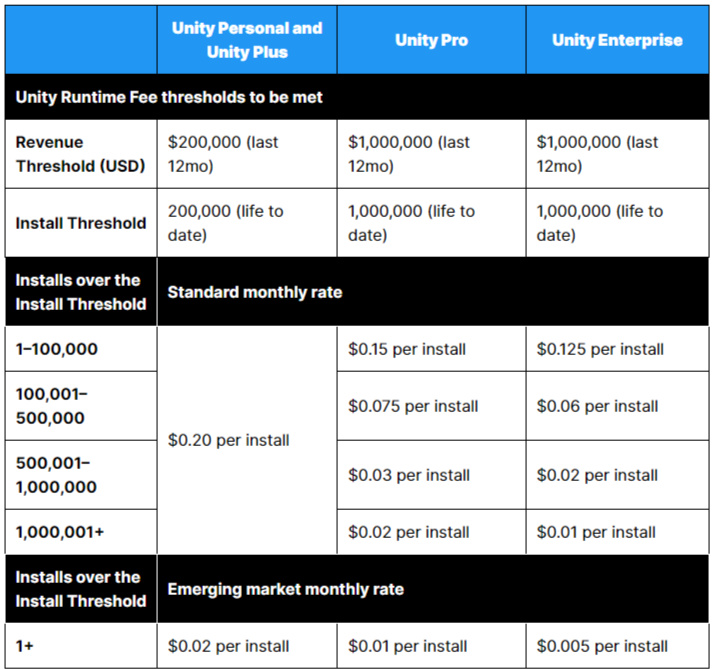
In a blog post released today (spotted via Game Developer), Unity revealed the ‘Unity Runtime Fee’. This new model be implemented from January 2024 and essentially means that developers will be charged a fee per install (compiled via a monthly charge) once a project crosses has made $200,000 in revenue over 12 months and achieved 200,000 total installs for Unity Personal and Plus. For Pro and Enterprise, the threshold is increased to $1 million in revenue over 12 months and 1 million total installs.

The fee is on average around $0.20 per download. The fee also varies depending on what development tool you’re using and how many installs over the threshold the project has reached. You can check out the table below from Unity to see how the fees are broken down per editor.

Fees
Image: Unity

Fees also depend on where the project is monetising. Free-to-play game developers will be able to offset this fee if they decide to use another Unity service that isn’t a developer tool or editor. This new model is also being applied retroactively across games that are already on the market and have been developed using Unity. How games developed for Switch, or downloaded via Game Pass, affect the figures, is currently unclear.

This news has been met with widespread concern from game developers, many of whom are worried about the viability of charity bundles — which Robot Teddy founder Callum Underwood pointed out on Twitter — sale prices, and demos.

Brandon Sheffield, director at Necrosoft Games — the studio behind the up-and-coming Persona-inspired SRPG Demonschool — and one of the voices on the Insert Credit podcast has discouraged people from using Unity and is concerned about users who may well abuse the system by constantly uninstalling and reinstalling games. In a blog post on the Insert Credit website, Sheffield has summarised many of the issues indie game developers could face with this new system, criticising Unity and pointing out recent comments from current CEO John Riccitiello has made around game developers and monetisation. We’d hope there will be protection against instances like this, but it’s currently not clear.

Garry Newman from Facepunch, best known for working on the survival game Rust, has taken to Twitter to express distaste for the potential for Unity can “just start charging us a tax per install?” and that developers “have to trust [Unity’s] tracking?”. It’s safe to say, there are lots of unanswered questions and worried developers out there following this news.

Some games you can play on Switch that were created in the Unity Engine are Return of the Obra Dinn, Hollow Knight, Cuphead, Ori and the Blind Forest, Doom (specifically the Switch version, too), and Death’s Door. This list is only a handful of games, many of which are successful ports or big indie titles, but for even smaller developers, this could be cause for concern.

We’ll keep you up to date as and when we know more about this new structure. In the meantime, share your thoughts on Unity’s proposed new model in the comments.

Posted on Leave a comment

Disgaea 7 Demo Available Now On Nintendo Switch, Doods!

Ahead of its release next month, NIS America has announced that there’s a free demo for Disgaea 7: Vows of the Virtueless is available to download now on the Switch eShop.

Sharing the announcement on Twitter, the NIS In Europe account also gave us a brand new trailer to celebrate the demo’s release, which you can watch up top.

The demo is available to download now in both Europe and North America, and it’s also live on PS4 and PS5, if you’d rather check it out there. But portability and super-sized SRPG battles seem right at home on the Switch, right?

Disgaea 7 sees the crazy strategy RPG series return to Switch with all of the over-the-top attacks and stats you could ever dream of. The key new mechanic in this entry is ‘Jumbification’, where you can make your characters go supersized.

This newest entry focuses on the Hinomoto demonic realm, where the bushido code has been kicked out. Pirilika, a huge fan of the bushido, arrives and asks for a demon, Fuji, to protect her as she aims to follow the way of the bushido.

Disgaea 7 launches on Nintendo Switch on 3rd October is North America, 6th October in Europe, and 13th October in Australia and New Zealand. Will you be getting this jumbo-sized sequel? Let us know in the comments, dood!

Posted on Leave a comment

How to Open a URL in Python Selenium

4/5 – (1 vote)

Selenium is a powerful tool for automation testing, allowing you to interact with web pages and perform various tasks, such as opening URLs, clicking buttons, and filling forms. As a popular open-source framework, Selenium supports various scripting languages, including Python. By using Python and Selenium WebDriver, you can simplify your web testing processes and gain better control over web elements.

To get started with opening URLs using Python and Selenium, you’ll first need to install the Selenium package, as well as the appropriate WebDriver for your browser (such as Chrome or Firefox).

Once you have your test environment set up, the get() method from the Selenium WebDriver allows you to open and fetch URLs, bringing you one step closer to effective automation testing.

Setting Up Environment

Before diving into opening URLs with Python Selenium, you need to set up your environment. This section will guide you through the necessary steps.

Installation of Selenium Library

First, you’ll want to ensure you have Python installed on your system. Check for Python versions by executing python --version. If you don’t have Python, you can download it from the official website.

Next, you’ll need to install the Selenium library. The most convenient method is using pip, the package installer for Python. To install Selenium, simply open the terminal or command prompt, and enter the following pip command:

pip install selenium

This command will download and install the Selenium library for you. Keep in mind that depending on your Python setup, you might want to use pip3 instead of pip.

With the Selenium library installed in your Python environment, you are now ready to start working on your project!

Webdriver Configuration

In this section, we will guide you through configuring Selenium WebDriver to open URLs in different web browsers. We will focus on the Driver Path Specification for various browser drivers such as ChromeDriver, GeckoDriver, and OperaDriver.

Driver Path Specification

Before working with Selenium WebDriver, it is crucial to specify the path of the driver executable for the browser you plan to use in your script. Here’s how you can set up the driver path for some popular browsers:

  • ChromeDriver (for Google Chrome): To use ChromeDriver for opening URLs in Google Chrome, you need to have the ChromeDriver executable available on your system. You can download it from the official site and set the executable_path when creating a WebDriver instance:
from selenium import webdriver path = '/path/to/chromedriver.exe'
browser = webdriver.Chrome(executable_path=path)
  • GeckoDriver (for Mozilla Firefox): Similarly, for working with Firefox, you need to download the GeckoDriver and provide its path when creating the WebDriver instance:
from selenium import webdriver path = '/path/to/geckodriver.exe'
browser = webdriver.Firefox(executable_path=path)
  • OperaDriver (for Opera): If you want to use the Opera browser, you will need to get the OperaDriver executable and specify its path as well:
from selenium import webdriver path = '/path/to/operadriver.exe'
browser = webdriver.Opera(executable_path=path)

Other browsers like Internet Explorer and Safari also require similar driver path specifications. Make sure to download the appropriate driver executable file and specify its path correctly in your script.

Remember that your WebDriver configuration depends on the browser you choose to work with. Always ensure that you have the correct driver executable and path set up for seamless browser automation with Selenium.

Url Navigation with Selenium

When automating web-based testing with Python and Selenium, you’ll often need to navigate to different pages, move back and forth through your browsing history, and fetch the current URL. In this section, we’ll explore how you can achieve these tasks effortlessly.

Loading a Web Page

To get started with opening a website, Selenium provides a convenient get() method. Here’s a basic example of how you can use this method to load Google’s homepage:

from selenium import webdriver driver = webdriver.Chrome()
driver.get("https://www.google.com")

The get() method receives a target URL as an argument and opens it in the browser window. The WebDriver returns control to your script once the page is fully loaded.

Page Navigation

While testing various functionalities, you might need to navigate back and forth through your browsing history. With Selenium, it’s easy to move between pages using the driver.back() and driver.forward() methods.

To go back to the previous page, use the following code:

driver.back()

This command simulates the action of clicking the browser’s back button.

If you want to move forward in your browsing history, you can do so by executing the following command:

driver.forward()

This action is equivalent to pressing the browser’s forward button.

In addition to navigating pages, you might want to fetch the current URL during your test. To do this, use the driver.current_url attribute. This attribute returns the URL of the webpage you are currently on. It can be useful to verify if your navigation steps or redirect chains are working as expected.

Here’s an example of how to print the current URL:

print(driver.current_url)

By leveraging Selenium’s get(), driver.back(), driver.forward(), and driver.current_url, you can easily navigate websites, switch between pages, and check your current location to ensure your tests are running smoothly.

Web Element Interaction

In this section, we will discuss how to interact with web elements using Python Selenium. We will focus on locating and manipulating elements to perform various actions on a webpage.

Locating Elements

To interact with a web element, you first need to locate it. Python Selenium provides several methods to find elements on a web page, like selecting them by their id, tag name, or other attributes.

For example, to find an element by its id, you can use the find_element_by_id() method:

element = driver.find_element_by_id("element_id")

You can also locate an element by its tag name using the find_element_by_tag_name() method:

element = driver.find_element_by_tag_name("element_tag")

Manipulating Elements

Once you have located an element, you can perform various actions like clicking, sending keys, or even copying its content. Let’s explore some commonly used methods for web element manipulation.

  • click(): This method allows you to simulate a left-click on a web element. For example:
element.click()
  • send_keys(): To enter text into an input field, you can use the send_keys() method. For instance:
element.send_keys("your text here")

Additionally, you can use the Keys class to simulate special key presses, like the Enter key:

from selenium.webdriver.common.keys import Keys
element.send_keys(Keys.ENTER)
  • right_click: To simulate a right-click on an element, you can use the ActionChains class. For example:
from selenium.webdriver import ActionChains
actions = ActionChains(driver)
actions.context_click(element).perform()
  • copy: To copy the content of a web element, you can use the get_attribute() method to obtain the desired attribute value. For example, if you want to copy the page title, you can do the following:
title_element = driver.find_element_by_tag_name("title")
title = title_element.get_attribute("innerHTML")

These are some of the basic techniques to interact with web elements using Python Selenium. By combining these methods, you can create powerful automations to navigate and manipulate web pages according to your needs.

Testing and Debugging

Screenshot Feature

One useful feature for testing and debugging with Selenium WebDriver is the ability to take screenshots of the current web page. This helps you understand what’s happening in your automated browser tests visually. To do this, use the save_screenshot() method provided by the WebDriver instance.

For example:

from selenium import webdriver driver = webdriver.Chrome()
driver.get("https://www.example.com")
driver.save_screenshot("screenshot.png")
driver.quit()

This code snippet demonstrates how to open a specific URL and save a screenshot of the entire page using Python Selenium. The screenshot will be saved in your local directory with the specified filename.

Error Handling and Transfer

Another essential aspect of testing and debugging with Selenium is error handling. You might encounter various types of errors while running your Python Selenium scripts, such as timing issues, element not found, or unexpected browser behavior.

To handle these errors effectively, it’s crucial to implement proper exception handling in your code. This allows you to monitor the behavior of your script and transfer the control to the next process smoothly. For example, you may use try and except blocks to handle exceptions related to the WebDriver.

from selenium import webdriver
from selenium.common.exceptions import WebDriverException try: driver = webdriver.Chrome() driver.get("https://www.example.com") # Perform your WebDriver actions here
except WebDriverException as e: print(f"An error occurred: {e}")
finally: driver.quit()

In this example, the code attempts to open a URL with Selenium. If an error occurs during the process, the except block catches the exception and prints the error message, making it easier for you to identify the problem and take corrective measures in your script.

By utilizing these features, you can improve the accuracy and reliability of your Python Selenium scripts, ensuring smoother testing and debugging experiences. Remember to consult the official documentation on Selenium WebDriver for more in-depth information and best practices.

Closing a Session

When working with Python Selenium, it’s essential to close the browser session once you have completed your automation tasks. Properly closing a session ensures that the browser’s resources are released and prevents issues with lingering browser instances. One way to close a session is by using the driver.quit() method.

Driver.quit

The driver.quit() method is a key function to manage and end a WebDriver session in Python Selenium. It gracefully terminates the browser instances associated with a WebDriver, closing all associated windows and tabs. This method also releases the resources used by Selenium, ensuring a clean closure of the session.

To use driver.quit(), simply call it at the end of your Selenium script, like this:

driver.quit()

Keep in mind that the main difference between driver.quit() and the close() method is the scope. While driver.quit() closes the entire browser session, including all windows and tabs, driver.close() terminates only the current active window. If you need to close a specific window without ending the entire session, you can use the close() method instead.

Related Web Scraping Tools

When working with Python and Selenium for web scraping, it’s essential to be aware of other related tools that can enhance and simplify your scraping process. One such popular tool is BeautifulSoup.

🧑‍💻 Recommended: Basketball Statistics – Page Scraping Using Python and BeautifulSoup

BeautifulSoup is a Python library used for parsing HTML and XML documents, making it easier to extract information from web pages. It’s widely used in conjunction with web scraping, as it allows you to traverse and search the structure of the websites you’re scraping. It’s a great complement to Selenium, as it can help extract data once Selenium has loaded and interacted with the required web components.

Another essential aspect of web scraping is handling AJAX and JavaScript content on web pages. Selenium provides an excellent way to interact with these dynamic elements, making it indispensable for various web scraping tasks.

When using Selenium, consider integrating other tools and libraries that can augment the scraping process. Some of these tools include:

  • Scrapy: A popular Python framework for web scraping which provides an integrated environment for developers. Scrapy can be combined with Selenium to create powerful web scrapers that handle dynamic content.
  • Requests-HTML: An HTML parsing library that extends the well-known Requests library, enabling simplified extraction of data from HTML and XML content.
  • Pandas: A powerful data manipulation library for Python that allows easy handling and manipulation of extracted data, including tasks such as filtering, sorting and exporting to various file formats.

In summary, while using Python, Selenium, and BeautifulSoup for web scraping can prove to be invaluable tools for your projects, remember to explore other libraries and frameworks that can enhance your workflow and efficiency. These additional tools can make the extraction and manipulation of data a seamlessly integrated process, empowering you to create efficient and reliable web scraping solutions.

Additional Selenium Features

As you venture into the world of Selenium for testing web applications, you’ll discover its numerous features and capabilities. One of the key advantages of Selenium is that it enables you to test on various browsers and platforms. Here we discuss some other remarkable features that you may find helpful in your journey.

Selenium offers the Remote WebDriver that allows you to run tests on real devices and browsers located on remote machines. This is particularly helpful when you need to test your application on multiple browsers, platforms, and versions.

Selenium provides expected_conditions to help you explicitly wait for certain conditions to occur before continuing with your test, ensuring a smoother and more reliable testing experience.

Working with location data is made easier by Selenium, allowing the tester to emulate specific geo-locations or manage geolocation permissions of the web browser during the testing process.

Customizing your web browser is possible with Selenium through the use of ChromeOptions. ChromeOptions enable you to set browser preferences, manage extensions, and even control the behavior of your Chrome browser instances.

Advanced Selenium Topics

When diving deeper into Selenium automation, you’ll encounter a number of advanced topics that enhance your knowledge and capabilities. Mastering these techniques will help you create more effective test scripts and efficiently automate web application testing.

An essential part of advanced Selenium usage is familiarizing yourself with Selenium Python bindings. This library allows you to interact with Selenium’s WebDriver API, making the process of writing and executing Selenium scripts in Python even smoother. Taking advantage of these bindings can help streamline your entire workflow, making the development of complex test scripts more manageable.

Understanding the underlying wire protocol is another crucial aspect of advanced Selenium proficiency. WebDriver’s wire protocol enables browsers to be controlled remotely using your Selenium scripts. This protocol allows you to efficiently connect various components of your Selenium infrastructure, including the test scripts, WebDriver API, and browser-specific drivers.

As you progress in your Selenium journey, learning from comprehensive Selenium Python tutorials can provide valuable insights and real-world examples. These tutorials can illuminate the nuances of Selenium Python scripts, including how to locate web elements, perform actions such as clicking or typing, and handle browser navigation.

Advanced concepts also include building custom modules that extend Selenium’s functionality to suit your specific requirements. By developing and importing your own Python modules, you can create reusable functions and streamline the overall test automation process. Leveraging these custom modules not only improves the maintainability of your test scripts but also can lead to significant time savings.

When considering advanced techniques, it is vital to stay up-to-date with the latest advancements in Selenium’s API. By staying informed about new releases and improvements, you can ensure that your test automation is leveraging the most reliable and efficient tools available.

In summary, mastering advanced Selenium topics such as the Selenium Python bindings, wire protocol, comprehensive tutorials, custom modules, and staying current with the Selenium API will greatly enhance your test automation capabilities and proficiency. As you continue to build your expertise, your efficiency and effectiveness in automating web application testing will undoubtedly improve.

Comparison with Other Testing Tools

When diving into test automation using Python Selenium, it’s essential to be aware of other testing tools and frameworks that offer alternative options for automated testing. This section helps you understand key alternatives and how they differ from Selenium with Python.

One popular alternative is the Selenium WebDriver with C#. It offers similar functionality as Python Selenium but benefits from C# syntax, making it a reliable choice for existing .NET developers. Additionally, there is a large community and extensive resources available for learning and implementing Selenium C# projects.

JavaScript test automation frameworks such as Protractor and WebDriverIO are increasingly popular due to the rise of JavaScript as a dominant programming language. These frameworks allow testing in a more asynchronous manner and provide better integration with popular JavaScript front-end libraries like Angular and React.

Another alternative is using Ruby with Selenium or the Capybara framework. Capybara is a high-level testing framework that abstracts away browser navigation, making it easier for testers to write clean, efficient tests. It is suited for testing web applications built using the Ruby on Rails framework.

In terms of infrastructure, a Cloud Selenium Grid can be highly advantageous. Cloud-based testing allows you to run tests on multiple browsers and platforms simultaneously without maintaining the testing infrastructure locally. This can lead to cost savings and scalability, particularly when testing extensively across numerous operating systems and devices.

When choosing a testing framework, it’s essential to consider your preferred programming languages and existing tools in your development environment. Some popular frameworks include pytest for Python, NUnit for C#, Mocha for JavaScript, and RSpec for Ruby.

Lastly, let’s touch upon Linux as the operating system for running Selenium tests. Linux is a robust and reliable platform for test automation, providing stability and flexibility in configuring environments. Many CI/CD pipelines use Linux-based systems for running automated tests, making it an essential platform to support while exploring test automation with Selenium and other tools.

Frequently Asked Questions

How to navigate to a website using Python Selenium?

To navigate to a website using Python Selenium, you need to first install the Selenium library, then import the necessary modules, create a webdriver instance, and use the get() method to open the desired URL. Remember to close the browser window after your operations with the close() method. Here’s an example:

from selenium import webdriver driver = webdriver.Chrome()
driver.get("https://www.example.com")
# Your operations
driver.close()

What is the syntax for opening a URL in Chrome with Selenium?

The syntax for opening a URL in Chrome using Selenium is quite simple. After importing the necessary modules, create an instance of webdriver.Chrome(), and use the get() method to open the URL. The example below demonstrates this:

from selenium import webdriver driver = webdriver.Chrome()
driver.get("https://www.example.com")
# Your operations
driver.close()

How does Selenium get the URL in Python?

Selenium uses the get() method to fetch and open a URL within the chosen browser. This method is called on the webdriver object you’ve created when initializing Selenium. Here’s a quick example:

from selenium import webdriver driver = webdriver.Firefox()
driver.get("https://www.example.com")
# Your operations
driver.close()

What’s the process to open a website with Selenium and Python?

The process to open a website with Selenium and Python involves a series of steps, including importing the necessary modules, setting up a webdriver instance, navigating to the desired website using the get() method, performing operations, and closing the browser. Here’s a simple example:

from selenium import webdriver driver = webdriver.Chrome()
driver.get("https://www.example.com")
# Your operations
driver.close()

How does Selenium open URL in different browsers?

Selenium can open URLs in different browsers by instantiating a specific webdriver object for each browser. Here are a few examples of opening a URL in different browsers:

# For Google Chrome
from selenium import webdriver chrome_driver = webdriver.Chrome()
chrome_driver.get("https://www.example.com")
# Your operations
chrome_driver.close()
# For Firefox
from selenium import webdriver firefox_driver = webdriver.Firefox()
firefox_driver.get("https://www.example.com")
# Your operations
firefox_driver.close()

Are there any differences between Python Selenium and C# Selenium for opening URLs?

The core functionality of Selenium remains the same across different programming languages, but the syntax and libraries used may differ. For example, in C#, you need to use the OpenQA.Selenium namespace instead of Python’s selenium library. Here’s a comparison of opening a URL in Chrome using Python Selenium and C# Selenium:

Python Selenium:

from selenium import webdriver driver = webdriver.Chrome()
driver.get("https://www.example.com")
# Your operations
driver.close()

C# Selenium:

using OpenQA.Selenium;
using OpenQA.Selenium.Chrome; var driver = new ChromeDriver();
driver.Navigate().GoToUrl("https://www.example.com");
// Your operations
driver.Quit();

🧑‍💻 Recommended: Is Web Scraping Legal?

The post How to Open a URL in Python Selenium appeared first on Be on the Right Side of Change.

Posted on Leave a comment

App Store submissions now open for the latest OS releases

iOS 17, iPadOS 17, macOS Sonoma, tvOS 17, and watchOS 10 will soon be available to customers worldwide. Build your apps and games using the Xcode 15 Release Candidate and latest SDKs, test them using TestFlight, and submit them for review to the App Store. You can now start deploying seamlessly to TestFlight and the App Store from Xcode Cloud. With exciting new capabilities, as well as major enhancements across languages, frameworks, tools, and services, you can deliver even more unique experiences on Apple platforms.

Xcode and Swift. Xcode 15 enables you to code and design your apps faster with enhanced code completion, interactive previews, and live animations. Swift unlocks new kinds of expressive and intuitive APIs by introducing macros. The new SwiftData framework makes it easy to persist data using declarative code. And SwiftUI brings support for creating more sophisticated animations with phases and keyframes, and simplified data flows using the new Observation framework.

Widgets and Live Activities. Widgets are now interactive and run in new places, like StandBy on iPhone, the Lock Screen on iPad, the desktop on Mac, and the Smart Stack on Apple Watch. With SwiftUI, the system adapts your widget’s color and spacing based on context, extending its usefulness across platforms. Live Activities built with WidgetKit and ActivityKit are now available on iPad to help people stay on top of what’s happening live in your app.

Metal. The new game porting toolkit makes it easier than ever to bring games to Mac and the Metal shader converter dramatically simplifies the process of converting your game’s shaders and graphics code. Scale your games and production renderers to create even more realistic and detailed scenes with the latest updates to ray tracing. And take advantage of many other enhancements that make it even simpler to deliver fantastic games and pro apps on Apple silicon.

App Shortcuts. When you adopt App Shortcuts, your app’s key features are now automatically surfaced in Spotlight, letting people quickly access the most important views and actions in your app. A new design makes running your app’s shortcuts even simpler and new natural language capabilities let people execute your shortcuts with their voice with more flexibility.

App Store. It’s now even simpler to merchandise your in-app purchases and subscriptions across all platforms with new SwiftUI views in StoreKit. You can also test more of your product offerings using the latest enhancements to StoreKit testing in Xcode, the Apple sandbox environment, and TestFlight. With pre-orders by region, you can build customer excitement by offering your app in new regions with different release dates. And with the most dynamic and personalized app discovery experience yet, the App Store helps people find more apps through tailored recommendations based on their interests and preferences.

And more. Learn about advancements in machine learning, Object Capture, Maps, Passkeys, SharePlay, and so much more.

Starting in April 2024, apps submitted to the App Store must be built with Xcode 15 and the iOS 17 SDK, tvOS 17 SDK, or watchOS 10 SDK (or later).

Download Xcode

Learn more about submitting apps

Posted on Leave a comment

Creature-Collecting RPG Cassette Beasts Catches First Major DLC Next Month

Developer Bytten Studio and publisher Raw Fury have today announced that the Pokémon-style RPG Cassette Beasts will be pressing play on its first major DLC next month as ‘Pier of the Unknown’ comes to Switch on 4th October.

With the perfect vibes for the season, this DLC package looks set to walk a little on the spooky side. You’ll be venturing into the brand-new location of Brightside Pier and uncovering a fresh storyline as you uncover the mysteries within — oOoOooo.

The DLC will also add 12 new monsters into the mix, meaning that the number of available full-imagined fusions is about to hit a whopping 19,881 — talk about having options for your squad. There’s also a fresh batch of character costume options, so you can look your best while exploring the spooky surroundings.

For a closer look at some of the DLC’s features, check out the following from the publishers.

“Pier of the Unknown” DLC Key Features
– A new storyline to unravel
– A spooky new location with three carnival-themed attractions to uncover and explore
– 12 new monsters that can only be found and collected within Brightside Pier, bringing the total number of monsters in game to 141
– Five new character costume options
– Approximately 4-10 hours of additional gameplay

‘Pier of the Unknown’ will be available on the Switch eShop next month for $6.99 (or your regional equivalent), which seems like a pretty good price for diving back in.

Will you be catching this one in October? Let us know in the comments.

Posted on Leave a comment

Disney Dreamlight Valley’s ‘Enchanted Adventure’ Drops Tomorrow, Here Are The Patch Notes

Disney Dreamlight Valley Belle and Beast
Image: Gameloft

Disney Dreamlight Valley‘s next big update lands tomorrow, 13th September, and Gameloft has shared the full patch notes ahead of the update: Enchanted Adventure.

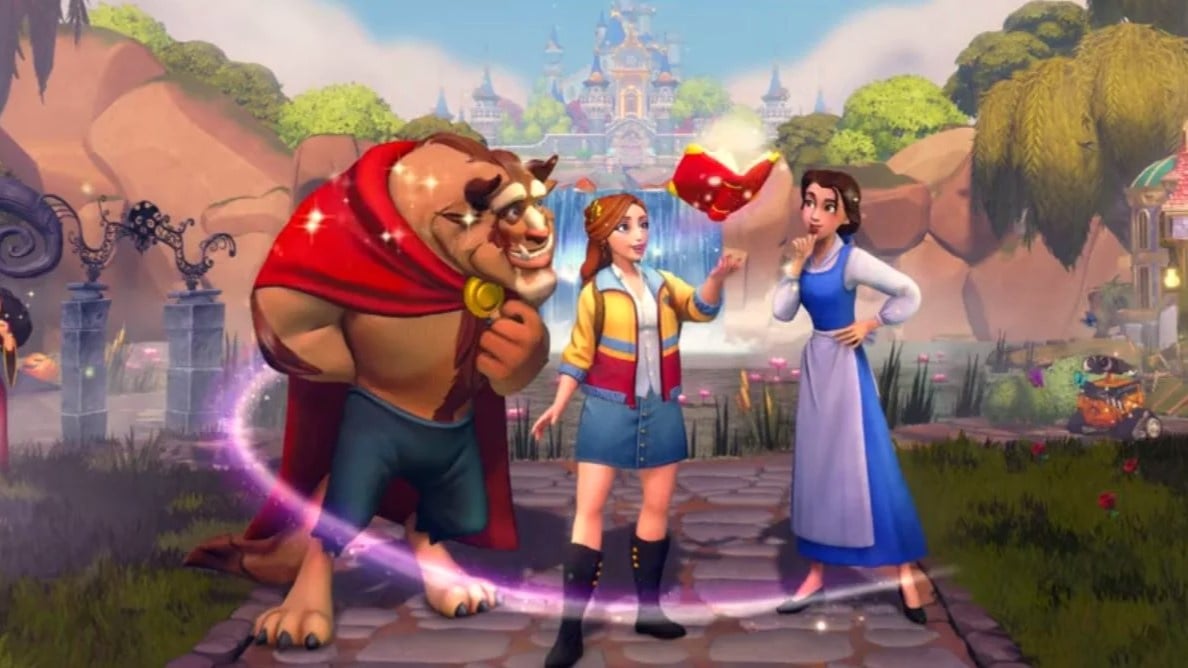
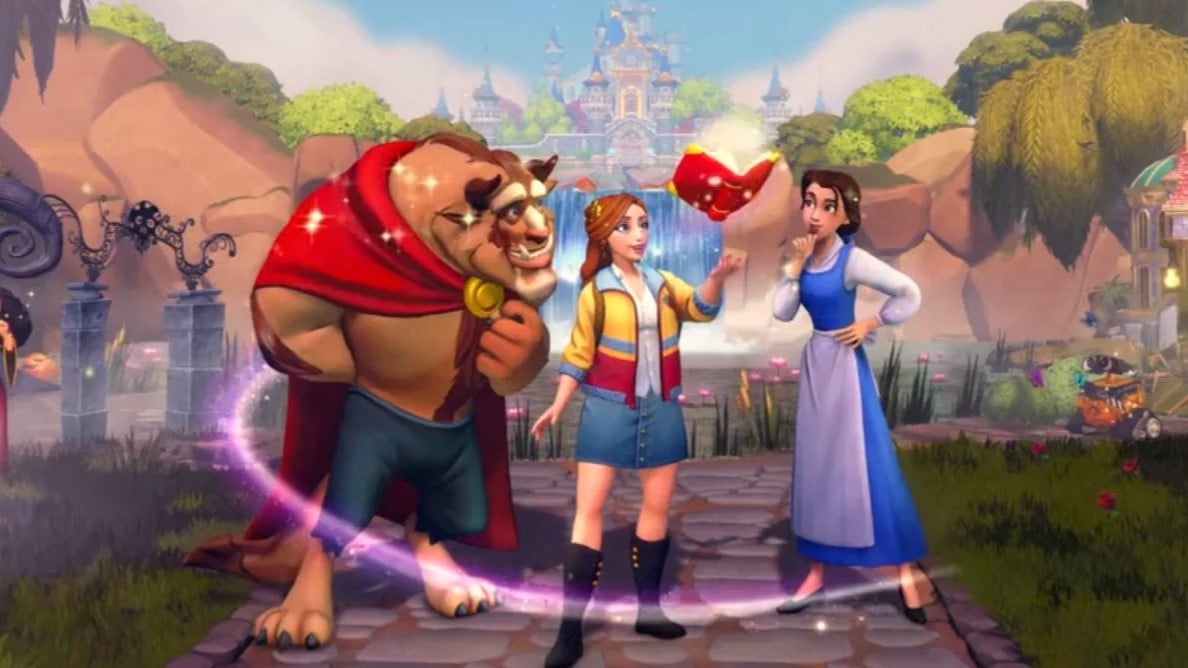
The Valley will welcome Beauty and the Beast’s very own Belle and Beast, complete with a new Realm door, a Halloween-themed Star Path, new shop items, new quests, and more DreamSnaps challenges.

As usual, tomorrow’s patch will also bring about a handful of big fixes and upgrades for the game, which has now been in Early Access for over a year.

Here are the complete patch notes from the Disney Dreamlight Valley blog:

NEW CONTENT AND IMPROVEMENTS:
– A new Realm door opens! Explore the enchanting Beauty and the Beast Realm and unearth its secrets.
– Two new characters! Belle and Beast arrive in the Valley, alongside brand new Friendship Quests and items.
– Get ready to stretch those legs! The optional Ursula’s Transformation Dream Bundle arrives in the Premium Shop, introducing a new Dream Style for Ursula that transforms her into her human form, and serves up exclusive quests, outfits, accessories and furniture.
– Trick AND treat! The new Haunted Holiday Star Path puts the focus on frightful fun, including a wide array of costumes and décor to help you prepare your Valley for the Halloween season.
– New quests! Help The Forgotten settle into the Valley over the course of the update with a series of quests.
– More optional items are coming to the Premium Shop for a limited time that are bound to fit your seasonal vibe, including an iconic hill, some Disneyland staples, and much more!
– New weekly DreamSnaps challenges to help you get in the festive spirit and show off your costuming creativity.
– Bring on the candy! Last year’s in-game candy event returns, giving you another chance to earn rewards by completing seasonal Dreamlight Duties, available from October 24 to November 1.
– Up your crafting productivity! When crafting fences and paths, you will receive more units of the crafted item.
– Fill out those Collections! Items previously found exclusively in pouches can now be found in Scrooge McDuck’s Store.

TOP BUG FIXES:
– Improved memory optimization for increased stability.
– Various improvements to DreamSnaps stability and performance.
– “Sprouting a Story” quest: Fixed an issue is which the storybook page in Mother Gothel’s house was unreachable.
– “What’s Left Behind” quest: Fixed an issue in which players were unable to speak with The Forgotten
– “Boss Up” quest: Fixed an issue in which Scar’s Lure would disappear for some players.
– “Meddling Mirabel” quest: Fixed an issue in which some players were unable to collect the cash register key needed to progress in this quest.
– “Eyes in the Dark” quest: Fixed an issue in which the bridge did not appear to lower across the river and the cutscene did not play.
– The Forgotten will now change their appearance to match the player’s avatar shortly after leaving the Wardrobe menu.
– Added new animation and VFX to The Forgotten.
– Various UI and localization fixes.
– Various visual and sound fixes.
– Various additional bug fixes and optimizations.

Gameloft will announce the exact timing of the drop tomorrow, but this is just the latest in a long line of updates to the life sim game, which has proved to be a huge hit over the past 12 months.

Are you excited to check out the Enchanted Adventure update? Let us know in the comments.

Posted on Leave a comment

Talking Point: Which Classic Cartoons Deserve The Shredder’s Revenge Treatment?

Classic Cartoons Shredder's Revenge Treatment
Image: Nintendo Life

We have been back on something of a Teenage Mutant Ninja Turtles: Shredder’s Revenge kick recently thanks to the release of the excellent Dimension Shellshock DLC. The heroes in a half shell are firmly back in our hearts thanks to developer Tribute Games and, after a recent interview from Xbox Expansion Pass with the game’s narrative designer, Yannic Belzil, it seems that there is a chance we might see the studio take on a franchise other than the Turtles in the future.

When asked about what the future holds for Tribute Games following the DLC’s release, Belzil commented that there is nothing currently in the works. That being said, he did note that the studio has been approached with offers to tackle something different:

“The game has made it so that there is interest. Some people have knocked on our door and they have expressed an interest, [asking], “will you do a Shredder’s Revenge for our characters and our franchise?” And, depending on the characters or the franchise, that could be really, really interesting. But, that’s still up in the air. We’ll see what happens. I would love to do it and I feel like a lot of us are stoked to do it, but we’ll see what makes sense for us as a company.

We’ll see what makes sense for us next. If it’s more Turtles, then it’s more Turtles, and I would love it. If it’s something else, then hopefully it will be exciting, so we’ll see.”

It’s hardly concrete proof of more to come, but it does show that there is a chance that other franchises might get the retro-inspired facelift that we have seen with TMNT — heck, we’re already seeing G.I Joe moving in the same direction under Maple Powered Games — and where there’s a chance, there’s room for speculation.

And so, we thought that we would throw a few names into the ring and see if any of them stick. We have tried to keep things restricted to ‘classic cartoons’ in this instance — basically anything from the original Turtles animated series era — though, of course, there is no guarantee that prospective developers would be faced with the same time period.

So, grab another quarter and check out what we’d like to see get the Shredder’s Revenge treatment next.

The Simpsons

The Simpsons
Image: 20th Television

This one’s a no-brainer, right? Tribute has already brought one of the all-time great arcade beat-em-up franchises into the modern day, so why not let lightning strike twice?

If Turtles was up your street, then The Simpsons arcade would be bound to follow suit. It’s another frantic beat-em-up so there is every chance that the developer would want to move a little further away from past projects, but if it ain’t broke don’t fix it, right? What’s more, unless you happen to live close to an arcade, Konami’s Springfield-set brawler is a rather hard doughnut to get your hands on these days.

The thought of seeing Homer, Marge, Bart and Lisa in crisp, updated pixel art is a sales pitch alone, and with some quality multi-player and sweet new animations in tow, this would really be a beauty.

X-Men

X-Men
Image: Marvel

While we’re on classic beat-em-ups getting a modern facelift, let’s throw X-Men‘s 1992 Arcade title in the mix, too. Based on the 1989 cartoon, this cabinet saw you taking on the role of Cyclops, Wolverine, Storm, Nightcrawler, Colossus or Dazzler as you set out on a mission to bring down Magneto.

It has all of the rapid action that we saw from Shredder’s Revenge and the comics have left plenty of room for a reboot to go in a whole new direction, story-wise — what we’d give for a House of M-inspired plot… Top this off with a handful of DLC characters like Beast, Gambit and Iceman in future waves and we’d really be onto a winner.

Ghostbusters

Ghostbusters
Image: DIC Enterprises

The Real Ghostbusters arcade cabinet is a little more shooty than the fisticuffs combat of the others on the list, but who says that we shouldn’t mix things up a little?

We can picture the members of the Ghostbusters team brilliantly realised in popping pixel art with some comedy idle animations and a retro-inspired soundtrack thrown in for good measure. Of course, the number of members in the Ghostbustin’ family has grown substantially since the original game was released in 1987, so with the addition of the Afterlife newbies, some six-player co-op would be a very attractive prospect indeed.

Transformers

Transformers
Image: Marvel Productions / Sunbow Productions

What if the Autobots rolled straight into a brawler? Double press in a direction to turn into a vehicle for a quick movement boost. Choose between long-range weapon attacks and close-quarters punch-ups. Take on Decepticon bosses at the end of each level before ultimately facing off against Megatron in the final battle. This stuff writes itself!

The beat-em-up genre might be a bit too large of a leap for this classic cartoon, but who says that developer needs to stay in the same ballpark? An action platformer across Cybertron? A speedy racer with a crisp retro-inspired visual style? PlatinumGames have already proved that the Autobots can work in an action game with Transformers: Devastation. But otherwise, good Transformers games are pretty hard to come by. We wouldn’t be picky about what this one could have in store.

He-Man

He-Man
Image: Filmation Associates

By the power of Grayskull, indeed. Much like Turtles, He-Man is stacked with characters who could each provide a unique fighting style and combos. Aside from the obvious ones of He-Man, She-Ra and Man-At-Arms, there would be plenty of weird and wonderful fighters to pull from to keep the roster going such as Fisto, Stratos or Mekaneck — gosh, those names really were something, huh?

There have been Masters of the Universe video games before, but none of them are that good — and none are brawlers, weirdly! There’s a free fan-made game you can check out online, and we think that serves as a pretty spectacular basis.

ThunderCats

ThunderCats
Image: Rankin/Bass Animated Entertainment

ThunderCats might not have quite the recognisable pull today that the likes of the Turtles still muster, but that doesn’t mean that these cool cats are out of the running for a video game adaptation.

Lion-O and Co. haven’t graced the video game world since 2012’s pretty terrible ThunderCats for the DS, so it makes sense that any prospective developer might be slightly afraid to take this one on. However, the colourful cast of characters, potential for some slick combat and enough public knowledge out there to make the IP feel truly “retro” means that this one could be a banger — if handled with care…

Batman

Batman: The Animated Series
Image: Warner Bros. Animation

We’ll finish off with Mr. Vengence himself. The SNES’ Batman Returns is a pretty underrated old-school beat ’em up if you ask us, and we would love to see something of a similar style come back and get the respect that it deserves.

One of the neat features of Shredder’s Revenge is the sheer number of character skins available now, and Batman has enough of them to last a good few DLC packages down the line. You could choose to dress the Caped Crusader in the style of West, Clooney, Bale, Pattinson and more, and the same applies to a host of allies and villains too.

We’d be hesitant to call this an ‘open goal’, but a well-made Batman beat ’em up seems as good of a shout as any.


Do any of our suggestions sound pixel-perfect to you? Are there any that we have missed? Fill out the following poll to let us know what you would most like to see and then take to the comments to tell us of any more.

Posted on Leave a comment

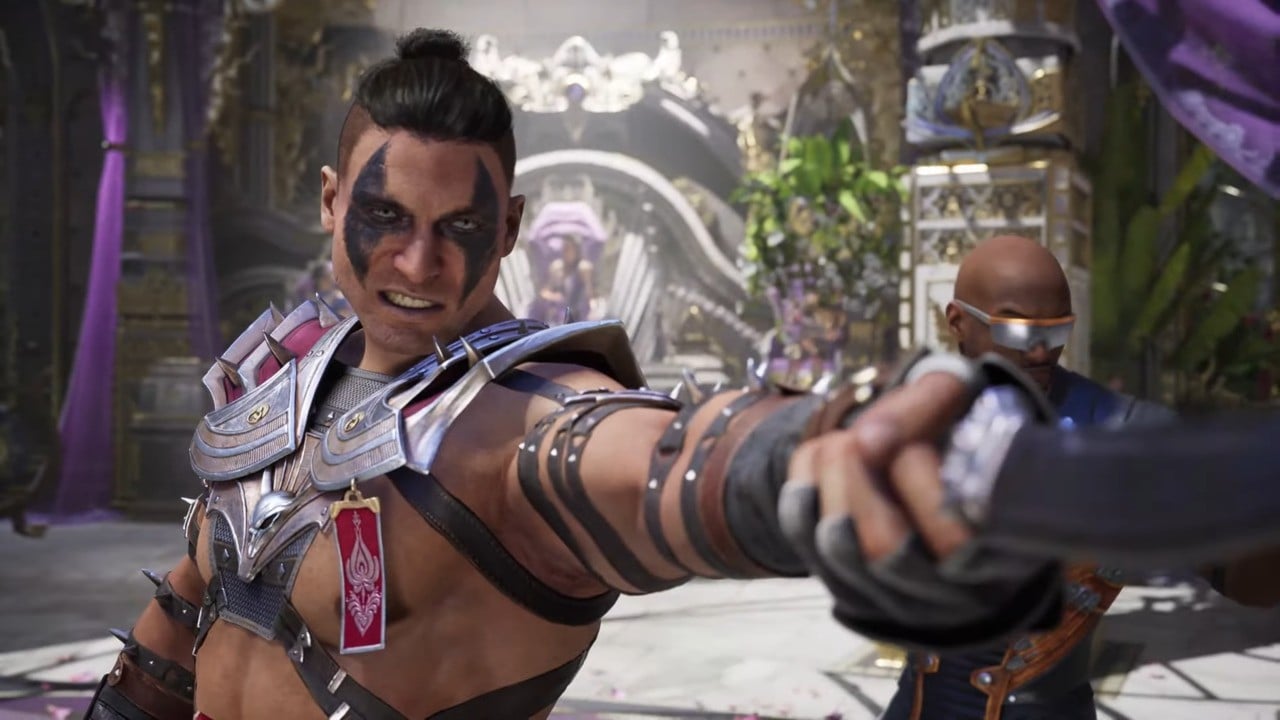
Mortal Kombat 1 Welcomes In The New Era With Launch Trailer

Mortal Kombat 1 is out in a week’s time, but NetherRealm Studios has dropped the game’s launch trailer nice and early to get fans amped up for the newest entry in the bloodiest fighting game series around.

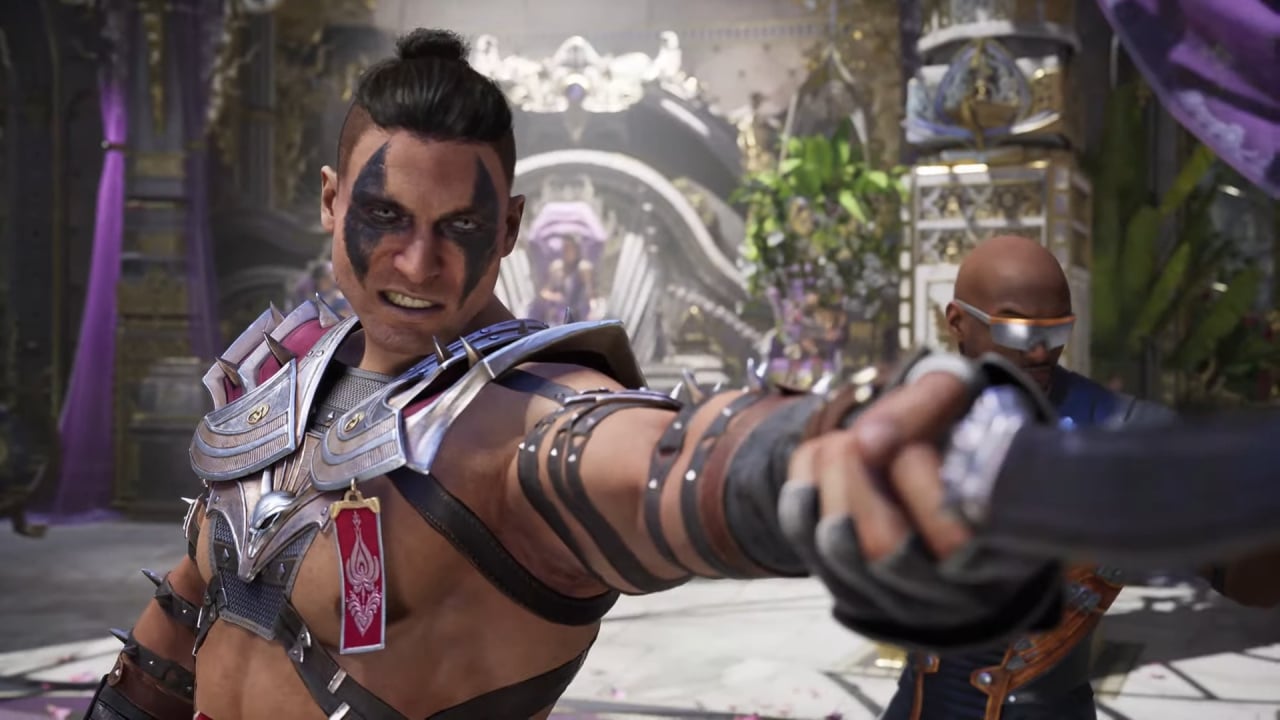
The launch trailer sets up some of the story for this “reboot”, where Fire God Liu Kang has created a brand new world. But we also get a look at Shang Tsung and Reiko — a general under his command — in combat.

While the latter only gets a brief section in the trailer, Shang Tsung’s fatality is on full display during the gameplay snippets, which is expectedly gory.

Reiko made his debut in Mortal Kombat 4 as a last-minute addition and caused some controversy among MK fans as some home console ports added a scene which shows Reiko in Shao Kahn’s throne room, where he adorns the skull mask. This has since been debunked by other games in the franchise. However, this is Reiko’s first playable appearance in some time, having been benched as a Kameo character for a while.

Even though Mortal Kombat 1 is only seven days away, some people have managed to get their hands on a Switch version of the game early and leaks are floating around on the internet, so be wary!

Mortal Kombat 1 launches on Switch on 19th September. Is the upcoming fighting game In Your Blood? Give us your thoughts in the comments.

Posted on Leave a comment

This Blockbuster VHS Switch Game Case Will Give You A Lovely Dose Of Nostalgia

Blockbuster Switch Game Case 1
Image: Retro Fighters

A Blockbuster Switch game case wasn’t on our 2023 bingo card, but Retro Fighters thought the world needed one anyway. And now that we’ve seen it, we couldn’t agree more.

The family-based video game accessory developer teased this brand new Switch game case, which is officially licensed by the video rental store, last week on YouTube. But today, you can check out the case on the Retro Fighters website.

The Blockbuster Switch game case is just the first in a planned lined of limited edition products which are “designed for the retro enthusiast”. However, you’ll have to snap them up fast as Retro Fighters has confirmed that once the products are sold out, “they will be gone FOREVER”.

Pre-orders for the Blockbuster Switch game case open today for just $19.99, with it due to launch on 15th November 2023.

The case is utterly adorable. It looks just like a rental case for a cassette and can hold up to 12 Switch games, along with four memory cards. The inside is all silicone, meaning there’s no risk of damaging your cartridges trying to squeeze them into plastic slots. And the case is magnetic safe, too, meaning it won’t easily slip open.

With such a nostalgic design — even if it’s a bit smaller than we remember — and the soft, silicone slots for the cartridges, we can see these going pretty fast. If you have any interest in these at all, have a look at Retro Fighters’ website for more details.

What do you think of the Mini VHS game case? Will you be rewinding time for this? Let us know in the comments.

Posted on Leave a comment

Upcoming Dragon Quest Game Scores Physical Switch Release With English Language Support

Before the arrival of Dragon Quest Monsters: The Dark Prince later this year, Square Enix will be releasing Infinity Strash: Dragon Quest The Adventure of Dai for the Nintendo Switch on 28th September.

In case you missed it, it’s an action RPG based on the anime and manga series of the same name – allowing players to relive the events of the anime as they take control of Dai and the Disciples of Avan against the Dark Army.

If you’re at all interested in a physical copy of the game, the good news is there will be a boxed version released in Asia with full English support. It’s available to pre-order now on websites like Playasia.

In related news, Square Enix has also released some new details about the game. There’ll be a post-game challenge mode and the previously revealed Temple of Recollection for added replay value.

Once completing the story mode, the challenge mode will allow players to take on stronger opponents as well as “remixed” enemies and battles. As for the temple, it allows players to participate in dungeon runs where they can strengthen party skills, spells and more. In this mode, the difficulty will start off at level 1.

Would you be interested in a physical copy of this upcoming release? Tell us below.