In this tutorial, we’ll have a quick look at each of them and give you a link to a more detailed resource so you can set up your Solidity compiler as quickly and efficiently as possible.
Video: For your convenience, I embedded the video tutorial provided by our Solidity expert Matija so you don’t even need to leave this page.
Without further ado, let’s get started!
Method 1: Install Solidity Compiler via npm
As you watch the video or go through this tutorial, feel free to download the following slides as well — for your convenience:
Before we go into details about the Docker installation of solc, let’s first get introduced to what Docker is.
Docker is an open platform for developing, shipping, and running applications… Docker provides the ability to package and run an application in a loosely isolated environment called a container… Containers are lightweight and contain everything needed to run the application, so you do not need to rely on what is currently installed on the host.
There are some parts of the description I’ve deliberately left out (separated by the symbol …) because they’re not essential to our understanding of the technology.
Method 3: Install Solidity Compiler via Source Code Compilation
This is a very complex way to install the Solidity compiler and I wouldn’t recommend it for most people. Due to the complexity, I’ll only give a quick overview of the associated article (tutorial).
Feel free to dive into it after scanning through these three contributions:
First, we listed and explained the software prerequisites needed for compiling a Solidity compiler. In some cases, we reached a complete explanation, and in others, we just gave a brief introductory explanation and announced an entire topic, such as in the case of the Satisfiability Modulo Theorem, SMT.
Second, we installed the prerequisites by following the first part of a step-by-step tutorial. All the examples have been checked and validated at the time of writing the article, so I expect that we’ll be able to follow them without issues. We also concluded that a compilation process can in some cases take a substantial amount of time; it took almost 40 minutes to compile the z3 SMT solver on my machine.
Third, we compiled a Solidity compiler following a step-by-step tutorial. I explained for each command example to broaden our learning process even outside of the strict scope of Solidity, to Linux (as far as we needed to go). Finally, when the compilation ended, we confirmed that our home-compiled Solidity compiler works at least as charming as the ones we’ve simply downloaded or installed in a precompiled state.
Method 4: Install Solidity Compiler via Static Binary and Linux Packages
You’ll just download the compiler’s static binary, or in short, binary, and simply run it, without any additional prerequisites or preparations required.
First, downloading the file solc-static-linux and giving it an executable privilege:
$ ~/solc-static-linux 1_Storage.sol -o output – abi – bin

Compiler run successful. Artifact(s) can be found in directory "output".
When checking our solidity_src directory, we’ll discover a new directory output, created by the Solidity compiler, containing both .abi and .bin files.
Solidity is the programming language of the future.
It gives you the rare and sought-after superpower to program against the “Internet Computer”, i.e., against decentralized Blockchains such as Ethereum, Binance Smart Chain, Ethereum Classic, Tron, and Avalanche – to mention just a few Blockchain infrastructures that support Solidity.
In particular, Solidity allows you to create smart contracts, i.e., pieces of code that automatically execute on specific conditions in a completely decentralized environment. For example, smart contracts empower you to create your own decentralized autonomous organizations (DAOs) that run on Blockchains without being subject to centralized control.
NFTs, DeFi, DAOs, and Blockchain-based games are all based on smart contracts.
This course is a simple, low-friction introduction to creating your first smart contract using the Remix IDE on the Ethereum testnet – without fluff, significant upfront costs to purchase ETH, or unnecessary complexity.
[freebies.indiegala.com] SAMOLIOTIK is a stylish shoot-em-up with different enemies, bosses, colour palettes, power-ups, set in different eras. Get it for FREE today!
The year is 1962 and NASA are trying to put a man on the moon. In a remote corner of Siberia, a Soviet cosmonaut is heading in the other direction. Comrade Ivan Ivanovich is dropped into an extinct volcano in his exploration capsule, Little Orpheus, to explore the center of the earth. He promptly vanishes.
Join our bold yet hapless hero as he explores lost civilizations, undersea kingdoms, prehistoric jungles and lands beyond imagination. Gasp as he battles the subhuman tribe of the Menkv and escapes the clutches of dreadful monsters! Cheer as he triumphs over impossible odds and brings socialism to the subterranean worlds!
Little Orpheus is a technicolor side-scrolling adventure game inspired by classic movies like Flash Gordon, Sinbad and The Land that Time Forgot. Delivered in eight bite-size, commute-friendly episodes, Little Orpheus is simple enough for casual players but rich enough for seasoned adventure fans.
All The Free Games For Xbox, PlayStation, PC, And Switch (September 2022)
While gaming can get quite pricey, these days there's almost always something great that you can add to your library without spending a dime. Entirely free games pop up every single week thanks to the Epic Games Store, and with the help of bargain friendly subscription services, there are literally hundreds of games out there that come as perks with services on Xbox, PlayStation, Switch, and PC. We've rounded up all of the free games (or free with subscriptions) that you can play now. We'll continue to keep this list updated weekly.
Our free games list focuses on full experiences that you can play without the pressure of microtransactions, so you won't find popular free-to-play games like Fortnite, Warzone, or Apex Legends here. We also aren't including free-to-start games such as Destiny 2 or Hitman 2's Starter Pack. But if you are looking for free-to-play games, we have lists rounding up the best options on PS5, PS4, Xbox Series X|S, Xbox One, PC, and Nintendo Switch.
Also, you’ll learn how to solve a variant of this challenge.
Bonus challenge: Find only the length of the shortest list in the list of lists.
Here are some examples:
[[1], [2, 3], [4, 5, 6]]1
[[1, [2, 3], 4], [5, 6], [7]]1
[[[1], [2], [3]], [4, 5, [6]], [7, 8, 9, 10]]3
So without further ado, let’s get started!
Method 1: min(lst, key=len)
Use Python’s built-in min() function with a key argument to find the shortest list in a list of lists. Call min(lst, key=len) to return the shortest list in lst using the built-inlen() function to associate the weight of each list, so that the shortest inner list will be the minimum.
A beautiful one-liner solution, isn’t it? Let’s have a look at a slight variant to check the length of the shortest list instead.
Method 2: len(min(lst, key=len))
To get the length of the shortest list in a nested list, use the len(min(lst, key=len)) function. First, you determine the shortest inner list using the min() function with the key argument set to the len() function. Second, you pass this shortest list into the len() function itself to determine the minimum.
A Pythonic way to check the length of the shortest list is to combine a generator expression or list comprehension with the min() function without key. For instance, min(len(x) for x in lst) first turns all inner list into length integer numbers and passes this iterable into the min() function to get the result.
Here’s this approach on the same examples as before:
A not so Pythonic but still fine approach is to iterate over all lists in a for loop, check their length using the len() function, and compare it against the currently shortest list stored in a separate variable. After the termination of the loop, the variable contains the shortest list.
Here’s a simple example:
def get_shortest_list(lst): shortest = lst[0] if lst else None for x in lst: if len(x) < len(shortest): shortest = x return shortest print(get_shortest_list([[1], [2, 3], [4, 5, 6]]))

# [1] print(get_shortest_list([[1, [2, 3], 4], [5, 6], [7]]))

# [7] print(get_shortest_list([[[1], [2], [3]], [4, 5, [6]], [7, 8, 9, 10]]))

# [[1], [2], [3]] print(get_shortest_list([]))

# None
So many lines of code! At least does the approach also work when passing in an empty list due to the ternary operator used in the first line.
lst[0] if lst else None
If you need a refresher on the ternary operator, you should check out our blog tutorial.
Note: If you need the length of the shortest list, you could simply replace the last line of the function with return len(shortest) , and you’re done!
Summary
You have learned about four ways to find the shortest list and its length from a Python list of lists (nested list):
Method 1: min(lst, key=len)
Method 2: len(min(lst, key=len))
Method 3: min(len(x) for x in lst)
Method 4: Naive For Loop
I hope you found the tutorial helpful, if you did, feel free to consider joining our community of likeminded coders—we do have lots of free training material!
Posted by: xSicKxBot - 09-25-2022, 03:41 AM - Forum: Lounge
- No Replies
Sly Cooper Celebrates 20 Years With Art Prints, Merch, And More
PlayStation and Sucker Punch are celebrating the Sly Cooper franchise's 20th anniversary by creating some merchandise for fans to purchase.
Sony provided details over at the PlayStation Blog and the most notable piece of merchandise is a tribute art piece drawn by original Sly Cooper art director Dev Madan. It includes plenty of Easter eggs and references to the franchise and those who purchase the art print will receive a certificate of authenticity signed by Madan himself.
Madan also created a 20th-anniversary T-shirt showing off the main characters of the franchise: Sly, Bentley, Murray, and Carmelita Fox. Lastly, there is also a 9-inch tall plushie of Sly being manufactured too, which will start shipping next year. The doll comes with a magnetic cane that attaches to Sly's hand.
Ferocious Alpine warfare will test your tactical skills in this authentic WW1 FPS. Battle among the scenic peaks, rugged valleys and idyllic towns of northern Italy. The Great War on the Italian Front is brought to life and elevated to unexpected heights!
Posted by: xSicKxBot - 09-24-2022, 10:31 AM - Forum: Python
- No Replies
How to Delete a Line from a File in Python?
5/5 – (1 vote)
Problem Formulation and Solution Overview
This article will show you how to delete a line from a file in Python.
To make it more interesting, we have the following running scenario:
Rivers Clothing has a flat text file, rivers_emps.txt containing employee data. What happens if an employee leaves? They would like you to write code to resolve this issue.
Contents of rivers_emps.txt
100:Jane Smith
101:Daniel Williams
102:Steve Markham
103:Howie Manson
104:Wendy Wilson
105:Anne McEvans
106:Bev Doyle
107:Hal Holden
108:Mich Matthews
109:Paul Paulson
Question: How would we write code to remove this line?
We can accomplish this task by one of the following options:
This example uses List Comprehension to remove a specific line from a flat text file.
orig_lines = [line.strip() for line in open('rivers_emps.txt')]

new_lines = [l for l in orig_lines if not l.startswith('102')] with open('rivers_01.txt', 'w') as fp: print(*new_lines, sep='\n', file=fp)
The above code uses List Comprehension to read in the contents of a flat text file to a List, orig_lines. If output to the terminal, the following displays.
Then, List Comprehension is used again to append each element to a new List only if the element does not start with 102. If output to the terminal, the following displays.
As you can see, the element starting with 102 has been removed.
Next, a new file, rivers_01.txt, is opened in write (w) mode and the List created above is written to the file with a newline (\n) character appended to each line. The contents of the file are shown below.
100:Jane Smith
101:Daniel Williams
103:Howie Manson
104:Wendy Wilson
105:Anne McEvans
106:Bev Doyle
107:Hal Holden
108:Mich Matthews
109:Paul Paulson
orig_lines = [line.strip() for line in open('rivers_emps.txt')]

new_lines = orig_lines[0:2] + orig_lines[3:] with open('rivers_02.txt', 'w') as fp: fp.write('\n'.join(new_lines))
The above code uses List Comprehension to read in the contents of a flat text file to a List, orig_lines. If output to the terminal, the following displays.
Then Slicing is used to extract all elements, except element two (2). The results save to new_lines. If output to the terminal, the following displays.
100:Jane Smith
101:Daniel Williams
103:Howie Manson
104:Wendy Wilson
105:Anne McEvans
106:Bev Doyle
107:Hal Holden
108:Mich Matthews
109:Paul Paulson
As you can see, element two (2) has been removed.
Next, a new file, rivers_02.txt, is opened in write (w) mode and the List created above is written to the file with a newline (\n) character appended to each line. The contents of the file are shown below.
100:Jane Smith
101:Daniel Williams
103:Howie Manson
104:Wendy Wilson
105:Anne McEvans
106:Bev Doyle
107:Hal Holden
108:Mich Matthews
109:Paul Paulson
Before moving forward, please ensure that the NumPy library is installed to ensure this code runs error-free.
import numpy as np orig_lines = [line.strip() for line in open('rivers_emps.txt')]

new_lines = orig_lines[0:2] + orig_lines[3:] np.savetxt('rivers_03.txt', new_lines, delimiter='\n', fmt='%s')
The following line uses List Comprehension to read the contents of a flat text file to the List, orig_lines. If output to the terminal, the following displays.
Then Slicing is applied to extract all elements, except element two (2). The results save to new_lines. If output to the terminal, the following displays.
100:Jane Smith
101:Daniel Williams
103:Howie Manson
104:Wendy Wilson
105:Anne McEvans
106:Bev Doyle
107:Hal Holden
108:Mich Matthews
109:Paul Paulson
As you can see, element two (2) has been removed.
The last code line calls np.savetxt() and passes it three (3) arguments:
100:Jane Smith
101:Daniel Williams
103:Howie Manson
104:Wendy Wilson
105:Anne McEvans
106:Bev Doyle
107:Hal Holden
108:Mich Matthews
109:Paul Paulson
Method 4: Use pop()
This example uses the pop() function to remove a specific line from a flat text file.
import numpy as np orig_lines = [line.strip() for line in open('rivers_emps.txt')]

orig_lines.pop(2)

np.savetxt('rivers_04.txt', orig_lines, delimiter='\n', fmt='%s')
The following line uses List Comprehension to read in the contents of a flat text file to the List, orig_lines. If output to the terminal, the following displays.
Then, the pop() method is called and passed one (1) argument, the element’s index to remove.
In this case, it is the second element.
If this List was output to the terminal, the following would display.
100:Jane Smith
101:Daniel Williams
103:Howie Manson
104:Wendy Wilson
105:Anne McEvans
106:Bev Doyle
107:Hal Holden
108:Mich Matthews
109:Paul Paulson
As shown in Method 3, the results save to a flat text file. In this case, rivers_04.txt. The contents are the same as in the previous examples.
Note: The pop() function removes the appropriate index and returns the contents to capture if necessary.
Method 5: Use remove()
This example uses the remove()function to remove a specific line from a flat text file.
import numpy as np orig_lines = [line.strip() for line in open('rivers_emps.txt')]

orig_lines.remove('102:Steve Markham')

np.savetxt('rivers_05.txt', orig_lines, delimiter='\n', fmt='%s')
This code works exactly like the code in Method 4. However, instead of passing a location of the element to remove, this function requires the contents of the entire line you to remove.
Then, the remove() function is called and passed one (1) argument, the index to remove. In this case, it is the second element. If this List was output to the terminal, the following would display.
100:Jane Smith
101:Daniel Williams
103:Howie Manson
104:Wendy Wilson
105:Anne McEvans
106:Bev Doyle
107:Hal Holden
108:Mich Matthews
109:Paul Paulson
As shown in the previous examples, the results save to a flat text file. In this case, rivers_05.txt.
Bonus: Remove row(s) from a DataFrame
CSV files are also known as flat-text files. This code shows you how to easily remove single or multiple rows from a CSV file
Finxter Challenge Find 2 Additional Ways to Remove Lines
Summary
This article has provided five (5) ways to delete a line from a file to select the best fit for your coding requirements.
Good Luck & Happy Coding!
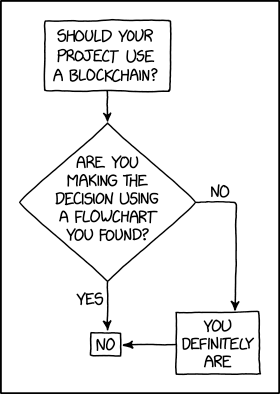
Programmer Humor – Blockchain
“Blockchains are like grappling hooks, in that it’s extremely cool when you encounter a problem for which they’re the right solution, but it happens way too rarely in real life.”source – xkcd
Export data to an excel file is mainly used for taking a backup. When taking database backup, excel format is a convenient one to read and manage easily. For some applications exporting data is important to take a backup or an offline copy of the server database.
This article shows how to export data to excel using PHP. There are many ways to implement this functionality. We have already seen an example of data export from MySQL.
This article uses the PHPSpreadSheet library for implementing PHP excel export.
It is a popular library that supports reading, and writing excel files. It will smoothen the excel import-export operations through its built-in functions.
The complete example in this article will let create your own export tool or your application.
About this Example
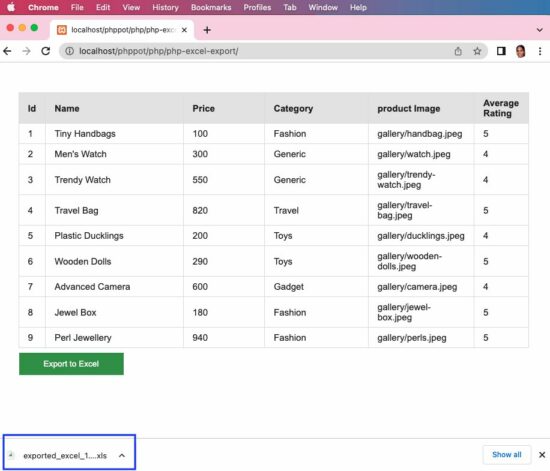
It will show a minimal interface with the list of database records and an “Export to Excel” button. By clicking this button, it will call the custom ExportService created for this example.
This service instantiates the PHPSpreadsheet library class and sets the column header and values. Then it creates a writer object by setting the PHPSpreadsheet instance to output the data to excel.
Follow the below steps to let this example run in your environment.
Create and set up the database with data exported to excel.
Download the code at the end of this article and configure the database.
Add PHPSpreadSheet library and other dependencies into the application.
1) Create and set up the database with data exported to excel
Create a database named “db_excel_export” and import the below SQL script into it.
structure.sql
--

-- Table structure for table `tbl_products`

-- CREATE TABLE `tbl_products` ( `id` int(8) NOT NULL, `name` varchar(255) NOT NULL, `price` double(10,2) NOT NULL, `category` varchar(255) NOT NULL, `product_image` text NOT NULL, `average_rating` float(3,1) NOT NULL

); --

-- Dumping data for table `tbl_products`

-- INSERT INTO `tbl_products` (`id`, `name`, `price`, `category`, `product_image`, `average_rating`) VALUES

(1, 'Tiny Handbags', 100.00, 'Fashion', 'gallery/handbag.jpeg', 5.0),

(2, 'Men\'s Watch', 300.00, 'Generic', 'gallery/watch.jpeg', 4.0),

(3, 'Trendy Watch', 550.00, 'Generic', 'gallery/trendy-watch.jpeg', 4.0),

(4, 'Travel Bag', 820.00, 'Travel', 'gallery/travel-bag.jpeg', 5.0),

(5, 'Plastic Ducklings', 200.00, 'Toys', 'gallery/ducklings.jpeg', 4.0),

(6, 'Wooden Dolls', 290.00, 'Toys', 'gallery/wooden-dolls.jpeg', 5.0),

(7, 'Advanced Camera', 600.00, 'Gadget', 'gallery/camera.jpeg', 4.0),

(8, 'Jewel Box', 180.00, 'Fashion', 'gallery/jewel-box.jpeg', 5.0),

(9, 'Perl Jewellery', 940.00, 'Fashion', 'gallery/perls.jpeg', 5.0); --

-- Indexes for dumped tables

-- --

-- Indexes for table `tbl_products`

--

ALTER TABLE `tbl_products` ADD PRIMARY KEY (`id`); --

-- AUTO_INCREMENT for dumped tables

-- --

-- AUTO_INCREMENT for table `tbl_products`

--

ALTER TABLE `tbl_products` MODIFY `id` int(8) NOT NULL AUTO_INCREMENT, AUTO_INCREMENT=10;
2) Download the code and configure the database
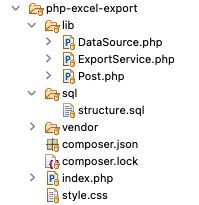
The source code contains the following files. This section explains the database configuration.
Once you download the excel export code from this page, you can find DataSource.php file in the lib folder. Open it and configure the database details in it as below.
PHP model calls prepare queries to fetch data to export
This is a PHP model class that is called to read data from the database. The data array will be sent to the export service to build the excel sheet object.
The getColumnName() reads the database table column name array. This array will supply data to form the first row in excel to create a column header.
The getAllPost() reads the data rows that will be iterated and set the data cells with the values.
lib/Post.php
<?php

class Post

{ private $ds; public function __construct() { require_once __DIR__ . '/DataSource.php'; $this->ds = new DataSource(); } public function getAllPost() { $query = "select * from tbl_products"; $result = $this->ds->select($query); return $result; } public function getColumnName() { $query = "select * from INFORMATION_SCHEMA.COLUMNS where TABLE_NAME=N'tbl_products'"; $result = $this->ds->select($query); return $result; }

}

?>
PHP excel export service
This service helps to export data to the excel sheet. The resultant file will be downloaded to the browser by setting the PHP header() properties.
The $postResult has the row data and the $columnResult has the column data.
This example instantiates the PHPSpreadSheet library class and sets the column header and values. Then it creates a writer object by setting the spreadsheet instance to output the data to excel.
Posted by: xSicKxBot - 09-24-2022, 10:30 AM - Forum: Lounge
- No Replies
Pierce Brosnan Doesn't Care Who The Next James Bond Is, But Wishes Him Well
While the search continues for the next actor to play James Bond, Pierce Brosnan--the fifth actor to play the British superspy--spoke with GQ about his indifference about who will step into the role after Daniel Craig.
"Who should do it? I don't care," Brosnan said. "It'll be interesting to see who they get, who the man shall be… whoever he be, I wish him well." Adds GQ writer Alex Pappademas, describing Brosnan's tone as "indicating it's maybe not actually that interesting."
Brosnan further adds, "I saw the last one, and I saw Skyfall. I love Skyfall. I'm not so sure about the last one [No Time to Die]. Daniel always gives of his heart. Very courageous, very strong. But…" And then, notes Pappademas, "the thought goes unfinished."


 Video: For your convenience, I embedded the video tutorial provided by our Solidity expert


 Docker is an open platform for developing, shipping, and running applications… Docker provides the ability to package and run an application in a loosely isolated environment called a container… Containers are lightweight and contain everything needed to run the application, so you do not need to rely on what is currently installed on the host.
 This is a very complex way to install the Solidity compiler and I wouldn’t recommend it for most people. Due to the complexity, I’ll only give a quick overview of the associated article (tutorial).


 Programming Challenge: Given a
  Let’s have a look at a slight variant to check the length of the shortest list instead.
 At least does the approach also work when passing in an empty list due to the ternary operator used in the first line.
 Note: If you need the length of the shortest list, you could simply replace the last line of the function with


 Finxter Challenge