
+- Sick Gaming (https://sickgaming.net)
+-- Forum: Programming (https://sickgaming.net/forum-76.html)
+--- Forum: Python (https://sickgaming.net/forum-83.html)
+--- Thread: [Tut] How to Delete a Line from a File in Python? (/thread-99982.html)
[Tut] How to Delete a Line from a File in Python? - xSicKxBot - 09-24-2022
How to Delete a Line from a File in Python?
5/5 – (1 vote)
Problem Formulation and Solution Overview
 This article will show you how to delete a line from a file in Python.
To make it more interesting, we have the following running scenario:
Rivers Clothing has a flat text file,
Code:
rivers_emps.txtContents of rivers_emps.txt
Code:
100:Jane Smith101:Daniel Williams102:Steve Markham103:Howie Manson104:Wendy Wilson105:Anne McEvans106:Bev Doyle107:Hal Holden108:Mich Matthews109:Paul Paulson Question: How would we write code to remove this line?
We can accomplish this task by one of the following options:
- Method 1: Use https://blog.finxter.com/list-comprehension/List Comprehension
- Method 2: Use List Comprehension and Slicing
- Method 3: Use List Comprehension, Slicing and ,Code:
np.savetxt()
- Method 4: Use Code:
pop()
- Method 5: Use Code:
remove()
- Method 6: Remove row(s) from a DataFrame
Method 1: Use List Comprehension
This example uses https://blog.finxter.com/list-comprehension/List Comprehension to remove a specific line from a flat text file.
Code:
orig_lines = [line.strip() for line in open('rivers_emps.txt')]
new_lines = [l for l in orig_lines if not l.startswith('102')] with open('rivers_01.txt', 'w') as fp: print(*new_lines, sep='\n', file=fp)
The above code uses List Comprehension to read in the contents of a flat text file to a List,
Code:
orig_linesCode:
['100:Jane Smith', '101:Daniel Williams', '102:Steve Markham', '103:Howie Manson', '104:Wendy Wilson', '105:Anne McEvans', '106:Bev Doyle', '107:Hal Holden', '108:Mich Matthews', '109:Paul Paulson']Then, List Comprehension is used again to append each element to a new List only if the element does not start with 102. If output to the terminal, the following displays.
Code:
['100:Jane Smith', '101:Daniel Williams', '103:Howie Manson', '104:Wendy Wilson', '105:Anne McEvans', '106:Bev Doyle', '107:Hal Holden', '108:Mich Matthews', '109:Paul Paulson']As you can see, the element starting with 102 has been removed.
Next, a new file,
Code:
rivers_01.txtCode:
wCode:
\nCode:
100:Jane Smith101:Daniel Williams103:Howie Manson104:Wendy Wilson105:Anne McEvans106:Bev Doyle107:Hal Holden108:Mich Matthews109:Paul Paulson
Method 2: Use List Comprehension and Slicing
This example uses List Comprehension and Slicing to remove a specific line from a flat text file.
Code:
orig_lines = [line.strip() for line in open('rivers_emps.txt')]
new_lines = orig_lines[0:2] + orig_lines[3:] with open('rivers_02.txt', 'w') as fp: fp.write('\n'.join(new_lines))
The above code uses List Comprehension to read in the contents of a flat text file to a List,
Code:
orig_linesCode:
['100:Jane Smith', '101:Daniel Williams', '102:Steve Markham', '103:Howie Manson', '104:Wendy Wilson', '105:Anne McEvans', '106:Bev Doyle', '107:Hal Holden', '108:Mich Matthews', '109:Paul Paulson']Then Slicing is used to extract all elements, except element two (2). The results save to
Code:
new_linesCode:
100:Jane Smith101:Daniel Williams103:Howie Manson104:Wendy Wilson105:Anne McEvans106:Bev Doyle107:Hal Holden108:Mich Matthews109:Paul PaulsonAs you can see, element two (2) has been removed.
Next, a new file,
Code:
rivers_02.txtCode:
wCode:
\nCode:
100:Jane Smith101:Daniel Williams103:Howie Manson104:Wendy Wilson105:Anne McEvans106:Bev Doyle107:Hal Holden108:Mich Matthews109:Paul Paulson
Method 3: Use Slicing and np.savetxt()
This example uses List Comprehension, Slicing and NumPy’s
Code:
np.savetxt()Before moving forward, please ensure that the NumPy library is installed to ensure this code runs error-free.
Code:
import numpy as np orig_lines = [line.strip() for line in open('rivers_emps.txt')]
new_lines = orig_lines[0:2] + orig_lines[3:] np.savetxt('rivers_03.txt', new_lines, delimiter='\n', fmt='%s')
The first line imports the https://blog.finxter.com/numpy-tutorial/NumPy library.
The following line uses List Comprehension to read the contents of a flat text file to the List,
Code:
orig_linesCode:
['100:Jane Smith', '101:Daniel Williams', '102:Steve Markham', '103:Howie Manson', '104:Wendy Wilson', '105:Anne McEvans', '106:Bev Doyle', '107:Hal Holden', '108:Mich Matthews', '109:Paul Paulson']Then Slicing is applied to extract all elements, except element two (2). The results save to
Code:
new_linesCode:
100:Jane Smith101:Daniel Williams103:Howie Manson104:Wendy Wilson105:Anne McEvans106:Bev Doyle107:Hal Holden108:Mich Matthews109:Paul PaulsonAs you can see, element two (2) has been removed.
The last code line calls
Code:
np.savetxt()- The filename (‘‘).Code:
rivers_03.txt
- An iterable, in this case, a List ().Code:
new_lines
- A delimiter (appended to each line) – a newline character ().Code:
\n
- The format. Strings are defined as .Code:
%s
The contents of
Code:
rivers_03.txtCode:
100:Jane Smith101:Daniel Williams103:Howie Manson104:Wendy Wilson105:Anne McEvans106:Bev Doyle107:Hal Holden108:Mich Matthews109:Paul Paulson
Method 4: Use pop()
This example uses the
Code:
pop()Code:
import numpy as np orig_lines = [line.strip() for line in open('rivers_emps.txt')]
orig_lines.pop(2)
np.savetxt('rivers_04.txt', orig_lines, delimiter='\n', fmt='%s')
The first line imports the NumPy library.
The following line uses List Comprehension to read in the contents of a flat text file to the List,
Code:
orig_linesCode:
['100:Jane Smith', '101:Daniel Williams', '102:Steve Markham', '103:Howie Manson', '104:Wendy Wilson', '105:Anne McEvans', '106:Bev Doyle', '107:Hal Holden', '108:Mich Matthews', '109:Paul Paulson']Then, the
Code:
pop()In this case, it is the second element.
If this List was output to the terminal, the following would display.
Code:
100:Jane Smith101:Daniel Williams103:Howie Manson104:Wendy Wilson105:Anne McEvans106:Bev Doyle107:Hal Holden108:Mich Matthews109:Paul PaulsonAs shown in Method 3, the results save to a flat text file. In this case,
Code:
rivers_04.txt Note: The
Code:
pop()Method 5: Use remove()
This example uses the
Code:
remove()Code:
import numpy as np orig_lines = [line.strip() for line in open('rivers_emps.txt')]
orig_lines.remove('102:Steve Markham')
np.savetxt('rivers_05.txt', orig_lines, delimiter='\n', fmt='%s')
This code works exactly like the code in Method 4. However, instead of passing a location of the element to remove, this function requires the contents of the entire line you to remove.
Then, the
Code:
remove()Code:
100:Jane Smith101:Daniel Williams103:Howie Manson104:Wendy Wilson105:Anne McEvans106:Bev Doyle107:Hal Holden108:Mich Matthews109:Paul PaulsonAs shown in the previous examples, the results save to a flat text file. In this case,
Code:
rivers_05.txt
Bonus: Remove row(s) from a DataFrame
CSV files are also known as flat-text files. This code shows you how to easily remove single or multiple rows from a CSV file
Code:
import pandas as pd
import numpy as np staff = { 'First' : ['Alice', 'Micah', 'James', 'Mark'], 'Last' : ['Smith', 'Jones', 'Watts', 'Hunter'], 'Rate' : [30, 40, 50, 37], 'Age' : [23, 29, 19, 45]} indexes=['FName', 'LName', 'Rate', 'Age']
df = pd.DataFrame(staff, index=indexes) df1 = df.drop(index=['Age'])
df.to_csv('staff.csv', index=False) Finxter Challenge
Find 2 Additional Ways to Remove Lines
Summary
This article has provided five (5) ways to delete a line from a file to select the best fit for your coding requirements.
Good Luck & Happy Coding!
Programmer Humor – Blockchain
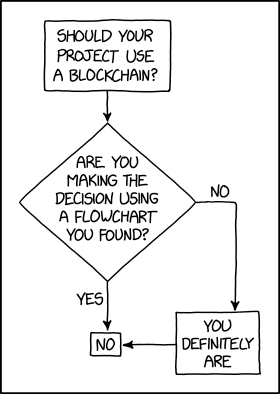 [i]“Blockchains are like grappling hooks, in that it’s extremely cool when you encounter a problem for which they’re the right solution, but it happens way too rarely in real life.” source – xkcd[/i]