Posted on Leave a comment

Anaconda Web UI preview image now public!

We are excited to announce the first public preview image of the new Anaconda web interface!  Our vision is to reimagine and modernize our installer’s user experience (see our blog post “Anaconda is getting a new suit”). We are doing this by redesigning the user experience on all fronts to make it more easy and approachable for everyone to use.

Today, we would like to introduce our plans for the public preview release, as our new project has already reached a point where core code functionality is already developed and the new interface can be used for real installations. 

So, we’re giving you something to play with! 🙂

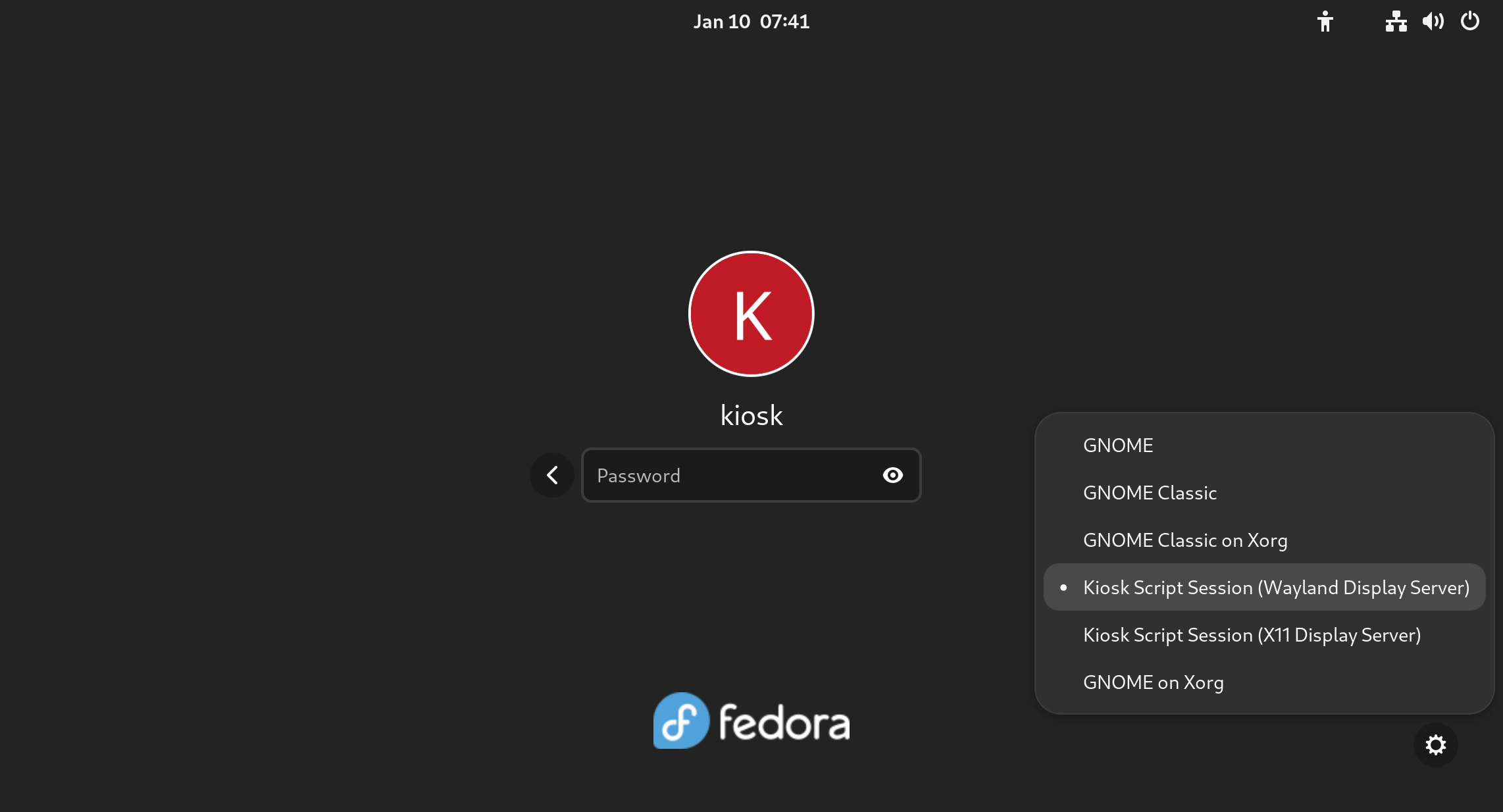
Installation progress of the preview image

Why public preview image?

By giving you a working ISO as soon as we can, you have the opportunity to help us to define this new UI. This task allows us to rethink what we have and find new ways to overcome the challenges of the UI instead of re-creating what we had already. Please take this opportunity and reach us with your feedback to help us to create the best OS installer ever!

Please let us know what you require from Anaconda. What features are important to you and why are these important? That will allow us to prioritize our focus on development and design. See below for how to contact us.

How to get public preview image?

Download the Anaconda preview image here

Thanks a lot to the Image Builder team for providing us with a way to build ISO with the Fedora 37 Workstation GA content. We are planning to provide additional images with an updated installer to give you the newest features and fixes with the link above. There are no updates to the installation payload (installed system data) yet. We will announce important updates of the ISO image by sending mail to anaconda-devel@lists.fedoraproject.org with CC to devel@lists.fedoraproject.org. Please subscribe to either of these to get information about the news. This way we will be able to iterate on your feedback.

What you will get with the preview ISO

The ISO will allow you to install the system and let you get a taste of the new UI, so you can provide us early feedback. However, it is pretty early in the development cycle. We advise you to not use this ISO to install critical infrastructure or machines where you have important data.

Let’s go to the more interesting part of what you can do with the ISO:

  • Choose installation language
  • Select your disks
  • Automatically partition the disks. BEWARE! This will erase everything on the selected disks.
  • Automatically install Fedora 37 GA Workstation system
  • Basic review screen of your selections
  • Installation progress screen
  • Built-in help (on Installation destination screen only)

Known issues:

  • In the bootloader menu you’ll see “Install Fedora 38”, it’s expected because the installation environment is from Rawhide. However, the content installed will be Fedora 37 GA, so don’t worry.
  • Virtual Box on Mac might have resolution issues. We are working on resolving this issue.
  • Aspect ratio and window handling. We know we need to solve this better, feedback is welcome.

How to provide feedback?

Your feedback is critical to have a project which you and we can be proud of, so please share it with us. To give us feedback:

Please take your time to play with the UI and tell us what you think. What works great, what is not working and what you would like to have. Ideally, follow future updates and tell us if the situation is better or worse. 

We are really counting on your feedback and we are thankful to have you all supporting us in this journey!

Posted on Leave a comment

How to rebase to Fedora Linux 37 on Silverblue

Fedora Silverblue is an operating system for your desktop built on Fedora Linux. It’s excellent for daily use, development, and container-based workflows. It offers numerous advantages such as being able to roll back in case of any problems. If you want to update or rebase to Fedora Linux 37 on your Fedora Silverblue system (these instructions are similar for Fedora Kinoite), this article tells you how. It not only shows you what to do, but also how to revert things if something unforeseen happens.

Prior to actually doing the rebase to Fedora Linux 37, you should apply any pending updates. Enter the following in the terminal:

$ rpm-ostree update

or install updates through GNOME Software and reboot.

Rebasing using GNOME Software

GNOME Software shows you that there is new version of Fedora Linux available on the Updates screen.

Fedora 37 update available

First thing you need to do is download the new image, so click on the Download button. This will take some time. When it’s done you will see that the update is ready to install.

Fedora 37 update ready to install

Click on the Restart & Upgrade button. This step will take only a few moments and the computer will be restarted at the end. After restart you will end up in new and shiny release of Fedora Linux 37. Easy, isn’t it?

Rebasing using terminal

If you prefer to do everything in a terminal, then this part of the guide is for you.

Rebasing to Fedora Linux 37 using the terminal is easy. First, check if the 37 branch is available:

$ ostree remote refs fedora

You should see the following in the output:

fedora:fedora/37/x86_64/silverblue

If you want to pin the current deployment (this deployment will stay as option in GRUB until you remove it), you can do it by running:

# 0 is entry position in rpm-ostree status
$ sudo ostree admin pin 0

To remove the pinned deployment use the following command:

# 2 is entry position in rpm-ostree status
$ sudo ostree admin pin --unpin 2

where 2 is the position in the rpm-ostree status.

Next, rebase your system to the Fedora Linux 37 branch.

$ rpm-ostree rebase fedora:fedora/37/x86_64/silverblue

Finally, the last thing to do is restart your computer and boot to Fedora Linux 37.

How to roll back

If anything bad happens—for instance, if you can’t boot to Fedora Linux 37 at all—it’s easy to go back. Pick the previous entry in the GRUB menu at boot (if you don’t see it, try to press ESC during boot), and your system will start in its previous state before switching to Fedora Linux 37. To make this change permanent, use the following command:

$ rpm-ostree rollback

That’s it. Now you know how to rebase Fedora Silverblue to Fedora Linux 37 and roll back. So why not do it today?

Posted on Leave a comment

Announcing Fedora Linux 37

Today I’m excited to share the results of the hard work of thousands of Fedora Project contributors: the Fedora Linux 37 release is here! Let’s see what the latest release brings you. As always, you should make sure your system is fully up-to-date before upgrading from a previous release. Can’t wait to get started? Download while you read!

New editions

Fedora Editions are flagship offerings targeted at a particular “market”. With Fedora Linux 37, we’re adding two new Editions. Fedora CoreOS is the successor to what you may remember as Atomic Host. Drawing from Project Atomic and the original CoreOS work, it provides an automatic update mechanism geared toward hosting container-based workloads. With atomic updates and easy rollback, it adds peace of mind to your infrastructure.

Fedora Cloud is also back as an Edition. The Cloud Working Group has seen a resurgence in activity. Cloud provides a great Fedora base to run in your favorite public or private cloud. AMIs will be available in the AWS Marketplace later this week and community channels are available now. Check the website for images in other cloud providers or for your own cloud!

Desktop improvements

Fedora Workstation focuses on the desktop experience. As usual, Fedora Workstation features the latest GNOME release. GNOME 43 includes a new device security panel in Settings, providing the user with information about the security of hardware and firmware on the system. Building on the previous release, more core GNOME apps have been ported to the latest version of the GTK toolkit, providing improved performance and a modern look. 

With this release, we’ve made a few changes to allow you to slim down your installation a bit. We split the language packs for the Firefox browser into subpackages. This means you can remove the “firefox-langpacks” package if you don’t need the localization. The runtime packages for gettext — the tools that help other packages produce multilingual text — are split into a separate, optional subpackage.

Of course, we produce more than just the Editions. Fedora Spins and Labs target a variety of audiences and use cases, including Fedora Comp Neuro, which provides tools for computational neuroscience, and desktop environments like Fedora LXQt, which provides a lightweight desktop environment. And, don’t forget our alternate architectures: ARM AArch64, Power, and S390x.

Sysadmin improvements

Fedora Server now produces a KVM disk image to make running Server in a virtual machine easier. If you’ve disabled SELinux (it’s okay — we still love you!), you can turn it back on with less impact. The autorelabel now runs in parallel, making the “fixfiles” operation much faster.

In order to keep up with advances in cryptography, this release introduces a TEST-FEDORA39 policy that previews changes planned for future releases. The new policy includes a move away from SHA-1 signatures. Researchers have long known that this hash (like MD5 before it) is not safe to use for many security purposes.

In the future, we are likely to remove SHA-1 from the list of acceptable security algorithms in Fedora Linux. (As the name TEST-FEDORA39 implies, perhaps as soon as next year.) We know there are still SHA-1 hashes in use today, however. The new policy helps you test your critical applications now so that you’ll be ready. Please try it out, and let us know where you encounter problems.

Speaking of cryptography, the openssl1.1 package is now deprecated. It will remain available, but we recommend you update your code to work with openssl 3.

Other updates

The Raspberry Pi 4 is now officially supported in Fedora Linux, including accelerated graphics. In other ARM news, Fedora Linux 37 drops support for the ARMv7 architecture (also known as arm32 or armhfp).

Following our “First” foundation, we’ve updated key programming language and system library packages, including Python 3.11, Golang 1.19, glibc 2.36, and LLVM 15.

We’re excited for you to try out the new release! Go to https://getfedora.org/ and download it now. Or if you’re already running Fedora Linux, follow the easy upgrade instructions. For more information on the new features in Fedora Linux 37, see the release notes.

In the unlikely event of a problem…

If you run into a problem, visit our Ask Fedora user-support forum. This includes a category for common issues.

Thank you everyone

Thanks to the thousands of people who contributed to the Fedora Project in this release cycle. We love having you in the Fedora community.

Posted on Leave a comment

Fedora Linux 37 update

Fedora Linux 37 is going to be late; very late. Here’s why. As you may have heard, the OpenSSL project announced a version due to be released on Tuesday. It will include a fix for a critical-severity bug. We won’t know the specifics of the issue until Tuesday’s release, but it could be significant. As a result, we decided to delay the release of Fedora Linux 37. We are now targeting a release day of 15 November.

Imperfect information

Most decisions happen with imperfect information. This one is particularly imperfect. If you’re not familiar with the embargo process, you might not understand why. When a security issue is discovered, this information is often shared with the project confidentially. This allows the developers to fix the issue before more people know about it and can exploit it. Projects then share information with downstreams so they can be ready.

Ironically, Fedora’s openness means we can’t start preparing ahead of time. All of our build pipelines and artifacts are open. If we were to start building updates, this would disclose the vulnerability before the embargo lifts. As a result, we only know that OpenSSL considers this the highest level of severity and Red Hat’s Product Security team strongly recommended we wait for a fix before releasing Fedora Linux 37.

Balancing time and quality

As the Fedora Program Manager, our release schedule is my responsibility. I take pride in the on-time release streak I inherited from my predecessor. We kept it going through Fedora Linux 34 in April 2021. In that time, we made big technical changes (like switching to Btrfs as the default for most variants) and kept each other going through a pandemic. I’m proud of what the community was able to accomplish under difficult circumstances.

But being on time isn’t the only factor. We know that you rely on Fedora Linux for work and for play, so quality is always a consideration. Knowing that we were going to delay for the OpenSSL vulnerability, the question became “how long”?

We make the “go/no-go” decision on Thursdays for a release the following Tuesday. This gives time for the images to update to the mirrors. The OpenSSL project team plans to publish the security fix about 48 hours before we’d make the go/no-go decision for an 8 November target. Factoring in time to build the updated openssl package and generate a release candidate, that gives us about a day and a half to do testing. That’s not enough time to be comfortable with a change to such an important package.

As a result, we’re giving ourselves an extra week so that we can be confident that Fedora Linux 37 has the same level of quality you’ve come to expect.

Was it the right decision?

Time will tell if we made the right decision or not. Today’s Go/No-Go meeting was lively and not everyone agrees that we should delay the release because of this. Like I said, we have little information to go on. It’s important to note that the decision was made as a team, and not the dictate of a single person. Fedora values collaborative decision making, and this is a good example.

When the details are released Tuesday, it may turn out we go “wow, that was not worth delaying the release.” But I think we made the best decision we could with the information we have available.

In the meantime, please join us November 4–5 for the Fedora Linux 37 Release Party. It will be a lot of fun, even if the release isn’t quite out yet.

Posted on Leave a comment

What’s new in Fedora Workstation 37

Fedora Workstation 37 is the latest version of the Fedora Project’s desktop operating system, made by a worldwide community dedicated to pushing forward innovation in open source. This article describes some of the new user-facing features in Fedora Workstation 37. Upgrade today from GNOME Software, or by using dnf system-upgrade in your favourite terminal emulator!

GNOME 43

Fedora Workstation 37 features the latest version of the GNOME desktop environment which sees more core applications ported to GTK 4, user interface tweaks, and performance tune-ups. Check out the GNOME 43 release notes for more information!

Redesigned Quick Settings menu

No need to open Settings just to change to and from Dark Mode

The new Quick Settings menu offers more control and convenience. You can now easily switch your Wi-Fi network in the menu instead of being taken to a full-screen dialogue box, change between default and dark modes, and enable Night Light without opening the Settings app. A convenient button for taking screenshots and screencasts is also now present.

Core applications

The GNOME core applications included in Fedora Workstation 37 have seen a round of tweaks and improvements.

  • Files has been ported to GTK 4, and the user interface has seen many improvements. Here are just some of them:
    • It is now adaptive – meaning it automatically adjusts to a narrower size, making better use of the available space.
    • The list view has been re-architected to make rubber-band selections easier.
    • The “Properties” and “Open With…” dialogues have been redesigned.
Rubber-band selection in Files 43
  • Calendar features a new sidebar that shows your upcoming events at a glance. It, along with Contacts, now feature adaptive user interfaces.
  • Characters now shows you different skin tone, hair colour, and gender options for emoji.
  • The package source selector in Software has been redesigned and moved to a more visible location.
  • Maps has been ported to GTK 4.
  • Settings includes a new Device Security panel, allowing you to easily see the hardware security features your devices offers – or lacks!
Uh oh!

New supplemental default wallpapers

Fedora Workstation 37 ships with a new set of supplemental wallpapers. See how they were made here!

The six new wallpapers come in both light and dark variants

Under-the-hood changes throughout Fedora Linux 37

Fedora Linux 37 features many under-the-hood changes. Here are some notable ones:

  • The Raspberry Pi 4 single-board computer is now officially supported, including 3D acceleration!
  • New installs on BIOS systems will use the GPT disk layout instead of the legacy MBR layout. The installer images will also now use GRUB instead of syslinux to boot on BIOS systems.
  • If you disable and then re-enable SELinux, or run the fixfiles onboot command, the file system relabelling processes will now be done in parallel, allowing for a significant speed boost.
  • The default fonts for Persian has been changed from DejaVu and Noto Sans Arabic to Vazirmatn, providing a more consistent experience for those who use Fedora Linux in Persian.

Also check out…

Cool happenings throughout the Fedora Project!

  • Fedora CoreOS and Fedora Cloud Base have been promoted to Edition status!
  • Preview installer images with a new GUI for Anaconda, the Fedora Linux system installer, will become available in about a week. An article will be published with more details, so watch this space!
Posted on Leave a comment

EPEL 8 Modularity is going away

EPEL 8 Modularity was set up shortly after the main EPEL 8 release. It attempted to use the Fedora module ecosystem with RHEL modules. The strange mixture of Fedora ecosystem and RHEL modularity never worked properly. There have been routine instances of modules that wouldn’t install, modules that overwrote RHEL modules, Fedora maintainers surprised their modules were in EPEL, and the constant issue that EPEL modules couldn’t depend on RHEL modules.

Many people have attempted to fix EPEL modularity over the years but none of these attempts have worked. At this point the EPEL Steering Committee is saying that the experiment with modules in EPEL has not worked. We are decommissioning EPEL 8 modularity.

Decommission Plan

  • October 31, 2022
    • An updated epel-release will be pushed to the epel8 repo.
      • This sets “enabled = 0” for epel-modular, if you haven’t already changed your config.
      • epel-modular full name will have “DEPRECATED” in it.
  • February 15, 2023
    • The infrastructure for building and publishing epel8 modules will be removed.
    • The EPEL 8 modules will be archived and removed.
    • The mirror manager will be pointed to the archive.

Archive Access

Systems will still be able to access archived modules, but their use is not recommended. The modules will not receive any further security or bug fixes.

Posted on Leave a comment

You’re invited to the Fedora Linux 37 Release Party!

I am pleased to announce we will celebrate the final release of Fedora Linux 37 with a virtual Release Party. The virtual release parties are a great way to learn more about the latest Fedora Linux release. More importantly, they’re a chance to spend time with the wonderful Fedora community. Please register on Hopin and join us on November 4th and 5th for a short program of informational sessions and social activities. Make sure to save the dates, share the registration, and show up to party with Fedora Friends!

The program is still in the works, but we hope to include informational sessions that will feature updates about Fedora CoreOS, the new installer interface preview, and a bunch more current community activities. We’ll also meet our new Fedora Community Action and Impact Coordinator, Justin W. Flory. Last, but certainly not least, we will have social sessions, including hanging out in the Fedora Museum WorkAdventure. Thanks to our amazing community for all your contributions to the latest release of Fedora Linux. Let’s celebrate!

Don’t forget to register for free any time and join us November 4th and 5th.

Posted on Leave a comment

Contribute at the Fedora Linux Test Week for Kernel 6.0

The kernel team is working on final integration for Linux kernel 6.0. This version was just recently released, and will arrive soon in Fedora. As a result, the Fedora kernel and QA teams have organized a test week now through Sunday, Oct 16, 2022. Refer to the wiki page for links to the test images you’ll need to participate. Read below for details.

How does a test week work?

A test week is an event where anyone can help make sure changes in Fedora work well in an upcoming release. Fedora community members often participate, and the public is welcome at these events. If you’ve never contributed before, this is a perfect way to get started.

To contribute, you only need to be able to do the following things:

  • Download test materials, which include some large files
  • Read and follow directions step by step

The wiki page for the kernel test day has a lot of good information on what and how to test. After you’ve done some testing, you can log your results in the test day web application. If you’re available on or around the day of the event, please do some testing and report your results. We have a document which provides all the necessary steps.

Happy testing, and we hope to see you on test day.

Posted on Leave a comment

Welcome to our new Fedora Community Action and Impact Coordinator

Great news, Fedora Friends! I am excited to announce that we have completed our search for a new Fedora Community Action and Impact Coordinator (FCAIC). He joins the Open Source Program Office (OSPO) team at Red Hat to work with the Fedora Community today. Please give a warm welcome to Justin W. Flory (he/him).

If you’re a contributor to Fedora, you may have already worked with Justin on a variety of teams and projects. Although I couldn’t possibly list them all in one post, Justin’s Fedora contribution highlights include co-founding CommOps, the Diversity, Equity and Inclusion (D.E.I.) Team, and Mindshare Committee. More contribution highlights include former editor-in-chief of the Fedora Magazine and Community Blog, former Council Member, leading the Marketing team, contributing as a packager, and traveling to events and conferences worldwide as a Fedora Ambassador. He has attended many Flocks: organizing workshops, presenting sessions, and coordinating informal socials like the international candy swap. Most recently Justin presented “5 Lessons Learned from 5 years of Fedora’s D.E.I. Events” at Nest with Fedora 2022.

Justin is new to Red Hat, joining us after seven years of involvement with the Fedora Community. He was first introduced to Fedora as a high school student and later through Open@RIT at the Rochester Institute of Technology (formerly the FOSSBox and FOSS@MAGIC). Justin’s most recent role was at UNICEF’s Office of Innovation supporting and mentoring startup companies across the world in open sourcing their innovations. He mentored 23 companies from 19 countries on community strategies for their Open Source products. Of those, fourteen achieved global recognition as Digital Public Goods (like Fedora Linux). Additionally, he also designed a fixed-term Open Source mentoring program for startup companies and developer communities to follow best practices and industry standards on launching Open Source communities.

Justin’s extensive experience with supporting Open Source community building, program management, and involvement with the Fedora Project makes him an excellent fit for this position. I am excited to work with him as both a colleague on the OSPO team at Red Hat and as a Fedora contributor. Feel free to reach out to Justin with your congratulations, but give him a bit to get up to speed with his new FCAIC duties. 

Congratulations, Justin!

Posted on Leave a comment

Working with Btrfs – General Concepts

This article is part of a series of articles that takes a closer look at Btrfs. This is the default filesystem for Fedora Workstation and Fedora Silverblue since Fedora Linux 33.

Introduction

Filesystems are one of the foundations of modern computers. They are an essential part of every operating system and they usually work unnoticed. However, modern filesystems such as Btrfs offer many great features that make working with computers more convenient. Next to other things they can, for example, transparently compress your files for you or build a solid foundation for incremental backups.

This article gives you a high-level overview of how the Btrfs filesystem works and some of the features it has. It will not go into much technical detail nor look at the implementation. More detailed explanations of some highlighted features follow in later articles of this series.

What is a filesystem?

If you’ve heard before how filesystems work on the most basic level, then this isn’t new to you and you can skip to the next section. Otherwise, read ahead for a short introduction into what makes a filesystem in the first place.

In simple terms, a filesystem allows your PC to find the data that it stores on disk. This sounds like a trivial task, but in essence any type of non-volatile storage device today (such as HDDs, SSDs, SD cards, etc…) is still mostly what it was back in 1970 when PCs were being invented: A (huge) collection of storage blocks.

Blocks are the most granular addressable storage unit. Every file on your PC is stored across one or more blocks. A block is typically 4096 bytes in size. This depends on the hardware you have and the software (i.e. the filesystem) on top of it.

Filesystems allow us to find the contents of our files from the vast amount of available storage blocks. This is done via so-called inodes. An inode contains information about a file in a specially formatted storage block. This includes the file’s size, where to find the storage blocks that make up the file contents, its access rules (i.e. who can read, write or execute the file) and much more.

Below is an example of what this looks like:

A text file “myfile.txt” and a hypothetical example of its representation on disk. All the squares are individual storage blocks.

The structure of an inode has big implications on a filesystem’s capabilities, so it is one of the central datastructures for any file system. For this reason every filesystem has its own inode structure. If you want to know more about this, have a look at the inode structure of the Btrfs filesystem linked below [1]. For a more detailed explanation of what the individual fields mean, you can refer to the inode structure of the ext4 filesystem [2].

Copy-on-Write filesystems

One of the outstanding features of Btrfs, compared to ext4, for example, is that it is a CoW (Copy-on-Write) filesystem. When a file is changed and written back to disk, it intentionally is not written back to where it was before. Instead, it is copied and stored in an entirely new location on disk. In this sense, it may be simpler to think of CoW as a kind of “redirection”, because the file write is redirected to different storage blocks.

This may sound wasteful, but in practice it isn’t. This is because the modified data must be written back to the disk in any case, regardless of how the filesystem works. Btrfs merely makes sure that the data is written to previously unoccupied blocks, so the old data remains intact. The only real drawback is that this behavior can lead to file fragmentation quicker than on other filesystems. In regular desktop usage scenarios it is unlikely you will notice a difference.

What is the advantage of CoW? In simple terms: a history of the modified and edited files can be kept. Btrfs will keep the references to the old file versions (inodes) somewhere they can be easily accessed. This reference is a snapshot: An image of the filesystem state at some point in time. This will be the topic of a separate article in this series, so it will be left at that for now.

Beyond keeping file histories, CoW filesystems are always in a consistent state, even if a previous filesystem transaction (like writing to a file) didn’t complete due to e.g. power loss. That is because filesystem metadata updates are also CoW: The file system itself is never overwritten, so an interruption can’t leave it in a partially written state

Copy-on-Write for files

You can think of filenames as pointers to the inodes of the file they belong to. Upon writing to a file, Btrfs creates a copy of the modified file content (the data), along with a new inode (the metadata), and then makes your filename point to this new inode. The old inode remains untouched. Below you see another hypothetical example to illustrate this:

Continuation of the example above: 3 more bytes of data were added

Here “myfile.txt” has had three bytes appended. A traditional filesystem would have updated the “Data” block in the middle to contain the new contents. A CoW filesystem keeps the old blocks intact (greyed out) and writes (copies) changed data and metadata somewhere new. It is important to note that only changed data blocks are copied, and not the whole file.

If there are no more unused blocks to write new contents to, Btrfs will reclaim space from data blocks occupied by old file versions (Unless they are part of a snapshot, see later article in this series).

Copy-on-Write for folders

From a filesystem’s point of view, a folder is a special type of file. In contrast to regular files, the filesystem interprets the underlying contents directly. A folder has some metadata associated with it (an inode, as seen for files above) that governs access permissions or modification time. In the simplest case, the data stored in a folder (so called “directory entries”) is a list of references to inodes, where each inode is in turn another file or folder. However, modern filesystems store at least a filename, together with a reference to an inode of the file in question, in a directory entry.

Earlier it was pointed out that writing to a file creates a copy of the previous inode and modifies the contents accordingly. In essence, this yields a new inode that isn’t related to its predecessor. To make the modified file show up in the filesystem, all the directory entries containing a reference to it are updated as well.

This is a recursive process! Since a folder is itself a file with an inode, modifying any of its folder entries creates a new inode for the folder file. This recursion occurs all the way up the filesystem tree, until it arrives at the filesystem root.

As a consequence, as long as a reference is kept to any of the old directories and they are not deleted or overwritten, the filesystem tree can be traversed in it’s previous state. This, again, is exactly what snapshots do.

What to expect in future articles

Btrfs is more than just a CoW filesystem. It aims to implement “advanced features while also focusing on fault tolerance, repair and easy administration” (See [3]). Future articles of this series will have a look at these features in particular:

  • Subvolumes – Filetrees within your filetree
  • Snapshots – Going back in time
  • Compression – Transparently saving storage space
  • Qgroups – Limiting your filesystem size
  • RAID – Replace your mdadm configuration

This is by far not an exhaustive list of Btrfs features. If you want the full overview of available features, check out the Wiki [4] and Docs [3].

Conclusion

I hope that I managed to whet your appetite for getting to know your PC filesystem. If you have questions so far, please leave a comment about what you come up with so they can be discussed in future articles. In the meantime, feel free to study the linked resources in the text. If you stumble over a Btrfs feature that you find particularly intriguing, please add a comment below, too. If there’s enough interest in a particular topic, maybe I’ll add an article to the series. See you in the next article!

Sources

[1]: https://btrfs.wiki.kernel.org/index.php/Data_Structures#btrfs_inode_item
[2]: https://ext4.wiki.kernel.org/index.php/Ext4_Disk_Layout#Inode_Table
[3]: https://btrfs.readthedocs.io/en/latest/Introduction.html
[4]: https://btrfs.wiki.kernel.org/index.php/Main_Page