Posted on Leave a comment

Modernize .NET Anywhere with GitHub Copilot

Modernizing a .NET application is rarely a single step. It requires understanding the current state of the codebase, evaluating dependencies, identifying potential breaking changes, and sequencing updates carefully.

Until recently, GitHub Copilot modernization for .NET ran primarily inside Visual Studio. That worked well for teams standardized on the IDE, but many teams build elsewhere. Some use VS Code. Some work directly from the terminal. Much of the coordination happens on GitHub, not in a single developer’s local environment.

The modernize-dotnet custom agent changes that. The same modernization workflow can now run across Visual Studio, VS Code, GitHub Copilot CLI, and GitHub. The intelligence behind the experience remains the same. What’s new is where it can run. You can modernize in the environment you already use instead of rerouting your workflow just to perform an upgrade.

The modernize-dotnet agent builds on the broader GitHub Copilot modernization platform, which follows an assess → plan → execute model. Workload-specific agents such as modernize-dotnet, modernize-java, and modernize-azure-dotnet guide applications toward their modernization goals, working together across code upgrades and cloud migration scenarios.

What the agent produces

Every modernization run generates three explicit artifacts in your repository: an assessment that surfaces scope and potential blockers, a proposed upgrade plan that sequences the work, and a set of upgrade tasks that apply the required code transformations.

Because these artifacts live alongside your code, teams can review, version, discuss, and modify them before execution begins. Instead of a one-shot upgrade attempt, modernization becomes traceable and deliberate.

GitHub Copilot CLI

For terminal-first engineers, GitHub Copilot CLI provides a natural entry point.

You can assess a repository, generate an upgrade plan, and run the upgrade without leaving the shell.

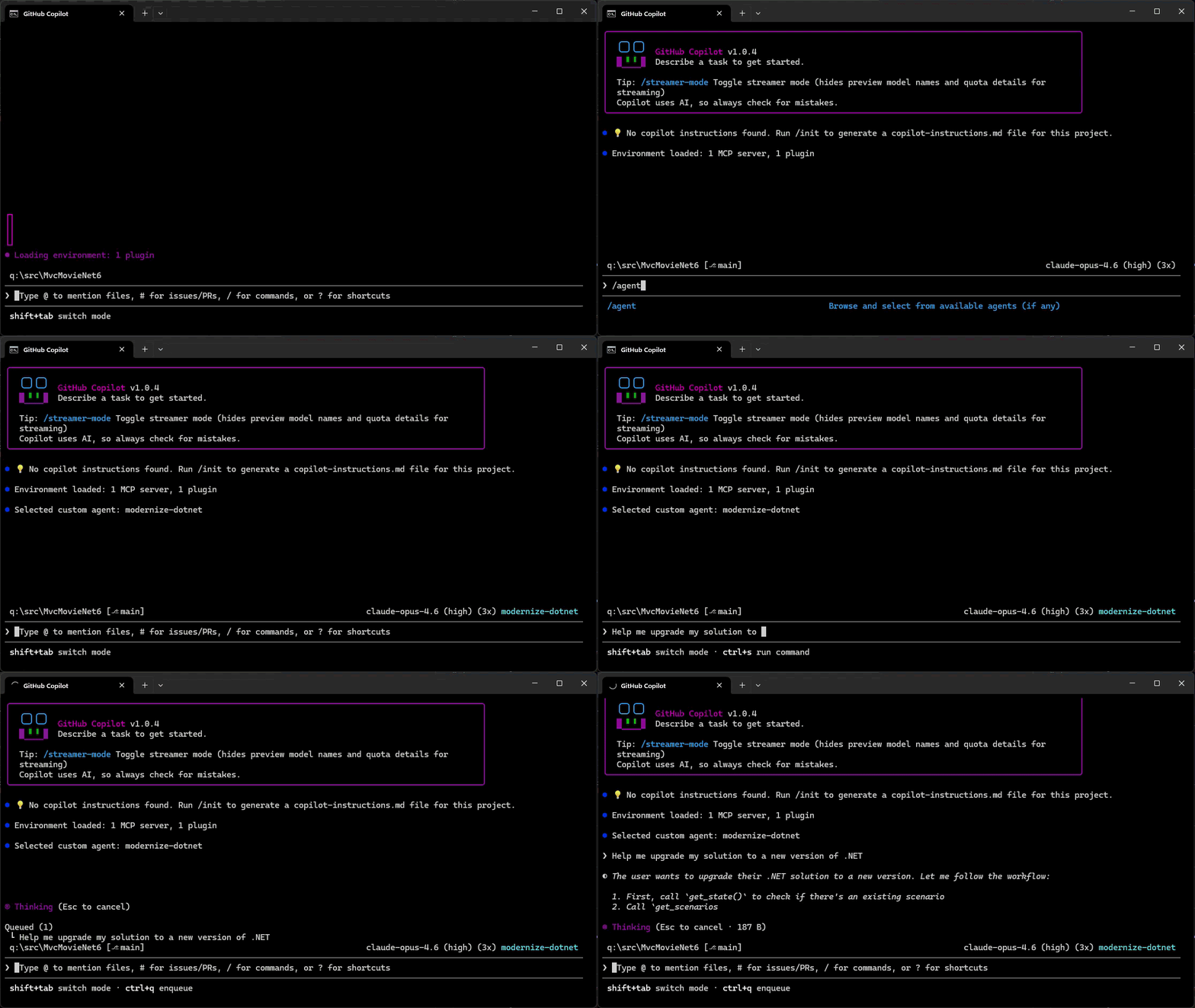
  1. Add the marketplace: /plugin marketplace add dotnet/modernize-dotnet
  2. Install the plugin: /plugin install modernize-dotnet@modernize-dotnet-plugins
  3. Select the agent: /agent to select modernize-dotnet
  4. Then prompt the agent, for example: upgrade my solution to a new version of .NET

Modernize .NET in GitHub Copilot CLI

The agent generates the assessment, upgrade plan, and upgrade tasks directly in the repository. You can review scope, validate sequencing, and approve transformations before execution. Once approved, the agent automatically executes the upgrade tasks directly from the CLI.

GitHub

On GitHub, the agent can be invoked directly within a repository. The generated artifacts live alongside your code, shifting modernization from a local exercise to a collaborative proposal. Instead of summarizing findings in meetings, teams review the plan and tasks where they already review code. Learn how to add custom coding agents to your repo, then add the modernize-dotnet agent by following the README in the modernize-dotnet repository.

VS Code

If you use VS Code, install the GitHub Copilot modernization extension and select modernize-dotnet from the Agent picker in Copilot Chat. Then prompt the agent with the upgrade you want to perform, for example: upgrade my project to .NET 10.

Visual Studio

If Visual Studio is your primary IDE, the structured modernization workflow remains fully integrated.

Right-click your solution or project in Solution Explorer and select the Modernize action to perform an upgrade.

Supported workloads

GitHub Copilot modernization supports upgrades across common .NET project types, including ASP.NET Core (MVC, Razor Pages, Web API), Blazor, Azure Functions, WPF, class libraries, and console applications.

Migration from .NET Framework to modern .NET is also supported for application types such as ASP.NET (MVC, Web API), Windows Forms, WPF, and Azure Functions, with Web Forms support coming soon.

The CLI and VS Code experiences are cross-platform. However, migrations from .NET Framework require Windows.

Custom skills

Skills are a standard part of GitHub Copilot’s agentic platform. They let teams define reusable, opinionated behaviors that agents apply consistently across workflows.

The modernize-dotnet agent supports custom skills, allowing organizations to encode internal frameworks, migration patterns, or architectural standards directly into the modernization workflow. Any skills added to the repository are automatically applied when the agent performs an upgrade.

You can learn more about how skills work and how to create them in the Copilot skills documentation.

Give it a try

Run the modernize-dotnet agent on a repository you’re planning to upgrade and explore the modernization workflow in the environment you already use.

If you try it, we’d love to hear how it goes. Share feedback or report issues in the modernize-dotnet repository.

Posted on Leave a comment

Extend your coding agent with .NET Skills

Coding agents are becoming part of everyday development, but quality of responses
and usefulness still depends on the best context as input. That context comes in
different forms starting from your environment, the code in the workspace, the
model training knowledge, previous memory, agent instructions, and of course
your own starting prompt. On the .NET team we’ve really adopted coding agents as
a part of our regular workflow and have, like you, learned the ways to improve
our productivity by providing great context. Across our repos we’ve adopted our
agent instructions and have also started to use agent skills to improve our
workflows. We’re introducing dotnet/skills,
a repository that hosts a set of agent skills for .NET developers from the team
who is building the platform itself.

What is an agent skill?

If you’re new to the concept, an agent skill is a lightweight package with specialized knowledge an agent can discover and use while solving a task. A skill bundles intent,
task-specific context, and supporting artifacts so the agent can choose better
actions with less trial and error. This work follows the
Agent Skills specification, which defines a common
model for authoring and sharing these capabilities with coding agents. GitHub Copilot CLI, VS Code, Claude Code and other coding agents support this specification.

What we are doing with dotnet/skills

With dotnet/skills, we’re publishing skills from the team that ships the platform.
These are the same workflows we’ve used ourselves, with first-party teams, and
in engineering scenarios we’ve seen in working with developers like yourself.

So what does that look like in practice? You’re not starting from generic
prompts. You’re starting from patterns we’ve already tested while shipping
.NET.

Our goal is practical: ship skills that help agents complete common .NET tasks
more reliably, with better context and fewer dead ends.

Does it help?

While we’ve learned that context is essential, we also have learned not to assume
more is always better. The AI models are getting remarkably better each release
and what was thought to be needed even 3 months ago, may no longer be required
with newer models. In producing skills we want to measure the validity if an
added skill actually improves the result. For each of our skills merged, we run
a lightweight validator (also available in the repo) to score it. We’re also learning the best graders/evals for this type…and so is the ecosystem as well.

Think of this as a unit test for a skill, not an integration test for the
whole system. We measure (using a specific model each run) against a baseline (no skill present) and try to score if the specific skill improved the intended behavior, and by how much. Some of this is taste as well so we’re careful not to draw too many hard lines on a specific number, but look at the result, adjust and re-score.

Each skill’s evaluation lives in the repository as well, so
you can inspect and run them. This gives us a practical signal on usefulness
without waiting for large end-to-end benchmark cycles. We will continue to learn in this space and adjust. We have a lot of partner teams trying different evaluation techniques as well at this level. The real test is you telling us if they have improved.

A developer posted this just recently on Discord sharing what we want to see:

The skill just worked with the log that I’ve with me, thankfully it was smartter[sic] than me and found the correct debug symbol. At the end it says the crash is caused by a heap corruption and the stack-trace points to GC code, by any chance does it ring a bell for you?

This is a great example of how a skill accelerated to the next step rapidly in this particular investigation for this developer. This is the true definition of success in unblocking and accelerating productivity.

Discovery, installation, and using skills

Popular agent tools have adopted the concept of
plugin marketplaces
which simply put are a registry of agent artifacts, like skills. The
plugin definition
serves as an organizational unit and defines what skills, agents, hooks, etc.
exist for that plugin in a single installable package. The dotnet/skills repo
is organized in the same manner, with the repo serving as the marketplace and we
have organized a set of plugins by functional areas. We’ll continue to define
more plugins as they get merged and based on your feedback.

While you can simply copy the SKILL.md files directly to your environment, the
plugin concept in coding agents like GitHub Copilot aim to make that process simpler.
As noted in the
README,
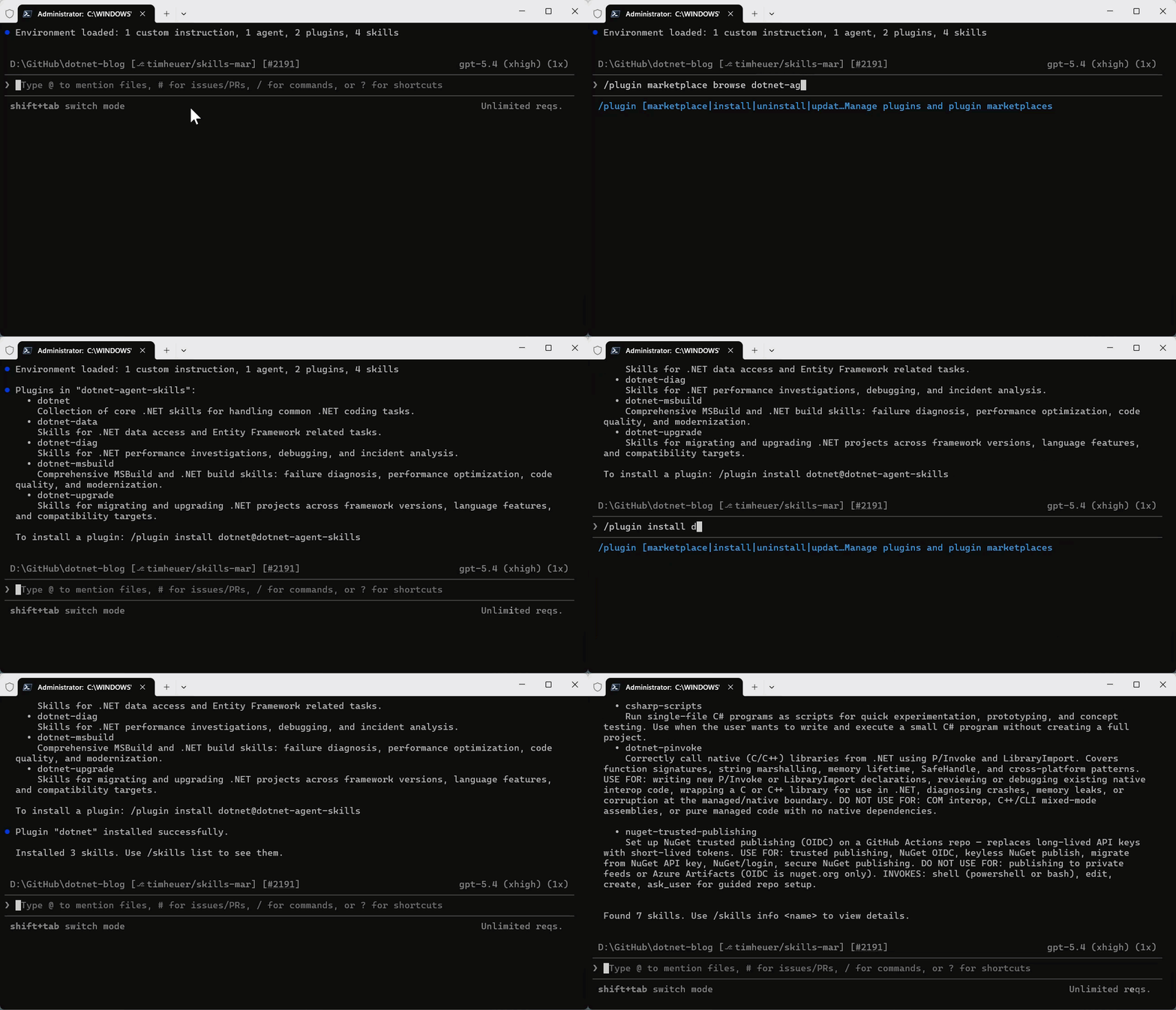
you can register the repo as a marketplace and browse/install the plugins.

/plugin marketplace add dotnet/skills

Once the marketplace is added, then you can browse any marketplace for a set of plugins to install and install the named plugin:

/plugin marketplace browse dotnet-agent-skills
/plugin install <plugin>@dotnet-agent-skills

Copilot CLI browsing plugin marketplace and installing a plugin via the CLI

They are now available in your environment automatically by your coding agent, or you can also invoke them explicitly.

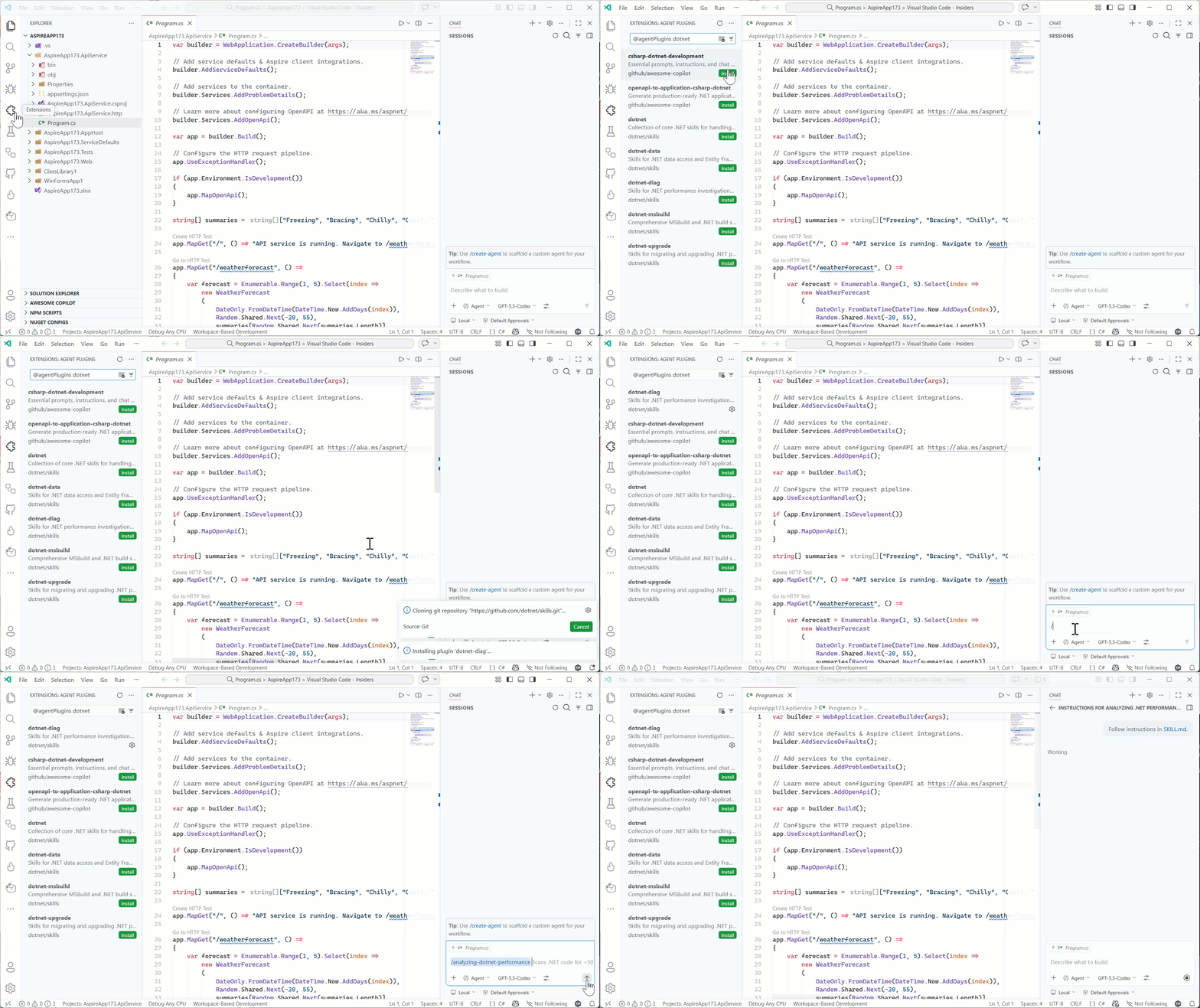
/dotnet:analyzing-dotnet-performance

And in VS Code you can add the marketplace URL into the Copilot extension settings for Insiders, adding https://github.com/dotnet/skills as the location and then you can browse in the extensions explorer to install, and then directly execute in Copilot Chat using the slash command:

Browsing agent plugins in the Extension marketplace

We acknowledge that discovery of even marketplaces can be a challenge and are
working with our own Copilot partners and ecosystem to better understand ways to
improve this discovery flow — it’s hard to use great skills if you don’t know
where to look! We’ll be sure to post more on any changes and possible .NET
specific tools to help identify skills that will make your project and developer
productivity better.

Starting principles

Like evolving standards in the AI extensibility space, skills is fast moving. We
are starting with the principle of simplicity first. We’ve seen in our own uses
that a huge set of new tools may not be needed with well scoped skills
themselves. Where we need more, we’ll leverage things like MCP or scripts, or
SDK tools that already exist and rely on them to enhance the particular skill
workflow. We want our skills to be proven, practical, and task-oriented.

We also know there are great community-provided agent skills that have evolved,
like github/awesome-copilot which
provide a lot of value for specific libraries and architectural patterns for .NET
developers. We support all these efforts as well and don’t think there is a ‘one
winner’ skills marketplace for .NET developers. We want our team to keep focused
closest to the core runtime, concepts, tools, and frameworks we deliver as a
team and support and learn from the community as the broader set of agentic
skills help all .NET developers in many more ways. Our skills are meant to
complement, not replace any other marketplace of skills.

What’s next

The AI ecosystem is moving fast, and this repository will too. We’ll iterate
and learn in the open with the developer community.

Expect frequent updates, new skills, and continued collaboration as we improve
how coding agents work across .NET development scenarios.

Explore dotnet/skills, try the skills in your own workflows, and share
feedback
on things that can improve or new ideas we should consider.

Posted on Leave a comment

Release v1.0 of the official MCP C# SDK

The Model Context Protocol (MCP) C# SDK has reached its v1.0 milestone, bringing full support for the
2025-11-25 version of the MCP Specification.
This release delivers a rich set of new capabilities — from improved authorization flows and richer metadata,
to powerful new patterns for tool calling, elicitation, and long-running request handling.

Here’s a tour of what’s new.

Enhanced authorization server discovery

In the previous spec, servers were required to provide a link to their Protected Resource Metadata (PRM) Document
in the resource_metadata parameter of the WWW-Authenticate header.
The 2025-11-25 spec broadens this, giving servers three ways to expose the PRM:

  1. Via a URL in the resource_metadata parameter of the WWW-Authenticate header (as before)
  2. At a “well-known” URL derived from the server’s MCP endpoint path
    (e.g. https://example.com/.well-known/oauth-protected-resource/public/mcp)
  3. At the root well-known URL (e.g. https://example.com/.well-known/oauth-protected-resource)

Clients check these locations in order.

On the server side, the SDK’s AddMcp extension method on AuthenticationBuilder
makes it easy to configure the PRM Document:

.AddMcp(options =>
{ options.ResourceMetadata = new() { ResourceDocumentation = new Uri("https://docs.example.com/api/weather"), AuthorizationServers = { new Uri(inMemoryOAuthServerUrl) }, ScopesSupported = ["mcp:tools"], };
});

When configured this way, the SDK automatically hosts the PRM Document at the well-known location
and includes the link in the WWW-Authenticate header. On the client side, the SDK handles the
full discovery sequence automatically.

Icons for tools, resources, and prompts

The 2025-11-25 spec adds icon metadata to Tools, Resources, and Prompts. This information is included
in the response to tools/list, resources/list, and prompts/list requests.
Implementation metadata (describing a client or server) has also been extended with icons and a website URL.

The simplest way to add an icon for a tool is with the IconSource parameter on the McpServerToolAttribute:

[McpServerTool(Title = "This is a title", IconSource = "https://example.com/tool-icon.svg")]
public static string ToolWithIcon(

The McpServerResourceAttribute, McpServerResourceTemplateAttribute, and McpServerPromptAttribute
have also added an IconSource parameter.

For more advanced scenarios — multiple icons, MIME types, size hints, and theme preferences — you can
configure icons programmatically via McpServerToolCreateOptions.Icons:

.WithTools([ McpServerTool.Create( typeof(EchoTool).GetMethod(nameof(EchoTool.Echo))!, options: new McpServerToolCreateOptions { Icons = [ new Icon { Source = "https://raw.githubusercontent.com/microsoft/fluentui-emoji/main/assets/Loudspeaker/Flat/loudspeaker_flat.svg", MimeType = "image/svg+xml", Sizes = ["any"], Theme = "light" }, new Icon { Source = "https://raw.githubusercontent.com/microsoft/fluentui-emoji/main/assets/Loudspeaker/3D/loudspeaker_3d.png", MimeType = "image/png", Sizes = ["256x256"], Theme = "dark" } ] } )
])

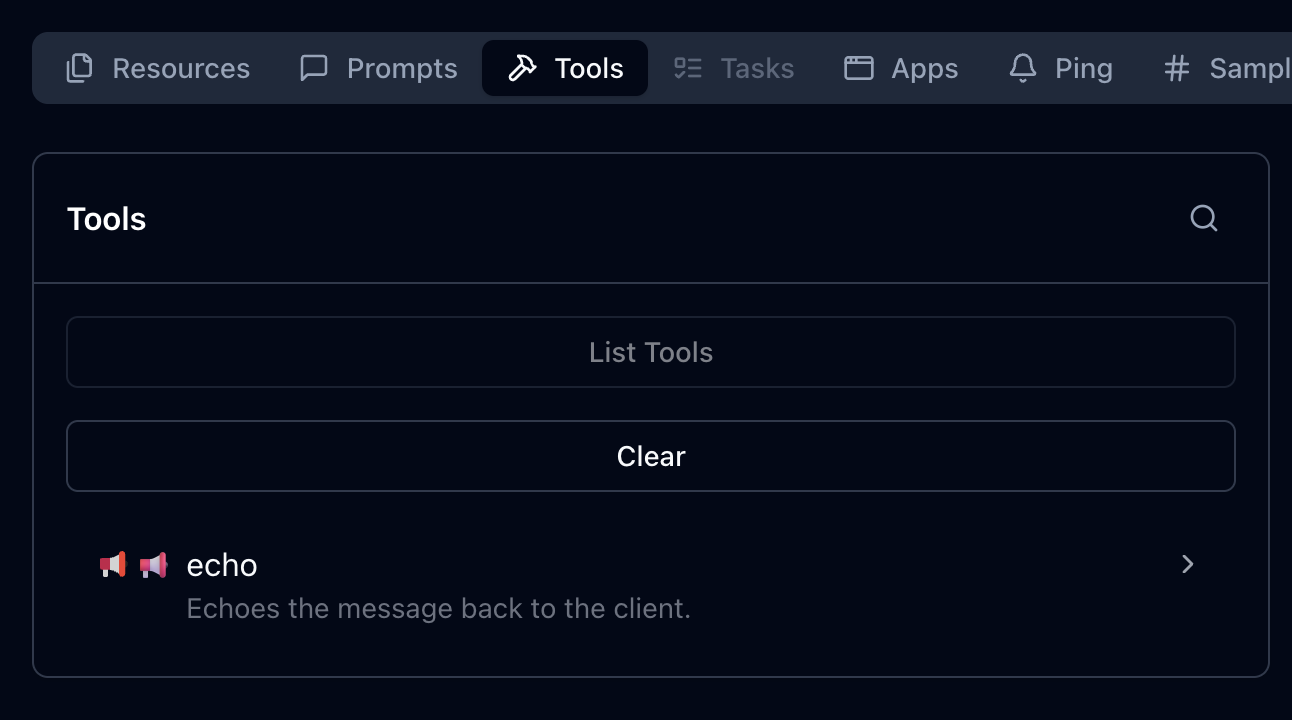
Here’s how these icons could be displayed, as illustrated in the MCP Inspector:

Icons displayed in MCP Inspector showing tool icons with different themes and styles

This placement works well after the code example showing how to configure multiple icons, providing a visual demonstration of how those icons appear in practice.

The Implementation class also has
Icons and
WebsiteUrl properties for server and client metadata:

.AddMcpServer(options =>
{ options.ServerInfo = new Implementation { Name = "Everything Server", Version = "1.0.0", Title = "MCP Everything Server", Description = "A comprehensive MCP server demonstrating all MCP features", WebsiteUrl = "https://github.com/modelcontextprotocol/csharp-sdk", Icons = [ new Icon { Source = "https://raw.githubusercontent.com/microsoft/fluentui-emoji/main/assets/Gear/Flat/gear_flat.svg", MimeType = "image/svg+xml", Sizes = ["any"], Theme = "light" } ] };
})

Incremental scope consent

The incremental scope consent feature brings the Principle of Least Privilege
to MCP authorization, allowing clients to request only the minimum access needed for each operation.

MCP uses OAuth 2.0 for authorization, where scopes define the level of access a client has.
Previously, clients might request all possible scopes up front because they couldn’t know which scopes
a specific operation would require. With incremental scope consent, clients start with minimal scopes
and request additional ones as needed.

The mechanism works through two flows:

  • Initial scopes: When a client makes an unauthenticated request, the server responds with
    401 Unauthorized and a WWW-Authenticate header that now includes a scopes parameter listing
    the scopes needed for the operation. Clients request authorization for only these scopes.

  • Additional scopes: When a client’s token lacks scopes for a particular operation, the server
    responds with 403 Forbidden and a WWW-Authenticate header containing an error parameter
    of insufficient_scope and a scopes parameter with the required scopes. The client then
    obtains a new token with the expanded scopes and retries.

Client support for incremental scope consent

The MCP C# client SDK handles incremental scope consent automatically. When it receives a 401 or 403 with a scopes
parameter in the WWW-Authenticate header, it extracts the required scopes and initiates the
authorization flow — no additional client code needed.

Server support for incremental scope consent

Setting up incremental scope consent on the server involves:

  1. Adding authentication services configured with the MCP authentication scheme:

    builder.Services.AddAuthentication(options =>
    { options.DefaultAuthenticateScheme = McpAuthenticationDefaults.AuthenticationScheme; options.DefaultChallengeScheme = McpAuthenticationDefaults.AuthenticationScheme;
    })
  2. Enabling JWT bearer authentication with appropriate token validation:

    .AddJwtBearer(options =>
    { options.TokenValidationParameters = new TokenValidationParameters { ValidateIssuer = true, ValidateAudience = true, ValidateLifetime = true, ValidateIssuerSigningKey = true, // Other validation settings as appropriate };
    })

    The following token validation settings are strongly recommended:

    Setting Value Description
    ValidateIssuer true Ensures the token was issued by a trusted authority
    ValidateAudience true Verifies the token is intended for this server
    ValidateLifetime true Checks that the token has not expired
    ValidateIssuerSigningKey true Confirms the token signature is valid
  3. Specifying authentication scheme metadata to guide clients on obtaining access tokens:

    .AddMcp(options =>
    { options.ResourceMetadata = new() { ResourceDocumentation = new Uri("https://docs.example.com/api/weather"), AuthorizationServers = { new Uri(inMemoryOAuthServerUrl) }, ScopesSupported = ["mcp:tools"], };
    });
  4. Performing authorization checks in middleware.
    Authorization checks should be implemented in ASP.NET Core middleware instead of inside the tool method itself. This is because the MCP HTTP handler may (and in practice does) flush response headers before invoking the tool. By the time the tool call method is invoked, it is too late to set the response status code or headers.

    Unfortunately, the middleware may need to inspect the contents of the request to determine which scopes are required, which involves an extra deserialization for incoming requests. But help may be on the way in future versions of the MCP protocol that will avoid this overhead in most cases. Stay tuned…

    In addition to inspecting the request, the middleware must also extract the scopes from the access token sent in the request. In the MCP C# SDK, the authentication handler extracts the scopes from the JWT and converts them to claims in the HttpContext.User property. The way these claims are represented depends on the token issuer and the JWT structure. For a token issuer that represents scopes as a space-separated string in the scope claim, you can determine the scopes passed in the request as follows:

    var user = context.User;
    var userScopes = user?.Claims .Where(c => c.Type == "scope" || c.Type == "scp") .SelectMany(c => c.Value.Split(' ')) .Distinct() .ToList();

    With the scopes extracted from the request, the server can then check if the required scope(s) for the requested operation is included with userScopes.Contains(requiredScope).

    If the required scopes are missing, respond with 403 Forbidden and a WWW-Authenticate header, including an error parameter indicating insufficient_scope and a scopes parameter indicating the scopes required.
    The MCP Specification describes several strategies for choosing which scopes to include:

    • Minimum approach: Only the newly-required scopes (plus any existing granted scopes that are still relevant)
    • Recommended approach: Existing relevant scopes plus newly required scopes
    • Extended approach: Existing scopes, newly required scopes, and related scopes that commonly work together

URL mode elicitation

URL mode elicitation enables secure out-of-band interactions between the server and end-user,
bypassing the MCP host/client entirely. This is particularly valuable for gathering sensitive data — like API keys,
third-party authorizations, and payment information — that would pose a security risk
if transmitted through the client.

Inspired by web security standards like OAuth, this mechanism lets the MCP client obtain user consent
and direct the user’s browser to a secure server-hosted URL where the sensitive interaction takes place.

The MCP host/client must present the elicitation request to the user — including the server’s identity
and the purpose of the request — and provide options to decline or cancel.
What the server does at the elicitation URL is outside the scope of MCP; it could present a form,
redirect to a third-party authorization service, or anything else.

Client support for URL mode elicitation

Clients indicate support by setting the Url property in Capabilities.Elicitation:

McpClientOptions options = new()
{ Capabilities = new ClientCapabilities { Elicitation = new ElicitationCapability { Url = new UrlElicitationCapability() } } // other client options

The client must also provide an ElicitationHandler.
Since there’s a single handler for both form mode and URL mode elicitation, the handler should begin by checking the
Mode property of the ElicitationRequest parameters
to determine which mode is being requested and handle it accordingly.

async ValueTask<ElicitResult> HandleElicitationAsync(ElicitRequestParams? requestParams, CancellationToken token)
{ if (requestParams is null || requestParams.Mode != "url" || requestParams.Url is null) { return new ElicitResult(); } // Success path for URL-mode elicitation omitted for brevity.
}

Server support for URL mode elicitation

The server must define an endpoint for the elicitation URL and handle the response.
Typically the response is submitted via POST to keep sensitive data out of URLs and logs.
If the URL serves a form, it should include anti-forgery tokens to prevent CSRF attacks —
ASP.NET Core provides built-in support for this.

One approach is to create a Razor Page:

public class ElicitationFormModel : PageModel
{ public string ElicitationId { get; set; } = string.Empty; public IActionResult OnGet(string id) { // Serves the elicitation URL when the user navigates to it } public async Task<IActionResult> OnPostAsync(string id, string name, string ssn, string secret) { // Handles the elicitation response when the user submits the form }
}

Note the id parameter on both methods — since an MCP server using Streamable HTTP Transport
is inherently multi-tenant, the server must associate each elicitation request and response
with the correct MCP session. The server must maintain state to track pending elicitation requests
and communicate responses back to the originating MCP request.

Tool calling support in sampling

This is one of the most powerful additions in the 2025-11-25 spec. Servers can now include tools
in their sampling requests, which the LLM may invoke to produce a response.

While providing tools to LLMs is a central feature of MCP, tools in sampling requests are fundamentally different
from standard MCP tools — despite sharing the same metadata structure. They don’t need to be implemented
as standard MCP tools, so the server must implement its own logic to handle tool invocations.

The flow is important to understand: when the LLM requests a tool invocation during sampling,
that’s the response to the sampling request. The server executes the tool, then issues a new
sampling request that includes both the tool call request and the tool call response. This continues
until the LLM produces a final response with no tool invocation requests.

sequenceDiagram participant Server participant Client Server->>Client: CreateMessage Request Note right of Client: messages: [original prompt]<br/>tools: [tool definitions] Client-->>Server: CreateMessage Response Note left of Server: stopReason: tool_calls<br/>toolCalls: [tool call 1, tool call 2] Note over Server: Server executes tools locally Server->>Client: CreateMessage Request Note right of Client: messages: [<br/> original prompt,<br/> tool call 1 request,<br/> tool call 1 response,<br/> tool call 2 request,<br/> tool call 2 response<br/>]<br/>tools: [tool definitions] Client-->>Server: CreateMessage Response Note left of Server: stopReason: end_turn<br/>content: [final response]

Client/host support for tool calling in sampling

Clients declare support for tool calling in sampling through their capabilities and must provide
a SamplingHandler:

var mcpClient = await McpClient.CreateAsync( new HttpClientTransport(new() { Endpoint = new Uri("http://localhost:6184"), Name = "SamplingWithTools MCP Server", }), clientOptions: new() { Capabilities = new ClientCapabilities { Sampling = new SamplingCapability { Tools = new SamplingToolsCapability {} } }, Handlers = new() { SamplingHandler = async (c, p, t) => { return await samplingHandler(c, p, t); }, } });

Implementing the SamplingHandler from scratch would be complex, but the Microsoft.Extensions.AI
package makes it straightforward. You can obtain an IChatClient from your LLM provider and use
CreateSamplingHandler to get a handler that translates between MCP and your LLM’s tool invocation format:

IChatClient chatClient = new OpenAIClient(new ApiKeyCredential(token), new OpenAIClientOptions { Endpoint = new Uri(baseUrl) }) .GetChatClient(modelId) .AsIChatClient(); var samplingHandler = chatClient.CreateSamplingHandler();

The sampling handler from IChatClient handles format translation but does not implement user consent
for tool invocations. You can wrap it in a custom handler to add consent logic.
Note that it will be important to cache user approvals to avoid prompting the user multiple times for the same tool invocation during a single sampling session.

Server support for tool calling in sampling

Servers can take advantage of the tool calling support in sampling if they are connected to a client/host that also supports this feature.
Servers can check whether the connected client supports tool calling in sampling:

if (_mcpServer?.ClientCapabilities?.Sampling?.Tools is not {})
{ return "Error: Client does not support sampling with tools.";
}

Tools for sampling can be described as simple Tool objects:

Tool rollDieTool = new Tool()
{ Name = "roll_die", Description = "Rolls a single six-sided die and returns the result (1-6)."
};

But the real power comes from using Microsoft.Extensions.AI on the server side too. The McpServer.AsSamplingChatClient()
method returns an IChatClient that supports sampling, and UseFunctionInvocation adds tool calling support:

IChatClient chatClient = ChatClientBuilderChatClientExtensions.AsBuilder(_mcpServer.AsSamplingChatClient()) .UseFunctionInvocation() .Build();

Define tools as AIFunction objects and pass them in ChatOptions:

AIFunction rollDieTool = AIFunctionFactory.Create( () => Random.Shared.Next(1, 7), name: "roll_die", description: "Rolls a single six-sided die and returns the result (1-6)."
); var chatOptions = new ChatOptions
{ Tools = [rollDieTool], ToolMode = ChatToolMode.Auto
}; var pointRollResponse = await chatClient.GetResponseAsync( "<Prompt that may use the roll_die tool>", chatOptions, cancellationToken
);

The IChatClient handles all the complexity: sending sampling requests with tools, processing
tool invocation requests, executing tools, and translating between MCP and LLM formats.

OAuth Client ID Metadata Documents

The 2025-11-25 spec introduces Client ID Metadata Documents (CIMDs) as an alternative
to Dynamic Client Registration (DCR) for establishing client identity with an authorization server.
CIMD is now the preferred method for client registration in MCP.

The idea is simple: the client specifies a URL as its client_id in authorization requests.
That URL resolves to a JSON document hosted by the client containing its metadata — identifiers,
redirect URIs, and other descriptive information. When an authorization server encounters this client_id,
it dereferences the URL and uses the metadata to understand and apply policy to the client.

In the C# SDK, clients specify a CIMD URL via ClientOAuthOptions:

const string ClientMetadataDocumentUrl = $"{ClientUrl}/client-metadata/cimd-client.json"; await using var transport = new HttpClientTransport(new()
{ Endpoint = new(McpServerUrl), OAuth = new ClientOAuthOptions() { RedirectUri = new Uri("http://localhost:1179/callback"), AuthorizationRedirectDelegate = HandleAuthorizationUrlAsync, ClientMetadataDocumentUri = new Uri(ClientMetadataDocumentUrl) },
}, HttpClient, LoggerFactory);

The CIMD URL must use HTTPS, have a non-empty path, and cannot contain dot segments or a fragment component.
The document itself must include at least client_id, client_name, and redirect_uris.

The SDK will attempt CIMD first, and fall back to DCR if the authorization server doesn’t support it
(provided DCR is enabled in the OAuth options).

Long-running requests over HTTP with polling

At the data layer, MCP is a message-based protocol with no inherent time limits.
But over HTTP, timeouts are a fact of life. The 2025-11-25 spec significantly improves the story
for long-running requests.

Previously, clients could disconnect and reconnect if the server provided an Event ID in SSE events,
but few servers implemented this — partly because it implied supporting stream resumption from any
event ID all the way back to the start. And servers couldn’t proactively disconnect; they had to
wait for clients to do so.

The new approach is cleaner. Servers that open an SSE stream for a request begin with an empty event
that includes an Event ID and optionally a Retry-After field. After sending this initial event,
servers can close the stream at any time, since the client can reconnect using the Event ID.

Server support for long-running requests

To enable this, the server provides an ISseEventStreamStore implementation. The SDK includes
DistributedCacheEventStreamStore, which works with any IDistributedCache:

// Add a MemoryDistributedCache to the service collection
builder.Services.AddDistributedMemoryCache();
// Add the MCP server with DistributedCacheEventStreamStore for SSE stream storage
builder.Services .AddMcpServer() .WithHttpTransport() .WithDistributedCacheEventStreamStore() .WithTools<RandomNumberTools>();

When a request handler wants to drop the SSE connection and let the client poll for the result,
it calls EnablePollingAsync on the McpRequestContext:

await context.EnablePollingAsync(retryInterval: TimeSpan.FromSeconds(retryIntervalInSeconds));

The McpRequestContext is available in handlers for MCP requests by simply adding it as a parameter to the handler method.

Implementation considerations

Event stream stores can be susceptible to unbounded memory growth, so consider these retention strategies:

Tasks (experimental)

Note: Tasks are an experimental feature in the 2025-11-25 MCP Specification. The API may change in future releases.

The 2025-11-25 version of the MCP Specification introduces tasks, a new primitive that provides durable state tracking
and deferred result retrieval for MCP requests. While stream resumability
handles transport-level concerns like reconnection and event replay, tasks operate at the data layer to ensure
that request results are durably stored and can be retrieved at any point within a server-defined retention window —
even if the original connection is long gone.

The key concept is that tasks augment existing requests rather than replacing them.
A client includes a task field in a request (e.g. tools/call) to signal that it wants durable result tracking.
Instead of the normal response, the server returns a CreateTaskResult containing task metadata — a unique task ID, the current status (working),
timestamps, a time-to-live (TTL), and optionally a suggested poll interval.
The client then uses tasks/get to poll for status, tasks/result to retrieve the stored result,
tasks/list to enumerate tasks, and tasks/cancel to cancel a running task.

This durability is valuable in several scenarios:

  • Resilience to dropped results: If a result is lost due to a network failure, the client can retrieve it again by task ID
    rather than re-executing the operation.
  • Explicit status tracking: Clients can query the server to determine whether a request is still in progress, succeeded, or failed,
    rather than relying on notifications or waiting indefinitely.
  • Integration with workflow systems: MCP servers wrapping existing workflow APIs (e.g. CI/CD pipelines, batch processing, multi-step analysis)
    can map their existing job tracking directly to the task primitive.

Tasks follow a defined lifecycle through these status values:

Status Description
working Task is actively being processed
input_required Task is waiting for additional input (e.g., elicitation)
completed Task finished successfully; results are available
failed Task encountered an error
cancelled Task was cancelled by the client

The last three states (completed, failed, and cancelled) are terminal — once a task reaches one of these states, it cannot transition to any other state.

Task support is negotiated through explicit capability declarations during initialization.
Servers declare that they support task-augmented tools/call requests, while clients can declare support for
task-augmented sampling/createMessage and elicitation/create requests.

Server support for tasks

To enable task support on an MCP server, configure a task store when setting up the server.
The task store is responsible for managing task state — creating tasks, storing results, and handling cleanup.

var taskStore = new InMemoryMcpTaskStore(); builder.Services.AddMcpServer(options =>
{ options.TaskStore = taskStore;
})
.WithHttpTransport()
.WithTools<MyTools>(); // Alternatively, you can register an IMcpTaskStore globally with DI, but you only need to configure it one way.
//builder.Services.AddSingleton<IMcpTaskStore>(taskStore);

The InMemoryMcpTaskStore is a reference implementation suitable for development and single-server deployments.
For production multi-server scenarios, implement IMcpTaskStore
with a persistent backing store (database, Redis, etc.).

The InMemoryMcpTaskStore constructor accepts several optional parameters to control task retention, polling behavior,
and resource limits:

var taskStore = new InMemoryMcpTaskStore( defaultTtl: TimeSpan.FromHours(1), // Default task retention time maxTtl: TimeSpan.FromHours(24), // Maximum allowed TTL pollInterval: TimeSpan.FromSeconds(1), // Suggested client poll interval cleanupInterval: TimeSpan.FromMinutes(5), // Background cleanup frequency pageSize: 100, // Tasks per page for listing maxTasks: 1000, // Maximum total tasks allowed maxTasksPerSession: 100 // Maximum tasks per session
);

Tools automatically advertise task support when they return Task, ValueTask, Task<T>, or ValueTask<T> (i.e. async methods).
You can explicitly control task support on individual tools using the ToolTaskSupport enum:

  • Forbidden (default for sync methods): Tool cannot be called with task augmentation
  • Optional (default for async methods): Tool can be called with or without task augmentation
  • Required: Tool must be called with task augmentation

Set TaskSupport on the McpServerTool attribute:

[McpServerTool(TaskSupport = ToolTaskSupport.Required)]
[Description("Processes a batch of data records. Always runs as a task.")]
public static async Task<string> ProcessData( [Description("Number of records to process")] int recordCount, CancellationToken cancellationToken)
{ await Task.Delay(TimeSpan.FromSeconds(8), cancellationToken); return $"Processed {recordCount} records successfully.";
}

Or set it via McpServerToolCreateOptions.Execution when registering tools explicitly:

builder.Services.AddMcpServer() .WithTools([ McpServerTool.Create( (int count, CancellationToken ct) => ProcessAsync(count, ct), new McpServerToolCreateOptions { Name = "requiredTaskTool", Execution = new ToolExecution { TaskSupport = ToolTaskSupport.Required } }) ]);

For more control over the task lifecycle, a tool can directly interact with
IMcpTaskStore and return an McpTask.
This bypasses automatic task wrapping and allows the tool to create a task, schedule background work, and return immediately.
Note: use a static method and accept IMcpTaskStore as a method parameter rather than via constructor injection
to avoid DI scope issues when the SDK executes the tool in a background context.

Client support for tasks

To execute a tool as a task, a client includes the Task property in the request parameters:

var result = await client.CallToolAsync( new CallToolRequestParams { Name = "processDataset", Arguments = new Dictionary<string, JsonElement> { ["recordCount"] = JsonSerializer.SerializeToElement(1000) }, Task = new McpTaskMetadata { TimeToLive = TimeSpan.FromHours(2) } }, cancellationToken); if (result.Task != null)
{ Console.WriteLine($"Task created: {result.Task.TaskId}"); Console.WriteLine($"Status: {result.Task.Status}");
}

The client can then poll for status updates and retrieve the final result:

// Poll until task reaches a terminal state
var completedTask = await client.PollTaskUntilCompleteAsync( taskId, cancellationToken: cancellationToken); switch (completedTask.Status)
{ case McpTaskStatus.Completed: // ... break; case McpTaskStatus.Failed: // ... break; case McpTaskStatus.Cancelled: // ... break;
{ var resultJson = await client.GetTaskResultAsync( taskId, cancellationToken: cancellationToken); var result = resultJson.Deserialize<CallToolResult>(McpJsonUtilities.DefaultOptions); foreach (var content in result?.Content ?? []) { if (content is TextContentBlock text) { Console.WriteLine(text.Text); } }
}

The SDK also provides methods to list all tasks (ListTasksAsync)
and cancel running tasks (CancelTaskAsync):

// List all tasks for the current session
var tasks = await client.ListTasksAsync(cancellationToken: cancellationToken); // Cancel a running task
var cancelledTask = await client.CancelTaskAsync(taskId, cancellationToken: cancellationToken);

Clients can optionally register a handler to receive status notifications as they arrive,
but should always use polling as the primary mechanism since notifications are optional:

var options = new McpClientOptions
{ Handlers = new McpClientHandlers { TaskStatusHandler = (task, cancellationToken) => { Console.WriteLine($"Task {task.TaskId} status changed to {task.Status}"); return ValueTask.CompletedTask; } }
};

Summary

The v1.0 release of the MCP C# SDK represents a major step forward for building MCP servers and clients in .NET.
Whether you’re implementing secure authorization flows, building rich tool experiences with sampling,
or handling long-running operations gracefully, the SDK has you covered.

Check out the full changelog
and the C# SDK repository to get started.

Demo projects for many of the features described here are available in the
mcp-whats-new demo repository.

Posted on Leave a comment

Mayo Clinic to deploy and test Microsoft generative AI tools

ROCHESTER, Minn., and REDMOND, Wash. — Sept. 28, 2023 — Mayo Clinic, a world leader in healthcare known for its commitment to innovation, is among the first healthcare organizations to deploy Microsoft 365 Copilot. This new generative AI service combines the power of large language models (LLMs) with organizational data from Microsoft 365 to enable new levels of productivity in the enterprise.

Mayo Clinic is testing the Microsoft 365 Copilot Early Access Program with hundreds of its clinical staff, doctors and healthcare workers.

“Microsoft 365 Copilot has the ability to transform work across virtually every industry so people can focus on the most important work and help move their organizations forward,” said Colette Stallbaumer, general manager, Microsoft 365. “We’re excited to be helping customers like Mayo Clinic achieve their goals.”

Generative AI has the potential to support Mayo Clinic’s vision to transform healthcare. For example, generative AI can help doctors automate form-filling tasks. Administrative demands continue to burden healthcare providers, taking up valuable time that could be used to provide more focused care to patients. Microsoft 365 Copilot has the potential to give healthcare providers valuable time back by automating tasks.

Mayo Clinic is one of the first to start working with Copilot tools to enable staff experience across apps like Microsoft Outlook, Word, Excel and more. Microsoft 365 Copilot combines the power of LLMs with data in the Microsoft 365 apps, including calendars, emails, chats, documents and meeting transcripts, to turn words into a powerful productivity tool.

“Privacy, ethics and safety are at the forefront of Mayo Clinic’s work with generative AI and large language models,” said Cris Ross, chief information officer at Mayo Clinic. “Using AI-powered tech will enhance Mayo Clinic’s ability to lead the transformation of healthcare while focusing on what matters most — providing the best possible care to our patients.”

As a leader in healthcare, Mayo Clinic is always looking for new ways to improve patient care. By using generative AI and LLMs, Mayo Clinic will be able to offer its teams new timesaving tools to help them succeed.

About Mayo Clinic

Mayo Clinic is a nonprofit organization committed to innovation in clinical practice, education and research, and providing compassion, expertise and answers to everyone who needs healing. Visit the Mayo Clinic News Network for additional Mayo Clinic news.

About Microsoft

Microsoft (Nasdaq “MSFT” @microsoft) enables digital transformation for the era of an intelligent cloud and an intelligent edge. Its mission is to empower every person and every organization on the planet to achieve more.

For more information, press only:

Microsoft Media Relations, WE Communications for Microsoft, (425) 638-7777, [email protected]

Samiha Khanna, Mayo Clinic, (507) 266-2624, [email protected]

Note to editors: For more information, news and perspectives from Microsoft, please visit the Microsoft News Center at http://news.microsoft.com. Web links, telephone numbers and titles were correct at time of publication but may have changed. For additional assistance, journalists and analysts may contact Microsoft’s Rapid Response Team or other appropriate contacts listed at https://news.microsoft.com/microsoft-public-relations-contacts.

Posted on Leave a comment

Microsoft and Mercy collaborate to empower clinicians to transform patient care with generative AI

Multiyear alliance creates foundation for innovation and deeper insights with data

Mercy and Microsoft logos

REDMOND, Wash., and ST. LOUIS — Sept. 27, 2023 Microsoft Corp. and Mercy are forging a long-term collaboration using generative AI and other digital technologies to give physicians, advance practice providers and nurses more time to care for patients and improve the patient experience. This work represents what’s next in healthcare for applying advanced digital technologies to the delivery of care to consumers.

“With the latest advances in generative AI, this moment marks a true phase change where emerging capabilities can help health care organizations address some of their most pressing challenges, create needed efficiency and transform care,” said Peter Lee, corporate vice president of research and incubations at Microsoft. “Mercy has a reputation for ongoing innovation and — through our years working together — has been a leader in the industry in creating an intelligent data platform on which to launch this kind of transformation. This is just the beginning, and it’s inspiring to see Mercy’s leadership adopting these tools to empower physicians, providers, nurses and all clinicians to improve patient care.”

Mercy plans to use Microsoft Azure OpenAI Service to improve care in several immediate new ways:

  • Patients will have the information to better understand their lab results and engage in more informed discussions about their health with their provider through the help of generative AI-assisted communication. Patients will be empowered to get answers in simple, conversational language.
  • Mercy will apply generative AI when taking patient calls for actions like scheduling appointments. Beyond the initial call, the AI solution will provide recommendations for additional follow-up actions to make sure all the patient’s needs are met during a single interaction, limiting the need for follow-up calls.
  • A chatbot for Mercy co-workers will help quickly find important information about Mercy policies and procedures, and locate HR-related answers such as information on benefits or leave requirements. By helping nurses and co-workers find the information they need more quickly, they can spend more time on patient care.

“Because of all the investments we have made together with Microsoft in the past few years, including the use of Microsoft’s secure cloud, we are better positioned to perform real-time clinical decision-making that ultimately improves patient care,” said Joe Kelly, Mercy’s executive vice president of transformation and business development officer. “With Microsoft, we are exploring more than four dozen uses of AI and will launch multiple new AI use cases by the middle of next year to transform care and experiences for patients and co-workers. This is predictive, proactive and personalized care at its best.”

As Mercy’s preferred platform for ongoing innovation, the Microsoft Cloud provides the health system with a trusted and comprehensive platform to improve efficiency, connect and govern data, impact patient and co-worker experience, reach new communities, and build a foundation for ongoing innovation. By securely centralizing and organizing data in an AI-powered intelligent data platform built on Azure, Mercy is uniquely positioned to deliver on evolving clinician and patient expectations more quickly. For example, Mercy can tap into secure data insights to reduce many unnecessary patient days in the hospital by giving care teams smart dashboards and better visibility into the factors that impact how soon patients can return home. Additionally, Microsoft’s modern work solutions will help Mercy co-workers improve productivity and communication so they can spend more time improving patient care and experience.

“Mercy and Microsoft are creating a new path for health systems in which we are working shoulder to shoulder to combine our 200-year heritage in health care and Microsoft’s extensive expertise in cloud and AI to enhance care for the patients we serve and improve the working experience for our physicians, advanced providers, nurses and all co-workers,” said Steve Mackin, Mercy’s president and CEO. “By using technology in new and secure ways, we innovate better health care for all.”

The organizations recently brought together Mercy’s engineering teams and senior leaders with Microsoft leaders, engineers and industry experts for a hackathon to co-imagine and begin to co-innovate around the generative AI use cases in development. Additionally, Microsoft and Mercy are working together to showcase Mercy’s solutions in the Microsoft Technology Center (MTC) in Chicago in 2024. The showcase will highlight transformational clinical experiences and demonstrate what the future of health care could look like using Microsoft technology.

About Mercy

Mercy, one of the 20 largest U.S. health systems and named the top large system in the U.S. for excellent patient experience by NRC Health, serves millions annually with nationally recognized quality care and one of the nation’s largest Accountable Care Organizations. Mercy is a highly integrated, multi-state health care system including more than 40 acute care, managed and specialty (heart, children’s, orthopedic and rehab) hospitals, convenient and urgent care locations, imaging centers and pharmacies. Mercy has 900 physician practices and outpatient facilities, more than 4,000 physicians and advanced practitioners and more than 45,000 co-workers serving patients and families across Arkansas, Kansas, Missouri and Oklahoma. Mercy also has clinics, outpatient services and outreach ministries in Arkansas, Louisiana, Mississippi and Texas.

About Microsoft

Microsoft (Nasdaq “MSFT” @Microsoft) enables digital transformation for the era of an intelligent cloud and an intelligent edge. Its mission is to empower every person and every organization on the planet to achieve more.

For more information, press only:

Microsoft Media Relations, WE Communications for Microsoft, (425) 638-7777, [email protected]

Bethany Pope, Mercy, (314) 251-4472 office, [email protected]

Joe Poelker, Mercy, (314) 525-4005 office, (314) 724-6095 mobile, [email protected]

Note to editors: For more information, news and perspectives from Microsoft, please visit the Microsoft News Center at http://news.microsoft.com. Web links, telephone numbers and titles were correct at time of publication but may have changed. For additional assistance, journalists and analysts may contact Microsoft’s Rapid Response Team or other appropriate contacts listed at https://news.microsoft.com/microsoft-public-relations-contacts.

Posted on Leave a comment

Lumen Technologies dives into Microsoft 365 Copilot to help enhance employee efficiency and customer relationships

Generative AI tool shows early signs of helping Lumen innovate for growth

DENVER, Colo., and REDMOND, Wash. — Aug. 30, 2023 — Lumen Technologies Inc. (NYSE: LUMN), a multinational technology company, is working with Microsoft Corp. (Nasdaq: MSFT) to deploy Microsoft 365 Copilot to empower its approximately 30,000 employees. Lumen is beta-testing Microsoft 365 Copilot as a part of the Early Access Program (EAP). The company has already seen the benefits of equipping some of its teams with Microsoft’s large language model (LLM) AI solutions, with plans to deploy the tech more broadly in the future.

“We are thrilled to be leading the early deployment of Microsoft 365 Copilot at Lumen Technologies,” said Kate Johnson, president and CEO, Lumen Technologies Inc. “Giving our workforce the digital tools they need to deliver dramatically improved customer experiences with greater ease is an essential part of our company transformation. Our people are seeing immediate productivity improvements with Copilot, allowing them to focus on more value-added activities each day.”

Microsoft 365 Copilot can disrupt the telecommunications industry by providing employees with a tool to help enhance creativity, productivity and skills with real-time intelligent assistance. It has the potential to significantly improve employee productivity by automating tedious tasks and providing powerful tools for data analysis and decision-making. With features such as meeting summaries in Microsoft Teams and Copilot enhancements across Outlook, PowerPoint and other Microsoft 365 apps, employees can get back important time to deliver on strategic priorities.

Customer service teams at Lumen are using Copilot to surface relevant policies, summarize tickets or easily access step-by-step repair instructions from manuals. Sales and customer experience teams are using Copilot to add depth and context to customer communications and summarize actions and next steps. Across the board, teams are using Copilot to quickly create presentations, and for new business proposal and statement-of-work creation to deliver a consistent Lumen message and experience.

Lumen is among the first companies to start working with Microsoft 365 Copilot as one of the EAP adopters. Microsoft 365 Copilot combines the power of LLMs with data in the Microsoft Graph — calendar, emails, chats, documents, meetings and more — and the Microsoft 365 apps to turn words into a powerful productivity tool.

“Microsoft 365 Copilot has the power to revolutionize the way we work, enabling people to focus on what truly matters and drive their organizations forward,” said Deb Cupp, president, Americas Microsoft. “We are thrilled to be delivering this technology to innovative companies like Lumen to help them achieve their goals.”

As a pioneer in the telecommunications industry, Lumen is pushing the envelope when it comes to enhancing the customer experience. By harnessing the power of advanced AI technologies such as generative AI and AI language models through tools like Microsoft 365 Copilot, Lumen can provide their teams with the cutting-edge tools they need to succeed and drive their business forward.

About Lumen Technologies

Lumen connects the world. We are dedicated to furthering human progress through technology by connecting people, data, and applications – quickly, securely, and effortlessly. Everything we do at Lumen takes advantage of our network strength. From metro connectivity to long-haul data transport to our edge cloud, security, and managed service capabilities, we meet our customers’ needs today and as they build for tomorrow. For news and insights visit news.lumen.com, LinkedIn: /lumentechnologies, Twitter: @lumentechco, Facebook: /lumentechnologies, Instagram: @lumentechnologies, and YouTube: /lumentechnologies.

About Microsoft

Microsoft (Nasdaq “MSFT” @Microsoft) enables digital transformation for the era of an intelligent cloud and an intelligent edge. Its mission is to empower every person and every organization on the planet to achieve more.

For more information, press only:

Microsoft Media Relations, WE Communications for Microsoft, (425) 638-7777, [email protected]

Danielle Spears, Corporate Communications for Lumen, (407) 961-3838, [email protected]

Posted on Leave a comment

Introducing the Microsoft 365 Copilot Early Access Program and the 2023 Work Trend Index

Microsoft is bringing Microsoft 365 Copilot to more customers and releasing new research that shows how AI will change the way we work

REDMOND, Wash. — May 9, 2023 — Earlier this year, Microsoft Corp. introduced Microsoft 365 Copilot, which will bring powerful new generative AI capabilities to apps millions of people use every day like Microsoft Word, Excel, PowerPoint, Outlook, Microsoft Teams and more.

On Tuesday, the company announced it is expanding access to the Microsoft 365 Copilot preview and introducing new features. The company also released new data and insights from its 2023 Work Trend Index report: “Will AI Fix Work?

The data shows that the pace of work has accelerated faster than humans can keep up, and it’s impacting innovation. Next-generation AI will lift the weight of work. Organizations that move first to embrace AI will break the cycle — increasing creativity and productivity for everyone.

“This new generation of AI will remove the drudgery of work and unleash creativity,” said Satya Nadella, chairman and CEO, Microsoft. “There’s an enormous opportunity for AI-powered tools to help alleviate digital debt, build AI aptitude and empower employees.”

The report shares three key insights for business leaders as they look to understand and responsibly adopt AI for their organization:

  1. Digital debt is costing us innovation: We’re all carrying digital debt: The volume of data, emails and chats has outpaced our ability to process it all. There is an opportunity to make our existing communications more productive. Every minute spent managing this digital debt is a minute not spent on creative work. Sixty-four percent of employees don’t have enough time and energy to get their work done and those employees are 3.5x more likely to say they struggle with being innovative or thinking strategically. Of time spent in Microsoft 365, the average person spends 57% communicating and only 43% creating.
  2. There’s a new AI-employee alliance: For employees, the promise of relief outweighs job loss fears and managers are looking to empower employees with AI, not replace. Forty-nine percent of people say they’re worried AI will replace their jobs, but even more — 70% — would delegate as much work as possible to AI in order to lessen their workloads. In fact, leaders are 2x more likely to say that AI would be most valuable in their workplace by boosting productivity rather than cutting headcount.
  3. Every employee needs AI aptitude: Every employee, not just AI experts, will need new core competencies such as prompt engineering in their day to day. Eighty-two percent of leaders anticipate employees will need new skills in the AI era, and as of March 2023, jobs on LinkedIn in the U.S. mentioning GPT have increased by 79% year over year. This new, in-demand and AI-centric skillset will have ripple effects across everything from resumes to job postings.

“The pace and volume of work have increased exponentially and are outpacing humans’ ability to keep up,” said Jared Spataro, CVP, Modern Work and Business Applications. “In a world where creativity is the new productivity, digital debt is more than an inconvenience — it’s a threat to innovation. Next-generation AI will lift the weight of work and free us all to focus on the work that matters.”

To empower businesses in the AI era, Microsoft is introducing the Microsoft 365 Copilot Early Access Program with an initial wave of 600 enterprise customers worldwide in an invitation-only paid preview program. In addition, the following new capabilities will be added to Microsoft 365 Copilot and Microsoft Viva:

  • Copilot in Whiteboard will make Microsoft Teams meetings and brainstorms more creative and effective. Using natural language, you can ask Copilot to generate ideas, organize ideas into themes, create designs that bring ideas to life, and summarize Whiteboard content.
  • By integrating DALL-E, OpenAI’s image generator, into Copilot in PowerPoint, users will be able to ask Copilot to create custom images to support their content.
  • Copilot in Outlook will offer coaching tips and suggestions on clarity, sentiment and tone to help users write more effective emails and communicate more confidently.
  • Copilot in OneNote will use prompts to draft plans, generate ideas, create lists and organize information to help customers find what they need easily.
  • Copilot in Viva Learning will use a natural language chat interface to help users create a personalized learning journey including designing upskilling paths, discovering relevant learning resources and scheduling time for assigned trainings.

To help every customer get AI-ready, Microsoft is also introducing the Semantic Index for Copilot, a new capability we’re starting to roll out to all Microsoft 365 E3 and E5 customers.

To learn more, visit the Official Microsoft Blog, Microsoft 365 Blog and the new Work Trend Index.

Microsoft (Nasdaq “MSFT” @microsoft) enables digital transformation for the era of an intelligent cloud and an intelligent edge. Its mission is to empower every person and every organization on the planet to achieve more.

For more information, press only:

Microsoft Media Relations, WE Communications, (425) 638-7777, [email protected]

Note to editors: For more information, news and perspectives from Microsoft, please visit the Microsoft News Center at http://news.microsoft.com. Web links, telephone numbers and titles were correct at time of publication but may have changed. For additional assistance, journalists and analysts may contact Microsoft’s Rapid Response Team or other appropriate contacts listed at https://news.microsoft.com/microsoft-public-relations-contacts.

Posted on Leave a comment

Industry leaders in tech, education and financial services join together in new national council to activate AI for the greater good

Coalition established to identify and solve significant societal and industry barriers through the adoption of AI

REDMOND, Wash. — Dec. 11, 2020 — On Friday, leading organizations across the U.S. financial services, technology and academic industries announced the formation of a new National Council for Artificial Intelligence (NCAI). The council brings together the Brookings Institution, CUNY, the Federal Reserve Bank of New York, Mastercard, Microsoft, Nasdaq, Plug and Play, SUNY, University of Central Florida, and Visa with the goal of maximizing technology to jointly solve specific issues of interest to the industry.

“The goal of the newly created NCAI is to establish a pragmatic coalition with public-private partnerships in the financial services sector to identify and address significant societal and industry barriers,” said Gretchen O’Hara, vice president of AI and sustainability strategy, Microsoft U.S. “I am excited about the launch of our distinguished board, and the continued momentum to work with the members of this coalition to better serve the needs of our stakeholders and communities through AI innovation.”

The NCAI board, composed of volunteer senior executives acting as advisors to the council on behalf of their company or organization, will work to co-create AI solutions for positive societal and financial impact, identify and set the AI strategy and vision for a wide range of projects, and track AI adoption progress. Each member organization has nominated its own AI ambassadors to serve as regional leads and drive programs. All members have an equal voice in the way it operates and is governed.

The council intends to apply AI to resolve significant challenges in business such as:

  • General economic and industrial challenges – including research transfer, industry standards and funding instruments
  • Digital skills and employability – including organizational and cultural challenges, and labor policies
  • Data privacy – including data access and shared innovation

“Although there are many councils focusing on resolving technology challenges, I appreciate NCAI’s charter to figure out how AI can deliver deeper societal impact,” said Ed Fandrey, vice president of Financial Services, Microsoft U.S. “The NCAI coalition brings partners together across the industry to ensure AI and the technologies underpinning it are transparent and safe for not only financial services customers but throughout the regulated industry.”

Overall, the objective of the collaboration is to accelerate AI innovation and adoption by:

  • Lowering the risk of AI adoption and bias
  • Lowering the barrier of entry to innovate
  • Defining the educational journey for the AI talent of the future and equipping workers facing AI displacement with the right skills to maintain career momentum
  • Serving as an advisor of vision, information and multidisciplinary partnership with a focus on AI policy

To achieve these goals, the NCAI will deliver a robust curriculum for AI education and skilling, and will engage with the community through research white papers, new tools and programs, hosted events, and social media outreach to make AI more applicable and impactful. The council also plans to host quarterly meetings and public events to transparently communicate the resolution and progress of key challenges through AI adoption.

Initial work from the council will focus on reskilling and upskilling of the current workforce and business leaders. More details about the coalition’s programs and its impacts will be available in early 2021.

Microsoft (Nasdaq “MSFT” @microsoft) enables digital transformation for the era of an intelligent cloud and an intelligent edge. Its mission is to empower every person and every organization on the planet to achieve more.

For more information, press only:
Microsoft Media Relations, WE Communications for Microsoft, (425) 638-7777, [email protected]

Note to editors: For more information, news and perspectives from Microsoft, please visit the Microsoft News Center at http://news.microsoft.com. Web links, telephone numbers and titles were correct at time of publication, but may have changed. For additional assistance, journalists and analysts may contact Microsoft’s Rapid Response Team or other appropriate contacts listed at https://news.microsoft.com/microsoft-public-relations-contacts.

Perspectives from NCAI member organizations

“Mastercard has been pioneering the use of AI, applying it across our business to help keep the digital ecosystem safe for governments, banks, merchants and consumers,” said Rohit Chauhan, executive vice president, Artificial Intelligence, Mastercard. “It has enabled us to provide quicker, easier and safer ways to transact and interact. As AI’s role and influence continues to expand, partnership, knowledge-sharing and best practices are needed to help accelerate the adoption in a responsible, secure and human-centric manner. Our work with the council is just beginning and we’re eager to collaborate and innovate with this group of industry leaders.”

“At Nasdaq, we are leveraging AI to solve challenges for the capital markets and beyond, with an aim to make markets safer, smarter and stronger,” said Michael O’Rourke, senior vice president and head of Artificial Intelligence and Investment Intelligence Technology, Nasdaq and NCAI council member. “We enthusiastically support the formation of the NCAI to progress these values and to use AI for the greater good for the investing public in the U.S. and worldwide.”

“Brookings Institution aims to advance effective and inclusive governance of transformative new technologies,” said Dr. Nicol Turner Lee, director of the Center for Technology Innovation, the Brookings Institution. “While artificial intelligence is generating benefits, difficult questions surface in terms of bias and discrimination. I am excited to join the National Council for Artificial Intelligence together with Microsoft and the other member organizations to work together to drive major solutions and policies that govern innovation, and drive the advancement of digital equity and inclusion for historically disadvantaged populations.”

“SUNY’s inclusion in the National Council for Artificial Intelligence shows our system’s dedication to partnering with fellow institutions of higher education and industry leaders in artificial intelligence — a field that is ever-growing and in need of diverse perspectives to serve businesses and organizations throughout the country,” said Chris Ellis, deputy chief of staff, SUNY. “We are proud to be a member of the council and look forward to working with the other members to influence artificial intelligence innovation of tomorrow and shaping educational programs involving AI.”

“It is incumbent upon leaders from the public and private sectors to ensure that our shared values of accountability, transparency and civic-mindedness guide us as AI becomes more prevalent in our everyday lives,” said Félix V. Matos Rodríguez, chancellor, CUNY. “AI promises many hopeful rewards, but it also presents a host of new and ever-evolving challenges. One thing is certain: CUNY is committed to educating and training students, as well as upskilling displaced workers for the ever-shifting 21st century labor market. We thank our partners in the National Council for Artificial Intelligence for the opportunity to ensure that the future remains bright and promising for all.”

“We are thrilled to participate on this board and have ambition to form an AI-focused innovation platform and accelerator,” said Michael Olmstead, chief revenue officer, Plug and Play. “With participation from the fellow board members, we will use this platform as a potential investment vehicle and sandbox to test different policies and ideas this group is looking to create.”

Posted on Leave a comment

C3.ai, Microsoft, and Adobe combine forces to re-invent CRM with AI

C3 AI CRM enables a new category of customer-focused industry AI use cases and a new ecosystem

REDWOOD CITY, CA, REDMOND, WA, and SAN JOSE, CA – October 26, 2020 – C3.ai, Microsoft Corp. (NASDAQ:MSFT), and Adobe Inc. (NASDAQ:ADBE) today announced the launch of C3 AI® CRM powered by Microsoft Dynamics 365. The first enterprise-class, AI-first customer relationship management solution is purpose-built for industries, integrates with Adobe Experience Cloud, and drives customer-facing operations with predictive business insights.

The partners have agreed to:

  • Integrate Microsoft Dynamics 365, Adobe Experience Cloud (including Adobe Experience Platform), and C3.ai’s industry-specific data models, connectors, and AI models, in a joint go-to-market offering designed to provide an integrated suite of industry-specific AI-enabled CRM solutions including marketing, sales, and customer service.
  • Sell the industry-specific AI CRM offering through dedicated sales teams to target enterprise accounts across multiple industries globally, as well as through agents and industry partners.
  • Target industry vertical markets initially including financial services, oil and gas, utilities, manufacturing, telecommunications, public sector, healthcare, defense, intelligence, automotive, and aerospace
  • Market the jointly branded offering globally, supported by the companies’ commitment to customer success

C3 AI logo“Microsoft, Adobe, and C3.ai are reinventing a market that Siebel Systems invented more than 25 years ago,” said Thomas M. Siebel, CEO of C3.ai. “The dynamics of the market and the mandates of digital transformation have dramatically changed CRM market requirements.  A general-purpose CRM system of record is no longer sufficient.  Customers today demand industry-specific, fully AI-enabled solutions that provide AI-enabled revenue forecasting, product forecasting, customer churn, next-best product, next-best offer, and predisposition to buy.”

“This year has made clear that businesses fortified by digital technology are more resilient and more capable of transforming when faced with sweeping changes like those we are experiencing,” said Satya Nadella, CEO, Microsoft. “Together with C3.ai and Adobe, we are bringing to market a new class of industry-specific AI solutions, powered by Dynamics 365, to help organizations digitize their operations and unlock real-time insights across their business.”

“We’re proud to partner with C3.ai and Microsoft to advance the imperative for digital customer engagement,” said Shantanu Narayen, president and CEO of Adobe. “The unique combination of Adobe Experience Cloud, the industry-leading solution for customer experiences, together with the C3 AI Suite and Microsoft Dynamics 365, will enable brands to deliver rich experiences that drive business growth.”

Adobe logo“This is an exciting development in the advancement of Enterprise AI,” said Lorenzo Simonelli, chairman and CEO of Baker Hughes. “This partnership between C3.ai, Microsoft, and Adobe will bring a unique and powerful new CRM offering to the market. We are adopting AI in multiple applications internally and in new products and services for our customers through our C3.ai partnership. We look forward to offering C3 AI CRM to our customers and benefitting from the capabilities internally.”

Combining the market-leading Microsoft Dynamics 365 CRM software with Adobe’s leading suite of customer experience management solutions alongside C3.ai’s enterprise AI capabilities, C3 AI CRM is the world’s first AI-driven, industry-specific CRM built with a modern AI-first architecture. C3 AI CRM integrates and unifies vast amounts of structured and unstructured data from enterprise and extraprise sources into a unified, federated image to drive real-time predictive insights across the entire revenue supply chain, from contact to cash. With embedded AI-driven, industry-specific workflows, C3 AI CRM helps teams:

  • Accurately forecast revenue
  • Accurately predict product demand
  • Identify and reduce customer churn
  • Identify highly-qualified prospects
  • Next-best offer, next-best product
  • AI-driven segmentation, marketing, and targeting

C3 AI CRM enables brands to take advantage of their real-time customer profiles for cross-channel journey orchestration. The joint solution offers an integrated ecosystem that empowers customers to take advantage of leading CRM capabilities along with an integrated ecosystem with Azure, Microsoft 365, and the Microsoft Power Platform. C3 AI CRM is pre-built and configured for industries – financial services, healthcare, telecommunications, oil and gas, manufacturing, utilities, aerospace, automotive, public sector, defense, and intelligence – enabling customers to deploy and operate C3 AI CRM and its industry-specific machine learning models quickly. In addition, C3 AI CRM leverages the common data model of the Open Data Initiative (ODI), making it easier to bring together disparate customer data from across the enterprise.

C3 AI CRM is immediately available, with Adobe Experience Cloud sold separately. C3 AI CRM powered by Dynamics 365 will be available from C3.ai, Adobe, Microsoft and through the Microsoft Dynamics 365 Marketplace. Please contact sales@c3.ai to learn more.

###
About C3.ai

C3.ai is a leading enterprise AI software provider for accelerating digital transformation. C3.ai delivers the C3 AI Suite for developing, deploying, and operating large-scale AI, predictive analytics, and IoT applications in addition to an increasingly broad portfolio of turn-key AI applications. The core of the C3.ai offering is a revolutionary, model-driven AI architecture that dramatically enhances data science and application development.

About Microsoft

Microsoft (Nasdaq “MSFT” @microsoft) enables digital transformation for the era of an intelligent cloud and an intelligent edge. Its mission is to empower every person and every organization on the planet to achieve more.

About Adobe

Adobe is changing the world through digital experiences. For more information, visit  www.adobe.com.

For more information, contact:

C3.ai Public Relations:
April Marks

(917) 574-5512
pr@c3.ai

Microsoft Media Relations:

WE Communications for Microsoft

(425) 638-7777

rrt@we-worldwide.com

Adobe Comms:

Ashley Levine

(408) 666-5888

aslevine@adobe.com


Posted on Leave a comment

Demonstrating Perl with Tic-Tac-Toe, Part 4

This is the final article to the series demonstrating Perl with Tic-Tac-Toe. This article provides a module that can compute better game moves than the previously presented modules. For fun, the modules chip1.pm through chip3.pm can be incrementally moved out of the hal subdirectory in reverse order. With each chip that is removed, the game will become easier to play. The game must be restarted each time a chip is removed.

An example Perl program

Copy and paste the below code into a plain text file and use the same one-liner that was provided in the the first article of this series to strip the leading numbers. Name the version without the line numbers chip3.pm and move it into the hal subdirectory. Use the version of the game that was provided in the second article so that the below chip will automatically load when placed in the hal subdirectory. Be sure to also include both chip1.pm and chip2.pm from the second and third articles, respectively, in the hal subdirectory.

00 # artificial intelligence chip
01 02 package chip3;
03 require chip2;
04 require chip1;
05 06 use strict;
07 use warnings;
08 09 sub moverama {
10 my $game = shift;
11 my @nums = $game =~ /[1-9]/g;
12 my $rama = qr/[1973]/;
13 my %best;
14 15 for (@nums) {
16 my $ra = $_;
17 next unless $ra =~ $rama;
18 $best{$ra} = 0;
19 for (@nums) {
20 my $ma = $_;
21 next unless $ma =~ $rama;
22 if (($ra-$ma)*(10-$ra-$ma)) {
23 $best{$ra} += 1;
24 }
25 }
26 }
27 28 @nums = sort { $best{$b} <=> $best{$a} } keys %best;
29 30 return $nums[0];
31 }
32 33 sub hal_move {
34 my $game = shift;
35 my $mark = shift;
36 my @mark = @{ shift; };
37 my $move;
38 39 $move = chip2::win_move $game, $mark, \@mark;
40 41 if (not defined $move) {
42 $mark = ($mark eq $mark[0]) ? $mark[1] : $mark[0];
43 $move = chip2::win_move $game, $mark, \@mark;
44 }
45 46 if (not defined $move) {
47 $move = moverama $game;
48 }
49 50 if (not defined $move) {
51 $move = chip1::hal_move $game;
52 }
53 54 return $move;
55 }
56 57 sub complain {
58 print 'Just what do you think you\'re doing, ',
59 ((getpwnam($ENV{'USER'}))[6]||$ENV{'USER'}) =~ s! .*!!r, "?\n";
60 }
61 62 sub import {
63 no strict;
64 no warnings;
65 66 my $p = __PACKAGE__;
67 my $c = caller;
68 69 *{ $c . '::hal_move' } = \&{ $p . '::hal_move' };
70 *{ $c . '::complain' } = \&{ $p . '::complain' };
71 72 if (&::MARKS->[0] ne &::HAL9K) {
73 @{ &::MARKS } = reverse @{ &::MARKS };
74 }
75 }
76 77 1;

How it works

Rather than making a random move or making a move based on probability, this final module to the Perl Tic-Tac-Toe game uses a more deterministic algorithm to calculate the best move.

The big takeaway from this Perl module is that it is yet another example of how references can be misused or abused, and as a consequence lead to unexpected program behavior. With the addition of this chip, the computer learns to cheat. Can you figure out how it is cheating? Hints:

  1. Constants are implemented as subroutines.
  2. References allow data to be modified out of scope.

Final notes

Line 12 demonstrates that a regular expression can be pre-compiled and stored in a scalar for later use. This is useful as performance optimization when you intend to re-use the same regular expression many times over.

Line 59 demonstrates that some system library calls are available directly in Perl’s built-in core functionality. Using the built-in functions alleviates some overhead that would otherwise be required to launch an external program and setup the I/O channels to communicate with it.

Lines 72 and 73 demonstrate the use of &:: as a shorthand for &main::.

The full source code for this Perl game can be cloned from the git repository available here: https://pagure.io/tic-tac-toe.git