This article will show you how to use the BeforeAfter image component in your Plotly Dash project.
Dash book author Ann just created the following stunning web project visualizing before/after galaxy images from the James Webb Space Telescope in a simple and straightforward Dash app using the BeforeAfter component of the dash-extensions library.
pip install dash-extensions
Before we dive into the code, here’s a screenshot of the stunning interactive dashboard visualization created in the project:
Feel free to visit the live app showing different exciting images from the Hubble and Webb telescopes here:
Adam’s video greatly explains the Before After Image Slider — feel free to watch it and leave a like in the video for his effort educating the Dash community for free with outstanding content:
You can find a tutorial on how to install dash here.
In this article, you’ll learn how to increment a dictionary value in Python.
To make it more fun, we have the following running scenario:
Trinity Bank keeps track of its latest mortgage rates in a Dictionary format. Recently there has been a steady increase in rates. How would Trinity Bank increment/increase the Dictionary value of a selected rate?
In this example, the 20 Year Fixed mortgage rate is referenced and accessed using (mtg_rates.get('20-Year-Fixed')). This value is then incremented by two (2).
Then, this updated value is saved back to mtg_rates['20-Year-Fixed'] and output to the terminal.
7.25
Method 3: Use Dictionary.update()
This method uses Dictionary.update() to reference the appropriate Key and increment the Value.
new_rates = dict(((key, round(value*1.10, 3)) for key, value in mtg_rates.items()))
print(new_rates)
Above, accesses each mortgage rate in the mtg_rates Dictionary and increments the rate by 1.10. Then, round() is called to round the results down to three (3) decimal places. The result saves to new_rates and output to the terminal.
How to check the version of the Python module (package, library) future? And how to check if future is installed anyways?
These are the eight best ways to check the installed version of the Python module future:
Method 1: pip show future
Method 2: pip list
Method 3: pip list | findstr future
Method 4: library.__version__
Method 5: importlib.metadata.version
Method 6: conda list
Method 7: pip freeze
Method 8: pip freeze | grep future
Before we go into these ways to check your future version, let’s first quickly understand how versioning works in Python—you’ll be thankful to have spent a few seconds on this topic, believe me!
A Note on Python Version Numbering
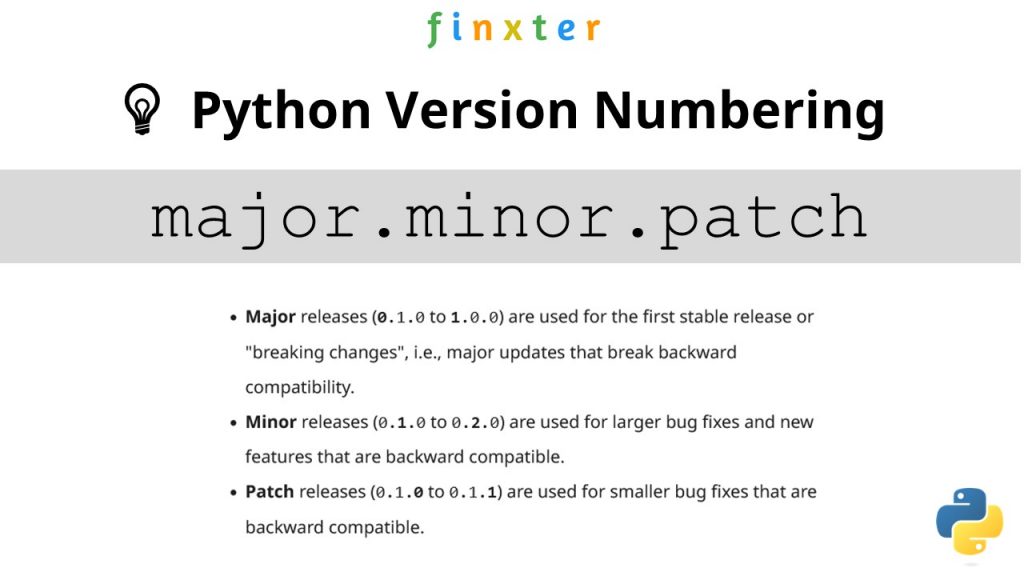
Python versioning adds a unique identifier to different package versions using semantic versioning. Semantic versioning consists of three numerical units of versioning information in the format major.minor.patch.
In this tutorial, we’ll use the shorthand general version abbreviation like so:
x.y.z
Practical examples would use numerical values for x, y, and z:
1.2.3
4.1.4
1.0.0
This is shorthand for
major.minor.patch
Major releases (0.1.0 to 1.0.0) are used for the first stable release or “breaking changes”, i.e., major updates that break backward compatibility.
Minor releases (0.1.0 to 0.2.0) are used for larger bug fixes and new features that are backward compatible.
Patch releases (0.1.0 to 0.1.1) are used for smaller bug fixes that are backward compatible.
Let’s dive into the meat of this article:
Question: How to check the (major, minor, patch) version of future in your current Python environment?
Method 1: pip show
To check which version of the Python library future is installed, run pip show future or pip3 show future in your CMD/Powershell (Windows), or terminal (macOS/Linux/Ubuntu).
This will work if your pip installation is version 1.3 or higher—which is likely to hold in your case because pip 1.3 was released a decade ago in 2013!!
Here’s an example in my Windows Powershell: I’ve highlighted the line that shows that my package version is a.b.c:
In some instances, this will not work—depending on your environment. In this case, try those commands before giving up:
python -m pip show future
python3 -m pip show future
py -m pip show future
pip3 show future
Next, we’ll dive into more ways to check your future version.
But before we move on, I’m excited to present you my new Python book Python One-Liners (Amazon Link).
If you like one-liners, you’ll LOVE the book. It’ll teach you everything there is to know about a single line of Python code. But it’s also an introduction to computer science, data science, machine learning, and algorithms. The universe in a single line of Python!
The book was released in 2020 with the world-class programming book publisher NoStarch Press (San Francisco).
To check the versions of all installed packages, use pip list and locate the version of future in the output list of package versions sorted alphabetically.
This will work if your pip installation is version 1.3 or higher.
Here’s a simplified example for Windows Powershell, I’ve highlighted the line that shows the package version is 1.2.3:
PS C:\Users\xcent> pip list
Package Version
--------------- ---------
aaa 1.2.3
...
future 1.2.3
...
zzz 1.2.3
In some instances, this will not work—depending on your environment. Then try those commands before giving up:
python -m pip list
python3 -m pip list
py -m pip list
pip3 list
Method 3: pip list + findstr on Windows
To check the versions of a single package on Windows, you can chain pip list with findstr future using the CMD or Powershell command: pip3 list | findstr future to locate the version of future in the output list of package versions automatically.
Here’s an example for future:
pip3 list | findstr future 1.2.3
Method 4: Module __version__ Attribute
To check which version is installed of a given library, you can use the library.__version__ attribute after importing the library (package, module) with import library.
Here’s the code:
import my_library
print(my_library.__version__)
# x.y.z for your version output
Here’s an excerpt from the PEP 8 docs mentioning the __version__ attribute.
“PEP 8 describes the use of a module attribute called __version__ for recording “Subversion, CVS, or RCS” version strings using keyword expansion. In the PEP author’s own email archives, the earliest example of the use of an __version__ module attribute by independent module developers dates back to 1995.”
You can also use the following one-liner snippet to run this from your terminal (macOS, Linux, Ubuntu) or CMD/Powershell (Windows):
However, this method doesn’t work for all libraries, so while simple, I don’t recommend it as a general approach for that reason.
Method 5: importlib.metadata.version
The importlib.metadata library provides a general way to check the package version in your Python script via importlib.metadata.version('future') for library future. This returns a string representation of the specific version such as 1.2.3 depending on the concrete version in your environment.
If you have created your Python environment with Anaconda, you can use conda list to list all packages installed in your (virtual) environment. Optionally, you can add a regular expression using the syntax conda list regex to list only packages matching a certain pattern.
How to list all packages in the current environment?
conda list
How to list all packages installed into the environment 'xyz'?
conda list -n xyz
Regex: How to list all packages starting with 'future'?
conda list '^future'
Method 7: pip freeze
The pip freeze command without any option lists all installed Python packages in your environment in alphabetically order (ignoring UPPERCASE or lowercase). You can spot your specific package future if it is installed in the environment.
pip freeze
Output example (depending on your concrete environment/installation):
To check the versions of a single package on Linux/Ubuntu/macOS, you can chain pip freeze with grep future using the CMD or Powershell command: pip freeze | grep future to programmatically locate the version of your particular package future in the output list of package versions.
Here’s an example for future:
pip freeze | grep future
future==1.2.3
Related Questions
Check future Installed Python
How to check if future is installed in your Python script?
To check if future is installed in your Python script, you can run import future in your Python shell and surround it by a try/except to catch a potential ModuleNotFoundError.
How to check the package version of future in Python?
To check which version of future is installed, use pip show future or pip3 show future in your CMD/Powershell (Windows), or terminal (macOS/Linux/Ubuntu) to obtain the output major.minor.patch.
pip show future # or pip3 show future
# 1.2.3
Check future Version Linux
How to check my future version in Linux?
To check which version of future is installed, use pip show future or pip3 show future in your Linux terminal.
pip show future # or pip3 show future
# 1.2.3
Check future Version Ubuntu
How to check my future version in Ubuntu?
To check which version of future is installed, use pip show future or pip3 show future in your Ubuntu terminal.
pip show future # or pip3 show future
# 1.2.3
Check future Version Windows
How to check my future version on Windows?
To check which version of future is installed, use pip show future or pip3 show future in your Windows CMD, command line, or PowerShell.
pip show future # or pip3 show future
# 1.2.3
Check future Version Mac
How to check my future version on macOS?
To check which version of future is installed, use pip show future or pip3 show future in your macOS terminal.
pip show future # or pip3 show future
# 1.2.3
Check future Version Jupyter Notebook
How to check my future version in my Jupyter Notebook?
To check which version of future is installed, add the line !pip show future to your notebook cell where you want to check. Notice the exclamation mark prefix ! that allows you to run commands in your Python script cell.
!pip show future
Output: The following is an example on how this looks for future in a Jupyter Notebook cell:
How to check the future version in my conda installation?
Use conda list 'future' to list version information about the specific package installed in your (virtual) environment.
conda list 'future'
Check future Version with PIP
How to check the future version with pip?
You can use multiple commands to check the future version with PIP such as pip show future, pip list, pip freeze, and pip list.
pip show future
pip list
pip freeze
pip list
The former will output the specific version of future. The remaining will output the version information of all installed packages and you have to locate future first.
Check Package Version in VSCode or PyCharm
How to check the future version in VSCode or PyCharm?
Integrated Development Environments (IDEs) such as VSCode or PyCharm provide a built-in terminal where you can run pip show future to check the current version of future in the specific environment you’re running the command in.
pip show future
pip3 show future pip list
pip3 list pip freeze
pip3 freeze
You can type any of those commands in your IDE terminal like so:
Summary
In this article, you’ve learned those best ways to check a Python package version:
Method 1: pip show future
Method 2: pip list
Method 3: pip list | findstr future
Method 4: library.__version__
Method 5: importlib.metadata.version
Method 6: conda list
Method 7: pip freeze
Method 8: pip freeze | grep future
Thanks for giving us your valued attention — we’re grateful to have you here!
Programmer Humor
There are only 10 kinds of people in this world: those who know binary and those who don’t. ~~~
There are 10 types of people in the world. Those who understand trinary, those who don’t, and those who mistake it for binary.
These are the eight best ways to check the installed version of the Python module abc:
Method 1: pip show abc
Method 2: pip list
Method 3: pip list | findstr abc
Method 4: library.__version__
Method 5: importlib.metadata.version
Method 6: conda list
Method 7: pip freeze
Method 8: pip freeze | grep abc
Before we go into these ways to check your abc version, let’s first quickly understand how versioning works in Python—you’ll be thankful to have spent a few seconds on this topic, believe me!
A Note on Python Version Numbering
Python versioning adds a unique identifier to different package versions using semantic versioning. Semantic versioning consists of three numerical units of versioning information in the format major.minor.patch.
In this tutorial, we’ll use the shorthand general version abbreviation like so:
x.y.z
Practical examples would use numerical values for x, y, and z:
1.2.3
4.1.4
1.0.0
This is shorthand for
major.minor.patch
Major releases (0.1.0 to 1.0.0) are used for the first stable release or “breaking changes”, i.e., major updates that break backward compatibility.
Minor releases (0.1.0 to 0.2.0) are used for larger bug fixes and new features that are backward compatible.
Patch releases (0.1.0 to 0.1.1) are used for smaller bug fixes that are backward compatible.
Let’s dive into the meat of this article:
Question: How to check the (major, minor, patch) version of abc in your current Python environment?
Method 1: pip show
To check which version of the Python library abc is installed, run pip show abc or pip3 show abc in your CMD/Powershell (Windows), or terminal (macOS/Linux/Ubuntu).
This will work if your pip installation is version 1.3 or higher—which is likely to hold in your case because pip 1.3 was released a decade ago in 2013!!
Here’s an example in my Windows Powershell: I’ve highlighted the line that shows that my package version is a.b.c:
In some instances, this will not work—depending on your environment. In this case, try those commands before giving up:
python -m pip show abc
python3 -m pip show abc
py -m pip show abc
pip3 show abc
Next, we’ll dive into more ways to check your abc version.
But before we move on, I’m excited to present you my new Python book Python One-Liners (Amazon Link).
If you like one-liners, you’ll LOVE the book. It’ll teach you everything there is to know about a single line of Python code. But it’s also an introduction to computer science, data science, machine learning, and algorithms. The universe in a single line of Python!
The book was released in 2020 with the world-class programming book publisher NoStarch Press (San Francisco).
To check the versions of all installed packages, use pip list and locate the version of abc in the output list of package versions sorted alphabetically.
This will work if your pip installation is version 1.3 or higher.
Here’s a simplified example for Windows Powershell, I’ve highlighted the line that shows the package version is 1.2.3:
PS C:\Users\xcent> pip list
Package Version
--------------- ---------
aaa 1.2.3
...
abc 1.2.3
...
zzz 1.2.3
In some instances, this will not work—depending on your environment. Then try those commands before giving up:
python -m pip list
python3 -m pip list
py -m pip list
pip3 list
Method 3: pip list + findstr on Windows
To check the versions of a single package on Windows, you can chain pip list with findstr abc using the CMD or Powershell command: pip3 list | findstr abc to locate the version of abc in the output list of package versions automatically.
Here’s an example for abc:
pip3 list | findstr abc 1.2.3
Method 4: Module __version__ Attribute
To check which version is installed of a given library, you can use the library.__version__ attribute after importing the library (package, module) with import library.
Here’s the code:
import my_library
print(my_library.__version__)
# x.y.z for your version output
Here’s an excerpt from the PEP 8 docs mentioning the __version__ attribute.
“PEP 8 describes the use of a module attribute called __version__ for recording “Subversion, CVS, or RCS” version strings using keyword expansion. In the PEP author’s own email archives, the earliest example of the use of an __version__ module attribute by independent module developers dates back to 1995.”
You can also use the following one-liner snippet to run this from your terminal (macOS, Linux, Ubuntu) or CMD/Powershell (Windows):
However, this method doesn’t work for all libraries, so while simple, I don’t recommend it as a general approach for that reason.
Method 5: importlib.metadata.version
The importlib.metadata library provides a general way to check the package version in your Python script via importlib.metadata.version('abc') for library abc. This returns a string representation of the specific version such as 1.2.3 depending on the concrete version in your environment.
If you have created your Python environment with Anaconda, you can use conda list to list all packages installed in your (virtual) environment. Optionally, you can add a regular expression using the syntax conda list regex to list only packages matching a certain pattern.
How to list all packages in the current environment?
conda list
How to list all packages installed into the environment 'xyz'?
conda list -n xyz
Regex: How to list all packages starting with 'abc'?
conda list '^abc'
Method 7: pip freeze
The pip freeze command without any option lists all installed Python packages in your environment in alphabetically order (ignoring UPPERCASE or lowercase). You can spot your specific package abc if it is installed in the environment.
pip freeze
Output example (depending on your concrete environment/installation):
To check the versions of a single package on Linux/Ubuntu/macOS, you can chain pip freeze with grep abc using the CMD or Powershell command: pip freeze | grep abc to programmatically locate the version of your particular package abc in the output list of package versions.
Here’s an example for abc:
pip freeze | grep abc
abc==1.2.3
Related Questions
Check abc Installed Python
How to check if abc is installed in your Python script?
To check if abc is installed in your Python script, you can run import abc in your Python shell and surround it by a try/except to catch a potential ModuleNotFoundError.
How to check the package version of abc in Python?
To check which version of abc is installed, use pip show abc or pip3 show abc in your CMD/Powershell (Windows), or terminal (macOS/Linux/Ubuntu) to obtain the output major.minor.patch.
pip show abc # or pip3 show abc
# 1.2.3
Check abc Version Linux
How to check my abc version in Linux?
To check which version of abc is installed, use pip show abc or pip3 show abc in your Linux terminal.
pip show abc # or pip3 show abc
# 1.2.3
Check abc Version Ubuntu
How to check my abc version in Ubuntu?
To check which version of abc is installed, use pip show abc or pip3 show abc in your Ubuntu terminal.
pip show abc # or pip3 show abc
# 1.2.3
Check abc Version Windows
How to check my abc version on Windows?
To check which version of abc is installed, use pip show abc or pip3 show abc in your Windows CMD, command line, or PowerShell.
pip show abc # or pip3 show abc
# 1.2.3
Check abc Version Mac
How to check my abc version on macOS?
To check which version of abc is installed, use pip show abc or pip3 show abc in your macOS terminal.
pip show abc # or pip3 show abc
# 1.2.3
Check abc Version Jupyter Notebook
How to check my abc version in my Jupyter Notebook?
To check which version of abc is installed, add the line !pip show abc to your notebook cell where you want to check. Notice the exclamation mark prefix ! that allows you to run commands in your Python script cell.
!pip show abc
Output: The following is an example on how this looks for abc in a Jupyter Notebook cell:
How to check the abc version in my conda installation?
Use conda list 'abc' to list version information about the specific package installed in your (virtual) environment.
conda list 'abc'
Check abc Version with PIP
How to check the abc version with pip?
You can use multiple commands to check the abc version with PIP such as pip show abc, pip list, pip freeze, and pip list.
pip show abc
pip list
pip freeze
pip list
The former will output the specific version of abc. The remaining will output the version information of all installed packages and you have to locate abc first.
Check Package Version in VSCode or PyCharm
How to check the abc version in VSCode or PyCharm?
Integrated Development Environments (IDEs) such as VSCode or PyCharm provide a built-in terminal where you can run pip show abc to check the current version of abc in the specific environment you’re running the command in.
pip show abc
pip3 show abc pip list
pip3 list pip freeze
pip3 freeze
You can type any of those commands in your IDE terminal like so:
Summary
In this article, you’ve learned those best ways to check a Python package version:
Method 1: pip show abc
Method 2: pip list
Method 3: pip list | findstr abc
Method 4: library.__version__
Method 5: importlib.metadata.version
Method 6: conda list
Method 7: pip freeze
Method 8: pip freeze | grep abc
Thanks for giving us your valued attention — we’re grateful to have you here!
Programmer Humor
There are only 10 kinds of people in this world: those who know binary and those who don’t. ~~~
There are 10 types of people in the world. Those who understand trinary, those who don’t, and those who mistake it for binary.
The following career paths for coders interested in the broad database space are ordered alphabetically. The table shows the annual income of different job descriptions in the database space:
Job/Career Description
Annual Income $USD (Lower)
Annual Income $USD (Higher)
Cassandra Developer
110,000
145,000
Couchbase Developer
87,000
212,000
Database Administrator
83,000
131,000
Database Developer
72,000
135,000
DynamoDB Developer
70,000
160,000
IBM DB2 Developer
90,000
132,000
MariaDB Developer
70,000
100,000
Microsoft SQL Server Developer
74,000
137,000
MongoDB Developer
59,000
146,000
MS Access Developer
45,000
75,000
MySQL Developer
87,000
149,000
Oracle Developer
86,000
107,000
PL-SQL Developer
72,000
103,000
PostgreSQL Developer
104,000
133,000
RavenDB Developer
101,000
130,000
Redis Developer
100,000
126,000
SQL Developer
76,000
87,000
SQLite Developer
49,000
107,000
Table: Annual income in the US ($) of different job descriptions in the database space
Let’s dive into each of those job descriptions next!
Cassandra Developer
Cassandra is a free, open-source, distributed, NoSQL database management system (DBMS) for large amounts of data that may be distributed across many commodity servers.
A Cassandra developer manages the Cassandra system and integrates applications with the database storage solution and API.
The average annual income of a Cassandra Developer is between $110,000 and $145,500, according to Glassdoor (source).
Do you want to become a Cassandra Developer? Here’s a learning path I’d propose in five steps to get started:
Couchbase is an open-source, distributed NoSQL database infrastructure for interactive applications to serve concurrent users.
A Couchbase developer creates applications using this infrastructure—mostly for business clients.
The average Couchbase salary ranges from approximately $87,504 per year for an Inside Sales Representative to $212,621 per year for a Senior Software Engineer (source).
A database administrator (DBA) is an IT professional responsible for maintaining the reliable, efficient, and secure execution of a database management system (DBMS).
In this way, a database administrator is responsible for providing the data infrastructure of a company or organization. This involves installing, configuring, debugging, optimizing, securing, troubleshooting, and managing database systems.
DBAs can either work as employees or as freelancers remotely or onsite.
Figure: Average Income of a Database Admin in the US by Source. [1]
The average annual income of a Database Administrator in the United States is between $83,533 and $131,056, with an average of $100,920 and a statistical median of $98,860 per year.
A database engineer is responsible for providing the data infrastructure of a company or organization. This involves designing, creating, installing, configuring, debugging, optimizing, securing, and managing databases.
Database engineers can either work as employees or as freelancers remotely or onsite.
A database engineer has the following responsibilities:
Creating a new database system.
Finding a database system tailored to the needs of an organization.
Designing the data models.
Accessing the data with scripting languages including SQL-like syntax.
Installing an existing database software system onsite.
Configuring a database system.
Optimizing a database management system for performance, speed, or reliability.
Consulting management regarding data management issues.
Keeping databases secure and providing proper access control to users.
Monitoring and managing an existing database system to keep it running smoothly.
Debugging potential bugs, errors, and security issues detected at runtime.
Testing and deploying a database system on a public cloud infrastructure such as AWS.
Handling distribution issues in the case of a distributed database management system.
Ensuring budget adherence when running on a public cloud and estimating costs for private database solutions.
Communicating and negotiating with salespeople (e.g., from Oracle).
The average annual income of a Database Engineer in the United States is between $72,536 and $135,000, with an average of $103,652 and a statistical median of $106,589 per year.
Figure: Average Income of a Database Engineer in the US by Source. [1]
Amazon’s DynamoDB is a NoSQL, serverless, key-value database for high-performance applications. It is fully managed so a DynamoDB developer usually helps clients set up and connect to the database—and provides minimal maintenance support.
As a DynamoDB Developer, you can expect to earn between $70,000 and $160,000 per year according to Google (source).
Do you want to become a DynamoDB Developer?
Here’s a learning path I’d propose in five steps to get started:
Note: If I may be so blunt—I don’t recommend this career path anymore due to the “dying” interest in IBM DB2 technology.
IBM DB2 is a data processing and storage solution that helps developers quickly build and deploy applications such as natural language querying and AI. An IBM DB2 developer creates apps for and integrates them into this system.
The average annual income of an IBM DB2 Developer is $132,000 according to Glassdoor (source).
MariaDB is a database framework focusing on relational databases that are compatible with Oracle. MariaDB developers provide value to clients by integrating their applications with new or existing MariaDB databases. (Source)
The average annual income of a MariaDB Developer is $85,000 according to Payscale (source).
Microsoft SQL Server is a relational database management system (RDBMS) to store and retrieve data on the same computer or across a network. A Microsoft SQL Server Developer creates and connects applications that access the Microsoft SQL Server API. (Source)
The average annual income of a Microsoft SQL Server Developer is between $74,000 and $137,500 according to Ziprecruiter (source):
The average annual income of a MongoDB Developer is $92,414 with a most likely range between $59,000 and $146,000 and a top earner income of $222,000 according to Glassdoor (source).
MongoDB is a source-available cross-platform document-oriented database program. As a NoSQL database program, MongoDB uses JSON-like documents with optional schemas.
A MongoDB developer implements, maintains, and designs MongoDB database applications. (Source)
The average annual income of an MS Access Developer is between $45,000 (25th percentile) and $75,000 (75th percentile) according to Ziprecruiter with top developers making $122,000 and more (source).
A Microsoft Access Developer developer creates, edits, analyzes, debugs, and supervises the development of software written in the MS Access programming language.
MS Access is a database system. Although it isn’t used that much anymore, it is still a great tool for small projects. And there is a huge number of legacy systems that depend upon MS Access. (Source)
A MySQL Developer is responsible for database administration, such as performance optimization, troubleshooting, problem-solving, and customer support.
The average annual income of a MySQL Developer is between $87,828 and $149,975, according to Glassdoor (source).
An Oracle developer creates or maintains the database components of an Oracle application. They often develop new applications or convert existing applications to run in an Oracle Database environment. (Source)
The average annual income of an Oracle Developer in the United States is between $86,074 and $107,675, according to Salary.com, with an average of $97,941. (source)
PostgreSQL calls itself “The World’s Most Advanced Open Source Relational Database”.
A PostgreSQL database developer works on the PostgreSQL project whereas a PostgreSQL developer works with PostgreSQL on a third-party application. Most will take the second route, for which you need to know how to access the API. (Source)
Do you want to become a PostgreSQL developer? Here’s a learning path I’d propose in five steps to get started:
According to ZipRecruiter, the annual income of PostgreSQL developers is between $104,000 for the bottom 25th percentile, $133,000 for the 75th Percentile, and $171,500 for the top earners.
The monthly pay ranges from $8,666 to $14,291 with an average monthly income of $10,052.
The average annual income of a RavenDB Developer is hard to estimate given the limited data availability. However, RavenDB developers are NoSQL developers who earn between $101,000 (25th percentile) and $130,500 (75th percentile) with an average of $119,105 per year in the US according to Ziprecruiter (source).
A RavenDB Developer developer creates, edits, analyzes, debugs, and supervises the development of software written in the RavenDB programming language. RavenDB is a NoSQL document-oriented database written especially for the .NET framework. (Source)
Redis (Remote Dictionary Server) is a fast, open source, in-memory, key-value data store.
As a Redis developer, you will apply and develop Redis solutions for databases, caches, message brokers, and queues.
Other use cases are chat apps, gaming leaderboards, session stores, streaming apps, and handling geospatial data sources — to name just a few. (Source)
The average annual income of a Redis developer is $113,000 in the US according to PayScale (source).
An SQL Developer creates, among other things, SQL code for database access. SQL is short for Structured Query Language that is designed to manage data stored in relational databases. (Source)
The average annual income of a SQL Developer in the US is $76,110 according to PayScale and $87,489 according to Indeed.com.
SQLite is the most used database engine in the world. SQLite implements a small, fast, self-contained, high-reliability, full-featured, SQL database engine.
SQLite developers help clients set up, maintain, and manage an SQLite database for their applications. (Source)
The average annual income of a SQLite Developer is between $49,000 and $107,000 with an average of $64,977 per year according to PayScale (source).
Question: Given a Python list stored in a variable lst. How to remove the first and last elements from the list lst?
Example: The list ['Alice', 'Bob', 'Carl', 'Dave'] stored in variable lst becomes ['Bob', 'Carl'].
Method 1: Slicing List[1:-1]
To remove the first and last elements from a Python list, use the expression lst = lst[1:-1] that uses a Python feature called slicing with the syntax variable[start:stop] to iterate over a sequence starting from the start index (included) and ending in the element at stop index (excluded). If stop is a negative integer such as -i, Python takes the i-th right-most element.
To remove the first and last elements from a Python list, you can also use the slightly more complex expression lst = lst[1:len(lst)-1] that assigns the result of the slicing operation to the list and, thereby, overwrites the original longer list. We decrement the len() function result to obtain the index of the last element that is excluded from the slice.
To remove the first element of a Python list, you can use the list.pop(0) method. To remove the last element of a Python list, you can use the list.pop() method without argument. You can call both to remove the first and the last elements if the list has at least two elements.
Here’s a minimal example:
lst = ['Alice', 'Bob', 'Carl', 'Dave']
lst.pop() # remove last
lst.pop(0) # remove first
print(lst)
# ['Bob', 'Carl']
However, for a list with less than two elements, this will raise an IndexError: pop from empty list. A simple if check can make sure that the list has at least two elements—and otherwise simply override it with the empty list.
Here’s some background info in case you want to dive deeper into this approach:
The list.pop() method removes and returns the last element from an existing list. The list.pop(index) method with the optional argument index removes and returns the element at the position index.
This article will go over the top 21 most attractive developer jobs in the decade to come. Note that the purpose of this article is to look forward to the future rather than looking backward into the past. The future is inherently uncertain but we did everything we could (as you’ll see) to remain objective and use data to guide our predictions.
Here’s a quick tabular overview on the most relevant career paths and jobs you could pursue in the decade to come – if you’re a developer optimizing for the future rather than the past:
Okay, let’s dive into the meat—the most promising developer role for the upcoming decade(s)!
Blockchain Developer
A blockchain engineer operates, designs, develops, analyzes, implements, and supports a distributed blockchain network. Blockchain engineers manage specific business models dealing with blockchain technology.
The average annual income of a Blockchain engineer is between $105,180 and $108,560 according to Glassdoor (source):
But is there enough demand? Let’s have a look at Google trends to find out how interest evolves over time (source):
Do you want to become a Blockchain engineer? Here’s a learning path I’d propose in five steps to get started:
Data scientists use data to find quantifiable answers to questions that often need to be found as well!
For example, they not only find the answer to the question “How can company ABC make more money?” Instead, they may find that a better question to ask would be: “Who are the top 20% of the clients that bring 80% of the revenue, and what do they want in the first place?”
How much does a Data Scientist make per year?
Figure: Average Income of a Data Scientist in the US by Source. [1]
The average annual income of a Data Scientist in the United States is between $97,294 and $135,924 with an average of $116,505 and a median of $119,413 per year.
But is there enough demand? Let’s have a look at Google trends to find out how interest evolves over time (source):
Clearly, this is a long-term trend you can build your whole career on!
Do you want to become a Data Scientist? Here’s a step-by-step learning path I’d propose to get started with Data :
A Machine Learning Engineer creates, edits, analyzes, debugs, models, and supervises the development of machine learning models using programming languages such as Python or C++ and machine learning libraries such as Keras or TensorFlow.
How much does a Machine Learning Engineer make per year?
Figure: Average Machine Learning Engineer Income. [1]
The average annual income of a Machine Learning Engineer in the United States is between $112,000 and $157,000 with a median of $131,000 per year according to multiple data sources such as Indeed, Glassdoor, Salary.com, and Payscale.
Deep learning is a subset of machine learning using artificial neural network (ANN) models with more than three layers. ANNs are inspired by the behavior of the human brain to enable machines to learn — with the idea to connect neurons with each other via artificial “synapses” and learning is modeled as the collective weights and magnitude of the neural connections.
The average annual income of a Deep Learning Engineer in the United States is between $124,000 and $148,000 based on multiple sources such as Indeed, Ziprecruiter, and Salary.com.
A Deep Learning Engineer creates, edits, analyzes, debugs, and supervises the development of artificial neural networks (ANN) with multiple layers written in programming environments such as Python, TensorFlow, or Keras.
Do you want to become a Deep Learning Engineer? Here’s a step-by-step learning path I’d propose to get started with Deep Learning :
A computer science researcher and scientist identifies and answers open research questions in computer science. They apply scientific reasoning and research techniques to push the state-of-the-art forward in various fields such as machine learning, distributed systems, databases, algorithms, and data science.
Six of the most common activities of computer science researchers, based on my own experience:
reading research papers,
thinking about research questions and problems,
identifying research gaps and discussing them with their peers,
creating code and software systems for evaluation purposes,
writing research papers, and
presenting those scientific results at conferences and in journals.
The median annual income (=50th percentile) of a computer science researcher was $131,490 in May 2021. The bottom 10% (=10th percentile) of computer science researchers earned less than $74,210 and the top 10% (=90th percentile) earned more than $208,000.
A distributed system is a computer system spread across multiple computing devices connected via a communication network. Each participating device takes over part of the overall work performed by the system. By means of the collaboration of individual units, the system can provide services that each individual system component couldn’t provide on its own.
Some examples of distributed systems are:
Ethereumis a distributed system of Ethereum nodes connected via the Internet and a specific communication protocol.
Bitcoin is a distributed system of Bitcoin nodes connected via the Internet and a specific communication protocol as defined by the open-source Bitcoin protocol.
The World Wide Web is a distributed system of servers connected via IP to provide a coherent web experience via browsers and an HTML-like web experience.
A distributed systems engineer designs, implements, and debugs distributed systems for data storage, crypto & web3, or analytics. The idea is to design a distributed system that can provide a service to users that couldn’t be provided by a centralized system (e.g., providing a decentralized, censorship-free monetary network).
Figure: Average Income of a Distributed Systems Engineer in the US by Source. [1]
The average annual income of a Distributed Systems Engineer in the United States is between $97,000 and $169,656, with an average of $126,894 and a statistical median of $130,000 per year.
An AWS Developer creates, edits, analyzes, debugs, and supervises the development of software written for the AWS cloud services that support many programming languages such as Python or Java.
Learning AWS is one of the most important, most sought-after, and most profitable things you can do as a developer!
The average annual income of an AWS Developer in the United States is $122,799 per year according to ZipRecruiter. Another estimate is provided by Glassdoor that provides data supporting an annual income of AWS Developers of $115,000 per year.
An Android app developer is a programmer who focuses on software creation for mobile devices such as smartphones or wearables using the Android operating system.
As an Android app developer, your skill set varies depending on the concrete set of applications you’re working on. However, these skills will proof useful no matter what, and most successful Android app developers have these seven skills:
General programming skills (e.g., Java, C++, Python)
Figure: Average Income of an Android App Developer in the US by Source. [1]
The average annual income of an Android App Developer in the United States is between $85,000 and $126,577 with an average of $106,923 and a statistical median of $107,343 per year.
As a C++ developer, you create software in the programming language C++ which is among the most widely used programming languages. For example, Google, Amazon, Facebook all employ a large number of C++ developers.
The average annual income of a C++ Developer is between $45,000 and $140,000 according to PayScale with an average of $67,473 in the US based on 31 salary reports (source). But Indeed.com reports an even higher annual C++ developer income of $116,925 based on 480 salaries reported (source).
Do you want to become a C++ Developer? Here’s a step-by-step learning path I’d propose to get started with C++:
A full-stack web developer works both with back-end and front-end web technologies.
The back-end consists of the webserver infrastructure, databases, and code function integration to facilitate a smooth and secure serving of user requests.
The front-end focuses on the graphical user interface (GUI) of the website using HTML, CSS, and JavaScript with the goal of setting up the whole technology stack to enable users to view and interact with the website.
Full-stack developers have skills in all those fields so they often take crucial roles in overseeing the technical implementation of large web projects.
The average annual income of a Full-Stack Web Developer in the United States is between $79,584 and $108,984 with an average income of $98,454 and a median income of $99,274 per year according to our meta-study of 7 aggregated data sources such as Glassdoor and Indeed.
Figure: Average Income of a Full-Stack Developer in the US by Source. [1]
Let’s have a look at Google trends to find out how interest evolves over time (source):
A Solidity developer creates, edits, analyzes, and debugs code in the Solidity programming language used to develop smart contracts for modern Blockchain ecosystems such as Ethereum.
Do you want to become a Solidity Developer? Here’s a step-by-step learning path I’d propose to get started with Solidity:
A Python developer is a programmer who creates software in the Python programming language. Python developers are often involved in data science, web development, and machine learning applications.
A Python developer earns $65,000 (entry-level), $82,000 (mid-level), or $114,000 (experienced) per year in the US according to Indeed. (source)
Do you want to become a Python Developer? Here’s a step-by-step learning path I’d propose to get started with Python:
The average annual income of a Crypto Trading Bot Developer is similar to algorithmic traders of $104,422 (source). However, due to the novelty of the industry, there’s little official data. If you assume an hourly rate of $50 and an annual 2000 hours worked, the annual income of a crypto trading bot developer would be $100,000.
Let’s have a look at Google trends to find out how interest evolves over time (source):
Yes, this definitely is an interesting industry for programmers to make $50 per hour and more!
Trading bots are software programs that talk directly to financial exchanges. Crypto trading bots are programs that talk to crypto exchanges. A crypto bot developer develops those programs. Crypto trading bot developers tend to be very proficient in trading, financial algorithms, APIs, and web services.
Do you want to become a Crypto Trading Bot Developer? Here’s a learning path I’d propose in five steps to get started:
An Azure Developer creates, designs, edits, analyzes, debugs, deploys, and supervises the development of cloud applications written for the Azure cloud and development ecosystem.
The average annual income of an Azure Developer in the United States is $122,031 per year according to Talent.com. Entry-level Azure Developers start with $107,250 per year. Top earners make $127,000 and more in the US according to Glassdoor!
Let’s have a look at Google trends to find out how interest evolves over time (source):
Game Development is the art of creating games that involves multiple development stages such as game concept generation, game design, game development, game testing, game building, game deployment, and game release.
Game developers and video game developers create code for games in a variety of formats such as desktop-based games (Windows, macOS, Linux), consoles (PS2), web browsers (Chrome, Safari), crypto (Ethereum, Polygon/Optimism, Solana), and mobile phone (iOS, Android).
Figure: Average Income of a Game Developer in the US by Source. [1]
The average annual income of a Game Developer in the United States is between $64,053 and $115,846 with an average of $89,889 and a median of $92,061 per year.
A JavaScript developer creates dynamic web applications focusing mostly on the front-end logic—but recently some back-end JavaScript frameworks emerged as well. If you like web development and programming user interfaces, you’ll love the work as a JavaScript developer.
The average annual income of a JavaScript Developer is between $62,000 and $118,000 with an average of $84,000 per year according to Daxx.com and PayScale (source).
Do you want to become a JavaScript Developer? Here’s a step-by-step learning path I’d propose to get started with JavaScript and web development:
A quantitative developer (i.e., Quant) is a financial programmer focused on financial modeling and quantitative finance and trading.
Quants use their profound knowledge of
statistics and math,
finance,
data structures,
algorithms,
machine learning,
scientific computing,
data science,
chart technique, and
data visualization
to create models for financial prediction, backtesting, analysis, and implementation of trading and financial applications (e.g., for risk management).
Figure: Average Income of a Quant Developer in the US by Source. [1]
The expected annual income of a Quantitative Developer (Quant) in the United States is between $86,528 and $170,000 per year, with an average annual income of $127,375 per year and a median income of $136,321 per year.
A security engineer is a “white-hat hacker”, i.e., an IT professional who analyzes computer systems and computer networks to ensure they are running securely. This involves proactive analysis and understanding of possible security threats and attack vectors and designing the system to minimize the exposure to these threats.
Figure: Average Income of a Security Engineer in the US by Source. [1]
The average annual income of a Security Engineer in the United States is between $75,732 and $144,874, with an average of $108,851 and a statistical median of $105,928 per year.
A Test Automation Engineer is a software developer who creates automated software tests for existing or new applications. Testing is a crucial phase in the software development cycle to learn about bugs, usability, and security issues and fix them before deploying an application in the real world.
Figure: Average Income of a Test Automation Engineer in the US by Source. [1]
The expected annual income of a Test Automation Engineer in the United States is between $74,821 and $120,000 per year, with an average annual income of $95,285 per year and a median income of $93,657 per year.
A VHDL Developer developer creates, edits, analyzes, debugs, and supervises the development of software written in the VHDL programming language. VHDL is the other popular hardware description language. In fact, most professionals who know VHDL also know Verilog.
The annual income of a VHDL developer in the US can be as high as $169,500 and as low as $32,000 according to Ziprecruiter (source). Most VHDL developer make between $65,000 (25th percentile) and $135,000 (75th percentile) with top earners (90th percentile) making $157,500 annually across the United States.
A web developer is a programmer who specializes in the development of websites or applications viewed on web browsers, mobile devices, and large desktop screens that are transported over private or public networks such as the Internet.
A front-end web developer focuses on the graphical user interface (GUI) of the website using HTML, CSS, and JavaScript with the goal of setting up the whole technology stack to enable users to view and interact with the website.
The average annual income of a Front-end Web Developer in the United States is between $61,194 and $119,224 with an average income of $89,683 and a median income of $90,499 per year according to our meta-study of 8 aggregated data sources such as Glassdoor and Indeed.
The following graphic shows the individual data sources, as well as the average and median income level of a web developer in the US:
Figure: Average Income of a Front-End Web Developer in the US by Source. [1]
Feel free to join our free email academy to stay tuned and informed in many of those fields!
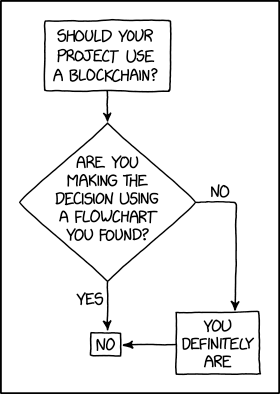
Programmer Humor – Blockchain
“Blockchains are like grappling hooks, in that it’s extremely cool when you encounter a problem for which they’re the right solution, but it happens way too rarely in real life.”source – xkcd
Where to Go From Here?
Enough theory. Let’s get some practice!
Coders get paid six figures and more because they can solve problems more effectively using machine intelligence and automation.
To become more successful in coding, solve more real problems for real people. That’s how you polish the skills you really need in practice. After all, what’s the use of learning theory that nobody ever needs?
You build high-value coding skills by working on practical coding projects!
Do you want to stop learning with toy projects and focus on practical code projects that earn you money and solve real problems for people?
If your answer is YES!, consider becoming a Python freelance developer! It’s the best way of approaching the task of improving your Python skills—even if you are a complete beginner.
If you just want to learn about the freelancing opportunity, feel free to watch my free webinar “How to Build Your High-Income Skill Python” and learn how I grew my coding business online and how you can, too—from the comfort of your own home.
In this article, I’ll show you how to check the version of a Python module (package, library).
These are the eight best ways to check the version of a Python module:
Method 1: pip show my_package
Method 2: pip list
Method 3: pip list | findstr my_package
Method 4: my_package.__version__
Method 5: importlib.metadata.version
Method 6: conda list
Method 7: pip freeze
Method 8: pip freeze | grep my_package
Let’s dive into some examples for each of those next!
Method 1: pip show
To check which version of a given Python library, say xyz, is installed, use pip show xyz or pip3 show xyz. For example, to check the version of your NumPy installation, run pip show numpy in your CMD/Powershell (Windows), or terminal (macOS/Linux/Ubuntu).
This will work if your pip installation is version 1.3 or higher—which is likely to hold in your case because pip 1.3 was released a decade ago in 2013!!
Here’s an example in my Windows Powershell for NumPy: I’ve highlighted the line that shows that my package version is 1.21.0:
PS C:\Users\xcent> pip show numpy
Name: numpy
Version: 1.21.0
Summary: NumPy is the fundamental package for array computing with Python.
Home-page: https://www.numpy.org
Author: Travis E. Oliphant et al.
Author-email: None
License: BSD
Location: c:\users\xcent\appdata\local\programs\python\python39\lib\site-packages
Requires:
Required-by: pandas, matplotlib
In some instances, this will not work—depending on your environment. In this case, try those commands before giving up:
python -m pip show numpy
python3 -m pip show numpy
py -m pip show numpy
pip3 show numpy
Of course, replace “numpy” with your particular package name.
Method 2: pip list
To check the versions of all installed packages, use pip list and locate the version of your particular package in the output list of package versions sorted alphabetically.
This will work if your pip installation is version 1.3 or higher.
Here’s an example in my Windows Powershell, I’ve highlighted the line that shows that my package version is 1.21.0:
In some instances, this will not work—depending on your environment. Then try those commands before giving up:
python -m pip list
python3 -m pip list
py -m pip list
pip3 list
Method 3: pip list + findstr on Windows
To check the versions of a single package on Windows, you can chain pip list with findstr xyz using the CMD or Powershell command: pip3 list | findstr numpy to locate the version of your particular package xyz in the output list of package versions automatically.
Here’s an example for numpy:
pip3 list | findstr numpy 1.21.0
Method 4: Library.__version__ Attribute
To check your package installation in your Python script, you can also use the xyz.__version__ attribute of the particular library xyz. Not all packages provide this attribute but as it is recommended by PEP, it’ll work for most libraries.
Here’s the code:
import numpy
print(numpy.__version__)
# 1.21.0
Here’s an excerpt from the PEP 8 docs mentioning the __version__ attribute.
“PEP 8 describes the use of a module attribute called __version__ for recording “Subversion, CVS, or RCS” version strings using keyword expansion. In the PEP author’s own email archives, the earliest example of the use of an __version__ module attribute by independent module developers dates back to 1995.”
Method 5: importlib.metadata.version
The importlib.metadata library provides a general way to check the package version in your Python script via importlib.metadata.version('xyz') for library xyz. This returns a string representation of the specific version. For example, importlib.metadata.version('numpy') returns 1.21.0 in my current environment.
If you have created your Python environment with Anaconda, you can use conda list to list all packages installed in your (virtual) environment. Optionally, you can add a regular expression using the syntax conda list regex to list only packages matching a certain pattern.
How to list all packages in the current environment?
conda list
How to list all packages installed into the environment 'xyz'?
conda list -n xyz
Regex: How to list all packages starting with 'py'?
conda list '^py'
Regex: How to list all packages starting with 'py' or 'code'?
conda list '^(py|code)'
Method 7: pip freeze
The pip freeze command without any option lists all installed Python packages in your environment in alphabetically order (ignoring UPPERCASE or lowercase). You can spot your specific package if it is installed in the environment.
pip freeze
Output from my local Windows environment with PowerShell (strange packages I know) ;):
To check the versions of a single package on Linux/Ubuntu/macOS, you can chain pip freeze with grep xyz using the CMD or Powershell command: pip freeze | grep xyz to programmatically locate the version of your particular package xyz in the output list of package versions.
To check which version of a given Python package is installed, use pip show my_package. For example, to check the version of your NumPy installation, run pip show numpy in your CMD/Powershell (Windows), or terminal (macOS/Linux/Ubuntu).
pip show my_package
Check Package Version Linux
How to check my package version in Linux?
To check which version of a given Python package is installed, use pip show my_package. For example, to check the version of your NumPy installation, run pip show numpy in your Linux terminal.
pip show my_package
Check Package Version Ubuntu
How to check my package version in Ubuntu?
To check which version of a given Python package is installed, use pip show my_package. For example, to check the version of your NumPy installation, run pip show numpy in your Ubuntu terminal/shall/bash.
pip show my_package
Check Package Version Windows
How to check package version on Windows?
To check which version of a given Python package is installed, use pip show my_package. For example, to check the version of your NumPy installation, run pip show numpy in your Windows CMD, command line, or PowerShell.
pip show my_package
Check Package Version Mac
How to check package version on macOS?
To check which version of a given Python package is installed, use pip show my_package. For example, to check the version of your NumPy installation, run pip show numpy in your macOS terminal.
pip show my_package
Check Package Version Jupyter Notebook
How to check package version in your Jupyter Notebook?
To check which version of a given Python package is installed, add the line !pip show my_package to your notebook cell where you want to check. Notice the exclamation mark prefix ! that allows you to run commands in your Python script cell. For example, to check the version of your NumPy installation, run !pip show numpy in your macOS terminal.
!pip show my_package
For example, this is a screenshot on how this looks for numpy in a Jupyter Notebook:
Check Package Version Terminal
How to check package version in my terminal?
To check which version of a given Python package is installed, use pip show my_package. For example, to check the version of your NumPy installation, run pip show numpy in your terminal.
pip show my_package
Check Package Version Conda/Anaconda
How to check package version in my conda installation?
Use conda list 'my_package' to list version information about the specific package installed in your (virtual) environment.
conda list 'my_package'
Check Package Version with PIP
How to check package version with pip?
You can use multiple commands to check the package version with PIP such as pip show my_package, pip list, pip freeze, and pip list.
pip show my_package
pip list
pip freeze
pip list
Check Package Version in VSCode or PyCharm
How to check package version in VSCode or PyCharm?
Integrated Development Environments (IDEs) such as VSCode or PyCharm provide a built-in terminal where you can run pip show my_package to check the current version of my_package in the specific environment you’re running the command in.
pip show my_package
pip list
pip freeze
You can type any of those commands in your IDE terminal like so:
Summary
In this article, you’ve learned those best ways to check a Python package version:
Method 1: pip show my_package
Method 2: pip list
Method 3: pip list | findstr my_package
Method 4: my_package.__version__
Method 5: importlib.metadata.version
Method 6: conda list
Method 7: pip freeze
Method 8: pip freeze | grep my_package
Thanks for giving us your valued attention — we’re grateful to have you here!
Programmer Humor
There are only 10 kinds of people in this world: those who know binary and those who don’t. ~~~
There are 10 types of people in the world. Those who understand trinary, those who don’t, and those who mistake it for binary.
This method uses List Comprehension to apply a mathematical operation to each element and return the result.
prime_nums = [2, 3, 5, 7, 11]
mult_result = [x * 2 for x in prime_nums]
print(mult_result)
Above declares the first (5) Prime Numbers and saves this List to prime_nums. Next, List Comprehension loops through each element and applies the multiplication operation to each. The output saves to mult_result and is output to the terminal.
[4, 6, 10, 14, 22]
Method 2: Use Pandas tolist()
This method requires an additional library to be imported, Pandas, to use the tolist() function.
Above, imports the Pandas Library. Click here if this requires installation. Then, the first (5) Prime Numbers are declared and saved to prime_nums.
Next, prime_nums is passed as an argument to the pd.Series() function and returns mult_result. The output of mult_result at this point is shown below.
0 2
1 3
2 5
3 7
4 11
dtype: int64
Now, we need to convert this output to a list (tolist()) and apply the multiplication operation to each element. The results save to mult_result and are output to the terminal.
[4, 6, 10, 14, 22]
Method 3: Use map and lambda Functions
This method wraps the map(), and lambda functions inside a Python List and calculates the results.
Above declares the first (5) Prime Numbers and saves them to prime_nums. The next line does the following:
The map() function is passed the lambda() function as an argument (map(lambda x: x*2, prime_nums)).
The lambda performs the multiplication operation to each element of prime_nums and saves it to map() as an object similar to below. <map object at 0x000001DC99CBBBB0>
Above, imports the NumPy Library. Click here if this requires installation. Then the first (5) Prime Numbers are declared and saved to prime_nums.
Next, prime_nums is passed as an argument to np.array() where the multiplication operation is applied to each element. Then, this is converted to a List, saved to the_result and output to the terminal.
[4, 6, 10, 14, 22]
Method 5: Use Slicing
This method uses Python’s infamous Slicing! No overhead, and a very pythonic way to resolve the issue.
prime_nums = [2, 3, 5, 7, 11]
prime_nums[:] = [x * 2 for x in prime_nums]
print(prime_nums)
Above declares the first (5) Prime Numbers and saves them to prime_nums.
Then slicing is applied and used in conjunction with List Comprehension to apply the multiplication operation to each element. The results save back to prime_nums and are output to the terminal.
[4, 6, 10, 14, 22]
A Finxter Favorite!
Summary
These methods of multiplying list elements by a number should give you enough information to select the best one for your coding requirements.
Good Luck & Happy Coding!
Programmer Humor
Programmer 1: We have a problem Programmer 2: Let’s use RegEx! Programmer 1: Now we have two problems
The TypeError: unhashable type: 'list' usually occurs when you try to use a list object as a set element or dictionary key and Python internally passes the unhashable list into the hash() function. But as lists are mutable objects, they do not have a fixed hash value. The easiest way to fix this error is to use a hashable tuple instead of a non-hashable list as a dictionary key or set element.
We’ll show how this is done in the remaining article. The last method is a unique way to still use lists in sets or dictionary keys that you likely won’t find anywhere else, so keep reading and learn something new!
Problem Formulation and Explanation
Question: How to fix the TypeError: unhashable type: 'list' in your Python script?
As you’ve seen in the previous two code snippets, the TypeError: unhashable type: 'list' usually occurs when you try to use a list object as a set element or dictionary key.
But let’s dive deeper to find the real reason for the error:
Minimal Reproducible Error Example: Lists are mutable objects so they do not have a fixed hash value. In fact, the error can be reproduced most easily when calling hash(lst) on a list object lst.
This is shown in the following minimal example that causes the error:
hash([1, 2, 3])
The output is the error message:
Traceback (most recent call last): File "C:\Users\xcent\Desktop\code.py", line 1, in <module> hash([1, 2, 3])
TypeError: unhashable type: 'list'
Because you cannot successfully pass a list into the hash() function, you cannot directly use lists as set elements or dictionary keys.
But let’s dive into some solutions to this problem!
Method 1: Use Tuple Instead of List as Dictionary Key
The easiest way to fix the TypeError: unhashable type: 'list' is to use a hashable tuple instead of a non-hashable list as a dictionary key. For example, whereas d[my_list] will raise the error, you can simply use d[tuple(my_list)] to fix the error.
The error may also occur when you try to use a list as a set element. Next, you’ll learn what to do in that case:
Method 2: Use Tuple Instead of List as Set Element
To fix the TypeError: unhashable type: 'list' when trying to use a list as a set element is to use a hashable tuple instead of a non-hashable list. For example, whereas set.add([1, 2]) will raise the error, you can simply use set.add((1, 2)) or set.add(tuple([1, 2])) to fix the error.
Here’s a minimal example:
my_set = set() # Error: my_set.add([1, 2]) # This is how to resolve the error:
my_set.add((1, 2))
# Or: my_set.add(tuple([1, 2])) print(my_set)
# {(1, 2)}
If you want to convert a list of lists to a set, you can check out my detailed tutorial on the Finxter blog:
Method 3: Use String Representation of List as Set Element or Dict Key
To fix the TypeError: unhashable type: 'list', you can also use a string representation of the list obtained with str(my_list) as a set element or dictionary key. Strings are hashable and immutable, so Python won’t raise the error when using this approach.
Here’s an example:
my_list = [1, 2, 3] # 1. Use str repr of list as dict key:
d = {}
d[str(my_list)] = 'hello Finxters' # 2. Use str repr of list as set element:
s = set()
s.add(str(my_list))
In both cases, we used the string representation of the list instead of the list itself. The string is immutable and hashable and it fixes the error.
But what if you really need a mutable set or dictionary key? Well, you shouldn’t but you can by using this approach:
Method 4: Create Hashable Wrapper List Class
You can still use a mutable list as a dictionary key, set element, or argument of the hash() function by defining a wrapper class, say HackedList, that overrides the __hash__()dunder method.
Python’s built-inhash(object) function takes one object as an argument and returns its hash value as an integer. You can view this hash value as a unique fingerprint of this object.
The Python __hash__() method implements the built-in hash() function.
Here’s the minimal code example that creates a wrapper class HackedList that overrides the __hash__() dunder method so you can use an instance of HackedList as a dictionary key, set element, or just as input to the hash() function:
my_list = [1, 2, 3] class HackedList: def __init__(self, lst): self.lst = lst def __hash__(self): return len(self.lst) my_hacked_list = HackedList(my_list) # 1. Pass hacked list into hash() function:
print(hash(my_hacked_list)) # Output: 3 # 2. Use hacked list as dictionary key:
d = dict()
d[my_hacked_list] = 'hello Finxters' # 3: Use hacked list as set element:
s = set()
s.add(my_hacked_list)
Here’s the content of the dictionary and set defined previously:
{<__main__.HackedList object at 0x0000016CFB0BDFA0>: 'hello Finxters'}
{<__main__.HackedList object at 0x0000016CFB0BDFA0>}
If you want to fix the ugly output, you can additionally define the __str__() and __repr__() magic methods like so:
my_list = [1, 2, 3] class HackedList: def __init__(self, lst): self.lst = lst def __hash__(self): return len(self.lst) def __str__(self): return str(self.lst) def __repr__(self): return str(self.lst) my_hacked_list = HackedList(my_list) # 1. Pass hacked list into hash() function:
print(hash(my_hacked_list)) # Output: 3 # 2. Use hacked list as dictionary key:
d = dict()
d[my_hacked_list] = 'hello Finxters' # 3: Use hacked list as set element:
s = set()
s.add(my_hacked_list) print(d)
print(s)
Beautiful output:
{[1, 2, 3]: 'hello Finxters'}
{[1, 2, 3]}
Summary
The five most Pythonic ways to convert a list of lists to a set in Python are:

 This article will show you how to use the
 Interactive Live App: https://dash-webb-compare.herokuapp.com/
 Full Source Code: https://github.com/AnnMarieW/webb-compare
 Question: How would we write code to increment a Dictionary value in Python?



 Do you want to go deep into databases?


 If your answer is YES!, consider becoming a
 A Finxter Favorite!
 Minimal Reproducible Error Example: Lists are