Posted on Leave a comment

Chart JS Pie Chart Example

by Vincy. Last modified on December 7th, 2022.

In this tutorial, we are going to learn how to create a pie chart using JavaScript libraries. We have used Chart.js library for the generating the pie charts. As an alternate option, I have also presented a 3d pie chart example using Google charts library.

Let us see the following examples of creating a pie chart using JavaScript.

  • Quick example – Simple pie chart example via ChartJS.
  • 3D pie chart with Google Charts library.
  • Responsive ChartJS pie chart.

Quick example – Simple pie chart example via ChartJS

<!DOCTYPE html>
<html>
<head>
<title>Chart JS Pie Chart</title>
<link rel='stylesheet' href='style.css' type='text/css' />
</head>
<body> <div class="phppot-container"> <h1>Responsive Pie Chart</h1> <div> <canvas id="pie-chart"></canvas> </div> </div> <script src="https://cdn.jsdelivr.net/npm/chart.js@4.0.1/dist/chart.umd.min.js"></script> <script> new Chart(document.getElementById("pie-chart"), { type : 'pie', data : { labels : [ "Lion", "Horse", "Elephant", "Tiger", "Jaguar" ], datasets : [ { backgroundColor : [ "#51EAEA", "#FCDDB0", "#FF9D76", "#FB3569", "#82CD47" ], data : [ 418, 263, 434, 586, 332 ] } ] }, options : { title : { display : true, text : 'Chart JS Pie Chart Example' } } }); </script>
</body>
</html>

Creating a ChartJS pie chart is a three-step process as shown below.

  1. Add the ChartJS library include to the head section of your HTML.
  2. Add a canvas element to the HTML.
  3. Add the ChartJS class initiation and invoking script before closing the HTML body tag.

About the ChartJS pie chart script

The script sets the following properties to initiate the ChartJS library.

  • type – The type of the chart supported by the ChartJS library.
  • data – It sets the chart labels and datasets. The dataset contains the data array and the display properties.
  • options – It sets the chart title text and its display flag as a boolean true to show it on the browser.

Output:
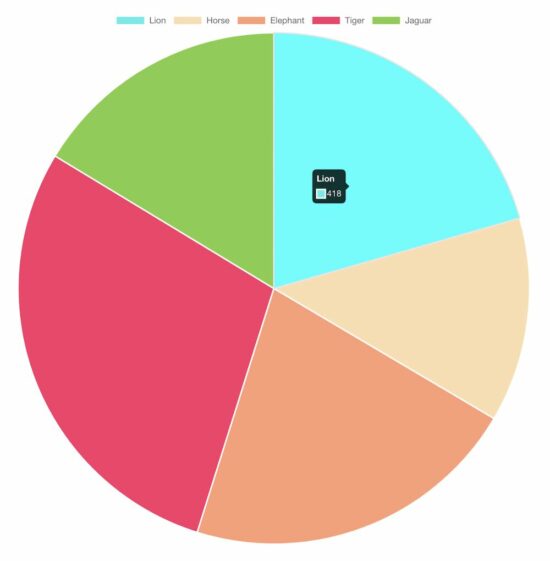
chartjs pie chart

In a previous tutorial, we have seen the various ways of creating line charts using the Chart JS library.

View Demo

Creating 3D pie chart

There is no option for a 3D pie chart using chart JS. For those users who have landed here looking for a 3D pie chart, you may try Google Charts.

This example uses Google Charts to create a 3D pie chart for a webpage. In a previous code, we use Google Charts to render a bar chart to show students’ attendance statistics.

The Google Charts JavaScript code prepares the array of animal distribution data. This array is for sending it to the chart data table which helps to draw the pie chart.

The Google Charts library accepts the is3D with a boolean true to output a 3D pie chart.

It creates a chart visualization object with the reference with respect to the UI element target. Then, it calls the Google Charts library function to draw and render the chart.

<!DOCTYPE html>
<html>
<head>
<title>3d Pie Chart JavaScript with Google Charts</title>
<link rel='stylesheet' href='style.css' type='text/css' /> <script type="text/javascript" src="https://www.gstatic.com/charts/loader.js"></script>
<script type="text/javascript"> google.charts.load("current", { packages : [ "corechart" ] }); google.charts.setOnLoadCallback(drawChart); function drawChart() { var data = google.visualization.arrayToDataTable([ [ 'Animal', 'Distribution' ], [ 'Horse', 11 ], [ 'Elephant', 2 ], [ 'Tiger', 2 ], [ 'Lion', 2 ], [ 'Jaguar', 7 ] ]); var options = { title : '3d Pie Chart JavaScript with Google Charts', is3D : true, }; var chart = new google.visualization.PieChart(document .getElementById('3d-pie-chart')); chart.draw(data, options); }
</script>
</head>
<body> <div class="phppot-container"> <h1>3d Pie Chart JavaScript with Google Charts</h1> <div id="3d-pie-chart" style="width: 700px; height: 500px;"></div> </div>
</body>
</html>
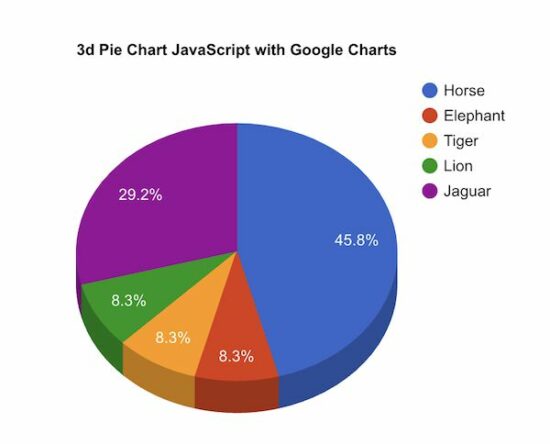
3d pie chart

Responsive pie chart using Chart JS

The Chart JS library provides JavaScript options to make the output pie chart responsive.

This example script uses those options to render a responsive pie chart in a browser.

The JavaScript code to render a responsive pie chart is the same as we have seen in the quick example above.

The difference is nothing but to set responsive: true in the ChartJS options properties.

If you want to create a responsive chart using Google Charts, then the linked article has an example.

<!DOCTYPE html>
<html>
<head>
<title>Responsive Pie Chart</title>
<link rel='stylesheet' href='style.css' type='text/css' />
<meta name="viewport" content="width=device-width, initial-scale=1">
</head>
<body> <div class="phppot-container"> <h1>Responsive Pie Chart</h1> <div> <canvas id="pie-chart"></canvas> </div> </div> <script src="https://cdn.jsdelivr.net/npm/chart.js@4.0.1/dist/chart.umd.min.js"></script> <script> new Chart(document.getElementById("pie-chart"), { type : 'pie', data : { labels : [ "Lion", "Horse", "Elephant", "Tiger", "Jaguar" ], datasets : [ { backgroundColor : [ "#51EAEA", "#FCDDB0", "#FF9D76", "#FB3569", "#82CD47" ], data : [ 418, 263, 434, 586, 332 ] } ] }, options : { title : { display : true, text : 'Responsive Pie Chart' }, responsive : true } }); </script>
</body>
</html>

View DemoDownload

↑ Back to Top

Posted on Leave a comment

How to Convert an Octal Escape Sequence in Python – And Vice Versa?

5/5 – (1 vote)

This tutorial will show you how to convert an

  • octal escape sequence to a Python string, and a
  • Python string to an octal escape sequence.

But let’s quickly recap what an octal escape sequence is in the first place! 👇

This is you and your friend celebrating after having solved this problem! 🥳

What Is An Octal Escape Sequence?💡

An Octal Escape Sequence is a backslash followed by 1-3 octal digits (0-7) such as \150 which encodes the ASCII character 'h'. Each octal escape sequence encodes one character (except invalid octal sequence \000). You can chain together multiple octal escape sequences to obtain a word.

Problem Formulation

💬 Question: How to convert an octal escape sequence to a string and vice versa in Python?

Examples

Octal String
\101 \102 \103 'ABC'
\101 \040 \102 \040 \103 'A B C'
\141 \142 \143 'abc'
\150 \145 \154 \154 \157 'hello'
\150 \145 \154 \154 \157 \040 \167 \157 \162 \154 \144 'hello world'

Python Octal to String Built-In Conversion

You don’t need to “convert” an octal escape sequence to a Unicode string if you already have it represented by a bytes object. Python automatically resolves the encoding.

See here:

>>> b'\101\102\103'
b'ABC'
>>> b'101\040\102\040\103'
b'101 B C'
>>> b'\101\040\102\040\103'
b'A B C'
>>> b'\141\142\143'
b'abc'
>>> b'\150\145\154\154\157'
b'hello'
>>> b'\150\145\154\154\157\040\167\157\162\154\144'
b'hello world'

Python Octal to String Explicit Conversion

The bytes.decode('unicode-escape') function converts a given bytes object represented by an (octal) escape sequence to a Python string. For example, br'\101'.decode('unicode-escape') yields the Unicode (string) character 'A'.

def octal_to_string(x): ''' Converts an octal escape sequence to a string''' return x.decode('unicode-escape')

Example: Convert the octal representations presented above:

octals = [br'\101\102\103', br'\101\040\102\040\103', br'\141\142\143', br'\150\145\154\154\157', br'\150\145\154\154\157\040\167\157\162\154\144'] for octal in octals: print(octal_to_string(octal)) 

This leads to the following expected output:

ABC
A B C
abc
hello
hello world

Python String to Octal

To convert a Python string to an octal escape sequence representation, iterate over each character c and convert it to an octal escape sequence using oct(ord(c)).

The result uses octal representation such as '0o123'. You can do string manipulation, such as slicing and string concatenation, to bring it into the final version '\123', for instance.

Here’s the function that converts string to octal escape sequence format:

def string_to_octal(x): ''' Converts a string to an octal escape sequence''' return '\\' + '\\'.join(oct(ord(c))[2:] for c in x)

✅ Background:

  • The ord() function takes a character (=string of length one) as an input and returns the Unicode number of this character. For example, ord('a') returns the Unicode number 97. The inverse function of ord() is the chr() function, so chr(ord('a')) returns the original character 'a'.
  • The oct() function takes one integer argument and returns an octal string with prefix "0o".

Let’s check how our strings can be converted to the octal escape sequence representation using this function:

strings = ['ABC', 'A B C', 'abc', 'hello', 'hello world'] for s in strings: print(string_to_octal(s))

And here’s the expected output:

\101\102\103
\101\40\102\40\103
\141\142\143
\150\145\154\154\157
\150\145\154\154\157\40\167\157\162\154\144

If you don’t like the one-liner solution provided above, feel free to use this multi-liner instead that may be easier to read:

def string_to_octal(x): ''' Converts a string to an octal escape sequence''' result = '' for c in x: result += '\\' + oct(ord(c))[2:] return result

If you want to train your Python one-liner skills instead, check out my book! 👇

Python One-Liners Book: Master the Single Line First!

Python programmers will improve their computer science skills with these useful one-liners.

Python One-Liners

Python One-Liners will teach you how to read and write “one-liners”: concise statements of useful functionality packed into a single line of code. You’ll learn how to systematically unpack and understand any line of Python code, and write eloquent, powerfully compressed Python like an expert.

The book’s five chapters cover (1) tips and tricks, (2) regular expressions, (3) machine learning, (4) core data science topics, and (5) useful algorithms.

Detailed explanations of one-liners introduce key computer science concepts and boost your coding and analytical skills. You’ll learn about advanced Python features such as list comprehension, slicing, lambda functions, regular expressions, map and reduce functions, and slice assignments.

You’ll also learn how to:

  • Leverage data structures to solve real-world problems, like using Boolean indexing to find cities with above-average pollution
  • Use NumPy basics such as array, shape, axis, type, broadcasting, advanced indexing, slicing, sorting, searching, aggregating, and statistics
  • Calculate basic statistics of multidimensional data arrays and the K-Means algorithms for unsupervised learning
  • Create more advanced regular expressions using grouping and named groups, negative lookaheads, escaped characters, whitespaces, character sets (and negative characters sets), and greedy/nongreedy operators
  • Understand a wide range of computer science topics, including anagrams, palindromes, supersets, permutations, factorials, prime numbers, Fibonacci numbers, obfuscation, searching, and algorithmic sorting

By the end of the book, you’ll know how to write Python at its most refined, and create concise, beautiful pieces of “Python art” in merely a single line.

Get your Python One-Liners on Amazon!!

Posted on Leave a comment

Python | Split String Variable Spaces

Rate this post

⭐Summary: The most efficient way to split a string using variable spaces is to use the split function like so given_string.split(). An alternate approach is to use different functions of the regex package to split the string at multiple whitespaces.

Minimal Example

text = "a b c d"
# Method 1
print(text.split())
# Method 2
import re
print(re.split('\s+', text))
# Method 3
print([x for x in re.findall(r'\S+', text) if x != ''])
# Method 4
print(re.sub(r'\s+', ',', text).split(','))
# Method 5
print(list(filter(None, text.split()))) # ['a', 'b', 'c', 'd']

Problem Formulation

📜Problem: Given a string. How will you split the string using multiple spaces?

Example

# Input
text = "abc xyz lmn pqr"
# Output
['abc', 'xyz', 'lmn', 'pqr']

The given input has multiple spaces between each substring, i.e., there are three spaces after abc, two spaces after xyz while a single space after lmn. So, not only do you have multiple spaces between the substring but also varied number of spaces. Can you split the string by varied and multiple spaces?


Though the question might look daunting at first but once you get hold of it, the solutions to this problem are easier than one can imagine. So, without further delay let us dive into the different ways of solving the given problem.

Method 1: Using split()

The built-in split('sep') function allows you to split a string in Python based on a given delimiter. By default the split function splits a given string at whitespaces. Meaning, if you do not pass any delimiter to the split function then the string will be split at whitespaces.

You can use this default property of the split function and successfully split the given string at multiple spaces just by using the split() function.

Code:

text = "abc xyz lmn pqr"
print(text.split()) # ['abc', 'xyz', 'lmn', 'pqr']

📚Recommended DigestPython String split()

Method 2: Using re.split

The re.split(pattern, string) method matches all occurrences of the pattern in the string and divides the string along the matches resulting in a list of strings between the matches. For example, re.split('a', 'bbabbbab') results in the list of strings ['bb', 'bbb', 'b'].

Approach: To split the string using multiple space characters use re.split("\s+", text) where \s+ is the matching pattern and it represents a special sequence that returns a match whenever it finds any whitespace character and splits the string. So, whenever there’s a space or multiple spaces (any number of occurrences of space are whitespace characters) the string will be split.

Code:

import re
text = "abc xyz lmn pqr"
print(re.split('\s+', text))
# ['abc', 'xyz', 'lmn', 'pqr']

📚Recommended Read:  Python Regex Split.

Method 3: Using re.findall

The re.findall(pattern, string) method scans the string from left to right, searching for all non-overlapping matches of the pattern. It returns a list of strings in the matching order when scanning the string from left to right.

📚Recommended Read: Python re.findall() – Everything You Need to Know

Code:

import re
text = "abc xyz lmn pqr"
print([x for x in re.findall(r'\S+', text) if x != ''])
# ['abc', 'xyz', 'lmn', 'pqr']

Method 4: Using re.sub

The regex function re.sub(P, R, S) replaces all occurrences of the pattern P with the replacement R in string S. It returns a new string. For example, if you call re.sub('a', 'b', 'aabb'), the result will be the new string 'bbbb' with all characters 'a' replaced by 'b'.

Approach: Use the re.sub method to replace all occurrences of space characters in the given string with a comma. Thus, the string will now have commas instead of space characters and you can simply split it using a normal string split method by passing comma as the delimiter.

Silly! Isn’t it? Nevertheless, it works.

Code:

import re
text = "abc xyz lmn pqr"
res = re.sub(r'\s+', ',', text).split(',')
print(res)
# ['abc', 'xyz', 'lmn', 'pqr']

Method 5: Using filter

Python’s built-in filter() function filters out the elements that pass a filtering condition. It takes two arguments: function and iterable. The function assigns a Boolean value to each element in the iterable to check whether the element will pass the filter or not. It returns an iterator with the elements that pass the filtering condition.

📚Related Read: Python filter()

Approach: You can use the filter() method to split the string by space. Feed in None as the first argument and the list of split strings as the second argument into the filter function. The filter() function then iterates through the list and filters out the spaces from the given string and returns only the non-whitespace characters. As the filter() method returns an object, we need to use the list() to convert the object into a list.

Code:

text = "abc xyz lmn pqr"
print(list(filter(None, text.split())))
# ['abc', 'xyz', 'lmn', 'pqr']

Conclusion

Hurrah! We have successfully solved the given problem using as many as five different ways. I hope you enjoyed reading this article and it helped you in your Python coding journey. Please subscribe and stay tuned for more interesting articles!

Happy coding! 🙂

📚Suggested Read: Python Regex Superpower [Full Tutorial]


Do you want to master the regex superpower? Check out my new book The Smartest Way to Learn Regular Expressions in Python with the innovative 3-step approach for active learning: (1) study a book chapter, (2) solve a code puzzle, and (3) watch an educational chapter video.

Posted on Leave a comment

phpMyAdmin – How to Import a Database?

by Vincy. Last modified on December 5th, 2022.

In this tutorial, we are going to learn how to import MySQL database using phpMyAdmin. There are two ways to do the import via this PHP application.

  1. Go to the “Import” tab in the phpMyAdmin and upload a file(SQL, CSV …) source that contains the database dumb.
  2. Choose a database and drag and drop the import file to the phpMyAdmin interface.

How to import?

Open the phpMyAdmin application and create a connection by logging in with the host, user and password. Then, follow the below steps to import a database.

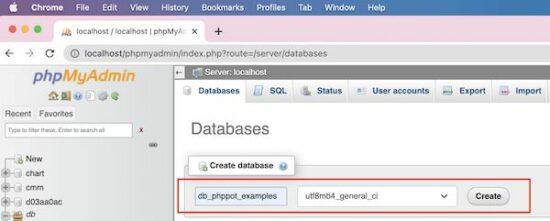
1) Choose the “Database” link and create a new or select an existing database. In a previous tutorial, we have seen the possible options of creating a database using phpMyAdmin.

create database

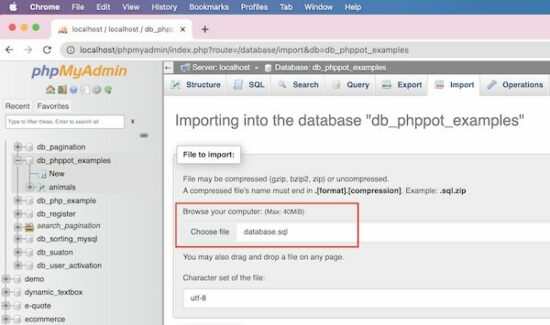
2) Choose the file in .sql (or other phpMyAdmin-supported) format.

choose import file

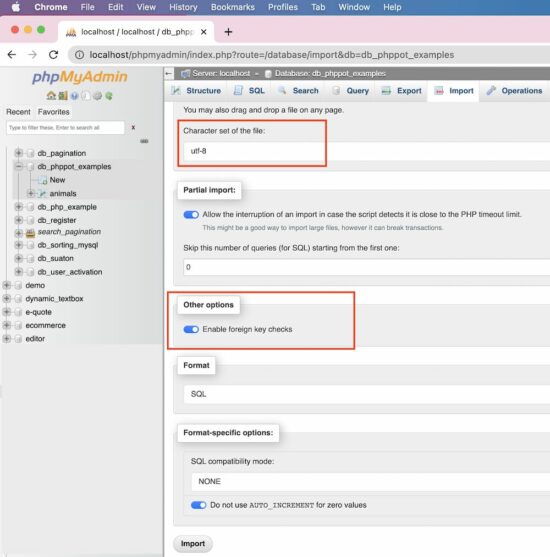
3) [optional] Choose char-set, SQL compatibility modes and other options like,

  • Foreign key checks.
  • Partial import.

phpmyadmin import options

Click “Go” to complete the import.

Import CSV

If you have the SQL dumb in a form of a CSV file, the phpMyAdmin allows that format to import.

Change the format to the CSV from the default format. The SQL is the default format that the phpMyAdmin populates under the “Format” section.

It is suitable to import a database containing a single table. If the import file contains multiple tables then the import will merge all into one.

It creates auto-generated columns like COL1, COL2… and stores the other comma-separated values as data.

Note the following CSV format to import a database table.

"id","question","answer" "1"," What are the widely used array functions in PHP?","Answer1" "2","How to redirect using PHP?","Answer2" "3"," Differentiate PHP size() and count():","Answer3" "4","What is PHP?","Answer4" "5","What is php.ini?","Answer5"

Import large SQL file

Note the maximum file size allowed to upload via the phpMyAdmin application. It is near the “Choose File” option on the Import page.

If the import file is too large, then it interrupts to skip the number of queries during the import.

It is better to process import via Terminal if the import file exceeds the allowed limit. It will prevent the data inconsistency that may occur because of the partial import.

Note the below Terminal command to process importing larger SQL files.

#path-to-mysql#mysql -u root -p #database_name# < #path-of-the-sql-file#

Replace the following variable in the above command

  • #path-to-mysql# – Path where the MySQL is. Example: /Applications/XAMPP/bin/mysql
  • #database_name# – The target database where the import is going to happen.
  • #path-of-the-sql-file# – The path of the source SQL to import. Example: /Users/vincy/Desktop/db_phppot_example.sql

The command line execution is also used to connect the remote server. It is in case of facing restrictions to access a remote MySQL server via phpMyAdmin.

Features of the phpMyAdmin Import

The phpMyAdmin “Import” functionality provides several features.

  • It allows the import of files in the following formats. The default format is SQL.
    • CSV
    • ESRI shape file
    • MediaWiki table
    • OpenDocument spreadsheet
    • SQL
    • XML
  • It allows choosing character sets and SQL compatibility modes.
  • It allows partial imports by allowing interruptions during the import of larger files.

Things to remember

When you import a database or table certain things to remember.

Database resource “Already exists” error

This error will occur if the importing file contains statements of existing resources.

Example:
If the importing file has the query to create an existing table, then phpMyAdmin will show this error.

So, it is important to clean up the existing state before importing a database to avoid this problem.

Access denied error

If the users have no permission to import or create databases/tables, then it will return this error.

If the user can import and can’t create tables, the file must contain allowed queries only.

Note: If you are importing via remote access, give the right credentials to connect. Make sure about the user access privileges to import or related operations.

↑ Back to Top

Posted on Leave a comment

Python | Split String Multiple Whitespaces

Rate this post

🍎Summary: The most efficient way to split a string using multiple whitespaces is to use the split function like so given_string.split(). An alternate approach is to use different functions of the regex package to split the string at multiple whitespaces.

Minimal Example:

import re text = "mouse\nsnake\teagle human"
# Method 1
print(text.split()) # Method 2
res = re.split("\s+", text)
print(res) # Method 3
res = re.sub(r'\s+', ',', text).split(',')
print(res) # Method 4
print(re.findall(r'\S+', text)) # ['mouse', 'snake', 'eagle', 'human']

Problem Formulation

📜Problem: Given a string. How will you split the string using multiple whitespaces?

Example

# Input
text = "abc\nlmn\tpqr xyz\rmno"
# Output
['abc', 'lmn', 'pqr', 'xyz', 'mno']

There are numerous ways of solving the given problem. So, without further ado, let us dive into the solutions.

Method 1: Using Regex

The best way to deal with multiple delimiters is to use the flexibility of the regular expressions library. There are different functions available in the regex library that you can use to split the given string. Let’s go through each one by one.

1.1 Using re.split

The re.split(pattern, string) method matches all occurrences of the pattern in the string and divides the string along the matches resulting in a list of strings between the matches. For example, re.split('a', 'bbabbbab') results in the list of strings ['bb', 'bbb', 'b'].

📚Recommended Read:  Python Regex Split.

Approach: To split the string using multiple whitespace characters use re.split("\s+", text) where \s is the matching pattern and it represents a special sequence that returns a match whenever it finds any whitespace character and splits the string.

Code:

import re
text = "abc\nlmn\tpqr xyz\rmno"
res = re.split("\s+", text)
print(res) # ['abc', 'lmn', 'pqr', 'xyz', 'mno']

1.2 Using re.findall

The re.findall(pattern, string) method scans the string from left to right, searching for all non-overlapping matches of the pattern. It returns a list of strings in the matching order when scanning the string from left to right.

📚Recommended Read: Python re.findall() – Everything You Need to Know

Code:

import re text = "abc\nlmn\tpqr xyz\rmno"
print(re.findall(r'\S+', text))

Explanation: In the expression, i.e., re.findall(r"\S'+", text), all occurrences of characters except whitespaces are found and stored in a list. Here, \S+ returns a match whenever the string contains one or more occurrences of normal characters (characters from a to Z, digits from 0-9, etc. However, not the whitespaces are considered).

1.3 Using re.sub

The regex function re.sub(P, R, S) replaces all occurrences of the pattern P with the replacement R in string S. It returns a new string. For example, if you call re.sub('a', 'b', 'aabb'), the result will be the new string 'bbbb' with all characters 'a' replaced by 'b'.

Aprroach: Use the re.sub method to replace all occurrences of whitespace characters in the given string with a comma. Thus, the string will now have commas instead of whitespace characters and you can simply split it using a normal string split method by passing comma as the delimiter.

Code:

import re
text = "abc\nlmn\tpqr xyz\rmno"
res = re.sub(r'\s+', ',', text).split(',')
print(res) # ['abc', 'lmn', 'pqr', 'xyz', 'mno']

Do you want to master the regex superpower? Check out my new book The Smartest Way to Learn Regular Expressions in Python with the innovative 3-step approach for active learning: (1) study a book chapter, (2) solve a code puzzle, and (3) watch an educational chapter video.


Method 2: Using split()

By default the split function splits a given string at whitespaces. Meaning, if you do not pass any delimiter to the split function then the string will be split at whitespaces. You can use this default property of the split function and successfully split the given string at multiple whitespaces just by using the split() function.

Code:

text = "abc\nlmn\tpqr xyz\rmno"
print(text.split())
# ['abc', 'lmn', 'pqr', 'xyz', 'mno']

📚Recommended Digest: Python String split()

Conclusion

We have successfully solved the given problem using different approaches. Simply using split could do the job for you. However, feel free to explore and try out the other options mentioned above. I hope this article helped you in your Python coding journey. Please subscribe and stay tuned for more interesting articles.

Happy Pythoning! 🐍 


Python Regex Course

Google engineers are regular expression masters. The Google search engine is a massive text-processing engine that extracts value from trillions of webpages.  

Facebook engineers are regular expression masters. Social networks like Facebook, WhatsApp, and Instagram connect humans via text messages

Amazon engineers are regular expression masters. Ecommerce giants ship products based on textual product descriptions.  Regular expressions ​rule the game ​when text processing ​meets computer science. 

If you want to become a regular expression master too, check out the most comprehensive Python regex course on the planet:

Posted on Leave a comment

Python | Split String by Number

Rate this post

✨Summary: To split a string by a number, use the regex split method using the “\d” pattern.

Minimal Example

my_string = "#@1abc3$!*5xyz" # Method 1
import re res = re.split('\d+', my_string)
print(res) # Method 2
import re res = re.findall('\D+', my_string)
print(res) # Method 3
from itertools import groupby li = [''.join(g) for _, g in groupby(my_string, str.isdigit)]
res = [x for x in li if x.isdigit() == False]
print(res) # Method 4
res = []
for i in my_string: if i.isdigit() == True: my_string = my_string.replace(i, ",")
print(my_string.split(",")) # Outputs:
# ['#@', 'abc', '$!*', 'xyz']

Problem Formulation

📜Problem: Given a string containing different characters. How will you split the string whenever a number appears?

Method 1: re.split()

The re.split(pattern, string) method matches all occurrences of the pattern in the string and divides the string along the matches resulting in a list of strings between the matches. For example, re.split('a', 'bbabbbab') results in the list of strings ['bb', 'bbb', 'b'].

Code:

import re
my_string = "#@1abc3$!*5xyz"
res = re.split('\d+', my_string)
print(res) # ['#@', 'abc', '$!*', 'xyz']

Explanation: The \d special character matches any digit between 0 and 9. By using the maximal number of digits as a delimiter, you split along the digit-word boundary. 

Method 2: re.findall()

The re.findall(pattern, string) method scans string from left to right, searching for all non-overlapping matches of the pattern. It returns a list of strings in the matching order when scanning the string from left to right.

Code:

import re
my_string = "#@1abc3$!*5xyz"
res = re.findall('\D+', my_string)
print(res) # ['#@', 'abc', '$!*', 'xyz']

Explanation: The \special character matches all characters except any digit between 0 and 9. Thus, you are essentially finding all character groups that appear before the occurrence of a digit.

Do you want to master the regex superpower? Check out my new book The Smartest Way to Learn Regular Expressions in Python with the innovative 3-step approach for active learning: (1) study a book chapter, (2) solve a code puzzle, and (3) watch an educational chapter video.

Method 3: itertools.groupby()

Code:

from itertools import groupby
my_string = "#@1abc3$!*5xyz"
li = [''.join(g) for _, g in groupby(my_string, str.isdigit)]
res = [x for x in li if x.isdigit() == False]
print(res) # ['#@', 'abc', '$!*', 'xyz']

Explanation:

  • The itertools.groupby(iterable, key=None) function creates an iterator that returns tuples (key, group-iterator) grouped by each value of key. We use the str.isdigit() function as key function.
  • The str.isdigit() function returns True if the string consists only of numeric characters. Thus, you will have a list created by using numbers as separators. Note that this list will also contain the numbers as items within it.
  • In order to eliminate the numbers, use another list comprehension that checks if an element in the list returned previously is a digit or not with the help of the isdigit method. If it is a digit, the item will be discarded. Otherwise it will be stored in the list.

Method 4: Replace Using a for Loop

Approach: Use a for loop to iterate through the characters of the given string. Check if a character is a digit or not. As soon as a digit is found, replace that character/digit with a delimiter string ( we have used a comma here) with the help of the replace() method. This basically means that you are placing a particular character in the string whenever a number appears. Once all the digits are replaced by the separator string, split the string by passing the separator string as a delimiter to the split method.

Code:

my_string = "#@1abc3$!*5xyz"
res = []
for i in my_string: if i.isdigit(): my_string = my_string.replace(i, ",")
print(my_string.split(",")) # ['#@', 'abc', '$!*', 'xyz']

Conclusion

Phew! We have successfully solved the given problem and managed to do so using four different ways. I hope you found this article helpful and it answered your queries. Please subscribe and stay tuned for more solutions and tutorials.

Happy coding! 🙂

🌐Related Read: How to Split a String Between Numbers and Letters?

Posted on Leave a comment

How to Convert Octal String to Integer in Python

5/5 – (1 vote)

Problem Formulation

Given a string in the octal form:

s = '0o77'
# or s = '77'

How to convert the octal string to an integer in Python?

For example, you want to convert the octal string 'o10' to the decimal integer 8.

Here are a few other examples:

Octal String Decimal
'0o0' 0
'0o4' 4
'0o10' 8
'0o14' 12
'0o20' 16
'0o77' 63
'0o77777' 32767

Oct String to Integer using int() with Base 8

To convert an octal string to an integer, pass the string as a first argument into Python’s built-in int() function. Use base=8 as a second argument of the int() function to specify that the given string is an octal number. The int() function will then convert the octal string to an integer with base 10 and return the result.

Here’s a minimal example:

>>> int('0o77', base=8)
63

Examples

And here’s how you can convert the additional examples shown above:

>>> int('0o0', base=8)
0
>>> int('0o4', base=8)
4
>>> int('0o10', base=8)
8
>>> int('0o14', base=8)
12
>>> int('0o20', base=8)
16
>>> int('0o77', base=8)
63
>>> int('0o77777', base=8)
32767

You actually don’t need to use the prefix '0o' because your second argument already defines unambiguously that the given string is an octal number:

>>> int('0', base=8)
0
>>> int('4', base=8)
4
>>> int('10', base=8)
8
>>> int('14', base=8)
12
>>> int('20', base=8)
16
>>> int('77', base=8)
63
>>> int('77777', base=8)
32767

However, skipping the base but leaving the prefix raises a ValueError: invalid literal for int() with base 10: '0o77':

>>> int('0o77')
Traceback (most recent call last): File "<pyshell#16>", line 1, in <module> int('0o77')
ValueError: invalid literal for int() with base 10: '0o77'

It assumes that the input string is in base 10 when in fact, it isn’t.

💡 Note: Even though passing a prefixed string '0o...' into the int() function is unambiguous, Python’s int() function doesn’t accept it if you don’t also define the base. This may be fixed in future versions!

In fact, you can specify the base argument as 0 to switch on base guessing—which should be the default behavior anyway! 👇

Base Guessing

You can pass a prefixed string '0o...' into the int() function and set the base to 0 to switch on base guessing in Python. This uses the prefix to determine the base automatically—without you needing to set it to 16. Yet, you still have to set it to 0 so the benefit is marginal in practice.

>>> int('0o7', base=8)
7
>>> int('0o7', base=0)
7
>>> int('0o7', 0)
7

Converting Octal Literals to Int

If you don’t have an octal string but a octal number—called a literal—such as 0xff, you don’t even need the int() function because Python will automatically convert it to a decimal number:

>>> 0o743
483
>>> 0o7
7
>>> 0o10
8

Background int()

Syntax: int(value [, base]) – > int
Argument value A Python object to be converted into an integer number. The value object must have an __int__() method that returns the associated integer number—otherwise a TypeError will be raised.
base An optional integer argument base to define the base of the numerical system in the value argument. If you set the base, the value argument must be a string. The base argument determines how the string argument is interpreted.
Return Value int Returns an integer number after converting the input argument value using its required __int__() method for the conversion.
YouTube Video

Do you still need more background information about Python’s built-in int() function? No problem, read over the related tutorial.

🌍 Related Tutorial: Python’s Built-in int() Function

Posted on Leave a comment

Python | Split String Hyphen

Rate this post

⭐Summary: Use "given string".split('-') to split the given string by hyphen and store each word as an individual item in a list. Some other ways to split using hyphen include using a list comprehension and the regex library.

Minimal Example

text = "Violet-Indigo-Blue-Green-Yellow-Orange-Red"
# Method 1
print(text.split("-"))
# Method 2
import re
print(re.split('-', text))
# Method 3
print(list(filter(None, text.split('-'))))
# Method 4
print([x for x in re.findall(r'[^-]*|(?!-).*$', text) if x != '']) # OUTPUT: ['Violet', 'Indigo', 'Blue', 'Green', 'Yellow', 'Orange', 'Red']

Problem Formulation

📜Problem: Given a string, how will you split the string into a list of words using the hyphen as a delimiter?

Example

Let’s understand the problem with the help of an example.

# Input:
text = "Violet-Indigo-Blue-Green-Yellow-Orange-Red"
# Output:
['Violet', 'Indigo', 'Blue', 'Green', 'Yellow', 'Orange', 'Red']

Now without any further ado, let’s dive into the numerous ways of solving this problem.

Method 1: Using split()

Python’s built-in split() function splits the string at a given separator and returns a split list of substrings. Here’s how the split() function works: 'finxterx42'.split('x') will split the string with the character ‘x’ as the delimiter and return the following list as an output: ['fin', 'ter', '42'].

Approach: To split a string by hyphen, you can simply pass the underscore as a separator to the split('-') function.

Code:

text = "Violet-Indigo-Blue-Green-Yellow-Orange-Red"
print(text.split("-")) # ['Violet', 'Indigo', 'Blue', 'Green', 'Yellow', 'Orange', 'Red']

🌏Related Read: Python String split()

Method 2: Using re.split()

Another way of separating a string by using the underscore as a separator is to use the re.split() method from the regex library. The re.split(pattern, string) method matches all occurrences of the pattern in the string and divides the string along the matches resulting in a list of strings between the matches. For example, re.split('a', 'bbabbbab') results in the list of strings ['bb', 'bbb', 'b'].

Approach: You can use the re.split() method as re.split('-', text) where '-' returns a match whenever the string contains a hyphen. Whenever any hyphen is encountered, the text gets separated and the split substring gets stored as an element within the resultant list.

Code:

import re
text = "Violet-Indigo-Blue-Green-Yellow-Orange-Red"
print(re.split('-', text)) # ['Violet', 'Indigo', 'Blue', 'Green', 'Yellow', 'Orange', 'Red']

🌏Related Read: Python Regex Split

Method 3: Using filter()

Note: This approach is efficient when the resultant list contains empty strings along with substrings.

Python’s built-in filter() function filters out the elements that pass a filtering condition. It takes two arguments: function and iterable. The function assigns a Boolean value to each element in the iterable to check whether the element will pass the filter or not. It returns an iterator with the elements that passes the filtering condition.

Approach: Use the filter() method to split the string by hyphen. The function takes None as the first argument and the list of split strings as the second argument. The filter() function then iterates through the list and removes any empty elements. As the filter() method returns an object, we need to use the list() to convert the object into a list.

Code:

text = "Violet-Indigo-Blue-Green-Yellow-Orange-Red" print(list(filter(None, text.split('-')))) # ['Violet', 'Indigo', 'Blue', 'Green', 'Yellow', 'Orange', 'Red']

🌏Related Read: Python filter()

Method 4: Using re.findall()

The re.findall(pattern, string) method scans the string from left to right, searching for all non-overlapping matches of the pattern. It returns a list of strings in the matching order- when scanning the string from left to right.

Approach: You can use the re.findall() method from the regex module to split the string by hyphen. Use ‘[^-]|(?!-).$‘ as the pattern that can be fed into the findall function to solve the problem. It simply, means a set all characters that are joined by a hyphen will be grouped together.

Code:

import re
text = "Violet-Indigo-Blue-Green-Yellow-Orange-Red" print([x for x in re.findall(r'[^_]*', text) if x != '']) # ['Python', 'Pycharm', 'Java', 'Eclipse', 'Golang', 'VisualStudio']

🌏Related Read: Python re.findall() – Everything You Need to Know

Python | Split String by Dot

Now that we have gone through numerous ways of solving the given problem, here’s a similar programming challenge for you to solve.

Challenge: You are given a string that contains dots in it. How will you split the string using a dot as a delimiter? Consider the code below and try to split the string by dot.

# Input:
text = "stars.moon.sun.sky" # Expected Output:
['stars', 'moon', 'sun', 'sky']

Try to solve the problem yourself before looking into the given solutions.

Solution: Here are the different methods to split a string by using the dot as a delimiter/separator:

text = "a*b*c"
# Method 1
print(text.split("*")) # Method 2
print(list(filter(None, text.split('*')))) # Method 3
import re
print([x for x in re.findall(r'[^/*]*|(?!/*).*$', text) if x != '']) # Method 4
print(re.split('[/*]', text))

Conclusion

Hurrah! We have successfully solved the given problem using as many as four different ways. We then went on to solve a similar coding challenge. I hope this article helped you. Please subscribe and stay tuned for more interesting articles!

Happy coding! 🙂


Do you want to master the regex superpower? Check out my new book The Smartest Way to Learn Regular Expressions in Python with the innovative 3-step approach for active learning: (1) study a book chapter, (2) solve a code puzzle, and (3) watch an educational chapter video.

Posted on Leave a comment

Chart JS Line Chart Example

by Vincy. Last modified on December 1st, 2022.

It is one of the free and best JS libraries for charts. It supports rendering more types of chart in client side.

In this tutorial, we will see examples of rendering different types of line charts using the Chart.js library.

Quick example

The Chart JS library requires 3 things to be added to the webpage HTML to render the graph.

  1. Step 1: Include the Chart JS library file to the target HTML page.
  2. Step 2: Create a HTML canvas element to render the line chart.
  3. Step 3: Initiate the Chart JS library function with the data and other required options.
<canvas id="line-chart"></canvas>
<script src="https://cdn.jsdelivr.net/npm/chart.js@4.0.1/dist/chart.umd.min.js"></script>
<script> new Chart(document.getElementById("line-chart"), { type : 'line', data : { labels : [ 1500, 1600, 1700, 1750, 1800, 1850, 1900, 1950, 1999, 2050 ], datasets : [ { data : [ 186, 205, 1321, 1516, 2107, 2191, 3133, 3221, 4783, 5478 ], label : "America", borderColor : "#3cba9f", fill : false }] }, options : { title : { display : true, text : 'Chart JS Line Chart Example' } } });
</script>

The above script refers to the target canvas element on initiating the library class.

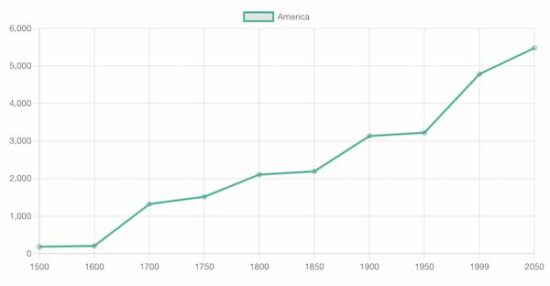
It pinpoints the graph readings with data properties. In addition, it specifies the line label, and border color. This quick example will output the following line chart to the browser.

Output:

chartjs line chart output

View Demo

A line chart is the best way to display analytics in a form of a catchy line graph. It also helps to compare one or more analytical lines.

In previous tutorials, we used different libraries to render different types of charts on a web page. See the below links if you want to refer.

More examples of line charts using Chart JS

The Chart JS supports creating a variety of line charts to plot the different perspectives of the data points.

  1. It supports drawing multiple lines of data points in a line chart which shows comparisons of data.
  2. It supports creating a linear line chart by applying formulas with x, and y coordinates.
  3. Rending sin waves in a Chart JS line chart with JS Math functions.

In the below sections, we will see examples of creating the following type of line charts using the Chart JS library.

  1. Multiple lines in a line chart.
  2. Gridlines – Line chart

Chart JS Multiple Lines Example

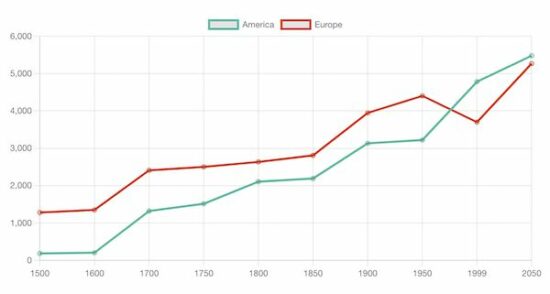
It outputs a Chart JS graph with two line charts. The script sets the dataset array for the two lines to be displayed on the graph.

The dataset is configured with the following display properties apart from the data points of the line chart.

  • label – to show with a tooltip on hovering a data point.
  • borderColor – Line border color.
  • fill – to enable or disable highlighting the chart area.

In this multi-line chart, the fill property is set to false, since the two chart areas overlap each other.

<!DOCTYPE html>
<html>
<head>
<title>Chart JS Multiple Lines Example</title>
<link rel='stylesheet' href='style.css' type='text/css' />
</head>
<body> <div class="phppot-container"> <h1>Chart JS Multiple Lines Example</h1> <div> <canvas id="line-chart"></canvas> </div> </div> <script src="https://cdn.jsdelivr.net/npm/chart.js@4.0.1/dist/chart.umd.min.js"></script> <script> new Chart(document.getElementById("line-chart"), { type : 'line', data : { labels : [ 1500, 1600, 1700, 1750, 1800, 1850, 1900, 1950, 1999, 2050 ], datasets : [ { data : [ 186, 205, 1321, 1516, 2107, 2191, 3133, 3221, 4783, 5478 ], label : "America", borderColor : "#3cba9f", fill : false }, { data : [ 1282, 1350, 2411, 2502, 2635, 2809, 3947, 4402, 3700, 5267 ], label : "Europe", borderColor : "#e43202", fill : false } ] }, options : { title : { display : true, text : 'Chart JS Multiple Lines Example' } } }); </script>
</body>
</html>

chartjs multi line chart

Chart JS Gridlines – Line Chart Example

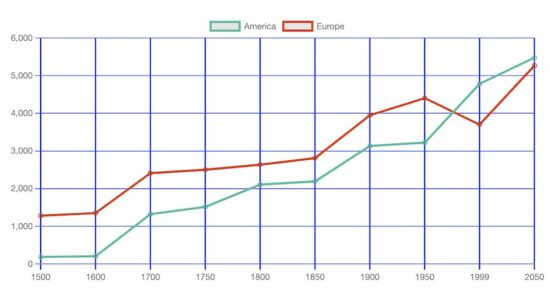
This JS script configures the same settings like as the above multi-line chart example. In addition, it configures the Chart JS scale properties to draw the grid in the x and y-axis.

The following display properties are used to show the grid in both axis of the. Chart JS graph.

  • display – a boolean value to enable or disable grid display on the chart.
  • color – the grid line border-color.
  • lineWidth – the stroke size of the grid line.
<!DOCTYPE html>
<html>
<head>
<title>Chart JS Gridlines - Line Chart Example</title>
<link rel='stylesheet' href='style.css' type='text/css' />
</head>
<body> <div class="phppot-container"> <h1>Chart JS Gridlines - Line Chart Example</h1> <div> <canvas id="line-chart"></canvas> </div> </div> <script src="https://cdn.jsdelivr.net/npm/chart.js@4.0.1/dist/chart.umd.min.js"></script> <script> new Chart( document.getElementById("line-chart"), { type : 'line', data : { labels : [ 1500, 1600, 1700, 1750, 1800, 1850, 1900, 1950, 1999, 2050 ], datasets : [ { data : [ 186, 205, 1321, 1516, 2107, 2191, 3133, 3221, 4783, 5478 ], label : "America", borderColor : "#3cba9f", fill : false }, { data : [ 1282, 1350, 2411, 2502, 2635, 2809, 3947, 4402, 3700, 5267 ], label : "Europe", borderColor : "#e43202", fill : false } ] }, options : { title : { display : true, text : 'Chart JS Gridlines - Line Chart Example' }, scales : { x : { grid : { display : true, color: "#0046ff", lineWidth: 2 } }, y : { grid : { display : true, color: "#0046ff" } } } } }); </script>
</body>
</html>

chartjs grid line chart

More details about the basics of the Chart JS library

Knowing more about this very good JS library will be useful to use this graph confidently in production.

Without specifying dataset options or display properties, the default options will be applied. The following list shows the level of Chart.js options that will be resolved about the context. Read more about option resolution documentation provided by the Chart JS library.

Dataset and element properties with respect to the data and options

  • data.datasets[index] – options for this dataset only.
  • options.datasets.line – options for all line datasets.
  • options.elements.line – options for all line elements.
  • options.elements.point – options for all point elements.
  • options – options for the whole chart.

Display properties

  • backgroundColor
  • borderColor
  • borderWidth
  • fill
  • hoverBorderColor
  • label
  • pointStyle
  • xAxisID
  • yAxisID

Custom options

The Chart JS accepts a custom callback to be called on rendering each data point.

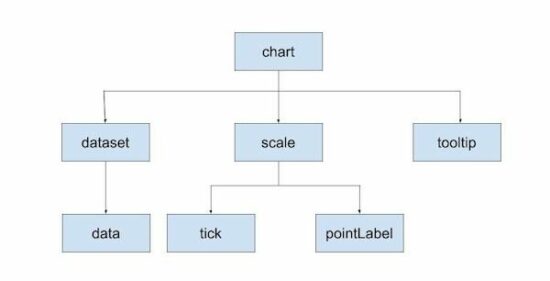
The callback function accepts the context reference to get the UI scope. The context hierarchy is shown in the below diagram.

chartjs context level

Indexable options

Indexable options are used to define properties for the chart.js data item at a particular index.

It has a mapping array to link a property at a particular index to the data point of the chart at the same index.

If the array options property array length is less than the data array, then the property will be looped over.

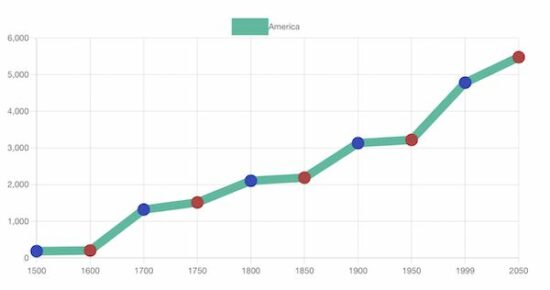
The below code contains the options of setting line chart point color. It has only three pointBackgroundColor in the array. It will loop over to the data array of 10 elements.

datasets : [{ data : [ 186, 205, 1321, 1516, 2107, 2191, 3133, 3221, 4783, 5478 ], label : "America", borderColor : "#3cba9f", pointBackgroundColor: [ '#354abb', '#bb3c43' ], pointBorderColor: [ '#354abb', '#bb3c43' ], fill: false, borderWidth: 12
}]

chartjs index option

Other chart types supported by the Chart.js library

The Chart JS library also supports creating other types of charts listed below. Let us see the example of creating a few of the below charts in the future.

  1. Area chart
  2. Bar chart
  3. Bubble chart
  4. Doughnut chart
  5. Line chart
  6. Mixed chart
  7. Polar Area chart
  8. Radar chart
  9. Scatter chart

View DemoDownload

↑ Back to Top

Posted on Leave a comment

Python | Split String by Underscore

Rate this post

⭐Summary: Use "given string".split() to split the given string by underscore and store each word as an individual item in a list.

Minimal Example

text = "Welcome_to_the_world_of_Python"
# Method 1
print(text.split("_")) # Method 2
import re
print(re.split('_', text)) # Method 3
print(list(filter(None, text.split('_')))) # Method 4
print([x for x in re.findall(r'[^_]*|(?!_).*$', text) if x != '']) # OUTPUT: ['Welcome', 'to', 'the', 'world', 'of', 'Python']

Problem Formulation

📜Problem: Given a string, how will you split the string into a list of words using the underscore as a delimiter?

Example

Let’s understand the problem with the help of an example.

# Input:
text = "Python_Pycharm_Java_Eclipse_Golang_VisualStudio"
# Output:
['Python', 'Pycharm', 'Java', 'Eclipse', 'Golang', 'VisualStudio']

Now without any further ado, let’s dive into the numerous ways of solving this problem.

Method 1: Using split()

Python’s built-in split() function splits the string at a given separator and returns a split list of substrings. Here’s how the split() function works: 'finxterx42'.split('x') will split the string with the character ‘x’ as the delimiter and return the following list as an output: ['fin', 'ter', '42'].

Approach: To split a string by underscore, you need to use the underscore as the delimiter. You can simply pass the underscore as a separator to the split('_') function.

Code:

text = "Python_Pycharm_Java_Eclipse_Golang_VisualStudio"
print(text.split("_")) # ['Python', 'Pycharm', 'Java', 'Eclipse', 'Golang', 'VisualStudio']

🌏Related Read: Python String split()

Method 2: Using re.split()

Another way of separating a string by using the underscore as a separator is to use the re.split() method from the regex library. The re.split(pattern, string) method matches all occurrences of the pattern in the string and divides the string along the matches resulting in a list of strings between the matches. For example, re.split('a', 'bbabbbab') results in the list of strings ['bb', 'bbb', 'b'].

Approach: You can simply use the re.split() method as re.split('_', text) where '_' returns a match whenever the string contains an underscore. Whenever any underscore is encountered, the text gets separated at that point.

Code:

import re
text = "Python_Pycharm_Java_Eclipse_Golang_VisualStudio"
print(re.split('_', text)) # ['Python', 'Pycharm', 'Java', 'Eclipse', 'Golang', 'VisualStudio']

🌏Related Read: Python Regex Split

Method 3: Using filter()

Python’s built-in filter() function filters out the elements that pass a filtering condition. It takes two arguments: function and iterable. The function assigns a Boolean value to each element in the iterable to check whether the element will pass the filter or not. It returns an iterator with the elements that passes the filtering condition.

Approach: You can use the filter() method to split the string by underscore. The function takes None as the first argument and the list of split strings as the second argument. The filter() function iterates through the list and removes any empty elements. As the filter() method returns an object, we need to use the list() to convert the object into a list.

Code:

text = "Python_Pycharm_Java_Eclipse_Golang_VisualStudio"
print(list(filter(None, text.split('_')))) # ['Python', 'Pycharm', 'Java', 'Eclipse', 'Golang', 'VisualStudio']

🌏Related Read: Python filter()

Method 4: Using re.findall()

The re.findall(pattern, string) method scans the string from left to right, searching for all non-overlapping matches of the pattern. It returns a list of strings in the matching order- when scanning the string from left to right.

Approach: You can use the re.findall() method from the regex module to split the string by underscore. You can use ‘[^_]‘ as the pattern that can be fed into the findall function to solve the problem. It simply, means a set all characters that start with an underscore will be grouped together.

Code:

import re
text = "Python_Pycharm_Java_Eclipse_Golang_VisualStudio"
print([x for x in re.findall(r'[^_]*', text) if x != '']) # ['Python', 'Pycharm', 'Java', 'Eclipse', 'Golang', 'VisualStudio']

🌏Related Read: Python re.findall() – Everything You Need to Know

Python | Split String by Dot

Now that we have gone through numerous ways of solving the given problem, here’s a similar programming challenge for you to solve.

Challenge: You are given a string that contains dots in it. How will you split the string using a dot as a delimiter? Consider the code below and try to split the string by dot.

# Input:
text = "stars.moon.sun.sky" # Expected Output:
['stars', 'moon', 'sun', 'sky']

Try to solve the problem yourself before looking into the given solutions.

Solution: Here are the different methods to split a string by using the dot as a delimiter/separator:

text = "stars.moon.sun.sky"
# Method 1
print(text.split(".")) # Method 2
print(list(filter(None, text.split('.')))) # Method 3
import re
print([x for x in re.findall(r'[^.]*|(?!.).*$', text) if x != '']) # Method 4
print(re.split('\\.', text))

Conclusion

Hurrah! We have successfully solved the given problem using as many as four different ways. I hope you enjoyed this article and it helps you in your Python coding journey. Please subscribe and stay tuned for more interesting articles!


Do you want to master the regex superpower? Check out my new book The Smartest Way to Learn Regular Expressions in Python with the innovative 3-step approach for active learning: (1) study a book chapter, (2) solve a code puzzle, and (3) watch an educational chapter video.