Publisher Graffiti Games and developer Fervir Games have confirmed that the pixel art RPG Creature Keeper will be making its way to the Nintendo Switch later this year.
Boasting some lovely retro-inspired visuals, the game sees you befriend a number of unique creatures, dress them up, cook for them, and craft a number of helpful items as you embark on an epic adventure to restore balance to the world of Thera.
Here are some more details from Graffiti Games:
Take up the ancient role of a Creature Keeper. A strange sickness is affecting otherwise healthy creatures and you must uncover its mysteries to restore balance to a world divided. Assemble your dream team by befriending a bevy of creatures to fight alongside you. Learn recipes while adventuring and cook up tasty meals to help your creatures grow in their own special way. More knowledge = more power! Raise your party and fight corrupted creatures to unlock creature notes, skills, recipes, and more in the Bestiary. Customize your play style by crafting a variety of weapons and trinkets with unique effects. Grow ingredients, power ups, equipment, and more with your Pocket Garden, a magical portable farm. Craft fashion items such as hats, masks, and accessories for your creatures to wear!
We’ll have more on Creature Keeper, including its release date, as soon as we hear.
Are you up for trying out Creature Keeper when it launches on the Switch? Let us know your thoughts with a comment down below.
As a wise man once said, I like turtles, and I especially love turtles of the ‘mutant’ and ‘ninja’ variety. Well those radical reptiles are back with an update to their recent smash beat-em-up, as Dotemu announces the TMNT Shredder’s Revenge Dimension Shellshock DLC. One of the best Netflix games is getting even better!
While the thrilling action side scroller already features plenty of characters to play as and areas to explore, the Dimension Shellshock throws some madness into the mix, taking the heroes on an interdimensional adventure. There are even some new faces along for the ride, as the update brings in Karai and Miyamoto Usagi from the infamous Usagi Yojimbo comics. Considering the turtles are martial arts animals from comics, it’s a great fit.
So far Dotemu is only confirming the console release dates, as the TMNT Shredder’s Revenge Dimension Shellshock DLC hits Nintendo Switch, PS4/5, Xbox Series S/X, and PC on August 31, 2023. We’re not sure if or when the DLC is set to hit Netflix users, but we’ll keep you updated as soon as we get more details. Shredder’s Revenge is free to download on mobile for any user with an active Netflix account, and it’s one of the best games on the service.
Is there a TMNT Shredder’s Revenge Dimension Shellshock DLC trailer?
You’d better believe it, folks, there is a totally bodacious trailer ready to take your eyes for a trip across the dimensions below.
That’s all we have for now folks, but check back for more turtle-y awesome game news soon. For now, be sure to get a slice of the action with our guide to the best fighting games on Switch next.
Note: The review text below makes only very brief mention of this game’s heavy themes without going into detail, but please note that this game contains references to suicide and self-harm.
The Cosmic Wheel Sisterhood is the latest gem from Deconstructeam (The Red Strings Club) and it’s a spellbinding narrative experience. Fitting into the deckbuilding genre in a very literal sense, this game follows the story of Fortuna, an exiled Witch who has been cast out into the cosmos by her own Coven.
Starting off in a tiny house on an asteroid hurtling through space, the game immediately sets a mystical yet comforting tone. Fortuna is struggling to come to terms with her 1000-year banishment from the Coven and decides to summon a Behemoth (a terrifyingly powerful being that is older than the universe itself) to help with the issue. The Behemoth, Ábramar, takes on a mentor role for Fortuna as she decides how to handle her Coven from afar. This comes at a price, though.
Fortuna specializes in divination (as you may have guessed from her name) and her Tarot deck was taken from her when she was exiled. To open this new chapter of her life, Fortuna begins to craft her own divination deck with the help of her Behemoth buddy.
Captured on Nintendo Switch (Handheld/Undocked)
The deckbuilding aspect is vibrant and indulgent. The creators evidently put in the hours when it came to researching magical symbolism and mythology, as the card meanings and lore snippets are written in a truly authentic manner. Fortuna can create cards manually (letting her pick a background, character, and symbols) by spending energy, which is earned through readings, destroying cards at the cauldron, rest, and gathering energy in the late game.
Visitors will ask for readings and she draws a card at random to fit a prompt (e.g. ‘What will my career turn out like?’ may be the question and ‘career’ the prompt) before picking an interpretation. The interpretations reward different types of elemental energy, so one might give two Fire energy and four Water, or four Earth and six Air. This energy can then in turn be spent on card elements. As you play, you’ll get to build your own divination deck, one card at a time. You’ll need to pick from various backgrounds, characters, and symbols, all with their own rich meanings and representations. You’ll be able to unlock more creative options as you progress, too.
After the initial work between Ábramar and Fortuna takes place, Fortuna gains the ability to receive visitors at her solitary starbound suite. The story unfolds elegantly and at a natural rhythm, with Fortuna offering her divination services to visitors while learning about the fate of the Coven – and by extension, the fate of the universe.
Captured on Nintendo Switch (Docked)
Something that’s truly magical is that every choice you make here really matters. The game feels like peeking into a loved one’s journal — or Grimoire, for that matter. It’s incredibly personal. Ábramar warns Fortuna at the beginning that her choices will have an impact, and this can be seen consistently, with player choices changing how characters behave, how the story reveals itself, and the outcome of that story.
Fortuna is incredibly powerful, too. Her power grows immensely as you progress and it’s possible to have a real impact on the Witches you encounter. In fact, it’s impossible not to have a real impact on the other characters.
Another way that the game offers a deeply personal experience for players is by offering a huge variety of characters to interact and bond with. This title is diverse and offers amazing representation, featuring Witches from all walks of life and showing the raw beauty of relationships and love in all forms. It’s an incredibly emotional experience. The characters have been written in a life-like way, so it’s easy to connect with them and root for them, but it’s easy to feel their sorrow and their pain, too.
Captured on Nintendo Switch (Handheld/Undocked)
It’s important to note that Cosmic Wheel touches on some heavy themes, including suicide, illness, death, and self-harm. The topics are broached in a respectful and sensitive way, but it’s still worth considering if these are difficult topics for you.
On a technical note, it looks fantastic and performs well on Switch. The controls are intuitive for the most part — although card creation can get a little fiddly with the Joy-Con — and the way that the touchscreen has been integrated feels very natural. We did experience one crash just before the end of the final chapter, but got back in without issue and only lost a few minutes’ progress.
One interesting aspect is that Deconstructeam doesn’t let you return to past saves. The game autosaves at key moments, but you can’t reload old save files or hop between save slots. This aims, presumably, to encourage you to focus on fate and stick to your choices. While this might wind up people with a completionist mindset, the quality of the writing — a few typos and formatting quirks excepted — makes it easy to continue with your playthrough without worrying about what might have been.
Captured on Nintendo Switch (Handheld/Undocked)
Deckbuilding games come in all shapes and sizes, and this one veers towards the artistic side more than the technical. Every minute detail in your deck is important, from the placement of the magical components to the elemental energy each card focuses on. Bearing that in mind, this may not be the best deckbuilder for fans of deep strategy but it’s one of the most creative and ethereal deckbuilders out there, without a doubt.
That’s not to say that there isn’t any strategy involved, though. Every single choice you make and every button you tap will change the outcome of the narrative in your playthrough (our first took around eight hours), ranging from picking the right political slogan to choosing the correct toppings for a pizza. The writing is the true star here, though — truly emotive and engaging, and it manages to feel realistic while still touching on fantastical stories featuring cosmic ascension, consuming elder Witches, and otherworldly powers.
Conclusion
The Tarot deckbuilding aspect is present and correct here, but the wide variety of Witches and the way their stories intertwine is where The Cosmic Wheel Sisterhood really shines. Every being that you encounter has a purpose in this story, and all the threads twist together to make a truly beautiful tapestry. Being locked down narrative paths without the ability to return might not be for everyone, but it’s a moot point when the story is this good — every playthrough will feel like a brand-new experience.
We have been eagerly anticipating more news on the Teenage Mutant Ninja Turtles: Shredder’s Revenge DLC, ‘Dimension Shellshock,’ since we first caught wind of it back in June. Today, we have learnt that the bonus content will be skating onto Switch on 31st August (that’s not too far away, folks!) and there’s yet another new fighter joining the roster too.
Yes, alongside the sword-wielding rabbit Usagi Yojimbo, we now know that former Foot Clan member Karai will also be joining the turtles beat ’em up in just a few weeks. This lightning-fast ninja has made several appearances in the modern TMNT animated series, moving from a straight-up villain to a friend and ally of the Turtles.
You can find some new screenshots featuring Karai in action amongst the fresh colour palettes below:
The Dimension Shellshock DLC will be available for $7.99 (or your regional equivalent) and is set to add these new fighters alongside a fresh dimension-hopping Survival Mode and a boatload of sweet visual options like new character skins and more.
Alongside this DLC, publisher Dotemu and developer Tribute Games have confirmed that a second free update will also be coming to Shredder’s Revenge, offering an additional range of colour palette options for all owners of the base game along the same lines as the update that we saw back in December.
Will you be picking up the TMNT DLC later this month? Shred your thoughts in the comments below.
Jollypunch Games has today announced RoboDunk, an arcade basketball roguelite that will be slamming onto Switch on 25th September.
NBA Jam-style 2v2 basketball and randomised roguelite campaigns are not two genres that we initially would have put together, but RoboDunk seems to be doing just that. The game will see you taking to the court with a team of robots and challenging your opponents with the helping hand of explosive weapons and power-ups.
You can then dribble through the roguelite campaign and pick your own path between games, collecting upgrades and skill boosts as you go. The rules and teams appear to be always changing in this mode, so don’t expect any fair calls from the ref.
For a closer look at some of the game’s features and some screenshots, check out the following from the publishers:
Roguelite Campaign EVERY MATCH IS DIFFERENT: Choose your path among randomized matches with unique rewards, rules, traps and opponents. TONS TO UNLOCK: Massive skill tree, robots to discover with their own upgrade tree. GROW YOUR TEAM: Your bots level up, gain new skills and stat boosts after every victory. COLLECT THE LORE: Piece together info on the Gods and why DUNK is the meaning of life. SINGLE PLAYER AND FULL COOP: A friend can drop in/out whenever you want. Satisfying Robosport MASSIVE DUNKS: Charge a max power jump, leap from mid-field and press just at the right time to explode the hoop. POWERFUL WEAPONS: Ram the enemy or shoot them with unique weapons, from classic lasers to falling pans and shock rings. NEW MODS EACH ROUND: Choose temporary skills and upgrades that change the game at every round: double jumps, shocking passes, ammo multipliers and more. STAGE HAZARDS: Avoid or exploit stage dangers like spiky rollers, tornados, jump pads and meteors. LOCAL MULTIPLAYER for 1-4 people.
We don’t know what exactly to make of a combination such as this one, but so long as the Jam-like 2v2 is entertaining then we can see this robot baller being some good fun when it comes to Switch next month.
Does RoboDunk look like it will be up your street? Slam your thoughts in the comments.
As we approach the end of the summer, 2K’s latest basketball sim once again rears its ugly head with NBA 2K24 tipping off on Switch on 8th September. For the most part, the series has avoided the FIFA-esque corner-cutting in its Nintendo versions, with the Switch receiving the full game (we know, what a concept!) just like its PlayStation and Xbox siblings. However, it seems that this won’t fully be the case with 2K24.
A new gameplay trailer for the upcoming basketball title showcases the fresh ProPLAY feature — where movements from real NBA games are scanned into 2K for more realistic animations. It’s a neat addition, for sure (and the demonstrated KD step-back sure does look clean) but this is one of the changes that we will not be seeing on Switch, with ProPLAY being reserved for next-gen players only.
It’s a shame that this feature is remaining firmly on the bench for Switch, though it’s hardly a huge surprise as the game requires a pretty hefty downgrade in the visuals department to run on Nintendo’s comparatively smaller console. 2K notes (via the NBA 2K24 website) that there are several enhancements that will be coming to the Switch version, however, so we’re not looking at a ‘Legacy Edition’ situation here:
ProPLAY delivers an immersive and authentic game on New Gen, while the gameplay enhancements we’ve made across all consoles in NBA 2K24 provide an elevated experience for everyone.
While the NBA 2K series has generally remained pretty strong as far as Switch versions go, this is not the first time that Nintendo has seen a slightly smaller package — you might remember the absence of MyCareer’s central hub, ‘The City’, in 2K23, replaced by the smaller ‘G.O.A.T. Boat’ on current-gen consoles. An all-new City will be present in the upcoming release, which is currently also listed as “New Gen Only”. We imagine it won’t be long before we find out what the current-gen replacement is this time around.
Please note that some external links on this page are affiliate links, which means if you click them and make a purchase we may receive a small percentage of the sale. Please read our FTC Disclosure for more information.
Are you sad to see ProPLAY skipping the Switch? Let us know in the comments.
Vampire Survivors is a singular game. Kind of a roguelike, kind of an arcade game, kind of a bullet hell, but at the same time nothing like what you probably think of when those genres come to mind. After all, there’s a reason it captured the hearts and minds of gamers and won handfuls of awards on other platforms in 2022. Jam-packed with rewarding structures, satisfying sound design, cheeky nods to the much more senior vampire-killing franchise that inspired it, and loads of secrets, it’ll sink its fangs into you after just one round.
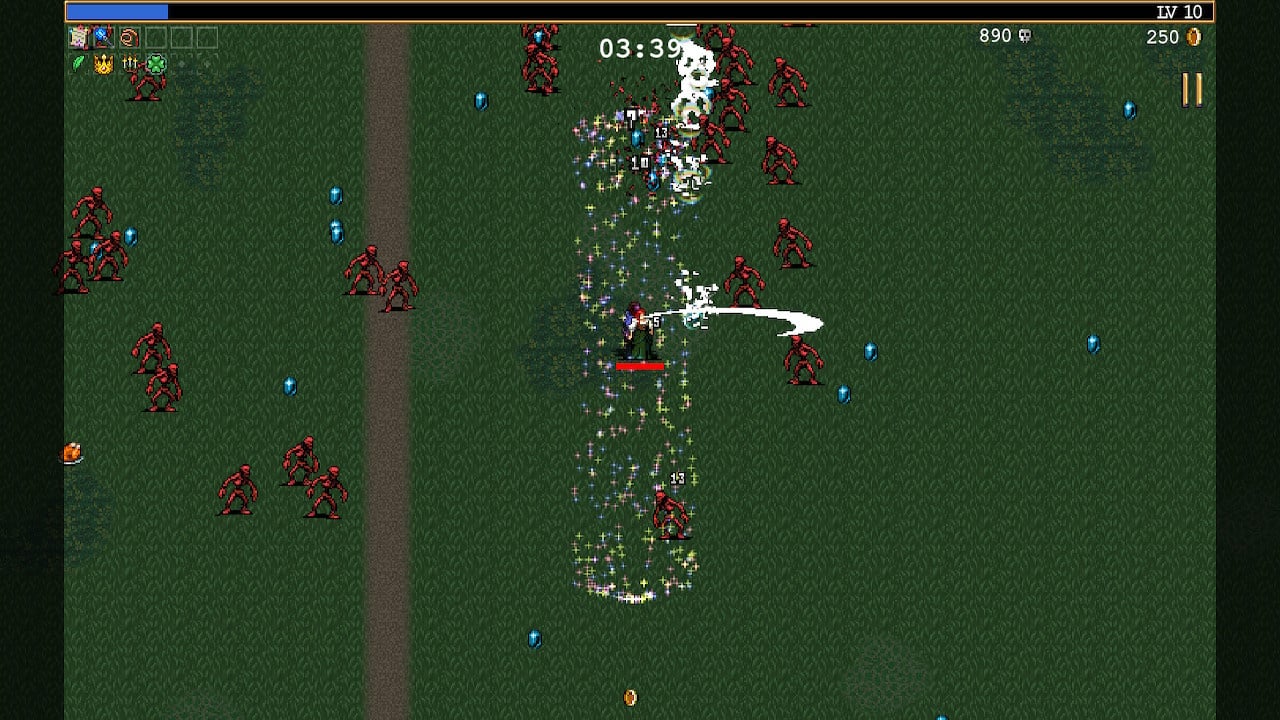
The most common way we’ve heard Vampire Survivors described is, “A bullet hell where you are the bullet hell,” but that’s only half of the story. You start each level with one attack. They vary from classic stuff you’d expect from a Castlevania game, like a whip, a cross-shaped boomerang, or a throwing axe to more goofy stuff like the aroma of garlic or giant minecarts. There are dozens of them, and each attack has its own strengths, weaknesses, and properties; garlic, for example, creates a miasma of deadly garlic breath, damaging any enemy that dares enter your personal space. The whip slashes out in front of the direction that the player’s facing, dealing high damage to anything in its range.
Captured on Nintendo Switch (Docked)
Every attack has a cooldown, but instead of deciding when to throw them out into the horde of Castlevania-inspired enemies, they all shoot out automatically. Most of the gameplay loop here is dealing with an attack’s specific strengths and weaknesses while learning to twist them into the most efficient tools to quell the onslaught of monsters, all navigated with the left stick or via the touchscreen, which mirrors the touch input of the mobile version.
The monsters on the receiving end of your attacks approach from all angles at all speeds. Some pop up out of the ground and hurl magical attacks at you. Others just run at you with reckless abandon. All but one are killable, and they die with a satisfying pop. As they die, they drop experience points that you can use to level up and get new attacks, power-ups, or potentially even discover new combinations that unlock new abilities for your attacks.
Without revealing any of the game’s many secrets, some combinations unlock powered-up versions of an attack that have no cooldown. Others might add vampiric, health-stealing attributes or a second hit to an attack. This combination is just one example of the many games hidden within Vampire Survivors. Sure, the game’s main loop is all about surviving the endless volley of enemies, but if you just leveled up on a linear path, it wouldn’t be nearly as exciting or gripping as it actually is.
Instead, you’re making dozens of small choices and gambles in a variety of different avenues. In the main loop, you may be confronted with needing to choose between pursuing an objective that’s in a far-off corner of the map and staying in place so you can level up your character to avoid an untimely fate halfway to the treasure. But within that choice, you might be confronted with a choice between a few new abilities or power-ups as you level up. Each decision will directly impact your gameplay and experience and Vampire Survivors goes out of its way to reward you with brain-tickling aplomb.
Captured on Nintendo Switch (Docked)
Vampire Survivors wears its slot machine-inspired psychology on its sleeve; opening a treasure chest feels like playing a slot machine that you always win, you never know what you’ll stumble on when you level up, and exploring the game’s unknown power combinations feels like making an un-losable bet. Sure, some hands might be better than others, but it always feels like an event to get to that next level, objective, or treasure chest. Like many of the best roguelikes and arcade games, this push and pull between risk and reward is what really elevates Vampire Survivors’ deceptively simple core loop.
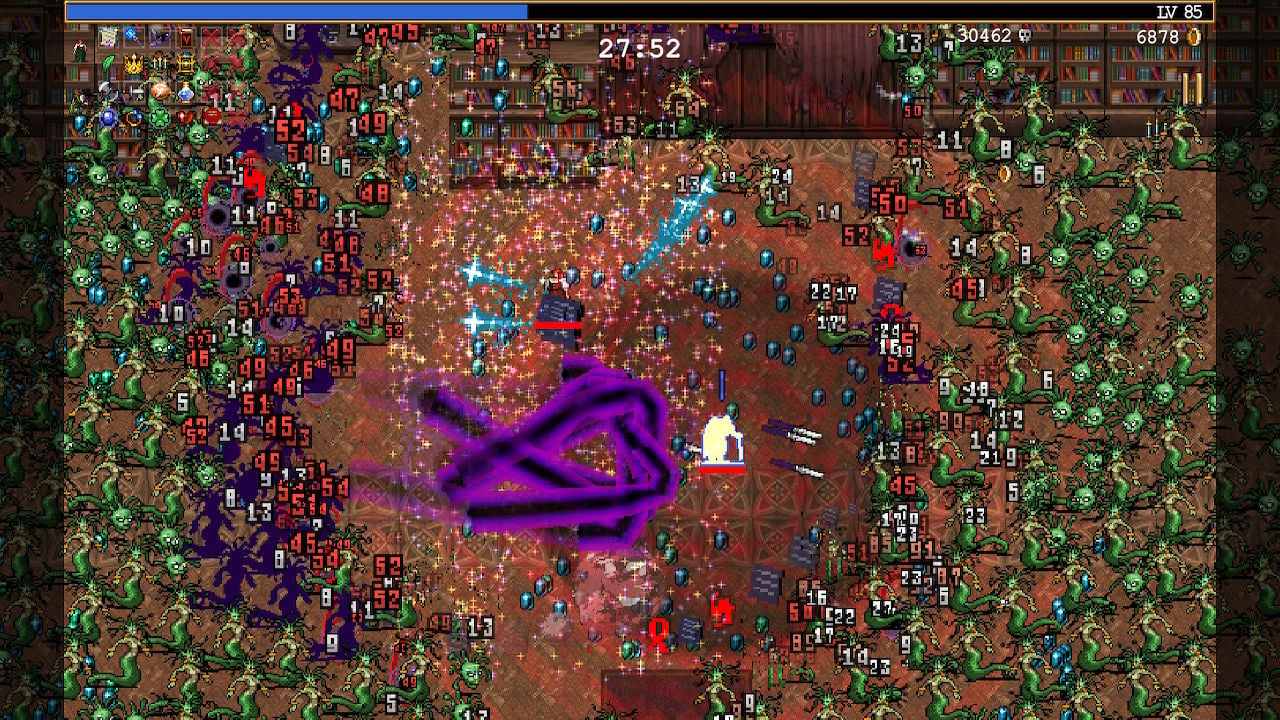
Of course, as you level up and begin to throw out more projectiles, the game matches your pace by sending more and more enemies after you. Needless to say, things can get very chaotic. At times, your entire screen might be filled with enemies except for a small area around your character. Sometimes it can become a bit difficult to follow where exactly your character is, or whether or not they’re taking damage when the screen gets that full. Moreover, it can lead to some performance issues.
With the game even seeing some mild performance dips in our experience playing an older version on PC, one of our biggest concerns about this port was the Switch’s ability to run the game smoothly. We’re happy to report that it runs shockingly well! Given the sheer amount of enemies that can be on-screen at the same time (especially once you approach the 30-minute mark on a run), we were pleasantly surprised to see how few frames the handheld dropped.
We encountered the biggest dips when cycling between leveling up, opening treasure chests, and getting back into the action, but even then, the performance issues were very brief. In fact, after about 12 hours with the game, we haven’t encountered any drops in frame rate that lasted longer than a second or two.
The new local co-op is the only exception when it comes to the game’s overall very solid performance. Depending on how many players you have in one session, the power-ups and attacks they choose, and what stage you’re on, you might end up playing with a lower frame rate for longer periods of time. Like in the rest of the game, things never get too dicey. Based on our experience with the co-op modes, the game is very consistent and never became unplayable.
Overall, this new co-op mode is a great addition. You can play with up to four players at a time and it’s really well-implemented. Instead of allocating XP to whoever picks it up first, everyone shares one bar and alternate gaining new levels, and chests are assigned to a random player. For balancing purposes, the amount of power-ups and attacks you can have are limited in co-op.
Conclusion
Vampire Survivors skyrocketed in popularity in 2022 for good reason. It’s one of the best roguelites in recent memory thanks to its gripping gameplay loop and metagame that highjacks your mind. The Switch port only adds more to love with local co-op and updated content. It’s so easy to slip into a blissful sense of flow in Vampire Survivors’ Castlevania-inspired, comically named levels as its ripping soundtrack and satisfying sound design propel you into the horde that you’ll surely lose track of time playing it. It’s a good thing that rounds don’t usually last more than half an hour.
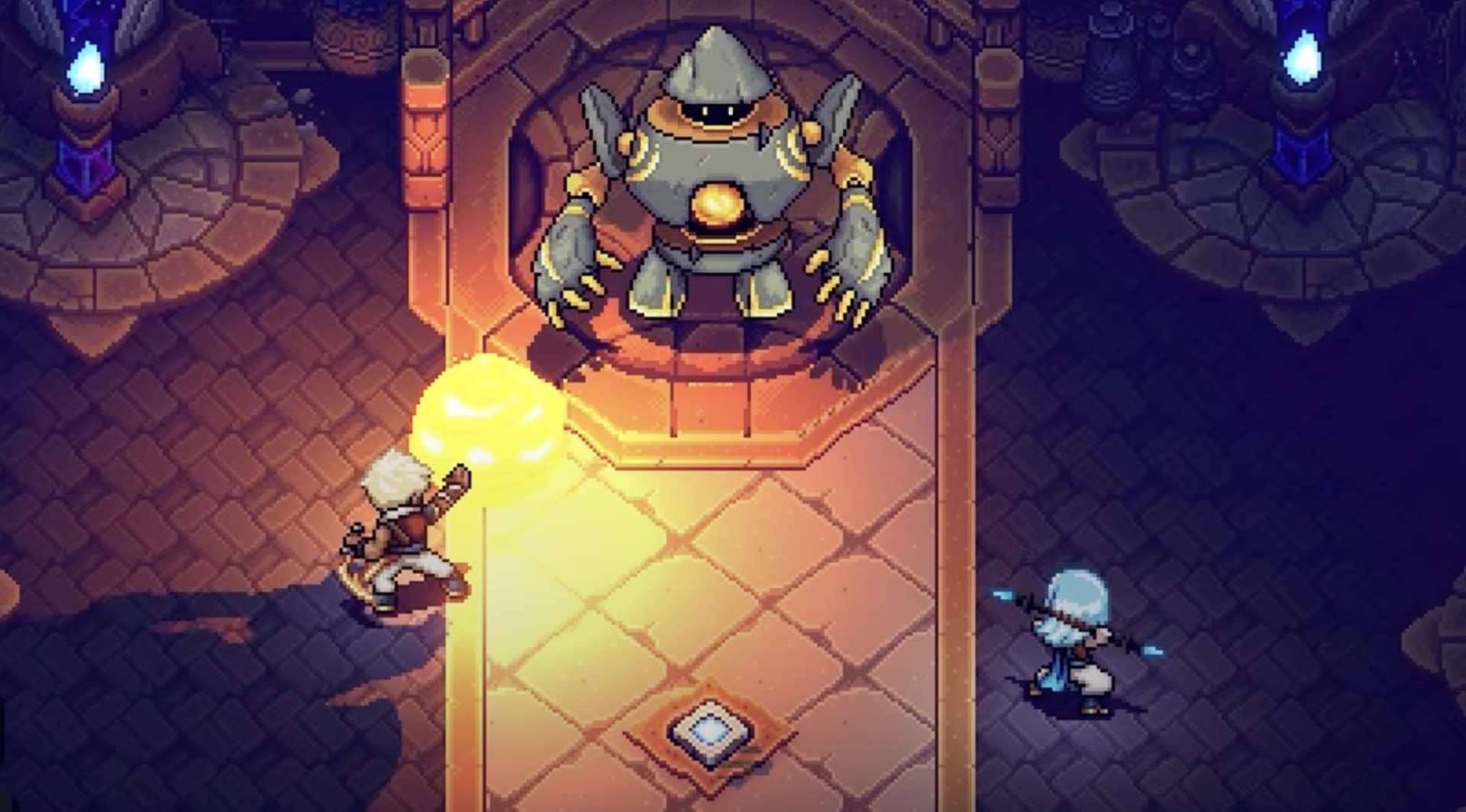
Sea Of Stars is well on its way to launching on the Nintendo Switch on August 29th, 2023. To celebrate, developer Sabotage Studio has joined forces with The Escapist to present a “Making Of” documentary that’s now available for free via YouTube.
The half-hour documentary is well worth checking out if you’re a fan of Sabotage Studio’s previous effort The Messenger and are looking forward to the upcoming launch of Sea of Stars. It goes into how Sabotage Studio was formed, how The Messenger came to be, and what the team is doing to ensure Sea of Stars stands out from the crowd in the RPG genre.
If you’re concerned about spoilers, then fear not: we’ve already watched the documentary ourselves and can confirm that it doesn’t go into any key story details. Rather, the developers talk more about the technical aspects of the game, like pacing, lighting mechanics, and day/night cycles – that sort of thing.
Are you looking forward to Sea of Stars later this month? What do you make of this documentary? Leave a comment with your thoughts below.
It probably sounds too good to be true: the ability to manage remote systems using an easy to use, intuitive graphical interface – without the need to install extra software on the remote systems, enable additional services, or make any other changes on the remote systems. This functionality, however, is now available with a combination of the recently introduced Python bridge for Cockpit and the Cockpit Client Flatpak! This allows Cockpit to manage remote systems, assuming only SSH access and that Python is installed on the remote host. Read on for more information on how this works and how to get started.
If you are not familiar with Cockpit, it is described on the project’s web site as a web-based graphical interface for servers. Cockpit is intended for everyone, especially those who are:
new to Linux (including Windows admins)
familiar with Linux and want an easy, graphical way to administer servers
expert admins who mainly use other tools but want an overview on individual systems
You can easily and intuitively complete a variety of tasks from Cockpit. These including tasks such as:
expanding the size of a filesystem
creating a network bond
modifying the firewall
viewing log entries
viewing real time and historical performance information
managing Podman containers
managing KVM virtual machines
and many additional tasks.
Objections to using Cockpit on systems
In the past, I’ve heard two main objections to using Cockpit on systems:
I don’t want to run the Cockpit web server on my systems. Additional network services like this increase the attack surface. I don’t want to open another port in the firewall. I don’t want more HTTPS certificates in my environment to manage and maintain.
I don’t want to install additional packages on my systems. I don’t even have access to install additional packages). The more packages installed, the larger my footprint is, and the more attack surface there is. For me to install additional packages in a production environment, I have to go through a change management process, etc. What a hassle!
Let’s address these one at a time. For the first concern, you have actually had several options for connecting to Cockpit over SSH, without running the Cockpit web server, for quite some time. These options include:
The ability to set up a bastion host, which is a host that has the Cockpit web server running on it. You can then connect to Cockpit on the bastion host using a web browser. From the Cockpit login screen on the bastion host you can use the Connect tooption to specify an alternate host to login to (refer to the LoginTo cockpit.conf configuration option). Another option is to authenticate to Cockpit on the bastion host, and use the Add new host option. In either case, the bastion Cockpit host will connect to these additional remote hosts over SSH (so only the bastion host in your environment needs to be running the Cockpit web server).
You can use the Cockpit integration available with the upstream Foreman, or downstream Red Hat Satellite, to connect to Cockpit on systems in your environment over SSH.
You can use the cockpit/ws container image. This is a containerized version of the Cockpit web server that acts as a containerized bastion host
For more information on these options, refer to the Connecting to the RHEL web console, part 1: SSH access methods blog post. This blog post focuses on the downstream RHEL web console, however, the information also applies to the upstream Cockpit available in Fedora.
This brings me to the second concern, and the main focus of this article. This is the concern that I don’t want to install additional packages on the remote systems I am managing. While there are several options for using the web console without the Cockpit web server, all of these options previously had a prerequisite that the remote systems needed to have at least the cockpit-system package installed. For example, previously if you tried to use the Cockpit Client Flatpak to connect to a remote system that didn’t have Cockpit installed, you’d see an error message stating that the remote system doesn’t have cockpit-bridge installed.
The Cockpit team has replaced the previous Cockpit bridge (implemented using C) with a new bridge written in Python. For a technical overview of the function of the Cockpit bridge, and how the new Python bridge was implemented, refer to the recent Monty Python’s Flying Cockpit DevConf presentation by Allison Karlitskaya and Martin Pitt.
This new Python bridge overcomes the previous limitation requiring Cockpit to be installed on the remote hosts.
Using the Cockpit Client Flatpak
With the Cockpit Client Flatpak application installed on a workstation, we can connect to remote systems over SSH and manage them using Cockpit.
Installation
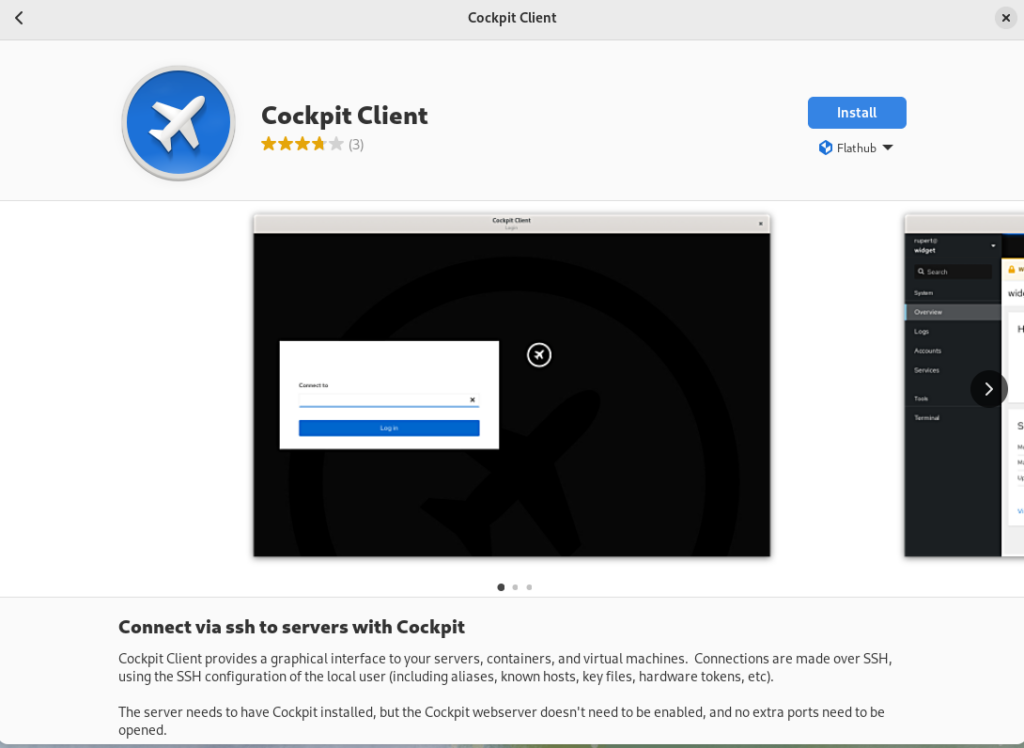
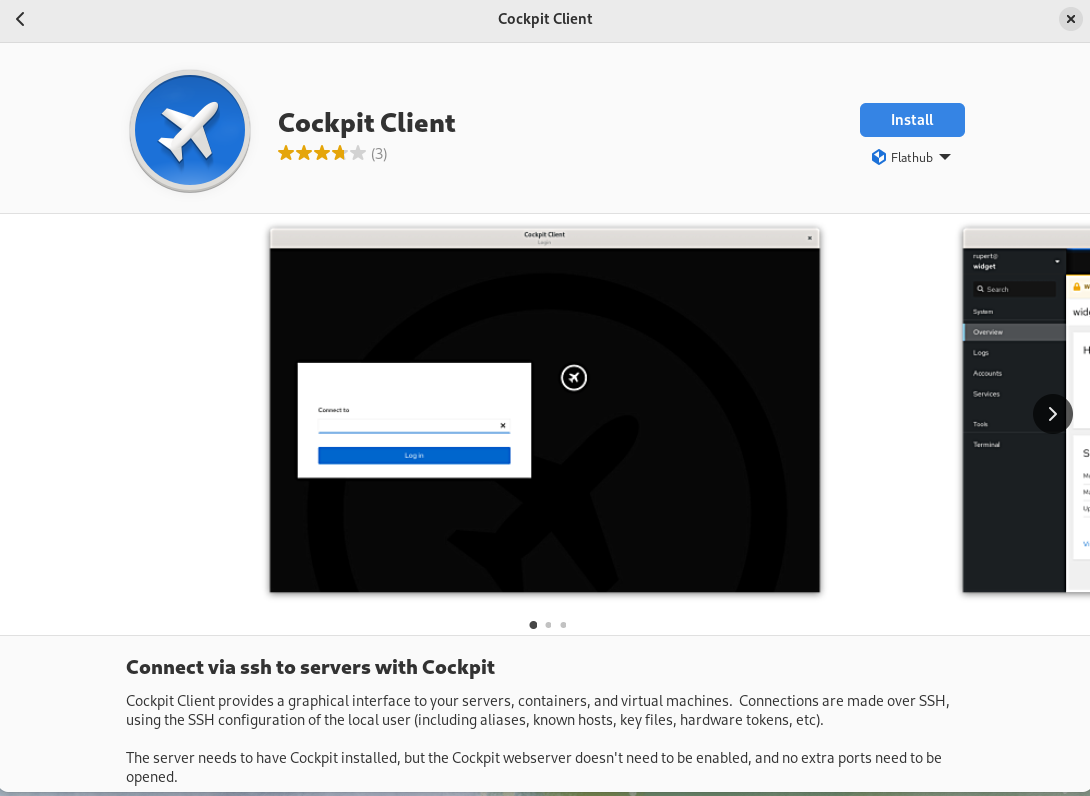
In the following example, I’m using a Fedora 38 workstation. Install the Cockpit Client Flatpak by simply opening the GNOME Software application and searching for Cockpit. Note that you’ll need to have Flathub enabled in GNOME Software.
Using the Cockpit Client
Once installed, you’ll see the following when opening the Cockpit Client:
You can type in a hostname or IP address that you would like to connect to. To authenticate as a user other than the user you are currently using, you can use the user@hostname syntax. A list of recent hosts that you’ve connected to will appear, if this is not the first time using the Cockpit Client. In that case, you can simply click on a host name to reconnect
If you have SSH key based authentication setup, you’ll be logged in to the remote host using the key based authentication. With out SSH keys setup, you’ll be prompted to authenticate with a password. In either case, if it is your first time connecting to the host over SSH, you’ll be prompted to accept the host key fingerprint.
As a special case, you can log into your currently running local session by connecting to localhost, without authentication.
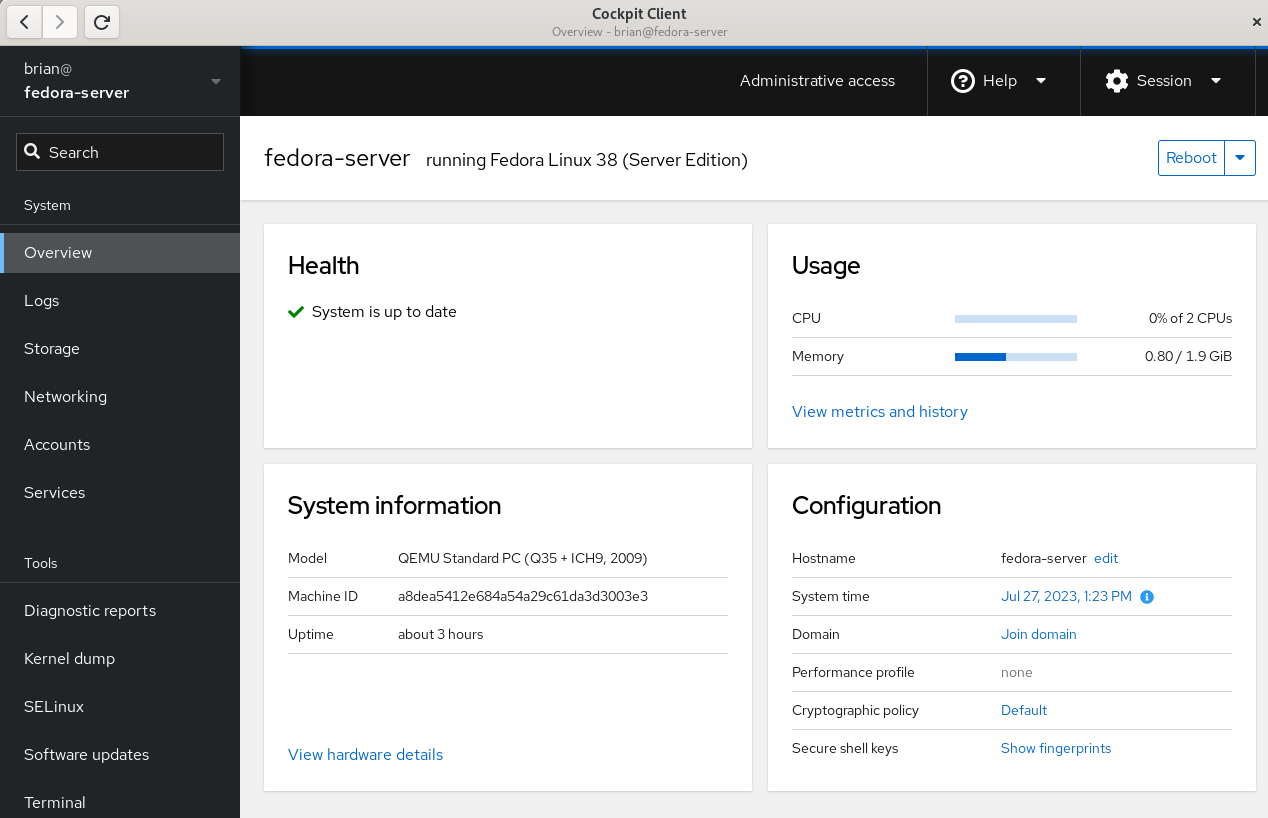
Once connected, you’ll see the Cockpit Overview page:
Cockpit overivew menu
Select the Terminal menu item in Cockpit to show that the remote system that I’m logged in to does not have any Cockpit packages installed:
Cockpit Terminal view
Prerequisites for connecting to systems with Cockpit Client
There are several prerequisites for utilizing Cockpit Client to connect to a remote system. If you are familiar with managing remote hosts with Ansible, you’ll likely already be familiar with the prerequisites. They are the same:
You must have connectivity to the remote system over SSH.
You must have a valid user account on the remote system that you can authenticate with.
If you need the ability to complete privileged operations in Cockpit, the user account on the remote system will need sudo privileges.
If you are connecting to a remote system that doesn’t have Cockpit installed, there are a couple of additional prerequisites:
Python 3.6 or later must be installed on the remote host. This is not usually an issue, with some exceptions, such as Fedora CoreOS which does not include Python by default.
An older version of Cockpit Client can not be used to connect to a newer operating system version. For example, if I installed Cockpit Client on my Fedora 38 workstation today and never updated it, it may not work properly to manage a Fedora 39 or Fedora 40 server in the future.
Frequently asked questions
Here are some frequently asked questions about this functionality:
Question: Cockpit is extendable via additional Applications. Which Cockpit applications are available if I use the Cockpit Client to connect to a remote system that doesn’t have Cockpit installed?
Answer: Currently, Cockpit Client includes
cockpit-machines (virtual machine management)
cockpit-podman (Podman container management)
cockpit-ostree (used to manage rpm-ostree based systems)
The Cockpit team is looking for feedback on what Cockpit applications you’d like to see included in the Cockpit Client. Post a comment below with your feedback.
Question: I connected to a remote system that doesn’t have Cockpit installed, but I don’t see Virtual Machines or one of the other applications listed in the menu. I thought you just said these were included in the Cockpit Client Flatpak?
Answer: When you login to a remote system that doesn’t have Cockpit packages installed, you’ll only see the menu options for underlying functionality available on the remote system. For example, you’ll only see Virtual Machines in the Cockpit menu if the remote host has the libvirt-dbus package installed.
Question: Can Cockpit applications available in the Cockpit Client be used with locally installed Cockpit applications on the remote host? In other words, if I need a Cockpit application not included in the Cockpit Client, can I install just that single package on the remote host?
Answer: No, you cannot mix and match applications included in the Cockpit Client flatpak and those installed locally on the remote host. For a remote host that has thecockpit-bridge package installed, Cockpit Client will exclusively use the applications that are installed locally on the remote host. If the remote host does not have the cockpit-bridge package installed, Cockpit Client will exclusively use the applications bundled in the Cockpit Client Flatpak.
Question: Can I use Cockpit Client to connect to the local host?
Answer: Yes! Simply open Cockpit Client and type in localhost and you’ll be able to manage the local host. You don’t need to have any Cockpit packages installed on the local host if you use this method. You only need the Cockpit Client Flatpak.
Question: What Linux distributions can I connect to using the Cockpit Client?
Answer: Cockpit is compatible with a number of different Linux distributions. For more information, see the Running Cockpit page. If connecting to a remote system that doesn’t have Cockpit installed, keep in mind the previously mentioned requirements regarding not connecting to newer OS’s from an older Cockpit Client.
Question: Does the Cockpit team have any future plans regarding this functionality?
Answer: The Cockpit team is planning on adding the ability to connect to remote hosts without Cockpit packages installed to the cockpit-ws container image. See COCKPIT-954 ticket for more info.
Have more questions not covered here? Ask them in the comments section below!
Conclusion
The new Python bridge, and the corresponding ability to use the Cockpit Client to connect to remote systems without installing Cockpit, makes it incredibly easy to use Cockpit in almost any circumstance.
Try this out! It’s easy to do. Simply install the Cockpit Client Flatpak, and use it to connect to either your localhost or a remote system. Once you’ve tried it, let us know what you think in the comments below.
List comprehension is a concise way to create lists in Python. They offer a shorter syntax to achieve the same result as using a traditional for loop and a conditional statement. List comprehensions make your code more readable and efficient by condensing multiple lines of code into a single line.
The basic syntax for a list comprehension is:
new_list = [expression for element in iterable if condition]
Here, the expression is applied to each element in the iterable (e.g., a list or a range), and the result is appended to the new_list if the optional condition is True. If the condition is not provided, all elements will be included in the new list.
Let’s look at an example. Suppose you want to create a list of squares for all even numbers between 0 and 10. Using a list comprehension, you can write:
squares = [x**2 for x in range(11) if x % 2 == 0]
This single line of code generates the list of squares, [0, 4, 16, 36, 64, 100]. It’s more concise and easier to read compared to using a traditional for loop:
squares = []
for x in range(11): if x % 2 == 0: squares.append(x**2)
You can watch my explainer video on list comprehension here:
For example, you can create a list of all numbers divisible by both 3 and 5 between 1 and 100 with the following code:
divisible = [num for num in range(1, 101) if num % 3 == 0 and num % 5 == 0]
In this case, the resulting list will be [15, 30, 45, 60, 75, 90].
One more advanced feature of Python list comprehensions is the ability to include conditional expressions directly in the expression part, rather than just in the condition.
For example, you can create a list of “even” and “odd” strings based on a range of numbers like this:
even_odd = ["even" if x % 2 == 0 else "odd" for x in range(6)]
This code generates the list ["even", "odd", "even", "odd", "even", "odd"].
If you want to learn to write more concise Python code, check out my book:
If you like one-liners, you’ll LOVE the book. It’ll teach you everything there is to know about a single line of Python code. But it’s also an introduction to computer science, data science, machine learning, and algorithms. The universe in a single line of Python!
The book was released in 2020 with the world-class programming book publisher NoStarch Press (San Francisco).
List comprehensions provide a concise way to make new lists by iterating through an existing list or other iterable object. They are more time and space-efficient than traditional for loops and offer a cleaner syntax.
even_numbers = [x*2 for x in range(5)] # Output: [0, 2, 4, 6, 8]
This creates a new list by multiplying each element within the range(5) function by 2. This compact syntax allows you to define a new list in a single line, making your code cleaner and easier to read.
You can also include a conditional statement within the list comprehension:
even_squares = [x**2 for x in range(10) if x % 2 == 0] # Output: [0, 4, 16, 36, 64]
This example creates a new list of even squares from 0 to 64 by using an if statement to filter out the odd numbers. List comprehensions can also be used to create lists from other iterable objects like strings, tuples, or arrays.
For example, extracting vowels from a string:
text = "List comprehensions in Python"
vowels = [c for c in text if c.lower() in 'aeiou'] # Output: ['i', 'o', 'e', 'e', 'o', 'i', 'o', 'i', 'o']
This will create a list with five None elements. You can then replace them as needed, like placeholder_list[2] = 42, resulting in [None, None, 42, None, None].
Filtering and Transforming Lists
List comprehensions in Python provide a concise way to filter and transform values within an existing list.
Filtering a list involves selecting items that meet a certain condition. You can achieve this using list comprehensions by specifying a condition at the end of the expression.
For example, to create a new list containing only even numbers from an existing list, you would write:
numbers = [1, 2, 3, 4, 5, 6, 7, 8, 9]
even_numbers = [num for num in numbers if num % 2 == 0]
In this case, the condition is num % 2 == 0. The list comprehension iterates over each item in the numbers list and only includes items where the condition is true.
Aside from filtering, list comprehensions can also transform items in a list. You can achieve this by altering the expression at the beginning of the list comprehension.
For example, to create a list of squares from an existing list, you can use the following code:
squares = [num ** 2 for num in numbers]
Here, the expression num ** 2 transforms each item in the list by squaring it. The squares list will now contain the squared values of the original numbers list.
By combining filtering and transformation, you can achieve even more powerful results in a single, concise statement.
For instance, to create a new list containing the squares of only the even numbers from an existing list, you can write:
even_squares = [num ** 2 for num in numbers if num % 2 == 0]
In this example, we simultaneously filter out odd numbers and square the remaining even numbers.
To further explore list comprehensions, check out these resources on
List comprehensions in Python provide a way to create a new list by filtering and transforming elements of an existing list while significantly enhancing code readability. They enable you to create powerful functionality within a single line of code. Compared to traditional for loops, list comprehensions are more concise and generally preferred in terms of readability.
Here’s an example of using a list comprehension to create a list containing the squares of even numbers in a given range:
even_squares = [x ** 2 for x in range(10) if x % 2 == 0]
This single line of code replaces a multiline for loop as shown below:
even_squares = []
for x in range(10): if x % 2 == 0: even_squares.append(x ** 2)
As you can see, the list comprehension is more compact and easier to understand. In addition, it often results in improved performance. List comprehensions are also useful for tasks such as filtering elements, transforming data, and nesting loops.
Here’s another example – creating a matrix transpose using nested list comprehensions:
matrix = [[1, 2, 3], [4, 5, 6], [7, 8, 9]]
transpose = [[row[i] for row in matrix] for i in range(len(matrix[0]))]
This code snippet is equivalent to the nested for loop version:
transpose = []
for i in range(len(matrix[0])): row_list = [] for row in matrix: row_list.append(row[i]) transpose.append(row_list)
While using list comprehensions, be mindful of possible downsides, including loss of readability if the expression becomes too complex. To maintain code clarity, it is crucial to strike the right balance between brevity and simplicity.
List Comprehensions with Different Data Types
List comprehensions work with various data types, such as strings, tuples, dictionaries, and sets.
For example, you can use list comprehensions to perform mathematical operations on list elements. Given a list of integers, you can easily square each element using a single line of code:
num_list = [2, 4, 6]
squared_list = [x**2 for x in num_list]
Handling strings is also possible with list comprehensions. When you want to create a list of the first letters of a list of words, use the following syntax:
words = ["apple", "banana", "cherry"]
first_letters = [word[0] for word in words]
Working with tuples is very similar to lists. You can extract specific elements from a list of tuples, like this:
tuple_list = [(1, 2), (3, 4), (5, 6)]
first_elements = [t[0] for t in tuple_list]
Additionally, you can use list comprehensions with dictionaries. If you have a dictionary and want to create a new one where the keys are the original keys and the values are the squared values from the original dictionary, use the following code:
input_dict = {"a": 1, "b": 2, "c": 3}
squared_dict = {key: value**2 for key, value in input_dict.items()}
Using Functions and Variables in List Comprehensions
List comprehensions in Python are a concise and powerful way to create new lists by iterating over existing ones. They provide a more readable alternative to using for loops and can easily add multiple values to specific keys in a dictionary.
When it comes to using functions and variables in list comprehensions, it’s important to keep the code clear and efficient. Let’s see how to incorporate functions, variables, and other elements mentioned earlier:
Using Functions in List Comprehensions You can apply a function to each item in the list using a comprehension. Here’s an example with the upper() method:
letters = ['a', 'b', 'c', 'd']
upper_letters = [x.upper() for x in letters]
This comprehension will return a new list containing the uppercase versions of each letter. Any valid function can replace x.upper() to apply different effects on the input list.
Utilizing Variables in List Comprehensions With variables, you can use them as a counter or a condition. For example, a list comprehension with a counter:
squares = [i**2 for i in range(1, 6)]
This comprehension creates a list of squared numbers from 1 to 5. The variable i is a counter that iterates through the range() function.
For a more complex example, let’s say we want to filter out odd numbers from a list using the modulo % operator:
numbers = [1, 2, 3, 4, 5, 6, 7, 8, 9]
even_numbers = [x for x in numbers if x % 2 == 0]
In this case, the variable x represents the current element being manipulated during the iteration, and it is used in the condition x % 2 == 0 to ensure we only keep even numbers.
Working with Nested List Comprehensions
Nested list comprehensions in Python are a versatile and powerful feature that allows you to create new lists by applying an expression to an existing list of lists. This is particularly useful for updating or traversing nested sequences in a concise and readable manner.
I created a video on nested list comprehensions here:
A nested list comprehension consists of a list comprehension inside another list comprehension, much like how nested loops work. It enables you to iterate over nested sequences and apply operations to each element.
For example, consider a matrix represented as a list of lists:
matrix = [ [1, 2, 3], [4, 5, 6], [7, 8, 9]
]
To calculate the square of each element in the matrix using nested list comprehensions, you can write:
squared_matrix = [[x**2 for x in row] for row in matrix]
This code is equivalent to the following nested for loop:
squared_matrix = []
for row in matrix: squared_row = [] for x in row: squared_row.append(x**2) squared_matrix.append(squared_row)
As you can see, the nested list comprehension version is much more concise and easier to read.
Python supports various sequences like lists, tuples, and dictionaries. You can use nested list comprehensions to create different data structures by combining them. For instance, you can convert the matrix above into a dictionary where keys are the original numbers and values are their squares:
matrix_dict = {x: x**2 for row in matrix for x in row}
List comprehension is a powerful feature in Python that allows you to quickly create new lists based on existing iterables. They provide a concise and efficient way of creating new lists with a few lines of code.
The first advanced technique to consider is using range() with index. By utilizing the range(len(...)) function, you can iterate over all the items in a given iterable.
numbers = [1, 2, 3, 4, 5]
squares = [number ** 2 for number in numbers]
In addition to creating new lists, you can also use conditional statements in list comprehensions for more control over the output.
For example, if you want to create a new list with only the even numbers from an existing list, you can use a condition like this:
numbers = [1, 2, 3, 4, 5, 6]
even_numbers = [num for num in numbers if num % 2 == 0]
Another useful feature is the access of elements in an iterable using their index. This method enables you to modify the output based on the position of the elements:
words = ["apple", "banana", "cherry", "date"]
capitals = [word.capitalize() if i % 2 == 0 else word for i, word in enumerate(words)]
In this example, the enumerate() function is used to get both the index (i) and the element (word). The even-indexed words are capitalized, and the others remain unchanged.
Moreover, you can combine multiple iterables using the zip() function. This technique allows you to access elements from different lists simultaneously, creating new lists based on matched pairs.
x = [1, 2, 3]
y = [4, 5, 6]
combined = [a + b for a, b in zip(x, y)]
Frequently Asked Questions
What is the syntax for list comprehensions with if-else statements?
List comprehensions allow you to build lists in a concise way. To include an if-else statement while constructing a list, use the following syntax:
new_list = [expression_if_true if condition else expression_if_false for item in iterable]
For example, if you want to create a list of numbers, where even numbers are squared and odd numbers remain unchanged:
numbers = [1, 2, 3, 4, 5]
new_list = [number ** 2 if number % 2 == 0 else number for number in numbers]
How do you create a dictionary using list comprehension?
You can create a dictionary using a dict comprehension, which is similar to a list comprehension. The syntax is:
new_dict = {key_expression: value_expression for item in iterable}
For example, creating a dictionary with square values as keys and their roots as values:
squares = {num ** 2: num for num in range(1, 6)}
How can you filter a list using list comprehensions?
Filtering a list using list comprehensions involves combining the basic syntax with a condition. The syntax is:
filtered_list = [expression for item in iterable if condition]
For example, filtering out even numbers from a given list:
numbers = [1, 2, 3, 4, 5]
even_numbers = [number for number in numbers if number % 2 == 0]
What is the method to use list comprehension with strings?
List comprehensions can be used with any iterable, including strings. To create a list of characters from a string using list comprehension:
text = "Hello, World!"
char_list = [char for char in text]
How do you combine two lists using list comprehensions?
To combine two lists using list comprehensions, use a nested loop. Here’s the syntax:
combined_list = [expression for item1 in list1 for item2 in list2]
For example, combining two lists containing names and ages:
names = ["Alice", "Bob", "Charlie"]
ages = [25, 30, 35]
combined = [f"{name} is {age} years old" for name in names for age in ages]
What are the multiple conditions in a list comprehension?
When using multiple conditions in a list comprehension, you can have multiple if statements after the expression. The syntax is:
new_list = [expression for item in iterable if condition1 if condition2]
For example, creating a list of even numbers greater than 10:
numbers = list(range(1, 20))
result = [number for number in numbers if number % 2 == 0 if number > 10]
Python One-Liners Book: Master the Single Line First!
Python programmers will improve their computer science skills with these useful one-liners.
Python One-Linerswill teach you how to read and write “one-liners”: concise statements of useful functionality packed into a single line of code. You’ll learn how to systematically unpack and understand any line of Python code, and write eloquent, powerfully compressed Python like an expert.
The book’s five chapters cover (1) tips and tricks, (2) regular expressions, (3) machine learning, (4) core data science topics, and (5) useful algorithms.
Detailed explanations of one-liners introduce key computer science concepts and boost your coding and analytical skills. You’ll learn about advanced Python features such as list comprehension, slicing, lambda functions, regular expressions, map and reduce functions, and slice assignments.
You’ll also learn how to:
Leverage data structures to solve real-world problems, like using Boolean indexing to find cities with above-average pollution
Use NumPy basics such as array, shape, axis, type, broadcasting, advanced indexing, slicing, sorting, searching, aggregating, and statistics
Calculate basic statistics of multidimensional data arrays and the K-Means algorithms for unsupervised learning
Create more advanced regular expressions using grouping and named groups, negative lookaheads, escaped characters, whitespaces, character sets (and negative characters sets), and greedy/nongreedy operators
Understand a wide range of computer science topics, including anagrams, palindromes, supersets, permutations, factorials, prime numbers, Fibonacci numbers, obfuscation, searching, and algorithmic sorting
By the end of the book, you’ll know how to write Python at its most refined, and create concise, beautiful pieces of “Python art” in merely a single line.
























 Recommended:
