CD Projekt Red has applied a new hotfix to the Nintendo Switch Version of The Witcher 3: Wild Hunt.
The hotfix dropped yesterday, as announced on Twitter, and fixes a number of very small issues with the massive open-world RPG.
First and foremost, ambient audio problems have been resolved — some players had been reporting that it was absent or disappeared during some areas, and that’s been fixed with this update. The second fix is for regional restrictions for the Korean version of the game.
This isn’t a large-scale update, so CD Projekt Red has advised players to check the date of the last update to make sure the game is up-to-date.
Talk of a brand new Witcher game has ramped up recently, with the developer confirming that a large number of people who worked on Cyberpunk 2077 are moving onto The Witcher 4 after the Phantom Liberty DLC launches. The Witcher 4 on a Nintendo console is probably a fair way off, though.
Are you still playing The Witcher 3 on Switch? Have you experienced either of these issues? Let us know in the comments.
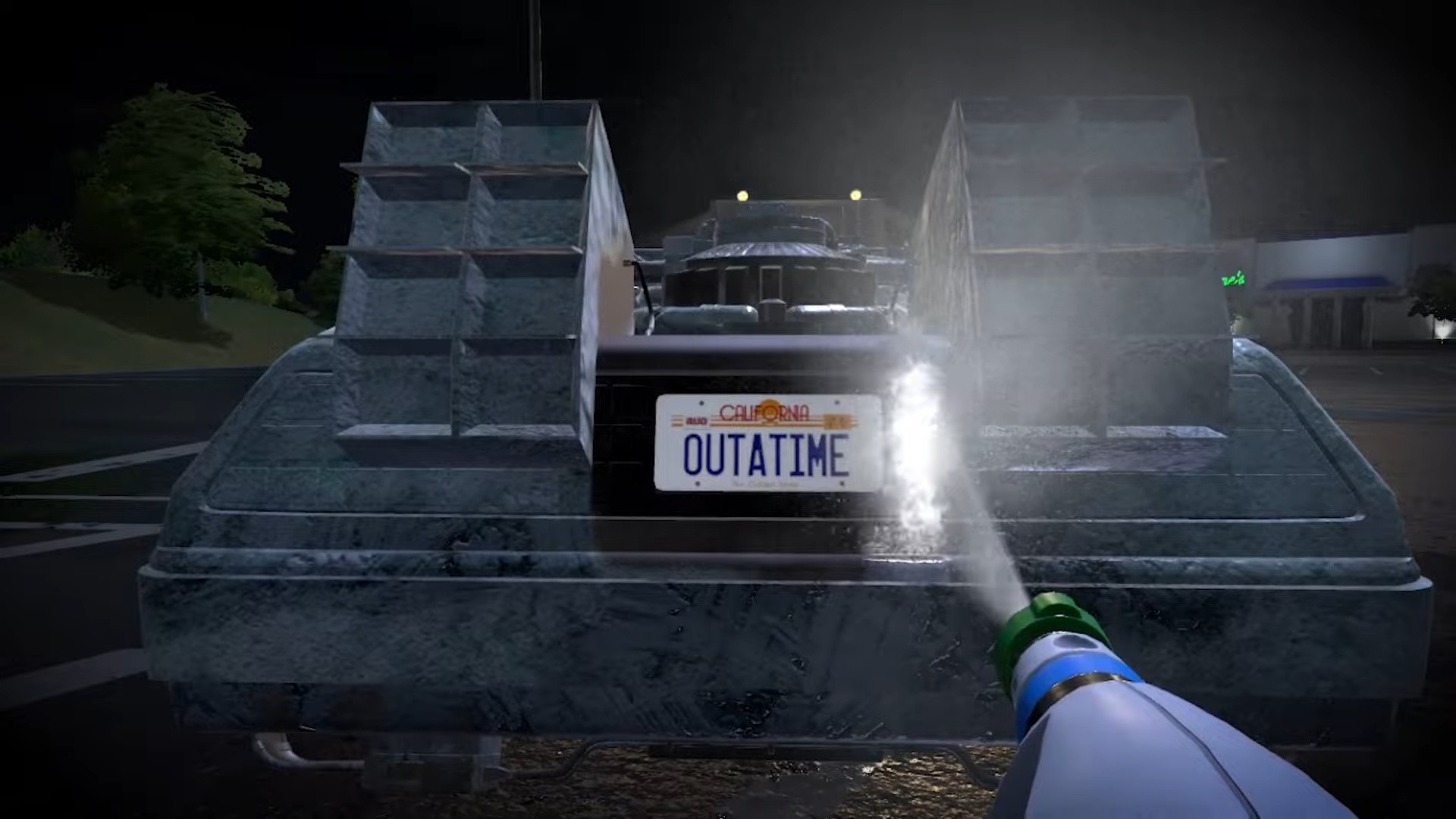
Some movie fans are going to go wild with this announcement — PowerWash Simulator is teaming up with Back to the Future for a brand new DLC pack later this year for $7.99 / €7.99 / £6.49.
Yes, you’re going to get to clean the DeLorean. Really. FuturLab made the announcement with a very short teaser trailer, featuring the iconic license plate of the time-travelling machine from the ’80s movie franchise.
It’s not just the DeLorean you’ll be setting your eyes — or your washer — on, though. You’ll be able to clean up Doc Brown’s van, Hill Valley Clocktower, the Holomax Theatre, and Doc’s Time Train.
FuturLab’s Co-CEO Kirsty Rigden is rightly excited about this collaboration saying that “Back to the Future is a dream IP.” It probably opens up the door for even more iconic movie cars — how about some of James Bond’s snazzy rides, next?
PowerWash Simulator’s Back to the Future pack will drop on the eShop later this year. Will you be picking this up? Travel down to the comments and let us know.
2017’s Mario + Rabbids Kingdom Battle had one of the best DLCs we’ve ever seen a game starring Mario receive. The Donkey Kong Adventure story expansion saw Donkey Kong and Rabbid Cranky team up with Rabbid Peach to take on tons of reworked enemies and tons of tight, tactical challenges. It proved Ubisoft knew how to make a quality DLC. Thus far, this quality hasn’t extended to the DLC releases for the sequel, Mario + Rabbids Sparks of Hope – while both the Tower of Doooom and The Last Spark Hunter gave us more of what made Sparks of Hope great, they were just that: more of the same.
We had high hopes for the final DLC expansion titled Rayman in the Phantom Show. Not only have we not seen Ubisoft’s platforming poster boy in quite some time, but it looked like it might follow in Donkey Kong Adventure’s footsteps. However, after clearing the regrettably short story, it mirrors Sparks of Hope’s other lacklustre DLCs.
Rayman in the Phantom Show begins with Rayman arriving at the Space Opera Network via a golden invitation, which is a run-down TV studio that produces on a galactic scale. Much to his surprise, he runs into two Rabbids, Rabbid Peach and Rabbid Mario, who aren’t out to cause problems for him. Rather, they also received invitations and came to claim galactic stardom along with their robotic pal Beep-0.
Captured on Nintendo Switch (Handheld/Undocked)
If you want to see Rayman team up with his platforming peers Mario and Luigi, you’re out of luck. Rayman in the Phantom Show is a completely separate adventure, meaning Rayman cannot join in the quest to stop Cursa and her minions. In fact, other than a couple of post-credits images, Rayman and the denizens of the Mushroom Kingdom do not interact, which makes for a rather disappointing crossover.
A lack of Rayman-specific elements furthers this disappointment. Sure, Rabbids originated as a Rayman enemy, but the Space Opera Network has nothing to do with our straw-haired hero’s storied adventures. The Big Bad of the adventure isn’t a Rayman rival either, such as Mr. Dark, but rather a return of Kingdom Battle’s Phantom. While a fun character in his own right, the lack of Rayman elements left us feeling like he deserved better.
Rayman does, however, play quite differently than the other heroes. Instead of using the titular Sparks in battle, Rayman comes equipped with two of his suits: Vortex and Rocket. Switching to either of these suits changes everything about him, such as giving his basic Blaster Shot and Plunger Guards the ability to push foes off the map or cause area-based damage. Rayman can also grab onto flying rings, which is the only element from his games that Ubisoft included. He can also punch blocks and grab distant items, which almost all of the overworld puzzles rely on. These puzzles, as you’d expect, play much like they do in the base game: find a shaped key, use Beep-0 to reveal a hidden bridge, and repeat. We grew tired of them quickly.
Captured on Nintendo Switch (Handheld/Undocked)
Thankfully, Sparks of Hope’s freeform tactical battles still provide a lot of fun. The Phantom has Rayman and friends visit three different themed sets — cowboy, pirate, and mediaeval — to complete a puzzle or two before a boss encounter of some sort. Team hopping to take out Flamin’ Stooges before they can hit you with fiery blasts, and finding a way to pop Darkmess Eyes plays as great as it always has. Of these three sets, the pirate set stands out with a massive cardboard cutout of a Kraken serving as an obstacle, while the cowboy stage reskins a standard foe and the mediaeval one enlarges a Stooge to serve as a boss.
When we finished these three in a few hours of play, we opened the menu to check our progress and were surprised to find the adventure was 80% done. While we still had a lot of little secrets to uncover and puzzles to solve throughout the Space Opera Network, we expected another handful of sets to battle through or a more open area, such as the base game’s Pristine Peaks, to explore. Instead, we merely had to defeat the Phantom to finish the game in under four hours.
The Phantom himself has a few fun musical numbers as we took him on, taking digs at how Rayman hasn’t had a game in a while and lamenting his previous loss at the hands of Mario. The final encounter with him plays almost exactly the same as it did in Kingdom Battle: to break his invulnerability, you must disable his spotlight by destroying the light fixtures near him first. You have to do this three times with increasing difficulty, yet we had grown tired of the mechanic before we finished the first round.
Conclusion
As we haven’t seen Rayman on the Nintendo Switch in quite some time, Rayman in the Phantom Show comes as a disappointment – especially when compared to Kingdom Battle’s Donkey Kong Adventure. The lack of Rayman specific elements, the inability to play as Rayman in the base game, and the rehashing of old enemies and encounters, make this an adventure fit only for those that can’t get enough of Sparks of Hope’s great tactical battles.
A Python dictionary is a built-in data structure that allows you to store data in the form of key-value pairs. It offers an efficient way to organize and access your data.
In Python, creating a dictionary is easy. You can use the dict() function or simply use curly braces {} to define an empty dictionary.
For example:
my_dictionary = {}
This will create an empty dictionary called my_dictionary. To add data to the dictionary, you can use the following syntax:
In this case, "key1" and "key2" are the keys, while "value1" and "value2" are the corresponding values. Remember that the keys must be unique, as duplicate keys are not allowed in Python dictionaries.
One of the reasons why dictionaries are important in programming projects is their efficient access and manipulation of data. When you need to retrieve a value, simply provide the corresponding key:
value = my_dictionary["key1"]
This will return the value associated with "key1", in this case, "value1". If the key does not exist in the dictionary, Python will raise a KeyError.
Dictionaries also support various methods for managing the data, such as updating the values, deleting keys, or iterating through the key-value pairs.
Basic Dictionary Creation
In this section, we will discuss the basic methods of creating dictionaries.
To create an empty dictionary, you can use a pair of curly braces, {}. This will initialize an empty dictionary with no elements. For example:
empty_dict = {}
Another method to create an empty dictionary is using the dict() function:
another_empty_dict = dict()
Once you have an empty dictionary, you can start populating it with key-value pairs. To add elements to your dictionary, use the assignment operator = and square brackets [] around the key:
# Creating an empty dictionary
my_dict = {} # Adding a key-value pair for "apple" and "fruit"
my_dict["apple"] = "fruit"
Alternatively, you can define key-value pairs directly in the dictionary using the curly braces {} method. In this case, each key is separated from its corresponding value by a colon :, and the key-value pairs are separated by commas ,:
To create a dictionary from a list, first make sure that the list contains mutable pairs of keys and values. One way to achieve this is by using the zip() function. The zip() function allows you to combine two lists into a single list of pairs.
To create a dictionary from two separate lists, you can utilize the zip() function along with a dictionary comprehension. This method allows you to easily iterate through the lists and create key-value pairs simultaneously:
keys = ['a', 'b', 'c']
values = [1, 2, 3]
dictionary = {key: value for key, value in zip(keys, values)}
print(dictionary) # Output: {'a': 1, 'b': 2, 'c': 3}
List comprehension is a powerful feature in Python that allows you to create a new list by applying an expression to each element in an existing list or other iterable data types. You can also use list comprehension to create a dictionary:
keys = ['a', 'b', 'c']
values = [1, 2, 3]
dictionary = {keys[i]: values[i] for i in range(len(keys))}
print(dictionary) # Output: {'a': 1, 'b': 2, 'c': 3}
Python Create Dict From List in One Line
To create a dictionary from a list in just one line of code, you can use the zip() function and the dict() function:
To create a dictionary from an array or any sequence data type, first convert it into a list of tuples, where each tuple represents a key-value pair. Then, use the dict() function to create the dictionary:
Note that the values in this example are strings because the NumPy array stores them as a single data type. You can later convert these strings back to integers if needed.
Creating Dictionaries from Strings and Enumerations
Python Create Dict From String
To create a dictionary from a string, you can use a combination of string manipulation and dictionary comprehension. This method allows you to extract key-value pairs from the given string, and subsequently populate the dictionary.
The following example demonstrates how to create a dictionary from a string:
input_string = "name=John Doe, age=25, city=New York"
string_list = input_string.split(", ") dictionary = {item.split("=")[0]: item.split("=")[1] for item in string_list}
print(dictionary)
In this example, the input string is split into a list of smaller strings using , as the separator. Then, a dictionary comprehension is used to split each pair by the = sign, creating the key-value pairs.
Python Create Dict from Enumerate
The enumerate() function can also be used to create a dictionary. This function allows you to create key-value pairs, where the key is the index of a list item, and the value is the item itself.
Here is an example of using enumerate() to create a dictionary:
input_list = ["apple", "banana", "orange"]
dictionary = {index: item for index, item in enumerate(input_list)}
print(dictionary)
Output:
{0: 'apple', 1: 'banana', 2: 'orange'}
In this example, the enumerate() function is used in a dictionary comprehension to create key-value pairs with the index as the key and the list item as the value.
Python Create Dict From Enum
Python includes an Enum class, which can be used to create enumerations. Enumerations are a way to define named constants that have a specific set of values. To create a dictionary from an enumeration, you can loop through the enumeration and build key-value pairs.
Here’s an example of creating a dictionary from an enumeration:
from enum import Enum class Color(Enum): RED = 1 GREEN = 2 BLUE = 3 dictionary = {color.name: color.value for color in Color}
print(dictionary)
Output:
{'RED': 1, 'GREEN': 2, 'BLUE': 3}
In this example, an enumeration called Color is defined and then used in a dictionary comprehension to create key-value pairs with the color name as the key and the color value as the value.
When working with dictionaries in Python, it’s essential to be aware of potential KeyError exceptions that can occur when trying to access an undefined key in a dictionary. This can be handled using the dict.get() method, which returns a specified default value if the requested key is not found.
Also, updating the dictionary’s key-value pairs is a simple process using the assignment operator, which allows you to either add a new entry to the dictionary or update the value for an existing key.
Creating Dictionaries from Other Dictionaries
In this section, you’ll learn how to create new dictionaries from existing ones. We’ll cover how to create a single dictionary from another one, create one from two separate dictionaries, create one from multiple dictionaries, and finally, create one from a nested dictionary.
Python Create Dict From Another Dict
To create a new dictionary from an existing one, you can use a dictionary comprehension. The following code snippet creates a new dictionary with keys and values from the old one, in the same order.
old_dict = {'a': 1, 'b': 2, 'c': 3}
new_dict = {k: v for k, v in old_dict.items()}
If you want to modify the keys or values in the new dictionary, simply apply the modifications within the comprehension:
new_dict_modified = {k * 2: v for k, v in old_dict.items()}
Python Create Dict From Two Dicts
Suppose you want to combine two dictionaries into one. You can do this using the update() method or union operator |. The update() method can add or modify the keys from the second dictionary in the first one.
The combined_dict will contain all the keys and values from dict1, dict2, and dict3. In case of overlapping keys, the values from later dictionaries will replace those from the earlier ones.
Python Create Dict From Nested Dict
When working with a nested dictionary, you might want to create a new dictionary from a sub-dictionary. To do this, use the key to access the nested dictionary, and then make a new dictionary from the sub-dictionary:
nested_dict = {'a': {'x': 1, 'y': 2}, 'b': {'z': 3}}
sub_dict = nested_dict['a']
new_dict = {k: v for k, v in sub_dict.items()}
In the code above, the new_dict will be created from the sub-dictionary with the key 'a'.
Creating Dictionaries from Files and Data Formats
In this section, we will explore ways to create Python dictionaries from various file formats and data structures. We will cover the following topics:
Python Create Dict From CSV
Creating a dictionary from a CSV file can be achieved using Python’s built-in csv module. First, open the CSV file with a with statement and then use csv.DictReader to iterate over the rows, creating a dictionary object for each row:
import csv with open('input.csv', 'r') as csvfile: reader = csv.DictReader(csvfile) my_dict = {} for row in reader: key = row['key_column'] my_dict[key] = row
Python Create Dict From Dataframe
When working with Pandas DataFrames, you can generate a dictionary from the underlying data using the to_dict() method:
import pandas as pd df = pd.read_csv('input.csv') my_dict = df.set_index('key_column').to_dict('index')
This will create a dictionary where the DataFrame index is set as keys and the remaining data as values.
Python Create Dict From Dataframe Columns
To create a dictionary from specific DataFrame columns, use the zip function and the to_dict() method:
Openpyxl is a Python library that helps you work with Excel (.xlsx) files. Use it to read the file, iterate through the rows, and add the data to a dictionary:
import openpyxl workbook = openpyxl.load_workbook('input.xlsx')
sheet = workbook.active my_dict = {}
for row in range(2, sheet.max_row + 1): key = sheet.cell(row=row, column=1).value value = sheet.cell(row=row, column=2).value my_dict[key] = value
Python Create Dict From YAML File
To create a dictionary from a YAML file, you can use the PyYAML library. Install it using pip install PyYAML. Then read the YAML file and convert it into a dictionary object:
import yaml with open('input.yaml', 'r') as yaml_file: my_dict = yaml.safe_load(yaml_file)
Python Create Dict From Json File
To generate a dictionary from a JSON file, use Python’s built-in json module to read the file and decode the JSON data:
import json with open('input.json', 'r') as json_file: my_dict = json.load(json_file)
Python Create Dict From Text File
To create a dictionary from a text file, you can read its contents and use some custom logic to parse the keys and values:
with open('input.txt', 'r') as text_file: lines = text_file.readlines() my_dict = {}
for line in lines: key, value = line.strip().split(':') my_dict[key] = value
Modify the parsing logic according to the format of your input text file. This will ensure you correctly store the data as keys and values in your dictionary.
Advanced Dictionary Creation Methods
Python Create Dict From Variables
You can create a dictionary from variables using the dict() function. This helps when you have separate variables for keys and values. For example:
Another way to create dictionaries is by using the **kwargs feature in Python. This allows you to pass keyword arguments to a function and create a dictionary from them. For example:
You can also create a dictionary by iterating over a list and using list comprehensions, along with the get() method. This is useful if you need to count occurrences of certain elements:
my_list = ['a', 'b', 'a', 'c', 'b']
my_dict = {} for item in my_list: my_dict[item] = my_dict.get(item, 0) + 1
Python Create Dict From User Input
To create a dictionary from user input, you can use a for loop. Prompt users to provide input and create the dictionary with the key-value pairs they provide:
my_dict = {} for i in range(3): key = input("Enter key: ") value = input("Enter value: ") my_dict[key] = value
Python Create Dict From Object
You can create a dictionary from an object’s attributes using the built-in vars() function. This is helpful when converting an object to a dictionary. For example:
class MyObject: def __init__(self, a, b, c): self.a = a self.b = b self.c = c my_obj = MyObject(1, 2, 3)
my_dict = vars(my_obj)
Python Create Dict Zip
Lastly, you can create a dictionary using the zip() function and the dict() constructor. This is useful when you have two lists — one representing keys and the other representing values:
To create an empty dictionary in Python, you can use either a set of curly braces {} or the built-in dict() function. Here are examples of both methods:
empty_dict1 = {}
empty_dict2 = dict()
What are common ways to create a dictionary from two lists?
To create a dictionary from two lists, you can use the zip function in combination with the dict() constructor. Here’s an example:
Python One-Liners Book: Master the Single Line First!
Python programmers will improve their computer science skills with these useful one-liners.
Python One-Linerswill teach you how to read and write “one-liners”: concise statements of useful functionality packed into a single line of code. You’ll learn how to systematically unpack and understand any line of Python code, and write eloquent, powerfully compressed Python like an expert.
The book’s five chapters cover (1) tips and tricks, (2) regular expressions, (3) machine learning, (4) core data science topics, and (5) useful algorithms.
Detailed explanations of one-liners introduce key computer science concepts and boost your coding and analytical skills. You’ll learn about advanced Python features such as list comprehension, slicing, lambda functions, regular expressions, map and reduce functions, and slice assignments.
You’ll also learn how to:
Leverage data structures to solve real-world problems, like using Boolean indexing to find cities with above-average pollution
Use NumPy basics such as array, shape, axis, type, broadcasting, advanced indexing, slicing, sorting, searching, aggregating, and statistics
Calculate basic statistics of multidimensional data arrays and the K-Means algorithms for unsupervised learning
Create more advanced regular expressions using grouping and named groups, negative lookaheads, escaped characters, whitespaces, character sets (and negative characters sets), and greedy/nongreedy operators
Understand a wide range of computer science topics, including anagrams, palindromes, supersets, permutations, factorials, prime numbers, Fibonacci numbers, obfuscation, searching, and algorithmic sorting
By the end of the book, you’ll know how to write Python at its most refined, and create concise, beautiful pieces of “Python art” in merely a single line.
This article introduces projects available in Flathub with installation instructions.
Flathub is the place to get and distribute apps for all of Linux. It is powered by Flatpak, allowing Flathub apps to run on almost any Linux distribution.
Flatseal is a graphical utility to review and modify permissions from your Flatpak applications. This is one of the most used apps in the flatpak world, it allows you to improve security on flatpak applications. However, it needs to be used with caution because you can make your permissions be too open.
It’s very simple to use: Simply launch Flatseal, select an application, and modify its permissions. Restart the application after making the changes. If anything goes wrong just press the reset button.
You can install “Flatseal” by clicking the install button on the web site or manually using this command:
Reco is an audio recording app that helps you recall and listen to things you listened to earlier.
Some of the features include:
Recording sounds from both your microphone and system at the same time.
Support formats like ALAC, FLAC, MP3, Ogg Vorbis, Opus, and WAV
Timed recording.
Autosaving or always-ask-where-to-save workflow.
Saving recording when the app quits.
I used it a lot to help me record interviews for the Fedora Podcast
You can install “Reco” by clicking the install button on the web site or manually using this command:
flatpak install flathub com.github.ryonakano.reco
Mini Text
Mini Text is a very small and minimalistic text viewer with minimal editing capabilities. It’s meant as a place to edit text to be pasted, it doesn’t have saving capabilities. It uses GTK4 and it’s interface integrates nicely with GNOME.
I found this to be very useful just to keep data that I want to paste anywhere, it doesn’t have unwanted and/or unneeded rich text capabilities, just plain text with minimal editing features.
You can install “Mini Text” by clicking the install button on the web site or manually using this command:
Ahead of the launch of the Pokémon Scarlet and Violet DLC on 13th September, there’s reportedly been a leak.
As highlighted by Polygon, “renders of new Pokémon and Pokémon forms” from the first part ‘The Teal Mask’ are apparently doing the rounds on social media. There are supposedly some other details like “new abilities” and the names of some locations in the DLC.
If these leaks are the real deal and you don’t want any spoilers going into this new content, you might want to stay away from certain parts of the internet until this DLC does go live.
Unfortunately, this has become a common occurrence with just about every new Switch release, although it’s not every day it happens with DLC. Nintendo experienced a similar situation back in July, prior to the launch of Pikmin 4 on the hybrid system. Pokémon leaks also have quite a history.
Super Mario Bros. Wonder has a wacky design compared to your average Mario game, and while the new Elephant power-up has been welcomed with open arms by fans, Mario’s creator wasn’t quite as convinced when he first saw it.
As part of the latest press rounds promoting this upcoming Switch exclusive, the game’s director Shiro Mouri and producer Takashi Tezuka mentioned how there was an earlier phase during development where Shigeru Miyamoto questioned the look of Elephant Mario, but it was mostly because the design hadn’t been finalised.
Mouri explained how Miyamoto sort of just showed up ahead of schedule and unfortunately, the first impressions didn’t go down so well. In saying this, Miyamoto did offer some helpful feedback about the movement of the elephant. Here’s how he remembers this moment playing out:
Shiro Mouri: “It was a phase where we still had tentative visuals for Elephant Mario, and we had plans to adjust the visuals already, but he [Miyamoto] had come and taken a look before that and he gave us the sharp comment that ‘This doesn’t look like a Mario character.’ Along the same topics, there was the idea of how Elephant Mario sprays water, he came and said that if an elephant was actually spraying water, it wouldn’t move that way, and that was an example of feedback he gave us.”
Fortunately, this was ahead of the completion of this power-up, and the rest is history. Mario isn’t the only one who can transform into an elephant in Super Mario Bros. Wonder and to top it off, the elephant version of any character can also ride Yoshi!
What are your thoughts about the new elephant form? Do you like the look of it? Tell us in the comments.
Police in Nashville were able to use an AirTag to help track down a stolen vehicle.
That continues to be the case in Nashville, Tennessee, as police were able to track down a suspected car thief thanks to an AirTag, as first covered by 9to5Mac. According toWSMV4, the victim informed police their car had been stolen on August 3, but an AirTag was installed inside.
Metropolitan Nashville Police Department tracked the AirTag, which was tucked away inside a Dodge Charger Scat Pack. They corresponded with the Metropolitan Nashville Aviation Unit to follow the vehicle.
The Dodge Charger eventually stopped at a local barbershop, and the suspect, identified as Kevonta Brooks, went inside with a passenger. A police air unit passed along a description of Brooks, and law enforcement on the ground took him into custody.
Once taken into custody, it was discovered Brooks had a vehicle key FOB, a vehicle reprogramming device, and a screwdriver in a brown backpack. He had other items as well, including various paraphernalia.
Brooks remains in custody, with a $28,500 bond. He is facing several charges, including vehicle theft and unauthorized use of a vehicle.
Developer AstralShift has shared the debut trailer for its horror adventure RPG Little Goody Two Shoes — which looks cute and dainty on the surface, but there’s a sinister root running through this forest.
Published by Square Enix Collective, Little Goody Two Shoes is the prequel to AstralShift’s cult RPG Maker title Pocket Mirror — which is available on itch.io. Inspired by fairy tales (we’re getting The Red Shoes and Little Red Riding Hood, here) you play as Elise, a young girl who dreams of becoming rich. One day, she finds a pair of shoes in her garden, but these shoes seem to bring her more than just a fashionable spring in her step…
Sporting some rather lovely pixel art animation and retro-style anime cutscenes, Little Goody Two Shoes looks whimsical, unusual, and actually a little bit terrifying. A release date hasn’t been announced yet, but we can share all of the details on the game from the developer’s website, along with some screenshots:
There once was Elise, a vibrant and ambitious young lass with a big dream – becoming filthy rich. In spite of this, the stars didn’t seem to have reserved our protagonist much fortune in life. Elise, who came from humble beginnings, had no choice but to spend her days away assisting her fellow neighbours with menial tasks to make a living.
One day, Elise discovers a pair of beautiful shiny red shoes buried in her backyard – what a surprise! Bewitched, Elise embarks on a fearful journey that pulls her closer and closer into the heart of the mysterious Woods!
Will Elise risk it all for the sake of a dream come true, or settle for her humble day-to-day life? The ending of this tale is yours to write…
Square Enix Collective is Square Enix’s indie game publishing division which has brought titles like Forgotton Anne and The Turing Test to Switch. So, with its keen eye for variety and unusual stories, we think Little Goody Two Shoes could be a really interesting experience.
What do you think of Little Goody Two Shoes? Have you played Pocket Mirror on PC before? Slip into the comments.
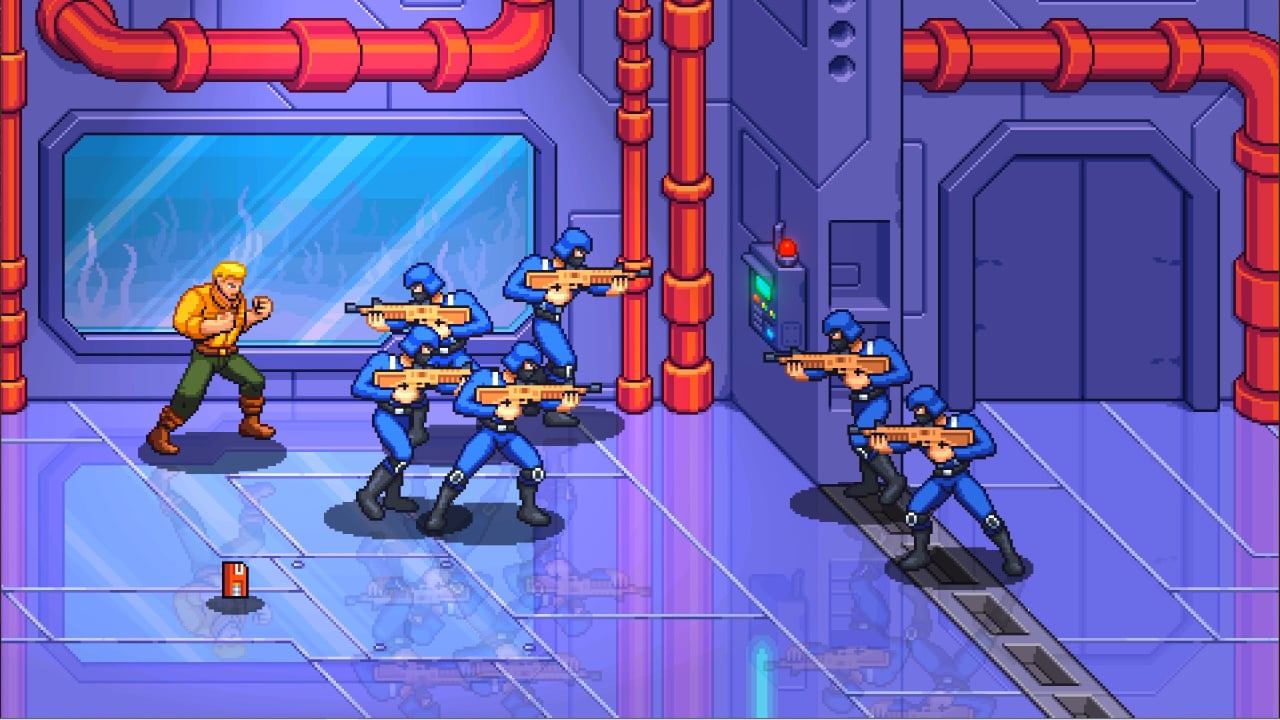
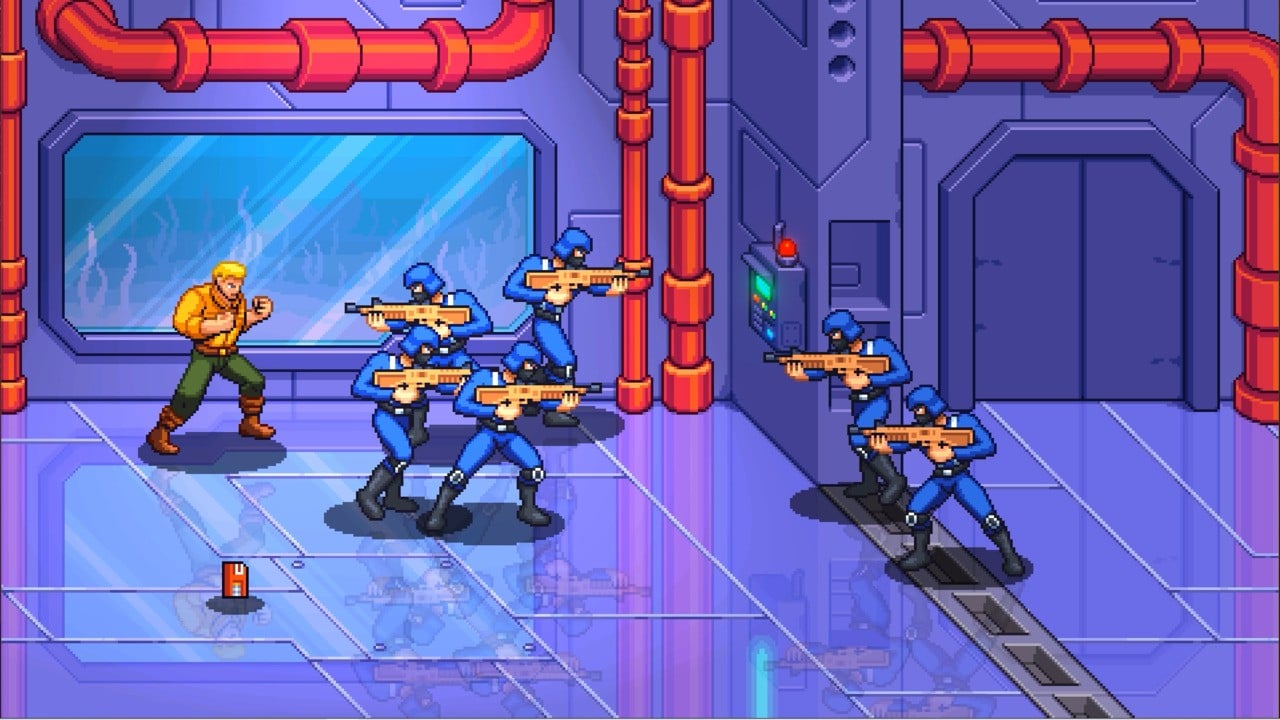
Developer Maple Powered Games and publisher Freedom Games have revealed a brand new collaboration with your company Hasbro — a G.I. Joe side-scrolling beat ’em up that’ll have you scrambling for the arcades.
Reminiscent of Streets of Rage 4 and Teenage Mutant Ninja Turtles: Shredder’s Revenge, G.I. Joe: Wrath of Cobra is a pixel art arcade brawler that will give you command of a number of G.I. Joe favourites, including Duke, Scarlett, Snake Eyes, and Roadblock. All of the iconic weapons, locations, and vehicles will be at your disposal as you take on G.I. Joe’s toughest mission yet.
What makes this announcement rock even more is the announcement that Tee Lopes — who worked on the aforementioned games — and Crush 40’s lead singer Johnny Gioeli (of Sonic the Hedgehog fame) will be contributing to the soundtrack. We’re pumped.
Here’s a run down of what we know so far:
The legendary G.I. Joe franchise returns for arcade-style beat’em up action with Duke, Scarlett, Snake Eyes, Roadblock, and other beloved franchise favorites. Navigate land, air, sea, and even space through iconic locations like Cobra Island, the Pit, Cobra’s top-secret underwater base, and more as you thwart the devious Cobra Commander’s latest scheme to take over the world.
Wield an arsenal of weapons, explosives, and more as you combat the ferocious forces of Cobra and take on Troopers, Ninja Vipers, HISS Tanks, the deadly Crimson Guard and more. String together powerful combos and master the special abilities of each character to turn the tide of battle. Master dodging and parrying to overcome the odds and save the world.
Assemble up to four players in both online or couch co-op in either Story or Arcade Mode. Lovingly detailed hand-drawn pixel art and classic style cartoon cutscenes combine for the ultimate G.I. Joe experience featuring an arcade-inspired soundtrack from legendary composer Tee Lopes (Sonic Mania, TMNT Shredder’s Revenge, Streets of Rage 4 – Mr. X Nightmare DLC) and from Crush 40’s lead vocalist Johnny Gioeli (Super Smash Bros. Ultimate, Mario & Sonic at the Olympic Games Tokyo 2020).
G.I. Joe: Wrath of Cobra is launching on Switch in Q1 2024 — we’ll be ready for that soundtrack regardless, but this looks to be a real good time.
Will you be reaching for the nostalgia early next year? Let us know in the comments below.









 Recommended:

 Master Tip: Python Create Dict From Multiple Dicts