Posted on Leave a comment

Mini Review: Divinity: Original Sin 2 – Nintendo Switch 2 Edition – A Great Upgrade That Misses A Few Wins

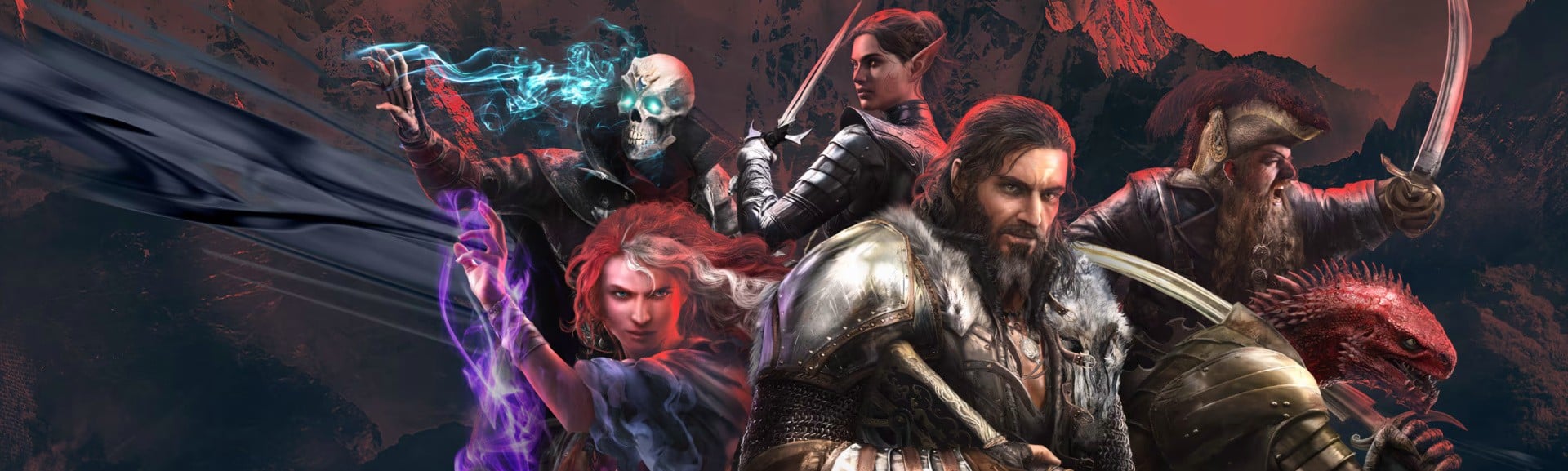
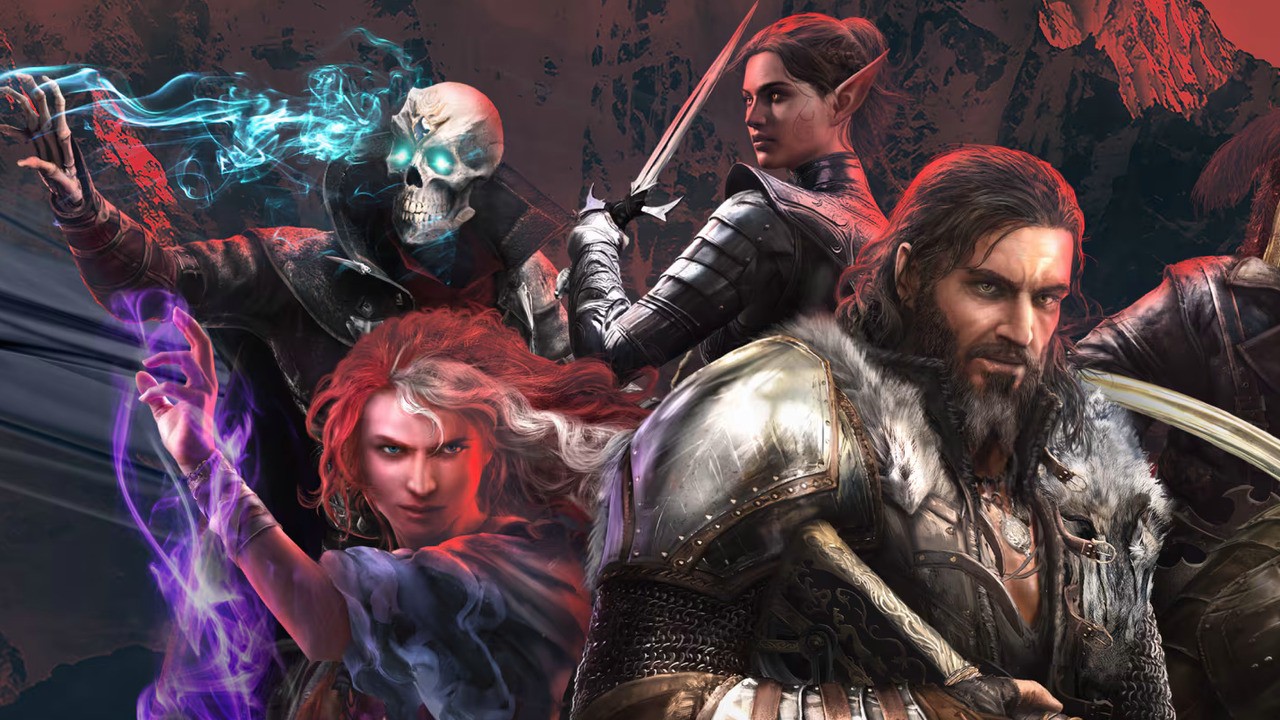
I’m not sure how many times I’ve played through the opening hours of Divinity: Original Sin 2, but it’s a lot, and it’s been across a long period of time via various platforms.

What I’m saying is that I’ve experienced this all-timer during phases of janky performance, and whilst it’s a game that still shines, no matter the technical issues at hand, it’s one that’s all the more dreamy when it runs well and is, most importantly, easy to parse at all times.

Divinity: Original Sin 2 is a busy old thing in how it utilises every inch of your screen to convey info about everything that’s going on at any given time, you see. There’s a lot to digest, and having a nice crisp resolution, coupled with a frame rate that’s smooth, really brings it all home as a remarkable achievement in gaming that everyone should dive into.

I gave the Switch 1 port a 9/10 in my review of that version back in 2019, remarking that “beyond a quite understandable drop in resolution and texture quality, this is […] running at a solid and dependable 30fps”. Ah, yes, that’s right, this one already ran surprisingly well, so we’re on easy street. Sort of.

Yes, we can put an end to a streak of properly awful Switch 2 ports (that’s right, Skyrim and Warhammer 40,000: Rogue Trader, I am talking about you guys) by rejoicing in the fact that Larian has delivered a free update that, whilst bare-bones, gives us a much-improved experience overall. And that’s what actually matters.

Whilst it’s definitely a disappointment that we’ve only got 30fps in portable, and with no mouse mode added in to boot (I mean…why?!), the handheld 30fps here is the smooth-feeling sort, and it’s also not the type of game that critically needs to be at 60fps, at the end of the day.

In docked mode, it does now hit 60fps, though. Hooray! And it’s stuck resolutely to 60fps throughout all of my time playing. It also — thanks to a resolution bump to 1080p — looks way clearer on-screen whilst benefitting from some lighting and shadow touch-ups. Oh, and loading times, thankfully, are way down here, so that’s a very nice bonus. These are meaningful quality-of-life upgrades for players who’ve grown accustomed to long waits and blurry visuals on Switch 1 or anyone who’s likely to pump a lot of time into this gem in the near future.

And so, overall, whilst this is as bare bones as these things get, it is free if you own the game already, and you can’t argue that it ain’t prettier, crisper, and better to play now, can you? Also, given that it’s an all-timer for all times, well, they get away with it.

Now, where’s Baldur’s Gate 3? Didn’t you guys know I gave that a 10? Make with the mind-flayers already.

Posted on Leave a comment

Resident Evil Fans Are Convinced Another Veteran Character Is In Requiem

Capcom has recently confirmed the worst kept secret of 2025 by finally showcasing Leon Kennedy in Resident Evil Requiem.

However, the new trailer also contains a few lines of dialogue from another off-screen character, and fans are convinced that they know who it is. Ahead of Leon’s reveal, we hear from a supporting character over comms, who provides information while asking questions regarding the events of Requiem.

Although it might be tempting to say that this is Ingrid Hunnigan, the agent who supported Leon over comms during the events of Resident Evil 4 and 6, comparisons to voiceover work in the latter entry have fans convinced that it’s actually Sherry Birkin.

Sherry last appeared in Resident Evil 6 and featured prominently in Jake Muller’s campaign, crossing paths with Leon during a bio-terror incident in China. She was voiced by Eden Riegel, and comparisons between her scenes in Resident Evil 6 and the voiceover heard in the Requiem trailer reveal that the voices sound incredibly similar.

In addition to the voiceover work, a very brief shot during the Requiem trailer shows someone viewing information on a screen whilst wearing a microphone – someone with very distinctive blonde hair.

It would make a lot of sense if this were indeed the case. Sherry became close friends with Leon and Claire Redfield during the events of Resident Evil 2, and later became an agent under the Division of Security Operations (D.O.S.), an entity that also happens to employ Leon.

So it seems likely, then, that Sherry Birkin will feature in Requiem. Will it stop there, though, or can we also expect to see more classic characters make their grand return? Heck, if Leon’s in the game, then it’s reasonable to assume we’ll also catch a glimpse of Ada Wong.

Either way, we’ll find out for sure when Resident Evil Requiem launches on Switch 2 on 27th February 2026.

What do you think, dear reader? Is Sherry Birkin really in Resident Evil Requiem? Or could this be a new character? Let us know your thoughts with a comment.

Posted on Leave a comment

Hyrule Warriors: Age Of Imprisonment’s Next Patch Out This Week, Adds New Difficulty Mode

Hyrule Warriors: Age of Imprisonment
Image: Nintendo

If smashing your way through armies of Bokoblins and Lizalfos seems like perfect festive fodder, then Hyrule Warriors: Age of Imprisonment‘s next patch should make you very happy.

Koei Tecmo and Nintendo have announced that version 1.0.3 will drop on 18th December 2025, version 1.0.3 is adding new features, more Battle and Hyrule Challenges in the post-game, and a brand new difficulty mode (Thanks, OatmealDome!).

Let’s dig into Phantom Mode, first — this is an event that randomly occurs in fights you’ve already cleared. Some foes will turn into either a more powerful version of itself or a “Miasma” variant. Oh, and Phantom Ganon can appear out of nowhere. Just like Tears of the Kingdom! The new difficulty mode, called “Taboo” (at least via Google Translate), is even harder than Very Hard.

A few functionality and bug fixes are being patched in too, but for a deeper rundown of the specifics, we’ll have the full English patch notes later this week. For now, here are the major new additions (via Koei Tecmo, Google Translate):

Phantom Mode
“Phantom Mode” is a new feature that randomly occurs in battles that have already been cleared.

In battles where “Phantom Mode” occurs, some of the enemies that appear will change into “Dangerous Species” or “Miasma Enemies,” and there is a chance that “Phantom Ganon” will appear when a strong enemy is defeated. Compared to normal battles, you can obtain more “High-Purity Zonanium Steel.”

Difficulty level “Taboo”

In the new difficulty level “Taboo,” you can experience high-difficulty battles that are even more tense than “Very Hard.”

By clearing a certain number of battles in “Taboo,” you will receive special rewards such as “High-Purity Zonanium Steel” and “Increased Carry Limit for Special Food.”

Adding new challenges

Following the first free update, the second update will also add multiple “Battle Challenges” and “Hyrule Challenges”

to the Hyrule map after clearing the main story. Lizalfos and Chuchu will appear as new “dangerous species.” Additionally, the “Training Hall” on Sky Island will be unlocked, allowing players to activate Sync Strikes by entering the “Training Hall” with two other players.

New unique skills added

New unique skills will be added to the Mysterious Golem for the One-Handed Sword, Two-Handed Sword, and Spear.

The One-Handed Sword’s unique skill, “Shield Charge,” allows you to step forward with your shield ready to ward off dangerous attacks from charging enemies. Additionally, by timing this skill with an enemy attack, you can unleash a powerful spinning slash.
(You can learn it by completing the “Battle Challenge” and “Hyrule Challenge” that will be added in this update.)

New weapons added

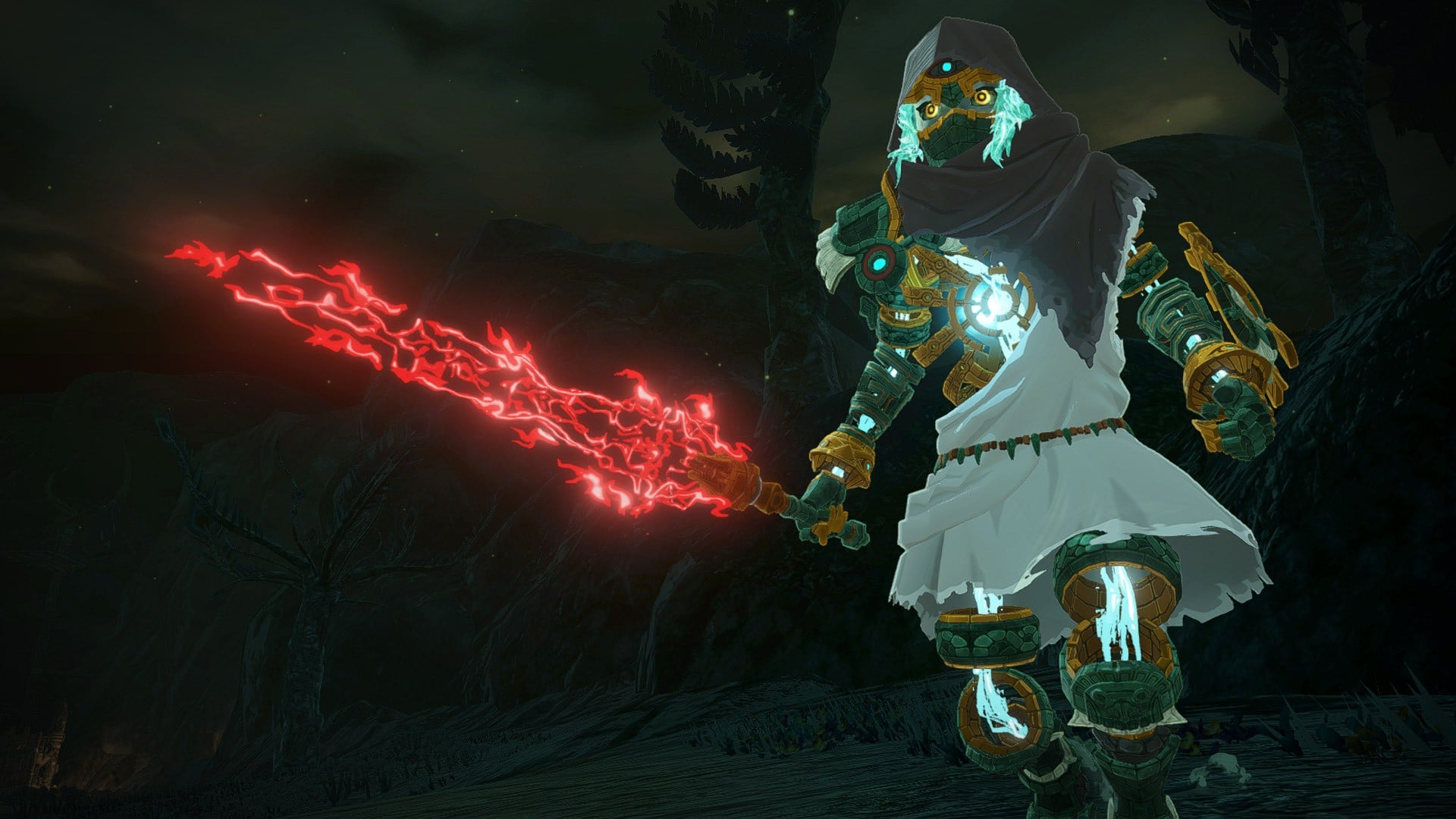
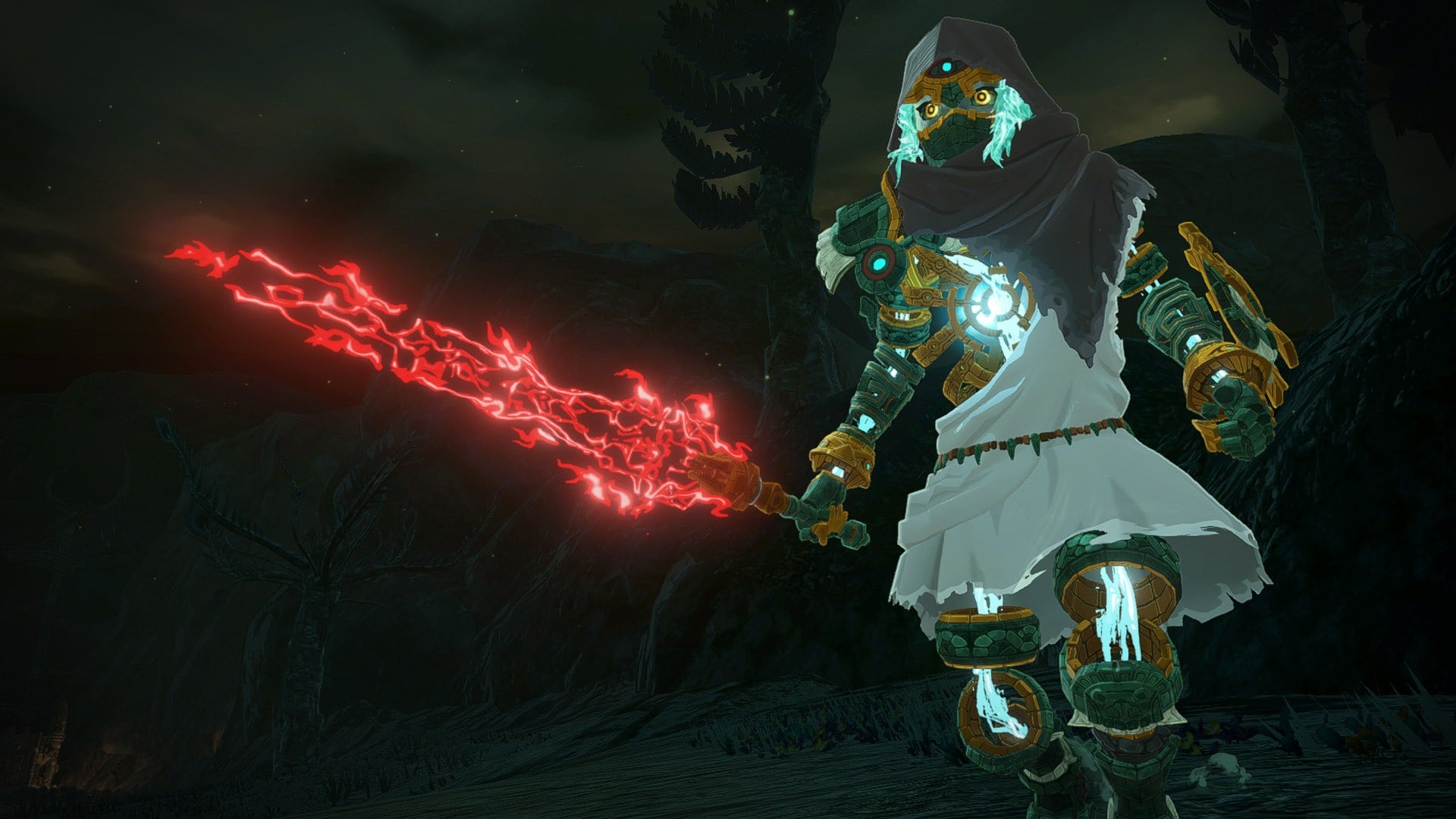
The Forbidden Sword, a one-handed sword whose blade has been tainted by miasma and transformed into a sinister blade, has been added. It can be equipped by Mysterious Golems and warriors of all races.

In addition to the above, the following new battles will be added:
– “Battles focused on warriors”
– “A deadly battle with a certain formidable enemy”

If you haven’t been back to Age of Imprisonment since launch, the last update brought with it new challenges, weapons, and sync strikes, so you’ll have plenty more to do with 1.0.2 and 1.0.3.


Let us know whether you’ll be diving into Taboo Mode in the comments.

Posted on Leave a comment

New UK lawsuit takes another shot at Amazon’s and Apple’s alleged price fixing

Despite both UK and US courts previously dismissing cases about Apple and Amazon allegedly colluding over prices, a new lawsuit has been filed to see if it can do any better.

The accusation in each case is that Amazon and Apple made a secret deal that placed unfair restrictions on independent retailers selling Apple devices on Amazon. Consequently the suit claims that consumers suffered harm as the two firms were able to maintain higher prices than they would.

This case was filed in the US in 2022 and was ultimately dismissed in September 2025. Similarly, Professor Christine Riefa later brought a mass lawsuit — the British equivalent of a class action — to the UK’s Competition Appeal Tribunal (CAT).

That was dismissed in January 2025. Significantly, though, the new suit points out that while the CAT dismissed the case, it did not say that the underlying claims of consumer harm were wrong.

So right then, sleeves up, Justin Le Patourel has taken a seemingly identical suit. And he has done so with the same Competition Appeal Tribunal.

“The merits of the case have always been strong,” said Le Patourel in a statement. “The Tribunal’s earlier refusal to certify the previous claim had nothing to do with the core allegations, which remain compelling and unanswered.”

In details sent to AppleInsider, a representative of law firm Hausfeld & Co said that Le Patourel was bringing a $1.2 billion case against Apple and Amazon.

The same representative also described Le Patourel as a consumer rights champion, who previously led a high-profile action against British wireless carrier BT. It neglects to mention that Le Patourel lost that case and was ordered — by CAT — to pay $18.7 million in costs.

While the essentially identical US case was dismissed in September 2025, it is actually continuing in a highly unusual way. Apple and Amazon are now demanding a total of $2 million in costs from law firm Hagens Berman.

The companies argue that the law firm incurred further costs by dishonestly attempting to keep a dead class action case alive. Amazon and Apple’s filing describes a “lack of candor” by the firm.

Long-time Apple legal foe Hagens Berman later denied misleading the court. However, it did admit that that “the situation could have been handled better.”

The fate of the UK suit is unclear. The writing may be on the wall, though, given how the last two went.

Posted on Leave a comment

The Hidden React Pattern No One Talks About Why Micro Interactions Boost UI Trust Instantly

by Vincy. Last modified on December 16th, 2025.

Developers uses most of the React patterns without even thinking of the patterns greatness in creating user interfaces. We are going to see some of those patterns no one talks about, but uses unintentionally, that boost the UI trust.

When using them, the developers put no intentional effort to uplift the UI trust. But it happens. Those are micro interactions that help for detailing the UI by sending feedback based on user actions. These hidden micro interactions make the UI rich, intuitive and improve the user experience.

A simple React-State-driven micro interaction

This tiny React example manages a button’s press state. It triggers class based on the pressed/released state change of the button element.

//Button press down micro-instruction
const [pressed, setPressed] = useState(false); // button elment to render on the interface
<button
onMouseDown={() => setPressed(true)}
onMouseUp={() => setPressed(false)}
className=className={`
transition-transform duration-150 ${pressed ? "scale-95" : "scale-100"}
`}
>
Save
</button>

This example code 1) allows mouse-down and mouse-up action -> 2) change the 'pressed' state -> 3) triggers class

React Micro Interactions UI Trust

Common React Micro-Interactions that increase user trust

Micro interactions are added in React just like that. These are created by React patterns that are hidden to explain in most of the documentations and tutorials. They are treated as small UX detailing process rather than known as patterns. But, these are greatly contributing in UI enrichment. They helps to improve the UI to make users trust the interface.

The list below show the different micro interaction techniques to send feedback to the UI.

  1. Press down micro interaction when clicking a button.
  2. Dynamic validation on input.
  3. On hovering micro interaction to change the background or add shadow.
  4. Showing spinner on processing background job.
  5. Shaking animation for Reacting to errors.

Press down/up Effect

This Pressable React wrapper is about to have a child clickable element. It consistantly perform the following micro interaction loop for user action.

  • It captures user’s click.
  • Acknowledge by calling on-press event handler.
  • Then send feedback by enabling the press effect via class.
  • Let the user trust the UI.

This React article has the code for using this Pressable wrapper for a ButtonPending component. That component enables the button ‘disabled’ logic based on the ‘loading’ state. If the ‘loading = true’, it will make the button to caption to show “Subscribing…”.

The complete child component of this Pressable wrapper is clickable. This feature increases the success rate of capturing the user-click.

src/components/Pressable.jsx

export default function Pressable({ children, onPress, className }) { return ( <div className={`pressable ${className || ''}`} onClick={onPress}> {children} </div> );
}

react micro form loader animation

src/components/ButtonPending.jsx

export default function ButtonPending({ loading, children, onClick }) { return ( <button className="button-pending" disabled={loading} onClick={onClick}> <span style={{ flex: 1, textAlign: 'center' }}> {loading ? 'Subscribing...' : children} </span> </button> );
}

Micro interaction feedback with Ripple effect

The Ripple effect create an expanded, faded circular view around the click-point. It strongly acknowledges user-click action using this feedback. User will trust the UI by getting this instant visual confirmation.

The click co-ordinates are captured by getBoundingClientRect() to create the absolute positioning of the Ripple.

This component has the reference for the the click target by using React useRef. When the user click on the containerRef, an active ripple instance is created and disappears.

src/components/Ripple.jsx

import { useState, useRef } from 'react'; export default function Ripple({ children }) { const [ripples, setRipples] = useState([]); const containerRef = useRef(null); const addRipple = (e) => { const rect = containerRef.current?.getBoundingClientRect(); if (!rect) return; const size = Math.max(rect.width, rect.height); const x = e.clientX - rect.left - size / 2; const y = e.clientY - rect.top - size / 2; const ripple = { id: Math.random(), x, y, size }; setRipples((prev) => [...prev, ripple]); setTimeout(() => setRipples((prev) => prev.filter((r) => r.id !== ripple.id)), 650); }; return ( <div className="ripple-container" ref={containerRef} onMouseDown={addRipple}> {ripples.map((r) => ( <div key={r.id} className="ripple" style={{ left: r.x, top: r.y, width: r.size, height: r.size }} /> ))} {children} </div> );
}

Dynamic validation shows error on form section

Form validation is called at the moment when users giving input. It will send feedback by showing validation error immediately. This will build trust by showing instant feedback.
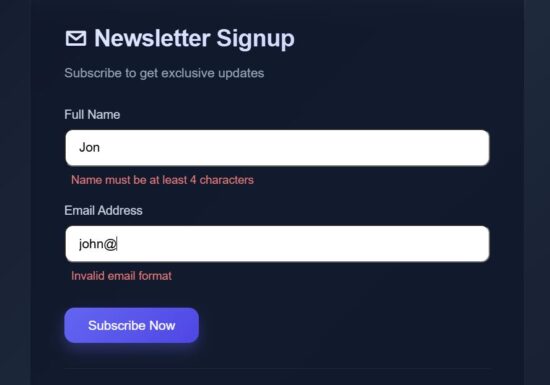
react micro interaction validation error

This React FormSection component has the reference for all the React state variables needed for enabling this micro interaction concept.

This section accepts form data and call a field level validation on typing the input. This example validates the Name and Email fields. Once the user enters wrong data or giving input in wrong format, then the field level validation error will be managed in the fieldErrors.

The field onchange handler update only the current field data with the formData state then calls the field specific validation.

src/components/FormSection.jsx

export default function FormSection({ formData, fieldErrors, loading, setFormData, validateField, setError }) { return ( <> <div className="form-group"> <label>Full Name</label> <input type="text" placeholder="John Doe" value={formData.name} onChange={(e) => { const val = e.target.value; setFormData({ ...formData, name: val }); validateField("name", val); setError(false); }} disabled={loading} /> {fieldErrors.name && <p className="field-error">{fieldErrors.name}</p>} </div> <div className="form-group"> <label>Email Address</label> <input type="email" placeholder="john@example.com" value={formData.email} onChange={(e) => { const val = e.target.value; setFormData({ ...formData, email: val }); validateField("email", val); setError(false); }} disabled={loading} /> {fieldErrors.email && <p className="field-error">{fieldErrors.email}</p>} </div> </> );
}

React micro interaction on hover

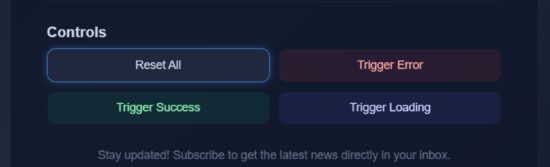
On hovering an element, the animation effect can be given in different ways. The HoverLift and HoverApplyBorder wrapper helpers are most frequently used micro interaction techniques.

These functions encloses hovered target with the lift effect or border.

src/components/HoverLift.jsx

export default function HoverLift({ children }) { return <div className="hover-lift">{children}</div>;
}
react micro button hover border

src/components/HoverApplyBorder.jsx

export default function HoverApplyBorder({ children }) { return ( <div className="hover-border"> {children} </div> );
}

Micro interaction pattern used during progressing user request

When submitting a form, the user request is taken to the backend and the process will be going on. During the processing time, the useDelayedLoader will be shown to the form near the button. Also, the FadePresence wrapper is applied to the form component to dim the UI. It lets the user know that the form-action request is taken for processing. It will build trust about the user interface.

src/components/useDelayedLoader.js

import { useState, useEffect } from 'react';
export default function useDelayedLoader(isLoading, delay = 450) { const [showLoader, setShowLoader] = useState(false); useEffect(() => { let timer; if (isLoading) { timer = setTimeout(() => setShowLoader(true), delay); } else { // defer state update to next tick to avoid ESLint warning timer = setTimeout(() => setShowLoader(false), 0); } return () => clearTimeout(timer); }, [isLoading, delay]); return showLoader;
}

src/components/FadePresence.jsx

export default function FadePresence({ show, children }) { return ( <div className="fade-presence" style={{ opacity: show ? 1 : 0.5, transform: show ? 'translateY(0)' : 'translateY(10px)', pointerEvents: show ? 'auto' : 'none', }} > {children} </div> );
}

Show response or progressing state of the form submission

src/components/StatusSection.jsx

export default function StatusSection({ loading, showLoader, success, error }) { return ( <div className="status-box"> {showLoader && loading && ( <div className="loader"> <div className="loader-spinner" /> <span>Subscribing...</span> </div> )} {!loading && success && ( <div className="success"> <span className="success-icon">✓</span> <p>Check your email to confirm</p> </div> )} {!loading && error && ( <div className="error-box"> <span className="error-icon">!</span> <p>Please fill all fields</p> </div> )} </div> );
}

Send feedback effect on success or failure

react micro form validation error

src/components/ShakeOnError.jsx

export default function ShakeOnError({ isError, children }) { return <div className={isError ? 'shake' : ''}>{children}</div>;
}
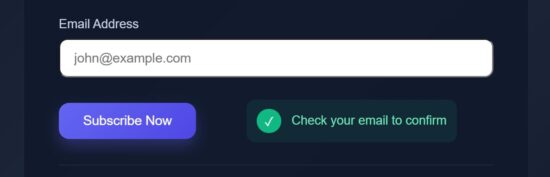
react micro form validation success

src/components/PulseOnSuccess.jsx

export default function PulseOnSuccess({ success, children }) { return <div className={success ? 'pulse' : ''}>{children}</div>;
}

Button controls that triggers React micro interaction loop

Most of the micro interactions are added to the “Subscribe Now” button. Added to that, an additional button interfaces are provided in the code to have a quick experiment with the effects.

These controls will show you the hover lift effect and update the status section without completing the form.
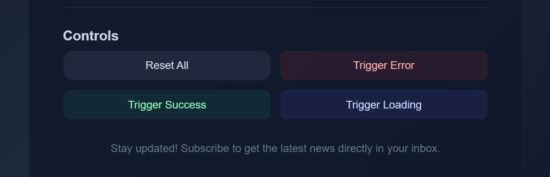
react micro interactions controls

src/components/ControlsSection.jsx

import HoverApplyBorder from "./HoverApplyBorder";
import Ripple from "./Ripple";
export default function ControlsSection({ setError, setSuccess, setLoading, setFormData, setFieldErrors }) { return ( <div className="controls"> <h3 className="controls-title">Controls</h3> <div className="button-grid"> <HoverApplyBorder> <Ripple> <button className="control-btn reset" onClick={() => { setError(false); setSuccess(false); setLoading(false); setFormData({ email: "", name: "" }); setFieldErrors({ name: "", email: "" }); }}> Reset All </button> </Ripple> </HoverApplyBorder> <HoverApplyBorder> <button className="control-btn error" onClick={() => { setError(false); setTimeout(() => setError(true), 50); setSuccess(false); setLoading(false); }}> Trigger Error </button> </HoverApplyBorder> <HoverApplyBorder> <button className="control-btn success" onClick={() => { setSuccess(false); setTimeout(() => setSuccess(true), 50); setError(false); setLoading(false); }} > Trigger Success </button> </HoverApplyBorder> <HoverApplyBorder> <button className="control-btn loading" onClick={() => { setLoading(true); setTimeout(() => setLoading(false), 2000); }} > Trigger Loading </button> </HoverApplyBorder> </div> </div> );
}

React frontend form uses micro interaction techniques

This is the landing page JSX that uses all the components and wrapper classes we have seen above. This script will be useful how the micro interaction wrapper are used in the React frontend components.

src/App.jsx

import { useState } from "react";
import Pressable from "./components/Pressable";
import ShakeOnError from "./components/ShakeOnError";
import FadePresence from "./components/FadePresence";
import PulseOnSuccess from "./components/PulseOnSuccess";
import HoverLift from "./components/HoverLift";
import ButtonPending from "./components/ButtonPending";
import useDelayedLoader from "./components/useDelayedLoader"; import FormSection from "./components/FormSection";
import StatusSection from "./components/StatusSection";
import ControlsSection from "./components/ControlsSection"; export default function App() { const [loading, setLoading] = useState(false); const [error, setError] = useState(false); const [success, setSuccess] = useState(false); const [formData, setFormData] = useState({ email: "", name: "" }); const [fieldErrors, setFieldErrors] = useState({ name: "", email: "" }); const showLoader = useDelayedLoader(loading, 450); const handleSubmit = () => { setSuccess(false); setError(false); const isNameEmpty = !formData.name.trim(); const isEmailEmpty = !formData.email.trim(); if (isNameEmpty || isEmailEmpty) { setTimeout(() => setError(true), 20); return; } if (validateField("name", formData.name, true) || validateField("email", formData.email, true)) { return; } setLoading(true); setTimeout(() => { setLoading(false); setSuccess(true); setTimeout(() => { setFormData({ email: "", name: "" }); setFieldErrors({ name: "", email: "" }); }, 1500); }, 1300); }; const validateField = (field, value, returnOnly = false) => { let message = ""; if (field === "name") { if (!value.trim()) message = "Name is required"; else if (value.trim().length < 4) message = "Name must be at least 4 characters"; } if (field === "email") { const emailRegex = /^[^\s@]+@[^\s@]+\.[^\s@]+$/; if (!value.trim()) message = "Email is required"; else if (!emailRegex.test(value)) message = "Invalid email format"; } if (!returnOnly) { setFieldErrors((prev) => ({ ...prev, [field]: message })); } return message; }; return ( <div className="container"> <main> <ShakeOnError isError={error}> <PulseOnSuccess success={success}> <div className="card"> <header> <h1>✉ Newsletter Signup</h1> <p className="subtitle">Subscribe to get exclusive updates</p> </header> <FadePresence show={!loading}> <FormSection formData={formData} fieldErrors={fieldErrors} loading={loading} setFormData={setFormData} validateField={validateField} setError={setError}/> </FadePresence> <div className="action-row"> <HoverLift> <Pressable onPress={handleSubmit}> <ButtonPending loading={loading}>Subscribe Now</ButtonPending> </Pressable> </HoverLift> <StatusSection loading={loading} showLoader={showLoader} success={success} error={error} /> </div> <div className="divider"></div> <ControlsSection setError={setError} setSuccess={setSuccess} setLoading={setLoading} setFormData={setFormData} setFieldErrors={setFieldErrors} /> <footer>Stay updated! Subscribe to get the latest news directly in your inbox.</footer> </div> </PulseOnSuccess> </ShakeOnError> </main> </div> );
}

Output:
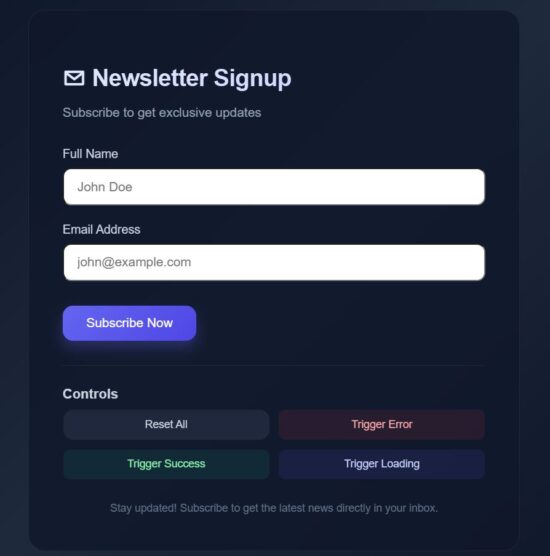
react micro interaction validation effects

Some of the libraries to build micro-interaction and animation in React

These are some of the useful libraries that ease the process of building React app with micro-interaction techniques and smooth animation effects.

  • Framer Motion – It is suitable to use for its perfect result for on hover or on Press effects, enter or exit transition, layout shift micro-interactions.
  • React Spring – It is known for its smooth drag and drop, expand-collapse, and toggle effects.
  • AutoAnimate – It is popularly known for its auto DOM changes with minimal config.
  • GSAP – GreenSock animation is recommended for an embedding platform for imposing complex animation on the frontend. The example for the complex animations are, chained effects, SVG morphing and more.

Conclusion

We have seen how do micro-interactions increase UI trust. An interactive and intuitive web interface impresses endusers and encourages them to use it. React web app using micro interaction patterns earns user trust by sending appropriate feedback to the interface.

The feedbacks close the loop to let the users understand that their actions are taken for processing. Various kind of feedbacks are used to acknowledge the users. These are the commonly used techniques in gain the user’s trust.

  • Displaying feedback messages.
  • Animation effects like shaking login when entering wrong credentials.
  • Animated icons to show tick on successful payment transactions.

We see some of the micro interaction techniques to show status, progress bar, or to shake UI if something went wrong.

References:

  1. Power of response time and its limits in UI/UX.
  2. Role of micro interaction in modern UI.

Download

Vincy
Written by Vincy, a web developer with 15+ years of experience and a Masters degree in Computer Science. She specializes in building modern, lightweight websites using PHP, JavaScript, React, and related technologies. Phppot helps you in mastering web development through over a decade of publishing quality tutorials.

↑ Back to Top

Posted on Leave a comment

Assassin’s Creed Shadows Title Update 1.1.7 Out This Week On Switch 2, Here Are The Full Patch Notes

Assassin's Creed Shadows
Image: Ubisoft

Assassin’s Creed Shadows didn’t get off to the best start on the Switch 2 when it arrived earlier this month, with players reporting crashing and stability issues.

Fortunately, Ubisoft acknowledged these problems and said these issues would be resolved in the next major game update. Title Update 1.1.7 is out this week on the Switch 2 and other platforms, and we’ve now got a look at the patch notes.

Most notably, it comes loaded with “bug fixes & improvements” for the Switch 2 edition of the game, resolving crases and more. Here’s the full rundown, courtesy of Ubisoft’s official website:

Assassin’s Creed Shadows – Title Update 1.1.7 (17th December 2025)

New Finisher Animations

We heard your feedback and are bringing new finishers to combat!

Bring more flair to your encounters with a fresh set of finisher animations. Both Naoe and Yasuke now have expanded ways to end fights in style with more cinematic flair and brutality.

Animus Rift: Lost and Found

A mysterious new Rift has appeared within the Animus…

Uncover secrets, solve puzzle, traverse across the digital plains and help The Guide.

New Project: Defiance

We are releasing a new Project available in the Animus HUB, called Defiance, in which you can unlock a new Bo staff, Trinket and more! Activate the new Project, complete Anomalies and progress through the rewards like previously released ones.

A quick access for the Vault has been added to the Animus menu while in gameplay for easier access to the feature.

New Resources Available in the Exchange

Gold, Mastery and Knowledge Points are now available as part of daily offers, which can be purchased repeatedly with Keys.

Bug fixes & Improvements

Nintendo Switch 2

  • Improved various FPS issues.
  • Fixed crashes for stability improvements.
  • Fixed various visual issues.
  • Improved the touchscreen experience.
  • Fixed an issue where players were asked to connect to a controller whenever the Switch 2 was docked or undocked, even if controllers were already connected.
  • Resolved an issue where the players would remain in an infinite black screen after creating a Ubisoft Connect account or log in with an already existing account upon selecting an audio pack from the initial boot menu.

Gameplay

  • Removed an exploit that would permit double engravings on the Sword of Fathoms.
  • Fixed an issue preventing Naginatas from being sold. Fine, I shall sell my best wares somewhere else!
  • Resolved an issue where perks that checked Mastery points spent would not update if Mastery points changed after equipping the item.
  • Fixed an issue where upgrading skills to Rank 3 would sometimes cause damage upgrades from Rank 2 to be missing.
  • The Bo Staff will now increase its affliction buildup stat when upgrading it Mythic and Artifact quality.
  • Perks with affliction effects now have dynamic wording that specify which affliction they apply, based on the item they are engraved on.
  • Fixed an issue where Knowledge Scrolls were removed from the players inventory. Junjiro did you take my scrolls again??
  • Shared skills between Naoe and Yasuke will now correctly be learned by both.
  • Edited wording for the “Affliction After Deflect” perk to clarify it applies 35% buildup instead of a full Affliction.
  • Ensured that “Restore 6% Health With Posture Attack” is present for all Critical Damage and Health Gain engravings for all weapons when equipped.

Claws of Awaji

  • Fixed an issue where players with two copies of the game, one with the Claws of Awaji Expansion and one without, would permanently lose the ability to fast travel to the island of Awaji when switching between the two editions of the game.

World

  • Players can now whistle while using the Follow Road mechanic. Enjoy the open road, whistle a tune and relax!
  • Corrupted Castles will no longer reset when loading into a previous save after a season has already changed.
  • Fixed an issue where enemies and loot would respawn upon loading a save before changing seasons.

Visuals & Graphics

  • Adjusted some facial animation for Naoe or Yasuke that looked unnatural during all cinematics when a hood was equipped. Psst! Naoe, stop making silly faces, please!

UI

  • Corrected inconsistencies between the smuggled rewards shown in the UI at the end of a season and what was truly received. All the goods are there, boss!
  • Fixed inconsistencies with the smuggled rewards UI when the Stables are upgraded. Remember to give your trusty steed an apple as a treat.
  • Corrected location name for “Kawarajiri Lumber Camp” in Japanese.

Online Store

  • Fixed an issue with receiving Store, Deluxe and Premium items into the player’s inventory.

SPOILERS AHEAD!

Quests

“Swords And Sake”
Fixed an issue where the mission couldn’t be completed due to Gennojo dying.
“Eliminate Outlaws”
Corrected issues preventing the completion of the mission.
“Temple Stories”
Ensured that Joken Hokkyo will not disappear so that the quest objective can be completed. Wait! Don’t go! I need to complete this mission!
“Dismantling One by One”
Wandering enemies will now be indicated with a marker.

According to the same page on Ubisoft’s website, this patch will be 3.66 GB update. This title update will go live on other platforms on 16th December 2025, with the Switch 2 version of the update to follow on 17th December 2025.

Will you be revisiting this game on the Switch 2 once this update goes live? Let us know in the comments.

Posted on Leave a comment

Fire Emblem Shadows Makes Metacritic’s “Worst Games Of 2025” List

Fire Emblem Shadows
Image: Nintendo

Metacritic’s annual round-up of the worst reviewed games of the year is upon us. And, by and large, there have been a lot of good video games in 2025. But there will always be a few that hit the bottom. And, well, if you’ve been keeping up with gaming news this year, number one shouldn’t surprise you.

As a reminder, the aggregate site determines the list based on games released between 1st January and 31st December 2025 and with at least four critic reviews. Obviously some games will have more than others on this list, so make of that what you will. And in multiplatform releases, only the lowest-scoring platform will appear here.

So, while number one should be fairly obvious to guess, number two was a bit of a sobering reminder. Remember earlier this year when Nintendo shadow-dropped a Fire Emblem game on mobile? And that it’s a social deduction game? Uh, yeah, Fire Emblem Shadows happened, and, yeah it seems like we weren’t the only ones who didn’t like the game. The iOS version sits on a Metascore of 37, and user reviews aren’t any better.

Tamagotchi Plaza – Nintendo Switch 2 Edition, Spy Drops (the PS5 version), Fast & Furious: Arcade Edition (PS5), and QUByte Classics: Glover (PS5) have also all made the list and are all available on Switch 1 and 2.

But nothing could really top MindsEye this year, could it? Just read our sister site Push Square’s review and… ouch. Anyway, here’s the list in full:

Metacritic – The 10 Worst Video Games of 2025:

  1. MindsEye – PS5 (28/100)
  2. Fire Emblem Shadows – Mobile (37/100)
  3. Blood of Mehran – PS5 (38/100)
  4. Spy Drops – PC (39/100)
  5. Gore Doctor – PS5 (40/100)
  6. Tamagotchi Plaza – Nintendo Switch 2 Edition – Switch 2 (43/100)
  7. Ambulance Life: A Paramedic Simulator – PS5 (44/100)
  8. QUByte Classics: Glover – PS5 (44/100)
  9. Scar-Lead Salvation – PS5 (44/100)
  10. Fast & Furious: Arcade Edition – PS5 (45/100)

Last year saw Utopia City, a totally-sudden rerelease of a niche 20-year-old shooter which arrived on Steam in November 2024, at the top spot. Look, we’re in Game of the Year season, so let’s focus on the good stuff.


What do you think of this year’s top 10? Do you think 2025 has been a good year for games? Let us know in the comments.

Posted on Leave a comment

Digital Foundry’s ‘Graphics Of The Year Awards’ Nod To Some Switch 2 Beauties

2026 is almost upon us, so naturally, everyone is thinking about end-of-year awards. Geoff Keighley hosted his ceremony last week, and today, it’s time for the tech experts from Digital Foundry to get involved, as they run down their best graphics of 2025.

It will come as no surprise that the shortlist this year is mainly comprised of titles found on PS5 and Xbox Series, with the likes of Ghost of Yōtei, Mafia: The Old Country, and Silent Hill f getting their flowers, but a handful of Switch newbies got a nod too.

Digital Foundry dedicated the entirety of its honourable mentions section to the Switch 2 this year, giving a shoutout to Mario Kart World, Kirby Air Riders and Fast Fusion for “maximising the Tegra T239 in different ways”, and Star Wars Outlaws, which DF calls “currently Switch 2’s best ‘impossible port’.” The outlet also highlights Panic Button’s work on the Switch 1-to-2 upgrades.

That’s not to say that Switch 2 is entirely absent from the official top 10, mind you. Metroid Prime 4 lands a spot all of its own, with DF calling Samus’ latest “a lighting masterwork – a prime (pun intended) example of how pre-baked lighting inside carefully crafted environments, whether fully indoors or exposed to outdoor elements, can implement attractive lighting phenomena like emissive lighting while also organically leading players.”

The Switch 1 version of MP4 even gets a shoutout in the Digital Foundry listing, with the outlet praising how it delivers “so much ecosystem diversity within large exploration zones at a steady 60fps, building upon the already impressive likes of Metroid Prime 1 Remastered to push the 2017 console to its limits.”

As ever, Digital Foundry’s top 10 is unordered until hitting the top three, with the seven preceding entries sorted alphabetically instead. Here’s the full list, as laid out on the Digital Foundry website:

– Dying Light: The Beast

– Earthion

– Ghost of Yōtei

– Mafia: The Old Country

– Metroid Prime 4: Beyond

– Routine

– Silent Hill f

3. Death Stranding 2: On the Beach

2. Assassin’s Creed: Shadows

1. Doom: The Dark Ages

A pretty good year for good-looking games, then! You’ll find the team’s explanation for each entry either in the video at the top of this article or by heading over to the DF site.

Are there any other titles that you’d add to this list? Let us know in the comments.