Posted on Leave a comment

“I Need A Union Contract To Feel Safe” – Mega Man 11 Voice Actor Not Returning For Dual Override

Mega Man: Dual Override
Image: Capcom

After what’s felt like a lifetime, Capcom finally confirmed Mega Man: Dual Override, the latest entry in the iconic side-scrolling action series. Scheduled to launch on Switch and Switch 2 in 2027, there’s not a whole lot we know about the game at this early stage, but what we do now know is that Mega Man 11 voice actor Ben Diskin won’t be returning to voice the Blue Bomber.

Speaking in a thread on Bluesky, Diskin confirmed that he was asked to come back for the upcoming title, but Capcom was unwilling to provide a union contract. Despite offering assurances that Diskin’s voice wouldn’t be for AI development in the future, Diskin felt that due to the volatile state of the industry right now, he couldn’t take the risk.

Here’s a look at Diskin’s full statement:

“With a broken Blue Bomber heart, I am no longer the voice of Mega Man.

“I was asked to return for Mega Man: Dual Override, but only on the condition I work without the protections of a union contract. I was told there are “full A.I. protections in place that guarantee in writing that [my] voice will never be used for A.I. development” but was also told “with certainty, from [Capcom], that the project will not go union.”

“While I certainly appreciate the acknowledgement of the concern around AI, working without a contract I can realistically enforce isn’t something I can risk. The only way to enforce non-union contracts like this involves personally taking giant companies like Capcom to court and suing if I thought they’d used AI. I don’t have the mental, emotional, or monetary strength to survive a protracted legal fight.

“In my heart, I want to believe Capcom would never use AI… But in my HEAD, I’m aware that basically every major corporation is looking to incorporate generative AI to save money. The video game industry is facing record layoffs and huge amounts of uncertainty. I need a union contract to feel safe. (Also, as an aside, I don’t think it makes sense to strike for over 11 months to get enforceable AI abuse protections and then turn right around and go back to work without them.)

“I truly wish Capcom was at least willing to speak with SAG-AFTRA about doing this game union.
I expressed that I’d even be willing to work on a LOWER-budget union contract if it meant this flipped. It genuinely wasn’t about the money for me.

“It’s been an honor voicing Mega Man in Mega Man 11, the best-selling game in the series’ history and watching Mega Man reclaim his rightful place as a gaming icon. I hope Mega Man: Dual Override is even more successful than 11 and that everyone enjoys all the hard work the devs are putting into it.

“Good luck out there, Mega!” I just wish I could have been there with you.”

Diskin’s message has been met with unwavering support from fans and fellow voice actors. Yuri Lowenthal, who has provided voice work for games like Xenoblade Chronicles X, Persona 3 Reload, and Mortal Kombat 1, responded to simple say “You are the best of us, Ben”.

So we’ll have to wait and see who Capcom has lined up to replace Diskin. It’s likely we won’t hear anything for quite some time given the game’s rather vague 2027 release window, but we’ll be sure to let you know as soon as we can.

What do you make of all of this? Share your thoughts with a comment down below.

Posted on Leave a comment

Capcom’s Demo For Its New IP ‘Pragmata’ Has Now Hit Two Million Downloads

Pragmata
Image: Capcom

Capcom’s new IP Pragmata got a demo not long ago and it seems the word about it is spreading. Following the downloads for this ‘Sketchbook’ trial reaching one million combined downloads across all platforms last month, we’ve now got an update.

The demo has now hit a whopping two million downloads, and to top it off, it’s also had two million wishlists.

“Hugh, look – I can’t believe millions of people are excited for our game!” PRAGMATA has reached 2 million wishlists, and 2 million demo downloads. Thank you so much for all your support.

Pragmata
Image: Capcom

It’s not clear how exactly this will all translate to the actual game sales, but it sure is looking promising for the new IP. We ran a poll after the previous update about demo downloads, and 42% of respondants said they would be getting the Pragmata, with 41% still on the fence about this new game.

The update on demo downloads follows Capcom’s news last week, revealing Pragmata would now arriving a little earlier than expected on 17th April 2026.

Have you downloaded this demo on the Switch 2 yet? Will you be getting the full game? Tell us in the comments.

Posted on Leave a comment

Fashion Dreamer For Switch Shutting Down Online Mode Next Week

Fashion Dreamer
Image: Marvelous

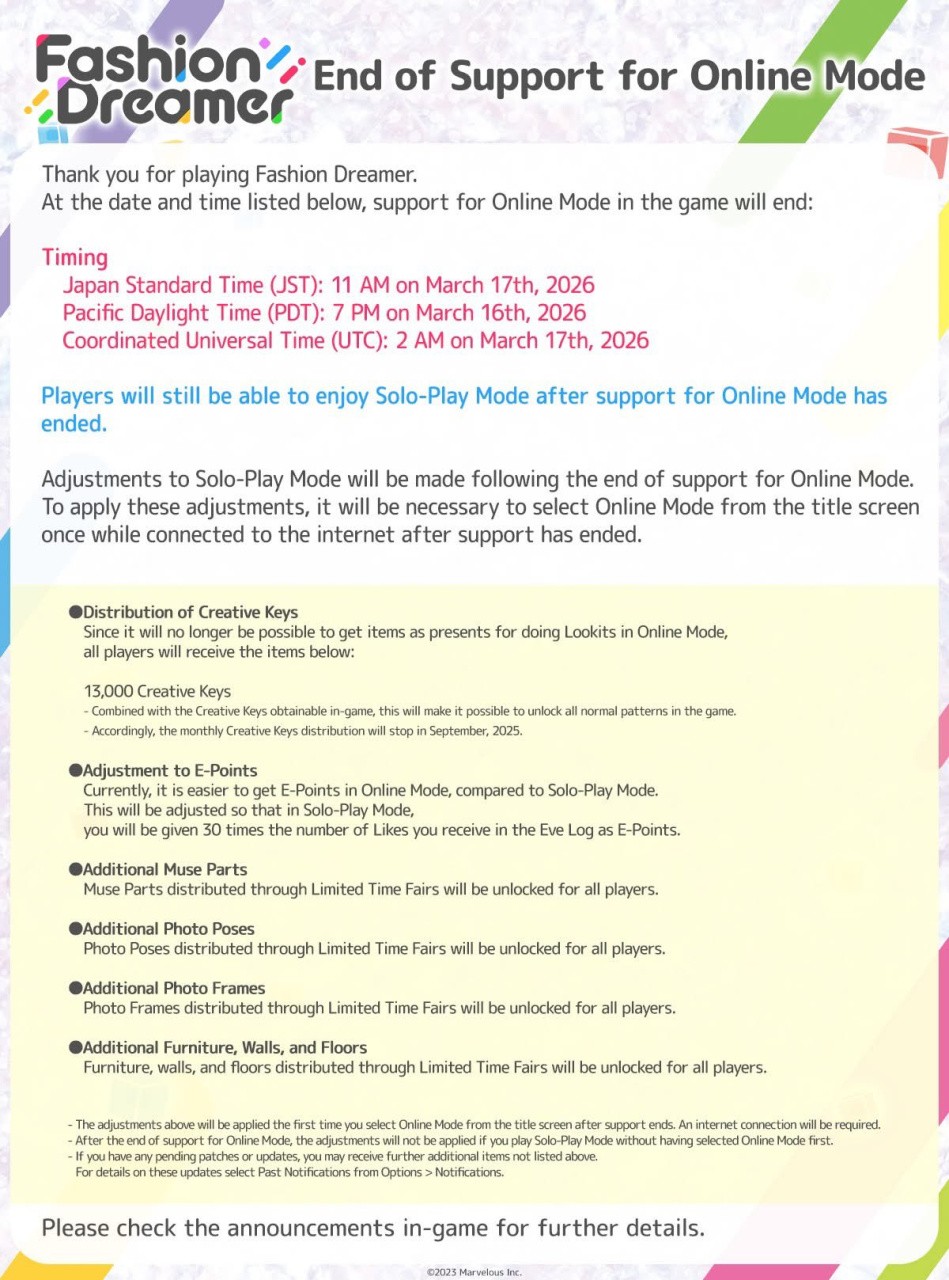
Marvelous has issued a reminder today that it will be ending support for the Online Mode in Fashion Dreamer next week. The title was originally released for the Switch in 2023.

Although this mode is coming to an end, the Solo-Play Mode will continue to be available after this date. There’ll also be some adjustments made to this particular mode. This includes the distribution of creative keys, adjustment to e-points, and additional muse parts, photo poses, photo frames, furniture, walls and floors.

“Thank you for playing Fashion Dreamer. Support for Online Mode is scheduled to end on the following date: 17th of March, 2026 2AM UTC Solo-Play Mode will continue to be playable after Online Mode support ends.”

This update will be applied when you select the Online Mode after support for the Online Mode has ended. You can get the full rundown in the official notice below:

Fashion Dreamer
Image: Marvelous

The same developer involved with this title and the Style Savvy series is also responsible for a Switch dressmaking game known as Magical Craft. This was originally released in Japan in 2025, and a rating for the title was more recently spotted on the ESRB.

Did you ever play this game’s online mode? How do you feel about this service being discontinued? Let us know in the comments.

Posted on Leave a comment

Yoshi And The Mysterious Book Estimated File Size And Price Seemingly Revealed

Yoshi and the Mysterious Book
Image: Nintendo

Yesterday, as part of the ongoing MAR10 Day celebrations, Nintendo locked in a May release date for the Switch 2 title, Yoshi and the Mysterious Book.

This was presented alongside a new trailer, and since then, the official game pages have gone live – revealing the new title’s estimated file size as well as the supposed price of the game in specific locations around the world.

In terms of the game’s file size, according to the official eShop, Yoshi’s new adventure is estimated to require 20.5GB of free space to play. If you’re curious to know how this compares to Nintendo’s other Switch 2 releases, games such as Donkey Kong Bananza is under 10GB, while Mario Kart World is around 22GB. Zelda‘s upgraded versions are also about 20GB.

As for the pricing of Yoshi’s new Switch 2 title, according to the UK and European eShop it will be £49.99 / 59,99€. As a comparison, Donkey Kong Bananza is £58.99/69,99€ and Mario Kart World is £66.99/79,99€. Over in Japan, the Mysterious Book is listed at 6,980 yen. Meanwhile, games like Mario Tennis Fever are 7,980 yen, and Mario Kart World is 8,980 yen.

There is no official confirmation of pricing for Yoshi and the Mysterious Book in North America just yet, but it seems it will cheaper than certain other first-party Switch 2 titles across multiple regions. We’ll let you know when we hear more.

What are your thoughts about the price and file size for this new Yoshi title? Let us know.

Posted on Leave a comment

Dragon Quest I & II HD-2D Remake Receives A New Update, Here Is Everything Included

Dragon Quest
Image: Square Enix

Following an update to Octopath Traveler 0 just days ago, Square Enix has now rolled out an update for Dragon Quest I & II HD-2D Remake.

This title originally arrived on the Switch, Switch 2 and other platforms last October and has already received some patches since then. As for this latest one, which bumps it up to Version 1.0.2.0, it’s made some subtle but significant updates.

While this update for the two-in-one RPG package isn’t the biggest, there are still some notable updates included in this latest patch. This includes some difficulty adjustments, improvements like faster ship movement in the second game, and a fix for a bug tied to Dragon Quest III HD-2D Remake bonus items.

Here’s the full rundown (via Steam):

Dragon Quest I & II HD-2D Remake (March 2026)

DRAGON QUEST I & II HD-2D Remake Update – An update (version 1.0.2.0) for the game was released on 03/09/2026.

The patch contains the following changes:

DRAGON QUEST I

  • The way the protagonist’s attributes change when leveling up on the “Dragon Quest” and “Draconian Quest” difficulties has been adjusted.

DRAGON QUEST II

  • The ship now moves faster.
  • A bug which could cause the screen to freeze after fading to black when players obtained the Yggdrasil leaf in Yggdrasil’s Arbour has been fixed.

Miscellaneous Updates

  • More “Traveller’s Tips” entries have been added concerning game systems and progress.
  • A bug which left players with DRAGON QUEST III HD-2D Remake save data unable to claim bonus items on SteamDeck has been fixed.
  • Other minor bugs have been fixed.

If you haven’t already tried out Dragon Quest I & II HD-2D Remake, it’s well worth a look if you’re a fan of the series and RPGs in general.

“Dragon Quest I & II HD-2D Remake is a deeply satisfying follow-up to last year’s remake project, closing out the Erdrick trilogy on a fittingly high note. A gorgeous art style, tons of new content and quality-of-life updates, and a wonderful soundtrack all combine to make this one an easy recommendation for any retro JRPG fans.”

In case you somehow missed it, Square Enix also released Dragon Quest VII: Reimagined for Switch 2 and Switch last month.

What do you think of this latest update for Dragon Quest I & II HD-2D Remake? Is there anything else you would like to see adjusted or updated? Let us know in the comments.

Posted on Leave a comment

My Nintendo Store Adds A Super Mario 40th Anniversary Reward (North America)

Super Mario Galaxy
Image: Nintendo

Alongside the MAR10 Day celebrations this year, Nintendo has released a new My Nintendo Reward on its official store in North America.

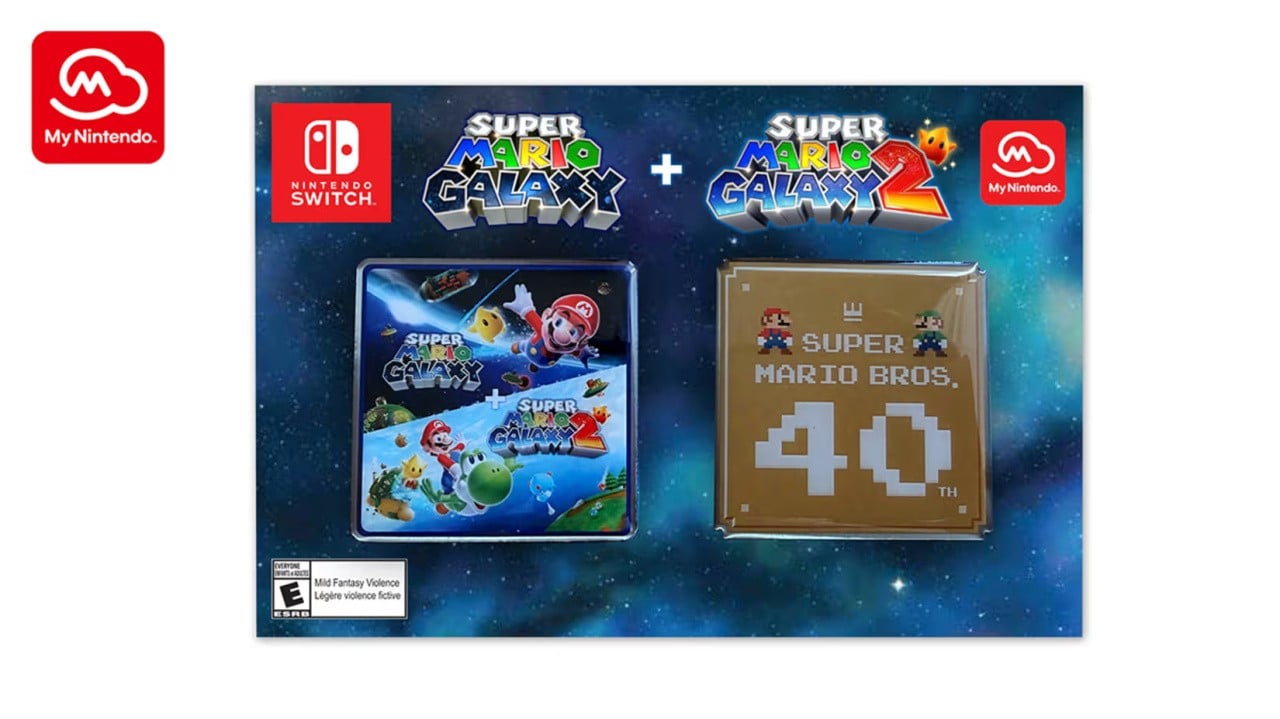
For 600 platinum points, you’ll be able to get a Super Mario Galaxy + Super Mario Galaxy 2 pin that also comes with a 40th anniversary Super Mario Bros. pin. Here’s another look, along with the official description and details:

“Enjoy MAR10 Day all year long with this pin set that celebrates the Super Mario Galaxy + Super Mario Galaxy 2 games along with the Super Mario Bros. 40th Anniversary. The set includes two jumbo 2″ x 2″ collectible pins.”

Super Mario Galaxy
Image: Nintendo

Nintendo is also selling a Super Mario Bros. 40th anniversary t-shirt on the My Nintendo Store. It’s priced at $34.99 USD / $47.99 CAD and is available in black and white. Nintendo has confirmed it will also be stocking these shirts at the New York and San Francisco Nintendo stores.

“This t-shirt features a large Super Mario™ 40th Anniversary logo on the chest with a smaller “Since 1985” design on the back just below the collar. A little retro and completely fun, grab yours while supplies last!:

As part of the MAR10 Day celebrations this week, Nintendo has also bolstered its Switch Online + Expansion Pack retro library with three more titles. Along with this, it’s revealed Mario will be getting his very own Lego minifigure!

What do you think of the latest Mario reward? How are you celebrating MAR10 Day and Mario’s 40th anniversary? Let us know in the comments.

Posted on Leave a comment

Bad CAPTCHA in the wild tricks Mac users into installing malware through Terminal

Hackers have a new tool called ClickFix. The new attack vector combines fake human-verification prompts with malware, trying to trick users into running Terminal commands that bypass macOS security.

The tactic, known as ClickFix, disguises malware delivery as a routine human verification step. Victims are instructed to open tools like Terminal or a command prompt and paste a command to complete verification.

Running the command installs malicious software on the system. Stolen data can include passwords, browser information, and cryptocurrency wallets.

Security analysts say the technique is spreading quickly through compromised websites, malicious advertisements, and phishing campaigns.

CAPTCHAs are designed to distinguish human users from automated bots and have become a common part of browsing the web. Many sites rely on verification systems such as Cloudflare security checks or Google reCAPTCHA to filter automated traffic.

Attackers exploit users’ familiarity with these security screens. Fake verification pages appear after visiting compromised websites or clicking malicious ads.

Instead of asking users to identify images or check a box, the page instructs visitors to open a system tool and paste a command into it. Running the command downloads malware from a remote server and executes it locally on the victim’s device.

ClickFix fake CAPTCHA attacks are spreading rapidly across the web

Security researchers first identified ClickFix campaigns in 2024 as attackers began experimenting with copy-and-paste malware delivery methods.

Unlike older malware campaigns that relied on downloads or attachments, ClickFix convinces victims to run malicious commands themselves. Eliminating obvious downloads has helped the tactic spread quickly across compromised websites and phishing campaigns.

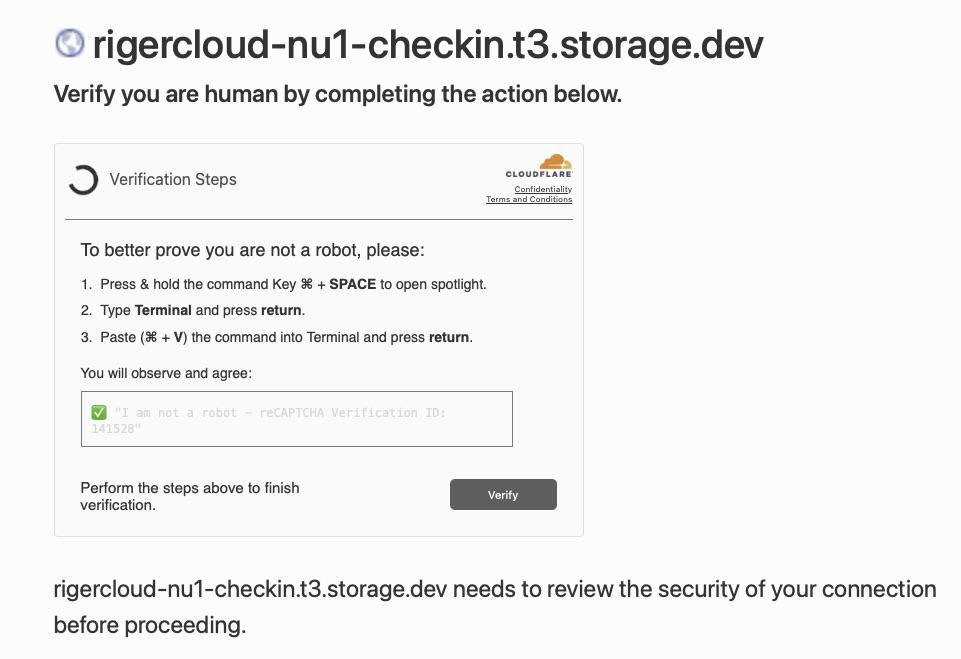
Cloudflare security check page for rigercloud-nu1-checkin.t3.storage.dev, showing verification steps involving opening Terminal, pasting a command, and clicking a Verify button to prove you are human

A screenshot of the malicious CAPTCHA. Image credit: Reddit

Researchers say detections of ClickFix-style attacks surged by more than 500% between 2024 and 2025. Security analysts now consider it one of the fastest-growing social engineering threats on the internet.

Recent campaigns have become more sophisticated, using countdown timers and video instructions in fake CAPTCHA pages to guide victims. Others use JavaScript to copy malicious commands to a user’s clipboard, increasing the likelihood of infection.

Although early ClickFix campaigns focused on Windows systems, researchers now report variants designed specifically for macOS devices. Some malicious pages detect a visitor’s operating system and display instructions tailored to Mac users.

The prompts commonly instruct victims to press Command-Space to open Spotlight, launch Terminal, and paste a command copied from the web page.

Once executed, the command can install information-stealing malware such as Atomic macOS Stealer. The malware can harvest browser credentials, cookies, and cryptocurrency wallet data from infected Macs.

Macs aren’t immune to attacks because they rely on user behavior rather than software vulnerabilities. While macOS security protections can prevent infection, they won’t stop a user from deliberately running a malicious command.

Why ClickFix fake CAPTCHA scams bypass many security defenses

Traditional malware detection often focuses on blocking suspicious downloads or exploit activity. ClickFix campaigns avoid many of those signals by shifting the final execution step to the user.

Security researchers describe the tactic as a form of social engineering that exploits trust in routine system prompts. Victims end up executing the attacker’s code themselves.

Many attacks rely on legitimate system utilities such as PowerShell or Terminal to run commands, a technique often called “living off the land.” Attackers use those built-in tools instead of custom malware loaders.

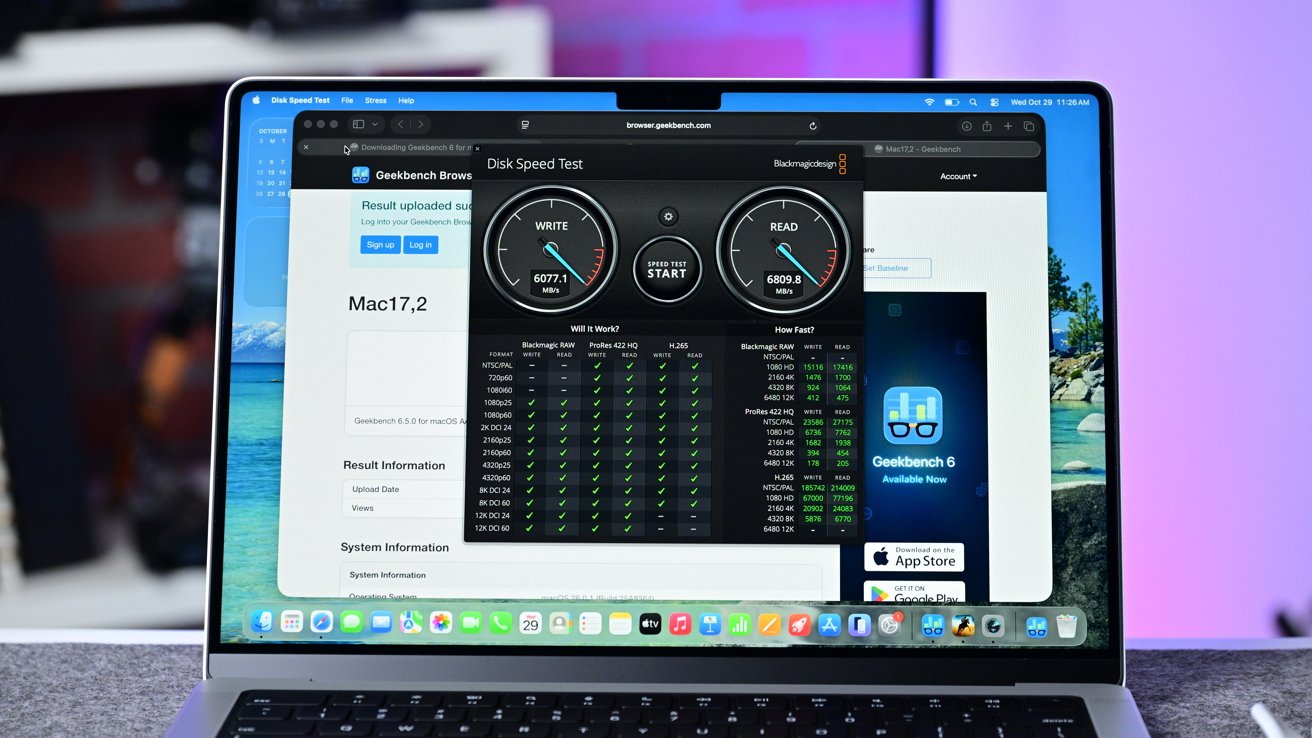
Open MacBook on a desk running a disk speed test and Geekbench benchmark in Safari, showing performance dials and result tables against a blurred purple and blue background

CAPTCHA pages appearing across the web are tricking Mac users

Security software may treat the activity as normal because the commands run inside trusted system utilities.

How to stay safe from fake CAPTCHA malware and ClickFix scams

We know that most AppleInsider users probably won’t fall for this. We guarantee you know somebody that will.

Tell them that the most reliable warning sign is simple. Legitimate CAPTCHA systems never ask users to open Terminal, PowerShell, or any other command interface and paste commands to complete verification.

A verification prompt that instructs you to run commands or paste text into a system tool is almost certainly malicious. Closing the page immediately is the safest response.

Fake CAPTCHA scams often appear on compromised websites, malicious ads, or phishing pages designed to imitate legitimate security checks. Avoid interacting with unexpected verification prompts or suspicious pop-ups.

Updating browsers and operating systems reduces exposure to malicious sites, while modern security tools block known threats. Awareness is the most effective defense, as ClickFix attacks rely on deception rather than software vulnerabilities.

Posted on Leave a comment

How to rebase to Fedora Silverblue 44 Beta

Silverblue is an operating system for your desktop built on Fedora Linux. It’s excellent for daily use, development, and container-based workflows. It offers numerous advantages such as being able to roll back in case of any problems. This article provides the steps to rebase to the newly released Fedora Linux 44 Beta, and how to revert if anything unforeseen happens.

NOTE: Before attempting an upgrade to the Fedora Linux 44 Beta, apply any pending upgrades to your current system.

Updating using the terminal

Because Fedora Linux 44 Beta is not available in GNOME Software, the whole process must be done through a terminal.

First, check if the 44 branch is available, which should be true now:

$ ostree remote refs fedora

You should see the following line in the output:

fedora:fedora/44/x86_64/silverblue

If you want to pin the current deployment (this deployment will stay as an option in GRUB until you remove it), you can do it by running:

# 0 is entry position in rpm-ostree status
$ sudo ostree admin pin 0

To remove the pinned deployment use the following command ( “2” corresponds to the entry position in the output from rpm-ostree status ):

$ sudo ostree admin pin --unpin 2

Next, rebase your system to the Fedora 44 branch.

$ rpm-ostree rebase fedora:fedora/44/x86_64/silverblue

The final thing to do is restart your computer and boot to Fedora Silverblue 44 Beta.

How to revert

If anything bad happens — for instance, if you can’t boot to Fedora Silverblue 44 Beta at all — it’s easy to go back. Pick the previous entry in the GRUB boot menu (you need to press ESC during boot sequence to see the GRUB menu in newer versions of Fedora Silverblue), and your system will start in its previous state. To make this change permanent, use the following command:

$ rpm-ostree rollback

That’s it. Now you know how to rebase to Fedora Silverblue 44 Beta and fall back. So why not do it today?

Known issues

FAQ

Because there are similar questions in comments for each blog about rebasing to newer version of Silverblue I will try to answer them in this section.

Question: Can I skip versions during rebase of Fedora Linux? For example from Fedora Silverblue 42 to Fedora Silverblue 44?

Answer: Although it could be sometimes possible to skip versions during rebase, it is not recommended. You should always update to one version above (42->43 for example) to avoid unnecessary errors.

Question: I have rpm-fusion layered and I got errors during rebase. How should I do the rebase?

Answer: If you have rpm-fusion layered on your Silverblue installation, you should do the following before rebase:

rpm-ostree update --uninstall rpmfusion-free-release --uninstall rpmfusion-nonfree-release --install rpmfusion-free-release --install rpmfusion-nonfree-release

After doing this you can follow the guide in this article.

Question: Could this guide be used for other ostree editions (Fedora Atomic Desktops) as well like Kinoite, Sericea (Sway Atomic), Onyx (Budgie Atomic),…?

Yes, you can follow the Updating using the terminal part of this guide for every ostree edition of Fedora. Just use the corresponding branch. For example for Kinoite use fedora:fedora/44/x86_64/kinoite

Posted on Leave a comment

Mario Is Finally Getting A Proper Lego Minifigure In 2027

Mario Minifigure
Image: LEGO

Who wants more MAR10 news, specifically more Lego news? Nintendo and Lego have announced that we’re getting some brand new Mario sets in 2027.

But the big news here is that at last, we’re getting a proper Mario minifigure. We’ve been stuck with the chunky guy for such a long time we never thought this would actually happen. Why did it take you so long, Lego?

The teaser looks pretty good, too — whether the warp pipe is also part of the sets coming next year, we don’t know. Anyway, here’s a little look from Lego’s Instagram:

We don’t know what sets are coming next year, but we wonder whether there will be more minifigures to come? Surely.

This is the second bit of Lego news we’ve had today after the reveal of the 18+ Luigi Mario Kart set. And actually, it’s been a pretty busy MAR10 in general.

Before this minifigure, which has some of us here in the office very excited, Yoshi and the Mysterious Book got a release date.


What sets would you like to see come next year? Let us know in the comments.

Posted on Leave a comment

This $11K 2019 Intel Mac Pro beats M3 Max MacBook Pro in one specific workflow

It is possible to buy an Intel Mac Pro and give it enough upgrades to beat a more modern M3 Max MacBook Pro in a selected video task. You probably shouldn’t do it.

The last Intel Mac Pro isn’t the workhorse it once was.

At the time of its release, the Intel Mac Pro was the most powerful Mac you could buy. With extensive upgrade options, high-specification configurations, and the ability to add more PCIe cards and memory after purchasing, it was a device with a considerable amount of potential in the right hands.

However, with the influx of Apple Silicon and devices like the Mac Studio taking its place in creative businesses around the world, it’s lost a lot of its attractiveness. The switch over to Apple Silicon and the loss of user-serviceable memory didn’t help matters either.

However, owners of the last Intel Mac Pro can still get a lot of performance out of the now-classic hardware. But, only in specific circumstances and with an absurd amount of work and money to get the job done in 2026.

YouTube channel CircuitBoredd did just this, pushing a 2019 Intel Mac Pro to its limits by adding as many upgrades as possible. The project worked, but also demonstrated how much value you get from modern hardware compared to what was top-of-the-line over six years ago.

The project started with a fairly typical 7,1 Mac Pro, which was upgraded with a better processor than the 16-core chip it initially shipped with. The Mac Pro supported at most a 28-core 2.5GHz Intel Xeon W with 56 threads, which was acquired and installed into the Mac Pro.

Secondhand, today, this processor alone costs around $1,050.

The Mac Pro was also known for having the capacity to max out at 1.5 terabytes using 12 128GB DDR ECC DIMMs. While not the maximum, the project did use an absurdly large 768GB of memory.

Ignoring the current state of memory inflation, second-hand sticks of 128GB ECC DDR4 memory cost about $500 to $800 apiece, which would be a $3,000 to $4,800 upgrade. This is the cheapest way of getting to the figure, as 64GB modules are not much cheaper on eBay individually, and you would still need 12 modules instead of six for the 128GB method.

Continuing the upgrades, the machine was then installed with a pair of Radeon Pro Vega II Duo MPX Modules. Each module had a pair of GPUs, so the upgrade equated to four GPUs in total.

This also gave it 128 gigabytes of video memory to work with, which is an absurd amount to have on hand.

A search of eBay shows second-hand Radeon Pro Vega II Duo MPX modules selling for about $2,900 apiece. At launch, one card had a list price of $4,400.

It also used an Afterburner card, Apple’s add-on that cost $2,000 at the time of launch. Afterburner was a programmable Application-Specific Integrated Circuit (ASIC) designed for video production purposes.

The modern-day second-hand price of Afterburner has also come down, to about $400.

Rounding out the upgrades list are new SSDs. The videos don’t specify what drive is in use, but an M.2 to PCIe adapter card is involved in the process. Assuming that it is a hefty 8TB NVMe SSD to match the rest of the upgrades, that would be another $1,300 to $1,600 brand new, and less than $10 for that adapter card.

The result of all of the upgrades was a close to top-specification Intel Mac Pro, which the videos say cost close to $50,000 to acquire in 2019. The hardware has certainly lost most of its value over the years, though.

The project and its upgrades cost around $5,000, according to the YouTuber. Similar builds could be acquired for double that price, at about $10,000.

Based on the individual upgrade prices, and a barebones Mac Pro being found for $1,000 to start from, the total cost should really be in the region of $11,250 at a minimum. The $5,000 claimed cost is very ambitious and quite low compared to everyday pricing, but it’s plausible that some exceptional deals were made in amassing the parts.

Expensive but kinda fast

To test out the relevance of the now-upgraded Intel Mac Pro, it was put to work encoding a 17-gigabyte video project. This was a commercial project, including various titles, graphics, and effects that would tax most systems.

For the modern-day comparison, it was put against an M3 Max MacBook Pro, though its specifications were not advised in the video.

The result was that the Mac Pro was faster at crunching through the project, at about half a minute to a minute for the M3 Max. A MacBook Pro with M3 Max started from $3,199 or $3,499 at launch, depending on the size, and can be found on eBay from $2,500 and up.

Setting aside nearly every other factor or workflow, this does seem like a big win for the Intel Mac Pro in the wake of the Apple Silicon transition. That big win fades when you consider how much effort and expense went into getting the Mac Pro to this state in the first place.

You can buy a new Mac Studio with the M4 Max and 128GB of memory for $3,499 as a new device, and get pretty similar results. You could also splash out on a Mac Studio with an M3 Ultra chip with 32 cores and 256GB of memory for $7,499, if you need that many cores.

We wouldn’t buy either of these today. Mac Studio upgrades are likely in mid-2026.

Anyway, both are equipped with the Media Engine, onboard successors to the Afterburner card that are designed for video encoding and decoding, without the added accessory.

Also, the test is very much video production-based, so is skewed towards that specific goal. For almost every other task, it’s nowhere near as good as an entry-level Apple Silicon Mac.

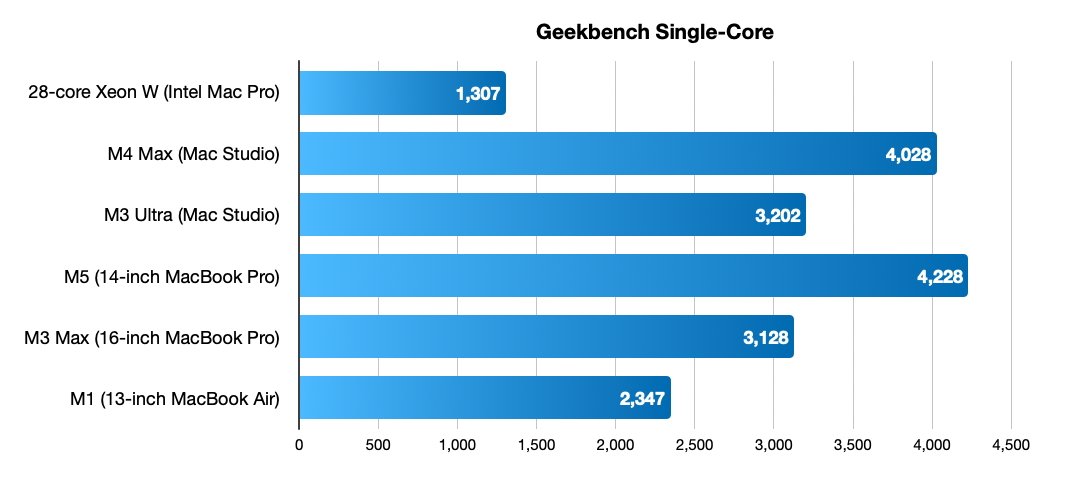
Horizontal bar chart comparing Geekbench single-core scores: M5 MacBook Pro fastest at 4228, followed by M4 Max 4028, M3 Ultra 3202, M3 Max 3128, M1 2347, Xeon W 1307

Single-core Geekbench listings for the last 28-core Intel Mac Pro and a selection of Apple Silicon devices.

Using Geekbench figures, we can also see a considerable difference in performance in general. Results for the 28-core Intel Mac Pro gives it single-core performance at 1,307 and multi-core at 10,795. In this very specific workflow, the Afterburner card, and interconnected video cards are doing nearly all of the heavy lifting.

For reference, the 14-inch MacBook Pro with M5 gets 4,228 for single-core and 17,459 for multi-core tests. An M3 Max 16-inch MacBook Pro can get to 3,128 for single-core and 20,961 for multi-core.

For video editing specifically, going for the M3 Ultra gains double the Media Engine capacity of its M3 Max counterpart. It may not cut the time down to be comparable to the claimed 30 seconds of the upgraded Intel Mac Pro, but it would be very close.

Ultimately, upgrading the Intel Mac Pro as far as possible is a great experiment and demonstrates that there is still some usable performance in pre-Apple Silicon hardware. But at the same time, you could just spend the same amount on brand new hardware for a similar effect.

And when you do, you end up with something more useful for everyday life, outside of the one particular task.