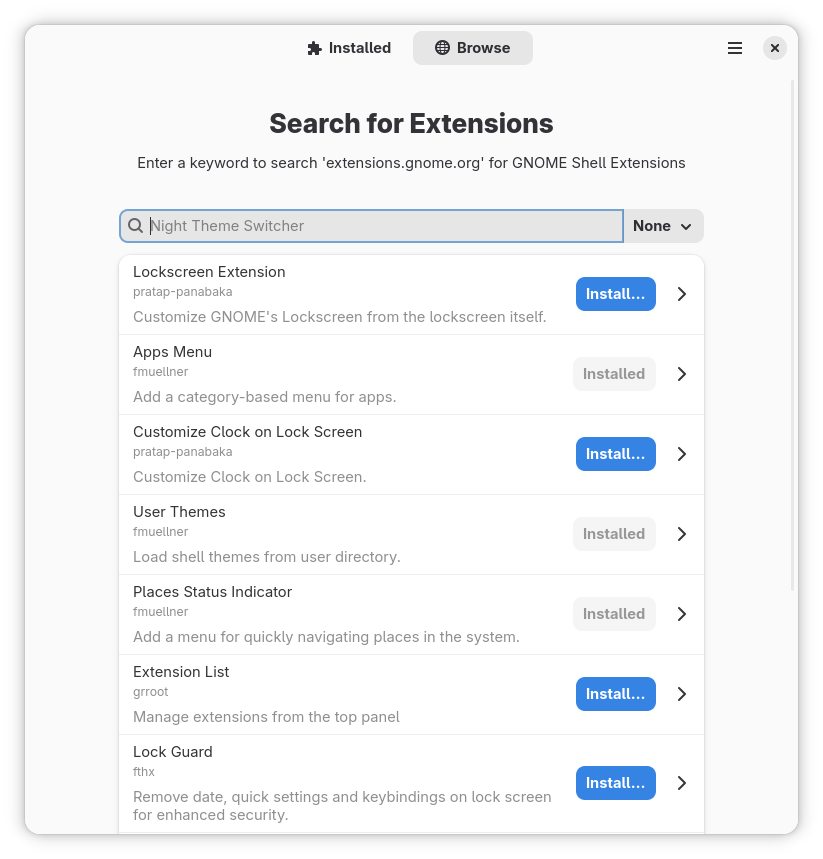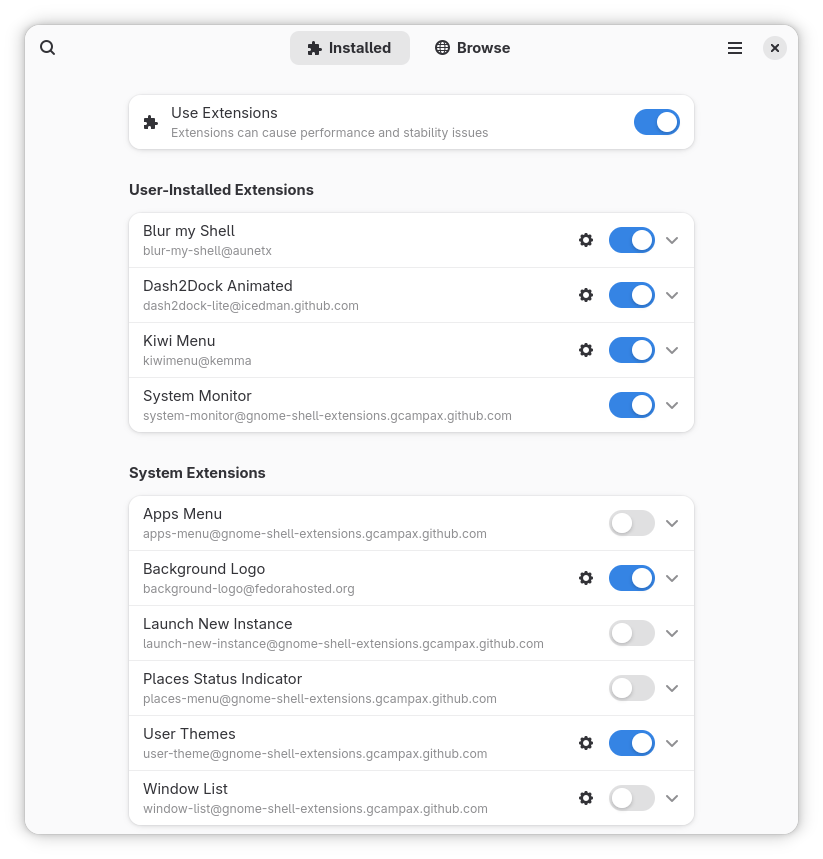
Posted on Leave a comment

Sega Drops Another Small Puyo Puyo Tetris 2S Patch For Switch 2

Update #3 []: Sega has released its first 2026 update for the Switch 2 launch title Puyo Puyo Tetris 2S, and Doubles Mode is now ready for local and online multiplayer. Version 1.0.5 also resolves various bugs.

As usual, replays from earlier versions can’t be viewed after this update has been performed. Here are the full patch notes via Sega’s social media page:

Puyo Puyo Tetris 2S Update – 13th March 2026

Update drops today!

Patch ver. 1.0.5 has landed in Puyo Puyo™ Tetris® 2S!

What’s new?

• Puyo Tetris Doubles mode is now ready for action in local AND online multiplayer!

• Various bugs have been squished

Heads up! Replays from earlier versions won’t be viewable after updating.

If you haven’t played this title yet, be sure to check out our review. Unfortunately, there’s no upgrade path for this one, so you’ll either have to fork out the full price, wait for a sale, or you can stick with the existing Puyo Puyo Tetris 2 game on the Switch.

You can see all of the past updates for Puyo Puyo Tetris 2 in our existing stories below.


Update #2 []:

Sega has announced another update for the Switch 2 launch title Puyo Puyo Tetris 2S. This patch will address some matchmaking issues online and resolves some bugs. Here’s the full rundown about Version 1.0.4:


Update #1 []:

Sega has already shown plenty of love for the Switch 2 with games like Sonic and Yakuza, and its support for the launch title Puyo Puyo Tetris 2S also continues. While the game was already in a respectable state on release, the company has continued to roll out some small updates for it.

Following the USB camera fix in the previous update, which you can see in the original story below, Version 1.0.3 has now officially gone live. It apparently deals with more bugs, with the official details mentioning how “various fixes” have been applied. Sega also mentions how replay data from earlier iterations of the game will no longer be playable in this version.

Once again, if you haven’t already played this game on the Switch 2, be sure to check out our review. It got six out of ten stars. It’s a “pretty darn decent” experience, even if the Switch 2 additions are admittedly minimal at best.


Original Story: One of the many Sega games released alongside the Switch 2 at launch was Puyo Puyo Tetris 2S.

Although it arguably didn’t offer much for returning players, there was a new camera feature allowing you to superimpose your face during gameplay. It seems there were some display issues with “certain” USB cameras, but this now been resolved in the latest update.

Along with this fix are some other updates, resolving various issues. Here’s the full rundown:

Puyo Puyo Tetris 2S – Ver. 1.0.2 (27th June 2025)

  • Fixes video display problems that could affect certain USB cameras.
  • Fixes matchmaking issues that could occur with promotion battles.
  • Other minor fixes.

And in case you missed it, yes – you can use regular USB cameras with your Switch 2 to enjoy certain features in select titles. The game also includes Joy-Con 2 mouse support.

As for our thoughts on Puyo Puyo Tetris 2S, we gave it six out of ten. While it’s a “pretty darn decent game” the Switch 2 additions are minimal at best, and there’s no upgrade path like certain other third-party releases.

Have you tried out this game on the Switch 2 yet? Or are you sticking with the Switch release? Let us know in the comments.


Posted on Leave a comment

Round Up: The Previews Are In For Elden Ring’s Updated Switch 2 Build

Elden Ring
Image: FromSoftware

Elden Ring: Tarnished Edition is on its way to the Switch 2 at some point this year, and ahead of its arrival, we’ve got a new round of previews from GDC. These latest impressions are based on a 15-minute demo of a newly optimised build of the game.

Overall, this latest previews seem mostly positive and there is a lot of focus on the game’s performance. FromSoftware’s title will apparently run at around 30fps on Nintendo’s new hybrid hardware on both the handheld and docked modes. RPG Site says the resolution is “either hitting or very visibly close to a native 1080p” in handheld.

So, here are the latest round of impressions:

Polygon: “While the Switch 2 version most certainly won’t be hitting 60 FPS, it doesn’t seem too far behind handhelds like the Steam Deck anymore. At a glance, I’d wager that it was running in the 30 to 40 FPS range, depending on how demanding the scene was. I was able to take down an easy, early game boss without disruptive stutters..The performance is far from perfect, mind you. The biggest dip in frame rate I saw wasn’t in a boss fight, but when it started raining while riding Torrent through the world. That’s what makes me a little hesitant to say that FromSoftware has totally cracked the Switch 2 code.”

RPG Site: “Our session was quite short, but to make the most of it, I bumrushed from the tutorial to the Margit boss fight in order to get the best representation of the game’s performance across the open world, while deliberately stretching things to the limits with active NPCs and constant loading. Even once it started raining, the game hit the 30FPS target consistently, and resolution similarly remained much the same… We also got to check out the game in docked mode, using the new lighter knight-type class added to this version of Elden Ring. The demo we played looked to emphasize quality over performance, settling in with a 30FPS framerate at a high resolution.”

GameSpot: “After several months of performance adjustment, the game has re-emerged at GDC 2026, and so far, it looks to be in a much better shape. One telling sign here is that Bandai Namco has enough confidence to allow Switch 2 handheld gameplay to be recorded, albeit from an over-the-shoulder perspective. The demo can also be experienced in docked mode, and overall, it looks like the game has been well-optimized. Even with several graphical concessions, Limgrave still looks great, and it looks like the frame rate hovers around the 30-40 FPS range.”


This new optimised build for Switch 2 is sounding promising, and it seems to be a step up from the previews based on the Gamescom 2025 demo. Now, we just need a release date, or at least a window!

FromSoftware’s new game The Duskbloods is also planned for a 2026 release, so be on the lookout for that.

Are you planning to check out Elden Ring for the Switch 2 when it’s released? Let us know in the comments.

Posted on Leave a comment

Pokémon Pokopia Is Getting A New Update Soon, Here Are The Details

Pokémon Pokopia
Image: The Pokémon Company

The relaxing life sim Pokémon Pokopia has got off to a tremendous start, with The Pokémon Company yesterday reporting the game’s sales had already surpassed 2.2 million units globally in just four days.

With the launch patch out of the way, the development team has now announced the next update will be arriving soon. Based on a rough machine translation from Pokopia’s Japanese website, the main takeaway here is that this next update will address multiple issues, including progression bugs. The team also has some improvements planned to deal with certain other issues.

Here are the details, and we’ll provide an update if English patch notes are shared.

Thank you for always enjoying the Nintendo Switch 2 software Pokémon Pokopia. We plan to address the following issues.

Confirmed Bugs

– In the request “Let’s Build a Home!” in “Dry and Dust-Covered Town,” Squirtle moves onto a tree and becomes unapproachable, preventing progress on the request.

– In the request “Let’s Find the Pokémon Center!” in Cloudy Seaside Town, if you break the cracked bridge blocks before Munchlax crosses the bridge, it becomes difficult to progress the request.

– In the request “Let’s Find the Pokémon Center!” in the Cloudy Seaside Town, performing specific steps prevents the event where Munchlax repairs the bridge from occurring, making it impossible to progress the request.

– In “Rocky Mountain Town,” performing specific actions prevents the event where you encounter Rotom from occurring.

– The request “Clean Up the Road!” in “Rocky Mountain Town” becomes difficult to progress under certain conditions.

– The type listed for “Ittomaru” (Spinarak) in the Pokédex is incorrect.

Planned Improvements

We plan to implement improvements for the following issues.

– In the “Dry Dry Town” request “Break Rocks with Rock Smash!”, if another block is placed on the cracked block near “Shrimpy” instead, the progression path becomes unclear.

– In the “Gloomy Seaside Town” request “Take the Scientists There!”, placing a different block where the cracked block near “Snorlax” should be makes the progression unclear.

Future Plans

An update to fix the above issues is scheduled for release soon. Even if you are already experiencing this issue, applying this update will resolve it. We will continue investigating other issues beyond those mentioned above.


So, if you are encountering certain problems in Pokémon Pokopia, as you can see, bug fixes and improvements are on the way.

If you haven’t already got Pokémon Pokopia and want to know more about this new spin-off, take a look at our review. We called it the “freshest Pokémon experience in a long time”.

How has your experience been with Pokémon Pokopia so far? Have you encountered any problems or progression issues? Let us know in the comments.

Posted on Leave a comment

Adjustments to the China storefront of the App Store on iOS and iPadOS

Apple is making changes to the App Store in China following discussions with the Chinese regulator.

As of March 15, 2026, changes will be made to the commission rates that apply to the China mainland storefront of the App Store on iOS and iPadOS.

The commission rate for standard Apple In-App Purchase and paid app transactions will be 25%. Currently, the rate is 30%. The commission rate for qualifying Apple In-App Purchase transactions under the App Store Small Business Program and Mini Apps Partner Program, and for auto-renewals of Apple In-App Purchase subscriptions after the first year, will be 12%. Currently, the rate is 15%.

Signing the updated terms by March 15 is not required to receive the benefit of these commission rate changes starting that date.

We strive for iOS and iPadOS to be the best app ecosystem and a great business opportunity for developers in China. We are committed to terms that remain fair and transparent to all developers, and to always offering competitive App Store rates to developers distributing apps in China that are no higher than overall rates in other markets.

The Apple Developer Program License Agreement has been revised to support updated policies. You can sign in to your account to accept the updated terms.

Translations of the updated agreement will be available on Apple Developer website within one month.

Posted on Leave a comment

Marvel Maximum Collection Brings Six Superhero Titles To Switch This Month

Last month, Limited Run Games announced it was teaming up with Marvel and Konami to revive six classic titles in the Marvel Maximum Collection.

It was mentioned how this superhero-sized collection was “coming soon” to the Switch and multiple other platforms, and we’ve now got an official update, fresh from GDC. As highlighted in the new trailer above, this collection will launch digitally on 27th March 2026, with pre-orders for the standard physical edition opening on the same date.

Here’s a look at the physical edition for Switch which will also include a foil cover sheet, manual and a sprites sticker sheet:

Marvel Maximum Collection
Image: Limited Run Games / Marvel, Konami

In case you missed the original announcement, this collection will include X-Men: The Arcade Game (featuring rollback netcode), Captain America and The Avengers, Spider-Man/Venom: Maximum Carnage, Venom/Spider-Man: Separation Anxiety, Spider-Man/X-Men: Arcade’s Revenge and Silver Surfer.

You can find out more about each of these titles, the versions included and more details about this collection in our previous post. Of course, there’ll also be the usual features such as a rewind ability, save states and display options.

Will you be getting the digital or physical version of this game? Let us know in the comments.
Posted on Leave a comment

Customize Fedora Linux Workstation with Extension Manager

What are GNOME Shell extensions?

Imagine that Fedora Workstation is your desk, and GNOME Shell extensions are small accessories you add to make it feel more personal. It’s like placing a pencil case on the right side, a lamp that helps you focus, or a small cabinet to keep your things from getting scattered. It’s the same desk—GNOME stays clean and minimal—but a few additions can make your routine more comfortable.

Extensions work on the GNOME interface: the top panel, the way you open applications, how notifications appear, and small details that usually stay hidden. These simple changes can be enough to make your Fedora Workstation feel different. With just one extension, you can make Fedora feel more “you.”

But like any accessories, choose only what truly helps—don’t install everything. Too many extensions can clutter your desktop or make things feel unstable. The goal isn’t to chase excitement, but to find a few small add-ons that better fit the way you work in Fedora Workstation.

Why use Extension Manager?

Once you see extensions as small “accessories” for GNOME, a question comes up fast: how do you install them without the hassle? This is where Extension Manager helps.

Instead of opening many browser tabs, you can do everything in one place. You can browse extensions. You can search for what you need. You can also read a short description before installing. As a result, the whole process feels calmer and more familiar.

More importantly, Extension Manager makes it easier to experiment safely. For example, you can try one extension to make the top panel more useful. If it doesn’t feel right, you can simply turn it off. Or you can uninstall it in seconds. That way, you stay in control.

Also, you’re not “modding” your whole system. You’re only adding small features. And if you change your mind, you can always go back to GNOME’s clean default look.

In short, Extension Manager is like a small drawer on your desk. It keeps your extensions in one spot. So they’re easy to find, easy to try, and easy to tidy up again.

Install Extension Manager

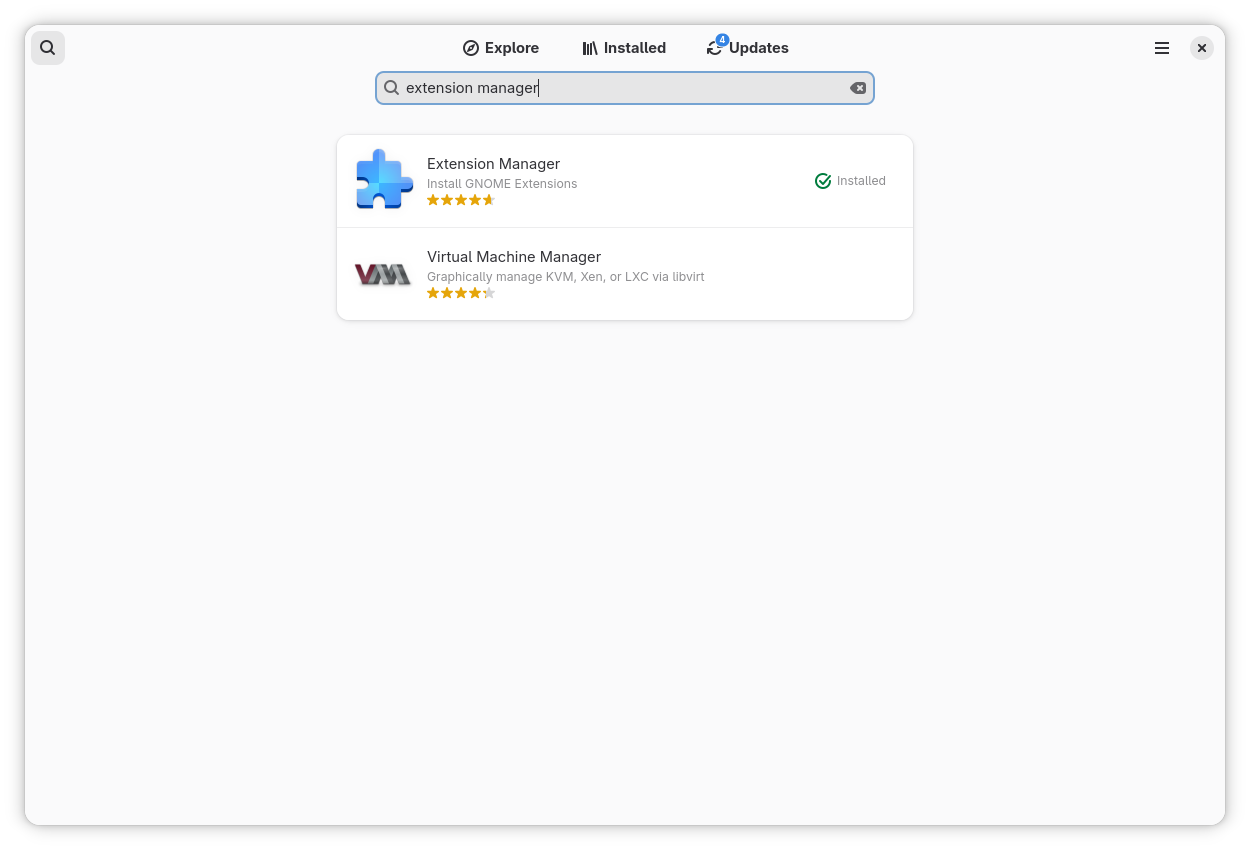
Let’s move to the easiest part: installing Extension Manager with just a few clicks. Open the Software app on Fedora Workstation, then search for Extension Manager using the search bar. Select the app and click Install. That’s it.

Once the installation is complete, open it from the app menu—look for Extension Manager. Now you’re ready to customize. Start slowly: try one extension first, then see if it fits your daily routine.

Find and Install an Extension

After you open Extension Manager, it can feel like opening an “accessories shop” for your Fedora Workstation. There are many options, from small tweaks to extensions that can change how you work.

Start with the search bar. Think about what you most often need in your day-to-day routine. For example, you might want quicker access to apps, tray icons for indicators, or a more informative top panel. When you find an extension that looks interesting, open its page for a moment. Read the short description, look at the screenshots, and then ask yourself whether it will really help your work flow.

If you’re sure, just click Install. In a few seconds, it will be installed, and you’ll notice the change right away. However, if it doesn’t feel right, don’t hesitate to uninstall it. At this stage, you’re simply trying things out—like picking the accessories that best fit your desk.

Enable/disable and adjust settings

After you install a few extensions, you don’t have to stick with all of them. Sometimes an extension is useful, but you don’t need it all the time. That’s the nice thing about Extension Manager: you can enable or disable extensions at any time, without any drama.

Think of it like accessories on your desk. Some days you need a desk lamp to help you focus. On other days, you want your desk to stay clean and simple. Extensions work the same way. You can turn one on when you need it, and turn it off when you’re done.

If an extension has options, you’ll usually see a Settings or Preferences button. From there, you can tweak small details to match your style—icon placement, button behaviour, panel appearance, and more. This is what makes extensions feel personal. You’re not just installing something and forgetting it; you’re shaping it around your workflow.

And if one day your Fedora starts to feel too crowded, don’t panic. Just open the list of installed extensions and disable the ones you don’t need. Take it slow. The best customization isn’t about how many extensions you have, but how well they fit your daily activities.

Keep it safe: a few practical tips

At this point, you might start thinking, “Wow, there are so many things I can change.” And that’s true. However, if you want Fedora Workstation to stay light and comfortable, there are a few simple habits worth keeping in mind.

First, install extensions the same way you choose tools: only when you truly need them. If you stop using an extension after a few days, it’s better to disable it or remove it. A comfortable desktop isn’t the most crowded one—it’s the one with fewer distractions.

Second, try extensions one by one. If you install many at once, it’s hard to tell which one causes a problem. On the other hand, if you take it slowly, you can quickly feel what fits and what doesn’t.

Finally, remember that GNOME keeps evolving. Sometimes after a major update, an extension may not be ready yet. If something feels odd after an update, the safest move is simple: open Extension Manager and disable the extension you suspect. Once things are back to normal, you can wait for an update or choose an alternative.

In the end, Extension Manager isn’t a ticket to customize without limits. It’s more like a clean toolbox. If you use it with care and focus on what you really need, customization can stay enjoyable—without losing the clean, stable feel of Fedora Workstation.

Wrapping up: share your favorite extensions

Now you know how to customize your Fedora Workstation with Extension Manager. You’ve learned how to install the app, try a few extensions, and adjust their settings. And here’s the fun part: everyone ends up with a different mix of extensions, because we all have different needs and work styles.

If you have a favorite extension, share it. Which one do you rely on most, and what do you use it for? Maybe it helps you stay focused during presentations. Or maybe it makes the top panel more informative, brings back tray icons, or simply speeds up your work flow. Tell us why you like it, so others can picture the benefit.

Who knows—your list might inspire someone else. And you might also discover a new extension that fits your daily routine even better.

Posted on Leave a comment

Dave The Diver’s Next Major DLC Launches This June

Developer Mintrocket has confirmed that Dave the Diver‘s next major DLC, ‘Into the Jungle’, will launch on Switch and Switch 2 on 18th June 2026.

The expansion will feature entirely new locations, with additional NPCs, quests, and more. To put it simply, if you’re a fan of the base game, then chances are you’re going to love this one.

If that’s not enough, it’s also been confirmed that a new ‘Complete Edition’ physical release is inbound for Switch 2 and PS5. This includes the base game plus all DLC (yes, including ‘Into the Jungle’) on cartridge, and those who wish to splash out a bit more can also opt for the Collector’s Edition.

This one will include the following:

  • Bancho Sushi Restaurant Acrylic Standee
  • 4 Metal Pin Badges
  • Acrylic Keyring
  • Dolphin Pendant Necklace
  • 2 Marinca Cards
  • Poster
  • 4 Postcards
Dave the Diver DLC 6
Image: Mintrocket

Both editions can be pre-ordered from the Silver Lining Direct store. In the meantime, if you’re on the fence about Dave the Dive, then be sure to check out our review. We gave it a score of 9/10 and said that it “rivals Mario Wonder’s all-out density and charm while doing something almost completely new”.

Will you be picking up Dave the Diver’s upcoming DLC? How about the new physical edition? Let us know with a comment.

Posted on Leave a comment

PHP 8.5.4 Released

The PHP development team announces the immediate availability of PHP
8.5.4. This is a bugfix release. All PHP 8.5 users are encouraged to upgrade to this version. For source downloads of PHP 8.5.4 please visit our downloads page.
Windows binaries can be found on the same page.
The list of changes is recorded in the ChangeLog. Release Announcement: <https://php.net/releases/8_5_4.php>
Downloads: <https://php.net/downloads>
Changelog: <https://php.net/ChangeLog-8.php#8.5.4>
Release Manifest: <
https://gist.github.com/DanielEScherzer/a584b194fa50f798432ccfdcd503bc47> Many thanks to all the contributors and supporters! Regards,
Daniel Scherzer, Volker Dusch, and Pierrick Charron php-8.5.4.tar.bz2
SHA256 hash:
2ac929a29a6b7ef4b8acec981a417b91bdf7f548f597df665cc56ab9ea95fc75
PGP signature:
-----BEGIN PGP SIGNATURE----- iQIzBAABCAAdFiEE2VwDvHAr6VFTRK4zdORLyQZ3AaUFAmmwqTcACgkQdORLyQZ3
AaU/NRAAjTMEAQgS+rtgBbggtLE7PM9Bd6cPKiTUIWaNE7ZIf5OGj7Ofup2waGCK
ujhR9UkE4qA5Ost8BtW1latbEnIBq8wELb0HrcU+QTmPI8ofR7WkKZDbfQd7+W8q
v5RKYZIYW9qCIaJcQgNQWQPO/1ASeYCXPT8/PFKVmLpYZgngdPeegTmXJxc63Orn
L0Ds4TBbOAVqthb5YMQJNlLWwBmrR1gbmvsNbBDd/hlvOg6a4htdYnycgCxXrCqW
/OVIL5GMfHV2MVAdi3CpiIKimYEc7Yl9FYloddKRAB6xGzxwkqCXDGa/FFlNTLLs
MQ6JmqJFSNoTxdkxGyov5sw6xodGw641n+LtHgiJ2sxDkmi9IZaZi23nQo3l34MT
pS/W6A+FJmZQEJKzyXNsfyoHAgeXP6V8ZDgDTY91wHCLNecoSWD/9MGXoO2kkJrO
xzKZFT4RZ4lcUTsMUm1J5HgCZJ58G0BMXBjtxJcfJRmxUKLzwLx7ue60TgEfCh3f
xUeVG8N4vZrfaRcwEfMyPlppLO5EmrwGYT9pTVx+fZdRF8CCkM7DrR0zM2CoF9a4
7zcW5kjuS/02JoGGyOmzgcymJ4PrwZpsy+TV7VppO0DXBnrm45vPimAnoptbSF1P
+IV2t5SBpE/IpvRlOfrUb1PVWqyeHIEv7x7Q1RY1C2WmDOH2HZs=
=sB6P
-----END PGP SIGNATURE----- php-8.5.4.tar.gz
SHA256 hash:
4fef7f44eff3c18e329504cb0d3eb30b41cf54e2db05cb4ebe8b78fc37d38ce1
PGP signature:
-----BEGIN PGP SIGNATURE----- iQIzBAABCAAdFiEE2VwDvHAr6VFTRK4zdORLyQZ3AaUFAmmwqTwACgkQdORLyQZ3
AaXZyg/5AdsEPYdcC0N8jZrXe0QDZdXuNGc8byXTkiuRZnOgH0CIb9/tIZHjzaaU
Tptsq1Kiw9tHM+OZ0RVlUM2uVt+CsfafShbiOBhZ3dqK8rh81sIUiQP1hxRHMKi/
GqhtQLJg93RPiZ/mmQvWNshB/hITJyGBls0Bx6PKBRuVJnHRLVmkwP9VnhFtrhhX
FmYKozUkdUqp4ViAGJMuINRCUvpyG6qQRy0y0UaSGMkjvmKH380+uXL5TH6BO+Sk
o+QUGOr6tybDCD0nIq61zSSyHX6Ne5NSsCiFJ9uV6+OJ4O0J3n2o/rWUV19s9Ee+
D1w5jycxdAibGfGZCKgihVEP8FE11SSQjlJBHtBr0BpiELwKU4JWsa8BeryAZPrH
jZ5A/jy7iRu5rqPWoYyzMchKg9F2DpodETwMagNeG2WKWT9fuvPxBKUj+Wytvuuv
/sY/ijUJO9/zI5xNRfmF90QIAN3huDNOiaLxonLV7/igx96OY82caaikxT9bQmrm
bug6sNwYieFYwf7L31qUAT8KHJkKA9wa5rNZL7pUnI5/LqMdoZl5RjHBWsflF1hh
HKDJBW2LJU9921Gw1/S4wedLZPBtMmBWrVXeDQtKJT6jQaUKUIgE8OnpVvEhqVxy
CPfMFJCjFVoBkye6JB/g4G61hUDctx6XJHDHzTciUc/j5PiEN5E=
=x72g
-----END PGP SIGNATURE----- php-8.5.4.tar.xz
SHA256 hash:
c1569f1f543f6b025c583cdc0e730e5c5833c603618613f1aa8e75d1524b8c91
PGP signature:
-----BEGIN PGP SIGNATURE----- iQIzBAABCAAdFiEE2VwDvHAr6VFTRK4zdORLyQZ3AaUFAmmwqTwACgkQdORLyQZ3
AaWHMQ//YMxdSxW3vs1m6T+XdnF0djcTFjKKgkKVRqYp/jR63l0bPpKn0KmvIfcE
MMzMCZRUzDnziAN4eKb/EtooYoFt1W+yIrJhmWDXZCPqc/Aom2y5uILyblRybJFO
GSSe+ZVazUscpO7Ait0sxWq8ZsmumMCudes7W21bQWlcYjx4zzx+1SYN3t8seCWI
+K65mZaokSiQG2cR6HQzMwHRssIQW8FFOmCtus8Gc4AIhhvp4ZeBpp3HwpkrkRpl
y7MaVtAE9ktL5YYmb3KMqpfzEMta1yRI32fsssWmCFrlMny7lIXsNIE5m0W0qbls
PkBKz+HDeZzo55zk9q8wAyIPUDkD/Yjm7h/Wzbx5VlxwGe5wOT60S+nt2pjMcX3z
gY+11bELCAqzpkWPZ7h/uRNbYo8DWLebggFbxg/iUItFL369Qza2DMMRJ2jTgkVn
RanFh79pwjGy4hw70QdYRrQNqQQJ7Z8vdoagicn4JTnbttkHejXzKHkG0jiWASwm
miDwUDwyxJ18ONRervIAFJSKfmNwkqO/pv7aBpIdKi/ZDTyWcXbaJb0TnzQR2Rg7
Z5AKitb7xS+8spKu09lCuOvo7Xl+bAAC8BARqMF1PaaGlWirGMiAAEvRAketPd+o
isJEA5Uo2LYjIo88CMmdY7FEnvOqsUft9JF87rBWl1cS3d6ib9k=
=KYWv
-----END PGP SIGNATURE-----

Thread (1 message)

  • Daniel Scherzer
Posted on Leave a comment

PHP 8.4.19 Released

The PHP development team announces the immediate availability of PHP
8.4.19. This is a bugfix release. All PHP 8.4 users are encouraged to upgrade to this version. For source downloads of PHP 8.4.19 please visit our downloads page.
Windows binaries can be found on the PHP for Windows site.
The list of changes is recorded in the ChangeLog. Release Announcement: <https://php.net/releases/8_4_19.php>
Downloads: <https://php.net/downloads>
Windows downloads: <https://www.php.net/downloads.php?os=windows&version=8.4>
Changelog: <https://php.net/ChangeLog-8.php#8.4.19>
Release Manifest: <https://gist.github.com/NattyNarwhal/708834a001d61b0d2fc8a3a4b6da2e8f> Many thanks to all the contributors and supporters! Regards,
Calvin Buckley, Saki Takamachi, and Eric Mann php-8.4.19.tar.bz2
SHA256 hash: bceb7798ed37b442fe523ae7ef345ccc2231db0b022d30735c2e378d3254a0d4
PGP signature:
-----BEGIN PGP SIGNATURE----- iJEEABYKADkWIQSdf5mgy48FyKaVjWJWqXr3YAo5pgUCabA/cBsUgAAAAAAEAA5t
YW51MiwyLjUrMS4xMSwwLDMACgkQVql692AKOaYVoQD/SbMwarGdQI80QFEFL0UW
ZM2+XgrrqCoWzIs9YEUmIqoA/2Evt8P20A945XCLKvYFa+nJAsf6ov9AmhmYGIHj
gRwE
=KYZd
-----END PGP SIGNATURE----- php-8.4.19.tar.gz
SHA256 hash: 9e862435ffb533dc5b0eb486170a74e5f7c8095e8eb8819a2ff5aad430292a18
PGP signature:
-----BEGIN PGP SIGNATURE----- iJEEABYKADkWIQSdf5mgy48FyKaVjWJWqXr3YAo5pgUCabA/cBsUgAAAAAAEAA5t
YW51MiwyLjUrMS4xMSwwLDMACgkQVql692AKOabMAQD8CvWk0VbVra73NQWFOMVw
3RoEkKV1MA1hDGZBJpuc6JUA/R9w1ZMudTPErfwkuNfvBIIim+x0Va5aVFvNKxOb
mCoM
=Cmx2
-----END PGP SIGNATURE----- php-8.4.19.tar.xz
SHA256 hash: 11f7164ab26d356c31f94d3d69cc0e0707d5d2d6494a221aaeae307c08eaaa1c
PGP signature:
-----BEGIN PGP SIGNATURE----- iJEEABYKADkWIQSdf5mgy48FyKaVjWJWqXr3YAo5pgUCabA/cBsUgAAAAAAEAA5t
YW51MiwyLjUrMS4xMSwwLDMACgkQVql692AKOaYnCAEA1PGwqbH/fMQtmLUi6Wy6
ZvtXsZcyHn++7hgIkHK2NBsA/3AC3DXaFymZvIwZENBVccl8QB20ev0tBcsGrlr+
G60F
=xSQh
-----END PGP SIGNATURE-----

Thread (1 message)

  • Calvin Buckley