OUTRIDERS is a story driven RPG-Shooter that will put the player in the shoes of an Outrider, the last hope of the human race trapped on Enoch, a dangerous and untamed planet. The campaign can be played entirely in single player, or in co-op with up to three players. Outriders Worldslayer is a new expansion that takes place directly after the events of the main campaign. In it, you and up to 2 other players must travel to the far reaches of Enoch to battle a new threat known as Ereshkigal, a dark overlord, and the main villain of the expansion.
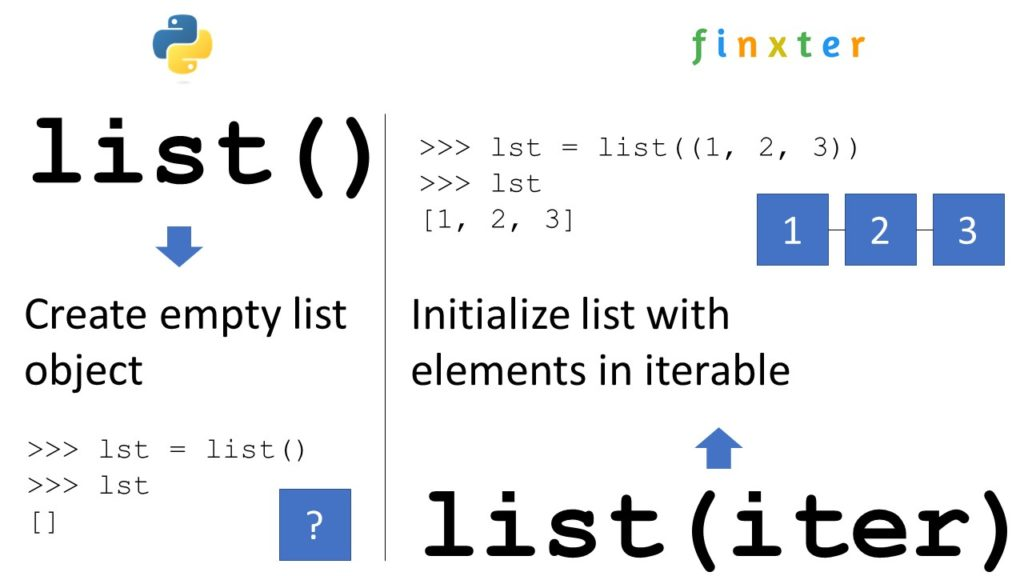
To create an empty list in Python, you can use two ways. First, the empty square bracket notation [] creates a new list object without any element in it. Second, the list() initializer method without an argument creates an empty list object too.
Both approaches are shown in the following code:
# Way 1 to create an empty list:

my_list = [] # Way 2 to create an empty list:

my_list = list()
Next, you’ll learn many more related Python concepts you need to know that concern creation of lists. Keep reading to keep improving your skills and answer any subsequent question you may have!
Python list() — Quick Guide
Python’s built-in list() function creates and returns a new list object. When used without an argument, it returns an empty list. When used with the optional iterable argument, it initializes the new list with the elements in the iterable.
You can create an empty list by skipping the argument:
>>> list()

[]
If you pass an iterable—such as another list, a tuple, a set, or a dictionary—you obtain a new list object with list elements obtained from the iterable:
You can create an empty list of lists do not use [[]] * n because this creates a nested list that contains the same empty list object n times which can cause problems because if you update one, all inner lists change!
To create an empty list of lists with n empty inner lists, use the list comprehension statement [[] for _ in range(n)] that creates a fresh empty list object n times.
n = 5

my_list = [[] for _ in range(n)]

print(my_list)

# [[], [], [], [], []]
List comprehension is a powerful Python feature and I’ve written a full blog tutorial on it—feel free to watch my general explainer video and read the associated blog article!
Follow these three easy steps to create an empty list and append values to it in a for loop:
my_list = [] creates the empty list and assigns it to the name my_list.
for i in range(10): initializes the for loop to be repeated 10 times using loop variable i that takes on all values between 0, 1, …, 9.
my_list.append(i) is the loop body that appends the integer value of the loop variable i to the list.
Here’s the code example:
my_list = []

for i in range(10): my_list.append(i) print(my_list)

# [0, 1, 2, 3, 4, 5, 6, 7, 8, 9]
However, a better Python one-liner alternative is using list comprehension for this:
my_list = [i for i in range(10)]
Python Create List of Empty Strings
To create a list of n empty strings, you can use the expression [''] * n because it places the same empty string literal '' into the list n times. This doesn’t cause any problems due to the fact that all list elements refer to the same empty string object because strings are immutable and cannot be modified anyways.
To create a list of n dictionaries, each dict being empty, use the list comprehension statement [dict() for _ in range(n)] with the underscore _ as a throw-away “loop variable” and the dict() built-in dictionary creation function.
my_list = [dict() for _ in range(10)]

print(my_list)

# [{}, {}, {}, {}, {}, {}, {}, {}, {}, {}]
Note that if you update one of the dictionaries, all other dictionaries are unaffected by this because we really created n independent dictionary objects.
To create an empty list of class objects, you can use list comprehension statement my_list = [MyClass() for _ in range(n)] that repeats n times the creation of an empty class object MyClass and adding it to the list. You can then later change the contents of the n different MyClass objects.
class MyClass(object): pass my_list = [MyClass() for _ in range(5)] print(my_list)

# [<__main__.MyClass object at 0x000001EA45779F40>, <__main__.MyClass object at 0x000001EA47533D00>, <__main__.MyClass object at 0x000001EA475334C0>, <__main__.MyClass object at 0x000001EA4758E070>, <__main__.MyClass object at 0x000001EA4758E4F0>]
Python Create Empty List of Type
Python is a dynamic language so there is no concept of a “list of type X”. Instead of creating a list of a fixed type, simply create an empty list using [] or list() and assign it to a variable such as my_list. Using the variable, you can then fill into the existing list any data type you want!
Here we create an empty list and fill in an integer, a list, and a string—all into the same list!
my_list = []

# Alternative: my_list = list() # Add integer to list:

my_list.append(42) # Add list to list:

my_list.append([1, 2, 3]) # Add string to list:

my_list.append('hello world') # Print all contents of list:

print(my_list)

# [42, [1, 2, 3], 'hello world']
Python Create Empty List of Integers
To initialize a list with certain integers such as zeroes 0, you can either use the concise list multiplication operation [0] * n or you use list comprehension [0 for _ in range(n)].
To create an empty list and later add one tuple at-a-time to it, first initialize the empty list using the [] square bracket operator and then use the list.append(t) to append one tuple t at a time.
Here we add three tuples to the initially empty list:
Killing Floor 2 is a recurring giveaway, being given once on the Epic Store on July 2020. The games are free to keep until July 14th 2022 - 15:00 UTC.
Next week's freebie: Wonder Boy The Dragons Trap
We are welcoming everyone to join our discord[discord.gg]. We are more active there on finding giveaways, small or large, and there are daily raffles you can participate.
[www.indiegala.com] The Wunder Gate Bundle is LIVE! Uncertainty turns into serendipity with this wonderful indie selection: SHUT IN, Wunderling DX, Gate to Site 8, Zom Tom, Firelight Fantasy: Vengeance, 3D PUZZLE - Farm House.
[indiegala.com] What better way to relax than listening to some tunes with your friends? The Dream Beats Bundle is about to end, but not before bringing you the chance to grab a few extra copies for your pals during the Happy Hour.
Frozenheim is a serene Norse city builder with elaborate management gameplay and RTS tactical combat. Lead your Viking clan through hardships of the frozen north, season by season, year after year. Build and survive. Set sail, explore and conquer. Win Odin’s favor and secure your place in Valhalla!
War Of The Visions: Final Fantasy Brave Exvius' Antagonist Now A Playable Unit
Square Enix has added a new unit to their RPB mobile game War Of The Visions: Final Fantasy Brave Exvius. As a part of the latest update, players can now add Sadali to their roster and use him to boost their allies. Players can also test the Sadali units in a unique quest available now.
Sadali is an Ultra Rare unit that specializes in wind elements. His main job is Crystal Sanctum Founder and has sub-jobs of Devout and Kotodama Wielder. Sadali's skills include the following:
Limit Burst: Crystallite Reckoning – Sadali raises his Magic Attack Res Piercing Rate before dealing significant damage to the target based on his MAG stat.
Rush Not Thy Fate – This skill inflicts medium damage based on the caster's MAG stat to targets in a large area of effect, reduces their CT, and lowers their Agility for one turn.
Sacred Sacrament – Raises all Elemental Resistances of allies within an area around self and adds status removals (AP Auto-Restore/Additional Damage effect) to attacks for three turns.
In addition to Sadali, the Ultra Rare Culmination card will also be introduced. It'll cost 70 in-game currency and increases your party's area of attack resistance and the critical evasion of wind-type units. When at max level, wind-type units will receive an agility boost from the card. When equipped with Sadali, the card boosts both his Healing Power and Magic. When it's equipped with Gilgamesh or Whisper, it boosts their Max HP.
Input: You have some data in a CSV file stored in 'my_file.csv' where the first row is the header and the remaining rows are values associated to the column names in the header.
Desired Output: You want to store the data in an XML file 'my_file.xml' so that each row is represented by an XML <row> tag and each column value is associated with a specific column header tag.
You can convert a CSV to an XML using the following approach:
Read the whole CSV file into your Python script.
Store the first row as header data that is needed to name your custom XML tags (e.g., <Name>, <Job>, <Age>, and <Income> in our example).
Create a function convert_row() that converts each row separately to an XML representation of that row using basic string formatting.
Iterate over the data row-wise using csv.reader() and convert each CSV row to XML using your function convert_row().
Here’s the code for copy&paste:
# Convert CSV file to XML string

import csv filename = 'my_file.csv' def convert_row(headers, row): s = f'<row id="{row[0]}">\n' for header, item in zip(headers, row): s += f' <{header}>' + f'{item}' + f'</{header}>\n' return s + '</row>' with open(filename, 'r') as f: r = csv.reader(f) headers = next® xml = '<data>\n' for row in r: xml += convert_row(headers, row) + '\n' xml += '</data>' print(xml)
You can also use pandas instead of the csv module to read the CSV file into your Python script. Everything else remains similar—I highlighted the lines that have changed in the following code snippet:
import pandas as pd def convert_row(headers, row): s = f'<row id="{row[0]}">\n' for header, item in zip(headers, row): s += f' <{header}>' + f'{item}' + f'</{header}>\n' return s + '</row>' df = pd.read_csv("my_file.csv")

headers = df.columns.tolist()

xml = '<data>\n' for _, row in df.iterrows(): xml += convert_row(headers, row) + '\n' xml += '</data>'

print(xml)
Another helping of classic Cuphead action awaits you in Cuphead - The Delicious Last Course! Brothers Cuphead and Mugman are joined by the clever, adventurous Ms. Chalice for a rollicking adventure on a previously undiscovered Inkwell Isle! With the aid of new weapons, magical charms, and Ms. Chalice’s unique abilities, players will take on a new cast of fearsome, larger than life bosses to assist the jolly Chef Saltbaker in Cuphead’s final challenging quest!



 Read More: Read our


 Those Awesome Guys Sale, up to 75% OFF
 Unknown Worlds Entertainment Sale, up to 70% OFF
 Motorsport Gaming Sale, up to 90% OFF
 Systemic Reaction Sale, up to 72% OFF
 Expansive Worlds Sale, up to 72% OFF
  Untold Tales Sale, up to 65% OFF
 Revolution Software Sale, up to 70% OFF
  Kasedo Games Sale, up to 80% OFF
 Good Shepherd Entertainment Sale, up to 92% OFF
 IO Interactive A/S, up to 90% OFF