
+- Sick Gaming (https://sickgaming.net)
+-- Forum: Programming (https://sickgaming.net/forum-76.html)
+--- Forum: Python (https://sickgaming.net/forum-83.html)
+--- Thread: [Tut] How to Create an Empty List in Python? (/thread-99675.html)
[Tut] How to Create an Empty List in Python? - xSicKxBot - 07-07-2022
How to Create an Empty List in Python?
5/5 – (1 vote)
To create an empty list in Python, you can use two ways. First, the empty square bracket notation
Code:
[]Code:
list()Both approaches are shown in the following code:
Code:
# Way 1 to create an empty list:
my_list = [] # Way 2 to create an empty list:
my_list = list()
Next, you’ll learn many more related Python concepts you need to know that concern creation of lists. Keep reading to keep improving your skills and answer any subsequent question you may have!
Python list() — Quick Guide
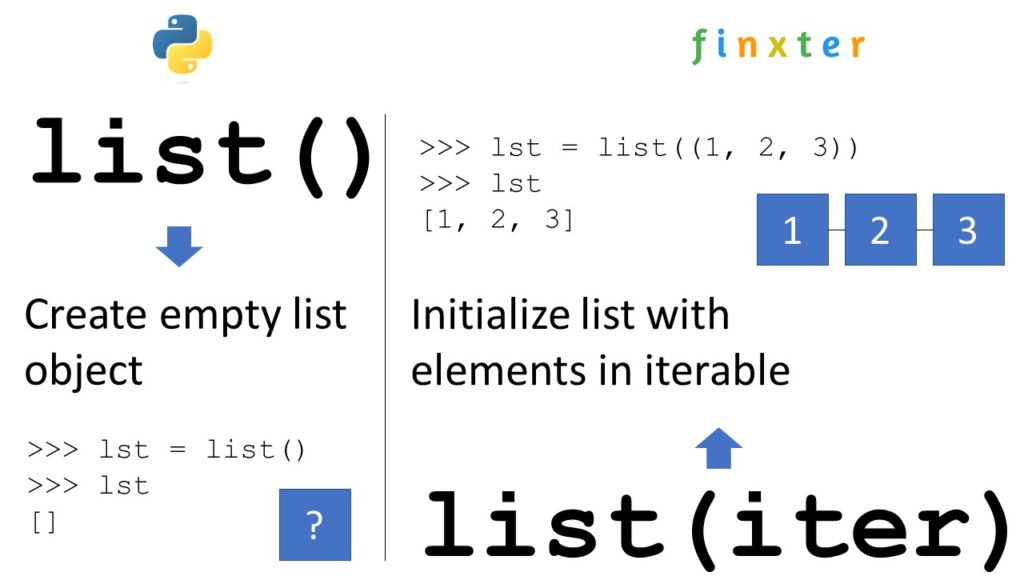
Python’s built-in
Code:
list()Code:
iterableYou can create an empty list by skipping the argument:
Code:
>>> list()
[]
If you pass an iterable—such as another list, a tuple, a set, or a dictionary—you obtain a new list object with list elements obtained from the iterable:
Code:
>>> list([1, 2, 3])
[1, 2, 3] Read More: Read our full tutorial on the Finxter blog to learn everything you need to know.
Python Create Empty List of Size
To create a list of
Code:
nCode:
nFor example, use
Code:
[None] * 5Code:
[None, None, None, None, None]Code:
NoneYou can then overwrite some elements with index assignments.
In the example,
Code:
lst[2] = 42Code:
[None, None, 42, None, None]Code:
# Create a list with n placeholder elements
n = 5
lst = [None] * n # Print the "placeholder" list:
print(lst)
# [None, None, None, None, None] # Overwrite the placeholder elements
lst[0] = 'Alice'
lst[1] = 0
lst[2] = 42
lst[3] = 12
lst[4] = 'hello'
print(lst)
# ['Alice', 0, 42, 12, 'hello']
Read More: Read our full tutorial on the Finxter blog to learn everything you need to know.Python Create Empty List of Lists
You can create an empty list of lists do not use
Code:
[[]] * nTo create an empty list of lists with n empty inner lists, use the list comprehension statement
Code:
[[] for _ in range(n)]Code:
nCode:
n = 5
my_list = [[] for _ in range(n)]
print(my_list)
# [[], [], [], [], []]
List comprehension is a powerful Python feature and I’ve written a full blog tutorial on it—feel free to watch my general explainer video and read the associated blog article!
Read More: Read our full tutorial on the Finxter blog to learn everything you need to know.Python Create Empty List and Append in Loop
Follow these three easy steps to create an empty list and append values to it in a
Code:
for- creates the empty list and assigns it to the nameCode:
my_list = [].Code:my_list
- initializes the for loop to be repeated 10 times using loop variableCode:
for i in range(10):that takes on all values between 0, 1, …, 9.Code:i
- is the loop body that appends the integer value of the loop variableCode:
my_list.append(i)to the list.Code:i
Here’s the code example:
Code:
my_list = []
for i in range(10): my_list.append(i) print(my_list)
# [0, 1, 2, 3, 4, 5, 6, 7, 8, 9]
However, a better Python one-liner alternative is using list comprehension for this:
Code:
my_list = [i for i in range(10)]To create a list of
Code:
nCode:
[''] * nCode:
''Code:
nCode:
>>> [''] * 5
['', '', '', '', '']
>>> [''] * 20
['', '', '', '', '', '', '', '', '', '', '', '', '', '', '', '', '', '', '', '']To create a list of
Code:
nCode:
[dict() for _ in range(n)]Code:
_Code:
dict()Code:
my_list = [dict() for _ in range(10)]
print(my_list)
# [{}, {}, {}, {}, {}, {}, {}, {}, {}, {}]
Note that if you update one of the dictionaries, all other dictionaries are unaffected by this because we really created n independent dictionary objects.
Code:
# update first dictionary:
my_list[0]['foo'] = 'bar' print(my_list)
# [{'foo': 'bar'}, {}, {}, {}, {}, {}, {}, {}, {}, {}]To create an empty list of class objects, you can use list comprehension statement
Code:
my_list = [MyClass() for _ in range(n)]Code:
nCode:
MyClassCode:
nCode:
MyClassCode:
class MyClass(object): pass my_list = [MyClass() for _ in range(5)] print(my_list)
# [<__main__.MyClass object at 0x000001EA45779F40>, <__main__.MyClass object at 0x000001EA47533D00>, <__main__.MyClass object at 0x000001EA475334C0>, <__main__.MyClass object at 0x000001EA4758E070>, <__main__.MyClass object at 0x000001EA4758E4F0>]
Python is a dynamic language so there is no concept of a “list of type X”. Instead of creating a list of a fixed type, simply create an empty list using
Code:
[]Code:
list()Code:
my_listHere we create an empty list and fill in an integer, a list, and a string—all into the same list!
Code:
my_list = []
# Alternative: my_list = list() # Add integer to list:
my_list.append(42) # Add list to list:
my_list.append([1, 2, 3]) # Add string to list:
my_list.append('hello world') # Print all contents of list:
print(my_list)
# [42, [1, 2, 3], 'hello world']To initialize a list with certain integers such as zeroes 0, you can either use the concise list multiplication operation
Code:
[0] * nCode:
[0 for _ in range(n)]Code:
>>> [0] * 5
[0, 0, 0, 0, 0]
>>> [0] * 10
[0, 0, 0, 0, 0, 0, 0, 0, 0, 0]
>>> [42] * 5
[42, 42, 42, 42, 42]
>>> [42 for _ in range(5)]
[42, 42, 42, 42, 42]To create an empty list and later add one tuple at-a-time to it, first initialize the empty list using the
Code:
[]Code:
list.append(t)Code:
tHere we add three tuples to the initially empty list:
Code:
# create empty list:
my_list = [] # append tuples
my_list.append((1, 2))
my_list.append(('alice', 'bob', 'carl'))
my_list.append(tuple()) print(my_list)
# [(1, 2), ('alice', 'bob', 'carl'), ()]