Posted on Leave a comment

Freelance Developers Specialize! But Where?

As a freelance developer, many routes lead to success. But this doesn’t mean that you shouldn’t decide which route to take and stick to it!

Quite contrarily, the worst is to be a jack-of-all-trades—a freelance developer who doesn’t have the guts to focus on one specialized skill set. Specialization is critical for your success as a freelance developer. Specialists earn more money, learn faster because they can build on knowledge they’ve already acquired, are more efficient because they don’t need to spend hours and hours learning about a new field for each gig they take, and enjoy a higher status as they’re perceived as “experts in their fields”.

In the following, you’re going to learn about the most popular niches in the freelance developing space.

Freelance Web Developer

The most popular freelance developer specialization is web developing. This makes sense because most freelancing gigs are brokered over the web. So, why not sell your skills creating websites and solving other types of problems in the web.

As a freelance web developer, you must discuss requirements with clients, propose website ideas, design web pages, fix broken databases, work with CMS, write HTML code, add JavaScript widgets, and collaborate with designers. You can focus on front-end, or back-end, or full-stack web development.

  • Front-end web development: Create websites but focus on user interfaces, usability, and design. You use front-end technologies such as JavaScript, HTML, CSS and Bootstrap.
  • Back-end web development: Create web application but focus on server-side logic—databases, scaling the application to hundreds of thousands of users, distributed systems.
  • Full-stack web development: Create web applications but be able to do both front-end and back-end web development. These highly skilled professionals are sought by many small companies that cannot afford to hire multiple web developers. Also, it helps you understand the big picture of a web application which is a vital skill for leaders and higher management.

Freelance Full Stack Developer

“A full stack web developer is a person who can develop both client and server software. In addition to mastering HTML and CSS, he/she also knows how to: Program a browser (like using JavaScript, jQuery, Angular, or Vue) Program a server (like using PHP, ASP, Python, or Node)” (source)

Freelance Frontend Developer

“A front-end web developer is responsible for implementing visual elements that users see and interact with in a web application. They are usually supported by back-end web developers, who are responsible for server-side application logic and integration of the work front-end developers do.” (source)

Freelance Backend Developer

“Back-end developers work hand-in-hand with front-end developers by providing the outward facing web application elements server-side logic. In other words, back-end developers create the logic to make the web app function properly, and they accomplish this through the use of server-side scripting languages like Ruby or.” (source)

Freelance Qt Developer

“Qt (pronounced “cute”) is a free and open-source widget toolkit for creating graphical user interfaces as well as cross-platform applications that run on various software and hardware platforms such as Linux, Windows, macOS, Android or embedded systems with little or no change in the underlying codebase while still being a native application with native capabilities and speed (source).”

As a freelance Qt developer, you create application that use Qt as a GUI framework. Qt is a widely distributed framework that is used for many Linux systems, Adobe, Google Earth, Photoshop, and many popular applications. Because of the wide distribution of the Qt framework—and the high barrier to entry—freelancing as a Qt developer can be very profitable. However, the learning curve is quite steep as well and you must be willing to read many books and spend hundreds of hours learning this exciting framework.

Freelance Quant Developer

Quants are finance geeks that use quantitative analysis to gain insight into financial data. Quants have a thorough statistical education because they must understand the statistical significance of their insights. The financial niche pays above average and you can work for large financial firms that crunch numbers to come to predictions regarding undervalued stocks or financial instruments.

The potential to work as a freelancer is relatively limited because most large financial institutions rely on quant employees. However, more and more financial startups (FinTechs) hire quant developers to create trading bots and automize financial analysis. Those startups often prefer to hire freelance quant developers.

Should you become a freelance quant developer? In my opinion, this is a financially very attractive opportunity paying much more than six-figures—but only if you’re very interested in finance and you have a knack for maths, data science, and statistics.

Freelance Software Developer

A freelance software developer is a person who professionally creates software through computer programming by selling his services to companies, organizations, or individuals in an independent contractor relationship. There are a multitude of programming languages and frameworks designed to create software—so, the niche description is still very broad and general. You must choose your specific niche in more detail. However, the term “freelance software developer” is mostly used for larger-scale software projects where the freelancer is hired on a per-project basis.

Freelance Java Developer

“Java is a class-based, object-oriented programming language that is designed to have as few implementation dependencies as possible. It is a general-purpose programming language intended to let application developers write once, run anywhere (WORA), meaning that compiled Java code can run on all platforms that support Java without the need for recompilation.” (source)

Freelance Developer Embedded

“An embedded system is a computer system—a combination of a computer processor, computer memory, and input/output peripheral devices—that has a dedicated function within a larger mechanical or electrical system. It is embedded as part of a complete device often including electrical or electronic hardware and mechanical parts. Because an embedded system typically controls physical operations of the machine that it is embedded within, it often has real-time computing constraints. Embedded systems control many devices in common use today. Ninety-eight percent of all microprocessors manufactured are used in embedded systems.” (source)

Freelance eLearning Developer

“A Learning Engineer is someone who draws from evidence-based information about human development — including learning — and seeks to apply these results at scale, within contexts, to create affordable, reliable, data-rich learning environments.” (source)

Freelance Email Developer

“The Email Developer is responsible for design and execution of responsive design and development of email promotions ensuring that projects are completed.” (source)

Freelance eCommerce Developer

“The eCommerce developers are normally web developers with additional skills for the tools and platforms commonly used in eCommerce businesses. The main skills of an eCommerce developer should include: HTML, CSS, XML. JavaScript, Node.” (source)

Freelance ETL Developer

“An ETL Developer is an IT specialist who designs data storage systems for companies, and works to fill that system with the data that needs to be stored. ETL Developers generally work as part of a team. They are sometimes employed by a single company.” (source)

Freelance React Developer

“In a nutshell, a React developer designs and implements user-facing features for websites and applications using React.js. They are known as front-end developers, a sub-group of developers that manage everything that users see on their web browsers or applications.” (source)

Freelance Developer WordPress

“WordPress Developers are responsible for both back-end and front-end development, including creating WordPress themes and plugins. They have different programming skills such as namely PHP, HTML5, CSS3, and JavaScript.” (source)

Freelance Tableau Developer

“A Tableau developer creates computer system and data visualization solutions to improve business processes. This job involves tasks such as creating Tableau dashboard reports, working with developers, creating business intelligence reports and visualizations, and attending feedback sessions to improve systems.” (source)

Freelance Tally Developer

A Tally Developer uses a comprehensive development suite to develop, and deploy solutions for Tally. “Tally is a windows-based Enterprise Resource Planning software. The software handles Accounting, Inventory Management, Order Management, Tax Management, Payroll, Banking and many such requirements of the business. It supports all day-to-day processes from recording invoices to generating various MIS reports.” (source)

Freelance Zoho Developer

As a Zoho Developer, you create apps on the Zoho Developer platform that “is a free cloud platform for developers to create ready-to-deploy cloud applications on top of the Zoho platform. Unlike conventional cloud platforms, the Zoho Developer Console lets you quickly build enterprise level applications through drag and drop tools.” (source)

Freelance Unity Developer

“A unity developer creates apps for the unity platform. “Unity is a cross-platform game engine developed by Unity Technologies, first announced and released in June 2005 at Apple Inc.’s Worldwide Developers Conference as a Mac OS X-exclusive game engine. As of 2018, the engine had been extended to support more than 25 platforms.” (source)

Freelance UI Developer

A UI developer creates user interfaces to interact with the user of a given application. “Marketable programming skills for UI developers include HTML, CSS, JavaScript, AJAX, JSON, jQuery, Java, Ruby on Rails, and SQL database development. UI devs will also benefit from learning Photoshop, Flash, Flex and Illustrator from the Adobe Creative Suite.” (source)

Freelance Unreal Developer

An Unreal Developer creates apps for the Unreal engine. “Unreal Engine is the world’s most open and advanced real-time 3D creation platform for photoreal visuals and immersive experiences.” (source)

Freelance Umbraco Developer

An Umraco Developer works with the Umbraco platform, maintains it, and extends it with new features. “Umbraco is an open-source content management system (CMS) platform for publishing content on the World Wide Web and intranets. It is written in C# and deployed on Microsoft based infrastructure. Since version 4.5, the whole system has been available under an MIT License.” (source)

Freelance Flutter Developer

A Flutter Developer creates apps for the Flutter platform. “Flutter is Google’s UI toolkit for building beautiful, natively compiled applications for mobile, web, and desktop from a single codebase.” (source)

Freelance Filemaker Developer

“The primary qualifications for a FileMaker developer include experience with FileMaker database solutions, knowledge of database administration, and skills in related programming languages such as SQL, Java, and Perl.” (source)

Freelance Firmware Developer

“Firmware engineers develop the software that manages electronic devices. These positions require proficiency in programming languages and applications, as well as good communications skills.” (source)

Freelance Flask Developer

A Flask Developer is a programmer who develops apps in Python’s Flask framework. “Flask is a micro web framework written in Python. It is classified as a microframework because it does not require particular tools or libraries. It has no database abstraction layer, form validation, or any other components where pre-existing third-party libraries provide common functions. However, Flask supports extensions that can add application features as if they were implemented in Flask itself. Extensions exist for object-relational mappers, form validation, upload handling, various open authentication technologies and several common framework related tools.” (source)

Freelance Django Developer

A Django developer creates, maintains, and improves apps written in Python’s Django framework. “Django is a high-level Python Web framework that encourages rapid development and clean, pragmatic design. Built by experienced developers, it takes care of much of the hassle of Web development, so you can focus on writing your app without needing to reinvent the wheel. It’s free and open source.” (source)

Freelance Game Developer

“Game developers are people like you with math, computer, or creative arts skills. They spend their time programming and developing games. This includes programming console, computer, and mobile video games. They are persistent, they are a little bit lucky, and they manage to get hired to do develop video games.” (source)

Freelance Go Developer

A Go Developer is a programmer who uses the Golang programming language to create, maintain, and improve Go applictions. “Go is a really flexible language, able to solve a lot of problems. You can use it for system and network programming, big data, machine learning, audio and video editing, and more.” (source)

Freelance GIS Developer

“The job of a geographic information systems developer is to design and execute applications used to support GIS data; “GIS” refers simply to applications and software which collect data from specific locations. The applications developed by those in this position are also used to edit and analyze data and create maps.” (source)

Freelance Hubspot Developer

A Hubspot developer is involved in managing access to the HubAPI. “This domain is owned by Hubspot. The company provides a range of online marketing and sales technology and services. The main purpose of cookies set by this host is: Targeting/Advertising.” (source)

Freelance HTML Developer

“HTML developers are responsible for the complete end-to-end coding of websites. They provide technical support to website users, direct HTML projects, code sites, develop web-based applications, and perform testing on Web sites and their background code.” (source)

Freelance LabVIEW Developer

A Labview developer has passed the LabVIEW exam. “The Certified LabVIEW Developer (CLD) exam verifies the user’s ability to design and develop functional programs while minimizing development time and ensuring maintainability through proper documentation and style. Certified Developers can provide technical leadership to less experienced engineers, helping ensure their team is following best practices and becoming more competent and efficient LabVIEW programmers.” (source)

Freelance VR Developer

A VR developer specializes in virtual reality. In particular, the VR developer is involved in “development of VR and AR applications (UE4, Unity, C++, C#), development and implementation of prototypes and new functions, agile development planning, and running tests and code reviews.” (source)

Freelance VBA Developer

“A VBA Developer works with the Excel application and adapts it to the specific needs of a challenge or requirements to automate repetitive tasks and accelerate the workflow of a business. This is done using the Visual Basic for Applications and Macros – hence the term VBA developer.” (source)

Freelance UI Developer

“A UI developer’s role is to translate creative software design concepts and ideas into reality using front end technology. They understand the user interface design solution both in its practical intent and creative vision, and convert it into engineered softwares.” (source)

Freelance Blockchain Developer

“A developer responsible for developing and optimizing blockchain protocols, crafting the architecture of blockchain systems, developing smart contracts and web apps using blockchain technology are commonly called blockchain developers.” (source)

Freelance .Net Developer

“A .NET Software Developer is a software developer who specialises in building software for Microsoft’s Windows platform. They work with programming languages compatible with Microsoft’s .NET framework, including VB.NET, C# (C sharp) and F# (F sharp).” (source)

Freelance Mobile Developer

“Mobile developers are a type of software developer. They specialise in mobile technology such as building apps for Google’s Android, Apple’s iOS and Microsoft’s Windows Phone platforms. For this reason job titles for this type of role also include Android developer and iOS developer.” (source)

Freelance Magento Developer

“Magento developers are in charge of developing, maintaining, and improving their clients’ eCommerce websites. … Magento developers are in charge of developing, maintaining, and improving their clients’ eCommerce websites. Their responsibility is huge, as most of the time, Magento websites generate a lot of revenue.” (source)

Freelance iOS Developer

“An iOS developer is responsible for developing applications for mobile devices powered by Apple’s iOS operating system. Ideally, a good iOS developer is proficient with one of the two programming languages for this platform: Objective-C or Swift.” (source)

Freelance IONIC Developer

An IONIC developer creates apps for the IONIC platform. “Ionic provides tools and services for developing hybrid mobile, desktop, and Progressive Web Apps based on modern web development technologies and practices, using Web technologies like CSS, HTML5, and Sass. In particular, mobile apps can be built with these Web technologies and then distributed through native app stores to be installed on devices by utilizing Cordova or Capacitor.” (source)

Freelance Odoo Developer

An Odoo developer is involved in Odoo development. “Odoo is a suite of business management software tools including CRM, e-commerce, billing, accounting, manufacturing, warehouse, project management, and inventory management to name a few.” (source)

Freelance Outsystems Developer

An Outsystems Developer creates and ships scalable, responsive software developed with OutSystems. The rapidly developed apps integrate well with existing systems and possess high scalability.

Freelance App Developer

“An app developer is a computer software engineer whose primary responsibilities include creating, testing and programming apps for computers, mobile phones, and tablets. These developers typically work in teams, and think of ideas and concepts either for the general public, or for a specific customer need.” (source)

Freelance Android Developer

An Android developer creates mobile applications for the Android operating system. “You can make a very competitive income, and build a very satisfying career as an Android developer. Android is still the most used mobile operating system in the world, and the demand for skilled Android developers remains very high.” (source)

Freelance Angular Developer

An Angular developer is involved in the following activities: “Designing and developing user interfaces using AngularJS best practices. Adapting interface for modern internet applications using the latest front-end technologies. Writing JavaScript, CSS, and HTML. … Ensuring high performance of applications and providing support.” (source)

Freelance Database Developer

“Database developers ensure that database management systems (DBMS) can handle massive quantities of data. Also called database programmers, developers usually work as part of a software development team. … Modifying and editing databases. Designing and developing new databases.” (source)

Freelance Drupal Developer

“A Drupal developer is someone who writes a lot of PHP and other server side languages. They write custom modules, automated tests, consume web services, automate deployment etc. They may also be know as “backend Drupal developers”. They may also get involved in some of the more advanced side of the theme layer as well.” (source)

Freelance Delphi Developer

A Delphi developer creates code in the Delphi programming language. “Delphi is a high-level programming language distributed by Embarcadero Technologies as part of RAD Studio, an IDE for professional developers. It is primarily used to build applications for Windows systems but can be used to build applications for a variety of operating systems.” (source)

Freelance Oracle Developer

“An Oracle developer is responsible for creating or maintaining the database components of an application that uses the Oracle technology stack. Oracle developers either develop new applications or convert existing applications to run in an Oracle Database environment.” (source)


Do you want to develop the skills of a well-rounded Python professional—while getting paid in the process? Become a Python freelancer and order your book Leaving the Rat Race with Python on Amazon (Kindle/Print)!

Leaving the Rat Race with Python Book

Where to Go From Here?

Enough theory, let’s get some practice!

To become successful in coding, you need to get out there and solve real problems for real people. That’s how you can become a six-figure earner easily. And that’s how you polish the skills you really need in practice. After all, what’s the use of learning theory that nobody ever needs?

Practice projects is how you sharpen your saw in coding!

Do you want to become a code master by focusing on practical code projects that actually earn you money and solve problems for people?

Then become a Python freelance developer! It’s the best way of approaching the task of improving your Python skills—even if you are a complete beginner.

Join my free webinar “How to Build Your High-Income Skill Python” and watch how I grew my coding business online and how you can, too—from the comfort of your own home.

Join the free webinar now!

The post Freelance Developers Specialize! But Where? first appeared on Finxter.

Posted on Leave a comment

Overriding in Python

In this article, we are going to explore the concept of overriding in Python. We are also going to explore what are magic methods and abstract classes.

Introduction

Overriding is an interesting concept in object-oriented programming.  When the method definitions of a Base Class are changed in a Subclass (Derived) Class this is called a method override.  You are keeping the same signature of the method but changing the definition or implementation of a method defined by one of the ancestors.  There is no special syntax or additional keywords needed to do method overriding in Python.  It is a very important object-oriented programming concept since it makes inheritance exploit its full power.  In essence, you are not duplicating code, thus following the programming principle of DRY (do not repeat yourself), and you can enhance the method in the subclass.

To understand the concept of overrides, you must know the basic concepts of object-oriented programming such as classes and inheritance.  There are many resources on the internet about OOP.  A really good resource is Finxter Academy’s object-oriented Python class: https://academy.finxter.com/university/object-oriented-python/

Need for Overrides

In the following example, you see how inheritance works and the problem of not overriding a method in the subclass.  The Parent class has a method whoami that displays “I am a parent”.  This method is inherited by the Child class.  Calling the whoami method from the Child class, calls the inherited method from the Parent class and thus displays “I am a parent” which is wrong.

Inheritance example with no method overriding:

class Parent(): def whoami(self): print("I am a parent") class Child(Parent): def play(self): print(" I am playing") child = Child()
child.whoami() # Output:
# I am a parent

Basic Override

The next example, shows how basic overriding works.  In this example the Child class has a definition of the whoami method that overrides the method from the Parent class. Calling the whoami method from the Child class now displays “I am a child”.

Basic Overriding example:

#Overriding
class Parent(): def whoami(self): print("I am a parent") class Child(Parent): def play(self): print(" I am playing") def whoami(self): print("I am a child") parent = Parent()
parent.whoami()
print()
child = Child()
child.whoami() # Output:
# I am a parent
# I am a child

Extending a Method Through Overrides

The third example shows how you can extend a method in a Base Class by overriding the method in the Subclass.  To do that we use the super() built-in function.  It returns a proxy object that allows us to access methods of the base class.  We can refer to the base class from the subclass without having to call the base class name explicitly.

The Employee class has the following details for the employee: employee number, employee name, salary and, department number.  This information is passed to the instantiated object in the __init__ method.  The showEmployee method of the class then displays this information formatted using new lines.

The Salesman class inherits from the Employee class.  By default, it inherits the showEmployee method as-is from the Employee class.  The only problem is that we want to display the commission that the salesman receives as part of the printed information.  Here is where overriding is needed.  We want to reuse the showEmployee method from the Employee class but we want to extend it to add the commission information.  This is accomplished by using the super() built-in function.  In the example below you see that in the Salesman class, super() is used twice.  The __init__ method uses it to call the __init__ method of the Employee base class and the showEmployee uses it to override the showEmployee method of the Employee base class.  In it, we display the employee information for the salesman plus the commission for the salesman.

A third class called CEO uses the same logic as before.  The showEmployee method in this case displays the employee information plus the stock options for the CEO.

class Employee(): def __init__(self, empno, ename, salary, deptno): self.Empno = empno self.Ename = ename self.Salary = salary self.Deptno = deptno def showEmployee(self): print("Employee # : {}\nEmployee Name : {}\nSalary : {}\nDepartment : {}".format(self.Empno, self.Ename, self.Salary, self.Deptno)) class Salesman(Employee): def __init__(self, empno, ename, salary, deptno, comm): self.Commission = comm super().__init__(empno, ename, salary, deptno) def showEmployee(self): print("Salesman Profile") super().showEmployee() print("Commision : ", self.Commission) class CEO(Employee): def __init__(self, empno, ename, salary, deptno, stock): self.Stock = stock super().__init__(empno, ename, salary, deptno) def showEmployee(self): print("CEO Profile") super().showEmployee() print("Stock Options : ", self.Stock) salesman = Salesman(200, "John Doe", 67000, "Sales", 100)
salesman.showEmployee()
print("")
ceo = CEO(40, "Jennifer Smith", 300000, "Director", 1000000)
ceo.showEmployee() 

Output:

Salesman Profile
Employee # : 200
Employee Name : John Doe
Salary : 67000
Department : Sales
Commision : 100 CEO Profile
Employee # : 40
Employee Name : Jennifer Smith
Salary : 300000
Department : Director
Stock Options : 1000000

Multiple Inheritance Overriding

Understanding multiple inheritance has its own challenges.  One of them is the use of super().  Here is a link to an article about this issue: https://www.datacamp.com/community/tutorials/super-multiple-inheritance-diamond-problem

In the example below, I wanted to show a way to override a method from a subclass with multiple inheritance.  The example consists of three classes: Account, Customer, and Orders

  • The Account class has its name and number and a display method which displays this information. 
  • The Customer class has also its name and number and a display method that displays this information. 
  • The Orders class displays the orders information for a customer in a specific account.  It inherits from both the Account and Orders class.  The display method in this class overrides the display methods of the base classes.  The display method prints the Account information, the Customer information, and the Orders information

Here’s an example:

class Account(): def __init__(self, name, number): self.Name = name self.Number = number def display(self): print("Account # : {}\nAccount Name : {}".format(self.Number, self.Name)) class Customer(): def __init__(self, name, number): self.Name = name self.Number = number def display(self): print("Customer # : {}\nCustomer Name : {}".format(self.Number, self.Name)) class Orders(Account, Customer): def __init__(self, acctnumber, acctname, custnumber, custname, ordnumber, ordnamename, product, qty): self.OrdNumber = ordnumber self.Product = product self.Qty = qty self.OrdName = ordnamename self.acct = Account(acctname, acctnumber) self.cust = Customer(custname, custnumber) def display(self): print("Order Information") self.acct.display() self.cust.display() print("Order # : {}\nOrder Name : {}\nProduct : {}\nQuantiy : {}".format(self.OrdNumber, self.OrdName, self.Product, self.Qty)) acct = Account("AB Enterprise", 12345)
acct.display()
print("")
cust = Customer("John Smith", 45678)
cust.display()
print("")
order = Orders(12345, "AB Enterprise", 45678,"John Smith", 1, "Order 1", "Widget", 5, )
order.display()

Output:

Account # : 12345
Account Name : AB Enterprise Customer # : 45678
Customer Name : John Smith Order Information
Account # : 12345
Account Name : AB Enterprise
Customer # : 45678
Customer Name : John Smith
Order # : 1
Order Name : Order 1
Product : Widget
Quantiy : 5

Different Overriding Scenarios

1 – Class Methods

Class methods are special in the sense that they can be called on a class by itself or by instances of a class.  They bind to a class so this means that the first argument passed to the method is a class rather than an instance.

Class methods are written similarly to regular instance methods.  One difference is the use of the decorator @classmethod to identify that the method is a class method.  Also, by convention, instead of using self to reference the instance of a class, cls is using to reference the class.  For example:

class Account(): @classmethod def getClassVersion(cls): print("Account class version is 1.0”)

For more information about class methods check this website.

Here is an example of the problem you will encounter when overriding a class method:

class ParentClass: @classmethod def display(cls, arg): print("ParentClass") class SubClass(ParentClass): @classmethod def display(cls, arg): ret = ParentClass.create(cls, arg) print("Subclass") return ret SubClass.display("test")

Output:

create() takes 2 positional arguments but 3 were given

In the Subclass, the call to the ParentClass create method is not an unbound call the way it happens with a normal instance method.  The outcome of this call is a TypeError because the method received too many arguments.

The solution is to use super() in order to successfully use the parent implementation.

class ParentClass: @classmethod def display(cls, arg): print("ParentClass") class SubClass(ParentClass): @classmethod def display(cls, arg): ret = super(SubClass, cls).create(arg) print("Subclass") return ret SubClass.display("test")

Output:

ParentClass
Subclass

2 – Magic Methods

What are magic methods?

Magic methods are a set of methods that Python automatically associates with every class definition. Your classes can override these magic methods to implement different behaviors and make them act just like Python’s built-in classes. Below you will see examples of two of the most common ones: __str__ and __repl__. Using these two methods, you can implement how your objects are displayed as strings, which will be of importance while debugging and presenting the information to the user.  Overriding these methods adds to the flexibility and power of Python.  

The __str__ method of a class is used when Python prints an object. This magic method is called by the str built-in function.

class DemoMagic(): def display(self): print("Demo Magic class") varDemo = DemoMagic()
varDemo.display()
str(varDemo) 

Output:

Demo Magic class '<__main__.DemoMagic object at 0x000002A7A7F64408>' class DemoMagic():
def display(self): print("Demo Magic class") def __str__(self): return "Override of str function" varDemo = DemoMagic()
varDemo.display()
str(varDemo) 

Output:

Demo Magic class 'Override of str function'

The __repr__ method of a class is used to display the details of an object’s values. This magic method is called by the built-in the repr function.

class Person(object): def __init__(self, firstname, lastname): self.first = firstname self.last = lastname def __repr__(self): return "%s %s" % (self.first, self.last) Tom = Person("Tom", "Sawyer")
repr(Tom)

Output

'Tom Sawyer'

Here is a list of magic methods.  You can learn more about them here (https://www.tutorialsteacher.com/python/magic-methods-in-python) and think how to override them to fit your needs:

'__abs__', '__add__', '__and__', '__bool__', '__ceil__', '__class__', '__delattr__', '__dir__', '__divmod__', '__doc__', '__eq__', '__float__', '__floor__', '__floordiv__', '__format__', '__ge__', '__getattribute__', '__getnewargs__', '__gt__', '__hash__', '__index__', '__init__', '__init_subclass__', '__int__', '__invert__', '__le__', '__lshift__', '__lt__', '__mod__', '__mul__', '__ne__', '__neg__', '__new__', '__or__', '__pos__', '__pow__', '__radd__', '__rand__', '__rdivmod__', '__reduce__', '__reduce_ex__', '__repr__', '__rfloordiv__', '__rlshift__', '__rmod__', '__rmul__', '__ror__', '__round__', '__rpow__', '__rrshift__', '__rshift__', '__rsub__', '__rtruediv__', '__rxor__', '__setattr__', '__sizeof__', '__str__', '__sub__', '__subclasshook__', '__truediv__', '__trunc__', '__xor__'

3 – Abstract Classes  

An abstract class is a blueprint that subclasses must follow.  It can be viewed as a contract between the abstract class and the subclass.  The abstract class tells you what to do by providing an empty abstract method and the subclass must implement it.  By default, you must override the abstract methods defined by the abstract class.  In other terms, we are providing a common interface for different implementations of a class.  This is very useful for large projects where certain functionality must be implemented.

Here is an example of an abstract class and the overrriden methods in the subclasses.

from abc import ABC, abstractmethod class Animal(ABC): @abstractmethod def whoami(self): pass class Dog(Animal): def move(self): print("I am a dog") class Cat(Animal): def move(self): print("I am a cat") 

Conclusion

Overriding is a basic concept used in many places in object-oriented programming.  You must understand it to be able to implement better classes and modify their behavior.  This article shows you some examples where you can use overrides in Python.  Other concepts mentioned that are worth learning more about are: magic method and abstract classes.

The post Overriding in Python first appeared on Finxter.

Posted on Leave a comment

Freelance Developer LLC — Is It Smart For You?

Should you create an LLC as a freelance developer?

In this article, you’ll learn about which clothes your freelancing business should wear. Make no mistake—choosing the right business entity matters. And informing about this question by reading articles like this one may be one of the most important decisions in your professional life.

Disclaimer: I’m not an accountant but a programmer—so, you should consult with your accountant or lawyer before taking any conclusive action!

Definition LLC

“A limited liability company (LLC) is a business structure in the United States whereby the owners are not personally liable for the company’s debts or liabilities. Limited liability companies are hybrid entities that combine the characteristics of a corporation with those of a partnership or sole proprietorship.” (source)

So, if you create an LLC, you are generally not liable for any debt or liabilities of your freelancing business. Most likely, your freelancing business doesn’t need a lot of debt—after all, you’re selling your time for money—however, there may still be liabilities!

For example, you may have signed a contract that requires you to pay for all damages incurred by your software. Yes, you shouldn’t have done it—but assuming you have, if you signed in the name of the LLC, you personally cannot be hold accountable for the potentially devastating liabilities.

Pros vs Cons Table

What are some advantages and disadvantages of a liability?

LLC Pros LLC Cons
Limited Liability – If you keep your finances separate and fullfil your duties as a business owner, you cannot be personally held liable. Your personal assets like real estate, stocks, bonds, mutual funds will remain protected even if your business fails. Limitations of Limited Liability – this is called “piercing the corporate veil” and it means that if you don’t follow the rules of the LLC, a judge may decide that your liability protection will be removed and you, personally, can be held liable.
Pass-Through Federal Taxation on Profits – Per default, the profits are not taxed on the company level but are passed through to its owners who then tax them individually. This is an advantage if you have a relatively lower tax rate and it avoids double taxation on the corporate and individual level. Self-Employment Tax – Per default, you must pay self-employment taxes on the profits of an LLC because it is a pass-through entity.
Management Flexibility – The LLC can be managed by one or more owners. This is a perfect structure for partnerships where ownership percentages can be divided in a flexible way. Turnover – If an LLC partner dies, goes bankrupt, or leaves the company, the company will be dissolved. You need to create a new one and you take over all the leaving partners’ obligations that result in dissolving the LLC.
Easy Startup Overhead – It’s relatively simple and cheap—a few hundred dollars—to start an LLC. For the amount of protection it offers, it’s a very cheap way to organize your freelancing business. Investments – It’s difficult to raise outside capital. This is usually not a problem for you as a freelance developer because freelance developing has only minimal capital requirements.
Unproportional Profit Distribution – Members can receive profits that are not proportional to the ownership percentage they hold. This allows you to reinforce members for great work.
Credibility – Being an LLC gives you more credibility as a freelance developer. Clients tend to trust you more, as a freelance developer organized in an LLC, for two reasons: you’re an US-based business and you’re a serious business.

Sources:

Freelancer LLC Taxes

An LLC isn’t a federal tax designation but there’s a pass-through federal taxation on profits. This means that in most states, LLC aren’t taxed at all but the individuals who own them are. In other words, your tax designation is that of a disregarded entity that files taxes the same as a sole proprietor.

As a freelance developer, you probably don’t want to leave a lot of profits in the business, so the fact that it is pass-through doesn’t bother you at all. If you would like to build a business machine based on smart reinvestments of profits, feel free to read my detailed article about the topic or watch the following video:

Sources:

Freelancer LLC or Sole Proprietorship

Sole proprietorship is the freelancer’s default business entity. If you don’t explicitly form an LLC or corporation, you’ll automatically operate as a sole proprietor. The main advantage of LLCs compared to Sole Proprietorships are that you’re generally not liable for debts or liabilities of your freelancing business. This protects your personal assets and reduces the likelihood of a personal bankruptcy in case of unforeseen liabilities that happened because of your business activities.

You can read more about the best legal entity for your freelancing business here.

Freelancer LLC or S-Corp

Per default, single-member LLCs are automatically taxed like sole proprietors as pass-through entities. The business isn’t taxed but you are. The S-Corp is just an alternative way you can choose to get taxed: You ask the IRS to tax your single-member LLC as an S-Corp. As a result, you don’t have to pay self-employment taxes anymore—but only income taxes on the corporate profits. This has a few advantages such as the tax deductability of the self-employment tax from corporate profits and the possibility to tax only a smaller portion of the overall profits.

You can read more in this excellent article:

Source: https://www.collective.com/blog/business-setup/llc-vs-s-corp-which-is-the-best-for-freelancers/

Freelancer LLC Names

As a freelance developer, you need to decide on a business name. There are two types of restrictions: First, you cannot choose names that are already trademarked—or that are similar to trademarked names. Second, you cannot choose names that are already taken by other businesses. If you choose your business as your personal name, you usually don’t run into any legal problem. Some people argue that this can harm your scalability or prospects to sell the business. However, as a freelance developer, this is usually not a problem as you’d create a separate business for more scalable ventures anyways.

Delaware LLC Freelancer

Can you create a Delaware corporation as a freelance developer? According to international tax lawyer Jason Knott, the answer is: “Yes, a nonresident can form an entity in Delaware or almost any other state in the U.S.” If you succeed as a freelance developer creating a Delaware LLC, you reduce or even eliminate your income tax burden. However, this can be a complicated legal procedure and you should definitely seek expert advice.

Where to Go From Here?

Enough theory, let’s get some practice!

To become successful in coding, you need to get out there and solve real problems for real people. That’s how you can become a six-figure earner easily. And that’s how you polish the skills you really need in practice. After all, what’s the use of learning theory that nobody ever needs?

Practice projects is how you sharpen your saw in coding!

Do you want to become a code master by focusing on practical code projects that actually earn you money and solve problems for people?

Then become a Python freelance developer! It’s the best way of approaching the task of improving your Python skills—even if you are a complete beginner.

Join my free webinar “How to Build Your High-Income Skill Python” and watch how I grew my coding business online and how you can, too—from the comfort of your own home.

Join the free webinar now!

The post Freelance Developer LLC — Is It Smart For You? first appeared on Finxter.

Posted on Leave a comment

How to Install PIL/Pillow in Python? A Helpful Illustrated Guide

PIL is an abbreviation of Python Imaging Library and it adds image processing to Python. In 2011, PIL has been discontinued—its unofficial successor framework Pillow for image processing is an actively maintained and user-friendly alternative for Python 3.

Install Pillow Command Line Windows
pip install Pillow

Let’s dive into the installation guides for the different operating systems and environments!

How to Install Pillow on Windows?

To install the updated Pillow framework on your Windows machine, run the following code in your command line or Powershell:

python3 -m pip install --upgrade pip
python3 -m pip install --upgrade Pillow

How to Install Pillow on Mac?

Open Terminal (Applications/Terminal) and run:

  • xcode-select -install (You will be prompted to install the Xcode Command Line Tools)
  • sudo easy_install pip
  • sudo pip install pillow
  • pip install pillow

As an alternative, you can also run the following two commands to update pip and install the Pillow library:

python3 -m pip install --upgrade pip
python3 -m pip install --upgrade Pillow

How to Install Pillow on Linux?

Upgrade pip and install the Pillow library using the following two commands, one after the other:

python3 -m pip install --upgrade pip
python3 -m pip install --upgrade Pillow

How to Install Pillow on Ubuntu?

Upgrade pip and install the Pillow library using the following two commands, one after the other:

python3 -m pip install --upgrade pip
python3 -m pip install --upgrade Pillow

How to Install Pillow in PyCharm?

The simplest way to install Pillow in PyCharm is to open the terminal tab and run the following command:

pip install Pillow

Here’s a screenshot with the two steps:

  • Open Terminal tab in Pycharm
  • Run pip install Pillow in the terminal to install Pillow in a virtual environment.
Install Pillow

As an alternative, you can also search for Pillow in the package manager. However, this is usually an inferior way to install packages because it involves more steps.

How to Install Pillow in Anaconda?

You can install the Pillow package with Conda using the following command in your shell:

 conda install -c anaconda pillow 

This assumes you’ve already installed conda on your computer. If you haven’t check out the installation steps on the official page.

Where to Go From Here?

Enough theory, let’s get some practice!

To become successful in coding, you need to get out there and solve real problems for real people. That’s how you can become a six-figure earner easily. And that’s how you polish the skills you really need in practice. After all, what’s the use of learning theory that nobody ever needs?

Practice projects is how you sharpen your saw in coding!

Do you want to become a code master by focusing on practical code projects that actually earn you money and solve problems for people?

Then become a Python freelance developer! It’s the best way of approaching the task of improving your Python skills—even if you are a complete beginner.

Join my free webinar “How to Build Your High-Income Skill Python” and watch how I grew my coding business online and how you can, too—from the comfort of your own home.

Join the free webinar now!

The post How to Install PIL/Pillow in Python? A Helpful Illustrated Guide first appeared on Finxter.
Posted on Leave a comment

How to Read a File Line-By-Line and Store Into a List?

Summary: Use one of the following ways to read a file line by line and store into a list:

  • Using The readlines And strip Method
  • Using rstrip()
  • Use the for Loop and strip() method
  • Use splitlines()
  • Use The pathlib Library And The splitlines() Method
  • Use List Comprehension

Problem: How to read every line of a file in Python and store each line as an element in a list?

In this article we are going to discuss how we can –

  • Read a file line by line.
  • Then store it in a list.

Let us have a look at an example given below that we will be referring while discussing the solutions.

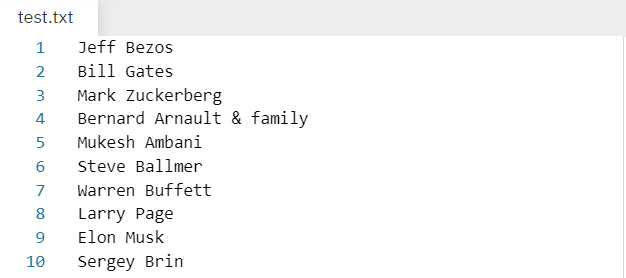
Given File:

Output:

['Jeff Bezos', 'Bill Gates', 'Mark Zuckerberg', 'Bernard Arnault & family', 'Mukesh Ambani', 'Steve Ballmer', 'Warren Buffett', 'Larry Page', 'Elon Musk', 'Sergey Brin']

In the above example we have a file by the name test.txt that stores the names of few well known personalities 😉. Our purpose is to read each line (which in this case contains names) one by one and store them in a list.

Note: The file taken into consideration is the same file as mentioned in the example above. Therefore the solution derived is in accordance to the same file. I have attached the file below 👇  for your convenience. Please feel free to download it in case you want to practice with it.

Without further delay let us dive into the solutions.

Method 1: Using The readlines And strip Methods

  • readlines() is a built-in method in Python used to read a file line by line and then store each line in a list.
  • string.strip(): Removes leading and trailing whitespaces including newline characters ‘\n’ and tabular characters ‘\t’.

We are going to use the readlines() method to read the file line by line while the strip() method is used to get rid of the new line character '\n' while storing the elements in the list. Let us have a look at the following program to visualize how we can solve our problem using the above mentioned methods.

with open('test.txt') as f: content = f.readlines()
# you may also want to remove whitespace characters like `\n` at the end of each line
li = [x.strip() for x in content]
print(li)

Output:

['Jeff Bezos', 'Bill Gates', 'Mark Zuckerberg', 'Bernard Arnault & family', 'Mukesh Ambani', 'Steve Ballmer', 'Warren Buffett', 'Larry Page', 'Elon Musk', 'Sergey Brin']

Method 2: Using line.rstrip()

string.rstrip() is a built-in function in Python removes all whitespaces on the right of the string (trailing whitespaces). Thus, we can use it to strip or separate elements out of each line and then store them in a list using the [] notation.

Example:

with open('test.txt') as f: lines = [line.rstrip() for line in f]
print(lines)

Output:

['Jeff Bezos', 'Bill Gates', 'Mark Zuckerberg', 'Bernard Arnault & family', 'Mukesh Ambani', 'Steve Ballmer', 'Warren Buffett', 'Larry Page', 'Elon Musk', 'Sergey Brin']

Method 3: Using the for Loop and strip() method

Another approach to our problem is to use a for loop to iterate over the lines in the file one by one and then append them to a list using the append() function. The strip() function again comes into play which allows us to strip the newline character.

with open("test.txt") as file_in: lines = [] for line in file_in: lines.append(line.strip('\n')) print(lines)

Output:

['Jeff Bezos', 'Bill Gates', 'Mark Zuckerberg', 'Bernard Arnault & family', 'Mukesh Ambani', 'Steve Ballmer', 'Warren Buffett', 'Larry Page', 'Elon Musk', 'Sergey Brin']

Method 4: Using splitlines()

splitlines() is an inbuilt function in Python which is used to split a string breaking at line boundaries.

Example:

# Open the file for reading.
with open('test.txt', 'r') as infile: data = infile.read() # Read the contents of the file into memory. # Return a list of the lines, breaking at line boundaries.
li = data.splitlines()
print(li)

Output:

['Jeff Bezos', 'Bill Gates', 'Mark Zuckerberg', 'Bernard Arnault & family', 'Mukesh Ambani', 'Steve Ballmer', 'Warren Buffett', 'Larry Page', 'Elon Musk', 'Sergey Brin']

 In the solution above, we’re opening the file for reading and assigning it to the variable ‘infile.’ Once the code has finished running, the file will be automatically closed. Then we use the splitlines() method to store it in a list by storing each line of the file as a separate element.

Method 5: Using The pathlib Library And The splitlines() Method

The pathlib library was introduced in Python 3.4 and has a handy method known as read_text() which is a nice way to read the file without having to worry about opening or closing it. The splitlines function turns the contents of the file to a list containing the elements of the file line by line.

Example:

from pathlib import Path
p = Path('test.txt')
lines = p.read_text().splitlines()
print(lines)

Output:

['Jeff Bezos', 'Bill Gates', 'Mark Zuckerberg', 'Bernard Arnault & family', 'Mukesh Ambani', 'Steve Ballmer', 'Warren Buffett', 'Larry Page', 'Elon Musk', 'Sergey Brin']

Method 6: Using List Comprehension

List comprehension is a compact way of creating lists. The simple formula is [expression + context].

  • Expression: What to do with each list element?
  • Context: What elements to select? The context consists of an arbitrary number of for and if statements.

The example [x for x in range(3)] creates the list [0, 1, 2].

If you want to learn more about list comprehensions, please have a look at our blog tutorial here. Now let us have a look at a one-line solution to our problem using list comprehension.

print([line.rstrip() for line in open('test.txt')])

output:

['Jeff Bezos', 'Bill Gates', 'Mark Zuckerberg', 'Bernard Arnault & family', 'Mukesh Ambani', 'Steve Ballmer', 'Warren Buffett', 'Larry Page', 'Elon Musk', 'Sergey Brin']

Method 7: Reading a csv File Line By Line And Store In a List

Thus far we have seen how we can read a text file line by line and store the elements in a list. Now let us discuss how we can do the same for a csv file. The approach used by us, in this case, is the pandas library in Python which allows us to read the data from the csv file and store the values in an array. We can convert the array to a list using the tolist() method.

The file that we are going to mention in the example to follow looks like the one given blow.

Now let us have a look at the solution to our problem in the program given below.

import pandas as pd
data = pd.read_csv('test.csv') # You can also add parameters such as header, sep, etc.
array = data.values
print(array.tolist())

Output:

[['Bill Gates'], ['Mark Zuckerberg'], ['Bernard Arnault & family'], ['Mukesh Ambani'], ['Steve Ballmer'], ['Warren Buffett'], ['Larry Page'], ['Elon Musk'], ['Sergey Brin']]

Conclusion

I hope that after reading this article you can read files line by line and then store the elements in a list such that each line represents an element of the list. Please subscribe and stay tuned for more interesting articles!

Where to Go From Here?

Enough theory, let’s get some practice!

To become successful in coding, you need to get out there and solve real problems for real people. That’s how you can become a six-figure earner easily. And that’s how you polish the skills you really need in practice. After all, what’s the use of learning theory that nobody ever needs?

Practice projects is how you sharpen your saw in coding!

Do you want to become a code master by focusing on practical code projects that actually earn you money and solve problems for people?

Then become a Python freelance developer! It’s the best way of approaching the task of improving your Python skills—even if you are a complete beginner.

Join my free webinar “How to Build Your High-Income Skill Python” and watch how I grew my coding business online and how you can, too—from the comfort of your own home.

Join the free webinar now!

The post How to Read a File Line-By-Line and Store Into a List? first appeared on Finxter.

Posted on Leave a comment

How to Build Your Brand as a Freelance Developer [Ultimate Guide]

Personal Brand Coder

This guide shows you the importance of building your personal brand as a freelance developer.

Why Freelance Developing?

Freelancing is the new mega trend in the 21st century. Freelancing platforms such as Upwork and Fiverr grow double-digits year after year. The COVID-19 crisis has revived the interest in remote work and, statistically, most people dream of being their own boss and gaining more control of their lives.

Woman Sitting On The Floor Using A Laptop

Do you want to be one of the winners of spotting this trend early? There are many arguments why freelance developing may be a great thing for you to do. Here are the most convincing ones:

  • Time: Zero time on the road—you don’t have any commute time (I love it!)
  • Independence: No boss
  • Pay: Higher hourly rates than employees: the average rate is $61 per hour for Python freelancers!
  • Flexibility. Set your own time and work schedule.
  • Control of your income
  • Job Safety: you work for hundreds of companies rather than just a single one
  • Learning: you learn more because of the different types of stimuli.
  • Region Independence: work on the beach, in a cafe, or in a cheaper environment.
  • Side Income: You can always side-hustle on your freelancing business to create a second stream of income if you or your family need more cash.

These are just some, not all, advantages. Also, there are some disadvantages—you can read the full comparison in my blog article.

Related Article: Freelance Developer – To Be or Not to Be?

What is Personal Branding?

Person in White Shirt Using Computer

Your personal brand is the image you represent to the outer world.

Personal branding is the conscious and intentional effort to create and influence public perception of an individual by positioning them as an authority in their industry, elevating their credibility, and differentiating themselves from the competition, to ultimately advance their career, increase their circle of influence, and have a larger impact.” (source)

This definition consists of different parts:

  • Conscious and intentional: The act of personal branding is an active one. You must pursue it and aim to control the positioning and your perception.
  • Effort: Building your personal brand is a long-term strategy for success. It’s not a get-rich-quick scheme. But it’s by far the most certain, predictable, and controllable way to success.
  • Positioning: You cannot be the jack-of-all-trades. You must be the master of one. You may not have thought about this much, but choosing the right positioning, where you can perform from your strengths, is the most important business move in your whole life. Read my detailed blog tutorial on this topic!
  • Credibility: It is hard to be earned but easily lost. Never jeopardize your good name and your credibility. Be a man or woman of your words. Overdeliver. Keep your promises. Be punctual.
  • Differentiation: It is more important to be different than to be good. If you cannot be excellent—that is: you cannot join the top 5% in your field—no problem: be different! You’ll still be able to command premium prices with average skills, if you’re different.
  • Impact: The easiest way to motivate yourself, get others to follow you, and build your personal brand that is perceived positively is to choose to aim for a goal higher than your own selfish ones. Don’t aim for your own profit but allow others to make great profit and you will have impact. The rewards will follow if you’re truly impactful.

You may ask: why is it important to build a personal brand in the first place? Let’s explore this question next!

Why Branding?

The most fundamental law of economics states that as demand for a fixed resource rises, prices rise, too. As you build and refine your personal brand, the demand for your time increases. This has all kinds of benefits such as higher hourly pay, higher status, higher perception of attractiveness, increased opportunities, and an exponentially growing network of supporters. Building a personal brand that shines is more than ever the highest-leveraged activity you can do to ensure your success into the future.

Woman Reading Book

The web has broken up many social structures and the way personal brands are created. If you don’t have a web presence, it’s very unlikely that you have already built yourself a powerful personal brand. The web is a highly scalable way to reach people all over the world. Without this highly-scalable distribution channel, it becomes very hard to reach more people. However, if you use the web in the right manner, you can make a name for yourself in relatively little time.

The brand is a concept of your person in other people’s mind. If you give them stuff they like and make them feel good, they’ll have an overwhelmingly positive concept of your person. If you make them feel awkward or bad, they’ll also have a negative concept of you. Your personal brand is a reflection of your own actions. If you control your actions and reactions, you control how other people perceive you.

Examples of Great Personal Brands on Upwork

Next, we’re going to look at three freelance developers who built their personal brand on Upwork.

#1 Machine Learning Engineer ($300/h)

Profile link for logged in Upwork users: https://www.upwork.com/ab/profiles/search/details/~015d2c4bd4000ad07f/profile

Jason clearly positions himself as a machine learning engineer and data scientist. He doesn’t offer web development, Python, or server maintenance. Great brand building is always a game of smart positioning in an attractive space. He clearly states his value proposition in his profile text:

If your project involves data, I CAN HELP, here's how: Don't have any data? I'll scrape some for you! Have data, but it's very raw?
I'll clean it for you! Have data, but not sure what to do with it? I'll analyze it, provide useful insights, and create stunning visualizations! Trying to build a machine learning model? I'll use state of the art techniques to develop the best model possible!

He positions himself as an expert in a field charging premium prices of $300/h. And his testimonials support the great value he offers. Here are four testimonials:

Social proof is always an important building block of powerful personal brands.

Now, let’s have a look at another machine learning engineer that earns less than one-tenth of Jason:

#2 Machine Learning Engineer ($20/h)

The positioning is more freelancer-focused than client-focused (read the first few sentences and you’ll know what I mean). Social proof is not as strong as for the first freelancer Jason. That’s why the freelancer both has less total earnings, fewer ratings and gigs, and a reduced hourly rate.


These two examples show, plain and simple, how powerful building your personal brand can be. What one person earns in 15 hours will another person earn in only one hour—to a large extend because of personal brand building.

How to Nurture Your Personal Brand [5 Simple Steps]

As a general framework for brand-building, you can perform the following five simple steps (source).

Step 1: Clearly formulate your personal brand statement. Before you can start working on your brand, you must know what message you send out to the world. Brand consistency is king!

Step 2: Examine your online presence. Look for everything you’ve ever posted online and put it in a document for easy access.

Step 3: Remove threats hurting your reputation. The data protection laws of most countries empower you to request removal of all harmful content that can hurt your reputation or are not in line with your personal brand.

Step 4: Create online assets that are in line with your brand strategy. You can post to social networks, create your own blog, or shoot videos. Make sure that the message you’re delivering is consistent to your brand strategy. For example, if you want to position yourself as trusted advisor, make sure to earn that trust and don’t sell your audience to the highest bidder!

Step 5: Strengthen your brand by creating a habit around fostering your brand. Every one-time action is destined to fail. However, if you establish a regular process or routine for brand reputation management, you create a positive upward spiral towards success. The more assets you create that are in-line with your brand, the more other people will reinforce this brand and it becomes stronger and stronger. Before you know, you’ll be able to charge $300 per hour on Upwork.

Do you want to develop the skills of a well-rounded Python professional—while getting paid in the process? Become a Python freelancer and order your book Leaving the Rat Race with Python on Amazon (Kindle/Print)!

Leaving the Rat Race with Python Book

Where to Go From Here?

Enough theory, let’s get some practice!

To become successful in coding, you need to get out there and solve real problems for real people. That’s how you can become a six-figure earner easily. And that’s how you polish the skills you really need in practice. After all, what’s the use of learning theory that nobody ever needs?

Practice projects is how you sharpen your saw in coding!

Do you want to become a code master by focusing on practical code projects that actually earn you money and solve problems for people?

Then become a Python freelance developer! It’s the best way of approaching the task of improving your Python skills—even if you are a complete beginner.

Join my free webinar “How to Build Your High-Income Skill Python” and watch how I grew my coding business online and how you can, too—from the comfort of your own home.

Join the free webinar now!

The post How to Build Your Brand as a Freelance Developer [Ultimate Guide] first appeared on Finxter.

Posted on Leave a comment

How To Kill A Thread In Python?

Summary: To kill a thread use one of the following methods:

  • Create an Exit_Request flag.
  • Using the multiprocessing Module.
  • Using the trace Module.
  • Using ctypes to raise Exceptions in a thread

Problem: How to kill a thread in Python?

This is one of the most commonly asked questions in Python. Thus, in this article, we are going to address this issue and make sure you have a clear understanding of this topic. Before divining into the topic directly, we will have a look at threading in brief and then move on to our mission-critical question. So without further delay, let the games begin! 😎 

Introduction

🧵 What is a Thread?

According to Wikipedia, in computer science, a thread of execution is the smallest sequence of programmed instructions that can be managed independently by a scheduler, which is typically a part of the operating system. Multiple threads can run concurrently within a single program. For example in a word processor, a background thread may be used for spell-checking while a foreground thread may be used to processes user input (keystrokes ), while yet a third thread may be used to load images from the hard drive, and a fourth thread might be busy doing periodic automatic backups of the file being edited.

  • Therefore, treading in Python is used to run multiple threads that can be tasks or function calls, at the same time. Please note that this doesn’t mean that multiple threads are executed on different CPUs.
  • Python threads do not make the program faster in case it already uses 100 % CPU time. That is probably a part of parallel programming which is not within the scope of this discussion.

Note: Threading in Python is itself an entire topic of discussion. The purpose of this introduction is to just get you acquainted with the idea of threads. It is highly recommended that you have some understanding of threading in Python before diving into the topic of killing the thread.

When do we use Threading in Python?

Threads in Python are used in situations where the execution of a task or function call involves some waiting. An example could be interaction with a service hosted on a webserver. Thus, treading allows Python to execute other code while waiting. 

Example:

import threading
import time print("Printing values from 90 to 100: ")
def loop_thread(): for t in range(90, 101): time.sleep(1) print(t) threading.Thread(target=loop_thread).start()

Output:

Printing values from 90 to 100: 90
91
92
93
94
95
96
97
98
99
100

Now that have an overview of threads, let us dive into our mission-critical question.

Ways To Kill A Thread In Python

Simply put, killing a thread abruptly is a very bad practice unless absolutely required. Having said that, you might want to kill a thread after a certain duration or after some interrupt. So, instead of closing it forcibly, you can kindly ask the thread to go away after ensuring a proper clean up which means:

  • The thread you are trying to kill might be holding a critical resource that must be closed properly.
  • The thread might have created several other threads that must be killed as well before the parent thread can be killed.

Let us understand the numerous ways that help us to do that.

Method 1: Creating An Exit Request Flag

If you are the manager of your own threads, a nice way of handling thread termination is to create an exit flag that each thread checks at regular intervals to know if it is time for it to exit.

Example:

import threading import time def thread_foo(stop): while True: print("THREAD STILL RUNNING!") if exit_flag: break exit_flag = False
t = threading.Thread(target = thread_foo, args =(lambda : exit_flag, )) t.start() time.sleep(0.1) print('Done sleeping! Time to stop the threads.')
exit_flag = True
t.join() print('THREAD TERMINATED!')

Output:

In the above example, we created a function that keeps executing the thread until the program encounters the variable exit_flag = True. As soon as that happens, the thread can be killed using the t.join() method.

Note: join() causes the main thread to wait for your thread to finish. In other words, join() acts as a “hold” on the main thread. It ensures that your thread has completed its execution before the main thread can move forward. In a way, it assures a clean and proper termination of your thread.

Method 2: Using The Multiprocessing Module

As stated in the Python documentation, multiprocessing is a package that supports spawning processes using an API similar to the threading module. Also, killing a process is much safer than killing a thread because threads share global variables and have a dependency, whereas processes are completely independent and exist separate from each other. The multiprocessing module has the terminate() function which is used to kill a process.

Let us have a look at the following example given below to understand how we can use the multiprocessing module to kill the process.

import multiprocessing
import time
def Child_process(): while True: for i in range (20): print ('Process: ', i) time.sleep(0.05)
t = multiprocessing.Process(target = Child_process)
t.start()
time.sleep(0.5)
t.terminate()
print("Child Process successfully terminated")

Output:

Process: 0
Process: 1
Process: 2
Process: 3
Process: 4
Process: 5
Process: 6
Process: 7
Process: 8
Process: 9
Child Process successfully terminated

In the above example after 0.5 seconds the execution of the Child_process was terminated using the terminate() function.

Method 3: Using The trace Module

Another approach to kill a thread is to install trace into the thread that will exit the thread. 

The module given below allows you to kill threads. The class KThread is a drop-in replacement for threading.Thread. It adds the kill() method, which should stop most threads in their tracks.

Disclaimer: The procedure given below has been taken from the following resource: Kill a thread in Python

🐍 KThread.py: A killable Thread implementation

import time
import sys
import trace
import threading class KThread(threading.Thread): """A subclass of threading.Thread, with a kill()
method.""" def __init__(self, *args, **keywords): threading.Thread.__init__(self, *args, **keywords) self.killed = False def start(self): """Start the thread.""" self.__run_backup = self.run self.run = self.__run threading.Thread.start(self) def __run(self): """Hacked run function, which installs the
trace.""" sys.settrace(self.globaltrace) self.__run_backup() self.run = self.__run_backup def globaltrace(self, frame, why, arg): if why == 'call': return self.localtrace else: return None def localtrace(self, frame, why, arg): if self.killed: if why == 'line': raise SystemExit() return self.localtrace def kill(self): self.killed = True # Example Usage
#This illustrates running a function in a separate thread. The thread is killed before the function finishes.
def func(): print('Function started') for i in range(1,100): print(i) time.sleep(0.2) print('Function finished') A = KThread(target=func)
A.start()
time.sleep(1)
A.kill()

Output:

Function started
1
2
3
4
5

Method 4: Using ctypes To Raise Exceptions In A Thread

In cases when you need to kill a thread forcibly, for example while wrapping an external library that is busy for long calls and you want to interrupt it, you can use raise_exc() to raise an arbitrary exception, or call terminate() to raise SystemExit automatically. It uses the unexposed PyThreadState_SetAsyncExc function (via ctypes) to raise an exception in the context of the given thread. 

The following code allows (with some restrictions) to raise an Exception in a Python thread:

Example:

import threading
import inspect
import ctypes
import time def _async_raise(tid, exctype): """raises the exception, performs cleanup if needed""" if not inspect.isclass(exctype): raise TypeError("Only types can be raised (not instances)") res = ctypes.pythonapi.PyThreadState_SetAsyncExc(ctypes.c_long(tid), ctypes.py_object(exctype)) if res == 0: raise ValueError("invalid thread id") elif res != 1: # """if it returns a number greater than one, you're in trouble, # and you should call it again with exc=NULL to revert the effect""" ctypes.pythonapi.PyThreadState_SetAsyncExc(tid, 0) raise SystemError("PyThreadState_SetAsyncExc failed") class Thread(threading.Thread): def _get_my_tid(self): """determines this (self's) thread id""" if not self.is_alive(): raise threading.ThreadError("the thread is not active") # do we have it cached? if hasattr(self, "_thread_id"): return self._thread_id # no, look for it in the _active dict for tid, tobj in threading._active.items(): if tobj is self: self._thread_id = tid return tid raise AssertionError("could not determine the thread's id") def raise_exc(self, exctype): """raises the given exception type in the context of this thread""" _async_raise(self._get_my_tid(), exctype) def terminate(self): """raises SystemExit in the context of the given thread, which should cause the thread to exit silently (unless caught)""" self.raise_exc(SystemExit) def f(): try: while True: for i in range(10000): print(i) time.sleep(0.1) finally: print ("TERMINATING!!!") t = Thread(target = f)
t.start()
time.sleep(0.6)
t.terminate()
t.join()

Output:

0
1
2
3
4
5
TERMINATING!!!

Conclusion

The key takeaways from this article were:

  • What is Thread?
  • Ways to kill a thread in Python:
    • Creating an Exit_Request flag.
    • Using the Multiprocessing Module.
    • Using the trace Module.
    • Using ctypes to raise Exceptions in a thread

Please subscribe and stay tuned for more interesting articles!

References

  1. https://stackoverflow.com/questions/323972/is-there-any-way-to-kill-a-thread
  2. http://net-informations.com/python/iq/kill.htm
  3. https://pybay.com/site_media/slides/raymond2017-keynote/threading.html
  4. http://tomerfiliba.com/recipes/Thread2/

Where to Go From Here?

Enough theory, let’s get some practice!

To become successful in coding, you need to get out there and solve real problems for real people. That’s how you can become a six-figure earner easily. And that’s how you polish the skills you really need in practice. After all, what’s the use of learning theory that nobody ever needs?

Practice projects is how you sharpen your saw in coding!

Do you want to become a code master by focusing on practical code projects that actually earn you money and solve problems for people?

Then become a Python freelance developer! It’s the best way of approaching the task of improving your Python skills—even if you are a complete beginner.

Join my free webinar “How to Build Your High-Income Skill Python” and watch how I grew my coding business online and how you can, too—from the comfort of your own home.

Join the free webinar now!

The post How To Kill A Thread In Python? first appeared on Finxter.

Posted on Leave a comment

Exporting From Unity To Other Game Engines

With the recent Fantasy 3D Models humble bundle there were a number of questions about how assets can be extracted from the Unity game engine for use in other engines such as Godot, Unreal, Lumberyard, Stride, CryEngine or basically any other 3D game engine. That is exactly what we will look at in this tutorial, as we have in the past in this tutorial for Unreal Engine. Fortunately assets in the Unity game engine are generally stored as FBX files and textures are stored in image file formats, making this process a fair bit easier than it was in Unreal.

First and foremost you need to download the assets. Unfortunately to do this you will need to have Unity installed to perform the download process. (If you know a way to download unitypackage files from the command-line or outside of Unity, please let me know and I will update!) First you are going to need to purchase an asset from the Unity Asset store (or one of the several available free options). Once you have one or more assets on your account, fire up Unity and create a new project (type doesn’t matter). Next select the Package Manager in the menu Window->Package Manager.

Package Manager Window

Next in the Package Manager, in the top left corner drop down the menu and select My Assets option.

Package Manager My Assets selection in Unity

This will load your assets. If you have several assets, you may need to click Load More and the bottom to find your asset. Once located, select your asset in the left hand list, then select the Download button on the bottom right menu.

Downloading assets in the Package Manager in Unity

Repeat this task for each package you want downloaded. Once you have all of your assets downloaded you can close Unity. Now (on Windows at least) go to Windows Explorer and enter %APPDATA% in the location box.

APPDATA in Explorer

This will automatically expand into the relevant folder name. Next navigate into the folder Unity, then Asset Store-5.x. In my case the full directory is C:\Users\serap\AppData\Roaming\Unity\Asset Store-5.x. In this folder will be a list of companies, these are the creators of the assets as named on the Asset Store, pick the one you downloaded earlier, then open up the asset within that directly. You should now see one or more files with a unitypackage file extension. Copy the asset you want to use to a directory of your choice.

Now we are going to need Unity Package Extractor, download Unity Package Extractor. Extract the zip file to the same location that you copied your unitypackage earlier. Now open a command prompt and CD into that directory, in this example lets assume c:\temp. Run the commands:

cd \temp

extractor ‘packagenamewithextension.unitypackage’

This will extract out all of the assets ready for your use. Tada, done! You can learn more about this process, step by step in the tutorial video below.

Posted on Leave a comment

Freelancer Invoice Template

Whether you’re a freelance developer, agency owner, or web designer—each time you charge a client, you must create an invoice for the transaction. Here’s the ultimate freelancer invoice template you can use in your own business:

Download the Freelancer Invoice Template in the following formats:

Links open in a new tab or download the freelancer invoice template.

The post Freelancer Invoice Template first appeared on Finxter.