The Fedora CoreOS and QA teams are gearing up for Fedora 44, and we need your help! We are organizing a Test Week running from March 23 to March 27, 2026.
This event is a nice opportunity for the community to test Fedora CoreOS (FCOS) based on Fedora 44 content before it officially reaches the testing and stable streams. By participating, you help us ensure a smooth and reliable experience for all users.
How does a Test Week work?
A Test Week is an event where anyone can help verify that the upcoming release works as expected. If you’ve been looking for a way to get started with Fedora contribution, this is the perfect entry point.
To participate, you simply need to:
Download the FCOS test images.
Follow the step-by-step test cases provided.
Report whether the tests passed or failed on your hardware or VM.
The Wiki Page is your primary source of information for this event. Once you have completed your tests, please log your results here! Your contribution, big or small, makes a huge difference. Let’s work together to make this release a great one. Happy testing!
Join the Live Sync Session
Want to chat with the team? We are hosting a virtual in-person session on Tuesday, March 24, from 3:00 PM – 4:30 PM UTC. Drop in to ask questions and get help with testing!
The core motivation behind data analysis pipelines, and the focus of this article, is the need to establish a clear path from unprocessed data to actionable insights for contributor engagement and impact. The key question is “what are we trying to measure to ensure the continuity of community work?”
As a side note, my preparation for the ADSP (Advanced Data Analysis Semi-Professional) certification in Korea utilized RStudio Desktop, running on a Fedora Linux environment. I got hands-on with R’s core statistical toolkit, leveraging base functions. Among these were summary()1 and lm()2 as the basis for fundamental hypothesis testing and regression analysis3. I became more intrigued by R’s power after testing its data manipulation packages (especially the key package dplyr).
With this background in mind, the article focuses on the design of an analysis pipeline that fulfills three objectives:
it ensures scalable data transformation and analysis capabilities
Establishing such a robust foundation is essential for producing reliable and validated metrics for the contributor community, which itself is subject to ongoing definition and validation.
Acknowledgement: I extend my sincere gratitude to Justin Wheeler for connecting me with the Fedora Data Working Group (FDWG), and to Michael Winters and K Naraian for their guidance, discussion, and support throughout the design and validation of this data analysis pipeline.
Scope and Tool Selection: Please note that this analysis pipeline represents a combination of tools and methods chosen from my perspective as a data analyst, particularly one with a background in the CRM (Customer Relationship Management) domain and consumer electronics industry. Therefore, other analysts or data engineers may utilize different combinations of technologies based on their own expertise or project requirements.
The role of the analyst is undergoing a fundamental transformation in 2025. We are moving beyond the traditional responsibility of performing statistical analysis and presenting visualization on pre-cleaned data. Today, the modern analyst must evolve into a “Data Ops(Operations)”. This requires a holistic understanding of the data lifecycle and bridging the gap between business context and data engineering. This expansion mandates a familiarity with ELT/ETL processes to examine the quality and structure of the data source.
Moreover, data analysts must be adept at processing diverse data types such as semi-structured data (for example, schema-less JSON strings or variant) and understanding various data access methods such as leveraging the efficiency of in-situ processing over the constraints of in-memory loading of datasets.
RStudio: The Unified IDE for Hybrid R and Python workflows
My ADSP examination requirements motivated my initial deep dive into RStudio. However, it is worth highlighting its utility as a tool for any data professional. The most significant benefit of using RStudio is its seamless ability to leverage the best tools from both the R and Python language ecosystems. This eliminates the need for the analyst to switch environments which leads to dramatically higher operational efficiency. This unified approach streamlines the analysis lifecycle from code execution to final reporting.
Python for data engineering
Use Python’s libraries like Pandas for efficient ETL/ELT operations, data manipulation on large datasets, and integrating with production environments or machine learning workflows (TensorFlow/PyTorch).
R for analysis and visualization
Utilize R’s statistical packages and its superior data visualization capabilities (ggplot2, R Shiny) for data analysis modeling, beautiful reporting, and creating customized, publication-ready graphics.
RStudio Desktop: Installation Instructions7 for Fedora Linux
Install R base packages using the terminal and verify:
$ sudo dnf install R
$ R --version
Now, install RStudio from the Fedora COPR repository. Note that these COPR packages conflict with the binary package provided by Posit. Remove the existing Posit RStudio binary package if you installed it.
Launch the RStudio. When the < prompt appears on the RStudio Console enter the following commands. Note that this prompt should appear in the bottom-left pane of the default layout.
Install the reticulate package and execute the function reticulate::py_install() to manage Python dependencies:
ragg is an indirect but critical dependency of core Tidyverse packages (such as ggplot2):
install.packages("ragg")
Install base packages for data manipulation:
install.packages("tidyverse")
DBI, tools for database interface, is an essential R package that provides a standardized, vendor-agnostic interface for connecting to and interacting with various database systems (both local and remote)
install.packages("DBI")
Install tools for Parquet files and S3 data lake access:
install.packages("arrow")
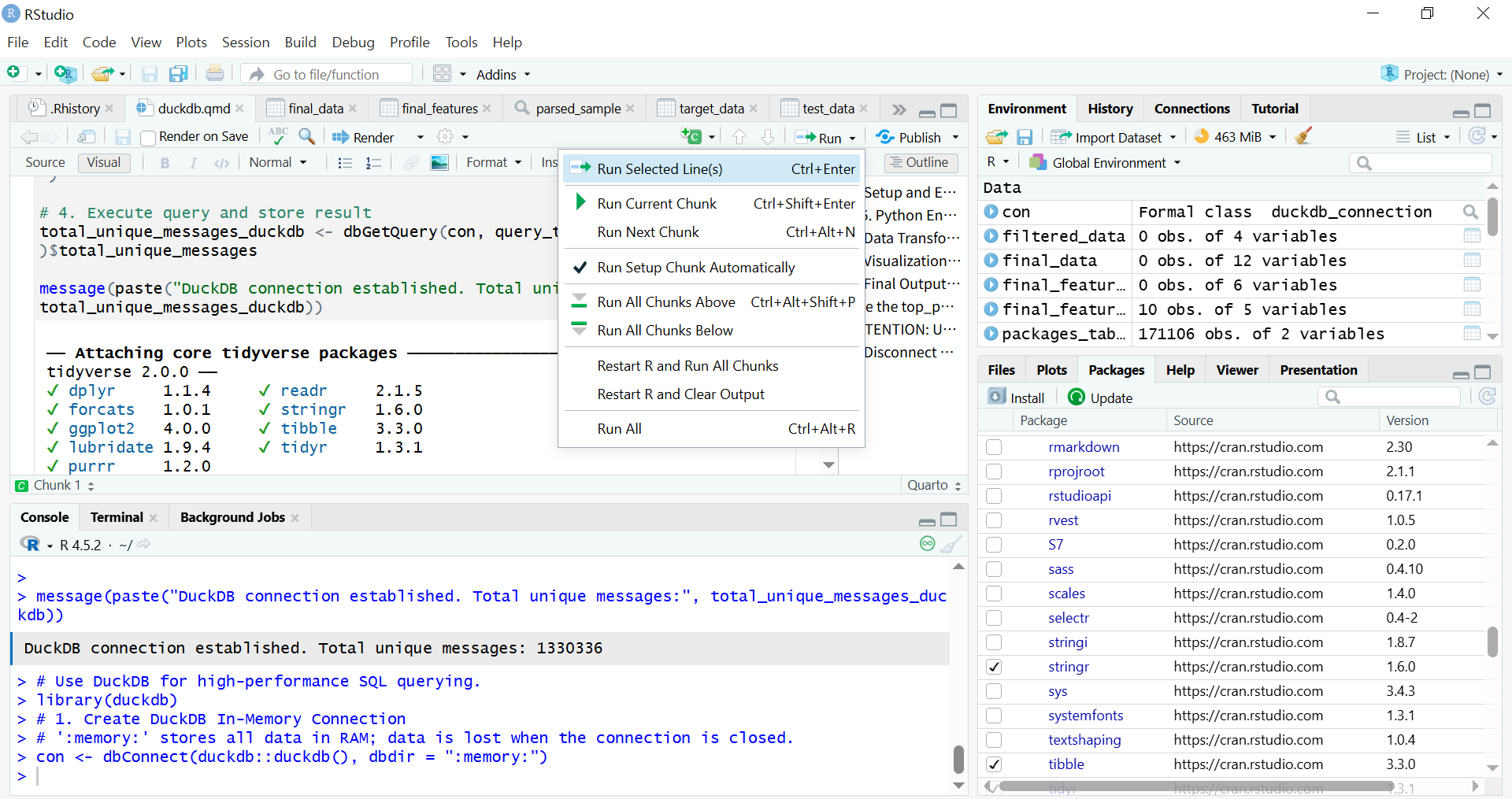
Install R Markdown for combining R code, and install Quarto for combining R/Python/SQL withits execution results, and explanatory text into reproducible data pipelines directly within the environment. The Quarto (.qmd) file runs code chunks in R, Python, and SQL in a single document.
install.packages(c("rmarkdown","quarto"))
Load packages for ELT and EDA:
library(tidyverse)
library(arrow)
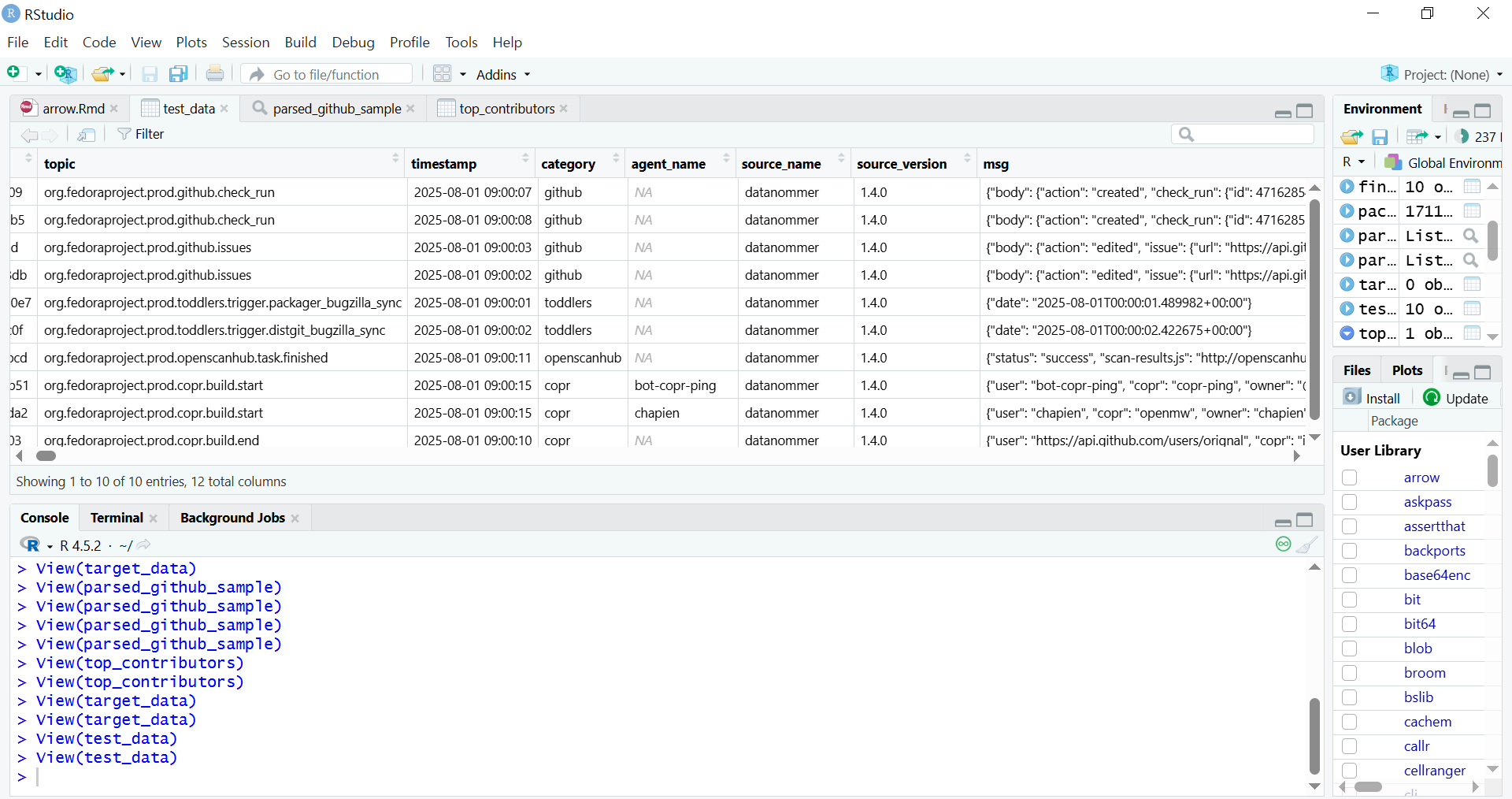
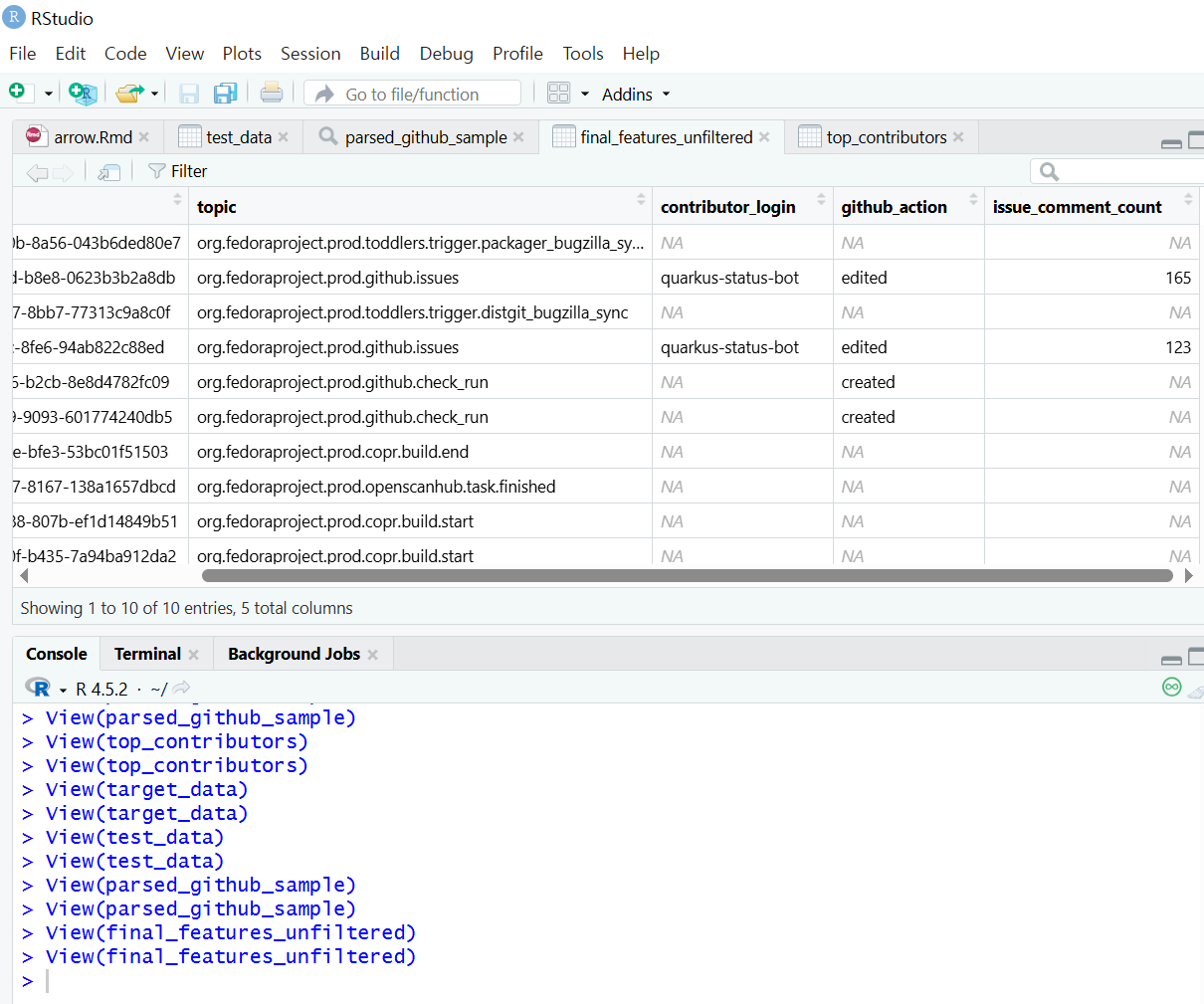
RStudio environment showing the contents of a Parquet file displayed in a data frame
Data architecture pipeline
The specific dataset chosen, Datanommer (Fedora Messaging Streams), aligns with the strategic objectives of the Fedora Data Working Group, where I contribute. The data is stored in the Bronze Data Layer where raw data from source systems is ingested and stored, as-is, for scalable data lake storage. The Bronze Layer allows for schema evolution without breaking downstream processes.
To provide the Working Group with transparent access and initial insight into this data, I have prepared a shared Initial Exploratory Data Analysis (EDA) Notebook. This notebook serves as the initial public view of the data quality and patterns, and it informed the subsequent architectural decisions for the scalable pipeline I am about to outline.
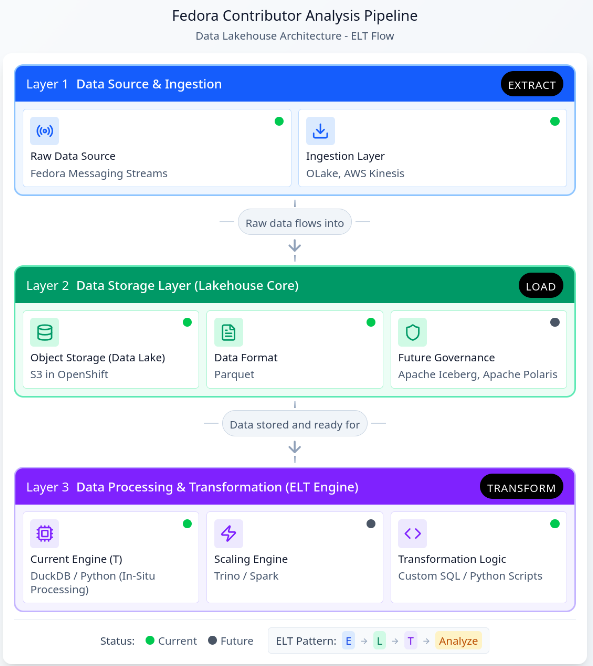
Given the complexity of the architecture, I will proceed with an outline of the core components, organized by their role in the ELT pipeline:
Data Architecture Diagram: Assisted by Figma ‘Infinite Canvas’
This restructured pipeline, leveraging the new Lakehouse architecture, unlocks several core benefits crucial for scaling contributor analysis and enabling future insights:
Elimination of Memory Constraints via In-Situ Processing
DuckDB acts as a high-performance analytical engine that enables In-Situ Processing. It queries data directly from storage (specifically the Parquet files) without requiring the entire dataset to be loaded into RAM. This not only solves the memory problem but also delivers rapid query execution and significantly lowers operational costs associated with large computational clusters hosted on the OpenShift/Fedora AWS infrastructure.
Quarto runs R code chunks to connect to DuckDB
Future-Proofing
The shift to a Lakehouse model ensures the pipeline is ready for growth and evolving data complexity. Future integration of Apache Iceberg and Apache Polaris will provide schema evolution capabilities. This ensures the pipeline is fully future-proofed against changes in underlying data structures.
Streamlined ELT Workflow and Multi-Lingual Access
I have redefined the processing workflow from a bottlenecked ETL model to a resilient Extract-Load-Transform (ELT) pattern. Parquet files with the variant type store semi-structured data (like JSON/nested structures), loaded raw into S3, simplifies the ingestion stage. When using R, it is recommended to read Parquet files using the Apache Arrow library.
Exploratory Data Analysis (EDA) using data frames in the Tidyverse
The parsed data is then accessible by multiple analytical platforms (R Shiny, Python, BI tools) without duplication or manual preparation. This multi-lingual access maximizes the utility of the clean data layer, supporting a growing number of analytical users and more complex queries necessary for defining long-term contributor metrics.
Initial EDA Notebook
The preliminary Exploratory Data Analysis (EDA) was conducted within the Jupyter Notebook format. This allowed broad compatibility with the existing execution and review environment of the Fedora Data Working Group.
The Initial EDA Notebook is documented to ensure complete reproducibility. This included all necessary steps for the Python library installation and environment setup. Any standard Python script containing ELT logic can be seamlessly run within RStudio’s Python mode or “knitting8” an R Markdown document or rendering a Quarto file.
Conclusion
The establishment of this analysis pipeline represents a crucial step in transforming unprocessed Fedora data into actionable insights. By addressing the core challenges of scaling and in-memory processing through DuckDB, and enabling transparent analysis via the hybrid RStudio/Jupyter workflow, I have demonstrated viable methods for performing Exploratory Data Analysis (EDA) and Extract, Load, Transform (ELT) processes on vast community datasets. In conclusion, the purpose of this work is to foster deeper engagement across a broader community by analyzing data with a view that relates to the Fedora Project community.
I hope this pipeline will serve as the technical foundation that activates and focuses the community discussion around the specific variables and metrics needed to define and ensure the continuity of community contributions.
AI Assistance
The ideation, structural planning, and terminology refinement of the pipelines were assisted by Gemini and Figma.
summary(): When used on a data object (for example, DataFrame), it provides basic statistics (min, max, mean, median). When used on a fitted linear model object (lm), it delivers key diagnostic information like coefficient estimates and p-values. ︎
lm(): Stands for Linear Model. This is the core function for fitting linear regression models in R, allowing the user to examine and model the linear relationship between variables. ︎
Regression analysis examines which factors affect the other and which ones are irrelevant for statistical and business context. ︎
DuckDB is a column-oriented database architecture. – Direct Querying: It directly queries data from file formats such as Parquet, CSV, and JSON. – Local compute engine: It is widely used as a high-performance local compute engine for analytical workloads. It runs in-process, meaning it operates within your application (like a Python script or R session) without needing a separate server or cluster management. – Cloud Integration: It supports querying data stored in cloud storage services like AWS S3, GCS (Google Cloud Storage), and Azure Blob Storage. ︎
ELT (Extract, Load, Transform): In a modern data environment like a Lakehouse, ELT is preferred: data is first extracted from the source and loaded raw into the cloud data lake (S3), and then transformedin place by the processing engine like DuckDB. ︎
ETL (Extract, Transform, Load): transformations occur before loading the data into the final destination. ︎
Key Advantages of RStudio over Jupyter Notebook for Production Workflows;
Even with its slightly more complex initial setup compared to Jupyter Notebooks, the advantages become significant when moving from exploration (Jupyter’s strength) to reproducible, production-ready workflows (RStudio’s strength).
– Integrated Console, Source, Environment, and Files: RStudio offers a cohesive, four-pane layout that allows for seamless navigation between writing code, running commands, inspecting variables, and managing files/plots. Jupyter requires constant shifting between code cells and external tabs. – Superior Debugging Tools: RStudio includes a powerful, visual debugger that allows you to set breakpoints, step through code line-by-line, and inspect variable states directly in the environment pane. Jupyter’s debugging is typically cell-based and less intuitive. – Native Project Management: RStudio Projects (.Rproj files) automatically manage the working directory and history. This makes it easy to switch between different analytical tasks without conflicts. – Integrated Environment Management (renv): RStudio integrates seamlessly with tools like renv (R Environment) to create isolated, reproducible R environments. This addresses dependency hell by ensuring the exact package versions used in development are used in production, which is crucial for data pipeline version control. – Quarto/R Markdown Integration: RStudio provides dedicated tools and buttons for easily compiling and rendering complex analytical documents (like your Quarto file) into HTML, PDF, or presentation slides. – Shiny Integration: RStudio is the native environment for developing Shiny web applications—interactive dashboards and tools that turn analysis into deployable products. Jupyter requires separate frameworks (like Dash or Streamlit) for similar deployment. – Focus on Scripting: RStudio’s source editor is optimized for writing clean, structured R/Python scripts, which are preferred for building robust, scheduled pipeline components (like those managed by Airflow). – Code Chunk Execution (Quarto): Even when using Quarto, RStudio allows for superior navigation and execution of code chunks compared to the often sequential and state-dependent nature of Jupyter Notebook cells. ︎
knitr executes code in R Markdown (.Rmd) file by chunks or as a whole (typically by clicking the “Knit” button in RStudio or using rmarkdown::render() in R) ︎
This article introduces projects available in Flathub with installation instructions.
Flathub is the place to get and distribute apps for all of Linux. It is powered by Flatpak, allowing Flathub apps to run on almost any Linux distribution.
Flatseal is a graphical utility to review and modify permissions from your Flatpak applications. This is one of the most used apps in the flatpak world, it allows you to improve security on flatpak applications. However, it needs to be used with caution because you can make your permissions be too open.
It’s very simple to use: Simply launch Flatseal, select an application, and modify its permissions. Restart the application after making the changes. If anything goes wrong just press the reset button.
You can install “Flatseal” by clicking the install button on the web site or manually using this command:
Reco is an audio recording app that helps you recall and listen to things you listened to earlier.
Some of the features include:
Recording sounds from both your microphone and system at the same time.
Support formats like ALAC, FLAC, MP3, Ogg Vorbis, Opus, and WAV
Timed recording.
Autosaving or always-ask-where-to-save workflow.
Saving recording when the app quits.
I used it a lot to help me record interviews for the Fedora Podcast
You can install “Reco” by clicking the install button on the web site or manually using this command:
flatpak install flathub com.github.ryonakano.reco
Mini Text
Mini Text is a very small and minimalistic text viewer with minimal editing capabilities. It’s meant as a place to edit text to be pasted, it doesn’t have saving capabilities. It uses GTK4 and it’s interface integrates nicely with GNOME.
I found this to be very useful just to keep data that I want to paste anywhere, it doesn’t have unwanted and/or unneeded rich text capabilities, just plain text with minimal editing features.
You can install “Mini Text” by clicking the install button on the web site or manually using this command:
This article introduces projects available in Flathub with installation instructions.
Flathub is the place to get and distribute apps for all of Linux. It is powered by Flatpak, allowing Flathub apps to run on almost any Linux distribution.
Authenticator is a simple app that allows you to generate Two-Factor authentication codes. It has a very simple and elegant interface with support for a a lot of algorithms and methods. Some of its features are:
Time-based/Counter-based/Steam methods support
SHA-1/SHA-256/SHA-512 algorithms support
QR code scanner using a camera or from a screenshot
Lock the application with a password
Backup/Restore from/into known applications like FreeOTP+, Aegis (encrypted / plain-text), andOTP, Google Authenticator
You can install “Authenticator” by clicking the install button on the site or manually using this command:
Secrets is a password manager that integrates with GNOME. It’s easy to use and uses the KeyPass file format. Some of its features are:
Supported Encryption Algorithms:
AES 256-bit
Twofish 256-bit
ChaCha20 256-bit
Supported Derivation algorithms:
Argon2 KDBX4
Argon2id KDBX4
AES-KDF KDBX 3.1
Create or import KeePass safes
Add attachments to your encrypted database
Generate cryptographically strong passwords
Quickly search your favorite entries
Automatic database lock during inactivity
Support for two-factor authentication
You can install “Secrets” by clicking the install button on the site or manually using this command:
flatpak install flathub org.gnome.World.Secrets
Flatsweep
Flatsweep is a simple app to remove residual files after a flatpak is unistalled. It uses GTK4 and Libadwaita to provide a coherent user interface that integrates nicely with GNOME, but you can use it on any desktop environment.
You can install “Flatsweep” by clicking the install button on the site or manually using this command:
Fedora Workstation 38 is the latest version of the leading-edge Linux desktop OS, made by a worldwide community, including you! This article describes some of the user-facing changes in this new version of Fedora Workstation. Upgrade today from GNOME Software, or use dnf system-upgrade in a terminal emulator!
GNOME 44
Fedora Workstation 38 features the newest version of the GNOME desktop environment. GNOME 44 features subtle tweaks and revamps all throughout, most notably in the Quick Settings menu and the Settings app. More details about can be found in the GNOME 44 release notes.
File chooser
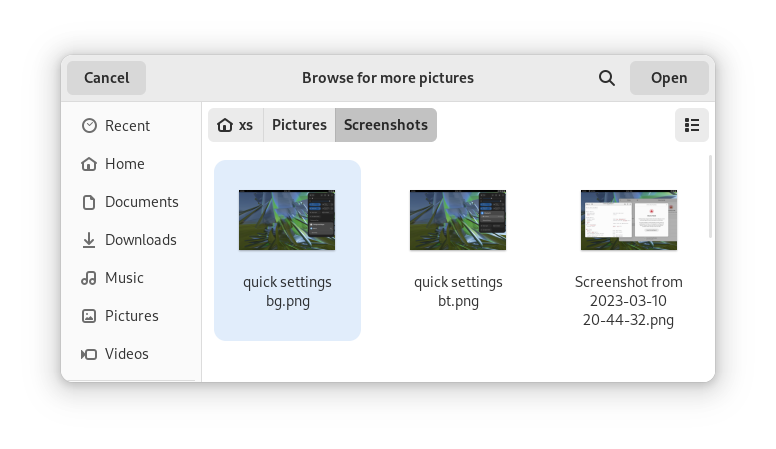
Most of the GNOME applications are built on GTK 4.10. This introduces a revamped file chooser with an icon view and image previews.
Icon view with image previews, new in GTK 4.10
Quick Settings tweaks
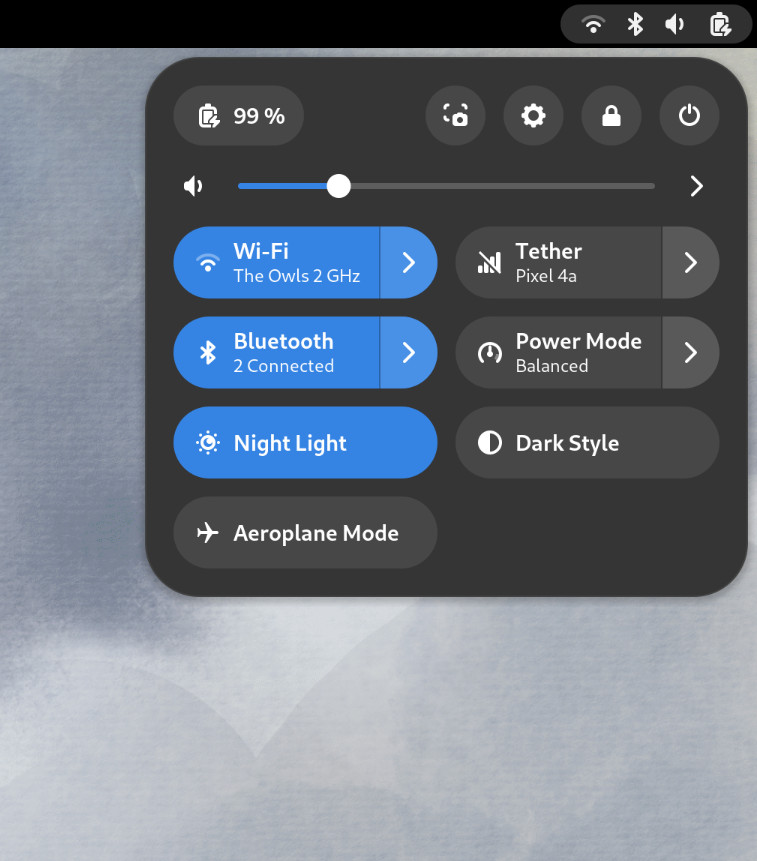
For GNOME 44 There have been a number of improvements to the Quick Settings menu. The new version includes a new Bluetooth menu, which introduces the ability to quickly connect and disconnect known Bluetooth devices. Additional information is available in each quick settings button, thanks to new subtitles.
The Bluetooth menu can now be used to connect to known devices
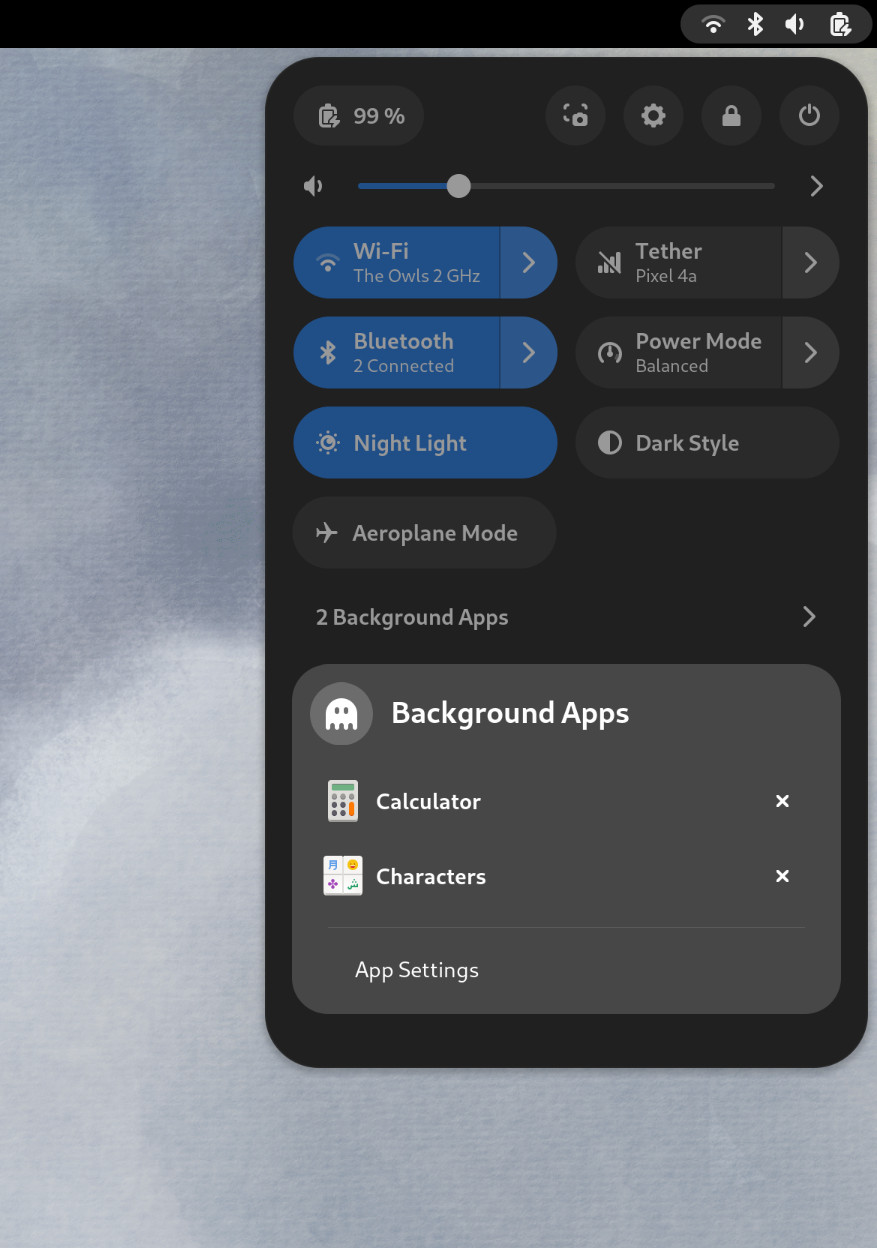
Also in the quick settings menu, a new background apps feature lists Flatpak apps which are running without a visible window.
Background Apps lets you see sandboxed apps running without a visible window and close them
Core applications
GNOME’s core applications have received significant improvements in the new version.
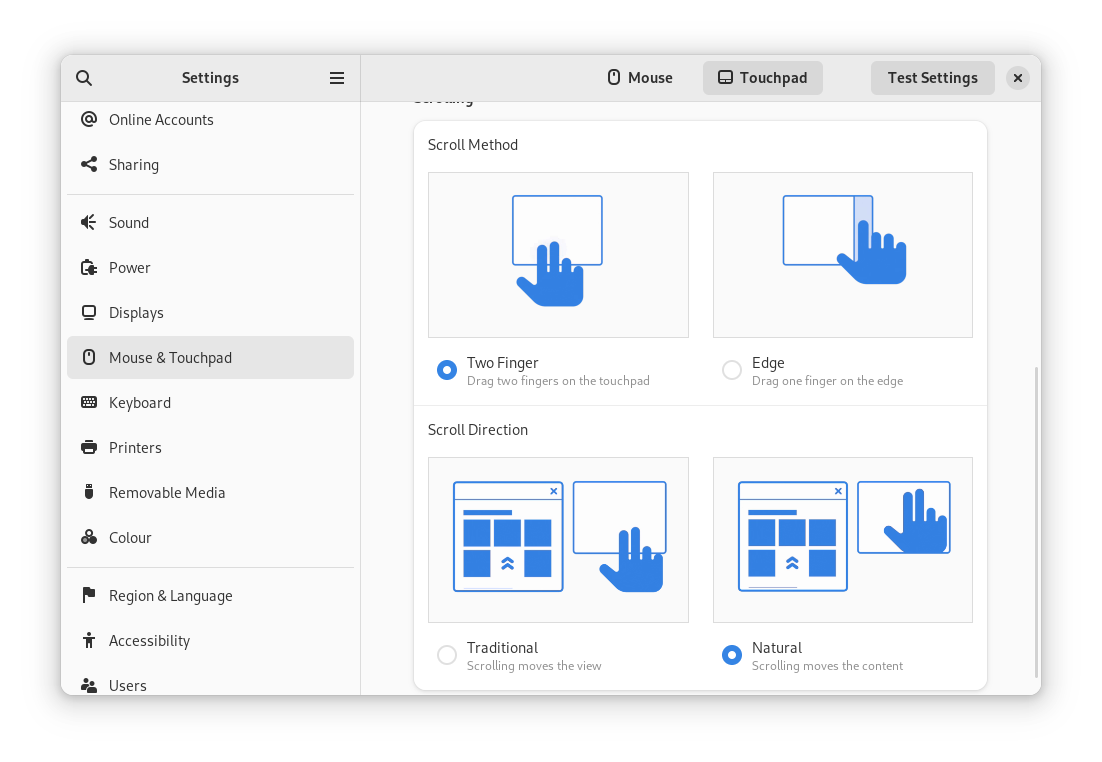
Settings has seen a round of updates, focused on improving the experience in each of the settings panels. Here are some notable changes:
Major redesigns of Mouse & Touchpad and Accessibility significantly improves usability.
Updated Device Security now uses clearer language.
Redesigned sound now includes new windows for the volume mixer and alert sound.
You can now share your Wi-Fi credentials to another device through a QR code.
The revamped Mouse & Touchpad panel in Settings
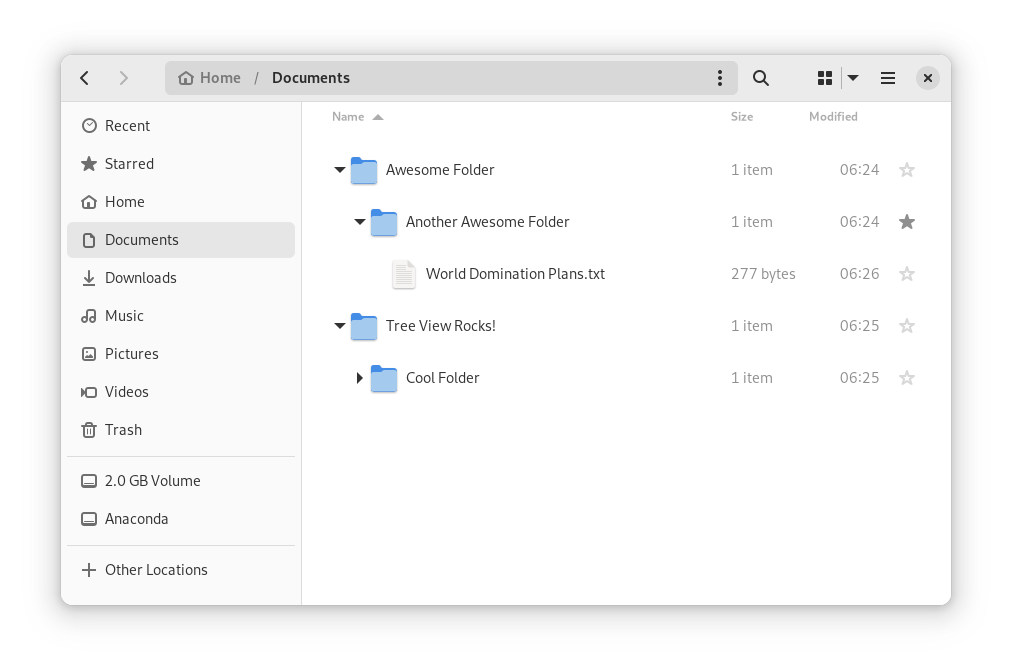
In Files, there is now an option to expand folders in the list view.
The tree view can be turned on in Files’ settings
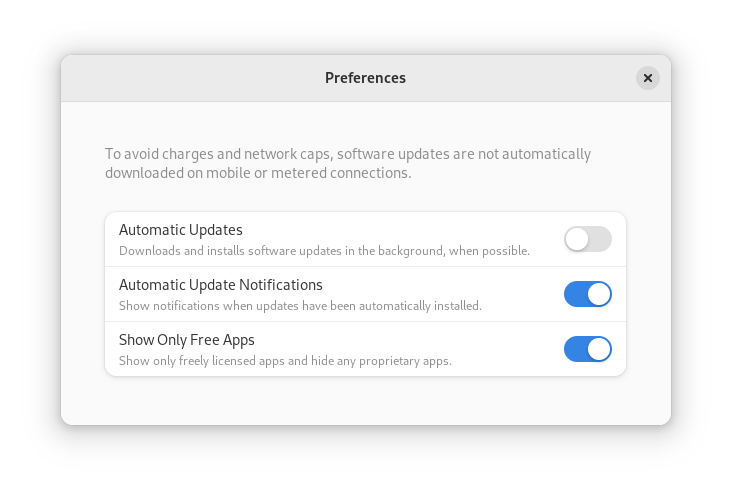
GNOME Software now automatically checks for unused Flatpak runtimes and removes them, saving disk space. You can also choose to only allow open source apps in search results.
In Contacts, you can now share a contact through a QR code, making it super easy to share a contact from your desktop to your phone!
Third-party repositories
Fedora’s third-party repositories feature makes it easy to enable a selection of additional software repos. Previous versions included a filtered version of Flathub, which included a small number of apps. For Fedora 38, filtering of Flathub content no longer occurs. This means that the third party repos now provide full access to all of Flathub.
The third party repos must still be manually enabled, and individual repositories may be disabled from the GNOME Software settings. If you want to keep proprietary apps from showing up in your search results, you can also do that in GNOME Software’s preferences menu.
You are in control.
Under-the-hood changes throughout Fedora Linux 38
Fedora Linux 38 features many under the hood changes. Here are some notable ones:
The latest Linux kernel, version 6.2, brings extended hardware support, bug fixes and performance improvements.
The length of time that system services may block shutdown has been reduced. This means that, if a service delays your machine from powering off, it will be much less disruptive than in the past.
RPM now uses the Rust-written Sequoia OpenGPG parser for better security.
The Noto fonts are now the default for Khmer and Thai. The variable versions of the Noto CJK fonts are now used for Chinese, Japanese, and Korean. This reduces disk usage.
Profiling will be easier from Fedora 38, thanks to changes in its default build configuration. The expectation is that this will result in performance improvements in future versions.
Also check out…
Official spins for the Budgie desktop environment and Sway tiling Wayland compositor are now available!
We are excited to announce the first public preview image of the new Anaconda web interface! Our vision is to reimagine and modernize our installer’s user experience (see our blog post “Anaconda is getting a new suit”). We are doing this by redesigning the user experience on all fronts to make it more easy and approachable for everyone to use.
Today, we would like to introduce our plans for the public preview release, as our new project has already reached a point where core code functionality is already developed and the new interface can be used for real installations.
So, we’re giving you something to play with!
Why public preview image?
By giving you a working ISO as soon as we can, you have the opportunity to help us to define this new UI. This task allows us to rethink what we have and find new ways to overcome the challenges of the UI instead of re-creating what we had already. Please take this opportunity and reach us with your feedback to help us to create the best OS installer ever!
Please let us know what you require from Anaconda. What featuresare important to you and why are these important? That will allow us to prioritize our focus on development and design. See below for how to contact us.
Thanks a lot to the Image Builder team for providing us with a way to build ISO with the Fedora 37 Workstation GA content. We are planning to provide additional images with an updated installer to give you the newest features and fixes with the link above. There are no updates to the installation payload (installed system data) yet. We will announce important updates of the ISO image by sending mail to anaconda-devel@lists.fedoraproject.org with CC to devel@lists.fedoraproject.org. Please subscribe to either of these to get information about the news. This way we will be able to iterate on your feedback.
What you will get with the preview ISO
The ISO will allow you to install the system and let you get a taste of the new UI, so you can provide us early feedback. However, it is pretty early in the development cycle. We advise you to not use this ISO to install critical infrastructure or machines where you have important data.
Let’s go to the more interesting part of what you can do with the ISO:
Choose installation language
Select your disks
Automatically partition the disks. BEWARE! This will erase everything on the selected disks.
Automatically install Fedora 37 GA Workstation system
Basic review screen of your selections
Installation progress screen
Built-in help (on Installation destination screen only)
Known issues:
In the bootloader menu you’ll see “Install Fedora 38”, it’s expected because the installation environment is from Rawhide. However, the content installed will be Fedora 37 GA, so don’t worry.
Virtual Box on Mac might have resolution issues. We are working on resolving this issue.
Aspect ratio and window handling. We know we need to solve this better, feedback is welcome.
How to provide feedback?
Your feedback is critical to have a project which you and we can be proud of, so please share it with us. To give us feedback:
Please take your time to play with the UI and tell us what you think. What works great, what is not working and what you would like to have. Ideally, follow future updates and tell us if the situation is better or worse.
We are really counting on your feedback and we are thankful to have you all supporting us in this journey!
Fedora Workstation 37 is the latest version of the Fedora Project’s desktop operating system, made by a worldwide community dedicated to pushing forward innovation in open source. This article describes some of the new user-facing features in Fedora Workstation 37. Upgrade today from GNOME Software, or by using dnf system-upgrade in your favourite terminal emulator!
GNOME 43
Fedora Workstation 37 features the latest version of the GNOME desktop environment which sees more core applications ported to GTK 4, user interface tweaks, and performance tune-ups. Check out the GNOME 43 release notes for more information!
Redesigned Quick Settings menu
No need to open Settings just to change to and from Dark Mode
The new Quick Settings menu offers more control and convenience. You can now easily switch your Wi-Fi network in the menu instead of being taken to a full-screen dialogue box, change between default and dark modes, and enable Night Light without opening the Settings app. A convenient button for taking screenshots and screencasts is also now present.
Core applications
The GNOME core applications included in Fedora Workstation 37 have seen a round of tweaks and improvements.
Files has been ported to GTK 4, and the user interface has seen many improvements. Here are just some of them:
It is now adaptive – meaning it automatically adjusts to a narrower size, making better use of the available space.
The list view has been re-architected to make rubber-band selections easier.
The “Properties” and “Open With…” dialogues have been redesigned.
Rubber-band selection in Files 43
Calendar features a new sidebar that shows your upcoming events at a glance. It, along with Contacts, now feature adaptive user interfaces.
Characters now shows you different skin tone, hair colour, and gender options for emoji.
The package source selector in Software has been redesigned and moved to a more visible location.
Maps has been ported to GTK 4.
Settings includes a new Device Security panel, allowing you to easily see the hardware security features your devices offers – or lacks!
The six new wallpapers come in both light and dark variants
Under-the-hood changes throughout Fedora Linux 37
Fedora Linux 37 features many under-the-hood changes. Here are some notable ones:
The Raspberry Pi 4 single-board computer is now officially supported, including 3D acceleration!
New installs on BIOS systems will use the GPT disk layout instead of the legacy MBR layout. The installer images will also now use GRUB instead of syslinux to boot on BIOS systems.
If you disable and then re-enable SELinux, or run the fixfiles onboot command, the file system relabelling processes will now be done in parallel, allowing for a significant speed boost.
The default fonts for Persian has been changed from DejaVu and Noto Sans Arabic to Vazirmatn, providing a more consistent experience for those who use Fedora Linux in Persian.
Also check out…
Cool happenings throughout the Fedora Project!
Fedora CoreOS and Fedora Cloud Base have been promoted to Edition status!
Preview installer images with a new GUI for Anaconda, the Fedora Linux system installer, will become available in about a week. An article will be published with more details, so watch this space!
Copr is a build system for anyone in the Fedora community. It hosts thousands of projects for various purposes and audiences. Some of them should never be installed by anyone, some are already being transitioned to the official Fedora Linux repositories, and the rest are somewhere in between. Copr gives you the opportunity to install third-party software that is not available in Fedora Linux repositories, try nightly versions of your dependencies, use patched builds of your favorite tools to support some non-standard use cases, and just experiment freely.
You may be aware the DNF team is working on DNF5. There is a change proposal for Fedora Linux 38. The benefit is that every package management software — including PackageKit, and DNFDragora — should use a common libdnf library. If you have an application that handles RPM packages, you should definitely check out this project.
Hare is a systems programming language designed to be simple, stable and robust. Hare uses a static type system, manual memory management, and a minimal runtime. It is well suited to writing operating systems, system tools, compilers, networking software, and other low-level, high-performance tasks. A detailed overview can be found in these slides.
My summary is: Hare is simpler than C. It can be easy. But if you insist on shooting in your legs, Hare will allow you to do it.
These packages are available for Fedora Linux 35, 36 and Rawhide. They are also available for OpenSUSE Leap and Tumbleweed. To install them, enter these commands:
In October 2021, a Fedora Linux user asked a question about licensing. Fedora Project Leader Matthew Miller left a response: “Since we don’t have a complete, exploded, searchable repository of all of the packages in Fedora, I don’t have a quick way to check.”
Followed by: “…or possibly pay Sourcegraph to do it for us. They seem like nice people.” He is correct, we (Sourcegraph) are nice people, but we don’t want your money. Instead, we wanted to team up with the Fedora community.
The Fedora Community can now search their universe of open source code—currently over 34,000 repositories and counting.
Introduction to code search
For those who aren’t familiar with the concept of code search, it enables teams to onboard to a new codebase and find answers faster, helps to identify security risks, and many other use cases. Sourcegraph has indexed over two-million repositories across multiple code hosts such as GitHub and GitLab. This article is going to focus strictly on code search for src.fedoraproject.org. Sourcegraph provides both a web app and CLI interface.
Using the Web app
When using the Sourcegraph web app you will need to start each search with repo:^src.fedoraprojects.org before entering any search queries. Using this link to the web app will include this initial string as shown here:
Sourcegraph web app interface
The following sections will provide some web app examples of searches that might be of interest.
Find repositories using popular OSI-approved licenses
The following query will scan all the repositories for software that is compatible with the “Open Source Definition” (OSD).
A co-worker of mine from back in the day told me “FTP is a dead protocol”. Is it? You can add to this query to find any other protocol such as irc, https, etc.
This query will find any files that are possibly vulnerable (false positives can happen) to CVE-2021-44228 aka Log4j. You can also search for other vulnerabilities that can then be reported to project maintainers.
Sourcegraph also has a command-line interface tool called src, which allows you to do everything I just mentioned above, plus other useful commands like getting results in JSON for programmatic consumption.
The examples shown may be a good starting point but are by no means the only queries that may be made. You can view all search query syntaxes and create your own as needed.
Conclusion
As you can see, with Sourcegraph, the Fedora Linux community can now quickly search for all code hosted at src.fedoraproject.org, regardless of whether they are literal or complex regex queries.
I appreciate the Fedora Linux community being so helpful and welcoming. If you have anything you want to add or questions, my team and I will be in the comments section below. You can also join us on Slack.
COPR is a collection of personal repositories for software that isn’t carried in Fedora. Some software doesn’t conform to standards that allow easy packaging. Or it may not meet other Fedora standards, despite being free and open-source. COPR can offer these projects outside the Fedora set of packages. Software in COPR isn’t supported by Fedora infrastructure or signed by the project. However, it can be a neat way to try new or experimental software.
This article presents a few new and interesting projects in COPR. If you’re new to using COPR, see the COPR User Documentation for how to get started.
Blanket
Blanket is an application for playing background sounds, which may potentially improve your focus and increase your productivity. Alternatively, it may help you relax and fall asleep in a noisy environment. No matter what time it is or where you are, Blanket allows you to wake up while birds are chirping, work surrounded by friendly coffee shop chatter or distant city traffic, and then sleep like a log next to a fireplace while it is raining outside. Other popular choices for background sounds such as pink and white noise are also available.
Installation instructions
The repo currently provides Blanket for Fedora 32 and 33. To install it, use these commands:
k9s is a command-line tool for managing Kubernetes clusters. It allows you to list and interact with running pods, read their logs, dig through used resources, and overall make the Kubernetes life easier. With its extensibility through plugins and customizable UI, k9s is welcoming to power-users.
The repo currently provides k9s for Fedora 32, 33, and Fedora Rawhide as well as EPEL 7, 8, Centos Stream, and others. To install it, use these commands:
rhbzquery is a simple tool for querying the Fedora Bugzilla instance. It provides an interface for specifying the search query but it doesn’t list results in the command-line. Instead, rhbzquery generates a Bugzilla URL and opens it in a web browser.
Installation instructions
The repo currently provides rhbzquery for Fedora 32, 33, and Fedora Rawhide. To install it, use these commands:
gping is a more visually intriguing alternative to the standard ping command, as it shows results in a graph. It is also possible to ping multiple hosts at the same time to easily compare their response times.
Installation instructions
The repo currently provides gping for Fedora 32, 33, and Fedora Rawhide as well as for EPEL 7 and 8. To install it, use these commands:



 ︎
︎