Posted on Leave a comment

Microsoft Garage opens in Atlanta as a hub for tech talent and community growth

Garage Atlanta launch event

The Microsoft Garage celebrates a new location at Microsoft’s Atlantic Yards campus to drive experimentation, innovation, and inspiration at Microsoft and in the vibrant city of Atlanta.

Atlanta’s skilled workforce is driven by an entrepreneurial spirit, providing an ideal landscape for international and local enterprises to establish a presence and open business. Atlanta has the third largest concentration of Fortune 500 companies in the United States. Add to the mix an energetic academic community of world-renowned Historically Black Colleges and Universities (HBCUs), with gifted young professionals eager to make an impact, the region continues to draw companies courting top-notch talent.

The Garage Atlanta enables collaboration, creativity, and experimentation. Through engagement with local communities, The Garage Atlanta will create connections and inspire innovation for the Atlanta ecosystem to amplify their voice and their expression, especially historically underserved and vulnerable communities.

Microsoft has partnered closely with the city every step of the way to involve the city council and local organizations in planning the campus. The Garage is purpose-built to promote Microsoft’s mission to empower people to achieve more, including a community gathering space for workshops, talks, and meetups, and a maker space with the latest fabrication and prototyping equipment.

The Garage Azure Showcase provides a 24/7 snapshot of real-time azure data with a video wall that enables a comprehensive view of Azure, from internal processes to the customer experience: it’s designed as a space where engineering teams, large and small, can come together to utilize the data to increase efficiency, anticipate issues, and deliver on customer needs.

The Garage will also provide programming for the site’s One Mic recording and editing studio. Located next to The Garage, the studio is an experience to drive collaboration, creativity, and experimentation. Through video and music creation and editing, employees can express their authentic voice and creativity, teams can collaborate and experiment with their communication, and the Atlanta community can amplify and elevate their voice.

The Garage Atlanta officially opened its doors in May during a Microsoft Atlanta (ATL) launch event hosted in The Garage space, kicked off with a lively performance by the percussion section band from Clark Atlanta University (CAU). Hosted by Vince “The Voice” Bailey, with Microsoft Atlanta site leadership discussion panel featuring Terrell Cox, Billy Anders, Gayle Sheppard, and Michael Ford, and words from Keisha Ebbensen, Jeffrey Brown, and Reginald Shareef who spoke about the ATL employee experience and culture. A broad array of business groups across Microsoft came together for the grand opening of The Garage Atlanta including Engineering, Legal, HR, and Finance groups, illustrating an appetite to innovate, to foster a hack culture and a growth mindset across One Microsoft.

Clark Atlanta University percussion section band performance at the ATL launch eventClark Atlanta University percussion section band performance kicking off the ATL launch celebration

“The Garage Atlanta will be moving full STEAM ahead by partnering with Microsoft Philanthropies and our community engagement groups to support local Science, Technology, Engineering, Arts, and Mathematics efforts.” LeAndra Jordan, Garage Atlanta Site Lead and Sr. Program Manager, is fully engaged and has already been connecting Microsoft to the local ecosystem. “We will continue to stoke creativity through different mediums of art including music and explore the intersectionality of aviation and hacking. We will offer opportunities for employee-led workshops to engage with each other but also the community.”

Located in Midtown Atlanta, The Garage is a tantalizing draw for new talent in tech and for Microsoft customers to experience what Microsoft’s culture is all about, how diversity in thought and curiosity to learn and collaborate can help create better products, more delightful experiences, and great innovations. Employees take principles practiced in The Garage back to their day jobs and while engaging customers – forming diverse teams and forging new relationships for better outcomes, valuing failure as essential to learning, putting the growth mindset into action with a bias for action, and understanding that good ideas can come from anywhere. Garage programs foster employee collaboration across the breadth of the company, breaking down silos and including varied perspectives.

The Garage Atlanta joins over a dozen Garages worldwide located in New England, New York, Bay Area, Vancouver, Kenya, Bengaluru, Dublin, Herzliya, Beijing and more.

Garage Programs include:
The Microsoft Global Hackathon, a company-wide, multi-day, global event produced by The Garage that brings employees and interns from all over the world together to create, innovate, and hack on ideas that inspire them.

New Employee Hacks, opportunities for new employees to be immersed in the Microsoft hack culture and learn The Garage approach to innovation.

Hack Advisors, a community for employees to put company cultural priorities into action by helping each other hack, gain feedback on products, and make connections across the company.

The Garage University Engagement creates career opportunities for underrepresented and underserved students.

Talks, Workshops, and Maker Kits are offerings for employees to exercise their curiosity and learn about topics and trends.

The Garage Growth Framework, a set of foundational methods to take your ideas from concept to sponsorship in the innovation lifecycle.

The Garage Experimental Outlet, where innovators at the company can put their ideas in the hands of real customers to get valuable feedback.

Garage Atlanta wall displaying Hackathon art and visual elements over the yearsWall display of Microsoft Global Hackathon visual elements and photos over the years

More about Microsoft Atlanta:

Microsoft announces next step in Atlanta campus development – Stories

Early community involvement has ‘meant a lot’ in Atlanta as Microsoft plans to expand its presence – Stories

Governor Kemp Announces Microsoft Corp. to Expand Presence in Atlanta with 1,500 New Jobs, New Facility | Governor Brian P. Kemp Office of the Governor (georgia.gov)

Posted on Leave a comment

How Microsoft Teams is expanding background noise suppression across platforms and scenarios

Over 270 million active users rely on Microsoft Teams to connect, share, learn, and collaborate, which affirms our commitment to continually improving call quality. In a previous Teams Blog post, we introduced machine-learning-based noise suppression, which automatically removes unwanted background sounds from calls and meetings. Since then, we have been working to expand the reach of this feature to more platforms and scenarios. After its initial release on Windows, background noise suppression is now available on Mac and iOS as well.

After the release of Teams background noise suppression for Windows users as an optional feature, we went through an iterative development and evaluation cycle to optimize our model and advance broader research in this field. With this goal in mind, we launched various competitions including our latest at the International Conference on Acoustics, Speech and Signal Processing 2022, and open-sourced both our dataset and the perceptual quality crowdsourcing framework.

These events helped improve the quality and complexity of our model. Our iterative experimentation process showed that improved call quality led to an increase in call duration for one-on-one calls. We also saw a 32% reduction in complaints of background noise reported in our end-of-call survey. Considering the significance of these improvements, we enabled machine-learning-based noise suppression as default for Teams customers using Windows. The same experiments were also conducted for Mac and iOS which showed similar improvements, leading us to release this feature as default on these platforms as well. This change of enabling noise suppression by default for most calls makes this feature the most widely used AI feature in Microsoft Teams, but more importantly improving experiences for millions of users who confidently take Teams calls and meetings from anywhere.

In addition to this extended platform coverage, we have also been working to make machine-learning-based noise suppression available on an expanded range of device types, including support for ARM-based devices and Microsoft Teams Rooms.

While the user benefits from machine-learning-based noise suppression appear obvious and ubiquitous, we were mindful of scenarios where it’s important to not suppress non-speech content, such as during music lessons. While it may be desirable that your kid’s music practice doesn’t disturb your work meeting, we also want to avoid negatively impacting the teacher’s ability to conduct the music lesson over Teams.

To differentiate those use-cases, we have implemented music detection into the noise suppression capability. This feature alerts users when AI identifies music so they can choose to disable noise suppression and enable transmitting music via our “High-fidelity Music Mode”. Music detection has been released for our desktop Windows client and has allowed us to turn on machine-learning-based noise suppression by default for our education customers as well. A future release of this feature is planned for education users on Mac and iOS devices as well as across all Teams Android and web clients.

While we’re excited about the advancements in Teams call quality we’ve achieved through machine-learning and AI, we’re just beginning to realize the opportunities ahead. Keep watching this blog to learn how innovation, testing, and optimization enables us to continually improve meeting and call quality in Teams.

Posted on Leave a comment

Why buildings are getting more efficient, safe and sustainable

Throughout my life, I’ve traveled to many places for work, pleasure, and education. Often with family, sometimes alone. Whether I am in Barcelona or Buenos Aires, Austin or Cleveland, Doha or Tel-Aviv, or closer to home exploring Manhattan, I’m always struck by the variation in the built environment.

Of course, cities look different based on when they were built, along with the cultural and architectural differences they reflect. There’s no mistaking Rome for Tokyo, for instance.

And yet, all over the world, the people who govern these cities have the same challenge: how to better serve residents and visitors. Whether it’s improving quality of life, the future of work, accessibility, or sustainability, city leaders and planners are thinking deeply about what the future holds and how to best prepare.

I wrote earlier in the year that we cannot miss the current chance to rebuild our infrastructure for accessibility. The same imperative applies to the buildings where we live, work, learn, and play.

Above all, our buildings don’t exist in isolation. I use the term “built environment” as a catchall to describe the various structures that distinguish cities from the natural environment. Looking ahead, the biggest benefits will be realized when buildings operate as a seamless part of the larger system of infrastructure.

Better accessible experiences

For anyone working in or visiting a place, the behind-the-scenes operations should remain invisible. What matters is the experience: how easy and accessible it is getting in and out of a space or building, how comfortable it is to accomplish work, and how seamless it is to visit. Reducing barriers and enabling a positive experience is what people want, and technology gives us much better ways of doing that.

But how does that happen? Let’s take a fun example—going to a sporting event. What makes it work?

  • An arena, like Madison Square Garden in New York, that’s connected to several major transit systems so people can use the mode of transportation that best fits their needs.
  • Ticketing that is easy to scan and keeps people moving through lines quickly. This is better for fans and workers.
  • A fully accessible space that helps everyone get to where they are going, easily and comfortably.
  • Contactless payment to keep concessions lines fast and short.
  • Strong connectivity that lets thousands of people use their devices.

Boosting operations with data

Heathrow airport is using data-driven insights to improve airport passenger flow, which helps deliver greater efficiency and cost savings for the airport and its carriers through more streamlined turnaround times for planes. This directly and positively impacts both the passengers and the staff working at the airport.

Daily operations—from security to air conditioning to lighting—come at a considerable cost. The fastest way to efficiency and cost reduction is by using data to make rapid, informed decisions. This is particularly important for older buildings that were not made for today’s technology and construction standards. As a result, the first rule for improving operations is that any changes or upgrades must apply to prioritized use cases. 

Creating a safer workplace

Our buildings also have a major impact on the way people work. For example, the physical workspace has an influence on employees’ ability to collaborate—it needs to accommodate employees’ needs throughout the day, and it needs to be intentional in facilitating movements in, out of, or around the space.

Government adoption of remote and hybrid work has varied widely since the start of COVID-19. But as governments invest in new buildings, it only makes sense to design them for safer working conditions—whether for hybrid or in-person workforces. It’s not only about productivity but also about creating a better employee experience. 

For example, Italy’s National Institute for Insurance against Accidents at Work launched a new badge system to solve building access issues. This resulted in a streamlined process for visitor access while ensuring that employees could easily move around the workplace. The new badge system made it easy to enable limited access to its physical spaces and data center only to authorized personnel.

Building sustainably  

Whether it’s a new building or the renovation of an old one, construction projects are a major opportunity to ensure focus on sustainability as a strategic priority. Energy efficiency across operations is a high priority in helping organizations achieve their sustainability goals while reducing costs of lighting and running heating, ventilation, and air conditioning (HVAC) systems. The automation of these systems to respond when buildings, floors, or even individual rooms are occupied can result in significant efficiencies. 

In a great example of how this works, MacDonald-Miller Facility Solutions helps customers build energy-efficient buildings and keep them operating at peak efficiency. MacDonald-Miller has gone all in with the Microsoft Cloud to design cutting-edge smart-building systems that save customers money.

But sustainability isn’t only about energy or carbon emissions. Technology can also help during construction to ensure building placement has a minimal environmental impact, enables more sustainable water use practices, and minimizes waste.

As we implement these solutions at scale, people will benefit from government and other publicly owned spaces and buildings—such as parks, arenas, or stadiums—to help them get the most out of their experience. Better operations help governments save money, and a focus on sustainability will ensure these spaces contribute to a healthier, cleaner future.

Transforming the built environment

By making bold investments in solutions that deliver on efficiency, safety, and sustainability goals, governments can make an outsized impact because of their vast real estate holdings. They also are major employers, and employees stand to realize significant benefits when improvements are made to government buildings. Our buildings were created to serve the public—and now we have the opportunity to make informed choices that will transform our built environment for the better.

Stay up to date on Microsoft’s global approach to government infrastructure by visiting the Microsoft for Critical Infrastructure website.

Posted on Leave a comment

Microsoft Security Excellence Awards winners announced

Spirits soared at the Microsoft Security Excellence Awards on June 5, 2022. And is it any wonder? The celebration marked the first time that Microsoft executives and Microsoft Intelligent Security Association (MISA) members had gathered in person in more than two years so it was a special night for many reasons!

Formerly known as the Microsoft Security 20/20 Awards, the Microsoft Security Excellence Awards recognizes MISA member success across security during the past 12 months. MISA is a coalition of Microsoft leaders and subject matter experts, independent software vendors (ISVs), and managed security service providers (MSSPs) working together to defend against increasing security threats.

Attendees donned their fashionably festive best and gathered at the brightly lit San Francisco Design Center for cocktails, dinner, networking, and awards recognition. They smiled as they caught up with folks they may not have seen in years—and some even made new connections.

The stars of the evening were all the MISA members that work tirelessly to ensure the security of our shared customers. Congratulations to all our award finalists and winners! After cocktails, conversation, and dinner, Microsoft executives Vasu Jakkal, Phil Montgomery, Andrew Conway, Alym Rayani, Irina Nechaeva, Desmond Forbes, Sue Bohn, Mandana Javaheri, Madhu Prasha, and Scott Woodgate handed out the awards. Vasu Jakkal, Corporate Vice President of Microsoft Security, praised the recipients for their achievements.

“I’m so honored to recognize this year’s award winners. MISA members regularly impress us with their shared vision of helping create a more secure world,” Vasu said. “They support this mission through their solutions and services, their dedication to innovation, and their dedication to customers. Security is a team sport, and we are so proud to defend together with our MISA community. Heartiest congratulations to all of this year’s winners.” 

Be fearless with comprehensive security

Microsoft and MISA members share a commitment to supporting customers in their efforts to be fearless. That means ensuring that they have the comprehensive security necessary to help them grow their enterprise securely to match their vision. When we talk about comprehensive security, we’re not referring merely to security coverage, though that’s important. We’re also talking about best-in-breed protection, built-in intelligence, and simplified management.

Being fearless when it comes to cybersecurity comes when companies:

  • Gain confidence that their data and people are more protected—so they can limit nothing.
  • Natively integrate individual layers of protection across clouds, platforms, endpoints, and devices.
  • Get alerts from 24 trillion security signals analyzed every 24 hours.
  • Reduce the risk of data breaches and compliance violations.

Of course, partners are key to giving customers the results that ease their security worries.

Our 2022 Microsoft Security Excellence Awards finalists

A Microsoft cross-functional group decided on this year’s 10 award categories, including 4 categories where MISA members could nominate themselves. We carefully selected these categories to celebrate all the unique ways that MISA members support customers and Microsoft security products. We received hundreds of award nominations and the same panel carefully read each and narrowed the award nominees to three for each category. Microsoft and MISA members then voted on our winners.

Security ISV of the Year

ISVs that are all-around powerhouses, show growth potential and have innovative security solutions that integrate with a MISA-qualifying security product.

Security MSSP of the Year

MSSPs that are all-around powerhouses with strong integration between Microsoft products and ongoing managed security services that drive the end-to-end Microsoft Security stack to our mutual customers.

Security Trailblazer

Partners that are outstanding leaders in accelerating customers’ efforts to mitigate cybersecurity threats and that have developed innovative solutions or services that leverage Microsoft Security products.

Compliance and Privacy Trailblazer

Partners that deliver innovative solutions or services and are distinguished leaders in driving holistic or end-to-end Microsoft compliance or privacy strategy with customers.

Identity Trailblazer

Partners that are leaders in the identity space and have driven identity-related initiatives and delivered innovative solutions or services with Microsoft Azure Active Directory.

Zero Trust Champion

Partners that are dedicated to supporting customers in their Zero Trust journey and that have demonstrated vital integrations with the Microsoft Zero Trust platform.

Security Software Innovator

ISVs that have developed innovative solutions with disruptive and transformative technology in collaboration with Microsoft that makes work easier for our mutual customers.

Security Services Innovator

MSSPs that are exceptional at educating the market on Internet of Things (IoT) and Operational Technology (OT) security-related initiatives and that deliver innovative and transformative security services to customers.

Security Customer Champion

Partners that go above and beyond to drive customer impact and that have a proven track record of customer obsession and success.

Security Changemaker

Individuals within partner organizations who have made a remarkable security contribution to the company or to the larger security community.

Excited for another year of MISA success

Congratulations again to all our finalists and winners! Your innovation and your commitment to helping customers be fearless impresses us every day. We can’t wait to see what exciting accomplishments our partners achieve over the next 12 months and hope to see you at next year’s Microsoft Security Excellence Awards!

To learn more about Microsoft Security solutions, visit our website. Bookmark the Security blog to keep up with our expert coverage on security matters. Also, follow us at @MSFTSecurity for the latest news and updates on cybersecurity.

Posted on Leave a comment

Shopping for grads and dads? Check out these Windows 11 PCs for school, work and gaming

It’s the time of year when graduation photos fill up social media feeds, a major milestone and transition for many families. And then soon after, it’s Father’s Day – another opportunity to celebrate and give thanks to that special paternal figure in your life.

New grads embarking on the next chapter in their lives – college and/or career – are going to need a PC that can handle the multitasking of assignments, presentations and calculations; the streaming of favorite shows in their downtime; and video chats with family and friends across the country or world.

Students sitting at tables studying

With Windows 11, they can do all that, using features such as Snap Assist and Desktop Groups to juggle Microsoft Word, PowerPoint and Excel; using Widgets to easily access information such as weather, your Outlook calendar and news; and Chat from Microsoft Teams to stay in touch with loved ones.

And dads too, can enjoy a new PC to help juggle calendars, participate in video calls and do research. And like the younger generation, they might also like to get some “me” time in too: to game, online shop, browse cat or dog videos, etc. With the PC Game Pass, which many PCs include as a free trial, more than 100 high-quality PC games are available to play. New games are added all the time.

When that special someone gets a new PC, Windows 11 makes it easy to set up, transferring their existing setup from their old PC to the new one via OneDrive. And if you prefer using touchscreens, pens and your voice (speech-to-text), you can find a PC with those input options so you can work (and play) the way you like.

To get you started on your search for the right PC for your grad or dad, here are some picks for those different stages of life:

Going to college 

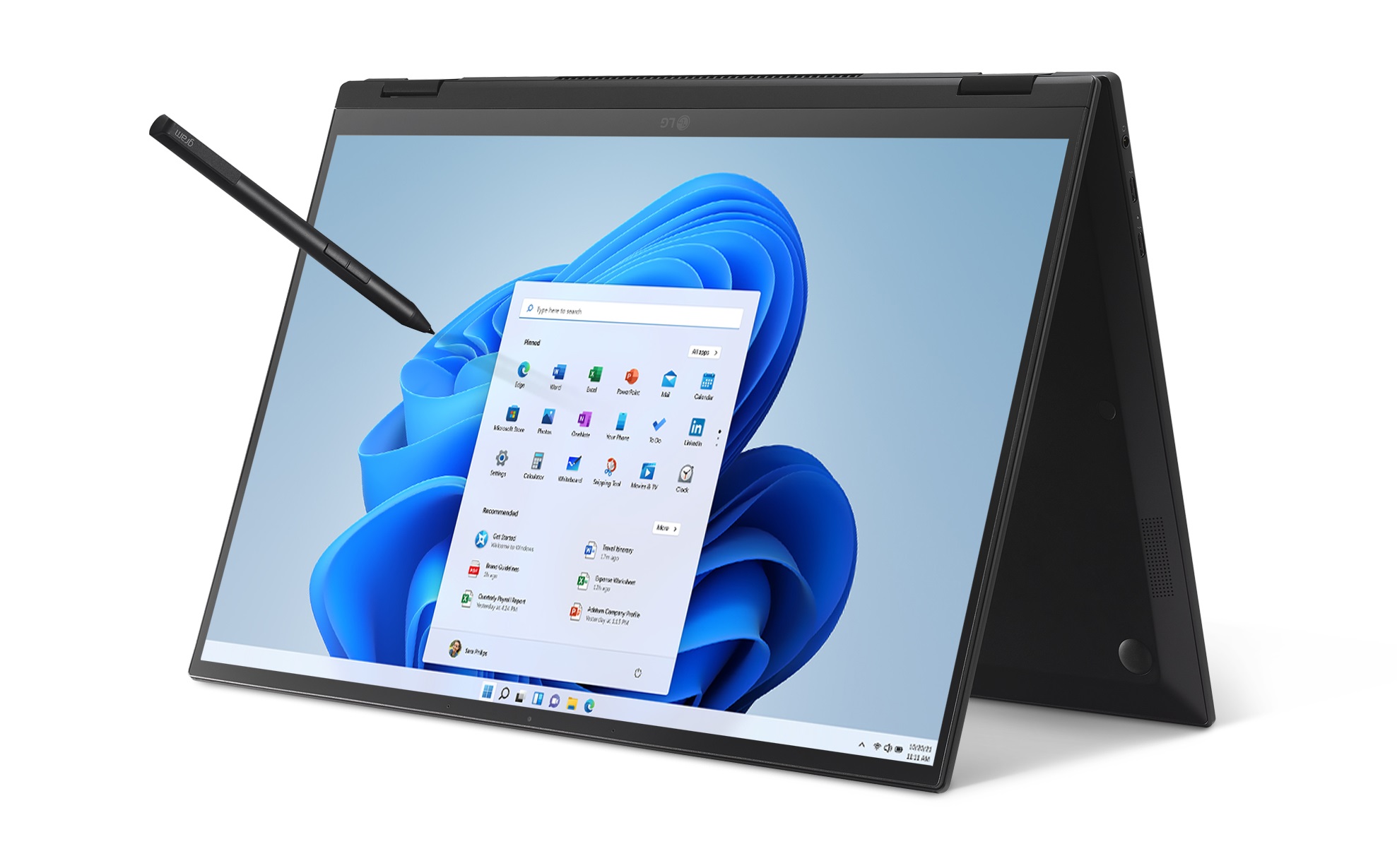
LG laptop in tent mode with a pen hovering over Windows 11 interface

Grads are growing up in less traditional environments and schedules, which is also reflected in the workforce. People are gravitating more toward mobile, simpler devices that adapt to the way they want to work. Tablets, for instance, are no longer just for entertainment. New grads can now use them for work and play, as well as 2-in-1s, like the LG gram 2-in-1 16. Go from a 16-inch laptop to a 16-inch tablet with a flip of the 360-degree hinge. At 3.26 pounds, this compact body also has a Gorilla Glass screen, full-size keyboard and 360-degree touch display. Powered by the 11th Gen Intel Core processor with Iris Xe graphics, it provides up to 1.2X CPU performance.

Acer laptop open and facing reader

The Acer Swift X lineup added two 14-inch and 16-inch models earlier this year, featuring a 16:10 aspect-ratio IPS screen with a 92.22% screen-to-body ratio. From there, 100% coverage of the sRGB color gamut delivers an immersive viewing experience – the better for streaming through Microsoft Store apps or shopping securely on Microsoft Edge. When you’re in Teams video meetings, you’ll find an FHD webcam with Acer’s Temporal Noise Reduction (TNR) technology for high-quality imagery, even in low-light conditions. And for added security when you’re working in communal spaces, there’s a fingerprint reader for easy login with Windows Hello. (Buy it on Amazon.com.)

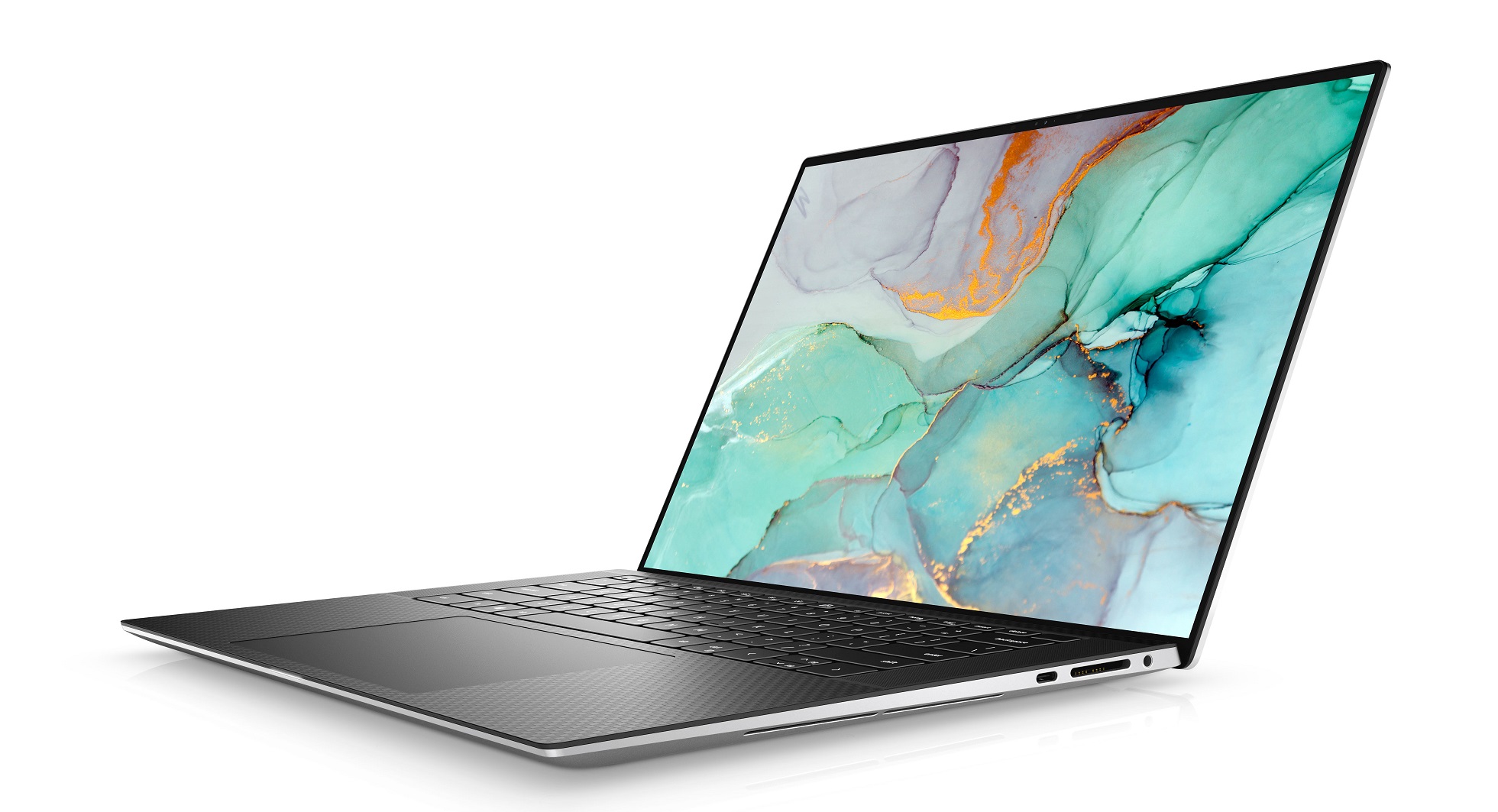
When you’re in your dorm room or on the go, you’ll find the Dell XPS 15 balances power and portability with an immersive visual and sound experience on a dynamic display that delivers high brightness, improved clarity and precise detail. Whether you are working on your next project, streaming, or editing photos, the XPS 15 has the power to move your ideas into reality, powered with the latest 12th Gen Intel Core processors up to i9k and DDR5 memory.  GeForce RTS 30 Series allows for top performance to create complex 3D scenes, edit 8K video, or live stream with the best encoding and image quality. Log-on securely with facial recognition or a fingerprint reader with Windows Hello. (Buy it at Dell.com.)

Lenovo IdeaPad 5 open and angled to the left

The Lenovo IdeaPad 5, with up to 11th Gen Intel Core processors, comes with a 15.6-inch FHD touchscreen with narrow borders, providing an ample canvas to work on or to play. Stay connected at home or on campus by combining what you love about your smartphone with the efficiency of a thin and light fan-less laptop. And when you’re out and about, webcam privacy shutters and fingerprint readers deliver both security and easy logins with Windows Hello. USB-C ports and Quick Charging gets your battery full faster. All this empowers you to download movies, make calls and send emails from virtually anywhere. (Read more about it on the Windows Experience Blog.)

Welcome to the workforce 

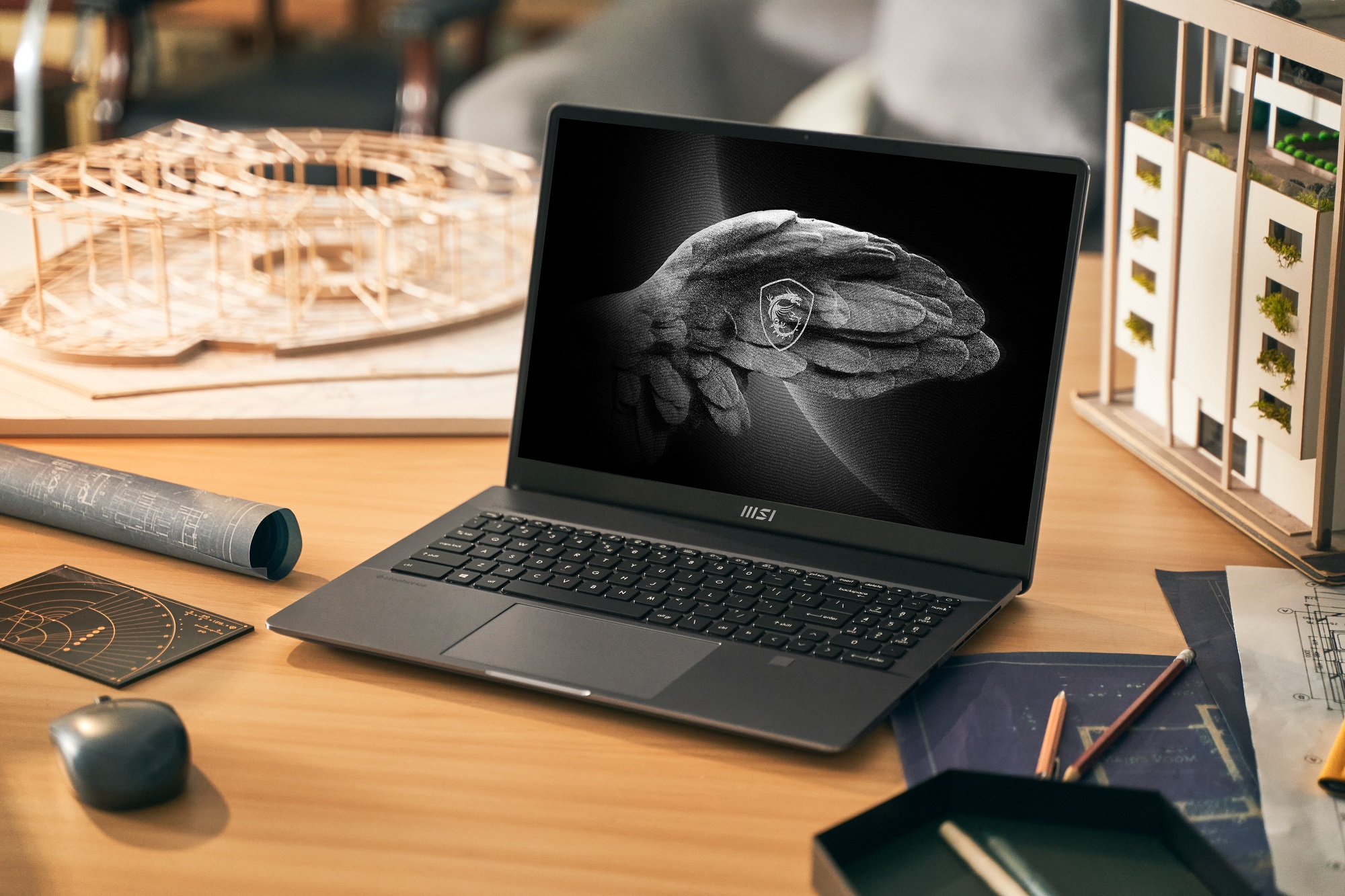
MSI laptop open on a desk

The MSI Creator Z16P Windows 11 PC includes the latest 12th Gen Intel Core i9 processors and GeForce RTX 30 Series GPUs to bring your creativity to life as you start your new job or need refresh tech on your current job. Your workflow will zip along faster with twice the rendering performance and twice the graphics memory of the 20 Series, to make editing up to 8K HDR RAW video and working with extra-large 3D models a snap. You can do all this with a 16:10 Golden Ratio Display, MPP2.0 Active pen support and exceptional vapor chamber cooling. (Buy it at authorized resellers and read more about it.)

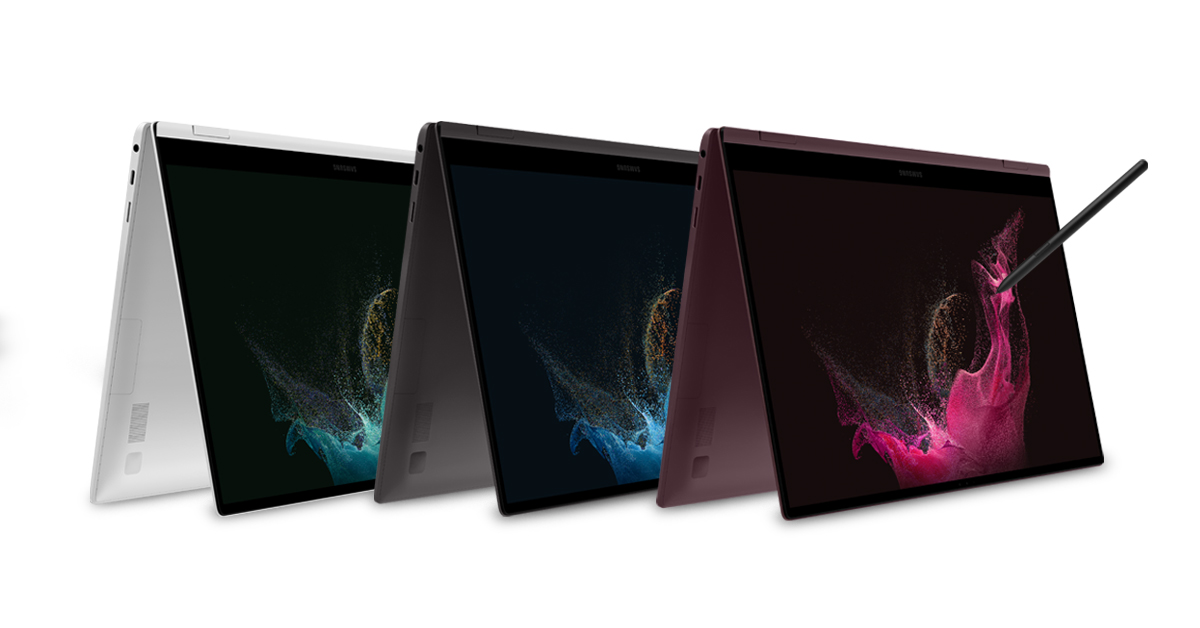
Samsung GalaxyBook2 Pro 360 in tent mode, three side by side

The Samsung Galaxy Book2 Pro 360 made its debut in February at MWC Barcelona, where it showed off updates to features such as Phone Link (formerly known as Windows/Microsoft Your Phone) [1], which pairs your Galaxy smartphone to your Galaxy Book2 Pro series device. With Recent Apps, users can swipe up on their Windows 11 taskbar to check their smartphone’s status and choose their most recently used smartphone apps to use directly on their desktops. To provide power to do more, the Galaxy Book2 Pro series features the latest 12th Gen Intel Core processors for reliable performance to work, video call and game. Because video calls are now a part of everyday life, the Galaxy Book2 Pro series is upgraded for high-quality call experiences, with 1080p FHD webcams and wider field of view angles [2]. To keep you protected, the Galaxy Book2 Pro series is the first consumer PC lineup meeting Microsoft’s Secured-core PC requirements. Previously designed for enterprise PCs in high-security industries, this Secured-core PC designation delivers the highest level of protection on Windows 11 and features deeply integrated hardware, firmware and software to enhance protection against potential cyberattacks [3]. (Shop for it at Samsung.)

Dynabook laptop open and facing left at an angle

The Dynabook Portégé X40-K is a 14-inch Windows 11 Pro PC built with new hybrid-architecture 12th Gen Intel Core P-Series 28W processor options, configurable with Core i5 or i7 CPUs, up to 64GB of memory and reinforced with ultra-fast SSD storage, Wi-Fi 6E and Thunderbolt 4. Created with the hybrid workplace in mind, the laptop is just 0.70 inches thin and weighs under 3.2 pounds. The Portégé X40-K was engineered and tested to MIL-STD-810H standards for strength and durability to ensure robust endurance to the rigors of daily use in or out of the office. Opening the lid exposes a thin-bezel 14-inch IPS or multi-touch display, premium backlit keyboard and large multi-touch ClickPad embedded into a comfortable aluminum palm rest. When you’re not using it, Sleep & Charge technology keeps a USB port powered, which means the laptop can charge a smartphone and other accessories.

Gaming 

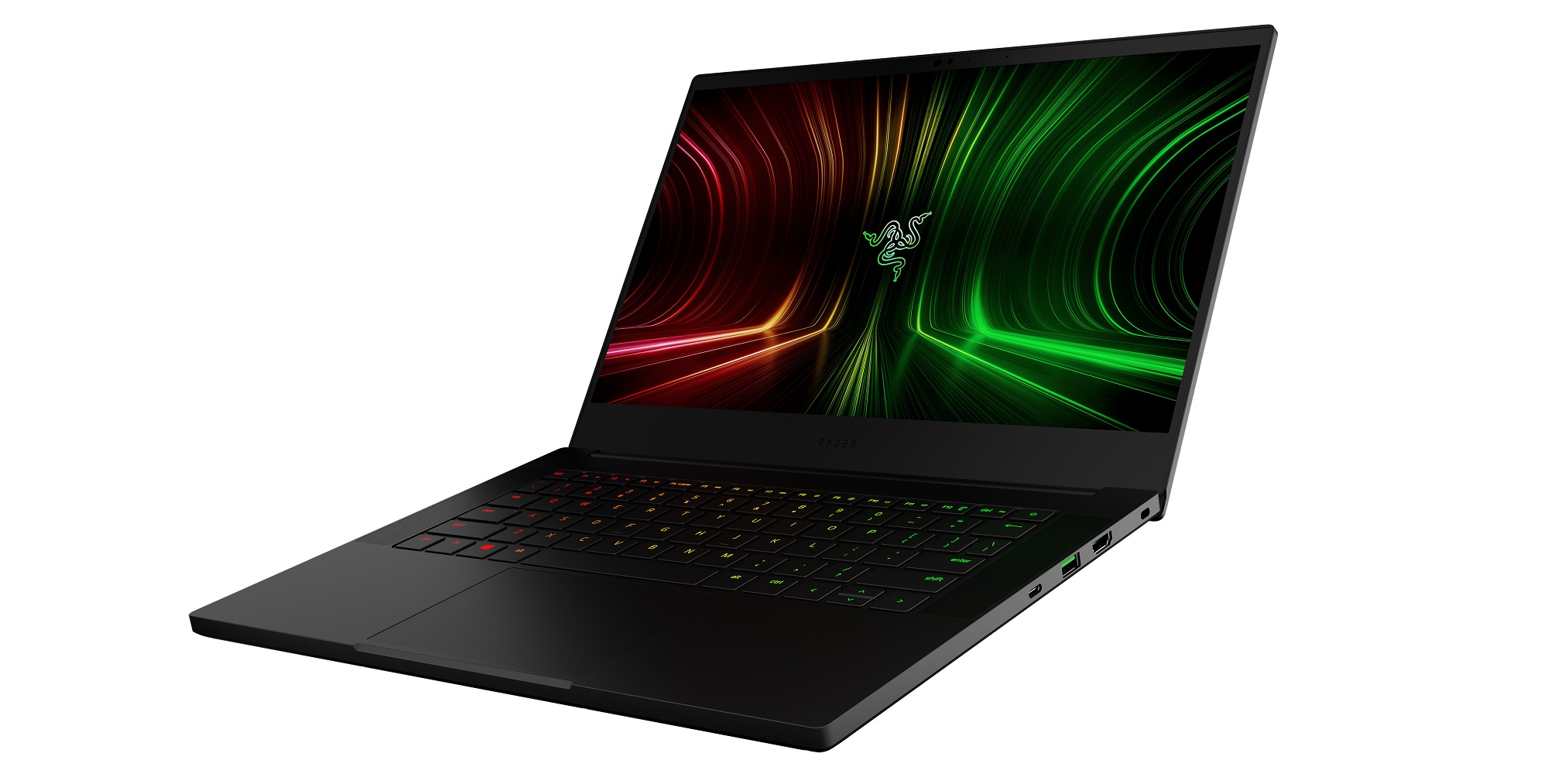
Razer Blade 14 open and facing left

CES 2022 introduced the Razer Blade 14, which includes Windows 11 and all its gaming benefits, including DirectStorage, Xbox Game Bar and Xbox Game Pass. It comes with the next generation of AMD Ryzen 6000 Series Processors. Every configuration prominently features the ultra-fast Ryzen 9 6900HX processor, enabling some of the most powerful AMD gaming possible on a mobile device. With a newly implemented MUX Switch, the Blade 14 allows players to increase gameplay performance by utilizing the discrete GPU to drive games on the internal display. This laptop now also joins its slightly larger family members with the addition of the same fingerprint resistant coating and a 1080p Windows Hello IR webcam, making video calls twice as clear as before. (Buy it at razer.com.)

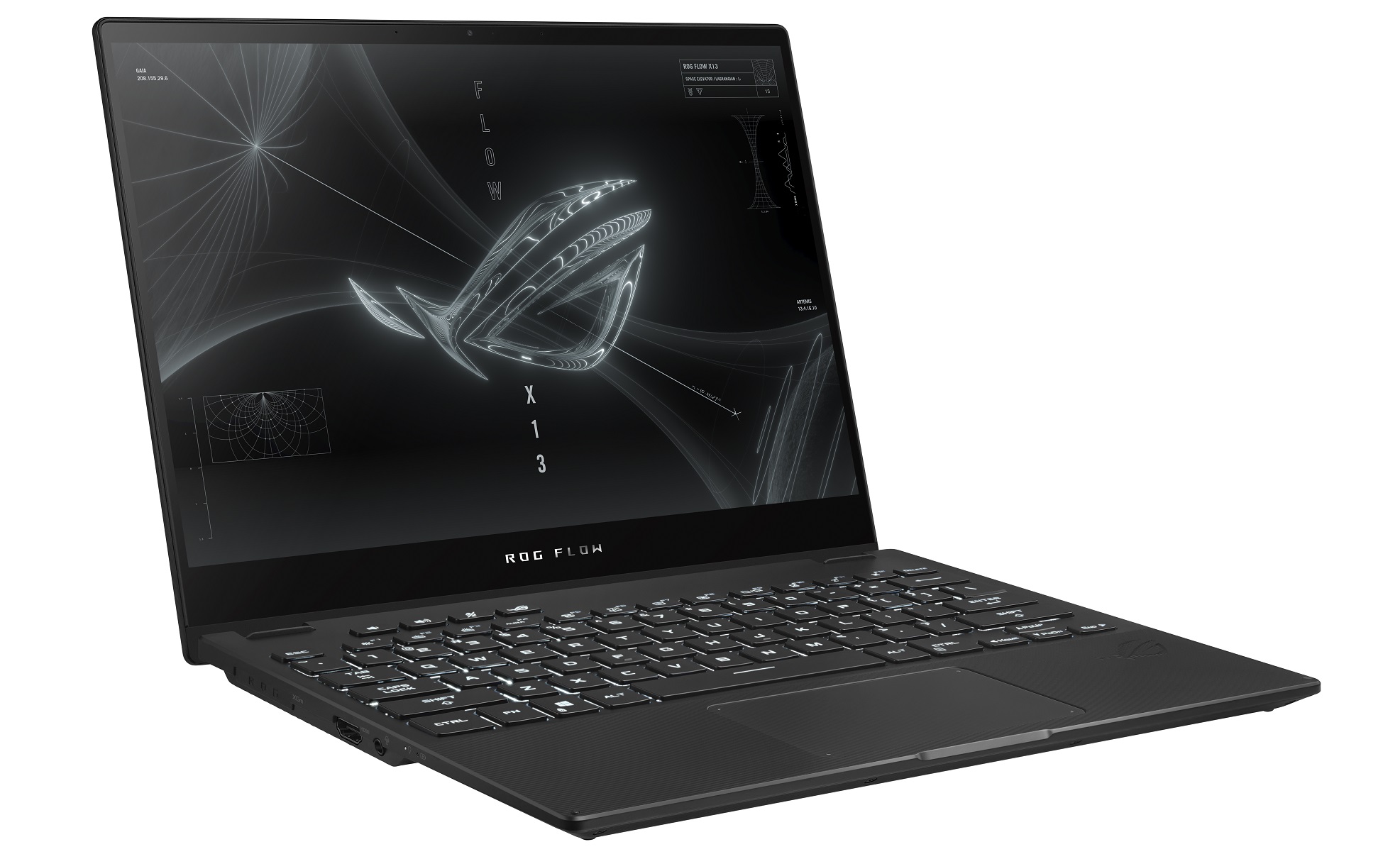
ROG Flow X13 open and facing right

The ASUS ROG Flow X13 was the first 2-in-1 convertible ROG gaming laptop that now comes with Windows 11 Pro and up to the latest Ryzen 9 6900HS processor and GeForce RTX 3050 Ti GPU which provides the performance needed for demanding workloads and enables strong performance in the latest games. Your favorite player can also choose between 4K UHD or 120Hz FHD displays. On both displays, Adaptive-Sync synchronizes the panel’s refresh rate with the GPU’s frame rate to reduce lag, minimize stuttering and eliminate visual tearing. Sign on with Windows Hello. You can also wake it up like a smartphone thanks to an integrated one-touch login. A 360-degree hinge maximizes touchscreen viewing and interaction, quickly flipping from laptop mode into positions for gaming, drawing and presenting. You can also take advantage of Windows Ink. The edge-to-edge keyboard design incorporates a full-sized, desktop-style layout into its compact chassis. (Buy it on the ROG website and find out more about it.)

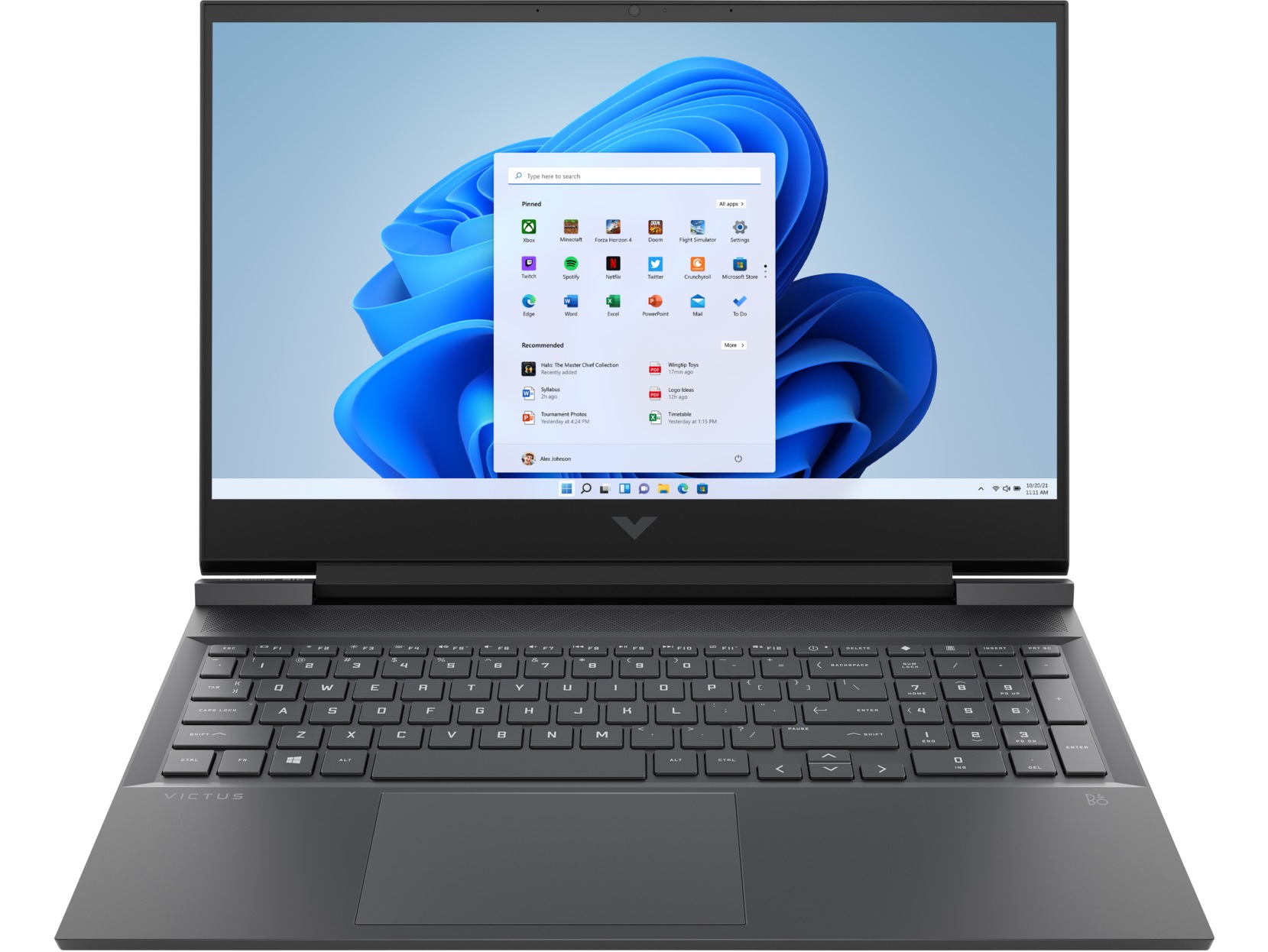
Victus 16 open and facing reader

Built with OMEN’s DNA, Victus by HP debuted in 2021 for entry-level gamers. The Victus by HP 16 was the first of this line. Pixels have never moved faster on these second-generation GeForce RTX 3060 laptops with graphics powered by award-winning NVIDIA Ampere architecture. Computing gameplay on the screen is lightning fast with options up to Intel Core i7-12700H or AMD Ryzen 7 6800H series processors along with up to 32 GB DDR5 4800 MHz memory. Wide rear vents add a visual flair on top of enhanced thermal efficiency, which is bolstered by five-way airflow and a four-heat pipe design. With a single SSD up to Gen4 1TB PCIe storage, storage options are plentiful for gaming and other activities. (Buy it at HP.com and go to the Windows Experience Blog to find out more about it.)

[1] Users must link their Galaxy device to their Windows PC through ‘Link to Windows’ on phone and Phone Link app on PC, follow the set-up prompts, including being signed into same Microsoft account. Link to Windows is preloaded on select Galaxy devices. Phone Link requires Windows 10 April 2019 Update (or later) on the PC and recommends the latest Windows 11. Phone Link requires Galaxy device to be on and connected to the same Wi-Fi network as the PC. Some mobile apps may restrict content to be shared on other screens or may require a touch screen to be able to interact with them. Multiple Android applications can be launched simultaneously up to five at a time in Windows 11 PC.

[2] Galaxy Book2 Pro series device features 87-degree field of view compared to 77-degree field of view in Galaxy Book Pro series.

[3] Secured-core PCs use hardware-based security components like Trusted Platform Module 2.0 (TPM) and modern CPUs along with virtualization-based security (VBS) and Windows hypervisor code integrity (HVCI) service to create a secure, hardware-isolated environment that effectively isolates memory and critical components to prevent attacks and unauthorized access to critical parts of the operating system. The Secured-core PC relies on advanced security capabilities built into modern CPUs to protect the integrity of Windows and its boot process from advanced attacks at the firmware level.

Requires specialized hardware, including fingerprint reader, illuminated IT sensor or other biometric sensors and capable devices.

Posted on Leave a comment

How to watch the Xbox & Bethesda Games Showcase coming Sunday, June 12

In a little less than a week, gamers across the globe will come together to watch the Xbox & Bethesda Games Showcase, featuring the latest on games from Xbox Game Studios, Bethesda, and our partners from around the world.

The show will include everything you want to know about the gaming lineup coming to Xbox and PC, including upcoming releases on Xbox Game Pass, and more.

Wherever in the world you may be, if you have a screen and internet access, you’ll be able to join in on our biggest moment of 2022 so far. Now, how about some specifics?

When is the event? Sunday, June 12 at 10am Pacific Time.

How do I watch? The showcase will be streamed out live on official Xbox channels, including Twitch, YouTube, Facebook, Twitter, and, for the first time, TikTok.

The show will also be streamed out simultaneously on regional Xbox and Bethesda channels around the globe, as well as on Steam, China’s Bilibli, and media outlets.

Important note: the show will be streamed in 1080p at 60fps. For a more representative look at the visuals contained in the showcase, we recommend watching the 4K / 60fps rebroadcast of the showcase on the Xbox YouTube channel, which will be available after the conclusion of the premiere. We will be sure to post on @Xbox social when the 4K / 60fps version is ready to view. 

Is the event available in languages other than English?  We will be providing subtitle support and/or audio dubbed translations in the following languages: Arabic, Chinese (Simplified), Chinese (Traditional), Czech, Danish, Dutch, Finnish, French, German, Greek, Hebrew, Hindi, Hungarian, Indonesian, Italian, Japanese, Korean, Malay, Norwegian, Persian (Farsi), Polish, Portuguese, Portuguese (Brazilian), Russian, Slovak, Spanish (Castilian), Spanish (Latin America), Swedish, Thai, Turkish, Ukranian, and Vietnamese. We expect to have all languages available with the show’s live broadcast but it is possible that select languages may need to be added in the days following the broadcast if they have not finished translating.

The easiest way to find your preferred language is to check out your country’s Xbox page on Facebook or by viewing on the official Xbox YouTube channel and clicking the gear icon in the lower right corner.

Is the show going to be Accessible to those with low/no hearing or low/no vision? There will be a version of the show with Audio Descriptions (AD) in English on the Xbox YouTube channel, and American Sign Language (ASL) on Xbox’s YouTube channel and the new /XboxASL Twitch channel.

I’m not going to be able to watch, where can I find out what was announced? As announcements roll out during the broadcast, the Xbox Wire team will be publishing detailed blog posts containing key announcements right here at news.xbox.com (including localized versions in Brazilian Portuguese, French, German, LATAM Spanish, and Japanese).

Xbox FanFest Watch Parties: There is no better way to celebrate this year’s Xbox & Bethesda Games Showcase than with friends around the world! That is why we are inviting all Xbox fans to join us at the Xbox FanFest Virtual Watch Party. To get access, sign up as an Xbox FanFest fan at www.xbox.com/fanfest and opt-in to the virtual event.

Xbox FanFest is also hosting in-person watch parties around the world. Select Xbox FanFest fans won tickets to attend watch parties in Los Angeles, California; Madrid, Spain; Toronto, Canada; and Melbourne, Australia. Become an Xbox FanFest fan to unlock access to exclusive events, offers and more. Sign up as an Xbox FanFest fan at www.xbox.com/fanfest.

Notes for co-streamers and creators: We at Xbox greatly appreciate any co-stream efforts and aim to ensure you have a smooth experience if you choose to do so.

However, due to forces beyond our control, we cannot guarantee that glitches or disruptions by bots and other automated software won’t interfere with your co-stream.

Video on Demand (VOD): For those planning to create full post-show breakdowns in the form of VOD coverage, we recommend you do not use any audio containing copyrighted music to avoid any action by automated bots, and to also consult the terms of service for your service provider.

Will there be an Extended Stream? Yes! Stay tuned for the Xbox Games Showcase Extended on June 14th at 10am PT where we will share new trailers, take deeper looks at the news from the Xbox & Bethesda Games Showcase and speak with some of your favorite game creators. This all-new broadcast is approximately 90 minutes in length, and will be broadcast live in English, Latin America Spanish, Brazilian Portuguese, German and French, and the additional languages we offer will be available within a week. Audio Descriptions and American Sign Language will be offered live.

YouTube.com/Xbox
YouTube.com/Bethesda
Twitch.tv/Xbox
Twitch.tv/XboxASL
Twitch.tv/Bethesda
Twitter.com/Xbox
Facebook.com/Xbox
Facebook.com/Bethesda

Xbox_ShowcaseExtended_Tunein

See you on Sunday!

Posted on Leave a comment

Gen-trepreneur Z is making its mark on the future of small business

How Gen Z is flipping the career paradigm on its head and navigating the entrepreneurial world independently. 

The data featured in this post is from an internal study, the “Small Business State of Mind” report, commissioned by Microsoft Corporation in April 2022 and conducted by Wakefield Research.

In 2021 alone, Americans submitted over 5.4 million applications[i] to start a new business. With the U.S. experiencing a small business boom, Gen Z, the generation known for bucking traditional paths, is shaping its future. They’re showing us their entirely unique perspective on work and success and shaking up the world as we know it with their social media prowess, value of self-expression and heightened social consciousness. With 62% of Gen Zers[ii] indicating they have started—or intend to start—their own business, Gen Z is making its mark poised to become the most entrepreneurial generation the world has seen.

So, what does the state of small business look like today and how is Gen Z shaping this evolution? Microsoft Store’s “Small Business State of Mind” report—a survey of 1,000 small business owners with 0-24 employees—digs into the mindsets of today’s entrepreneurs to understand their work motives, lifestyles and vision for the future as they lead, navigate and plan for the opportunities and obstacles that lie ahead.

Key Findings

A look at five small business trends shaping entrepreneurship as we know it:

  1. 9-to-never. Gen Z small business owners are redefining the workplace hustle.
  2. The do-good effect. Small business owners investing in social good are seeing the benefits.
  3. Risky business. Small businesses are letting data breach prevention fall to the wayside.
  4. Road to retirement. Why is Gen Z set on small business ownership? Early retirement.
  5. TikTok over textbooks. Gen Z small business owners are leaning into TikTok for business advice while debating the necessity of a higher ed degree.
Smiling man wearing an apron and holding a tablet device, next to two statistics

The workplace hustle experienced by Millennials—typically consisting of long work weeks and endless hours at a desk in front of a computer—has simply taken on a new form with Gen Z. The Gen Z grind may look similar to the Millennial hustle, but it has some key differences.

Survey results show that 91% of Gen Z small business owners work unconventional hours outside of 9 a.m. to 5 p.m., and 81% of Gen Z small business owners work while on vacation, compared to 62% of small business owners overall. They wear multiple hats: nearly half of Gen Z (48%) and non-Hispanic Black small business owners (49%) have multiple side hustles, compared to 34% of small business owners overall. Additionally, a clear majority of Gen Z (64%) and Black, Indigenous and People of Color (BIPOC) small business owners (58%) operate at least half of their business on their phone, compared to 48% of small business owners overall.

Not only does Gen Z hustle, but they’re fueled by a purpose. Half of Gen Z small business owners (50%) rank social good as among their top three business priorities compared to 39% of small business owners overall—more on this in the next section.

“At Microsoft Store, we know technology is critical to supporting a flexible and mobile work lifestyle,” says Travis Walter, vice president of Microsoft Store. “It allows small business owners the ability to manage a business at anytime from anywhere, reach customers where they are at, and gives them space to focus on what really matters to them and their business.”

Text about the do-good effect, next to two statistics

As the world continues to navigate a two-plus yearlong global pandemic, and a period of vast change at a societal level, Microsoft Store found Gen Z small business owners adopting non-traditional priorities when it comes to their small business—social good. On top of that, the data exemplifies a “do-good effect”—positive impacts were reported as a result of these social good investments.

The survey reported that half of Gen Z small business owners (50%) rank social good as among their top three business priorities, out of a list of options including financial stability, business growth and expansion, brand image/reputation, environmental sustainability and achieving fame. In fact, while 88% of small business owners overall put financial stability in their top three priorities, and 77% put business growth, that figure falls to 73% and 65%, respectively, among Gen Z small business owners.

The focus on social good doesn’t stop with Gen Z—nearly two in five small business owners (39%) placed it in their top three business priorities. And it has made an impact in more ways than one. The data shows a “do-good effect,” with 88% of small business owners who prioritize social good in their business saying it helps their business grow and 44% saying it has positively impacted their mental health.

Interestingly, 82% of Gen Z small business owners say prioritizing social good has helped their business grow, and 52% said it positively impacted their mental health; and 86% of BIPOC small business owners who prioritize social good in their businesses said it helped their business grow, and 56% said it positively impacted their mental health.

Text about risky business, along with one statistic

The pandemic drove many small business owners to adjust their operations or invest in technology to maintain business and reach their customers. With every pivot comes risk. The survey found that nearly half (47%) of small business owners haven’t invested much in data security and are rolling the dice hoping to avoid a data breach.

“This underscores the importance of investing in the right technology and taking proper precautions,” says Walter. “Technology has the power to open doors for small business owners—allowing them to efficiently run their business, more easily reach their customers, improve their productivity and increase output—but preventative security measures are a must. A recent study from Microsoft[iii] found there are now 921 password attacks per second, that’s 79.5M attacks per day—a data point that has nearly doubled in the last year. It’s critical to put proper data security measures in place, take the time to safeguard devices and arm employees with the knowledge to prevent data theft.”

Small business owners can access cybersecurity training and resources for free at Microsoft Store’s Small Business Resource Center.

Text about the road to retirement, along with one statistic

There are many motives to opt for small business life, and Gen Z acknowledges one additional reason: the potential for early retirement. Sixty-one percent of Gen Z small business owners believe pursuing entrepreneurship will lead them to retirement sooner than if they had gone corporate, compared to 40% of all small business owners. Early retirement offers the opportunity to pursue personal passions while age is still on their side. One thing is for certain, Gen Z is not afraid to write their own playbook.

Text about TikTok, along with two statistics

Gen Z is entering the workforce at a tumultuous moment in the evolution of work, following recent years of pandemic-fueled online schooling. Historically, graduating from college was seen as a rite of passage, an achievement previous generations expected and longed for. Gen Z, however, believes other paths are possible to achieve their goals. Seventy-eight percent of Gen Z small business owners say obtaining a college education is not very necessary for running their own business. What are they turning to instead? TikTok, of course.

TikTok has risen as a career resource for the next generation of entrepreneurs, ushering in a new wave of mentorship as the social platform teaches them new entrepreneurial skills they may not have had the chance to learn in a classroom setting. Microsoft Store found that while a third (33%) of small business owners overall use TikTok as a resource to learn about business, that percentage nearly doubles for Gen Z small business owners (65%).

In fact, small business owners who use TikTok as a resource (48%) are more likely to have multiple side hustles than those who do not (27%), more evidence of today’s workplace hustle.

What’s next for small businesses?

“It’s your local coffee shop, florist and barbershop you’ve been visiting for the past 10 years—it’s these small businesses that are driving our economy forward,” says Walter. “Small businesses [with fewer than 20 employees] make up 89% of all businesses in the U.S.[iv] Supporting these businesses is crucial, especially as they face no shortage of obstacles today.”

Half (51%) of small business owners ranked inflation as the biggest threat to their businesses right now, followed by COVID concerns (21%) and supply chain shortages (18%).

Despite that, a majority of small business owners (59%) surveyed are optimistic, expecting business growth in the next 12 months, including Gen Z (55%) and BIPOC (67%) small business owners. And they aren’t looking to trade in their “boss” title for a badge: 86% of small business owners stated they are more likely to keep their small business in favor of quitting and going to a corporate 9-to-5 job.

The state of small business will continue to evolve as our world evolves, but what we can expect is for Gen Z and its entrepreneurial and non-traditional mindset to fuel the future of it. This is only the beginning.

We invite small business owners to visit Microsoft Store’s Small Business Resource Center for free access to trainings, tools, products and business solutions to connect with teams, reach new customers, safeguard their businesses from data security threats and grow their businesses.

[i] (United States Census Bureau, 2022). https://www.census.gov/econ/bfs/index.html.

[ii] Engine, W. (2020). Generation Influence: Reaching Gen Z in the New Digital Paradigm.

[iii]Microsoft. (2022). This World Password Day consider ditching passwords altogether.

[iv] Small Business & Entrepreneurship Council. (2019). American Business is Overwhelmingly Small Business.


Posted on Leave a comment

How to make your Microsoft Teams meetings more effective and inclusive

In 2021, nearly three-quarters of employees experienced a 70% increase in meetings after organizations shifted to remote work due to the onset of the COVID-19 pandemic.¹ When 43% of remote workers state they do not feel included in meetings², the natural question is, how can we make meetings more effective and inclusive?

We were curious too, so we decided to survey a large number of Microsoft customers who wanted to improve meeting experiences in their organizations. As it happens, this was the first large-scale study that we’re aware of conducted by a technology company to determine what makes meetings effective and inclusive.

We used statistical, mathematical, and machine learning techniques to analyze meeting dynamics through survey data and anonymous telemetry. This enabled us to build a model to understand and predict which meetings would be effective, and why. Criteria such as using an agenda, active participation, having video turned on, keeping meeting sizes small, and sharing pre-meeting material all ranked high for driving inclusiveness and effectiveness. Additionally, data analysis showed strong connections between meeting participation and attendees’ subjective perceptions of inclusiveness, sense of comfort, and meeting effectiveness.

Since meetings are a permanent fixture of modern work, we encourage you to dive into the findings below and find new ways to promote behaviors that lead to more effective and inclusive meetings.

TeamsMeeting.jpg

Identifying Our Audience and Survey Methods

We used two survey methodologies in tandem to measure meeting effectiveness and inclusiveness across Microsoft employees and a select group of Microsoft Teams customers:

  1. Post-meeting pop-up – A two-question survey within Teams that popped up at the end of a meeting to collect sentiment in near real-time.
  2. Email-based survey – Approximately 20 questions designed to understand the nuances of the most recent meeting the respondent attended.

The in-Teams survey methodology was designed with goals to:

  • Reach a random sample of meetings throughout the organization
  • Minimize intrusion in the workday
  • Lower the burden to respond
  • Keep responses anonymous to ensure a psychologically safe place to provide feedback on meeting effectiveness and inclusivity

Survey types and population groups have different survey response rates, adding another layer of sampling to our data collection. While this additional layer induces a “non-response” bias to the data, our analysis showed a negligible amount of bias that did not degrade the data utility.

In-product surveyIn-product survey

Modeling the Survey Data

To understand the drivers of meeting effectiveness and inclusiveness, we began examining the strength of dependencies between user ratings on these criteria with expected factors including meeting duration, the number of participants, usage of audio/video/screen sharing, and presence of an agenda among others.

We used a variety of statistical tests and machine learning (ML) algorithms to learn the set of factors and combinations that correspond to fundamental differences in ratings of effectiveness and inclusiveness. While an abundance of articles and small-sample studies provide a long list of potential drivers for meeting effectiveness and inclusivity, many of them are shown to not be significant after large-sample analysis.

A proven method of breaking down the collective pattern of dependencies among the set of potential factors and ratings is through the use of graphical models. We developed a process for selecting top contributors by fitting a web of dependencies and estimating the strength of each connection. A sample of such a model is shown below. The following graphical model from our peer-reviewed publication³ illustrates the multivariate interplay between factors.

Multivariate model of effectiveness (red and green show negative and positive effects, respectively)Multivariate model of effectiveness (red and green show negative and positive effects, respectively)

The arrows in the above graph show the relationships between the variables and in relative terms. Using green arrows to show positive correlations and red arrows show negative correlations, this model helped us select the truly impactful factors on meeting effectiveness and inclusiveness from a sea of claims and anecdotal hypotheses. For example, the green arrow with “2.5” between “Participation” and “Inclusive” can be interpreted as meetings with high participation are 2.5x more likely to be rated as inclusive.

Participation represents “speaking in the meeting more than once.” It shows a significant positive impact on the chance of the meeting being rated inclusive (4 or 5-star). This pattern consistently shows up regardless of the survey type or audience group. The strength and consistency of this impact encouraged us to develop targeted ML models to further understand details about this correlation. Specifically, to include the interaction effects and explore the ramifications under different segments. Our findings show that:

  • Meetings with higher levels of participation were rated more inclusive. Participants who spoke often during the meeting gave a 98% inclusive rating, participants who spoke a few times gave an 89% inclusive rating, participants who spoke only once gave a 67% inclusive rating, and participants who only listened gave a 36% inclusive rating.
  • Participants who felt their presence was necessary for the meeting felt more included – giving the meeting a 92% inclusive rating over those whose presence was not necessary, who gave a 53% inclusive rating.
  • Meetings with smaller meeting sizes were rated as more inclusive. This is a decreasing trend where 2-person meetings were rated by all participants as inclusive, while meetings with more than 10 people were rated only 60% inclusive.

Our analysis also showed that the impact of participation on inclusiveness was also influenced by other factors including meeting duration and length of the meeting. For example, the most significant gain is observed for thirty-minute or shorter meetings. In this segment, participation can increase meeting inclusiveness by ~6% and effectiveness by ~4%.

Video usage was another area where the large sample of our survey allowed us to learn from nonlinear patterns. While additional research is warranted to understand the breadth of meeting scenarios that benefit most from having video on, and which scenarios benefit from having video off, our survey data did yield interesting findings. We found the meeting scenario with a higher chance of benefiting from video usage is a “small meeting” with fewer than eight participants where some people are in a meeting room, and the rest are joining remotely. The benefit mostly comes from local participants (those in the meeting room) being able to see remote participants via video. Larger meetings may be more prone to “Video Conference” due to prolonged eye gaze, an effect that’s magnified when users are required to stare at numerous one-inch boxes of faces on their screens.⁴

More Resources and Insights

In addition to encouraging behaviors correlated to increased meeting effectiveness and inclusiveness, Microsoft Productivity Score and Viva Insights are valuable resources to help monitor organizational productivity, effectiveness, and engagement.

Productivity Score can be accessed through the Microsoft 365 Admin CenterProductivity Score can be accessed through the Microsoft 365 Admin Center

Better Meetings… Through Science

Bookshelves are full of pages dedicated to the topic of meeting effectiveness, though many of these insights are based on small samples and anecdotes. While there’s still much about meetings yet to explore, such as the influence of meeting purpose on effectiveness and inclusion (brainstorming and problem solving versus status meetings), our research offers valuable constructs for how to make such connections.

What is clear in a hybrid-first world, is that the volume of scheduled and ad-hoc meetings is likely to increase. Organizations need a trusted methodology to identify and measure the factors that lead to more valuable meetings and enable us to form and strengthen connections between colleagues and friends.

1. Atlassian. 2022. You Waste A Lot of Time at Work Infographic | Atlassian. [online] Available at: https://www.atlassian.com/time-wasting-at-work-infographic
2. Work Trend Index: Microsoft’s latest research on the ways we work
3. Cutler, R., Hosseinkashi, Y., Pool, J., Filipi, S., Aichner, R., Tu, Y., & Gehrke, J. (2021, February 19). Meeting effectiveness and inclusiveness in remote collaboration. arXiv.org. Retrieved May 23, 2022, from https://arxiv.org/abs/2102.09803
4. Karl, K., Peluchette, J. and Aghakhani, N., 2021. Virtual Work Meetings During the COVID-19 Pandemic: The Good, Bad, and Ugly. Small Group Research, 53(3), pp.343-365

Posted on Leave a comment

Microsoft adopts principles for employee organizing and engagement with labor organizations

As we approach the second quarter of the 21st century, the American economy continues to evolve. Our free market is being reshaped in part by changing public expectations about the nature of work and the responsibilities of corporations. Technology is contributing to these changes, and the tech sector itself is addressing anew a facet that has long been important to the U.S. economy and American democracy – the right of workers to organize.

Recent unionization campaigns across the country — including in the tech sector — have led us to conclude that inevitably these issues will touch on more businesses, potentially including our own. This has encouraged us to think proactively about the best approach for our employees, shareholders, customers, and other stakeholders.

Our employees will never need to organize to have a dialogue with Microsoft’s leaders.  

But we also recognize the workplace is changing. That’s why we are sharing principles to guide our approach with labor organizations. 

Today we are announcing a new set of principles around employee organizing and how we will engage with our employees, labor organizations, and other important stakeholders in critical conversations around work.  

Two factors are guiding our thinking.

First, while relationships with labor organizations are not new to Microsoft, we know that we have a lot to learn. Many other industries have vastly more experience and knowledge than we do. In recent months we’ve talked with and worked hard to learn from prominent labor, business, and academic leaders. We have built on our company’s own collaborative experiences with works councils and unions in other countries, something I learned about myself in the 1990s when I was responsible for our European corporate and legal affairs. But mostly, we recognize that we have far more learning ahead of us than behind us.

Second, we recognize that the right approach for Microsoft may be different from what will work best for others. Each industry and each company is unique. We approach these issues with a deep appreciation of the vital and innovative role our employees play in the development and adoption of new technologies. This depends on a shared company culture that is grounded in a growth mindset focused on listening, learning, and evolving our approaches together, especially on important issues in a rapidly changing world.

Reflecting these factors, we believe Microsoft’s stakeholders will be served best with an open and constructive approach based on the following four principles:

• We believe in the importance of listening to our employees’ concerns. Our leaders have an open door policy, and we invest in listening systems and employee resource groups that constantly help us understand better both what is working and where we need to improve. But we recognize that there may be times when some employees in some countries may wish to form or join a union.

• We recognize that employees have a legal right to choose whether to form or join a union. We respect this right and do not believe that our employees or the company’s other stakeholders benefit by resisting lawful employee efforts to participate in protected activities, including forming or joining a union.

• We are committed to creative and collaborative approaches with unions when employees wish to exercise their rights and Microsoft is presented with a specific unionization proposal. In many instances, employee unionization proposals may open an opportunity for Microsoft to work with an existing union on agreed upon processes for employees to exercise their rights through a private agreement. We are committed to collaborative approaches that will make it simpler, rather than more difficult, for our employees to make informed decisions and to exercise their legal right to choose whether to form or join a union.

• Building on our global labor experiences, we are dedicated to maintaining a close relationship and shared partnership with all our employees, including those represented by a union. For several decades, Microsoft has collaborated closely with works councils across Europe, as well as several unions globally. We recognize that Microsoft’s continued leadership and success will require that we continue to learn and adapt to a changing environment for labor relations in the years ahead.

We acknowledge that this is a journey, and we will need to continue to learn and change as employee expectations and views change with the world around us. And we recognize that employers and employees will not always agree on all topics – and that is okay.

Perhaps as much as anything, we bring a sense of optimism grounded in an appreciation that success in a competitive global economy requires that businesses and labor strive to work together well.

When I visit officials in Washington, D.C., I sometimes think back to the fact that President Theodore Roosevelt in 1903 created a single cabinet agency, the Department of Commerce and Labor. A decade later, this department was divided so two different federal agencies could each focus more squarely on their distinct needs. But then, as now, real progress for companies and the country alike has so often required dialogue, collaboration, and trust between business and labor.

None of us ever knows precisely what challenges the future will bring. But we’re willing to bet that a company that listens to and works well with its employees is likely to have a winning hand.

Tags: , ,

Posted on Leave a comment

Looking to the future at Microsoft Envision; Season 2 finale coming June 14

Envision collage of photos
During the Season 2 finale of Microsoft Envision, Jessica Hawk (upper left) will explain how the metaverse is being used to transform business processes and enhance collaboration.

Over the past year at Microsoft Envision, the digital series we co-produce with Accenture and Avanade, we’ve heard from business leaders about how organizations can persevere in a time of ongoing disruption, as well as what it takes to build agility and foster innovation.

Speakers this season have included former PepsiCo Chair and CEO Indra Nooyi, LinkedIn cofounder Reid Hoffman, and Julie Sweet, chair and CEO of Accenture, along with tennis icon Billie Jean King.

The conversation will continue during the Season 2 finale on Tuesday, June 14. There we’ll be joined by Klaus Schwab, founder and executive chairman of the World Economic Forum, who’ll talk with Judson Althoff, Microsoft Executive Vice President and Chief Commercial Officer, about key themes from this week’s WEF Annual Meeting, as well as steps that business leaders can take to drive equitable growth and improve the state of the world.

During the episode, we’ll explore how leaders can prepare their organizations for the future with the help of emerging technologies. I’ll describe the industrial metaverse and the value it can deliver — as well as the importance of keeping the metaverse safe, secure and open.

Accenture Group Chief Executive and Chief Technology Officer Paul Daugherty will also share insights from Accenture’s Technology Vision 2022 report on the “Metaverse Continuum” and how the metaverse will remake the way we conduct business in the years to come.

In addition, attendees will hear from Kate Varah, Emma Keith and Toby Coffey of the National Theatre in London, who’ll share how they’re using mixed reality in innovative ways to transform storytelling and make the performing arts more accessible.

I hope you’ll take part in the discussion. Microsoft Envision is free to attend. To register, visit envision.microsoft.com.

Tags: , ,