Posted on Leave a comment

Announcing the Microsoft Quantum Network

Creating a scalable quantum computer will require the collective effort of many skilled and diverse teams. To reach that goal, over the past few years we have built a coalition of partners, universities, customers, and developers, all with the goal of sharing knowledge and collaborating with the best quantum innovators 

Today  at our inaugural Startup Summit – we’re formalizing that coalition as the Microsoft Quantum Network. This global community of individuals and organizations will work directly with Microsoft to advance quantum computing, develop practical applications, and build the quantum workforce of the future.    

“The Microsoft Quantum Network is our commitment to establishing the partnerships required to build the quantum workforce and the quantum economy, Todd Holmdahl, Corporate Vice President of Azure Hardware Systems Group at Microsoft, said during the summit. We believe both are vital to solving some of the world’s toughest problems.

Todd Holmdahl speaking to the Microsoft Quantum Network
Todd Holmdahl, Corporate Vice President of Azure Hardware Systems Group at Microsoft, speaking to the Microsoft Quantum Network

We’ve previously announced partnerships with some of the world’s leading startup talent in quantum software and algorithm development. Today we welcome two new partners: 

  • HQS Quantum Simulations develops quantum algorithms for predicting molecular properties for the chemical and pharmaceutical industries. 
  • Rahko is a quantum machinelearning company developing scalable quantum chemistry solutions for near-term quantum computers and beyond.  

HQS Quantum Simulations and Rahko will join other quantum startups who are working closely with Microsoft to build practical applications and accelerate the adoption of quantum computing.  Quantum Network startups also benefit from a partnership with Microsoft for Startups to help them grow their businesses, build innovative solutions, and connect to valuable resources. 

Other segments of the Microsoft Quantum Network are: 

  • Affiliate organizations have engaged directly with Microsoft to advance their expertise in quantum computing and jointly develop solutions that benefit their organization and industry. Case Western Reserve University (CWRU), the Dubai Electricity and Water Authority (DEWA), and Pacific Northwest National Labs (PNNL) are examples of organizations collaborating with us on many solutions in the areas of optimization and chemistry.    
  • Centers dedicated to research, development, and educational excellence have partnered with Microsoft to pursue the advancement of quantum computing. Today we’re performing quantum research alongside some of the best and brightest minds at Purdue UniversityUC Santa Barbarathe University of CopenhagenTU Delft, and the University of Sydney. At these locations, we’ve established Microsoft Quantum Labs where our research teams are advancing Microsoft Quantum research goals while also serving as scientific collaborators and partners with the quantum community. 
  • Developers and organizations have created their own quantum algorithms and applications with our free resources, including the Microsoft Quantum Development Kit, tutorials, Q# librariessamples, and workshops. Developers have now downloaded the Quantum Development Kit more than 100,000 times. 

If you or your organization are interested in becoming a member of the Microsoft Quantum Network as a startup or affiliateclick here to tell us about yourself. 

It will take a diverse set of skills across academia and industry to help develop the world’s first scalable quantum computer and quantum applications.  We are excited to bring together the best minds in quantum computing.  Together, we will bring this vision to life and shape the future of the quantum workforce and economy.

Posted on Leave a comment

Why unplugging from work is more work than we think

Unplugging from work: most of us probably think we do it—maybe we believe we’re pretty good at it. During our personal time we tuck our phones away and turn off our notifications. Maybe we’re even disciplined enough to not send an email during off-hours. A whole economy has sprung up, from digital detox camps for adults to gatekeeping apps to control our screen time, to help us detach.

And yet—sorry, hang on, did you hear that ding?—we’re still distractedly glancing at our phones, habitually monitoring inboxes and that ever-growing volume of work email, anticipating notifications even when they’re muzzled, and inadvertently missing the winning point at our kid’s ball game (shoot, sorry sweetie).

We agree that unplugging is important, but many of us aren’t succeeding at it—and it’s hurting us, our colleagues, and our companies.

A study by LinkedIn found that 70 percent of professionals don’t fully unplug from work. A recent study of 1,400 information workers commissioned by Microsoft  found that 40 percent of people work outside of regular hours in a way that interferes with family time. And research from Utah State University found that a person’s use of their mobile device for work during family time not only negatively impacted the employee and their spouse, but led to higher instances of burnout, a decreased commitment to their employer, and an increased likelihood of quitting.

Even official vacation time isn’t sacred: 67 percent of the people surveyed by LinkedIn said they would go ahead and contact a colleague about work-related matters while the colleague is on vacation.

Despite these statistics, leaders are increasingly aware that to be successful, companies must help employees feel balanced. And frazzled, distracted employees are increasingly desperate to disconnect from the very work tools they’ve come to rely on so they can truly recharge.

“Ironically, we have found that in modern life the source of a lot of our stress and tension is software, the way it is structured to be very notification-centric versus human-centric,” says Kamal Janardhan, partner director of product for Microsoft Workplace Analytics and MyAnalytics, tools that harness data to help drive change in the workplace. “Unplugging is almost a defense mechanism against that system.”

Ultimately, the actions we take individually—putting our phones in a box, locking apps, setting nebulous rules for ourselves that we then try to cheat—are reactions, and they aren’t enough to solve a larger problem. We need to change the system.

New research and our growing understanding about human behavior tell us two things for certain: that unplugging is more necessary than ever, and that true unplugging is not a single action but a social agreement—a culture shift that employees and companies must create together.

Finding hidden culprits

To understand where we are headed when it comes to the intersection of work and personal time, it’s important to remember how we got here. Much of what we believe about how we should work harkens back to the industrial revolution and the switch from a much longer workday to a 40-hour workweek and a collective expectation to clock in and clock out at set hours. In the 21st century this belief system became ripe for reinvention again, but not necessarily in the ways we’ve seen.

You need to regenerate your energy. Unplugging is an emotional recharge that we all need.

With modern technology, handheld and wearable devices, AI, and the cloud, work and personal time have blurred together for knowledge workers, the boundary now often invisible. There is no clear punch-out time anymore.

“Companies and experiments have shown that if you shorten the work week, employees become more productive, creative, and loyal. Henry Ford understood this impact on productivity when he shortened the week from 60 to 40 hours,” says Kate Nowak, solution design lead for Workplace Analytics, which enables companies to understand how employees work and collaborate every day and to build empowered workplace cultures.

“We need more companies to step up and experiment with new ways of working to inspire broader change.”

At the same time, humans are still humans, and while technology and work styles have shifted rapidly, our circadian rhythms still control our patterns of focus and rest, says Mary Czerwinski, principal research for Microsoft, who studies worker interaction techniques and multitasking. We aren’t built to be in a constant state of “on.” Workers have natural fluctuations of energy and attention in their day, from focused work to rote work to boredom, and we experience two peak focus times—midmorning and midafternoon.

“As your circadian rhythm goes down, the negative effects of trying to focus start to go up. You need that natural homeostasis boost again. That’s why we go home and take a break,” Czerwinski says. “You need to regenerate your energy. Unplugging is an emotional recharge that we all need.”

Often, though, the ways we’ve tried to address overload and enable unplugging have backfired. Have you ever pledged to unplug more, maybe spurred by something like National Day of Unplugging, or your partner or kids giving you the stink eye? Have you created rules for yourself only to find within a few days or a week you are reverting to old habits, sneaking glances at your inbox, reaching for your phone without even consciously choosing to?

One key reason it’s so hard to unplug is something called anticipatory stress: the anxiety we feel worrying about something that is coming or could come.

It works like this: It’s Saturday night and you’re getting ready to head out to a nice dinner with friends, when you get a ping from your boss with a head’s up about an important early Monday morning meeting, more details to come. Suddenly, even though you don’t log on to do any work, you’re anxious, thinking about prepping for the unexpected meeting and checking your phone for more emails. Your mind isn’t on the meal and the good company and your weekend wellbeing, it’s hung up on what work thing might come next.

According to the recent study of 1,400 workers , nearly half of respondents said that thinking about work outside of work hours regularly has a negative impact on their work-life balance. And thinking about work during personal time was the biggest work-life balance disruptor, beating out other factors such as phone notifications, manager and client expectations, and pressure from coworkers who work outside of work hours.

Bar chart showing work-life balance distruptors with worrying about work as top disruptor

Another recent study supports this, finding employees and their families experience the strain of expectation even if the employee doesn’t actually engage in work in their off hours.

Another reason it’s hard to change the way we work on our own is because behavioral change spreads in part by social confirmation—the more others adopt a behavior, the easier it becomes for each of us to do so, too. If no one feels like the company culture allows for true unplugging, few people will do it. Employees can’t go it alone.

At the same time, our strategies to address overwhelm often just lead to more work. Even Merlin Mann, the creator of Inbox Zero, backed away from his methodology eventually.

“Since greater efficiency has led to more work not less, what we really need are ways to protect ourselves from work expanding into the time we create for ourselves,” Nowak says.

And while many company leaders have embraced the goal of nurturing employee engagement and wellbeing through culture, the truth is that often, the pressure on workers to stay plugged in afterhours stems from hidden factors leaders might not even be aware of.

Using Workplace Analytics to analyze anonymized and aggregated digital signals from meetings, email, HR surveys, and other data sources, many Microsoft customers have looked at the behaviors of their workforce. Some consistent patterns connected directly to unplugging and work-life balance have emerged.

In one Fortune 100 technology company, for example, data revealed that every hour people managers spent working after-hours translated to 20 minutes of after-hour work time for direct reports. The numbers vary, but similar patterns have surfaced at several other companies.

In another instance here at Microsoft, leaders applied Workplace Analytics and were able to uncover the cause of a poor work-life balance rating by a group of engineers on an annual survey. It turned out that bloated, redundant meetings were keeping engineers from focus time during their day, so they felt compelled to finish work at home and couldn’t unplug. Compounding the problem, managers spurred afterhours email by leading by example. Once leaders gained these organizational insights, they kicked off a change program that worked.

Often, leaders can’t see the overall pattern of these types of behaviors or measure their true impact across a company. Through organizational analysis, company-specific insights emerge and leaders can work to evolve their culture, empowering employees to change collectively so they don’t have to go it alone.

Achieving personal balance

Designing another Microsoft tool that helps address work-life balance and the ability to unplug, this one driven from the employee side, product managers have recently shifted how they think about unplugging from work and employee wellbeing. Instead of telling employees how much time they spend working after hours every day, MyAnalytics—which shows personalized work metrics and insights only to individual employees—has changed to now track “quiet days” instead. An employee can look at their email digest and dashboard to see how many consecutive days out of their past month were quiet days—days without any emails, meetings, and chats outside working hours.

For instance, I can see that during a recent month my longest streak was 5 consecutive quiet days (including weekends). And I can see that 13 days of the month were quiet while 15 were not. By understanding work habits through this lens, I can mentally contextualize how impacted my personal life is overall by my work.

MyAnalytics dashboard showing one month of quiet time and collaboration hours

This new way of thinking reflects the research around anticipatory stress, says Wendy Guo, Microsoft senior program manager. When the MyAnalytics tool previously calculated after-hours work by the daily minute, many employees saw that, technically, they weren’t logging much time—maybe 15 or 45 minutes for instance. That might seem like maybe nothing to worry about—what’s 30 minutes a night sending emails, right?

But that measurement, and, more broadly, that way of thinking—day by day, hour by hour—doesn’t capture the cumulative stress of having your unplugged time constantly nibbled away at.

“It’s the pain of grazing,” Guo says. “Even if it’s 10 minutes checking email, scanning notifications, reading but not responding—it impedes your ability to mentally recharge. There is concrete evidence that people are engaging despite not wanting to.”

By reframing for employees how this accumulates, in a private, personalized report, Guo says her team hopes to empower workers with a sense of urgency “to think about work-life harmony, happiness, the things you can do instead of work when you allow yourself the time. To think about how you want to live. It’s ephemeral and not easy to quantify a sense of wellbeing, so we’re trying to help.”

With insight comes the power to evolve how we work so we’re productive and balanced in ways that work best for us. Just ask Vincent Fily, a global blackbelt seller in Microsoft’s Modern Workplace Sales division. Fily helps companies transform with tools like Workplace Analytics and the sister solution for employees, My Analytics. But when he moved back to France from the U.S. four years ago, he found himself having to navigate his own work-life balance.

It’s the pain of grazing.

He wanted to continue working flexibly as he had in the U.S.—taking his child to school before starting work, then focusing on emails and customers, taking time out for lunch, more customer time, then breaking to spend late afternoon and dinnertime with his family before finishing off work in the evening.

“This,” stresses Fily, who was born in France, “is not the French way.”

But instead of feeling guilty or worrying that he wasn’t adhering regional norms around work style, Fily knew he was productive and balanced, because he was using his own employee dashboard to gain these insights.

“I can see how I am doing. I can measure and see that I am going in the direction that I want. To me, that’s the goal—to see how you are doing and be able to shift how you work if you want.”

Getting there together

Employees and companies are poised to shift the culture of work because we’ve moved from acceptance—we understand technology is all-encompassing and work has fundamentally changed—to being ready for action. We can now do something about our state of near-constant connection, harnessing technology to help us unplug from work in intentional ways that are supported by collective norms.

“We have talked to a bunch of people, customers, employees, leaders, and analyzed data to find out the most common roots of this problem: people have too many meetings, they don’t block time, they feel the need to make up their lost focus time at home. During their personal time they are stressed out and unhappy. They get interrupted, by system notifications and people notifications. And there’s human psychology: some people cannot help responding to everything as it comes,” says Kalyan Nanduru, principal product manager for MyAnalytics.

But even those of us “beyond help” who think we might just be addicted to the ding of a notification can change. Organizations can look deeply at data to figure out what works and then replicate it; employees can team up to nurture a culture and each other in ways that honor the whole person and a healthy work-life continuum.

“People coming to work are just trying to get things done. I know, for example, that I cannot fix things like meeting culture on my own. If I want to stay offline in my personal time but my manager or teammates keep distracting me, I can’t,” Nanduru says.

“We have to build a system where we know if that’s happening across an organization. Then we can all work on it together.”

Unplugging is not tricking yourself. It’s not promising to stay in the moment but then constantly glancing at your inbox just to check in, so you don’t fall behind, because everyone else is doing it. Unplugging is a partnership on a journey toward the new way of working, and a key component of both personal happiness and workplace culture.

The ultimate vision could one day soon look like this: all of us spread out across parks and gyms and movie theaters and dinner tables and grocery stores and beaches focused wholly on our personal time, none of us contending with anticipatory stress because we’ve been empowered to solve for it. Then, when we’re all back at our jobs, we’re focused on the work that matters most, collaborating smartly, functioning effectively.

The two halves of a healthy whole.

Posted on Leave a comment

Now is the time to make the shift to Microsoft 365

As we shared on January 14, 2019, the end of support for Windows 7 is less than a year away. Many of you are well on your journey to migrate to Window 10 and Office 365, as they provide the most productive, secure, and cost-effective experience for users and IT departments. More than half of commercial devices are on Windows 10, which shows great momentum.

We are here to help you every step of the way. The Modern Desktop Deployment Center provides detailed step-by-step migration guidance. We are seeing 99.9 percent application compatibility with Windows 7, giving you confidence to upgrade or buy new Windows 10 devices. The Desktop App Assure program provides dedicated engineering resources to help you remediate any application compatibility issues you might have.

Security remains our biggest priority, and Windows 10 provides the most secure experience. For those of you who aren’t able to migrate all of your apps and devices to Windows 10 by the January 14, 2020, end of support date and need additional time to make the transition, we’ve got you covered with new options:

  • As we announced in September 2018, we will provide Extended Security Updates for Windows 7.
  • Microsoft Windows Virtual Desktop (coming soon) will provide a Windows 7 device with free Extended Security Updates through January 2023, giving you more options to support legacy apps as you transition to Windows 10.
  • As a final resource those of you with legacy Windows 7 devices, Extended Security Updates will be available for purchase starting April 1, 2019. They will be sold on a per-device basis for eligible customers and the price will increase each year.

In addition, Office 365 ProPlus will be supported on devices with active Windows 7 Extended Security Updates through January 2023. This means that customers who purchase the Windows 7 Extended Security Updates will be able to continue to run Office 365 ProPlus.

Please reach out to your partner or Microsoft account team for more details or download our FAQs for additional information. Now is the time to shift to Microsoft 365.

Posted on Leave a comment

National Bank of Canada reinvents workplace, empowers employees with Microsoft 365

Logo of the National Bank of Canada.


Profile picture of Ron Markezich.National Bank of Canada—one of Canada’s leading integrated financial groups—set out to increase collaboration, speed up decision-making, and improve business results by reinventing their way of working. National Bank redesigned its headquarters, introducing open floor plans with no offices. All employees across business units can work together to deliver on strategic objectives, including the bank’s executives. But they didn’t just transform the physical environment, they embarked on a journey of digital transformation empowering their employees to drive innovation with Microsoft 365 technologies.

The way National Bank encouraged all 23,000 employees to adopt these transformative digital tools is a fascinating example of innovative “low touch” change management. It was also confirmation of how empowering Microsoft cloud technologies really are. When National Bank began its cloud journey with Microsoft 365, a survey revealed most people were content with the existing workplace. Despite their satisfaction with the status quo, employees embraced the new tools because they valued them, not because they were required.

Denis Rousseau, Modern Workplace program leader at National Bank, tells the story:

We had a vision to transform how people work. By giving employees the highly secure tools from Microsoft 365, they have access to any information on any device, from anywhere, so they can work the way they want. To encourage adoption, we treated employees the way we treat our customers, using internal marketing, peer influencers, self-learning, and corporate social media to motivate everyone to download Office apps from our portal.

With no formal directive, in just nine months 80 percent of the company had adopted new tools and were changing how they collaborate. And it only took six months for more than half of our workforce to adopt Microsoft Teams. As we transition into a cloud-first, mobile-first environment, we proved that people can work productively from anywhere with Microsoft 365.

Continuing this digital workplace transformation, National Bank plans to incorporate intelligent search and artificial intelligence (AI) services next. I’m excited to see how National Bank continues to reinvent productivity and agility in the banking industry.

Posted on Leave a comment

Microsoft Threat Experts introduced to augment customer security operations

We’re excited to introduce Microsoft Threat Experts, an additional layer of expertise and optics that Microsoft customers can utilize to augment security operations capabilities as part of Microsoft 365. This new managed threat hunting service in Windows Defender Advanced Threat Protection provides proactive hunting, prioritization, and additional context and insights that further empower security operations centers (SOCs) to identify and respond to threats quickly and accurately.

Microsoft Threat Experts enables SOCs to jump-start threat investigations by providing context-rich intelligence. This release of the service includes 2 capabilities:

  1. Targeted attack notifications: Alerts that are tailored to organizations provide as much information as can be quickly delivered to bring attention to critical threats in their network, including the timeline, scope of breach, and the methods of intrusion.
  2. Experts on demand: When a threat exceeds the SOC’s capability to investigate, or when more actionable information is needed, security experts provide technical consultation on relevant detections and adversaries. In cases where a full incident response becomes necessary, seamless transition to Microsoft incident response (IR) services is available.

Microsoft Threat Experts

With Microsoft Threat Experts, SOCs can further improve defenses by tapping into our world-class security analysts. These experts deeply understand the security landscape and attacker techniques, have intimate knowledge of operating systems, and know how to get the most out of Windows Defender ATP’s features and capabilities. Our experience in battling attackers across more than a billion devices worldwide, together with the artificial intelligence (AI) necessary to harness such unprecedented optics and scale, makes our expert team unique and unmatched in the industry.

The next sections describe the two components of this new service in more detail.

Targeted attack notifications

Microsoft Threat Experts provides proactive hunting for the most important threats, such as human adversary intrusions, hands-on-keyboard attacks, and advanced attacks like cyberespionage. The managed threat hunting service includes:

  • Threat monitoring and analysis, reducing attacker dwell time and risk to business
  • Hunter-trained AI to discover and prioritize both known and unknown attacks
  • Identifying the most important risks, helping SOCs maximize time and energy
  • Scope of compromise and as much context as can be quickly delivered to enable fast SOC response

Custom Threat Experts alert in Windows Defender Security Center

Custom Threat Experts alert in Windows Defender Security Center

Experts on demand

Customers can partner with Microsoft security experts, who can be engaged directly from within Windows Defender Security Center, for timely and accurate response. Experts provide insights needed to better understand complex threats, from the latest zero-day exploit to the root cause of a suspicious network connection. Through Microsoft Threat Experts, customers can:

  • Get additional clarification on alerts including root cause or scope of the incident
  • Gain clarity into suspicious machine behavior and recommended next steps if faced with an advanced attacker
  • Determine risk and protection regarding threat actors, campaigns, or emerging attacker techniques
  • Seamlessly transition to Microsoft Incident Response (IR) services when necessary

Ask a Threat Expert button in Windows Defender Security Center

Ask a Threat Expert button in Windows Defender Security Center

Partnership for improved security

In today’s climate of cybersecurity challenges, organizations must fend off relentless attacks even as they go through their journey of building and maturing their security capabilities. Through Microsoft Threat Experts, customers can partner with Microsoft throughout this journey to augment security operations capabilities to prevent, detect, and respond to threats. Customers and Microsoft can build upon each other’s expertise, intelligence, and insight through this partnership, forming stronger defense against adversaries.

To illustrate the depth of intelligence and the value of the service to customers’ security defenses and overall security posture, we published two case studies for Microsoft Threat Experts on (1) human adversary-based activities related to a zero-day vulnerability and (2) complex “living off the land” threats.

Windows Defender ATP customers can now apply for preview through the Windows Defender Security Center. We will contact customers via email to confirm their participation.

Not yet reaping the benefits of Windows Defender ATP’s industry-leading optics and detection capabilities? Sign up for free trial today.


Talk to us

Questions, concerns, or insights on this story? Join discussions at the Windows Defender ATP community.

Follow us on Twitter @WDSecurity.

Posted on Leave a comment

Microsoft Security Intelligence Report Volume 24 now available

The 24th edition of the Microsoft Security Intelligence Report (SIR) is now available. And this year, I’m thrilled to share that not only can you download the PDF, but you can also visit an online, interactive version that provides tools to filter and deep dive into the data. This edition of the report is a reflection on last year’s security events and includes an overview of the security landscape, lessons learned from the field, and recommended best practices. I know you may find some of the trends, such as the increase in cryptocurrency mining and supply chain activity, worrisome. But I also hope you’re encouraged to learn that the defensive techniques we’ve taken as a security community are paying off: there is good evidence that bad actors have been forced to change their tactics.

To create this report, the SIR team culled core insights and key trends out of a year’s worth of data from multiple, diverse sources. We analyzed the 6.5 trillion security signals that go through the Microsoft cloud every day. We gathered insights from thousands of security researchers based around the world, and we learned lessons from real-world experiences, like the Ursnif campaign and the Dofoil coin-miner outbreak. There is a lot going on, but the SIR team distilled the data down into four key trends:

  • Ransomware attacks are on the decline.
  • Cryptocurrency mining is prevalent.
  • Software supply chains are at risk.
  • Phishing remains a preferred attack method.

Ransomware attacks are on the decline

The decline of ransomware attacks that we saw in the 2018 data is a great example of how the security community is pushing bad actors to adjust. Just last year, we highlighted the large threat that ransomware played in the 2017 data, so this decline is notable. We believe that attackers have shifted from this highly visible method to more stealth attacks because users have gotten smarter about how they respond.

Cryptocurrency mining is prevalent

The decline in ransomware is good news; however, on the flip side we are seeing cryptocurrency mining to be prevalent. This is one of the methods that attackers have deployed in lieu of ransomware. Mining coins profitably requires an immense amount of computing power to perform complex calculations, so attackers install malware on users’ computers to “steal” the necessary computing power. The SIR report provides a great overview of how cryptocurrency works and other factors driving this trend.

Software supply chains are at risk

Software supply chain attacks are another trend that Microsoft has been tracking for several years. One supply chain tactic used by attackers is to incorporate a compromised component into a legitimate application or update package, which then is distributed to the users via the software. These attacks can be very difficult to detect because they take advantage of the trust that users have in their software vendors. The report includes several examples, including the Dofoil campaign, which illustrates how wide-reaching these types of attacks are and what we are doing to prevent and respond to them.

Phishing remains the preferred method of attack

It’s probably not surprising that phishing continues to be a popular method of attack, and we expect that to continue for the foreseeable future. The good news: much like ransomware, bad actors have shifted tactics in response to the more sophisticated tools and techniques that have been deployed to protect users. We uncovered a lot of details about these new phishing methods that we hope you find useful in your fight to defend against them.

Learn more

When I was a practitioner, I sought out reports like these to help me better understand attacker techniques and plan my defenses accordingly. I hope you find the insights, tips, and best practices that we’ve pulled together just as helpful. Download volume 24 of the Microsoft Security Intelligence Report and then dig into the data specific to your region in the interactive website. The site will be updated monthly, so you can keep up with emerging data and insights throughout the year.

Also, later in March, join me and my colleague, Jonathan Trull, for a webinar where we’ll dissect these trends in more detail and share best practices to help you protect your organization.

The SIR serves to share some of the intelligence and insights that Microsoft generates as part of our broader security operations work, but it is not the whole story. Please also make sure to check out today’s announcements on new Microsoft security innovations aimed at helping defenders capitalize on the latest security intelligence and protections to help them stay ahead in the evolving cybersecurity landscape.

Posted on Leave a comment

New to Microsoft 365 in February: advancing security and empowering a modern workplace

This month, we released several new capabilities to help you stay ahead of threats, create a more productive workplace, and keep you in the flow of work.

Here’s a look at what’s new in February.

Stay ahead of threats and collaborate securely

New features and services help you better manage a complex threat landscape and communicate and collaborate securely.

Extend your security team’s capability with Microsoft Threat Experts—Our new managed threat-hunting service, called Microsoft Threat Experts, helps you proactively hunt and prioritize threats to get the most out of Windows Defender Advanced Threat Protection (ATP). The service provides access to world-class experts who can help you work through tough investigation challenges with the new Ask a Threat Expert button. Go to your Windows Defender ATP settings to apply for the public preview.

Image of a PC showing the Windows Defender Security Center.

Empower healthcare professionals to securely communicate and collaborate—This month, we announced new capabilities in Microsoft Teams that enable secure messaging and collaboration workflows for healthcare organizations. Priority notifications enable clinicians to focus on urgent messages to manage patient care. In addition, the ability to integrate FHIR-enabled electronic health records (EHR) data with Teams enables clinicians to securely access patient records, chat with other team members, and even start a video meeting—all in one hub for teamwork. These capabilities are now in private preview; visit the Microsoft 365 and health page and partner site to learn more about how Teams and Microsoft 365 can empower your healthcare teams.

Image of three phones showing a clinician getting a message in Teams.

Move confidently to the modern desktop and cloud with Desktop App Assure and Microsoft FastTrack—Our new service from Microsoft FastTrack, Desktop App Assure, provides app compatibility services for Windows 10 and Office 365 ProPlus. FastTrack also now offers guidance on how to configure Exchange Online Protection, Office 365 Advanced Threat Protection, Office 365 Message Encryption, and Data Loss Prevention policies. These services are now globally available to eligible customers with more than 150 seats at no additional cost. Sign in to Microsoft FastTrack and complete a Request for Assistance form to get started.

Get security alerts for your Microsoft account on your phone—Receive security notifications for important events on your personal Microsoft account now via the Microsoft Authenticator app. When you receive a push notification, you can quickly view your account activity and take actions to protect your account if needed. Microsoft Authenticator can also be used to add two-step verification to your account for added security. To get started, download the Microsoft Authenticator app and add your personal account.

Image of two phones showing a password being changed in Microsoft Authenticator.

Manage tasks and capture data with ease

New features expand capabilities to easily access all your apps and files, capture and convert data, and add context to your tasks.

Jump into your work quickly with the new Office app for Windows 10—The new, free Office app provides a simple experience to get started with and get the most out of Office. Anyone who signs in with a work, school, or personal Microsoft Account can use it to quickly access all the apps available to them and their most relevant files and documents. Organizations can also take advantage of the ability to integrate third-party apps, enable users to search for documents and people across the organization, and customize the experience with their own branding. The Office app can be downloaded from the Microsoft Store, requires a current version of Windows 10, and works with any Office 365 subscription, Office 2019, Office 2016, and Office.

Image of a tablet showing new Office apps for Windows 10.

Add data to Excel directly from a photo—Using the Excel app, you can take a picture of a printed data table on your Android device and automatically convert the picture into a fully editable table in Excel. This new image recognition functionality eliminates the need for you to manually enter hardcopy data. This capability is starting to roll out for the Excel Android app with iOS support coming soon.

Animated image of an Android phone snapping a picture and gathering Excel data from the image.

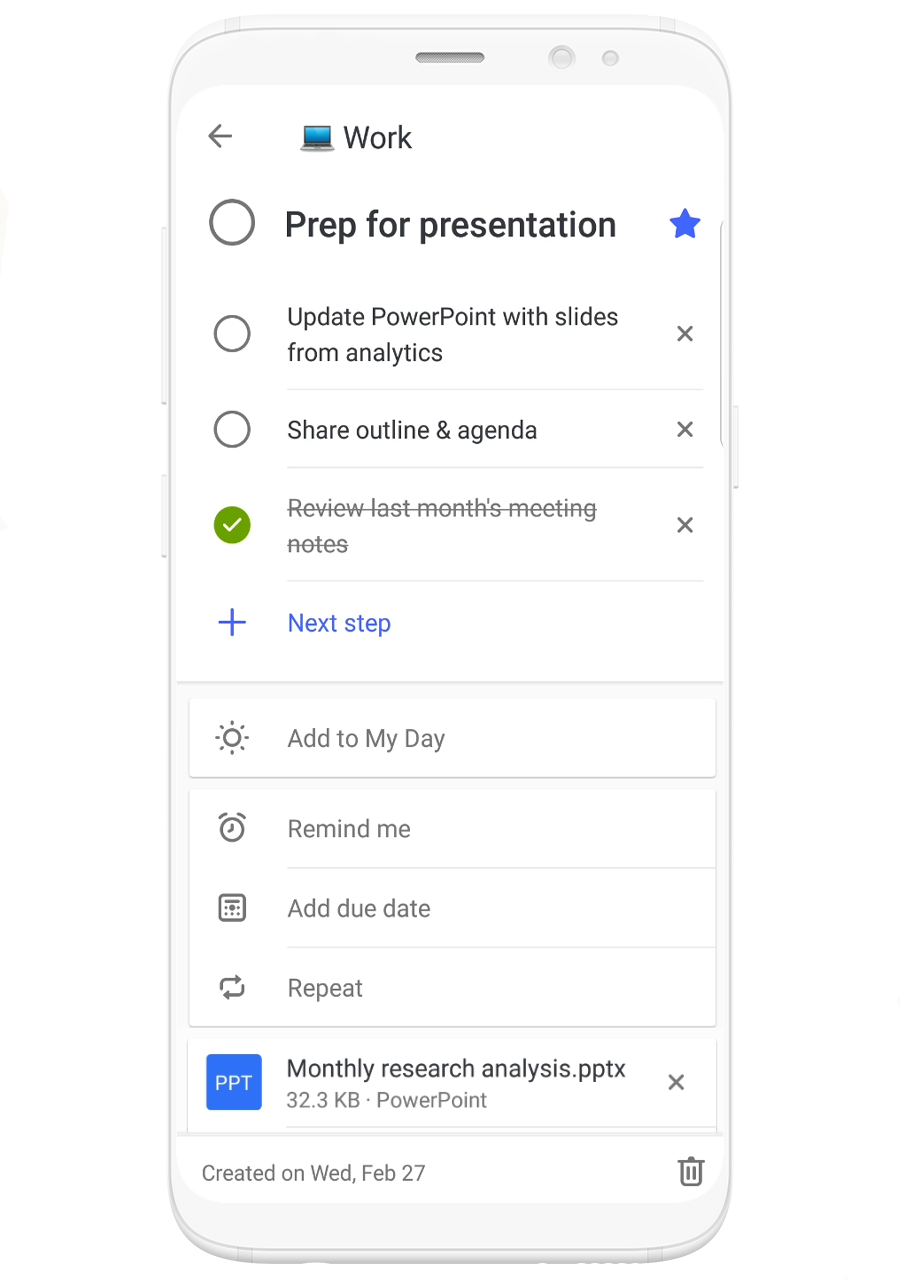
Quickly add photos and files to tasks in Microsoft To-Do—Attach files and photos to help make tasks more actionable with added context. This highly requested feature is now available on all platforms and syncs across your devices, so you can take your new file-attached tasks on the go.

Image of a phone using Microsoft To-Do to schedule prep time for a presentation.

Other updates

  • New one-time passcodes (OTP) from Azure Active Directory (Azure AD) make sharing and collaboration seamless for any user with any account.
  • Azure AD now supports automated user provisioning from Workday, enabling fast and efficient identity creation, so employees can access their Microsoft 365 apps and all other critical resources on day one.
  • Starting this month, the Teams desktop app will be installed along with the rest of the Office 365 ProPlus apps for all new installs.
  • Updates to the SharePoint Migration Tool make it even easier to bring your information to the cloud, with improvements like the ability to migrate web parts, pages, and site navigation.
Posted on Leave a comment

New cloud-based technology to empower cyber defenders

Cybersecurity is about people. The frontline defenders who stand between the promise of digital transformation and the daily reality of cyber-attacks need our help. At Microsoft, we’ve made it our mission to empower every person and organization on the planet to achieve more. Today that mission is focused on defenders. We are unveiling two new cloud-based technologies in Microsoft Azure Sentinel and Microsoft Threat Experts that empower security operations teams by reducing the noise, false alarms, time consuming tasks and complexity that are weighing them down. Let me start by sharing some insight into the modern defender experience.

Every day Microsoft security professionals help organizations respond to threats at scale and through targeted incident response. In one recent example from the latest Security Intelligence Report, Microsoft experts were called in to help several financial services organizations deal with attacks launched by a state-sponsored group that had gained administrative access and executed fraudulent transactions, transferring large sums of cash into foreign bank accounts. When the attack group realized they had been detected, they rapidly deployed destructive malware that crippled the customers’ operations for several days. Microsoft experts were on site within hours, working around the clock with the customers’ security teams to restore normal business operations.

Incidents like this are a reminder that many defenders are overwhelmed by threats and alerts – often spending their days chasing down false alarms instead of investigating and solving complex cases. Compounding the problem is a critical shortage of skilled cyber defenders, with an estimated shortfall of 3.5 million security professionals by 2021. With today’s announcements we are unlocking the power of the cloud and AI for security to do what they do best—reason over vast amounts of security signal, spot anomalies and bring global scale to highly trained security professionals.

Too many enterprises still rely on traditional Security Information and Event Management (SIEM) tools that are unable to keep pace with the needs of defenders, volume of data or the agility of adversaries. The cloud enables a new class of intelligent security technologies that reduce complexity and integrate with the platforms and productivity tools you depend on. Today we are pleased to announce Microsoft Azure Sentinel, the first native SIEM within a major cloud platform. Azure Sentinel enables you to protect your entire organization by letting you see and stop threats before they cause harm. With AI on your side it helps reduce noise drastically—we have seen an overall reduction of up to 90 percent in alert fatigue with early adopters. Because it’s built on Azure you can take advantage of nearly limitless cloud speed and scale and invest your time in security and not servers. In just a few clicks you can bring in your Microsoft Office 365 data for free and combine it with your other security data for analysis.

Azure Sentinel is the product of Microsoft’s close partnership with customers on their journey to digital transformation. We worked hand in hand with dozens of customers and partners to rearchitect a modern security tool built from the ground up to help defenders do what they do best – solve complex security problems. Early adopters are finding that Azure Sentinel reduces threat hunting from hours to seconds.

Corey McGarry, Senior Technical Specialist, Enterprise Operations, Tolko Industries, Ltd., told me, “After using Microsoft Azure Sentinel for six months, it has become a go-to resource every morning. We get a clear visual of what’s happening across our network without having to check all our systems and dashboards individually. I haven’t seen an offering like Microsoft Azure Sentinel from any other company.”

Azure Sentinel supports open standards such as Common Event Format (CEF) and broad partner connections, including Microsoft Intelligent Security Association partners such as Check Point, Cisco, F5, Fortinet, Palo Alto and Symantec, as well as broader ecosystem partners such as ServiceNow. You can even bring your own insights and collaborate with a diverse community of defenders. Azure Sentinel blends the insights of Microsoft experts and AI with the unique insights and skills of your own in-house defenders and machine learning tools to uncover the most sophisticated attacks before they take root. Azure Sentinel helps empower SecOps teams to keep their organizations safe by harnessing the power, simplicity and extensibility of Azure to analyze data from Microsoft 365 and security solutions from other vendors. Azure Sentinel is available in preview today from the Azure portal.

screenshot of Azure Sentinel overview page with bar graph, map and other sample data

Our approach to security is not only about applying the cloud and AI to your scale challenges, but also making the security operations experts who defend our cloud available to you. Therefore, we are pleased to announce Microsoft Threat Experts, a new service within Windows Defender ATP which provides managed hunting to extend the capability of your security operations center team. Through this service, Microsoft will proactively hunt over your anonymized security data for the most important threats, such as human adversary intrusions, hands-on-keyboard attacks, and advanced attacks like cyberespionage—helping your team prioritize the most important risks and respond quickly. The service also provides world-class expertise on demand. With the new “Ask a Threat Expert” button, your security operations team can submit questions directly in the product console. To join the public preview of Microsoft Threat Experts, apply in the Windows Defender ATP settings.

There are no easy answers or silver bullets for security, however the cloud is unlocking new capabilities. This is why we are putting the cloud and AI to work to extend and empower the defenders whose unique human insights are key to avoiding cyber threats. Azure Sentinel and Microsoft Threat Experts are two new capabilities that join our broad portfolio of security solutions across identity, endpoints, data, cloud applications and infrastructure. We look forward to showcasing Azure Sentinel and Microsoft Threat Experts at the RSA Conference next week and encourage you to stop by the Microsoft booth on the main show floor or any of our compelling sessions to learn more.

Tags: , , ,

Posted on Leave a comment

Volkswagen and Microsoft share progress on strategic partnership

ID. is the first vehicle generation to be connected to the Automotive Cloud

Volkswagen is preparing its digital ecosystem for the core markets of the future ID. model family. The ID. will be the first vehicle to use the Automotive Cloud and is to be launched in Europe in 2020. Production is to start in China the same year and a member of the ID. family will roll off the production line in the USA from 2022 onwards.

First lighthouse projects for connected vehicle services

Volkswagen and Microsoft are also working on first lighthouse projects for connected vehicles. They are concentrating on communication and navigation solutions as well as personalized services: These will leverage self-learning algorithms facilitating the use of services in the vehicle and offering occupants extended functions. Automated linking into telephone conferences and the transfer of prepared navigation destinations will only be the first steps, which will also include the integration of Microsoft Skype and Microsoft Office.

Volkswagen Development Center in Seattle makes progress

Progress is also being made with the establishment of the new Development Center in Seattle. Volkswagen had established this location for the development of the Automotive Cloud at the end of 2018. The idea of the Development Center is to learn from Microsoft’s highly developed culture of agile collaboration and digital leadership and transferring this culture to the center’s own organization. At the center, first developer teams are now starting on project work. Microsoft is providing support for the development of the new center in areas including the recruitment of specialists and project management.

CEOs speak about importance of partnership in Berlin

The two CEOs of Volkswagen, Herbert Diess, and Microsoft, Satya Nadella, visited the Volkswagen Digital Lab in Berlin on Wednesday. They spoke to media representatives about the importance of their strategic partnership and the challenges faced in the digital transformation of the automotive and IT industries.

For Volkswagen, Berlin is an important software development location. Apart from the Digital Lab, other competence centers have their headquarters here. These also include Carmeq, a subsidiary of Volkswagen which is moving ahead with the development of software for the new vehicle operating system “vw.os”. About 650 specialists at three locations are concentrating on “vw.os” as well as the development of software for driver assistance, driving convenience and infotainment functions.

Note for editors:
A film of the joint visit of Herbert Diess and Satya Nadella to the Digital Lab as well as other images will become available in the Volkswagen Newsroom in the course of Wednesday.

Posted on Leave a comment

5G at MWC: Here’s how this will change the way you work and live

Entrance to MWC19

Back in 1999, the first Wi-Fi-enabled laptop was introduced, and it wasn’t long before connectivity became a driving force in how the workplace evolved. Laptop sales began to overtake desktop PCs. As people realized the benefits of portability, open offices became a thing, as did laptops in conference rooms and coffee shops. And a few years later, smart phones made connectivity even more central to modern work and life.

At MWC Barcelona (formerly Mobile World Congress), we’re seeing a similar evolution. Announcements this week from telecoms and eSIM service enablers, demonstrate momentum toward building the infrastructure to provide the connectivity and capacity that LTE-enabled devices have been missing. These services are critical for customers to take advantage of 5G. The result is a wave of product innovation in both the consumer and corporate spaces like we haven’t seen in years.

Next Generation PCs

Over the past few months, we have seen the rise of LTE-enabled PCs that have extended battery life such as the ASUS NovaGo, HP Spectre x360 13, Lenovo Yoga C630 WOS and Samsung Galaxy Book2. These PCs marry the experience of a phone—awakening quickly, instantly connected and ready to go—with improved power availability.

Surface is also adopting this innovation with both the Surface Pro (5th Gen) and Surface GO available in LTE-enabled versions, offering our customers the perfect balance of performance, portability with additional connectivity options.

LTE-enabled PCs offer an always connected experience. You may not realize how frictionless the hunt for connectivity can be until you experience one of these PCs for yourself. No longer will you need to click on anything to connect, or duck into a coffee shop to get a signal, or ask your server what the Wi-Fi password is, or wait for a file to download on your hotel’s painfully slow connection. It’ll just be there, ready to go whenever you are—and more importantly, wherever you are. The beach, a park, or the back of a taxi.

These capabilities have been available as a PC add-on for some time. But with these new PCs it’s native, and while they work well with today’s 4G LTE connections, upcoming 5G connectivity will make for a transformative experience in personal computing.

Enabling constant connectivity with eSIMs

A big part of making that ubiquitous connectivity happen on a broader scale is the move from physical SIM cards in connected devices to electronic SIMs, or eSIMs.

eSIMs come with several advantages. For consumers, they bring the ability to stay connected by purchasing a data subscription on demand, when and where they need it. Since eSIMs can be updated over the internet, there is no need to visit a provider’s store.

Enterprises, meanwhile, get much more security and control with eSIMs in both phones and PCs. They can create multiple profiles for users traveling to different countries, enabling employees to be constantly connected to resources in the cloud. If a device is ever lost or stolen, it can be wiped first and then the connectivity disabled, without having to worry about whether it’s connected to the internet.

Since Microsoft announced Windows 10 support for eSIM back in 2016, we’ve seen much more interest in cellular-enabled devices, not only from PC makers, but also from the hardware vendors who create modems that now support eSIMs. As manufacturers and service providers roll out support for eSIMs in the coming months, expect to see them become a centerpiece for the connected computing movement.

5G: the newest technology disruptor

With so much potential just around the corner, there’s no doubt that 5G has MWC buzzing this week. As 5G capabilities begin to become available around the world, people are working to understand and prepare for the inevitable innovation and disruption it will bring across industries.

The high throughput of 5G enables extraordinary reductions in latency. Besides things like extremely fast downloads, improved clarity and reliability, the ability to deliver so much data, so quickly, opens up a world of possibilities for new technology solutions.

5G can enable and extend the intelligent edge, reaching drones flying remote inspections, allowing them to return high-definition video feeds and data analytics instantly. Autonomous vehicles in factories, warehouses or airports can be controlled and continually tracked to within one centimeter. New types of collaborative experiences can be enabled, putting everyone in the same virtual room. We’re talking untethered AR and VR and real-time gaming from anywhere.

Many are calling this the “year of infrastructure” as providers build out 5G capabilities across industries. On one hand, you have the telecommunications industry deploying the infrastructure and innovating with new services. And on the other, the entire ecosystem of connected computing device makers of all types, working to tap into the possibilities.

The results will be truly transformative. In our homes, in our cars, at our work, in our stadiums, in our entertainment centers, every industry, from precision agriculture to precision medicine, from personalized retail to personalized banking—every walk of life could see real changes in the coming years.

Microsoft partners and network providers jump in

With all of this going on, we’re very excited about some of the big announcements from our partners and device makers here at MWC. Partners are critical to making this a reality—device makers, silicon manufacturers, mobile operators, eSIM enablers, mobile device management providers (MDMs) and ISVs, all need to establish a new “connected computing” approach to business. And we’re hearing that’s just what they’re up to.

Devices

Qualcomm Technologies announced a new 5G-enabled Snapdragon X55 modem in the lead up to MWC, their second-generation 5G modem after the X50, which was announced in October, 2016.

This 5G modem will enable connectivity for smartphones, mobile hotspots, fixed wireless access points, extended reality devices, automotive applications, and larger-screen devices like LTE enabled PCs, laptops, tablets, which are critical to the ecosystem. For Microsoft this is foundational technology that underpins the sexier intelligent edge solutions to come, a key part of the full picture: PCs connected to a cloud service via 5G, with all of that computing power served up as if you were right there at the server farm.  They also announced Wi-Fi 6, which will play an important role for both consumers and in the enterprise.

Telecommunications services

Another foundational element will be onboarding service providers and offering up mobile data plans that let users get the most from LTE-enabled PCs and 5G. Mobile Plans is a Windows experience that provides consumers with an easy way to top off a data plan with their existing carrier, or sign up for additional data plans with local MNOs if their carrier is not available based on location. On that front, we’ve been working with Telstra in Australia for more than a year, and in the next few weeks they will launch a marketing push, offering customers who wish to sample the new technology, a 30-day trial that includes 30GB free data to use in Australia. Telstra joins our growing ecosystem of mobile operators including GigSky, KDDI Japan, Swisscom, Tele2 and Ubigi.

eSIMs

With eSIMs coming on in a big way, a new ecosystem has evolved, working together to address the productivity, connectivity and manageability gaps that commercial customers are currently experiencing. This week, several of these players are announcing new releases and partnerships within this category at MWC. As an example, IDEMIA and Mobile Iron will be sharing the offering for their common customers and mobile operators in support of the Windows commercial solution for eSIM. Wandera showcased its Windows connected PC solution, which helps enterprise customers define policies that govern how mobile data can be utilized by both users and mobile apps across a variety of network scenarios (physical SIMs, eSIMs, Wi-Fi, etc.). We are also excited to continue to work with mobile operators, such as C Spire and KDDI, as we get closer to deploying eSIM within the organizations of their customers.

Consumers are also benefitting from two new partnerships that will make it much easier for mobile operators to deliver support for easy connectivity with eSIM through Microsoft’s “Mobile Plans” app. Shown for the first time at MWC this week, Hewlett Packard Enterprise (HPE) and Microsoft demonstrated the expansion of “Digital Identity” with HPE’s Device Entitlement Gateway (DEG), a software product that enables mobile network operators to safely and securely connect to the Windows 10 eSIM platform.

Microsoft is also partnering with Amdocs to take advantage of their “Digital eSIM platform” offering to streamline the Mobile Operator onboarding process into Mobile Plans.

Just like the Wi-Fi revolution at the turn of the century, we expect this transformation to connected computing and 5G to take time. But as we’re seeing this week in Barcelona, the entire ecosystem is working to sort out the challenges and make this a new era of continuous, instantaneous, high-speed connectivity.

Updated February 27, 2019 12:22 am