The Fedora CoreOS and QA teams are gearing up for Fedora 44, and we need your help! We are organizing a Test Week running from March 23 to March 27, 2026.
This event is a nice opportunity for the community to test Fedora CoreOS (FCOS) based on Fedora 44 content before it officially reaches the testing and stable streams. By participating, you help us ensure a smooth and reliable experience for all users.
How does a Test Week work?
A Test Week is an event where anyone can help verify that the upcoming release works as expected. If you’ve been looking for a way to get started with Fedora contribution, this is the perfect entry point.
To participate, you simply need to:
Download the FCOS test images.
Follow the step-by-step test cases provided.
Report whether the tests passed or failed on your hardware or VM.
The Wiki Page is your primary source of information for this event. Once you have completed your tests, please log your results here! Your contribution, big or small, makes a huge difference. Let’s work together to make this release a great one. Happy testing!
Join the Live Sync Session
Want to chat with the team? We are hosting a virtual in-person session on Tuesday, March 24, from 3:00 PM – 4:30 PM UTC. Drop in to ask questions and get help with testing!
Silverblue is an operating system for your desktop built on Fedora Linux. It’s excellent for daily use, development, and container-based workflows. It offers numerous advantages such as being able to roll back in case of any problems. This article provides the steps to rebase to the newly released Fedora Linux 44 Beta, and how to revert if anything unforeseen happens.
NOTE: Before attempting an upgrade to the Fedora Linux 44 Beta, apply any pending upgrades to your current system.
Updating using the terminal
Because Fedora Linux 44 Beta is not available in GNOME Software, the whole process must be done through a terminal.
First, check if the 44 branch is available, which should be true now:
$ ostree remote refs fedora
You should see the following line in the output:
fedora:fedora/44/x86_64/silverblue
If you want to pin the current deployment (this deployment will stay as an option in GRUB until you remove it), you can do it by running:
# 0 is entry position in rpm-ostree status
$ sudo ostree admin pin 0
To remove the pinned deployment use the following command ( “2” corresponds to the entry position in the output from rpm-ostree status ):
$ sudo ostree admin pin --unpin 2
Next, rebase your system to the Fedora 44 branch.
$ rpm-ostree rebase fedora:fedora/44/x86_64/silverblue
The final thing to do is restart your computer and boot to Fedora Silverblue 44 Beta.
How to revert
If anything bad happens — for instance, if you can’t boot to Fedora Silverblue 44 Beta at all — it’s easy to go back. Pick the previous entry in the GRUB boot menu (you need to press ESC during boot sequence to see the GRUB menu in newer versions of Fedora Silverblue), and your system will start in its previous state. To make this change permanent, use the following command:
$ rpm-ostree rollback
That’s it. Now you know how to rebase to Fedora Silverblue 44 Beta and fall back. So why not do it today?
Because there are similar questions in comments for each blog about rebasing to newer version of Silverblue I will try to answer them in this section.
Question: Can I skip versions during rebase of Fedora Linux? For example from Fedora Silverblue 42 to Fedora Silverblue 44?
Answer: Although it could be sometimes possible to skip versions during rebase, it is not recommended. You should always update to one version above (42->43 for example) to avoid unnecessary errors.
Question: I have rpm-fusion layered and I got errors during rebase. How should I do the rebase?
Answer: If you have rpm-fusion layered on your Silverblue installation, you should do the following before rebase:
After doing this you can follow the guide in this article.
Question: Could this guide be used for other ostree editions (Fedora Atomic Desktops) as well like Kinoite, Sericea (Sway Atomic), Onyx (Budgie Atomic),…?
Yes, you can follow the Updating using the terminal part of this guide for every ostree edition of Fedora. Just use the corresponding branch. For example for Kinoite use fedora:fedora/44/x86_64/kinoite
On Tuesday, 10 March 2026, it is our pleasure to announce the availability of Fedora Linux 44 Beta! As with every beta release, this is your opportunity to contribute by testing out the upcoming Fedora Linux 44 Beta release. Testing the beta release is a vital way you can contribute to the Fedora Project. Your testing is invaluable feedback that helps us refine what the final F44 experience will be for all users.
We hope you enjoy this latest beta version of Fedora!
How to get the Fedora Linux 44 Beta release
You can download Fedora Linux 44 Beta, or our pre-release edition versions, from any of the following places:
The Fedora CoreOS “next” stream moves to the beta release one week later. Content for F44, however, is still available from their current branched stream to enjoy now.
You can also update an existing system to the beta using DNF system-upgrade.
The Fedora Linux 44 Beta release content may also be available for Fedora Spins and Labs.
Fedora Linux 44 Beta highlights
Like every Beta release, the Fedora Linux 44 Beta release is packed with changes. The following are highlights from the full set of changes for F44. They are ready for you to test drive in the Fedora Linux 44 Beta.
Installer and desktop Improvements
Goodbye Anaconda Created Default Network Profiles: This change impacts how Anaconda populates network device profiles. Only those devices configured during installation (by boot options, kickstart or interactively in UI) become part of the final system install. This behavior change addresses some long standing issues caused by populating network profiles for all network devices. These made it difficult to correctly reconfigure devices post-install.
Unified KDE Out of the Box Experience: This change introduces the post-install Plasma Setup application for all Fedora KDE variants. In the variants making use of this new setup application, the Anaconda configuration will be adjusted to disable redundant configuration stages that duplicate the functionality exposed in the setup application.
KDE Plasma Login Manager: This change introduced the Plasma Login Manager (PLM) for Fedora KDE variants instead of SDDM for the default login manager.
Reworked Games Lab: This change modernizes the Games Lab deliverable by leveraging the latest technologies. This offers a high quality gaming and game development experience. It includes a change from Xfce to KDE Plasma to take advantage of the latest and greatest Wayland stack for gaming.
Budgie 10.10: Budgie 10.10 is the latest release of Budgie Desktop. Budgie 10.10 migrates from X11 to Wayland. This ensures a viable long-term user experience for Fedora Budgie users and lays groundwork for the next major Budgie release.
LiveCD Improvements
Automatic DTB selection for aarch64 EFI systems: This change intends to make the aarch64 Fedora Live ISO images work out of the box on Windows on ARM (WoA) laptops. This will automatically select the right DTB at boot.
Modernize Live Media: This change modernizes the live media experience by switching to the “new” live environment setup scripts provided by livesys-scripts and leverage new functionality in dracut to enable support for automatically enabling persistent overlays when flashed to USB sticks.
System Enhancements
GNU Toolchain Update: The updates to the GNU Toolchain ensure Fedora stays current with the latest features, improvements, and bug and security fixes from the upstream gcc, glibc, binutils, and gdb projects. They guarantee a working system compiler, assembler, static and dynamic linker, core language runtimes, and debugger.
Reproducible Package Builds: Over the last few releases, we changed our build infrastructure to make package builds reproducible. This is enough to reach 90%. The remaining issues need to be fixed in individual packages. With this change, all package builds are expected to be reproducible in the F44 final release. Bugs will be filed against packages when an irreproducibility is detected. The goal is to have no fewer than 99% of package builds reproducible.
Packit as a dist-git CI: This change continues down the path of modernizing the Fedora CI experience by moving forward with the final phase of the plan to integrate Packit as the default CI for Fedora dist-git.
Remove Python Mock Usage: python-mock was deprecated with Fedora 34. However, it is still in use in many packages. We plan to go through the remaining usages and clean them up, with the goal of retiring python-mock from Fedora.
Adoption of new R Packaging Guidelines: This change introduces new rpm macros to help standardize and automate common R language packaging tasks resulting in a simplification of the rpm spec files.
Introduction of Nix Developer Tool: This change adds the nix package manager developer tool to Fedora.
Hardlink identical files in packages by default: With this change, all fedora packages will automatically hardlink files under /usr by default as a post install action. The mechanism introduced in this change is designed specifically to address reproducibility validation race conditions found in use by traditional hardlinking approaches.
Fedora Linux 44 Beta upgrades and removals
Golang 1.26: Fedora users will receive the most current and recent Go release. Being close to upstream allows us to avoid security issues and provide more updated features. Consequently, Fedora will provide a reliable development platform for the Go language and projects written in it.
MariaDB 11.8 as Distribution Default Version: The distribution default for MariaDB packaging will switch to 11.8. Multiple versions of the MariaDB packages will continue to be available. This change only impact which of the versioned packages presents itself as the unversioned “default”
IBus 1.5.34: Fedora users will benefit from better support of Wayland and Emoji features.
Django 6.x: Fedora Users can make use of the latest Django version; users who use Django add-ons that are not ready for 6.0 yet should be able to switch it out for python3-django5
TagLib 2: This change puts Fedora on the latest supported version, and it will benefit from improvements in future minor releases with a simple update.
Helm 4: Helm 4 has been released upstream with intentional backwards-incompatible changes relative to Helm 3. To ensure a smooth transition for Fedora, this Change introduces Helm 4 as the default helm package, while providing a parallel-installable helm3 package for users and tooling that still rely on Helm 3.
Ansible 13: Update from Ansible 11 and Ansible Core 2.18 to Ansible 13 and Ansible Core 2.20. This includes major robustness and security fixes to the templating engine which might break existing playbooks that had incorrect behavior. This was silently ignored in previous releases.
TeXLive 2025: With this change, we update to the latest version of TeXLive (2025). We also move to a modularized packaging system, which splits the “texlive” SPEC into a set of collection and scheme packages. This reflects the categorization that TeXLive upstream defines. Each collection package will package the immediate component dependencies as subpackages.
Drop QEMU 32-bit Host Builds: Fedora will stop building QEMU on i686 architecture. This change brings Fedora inline with the QEMU upstream project decision to deprecate support for 32-bit host builds. Upstream intends to start removing 32-bit host build support code in a future release and will assume 64-bit atomic ops in all builds.
Drop FUSE 2 libraries in Atomic Desktops: Remove FUSE 2 binaries and libraries from all Atomic Desktops
Drop compatibility for pkla polkit rules in Atomic Desktops: Remove support for deprecated pkla polkit rules from all Fedora Atomic Desktops
More information about Fedora Linux 44 Beta
Details and more information on the many great changes landing in Fedora Linux 44 are available on the Change Set page.
Fedora is heading back to sunny Southern California! As we gear up for SCaLE 23x, we are thrilled to announce a special edition of Fedora Hatch. This is taking place on Friday, March 6 as an embedded track at SCALE.
Whether you’re a long-time contributor, a curious user, or someone looking to make your very first pull request, Fedora Hatch is designed for you. This is our way of bringing the experience of Flock (our annual contributor conference) to a local level. It focuses on connection, collaboration, and community growth.
What’s Happening?
This year, Fedora has secured a dedicated track on Friday at SCALE. We’ve curated a line-up that balances technical deep dives with essential community initiatives.
When: Friday, March 6, 2026
Where: Room 208, Pasadena Convention Center
Who: You! (And a bunch of friendly Fedorans)
The Schedule Highlights
We have a packed morning featuring five talks and a hands-on workshop:
Getting Started in Open Source and Fedora (Amy Marrich): Are you new to the world of open source? Or are you looking to make your first contribution? This session will provide a guide for beginners interested in contributing to open source projects. It will focus on the Fedora project. We’ll cover a variety of topics, like finding suitable projects, making your first pull request, and navigating community interactions. Attendees will leave with practical tips, resources, and the confidence to embark on their open source journey.
Fedora Docs Revamp Initiative (Shaun McCance): The Fedora Council recently approved an initiative to revamp the Fedora docs. The initiative aims to establish a support team to maintain a productive environment for writing docs. It will establish subteams with subject matter expertise to develop docs in specific areas of interest. We’ll describe some of the challenges the Fedora docs have faced, and present the progress so far in improving the docs. You’ll also learn how you can help Fedora have better docs.
A Brief Tour of the Age of Atomic (Laura Santamaria): Ever wished to try a number of different desktop experiences quickly in your homelab? Maybe it’s time to explore Fedora Atomic or Universal Blue! The tour starts with what makes these experiences special. It will then review the options including Silverblue, Cosmic, Bluefin and Bazzite (yes, the gaming OS). We’ll briefly get under the hood to explore bootc, the technology powering Atomic. Finally, we’ll explore how you can contribute to the future of Fedora Atomic.
Accelerating CentOS with Fedora (Davide Cavalca): This talk will explore how CentOS SIGs are able to leverage the work happening in Fedora to improve the quality and velocity of packages in CentOS Stream. We’ll cover how the CentOS Hyperscale SIG is able to deliver faster-moving updates for select packages, and how the CentOS Proposed Updates SIG integrates bugfixes and improves the contribution process to the distribution.
Agentic Workloads on Linux: Btrfs + Service Accounts Architecture (David Duncan): As AI agents become more prevalent in enterprise environments, Linux systems need architectural patterns that provide isolation, security, and efficient resource management. This session explores an approach, using BTRFS subvolumes combined with dedicated service accounts, to build secure, isolated environments for autonomous AI agents in enterprise deployment.
RPM Packaging Workshop (Carl George): While universal package formats like Flatpak, Snap, and AppImage have gained popularity for their cross-distro support, native system packages remain a cornerstone of Linux distributions. These native formats offer numerous benefits. Understanding them is essential for those who want to contribute to the Linux ecosystem at a deeper level. In this hands-on workshop, we’ll explore RPM, the native package format used by Fedora, CentOS, and RHEL. RPM is a powerful and flexible tool. It plays a vital role in the management and distribution of software for these operating systems.
Don’t forget to swing by the Fedora Booth in the Expo Hall! Our team will be there all weekend (March 6–8) with live demonstrations of Fedora Linux 43, GNOME 49 improvements, and plenty of fresh swag to go around.
Registration Details
To join us at the Hatch, you’ll need a SCaLE 23x pass.
Location: Pasadena Convention Center, 300 E Green St, Pasadena, CA.
The Podman team and the Fedora Quality Assurance team are organizing a Test Week from Friday, February 27 through Friday, March 6, 2026. This is your chance to get an early look at the latest improvements coming to Podman and see how they perform on your machine.
What is Podman?
For those new to the tool, Podman is a daemonless, Linux-native engine for running, building, and sharing OCI containers. It offers a familiar command-line experience but runs containers safely without requiring a root daemon.
What’s Coming in Podman 5.8?
The upcoming release includes updates designed to make Podman faster and more robust. Here is what you can look forward to, and what you can try out during this Fedora Test Day.
A Modern Database Backend (SQLite)
Podman is upgrading its internal storage logic by transitioning to SQLite. This change modernizes how Podman handles data under the hood, aiming for better stability and long-term robustness.
Faster Parallel Pulls
This release brings optimizations to how Podman downloads image layers, specifically when pulling multiple images at the same time. For a deep dive into the engineering behind this, check out the developer blog post on Accelerating Parallel Layer Creation.
Experiment and Explore: Feel free to push the system a bit and try pulling several large images simultaneously to see if you notice the performance boost. Beyond that, please bring your own workflows. Don’t just follow the wiki instructions. Run the containers and commands you use daily. Your specific use cases are the best way to uncover edge cases that standard tests might miss.
Mrhbaan, Fedora community! I am happy to share that as of 10 February 2026, Fedora is now available in Syria. Last week, the Fedora Infrastructure Team lifted the IP range block on IP addresses in Syria. This action restores download access to Fedora Linux deliverables, such as ISOs. It also restores access from Syria to Fedora Linux RPM repositories, the Fedora Account System, and Fedora build systems. Users can now access the various applications and services that make up the Fedora Project. This change follows a recent update to the Fedora Export Control Policy. Today, anyone connecting to the public Internet from Syria should once again be able to access Fedora.
This article explains why this is happening now. It also covers the work behind the scenes to make this change happen.
Why Syria, why now?
You might wonder: what happened? Why is this happening now? I cannot answer everything in this post. However, the story begins in December 2024 with the fall of the Assad regime in Syria. A new government took control of the country. This began a new era of foreign policy in Syrian international relations.
This may seem like a small change. Yet, it is significant for Syrians. Some U.S. Commerce Department regulations remain in place. However, the U.S. Department of the Treasury’s policy change now allows open source software availability in Syria. The Fedora Project updated its stance to welcome Syrians back into the Fedora community. This matches actions taken by other major platforms for open source software, such as Microsoft’s GitHub.
Syria & Fedora, behind the scenes
Opening the firewall to Syria took seconds. However, months of conversations and hidden work occurred behind the scenes to make this happen. The story begins with a ticket. Zaid Ballour (@devzaid) opened Ticket #541 to the Fedora Council on 1 September 2025. This escalated the issue to the Fedora Council. It prompted a closer look at the changing political situation in Syria.
Jef Spaleta and I dug deeper into the issue. We wanted to understand the overall context. The United States repealed the 2019 Caesar Act sanctions in December 2025. This indicated that the Fedora Export Policy Control might be outdated.
During this time, Jef and I spoke with legal experts at Red Hat and IBM. We reviewed the situation in Syria. This review process took time. We had to ensure compliance with all United States federal laws and sanctions. The situation for Fedora differs from other open source communities. Much of our development happens within infrastructure that we control. Additionally, Linux serves as digital infrastructure. This context differs from a random open source library on GitHub.
However, the path forward became clear after the repeal of the 2019 Caesar Act. After several months, we received approval. Fedora is accessible to Syrians once again.
We wanted to share this exciting announcement now. It aligns with our commitment to the Fedora Project vision:
“The Fedora Project envisions a world where everyone benefits from free and open source software built by inclusive, welcoming, and open-minded communities.“
We look forward to welcoming Syrians back into the Fedora community and the wider open source community at large. Mrhbaan!
If you followed along with my blog, you’d have a chatbot running on your local Fedora machine. (And if not, no worries as the scripts below implement this chatbot!) Our chatbot talks, and has a refined personality, but does it know anything about the topics we’re interested in? Unless it has been trained on those topics, the answer is “no”.
I think it would be great if our chatbot could answer questions about Fedora. I’d like to give it access to all of the Fedora documentation.
How does an AI know things it wasn’t trained on?
A powerful and popular technique to give a body of knowledge to an AI is known as RAG, Retrieval Augmented Generation. It works like this:
If you just ask an AI “what color is my ball?” it will hallucinate an answer. But instead if you say “I have a green box with a red ball in it. What color is my ball?” it will answer that your ball is red. RAG is about using a system external to the LLM to insert that “I have a green box with a red ball in it” part into the question you are asking the LLM. We do this with a special database of knowledge that takes a prompt like “what color is my ball?”, and finds records that match that query. If the database contains a document with the text “I have a green box with a red ball in it”, it will return that text, which can then be included along with your original question. This technique is called RAG, Retrieval Augmented Generation.
ex:
“What color is my ball?”
“Your ball is the color of a sunny day, perhaps yellow? Does that sound right to you?”
“I have a green box with a red ball in it. What color is my ball?”
“Your ball is red. Would you like to know more about it?”
The question we’ll ask for this demonstration is “What is the recommended tool for upgrading between major releases on Fedora Silverblue”
The answer I’d be looking for is “ostree”, but when I ask this of our chatbot now, I get answers like:
Red Hat Subscription Manager (RHSM) is recommended for managing subscriptions and upgrades between major Fedora releases.
You can use the Fedora Silver Blue Upgrade Tool for a smooth transition between major releases.
You can use the `dnf distro-sync` command to upgrade between major releases in Fedora Silver Blue. This command compares your installed packages to the latest packages from the Fedora Silver Blue repository and updates them as needed.
These answers are all very wrong, and spoken with great confidence. Here’s hoping our RAG upgrade fixes this!
Docs2DB – An open source tool for RAG
We are going to use the Docs2DB RAG database application to give our AI knowledge. (note, I am the creator of Docs2DB!)
A RAG tool consists of three main parts. There is the part that creates the database, ingesting the source data that the database holds. There is the database itself, it holds the data. And there is the part that queries the database, finding the text that is relevant to the query at hand. Docs2DB addresses all of these needs.
Gathering source data
This section describes how to use Docs2DB to build a RAG database from Fedora Documentation. If you would like to skip this section and just download a pre-built database, here is how you do it:
If you do download the pre-made database then skip ahead to the next section.
Now we are going to see how to make a RAG database from source documentation. Note that the pre-built database, downloaded in the curl command above, uses all of the Fedora documentation, whereas in this example we only ingest the “quick docs” portion. FedoraDocsRag, from github, is the project that builds the complete database.
To populate its database, Docs2DB ingests a folder of documents. Let’s get that folder together.
There are about twenty different Fedora document repositories, but we will only be using the “quick docs” for this demo. Get the repo:
Fedora docs are written in AsciiDoc. Docs2DB can’t read AcsciiDoc, but it can read HTML. (The convert.sh script is available at the end of this article). Just copy the convert.sh script into the quick-docs repo and run it and it makes an adjacent quick-docs-html folder.
sudo dnf install podman podman-compose
cd quick-docs
curl -LO https://gist.githubusercontent.com/Lifto/73d3cf4bfc22ac4d9e493ac44fe97402/raw/convert.sh
chmod +x convert.sh
./convert.sh
cd ..
Now let’s ingest the folder with Docs2DB. The common way to use Docs2DB is to install it from PyPi and use it as a command line tool.
A word about uv
For this demo we’re going to use uv for our Python environment. The use of uv has been catching on, but because not everybody I know has heard of it, I want to introduce it. Think of uv as a replacement for venv and pip. When you use venv you first create a new virtual environment. Then, and on subsequent uses, you “activate” that virtual environment so that magically, when you call Python, you get the Python that is installed in the virtual environment you activated and not the system Python. The difference with uv is that you call uv explicitly each time. There is no “magic”. We use uv here in a way that uses a temporary environment for each invocation.
Install uv and Podman on your system:
sudo dnf install -y uv podman podman-compose
# These examples require the more robust Python 3.12
uv python install 3.12
# This will run Docs2DB without making a permanent installation on your system
uvx --python 3.12 docs2db ingest quick-docs-html/
Only if you are curious! What Docs2DB is doing
If you are curious, you may note that Docs2DB made a docs2db_content folder. In there you will find json files of the ingested source documents. To build the database, Docs2DB ingests the source data using Docling, which generates json files from the text it reads in. The files are then “chunked” into the small pieces that can be inserted into an LLM prompt. The chunks then have “embeddings” calculated for them so that during the query phase the chunks can be looked up by “semantic similarity” (e.g.: “computer”, “laptop” and “cloud instance” can all map to a related concept even if their exact words don’t match). Finally, the chunks and embeddings are loaded into the database.
Build the database
The following commands complete the database build process:
uv tool run --python 3.12 docs2db chunk --skip-context
uv tool run --python 3.12 docs2db embed
uv tool run --python 3.12 docs2db db-start
uv tool run --python 3.12 docs2db load
Now let’s do a test query and see what we get back
uvx --python 3.12 docs2db-api query "What is the recommended tool for upgrading between major releases on Fedora Silverblue" --format text --max-chars 2000 --no-refine
On my terminal I see several chunks of text, separated by lines of —. One of those chunks says:
“Silverblue can be upgraded between major versions using the ostree command.”
Note that this is not an answer to our question yet! This is just a quote from the Fedora docs. And this is precisely the sort of quote we want to supply to the LLM so that it can answer our question. Recall the example above about “I have green box with a red ball in it”? The statement the RAG engine found about ostree is the equivalent for this question about upgrading Fedora Silverblue. We must now pass it on to the LLM so the LLM can use it to answer our question.
Hooking it in: Connecting the RAG database to the AI
Later in this article you’ll find talk.sh. talk.sh is our local, open source, LLM-based verbally communicating AI; and it is just a bash script. To run it yourself you need to install a few components, this blog walks you through the whole process. The talk.sh script gets voice input, turns that into text, splices that text into a prompt which is then sent to the LLM, and finally speaks back the response.
To plug the RAG results into the LLM we edit the prompt. Look at step 3 in talk.sh and you see we are injecting the RAG results using the variable $CONTEXT. This way when we ask the LLM a question, it will respond to a prompt that basically says “You are a helper. The Fedora Docs says ostree is how you upgrade Fedora Silverblue. Answer this question: How do you upgrade Fedora Silverblue?”
“What is the recommended tool for upgrading between major releases on Fedora Silverblue”
And we get:
“Ostree command is recommended for upgrading Fedora Silver Blue between major releases. Do you need guidance on using it?”
Sounds good to me!
Knowing things
Our AI can now know the knowledge contained in documents. This particular technique, RAG (Retrieval Augmented Generation), adds relevant data from an ingested source to a prompt before sending that prompt to the LLM. The result of this is that the LLM generates its response in consideration of this data.
Try it yourself! Ingest a library of documents and have your AI answer questions with its new found knowledge!
AI Attribution: The convert.sh and talk.sh scripts in this article were written by ChatGPT 5.2 under my direction and review. The featured image was generated using Google Gemini.
convert.sh
OUT_DIR="$PWD/../quick-docs-html"
mkdir -p "$OUT_DIR" podman run --rm \ -v "$PWD:/work:Z" \ -v "$OUT_DIR:/out:Z" \ -w /work \ docker.io/asciidoctor/docker-asciidoctor \ bash -lc ' set -u ok=0 fail=0 while IFS= read -r -d "" f; do rel="${f#./}" out="/out/${rel%.adoc}.html" mkdir -p "$(dirname "$out")" echo "Converting: $rel" if asciidoctor -o "$out" "$rel"; then ok=$((ok+1)) else echo "FAILED: $rel" >&2 fail=$((fail+1)) fi done < <(find modules -type f -path "*/pages/*.adoc" -print0) echo echo "Done. OK=$ok FAIL=$fail" '
talk.sh
#!/usr/bin/env bash set -e # Path to audio input
AUDIO=input.wav # Step 1: Record from mic
echo " Speak now..."
arecord -f S16_LE -r 16000 -d 5 -q "$AUDIO" # Step 2: Transcribe using whisper.cpp
TRANSCRIPT=$(./whisper.cpp/build/bin/whisper-cli \ -m ./whisper.cpp/models/ggml-base.en.bin \ -f "$AUDIO" \ | grep '^\[' \ | sed -E 's/^\[[^]]+\][[:space:]]*//' \ | tr -d '\n')
echo " $TRANSCRIPT" # Step 3: Get relevant context from RAG database
echo " Searching documentation..."
CONTEXT=$(uv tool run --python 3.12 docs2db-api query "$TRANSCRIPT" \ --format text \ --max-chars 2000 \ --no-refine \ 2>/dev/null || echo "") if [ -n "$CONTEXT" ]; then echo " Found relevant documentation:" echo "- - - - - - - - - - - - - - - - - - - - - - - - - - - - - - - - - - - - - - - - -" echo "$CONTEXT" echo "- - - - - - - - - - - - - - - - - - - - - - - - - - - - - - - - - - - - - - - - -"
else echo " No relevant documentation found"
fi # Step 4: Build prompt with RAG context
PROMPT="You are Brim, a steadfast butler-like advisor created by Ellis. Your pronouns are they/them. You are deeply caring, supportive, and empathetic, but never effusive. You speak in a calm, friendly, casual tone suitable for text-to-speech. Rules: - Reply with only ONE short message directly to Ellis. - Do not write any dialogue labels (User:, Assistant:, Q:, A:), or invent more turns.
- ≤100 words.
- If the documentation below is relevant, use it to inform your answer.
- End with a gentle question, then write <eor> and stop.
Relevant Fedora Documentation:
$CONTEXT
User: $TRANSCRIPT
Assistant:" # Step 5: Get LLM response using llama.cpp
RESPONSE=$( LLAMA_LOG_VERBOSITY=1 ./llama.cpp/build/bin/llama-completion \ -m ./llama.cpp/models/microsoft_Phi-4-mini-instruct-Q4_K_M.gguf \ -p "$PROMPT" \ -n 150 \ -c 4096 \ -no-cnv \ -r "<eor>" \ --simple-io \ --color off \ --no-display-prompt
) # Step 6: Clean up response
RESPONSE_CLEAN=$(echo "$RESPONSE" | sed -E 's/<eor>.*//I')
RESPONSE_CLEAN=$(echo "$RESPONSE_CLEAN" | sed -E 's/^[[:space:]]*Assistant:[[:space:]]*//I') echo ""
echo " $RESPONSE_CLEAN" # Step 7: Speak the response
echo "$RESPONSE_CLEAN" | espeak
Anaconda installer now supports installation of bootc based bootable container images using the new bootc command. It has supported several types of payload to populate the root file system during installation. These include RPM packages (likely the most widely used option), tarball images you may know from Fedora Workstation, ostree, and rpm-ostree containers. The newest addition to the family, from a couple of weeks ago, is bootc-based bootable containers.
The difference is under the hood
We have added a new bootc kickstart command to Anaconda to support the new feature. This is very similar to the ostreecontainer command that has been present for some time. From the user’s perspective the two are very similar. The main difference, however, is under the hood.
One of the most important setup steps for a deployment is to create a requested partitioning in both cases. When the partitioning is ready, the ostreecontainer command makes Anaconda deploy the image onto the root filesystem using the ostree tool. It also executes the bootupctl tool to install and set up the bootloader. By contrast, with bootc containers installed using the bootc kickstart command, both the filesystem population and bootloader configuration is performed via the bootc tool. This makes the deployment process even more integrated.
The content of the container images used for installation is another difference. The bootc-enabled images are somewhat more versatile. Apart from installation using Anaconda, they provide a self-installing option via the bootc command executed from within a running container.
On the other hand, both options provide you with a way to install an immutable system based on a container image. This option may be useful for particular use cases where regular installation from RPM packages is not desired. This might be due to potentially lower deployment speed or inherent mutability of the resulting system.
A simple how-to
In practice, you’d likely use a custom container with pre-configured services, user accounts and other configuration bits and pieces. However, if you want to quickly try out how the new Anaconda’s feature works, you just need to follow a few simple steps. Starting with a Fedora Rawhide ISO:
First, take an existing container from a registry and create a minimal kickstart file instructing Anaconda to install the bootable container image:
# Beware that this kickstart file will wipe out the existing disk partitions.
# Use it only in an experimental/isolated environment or edit it accordingly!
zerombr
clearpart --all --initlabel
autopart lang en_US.UTF-8
keyboard us timezone America/New_York --utc
rootpw changeme bootc --source-imgref=registry:quay.io/fedora/fedora-bootc:rawhide
As a next step, place the kickstart file in some reachable location (e. g. HTTP server), point Anaconda to it by appending the following on the kernel command line:
inst.ks=http://url/to/kickstart
Now start the installation.
Alternatively, you may use the mkksiso tool provided by the lorax package to embed the kickstart file into the installation ISO.
When installation and reboot is complete, you are presented with an immutable Fedora Rawhide system. It will be running on your hardware (or VM) installed from a bootable container image.
Is there anything more about bootc in Anaconda?
You may ask if this option is limited to Fedora Rawhide container images. Technically speaking, you can use the Fedora Rawhide installation ISO to install, for instance, a CentOS Stream container image:
Nevertheless, keep in mind that for now Anaconda will handle it as Fedora installation in such a case. This is because it runs from a Fedora Rawhide boot ISO. This may result in unforeseen problems, such as getting a btrfs-based partitioning that CentOS Stream won’t be able to boot from. This particular issue is easily overcome by explicitly telling Anaconda to use some different partitioning type, e. g. autopart –fstype=xfs. We would like to address the lack of container images handling based on the contained operating system or flavour in the future. For now, one just needs to take the current behavior into consideration when using the bootc command.
There are a couple more known limitations in Anaconda or bootc at this point in time. These include lack of support for partitioning setups spanning multiple disks, support for arbitrary mount points, or for installation from authenticated registries. But we hope it won’t take long to solve those shortcomings. There are also plans to make the new bootc command available even on the RHEL-10 platform.
We invite you to try out this new feature and share your experience, ideas or comments with the Installer team. We are looking forward to hearing from you in a thread on discussion.fedoraproject.org!
The core motivation behind data analysis pipelines, and the focus of this article, is the need to establish a clear path from unprocessed data to actionable insights for contributor engagement and impact. The key question is “what are we trying to measure to ensure the continuity of community work?”
As a side note, my preparation for the ADSP (Advanced Data Analysis Semi-Professional) certification in Korea utilized RStudio Desktop, running on a Fedora Linux environment. I got hands-on with R’s core statistical toolkit, leveraging base functions. Among these were summary()1 and lm()2 as the basis for fundamental hypothesis testing and regression analysis3. I became more intrigued by R’s power after testing its data manipulation packages (especially the key package dplyr).
With this background in mind, the article focuses on the design of an analysis pipeline that fulfills three objectives:
it ensures scalable data transformation and analysis capabilities
Establishing such a robust foundation is essential for producing reliable and validated metrics for the contributor community, which itself is subject to ongoing definition and validation.
Acknowledgement: I extend my sincere gratitude to Justin Wheeler for connecting me with the Fedora Data Working Group (FDWG), and to Michael Winters and K Naraian for their guidance, discussion, and support throughout the design and validation of this data analysis pipeline.
Scope and Tool Selection: Please note that this analysis pipeline represents a combination of tools and methods chosen from my perspective as a data analyst, particularly one with a background in the CRM (Customer Relationship Management) domain and consumer electronics industry. Therefore, other analysts or data engineers may utilize different combinations of technologies based on their own expertise or project requirements.
The role of the analyst is undergoing a fundamental transformation in 2025. We are moving beyond the traditional responsibility of performing statistical analysis and presenting visualization on pre-cleaned data. Today, the modern analyst must evolve into a “Data Ops(Operations)”. This requires a holistic understanding of the data lifecycle and bridging the gap between business context and data engineering. This expansion mandates a familiarity with ELT/ETL processes to examine the quality and structure of the data source.
Moreover, data analysts must be adept at processing diverse data types such as semi-structured data (for example, schema-less JSON strings or variant) and understanding various data access methods such as leveraging the efficiency of in-situ processing over the constraints of in-memory loading of datasets.
RStudio: The Unified IDE for Hybrid R and Python workflows
My ADSP examination requirements motivated my initial deep dive into RStudio. However, it is worth highlighting its utility as a tool for any data professional. The most significant benefit of using RStudio is its seamless ability to leverage the best tools from both the R and Python language ecosystems. This eliminates the need for the analyst to switch environments which leads to dramatically higher operational efficiency. This unified approach streamlines the analysis lifecycle from code execution to final reporting.
Python for data engineering
Use Python’s libraries like Pandas for efficient ETL/ELT operations, data manipulation on large datasets, and integrating with production environments or machine learning workflows (TensorFlow/PyTorch).
R for analysis and visualization
Utilize R’s statistical packages and its superior data visualization capabilities (ggplot2, R Shiny) for data analysis modeling, beautiful reporting, and creating customized, publication-ready graphics.
RStudio Desktop: Installation Instructions7 for Fedora Linux
Install R base packages using the terminal and verify:
$ sudo dnf install R
$ R --version
Now, install RStudio from the Fedora COPR repository. Note that these COPR packages conflict with the binary package provided by Posit. Remove the existing Posit RStudio binary package if you installed it.
Launch the RStudio. When the < prompt appears on the RStudio Console enter the following commands. Note that this prompt should appear in the bottom-left pane of the default layout.
Install the reticulate package and execute the function reticulate::py_install() to manage Python dependencies:
ragg is an indirect but critical dependency of core Tidyverse packages (such as ggplot2):
install.packages("ragg")
Install base packages for data manipulation:
install.packages("tidyverse")
DBI, tools for database interface, is an essential R package that provides a standardized, vendor-agnostic interface for connecting to and interacting with various database systems (both local and remote)
install.packages("DBI")
Install tools for Parquet files and S3 data lake access:
install.packages("arrow")
Install R Markdown for combining R code, and install Quarto for combining R/Python/SQL withits execution results, and explanatory text into reproducible data pipelines directly within the environment. The Quarto (.qmd) file runs code chunks in R, Python, and SQL in a single document.
install.packages(c("rmarkdown","quarto"))
Load packages for ELT and EDA:
library(tidyverse)
library(arrow)
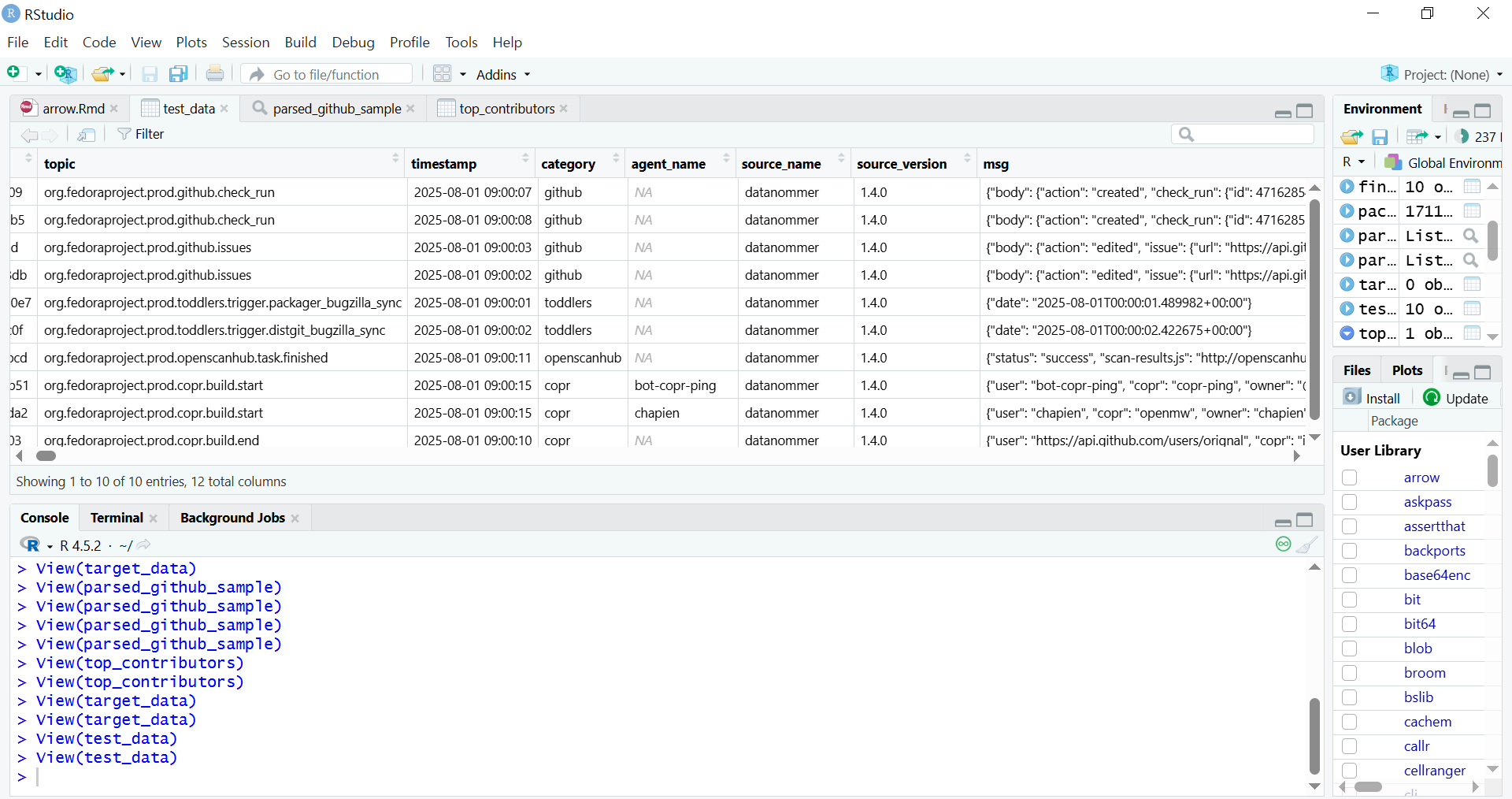
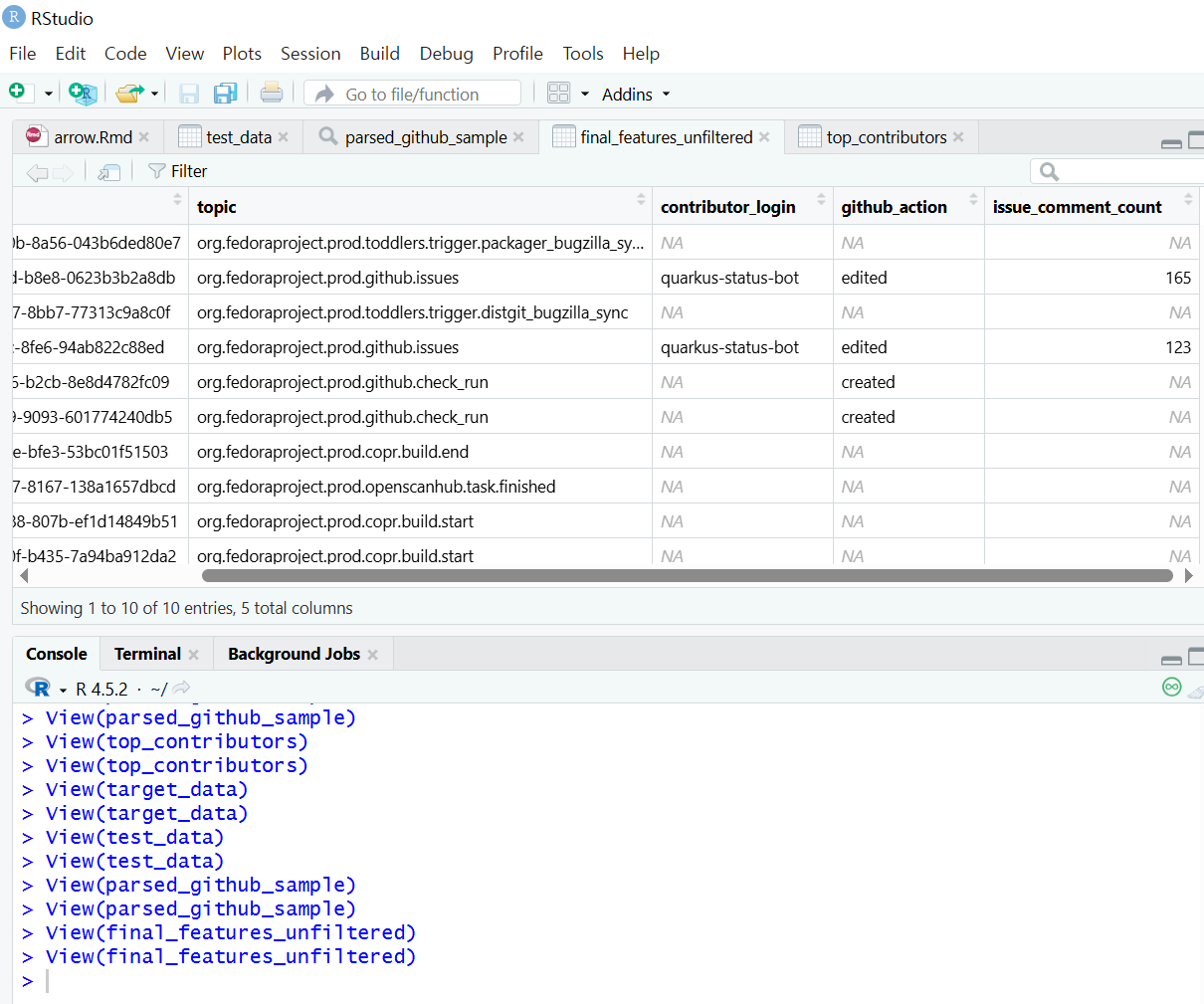
RStudio environment showing the contents of a Parquet file displayed in a data frame
Data architecture pipeline
The specific dataset chosen, Datanommer (Fedora Messaging Streams), aligns with the strategic objectives of the Fedora Data Working Group, where I contribute. The data is stored in the Bronze Data Layer where raw data from source systems is ingested and stored, as-is, for scalable data lake storage. The Bronze Layer allows for schema evolution without breaking downstream processes.
To provide the Working Group with transparent access and initial insight into this data, I have prepared a shared Initial Exploratory Data Analysis (EDA) Notebook. This notebook serves as the initial public view of the data quality and patterns, and it informed the subsequent architectural decisions for the scalable pipeline I am about to outline.
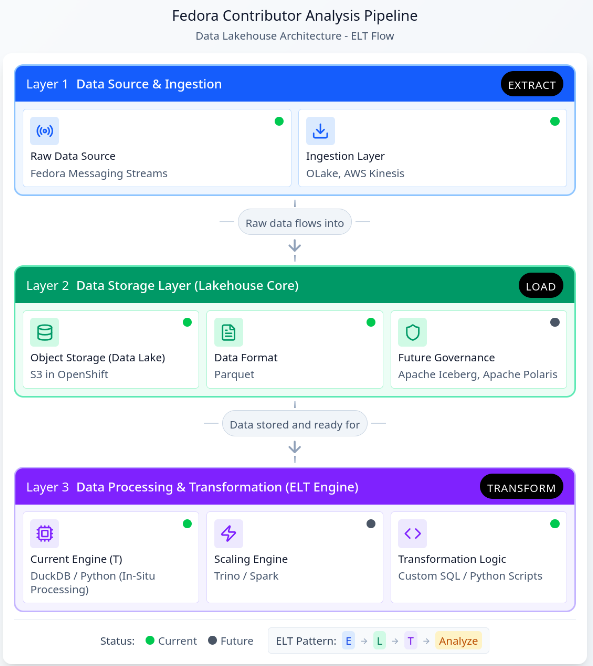
Given the complexity of the architecture, I will proceed with an outline of the core components, organized by their role in the ELT pipeline:
Data Architecture Diagram: Assisted by Figma ‘Infinite Canvas’
This restructured pipeline, leveraging the new Lakehouse architecture, unlocks several core benefits crucial for scaling contributor analysis and enabling future insights:
Elimination of Memory Constraints via In-Situ Processing
DuckDB acts as a high-performance analytical engine that enables In-Situ Processing. It queries data directly from storage (specifically the Parquet files) without requiring the entire dataset to be loaded into RAM. This not only solves the memory problem but also delivers rapid query execution and significantly lowers operational costs associated with large computational clusters hosted on the OpenShift/Fedora AWS infrastructure.
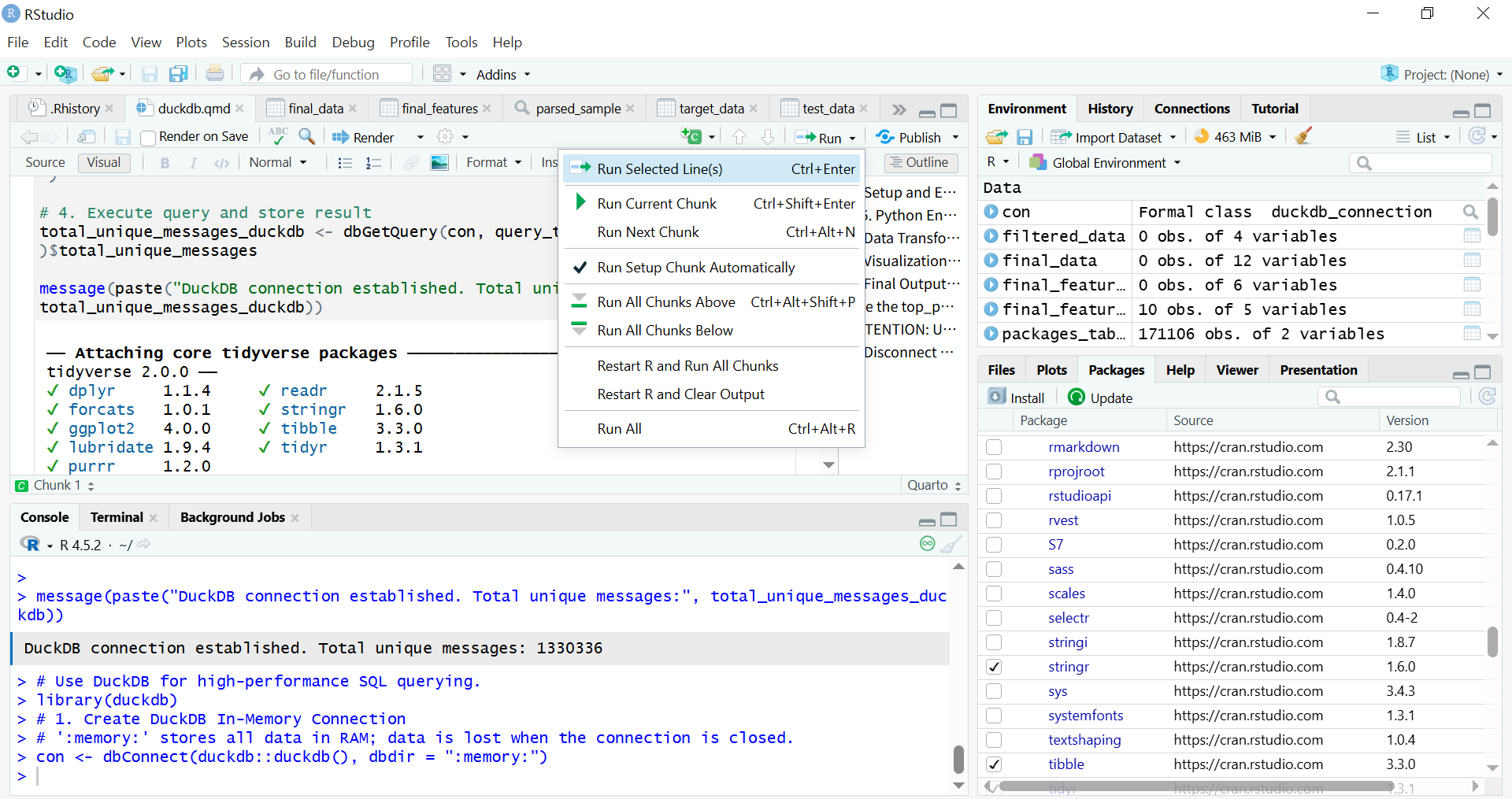
Quarto runs R code chunks to connect to DuckDB
Future-Proofing
The shift to a Lakehouse model ensures the pipeline is ready for growth and evolving data complexity. Future integration of Apache Iceberg and Apache Polaris will provide schema evolution capabilities. This ensures the pipeline is fully future-proofed against changes in underlying data structures.
Streamlined ELT Workflow and Multi-Lingual Access
I have redefined the processing workflow from a bottlenecked ETL model to a resilient Extract-Load-Transform (ELT) pattern. Parquet files with the variant type store semi-structured data (like JSON/nested structures), loaded raw into S3, simplifies the ingestion stage. When using R, it is recommended to read Parquet files using the Apache Arrow library.
Exploratory Data Analysis (EDA) using data frames in the Tidyverse
The parsed data is then accessible by multiple analytical platforms (R Shiny, Python, BI tools) without duplication or manual preparation. This multi-lingual access maximizes the utility of the clean data layer, supporting a growing number of analytical users and more complex queries necessary for defining long-term contributor metrics.
Initial EDA Notebook
The preliminary Exploratory Data Analysis (EDA) was conducted within the Jupyter Notebook format. This allowed broad compatibility with the existing execution and review environment of the Fedora Data Working Group.
The Initial EDA Notebook is documented to ensure complete reproducibility. This included all necessary steps for the Python library installation and environment setup. Any standard Python script containing ELT logic can be seamlessly run within RStudio’s Python mode or “knitting8” an R Markdown document or rendering a Quarto file.
Conclusion
The establishment of this analysis pipeline represents a crucial step in transforming unprocessed Fedora data into actionable insights. By addressing the core challenges of scaling and in-memory processing through DuckDB, and enabling transparent analysis via the hybrid RStudio/Jupyter workflow, I have demonstrated viable methods for performing Exploratory Data Analysis (EDA) and Extract, Load, Transform (ELT) processes on vast community datasets. In conclusion, the purpose of this work is to foster deeper engagement across a broader community by analyzing data with a view that relates to the Fedora Project community.
I hope this pipeline will serve as the technical foundation that activates and focuses the community discussion around the specific variables and metrics needed to define and ensure the continuity of community contributions.
AI Assistance
The ideation, structural planning, and terminology refinement of the pipelines were assisted by Gemini and Figma.
summary(): When used on a data object (for example, DataFrame), it provides basic statistics (min, max, mean, median). When used on a fitted linear model object (lm), it delivers key diagnostic information like coefficient estimates and p-values. ︎
lm(): Stands for Linear Model. This is the core function for fitting linear regression models in R, allowing the user to examine and model the linear relationship between variables. ︎
Regression analysis examines which factors affect the other and which ones are irrelevant for statistical and business context. ︎
DuckDB is a column-oriented database architecture. – Direct Querying: It directly queries data from file formats such as Parquet, CSV, and JSON. – Local compute engine: It is widely used as a high-performance local compute engine for analytical workloads. It runs in-process, meaning it operates within your application (like a Python script or R session) without needing a separate server or cluster management. – Cloud Integration: It supports querying data stored in cloud storage services like AWS S3, GCS (Google Cloud Storage), and Azure Blob Storage. ︎
ELT (Extract, Load, Transform): In a modern data environment like a Lakehouse, ELT is preferred: data is first extracted from the source and loaded raw into the cloud data lake (S3), and then transformedin place by the processing engine like DuckDB. ︎
ETL (Extract, Transform, Load): transformations occur before loading the data into the final destination. ︎
Key Advantages of RStudio over Jupyter Notebook for Production Workflows;
Even with its slightly more complex initial setup compared to Jupyter Notebooks, the advantages become significant when moving from exploration (Jupyter’s strength) to reproducible, production-ready workflows (RStudio’s strength).
– Integrated Console, Source, Environment, and Files: RStudio offers a cohesive, four-pane layout that allows for seamless navigation between writing code, running commands, inspecting variables, and managing files/plots. Jupyter requires constant shifting between code cells and external tabs. – Superior Debugging Tools: RStudio includes a powerful, visual debugger that allows you to set breakpoints, step through code line-by-line, and inspect variable states directly in the environment pane. Jupyter’s debugging is typically cell-based and less intuitive. – Native Project Management: RStudio Projects (.Rproj files) automatically manage the working directory and history. This makes it easy to switch between different analytical tasks without conflicts. – Integrated Environment Management (renv): RStudio integrates seamlessly with tools like renv (R Environment) to create isolated, reproducible R environments. This addresses dependency hell by ensuring the exact package versions used in development are used in production, which is crucial for data pipeline version control. – Quarto/R Markdown Integration: RStudio provides dedicated tools and buttons for easily compiling and rendering complex analytical documents (like your Quarto file) into HTML, PDF, or presentation slides. – Shiny Integration: RStudio is the native environment for developing Shiny web applications—interactive dashboards and tools that turn analysis into deployable products. Jupyter requires separate frameworks (like Dash or Streamlit) for similar deployment. – Focus on Scripting: RStudio’s source editor is optimized for writing clean, structured R/Python scripts, which are preferred for building robust, scheduled pipeline components (like those managed by Airflow). – Code Chunk Execution (Quarto): Even when using Quarto, RStudio allows for superior navigation and execution of code chunks compared to the often sequential and state-dependent nature of Jupyter Notebook cells. ︎
knitr executes code in R Markdown (.Rmd) file by chunks or as a whole (typically by clicking the “Knit” button in RStudio or using rmarkdown::render() in R) ︎
This article series takes a closer look at interesting projects that recently landed in Copr.
Copr is a build-system for anyone in the Fedora community. It hosts thousands of projects with a wide variety of purposes, targeting diverse groups of users. Some of them should never be installed by anyone, some are already transitioning into the official Fedora repositories, and others fall somewhere in between. Copr allows you to install third-party software not found in the standard Fedora repositories, try nightly versions of your dependencies, use patched builds of your favourite tools to support some non-standard use-cases, and experiment freely.
Vicinae is a fast application launcher written in C++/QT. Inspired by tool Raycast, it provides instant app and file search and clipboard history. It also includes built-in utilities such as a calculator and web search, along with support for extensions written in TypeScript. It is designed to be highly responsive and native for Wayland environment. Therefore, if you like keeping your hands on the keyboard or want a customizable, extensible launcher for your desktop, Vicinae may be worth trying.
Installation instructions
The repo currently provides vicinae for Fedora 42, 43, and Fedora Rawhide. To install it, use these commands:
UZDoom is a modern DOOM source port that builds upon classic GZDoom engine, offering hardware-accelerated rendering, an updated scripting system, improved mod support, and high-quality audio playback. At the same time, it maintains compatibility with classic WAD files while making the experience smooth on current systems.
Whether you are playing the original episodes or diving into extensive mod packs, UZDoom offers a convenient way to enjoy them.
Installation instructions
The repo currently provides uzdoom for Fedora 42, 43, and Fedora Rawhide. To install it, use these commands:
Plasma Panel Colorizer is a widget for KDE Plasma that allows you to customize the panel’s appearance. In addition, it offers options for background tinting, blur, custom opacity levels, shadows, floating panels, or themes that differ from the stock Plasma look. It also includes full blur support and is updated for Plasma 6, making it easy to adjust your panel exactly the way you want.
Installation instructions
The repo currently provides plasma-panel-colorizer for Fedora 42, 43, and Fedora Rawhide. To install it, use these commands:
Sfizz-ui is the graphical interface for the sfizz sampler engine, which is an open-source player for SFZ instrument libraries. The UI provides an accessible way to load SFZ instruments, adjust parameters, and integrate the sampler into your workflow. It also includes plugin support such as LV2 and VST3, making it suitable for music creation in a Linux DAW environment.
For musicians, sound designers, or anyone using SFZ sample libraries, sfizz-ui offers a polished interface.
Installation instructions
The repo currently provides sfizz-ui for Fedora 41, 42, and 43. To install it, use these commands:






 I am happy to share that as of 10 February 2026, Fedora is now available in Syria. Last week, the Fedora Infrastructure Team
 Speak now..."
arecord -f S16_LE -r 16000 -d 5 -q "$AUDIO" # Step 2: Transcribe using whisper.cpp
TRANSCRIPT=$(./whisper.cpp/build/bin/whisper-cli \ -m ./whisper.cpp/models/ggml-base.en.bin \ -f "$AUDIO" \ | grep '^\[' \ | sed -E 's/^\[[^]]+\][[:space:]]*//' \ | tr -d '\n')
echo "
Speak now..."
arecord -f S16_LE -r 16000 -d 5 -q "$AUDIO" # Step 2: Transcribe using whisper.cpp
TRANSCRIPT=$(./whisper.cpp/build/bin/whisper-cli \ -m ./whisper.cpp/models/ggml-base.en.bin \ -f "$AUDIO" \ | grep '^\[' \ | sed -E 's/^\[[^]]+\][[:space:]]*//' \ | tr -d '\n')
echo " $TRANSCRIPT" # Step 3: Get relevant context from RAG database
echo "
$TRANSCRIPT" # Step 3: Get relevant context from RAG database
echo " Searching documentation..."
CONTEXT=$(uv tool run --python 3.12 docs2db-api query "$TRANSCRIPT" \ --format text \ --max-chars 2000 \ --no-refine \ 2>/dev/null || echo "") if [ -n "$CONTEXT" ]; then echo "
Searching documentation..."
CONTEXT=$(uv tool run --python 3.12 docs2db-api query "$TRANSCRIPT" \ --format text \ --max-chars 2000 \ --no-refine \ 2>/dev/null || echo "") if [ -n "$CONTEXT" ]; then echo " Found relevant documentation:" echo "- - - - - - - - - - - - - - - - - - - - - - - - - - - - - - - - - - - - - - - - -" echo "$CONTEXT" echo "- - - - - - - - - - - - - - - - - - - - - - - - - - - - - - - - - - - - - - - - -"
else echo "
Found relevant documentation:" echo "- - - - - - - - - - - - - - - - - - - - - - - - - - - - - - - - - - - - - - - - -" echo "$CONTEXT" echo "- - - - - - - - - - - - - - - - - - - - - - - - - - - - - - - - - - - - - - - - -"
else echo " $RESPONSE_CLEAN" # Step 7: Speak the response
echo "$RESPONSE_CLEAN" | espeak
$RESPONSE_CLEAN" # Step 7: Speak the response
echo "$RESPONSE_CLEAN" | espeak

 ︎
︎