
Introduction
Writing a real-time audio plugin on Linux often conjures up images of a complex environment: C++, toolchains, CMake, CLAP / VST3 / LV2 SDK, ABI…
However, there is a much simpler approach : JSFX
This article offers a practical introduction to JSFX and YSFX on Fedora Linux: we’ll write some small examples, add a graphical VU meter, and then see how to use it as an CLAP / VST3 plugin in a native Linux workflow.
JSFX (JesuSonic Effects – created by REAPER [7]) allows you to write audio plugins in just a few lines, without compilation, with instant reloading and live editing.
Long associated with REAPER, they are now natively usable on Linux, thanks to YSFX [3], available on Fedora Linux in CLAP and VST3 formats via the Audinux repository ([4], [5]).
This means it’s possible to write a functional audio effect in ten lines, then immediately load it into Carla [8], Ardour [9], or any other compatible host, all within a PipeWire / JACK [11] environment.
A citation from [1] (check the [1] link for images):
In 2004, before we started developing REAPER, we created software designed for creating and modifying FX live, primarily for use with guitar processing.
The plan was that it could run on a minimal Linux distribution on dedicated hardware, for stage use. We built a couple of prototypes.
These hand-built prototypes used mini-ITX mainboards with either Via or Intel P-M CPUs, cheap consumer USB audio devices, and Atmel AVR microcontrollers via RS-232 for the footboard controls.
The cost for the parts used was around $600 each.
In the end, however, we concluded that we preferred to be in the software business, not the hardware business, and our research into adding multi-track capabilities in JSFX led us to develop REAPER. Since then, REAPER has integrated much of JSFX’s functionality, and improved on it.
So, as you can see, this technology is not that new. But the Linux support via YSFX [3] is rather new (Nov 2021, started by Jean-Pierre Cimalando).
A new programming language, but for what ? What would one would use JSFX for ?
This language is dedicated to audio and with it, you can write audio effects like an amplifier, a chorus, a delay, a compressor, or you can write synthesizers.
JSFX is good for rapid prototyping and, once everything is in place, you can then rewrite your project into a more efficient language like C, C++, or Rust.
JSFX for developers
Developing an audio plugin on Linux often involves a substantial technical environment. This complexity can be a hindrance when trying out an idea quickly.
JSFX (JesuSonic Effects) offers a different approach: writing audio effects in just a few lines of interpreted code, without compilation and with instant reloading.
Thanks to YSFX, available on Fedora Linux in CLAP and VST3 formats, these scripts can be used as true plugins within the Linux audio ecosystem.
This article will explore how to write a minimal amplifier in JSFX, add a graphical VU meter, and then load it into Carla as a CLAP / VST3 plugin.
The goal is simple: to demonstrate that it is possible to prototype real-time audio processing on Fedora Linux in just a few minutes.
No compilation environment is required: a text editor is all you need.
YSFX plugin
On Fedora Linux, YSFX comes in 3 flavours :
- a standalone executable ;
- a VST3 plugin ;
- a CLAP plugin.
YSFX is available in the Audinux [5] repository. So, first, install the Audinux repository:
$ dnf copr enable ycollet/audinux
Then, you can install the version you want:
$ dnf install ysfx
$ dnf install vst3-ysfx
$ dnf install clap-ysfx
Here is a screenshot of YSFX as a VST3 plugin loaded in Carla Rack [8]:

You can :
- Load a file ;
- Load a recent file ;
- Reload a file modified via the Edit menu ;
- Zoom / Unzoom via the 1.0 button ;
- Load presets ;
- Switch between the Graphics and Sliders view.
Here is a screenshot of the Edit window:
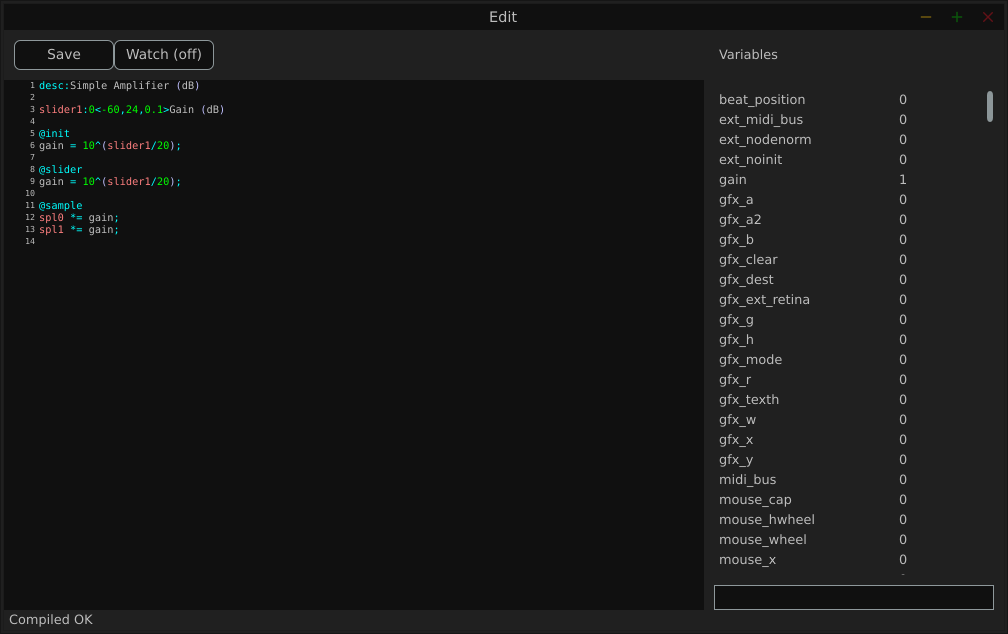
The Variables column displays all the variables defined by the loaded file.
Examples
We will use the JSFX documentation available at [4].
JSFX code is always divided into section.
- @init : The code in the @init section gets executed on effect load, on samplerate changes, and on start of playback.
- @slider : The code in the @slider section gets executed following an @init, or when a parameter (slider) changes
- @block : The code in the @block section is executed before processing each sample block. Typically a block is the length as defined by the audio hardware, or anywhere from 128-2048 samples.
- @sample : The code in the @sample section is executed for every PCM (Pulse Code Modulation) audio sample.
- @serialize : The code in the @serialize section is executed when the plug-in needs to load or save some extended state.
- @gfx [width] [height] : The @gfx section gets executed around 30 times a second when the plug-ins GUI is open.
A simple amplifier
In this example, we will use a slider value to amplify the audio input.
desc:Simple Amplifier
slider1:1<0,4,0.01>Gain @init
gain = slider1; @slider
gain = slider1; @sample
spl0 *= gain;
spl1 *= gain;
slider1, @init, @slider, @sample, spl0, spl1 are JSFX keywords [1].
Description:
- slider1: create a user control (from 0 to 4 here);
- @init: section executed during loading;
- @slider: section executed when we move the slide;
- @sample: section executed for each audio sample;
- spl0 and spl1: left and right channels.
- In this example, we just multiply the input signal by a gain.
Here is a view of the result :

An amplifier with a gain in dB
This example will create a slider that will produce a gain in dB.
desc:Simple Amplifier (dB)
slider1:0<-60,24,0.1>Gain (dB) @init
gain = 10^(slider1/20); @slider
gain = 10^(slider1/20); @sample
spl0 *= gain;
spl1 *= gain;
Only the way we compute the gain changes.
Here is a view of the result :

An amplifier with an anti-clipping protection
This example adds protection against clipping and uses a JSFX function for that.
desc:Simple Amplifier with Soft Clip
slider1:0<-60,24,0.1>Gain (dB) @init
gain = 10^(slider1/20); @slider
gain = 10^(slider1/20);
function softclip(x) ( x / (1 + abs(x));
); @sample
spl0 = softclip(spl0 * gain);
spl1 = softclip(spl1 * gain);
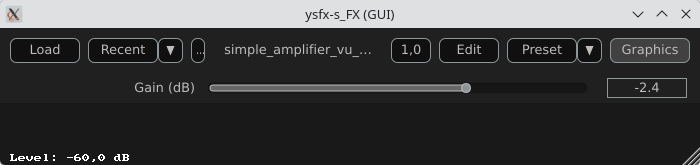
Here is a view of the result :

An amplifier with a VU meter
This example is the same as the one above, we just add a printed value of the gain.
desc:Simple Amplifier with VU Meter
slider1:0<-60,24,0.1>Gain (dB) @init
rms = 0;
coeff = 0.999; // RMS smoothing
gain = 10^(slider1/20); @slider
gain = 10^(slider1/20); @sample
// Apply the gain
spl0 *= gain;
spl1 *= gain;
// Compute RMS (mean value of the 2 channels)
mono = 0.5*(spl0 + spl1);
rms = sqrt((coeff * rms * rms) + ((1 - coeff) * mono * mono)); @gfx 300 200 // UI part
gfx_r = 0.1; gfx_g = 0.1; gfx_b = 0.1;
gfx_rect(0, 0, gfx_w, gfx_h); // Convert to dB
rms_db = 20*log(rms)/log(10);
rms_db < -60 ? rms_db = -60; // Normalisation for the display
meter = (rms_db + 60) / 60;
meter > 1 ? meter = 1; // Green color
gfx_r = 0;
gfx_g = 1;
gfx_b = 0; // Horizontal bar
gfx_rect(10, gfx_h/2 - 10, meter*(gfx_w-20), 20); // Text
gfx_r = gfx_g = gfx_b = 1;
gfx_x = 10;
gfx_y = gfx_h/2 + 20;
gfx_printf("Level: %.1f dB", rms_db);
The global structure of the code:
- Apply the gain
- Compute a smoothed RMS value
- Convert to dB
- Display a horizontal bar
- Display a numerical value
Here is a view of the result :
An amplifier using the UI lib from jsfx-ui-lib
In this example, we will use a JSFX UI library to produce a better representation of the amplifier’s elements.
First, clone the https://github.com/geraintluff/jsfx-ui-lib repository and copy the file ui-lib.jsfx-inc into the directory where your JSFX files are saved.
desc:Simple Amplifier with UI Lib VU
import ui-lib.jsfx-inc
slider1:0<-60,24,0.1>Gain (dB) @init
freemem = ui_setup(0);
rms = 0;
coeff = 0.999;
gfx_rate = 30; // 30 FPS @slider
gain = 10^(slider1/20); @sample
spl0 *= gain;
spl1 *= gain;
mono = 0.5*(spl0 + spl1);
rms = sqrt(coeff*rms*rms + (1-coeff)*mono*mono); // ---- RMS computation ----
level_db = 20*log(rms)/log(10);
level_db < -60 ? level_db = -60; @gfx 300 200
ui_start("main"); // ---- Gain ----
control_start("main","default");
control_dial(slider1, 0, 1, 0);
cut = (level_db + 100) / 200 * (ui_right() - ui_left()) + ui_left(); // ---- VU ----
ui_split_bottom(50);
ui_color(0, 0, 0);
ui_text("RMS Level: ");
gfx_printf("%d", level_db);
ui_split_bottom(10);
uix_setgfxcolorrgba(0, 255, 0, 1);
gfx_rect(ui_left(), ui_top(), ui_right() - ui_left(), ui_bottom() - ui_top());
uix_setgfxcolorrgba(255, 0, 0, 1);
gfx_rect(ui_left(), ui_top(), cut, ui_bottom() - ui_top());
ui_pop();
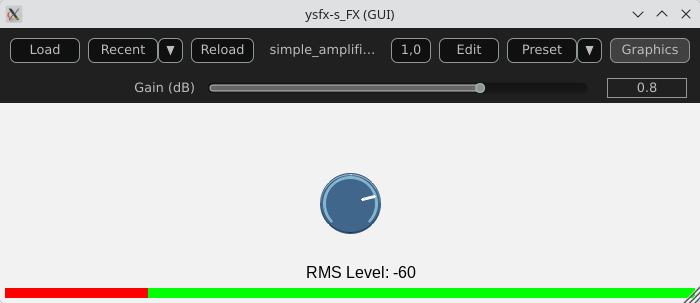
The global structure of the example:
- Import and setup: The UI library is imported and then allocated memory (ui_setup) using @init;
- UI controls: control_dial creates a thematic potentiometer with a label, integrated into the library;
- Integrated VU meter: A small graph is drawn with ui_graph, normalizing the RMS value between 0 and 1;
- UI structure: ui_start(“main”) prepares the interface for each frame. ui_push_height / ui_pop organize the vertical space.
Here is a view of the result :
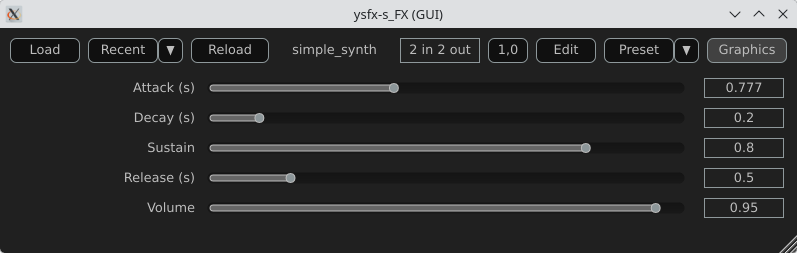
A simple synthesizer
Now, produce some sound and use MIDI for that.
The core of this example will be the ADSR envelope generator ([10]).
desc:Simple MIDI Synth (Mono Sine)
// Parameters
slider1:0.01<0.001,2,0.001>Attack (s)
slider2:0.2<0.001,2,0.001>Decay (s)
slider3:0.8<0,1,0.01>Sustain
slider4:0.5<0.001,3,0.001>Release (s)
slider5:0.5<0,1,0.01>Volume @init
phase = 0;
note_on = 0;
env = 0;
state = 0; // 0=idle,1=attack,2=decay,3=sustain,4=release @slider
// Compute the increment / decrement for each states
attack_inc = 1/(slider1*srate);
decay_dec = (1-slider3)/(slider2*srate);
release_dec = slider3/(slider4*srate); @block
while ( midirecv(offset, msg1, msg23) ? ( status = msg1 & 240; note = msg23 & 127; vel = (msg23/256)|0; // Note On status == 144 && vel > 0 ? ( freq = 440 * 2^((note-69)/12); phase_inc = 2*$pi*freq/srate; note_on = 1; state = 1; ); // Note Off (status == 128) || (status == 144 && vel == 0) ? ( state = 4; ); );
); @sample
// ADSR Envelope [10]
state == 1 ? ( // Attack env += attack_inc; env >= 1 ? ( env = 1; state = 2; );
); state == 2 ? ( // Decay env -= decay_dec; env <= slider3 ? ( env = slider3; state = 3; );
); state == 3 ? ( // Sustain env = slider3;
); state == 4 ? ( // Release env -= release_dec; env <= 0 ? ( env = 0; state = 0; );
); // Sine oscillator
sample = sin(phase) * env * slider5;
phase += phase_inc;
phase > 2*$pi ? phase -= 2*$pi; // Stereo output
spl0 = sample;
spl1 = sample;
Global structure of the example:
- Receives MIDI via @block;
- Converts MIDI note to frequency (A440 standard);
- Generates a sine wave;
- Applies an ADSR envelope;
- Outputs in stereo.
Here is a view of the result :
Comparison with CLAP / VST3
JSFX + YSFX
Advantages of JSFX:
- No compilation required;
- Instant reloading;
- Fast learning curve;
- Ideal for DSP prototyping;
- Portable between systems via YSFX.
Limitations:
- Less performant than native C++ for heavy processing;
- Less suitable for “industrial” distribution;
- Simpler API, therefore less low-level control.
CLAP / VST3 in C/C++
Advantages:
- Maximum performance;
- Fine-grained control over the architecture;
- Deep integration with the Linux audio ecosystem;
- Standardized distribution.
Limitations:
- Requires a complete toolchain;
- ABI management/compilation;
- Longer development cycle.
Conclusion
A functional audio effect can be written in just a few lines, adding a simple graphical interface, and then loaded this script as an CLAP / VST3 plugin on Fedora Linux. This requires no compilation, no complex SDK, no cumbersome toolchain.
JSFX scripts don’t replace native C++ development when it comes to producing optimized, widely distributable plugins. However, they offer an exceptional environment for experimentation, learning signal processing, and rapid prototyping.
Thanks to YSFX, JSFX scripts now integrate seamlessly into the Linux audio ecosystem, alongside Carla, Ardour, and a PipeWire-based audio system.
For developers and curious musicians alike, JSFX provides a simple and immediate entry point into creating real-time audio effects on Fedora Linux.
Available plugins
ysfx-chokehold
A free collection of JS (JesuSonic) plugins for Reaper.
Code available at: https://github.com/chkhld/jsfx
To install this set of YSFX plugins:
$ dnf install ysfx-chokehold
YSFX plugins will be available at /usr/share/ysfx-chokehold.
ysfx-geraintluff
Collection of JSFX effects.
Code available at: https://github.com/geraintluff/jsfx
To install this set of YSFX plugins:
$ dnf install ysfx-geraintluff
YSFX plugins will be available at /usr/share/ysfx-geraintluff.
ysfx-jesusonic
Some JSFX effects from Cockos.
Code available at: https://www.cockos.com/jsfx
To install this set of YSFX plugins:
$ dnf install ysfx-jesusonic
YSFX plugins will be available at /usr/share/ysfx-jesusonic.
ysfx-joepvanlier
A bundle of JSFX and scripts for reaper.
Code available at: https://github.com/JoepVanlier/JSFX
To install this set of YSFX plugins:
$ dnf install ysfx-joepvanlier
YSFX plugins will be available at /usr/share/ysfx-joepvanlier.
ysfx-lms
LMS Plugin Suite – Open source JSFX audio plugins
Code available at: https://github.com/LMSBAND/LMS
To install this set of YSFX plugins:
$ dnf install ysfx-lms
YSFX plugins will be available at /usr/share/ysfx-lms.
ysfx-reateam
Community-maintained collection of JS effects for REAPER
Code available at: https://github.com/ReaTeam/JSFX
To install this set of YSFX plugins:
$ dnf install ysfx-reateam
YSFX plugins will be available at /usr/share/ysfx-reateam.
ysfx-rejj
Reaper JSFX Plugins.
Code available at: https://github.com/Justin-Johnson/ReJJ
To install this set of YSFX plugins:
$ dnf install ysfx-rejj
And all the YSFX plugins will be available at /usr/share/ysfx-rejj.
ysfx-sonic-anomaly
Sonic Anomaly JSFX scripts for Reaper
Code available at: https://github.com/Sonic-Anomaly/Sonic-Anomaly-JSFX
To install this set of YSFX plugins:
$ dnf install ysfx-sonic-anomaly
YSFX plugins will be available at /usr/share/ysfx-sonic-anomaly.
ysfx-tilr
TiagoLR collection of JSFX effects
Code available at: https://github.com/tiagolr/tilr_jsfx
To install this set of YSFX plugins:
$ dnf install ysfx-tilr
YSFX plugins will be available at /usr/share/ysfx-tilr.
ysfx-tukan-studio
JSFX Plugins for Reaper
Code available at: https://github.com/TukanStudios/TUKAN_STUDIOS_PLUGINS
To install this set of YSFX plugins:
$ dnf install ysfx-tukan-studio
YSFX plugins will be available at /usr/share/ysfx-tukan-studio.
Webography
[1] – https://www.cockos.com/jsfx
[2] – https://github.com/geraintluff/jsfx
[3] – https://github.com/JoepVanlier/ysfx
[4] – https://www.reaper.fm/sdk/js/js.php
[5] – https://audinux.github.io
[6] – https://copr.fedorainfracloud.org/coprs/ycollet/audinux
[7] – https://www.reaper.fm/index.php
[8] – https://github.com/falkTX/Carla
[9] – https://ardour.org
[10] – https://en.wikipedia.org/wiki/Envelope_(music)
[11] – https://jackaudio.org


