Question: Does Python have a for each or foreach loop? If so, how does it work? If not, what is the alternative?
This article will shed light on these questions. I’ll give you the summary first and dive into the details later:
Python has three alternatives to the “for each” loop:
A simple for ... in ... loop
A map() function
A list comprehension statement.
You’ll learn about those alternatives in the following paragraphs, so keep reading!
Let’s get started with the most important question:
What is a “Foreach Loop”?
Definition: A foreach or for each loop is a programming control flow statement for iterating over elements in a sequence or collection. Unlike other loop constructs, the foreach loop iterates over all elements rather than maintaining a counter, loop variable, or checking a condition after each loop iteration.
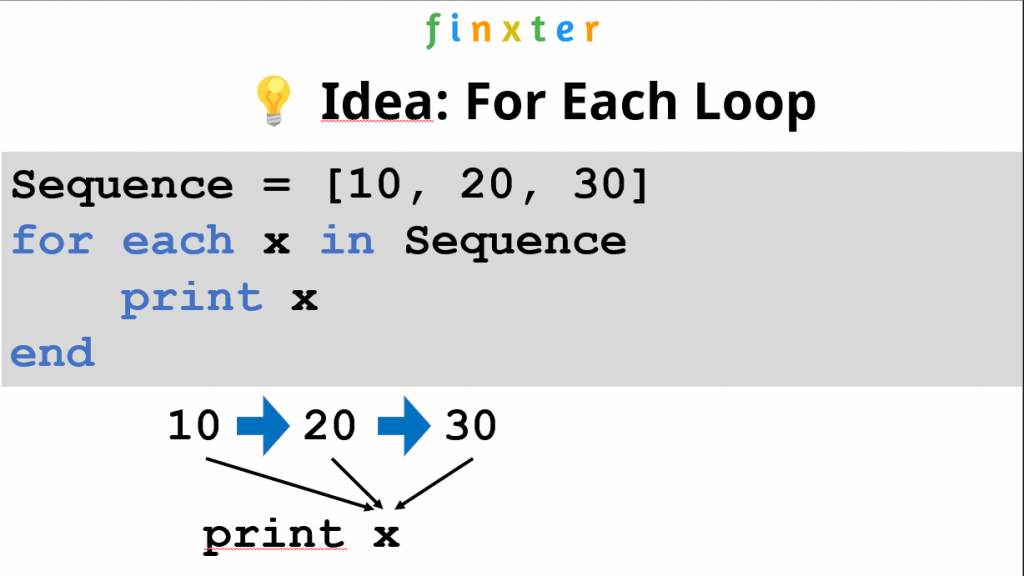
Figure: Example of a for each loop (pseudocode) that iterates over elements 10, 20, and 30 and prints their value.
Here are three examples of a foreach loop in three different programming languages PHP, C#, and Perl:
// PHP
foreach ($set as $value) { // Do something to $value;
} // C#
foreach (String val in array) { console.writeline(val);
} // Perl
foreach (1, 2, 3, 4) { print $_;
}
Does Python have a foreach Loop?
The Python language doesn’t support the keywords foreach or for each loops in a literal syntactical way. However, “for each” in Python is done using the “for … in …” expression. For example, to iterate over each element in the list[10, 20, 30] in Python, you’d write for x in [10, 20, 30].
Here’s a full Python code example with semantical equivalence to a “foreach” statement:
# 'foreach' or 'for each' in Python is done using 'for'
for x in [10, 20, 30]: print(x)
“For Each” Meaning “Apply Function to Each Element”
If you’re reading this and you haven’t been satisfied with the answers provided so far, chances are that you’re really searching for the map function functionality in Python.
Many programming languages with “for each” support provide a syntax that applies a function to each element of an iterable like so:
# Other programming languages:foreach(function, iterable)
This can be done in Python by means of the map() function:
# Python:
map(function, iterable)
Here’s a simple example of how you’d use the map() function in Python that applies the function f to each element of the list [1, 2, 3], incrementing each of its elements by 1 to obtain [2, 3, 4]:
Python’s list comprehension feature is syntactical sugar to create a new iterable by applying a (possibly identity) function to each element of an existing iterable.
Many coders would view the list comprehension feature as Python’s way to provide a functional “foreach” statement because it enables you to perform a function “for each” element of an iterable such as a sequence.
List comprehension is a compact way of creating lists. The simple formula is [expression + context].
Expression: What to do with each list element?
Context: What elements to select? The context consists of an arbitrary number of for and if statements.
The example [x+10 for x in [1, 2, 3]] creates the list [11, 12, 13].
lst = [1, 2, 3]
new_lst = [x+10 for x in lst]
print(new_lst)
# [11, 12, 13]
You can watch my explainer video on list comprehension in case you’re interested in how it works:
Now that the overview is complete, let’s connect to the database, filter, and output the results.
Connect to a SQLite Database
This code connects to an SQLite database and is placed inside a try/except statement to catch any possible errors.
try: conn = sqlite3.connect('finxter_users.db') cur = conn.cursor() except Exception as e: print(f'An error occurred: {e}.') exit()
The code inside the try statement executes first and attempts to connect to finxter_users.db. A Connection Object (conn), similar to below, is produced, if successful.
<sqlite3.Connection object at 0x00000194FFBC2140>
Next, the Connection Object created above (conn) is used in conjunction with the cursor() to create a Cursor Object. A Cursor Object (cur), similar to below, is produced, if successful.
<sqlite3.Cursor object at 0x0000022750E5CCC0>
Note: The Cursor Object allows interaction with database specifics, such as executing queries.
If the above line(s) fail, the code falls inside except capturing the error (e) and outputs this to the terminal. Code execution halts.
Prepare the SQLite Query
Before executing any query, you must decide the expected results and how to achieve this.
try: conn = sqlite3.connect('finxter_users.db') cur = conn.cursor() fid_list = [30022192, 30022450, 30022475] fid_tuple = tuple(fid_list) f_query = f'SELECT * FROM users WHERE FID IN {format(fid_tuple)}' except Exception as e: print(f'An error occurred: {e}.') exit()
In this example, the three (3) highlighted lines create, configure and save the following variables:
fid_list: this contains a list of the selected Users’FIDs to retrieve.
fid_tuple: this converts fid_list into a tuple format. This is done to match the database format (see above).
f_query: this constructs an SQLite query that returns all matching records when executed.
Query String Output
If f_query was output to the terminal (print(f_query)), the following would display. Perfect! That’s exactly what we want.
SELECT * FROM users WHERE FID IN (30022192, 30022450, 30022475)
Executing the SQLite Query
Let’s execute the query created above and save the results.
try: conn = sqlite3.connect('finxter_users.db') cur = conn.cursor() fid_list = [30022192, 30022450, 30022475] fid_tuple = tuple(fid_list) f_query = f'SELECT * FROM users WHERE FID IN {format(fid_tuple)}' results = cur.execute(f_query)
except Exception as e: print(f'An error occurred: {e}.') exit()
The highlighted line appends the execute() method to the Cursor Object and passes the f_query string as an argument.
If the execution was successful, an iterableCursor Object is produced, similar to below.
<sqlite3.Cursor object at 0x00000224FF987A40>
Displaying the Query Results
The standard way to display the query results is by using a for a loop. We could add this loop inside/outside the try/except statement.
try: conn = sqlite3.connect('finxter_users.db') cur = conn.cursor() fid_list = [30022192, 30022450, 30022475] fid_tuple = tuple(fid_list) f_query = f'SELECT * FROM users WHERE FID IN {format(fid_tuple)}' results = cur.execute(f_query)
except Exception as e: print(f'An error occurred: {e}.') exit() for r in results: print(r)
conn.close()
The highlighted lines instantiate a for loop to navigate the query results one record at a time and output them to the terminal.
The name agg is short for aggregate. To aggregate is to summarize many observations into a single value that represents a certain aspect of the observed data.
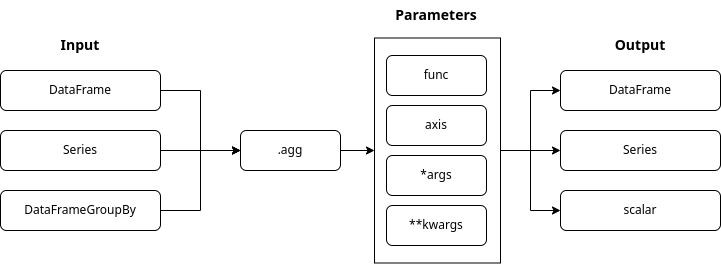
The .agg() function can process a dataframe, a series, or a grouped dataframe. It can execute many aggregation functions, e.g. ‘mean’, ‘max’,… in a single call along one of the axis. It can also execute lambda functions. Read on for examples.
We will use a dataset of FIFA players. Find the dataset here.
Basic Setup using Jupyter Notebook
Let’s start by importing pandas and loading our dataset.
import pandas as pd
df_fifa_soccer_players = pd.read_csv('fifa_cleaned.csv')
df_fifa_soccer_players.head()
To increase readability, we will work with a subset of the data. Let’s create the subset by selecting the columns we want to have in our subset and create a new dataframe.
Pandas provides a variety of built-in aggregation functions. For example, pandas.DataFrame.describe. When applied to a dataset, it returns a summary of statistical values.
df_fifa_soccer_players_subset.describe()
To understand aggregation and why it is helpful, let’s have a closer look at the data returned.
Example: Our dataset contains records for 17954 players. The youngest player is 17 years of age and the oldest player is 46 years old. The mean age is 25 years. We learn that the tallest player is 205 cm tall and the average player’s height is around 175 cm. With a single line of code, we can answer a variety of statistical questions about our data. The describe function identifies numeric columns and performs the statistical aggregation for us. Describe also excluded the column nationality that contains string values.
To aggregate is to summarize many observations into a single value that represents a certain aspect of the observed data.
Pandas provides us with a variety of pre-built aggregate functions.
returns the count of unique values of a set of values
Let’s use another function from the list above. We can be more specific and request the ‘sum’ for the ‘value_euro’ series. This column contains the market value of a player. We select the column or series ‘value_euro’ and execute the pre-build sum() function.
Pandas returned us the requested value. Let’s get to know an even more powerful pandas method for aggregating data.
The ‘pandas.DataFrame.agg’ Method
Function Syntax
The .agg() function can take in many input types. The output type is, to a large extent, determined by the input type. We can pass in many parameters to the .agg() function.
The “func” parameter:
is by default set to None
contains one or many functions that aggregate the data
is by default set to 0 and applies functions to each column
if set to 1 applies functions to rows
can hold values:
0 or ‘index’
1 or ‘columns’
What about *args and **kwargs:
we use these placeholders, if we do not know in advance how many arguments we will need to pass into the function
when arguments are of the same type, we use *args
When arguments are of different types, we use **kwargs.
Agg method on a Series
Let’s see the .agg() function in action. We request some of the pre-build aggregation functions for the ‘wage_euro’ series. We use the function parameter and provide the aggregate functions we want to execute as a list. And let’s save the resulting series in a variable.
Pandas uses scientific notation for large and small floating-point numbers. To convert the output to a familiar format, we must move the floating point to the right as shown by the plus sign. The number behind the plus sign represents the amount of steps.
Let’s do this together for some values.
The sum of all wages is 175,347,000€ (1.753470e+08)
The mean of the wages is 9902.135€ (9.902135e+03)
We executed many functions on a series input source. Thus our variable ‘wage_stats’ is of the type Series because.
type(wage_stats)
# pandas.core.series.Series
See below how to extract, for example, the ‘min’ value from the variable and the data type returned.
Let’s use one more example to understand the relation between the input type and the output type.
We will use the function “nunique” which will give us the count of unique nationalities. Let’s apply the function in two code examples. We will reference the series ‘nationality’ both times. The only difference will be the way we pass the function “nunique” into our agg() function.
When we use a dictionary to pass in the “nunique” function, the output type is a series.
nationality_unique_int = df_fifa_soccer_players_subset['nationality'].agg('nunique')
print(nationality_unique_int)
# 160 print(type(nationality_unique_int))
# int
When we pass the “nunique” function directly into agg() the output type is an integer.
Agg method on a DataFrame
Passing the aggregation functions as a Python list
One column represents a series. We will now select two columns as our input and so work with a dataframe.
Let’s select the columns ‘height_cm’ and ‘weight_kgs’.
We will execute the functions min(), mean() and max(). To select a two-dimensional data (dataframe), we need to use double brackets. We will round the results to two decimal points.
We will now use our newly created dataframe named ‘height_weight’ to use the ‘axis’ parameter. The entire dataframe contains numeric values.
We define the functions and pass in the axis parameter. I used the count() and sum() functions to show the effect of the axis parameter. The resulting values make little sense. This is also the reason why I do not rename the headings to restore the lost column names.
height_weight.agg(['count', 'sum'], axis=1)
We aggregated along the rows. Returning the count of items and the sum of item values in each row.
Passing the aggregation functions as a python dictionary
Now let’s apply different functions to the individual sets in our dataframe. We select the sets ‘overall_rating’ and ‘value_euro’. We will apply the functions std(), sem() and mean() to the ‘overall_rating’ series, and the functions min() and max() to the ‘value_euro’ series.
Passing the aggregation functions as a Python tuple
We will now repeat the previous example.
We will use tuples instead of a dictionary to pass in the aggregation functions. Tuple have limitations. We can only pass one aggregation function within a tuple. We also have to name each tuple.
The ‘groupby’ method creates a grouped dataframe. We will now select the columns ‘age’ and ‘wage_euro’ and group our dataframe using the column ‘age’. On our grouped dataframe we will apply the agg() function using the functions count(), min(), max() and mean().
Every row represents an age group. The count value shows how many players fall into the age group. The min, max and mean values aggregate the data of the age-group members.
Multiindex
One additional aspect of a grouped dataframe is the resulting hierarchical index. We also call it multiindex.
We can see that the individual columns of our grouped dataframe are at different levels. Another way to view the hierarchy is to request the columns for the particular dataset.
print(age_group_wage_euro.columns)
Working with a multiindex is a topic for another blog post. To use the tools that we have discussed, let’s flatten the multiindex and reset the index. We need the following functions:
The resulting dataframe columns are now flat. We lost some information during the flattening process. Let’s rename the columns and return some of the lost context.
Grouping by multiple columns creates even more granular subsections.
Let’s use ‘age’ as the first grouping parameter and ‘nationality’ as the second. We will aggregate the resulting group data using the columns ‘overall_rating’ and ‘height_cm’. We are by now familiar with the aggregation functions used in this example.
Every age group contains nationality groups. The aggregated athletes data is within the nationality groups.
Custom aggregation functions
We can write and execute custom aggregation functions to answer very specific questions.
Let’s have a look at the inline lambda functions.
Lambda functions are so-called anonymous functions. They are called this way because they do not have a name. Within a lambda function, we can execute multiple expressions. We will go through several examples to see lambda functions in action.
In pandas lambda functions live inside the “DataFrame.apply()” and the “Series.appy()” methods. We will use the DataFrame.appy() method to execute functions along both axes. Let’s have a look at the basics first.
Function Syntax
The DataFrame.apply() function will execute a function along defined axes of a DataFrame. The functions that we will execute in our examples will work with Series objects passed into our custom functions by the apply() method. Depending on the axes that we will select, the Series will comprise out of a row or a column or our data frame.
The “func” parameter:
contains a function applied to a column or a row of the data frame
The “axis” parameter:
is by default set to 0 and will pass a series of column data
if set to 1 will pass a series of the row data
can hold values:
0 or ‘index’
1 or ‘columns’
The “raw” parameter:
is a boolean value
is by default set toFalse
can hold values:
False-> a Series object is passed to the function
True -> a ndarray object is passed to the function
The “result_type” parameter:
can only apply when the axis is 1 or ‘columns’
can hold values:
‘expand’
‘reduce’
‘broadcast’
The “args()” parameter:
additional parameters for the function as tuple
The **kwargs parameter:
additional parameters for the function as key-value pairs
Filters
Let’s have a look at filters. They will be very handy as we explore our data.
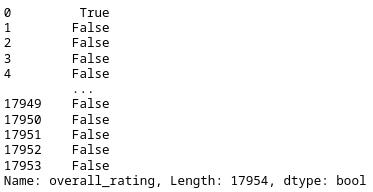
In this code example, we create a filter named filt_rating. We select our dataframe and the column overall_rating. The condition >= 90 returns True if the value in the overall_rating column is 90 or above.
The result is a Series object containing the index, and the correlated value of True or False.
Let’s apply the filter to our dataframe. We call the .loc method and pass in the filter’s name as a list item. The filter works like a mask. It covers all rows that have the value False. The remaining rows match our filter criteria of overall_rating >= 90.
df_fifa_soccer_players_subset.loc[filt_rating]
Lambda functions
Let’s recreate the same filter using a lambda function. We will call our filter filt_rating_lambda.
Let’s go over the code. We specify the name of our filter and call our dataframe. Pay attention to the double square brackets. We use them to pass a dataframe and not a Series object to the .appy() method.
Inside .apply() we use the keyword ‘lambda’ to show that we are about to define our anonymous function. The ‘x’ represents the Series passed into the lambda function.
The series contains the data from the overall_rating column. After the semicolumn, we use the placeholder x again. Now we apply a method called ge(). It represents the same condition we used in our first filter example “>=” (greater or equal).
We define the integer value 90 and close the brackets on our apply function. The result is a dataframe that contains an index and only one column of boolean values. To convert this dataframe to a Series we use the squeeze() method.
We now want to know how many players our filter returned. Let’s first do it without a lambda function and then use a lambda function to see the same result. We are counting the lines or records.
Great. Now let’s put us in a place where we actually need to use the apply() method and a lambda function. We want to use our filter on a grouped data-frame.
Let’s group by nationality to see the distribution of these amazing players. The output will contain all columns. This makes the code easier to read.
Pandas tells us in this error message that we can not use the ‘loc’ method on a grouped dataframe object.
Let’s now see how we can solve this problem by using a lambda function. Instead of using the ‘loc’ function on the grouped dataframe we use the apply() function. Inside the apply() function we define our lambda function. Now we use the ‘loc’ method on the variable ‘x’ and pass our filter.
Now let’s use the axis parameter to calculate the Body-Mass-Index (BMI) for these players. Until now we have used the lambda functions on the columns of our data.
The ‘x’ variable was a representation of the individual column. We set the axis parameter to ‘1’. The ‘x’ variable in our lambda function will now represent the individual rows of our data.
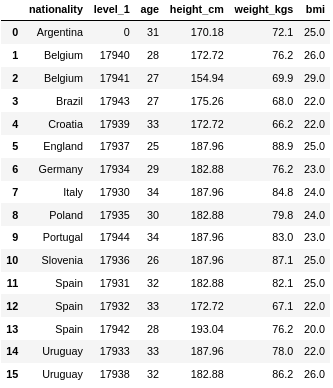
Before we calculate the BMI let’s create a new dataframe and define some columns. We will call our new dataframe ‘df_bmi’.
We calculate the BMI as follows. We divide the weight in kilogram by the square of the height in meters.
Let’s have a closer look at the lambda function. We define the ‘axis’ to be ‘1’. The ‘x’ variable now represents a row. We need to use specific values in each row. To define these values, we use the variable ‘x’ and specify a column name. At the beginning of our code example, we define a new column named ‘bmi’. And at the very end, we round the results.
Great! Our custom function worked. The new BMI column contains calculated values.
Conclusion
Congratulations on finishing the tutorial. I wish you many great and small insights for your future data projects. I include the Jupyter-Notebook file, so you can experiment and tweak the code.
Nerd Humor
Oh yeah, I didn’t even know they renamed it the Willis Tower in 2009, because I know a normal amount about skyscrapers. — xkcd (source)
Mobile app development is a massive skill in the 21st century. In fact, the revenue of the mobile app market worldwide is mobile app revenue in 2022 is $437 billion USD. (Statista)
A mobile app developer is a programmer who focuses on software creation for mobile devices such as smartphones or wearables.
Most mobile app developers create smartphone apps for the Android, macOS, or Windows mobile operating system.
This article will show you the five areas of focus you could pursue to become a mobile app developer.
#1 – Android App Developer
An Android app developer is a programmer who focuses on software creation for mobile devices such as smartphones or wearables using the Android operating system.
How much does an Android App Developer make per year?
Figure: Average Income of an Android App Developer in the US by Source.
The average annual income of an Android App Developer in the United States is between $85,000 and $126,577 with an average of $106,923 and a statistical median of $107,343 per year.
Learn More: I’ve written a full guide on this career path and published it on the Finxter blog here.
#2 – iOS App Developer
An iOS app developer is a programmer who focuses on software creation for Apple mobile devices such as iPhones or wearables such as Apple Watches. Most mobile app developers create smartphone apps for the iOS or watchOS mobile operating systems using the Swift programming language.
How much does an iOS App Developer make per year?
The average annual income of an iOS Developer in the United States is between $83,351 and $145,000 with an average of $110,331 and a statistical median of $111,716 per year.
Learn More: I’ve written a full guide on this career path and published it on the Finxter blog here.
#3 – Firebase Developer
Firebase is a Google-based platform to create mobile and web applications easily. Firebase developers are programmers who create mobile apps with Firebase
The average annual income of a Firebase Developer is approximately $80,000 according to PayScale (source).
Learn More: I’ve written a full guide on this career path and published it on the Finxter blog here.
#4 – Flutter Developer
A Flutter Developer developer creates, edits, analyzes, debugs, and supervises the development of Android mobile apps written in the Flutter programming framework using the Dart programming language.
The average income of a Flutter developer in the US is $112,125 per year or $57.50 per hour. Entry-level Flutter developers start with approximately $100,000 per year. Experienced developers make up to $159,900 per year. (source)
Learn More: I’ve written a full guide on this career path and published it on the Finxter blog here.
#5 – Kotlin Developer
A Kotlin Developer is an Android app programmer using the Kotlin programming language.
Kotlin is JVM compatible and, thus, fully compatible with Java. That’s why it’s often used as an alternative to Java when developing Android applications.
The average annual income of a Kotlin Developer is $102,000 according to PayScale and averages between $113,000 to $147,000 per year according to Ziprecruiter.
Learn More: I’ve written a full guide on this career path and published it on the Finxter blog here.
#6 – Swift Developer
A Swift developer is a programmer who creates software and mobile applications for the Swift programming language for iOS, iPadOS, macOS, tvOS, and watchOS. (Source)
The average annual income of a Swift Developer is between $93,000 (25th percentile) and $114,500 (75th percentile) according to Ziprecruiter (source).
Learn More: I’ve written a full guide on this career path and published it on the Finxter blog here.
Bonus #7 – Alexa Developer
Alexa is the cloud-based voice service distributed and sold by Amazon. It is available on hundreds of millions of devices and from third-party device manufacturers.
The average income of an Alexa skill developer in the US is $88,617 per year according to ZipRecruiter. This is approximately $42 per hour, $1,704 per week, or $7,385 per month.
Conclusion
A mobile app developer is a programmer who focuses on software creation for mobile devices such as smartphones or wearables. Most mobile app developers create smartphone apps for the Android, macOS, or Windows mobile operating system.
This article has shown you six main areas of focus. The technologies presented here overlap significantly but I hope reading this article has given you an initial glimpse into the world of mobile app development.
We start with exploring this basic challenge and build from there by changing the delimiter and using Pandas to access individual columns.
But first things first: How to convert a CSV file to a TXT file without changing its contents?
Method 1: CSV to TXT Unchanged
If you want to keep the content (including the delimiter ',') in the CSV file unmodified, the conversion is simple: read the .csv file and write its content into a new .txt file using the open(), read(), and write() functions without importing any library.
In other words, perform the three steps to write a CSV to a TXT file unmodified:
Open the CSV file in reading mode and the TXT file in writing mode.
Read the CSV file and store it in a variable.
Write the content into the TXT file.
Here’s the code snippet that solves our basic challenge:
# 1. Open the CSV file in reading mode and the TXT file in writing mode
with open('my_file.csv', 'r') as f_in, open('my_file.txt', 'w') as f_out: # 2. Read the CSV file and store in variable content = f_in.read() # 3. Write the content into the TXT file f_out.write(content)
Little-Known Fact: Python allows multiple expressions in the context manager (with opening line) if you separate them with a comma.
The content of the .csv and .txt files is identical:
Name Job Age Income
Alice Programmer 23 110000
Bob Executive 34 90000
Carl Sales 45 50000
Here’s the simple solution to this challenge:
If you want to change the delimiter ',' to an empty string ' ' in the new TXT file, read the .csv file and write its content into a new .txt file using the open(), read(), string.replace(), and write() functions without importing any library.
To convert a CSV to a TXT file in Python, perform the following steps:
Open the CSV file in reading mode and the TXT file in writing mode.
Read the CSV file into a string.
Create a new string by replacing all occurrences of the delimiter ',' with the empty string ' '.
Write the content into the TXT file.
with open('my_file.csv', 'r') as f_in, open('my_file.txt', 'w') as f_out: content = f_in.read().replace(',', ' ') f_out.write(content)
So far, so good. But in Python, there are always many ways to solve a problem. Let’s have a look at a powerful alternative to the no-library approach used before:
Method 3: CSV to TXT using Pandas
Assuming you’ve already installed pandas in your local environment, you can write a CSV to a TXT file in Python pandas using the following four steps:
Little-Known Fact: Python’s print() function allows you to write a string directly into a file object if you use the file argument as shown in the code snippet.
The output of the previous code snippet is as follows:
 Name Job Age Income
0 Alice Programmer 23 110000
1 Bob Executive 34 90000
2 Carl Sales 45 50000
Beautiful, isn’t it?
Let’s have a look at the last variation of the “CSV to TXT” problem addressed in this tutorial:
Method 4: CSV Columns or Rows to TXT using Pandas
How to write one or more individual columns or rows of the CSV file into a TXT file using Python Pandas?
The content of the new file 'my_file.txt' shows that only the first two rows have been taken due to the slicing operation [:2] in the previous code snippet:
0 Alice
1 Bob
Done! You’ve earned some programming enjoyment:
Programmer Humor
Question: How did the programmer die in the shower? ☠
❗ Answer: They read the shampoo bottle instructions: Lather. Rinse. Repeat.
Conclusion
I hope you enjoyed reading this article and learned something new. Feel free to join our email newsletter with free cheat sheets and weekly Python tutorials:
Summary: To initialize multiple variables to the same value in Python you can use one of the following approaches:
Use chained equalities as: var_1 = var_2 = value
Use dict.fromkeys
This article will guide you through the ways of assigning multiple variables with the same value in Python. Without further delay, let us dive into the solutions right away.
Method 1: Using Chained Equalities
You can use chained equalities to declare the variables and then assign them the required value.
Syntax: variable_1 = variable_2 = variable_3 = value
Code:
x = y = z = 100
print(x)
print(y)
print(z)
print("All variables point to the same memory location:")
print(id(x))
print(id(y))
print(id(z))
Output:
100
100
100
All variables point to the same memory location:
3076786312656
3076786312656
3076786312656
It is evident from the above output that each variable has been assigned the same value and each of them point to the same memory location.
Method 2: Using dict.fromkeys
Approach: Use the dict.fromkeys(variable_list, val) method to set a specific value (val) to a list of variables (variable_list).
Code:
variable_list = ["x", "y", "z"]
d = dict.fromkeys(variable_list, 100)
for i in d: print(f'{i} = {d[i]}') print(f'ID of {i} = {id(i)}')
Output:
x = 100
ID of x = 2577372054896
y = 100
ID of y = 2577372693360
z = 100
ID of z = 2577380842864
Discussion: It is evident from the above output that each variable assigned holds the same value. However, each variable occupies a different memory location. This is on account that each variable acts as a key of the dictionary and every key in a dictionary is unique. Thus, changes to a particular variable will not affect another variable as shown below:
variable_list = ["x", "y", "z"]
d = dict.fromkeys(variable_list, 100)
print("Changing one of the variables: ")
d['x'] = 200
print(d)
Output:
{'x': 200, 'y': 100, 'z': 100}
Conceptual Read:
fromkeys() is a dictionary method that returns a dictionary based on specified keys and values passed within it as parameters.
Syntax: dict.fromkeys(keys, value) keys is a required parameter that represents an iterable containing the keys of the new dictionary. value is an optional parameter that represents the values for all the keys in the new dictionary. By default, it is None.
Let’s address a frequently asked question that troubles many coders.
Problem: I tried to use multiple assignment as show below to initialize variables, but I got confused by the behavior, I expect to reassign the values list separately, I mean b[0] and c[0] equal 0 as before.
a=b=c=[0,3,5]
a[0]=1
print(a)
print(b)
print(c)
Output:
a = b = c = [0, 3, 5]
a[0] = 1
print(a)
print(b)
print(c)
But, why does the following assignment lead to a different behaviour?
Remember that everything in Python is treated as an object. So, when you chain multiple variables as in the above case all of them refer to the same object. This means, a , b and c are not different variables with same values rather they are different names given to the same object.
Thus, in the first case when you make a change at a certain index of variable a, i.e, a[0] = 1. This means you are making the changes to the same object that also has the names b and c. Thus the changes are reflected for b and c both along with a.
Verification:
a = b = c = [1, 2, 3]
print(a[0] is b[0]) # True
To create a new object and assign it, you must use the copy module as shown below:
import copy
a = [1, 2, 3]
b = copy.deepcopy(a)
c = copy.deepcopy(a)
a[0] = 5
print(a)
print(b)
print(c)
Output:
[5, 2, 3]
[1, 2, 3]
[1, 2, 3]
However, in the second case you are rebinding a different value to the variable a. This means, you are changing it in-place and that leads to a now pointing at a completely different value at a different location. Here, the value being changed is an interger and integers are immutable.
Follow the given illustration to visualize what’s happening in this case:
Verification:
a = b = c = 5
a = 3
print(a is b)
print(id(a))
print(id(b))
print(id(c))
Output:
False
2329408334192
2329408334256
2329408334256
It is evident that after rebinding a new value to the variable a, it points to a different memory location, hence it now refers to a different object. Thus, changing the value of a in this case means we are creating a new object without touching the previously created object that was being referred by a, b and c.
Python One-Liners Book: Master the Single Line First!
Python programmers will improve their computer science skills with these useful one-liners.
Python One-Linerswill teach you how to read and write “one-liners”: concise statements of useful functionality packed into a single line of code. You’ll learn how to systematically unpack and understand any line of Python code, and write eloquent, powerfully compressed Python like an expert.
The book’s five chapters cover (1) tips and tricks, (2) regular expressions, (3) machine learning, (4) core data science topics, and (5) useful algorithms.
Detailed explanations of one-liners introduce key computer science concepts and boost your coding and analytical skills. You’ll learn about advanced Python features such as list comprehension, slicing, lambda functions, regular expressions, map and reduce functions, and slice assignments.
You’ll also learn how to:
Leverage data structures to solve real-world problems, like using Boolean indexing to find cities with above-average pollution
Use NumPy basics such as array, shape, axis, type, broadcasting, advanced indexing, slicing, sorting, searching, aggregating, and statistics
Calculate basic statistics of multidimensional data arrays and the K-Means algorithms for unsupervised learning
Create more advanced regular expressions using grouping and named groups, negative lookaheads, escaped characters, whitespaces, character sets (and negative characters sets), and greedy/nongreedy operators
Understand a wide range of computer science topics, including anagrams, palindromes, supersets, permutations, factorials, prime numbers, Fibonacci numbers, obfuscation, searching, and algorithmic sorting
By the end of the book, you’ll know how to write Python at its most refined, and create concise, beautiful pieces of “Python art” in merely a single line.
What are Polygon and MATIC all about and why is another blockchain needed? You will find answers to these questions in this article.
The article starts with problems plaguing Ethereum, workable solutions to the problem, and then dives into more details of the Polygon network, its history, tokenomics, and an overview of the Polygon SDK.
Ethereum Scaling Problems
To date, Ethereum remains the most widely adopted and actively used blockchain in the current scenario.
It gained popularity because of its offering of smart contract functionality, variety of tools, ecosystem, and sizable community support.
However, using Ethereum comes at a price because of its high gas fees, network clogging because of many users, and lower transactions per second (approximately ~30 tps).
Ethereum TPS
Why do transactions on Ethereum (or also Bitcoin) take so long?
The answer is in the blockchain‘s structure. In these blockchains, before we approve a transaction, it must pass through various stages – queue in the transaction pools, mining, distribution, and validation.
Ethereum, also called layer-1 or base layer, must handle all the activities before the transaction gets included in the block and the block makes it to the chain.
Inevitably, there are delays in processing which affect the user experience and scalability at Ethereum or layer-1. Compare this with centralized systems such as Paypal or Visa with a TPS value as high as ~24,000.
Solutions to Scaling
You may wonder, “why Ethereum or layer-1 itself can’t be scaled ?”.
First, the problem is that sophistication levels introduced at layer-1 to solve scaling problems mean writing more code at this layer, resulting in more time to bring improvements, new features to Ethereum, and countless discussions.
Second, more code at layer-1 means compromising security for scalability.
Scaling problems such as the one described above have multiple solutions.
As this tutorial focuses mostly on Polygon, the other scaling solutions are mentioned here only for reference. We can divide the scaling solutions mainly as On-Chain and Off-Chain and further classified as in the below fig.
Fig: Scaling Ethereum
Most of the time, the names layer-2 or side chains are applied interchangeably, but there is a difference. While layer-2 inherits the security of the Ethereum network (mainnet), sidechains rely on their own security model.
In the next section, we start with Polygon, a sidechain solution (blockchain that runs parallel to the mainnet Ethereum), and how it solves the Ethereum scaling problem.
Polygon Origins
Originally known as Matic networks, it was started in 2017, in India by Anurag Arjun, Sandeep Nailwal, Jaynti Kanani, and Mihailo Bjelic.
Initially, it offered two solutions to the Ethereum scaling problem.
PoS sidechain, a proof of stake Ethereum sidechain
Plasma chain
In 2021, it was renamed or rebranded as Polygon.
Polygon’s goal has evolved from offering Ethereum network layer-2 to developing the entire blockchain network architecture for developers, as seen by the name change.
Polygon is presently working on a roadmap for connecting numerous layer-2 solutions forming a multi-layer-2 blockchain network that can coexist with the Ethereum network.
The existing Polygon solutions PoS sidechain and the Plasma chain will continue to exist and will be an important part of the growing Polygon multichain system.
Tokenomics and dApps
MATIC is the token name offered by the Polygon Network. Polygon MATIC began as a testnet in October 2017 and then transitioned to mainnet later that year.
During its maiden offering in April 2019, the company raised $5.6 million in ETH by selling 1.9 billion MATIC tokens over the course of 20 days. They formed the Matic Network in 2020, and Matic changed its name to Polygon Network in February 2021.
AAVE debuted on the platform in April 2021, enhancing the Polygon network’s value. Other famous dApps (Defi, NFTs, and Dex) launched on Polygon include Quickswap, KogeFarm, Aavegotchi, etc.
Polygon SDK Overview
Polygon is more of a protocol than a single solution to scaling, and up to this point, the Polygon framework aims to support two types of Ethereum compatible solutions: Secured chains and Stand-alone chains.
Secured Chains
Secured chains are chains that have the potential to internalize, make use of the existing security of the Ethereum network.
It allows developers to use Polygon’s scalability while still employing the Ethereum network’s security. As secured chains don’t have their own security model, they offer better security and lesser flexibility.
Secured chains are suitable for security focussed projects and startups. An example of a secured chain is Rollups.
Stand-Alone Chains
Stand-alone chains fully define their own security model of consensus mechanisms such as Proof Of Stake (PoS) and Delegated Proof Of Stake(dPoS).
They have their own miner or validator pools.
They offer better flexibility and independence but lesser security because of their own security mechanism in place.
Stand-alone chains are suitable for enterprise blockchains and projects needing more flexibility than security. An example of Stand-alone chains is sidechains.
The Polygon SDK offering can be summarized with the picture below:
Polygon offers several advantages over other blockchain ecosystems for layer-2 scaling like Polkadot (DOT), Avalanche (AVAX), and Cosmos (ATOM).
Polygon provides developers a fully customizable tech stack, with a user experience akin to Ethereum.
Polygon can use the full capacity of the Ethereum network thanks to the multi-chain technology, which allows it to do so without losing throughput or security.
Polygon provides blockchain speed-up solutions, allowing for faster transactions and reduced gas rates than the Ethereum mainnet. Polygon also plans to provide developers with tools for creating Ethereum-compatible blockchain networks.
Polygon is thus critical for developers and small-to-medium-sized enterprises concerned with Ethereum’s network congestion. As a long-term scaling solution, Polygon can provide a wide range of utilities for developers. Some people believe that this potential gives the MATIC token a one-of-a-kind value proposition.
Polygon For a User
Users who interact with Polygon frequently only view the blockchain as a whole, and the underlying architecture is unimportant to them.
Polygon allows any Ethereum-compatible web wallet, such as Metamask, to connect, acquire funds (MATIC), and interact with dApps deployed across the network.
For a long time, OpenSea has permitted the minting and trading of NFTs on Polygon.
Conclusion
This article discussed the Ethereum scalability issue and how the Polygon sidechain network can help solve the base-layer or layer-1 issues, as well as an overview of the Polygon SDK framework and how it compares to alternative solutions at this time.
The next posts will explore more on the Polygon networks and hands-on developing dApps on Polygon.
Nerd Humor
Oh yeah, I didn’t even know they renamed it the Willis Tower in 2009, because I know a normal amount about skyscrapers. — xkcd (source)
Given a CSV file (e.g., stored in the file with name 'my_file.csv').
INPUT: file 'my_file.csv'9,8,7
6,5,4
3,2,1
Challenge: How to convert the CSV file to a list of tuples, i.e., putting the row values into the inner tuples?
OUTPUT: Python list of tuples[(9, 8, 7), (6, 5, 4), (3, 2, 1)]
Method 1: csv.reader()
Method 1: csv.reader()
To convert a CSV file 'my_file.csv' into a list of tuples in Python, use csv.reader(file_obj) to create a CSV file reader that holds an iterable of lists, one per row. Now, use the list(tuple(line) for line in reader) expression with a generator expression to convert each inner list to a tuple.
Here’s a simple example that converts our CSV file to a nested list using this approach:
import csv csv_filename = 'my_file.csv' with open(csv_filename) as f: reader = csv.reader(f) lst = list(tuple(line) for line in reader)
You can also convert a CSV to a list of tuples using the following Python one-liner idea:
Open the file using open(), pass the file object into csv.reader(), and convert the CSV reader object to a list using the list() built-in function in Python with a generator expression to convert each inner list to a tuple.
Here’s how that looks:
import csv; lst=list(tuple(line) for line in csv.reader(open('my_file.csv'))); print(lst)
You can convert a CSV to a list of tuples with Pandas by first reading the CSV without header line using pd.read_csv('my_file.csv', header=None) function and second converting the resulting DataFrame to a nested list using df.values.tolist(). Third, convert the nested list to a list of tuples and you’re done.
Here’s an example that converts the CSV to a Pandas DataFrame and then to a nested raw Python list and then to a list of tuples:
import pandas as pd # CSV to DataFrame
df = pd.read_csv('my_file.csv', header=None) # DataFrame to List of Lists
lst = df.values.tolist() # List of Lists to List of Tuples:
new_lst = [tuple(x) for x in lst] print(new_lst)
# [(9, 8, 7), (6, 5, 4), (3, 2, 1)]
This was easy, wasn’t it?
Of course, you can also one-linerize it by chaining commands like so:
# One-Liner to convert CSV to list of tuples:
lst = [tuple(x) for x in pd.read_csv('my_file.csv', header=None).values.tolist()]
Method 4: Raw Python No Dependency
Method 4: Raw Python No Dependency
If you’re like me, you try to avoid using dependencies if they are not needed. Raw Python is often more efficient and simple enough anyways. Also, you don’t open yourself up to unnecessary risks and complexities.
Question: So, is there a simple way to read a CSV to a list of tuples in raw Python without external dependencies?
Sure!
To read a CSV to a list of tuples in pure Python, open the file using open('my_file.csv'), read all lines into a variable using f.readlines(). Iterate over all lines, strip them from whitespace using strip(), split them on the delimiter ',' using split(','), and pass everything in the tuple() function.
You can accomplish this in a simple list comprehension statement like so:
csv_filename = 'my_file.csv' with open(csv_filename) as f: lines = f.readlines() lst = [tuple(line.strip().split(',')) for line in lines] print(lst)
Feel free to check out my detailed video in case you need a refresher on the powerful Python concept list comprehension:
In case you enjoyed the one-liners presented here and you want to improve your Python skills, feel free to get yourself a copy of my best-selling Python book:
Python One-Liners Book: Master the Single Line First!
Python programmers will improve their computer science skills with these useful one-liners.
Python One-Linerswill teach you how to read and write “one-liners”: concise statements of useful functionality packed into a single line of code. You’ll learn how to systematically unpack and understand any line of Python code, and write eloquent, powerfully compressed Python like an expert.
The book’s five chapters cover (1) tips and tricks, (2) regular expressions, (3) machine learning, (4) core data science topics, and (5) useful algorithms.
Detailed explanations of one-liners introduce key computer science concepts and boost your coding and analytical skills. You’ll learn about advanced Python features such as list comprehension, slicing, lambda functions, regular expressions, map and reduce functions, and slice assignments.
You’ll also learn how to:
Leverage data structures to solve real-world problems, like using Boolean indexing to find cities with above-average pollution
Use NumPy basics such as array, shape, axis, type, broadcasting, advanced indexing, slicing, sorting, searching, aggregating, and statistics
Calculate basic statistics of multidimensional data arrays and the K-Means algorithms for unsupervised learning
Create more advanced regular expressions using grouping and named groups, negative lookaheads, escaped characters, whitespaces, character sets (and negative characters sets), and greedy/nongreedy operators
Understand a wide range of computer science topics, including anagrams, palindromes, supersets, permutations, factorials, prime numbers, Fibonacci numbers, obfuscation, searching, and algorithmic sorting
By the end of the book, you’ll know how to write Python at its most refined, and create concise, beautiful pieces of “Python art” in merely a single line.
To find the number of digits in an integer you can use one of the following methods: (1) Use Iteration (2) Use str()+len() functions (3) Use int(math.log10(x)) +1 (4) Use Recursion
Problem Formulation
Given: An integer value.
Question: Find the number of digits in the integer/number given.
Test Cases:
Input:
num = 123
Output: 3
=========================================
Input:
num = -123
Output: 3
=========================================
Input: num = 0
Output: 1
Method 1: Iterative Approach
Approach:
Use the built-in abs() method to derive the absolute value of the integer. This is done to take care of negative integer values entered by the user.
If the value entered is 0 then return 1 as the output. Otherwise, follow the next steps.
Initialize a counter variable that will be used to count the number of digits in the integer.
Use a while loop to iterate as long as the number is greater than 0. To control the iteration condition, ensure that the number is stripped of its last digit in each iteration. This can be done by performing a floor division (num//10) in each iteration. This will make more sense when you visualize the tabular dry run of the code given below.
Every time the while loop satisfies the condition for iteration, increment the value of the counter variable. This ensures that the count of each digit in the integer gets taken care of with the help of the counter variable.
Code:
num = int(input("Enter an Integer: "))
num = abs(num)
digit_count = 0
if num == 0: print("Number of Digits: ", digit_count)
else: while num != 0: num //= 10 digit_count += 1 print("Number of Digits: ", digit_count)
Output:
Test Case 1:
Enter an Integer: 123
Number of Digits: 3 Test Case 2:
Enter an Integer: -123
Number of Digits: 3 Test Case 3:
Enter an Integer: 0
Number of Digits: 1
Explanation through tabular dry run:
Readers Digest:
Python’s built-inabs(x) function returns the absolute value of the argument x that can be an integer, float, or object implementing the __abs__() function. For a complex number, the function returns its magnitude. The absolute value of any numerical input argument -x or +x is the corresponding positive value +x. Read more here.
Approach: Convert the given integer to a string using Python’s str() function. Then find the length of this string which will return the number of characters present in it. In this case, the number of characters is essentially the number of digits in the given number.
To deal with negative numbers, you can use the abs() function to derive its absolute value before converting it to a string. Another workaround is to check if the number is a negative number or not and return the length accordingly, as shown in the following code snippet.
Code:
num = int(input("Enter an Integer: "))
if num >= 0: digit_count = len(str(num))
else: digit_count = len(str(num)) - 1 # to eliminate the - sign
print("Number of Digits: ", digit_count)
Output:
Test Case 1:
Enter an Integer: 123
Number of Digits: 3

Test Case 2:
Enter an Integer: -123
Number of Digits: 3

Test Case 3:
Enter an Integer: 0
Number of Digits: 1
Alternate Formulation: Instead of using str(num), you can also use string modulo as shown below:
num = abs(int(input("Enter an Integer: ")))
digit_count = len('%s'%num)
print("Number of Digits: ", digit_count)
Method 3: Using math Module
Disclaimer: This approach works if the given number is less than 999999999999998. This happens because the float value returned has too many .9s in it which causes the result to round up.
Prerequisites: To use the following approach to solve this question, it is essential to have a firm grip on a couple of functions:
math.log10(x) – Simply put this function returns a float value representing the base 10 logarithm of a given number.
Example:
2. int(x) – It is a built-in function in Python that converts the passed argument x to an integer value. For example, int('24') converts the passed string value '24' into an integer number and returns 24 as the output. Note that the int() function on a float argument rounds it down to the closest integer.
Example:
Approach:
Use the math.log(num) function to derive the base 10 logarithm value of the given integer. This value will be a floating-point number. Hence, convert this to an integer.
As a matter of fact, when the result of the base 10 logarithm representation of a value is converted to its integer representation, then the integer value returned will almost most certainly be an integer value that is 1 less than the number of digits in the given number.
Thus add 1 to the value returned after converting the base 10 logarithm value to an integer to yield the desired output.
To take care of conditions where:
Given number = 0 : return 1 as the output.
Given number < 0 : negate the given number to ultimately convert it to its positive magnitude as: int(math.log10(-num)).
Code:
import math
num = int(input("Enter an Integer: "))
if num > 0: digit_count = int(math.log10(num))+1
elif num == 0: digit_count = 1
else: digit_count = int(math.log10(-num))+1
print("Number of Digits: ", digit_count)
Output:
Test Case 1:
Enter an Integer: 123
Number of Digits: 3

Test Case 2:
Enter an Integer: -123
Number of Digits: 3

Test Case 3:
Enter an Integer: 0
Number of Digits: 1
Method 4: Using Recursion
Recursion is a powerful coding technique that allows a function or an algorithm to call itself again and again until a base condition is satisfied. Thus, we can use this technique to solve our question.
Code:
def count_digits(n): if n < 10: return 1 return 1 + count_digits(n / 10) num = int(input("Enter an Integer: "))
num = abs(num)
print(count_digits(num))
Output:
Test Case 1:
Enter an Integer: 123
Number of Digits: 3

Test Case 2:
Enter an Integer: -123
Number of Digits: 3

Test Case 3:
Enter an Integer: 0
Number of Digits: 1
Exercise
Question: Given a string. How will you cont the number of digits, letters, spaces and other characters in the string?
Solution:
text = 'Python Version 3.0'
digits = sum(x.isdigit() for x in text)
letters = sum(x.isalpha() for x in text)
spaces = sum(x.isspace() for x in text)
others = len(text) - digits - letters - spaces
print(f'No. of Digits = {digits}')
print(f'No. of Letters = {letters}')
print(f'No. of Spaces = {spaces}')
print(f'No. of Other Characters = {others}')
Output:
No. of Digits = 2
No. of Letters = 13
No. of Spaces = 2
No. of Other Characters = 1
Explanation: Check if each character in the given string is a digit or a letter or a space or any other character or not using built-in Python functions. In each case find the cumulative count of each type with the help of the sum() method. To have a better grip on whats happening in the above code it is essential to understand the different methods that have been used to solve the question.
isdigit(): Checks whether all characters in a given are digits, i.e., numbers from 0 to 9 (True or False).
isalpha(): Checks whether all charactersof a given string are alphabetic (True or False).
isspace(): Checks whether all characters are whitespaces (True or False).
sum(): returns the sum of all items in a given iterable.
Conclusion
We have discussed as many as four different ways of finding number of digits in an integer. We also solved a similar exercise to enhance our skills. I hope you enjoyed this question and it helped to sharpen your coding skills. Please stay tuned and subscribe for more interesting coding problems.
One of the most sought-after skills on Fiverr and Upwork is web scraping. Make no mistake: extracting data programmatically from websites is a critical life skill in today’s world that’s shaped by the web and remote work.
So, do you want to master the art of web scraping using Python’s BeautifulSoup?
If the answer is yes – this course will take you from beginner to expert in Web Scraping.
It’s great having you here! The mission of Finxter is to help increase collective intelligence.
What does it mean to increase collective intelligence?
In my view, humanity it’s like a big organism. You and I are two cells of this big organism. There are communication channels between those cells — for example, video, audio, speech, etc.
We’re talking to each other now. This article is a one-way channel. But there are many two ways channels as well.
There are many types of communication and different types of interaction. For example, you may send a Tweet to your followers or a personal message to your friend via WhatsApp. Even if you just look at something with your eyes and another person observes where your attention goes, they gain a valuable piece of information. So your body communicates all the time with other people without you even realizing it.
There are many different levels of interaction, and all of us communicate with each other constantly in a never-ending stream of interaction.
But not only humans talk to other humans but also your body cells like the neurons in your brain talk with each other by means of electrical signals. These neurobiological signals carry information through the meta organism that is your brain, consisting of billions of individual cells (neurons) that exchange information via communication channels (synapses).
Together, these neurons form something bigger, your identity. You are like a meta Organism comprising the smaller cells such as your brain cells and your body cells, bacteria cells, and everything that interacts in your body.
The impulse of energy flowing through the collective organism is life itself.
Another example is the meta organism that is the forest consisting of smaller organisms from which it is built. Trees transform chemical signals in the form of CO2 to O2 which is then transformed back by humans and animals to CO2.
If the trees breathe out, humans breathe in. And as humans breathe out, trees breathe in.
Everything is like one giant organism and we’re all part of it. Together, we form a massive brain from which we are the cells. This is what I mean with collective intelligence.
We need to increase collective intelligence, i.e., our ability to solve problems such as climate change or societal problems. Eventually, the sun will destroy the earth, and we need to become a multi-planetary species in order to survive. We will become more intelligent and more capable of solving bigger and bigger problems – or we die and become extinct.
There are only two possibilities – become more intelligent or die!
An animal brain tends to be more intelligent, with a bigger brain consisting of more neurons and synapses.
Likewise, we need to increase the number of cells in our collective organism and the connection and capabilities of those cells to increase collective intelligence.
Another factor is to add synthetical cells, i.e., computers to integrate the cyber organism with our biological organism in a cyber-biological meta organism.
We are already in the midst of this process – you reading this message means that some algorithms and routing devices have decided to forward this information to you. The fact that I’m communicating with you means that algorithms have enabled us to do so.
Our communication wouldn’t be possible without them!
Consequently, we want to add coding leverage to this cyber-biological collective organism. Every cell in our collective brain should be able to also leverage itself by creating computational intelligence and injecting the computational intelligence into the system.
If we accomplish this, every cell can produce myriads of additional artificial, synthetical cells, i.e., computing devices that now increase collective intelligence even more. These computers can solve problems partially or completely autonomously, they already run without our explicit involvement.
This information was carried through the Web and touched by hundreds of routers to deliver it to your screen. No human was directly involved in carrying this information through time and space. Computing devices did it autonomously and automatically.
The goal of Finxter is to increase the capabilities of an individual cell and add leverage to it through programming.
We want to increase the number of connections between human cells.
We want to strengthen the connection and integrate them with computing intelligence.
We want to help organize them through new ways of synchronization such as Blockchain technology. This is a long, never-ending push towards higher and higher level of collective intelligence. There’s no short-cut only optimizations.
I will never stop doing it. You and I are in it together. Everything you do impacts me and everything I do impacts you. Let’s work together in making this meta organism more intelligent and more capable. Share this, join our email academy, and become a more successful human being!

 Question: Does Python have a
 Learn More: Feel free to check out our full article on Python loops on the Finxter blog.
 Programmer 1: We have a problem
 Programmer 2: Let’s use RegEx!









 Little-Known Fact: Python allows multiple expressions in the

 keys is a required parameter that represents an iterable containing the keys of the new dictionary.


 Readers Digest: