You have a tuple of integers—but you want a single integer. What can you do?
Problem: Given a tuple of values.
t = (1, 2, 3)
Your goal is to convert it to a single integer value.
There are multiple ways of accomplishing this (dependent on what exactly you want to do). Let’s get a quick overview in our interactive Python shell:
Exercise: Modify method 2 to calculate the average and round to the next integer!
Let’s dive into each of the method.
Method 1: sum()
The first way of converting a tuple to an integer, simply sum up all values. The sum() function is built-in in Python and you can use it on any iterable:
The syntax is sum(iterable, start=0):
Argument
Description
iterable
Sum over all elements in the iterable. This can be a list, a tuple, a set, or any other data structure that allows you to iterate over the elements. Example: sum([1, 2, 3]) returns 1+2+3=6.
start
(Optional.) The default start value is 0. If you define another start value, the sum of all values in the iterable will be added to this start value. Example: sum([1, 2, 3], 9) returns 9+1+2+3=15.
Here’s how you can use the sum() function to sum over all values in an iterable (such as a tuple):
# Method 1: sum()
t = (1, 2, 3)
i = sum(t)
print(i)
# 6
But what if you want to use all tuple values as digits of a larger integer value?
Method 2: str() + list comprehension + join()
List comprehension is a compact way of creating lists. The simple formula is [expression + context].
Expression: What to do with each list element?
Context: What elements to select? The context consists of an arbitrary number of for and if statements.
You can use it in combination with the sum() function to calculate the integer 123 from the tuple (1, 2, 3)—by using the tuple values as digits of the larger integer.
# Method 2: str() + list comprehension + join()
t = (1, 2, 3)
i = ''.join(str(x) for x in t)
print(int(i))
# 123
Well, to be frank, we didn’t even use list comprehension here—the correct term for str(x) for x in t is “generator expression”. The difference to list comprehension is that it creates a generator instead of a list.
If you like functional programming, you may like the following method:
Method 3: str() + map() + join()
The map() function creates a new iterable from an iterable by applying a function to each element of the original iterable:
You can pass the str() function into the map() function to convert each tuple element to a string.
Then, you can join all strings together to a big string. After converting the big string to an integer, you’ve successfully merged all tuple integers to a big integer value.
# Method 3: str() + map() + join()
t = (1, 2, 3)
i = ''.join(map(str, t))
print(i)
# 123
The string.join(iterable) method concatenates all the string elements in the iterable (such as a list, string, or tuple) and returns the result as a new string. The string on which you call it is the delimiter string—and it separates the individual elements. For example, '-'.join(['hello', 'world']) returns the joined string 'hello-world'.
Method 4: Multiple Assignments
If you simply want to get multiple integers by assigning the individual tuple values to integer variables, just use the multiple assignment feature:
# Method 4: multiple assignments
t = (1, 2, 3)
a, b, c = t
print(a)
print(b)
print(c) '''
1
2
3 '''
Variables a, b, and c have the values 1, 2, and 3, respectively.
Where to Go From Here?
Enough theory, let’s get some practice!
To become successful in coding, you need to get out there and solve real problems for real people. That’s how you can become a six-figure earner easily. And that’s how you polish the skills you really need in practice. After all, what’s the use of learning theory that nobody ever needs?
Practice projects is how you sharpen your saw in coding!
Do you want to become a code master by focusing on practical code projects that actually earn you money and solve problems for people?
Then become a Python freelance developer! It’s the best way of approaching the task of improving your Python skills—even if you are a complete beginner.
Do you want to find the maximum of a Python list? This article gives you everything you need to know to master the max() function in Python.
Description
Python’s built-in max() function returns the maximum element of a list or its generalization (an iterable).
Syntax
The syntax of the max() function is as follows:
max(list, default=obj, key=func)
Arguments
Argument
Description
list
The list or iterable from which you get the maximum value.
default
If the iterable is empty, returns this default object.
key
A function that associated a weight to each element in the iterable based on which the maximum is calculated.
Return Value
The return value of the max(list) function is a single element from the list that is the maximum of all elements. If the list is empty, the default object is returned, if explicitly defined. If not, a ValueError is thrown.
Examples
Let’s consider four examples that show how the arguments play together:
Exercise: Guess the output of the four print statements in the code. Run the code. How many did you guess right?
To find the maximal list in a list of lists, you need to make two lists comparable. How? With the key argument of the max() function. The key argument is a function that takes one input (a list) and returns one output (a numerical value). The list with the largest numerical value is returned as the maximum of the list of lists.
Problem: Say you have a list of lists (nested list) and you want to find the maximum of this list. It’s not trivial to compare lists—what’s the maximum among lists after all? To define the maximum among the inner lists, you may want to consider different objectives.
The first element of each inner list.
The i-th element of each inner list.
The sum of inner list elements.
The maximum of inner list elements.
The minimum of inner list elements.
Example: Given list of lists [[1, 1, 1], [0, 2, 0], [3, 3, -1]]. Which is the maximum element?
The first element of each inner list. The maximum is [3, 3, -1].
The i-th element of each inner list (i = 2). The maximum is [1, 1, 1].
The sum of inner list elements. The maximum is [3, 3, -1].
The maximum of inner list elements. The maximum is [3, 3, -1].
The minimum of inner list elements. The maximum is [3, 3, -1].
So how do you accomplish this?
Solution: Use the max() function with key argument.
Let’s study the solution code for our different versions of calculating the maximum “list” of a list of lists (nested list).
lst = [[1, 1, 1], [0, 2, 0], [3, 3, -1]] # Maximum using first element
print(max(lst, key=lambda x: x[0]))
# [3, 3, -1] # Maximum using third element
print(max(lst, key=lambda x: x[2]))
# [1, 1, 1] # Maximum using sum()
print(max(lst, key=sum))
# [3, 3, -1] # Maximum using max
print(max(lst, key=max))
# [3, 3, -1] # Maximum using min
print(max(lst, key=min))
# [1, 1, 1]
To become successful in coding, you need to get out there and solve real problems for real people. That’s how you can become a six-figure earner easily. And that’s how you polish the skills you really need in practice. After all, what’s the use of learning theory that nobody ever needs?
Practice projects is how you sharpen your saw in coding!
Do you want to become a code master by focusing on practical code projects that actually earn you money and solve problems for people?
Then become a Python freelance developer! It’s the best way of approaching the task of improving your Python skills—even if you are a complete beginner.
Today, let’s discuss something that’s all over the place in many code bases: what does if __name__ == '__main__' do in Python?
If you are learning Python programming step by step, you would have bumped into the above piece of code snippet somewhere. Even if you have not, I am sure you will soon come across it, and this might feel like a jerk in your so far smooth journey of learning Python programming. I have been there. I was going through a book on Python programming when I first saw this piece of code, and I thought—wait a minute, did I miss anything on my way up to here? Then I went back, revising the last few pages to figure out what I missed, and this loop went on for a while before I finally sat down to face the demon, and honestly, I smiled when I figured it out, it is that simple. Maybe, we learn this way. We go back and forth, keep jumping, and then one day, the magic happens. The only thing that works is not giving up.
Today I will try to make this understanding simple for you in a way that will hopefully bring a smile to your face if you have been in the loop of getting a hint of what it is and then keep forgetting.
To understand what is if __name__ == __main__ used for we will dive into some code examples first to understand what __name__ and __main__ are. Then we will cement the learning through another example. So be patient and go through the article carefully. The code snippets may look a little confusing but wait until we explain and see what is happening exactly.
What are __name__ and __main__?
Let us start with __name__. Simply put, __name__ is a special variable that is built-in in Python.
In Python, we can run code as a source file or, in other words, a python code that runs on its own (read – not imported from some separate Python source file). This sentence may be confusing at the moment, but let us explore this further.
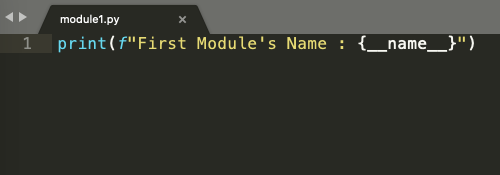
Look at the code snippet below. It is a simple python file with just one line:
print(f" First Module's Name : {__name__}")
Simply put, we are asking Python to print the value that __name__ variable has at this moment. Notice there is no import statement or even any other line of code above it.
Figure 1
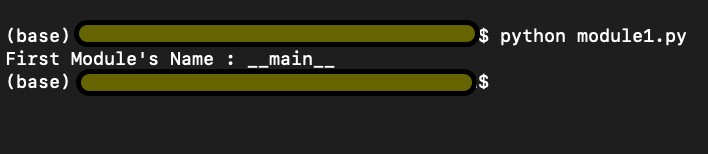
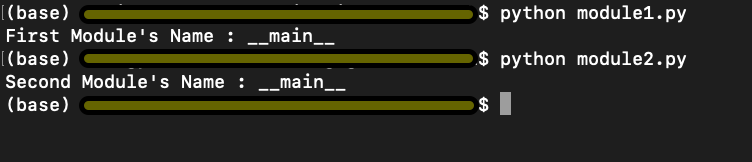
Check the output in Figure 2 below. We run the above lines of code and find the output
First Module’s Name : __main__
Figure 2
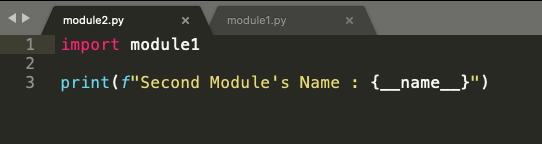
We import module1.py into module2.py and ask Python to return the second module’s name (second because this is the second python code we are running) stored in__name__variable again.
Figure 3
Interestingly, in Figure 5 below, we have the output
First Module’s Name : module1
Second Module’s Name : __main__
Figure 4
The above information summarised simply can be explained as follows. Python starts executing the first line of code found in a Python file, but before it runs anything to show the output, Python defines some special variables. __name__ is one such variable. When the source file is executed on its own i.e, not being imported from some other source code, the __name__ variable is set to value __main__, and hence the output we got in Figure 3 was First Module’s Name : __main__. If you import the file from some other module (as in the code snippet from Figure 4), the value of __name__ variable is set to the name of the module it is imported from. Hence the output in Figure 5.
Now let us look at the sequence of execution.
module1.py in Figure 1 is executed,
Variable __name__ is set to the value __main__
__main__ module is executed, and the output is First Module’s Name : __main__
Module2.py in Figure 4 is executed,
Variable __name__ is set to the value module1
module1 is the block of code in module1.py which is executed, and the output is First Module’s Name : module1
Next, we move on to line 3 in module2.py, the name value is reset to __main__, because this is a fresh piece of code in module2.py, and the output is Second Module’s Name : __main__
Using if __name__ == ‘__main__’
But let’s think only concerning the code in module2.py. In the real world, with module2.py I would not like to print the output from module1.py rather only import some functionality and get output for the lines of code written in module2.py i.e. Second Module’s Name : __main__
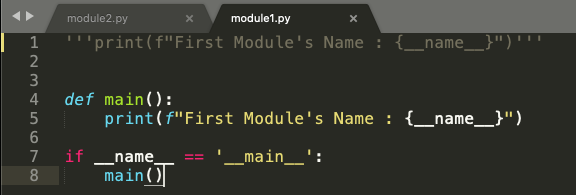
But how can we do it? There has to be a way because this seems more logical that way. Refer to the code snippet below in Figure 6.
Figure 5
So, we will define a function main(), and put the print statement from module1.py inside the main function. Now we use this small trick of using the statement if __name__ == ‘__main__’ and put the main function inside this if statement. Now let’s look at the execution sequence of our program.
We have a main() function where we ask to print the name of the first module stored in the __name__ variable. From the above example, we know the value stored in the __name__ variable is __main__
In line 7, we say if the value in __name__ variable is equal to __main__, only then go ahead and execute the main() function.
Now running the modified module1.py, we can see the output as First Module’s Name : __main__ as expected. Refer to the first output in Figure 7
Now when we run module2.py, we get the output as Second Module’s Name : __main__
Notice how the output for module2.py has changed now. Although we have imported module1 in our module2.py program, the program in module1.py doesn’t run. Why? Because the value stored in the __name__ variable at this moment is module1 and not __main__. So, using a main() function and if __name__ == ‘__main__’ has put restrictions on execution of lines of code in module1.py as it would only execute module1.py only if __name__ == ‘__main__’
Figure 6
Putting it all into a real-world example
We now take a more generic example, which would make more sense of all we have discussed above.
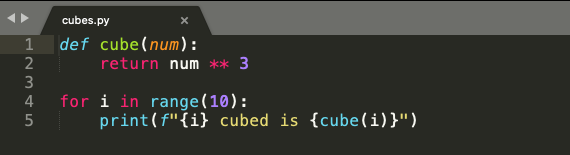
Have a look at the below code snippet from cubes.py in Figure 8. In line 1 and line 2, we have a function cube(), which takes num as an argument. The function cubes(num) returns the cube of a given number.
On line 4, we use a for loop which iterates over a list of numbers from 0 to 9.
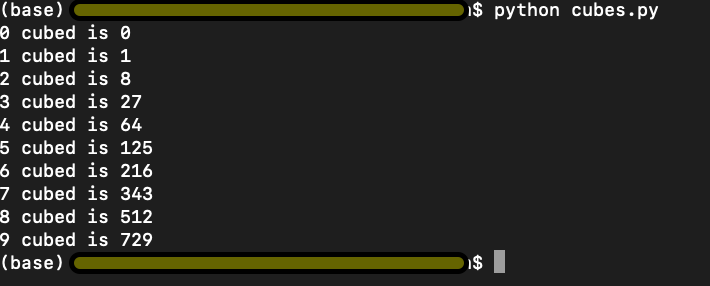
On line 5, we use the cubes(num) function with i as input to display the cube, as shown in figure 9. Simple enough.
Figure 7
Figure 8
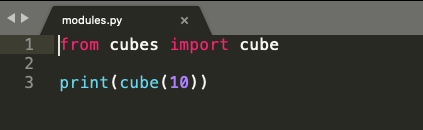
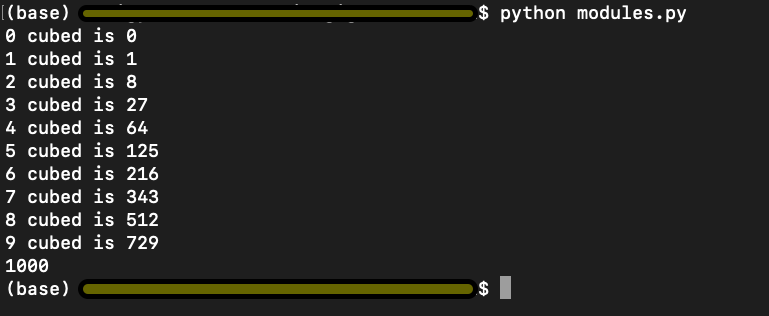
In the code snippet from modules.py below in Figure 10, we import cube(num) function from cubes.py and try to print cube of 10 in line 3. Logically, we are trying to use the function cube(num), which returns a cube of any given input number.
Figure 9
However, look at the output below. We have the output of both the programs cubes.py and modules.py. This is not what we intended or wanted to do.
Figure 10
Remember the explanation from above where we used if __name__ == ‘__main__’ to limit the execution of code from modules1.py. Let us try and implement the same idea and see if that works here.
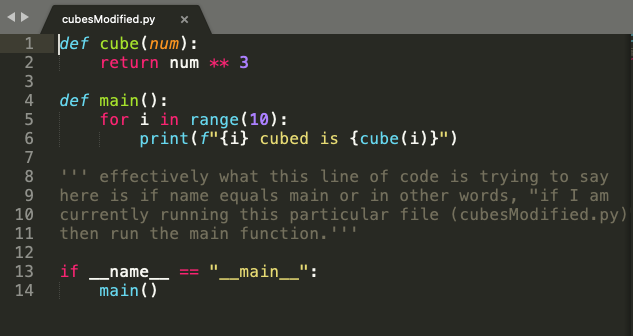
In the code snippet from cubesModified.py in Figure 11, we put the for loop and the print statement from cubes.py in the main() function. And again, we use the statement if __name__ == ‘__main__’ to execute code from cubesModified.py only when the value of __name__ variable equals to __main__.
Figure 11
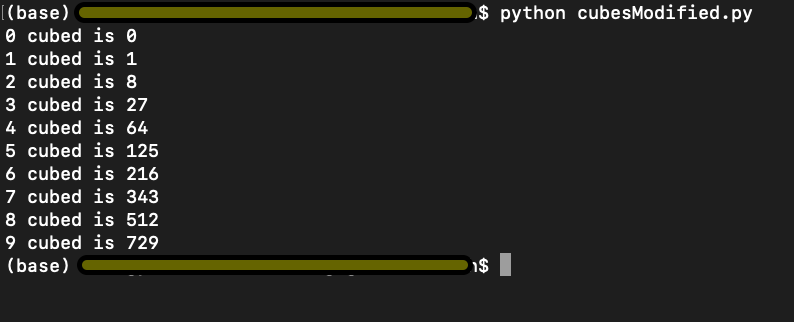
We run cubesModified.py and get the output as below and per our expectation.
Figure 12
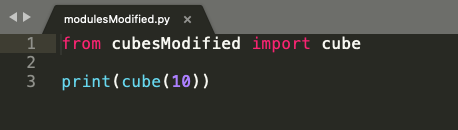
However, now when we run modulesModified.py where we import cube(num) function from cubesModified.py, it only executes the code from our modulesModified.py as shown in Figure 15, and the output is 1000 because the value stored in the __name__ variable in cubesModified and not __main__.
Figure 13
Figure 14
I hope this explanation helps you with a better understanding of what does if __name__ == ‘__main__’. Go ahead and play around with the code in the code editor and cement your understanding. Best of Luck!!
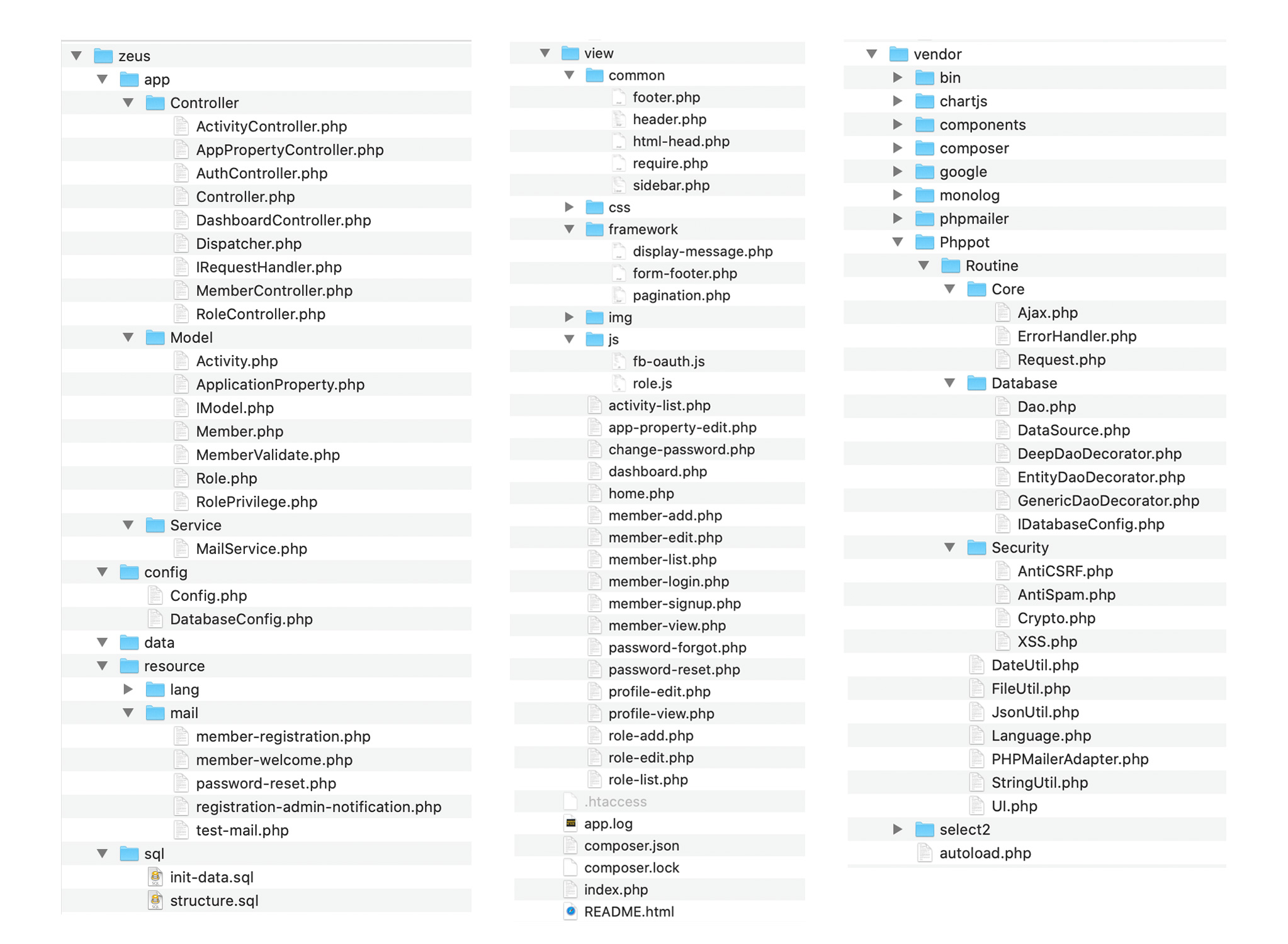
Built with security as the prime focus. Safe from SQL injection, CSRF attack, XSS attack and standard security measures in place.
Easy customization
Code is sleek, modular, separated in layers for easy understanding and customization. PSR standard compliant source code with optimum comments. Easy to understand, enhance and maintain.
User management
Admin can create users via the control panel or allow the users to register and signup on the system. Facebook oAuth login can be enabled. Admin can choose any or all of these via control panel.
Access management
Role based access privilege control authorization. Admin can manage access for users at functionality level with just a click of a button.
Admin control
Admin has complete control over the application. Every aspect of the application behavior can be configured via the admin control panel. Right from tracking user activity to restricting permission, all levels can be done via the control panel.
Multi-language
By default the application comes with English and German languages. You can add a new language in just minutes.
Summary: To convert a dictionary to a list of tuples, use the dict.items() method to obtain an iterable of (key, value) pairs and convert it to a list using the list(...) constructor: list(dict.items()). To modify each key value pair before storing it in the list, you can use the list comprehension statement [(k', v') for k, v in dict.items()] replacing k' and v' with your specific modifications.
In my code projects, I often find that choosing the right data structure is an important prerequisite to writing clean and effective code. In this article, you’ll learn the most Pythonic way to convert a dictionary to a list.
Problem: Given a dictionary of key:value pairs. Convert it to a list of (key, value) tuples.
Example: Given the following dictionary.
d = {'Alice': 19, 'Bob': 23, 'Carl': 47}
You want to convert it to a list of (key, value) tuples:
[('Alice', 19), ('Bob', 23), ('Carl', 47)]
You can get a quick overview of the methods examined in this article next:
Exercise: Change the data structure of the dictionary elements. Does it still work?
Let’s dive into the methods!
Method 1: List of Tuples with dict.items() + list()
The first approach uses the dictionary method dict.items() to retrieve an iterable of (key, value) tuples. The only thing left is to convert it to a list using the built-in list() constructor.
The variable t now holds a list of (key, value) tuples. Note that in many cases, it’s not necessary to actually convert it to a list, and, thus, instantiate the data structure in memory. For example, if you want to loop over all (key, value) pairs in the dictionary, you can do so without conversion:
for k,v in d.items(): s = str(k) + '->' + str(v) print(s) '''
Alice->19
Bob->23
Carl->47 '''
Using the items() method on the dictionary object is the most Pythonic way if everything you want is to retrieve a list of (key, value) pairs. However, what if you want to get a list of keys—ignoring the values for now?
Method 2: List of Keys with dict.key()
To get a list of key values, use the dict.keys() method and pass the resulting iterable into a list() constructor.
d = {'Alice': 19, 'Bob': 23, 'Carl': 47} # Method 2
t = list(d.keys())
print(t)
# ['Alice', 'Bob', 'Carl']
Similarly, you may want to get a list of values.
Method 3: List of Values with dict.values()
To get a list of key values, use the dict.values() method and pass the resulting iterable into a list() constructor.
d = {'Alice': 19, 'Bob': 23, 'Carl': 47} # Method 3
t = list(d.values())
print(t)
# [19, 23, 47]
But what if you want to modify each (key, value) tuple? Let’s study some alternatives.
Method 4: List Comprehension with dict.items()
List comprehension is a compact way of creating lists. The simple formula is [expression + context].
Expression: What to do with each list element?
Context: What elements to select? The context consists of an arbitrary number of for and if statements.
You can use list comprehension to modify each (key, value) pair from the original dictionary before you store the result in the new list.
d = {'Alice': 19, 'Bob': 23, 'Carl': 47} # Method 4
t = [(k[:3], v-1) for k, v in d.items()]
print(t)
# [('Ali', 18), ('Bob', 22), ('Car', 46)]
You transform each key to a string with three characters using slicing and reduce each value by one.
Method 5: zip() with dict.keys() and dict.values()
However, there’s no benefit compared to just using the dict.items() method. However, I wanted to show you this because the zip() function is frequently used in Python and it’s important for you to understand it.
Method 6: Basic Loop
The last method uses a basic for loop—not the worst way of doing it! Sure, a Python pro would use the most Pythonic ways I’ve shown you above. But using a basic for loop is sometimes superior—especially if you want to be able to customize the code later (e.g., increasing the complexity of the loop body).
d = {'Alice': 19, 'Bob': 23, 'Carl': 47} # Method 6
t = []
for k, v in d.items(): t.append((k,v))
print(t)
# [('Alice', 19), ('Bob', 23), ('Carl', 47)]
A single-line for loop or list comprehension statement is not the most Pythonic way to convert a dictionary to a Python list if you want to modify each new list element using a more complicated body expression. In this case, a straightforward for loop is your best choice!
To become successful in coding, you need to get out there and solve real problems for real people. That’s how you can become a six-figure earner easily. And that’s how you polish the skills you really need in practice. After all, what’s the use of learning theory that nobody ever needs?
Practice projects is how you sharpen your saw in coding!
Do you want to become a code master by focusing on practical code projects that actually earn you money and solve problems for people?
Then become a Python freelance developer! It’s the best way of approaching the task of improving your Python skills—even if you are a complete beginner.
Problem: Given are two lists l1 and l2. You want to perform either of the following:
1. Boolean Comparison: Compare the lists element-wise and return True if your comparison metric returns True for all pairs of elements, and otherwise False.
2. Difference: Find the difference of elements in the first list but not in the second.
Let’s discuss the most Pythonic ways of accomplishing these problems. We start with five ways to perform the Boolean comparison and look at five ways to perform the simple difference, next.
Boolean Comparison
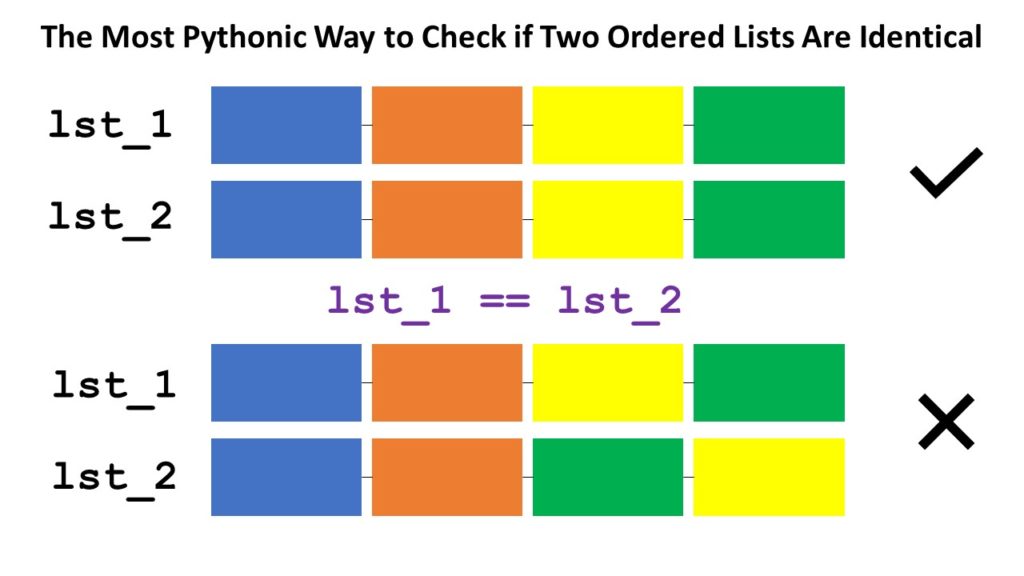
Short answer: The most Pythonic way to check if two ordered lists l1 and l2 are identical, is to use the l1 == l2 operator for element-wise comparison. If all elements are equal and the length of the lists are the same, the return value is True.
Problem: Given are two lists l1 and l2. You want to perform Boolean Comparison: Compare the lists element-wise and return True if your comparison metric returns True for all pairs of elements, and otherwise False.
Let’s discuss the most Pythonic ways of solving this problem. Here’s a quick interactive code overview:
Exercise: Glance over all methods and run the code. What questions come to mind? Do you understand each method?
Read on to learn about each method in detail!
Method 1: Simple Comparison
Not always is the simplest method the best one. But for this particular problem, it is! The equality operator == compares a list element-wise—many Python coders don’t know this!
The following method is what you’d see from a coder coming from another programming language or from a beginner who doesn’t know about the equality operator on lists (see Method 1).
# 2. Simple For Loop
def method_2(l1, l2): for i in range(min(len(l1), len(l2))): if l1[i] != l2[i]: return False return len(l1) == len(l2) l1 = [1, 2, 3, 4, 5]
l2 = [1, 2, 3]
print(method_2(l1, l2))
# False
In the code, you iterate over all indices from 0 to the last position of the smallest list as determined by the part min(len(l1), len(l2)). You then check if both elements at the same position are different. If they are different, i.e., l1[i] != l2[i], you can immediately return False because the lists are also different.
If you went through the whole loop without returning False, the list elements are similar. But one list may still be longer! So, by returning len(l1) == len(l2), you ensure to only return True if (1) all elements are equal and (2) the lists have the same length.
A lot of code to accomplish such a simple thing! Let’s see how a better coder would leverage the zip() function to reduce the complexity of the code.
Method 3: zip() + For Loop
The zip function takes a number of iterables and aggregates them to a single one by combining the i-th values of each iterable into a tuple for every i.
Let’s see how you can use the function to make the previous code more concise:
# 3. Zip + For Loop
def method_3(l1, l2): for x, y in zip(l1, l2): if x != y: return False return len(l1) == len(l2) l1 = [1, 2, 3, 4, 5]
l2 = [1, 2, 3]
print(method_3(l1, l2))
# False
Instead of iterating over indices, you now iterate over pairs of elements (the ones zipped together). If the lists have different sizes, the remaining elements from the longer list will be skipped. This way, element-wise comparison becomes simpler and no elaborate indexing schemes are required. Avoiding indices by means of the zip() function is a more Pythonic way for sure!
You first create an iterable of Boolean values using the generator expression x == y for x, y in zip(l1, l2).
Then, you sum up over the Boolean values (another trick of pro coders) to find the number of elements that are the same and store it in variable num_equal.
Finally, you compare this with the length of both lists. If all three values are the same, both lists have the same elements and their length is the same, too. They are equal!
# 4. Sum + Zip + Len
def method_4(l1, l2): num_equal = sum(x == y for x, y in zip(l1, l2)) return num_equal == len(l1) == len(l2) l1 = [1, 2, 3, 4, 5]
l2 = [1, 2, 3]
print(method_4(l1, l2))
# False print(method_4([1, 2], [1, 2]))
# True
From the methods except the first one using the == operator, this is the most Pythonic way due to the use of efficient Python helper functions like zip(), len(), and sum() and generator expressions to make the code more concise and more readable.
You could also write this in a single line of code!
sum(x == y for x, y in zip(l1, l2)) == len(l1) == len(l2)
# 5. map() + reduce() + len()
from functools import reduce
def method_5(l1, l2): equal = map(lambda x, y: x == y, l1, l2) result = reduce(lambda x, y: x and y, equal) return result and len(l1) == len(l2) l1 = [1, 2, 3, 4, 5]
l2 = [1, 2, 3]
print(method_5(l1, l2))
# False print(method_5([1, 2, 3], [1, 2, 3]))
# True
The map() function combines all pairs of elements to Boolean values (are the two elements equal?). The reduce() function combines all Boolean values performing an and operation. Sure, you can also use the more concise variant using the all() function:
Method 6: map() + all()
This is the same as the previous method—but using the all() function instead of reduce() to combine all Boolean values in a global and operation.
# 6. map() + all()
def method_6(l1, l2): result = all(map(lambda x, y: x == y, l1, l2)) return result and len(l1) == len(l2) l1 = [1, 2, 3, 4, 5]
l2 = [1, 2, 3]
print(method_5(l1, l2))
# False print(method_5([1, 2, 3], [1, 2, 3]))
# True
If you want to learn something new every day, join my free Python email series for continuous improvement in Python and computer science.
Short answer: The most Pythonic way to compute the difference between two lists l1 and l2 is the list comprehension statement [x for x in l1 if x not in set(l2)]. This works even if you have duplicate list entries, it maintains the original list ordering, and it’s efficient due to the constant runtime complexity of the set membership operation.
What’s the best way to compute the difference between two lists in Python?
a = [5, 4, 3, 2, 1]
b = [4, 5, 6, 7] # a - b == [3, 2, 1]
# b - a == [6, 7]
Let’s have an overview in the following interactive code shell:
Exercise: Run the code and think about your preferred way!
Let’s dive into each of the methods to find the most Pythonic one for your particular scenario.
This approach is elegant because it’s readable, efficient, and concise.
However, there are some unique properties to this method which you should be aware of:
The result is a set and not a list. You can convert it back to a list by using the list(...) constructor.
All duplicated list entries are removed in the process because sets cannot have duplicated elements.
The order of the original list is lost because sets do not maintain the ordering of the elements.
If all three properties are acceptable to you, this is by far the most efficient approach as evaluated later in this article!
However, how can you maintain the order of the original list elements while also allow duplicates? Let’s dive into the list comprehension alternative!
Method 2: List Comprehension
List comprehension is a compact way of creating lists. The simple formula is [expression + context].
Expression: What to do with each list element?
Context: What elements to select? The context consists of an arbitrary number of for and if statements.
You can use list comprehension to go over all elements in the first list but ignore them if they are in the second list:
# Method 2: List Comprehension
print([x for x in a if x not in set(b)])
# [3, 2, 1]
We used a small but effective optimization of converting the second list b to a set first. The reason is that checking membership x in b is much faster for sets than for lists. However, semantically, both variants are identical.
Here are the distinctive properties of this approach:
The result of the list comprehension statement is a list.
The order of the original list is maintained.
Duplicate elements are maintained.
If you rely on these more powerful guarantees, use the list comprehension approach because it’s the most Pythonic one.
Method 3: Simple For Loop
Surprisingly, some online tutorials recommend using a nested for loop (e.g., those guys):
# Method 3: Nested For Loop
d = []
for x in a: if x not in b: d.append(x)
print(d)
# [3, 2, 1]
In my opinion, this approach would only be used by absolute beginners or coders who come from other programming languages such as C++ or Java and don’t know essential Python features like list comprehension. You can optimize this method by converting the list b to a set first to accelerate the check if x not in b by a significant margin.
To become successful in coding, you need to get out there and solve real problems for real people. That’s how you can become a six-figure earner easily. And that’s how you polish the skills you really need in practice. After all, what’s the use of learning theory that nobody ever needs?
Practice projects is how you sharpen your saw in coding!
Do you want to become a code master by focusing on practical code projects that actually earn you money and solve problems for people?
Then become a Python freelance developer! It’s the best way of approaching the task of improving your Python skills—even if you are a complete beginner.
We are thrilled to announce that Orchard Core RC2 is now available.
What is Orchard Core?
Orchard Core Framework is a community-based application framework for building modular, multi-tenant applications on ASP.NET Core. It has been created by more than 150 contributors and has over 4K stars on GitHub.
Orchard Core also includes Orchard Core CMS, a Web Content Management System (CMS), that is built on top of the Orchard Core Framework. It allows you to build full websites, or headless websites using GraphQL.
Getting Started
Installing the templates
You can install the recommended templates by running:
dotnet new -i OrchardCore.ProjectTemplates::1.0.0-*
Creating a new modular application
Using the templates, a modular MVC application can be created by running:
dotnet new ocmvc -n MySite
And a module is created by running:
dotnet new ocmodulemvc -n MyModule
dotnet add MySite reference MyModule
Creating an Orchard CMS website
To create a new site based on the Orchard Core CMS run:
dotnet new occms -n MySite
dotnet run --project .\MySite\MySite.csproj
After going through the setup form you get a working Blog.
What’s new
Some notable improvements include:
Content localization support, and pre-configured localized Setup experience
Improved block content management experience
Sitemaps management
Azure support improvements
Resources
Development plan
The Orchard Core source code is available on GitHub.
There are still many important pieces to add and you might want to check our roadmap, but it’s also the best time to jump into the project and start contributing new modules, themes, improvements, or just ideas.
Feel free to drop on our dedicated Gitter chat and ask questions.
Short answer: The most Pythonic way to compute the difference between two lists l1 and l2 is the list comprehension statement [x for x in l1 if x not in set(l2)]. This works even if you have duplicate list entries, it maintains the original list ordering, and it’s efficient due to the constant runtime complexity of the set membership operation.
What’s the best way to compute the difference between two lists in Python?
a = [5, 4, 3, 2, 1]
b = [4, 5, 6, 7] # a - b == [3, 2, 1]
# b - a == [6, 7]
In Python, you always have multiple ways to solve the same (or a similar) problem. Let’s have an overview in the following interactive code shell:
Exercise: Run the code and think about your preferred way!
Let’s dive into each of the methods to find the most Pythonic one for your particular scenario.
This approach is elegant because it’s readable, efficient, and concise.
However, there are some unique properties to this method which you should be aware of:
The result is a set and not a list. You can convert it back to a list by using the list(...) constructor.
All duplicated list entries are removed in the process because sets cannot have duplicated elements.
The order of the original list is lost because sets do not maintain the ordering of the elements.
If all three properties are acceptable to you, this is by far the most efficient approach as evaluated later in this article!
However, how can you maintain the order of the original list elements while also allow duplicates? Let’s dive into the list comprehension alternative!
Method 2: List Comprehension
List comprehension is a compact way of creating lists. The simple formula is [expression + context].
Expression: What to do with each list element?
Context: What elements to select? The context consists of an arbitrary number of for and if statements.
You can use list comprehension to go over all elements in the first list but ignore them if they are in the second list:
# Method 2: List Comprehension
print([x for x in a if x not in set(b)])
# [3, 2, 1]
We used a small but effective optimization of converting the second list b to a set first. The reason is that checking membership x in b is much faster for sets than for lists. However, semantically, both variants are identical.
Here are the distinctive properties of this approach:
The result of the list comprehension statement is a list.
The order of the original list is maintained.
Duplicate elements are maintained.
If you rely on these more powerful guarantees, use the list comprehension approach because it’s the most Pythonic one.
Method 3: Simple For Loop
Surprisingly, some online tutorials recommend using a nested for loop (e.g., those guys):
# Method 3: Nested For Loop
d = []
for x in a: if x not in b: d.append(x)
print(d)
# [3, 2, 1]
In my opinion, this approach would only be used by absolute beginners or coders who come from other programming languages such as C++ or Java and don’t know essential Python features like list comprehension. You can optimize this method by converting the list b to a set first to accelerate the check if x not in b by a significant margin.
Performance Evaluation
Want to know the most performant one? In the following, I tested three different approaches:
import timeit init = 'l1 = list(range(100)); l2 = list(range(50))' # 1. Set Conversion
print(timeit.timeit('list(set(l1) - set(l2))', init, number = 10000)) # 2. List Comprehension
print(timeit.timeit('[x for x in l1 if x not in l2]', init, number = 10000)) # 3. List Comprehension + set
print(timeit.timeit('s = set(l2);[x for x in l1 if x not in s]', init, number = 10000)) '''
0.1620231000000001
0.5186101000000001
0.057180300000000184 '''
You can run the code in our interactive Python shell:
Exercise: Run the code. Which is fastest and why?
Although the first approach seems to be fastest, you now know that it has some disadvantages, too. (Loses duplicate info, loses ordering info.) From the two list comprehension approaches, the second one kills the first one in terms of runtime complexity and performance!
Where to Go From Here?
Enough theory, let’s get some practice!
To become successful in coding, you need to get out there and solve real problems for real people. That’s how you can become a six-figure earner easily. And that’s how you polish the skills you really need in practice. After all, what’s the use of learning theory that nobody ever needs?
Practice projects is how you sharpen your saw in coding!
Do you want to become a code master by focusing on practical code projects that actually earn you money and solve problems for people?
Then become a Python freelance developer! It’s the best way of approaching the task of improving your Python skills—even if you are a complete beginner.
Python’s built-in list data structure has many powerful methods any advanced Python programmer must be familiar with. However, some operations on lists can’t be performed simply by calling the right method.
You can add a single item to a list using the method append(item) on the list. If you want to add a list of items to another list, there is the method expand(items) which does the job for you.
The same holds if you want to delete an item from a list, you simply call the method remove(item)and you get the desired outcome.
But, did you ever wonder how to delete a list of items from a given list? Or what if the indices of the items to be deleted were given, how would you do that?
These were the questions I was asking myself in one of my latest hobby projects. Therefore I decided to find out the most Pythonic way to do that.
Problem
Let’s frame our problem like this: Given a list of Task items, how can we remove all items from the list which are marked as done?
Currently the implementation looks as follows:
class Task: def __init__(self, title): self.title = title self.done = False self.done_by = None def is_done(self): return self.done def set_done(self, name): self.done = True self.done_by = name def __repr__(self): state = f'was done by {self.done_by}' if self.done else 'is not done' s = f'Task: {self.title} {state}' return s todo_list = [ Task('Clean House'), Task('Walk Dog'), Task('Buy Bread'), Task('Repair Car'), Task('Plant Tree'), Task('Water Flowers'), Task('Bake Cake')
] todo_list[0].set_done('Bob')
todo_list[2].set_done('Alice')
todo_list[5].set_done('Bob') # print the whole list
print(todo_list)
So, how can we clean up our todo list so that it contains only tasks that have not yet been done?
Solutions
The following solutions can be divided into two groups:
Delete elements of given indices
Delete elements by a certain condition
Any solution of the first type can also be used to delete the elements by a given condition. To accomplish this, all we have to do, is iterate once over the input list, check the condition and store the indices of the elements for which the condition was True. This can be implemented as follows:
indices = []
for idx, task in enumerate(todo_list): if task.is_done(): indices.append(idx)
Since it takes one iteration of the list to find the indices, this adds O(n) to the runtime complexity. Yet, since any solution has at least a time complexity of O(n), we can neglect this first step.
Method 1: Remove a Single Item From the List and Repeat in a Loop
As mentioned before, there are methods to remove a single item from a list, either by value or by index.
Therefore one solution to remove several items is to use a method that removes a single item and executes it in a loop. Though, there is a pitfall to this solution. After we remove the element at index 0, all the other elements shift, and their indices change because the element at index 1 is now at index 0 and so on.
This is how the solution would look as code:
1.1. Remove using pop()
The list.pop() method removes and returns the last element from an existing list. The list.pop(index) method with the optional argument index removes and returns the element at the position index.
indices = [0, 2, 5] # must be ordered!
shift = 0
for i in indices: todo_list.pop(i-shift) shift += 1
Well, probably this looks a bit awkward to you, and be reassured, it’s not the way you would do it in Python!
To avoid shifting, we can reverse sort the list of indices so that we can remove the items from end to start:
indices = [0, 2, 5]
for i in sorted(indices, reverse=True): todo_list.pop(i)
1.2. Remove using remove()
A slightly simpler solution, but still not the best solution, uses the method remove(item).
We iterate over the list and check for each item if it satisfied the condition so that it can be deleted. This solution would look like this:
for task in todo_list: if task.is_done(): todo_list.remove(task)
Be careful if you use remove(item) on a list of simple data types like integers. The function remove() deletes the first occurrence of the given value from the list!
In all of the above solutions, we performed the deletion in-place, which means, we kept the initial instance of the list.
By now you should see, a good solution to the problem is not that obvious.
1.3. Remove using itemgetter() and remove()
If you use the function itemgetter from the module operator there is another interesting solution which is basically an improvement of solution 1.1.
The function itemgetter takes an arbitrary number of indices and returns all the elements from those indices in a tuple. Here is the implementation of the proposed solution:
from operator import itemgetter indices = [0, 2, 5]
for item in (itemgetter(*idx)(todo_list)): xs.remove(item)
But still, the code is more complex than it needs to be.
Method 2. Remove Multiple Items from a List
In the previous solutions, we simply adapted functionality for deleting a single element so that we could use it inside a loop. In this section, we take a look at more Pythonic solutions for the problem.
2.1. Remove all elements from a list
If you want to remove all elements from the list, there is a very simple solution: Use the list class’s method clear(). It removes all elements from the list in-place.
2.2. Remove a slice from a list
If your elements are in a continuous range or if they have a least equal distances from each other a simple way to delete multiple elements from a list is using the keyword deltogether with slicing.
This could look like this:
del todo_list[1::2]
It deletes the elements in-place, however, it doesn’t help if we want to delete randomly distributed elements from our list.
2.3. Remove randomly distributed elements from a list using set operations
First, we iterate over the list once and extract all items to be deleted. Then, we convert both lists to sets and perform the removal using set operations. This looks as follows:
done = []
for task in todo_list: if task.is_done(): done.append(task) todo_list = list(set(todo_list) - set(done))
Under the hood, a set in Python is a hashmap that allows performing certain operations on sets very fast (O(1)). Unfortunately we have to convert from a list to a set and back, so that we loose the advantage in speed. And again, we end up with an O(n) solution.
This solution doesn’t work in-place and is a bit difficult to read due to the many conversions between data structures.
2.4. Remove randomly distributed elements from a list using list comprehension
The best way to do this in Python is actually very close to what we saw in the first section of this article where we iterated over the list and removed the elements for which a certain condition was True.
However, in this solution, we will proceed the other way round: We iterate over the old list and create a new list to which we add all the elements that we want to keep. Obviously, we have to create a new list to achieve this, so the solution won’t work in-place.
Python provides just what we need to get the desired result in one single line of code: list comprehensions.
todo_list = [task for task in todo_list if not task.is_done()]
If we assign the result of the list comprehension back to our initial todo_list variable, this variable will now point to a list that contains only tasks that weren’t done yet.
After the above line of code, the memory address to which the variable todo_list points has changed!
However, that’s how you should delete several elements from a list in Python. If you want to do this in-place, there is also a one-line solution to the problem, though, I personally wouldn’t recommend you to use this.
Here is the code:
[todo_list.remove(task) for task in todo_list if task.is_done()]
Be honest, how long did you take to wrap your head around that?
We use a dummy list comprehension in which we delete the selected elements from the initial list, finally we throw away the list comprehension’s resulting list.
So, what we actually do is to abuse the list comprehension to iterate over todo_list and delete items from it.
Conclusion
Depending on the distribution of the items in the list, there are different solutions.
If you want to remove all elements from a list, use the list’s method clear().
If you want to remove a continuous range from the list or if you want to delete items with equal distances between, use slicing with the operator del l[start:stop].
If you want to remove randomly distributed elements, use a list comprehension which selects only the elements you want to keep – this is the solution I recommend.
Obviously, there are more possibilities to solve the problem, yet, the solutions presented in this article are the most common ones and also the easiest to understand. If you find another great solution, feel free to contact us! We would love to see it.
Where to Go From Here?
Enough theory, let’s get some practice!
To become successful in coding, you need to get out there and solve real problems for real people. That’s how you can become a six-figure earner easily. And that’s how you polish the skills you really need in practice. After all, what’s the use of learning theory that nobody ever needs?
Practice projects is how you sharpen your saw in coding!
Do you want to become a code master by focusing on practical code projects that actually earn you money and solve problems for people?
Then become a Python freelance developer! It’s the best way of approaching the task of improving your Python skills—even if you are a complete beginner.
That’s it! You should now be all set to use .NET 5 Preview 6.
What’s new?
Blazor WebAssembly template now included
The Blazor WebAssembly template is now included in the .NET 5 SDK along with the Blazor Server template. To create a Blazor WebAssembly project, simply run dotnet new blazorwasm.
JSON extension methods for HttpRequest and HttpResponse
You can now easily read and write JSON data from an HttpRequest and HttpResponse using the new ReadFromJsonAsync and WriteAsJsonAsync extension methods. These extension methods use the System.Text.Json serializer to handle the JSON data. You can also check if a request has a JSON content type using the new HasJsonContentType extension method.
The JSON extension methods can be combined with endpoint routing to create JSON APIs in a style of programming we call “route to code”. It is a new option for developers who want to create basic JSON APIs in a lightweight way. For example, a web app that has only a handful of endpoints might choose to use route to code rather than the full functionality of ASP.NET Core MVC.
endpoints.MapGet("/weather/{city:alpha}", async context =>
{ var city = (string)context.Request.RouteValues["city"]; var weather = GetFromDatabase(city); await context.Response.WriteAsJsonAsync(weather);
});
Custom handling of authorization failures is now easier with the new IAuthorizationMiddlewareResultHandler interface that is invoked by the AuthorizationMiddleware. The default implementation remains the same, but a custom handler can be be registered in DI which allows things like custom HTTP responses based on why authorization failed. A sample that demonstrates usage of the IAuthorizationMiddlewareResultHandler can be found here.
SignalR Hub filters
Hub filters, called Hub pipelines in ASP.NET SignalR, is a feature that allows you to run code before and after Hub methods are called, similar to how middleware lets you run code before and after an HTTP request. Common uses include logging, error handling, and argument validation.
You can read more about this Hub filters on the docs page.
Give feedback
We hope you enjoy this release of ASP.NET Core in .NET 5! We are eager to hear about your experiences with this latest .NET 5 release. Let us know what you think by filing issues on GitHub.