Posted on Leave a comment

Top 14 Places to Find Remote Freelance Developer Gigs and Work From Home

COVID-19 has changed the world in a sustainable way. Suddenly, even the most conservative bosses realized that it is perfectly efficient to allow developers to work from home. Remote work may easily be one of the most transformative trends in the 21st century: It will have an impact on almost every conventional job under the sun—and the year-over-year double-digit growth of freelancing platforms such as Upwork and Fiverr proves this point.

This article helps you to identify the best places to look for work-from-home, remote freelancing jobs—with a focus on jobs or gigs in the attractive programming sector. The average freelancer earns $51-$61 per hour and, thus, it may be an attractive way for you to build a second income stream besides your main job income.

So, without any further introduction, let’s dive into the top places to look for freelancing gigs! Here’s a quick overview of all gigs—ordered by relevance for freelance developers:

  1. TopTal Developers
  2. StackOverflow Jobs
  3. Hacker News Jobs
  4. GitHub Jobs
  5. Finxter Freelancer
  6. PeoplePerHour Developer Jobs
  7. Authentic Jobs
  8. Vue Jobs
  9. Remote Leads
  10. Redditors For Hire
  11. WeWorkRemotely
  12. Upwork
  13. Fiverr
  14. Twitter Company Remote Jobs

ALL LINKS OPEN IN A NEW TAB!

1. TopTal Developers

TopTal Developers

2. StackOverflow Jobs

Stackoverflow Jobs

3. Hacker News Jobs

Hacker News Jobs

4. GitHub Jobs

Github Jobs

5. Finxter Freelancer

Finxter Freelancer Course

6. PeoplePerHour Developer Jobs

People Per Hour Developer

7. Authentic Jobs

Authentic Jobs

8. Vue Jobs

Vue Jobs

9. Remote Leads

Remote Leads

10. Redditors For Hire

11. WeWorkRemotely

WeWorkRemotely

12. Upwork

Upwork

13. Fiverr

14. Twitter Company Remote Jobs

Twitter Remote Jobs

What Are The Best Freelancing Sites for Coders? Video Lesson

Want to become a freelance developer earning six-figures? Check out the FINXTER Python freelancer course—the world’s most in-depth Python freelancer program!

The post Top 14 Places to Find Remote Freelance Developer Gigs and Work From Home first appeared on Finxter.

Posted on Leave a comment

Stripe One Time Payment with Prebuilt Hosted Checkout in PHP

Last modified on October 6th, 2020.

Stripe provides payment processing to support eCommerce software and mobile APPs. The key features by Stripe are,

  • fast and interactive checkout experience.
  • secure, smooth payment flow.
  • scope to uplift the conversion rate and business growth.

Stripe is the most popular payment gateway solution supporting card payments along with PayPal. Its complete documentation helps developers to do an effortless integration.

Stripe provides different types of payment services to accept payments. It supports accepting one-time payment, recurring payment, in-person payment and more.

There are two ways to set up the Stripe one-time payment option in a eCommerce website.

  1. Use the secure prebuilt hosted checkout page.
  2. Create a custom payment flow.

Let us take the first method to integrate Stripe’s one-time payment. The example code redirects customers to the Stripe hosted checkout page. It’s a pre-built page that allows customers to enter payment details.

Stripe hosted checkout option piggybacks on the Stripe trust factor. If your website is lesser-known, if you are not popular, then it is best to choose this option. Because the end users may feel uncomfortable to enter their card details on your page.

This diagram depicts the Stripe payment flow, redirect and response handling.
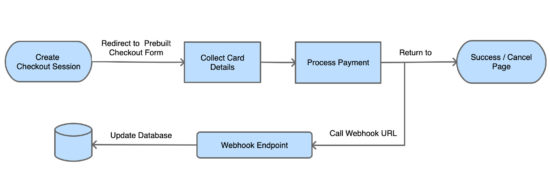
Stripe Hosted Checkout Block Diagram

In this example, it uses the latest checkout version to set up a one-time payment. If you want to create Stripe subscription payment, then the linked article has an example for it.

What is inside?

  1. About Stripe Checkout
  2. Steps to set up Stripe one-time payment flow
  3. About this example
  4. Generate and configure Stripe API keys
  5. Create webhook and map events
  6. Required libraries to access Stripe API
  7. Create client-server-side code to initiate checkout
  8. Capture and process webhook response
  9. Evaluate integration with test data
  10. Stripe one-time payment example output

About Stripe Checkout

Latest Stripe Checkout provides a frictionless smooth checkout experience. The below list shows some features of the latest Stripe checkout version.

  • Strong Customer Authentication (SCA).
  • Checkout interface fluidity over various devices’ viewport.
  • Multilingual support.
  • Configurable options to enable billing address collection, email receipts, and Button customizations

If you are using the legacy version,  it’s so simple to migrate to the latest Stripe Checkout version. The upgraded version supports advanced features like 3D secure, mobile payments and more.

Steps to setup Stripe one-time payment flow

The below steps are the least needs to set up a Stripe one-time payment online.

  1. Register with Stripe and generate API keys.
  2. Configure API keys with the application.
  3. Install and load the required libraries to access API.
  4. Create client and server-side code to make payments.
  5. Create endpoints to receive payment response and log into a database.
  6. Create a UI template to acknowledge customers.

We will see the above steps in this article with example code and screenshots.

About Stripe payment integration example

Stripe API allows applications to access and use its online payment services. It provides Stripe.js a JavaScript library to initiate the payment session flow.

This example code imports the Stripe libraries to access the API functions. It sets the endpoint to build the request and receive the response.

The client and server-side code redirect customers to the Stripe hosted checkout page. In the callback handlers, it processes the payment response sent by the API.

This example uses a database to store payment entries. It uses MySQLi with prepared statements to execute queries.

This image shows the simple file architecture of this example.
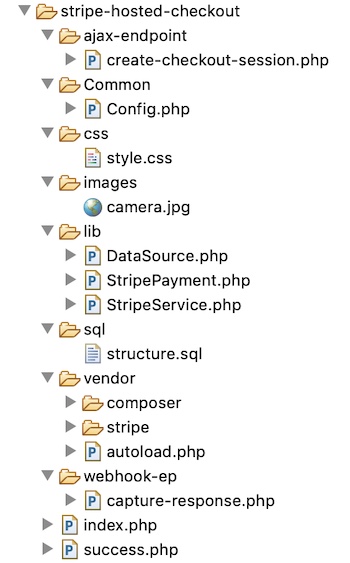
Stripe Hosted Checkout File Structure

Get and configure Stripe API keys

Register and log in with Stripe to get the API keys. Stripe dashboard will show two keys publishable_key and secret_key.

These keys are the reference to validate the request during the authentication process.

Note: Once finish testing in a sandbox mode, Stripe requires to activate the account to get the live API keys.
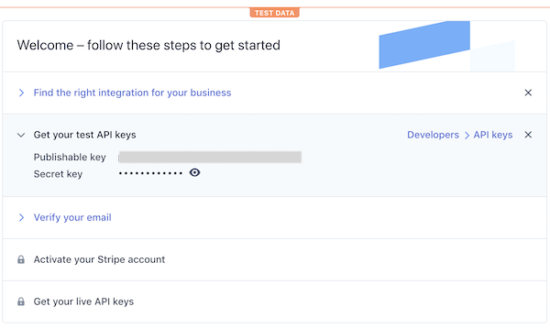
Get Stripe API Keys

This code shows the constants created to configure the API keys for this example.

<?php
namespace Phppot; class Config
{ const ROOT_PATH = "https://your-domain/stripe-hosted"; /* Stripe API test keys */ const STRIPE_PUBLISHIABLE_KEY = ""; const STRIPE_SECRET_KEY = ""; /* PRODUCT CONFIGURATIONS BEGINS */ const PRODUCT_NAME = 'A6900 MirrorLess Camera'; const PRODUCT_IMAGE = Config::ROOT_PATH . '/images/camera.jpg'; const PRODUCT_PRICE = '289.61'; const CURRENCY = 'USD'; const PRODUCT_TYPE = 'good';
}

Create webhook and map events

Creating a webhook is a conventional way to get the payment notifications sent by the API. All payment gateway providers give the option to create webhook for callback.

In PayPal payment gateway integration article, we have seen the types of notification mechanisms supported by PayPal.

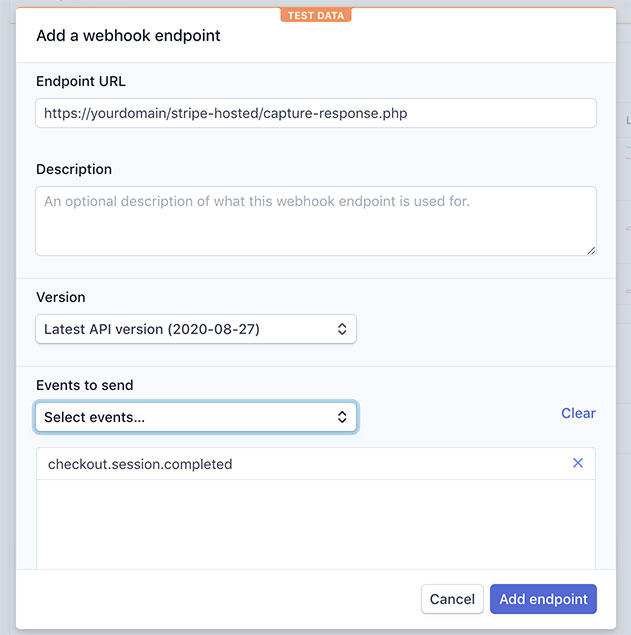
The code has the webhook endpoint registered with Stripe. It handles the API responses based on the event that occurred.

The below image shows the screenshot of the add-endpoint dialog. It populates the URL and the mapped events in the form fields.

Navigate via Developers->Webhooks and click the Add endpoint button to see the dialog.
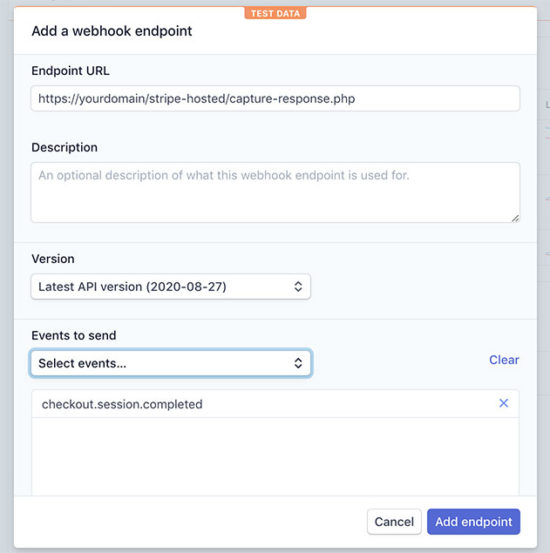
Add Stripe Webhook Endpoint

Required libraries to access Stripe API

First, download and install the stripe-php library. This will help to send flawless payment initiation request to the Stripe API.

This command helps to install this library via Composer. It is also available to download from GitHub.

composer require stripe/stripe-php

Load Stripe.js JavaScript library into the page which has the checkout button. Load this file by using https://js.stripe.com/v3/ instead of having it in local.

<script src="https://js.stripe.com/v3/"></script>

Create client-server code to process checkout

This section includes the steps needed to create the client-server code for setting up the Stripe one-time payment.

  1. Add checkout button and load Stripe.js
  2. Create a JavaScript event handler to initiate checkout session
  3. Create PHP endpoint to post create-checkout-session request
  4. Redirect customers to the Stripe hosted checkout page
  5. Get checkout session-id from the response.

HTML page with Stripe checkout button

This page has HTML code to add the Stripe checkout button. It loads the Stripe.js library.

This page loads a JavaScript that initiates the checkout session and redirects the user to the prebuilt Stripe hosted checkout.

The Stripe hosted checkout form handles the card validation effectively. We have created a custom car validator for Authorize.net payment integration code. Hosted checkout is more secure than handling card details by custom handlers.

index.php

<?php
namespace Phppot;
?>
<html>
<title>Stripe Prebuilt Hosted Checkout</title>
<head>
<link href="css/style.css" type="text/css" rel="stylesheet" />
<script src="https://js.stripe.com/v3/"></script>
</head>
<body> <div class="phppot-container"> <h1>Stripe Prebuilt Hosted Checkout</h1> <div id="payment-box"> <img src="images/camera.jpg" /> <h4 class="txt-title">A6900 MirrorLess Camera</h4> <div class="txt-price">$289.61</div> <button id="checkout-button">Checkout</button> </div> </div> <script> var stripe = Stripe('<?php echo Config::STRIPE_PUBLISHIABLE_KEY; ?>'); var checkoutButton = document.getElementById('checkout-button'); checkoutButton.addEventListener('click', function() { fetch('create-checkout-session.php', { method: 'POST', }) .then(function(response) { return response.json(); }) .then(function(session) { return stripe.redirectToCheckout({ sessionId: session.id }); }) .then(function(result) { if (result.error) { alert(result.error.message); } }) .catch(function(error) { console.error('Error:', error); }); }); </script>
</body>
</html>

JavaScript event handler initiates checkout session

In the previous section, it loads a JavaScript to do the following.

  1. Instantiate Stripe Javascript library object with the reference of the Stripe Publishable key.
  2. Map the checkout button’s click event to initiate a create-checkout-session.
  3. Redirect customers to the Stripe hosted checkout page with the checkout session id.

It calls the PHP endpoint builds the API request params to start a checkout session.

Then it receives the checkout-session-id as returned by the PHP endpoint. The redirectToCheckout() method sends customers to the prebuilt checkout to complete the payment.

PHP endpoint processing create-checkout-session request

When clicking the checkout button, the JavaScript executes an AJAX request. It fetches the PHP endpoint processing the create-checkout-session request.

The below code shows how to create the Stripe checkout-session via API. The API request is with the required query parameters. It includes the product detail, unit amount, payment method and more.

Then the API will return the session object after processing this request. This endpoint parses the response and grab the session-id and return it.

ajax-endpoint/create-checkout-session.php

<?php
namespace Phppot; use Phppot\StripeService;
use Phppot\StripePayment; $orderReferenceId = rand(100000, 999999); require_once __DIR__ . "/../lib/StripeService.php";
require_once __DIR__ .'/../Common/Config.php'; require_once __DIR__ . '/../lib/StripePayment.php';
$stripePayment = new StripePayment(); $stripeService = new StripeService(); $currency = Config::CURRENCY; $orderId = $stripePayment->insertOrder(Config::PRODUCT_PRICE, $currency, $orderReferenceId, "Payment in-progress");
$unitAmount = Config::PRODUCT_PRICE * 100;
$session = $stripeService->createCheckoutSession($unitAmount, $orderId);
echo json_encode($session);

The StripeService is a PHP class created to build API requests and process responses.

The createCheckoutSession() function builds the param array for the create-checkout-session request.

This service also handles the webhook responses sent by the API. The API sends the response on the occurrences of the events mapped with the webhook endpoint URL.

lib/StripeService.php

<?php
namespace Phppot; require_once __DIR__ . '/../Common/Config.php'; class StripeService
{ function __construct() { require_once __DIR__ . "/../vendor/autoload.php"; // Set your secret key. Remember to set your live key in production! \Stripe\Stripe::setApiKey(Config::STRIPE_SECRET_KEY); } public function createCheckoutSession($unitAmount, $clientReferenceId) { $checkout_session = \Stripe\Checkout\Session::create([ 'payment_method_types' => ['card'], 'line_items' => [[ 'price_data' => [ 'currency' => Config::CURRENCY, 'unit_amount' => $unitAmount, 'product_data' => [ 'name' => Config::PRODUCT_NAME, 'images' => [Config::PRODUCT_IMAGE], ], ], 'quantity' => 1, ]], 'mode' => 'payment', 'client_reference_id' => $clientReferenceId, 'success_url' => Config::ROOT_PATH . '/success.php?session_id={CHECKOUT_SESSION_ID}', 'cancel_url' => Config::ROOT_PATH . '/index.php?status=cancel', ]); return $checkout_session; } public function captureResponse() { $payload = @file_get_contents('php://input'); $event = json_decode($payload); require_once __DIR__ . "/../lib/StripePayment.php"; $stripePayment = new StripePayment(); switch($event->type) { case "customer.created": $param["stripe_customer_id"] = $event->data->object->id; $param["email"] = $event->data->object->email; $param["customer_created_datetime"] = date("Y,m,d H:i:s", $event->data->object->created); $param["stripe_response"] = json_encode($event->data->object); $stripePayment->insertCustomer($param); break; case "checkout.session.completed": $param["order_id"] = $event->data->object->client_reference_id; $param["customer_id"] = $event->data->object->customer; $param["payment_intent_id"] = $event->data->object->payment_intent; $param["stripe_checkout_response"] = json_encode($event->data->object); $stripePayment->updateOrder($param); break; case "payment_intent.created": $param["payment_intent_id"] = $event->data->object->id; $param["payment_create_at"] = date("Y-m-d H:i:s", $event->data->object->created); $param["payment_status"] = $event->data->object->status; $param["stripe_payment_response"] = json_encode($event->data->object); $stripePayment->insertPayment($param); break; case "payment_intent.succeeded": $param["payment_intent_id"] = $event->data->object->id; $param["billing_name"] = $event->data->object->charges->data[0]->billing_details->name; $param["billing_email"] = $event->data->object->charges->data[0]->billing_details->email; $param["payment_last_updated"] = date("Y-m-d H:i:s", $event->data->object->charges->data[0]->created); $param["payment_status"] = $event->data->object->charges->data[0]->status; $param["stripe_payment_response"] = json_encode($event->data->object); $stripePayment->updatePayment($param); break; case "payment_intent.canceled": $param["payment_intent_id"] = $event->data->object->id; $param["billing_name"] = $event->data->object->charges->data[0]->billing_details->name; $param["billing_email"] = $event->data->object->charges->data[0]->billing_details->email; $param["payment_last_updated"] = date("Y-m-d H:i:s", $event->data->object->charges->data[0]->created); $param["payment_status"] = $event->data->object->charges->data[0]->status; $param["stripe_payment_response"] = json_encode($event->data->object); $stripePayment->updatePayment($param); break; case "payment_intent.payment_failed": $param["payment_intent_id"] = $event->data->object->id; $param["billing_name"] = $event->data->object->charges->data[0]->billing_details->name; $param["billing_email"] = $event->data->object->charges->data[0]->billing_details->email; $param["payment_last_updated"] = date("Y-m-d H:i:s", $event->data->object->charges->data[0]->created); $param["payment_status"] = $event->data->object->charges->data[0]->status; $param["stripe_payment_response"] = json_encode($event->data->object); $stripePayment->updatePayment($param); break; } http_response_code(200); }
} 

Capture and process response

The capture-response.php file calls the StripeService class to handle the webhook response.

The registered webhook endpoint has the mapping for the events. The figure shows the mapped events and the webhook URL below.
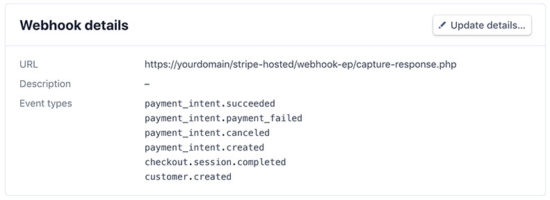
Stripe Developers Webhook Detail

The captureResponse() function handles the API response based on the events that occurred.

On each event, it updates the customer, order database tables. It creates the payment response log to put entries into the tbl_stripe_response table.

webhook-ep/capture-response.php

<?php
namespace Phppot; use Phppot\StriService; require_once __DIR__ . "/../lib/StripeService.php"; $stripeService = new StripeService(); $stripeService->captureResponse(); ?>

It invokes the StripeService function captureResponse(). It calls StripePayment to store Orders, Customers and Payment data into the database.

The StripePayment class it uses DataSource to connect the database and access it.

lib/StripePayment.php

<?php
namespace Phppot; use Phppot\DataSource; class StripePayment
{ private $ds; function __construct() { require_once __DIR__ . "/../lib/DataSource.php"; $this->ds = new DataSource(); } public function insertOrder($unitAmount, $currency, $orderReferenceId, $orderStatus) { $orderAt = date("Y-m-d H:i:s"); $insertQuery = "INSERT INTO tbl_order(order_reference_id, amount, currency, order_at, order_status) VALUES (?, ?, ?, ?, ?) "; $paramValue = array( $orderReferenceId, $unitAmount, $currency, $orderAt, $orderStatus ); $paramType = "sisss"; $insertId = $this->ds->insert($insertQuery, $paramType, $paramValue); return $insertId; } public function updateOrder($param) { $paymentDetails = $this->getPaymentByIntent($param["payment_intent_id"]); if (! empty($paymentDetails)) { if($paymentDetails[0]["payment_status"] == "succeeded") { $paymentStatus = "Paid"; } else if($paymentDetails[0]["payment_status"] == "requires_source") { $paymentStatus = "Payment in-progress"; } $query = "UPDATE tbl_order SET stripe_customer_id = ?, stripe_payment_intent_id = ?, stripe_checkout_response = ?, order_status = ? WHERE id = ?"; $paramValue = array( $param["customer_id"], $param["payment_intent_id"], $param["stripe_checkout_response"], $paymentStatus, $param["order_id"] ); $paramType = "ssssi"; $this->ds->execute($query, $paramType, $paramValue); } } public function insertCustomer($customer) { $insertQuery = "INSERT INTO tbl_customer(stripe_customer_id, email, customer_created_datetime, stripe_response) VALUES (?, ?, ?, ?) "; $paramValue = array( $customer["stripe_customer_id"], $customer["email"], $customer["customer_created_datetime"], $customer["stripe_response"] ); $paramType = "ssss"; $this->ds->insert($insertQuery, $paramType, $paramValue); } public function insertPayment($param) { $insertQuery = "INSERT INTO tbl_payment(stripe_payment_intent_id, payment_create_at, payment_status, stripe_payment_response) VALUES (?, ?, ?, ?) "; $paramValue = array( $param["payment_intent_id"], $param["payment_create_at"], $param["payment_status"], $param["stripe_payment_response"] ); $paramType = "ssss"; $this->ds->insert($insertQuery, $paramType, $paramValue); } public function updatePayment($param) { $query = "UPDATE tbl_payment SET billing_name = ?, billing_email = ?, payment_last_updated = ?, payment_status = ?, stripe_payment_response = ? WHERE stripe_payment_intent_id = ?"; $paramValue = array( $param["billing_name"], $param["billing_email"], $param["payment_last_updated"], $param["payment_status"], $param["stripe_payment_response"], $param["payment_intent_id"] ); $paramType = "ssssss"; $this->ds->execute($query, $paramType, $paramValue); } public function getPaymentByIntent($paymentIntent) { $query = "SELECT * FROM tbl_payment WHERE stripe_payment_intent_id = ?"; $paramValue = array( $paymentIntent ); $paramType = "s"; $result = $this->ds->select($query, $paramType, $paramValue); return $result; }
}
?>

Showing success page after payment

As sent with the create-checkout-session request, Stripe invokes the success page URL after payment.

The below code has the payment success message to acknowledge customers.

success.php

<?php
namespace Phppot; require_once __DIR__ . '/Common/Config.php';
?>
<html>
<head>
<title>Payment Response</title>
<link href="./css/style.css" type="text/css" rel="stylesheet" />
</head>
<body> <div class="phppot-container"> <h1>Thank you for shopping with us.</h1> <p>You have purchased "<?php echo Config::PRODUCT_NAME; ?>" successfully.</p> <p>You have been notified about the payment status of your purchase shortly.</p> </div>
</body>
</html>

Database script

Import the following SQL script to execute this example in your environment. It has the SQL to create tables created for this example and to build a relationship between them.

sql/structure.sql

--
-- Table structure for table `tbl_customer`
-- CREATE TABLE `tbl_customer` ( `id` int(11) NOT NULL, `stripe_customer_id` varchar(255) NOT NULL, `email` varchar(50) NOT NULL, `customer_created_datetime` timestamp NOT NULL DEFAULT CURRENT_TIMESTAMP ON UPDATE CURRENT_TIMESTAMP, `stripe_response` text NOT NULL, `create_at` timestamp NOT NULL DEFAULT CURRENT_TIMESTAMP ON UPDATE CURRENT_TIMESTAMP
) ENGINE=InnoDB DEFAULT CHARSET=latin1; -- -------------------------------------------------------- --
-- Table structure for table `tbl_order`
-- CREATE TABLE `tbl_order` ( `id` int(11) NOT NULL, `order_reference_id` varchar(255) NOT NULL, `stripe_customer_id` varchar(255) DEFAULT NULL, `stripe_payment_intent_id` varchar(255) DEFAULT NULL, `amount` decimal(10,2) NOT NULL, `currency` varchar(10) NOT NULL, `order_at` timestamp NOT NULL DEFAULT CURRENT_TIMESTAMP ON UPDATE CURRENT_TIMESTAMP, `order_status` varchar(25) NOT NULL, `stripe_checkout_response` text NOT NULL, `create_at` timestamp NOT NULL DEFAULT CURRENT_TIMESTAMP ON UPDATE CURRENT_TIMESTAMP
) ENGINE=InnoDB DEFAULT CHARSET=latin1; -- -------------------------------------------------------- --
-- Table structure for table `tbl_payment`
-- CREATE TABLE `tbl_payment` ( `id` int(11) NOT NULL, `stripe_payment_intent_id` varchar(255) NOT NULL, `payment_create_at` timestamp NULL DEFAULT NULL, `payment_last_updated` timestamp NULL DEFAULT '0000-00-00 00:00:00', `billing_name` varchar(255) NOT NULL, `billing_email` varchar(255) NOT NULL, `payment_status` varchar(255) NOT NULL, `stripe_payment_response` text NOT NULL, `create_at` timestamp NOT NULL DEFAULT CURRENT_TIMESTAMP ON UPDATE CURRENT_TIMESTAMP
) ENGINE=InnoDB DEFAULT CHARSET=latin1; --
-- Indexes for dumped tables
-- --
-- Indexes for table `tbl_customer`
--
ALTER TABLE `tbl_customer` ADD PRIMARY KEY (`id`), ADD UNIQUE KEY `stripe_customer_id` (`stripe_customer_id`); --
-- Indexes for table `tbl_order`
--
ALTER TABLE `tbl_order` ADD PRIMARY KEY (`id`), ADD KEY `stripe_payment_intent_id` (`stripe_payment_intent_id`), ADD KEY `stripe_customer_id` (`stripe_customer_id`); --
-- Indexes for table `tbl_payment`
--
ALTER TABLE `tbl_payment` ADD PRIMARY KEY (`id`), ADD UNIQUE KEY `stripe_payment_intent_id` (`stripe_payment_intent_id`); --
-- AUTO_INCREMENT for dumped tables
-- --
-- AUTO_INCREMENT for table `tbl_customer`
--
ALTER TABLE `tbl_customer` MODIFY `id` int(11) NOT NULL AUTO_INCREMENT; --
-- AUTO_INCREMENT for table `tbl_order`
--
ALTER TABLE `tbl_order` MODIFY `id` int(11) NOT NULL AUTO_INCREMENT; --
-- AUTO_INCREMENT for table `tbl_payment`
--
ALTER TABLE `tbl_payment` MODIFY `id` int(11) NOT NULL AUTO_INCREMENT; --
-- Constraints for dumped tables
-- --
-- Constraints for table `tbl_order`
--
ALTER TABLE `tbl_order` ADD CONSTRAINT `tbl_order_ibfk_1` FOREIGN KEY (`stripe_payment_intent_id`) REFERENCES `tbl_payment` (`stripe_payment_intent_id`), ADD CONSTRAINT `tbl_order_ibfk_2` FOREIGN KEY (`stripe_customer_id`) REFERENCES `tbl_customer` (`stripe_customer_id`);
COMMIT;

Evaluate integration with test data

After integrating Stripe one-time payment, evaluate the integration with test card details.

The following test card details help to try a successful payment flow.

Card Number 4242424242424242
Expiry Month/Year Any future date
CVV Three-digit number

Stripe provides more test card details to receive more types of responses.

Stripe one-time payment example output

This example displays a product tile with the Stripe Checkout button as shown below.

Stripe Payment Landing Page

On clicking the Checkout button, it redirects customers to the prebuilt Stripe hosted checkout page.
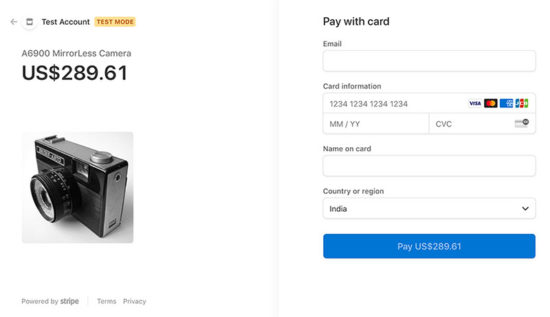
Stripe Hosted Checkout Page

After processing the payment, Stripe will redirect customers to the success page URL.
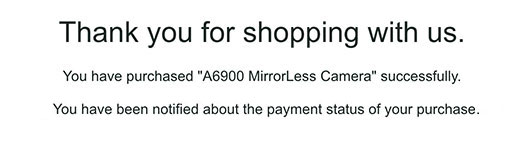
Payment Success Page

Conclusion

We have seen how to integrate the stripe hosted checkout in PHP with an example. Hope it is simple and easy to follow.

It helps to have a quick glance with the bullet points pre-requisites, implementation steps. It pinpoints the todo items in short.

The downloadable source code has the required vendor files. It is not needed to download libraries and SDK from anywhere.

With database intervention, the code is ready to integrate with a full-fledged application.

With the latest Stripe checkout version, it provides payment services with SCA and more advanced features.

Download

↑ Back to Top

Posted on Leave a comment

Python Reverse List with Slicing — An Illustrated Guide

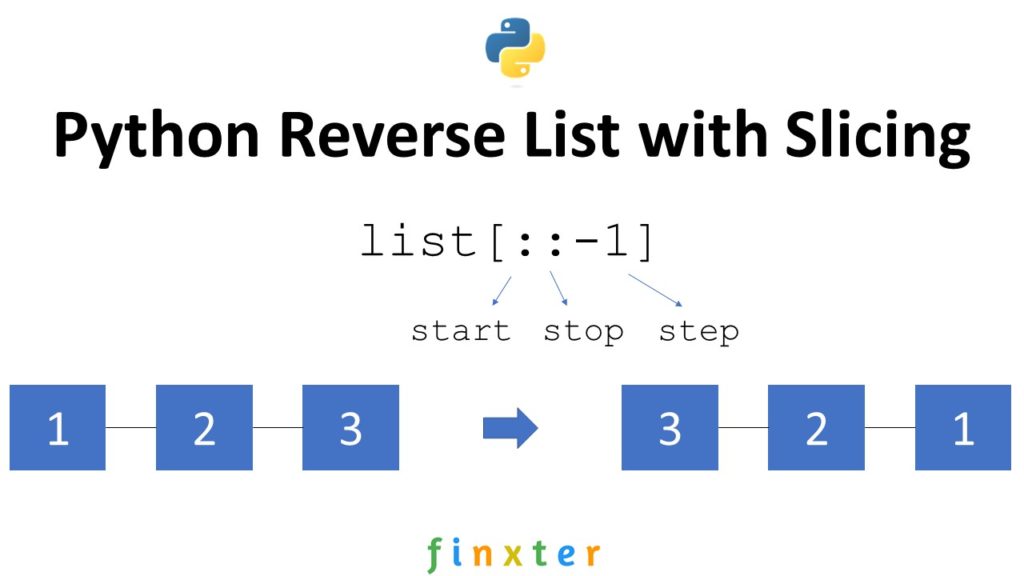
Summary: The slice notation list[::-1] with default start and stop indices and negative step size -1 reverses a given list.

Python Reverse List with Slicing

Problem: Given a list of elements. How to reverse the order of the elements in the list.

Example: Say, you’ve got the following list:

['Alice', 'Bob', 'Carl', 'Dora']

Your goal is to reverse the elements to obtain the following result:

['Dora', 'Carl', 'Bob', 'Alice']

Slicing with Default Start and Stop Values

Slicing is a concept to carve out a substring from a given string.

Use slicing notation s[start:stop:step] to access every step-th element starting from index start (included) and ending in index stop (excluded).

All three arguments are optional, so you can skip them to use the default values (start=0, stop=len(lst), step=1). For example, the expression s[2:4] from string 'hello' carves out the slice 'll' and the expression s[:3:2] carves out the slice 'hl'. Note that slicing works the same for lists and strings.

You can use a negative step size (e.g., -1) to slice from the right to the left in inverse order. Here’s how you can use this to reverse a list in Python:

# Reverse a List with Slicing
names = ['Alice', 'Bob', 'Carl', 'Dora']
names = names[::-1]
print(names)
# ['Dora', 'Carl', 'Bob', 'Alice']

Python masters know slicing from the inside out. Do you want to improve your slicing skills? Check out my book “Coffee Break Python Slicing” that will make you a slice pro in no time!

Alternatives Reversing List

Alternatively, you can also use other methods to reverse a list.

  • list.reverse() — Best if you want to reverse the elements of list in place.
  • list[::-1] — Best if you want to write concise code to return a new list with reversed elements.
  • reversed(list) — Best if you want to iterate over all elements of a list in reversed order without changing the original list.

The method list.reverse() can be 37% faster than reversed(list) because no new object has to be created.

Try it yourself in our interactive Python shell:

Exercise: Run the code. Do all methods result in the same reversed list?

Where to Go From Here?

Enough theory, let’s get some practice!

To become successful in coding, you need to get out there and solve real problems for real people. That’s how you can become a six-figure earner easily. And that’s how you polish the skills you really need in practice. After all, what’s the use of learning theory that nobody ever needs?

Practice projects is how you sharpen your saw in coding!

Do you want to become a code master by focusing on practical code projects that actually earn you money and solve problems for people?

Then become a Python freelance developer! It’s the best way of approaching the task of improving your Python skills—even if you are a complete beginner.

Join my free webinar “How to Build Your High-Income Skill Python” and watch how I grew my coding business online and how you can, too—from the comfort of your own home.

Join the free webinar now!

The post Python Reverse List with Slicing — An Illustrated Guide first appeared on Finxter.

Posted on Leave a comment

How to Remove Duplicates From a Python List While Preserving Order?

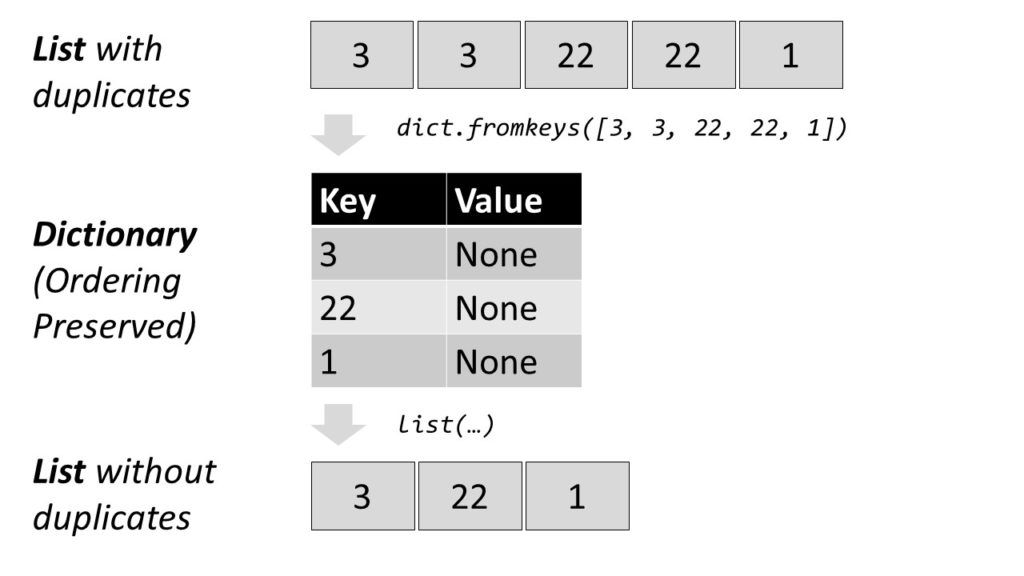
To remove duplicates from a Python list while preserving the order of the elements, use the code list(dict.fromkeys(list)) that goes through two phases: (1) Convert the list to a dict using the dict.fromkeys() function with the list elements as keys and None as dict values. (2) Convert the dictionary back to a list using the list() constructor. As dictionaries preserve the order of the keys, the list ordering is preserved.

Problem: How to remove duplicates from a Python list while keeping the order of the list elements preserved?

You may find this question a little awkward. What has removing duplicates to do with preserving the order of the elements? The reason is simple: a well-known and efficient way to remove duplicates from a list is to convert the list to a set—which is duplicated-free—and converting it back to a list. Here’s what you may find everywhere:

lst = [42, 42, 'Alice', 'Alice', 1]
dup_free = list(set(lst))
print(dup_free)
# ['Alice', 42, 1]

The back-and-forth conversion list(set(lst)) removes all duplicates from the list. However, it doesn’t preserve the order of the elements. In the example, the string 'Alice' now appears before the integer 42.

So, how to remove duplicates while preserving the order of the elements?

Remove Duplicates From List Preserve Order Python

The most Pythonic and blazingly fast approach is to use a dictionary:

lst = [3, 3, 22, 22, 1]
result = list(dict.fromkeys(lst))
print(result)
# [3, 22, 1]

The dict.fromkeys() method creates a new dictionary using the elements from an iterable as the keys. Python dictionary keys are unique by default so converting our list into a dictionary will remove duplicates automatically. Once this has been done with our initial list, converting the dictionary back results in the duplicate-free list.

This is the most Pythonic way to remove duplicates from a Python list while preserving the order.

Is this method fast? Like sets, dictionaries use hash tables, which means they are extremely fast.

Do you want to develop the skills of a well-rounded Python professional—while getting paid in the process? Become a Python freelancer and order your book Leaving the Rat Race with Python on Amazon (Kindle/Print)!

Leaving the Rat Race with Python Book

Do Python Dictionaries Preserve the Ordering of the Keys?

Surprisingly, the dictionary keys in Python preserve the order of the elements. So, yes, the order of the elements is preserved. (source)

Countless online resources like this argue that the order of dictionary keys is not preserved. They assume that the underlying implementation of the dictionary key iterables uses sets—and sets are well-known to be agnostic to the ordering of elements. But this assumption is wrong. The built-in Python dictionary implementation in cPython preserves the order.

Here’s another example:

lst = ['Alice', 'Bob', 'Bob', 1, 1, 1, 2, 3, 3]
dic = dict.fromkeys(lst)
print(dic)
# {'Alice': None, 'Bob': None, 1: None, 2: None, 3: None}

You see that the order of elements is preserved so when converting it back, the original ordering of the list elements is still preserved:

print(list(dic))
# ['Alice', 'Bob', 1, 2, 3]

However, you cannot rely on it because any Python implementation could, theoretically, decide not to preserve the order (notice the “COULD” here is 100% theoretical and does not apply to the default cPython implementation).

If you need to be certain that the order is preserved, you can use the ordered dictionary library. In cPython, this is just a wrapper for the default dict implementation.

Source Article: How to Remove Duplicates From a Python List?

Removing Duplicates From Ordered Lists For Older Versions

Dictionaries only became ordered in all Python implementations when Python 3.7 was released (this was also an implementation detail of CPython 3.6). 

So, if you’re using an older version of Python, you will need to import the OrderedDict class from the collections package in the standard library instead:

 from collections import OrderedDict lst = [1, 1, 9, 1, 9, 6, 9, 7] result = list(OrderedDict.fromkeys(lst))

The output is the following duplicate-free list with the order of the elements preserved:

 print(result) # [1, 9, 6, 7]

Interactive Code Shell

Let’s try this method in our interactive Python shell:

Exercise: Run the code. Does it work?

You can find more ways to remove duplicates while preserving the order in this detailed blog article:

Related tutorial: Python List: Remove Duplicates and Keep the Order

Where to Go From Here?

Enough theory, let’s get some practice!

To become successful in coding, you need to get out there and solve real problems for real people. That’s how you can become a six-figure earner easily. And that’s how you polish the skills you really need in practice. After all, what’s the use of learning theory that nobody ever needs?

Practice projects is how you sharpen your saw in coding!

Do you want to become a code master by focusing on practical code projects that actually earn you money and solve problems for people?

Then become a Python freelance developer! It’s the best way of approaching the task of improving your Python skills—even if you are a complete beginner.

Join my free webinar “How to Build Your High-Income Skill Python” and watch how I grew my coding business online and how you can, too—from the comfort of your own home.

Join the free webinar now!

The post How to Remove Duplicates From a Python List While Preserving Order? first appeared on Finxter.

Posted on Leave a comment

Freelance Developer Net Worth

What is the net worth of a freelance developer? In this article, you’ll learn the expected net worth of a freelance developer as a rough estimate.

Definition net worth: Net worth is the value the assets a person or corporation owns, minus the liabilities they owe. It is an important metric to gauge a company’s health and it provides a snapshot of the firm’s current financial position. (source)

The net worth of a freelance developer who earns the average $134,400 per year and saves 10% per year in a low-cost S&P500 index fund is $204,192 after 10 years, $687,592 after 20 years, and $4,541,140 after 40 years. Under these assumptions, a freelance developer with a savings rate of 20% reaches $1,000,000 net worth in year 18. An alternative measurement stick is a simple P/E valuation based on which the expected net worth of a freelance developer would be approximately 10x earnings which is $1,344,000.

Let’s see how we developed these numbers based on realistic assumptions and averaged statistics over millions of US workers.

To come up with a meaningful figure, we’re going for a few assumptions:

Assumptions

  • We assume a US-based freelance developer. Most non-US freelancers can approximate the net worth and earning potential of a US-based freelance developer by using freelancing platforms such as Upwork and Fiverr to participate in the US economy.
  • We assume that the freelance developer has average skills earning the average hourly rate of a Python developer of $56 per hour. The average Python developer worldwide earns $56 per hour (fluctuations between $51 and $61). This statistic is based on five credible online sources including the US government. You can learn more about the hourly rate here.
  • Based on a conservative estimation, your income as a Python freelancer will be $134,400 per year assuming a normal workday of eight billed hours per day for 300 days per year.
  • We assume that the freelancer has a saving rates of 10%. The average savings rate in the US has been between 7% and 17% during the COVID-19 crisis:
Source: Statista
  • We further assume that the saved money is invested in a low-cost index fund generating the 100-y historic return of 9% after fees. (source)

Calculation Net Worth Freelance Developer

Let’s see how the net worth of a freelancer would progress over a period of 50 years based on these assumptions.

So, if you start with age 20, you’d have an $11,000,000 net worth at age 70—quite a legacy! Here’s the yearly table:

Years Future Value (9.00%) Total Contributions
Year 0 $0.00 $0.00
Year 1 $13,440.00 $13,440.00
Year 2 $28,089.60 $26,880.00
Year 3 $44,057.66 $40,320.00
Year 4 $61,462.85 $53,760.00
Year 5 $80,434.51 $67,200.00
Year 6 $101,113.62 $80,640.00
Year 7 $123,653.84 $94,080.00
Year 8 $148,222.69 $107,520.00
Year 9 $175,002.73 $120,960.00
Year 10 $204,192.98 $134,400.00
Year 11 $236,010.34 $147,840.00
Year 12 $270,691.27 $161,280.00
Year 13 $308,493.49 $174,720.00
Year 14 $349,697.90 $188,160.00
Year 15 $394,610.71 $201,600.00
Year 16 $443,565.68 $215,040.00
Year 17 $496,926.59 $228,480.00
Year 18 $555,089.98 $241,920.00
Year 19 $618,488.08 $255,360.00
Year 20 $687,592.01 $268,800.00
Year 21 $762,915.29 $282,240.00
Year 22 $845,017.66 $295,680.00
Year 23 $934,509.25 $309,120.00
Year 24 $1,032,055.09 $322,560.00
Year 25 $1,138,380.05 $336,000.00
Year 26 $1,254,274.25 $349,440.00
Year 27 $1,380,598.93 $362,880.00
Year 28 $1,518,292.84 $376,320.00
Year 29 $1,668,379.19 $389,760.00
Year 30 $1,831,973.32 $403,200.00
Year 31 $2,010,290.92 $416,640.00
Year 32 $2,204,657.10 $430,080.00
Year 33 $2,416,516.24 $443,520.00
Year 34 $2,647,442.70 $456,960.00
Year 35 $2,899,152.54 $470,400.00
Year 36 $3,173,516.27 $483,840.00
Year 37 $3,472,572.74 $497,280.00
Year 38 $3,798,544.28 $510,720.00
Year 39 $4,153,853.27 $524,160.00
Year 40 $4,541,140.06 $537,600.00
Year 41 $4,963,282.67 $551,040.00
Year 42 $5,423,418.11 $564,480.00
Year 43 $5,924,965.74 $577,920.00
Year 44 $6,471,652.65 $591,360.00
Year 45 $7,067,541.39 $604,800.00
Year 46 $7,717,060.12 $618,240.00
Year 47 $8,425,035.53 $631,680.00
Year 48 $9,196,728.72 $645,120.00
Year 49 $10,037,874.31 $658,560.00
Year 50 $10,954,723.00 $672,000.00

After only 24 years working as a freelance developer, you’ll become a millionaire! Note that this graphic doesn’t talk about inflation which could reduce your pace by 2-3% per year. On the other hand, inflation will probably also cause your yearly earnings to rise. Also, you could probably increase your savings rate as you earn more and more through investments. Together, these two factors may balance out.

The same discussion must be made about the development of your skills. In this simulation, we assume that your skills remain average all your life. In my experience, you can reach this average skill relatively quickly after 4-5 years focused effort. You can check out my detailed Python freelancer program to learn how you can accelerate the process towards your thriving freelance developing business online. So, your earnings will probably grow over the years which makes it easier and easier to save more and more money over time.

Related video:

Note that with 20% savings rate (which is possible for most people), you’d reach your goals much earlier:

With a savings rate of 20%, you can reach the $10 million mark already after 40 years and the $1 million mark after 18 years.

Years Future Value (9.00%) Total Contributions
Year 0 $0.00 $0.00
Year 1 $26,880.00 $26,880.00
Year 2 $56,179.20 $53,760.00
Year 3 $88,115.33 $80,640.00
Year 4 $122,925.71 $107,520.00
Year 5 $160,869.02 $134,400.00
Year 6 $202,227.23 $161,280.00
Year 7 $247,307.68 $188,160.00
Year 8 $296,445.38 $215,040.00
Year 9 $350,005.46 $241,920.00
Year 10 $408,385.95 $268,800.00
Year 11 $472,020.69 $295,680.00
Year 12 $541,382.55 $322,560.00
Year 13 $616,986.98 $349,440.00
Year 14 $699,395.81 $376,320.00
Year 15 $789,221.43 $403,200.00
Year 16 $887,131.36 $430,080.00
Year 17 $993,853.18 $456,960.00
Year 18 $1,110,179.96 $483,840.00
Year 19 $1,236,976.16 $510,720.00
Year 20 $1,375,184.02 $537,600.00
Year 21 $1,525,830.58 $564,480.00
Year 22 $1,690,035.33 $591,360.00
Year 23 $1,869,018.51 $618,240.00
Year 24 $2,064,110.17 $645,120.00
Year 25 $2,276,760.09 $672,000.00
Year 26 $2,508,548.50 $698,880.00
Year 27 $2,761,197.86 $725,760.00
Year 28 $3,036,585.67 $752,640.00
Year 29 $3,336,758.38 $779,520.00
Year 30 $3,663,946.64 $806,400.00
Year 31 $4,020,581.83 $833,280.00
Year 32 $4,409,314.20 $860,160.00
Year 33 $4,833,032.48 $887,040.00
Year 34 $5,294,885.40 $913,920.00
Year 35 $5,798,305.08 $940,800.00
Year 36 $6,347,032.54 $967,680.00
Year 37 $6,945,145.47 $994,560.00
Year 38 $7,597,088.56 $1,021,440.00
Year 39 $8,307,706.53 $1,048,320.00
Year 40 $9,082,280.12 $1,075,200.00
Year 41 $9,926,565.33 $1,102,080.00
Year 42 $10,846,836.21 $1,128,960.00
Year 43 $11,849,931.47 $1,155,840.00
Year 44 $12,943,305.31 $1,182,720.00
Year 45 $14,135,082.78 $1,209,600.00
Year 46 $15,434,120.23 $1,236,480.00
Year 47 $16,850,071.05 $1,263,360.00
Year 48 $18,393,457.45 $1,290,240.00
Year 49 $20,075,748.62 $1,317,120.00
Year 50 $21,909,446.00 $1,344,000.00

Where to Go From Here?

Enough theory, let’s get some practice!

To become successful in coding, you need to get out there and solve real problems for real people. That’s how you can become a six-figure earner easily. And that’s how you polish the skills you really need in practice. After all, what’s the use of learning theory that nobody ever needs?

Practice projects is how you sharpen your saw in coding!

Do you want to become a code master by focusing on practical code projects that actually earn you money and solve problems for people?

Then become a Python freelance developer! It’s the best way of approaching the task of improving your Python skills—even if you are a complete beginner.

Join my free webinar “How to Build Your High-Income Skill Python” and watch how I grew my coding business online and how you can, too—from the comfort of your own home.

Join the free webinar now!

The post Freelance Developer Net Worth first appeared on Finxter.

Posted on Leave a comment

How to Get the Last Element of a Python List?

Problem: Given a list. How to access the last element of this list?

Example: You have the list ['Alice', 'Bob', 'Liz'] and you want to get the last element 'Liz'.

Quick solution: Use negative indexing -1.

friends = ['Alice', 'Bob', 'Liz']
print(friends[-1])
# Liz

To access the last element of a Python list, use the indexing notation list[-1] with negative index -1 which points to the last list element. To access the second-, third-, and fourth-last elements, use the indices -2, -3, and -4. To access the n last elements of a list, use slicing list[:-n-1:-1] with negative stop index -n and negative step size -1.

Method 1: Access the Last Element with Negative Indexing -1

To bring everybody on the same page, let me quickly explain indices in Python by example. Suppose, you have list ['u', 'n', 'i', 'v', 'e', 'r', 's', 'e']. The indices are simply the positions of the characters of this string.

(Positive) Index 0 1 2 3 4 5 6 7
Element ‘u’ ‘n’ ‘i’ ‘v’ ‘e’ ‘r’ ‘s’ ‘e’
Negative Index -8 -7 -6 -5 -4 -3 -2 -1

Positive Index: The first character has index 0, the second character has index 1, and the i-th character has index i-1.

Negative Index: The last character has index -1, the second last character has index -2, and the i-th last character has index -i.

Now, you can understand how to access the last element of the list:

friends = ['Alice', 'Bob', 'Liz']
print(friends[-1])
# Liz

But how to access the second-last element? Just use index -2!

friends = ['Alice', 'Bob', 'Liz']
print(friends[-2])
# Bob

Method 2: Access the n Last Elements with Slicing

But what if you want to access the n last elements? The answer is slicing.

The default slicing operation list[start:stop:step] accesses all elements between start (included) and stop (excluded) indices, using the given step size over the list. For example, the slicing operation friends[0:3:2] would start with the first element 'Alice' and end with the third element 'Liz' (included), but taking only every second element due to the step size of 2—effectively skipping the second element 'Bob'.

You can use slicing with negative start and stop indices and with negative stop size to slice from the right to the left. To access the n last elements in the slice, you’d therefore use the following code:

universe = ['u', 'n', 'i', 'v', 'e', 'r', 's', 'e'] # Access the n=4 last element from the list:
n = 4
print(universe[:-n-1:-1])
# ['e', 's', 'r', 'e']

There are different points to consider in the code:

  • You use a negative step size -1 which means that you slice from the right to the left.
  • If you don’t provide a value for start, stop, or step indices, Python takes the default ones. For example, we don’t provide the start index and perform negative slicing so Python starts from the last element 'e'.
  • You want to get the n last elements. The n-th last element has index -n. But as the stop index is never included in the slice, we need to slice one step further to the left—to the element with index -n-1 to include the element with index -n.

Try this yourself in our interactive code shell:

Exercise: What happens if the list has less than n characters?

Where to Go From Here?

Enough theory, let’s get some practice!

To become successful in coding, you need to get out there and solve real problems for real people. That’s how you can become a six-figure earner easily. And that’s how you polish the skills you really need in practice. After all, what’s the use of learning theory that nobody ever needs?

Practice projects is how you sharpen your saw in coding!

Do you want to become a code master by focusing on practical code projects that actually earn you money and solve problems for people?

Then become a Python freelance developer! It’s the best way of approaching the task of improving your Python skills—even if you are a complete beginner.

Join my free webinar “How to Build Your High-Income Skill Python” and watch how I grew my coding business online and how you can, too—from the comfort of your own home.

Join the free webinar now!

The post How to Get the Last Element of a Python List? first appeared on Finxter.

Posted on Leave a comment

How To Update A Key In A Dictionary In Python If The Key Doesn’t Exist?

Summary: To update a key in a dictionary if it doesn’t exist, you can check if it is present in the dictionary using the in keyword along with the if statement and then update the key-value pair using subscript notation or update() method or the * operator. Another workaround for this is, using the setdefault(key[, default]) method which updates the dictionary with the key-value pair only if it doesn’t exist in the dictionary otherwise, it returns the pre-existing items.

Problem: Given a dictionary; how to update a key in it if the key does not exist?

Example:

device = { "brand": "Apple", "model": "iPhone 11",
} < Some Method to Check if key-value pairs "color" : "red" and "year" : 2019 exists or not and then update/insert it in the dictionary > print(device)

Output:

{'brand': 'Apple', 'model': 'iPhone 11', 'color': 'red', 'year': 2019}

To solve our problem statement, let us follow a modular approach and break down our discussion in this article into three parts.

  1. In the first section let us discuss the methods to update or insert a key,
  2. In the second section, we shall be discussing the methods to check if the key is present in the dictionary,
  3. Finally, we shall merge our concepts to reach the final solution.

Without further delay let us dive into the solutions right away.

Section 1: Insert/Update A Key In A Dictionary

Method 1: Create A New Key-Value Pair Assign It To Dictionary | Subscript Notation

We can create a new index key and then assign a value to it and then assign the key-value pair to the dictionary. Let us have a look at the following program which explains the syntax to create a new key-value pair and assign it to the dictionary:

device = { "brand": "Apple", "model": "iPhone 11",
} device["year"] = 2019
print(device)

Output:

{‘brand’: ‘Apple’, ‘year’: 2019, ‘model’: ‘iPhone 11’}

Method 2: Use The update() Function

The update() method is used to insert or update a specific key-value pair in a dictionary. The item to be inserted can also be another iterable. Also, if the specified key is already present in the dictionary then the previous value will be overwritten.

The following code demonstrates the usage of the update() method:

device = { "brand": "Apple", "model": "iPhone 11",
} device.update({"year" : 2019})
print(device)

Output:

{'brand': 'Apple', 'model': 'iPhone 11', 'year': 2019}

Method 3: Using The * Operator

We can combine an existing dictionary and a key-value pair using the * operator. Let us have a look at the following code to understand the concept and usage of the * operator to insert items in a dictionary.

device = { "brand": "Apple", "model": "iPhone 11",
}
device = {**device,**{"year":2019}}
print(device)

Output:

{'brand': 'Apple', 'model': 'iPhone 11', 'year': 2019}

Disclaimer: In the above methods if we do not check the presence of a key in the dictionary, then the value will be overwritten in the dictionary if the key and value are already existing in the dictionary. Now, that brings us to the second section of our discussion!

Section 2: Check If A Key Is Present In A Dictionary

Method 1: Using The in Keyword

The in keyword is used to check if a key is already present in the dictionary. The following program explains how we can use the in keyword.

device = { "brand": "Apple", "model": "iPhone 11", "year":2018
} if "year" in device: print("key year is present!")
else: print("key year is not Present!") if "color" in device: print("key color is present!")
else: print("key color is not present!") 

Output:

key year is present!
key color is not present!

snake unicode Note: Just like the in keyword, we can use the not in keyword to check if the key is not present in the dictionary.

Method 2: Using keys() Function

keys() is an inbuilt method that extracts the keys present in a dictionary and stores them in a list. Thus with the help of this inbuilt method, we can determine if a key is present in the dictionary.

Let us have a look a the following program to understand how to use the keys() method and check the availability of a key in the dictionary:

device = { "brand": "Apple", "model": "iPhone 11", "year":2018
} if "year" in device.keys(): print("key year is present!")
else: print("key year is not Present!") if "color" in device.keys(): print("key color is present!")
else: print("key color is not present!") 

Output:

key year is present!
key color is not present!

Method 3: Using has_key() Function

If you are using Python 2.x then you might fancy your chances with the has_key() method which is an inbuilt method in Python that returns true if the specified key is present in the dictionary else it returns false.

Caution: has_key() has been removed from Python 3 and also lags behind the in keyword while checking for the presence of keys in a dictionary in terms of performance. So you must use avoid using it if you are using Python 3 or above.

Now let us have a look at the following program to understand how we can use the has_key() method:

device = { "brand": "Apple", "model": "iPhone 11", "year":2018
} if device.has_key("year"): print("key year is present!")
else: print("key year is not Present!") if device.has_key("color"): print("key color is present!")
else: print("key color is not present!") 

Output:

key year is present!
key color is not present!

Phew!!! Now, we are finally equipped with all the procedures to check as well as update a key in a dictionary if it does not exist in the dictionary. That brings us to the final stages of our discussion where we shall combine our knowledge from section 1 and section 2 to reach the desired output.

Update Key In Dictionary If It Doesn’t Exist

Solution 1: Using Concepts Discussed In Section 1 and Section 2

Since we are through with the concepts, let us dive into the program to implement them and get the final output:

device = { "brand": "Apple", "model": "iPhone 11",
} # Method 1 : Create a New Key_Value pair and check using the in keyword
if "color" not in device: device["color"] = "red" # Method 2 : Use update() method and check using the not in keyword
if "year" not in device.keys(): device.update({"year" : 2019}) # Method 2 : Use * operator and check using the not in keyword
if "brand" not in device.keys(): device.update({"brand" : "Samsung" })
else: print(device)

Output:

{'brand': 'Apple', 'model': 'iPhone 11', 'color': 'red', 'year': 2019}

Solution 2: Using setdefault() Method

setdefault() is an inbuilt Python method which returns the value of a key if it already exists in the dictionary and if it does not exist then the key value pair gets inserted into the dictionary.

Let us have a look at the following program which explains the setdefault() method in python:

device = { "brand": "Apple", "model": "iPhone 11", "color": "red"
} device.setdefault('year',2019)
print(device)

Output:

{'brand': 'Apple', 'model': 'iPhone 11', 'color': 'red', 'year': 2019}

Conclusion

I hope after reading this article you can check and update values in a dictionary with ease. In case you have any doubts regarding Python dictionaries, I highly recommend you to go through our tutorial on Python dictionaries.

Please subscribe and stay tuned for more interesting articles!

Where to Go From Here?

Enough theory, let’s get some practice!

To become successful in coding, you need to get out there and solve real problems for real people. That’s how you can become a six-figure earner easily. And that’s how you polish the skills you really need in practice. After all, what’s the use of learning theory that nobody ever needs?

Practice projects is how you sharpen your saw in coding!

Do you want to become a code master by focusing on practical code projects that actually earn you money and solve problems for people?

Then become a Python freelance developer! It’s the best way of approaching the task of improving your Python skills—even if you are a complete beginner.

Join my free webinar “How to Build Your High-Income Skill Python” and watch how I grew my coding business online and how you can, too—from the comfort of your own home.

Join the free webinar now!

The post How To Update A Key In A Dictionary In Python If The Key Doesn’t Exist? first appeared on Finxter.

Posted on Leave a comment

List Changes After Assignment — How to Clone or Copy It?

Problem: If you assign a list object to a new variable using new_list = old_list, any modification to new_list changes old_list. What’s the reason for this and how can you clone or copy the list to prevent this problem?

Example: Let’s consider the following example.

old_list = ['Alice', 'Bob', 'Carl']
new_list = old_list
new_list.append(42)
print(old_list)
# ['Alice', 'Bob', 'Carl', 42]

Appending an element to the new_list also modifies the original list old_list. Thus, old_list has now four elements—even though you didn’t change it directly.

Explanation

This problem of simultaneously modifying “two” lists arises because you don’t have two lists but only a single one.

In Python, everything is an object. You create a new list object ['Alice', 'Bob', 'Carl'] that resides in your machine’s memory. Both variable names new_list and old_list point to the same object in memory—if you modify one, you also modify the other!

List Changes After Assignment -- How to Clone or Copy It?

The following interactive tool visualizes the memory used by the Python interpreter when executing this particular code snippet:

Exercise: Visualize how the problem arises by clicking “Next”.

Do you understand the source of the problem? Great, let’s dive into the solutions starting with a short overview!

Solution Overview

You can see all three solutions discussed in this tutorial in our interactive Python shell:

Exercise: Change the original list. Do all three methods still produce the same output?

Next, you’ll learn about each method in greater detail!

Method 1: Slicing

The easiest way to create a shallow copy of a Python list is via slicing:

# Method 1: Slicing
old_list = ['Alice', 'Bob', 'Carl']
new_list = old_list[:]
new_list.append(42)
print(new_list)
# ['Alice', 'Bob', 'Carl']

The slicing operation old_list[:] creates a new list, so the variables new_list and old_list now point to different objects in memory. If you change one, the other doesn’t change.

This is the way with the least amount of characters and many Python coders would consider this the most Pythonic one. If you want to learn more about slicing, watch the following video and dive into the detailed blog tutorial.

Related Tutorial: Introduction to Slicing in Python

Method 2: Copy

An alternative is to use the list.copy() method that creates a shallow copy of the list.

# Method 2: Copy
old_list = ['Alice', 'Bob', 'Carl']
new_list = old_list.copy()
new_list.append(42)
print(old_list)
# ['Alice', 'Bob', 'Carl']

The list.copy() method copies all list elements into a new list. The new list is the return value of the method. It’s a shallow copy—you copy only the object references to the list elements and not the objects themselves.

The result is the same as the slicing method: you have two variables pointing to two different list objects in memory.

You can learn more about the list.copy() method in my detailed blog tutorial and the following video:

Related Tutorial: Python list.copy() [Ultimate Guide]

Method 3: List Comprehension

A third way to solve the problem of two lists pointing to the same object in memory is the list comprehension way to create new lists.

# Method 3: List Comprehension
old_list = ['Alice', 'Bob', 'Carl']
new_list = [x for x in old_list]
new_list.append(42)
print(old_list)
# ['Alice', 'Bob', 'Carl']

List comprehension is a compact way of creating lists. The simple formula is [expression + context].

  • Expression: What to do with each list element?
  • Context: What elements to select? The context consists of an arbitrary number of for and if statements.

You can watch the tutorial video and read over the related blog article to learn more about it!

Related Tutorial: An Introduction to List Comprehension

Where to Go From Here?

Enough theory, let’s get some practice!

To become successful in coding, you need to get out there and solve real problems for real people. That’s how you can become a six-figure earner easily. And that’s how you polish the skills you really need in practice. After all, what’s the use of learning theory that nobody ever needs?

Practice projects is how you sharpen your saw in coding!

Do you want to become a code master by focusing on practical code projects that actually earn you money and solve problems for people?

Then become a Python freelance developer! It’s the best way of approaching the task of improving your Python skills—even if you are a complete beginner.

Join my free webinar “How to Build Your High-Income Skill Python” and watch how I grew my coding business online and how you can, too—from the comfort of your own home.

Join the free webinar now!

The post List Changes After Assignment — How to Clone or Copy It? first appeared on Finxter.

Posted on Leave a comment

How To Format A String That Contains Curly Braces In Python?

Summary: Use one of the following methods to format strings that contain curly braces:

  • Use double curly braces {{}}
  • Use the old string formatting, i.e. the % operator
  • Use the JSON Library
  • Use Template Strings

Problem: Given a string literal with curly braces; how to format the string and ensure that the curly braces are available in the output?

To understand the problem statement, let us have a look at the following example:

Example:

x = "{Serial No.}{0} ".format(1)
print(x)

Output:

Traceback (most recent call last): File "main.py", line 1, in <module> x = "{Serial No.}{0} ".format(1)
KeyError: 'Serial No'

From the above example it is clear that when we execute a print statement with a literal text that contains the curly braces, the program raises a KeyError unless we provide the proper syntax for string formatting. In this article, we shall be discussing the methods to overcome this problem and print our text with the curly braces along with string formatting. Therefore:

Desired Output:

{Serial No:}1

Before we dive into the solutions, let us have a look at the reason behind the KeyError exception.

KeyError Exception

A KeyError is raised when you try to access or look for a value in a dictionary that does not exist. For example, consider the following dictionary:

profile={ 'Name':'Shubham', 'id':12345
}
print(profile['age'])

The above code will raise a KeyError exception. This is because we are trying to access the key ‘age‘ which does not exist within the dictionary profile. Since the key does not exist, we cannot access any value using this key.

Here’s what we get when we execute the above program:

Traceback (most recent call last): File "main.py", line 8, in <module> print(profile['age'])
KeyError: 'age'

No, the question that needs to be addressed is – “Why are we getting the KeyEror while formatting a string that contains a text along with curly braces?”

Reason: The .format() generally expects things inside { } to be keys but in this case, it is unable to do so since ‘Serial No.' is not a key. Therefore .format() unable to parse the data. This results in a KeyError as we are trying to access a key-value that does not exist.

Now that we know why we are getting the KeyError let us dive into the solutions to avoid this error.

Method 1: Using Double Curly Braces

We already discussed that {} inside a format string are special characters, therefore if we want to include braces as a part of our literal text, we need to tell the .format string parser that the given curly braces must be escaped and considered as a part of the given text literal. This can be easily done by doubling the curly braces encompassing the string, that is using the following syntax: {{Serial No.}}

The following program denotes how we can use double curly braces to reach our solution:

x = "{{Serial No.}}{0} ".format(1)
print(x)

Output:

{Serial No.}1 

Method 2: Using The Old String Formatting Style (%)

If you do not want to use the double curly braces then you might fancy the old style of string formatting that uses the modulo (%) operator. Let us have a look at the following program to understand how we can use the modulo operator to print our string along with curly braces in it.

x = " {Serial No.}%s"
print (x%(1)) 

Output

{Serial No.}1

Method 3: Using The JSON Library

In situations where you need to deal with complex JSON strings, the most efficient method of dealing with such scenarios is to use the JSON library in your program.

★ The json.dumps() method is used to covert a Python object, like a dictionary, to a JSON string.

Consider the following example which explains how we can use the JSON library to print JSON strings:

import json group = "Admin"
id = 1111
x = {"ID" : id, "Group" : group}
print(json.dumps(x))

Output:

{"ID": 1111, "Group": "Admin"}

Have a look at the following snippet given below to compare and contrast how complex and messy the syntax becomes when we try to print the same string using {{}} in our program.

group = "Admin"
id = 1111
print('{{"ID": {}, "Group": {}}}'.format(id,group))

Output:

{"ID": 1111, "Group": Admin}

Method 4: Using Template Strings

Template strings are used to provide string substitutions. If you want to avoid extra curly braces and % based substitutions then you can use the Template class of the string module.

★ The substitute() method performs template substitution a returns a new string.

Disclaimer: This might be a little confusing and prone to several exceptions if not properly used which is why I personally do not recommend you to use this procedure unless absolutely necessary.

Let us have a look at the following program to understand the usage of Template strings:

from string import Template
x = Template("$open Serial No: $close")
x = x.substitute(open='{',close='}')
print('{} {}'.format(x,1))

Output:

{ Serial No: } 1

EXERCISE

Now let’s get our hands dirty and practice some coding. Can you guess the output of the following snippet?

Note: Make sure you follow the comments in the given snippet which will unlock an important concept for you!

greet = "HELLO FINXTER"
name = input("Enter Your Name: ")
age = input("Enter Your Age:")
print("\n")
# to resolve an expression in the brackets instead of using literal text use three sets of curly braces
print(f"{{{greet.lower()}}} {name}")
print('{{You are {} years old!}}'.format(age))

Conclusion

In this article, we discussed various methods to format a string that contains curly braces in Python. Frankly speaking, the double curly braces is the simplest solution while using the JSON Library is the most efficient method while dealing with complex JSON data. However, you are always free to use any method that suits your requirements and the best way of getting hold of all these techniques is to practice them. So without further delay, please try them in your system, and please feel free to drop queries.

Please subscribe and stay tuned for more interesting articles!

Where to Go From Here?

Enough theory, let’s get some practice!

To become successful in coding, you need to get out there and solve real problems for real people. That’s how you can become a six-figure earner easily. And that’s how you polish the skills you really need in practice. After all, what’s the use of learning theory that nobody ever needs?

Practice projects is how you sharpen your saw in coding!

Do you want to become a code master by focusing on practical code projects that actually earn you money and solve problems for people?

Then become a Python freelance developer! It’s the best way of approaching the task of improving your Python skills—even if you are a complete beginner.

Join my free webinar “How to Build Your High-Income Skill Python” and watch how I grew my coding business online and how you can, too—from the comfort of your own home.

Join the free webinar now!

The post How To Format A String That Contains Curly Braces In Python? first appeared on Finxter.

Posted on Leave a comment

Freelance Developing Niche

This short article is based on the ultimate guide to freelance developing on the Finxter blog.

You’ll first learn about the definition of freelancing. Then, I’ll show you how you can evaluate whether the freelance developing niche is attractive for you and whether you can expect it to grow over time. So, let’s get started, shall we?

Definition

Freelancing is the act of delivering a service to another business or another customer in exchange for a defined rate.

If you travel back in time—say, ten years—freelancing would be the act of delivering your services to another business: a B2B (business-to-business) transaction.

But, since the appearance of freelancing platforms such as Upwork or Fiverr, it more and more became a B2C (business-to-customer) transaction. There are plenty of people, often employees, who need your services to become more and more productive.

In essence, you’re solving problems for other people. These people can be businesses, private persons, or employees. These people hire you to solve a problem for them. This makes perfect sense: in our world, everyone is a business owner.

As a person, employee, or freelancer, you are a one-person business that gets hired by organizations and other businesses.

As an employee, you are already a freelancer—have a look at the definition again. You sell your services to another party. You get paid by the hour. If you have experience as an employee, you have experience as a freelancer, too, because being an employee is nothing but a special case of being a freelancer.

But there are many more forms of freelancing. As an employee, you’re in a contract between your employer and yourself that ranges for many months. As a freelancer, you can also have these types of contracts: You can agree to contracts that range many years—in fact, businesses hire freelancers often on a long-term basis. If it makes economic sense to hire you once, why shouldn’t it make sense to hire you on a regular basis? But you can also have much smaller contracts that range only for a few hours.

Freelancing comes with all kinds of advantages and disadvantages. But as the term freelancing is so broadly defined, you cannot really generalize those: no advantage and no disadvantage will apply to any type of freelancing gig. Well, as a freelancer, you can aim for the best of both worlds: income security and higher income—if you design your freelancing business in an intelligent way.

Let’s have a deeper look into the freelance developer niche—is it attractive?

About the Freelance Developing Niche

Make no mistake: niche selection is critical.

Many people will tell you that you can select any niche. But this is only partially true.

Sure, if you join the top 10% of people in any niche, you’ll earn a lot of money and you’ll succeed in your profession.

But if you select the right niche, you can earn 10x or even 100x as a person in the top 10%. An example would be the niche “journalism” vs “machine learning engineer“.

  • As a top journalist, you can expect to earn $50,000-$100,000 per year. (source)
  • As a top machine learning engineer, you can expect to earn $200,000-$1,000,000 per year. (source)

That’s 4x to 10x difference in earnings of the top guys and gals! Niche selection is crucial.

Python Employee vs Freelancer

So, you may ask: should you go into the freelance developing niche—for instance, Python freelancing—or should you go into the pure Python development niche and become an employee?

I’ve recently read a book from the great Richard Koch: The Star Principle. He’s the author of The 80/20 Principle as well and he’s worth hundreds of millions of dollars. How has he done it?

He invests all his money in so-called “star companies”. And he has worked all his life in the same “star companies”. These companies generate lots of cash and everyone who’s involved benefits from their cash-generating ability.

A star business is an industry leader in a high-growth industry. This concept was developed by the Boston Consulting Group many decades ago—but it still applies to today’s businesses. Have a look at the matrix taken from BCG:

You want to invest your time and money only into businesses that are in high-growth markets and that have a high market share. An example is Google as the leader in the search engine market when the search engine market was still growing by more than 10% per year. Today, Google would be a “Cash Cow” according to the model—still attractive but not necessarily a star anymore.

The combination of being an industry leader and being in a high-growth market is very powerful.

  • As an industry leader, you have higher profit margins and more cash to reinvest than any other player in the market. This allows you to keep your growth rate over each other player in the market. Plus, you enjoy strong network effects (“the rich get richer”)—everyone knows you’re the leader so customers will come to you which reinforces your position as the leader.
  • As a company in a high-growth market, you will grow significantly even if you only maintain your market share.

If you can participate in a company that is the leader in a high-growth niche, you can expect significant benefits (if you don’t overpay as an investor).

So, how does it apply to the freelance developer niche?

The freelancing niche is growing double digits every year. Both companies Upwork and Fiverr (the industry leaders) grow more than 10% per year for many years.

These companies are out to disrupt the organization of the world’s talents. And if they keep growing, they’ll accomplish it!

As a developer, as a coder, you’re in an industry that grows 5% per year based on my estimation. It’s an attractive industry but it’s not a “star industry” anymore. Coding is still important and it will grow in importance over time. But it is not a high-growth niche anymore.

As a freelance developer though, you’re both in the freelancing and in the developer niche. Both grow significantly and their growth compounds. So, being a freelance developer is an extremely attractive niche.

If you combine it with Python which is the fastest-growing major programming language, you obtain a combination that has a high potential to transform your life.

If you want to participate in this disruptive trend, you should consider becoming a Python freelancer. Check out my Python freelancer course to get this going FAST!

Leaving the Rat Race


Do you want to develop the skills of a well-rounded Python professional—while getting paid in the process? Become a Python freelancer and order your book Leaving the Rat Race with Python on Amazon (Kindle/Print)!

Leaving the Rat Race with Python Book

The post Freelance Developing Niche first appeared on Finxter.