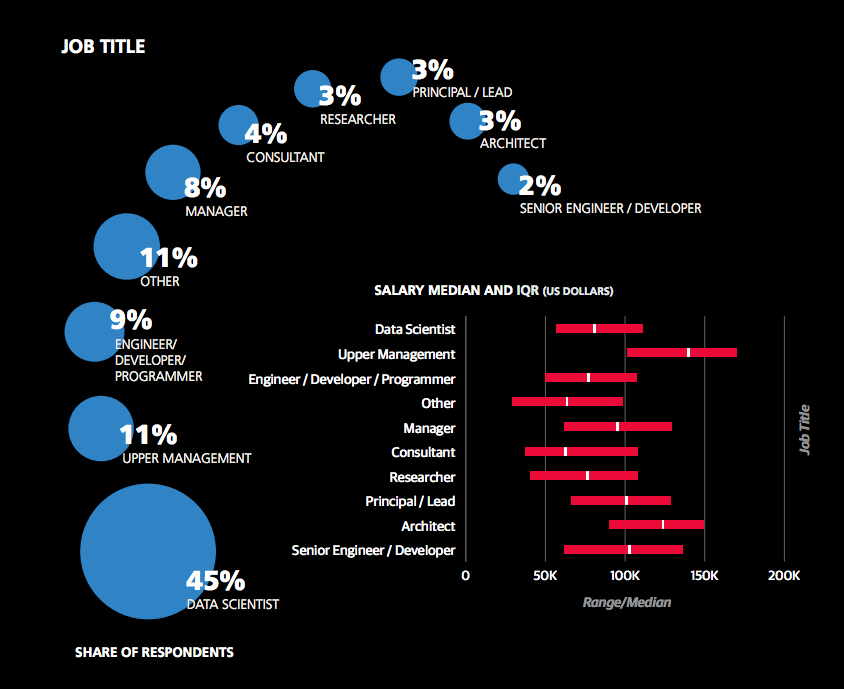
A recent study from O’Reilly found that data science is a wide field with many specializations and job descriptions. However, the average earning of an employed data scientist—45% of all respondents would consider themselves as such—is between $60,000 and $110,000. This means that experienced data scientists over time quite certainly reach six-figure income levels if they keep improving and searching for new opportunities. Here’s a screenshot from the report showing the different routes you can go:
You can see that there are significant opportunities “down the line” by working as an architect, team leader, or manager that earn significantly above six-figures. Becoming an employed data scientist remains an attractive way to make a great living.
But what about freelance data scientists? Do they earn more?
The best data comes directly from the source: Upwork, the biggest freelancer market in the world. Let’s dive into some profiles from freelance data scientists!
Here’s a table of 24 freelance data scientists incomes from the Upwork results:
Freelancer
Hourly Income
Earned
Job Success
Data Science & Machine Learning
$60
$100.000
100%
Data Science & Machine Learning
$300
$100.000
100%
Data Science Consultant
$50
$10.000
97%
Data Science & Machine Learning
$25
$10.000
91%
Data Science/Analyst, Statistician
$70
$100.000
97%
Applied Machine Learning
$300
$50.000
100%
Chief Technology Officer
$55
$200.000
100%
Computer Vision
$32
$2.000.000
100%
Data Engineer
$50
$10.000
100%
Research Scientist
$150
$700.000
95%
Analytics Expert
$52
$10.000
100%
Deep Learning Expert
$195
$10.000
100%
Data Scientist
$60
$10.000
77%
Scalable Analytics Consultant
$300
$500.000
100%
Machine Learning
$40
$8.000
91%
Machine Learning
$80
$30.000
100%
Tutor
$30
$20.000
92%
Math
$38
$4.000
100%
NLP
$35
$30.000
71%
Machine Learning
$50
$4.000
100%
Big Data Engineer
$50
$10.000
100%
AVERAGE
$96
$186.476
96%
The tabular data is drawn from 100 Upwork freelancer profiles as they appeared in the Upwork search. We randomly chose profiles and filtered them for data availability (e.g., total money earned). The result is that the average freelance data scientist earns $96 per hour. For 1700 working hours per year and a full schedule, this results in an average annual income of $163,200. To accomplish this, you need to join the ranks of relatively high-rated freelancers above 90% job satisfaction.
Let’s have a look at some other data sources: As a data scientist, you’re a programmer—in a way. The demand for programming talent has steadily increased in the preceding decades.
Here’s a quick tabular overview of what you can earn as a data scientist—it shows that as a data scientist, you’re in effect a well-compensated coder with specific skill sets.
Title
Best Programming Languages
Yearly Income (Average US)
Web Developer
JavaScript + HTML + CSS + SQL
$78,088
Mobile Developer Android
Java
$126,154
Mobile Developer Apple
Swift
$123,263
Back End Developer
Python + Django + Flask
$127,913
Front End Developer
JavaScript + HTML + CSS
$109,742
Full-Stack Engineer
Python + JavaScript + HTML + CSS + SQL
$112,098
Data Scientist
Python + Matplotlib + Pandas + NumPy + Dash
$122,700
Machine Learning Engineer
Python + NumPy + Scikit-Learn + TensorFlow
$145,734
Let’s dive into the different freelance developer career choices for maximum success!
Do you want to develop the skills of a well-rounded Python professional—while getting paid in the process? Become a Python freelancer and order your book Leaving the Rat Race with Python on Amazon (Kindle/Print)!
Where to Go From Here?
Enough theory, let’s get some practice!
To become successful in coding, you need to get out there and solve real problems for real people. That’s how you can become a six-figure earner easily. And that’s how you polish the skills you really need in practice. After all, what’s the use of learning theory that nobody ever needs?
Practice projects is how you sharpen your saw in coding!
Do you want to become a code master by focusing on practical code projects that actually earn you money and solve problems for people?
Then become a Python freelance developer! It’s the best way of approaching the task of improving your Python skills—even if you are a complete beginner.
Two mega trends can be observed in the 21st century: (I) the proliferation of data—and (II) the reorganization of the biggest market in the world: the global labor market towards project-basedfreelancing work.
By positioning yourself as a freelance data scientist, you’ll not only work in an exciting area with massive growth opportunities but you’ll also put yourself into the “blue ocean” of freelancing where there’s still much more demand than supply.
This article shows you six fundamental building blocks (pillars) that will lead you towards success as a freelancer in the data science space.
Pillar 1: Money—How Much Can You Earn as a Data Science Freelancer?
A recent study from O’Reilly found that data science is a wide field with many specializations and job descriptions. However, the average earning of an employed data scientist—45% of all respondents would consider themselves as such—is between $60,000 and $110,000. This means that experienced data scientists over time quite certainly reach six-figure income levels if they keep improving and searching for new opportunities.
There are significant opportunities “down the line” that earn significantly above six-figures by working as an architect, team leader, or manager. Becoming an employed data scientist remains an attractive way to make a great living.
But what about freelance data scientists? Do they earn more?
The best data comes directly from the source: Upwork, the biggest freelancer market in the world. Let’s dive into some profiles from freelance data scientists!
Here’s a table of 24 freelance data scientists incomes from the Upwork results:
Freelancer
Hourly Income
Earned
Job Success
Data Science & Machine Learning
$60
$100.000
100%
Data Science & Machine Learning
$300
$100.000
100%
Data Science Consultant
$50
$10.000
97%
Data Science & Machine Learning
$25
$10.000
91%
Data Science/Analyst, Statistician
$70
$100.000
97%
Applied Machine Learning
$300
$50.000
100%
Chief Technology Officer
$55
$200.000
100%
Computer Vision
$32
$2.000.000
100%
Data Engineer
$50
$10.000
100%
Research Scientist
$150
$700.000
95%
Analytics Expert
$52
$10.000
100%
Deep Learning Expert
$195
$10.000
100%
Data Scientist
$60
$10.000
77%
Scalable Analytics Consultant
$300
$500.000
100%
Machine Learning
$40
$8.000
91%
Machine Learning
$80
$30.000
100%
Tutor
$30
$20.000
92%
Math
$38
$4.000
100%
NLP
$35
$30.000
71%
Machine Learning
$50
$4.000
100%
Big Data Engineer
$50
$10.000
100%
AVERAGE
$96
$186.476
96%
The tabular data is drawn from 100 Upwork freelancer profiles as they appeared in the Upwork search. We randomly chose profiles and filtered them for data availability (e.g., total money earned). The result is that the average freelance data scientist earns $96 per hour. For 1700 working hours per year and a full schedule, this results in an average annual income of $163,200. To accomplish this, you need to join the ranks of relatively high-rated freelancers above 90% job satisfaction.
Let’s have a look at some other data sources: As a data scientist, you’re a programmer—in a way. The demand for programming talent has steadily increased in the preceding decades.
Here’s a quick tabular overview of what you can earn as a data scientist—it shows that as a data scientist, you’re in effect a well-compensated coder with specific skill sets.
Title
Best Programming Languages
Yearly Income (Average US)
Web Developer
JavaScript + HTML + CSS + SQL
$78,088
Mobile Developer Android
Java
$126,154
Mobile Developer Apple
Swift
$123,263
Back End Developer
Python + Django + Flask
$127,913
Front End Developer
JavaScript + HTML + CSS
$109,742
Full-Stack Engineer
Python + JavaScript + HTML + CSS + SQL
$112,098
Data Scientist
Python + Matplotlib + Pandas + NumPy + Dash
$122,700
Machine Learning Engineer
Python + NumPy + Scikit-Learn + TensorFlow
$145,734
Let’s dive into the different freelance developer career choices for maximum success!
Pillar 2: Confidence—Can You Become a Data Science Freelancer?
Before becoming a Python freelancer, you have to learn the very basics of Python. What’s the point of offering your freelancer services when you can not even write Python code?
Having said this, it’s more likely that you live on the other extreme. You do not want to offer your services before you don’t feel 100% confident about your skills. Unfortunately, this moment never arrives. I have met hundreds of advanced coders, who are still not confident in selling their services. They cannot overcome their self-woven system of limiting believes and mental barriers.
May I tell you a harsh truth? You won’t join the top 1% of the Python coders with high probability (a hard statistical fact). But never mind. Your services will still be valuable to clients who either have less programming skills (there are plenty of them) or little time (a big part of the rest). Most clients are happy to outsource the complex coding work to focus on their key result areas.
Regardless of your skill level, the variety of Python projects is huge. There are simple projects for $10 which an experienced coder can solve in 5 minutes. And there are complex projects that take months and promise you large payments of $100 to $1000 after completing each milestone.
You can be sure that you will find projects in your skill level.
Pillar 3: Learning—What Skills Do You Need as a Data Science Freelancer
Most freelance developers don’t have any experience when they get started on freelancing platforms such as Upwork or Fiverr. You can succeed by follow the three simple steps: (1) get your first gig, (2) learn what’s needed, (3) complete the gig. By repeating this, you’ll learn, grow, and, over time, earn the average hourly rate of $61 per hour for freelance developers.
Teaching many freelancing students, I have come to learn that most don’t believe they have all the skills they need to get started as a freelance developer. And why should they come to that conclusion given that there are so many different skills to be learned?
Programming
Marketing
Sales
Communication
Empathy
Positioning
Administration
Business Strategy
Copy Writing
Networking
Yet, while all of the listed skills are highly important for your freelancing business, I have yet to meet a single person that is highly skilled in all of those.
Consider each of those skills to be an axis of a multi-dimensional coordinate system. Now, you can assign to each person a score between 0% and 100% for each skill. Here’s the skill score card for two imaginary freelancers Alice and Bob:
Given are two freelancers: Alice and Bob.
Alice has a talent for marketing and copywriting. She’s an average coder and not very good in administration.
Bob is a master coder—the classical nerd—but he’s not skilled in marketing, sales, communication. He is a great administrator though.
Here’s the million dollar question: who’s the better freelance developer?
Posed like this, you may find the question ridiculous. Of course, it depends how both position themselves in the marketplace. Alice may have a small edge over Bob due to her people, sales, and marketing skills. However, it will be a close win because Bob’s programming skills are also highly valued by the marketplace.
Both will earn some money between minimum and maximum wage (say, around the average earnings of $51 per hour for freelance developers). The key is to understand that every single person on the planet has some value to the marketplace.
Let’s have a look at a third freelancer: YOU.
Say, Alice earns $55 per hour due to her ability to sell her skills. Bob earns $51 per hour due to his super programming skills.
Suppose you are a beginner in both: sales and programming. Your programming skills are only 30% and your sales skills are even worse with 10%. But you have solid networking, communication, and empathy skills as a human being. That’s all you need—you can offer value to the marketplace! Your skills are worth $23 per hour!
The only thing left for you to do is to sell your skills, keep engaging with the marketplace, and increase your skills over time. You’ll increase your sales and marketing skills. You’ll build confidence. You’ll increase your programming skills over time. By engaging the marketplace, you automatically increase your value to it. Your hourly rate increases with it!
So, do you have enough skills to get started as a freelance developer? Let’s have a look at the following video:
Most people never feel ready to get started with a project. They always want to learn more so that they feel better prepared for the tasks ahead. This may be a result from our modern-day educational system that teaches young people that they have to learn more and more before they can become successful in the real world. Grown ups with 18+ years believe they must learn for 10 more years before they can get started creating value and earning their own income.
The problem is that you’ll never feel ready no matter how much you learn. This is inherent in knowledge acquisition. The more you learn, the more you realize how much you don’t know, and the less ready you will feel to get started.
Therefore, a much better model will be proposed next. Most people understand this model rationally but they don’t internalize it—they don’t really get it.
So, what is it?
BIAS TOWARDS ACTION!
Your value to the marketplace is already larger than zero. If you start as a freelance developer, your hourly rate will be larger than $0. I don’t know what it is but you can already give value to clients. Say, you are a complete beginner and a client can hire you for $1 per hour. They will probably do it. Why? Because even as a complete beginner, you can create, say, $3 on their $1-spent, so you help them increase their business and they purchase as many of your services as they can afford. After all—how often would you buy $3 for a buck?
No matter what your current value, no matter where you start, the strategy is always the same: know your hourly rate, work for it, and increase it over time.
And what’s the best way to increase your hourly value? The answer is simple: create value for clients. Get started now. You have an actual value to contribute to clients no matter your current value. Just select any start hourly rate that you feel comfortable with. And then commit on the path to learning and improving your hourly rate by doing practical work for clients.
There’s no better way. If you want to improve your chess game, you better play chess a lot. If you want to improve your golf games, you better practice golf every day. If you want to become a more successful freelance developer earning a higher hourly rate—which is one of the key success metric of freelance developers—you better be out there on a freelancing platform doing the work and actually increase your hourly rate.
So, you go out there, create an account at Fiverr or Upwork, and get started today, now!
To commit on a quest to continuous improvement of your hourly rate, you can also check out the detailed FINXTER Python freelancer course.
Pillar 4: Clients—How Can You Get Clients and Deliver Value to Them?
Many people struggle with finding clients on a freelancer platform. They apply for one or two freelancer projects and wait for a few days until they get a response. The response is usually negative because the probability of getting accepted for a gig is maybe 5-10% — even if you underbid people. Oftentimes, clients want to have freelancers who have a lot of experience with past projects. If you are just starting out, you cannot showcase your experience.
So they apply for one or two projects and get rejected. If they are motivated, they try the same thing again. Only the super-committed ones repeat the same thing a third time. But after this fails too, they are out of the game. They are frustrated, argue that it’s not possible to earn money on freelancing platforms and go on with the next idea to make money online (on which they’ll fail, too).
I recently read the “The 10x Rule” by Grant Cardone. In his book, he invented the concept of taking massive action towards a goal.
Solution—Massive action.
Not a timid amount of action.
Not thinking in small numbers like “1” or “2”.
Massive action creates a new level of problems where you have too much instead of too little response from the real world.
It’s a simple idea but it’s really powerful. Applying this idea to finding clients on a freelancer platform is very effective and usually leads to success.
Yet, it’s so simple to find clients. It’s a numbers game.
Just realize that the acceptance rate of getting a freelancer gig is 10%. What’s the result? It means that on average, you need to apply for 10 projects to get one gig. If you apply for two projects, you have to be very lucky to get a gig — but most likely, you’ll fail. Even if you are serious and did everything right.
Before working as a self-employed Python coder, I was an academic computer science researcher. During my Ph.D. program, my goal was to get at least four high-quality research papers accepted. The acceptance rate was very low at 10-15% — even if you wrote a very good paper. So how to solve this problem? The only answer is massive action. Just submit the paper 10 times, improving it on the way. Then, you have a good chance of getting it accepted.
Realizing this early, I just committed to submitting a lot of papers. Because if I only submitted four times to a conference, it would have been virtually impossible to get accepted on four quality conferences. Instead, I submitted to maybe 15 conferences. Most papers got rejected but over time, more and more papers got accepted.
The only way of controlling your success in a competitive research environment is to submit papers regularly.
The same applies to get freelancing clients as a Python freelancer. I just want to encourage you to apply for 10 projects at once. If you do this, you’ll get accepted by maybe one or two.
Many people fear too much work when applying for 10 projects. But think about it: wouldn’t it be great if you got accepted for all 10 projects? This means that you can focus on the most interesting ones and simply write a nice email to the remaining clients telling them that you need a bit more time finishing their projects. It’s better to have too many clients than too few. Actually, you want this problem of having too many clients. Only this way, you can increase your hourly rate over time.
A fundamental law of economics is that if demand exceeds supply, prices rise. Your prices.
This is how you will break through your ceiling. Applying for two projects and waiting is not massive action. Ask yourself whether you really want success or whether you manipulate your own success. Massive action is applying for 10, 20, or even 50 projects. And creating yourself a new level of problems (having too many projects rather than too few).
This way, you’ll create your first experiences and a lot of profitable work for yourself.
Pillar 5: Business—How to Build Your Business as a Freelance Data Scientist?
As a freelance data scientist, you’re first and foremost a business person. Only second you’re a data scientist. You need to have solid data science skills but there’s so much more to creating a business system that throws lots of cash at you.
Everyone can create better burgers than McDonalds. But who can create a better business system? If you’re reading this article, chances are that you’re a far better coder than business person (the Finxter community consists of far more coders than business persons). So, stop learning tech-related stuff now and focus on building a great business system. How?
Here are my top tips:
Give More Value Than You Take in Payment
Eat Your Customers Complexity
Perform From Your Strengths
Position Yourself as a Specialist
Be Hyper-Responsive
Be Positive and Upbeat
Create a Client List
Create a Simple Ad Funnel
Lead Acquisition: Contact One Potential Lead Per Day
Lead Conversion: Implement Strategy Sessions
Join Freelancing Platforms
Use Testimonial Videos on Your Website
Get the Referral Engine Rolling
Leave Freelancing Platforms
Use Systems and Templates
Know Your Hourly Rate
Increase Your Hourly Rate
Contribute to Open-Source Projects
Market Yourself on LinkedIn, Not Facebook
Create Your Own Blog
Give, Give, Give, Right Hook
Befriend Colleagues
Be a Coding Consultant, Not a Freelance Developer
Read More Programming Books
Read More Business Books
Seek Expert Advice
You can find a detailed explanation on all of those points on my in-depth blog article.
“A limited liability company (LLC) is a business structure in the United States whereby the owners are not personally liable for the company’s debts or liabilities. Limited liability companies are hybrid entities that combine the characteristics of a corporation with those of a partnership or sole proprietorship.” (source)
So, if you create an LLC, you are generally not liable for any debt or liabilities of your freelancing business. Most likely, your freelancing business doesn’t need a lot of debt—after all, you’re selling your time for money—however, there may still be liabilities!
For example, you may have signed a contract that requires you to pay for all damages incurred by your software. Yes, you shouldn’t have done it—but assuming you have, if you signed in the name of the LLC, you personally cannot be hold accountable for the potentially devastating liabilities.
What are some advantages and disadvantages of a liability?
LLC Pros
LLC Cons
Limited Liability – If you keep your finances separate and fullfil your duties as a business owner, you cannot be personally held liable. Your personal assets like real estate, stocks, bonds, mutual funds will remain protected even if your business fails.
Limitations of Limited Liability – this is called “piercing the corporate veil” and it means that if you don’t follow the rules of the LLC, a judge may decide that your liability protection will be removed and you, personally, can be held liable.
Pass-Through Federal Taxation on Profits – Per default, the profits are not taxed on the company level but are passed through to its owners who then tax them individually. This is an advantage if you have a relatively lower tax rate and it avoids double taxation on the corporate and individual level.
Self-Employment Tax – Per default, you must pay self-employment taxes on the profits of an LLC because it is a pass-through entity.
Management Flexibility – The LLC can be managed by one or more owners. This is a perfect structure for partnerships where ownership percentages can be divided in a flexible way.
Turnover – If an LLC partner dies, goes bankrupt, or leaves the company, the company will be dissolved. You need to create a new one and you take over all the leaving partners’ obligations that result in dissolving the LLC.
Easy Startup Overhead – It’s relatively simple and cheap—a few hundred dollars—to start an LLC. For the amount of protection it offers, it’s a very cheap way to organize your freelancing business.
Investments – It’s difficult to raise outside capital. This is usually not a problem for you as a freelance developer because freelance developing has only minimal capital requirements.
Unproportional ProfitDistribution – Members can receive profits that are not proportional to the ownership percentage they hold. This allows you to reinforce members for great work.
Credibility – Being an LLC gives you more credibility as a freelance developer. Clients tend to trust you more, as a freelance developer organized in an LLC, for two reasons: you’re an US-based business and you’re a serious business.
Upwork places a great focus on quality. This is great for clients because it ensures that their work will get delivered—without compromising quality.
For freelancers just starting out, Upwork poses a significant barrier of entry—oftentimes, new profiles will get rejected by the Upwork team. They want to ensure that only clients who take their freelancing jobs seriously will start out on their platform.
However, the relatively high barrier of entry also protects established freelancers on the Upwork platform from too much competition. There is no price dumping because of low-quality offers which ultimately benefits all market participants.
Fiverr initially started out as a platform where you could buy and sell small gigs worth five bucks. However, in the meantime it grew to a full-fledged freelancing platform where people earn six-figure incomes.
Many jobs earn hundreds of Dollars per hour and many freelancers make a killing—especially in attractive industries such as programming, machine learning, and data science.
If you want to start earning money as a freelance developer with the hot Python programming language, check out my free webinar:
Toptal has a strong market proposition: it’s the platform with the top 3% of freelancers. Hence, it connects high-quality freelancers with high-quality clients.
It’s extremely hard to become a freelancer at Toptal: 97% of the applicants will not enter the platform. However, if you manage to join Toptal, you can greatly benefit with the best-in-class hourly rates. You can easily earn $100 per hour and beyond.
Also, the high barrier of entry ensures that the freelancer stays the valuable resource—he or she doesn’t become a commodity like on other freelancer platforms.
If you are an upcoming freelancer, you should aim for joining Toptal one day. Here’s a great freelancer course that shows you a crystal-clear path towards becoming a highly-paid freelancer.
You can find out about more freelancing sites at the following resource on this Finxter blog with more than 60 links sorted by the size of the freelancing sites.
There are many different ways of starting your Python freelancing adventures. Many freelancing platforms compete for your time, attention, and a share of your value creation. These platforms are a great way to start your freelancing career as a Python coder and gain some experience in business and coding, as well as get some testimonial to kick off your freelancing business. But keep in mind that they are only the first step and in the mid-term, you should strive to become independent of those platforms if you want to avoid global competition for each project in the future.
Where to Go From Here?
Enough theory, let’s get some practice!
To become successful in coding, you need to get out there and solve real problems for real people. That’s how you can become a six-figure earner easily. And that’s how you polish the skills you really need in practice. After all, what’s the use of learning theory that nobody ever needs?
Practice projects is how you sharpen your saw in coding!
Do you want to become a code master by focusing on practical code projects that actually earn you money and solve problems for people?
Then become a Python freelance developer! It’s the best way of approaching the task of improving your Python skills—even if you are a complete beginner.
Internet of things (IoT) is fascinating. I am predominantly a web applications person. But sensors, LED display, chips, soldering and the collage of software with these “things” is exciting.
The credit card sized Raspberry Pi computer gives all the opportunity to experiment and explore IoT. I wrote getting started with IoT using Raspberry Pi and PHP a while back. Now I thought of extending that and write about my hobby projects that I do with Raspberry Pi.
Monitor website uptime and notify if it’s up or down.
Show traffic user count to my website integrating Google Analytics.
Notify if there is a sale in my online shop.
Raspberry Pi is my hobby and I thought of sharing with you about these tiny projects. This will be a multi article series. Let us start with how to connect a I2C LCD display with the Raspberry Pi.
Then I will write about all the above items one by one.
I2C LCD display module
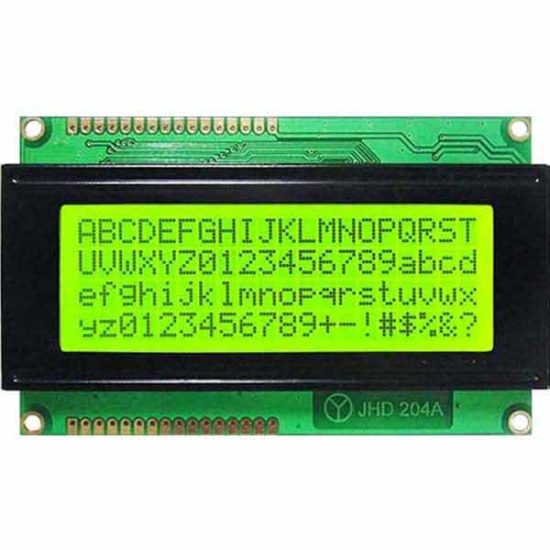
Widely popular are 16×2(LCD1602) and 20×4 (LCD2004) LCD displays. The below image shows a 20×4 LCD display module.
Three main reasons to choose this type of LCD display for IoT projects using Raspberry Pi or Arduino.
Economical to purchase. You can buy a 16×2 LCD module for just $1 USD.
It requires 5v to run and so we can hook it to Raspberry Pi and no dedicated power source required.
Consumes low current. You can keep it on 24×7 with backlight on without burning your purse.
Why I2C backpack?
These LCD modules have parallel interface. That will not be convenient to connect multiple pins to the chip and use them in parallel mode.
I2C is a serial bus developed by Philips. So we can use I2C communication and just use 4 wires to communicate. To do this we need to use an I2C adapter and solder it to the display.
I2C uses two bidirectional lines, called SDA (Serial Data Line) and SCL (Serial Clock Line) with 5V standard power supply requirement a ground pin. So just 4 pins to deal with.
When you buy the LCD module, you can purchase LCD, I2C adapter separately and solder it. If soldering is not your thing, then it is better to buy the LCD module that comes with the I2C adapter backpack with it.
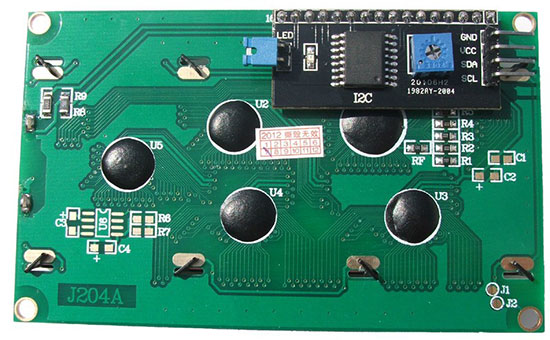
The above image is backside of a 2004 LCD module. The black thing is the I2C adapter. You can see the four pins GND, VCC, SDA and SCL. That’s where the you will be connecting the Raspberry Pi.
The square blue thing with plus mark is used for adjusting the brightness of the display. The blue jumper is used to switch on or off the backlight.
Switching off the backlight may not be necessary. If you switch off, the characters will be barely visible. You can keep it on 24×7, it will not eat up power as it is a low power consumption device.
Logic converter
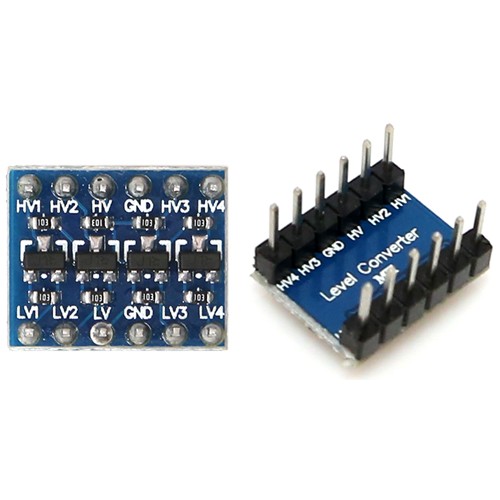
Raspberry Pi GPIO pins are natively of 3.3V. So we should not pull 5v from Raspberry Pi. The I2C LCD module works on 5V power and to make these compatible, we need to shift up the 3.3V GPIO to 5V. To do that, we can use a logic level converter.
This is an important point and this is where a lot of beginners fail out. You may find some conflicting information in the Internet pages.
You might see RPIs connected directly to a 5V devices, but they may not be pulling power from RPI instead supplying externally. Only for data / instruction RPI might be used. So watch out, you might end up frying the LCD module or the RPI itself.
Required hardware list
Raspberry Pi (I have used Zero W and you can use any model you have).
LCD display with I2C adapter backpack (I have used 20×4, you can use as per your choice).
3.3V to 5V bi-directional logic level converter
Breadboard
Jumper wires
Pre-requisite
Micro SD card with Raspbian OS
5.1V power supply (Official power adapter recommended)
Memory card reader
Why official power adapter?
Why am I recommending the official power adapter! There is a reason to it. The cheap mobile adapters though guarantee a voltage, they do not provide a steady voltage. That may not be required in charging a cellphone device but not in the case of Raspberry Pi. That is the main reason, a USB keyboard or mouse attached does not get detected. They may not get sufficient power. Either go for an official power adapter or use the best branded one you know.
Headless
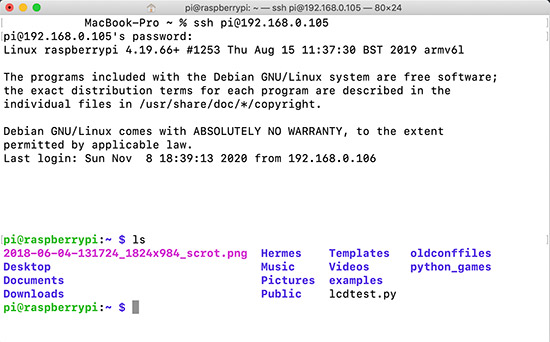
I have a headless setup. I am doing SSH from my MAC terminal and use VIM as editor. VNC viewer may occasionally help but doing the complete programming / debugging may not be comfortable. If you do not prefer SSH way, then you will need a monitor to plug-in to Raspberry Pi.
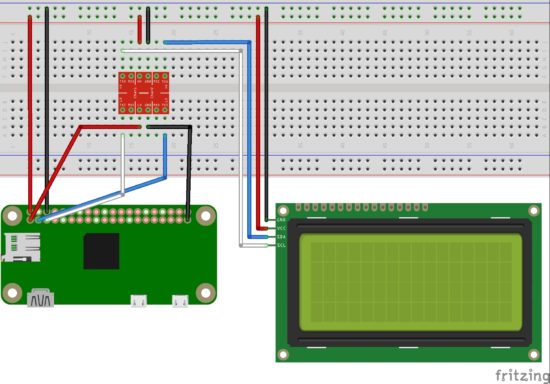
Raspberry Pi LCD I2C Circuit diagram
I have used a breadboard, logic level converter, 20×4 LCD display module with I2C backpack and Raspberry Pi Zero W in the circuit diagram.
3.3V GPIO of Raspberry Pi is converted using a logic level converter to 5V to be compatible for the LCD display.
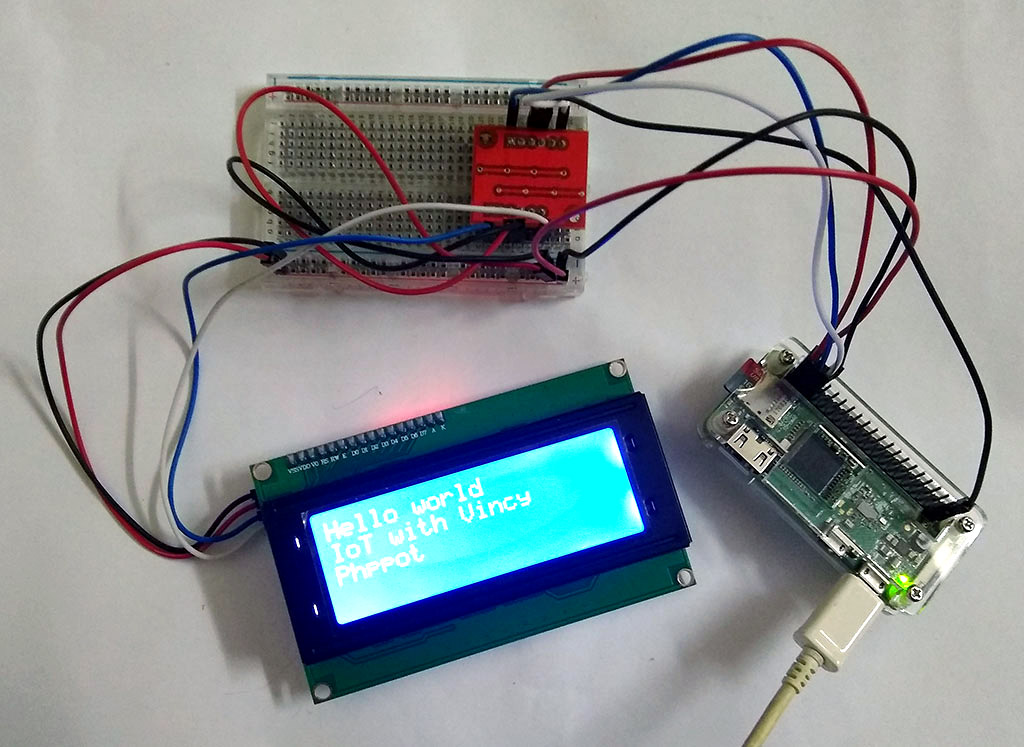
Raspberry Pi setup with LCD display module using I2C backpack
Programming
As you know my language of choice to build website is PHP. But for IoT with Raspberry Pi, let us use Python. Reason being availability of packages and that will save ton of effort. Low level interactions via serial or parallel interface is easier via Python.
I2C
We need the below two tools for working with I2C. So install it by running the following command in the RPI terminal.
sudo apt-get install python-smbus i2c-tools
Enable I2C
sudo raspi-config
The above command opens the Raspberry Pi configuration in the terminal. Under ‘Interfacing Options’, activate I2C.
sudo vi /etc/modules
Add the following two lines at the end of the file and save it.
i2c-bcm2708
i2c-dev
Then restart Raspberry Pi.
sudo reboot
Test I2C
To check if the I2C is properly connected and detected.
sudo i2cdetect -y 1
This will return a matrix with ’27’ highlighted, that means you I2C is detected and it is the address.
We need a library to interact with the LCD module. There are many Python libraries available. I prefer RPLCD.
sudo pip install RPLCD
This will install the RPLCD library.
Raspberry Pi LCD Hello World Python program
LCDHelloWorld.py
Following code imports the RPLCD library. Then initializes the LCD instance. Then print the “Hello World” string followed by new line. Then another two statements. Then a sleep for 5 seconds and switch off the LCD backlight. Finally, clear the LCD screen.
# Import LCD library
from RPLCD import i2c # Import sleep library
from time import sleep # constants to initialise the LCD
lcdmode = 'i2c'
cols = 20
rows = 4
charmap = 'A00'
i2c_expander = 'PCF8574' # Generally 27 is the address;Find yours using: i2cdetect -y 1 address = 0x27 port = 1 # 0 on an older Raspberry Pi # Initialise the LCD
lcd = i2c.CharLCD(i2c_expander, address, port=port, charmap=charmap, cols=cols, rows=rows) # Write a string on first line and move to next line
lcd.write_string('Hello world')
lcd.crlf()
lcd.write_string('IoT with Vincy')
lcd.crlf()
lcd.write_string('Phppot')
sleep(5)
# Switch off backlight
lcd.backlight_enabled = False # Clear the LCD screen
lcd.close(clear=True)
My next article in this series will be on how to integrate the GMail API and notify for new mails.
Ready, Steady, Go —-> Data Science by setting up Conda in your Computer
It has never been easier from the early python data tools invention than now, to set up an user environment in our own computer. Conda brings that easiness with it.
Conda as it defines itself is an “OS-agnostic, system-level binary package manager and ecosystem.”
The guiding principles of python are written by Tim Peters in PEP 20 — The Zen of Python. One of the aphorisms mentioned in it is, “There should be one– and preferably only one –obvious way to do it.” Conda is an effort towards it not only for Python but other languages like R, Ruby, etc.
If you wish to read more about conda, read an excellent blog post written by Travis Oliphant. He’s the creator of Numpy and Scipy.
The best way to install Conda package manager for python is through any one of the two distributions,
Anaconda
Miniconda
Choosing Between Anaconda and Miniconda
Miniconda is a small, bootstrap version of Anaconda that includes only conda, Python, the packages they depend on. If you’re ready to allocate more space (around 3 GB), Anaconda is the best option. Anaconda will install a wide range of packages that you might need to deal with the data. Otherwise, Miniconda will serve the purpose and you can install any package as required.
To get an up to date and stable version of the software, installing from the official documentation is the best way to do so. We’ll provide you the links to the docs. The steps mentioned in the docs are very easy to follow like a cakewalk. Also, by the time whenever any of the links are dead, We’ll update them.
We didn’t provide all the instructions directly here on this page because it’s very easy and clearly mentioned in the docs. The theme of this article is only to provide you with the necessary information to choose between Miniconda and Anaconda.
Do you want to enrich your Python script with powerful text-generation capabilities? You’re in the right place!
What does it do? I just discovered DeepAI’s API that automatically generates a body of text, given a sentence fragment or topic keyword.
How can it be used? You can use this as a basis to generate text automatically.
My opinion: The generated text makes sense (kind of) but you may need to further process it or guide it to generate longer meaningful content. The biggest opportunity, in my opinion, is to use it as a step in a more complex pipeline towards the automatic generation of valuable content. On its own, it wouldn’t generate too much meaning (apart from the entertainment value of reading machine-generated text).
Python Deep API Call
Ready? So, let’s have a look at the short Python script that asks the machine learning model to generate text for you—given a certain keyword such as ‘intelligence’, ‘Donald Trump’, or ‘Learn Python’.
You import Python’s standard library requests to issue web requests and access the DeepAI API that is hosted at the URL "https://api.deepai.org/api/text-generator".
Here’s the output the code snippet generated in my Python shell:
Automatically-Generated Text Example
Intelligence officials were able to confirm the existence of at least some Russian hacking operations, including the one apparent aimed at the White House.
The CIA brief, the statement said, “was made official by the Russian Government on the third assessment of a U.S. official that Russian Government officials had interfered in the 2016 presidential election. In my opinion, assertions that were made in the clear and unequivocal testimony of the public as well as in the public release on any of the Russian accounts were grossly improper, misleading, and should be seen to be completely absent from any official documents as well.”
It added: “In addition, the CIA’s assessment asserted the Russian Government’s claims were grossly misleading, misleading and misleading in their assertions. The CIA has concluded to date, including publicly, it has given credible facts to support the Russia’s claims, and there would be no justification for further claims, if such assertions are to be proven to be false.”
The CIA brief also claimed the CIA “should not” have “repeated, misleading details of Russian officials’ conduct.”
CIA spokeswoman Jane Harman told Fox News: “CIA Director John Brennan fully agrees that Director Brennan’s testimony confirms what we have heard from various intelligence agencies.
“He is clear that Director Brennan gave additional testimony to Congress on the subject, in the first instance in which he spoke frankly about the role of Russian intelligence.”
But Harman also said Brennan should have given “more proof” of “firm Russian intervention into the U.S. political environment” if such claims were to be believed about the same thing.
Brennan told me the U.S would “make public its best communications in Russia for all time.”
Brennan’s testimony was confirmed by CIA Director Gina Haspel.
Brennan’s public admission that the Clinton campaign was hacked “was, in fact, rejected by the CIA by the president,” the CIA brief said.
In a memo prepared to be published early Friday, CIA Director R. John Brennan outlined an intelligence assessment that a Russian national and political operative in the United States was responsible for leaking classified information to the Russian media and opposition leaders.
The CIA has denied the CIA’s assessment. But Brennan argued that the Russian “public claims are simply false assertions that are misleading, unconfirmed and improper.”
In the report, US intelligence provided more details to the National Security Council than a year ago, the first time in the United States that Russia was involved in the hack.
The CIA concluded that the Russian government hacked the DNC to help Trump and was trying to influence the 2016 election.
Russia has denied US attempts to influence the campaign. But President Obama, in a letter to US Secretary of State Rex Tillerson, said the US acted in “complete coordination with the Russian government” and “with Russian military officials, whom we have discussed with other countries.”
Russian election meddling and hacking of DNC were part of an international pattern of human rights violations in which countries have accused their governments of using disinformation to advance a political candidate and undermine a democratic election.
Dmitry Peskov, Russia’s president, said in December that the hacking was meant to interfere with the presidential election and may violate the election regulations.
“The cyberwar waged in this new Russia will not be stopped, the threats and security of the country will be the only legitimate measure,” he said, adding that the hackers “will have no chance to stop.”
The Russian state-sponsored cybercrime group F-Secure, which was based in Moscow, has claimed responsibility for a number of Russian cyber incidents that have been claimed by the United States, the Associated Press reports.
The Russian state-sponsored hacking groups include the computer firms Kaspersky Lab and DigiPG, both known for their malware and research programs, and the Moscow-based anti-virus firm Elemental.
The hacking groups have also said that as part of the election, they were targeting an array of Democratic political candidates.
The Russian military is responsible for the attack, according to Kremlin spokesman Dmitry Peskov.
Russia is often accused of using cyber hacks for its own interests. In December 2016, an Obama administration official stated that “every step is worth watching carefully” in the war in Afghanistan in 2014.
But Russia’s President Vladimir Putin, a Russian citizen and former head of the Communist Party, has denied that Russian state-backed separatists used hacking to support the presidential elections.
“I call on all government officials and political parties to avoid interference and the international community to take up arms for the political and economic purposes of Russia. We are not engaged, and should not be used,” Putin said in a speech in Moscow in February.
He said the Kremlin is not to blame for a country’s cyber crimes against the country during the presidential election.
Putin also said that “there is nothing new or wrong with the election result.”
Short Discussion
You can see that the generated text is quite detailed and looks professional. But is it correct? And does it contain plagiarism? To check these questions, I checked it with Grammarly. Here’s the result:
The text has high writing quality and is original!
But it’s obviously fake news—otherwise, Grammarly should have found the quotes of “CIA officials”. That’s why I think that the powerful text-generation ability should be used in a pipeline or system that ensures to create some real value-add—rather than using it as a stand-alone tool.
Try It Yourself (Interactive Shell)
Challenge
Challenge: Find ways to create real value using the Python API call in a more advanced code snippet and share it with the Finxter community. You can contact me by signing up on the Finxter Email Academy:
I’ll share the results of this poll in a follow-up blog article—so, stay tuned!
Quick Fix: Python throws the “ImportError: No module named pandas” when it cannot find the Pandas installation. The most frequent source of this error is that you haven’t installed Pandas explicitly with pip install pandas. Alternatively, you may have different Python versions on your computer and Pandas is not installed for the particular version you’re using. To fix it, run pip install pandas in your Linux/MacOS/Windows terminal.
Problem: You’ve just learned about the awesome capabilities of the Pandas library and you want to try it out, so you start with the following import statement you found on the web:
import pandas as pd
This is supposed to import the Pandas library into your (virtual) environment. However, it only throws the following import error: no module named pandas!
>>> import pandas as pd
ImportError: No module named pandas on line 1 in main.py
You can reproduce this error in the following interactive Python shell:
Why did this error occur?
The reason is that Python doesn’t provide Pandas in its standard library. You need to install Python first!
Before being able to import the Pandas module, you need to install it using Python’s package manager pip. You can run the following command in your Windows shell:
$ pip install pandas
Here’s the screenshot on my Windows machine:
This simple command installs Pandas in your virtual environment on Windows, Linux, and MacOS. It assumes that you know that your pip version is updated. If it isn’t, use the following two commands (there’s no harm in doing it anyways):
How to Fix “ImportError: No module named pandas” in PyCharm
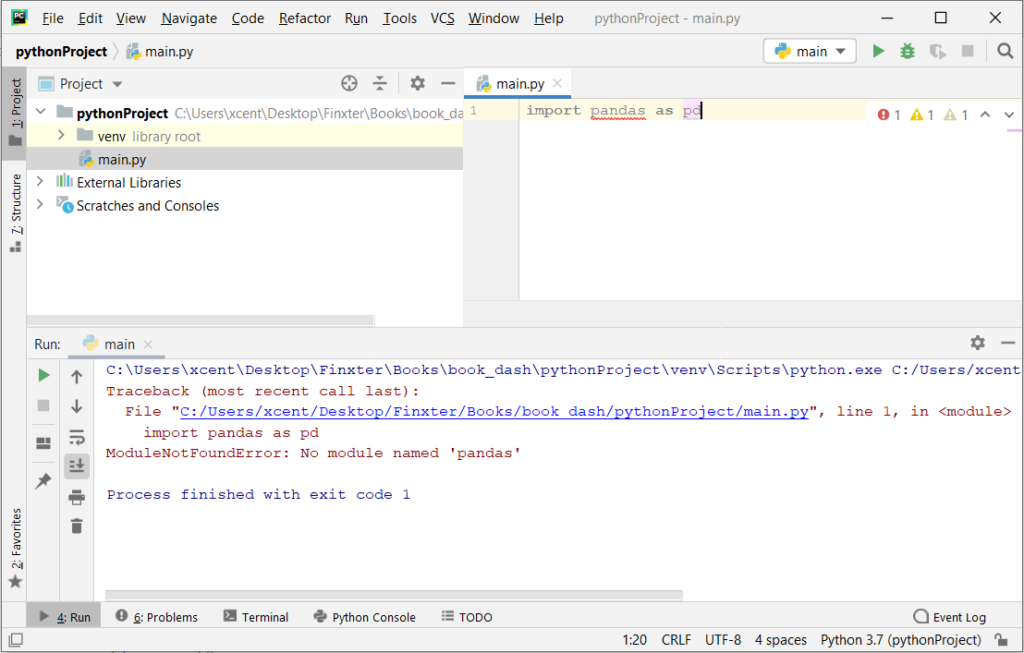
If you create a new Python project in PyCharm and try to import the Pandas library, it’ll throw the following error:
Traceback (most recent call last): File "C:/Users/xcent/Desktop/Finxter/Books/book_dash/pythonProject/main.py", line 1, in <module> import pandas as pd
ModuleNotFoundError: No module named 'pandas' Process finished with exit code 1
The reason is that each PyCharm project, per default, creates a virtual environment in which you can install custom Python modules. But the virtual environment is initially empty—even if you’ve already installed Pandas on your computer!
Here’s a screenshot:
The fix is simple: Use the PyCharm installation tooltips to install Pandas in your virtual environment—two clicks and you’re good to go!
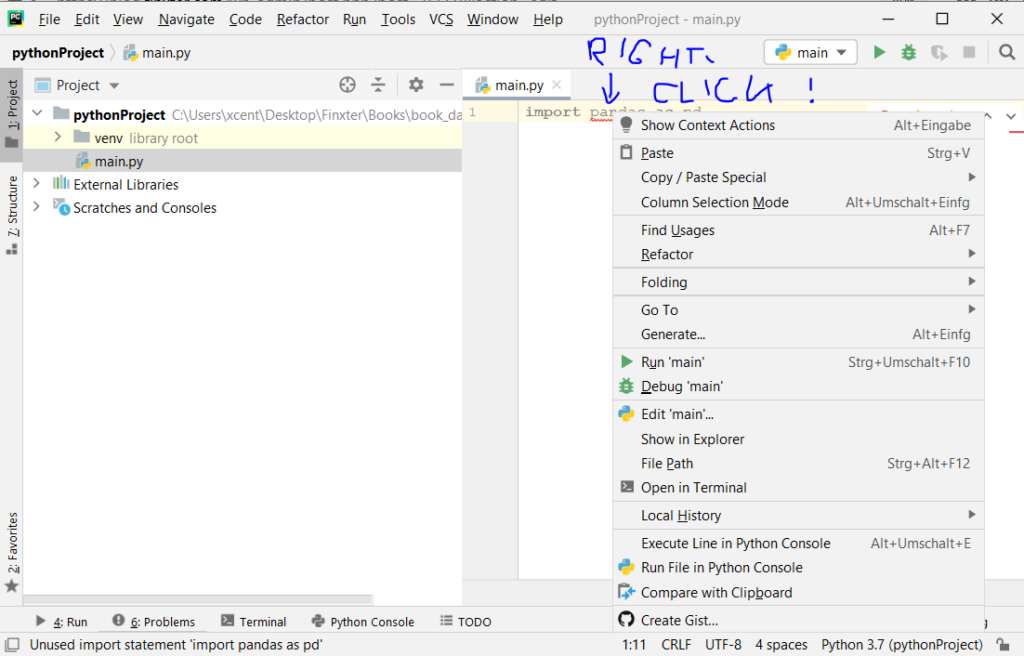
First, right-click on the pandas text in your editor:
Second, click “Show Context Actions” in your context menu. In the new menu that arises, click “Install Pandas” and wait for PyCharm to finish the installation.
The code will run after your installation completes successfully.
Rapid Answer: The following one-liner calculates the MD5 from the string 'hello world':
import hashlib as h;print(h.md5(b'hello world').hexdigest())
Background: MD5 message-digest is a vulnerable cryptographic algorithm to map a string to a 128-bit hash value. You can use it as a checksum on a given text to ensure that the message hasn’t been corrupted. However, you shouldn’t use it as a protection against malicious corruption due to its vulnerability. With modern hardware and algorithms, it’s easy to crack!
Problem: How to generate an MD5 sum from a string?
Example: Say, you have the following string text:
text = 'hello world'
And you want to convert it to the MD5 hash value:
5eb63bbbe01eeed093cb22bb8f5acdc3
We’ll discuss some methods to accomplish this next.
Method 1: hashlib.md5() — Multi-Liner
The hashlib library provides a function md5() that creates an object that can calculate the hash value of a given text for you via the method update():
# Method 1: hashlib.md5()
import hashlib m = hashlib.md5()
text = 'hello world'
m.update(text.encode('utf-8')) print(m.hexdigest())
# 5eb63bbbe01eeed093cb22bb8f5acdc3
Make sure to encode the string as a Unicode string with the string.encode('utf-8') method. Otherwise, Python will throw an error.
I also initialized the md5 object with the Unicode string directly rather than using the update() method. The one-liner now has minimum number of characters—I don’t think it can be made even more concise!
Python One-Liners Book
Python programmers will improve their computer science skills with these useful one-liners.
Python One-Linerswill teach you how to read and write “one-liners”: concise statements of useful functionality packed into a single line of code. You’ll learn how to systematically unpack and understand any line of Python code, and write eloquent, powerfully compressed Python like an expert.
The book’s five chapters cover tips and tricks, regular expressions, machine learning, core data science topics, and useful algorithms. Detailed explanations of one-liners introduce key computer science concepts and boost your coding and analytical skills. You’ll learn about advanced Python features such as list comprehension, slicing, lambda functions, regular expressions, map and reduce functions, and slice assignments. You’ll also learn how to:
• Leverage data structures to solve real-world problems, like using Boolean indexing to find cities with above-average pollution • Use NumPy basics such as array, shape, axis, type, broadcasting, advanced indexing, slicing, sorting, searching, aggregating, and statistics • Calculate basic statistics of multidimensional data arrays and the K-Means algorithms for unsupervised learning • Create more advanced regular expressions using grouping and named groups, negative lookaheads, escaped characters, whitespaces, character sets (and negative characters sets), and greedy/nongreedy operators • Understand a wide range of computer science topics, including anagrams, palindromes, supersets, permutations, factorials, prime numbers, Fibonacci numbers, obfuscation, searching, and algorithmic sorting
By the end of the book, you’ll know how to write Python at its most refined, and create concise, beautiful pieces of “Python art” in merely a single line.
Note that you can change the font-size to 15px, 17px, or even 20px—as you like! Also note that if you use another theme/style for your embedded code than bootstrap4, you need to set the CSS selector accordingly.
Pandas is Excel on steroids—the powerful Python library allows you to analyze structured and tabular data with surprising efficiency and ease. Pandas is one of the reasons why master coders reach 100x the efficiency of average coders. In today’s article, you’ll learn how to work with missing data—in particular, how to handle NaN values in Pandas DataFrames.
You’ll learn about all the different reasons why NaNs appear in your DataFrames—and how to handle them. Let’s get started!
Checking Series for NaN Values
Problem: How to check a series for NaN values?
Have a look at the following code:
import pandas as pd
import numpy as np data = pd.Series([0, np.NaN, 2])
result = data.hasnans print(result)
# True
Series can contain NaN-values—an abbreviation for Not-A-Number—that describe undefined values.
To check if a Series contains one or more NaN value, use the attribute hasnans. The attribute returns True if there is at least one NaN value and False otherwise.
There’s a NaN value in the Series, so the output is True.
Filtering Series Generates NaN
Problem: When filtering a Series with where() and no element passes the filtering condition, what’s the result?
The method where() filters a Series by a condition. Only the elements that satisfy the condition remain in the resulting Series. And what happens if a value doesn’t satisfy the condition? Per default, all rows not satisfying the condition are filled with NaN-values.
This is why our Series contains NaN-values after filtering it with the method where().
Working with Multiple Series of Different Lengths
Problem: If you element-wise add two Series objects with a different number of elements—what happens with the remaining elements?
import pandas as pd s = pd.Series(range(0, 10))
t = pd.Series(range(0, 20))
result = (s + t)[1] print(result)
# 2
To add two Series element-wise, use the default addition operator +. The Series do not need to have the same size because once the first Series ends, the subsequent element-wise results are NaN values.
At index 1 in the resulting Series, you get the result of 1 + 1 = 2.
Create a DataFrame From a List of Dictionaries with Unequal Keys
Problem: How to create a DataFrame from a list of dictionaries if the dictionaries have unequal keys? A DataFrame expects the same columns to be available for each row!
import pandas as pd data = [{'Car':'Mercedes', 'Driver':'Hamilton, Lewis'}, {'Car':'Ferrari', 'Driver':'Schumacher, Michael'}, {'Car':'Lamborghini'}] df = pd.DataFrame(data, index=['Rank 2', 'Rank 1', 'Rank 3'])
df.sort_index(inplace=True)
result = df['Car'].iloc[0] print(result)
# Ferrari
You can create a DataFrame from a list of dictionaries. The dictionaries’ keys define the column labels, and the values define the columns’ entries. Not all dictionaries must contain the same keys. If a dictionary doesn’t contain a particular key, this will be interpreted as a NaN-value.
This code snippet uses string labels as index values to sort the DataFrame. After sorting the DataFrame, the row with index label Rank 1 is at location 0 in the DataFrame and the value in the column Car is Ferrari.
Sorting a DataFrame by Column with NaN Values
Problem: What happens if you sort a DataFrame by column if the column contains a NaN value?
import pandas as pd df = pd.read_csv("Cars.csv") # Dataframe "df"
# ----------
# make fuel aspiration body-style price engine-size
# 0 audi gas turbo sedan 30000 2.0
# 1 dodge gas std sedan 17000 1.8
# 2 mazda diesel std sedan 17000 NaN
# 3 porsche gas turbo convertible 120000 6.0
# 4 volvo diesel std sedan 25000 2.0
# ---------- selection = df.sort_values(by="engine-size")
result = selection.index.to_list()[0]
print(result)
# 1
In this code snippet, you sort the rows of the DataFrame by the values of the column engine-size.
The main point is that NaN values are always moved to the end in Pandas sorting. Thus, the first value is 1.8, which belongs to the row with index value 1.
Count Non-NaN Values
Problem: How to count the number of elements in a dataframe column that are not Nan?
import pandas as pd df = pd.read_csv("Cars.csv") # Dataframe "df"
# ----------
# make fuel aspiration body-style price engine-size
# 0 audi gas turbo sedan 30000 2.0
# 1 dodge gas std sedan 17000 1.8
# 2 mazda diesel std sedan 17000 NaN
# 3 porsche gas turbo convertible 120000 6.0
# 4 volvo diesel std sedan 25000 2.0
# ---------- df.count()[5]
print(result)
# 4
The method count() returns the number of non-NaN values for each column. The DataFrame df has five rows. The fifth column contains one NaN value. Therefore, the count of the fifth column is 4.
Drop NaN-Values
Problem: How to drop all rows that contain a NaN value in any of its columns—and how to restrict this to certain columns?
import pandas as pd df = pd.read_csv("Cars.csv") # Dataframe "df"
# ----------
# make fuel aspiration body-style price engine-size
# 0 audi gas turbo sedan 30000 2.0
# 1 dodge gas std sedan 17000 1.8
# 2 mazda diesel std sedan 17000 NaN
# 3 porsche gas turbo convertible 120000 6.0
# 4 volvo diesel std sedan 25000 2.0
# ---------- selection1 = df.dropna(subset=["price"])
selection2 = df.dropna()
print(len(selection1), len(selection2))
# 5 4
The DataFrame’s dropna() method drops all rows that contain a NaN value in any of its columns. But how to restrict the columns to be scanned for NaN values?
By passing a list of column labels to the optional parameter subset, you can define which columns you want to consider.
The call of dropna() without restriction, drops line 2 because of the NaN value in the column engine-size. When you restrict the columns only to price, no rows will be dropped, because no NaN value is present.
Drop Nan and Reset Index
Problem: What happens to indices after dropping certain rows?
import pandas as pd df = pd.read_csv("Cars.csv") # Dataframe "df"
# ----------
# make fuel aspiration body-style price engine-size
# 0 audi gas turbo sedan 30000 2.0
# 1 dodge gas std sedan 17000 1.8
# 2 mazda diesel std sedan 17000 NaN
# 3 porsche gas turbo convertible 120000 6.0
# 4 volvo diesel std sedan 25000 2.0
# ---------- df.drop([0, 1, 2], inplace=True)
df.reset_index(inplace=True)
result = df.index.to_list()
print(result)
# [0, 1]
The method drop() on a DataFrame deletes rows or columns by index. You can either pass a single value or a list of values.
By default the inplace parameter is set to False, so that modifications won’t affect the initial DataFrame object. Instead, the method returns a modified copy of the DataFrame. In the puzzle, you set inplace to True, so the deletions are performed directly on the DataFrame.
After deleting the first three rows, the first two index labels are 3 and 4. You can reset the default indexing by calling the method reset_index() on the DataFrame, so that the index starts at 0 again. As there are only two rows left in the DataFrame, the result is [0, 1].
Concatenation of Dissimilar DataFrames Filled With NaN
Problem: How to concatenate two DataFrames if they have different columns?
import pandas as pd df = pd.read_csv("Cars.csv")
df2 = pd.read_csv("Cars2.csv") # Dataframe "df"
# ----------
# make fuel aspiration body-style price engine-size
# 0 audi gas turbo sedan 30000 2.0
# 1 dodge gas std sedan 17000 1.8
# 2 mazda diesel std sedan 17000 NaN
# 3 porsche gas turbo convertible 120000 6.0
# 4 volvo diesel std sedan 25000 2.0
# ---------- # Additional Dataframe "df2"
# ----------
# make origin
# 0 skoda Czechia
# 1 toyota Japan
# 2 ford USA
# ---------- try: result = pd.concat([df, df2], axis=0, ignore_index=True) print("Y")
except Exception: print ("N") # Y
Even if DataFrames have different columns, you can concatenate them.
If DataFrame 1 has columns A and B and DataFrame 2 has columns C and D, the result of concatenating DataFrames 1 and 2 is a DataFrame with columns A, B, C, and D. Missing values in the rows are filled with NaN.
Outer Merge
Problem: When merging (=joining) two DataFrames—what happens if there are missing values?
import pandas as pd df = pd.read_csv("Cars.csv")
df2 = pd.read_csv("Cars2.csv") # Dataframe "df"
# ----------
# make fuel aspiration body-style price engine-size
# 0 audi gas turbo sedan 30000 2.0
# 1 dodge gas std sedan 17000 1.8
# 2 mazda diesel std sedan 17000 NaN
# 3 porsche gas turbo convertible 120000 6.0
# 4 volvo diesel std sedan 25000 2.0
# ---------- # Additional dataframe "df2"
# ----------
# make origin
# 0 skoda Czechia
# 1 mazda Japan
# 2 ford USA
# ---------- result = pd.merge(df, df2, how="outer", left_on="make", right_on="make")
print(len(result["fuel"]))
print(result["fuel"].count())
# 7
# 5
With Panda’s function merge() and the parameter how set to outer, you can perform an outer join.
The resulting DataFrame of an outer join contains all values from both input DataFrames; missing values are filled with NaN.
In addition, this puzzle shows how NaN values are counted by the len() function whereas the method count() does not include NaN values.
Replacing NaN
Problem: How to Replace all NaN values in a DataFrame with a given value?
import pandas as pd df = pd.read_csv("Cars.csv") # Dataframe "df"
# ----------
# make fuel aspiration body-style price engine-size
# 0 audi gas turbo sedan 30000 2.0
# 1 dodge gas std sedan 17000 1.8
# 2 mazda diesel std sedan 17000 NaN
# 3 porsche gas turbo convertible 120000 6.0
# 4 volvo diesel std sedan 25000 2.0
# ---------- df.fillna(2.0, inplace=True)
result = df["engine-size"].sum()
print(result)
# 13.8
The method fillna() replaces NaN values with a new value. Thus, the sum of all values in the column engine-size is 13.8.
Length vs. Count Difference — It’s NaN!
Problem: What’s the difference between the len() and the count() functions?
import pandas as pd df = pd.read_csv("Cars.csv")
df2 = pd.read_csv("Cars2.csv") # Dataframe "df"
# ----------
# make fuel aspiration body-style price engine-size
# 0 audi gas turbo sedan 30000 2.0
# 1 dodge gas std sedan 17000 1.8
# 2 mazda diesel std sedan 17000 NaN
# 3 porsche gas turbo convertible 120000 6.0
# 4 volvo diesel std sedan 25000 2.0
# ---------- # Additional dataframe "df2"
# ----------
# make origin
# 0 skoda Czechia
# 1 mazda Japan
# 2 ford USA
# ---------- result = pd.merge(df2, df, how="left", left_on="make", right_on="make")
print(len(result["fuel"]))
print(result["fuel"].count())
# 3
# 1
In a left join, the left DataFrame is the master, and all its values are included in the resulting DataFrame.
Therefore, the result DataFrame contains three rows, yet, since skoda and ford don’t appear in DataFrame df, only one the row for mazda contains value.
Again, we see the difference between using the function len() which also includes NaN values and the method count() which does not count NaN values.
Equals() vs. == When Comparing NaN
Problem:
import pandas as pd df = pd.read_csv("Cars.csv") # Dataframe "df"
# ----------
# make fuel aspiration body-style price engine-size
# 0 audi gas turbo sedan 30000 2.0
# 1 dodge gas std sedan 17000 1.8
# 2 mazda diesel std sedan 17000 NaN
# 3 porsche gas turbo convertible 120000 6.0
# 4 volvo diesel std sedan 25000 2.0
# ---------- df["engine-size_copy"] = df["engine-size"]
check1 = (df["engine-size_copy"] == df["engine-size"]).all()
check2 = df["engine-size_copy"].equals(df["engine-size"])
print(check1 == check2)
# False
This code snippet shows how to compare columns or entire DataFrames regarding the shape and the elements.
The comparison using the operator == returns False for our DataFrame because the comparing NaN-values with == always yields False.
On the other hand, df.equals() allows comparing two Series or DataFrames. In this case, NaN-values in the same location are considered to be equal.
The column headers do not need to have the same type, but the elements within the columns must be of the same dtype.
Since the result of check1 is False and the result of check2 yields True, the final output is False.
Where to Go From Here?
Enough theory, let’s get some practice!
To become successful in coding, you need to get out there and solve real problems for real people. That’s how you can become a six-figure earner easily. And that’s how you polish the skills you really need in practice. After all, what’s the use of learning theory that nobody ever needs?
Practice projects is how you sharpen your saw in coding!
Do you want to become a code master by focusing on practical code projects that actually earn you money and solve problems for people?
Then become a Python freelance developer! It’s the best way of approaching the task of improving your Python skills—even if you are a complete beginner.
Being a Python freelancer is a new way of living in the 21st century. It’s a path of personal growth, learning new skills, and earning money in the process. But in today’s digital economy, becoming a Python freelancer is – above everything else – a lifestyle choice. It can give you fulfillment, flexibility, and endless growth opportunities. Additionally, it offers you a unique way of connecting with other people, learning about their exciting projects, and finding friends and acquaintances on the way.
Disclaimer: Please don’t take this as legal advice but as tips & tricks from someone who’s been there and done that.
Freelance Developer Germany Pros and Cons
So what are the advantages of being a freelance coder? Let’s dive right into them.
Advantages of Being a Freelance Programmer in Germany
Flexibility: One big advantage of being a Python freelancer is that you are flexible in time and space. I live in a large German city (Stuttgart) where rent prices are increasing. However, since I am working full-time in the Python industry, being self-employed, and 100% digital, I have the freedom to move to the countryside. Outside large cities, housing is exceptionally cheap and living expenses are truly affordable. I am earning good money matched only by a few employees in my home town — while I am not forced to compete for housing to live close to my employers. A few cities demand very high prices in Germany while others allow you to get affordable and beautiful houses in the countryside. A clear advantage for freelance developers!
Independence: Do you hate working for your boss? Does your boss still value old-school values such as working 9-to-5? In Germany, a lot of bosses are that way. Being a freelancer injects a dose of true independence into your life. While you are not totally free (after all, you are still working for clients), you can theoretically get rid of any single client while not losing your profession. Firing your bad clients is even a smart thing to do because they demand more of your time, drain your energy, pay you badly (if at all), and don’t value your work in general. In contrast, good clients will treat you with respect, pay well and on time, come back, refer you to other clients, and make working with them a pleasant and productive experience. As an employee, you don’t have this freedom of firing your boss until you find a good one.
Tax advantages: As a freelancer, you start your own business. Please note that I’m not an accountant — and tax laws are different in different countries. But in Germany and many other developed nations, your small Python freelancing business usually comes with a lot of tax advantages. You can deduct many expenses from the taxes you pay, such as your Notebook, your car, your living expenses, working environment, eating outside with clients or partners, your smartphone, and so on. At the end of the year, many freelancers enjoy tax benefits worth tens of thousands of Euros. You can find a detailed tax guide here.
Business expertise: This advantage is maybe the most important one. As a freelancer, you gain a tremendous amount of experience in the business world. You learn to offer and sell your skills in the marketplace, you learn how to acquire clients and keep them happy, you learn how to solve problems, and you learn how to keep your books clean, invest, and manage your money. Being a freelancer gives you a lot of valuable business experiences. And even if you plan to start a more scalable business system, being a freelance developer is truly a great first step towards your goal. The business experience is a clear plus compared to other, more “nerdy” developers working only with code. The business skills will make you a more valuable person—even for established companies.
Paid learning: While you have to pay to learn at University—living is relatively expensive in Germany—being a freelance developer flips this situation upside down. You are getting paid for learning. As a bonus, the things you are learning are as practical as they can be. Instead of coding toy projects in University, you are coding (more or less) exciting projects with an impact on the real world. In Germany, the pay is relatively good due to the developed nature of the economy.
Save time in commute: Many Germans are stuck in commute for hours and hours every day. Being in commute is one of the major time killers in modern life. During a 10 year period, you’ll waste 2000-4000 hours — enough to become a master in a new topic of your choice, or writing more than ten full books and sell them on the marketplace. Commute time to work is one of the greatest inefficiencies of our society. And you, as a freelance developer, can completely eliminate it. This will make your life constantly easier, you have an unfair advantage compared to any other employee. You can spend the time on learning, recreation, or building more side businesses. You don’t even need a car (I don’t have one) which will save you hundreds of thousands of Euros throughout your lifetime (the average German employee spends 300,000 € on cars).
Family time: During the last 12 months being self-employed with Python, I watched my 1-year old son walking his first steps and speaking his first words. I was actually attending every single stage of his development and growth. While this often seems very normal to me, I guess that many fathers who work at big companies as employees may have missed their sons and daughters growing up. In my environment, most fathers do not have time to spend with their kids during their working days. But I have and I’m very grateful for this.
Competition: In Germany, there’s a seller’s market for freelance developers—demand is much higher than supply. This means that you can charge premium rates and work only on the gigs you want.
Are you already convinced that becoming a Python freelancer is the way to go for you? You are not alone. To help you with your quest, I have created the one and only Python freelancer course on the web which pushes you to Python freelancer level in a few months — starting out as a beginner coder. The course is designed to pay for itself because it will instantly increase your hourly rate on diverse freelancing platforms such as Upwork or Fiverr.
Disadvantages of Being a Freelance Programmer in Germany
Less stability: It’s hard to reach a stable income as a freelancer. In Germany, many people seek security above freedom. Also, if you want to buy your own home and need credit, banks usually have less trust in your ability to generate income than if you were employed.
Bad clients: You will get those bad clients for sure. However, in Germany this disadvantage is somehow mitigated as clients are mostly business owners that are able to pay their freelancing fees.
Legacy code: Germany has a lot of large and established industry players such as Bosch, Daimler, and other manufacturers. These older industries usually have older code bases as well. As a German freelance developer, you may need to handle more legacy code than as a freelancer in a newer economy such as, for example, India.
Solitude: If you are working as an employee at a company, you always have company, quite literally. In Germany, this culture is especially true—only a small percentage of your IT friends will work as self-employed freelance developers. Most coders work for big companies.
Freelance Developer Germany While Employed
If you’re an employee, you have the freedom to create your own side-hustle in Germany. However, there are some laws that ensure that people don’t work too much. Thus, you need to be careful not to work too many hours per week. In this resource, they recommend not to work more than 18 hours per week on your side business—if you still have a main job. In general, these are the points to consider when creating your own side-business as a freelance developer in Germany:
Side vs Main Income: Make sure to earn more in your main job than in your side business. This is required so that it still counts as a side-business and not your main income. In that case, your business would be considered your main income which would result in a loss of some benefits paid by your employer.
Inform Your Employer: You may need to inform your employer that you create your side business. This may be required by contract or even by law (for some type of jobs such as government employees).
Register Your Business: You need to register your business with the tax office and government. As in most other countries, you cannot just “go for it” but need to register your intent to create a business—even if it is on the side.
Social Insurance: If you’re creating a business on the side, you’re stilled insured by your employer (e.g., for pension funds and health insurance). That’s why you need to make sure not to work or earn too much for your side business. As soon as you cross this threshold and your “side” business becomes your primary income stream, you need to take care of insurance yourself and you’ll lose access to the benefits provided by the employer. (Well, if you reach this point, you essentially have a double income so you probably wouldn’t care financially.)
Tax: You need to make sure to pay all taxes (e.g., sales tax and income tax). However, suppose you don’t earn a lot with your side business. In that case, you’re probably eligible to apply for special tax treatment (“Kleinunternehmerregelung”) to free you from the need (partially) to pay sales taxes.
Freelance developers in Germany earn more than their employed colleagues. A recent article from a German magazine states that the average freelance developer earns 84€ per hour. If you work 8 hours per day for a client, you’d earn 640€ per day or 13440€ per month.
Note that this is the average rate of a freelance developer! Most people can significantly increase their income by honing their business and programming skills at the same time—and reach above-average hourly rates over time. If you reach expert status in a certain area, you can charge 100€ per hour which results in a monthly income of 16000€.
Becoming a freelance developer in Germany is, indeed, a profitable endeavor!
Make sure to save some 10% of your income for more calm times to ensure liquidity at all costs. Cash is the lifeblood of any business and the sensible business owner makes sure to always have enough cash on their bank account to pay for at least 6 months of expenses.
To learn how to reach above-average hourly rates, join my Python freelancer course—the world’s most comprehensive and in-depth freelance developer program!
There are two primary types of taxes for self-employed freelancers in Germany: sales tax and income tax.
Sales tax is between 16-18% of each transaction volume and if you sell your services to another business, you can usually deduct it again (ask your accountant)!
Income tax can easily reach 40% of your income if you reach the average earning levels of a German freelancer of a six-figure income.
However, if you’re just starting out and you’ve only a few or zero clients, you don’t have to pay either sales tax and income tax.
There are many ways to optimize your taxes and I recommend you check out our detailed tax guide (for hackers) to learn some smart ways to pay less tax and invest in your future success.
Freelance Developer German Language
My friend and freelancer Lukas is involved in freelancing for German clients. He’s a German guy so he swears on using a German gig description on freelancing platforms such as Fiverr. The big benefit is that, as a person being able to speak the German language, you can shield yourself from international competition and price wars. Many German clients only seek freelancers who can speak German with them because they’re uncomfortable in expressing their needs and gig specifications in a foreign language such as English. Being able to speak German well can make your freelancing business even more profitable and better protected against the competition!
Where to Go From Here?
Enough theory, let’s get some practice!
To become successful in coding, you need to get out there and solve real problems for real people. That’s how you can become a six-figure earner easily. And that’s how you polish the skills you really need in practice. After all, what’s the use of learning theory that nobody ever needs?
Practice projects is how you sharpen your saw in coding!
Do you want to become a code master by focusing on practical code projects that actually earn you money and solve problems for people?
Then become a Python freelance developer! It’s the best way of approaching the task of improving your Python skills—even if you are a complete beginner.