Posted on Leave a comment

How to Compress PDF Files Using Python?

Problem Formulation

Suppose you have a PDF file, but it’s too large and you’d like to compress it (perhaps you want to reduce its size to allow for faster transfer over the internet, or perhaps to save storage space). 

Even more challenging, suppose you have multiple PDF files you’d like to compress. 

Multiple online options exist, but these typically allow a limited number of files to be processed at a time.  Also of course there is the extra time involved in uploading the originals, then downloading the results.  And of course, perhaps you are not comfortable sharing your files with the internet.

Fortunately, we can use Python to address all these concerns.  But before we learn how to do this, let’s first learn a little bit about PDF files.

About Compressing PDF Files

According to Dov Isaacs, former Adobe Principal Scientist (see his discussion here) PDF documents are already substantially compressed. 

The text and vector graphics portions of the documents are already internally zip-compressed, so there is little opportunity for improvement there. 

Instead, any file compression improvements are achieved through compression of image portions of PDF documents, along with potential loss of image quality. 

So compression might be achievable, but the user must choose between how much compression versus how much image quality loss is acceptable.

Setup

A programmer going by the handle Theeko74 has written a Python script called “pdf_compressor.py”. This script is a wrapper for ghostscript functions that do the actual work of compressing PDF files. 

This script is offered under the MIT license and is free to use as the user wishes.

💡 Hint: make sure you have ghostscript installed on your computer. To install ghostscript, follow this detailed guide and come back afterward.

Now download pdf_compressor.py from GitHub here.

Ultimately we will be writing a Python script to perform the compression. 

So we create a directory to hold the script, and use our preferred editor or IDE to create it (this example uses Linux command line to make the directory, and uses vim as the editor to make script “bpdfc.py”; use your preferred choice for creating the directory and creating the script within it):

$ mkdir batchPDFcomp
$ cd batchPDFcomp
$ vim bpdfc.py

We won’t write out the script just yet – we’ll show some details for the script a little later in this article.

When we do write the script, within it we’ll import “pdf_compressor.py” as a module

To prepare for this we should create a subdirectory below our Python script directory. 

Also, we’ll need to copy pdf_compressor.py into that subdirectory, and we’ll need to create a file __init__.py within the same subdirectory (those are double underscores each side of ‘init’):

$ mkdir pdfc
$ cp ~/Downloads/pdf_compressor.py ~/batchPDFcomp/pdfc/
$ cd pdfc
$ vim __init__.py

What we have done here is created a local package pdfc containing a module pdf_compressor.py

💡 Note: The presence of file __init__.py indicates to Python that that directory is part of a package, and to look there for modules.

Now we are ready to write our script.

The PDF Compression Python Script

Here is our script:

from pdfc.pdf_compressor import compress
compress('Finxter_WorldsMostDensePythonCheatSheet.pdf', 'Finxter_WorldsMostDensePythonCheatSheet_compr.pdf', power=4)

As you can see it’s a very short script. 

First we import the “compress” function from “pdf_compressor” module. 

Then we call the “compress” function.  The function takes as arguments: the input file path, the output file path, and a ‘power’ argument that sets compression as follows, from least compression to most (according to the documentation in the script):

Compression levels:

  • 0: default
  • 1: prepress
  • 2: printer
  • 3: ebook
  • 4: screen

Running the Script

Now we can run our script:

$ python bpdfc.py
Compress PDF...
Compression by 51%.
Final file size is 0.2MB
Done.
$ 

We have only compressed one PDF document in this example, but by modifying the script to loop through multiple PDF documents one can compress multiple files at once. 

However, we leave that as an exercise for the reader!

We hope you have found this article useful. Thank you for reading, and we wish you happy coding!

Posted on Leave a comment

How to Swap List Elements in Python?

Problem Formulation

Given a list of size n and two indices i,j < n.

Swap the element at index i with the element at index j, so that the element list[i] is now at position j and the original element list[j] is now at position i.

Examples:

  • Swapping indices 0 and 2 in list [1, 2, 3] modifies the list to [3, 2, 1].
  • Swapping indices 1 and 2 in list [1, 2, 3] modifies the list to [1, 3, 2].
  • Swapping indices 1 and 3 in list ['alice', 'bob', 'carl', 'denis'] modifies the list to ['alice', 'denis', 'carl', 'bob'].

Method 1: Multiple Assignment

To swap two list elements by index i and j, use the multiple assignment expression lst[i], lst[j] = lst[j], lst[i] that assigns the element at index i to index j and vice versa.

lst = ['alice', 'bob', 'carl']
i, j = 0, 2 # Swap index i=0 with index j=2
lst[i], lst[j] = lst[j], lst[i] print(lst)
# ['carl', 'bob', 'alice']

The highlighted line works as follows:

  • First, it obtains the elements at positions j and i by running the right-hand side of the assignment operation.
  • Second, it assigns the obtained elements in one go to the inverse indices i and j (see left-hand side of the assignment operation).

To help you better understand this code snippet, I’ve recorded a quick video that shows you how the generalization of multiple assignment, i.e., slice assignment, works as a Python One-Liner:

Method 2: Swap Two Elements by Value Using indexof()

Let’s quickly discuss a variant of this problem whereby you want to swap two elements but you don’t know their indices yet.

To swap two list elements x and y by value, get the index of their first occurrences using the list.index(x) and list.index(y) methods and assign the result to variables i and j, respectively. Then apply the multiple assignment expression lst[i], lst[j] = lst[j], lst[i] to swap the elements.

The latter part, i.e., swapping the list elements, remains the same. The main difference is highlighted in the following code snippet:

lst = ['alice', 'bob', 'carl']
x, y = 'alice', 'carl' # Get indices i and j associated with elements x and y
i, j = lst.index(x), lst.index(y) # Swap element at index i with element at index j
lst[i], lst[j] = lst[j], lst[i] print(lst)
# ['carl', 'bob', 'alice']

Do you need a quick refresher on the list.index() method?

💡 Background: The list.index(value) method returns the index of the value argument in the list. You can use optional start and stop arguments to limit the index range where to search for the value in the list. If the value is not in the list, the method throws a ValueError.

Feel free to also watch the following quick explainer video:

Python One-Liners Book: Master the Single Line First!

Python programmers will improve their computer science skills with these useful one-liners.

Python One-Liners

Python One-Liners will teach you how to read and write “one-liners”: concise statements of useful functionality packed into a single line of code. You’ll learn how to systematically unpack and understand any line of Python code, and write eloquent, powerfully compressed Python like an expert.

The book’s five chapters cover (1) tips and tricks, (2) regular expressions, (3) machine learning, (4) core data science topics, and (5) useful algorithms.

Detailed explanations of one-liners introduce key computer science concepts and boost your coding and analytical skills. You’ll learn about advanced Python features such as list comprehension, slicing, lambda functions, regular expressions, map and reduce functions, and slice assignments.

You’ll also learn how to:

  • Leverage data structures to solve real-world problems, like using Boolean indexing to find cities with above-average pollution
  • Use NumPy basics such as array, shape, axis, type, broadcasting, advanced indexing, slicing, sorting, searching, aggregating, and statistics
  • Calculate basic statistics of multidimensional data arrays and the K-Means algorithms for unsupervised learning
  • Create more advanced regular expressions using grouping and named groups, negative lookaheads, escaped characters, whitespaces, character sets (and negative characters sets), and greedy/nongreedy operators
  • Understand a wide range of computer science topics, including anagrams, palindromes, supersets, permutations, factorials, prime numbers, Fibonacci numbers, obfuscation, searching, and algorithmic sorting

By the end of the book, you’ll know how to write Python at its most refined, and create concise, beautiful pieces of “Python art” in merely a single line.

Get your Python One-Liners on Amazon!!

Posted on Leave a comment

Flask Developer – Income and Opportunity

Before we learn about the money, let’s get this question out of the way:

What Is Flask?

Let’s have a look at the definition from the Flask wiki page (highlights by me):

“Flask is a micro web framework written in Python. It is classified as a microframework because it does not require particular tools or libraries.

It has no database abstraction layer, form validation, or any other components where pre-existing third-party libraries provide common functions.

However, Flask supports extensions that can add application features as if they were implemented in Flask itself. Extensions exist for object-relational mappers, form validation, upload handling, various open authentication technologies and several common framework related tools.”

Now that you know about what it is, let’s have a look at what it earns next!

Annual Income

How much does a Flask Developer make per year?

The average annual income of a Flask Developer in the United States is between $79,000 (25th percentile) and $123,000 (75th percentile) with an average of $103,000 per year according to Ziprecruiter (source). Top earners make $151,000 and more in the US!

Let’s have a look at the hourly rate of Flask Developers next!

Hourly Rate

Flask Developers are well-paid on freelancing platforms such as Upwork or Fiverr.

If you decide to go the route as a freelance Flask Developer, you can expect to make between $40 and $45 per hour on Upwork (source). Assuming an annual workload of 2000 hours, you can expect to make between $80,000 and $90,000 per year.

⚡ Note: Do you want to create your own thriving coding business online? Feel free to check out our freelance developer course — the world’s #1 best-selling freelance developer course that specifically shows you how to succeed on Upwork and Fiverr!

Industry Demand

But is there enough demand? Let’s have a look at Google trends to find out how interest evolves over time (source):

Work Description

So, you may wonder: Flask Developer – what’s the definition?

Flask Developer Definition: A Flask Developer developer creates, edits, analyzes, debugs, and supervises the development of software written in the Flask programming language. You should have a basic understanding of web technologies such as HTML, CSS, JavaScript, and of course Python.

You can check out this free email academy to take care of the important Python skills:

Learning Path, Skills, and Education Requirements

Do you want to become a Flask Developer? Here’s a step-by-step learning path I’d propose to get started with Flask:

You can find many additional computer science courses on the Finxter Computer Science Academy (flatrate model).

But don’t wait too long to acquire practical experience!

Even if you have little skills, it’s best to get started as a freelance developer and learn as you work on real projects for clients — earning income as you learn and gaining motivation through real-world feedback.

🚀 Tip: An excellent start to turbo-charge your freelancing career (earning more in less time) is our Finxter Freelancer Course. The goal of the course is to pay for itself!

You can find more job descriptions for coders, programmers, and computer scientists in our detailed overview guide:

The following statistic shows the self-reported income from 9,649 US-based professional developers (source).

💡 The average annual income of professional developers in the US is between $70,000 and $177,500 for various programming languages.

Question: What is your current total compensation (salary, bonuses, and perks, before taxes and deductions)? Please enter a whole number in the box below, without any punctuation. If you are paid hourly, please estimate an equivalent weekly, monthly, or yearly salary. (source)

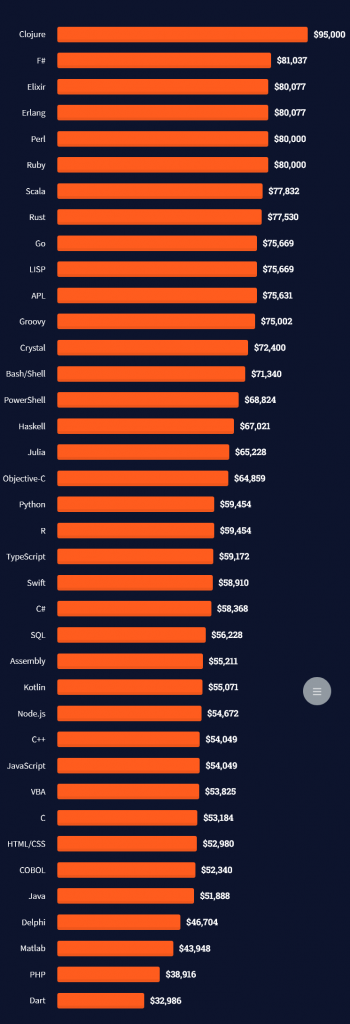
The following statistic compares the self-reported income from 46,693 professional programmers as conducted by StackOverflow.

💡 The average annual income of professional developers worldwide (US and non-US) is between $33,000 and $95,000 for various programming languages.

Here’s a screenshot of a more detailed overview of each programming language considered in the report:
Here’s what different database professionals earn:

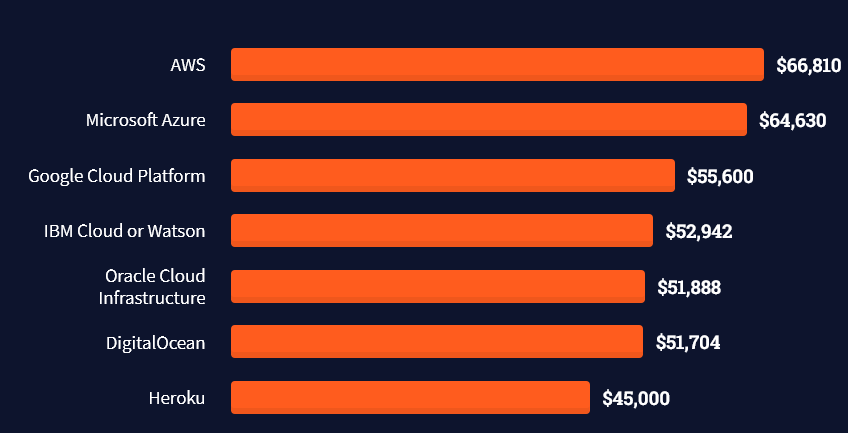
Here’s an overview of different cloud solutions experts:
Here’s what professionals in web frameworks earn:
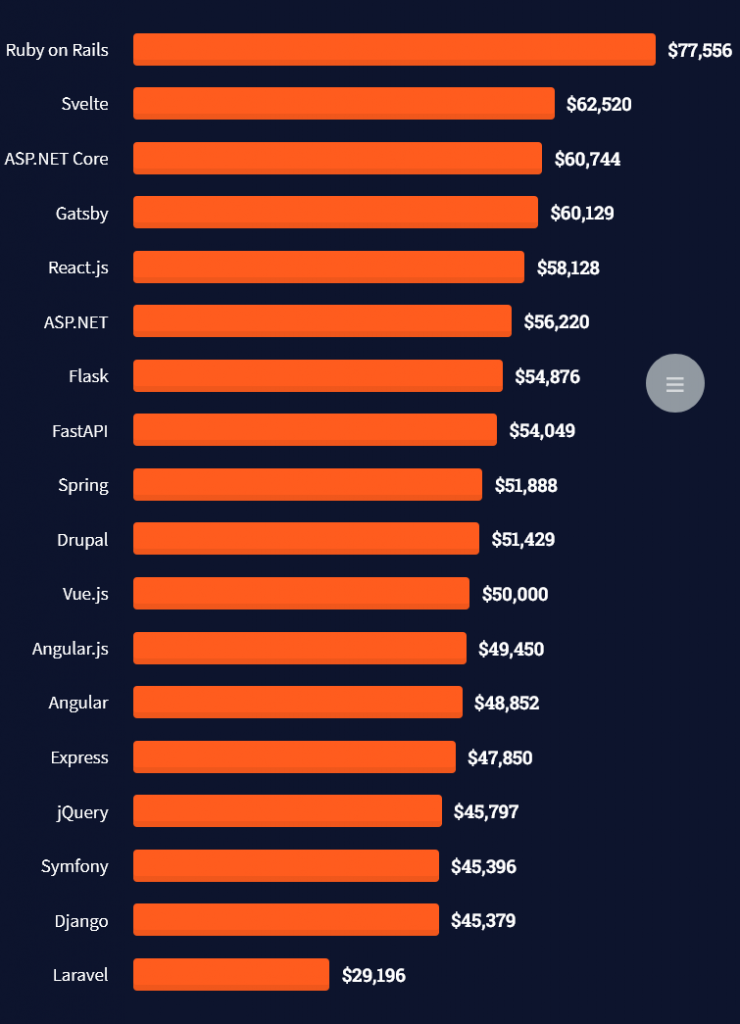
There are many other interesting frameworks—that pay well!
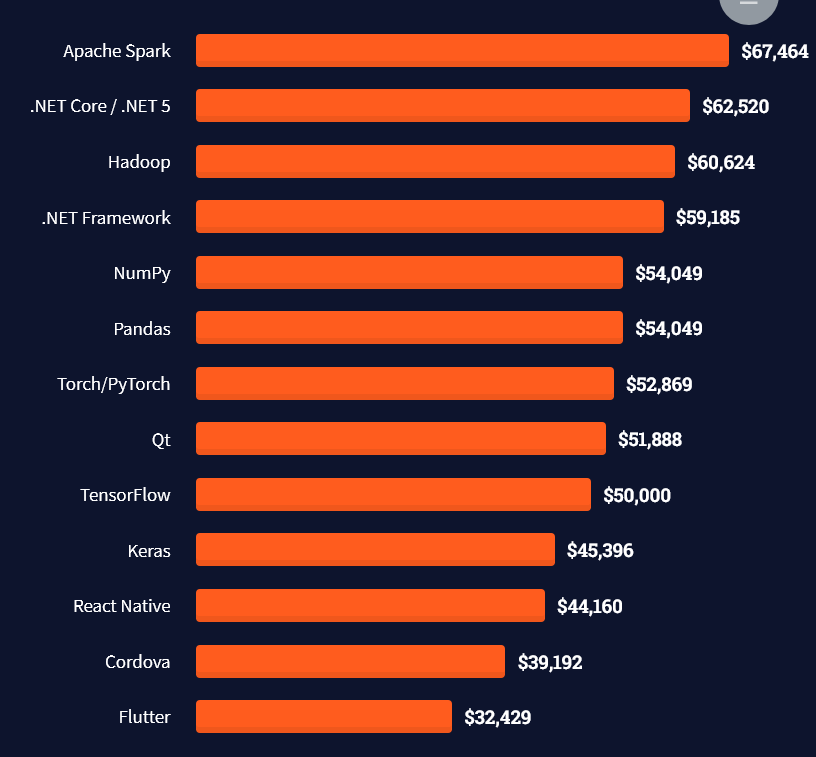
Look at those tools:
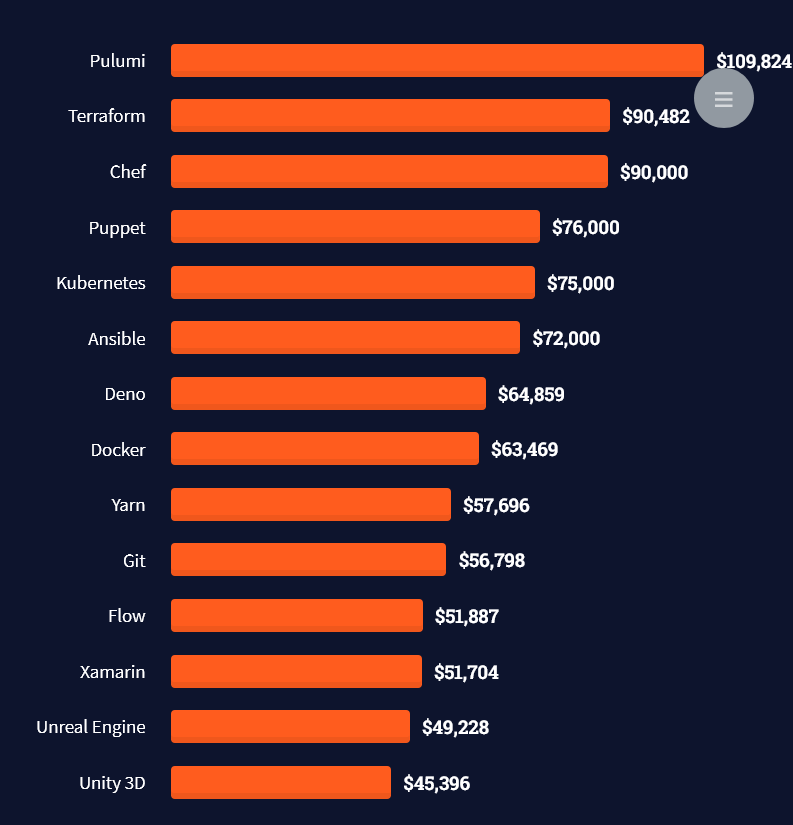
Okay, but what do you need to do to get there? What are the skill requirements and qualifications to make you become a professional developer in the area you desire?

Let’s find out next!

General Qualifications of Professionals

StackOverflow performs an annual survey asking professionals, coders, developers, researchers, and engineers various questions about their background and job satisfaction on their website.

Interestingly, when aggregating the data of the developers’ educational background, a good three quarters have an academic background.

Here’s the question asked by StackOverflow (source):

Which of the following best describes the highest level of formal education that you’ve completed?
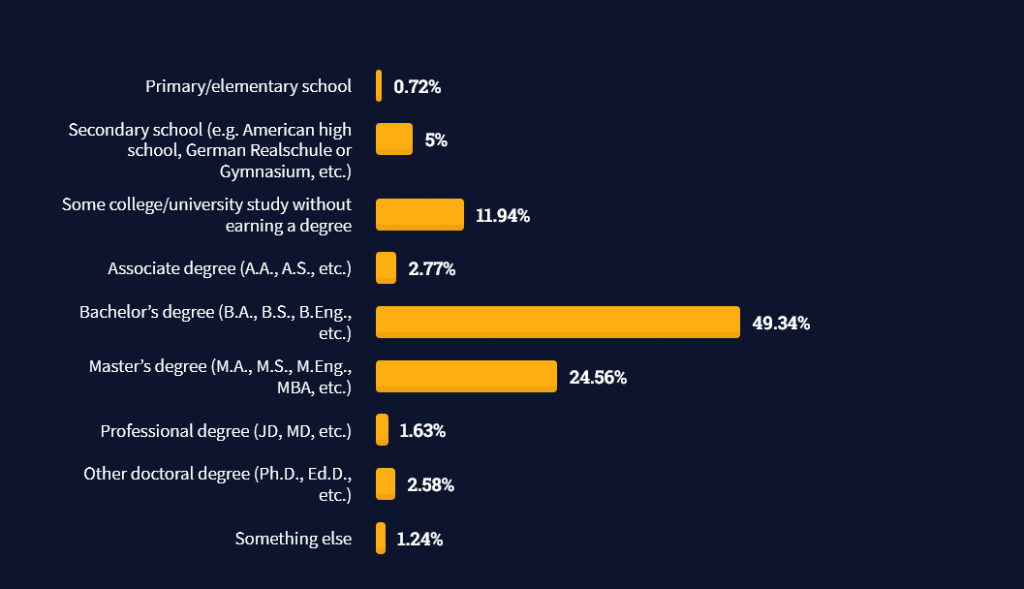
However, if you don’t have a formal degree, don’t fear! Many of the respondents with degrees don’t have a degree in their field—so it may not be of much value for their coding careers anyways.

Also, about one out of four don’t have a formal degree and still succeeds in their field! You certainly don’t need a degree if you’re committed to your own success!

Freelancing vs Employment Status

The percentage of freelance developers increases steadily. The fraction of freelance developers has already reached 11.21%!

This indicates that more and more work will be done in a more flexible work environment—and fewer and fewer companies and clients want to hire inflexible talent.

Here are the stats from the StackOverflow developer survey (source):
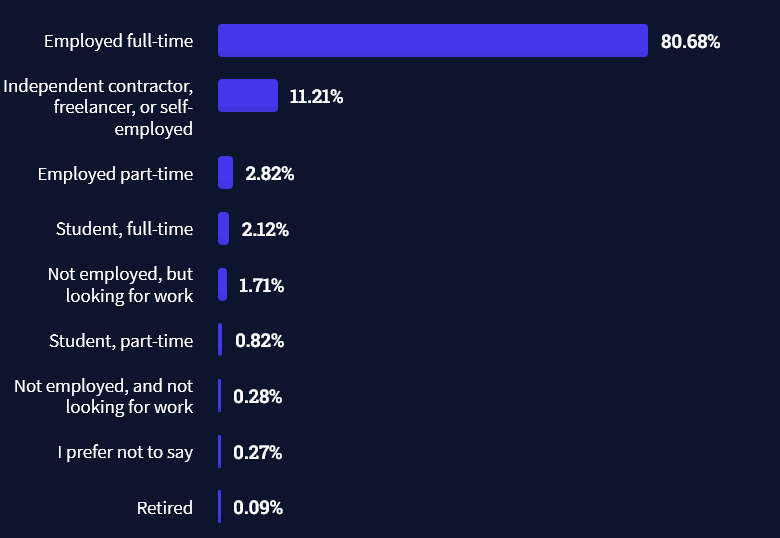
Do you want to become a professional freelance developer and earn some money on the side or as your primary source of income?

Resource: Check out our freelance developer course—it’s the best freelance developer course in the world with the highest student success rate in the industry!

Other Programming Languages Used by Professional Developers

The StackOverflow developer survey collected 58000 responses about the following question (source):

Which programming, scripting, and markup languages have you done extensive development work in over the past year, and which do you want to work in over the next year?

These are the languages you want to focus on when starting out as a coder:

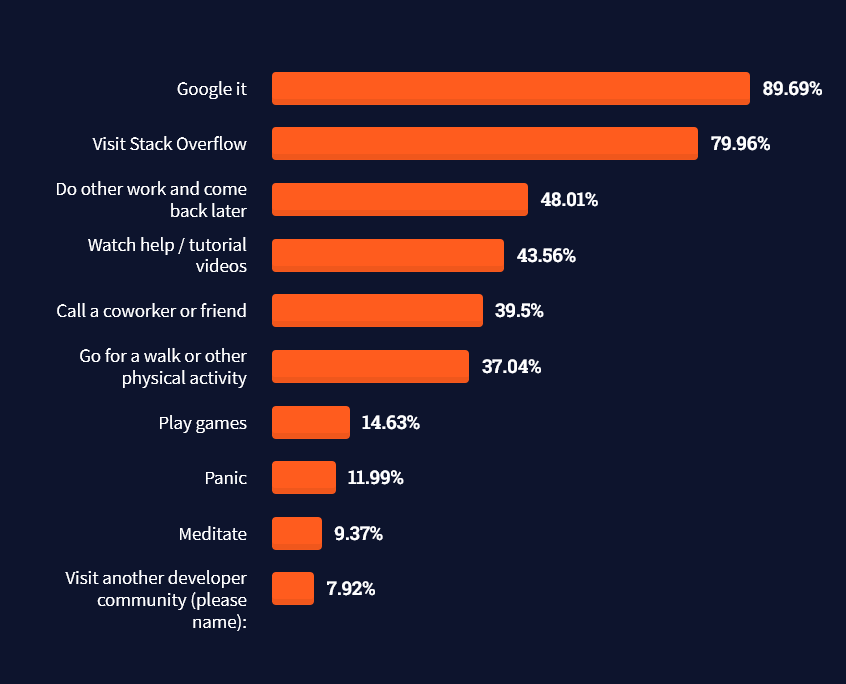
And don’t worry—if you feel stuck or struggle with a nasty bug. We all go through it. Here’s what SO survey respondents and professional developers do when they’re stuck:

What do you do when you get stuck on a problem? Select all that apply. (source)
To get started with some of the fundamentals and industry concepts, feel free to check out these articles:

Where to Go From Here?

Enough theory. Let’s get some practice!

Coders get paid six figures and more because they can solve problems more effectively using machine intelligence and automation.

To become more successful in coding, solve more real problems for real people. That’s how you polish the skills you really need in practice. After all, what’s the use of learning theory that nobody ever needs?

You build high-value coding skills by working on practical coding projects!

Do you want to stop learning with toy projects and focus on practical code projects that earn you money and solve real problems for people?

🚀 If your answer is YES!, consider becoming a Python freelance developer! It’s the best way of approaching the task of improving your Python skills—even if you are a complete beginner.

If you just want to learn about the freelancing opportunity, feel free to watch my free webinar “How to Build Your High-Income Skill Python” and learn how I grew my coding business online and how you can, too—from the comfort of your own home.

Join the free webinar now!

Posted on Leave a comment

Laravel Developer – Income and Opportunity

Before we learn about the money, let’s get this question out of the way:

What Is Laravel?

Let’s have a look at the definition from the official Laravel website:

“Laravel is a PHP-based web application framework with expressive, elegant syntax. […] Laravel strives to provide an amazing developer experience while providing powerful features such as thorough dependency injection, an expressive database abstraction layer, queues and scheduled jobs, unit and integration testing, and more.”

Ya, well, this is marketing speak for Laravel handles the back-end part when building websites with PHP.

Now that you know about what it is, let’s have a look at what it earns next!

Annual Income

How much does a Laravel Developer make per year?

The average annual income of a Laravel Developer in the United States is between $40,000 (25th percentile) and $150,000 (75th percentile) with an average of $92,000 per year according to Kinsta (source).

More specifically, ZipRecruiter reports an average income of a Laravel Developer of $92,285 per year, Payscale reports an average income of $78,000, and Salary.com reports an average income of $79,000 per year in the US.

Let’s have a look at the hourly rate of Laravel Developers next!

Hourly Rate

Laravel Developers are well-paid on freelancing platforms such as Upwork or Fiverr.

If you decide to go the route as a freelance Laravel Developer, you can expect to make between $35 and $55 per hour on Upwork (source). Assuming an annual workload of 2000 hours, you can expect to make between $70,000 and $110,000 per year.

⚡ Note: Do you want to create your own thriving coding business online? Feel free to check out our freelance developer course — the world’s #1 best-selling freelance developer course that specifically shows you how to succeed on Upwork and Fiverr!

Industry Demand

But is there enough demand? Let’s have a look at Google trends to find out how interest evolves over time (source):

Work Description

So, you may wonder: Laravel Developer – what’s the definition?

Laravel Developer Definition: A Laravel Developer developer creates, edits, analyzes, debugs, and supervises the development of PHP-based web applications written in the Laravel programming framework. You should have a basic understanding of web technologies such as HTML, CSS, JavaScript, and PHP.

Learning Path, Skills, and Education Requirements

Do you want to become a Laravel Developer? Here’s a step-by-step learning path I’d propose to get started with Laravel:

You can find many additional computer science courses on the Finxter Computer Science Academy (flatrate model).

But don’t wait too long to acquire practical experience!

Even if you have little skills, it’s best to get started as a freelance developer and learn as you work on real projects for clients — earning income as you learn and gaining motivation through real-world feedback.

🚀 Tip: An excellent start to turbo-charge your freelancing career (earning more in less time) is our Finxter Freelancer Course. The goal of the course is to pay for itself!

You can find more job descriptions for coders, programmers, and computer scientists in our detailed overview guide:

The following statistic shows the self-reported income from 9,649 US-based professional developers (source).

💡 The average annual income of professional developers in the US is between $70,000 and $177,500 for various programming languages.

Question: What is your current total compensation (salary, bonuses, and perks, before taxes and deductions)? Please enter a whole number in the box below, without any punctuation. If you are paid hourly, please estimate an equivalent weekly, monthly, or yearly salary. (source)

The following statistic compares the self-reported income from 46,693 professional programmers as conducted by StackOverflow.

💡 The average annual income of professional developers worldwide (US and non-US) is between $33,000 and $95,000 for various programming languages.

Here’s a screenshot of a more detailed overview of each programming language considered in the report:

Here’s what different database professionals earn:

Here’s an overview of different cloud solutions experts:

Here’s what professionals in web frameworks earn:

There are many other interesting frameworks—that pay well!

Look at those tools:

Okay, but what do you need to do to get there? What are the skill requirements and qualifications to make you become a professional developer in the area you desire?

Let’s find out next!

General Qualifications of Professionals

StackOverflow performs an annual survey asking professionals, coders, developers, researchers, and engineers various questions about their background and job satisfaction on their website.

Interestingly, when aggregating the data of the developers’ educational background, a good three quarters have an academic background.

Here’s the question asked by StackOverflow (source):

Which of the following best describes the highest level of formal education that you’ve completed?

However, if you don’t have a formal degree, don’t fear! Many of the respondents with degrees don’t have a degree in their field—so it may not be of much value for their coding careers anyways.

Also, about one out of four don’t have a formal degree and still succeeds in their field! You certainly don’t need a degree if you’re committed to your own success!

Freelancing vs Employment Status

The percentage of freelance developers increases steadily. The fraction of freelance developers has already reached 11.21%!

This indicates that more and more work will be done in a more flexible work environment—and fewer and fewer companies and clients want to hire inflexible talent.

Here are the stats from the StackOverflow developer survey (source):

Do you want to become a professional freelance developer and earn some money on the side or as your primary source of income?

Resource: Check out our freelance developer course—it’s the best freelance developer course in the world with the highest student success rate in the industry!

Other Programming Languages Used by Professional Developers

The StackOverflow developer survey collected 58000 responses about the following question (source):

Which programming, scripting, and markup languages have you done extensive development work in over the past year, and which do you want to work in over the next year?

These are the languages you want to focus on when starting out as a coder:

And don’t worry—if you feel stuck or struggle with a nasty bug. We all go through it. Here’s what SO survey respondents and professional developers do when they’re stuck:

What do you do when you get stuck on a problem? Select all that apply. (source)

To get started with some of the fundamentals and industry concepts, feel free to check out these articles:

Where to Go From Here?

Enough theory. Let’s get some practice!

Coders get paid six figures and more because they can solve problems more effectively using machine intelligence and automation.

To become more successful in coding, solve more real problems for real people. That’s how you polish the skills you really need in practice. After all, what’s the use of learning theory that nobody ever needs?

You build high-value coding skills by working on practical coding projects!

Do you want to stop learning with toy projects and focus on practical code projects that earn you money and solve real problems for people?

🚀 If your answer is YES!, consider becoming a Python freelance developer! It’s the best way of approaching the task of improving your Python skills—even if you are a complete beginner.

If you just want to learn about the freelancing opportunity, feel free to watch my free webinar “How to Build Your High-Income Skill Python” and learn how I grew my coding business online and how you can, too—from the comfort of your own home.

Join the free webinar now!

Posted on Leave a comment

Is There A List Of Line Styles In Matplotlib?

You want to plot a series of data with unique styles. You need to pick various line styles from a list but not sure how to get started. This tutorial will help you out.

Yes, there is a list of line styles in matplotlib. To get the list, import the lines from the matplotlib library.

from matplotlib import lines

Next, get the keys from the lineStyle attribute.

lines.lineStyles.keys()

You can then print the styles and choose your preferred style per plot.

print(lines.lineStyles.keys())

The result is

dict_keys(['-', '--', '-.', ':', 'None', ' ', ''])

As you will see in this tutorial, you can also generate line styles using colors and markers. What is more? Find out below.

Lab Setup To explore Line Styles In Matplotlib

Assume we want to plot the annual earnings of company X’s employees (designers, developers, and accountants) aged between 20 and 29. We store the ages in a list as follows.

ages = [20, 21, 22, 23, 24, 25, 26, 27, 28, 29]

Next, we create lists for each group of employees’ salaries.

designers = [45893, 50375, 52000, 52009, 54000, 55555, 56979, 57040, 55991, 54000]
developers = [55893, 53375, 52000, 51008, 58000, 58555, 59979, 60050, 65991, 67000]
accountants = [40000, 41500, 42000, 42508, 43001, 44555, 46979, 48050, 49991, 51000]

Now that we have some data to practice various line styles in matplotlib, let’s go ahead and manipulate the data.

Practical Ways To Use Line Styles In Matplotlib

➥Get the required functions

Install the matplotlib library using pip.

pip install matplotlib
# OR
pip3 install matplotlib

After installing Matplotlib, create a file and import the library’s functions into it. I have created one called employees.py and imported lines and pyplot as follows.

from matplotlib import lines, pyplot as plt

We will get the line styles from lines and plot the lines with pyplot. It is a convention to shorten pyplot as plt. In simple words it is an alias.

➥Plot the data

Plotting a bunch of data on a curve requires specifying the values for the x-axis and y-axis.

plt.plot(<x-axis data list>, <y-axis data list>)

We can plot our employee values as follows.

ages = [20, 21, 22, 23, 24, 25, 26, 27, 28, 29] designers = [45893, 50375, 52000, 52009, 54000, 55555, 56979, 57040, 55991, 54000]
developers = [55893, 53375, 52000, 51008, 58000, 58555, 59979, 60050, 65991, 67000]
accountants = [40000, 41500, 42000, 42508, 43001, 44555, 46979, 48050, 49991, 51000] plt.plot(ages, designers)
plt.plot(ages, developers)
plt.plot(ages, accountants) plt.show()

The plt.show() function instructs Python to reveal the graphical information cached in the memory. As soon as you run the file on the terminal, you get three solid lines of different colors.

python employees.py
List of Line Styles in Python - Figure 1

Now let us label the lines and add a title to the plots for easier identification. Insert the code before the plt.show() line.

plt.xlabel("Ages")
plt.ylabel("Annual salary in USD")
plt.title("Salaries of X employees for 20-29 ages")

Output:

List of Line Styles in Python - Figure 2

However, we cannot tell what the green, blue, and coral lines represent. So, let’s mark the lines using labels and a legend.

labels

plt.plot(ages, designers, label='designers')
plt.plot(ages, developers, label='developers')
plt.plot(ages, accountants, label='accountants')

legend represents the area that describes specific elements of the graph. In this case, we will use the legend() method to describe the labels assigned previously.

plt.legend()
plt.show()

Output:

Displaying Legends in Graph

Full code: Here’s the full code that helps to represent our data in the form of different lines.

from matplotlib import lines, pyplot as plt ages = [20, 21, 22, 23, 24, 25, 26, 27, 28, 29] designers = [45893, 50375, 52000, 52009, 54000, 55555, 56979, 57040, 55991, 54000]
developers = [55893, 53375, 52000, 51008, 58000, 58555, 59979, 60050, 65991, 67000]
accountants = [40000, 41500, 42000, 42508, 43001, 44555, 46979, 48050, 49991, 51000] plt.plot(ages, designers, label='designers')
plt.plot(ages, developers, label='developers')
plt.plot(ages, accountants, label='accountants') plt.xlabel("Ages")
plt.ylabel("Annual salary in USD")
plt.title("Salaries of X employees for 20-29 ages") plt.legend() plt.show()

Looks better, right? Yes, but we can improve the visuals by changing the line styles.

💡Change The Line Styles

We assigned different labels to distinguish different data but is there a way to change the style of the line? Yes! The first step is to grab the lines with the help of the lines module. You can import lines from matplotlib as we have done above or get them from Matplotlib line style docs.

Let’s print the styles from the imported lines. After commenting out the plt.show() method, run the print line below the import statement.

print(lines.lineStyles)

We get a dictionary which represents the type of styles in which the lines can be represented as follows:

{'-': '_draw_solid', '--': '_draw_dashed', '-.': '_draw_dash_dot', ':': '_draw_dotted', 'None': '_draw_nothing', ' ': '_draw_nothing', '': '_draw_nothing'}

Let’s find the keys and store them as list_styles.

line_styles = lines.lineStyles.keys()

We get a list on running printing line_styles.

print(line_styles)
dict_keys(['-', '--', '-.', ':', 'None', ' ', ''])

Let’s use the result to change line styles for the plots.

Combining the lines.lineStyles.keys() and pyplot.linestyle helps us change the designers and developers plots as follows.

from matplotlib import pyplot as plt ages = [20, 21, 22, 23, 24, 25, 26, 27, 28, 29] designers = [45893, 50375, 52000, 52009, 54000, 55555, 56979, 57040, 55991, 54000]
developers = [55893, 53375, 52000, 51008, 58000, 58555, 59979, 60050, 65991, 67000]
accountants = [40000, 41500, 42000, 42508, 43001, 44555, 46979, 48050, 49991, 51000] plt.plot(ages, designers, label='designers', linestyle='--')
plt.plot(ages, developers, label='developers', linestyle=':')
plt.show()

Output:

Here, lines.lineStyles show the styles, while pyplot‘s linestyle attribute changes the lines graphically.

😎 Tidbits

  • You can also style the lines using markers, width, and colors. For example, you can mark the accountants‘ plot using o as follows.
from matplotlib import pyplot as plt ages = [20, 21, 22, 23, 24, 25, 26, 27, 28, 29]
accountants = [40000, 41500, 42000, 42508, 43001, 44555, 46979, 48050, 49991, 51000]
plt.plot(ages, accountants, label='accountants', marker='o')
plt.show()

Output:

  • You can increase the width of the designers plot from 1 to 3 as follows
from matplotlib import pyplot as plt ages = [20, 21, 22, 23, 24, 25, 26, 27, 28, 29]
designers = [45893, 50375, 52000, 52009, 54000, 55555, 56979, 57040, 55991, 54000]
plt.plot(ages, designers, label='designers', linestyle='-.', linewidth=3)
plt.show()

Output:

  • Lastly you can customize the plot colors using the color aliases, hex colors or names.
from matplotlib import pyplot as plt ages = [20, 21, 22, 23, 24, 25, 26, 27, 28, 29]
designers = [45893, 50375, 52000, 52009, 54000, 55555, 56979, 57040, 55991, 54000]
developers = [55893, 53375, 52000, 51008, 58000, 58555, 59979, 60050, 65991, 67000]
accountants = [40000, 41500, 42000, 42508, 43001, 44555, 46979, 48050, 49991, 51000]
plt.plot(ages, designers, label='designers', linestyle='-.', color='b')
plt.plot(ages, developers, label='developers', linestyle=':', linewidth=3, color='#6dee6d')
plt.plot(ages, accountants, label='accountants', marker='o', color='gold')
plt.show()

Output:

Conclusion

You can get a list of styles in matplotlib using the lines attribute. After storing the target styles, you can change the lines’ appearance using pyplot‘s built-in linestyle attribute. Additionally, as illustrated in this tutorial, you can differentiate lines using markers, width, and colors.

Recommended: Matplotlib — A Simple Guide with Videos

Please stay tuned and subscribe for more interesting discussions in the future. Happy learning!

Posted on Leave a comment

Python os.walk() – A Simple Illustrated Guide

According to the Python version 3.10.3 official doc, the os module provides built-in miscellaneous operating system interfaces. We can achieve many operating system dependent functionalities through it. One of the functionalities is to generate the file names in a directory tree through os.walk().

If it sounds great to you, please continue reading, and you will fully understand os.walk through Python code snippets and vivid visualization.

In this article, I will first introduce the usage of os.walk and then address three top questions about os.walk, including passing a file’s filepath to os.walk, os.walk vs. os.listdir, and os.walk recursive.

How to Use os.walk and the topdown Parameter?

Syntax

Here is the syntax for os.walk:

os.walk(top[, topdown=True[, onerror=None[, followlinks=False]]])

Input

1. Must-have parameters:

  • top: accepts a directory(or file) path string that you want to use as the root to generate filenames.

2. Optional parameters:

  • topdown: accepts a boolean value, default=True. If True or not specified, directories are scanned from top-down. Otherwise, directories are scanned from the bottom-up. If you are still confused about this topdown parameter like I first get to know os.walk, I have a nicely visualization in the example below.
  • onerror: accepts a function with one argument, default=None. It can report the error to continue with the walk, or raise the exception to abort the walk.
  • followlinks: accepts a boolean value, default=False. If True, we visit directories pointed to by symlinks, on systems that support them.

💡 Tip: Generally, you only need to use the first two parameters in bold format.

Output

Yields 3-tuples (dirpath, dirnames, filenames) for each directory in the tree rooted at directory top (including top itself).

Example

I think the best way to comprehend os.walk is walking through an example.

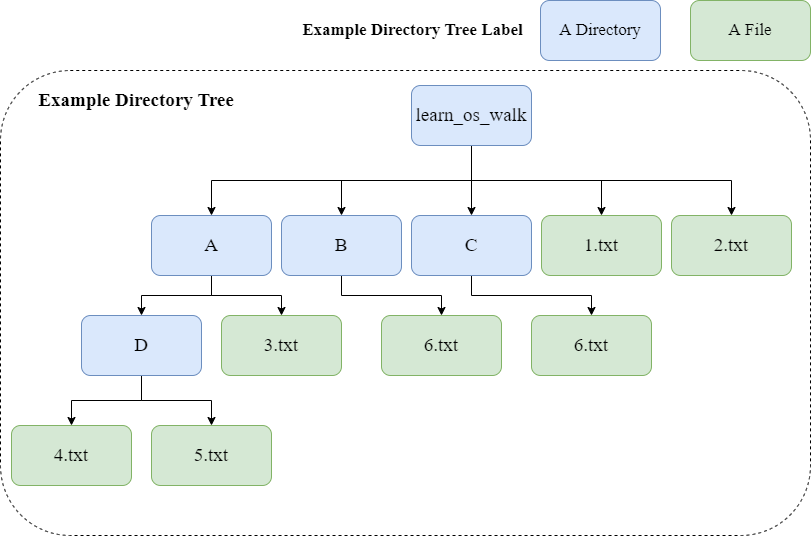
Our example directory tree and its labels are:

By the way, the difference between a directory and a file is that a directory can contains many files like the above directory D contains 4.txt and 5.txt.

Back to our example, our goal is to 

  • Generate filenames based on the root directory, learn_os_walk
  • Understand the difference between topdown=True and topdown=False

To use the os.walk() method, we need to first import os module:

import os

Then we can pass the input parameters to the os.walk and generate filenames. The code snippet is:

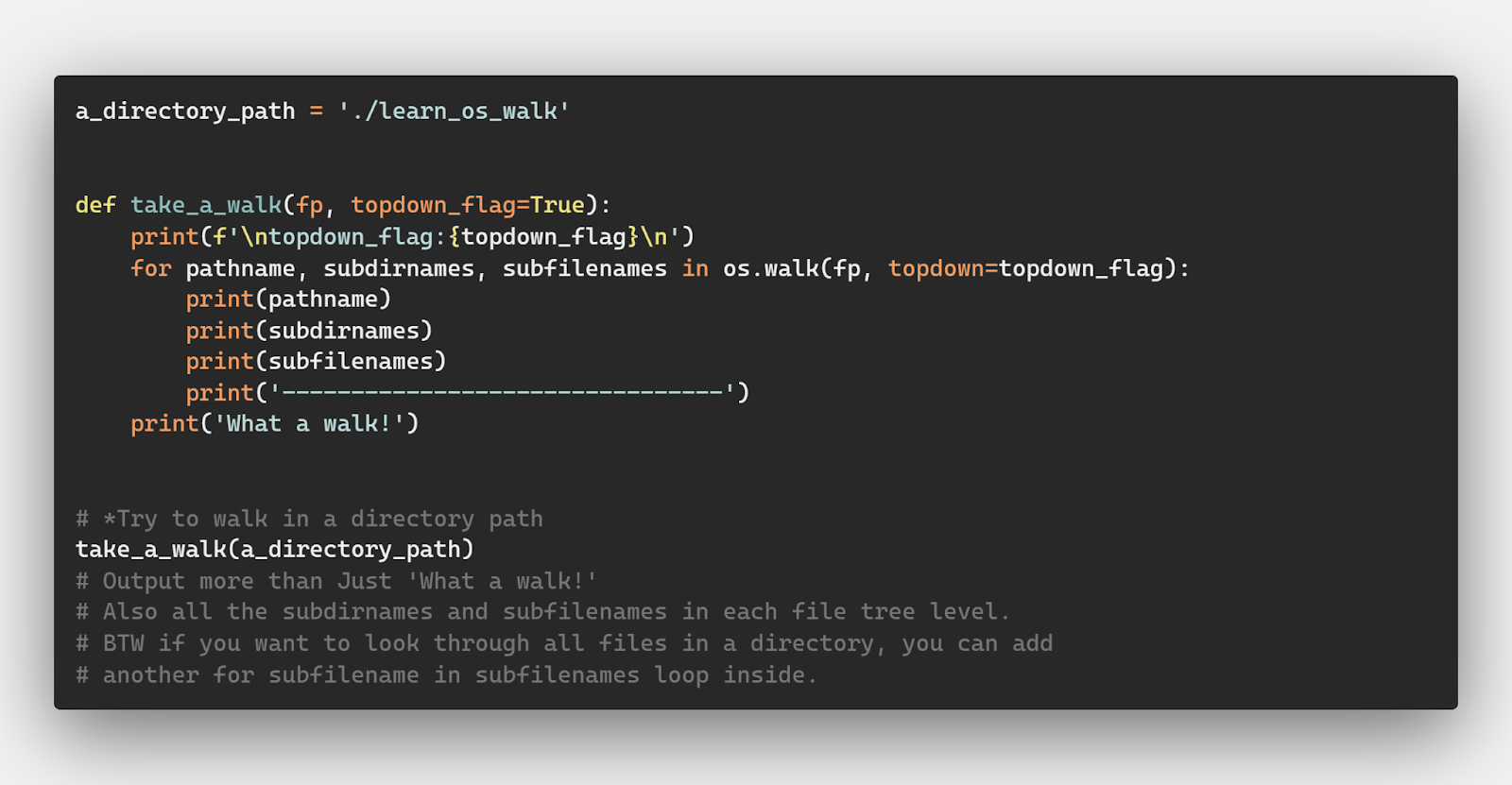
a_directory_path = './learn_os_walk' def take_a_walk(fp, topdown_flag=True): print(f'\ntopdown_flag:{topdown_flag}\n') for pathname, subdirnames, subfilenames in os.walk(fp, topdown=topdown_flag): print(pathname) print(subdirnames) print(subfilenames) print('--------------------------------') print('What a walk!') # *Try to walk in a directory path
take_a_walk(a_directory_path)
# Output more than Just 'What a walk!'
# Also all the subdirnames and subfilenames in each file tree level.
# BTW if you want to look through all files in a directory, you can add
# another for subfilename in subfilenames loop inside.

The above code has a function take_a_walk to use os.walk along with a for loop. This is the most often usage of os.walk so that you can get every file level and filenames from the root directory iteratively.

For those with advanced knowledge in Python’s generator, you would probably have already figured out that os.walk actually gives you a generator to yield next and next and next 3-tuple……

Back in this code, we set a True flag for the topdown argument. Visually, the topdown search way is like the orange arrow in the picture below:

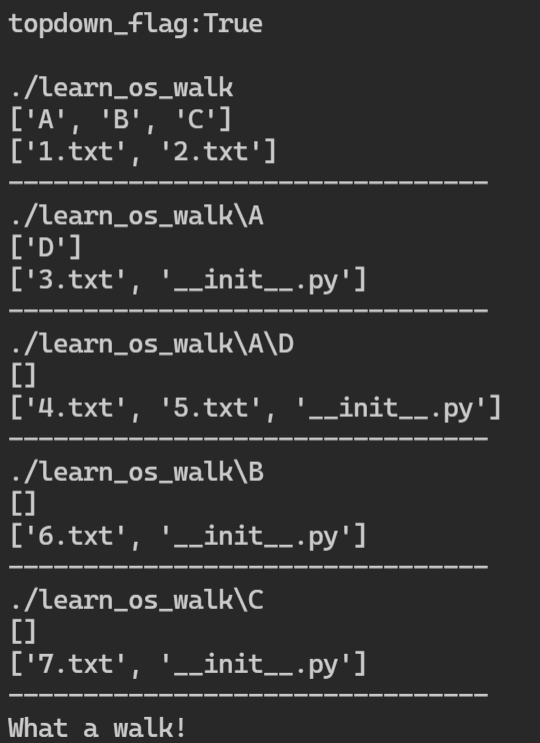
And if we run the above code, we can the below result:

If we set the topdown to be False, we are walking the directory tree from its bottom directory D like this:

The corresponding code snippet is:

a_directory_path = './learn_os_walk' def take_a_walk(fp, topdown_flag=False): print(f'\ntopdown_flag:{topdown_flag}\n') for pathname, subdirnames, subfilenames in os.walk(fp, topdown=topdown_flag): print(pathname) print(subdirnames) print(subfilenames) print('--------------------------------') print('What a walk!') # *Try to walk in a directory path
take_a_walk(a_directory_path)
# Output more than Just 'What a walk!'
# Also all the subdirnames and subfilenames in each file tree level.
# BTW if you want to look through all files in a directory, you can add
# another for subfilename in subfilenames loop inside.

And if we run the above code, we can the below result:

Now, I hope you understand how to use os.walk and the difference between topdown=True and topdown=False. 🙂

Here’s the full code for this example:

__author__ = 'Anqi Wu' import os a_directory_path = './learn_os_walk'
a_file_path = './learn_os_walk.py' # same as a_file_path = __file__ def take_a_walk(fp, topdown_flag=True): print(f'\ntopdown_flag:{topdown_flag}\n') for pathname, subdirnames, subfilenames in os.walk(fp, topdown=topdown_flag): print(pathname) print(subdirnames) print(subfilenames) print('--------------------------------') print('What a walk!') # *Try to walk in a file path
take_a_walk(a_file_path)
# Output Just 'What a walk!'
# Because there are neither subdirnames nor subfilenames in a single file !
# It is like:
# for i in []:
# print('hi!') # We are not going to execute this line. # *Try to walk in a directory path
take_a_walk(a_directory_path)
# Output more than Just 'What a walk!'
# Also all the subdirnames and subfilenames in each file tree level.
# BTW if you want to look through all files in a directory, you can add
# another for subfilename in subfilenames loop inside. # *Try to list all files and directories in a directory path
print('\n')
print(os.listdir(a_directory_path))
print('\n')

How to Pass a File’s filepath to os.walk?

Of course, you might wonder what will happen if we pass a file’s filepath, maybe a Python module filepath string like './learn_os_walk.py' to the os.walk function.

This is exactly a point I was thinking when I started using this method. The simple answer is that it will not execute your codes under the for loop.

For example, if you run a code in our learn_os_walk.py like this:

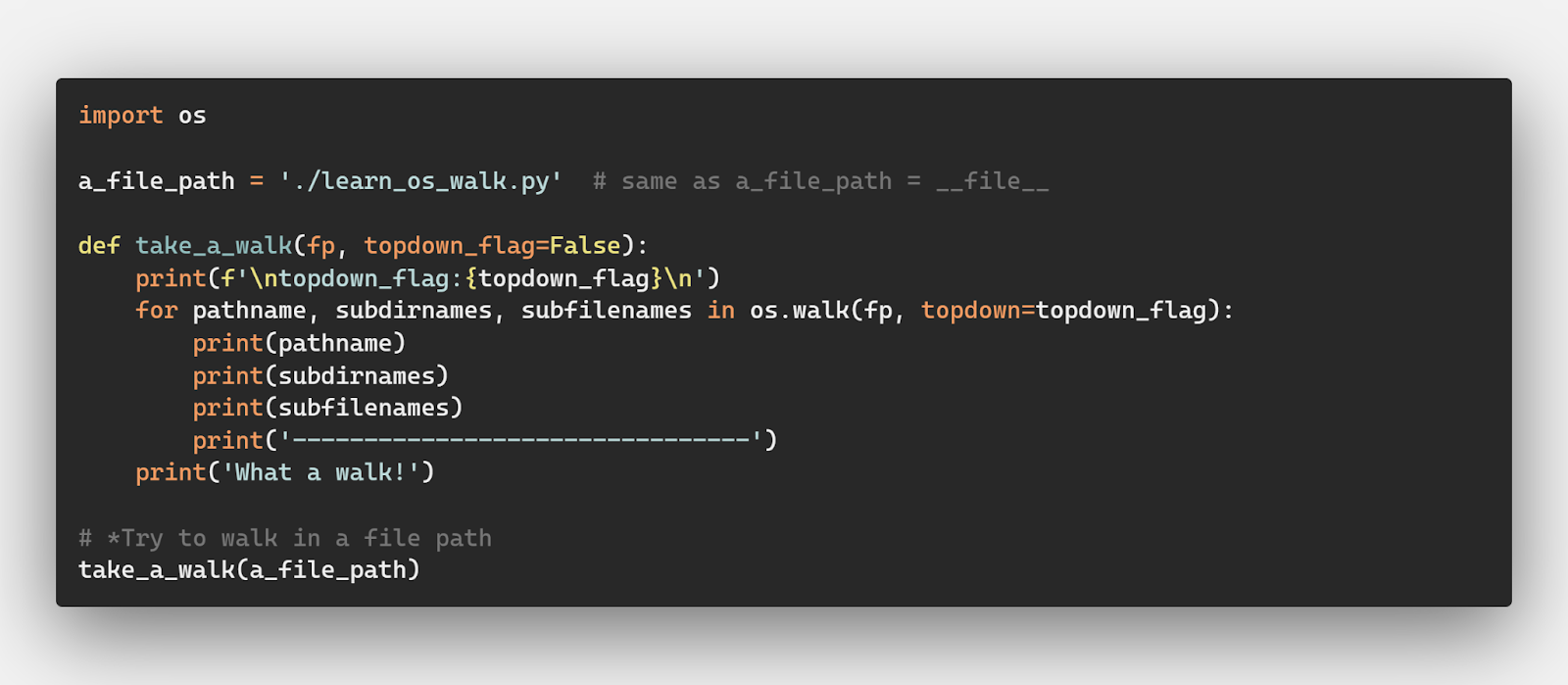
import os a_file_path = './learn_os_walk.py' # same as a_file_path = __file__ def take_a_walk(fp, topdown_flag=False): print(f'\ntopdown_flag:{topdown_flag}\n') for pathname, subdirnames, subfilenames in os.walk(fp, topdown=topdown_flag): print(pathname) print(subdirnames) print(subfilenames) print('--------------------------------') print('What a walk!') # *Try to walk in a file path
take_a_walk(a_file_path)

The only output would be like this:

Why is that?

Because there are neither subdirnames nor subfilenames in a single file! It is like you are writing the below code:

for i in []: print('hi!')

And you will not get any 'hi' output because there is no element in an empty list.

Now, I hope you understand why the official doc tells us to pass a path to a directory instead of a file’s filepath 🙂

os.walk vs os.listdir — When to Use Each?

A top question of programmers concerns the difference between os.walk vs os.listdir.

The simple answer is:

The os.listdir() method returns a list of every file and folder in a directory. The os.walk() method returns a list of every file in an entire file tree.

Well, if you feel a little bit uncertain, we can then use code examples to help us understand better!

We will stick to our same example directory tree as below:

In this case, if we call os.listdir() method and pass the directory path of learn_os_walk to it like the code below:

import os a_directory_path = './learn_os_walk' # *Try to list all files and directories in a directory path
print('\n')
print(os.listdir(a_directory_path))
print('\n')

And we will get an output like:

That’s it! Only the first layer of this entire directory tree is included. Or I should say that the os.listdir() cares only about what is directly in the root directory instead of searching through the entire directory tree like we see before in the os.walk example.

Summary

Summary: If you want to get a list of all filenames and directory names within a root directory, go with the os.listdir() method. If you want to iterate over an entire directory tree, you should consider os.walk() method.

Now, I hope you understand when to use os.listdir and when to use os.walk 🙂

os.walk() Recursive — How to traverse a Directory Tree?

Our last question with os.walk is about how to literally iterate over the entire directory tree.

Concretely, we have some small goals for our next example:

  • Iterate over all files within a directory tree
  • Iterate over all directories within a directory tree

All examples below are still based on our old friend, the example directory tree:

Iterate over all files within a directory tree

First, let’s head over iterating over all files within a directory tree. This can be achieved by a nested for loop in Python.

The potential application could be some sanity checks or number counts for all files within one folder. How about counting the number of .txt files within one folder? Let’s do it!

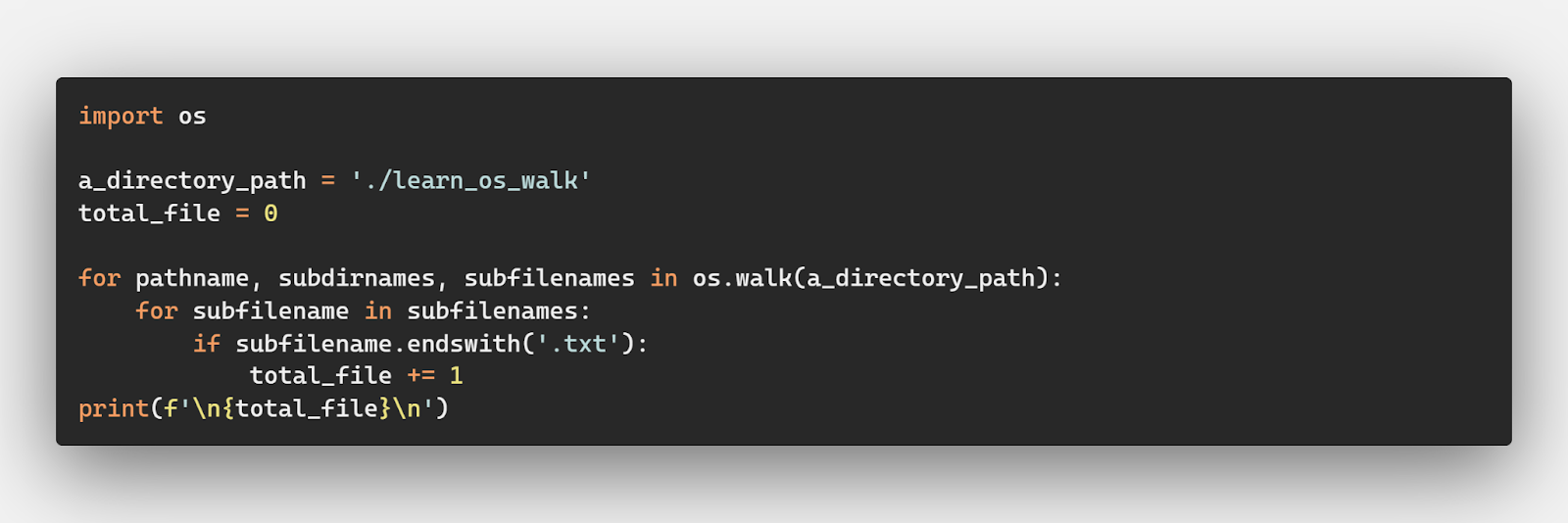
The code for this application is:

import os a_directory_path = './learn_os_walk'
total_file = 0 for pathname, subdirnames, subfilenames in os.walk(a_directory_path): for subfilename in subfilenames: if subfilename.endswith('.txt'): total_file += 1
print(f'\n{total_file}\n')

As you can see, we use another for loop to iterate over subfilenames to get evey file within a directory tree. The output is 7 and is correct according to our example directory tree.

The full code for this example can be found here.

Iterate over all directories within a directory tree

Last, we can also iterate over all directories within a directory tree. This can be achieved by a nested for loop in Python.

The potential application could be also be some sanity checks or number counts for all directories within one folder. For our example, let’s check if all directories contains __init__.py file and add an empty __init__.py file if not.

💡 Idea: The __init__.py file signifies whether the entire directory is a Python package or not.

The code for this application is:

import os a_directory_path = './learn_os_walk' for pathname, subdirnames, subfilenames in os.walk(a_directory_path): for subdirname in subdirnames: init_filepath = os.path.join(pathname, subdirname, '__init__.py') if not os.path.exists(init_filepath): print(f'Create a new empty [{init_filepath}] file.') with open(init_filepath, 'w') as f: pass

As you can see, we use another for loop to iterate over subdirnames to get evey directory within a directory tree.

Before the execution, our directory tree under the take_a_walk function mentioned before looks like this:

After the execution, we can take a walk along the directory tree again and we get result like:

Hooray! We successfully iterate every directory within a directory tree and complete the __init__.py sanity check.

The full code for this example can be found here.

In summary, you can use os.walk recursively traverse every file or directory within a directory tree through a nested for loop.

Conclusion

That’s it for our os.walk() article!

We learned about its syntax, IO relationship, and difference between os.walk and os.listdir.

We also worked on real usage examples, ranging from changing the search direction through topdown parameter, .txt file number count, and __init__.py sanity check.

Hope you enjoy all this and happy coding!


About the Author

Anqi Wu is an aspiring Data Scientist and self-employed Technical Consultant. She is an incoming student for a Master’s program in Data Science and builds her technical consultant profile on Upwork.

Anqi is passionate about machine learning, statistics, data mining, programming, and many other data science related fields. During her undergraduate years, she has proven her expertise, including multiple winning and top placements in mathematical modeling contests. She loves supporting and enabling data-driven decision-making, developing data services, and teaching. 

Here is a link to the author’s personal website: https://www.anqiwu.one/. She uploads data science blogs weekly there to document her data science learning and practicing for the past week, along with some best learning resources and inspirational thoughts.

Hope you enjoy this article! Cheers!

Posted on Leave a comment

PHP Pagination Code with Search using AJAX

by Vincy. Last modified on March 17th, 2022.

Fetching and displaying a bulk of records on a single fetch is not a good practice. It will increase the server load and has more disadvantages.

Pagination will resolve this problem.

Most of the website shows links of numbers for pagination. There are different ways to add pagination. Some of them are listed below.

  1. Previous-next navigation controls.
  2. Number links 1, 2, 3 … up to … total number of pages.
  3. A restricted number of page links that are expandable on navigation.

In this tutorial, we are going to see an example of a PHP pagination code with search sorting.

This example adds pagination to a list of records displayed in a tabular view. It uses jQuery AJAX to fetch records for each page from the database.

What is pagination

  • The Pagination is a simple method to split voluminous data into pages. It prevents the disadvantages of displaying all records on a page.
  • It shows a limited number of records per page which lets a quick glance at the page result.
  • Paginated results require the start offset and per-page count to set the LIMIT to fetch.

Merits and demerits of pagination

There are more merits of using PHP pagination. Some of them are listed below.

  • It increases efficiency by loading the page content quickly.
  • It reduces server overload.
  • The pagination links will reveal the approximate data stuff of the application.
  • It will greatly improve site responses on displaying the media library with pagination.
  • It increases user experience in browsing the paginated results.

Almost PHP pagination has no demerits, but it is not suitable in some scenarios. For example,

  • It is skippable for applications displaying records that are countable by fingers.
  • Without relational attributes (like prev, next URL), it gives negative impacts on SEO’s point of view.

About this example

This example has the code to group the pagination, sorting, search for a listing page.

The pagination UI will show limited pagination links. It extends the link stack on moving forward page by page.

In this example, we have three options based on which pagination format will be changed.

The pagination request carries over the search and sorting parameters if exist.

It calls an AJAX script to send the pagination, search and sort request data to the PHP.

It allows to search and sort by name via AJAX. The default sorting order is ascending (ASC) to sort the name column in alphabetical order.

The on-click event of the column header switches the sorting orders between ‘ASC’ and ‘DESC’

File structure

This is the file structure of the PHP pagination example. The has the paginated results to be rendered into the home page.

The list.php is to display the results queried with a per-page limit. The perpage.php file contains the handlers to prepare the pagination HTML to be shown into the UI.

php pagination files

Home page HTML to render pagination UI

The following code shows the HTML to display the member database results.

It displays a name-wise search panel above the table header. Also, the first column displays the member names with a sorting feature.

The PHP pagination, search and sorting actions give results without page refresh. It uses jQuery AJAX to request PHP to perform these actions without reloading the page.

The “listViaAJAX()” JavaScript function request PHP pagination result via AJAX. The “sortList()” function, sets the ordering request parameters to get the sorted results.

The search form submit-button invokes the listViaAJAX() code to send the keyword. In the callback, it gets the response HTML from the server and updates the UI.

index.php


<html>
<head> <link href="./assets/style.css" type="text/css" rel="stylesheet" />
</head>
<body> <h2 class="page-title">PHP Pagination with Search</h2> <div id="grid"> <form name="frmSearch" id="frmSearch" method="post" action="index.php"> <div class="search-box"> <label>Search :</label> <input type="text" id="search" placeholder="name" name="filter_value" class="demoInputBox" /> <input type="button" name="go" class="search-form-btn" value="Search" onClick="listViaAJAX();"> <input type="reset" class="search-form-btn" value="Reset" onclick="window.location='index.php'"> </div> <table id=mytable cellpadding="10" cellspacing="1"> <thead> <tr> <th class="sortable"><span onClick="sortList();"><input type="hidden" name="order_type" id="order-type" value="asc" />Name</span> <img src='images/sort-down.svg' /></th> <th>Registered Date</th> <th class="align-right">Subscription Amount</th> </tr> </thead> <tbody id="table-body"> <?php require_once __DIR__ . '/list.php'; ?> <tbody> </table> </form> </div>
</body>
<script src="https://code.jquery.com/jquery-3.6.0.min.js" integrity="sha256-/xUj+3OJU5yExlq6GSYGSHk7tPXikynS7ogEvDej/m4=" crossorigin="anonymous"></script>
<script src='./assets/pagination-ajax.js'></script>
</html> 

Paginated database results in a tabular view

This list.php file is to fetch and output the results to the UI. This PHP pagination request is called via AJAX by clicking the page links.

The below code prepares the MySQL query to fetch the data from the database. This query uses LIMIT to display the data with the per-page limit.

This code gets the total records’ count and per-page limit. It passes these two parameters the showPerpage() function to generate the PHP pagination HTML.

Added to the pagination parameters, this PHP code receives the search, sort request.

It prepares the WHERE and ORDER BY clause based on the search and sort request. These clauses are attached to the query to get the filtered result.

list.php


<?php
use Phppot\DataSource; require_once "perpage.php";
require_once __DIR__ . "/lib/DataSource.php";
$dataSource = new DataSource(); $name = "";
$queryCondition = "";
$paramType = "";
$paramValue = array();
if (! empty($_POST["filter_value"])) { $name = $_POST["filter_value"]; $queryCondition .= " WHERE name LIKE ?"; $paramType .= 's'; $paramValue[] = $_POST["filter_value"] . '%';
} $orderBy = "name";
$order = "asc";
if (! empty($_POST["order_type"])) { $order = $_POST["order_type"];
} $nextOrder = "asc";
if ($order == "asc") { $nextOrder = "desc";
}
$query = "SELECT * from tbl_member " . $queryCondition . " ORDER BY " . $orderBy . " " . $order . " ";
$href = 'index.php';
$perPage = 5;
$page = 1;
if (isset($_POST['pagination_offset'])) { $page = $_POST['pagination_offset'];
}
$start = ($page - 1) * $perPage; if ($start < 0) $start = 0; $queryWithLimit = $query . " limit " . $start . "," . $perPage; $resultpage = $dataSource->select($queryWithLimit, $paramType, $paramValue); if (! empty($resultpage)) { $count = $dataSource->getRecordCount($query, $paramType, $paramValue); $resultpage["perpage"] = showperpage($count, $perPage, $href);
}
?>
<?php if (! empty($resultpage)) { foreach ($resultpage as $k => $v) { if (is_numeric($k)) { ?> <?php $date = $resultpage[$k]["date"]; $newDate = date("d-m-Y", strtotime($date)); ?>
<tr> <td class="column1"><?php echo $resultpage[$k]["name"]; ?></td> <td class="column2"><?php echo $newDate ?></td> <td class="column3 align-right">$ <?php echo $resultpage[$k]["subscription_amount"]; ?></td>
</tr>
<?php } }
}
if (isset($resultpage["perpage"])) { ?>
<tr> <td colspan="5" class="align-center"> <?php echo $resultpage["perpage"]; ?></td>
</tr>
<?php } ?> 

External handlers to prepare PHP pagination controls

It uses a constant to split the database results into pages. This code uses the following two functions.

  • perpage() – prepares the HTML for the pagination UI links.
  • showperpage() – returns pagination HTML response.

The perpage() function adds the onClick attribute to the PHP pagination links. It calls the AJAX code by sending the pagination query offset.

It uses the offset, per-page count and the total number of records to calculate the number of pages.  It runs a loop through the number of pages to display the pagination links.

It adds HTML attributes to highlight the current page among the page links.

perpage.php


<?php
function perpage($count, $per_page = '5',$href) { $output = ''; $paging_id = "link_perpage_box"; if(!isset($_POST["pagination_offset"])) $_POST["pagination_offset"] = 1; if($per_page != 0) $pages = ceil($count/$per_page); if($pages>1) { if(($_POST["pagination_offset"]-3)>0) { if($_POST["pagination_offset"] == 1) $output = $output . '<span id=1 class="current-page">1</span>'; else $output = $output . '<input type="hidden" name="pagination_offset" value="1" /><input type="button" class="perpage-link" value="1" onClick="listViaAJAX()" />'; } if(($_POST["pagination_offset"]-3)>1) { $output = $output . '...'; } for($i=($_POST["pagination_offset"]-2); $i<=($_POST["pagination_offset"]+2); $i++) { if($i<1) continue; if($i>$pages) break; if($_POST["pagination_offset"] == $i) $output = $output . '<span id='.$i.' class="current-page" >'.$i.'</span>'; else $output = $output . '<input type="hidden" name="pagination_offset" value="' . $i . '" /><input type="button" class="perpage-link" value="' . $i . '" onClick="listViaAJAX()" />'; } if(($pages-($_POST["pagination_offset"]+2))>1) { $output = $output . '...'; } if(($pages-($_POST["pagination_offset"]+2))>0) { if($_POST["pagination_offset"] == $pages) $output = $output . '<span id=' . ($pages) .' class="current-page">' . ($pages) .'</span>'; else $output = $output . '<input type="hidden" name="pagination_offset" value="' . $pages . '" /><input type="button" class="perpage-link" value="' . $pages . '" onClick="listViaAJAX()" />'; } } return $output;
} function showperpage($count, $per_page = 5, $href)
{ $perpage = perpage($count, $per_page,$href); return $perpage;
}
?> 

jQuery AJAX script to call paginated list from PHP

This jQuery AJAX script calls the PHP pagination code on the server-side.

It calls the PHP endpoint index.php by sending the form data. It serializes and posts the following data to the PHP.

  • Page offset. Default is 0.
  • Search keyword.
  • Sorting order. Default is ascending order(ASC).

The sortlist() function toggles the sorting order by clicking the corresponding column name.

pagination-ajax.js


function listViaAJAX() { $.ajax({ method: "POST", url: "list.php", data: $("#frmSearch").serialize(), }).done(function( response ) { $("#table-body").html(response); });
} function sortList() { if($("#order-type").val() == 'asc') { $("#order-type").val('desc'); $(".sortable img").attr("src", "images/sort-up.svg"); } else { $("#order-type").val('asc'); $(".sortable img").attr("src", "images/sort-down.svg"); } listViaAJAX();
} 

Database script

Download the below database script into your environment. It shows the database schema with the table structure.

It also has the sample data in the target database table. It supports to start seeing the PHP pagination code result with search.

sql/database.sql

 --
-- Database: `blog_eg`
-- -- -------------------------------------------------------- --
-- Table structure for table `tbl_member`
-- CREATE TABLE `tbl_member` ( `id` int(255) NOT NULL, `name` varchar(256) NOT NULL, `date` date NOT NULL, `subscription_amount` varchar(256) NOT NULL
) ENGINE=InnoDB DEFAULT CHARSET=utf8mb4; --
-- Dumping data for table `tbl_member`
-- INSERT INTO `tbl_member` (`id`, `name`, `date`, `subscription_amount`) VALUES
(1, 'Jennifer d\' Sousa ', '2022-01-20', '10'),
(2, 'Tom Adomian', '2021-12-25', '10'),
(3, 'Vincent Thomas', '2021-12-24', '100'),
(4, 'Lara Ricky', '2021-12-25', '100'),
(5, 'Kevin Fernandes', '2021-12-17', '100'),
(6, 'Leena Christy', '2021-12-16', '40'),
(7, 'Christian Benchamin', '2021-12-19', '60'),
(8, 'Abraham Maslow', '2021-12-17', '175'),
(9, 'Helan Immaculate', '2021-12-16', '190'),
(10, 'Jane Jancy', '2021-12-19', '30'); --
-- Indexes for dumped tables
-- --
-- Indexes for table `tbl_member`
--
ALTER TABLE `tbl_member` ADD PRIMARY KEY (`id`); --
-- AUTO_INCREMENT for dumped tables
-- --
-- AUTO_INCREMENT for table `tbl_member`
--
ALTER TABLE `tbl_member` MODIFY `id` int(255) NOT NULL AUTO_INCREMENT, AUTO_INCREMENT=24; 

PHP pagination output

The following screenshot displays the PHP pagination code. It shows the tabular results with pagination links and a search panel.

php pagination search output

Download

↑ Back to Top

Posted on Leave a comment

Agile Software Development with Scrum

💡 Abstract: Is Agile software development with Scrum effective for businesses and tech companies? Here are the benefits of Scrum methodology and everything you should know about it! 


In the field of software development, agile software development with Scrum is one of the most popular methodologies. Flexible and low-cost, Agile Scrum is a powerful project management framework to increase teamwork and break down tasks, maximizing quality results.

Already in 2018, 94% of developers were using or used Scrum in their agile practice – of which, 78% use it with other frameworks, and 16% only work with it. 

But what is Scrum in Agile methodology? Here is an overview of the Scrum framework, including methods, benefits, and practices to know.

What Is Scrum?

Scrum is an Agile lifecycle subset method. The lightweight framework focuses on maximizing productivity while ensuring teamwork. Scrum teams work in collaborative environments with effective communication processes. 

The term Scrum was inspired by the passage of play in rugby that sees the whole team combine their collective strength in an attempt to gain ground, which is the perfect metaphor for the approach.

Scrum methodology enables last-minute adjustments and rapidly-changing requirements, increasing deliverables qualities and market trends compared to traditional waterfall processes. It’s an effective and low-cost solution for startups and small teams of 7-9 people. 

Benefits of Agile Software Development With Scrum

The main benefit of Scrum methodologies is flexibility. The team can adjust their workflow on the go based on market trends and users’ needs. Because of its nature, this methodology isn’t the most efficient option for plan-driven approaches or large and complex projects. However, it’s an efficient and valuable solution for startups and team environments, facilitating collaborative tasks and innovative solutions to improve products and services. 

Here are the core benefits of Agile software development with Scrum:  

  • Flexible and Adaptable: Scrum framework is one of the most effective solutions for new projects and startups. This Agile development methodology allows changes and edits on the go, without effective output. For this reason, it’s one of the most effective solutions for projects for companies in analyzing their customers’ requirements or improving their services over time. 
  • Time to Market: Scrum Agile methodologies require a short setup time, ensuring a fast and quality delivery to break into the market with new products and services. 
  • Lower Costs: Agile Scrum reduces a company’s costs because of automated documentation and control processes and increased productivity in the workflow. 
  • Transparency: Scrum methodology increases transparency between clients and the company. Any minor change is visible to all members, enforcing trust among consumers. 
  • Increase productivity: Agile Scrum provides a set system for deadlines and performance indicators. In addition, team members get rewards when meeting KPIs and quality checks, increasing team motivation and productivity. 
  • Feedback system: This methodology requires daily check-in and feedback for progress reports, ensuring a smoother and more efficient workflow in the long run.

Scrum Methodologies and Processes

As a part of Agile development methodologies, the Scrum framework consist of iterative processes to ensure teamwork and communication during the process. 

To put it simply, Scrum methods break the waterfall process delivery into smaller cycles. As a result, product teams and the end-customer can review the working software to ensure quality requirements at each stage – for the business and clients alike. 

In short, Agile Scrum method consists of Scrum roles, events, and artifacts: 

Roles  Artifacts Events 
Product owner Development team Scrum master  Increment Product backlogSpring backlog Sprint planning Sprint review Sprnt retrospective Daily Scrum 

Let’s have a closer look at the meaning and function elements in Agile software development with Scrum. 

Agile Software Development With Scrum: Roles 

In the Scrum framework, team members work to improve the software quality based on the product’s characteristics and business requirements. 

In general, a Scrum team consists of three leading roles: 

  • Scrum Master: This role guides the team in complying with rules and method processes. A Scrum master monitor bugs and development process to reduce obstacles and maximize the ROI with the Product Owner. In addition, this role takes care of Scrum updates while coaching, mentoring, and training the team for better results. 
  • Product owner (PO): The Product owner represents stakeholders and customers using the software. The focus is on the business requirements and the project ROI for this role. In short, they support the dev team in translating the project vision into a compelling product and service. 
  • Team: The team consists of professionals combining their tech knowledge to improve and implement the product during several cycles and stages. 

Agile Software Development With Scrum: Events 

Events in Scrum are a series of cycles (usually 2/3 weeks). Called Sprints, these cycles are a timebox to complete a set amount of tasks. The Scrum team combines multiple Sprints before the final Release, when the software enters the market and the product arrives at customers. 

Usually, the Product Owner breaks down the whole product functionality into smaller Epics or User Stories features. Prioritizing different stories helps the team monitor and test demos and prototypes and ensure the product’s complete functionality. 

Any Scrum event aims to simplify the adaptation and implementation of the process, the product, progress, or relationships. 

Here are the main Sprint in Agile software development with Scrum:

  • Sprint is the basic work unit for a Scrum team. It is the main feature that marks the difference between Scrum and other models for agile development.
  • Sprint Planning aims to define what and how it will be done during the current Sprint. Meeting at the beginning of each Sprint, the Scrum Master and team plan and determine how to approach the project coming from the Product Backlog stages and deadlines.
  • Daily Scrum concerns the project evaluation and trend until the end of the Sprint. In addition, the team synchronizes activities and creates a plan for the following 24 hours. 
  • Sprint Review aims to provide an overview of what has been done about the product backlog for future deliveries. At the end of each Sprint, team members report obstacles and implementation to the client. 
  • During the Sprint Retrospective, the team reviews goals analyzing positive and negative input. This stage aims to identify improvement steps and generate an effective plan for the next cycle. 

Agile Software Development With Scrum: Artifacts

Finally, Scrum Artifacts ensures transparency decision making and key information between customers and stakeholders: 

  • Product Backlog (PB): It is the process of listing what a product needs to satisfy potential customers. The Product Owner prioritizes what is important for the business, indicating what should be done to achieve requested quality standards for the product. 
  • Sprint Backlog (SB): As a subset of product backlog items, the team selects which type of tasks to perform during the Sprint, establishing the duration of the cycle and final goals on a shared Scrum board.
  • Increment: This Scrum artifact sums up tasks, user cases and stories, product backlogs, and any relevant element, and it makes them visible to software end-users.

Conclusion 

Agile software development with Scrum ensures a transparent and efficient workflow in mid-sized development teams. This framework allows breaking the whole development cycle in smaller breaks, simplifying the implementation and debugging process. Especially for startups and growing teams, it’s one of the best methodologies to improve development processes and ensure high-quality outcomes, especially for startups and growing teams.


This is a guest post contributed by:

Author’s Bio

Costanza Tagliaferri is a Writer and Content Marketer at DistantJob. She has covered a wide range of topics. Now, she is focussing on technology, traveling, and remote work.

Linkedin

Affiliated company: DistantJob, Remote IT Staffing Agency 


Posted on Leave a comment

PHP Login Form with MySQL database and form validation

by Vincy. Last modified on March 1st, 2022.

Login form – an entry point of a website to authenticate users. PHP login system requires users to register with the application first to log in later.

The registered users are managed in a database at the back end. On each login attempt via the PHP login form, it verifies the database to find a match.

It is a very simple and essential job. At the same time, it should be designed with security to guard the site. It should filter anonymous hits 100% not to let unregistered users get in.

The PHP login form action stores the logged-in user in a session. It uses PHP $_SESSION one of its superglobals. It’s better to validate the existence of this session at the beginning of each page to be protected.

This PHP code can also be used to add an admin login for your control panel. Also, it can be used as a common authentication entry for both admin and user side of an application.

PHP login form code

This example is to design a PHP login form working with backend processing. The login page in PHP shows the UI elements like social login, forgot password and etc.

It posts data to process a username/password-based login authentication. This example uses the database to authenticate the user login.

This PHP login system is capable of linking the following code to the additional login form controls.

  1. Link PHP forgot/reset password feature.
  2. Link User registration PHP example to the sign-up option.
  3. Also, Link Oauth login with Facebook, Twitter and Linkedin.

php login form

HTML form template

The landing page renders this template into the UI to let the user log in. It will happen when there is no logged-in session.

This form accepts the user’s login details username or email and a secure password. The submit event triggers the PHP login form validation and posts the login data to the PHP.

This PHP login form is responsive to the different viewport sizes. It uses simple CSS media queries for adding site responsiveness.

The form tag calls a JavaScript function validate() on the submit event. The below code includes the PHP login form validation script at the end.

view/login-form.php


<html>
<head>
<meta name="viewport" content="width=device-width, initial-scale=1">
<title>User Login</title>
<link href="./view/css/form.css" rel="stylesheet" type="text/css" />
<style>
body { font-family: Arial; color: #333; font-size: 0.95em; background-image: url("./view/images/bg.jpeg");
}
</style>
</head>
<body> <div> <form action="login-action.php" method="post" id="frmLogin" onSubmit="return validate();"> <div class="login-form-container"> <div class="form-head">Login</div> <?php if (isset($_SESSION["errorMessage"])) { ?> <div class="error-message"><?php echo $_SESSION["errorMessage"]; ?></div> <?php unset($_SESSION["errorMessage"]); } ?> <div class="field-column"> <div> <label for="username">Username</label><span id="user_info" class="error-info"></span> </div> <div> <input name="user_name" id="user_name" type="text" class="demo-input-box" placeholder="Enter Username or Email"> </div> </div> <div class="field-column"> <div> <label for="password">Password</label><span id="password_info" class="error-info"></span> </div> <div> <input name="password" id="password" type="password" class="demo-input-box" placeholder="Enter Password"> </div> </div> <div class=field-column> <div> <input type="submit" name="login" value="Login" class="btnLogin"></span> </div> </div> <div class="form-nav-row"> <a href="#" class="form-link">Forgot password?</a> </div> <div class="login-row form-nav-row"> <p>New user?</p> <a href="#" class="btn form-link">Signup Now</a> </div> <div class="login-row form-nav-row"> <p>May also signup with</p> <a href="#"><img src="view/images/icon-facebook.png" class="signup-icon" /></a><a href="#"><img src="view/images/icon-twitter.png" class="signup-icon" /></a><a href="#"><img src="view/images/icon-linkedin.png" class="signup-icon" /></a> </div> </div> </form> </div> <script> function validate() { var $valid = true; document.getElementById("user_info").innerHTML = ""; document.getElementById("password_info").innerHTML = ""; var userName = document.getElementById("user_name").value; var password = document.getElementById("password").value; if(userName == "") { document.getElementById("user_info").innerHTML = "required"; $valid = false; } if(password == "") { document.getElementById("password_info").innerHTML = "required"; $valid = false; } return $valid; } </script>
</body>
</html>

PHP login form action

A PHP endpoint script that is an action target of the login form handles the login data.

This login page in PHP sanitizes the data before processing them. It uses PHP filter_var function to sanitize the user entered authentication details.

It conducts the authentication process after receiving the user credentials.

This program puts the authenticated user details in a session. Then, it acknowledges the user accordingly.

login-action.php


<?php
namespace Phppot; use \Phppot\Member;
if (! empty($_POST["login"])) { session_start(); $username = filter_var($_POST["user_name"], FILTER_SANITIZE_STRING); $password = filter_var($_POST["password"], FILTER_SANITIZE_STRING); require_once (__DIR__ . "/class/Member.php"); $member = new Member(); $isLoggedIn = $member->processLogin($username, $password); if (! $isLoggedIn) { $_SESSION["errorMessage"] = "Invalid Credentials"; } header("Location: ./index.php"); exit();
} 

PHP login authentication model class

It contains the processLogin() function to check the PHP login form data with the database. It uses PHP password_verify() function to validate the user-entered password. This PHP function compares the password with the hashed password on the database.

The getMemberById() function reads the member result by member id. After successful login, it is called from the case to display the dashboard. It returns the array of data to be displayed on the dashboard.

class/Member.php


<?php
namespace Phppot; use \Phppot\DataSource; class Member
{ private $dbConn; private $ds; function __construct() { require_once "DataSource.php"; $this->ds = new DataSource(); } function getMemberById($memberId) { $query = "select * FROM registered_users WHERE id = ?"; $paramType = "i"; $paramArray = array($memberId); $memberResult = $this->ds->select($query, $paramType, $paramArray); return $memberResult; } public function processLogin($username, $password) { $query = "select * FROM registered_users WHERE user_name = ? OR email = ?"; $paramType = "ss"; $paramArray = array($username, $username); $memberResult = $this->ds->select($query, $paramType, $paramArray); if(!empty($memberResult)) { $hashedPassword = $memberResult[0]["password"]; if (password_verify($password, $hashedPassword)) { $_SESSION["userId"] = $memberResult[0]["id"]; return true; } } return false; }
}

Show dashboard and logout link after PHP login

After successful login, the site says there exists a session of the logged-in user. It can be shown in different ways.

In most sites, the site header displays the logged-in user’s profile link. It can be a clickable avatar that slides down a profile menu.

This PHP login system redirects the user to a dashboard page after login. This dashboard page shows a welcome message, about-user with an avatar.

The landing page checks the PHP session if any user has already login. If so, it will redirect to this dashboard page.

view/dashboard.php


<?php
namespace Phppot; use \Phppot\Member; if (! empty($_SESSION["userId"])) { require_once __DIR__ . './../class/Member.php'; $member = new Member(); $memberResult = $member->getMemberById($_SESSION["userId"]); if(!empty($memberResult[0]["display_name"])) { $displayName = ucwords($memberResult[0]["display_name"]); } else { $displayName = $memberResult[0]["user_name"]; }
}
?>
<html>
<head>
<title>User Login</title>
<style>
body { font-family: Arial; color: #333; font-size: 0.95em;
} .dashboard { background: #d2edd5; margin: 15px auto; line-height: 1.8em; color: #333; border-radius: 4px; padding: 30px; max-width: 400px; border: #c8e0cb 1px solid; text-align: center;
} a.logout-button { color: #09f;
}
.profile-photo { width: 100px; border-radius: 50%; }
</style>
</head>
<body> <div> <div class="dashboard"> <div class="member-dashboard"> <p>Welcome <b><?php echo $displayName; ?>!</b></p> <p><?php echo $memberResult[0]["about"]; ?></p> <p><img src="./view/images/photo.jpeg" class="profile-photo" /></p> <p>You have successfully logged in!</p> <p>Click to <a href="./logout.php" class="logout-button">Logout</a></p> </div> </div> </div>
</body>
</html>

PHP Logged in User Dashboard

Logging out from the site

This is a general routine to log out from the site. The following script clears the PHP session. Then it redirects back to login page in PHP.

Sometimes, the logout case may clear cookies. Example: In the case of using a cookie-based Remember Me feature in login.

view/dashboard.php


<?php session_start();
$_SESSION["user_id"] = "";
session_destroy();
header("Location: index.php"); 

Files structure

See the below image that shows the file structure of this simple PHP login form example. It contains a featured login form UI with the application view files.

The login action calls the PHP model on the submit event. It performs backend authentication with the database.

php login form files

Database script

Look at this SQL script which contains the CREATE statement and sample row data.

By importing this SQL, it creates database requisites in your development environment.

The sample data helps to try a login that returns success response on the authentication.

Test data: username: kate_91 password: admin123

sql/database.sql


--
-- Database: `blog_eg`
-- -- -------------------------------------------------------- --
-- Table structure for table `registered_users`
-- CREATE TABLE `registered_users` ( `id` int(8) NOT NULL, `user_name` varchar(255) NOT NULL, `display_name` varchar(255) NOT NULL, `password` varchar(255) NOT NULL, `email` varchar(255) NOT NULL, `photo` text DEFAULT NULL, `about` text DEFAULT NULL
) ENGINE=InnoDB DEFAULT CHARSET=utf8mb4; --
-- Dumping data for table `registered_users`
-- INSERT INTO `registered_users` (`id`, `user_name`, `display_name`, `password`, `email`, `photo`, `about`) VALUES
(1, 'kate_91', 'Kate Winslet', '$2y$10$LVISX0lCiIsQU1vUX/dAGunHTRhXmpcpiuU7G7.1lbnvhPSg7exmW', 'kate@wince.com', 'images/photo.jpeg', 'Web developer'); --
-- Indexes for dumped tables
-- --
-- Indexes for table `registered_users`
--
ALTER TABLE `registered_users` ADD PRIMARY KEY (`id`); --
-- AUTO_INCREMENT for dumped tables
-- --
-- AUTO_INCREMENT for table `registered_users`
--
ALTER TABLE `registered_users` MODIFY `id` int(8) NOT NULL AUTO_INCREMENT, AUTO_INCREMENT=2; 

Secure DataSource using MySQL with prepared statements

This DataSource is a common file to be used in any stand-alone PHP application. It uses MySQLi with prepared statement to execute database queries. It works with PHP 8 and 7+

class/DataSource.php


<?php
namespace Phppot; /** * Generic datasource class for handling DB operations. * Uses MySqli and PreparedStatements. * * @version 2.3 */
class DataSource
{ // PHP 7.1.0 visibility modifiers are allowed for class constants. // when using above 7.1.0, declare the below constants as private const HOST = 'localhost'; const USERNAME = 'root'; const PASSWORD = ''; const DATABASENAME = 'blog_eg'; private $conn; /** * PHP implicitly takes care of cleanup for default connection types. * So no need to worry about closing the connection. * * Singletons not required in PHP as there is no * concept of shared memory. * Every object lives only for a request. * * Keeping things simple and that works! */ function __construct() { $this->conn = $this->getConnection(); } /** * If connection object is needed use this method and get access to it. * Otherwise, use the below methods for insert / update / etc. * * @return \mysqli */ public function getConnection() { $conn = new \mysqli(self::HOST, self::USERNAME, self::PASSWORD, self::DATABASENAME); if (mysqli_connect_errno()) { trigger_error("Problem with connecting to database."); } $conn->set_charset("utf8"); return $conn; } /** * To get database results * @param string $query * @param string $paramType * @param array $paramArray * @return array */ public function select($query, $paramType="", $paramArray=array()) { $stmt = $this->conn->prepare($query); if(!empty($paramType) && !empty($paramArray)) { $this->bindQueryParams($stmt, $paramType, $paramArray); } $stmt->execute(); $result = $stmt->get_result(); if ($result->num_rows > 0) { while ($row = $result->fetch_assoc()) { $resultset[] = $row; } } if (! empty($resultset)) { return $resultset; } } /** * To insert * @param string $query * @param string $paramType * @param array $paramArray * @return int */ public function insert($query, $paramType, $paramArray) { print $query; $stmt = $this->conn->prepare($query); $this->bindQueryParams($stmt, $paramType, $paramArray); $stmt->execute(); $insertId = $stmt->insert_id; return $insertId; } /** * To execute query * @param string $query * @param string $paramType * @param array $paramArray */ public function execute($query, $paramType="", $paramArray=array()) { $stmt = $this->conn->prepare($query); if(!empty($paramType) && !empty($paramArray)) { $this->bindQueryParams($stmt, $paramType="", $paramArray=array()); } $stmt->execute(); } /** * 1. Prepares parameter binding * 2. Bind prameters to the sql statement * @param string $stmt * @param string $paramType * @param array $paramArray */ public function bindQueryParams($stmt, $paramType, $paramArray=array()) { $paramValueReference[] = & $paramType; for ($i = 0; $i < count($paramArray); $i ++) { $paramValueReference[] = & $paramArray[$i]; } call_user_func_array(array( $stmt, 'bind_param' ), $paramValueReference); } /** * To get database results * @param string $query * @param string $paramType * @param array $paramArray * @return array */ public function numRows($query, $paramType="", $paramArray=array()) { $stmt = $this->conn->prepare($query); if(!empty($paramType) && !empty($paramArray)) { $this->bindQueryParams($stmt, $paramType, $paramArray); } $stmt->execute(); $stmt->store_result(); $recordCount = $stmt->num_rows; return $recordCount; }
}

Conclusion

We have seen a simple example on the PHP login form. Hope this will be useful to have a featured, responsive login form.

The article interlinks the constellations of a login form. It will be helpful to integrate more features with the existing login template.

Let me know your feedback on the comments section if you need any improvements on this PHP login system.

Download

↑ Back to Top

Posted on Leave a comment

PHP File Upload to Server with MySQL Database

by Vincy. Last modified on February 1st, 2022.

File upload is an important component in building websites. This article will help you to implement a file upload to the server feature with PHP and a MySQL database.

Example use cases of where the file upload may be needed in a website,

Let us see how to code PHP file upload for a website. You can split this article into the following sections.

  1. PHP file upload – A quick example.
  2. File upload – server-side validation.
  3. Upload file to the server with database.
  4. Upload file as a blob to the database.

PHP file upload – Quick example

<?php if (isset($_FILES['upload_file'])) { move_uploaded_file($_FILES["upload_file"]["tmp_name"], $_FILES["upload_file"]["name"]);
}
?>
<form name="from_file_upload" action="" method="post" enctype="multipart/form-data"> <div class="input-row"> <input type="file" name="upload_file" accept=".jpg,.jpeg,.png"> </div> <input type="submit" name="upload" value="Upload File">
</form>

This quick example shows a simple code to achieve PHP file upload. It has an HTML form to choose a file to upload. Let the form with the following attributes for supporting file upload.

  1. method=post
  2. enctype=multipart/form-data

By choosing a file, it will be in a temporary directory. The $_FILES[“upload_file”][“tmp_name”] has that path. The PHP move_uploaded_file() uploads the file from this path to the specified target.

$_FILES[‘<file-input-name>’][‘tmp_name’] PHP file upload temporary path
$_FILES[‘<file-input-name>’][‘name’] File name with extension
$_FILES[‘<file-input-name>’][‘type’] File MIME type. Eg: image/jpeg
$_FILES[‘<file-input-name>’][‘size’] File size (in bytes)
$_FILES[‘<file-input-name>’][‘error’] File upload error code if any
$_FILES[‘<file-input-name>’][‘full_path’] Full path as sent by the browser

The form allows multi-file upload by having an array of file input.

PHP file upload configuration

Ensure that the server environment has enough settings to upload files.

  • Check with the php.ini file if the file_uploads = on. Mostly, it will be on by default.

More optional directives to change the default settings

  • upload_tmp_dir – to change the system default.
  • upload_max_filesize – to exceed the default limit.
  • max_file_uploads – to break the per-request file upload limit.
  • post_max_size – to breaks the POST data size.
  • max_input_time – to set the limit in seconds to parse request data.
  • max_execution_time – time in seconds to run the file upload script.
  • memory_limit – to set the memory limit in bytes to be allocated.

File upload – server-side validation

When file uploading comes into the picture, then there should be proper validation. It will prevent unexpected responses from the server during the PHP file upload.

This code checks the following 4 conditions before moving the file to the target path. It validates,

  • If the file is not empty.
  • If the file does not already exist in the target.
  • If the file type is one of the allowed extensions.
  • If the file is within the limit.

It shows only the PHP script for validating the uploaded file. The form HTML will be the same as that of the quick example.

file-upload-validation.php

<?php
if (isset($_POST["upload"])) { // Validate if not empty if (!empty($_FILES['upload_file']["name"])) { $fileName = $_FILES["upload_file"]["name"]; $isValidFile = true; // Validate if file already exists if (file_exists($fileName)) { echo "<span>File already exists.</span>"; $isValidFile = false; } // Validate file extension $allowedFileType = array( 'jpg', 'jpeg', 'png' ); $fileExtension = strtolower(pathinfo($fileName, PATHINFO_EXTENSION)); if (! in_array($fileExtension, $allowedFileType)) { echo "<span>File is not supported. Upload only <b>" . implode(", ", $allowedFileType) . "</b> files.</span>"; $isValidFile = false; } // Validate file size if ($_FILES["upload_file"]["size"] > 200000) { echo "<span>File is too large to upload.</span>"; $isValidFile = 0; } if ($isValidFile) { move_uploaded_file($_FILES["upload_file"]["tmp_name"], $fileName); } } else { echo "No files have been chosen."; }
}
?>

Upload file to the server with database

This section gives a full-fledged PHP file upload example. It is with add, edit, preview, list images features. The add/edit allows users to choose an image file to upload to the server.

The home page displays a list of uploaded images with edit, delete action controls. The edit screen will show the preview of the existing file.

PHP file upload and add a new row to the database

This code is for showing a HTML form with a file upload option. This allows users to choose files to upload to the server.

The PHP code receives the uploaded file data in $_FILES. In this code, it checks for basic file validation to make sure of its uniqueness.

Then, it calls functions to upload and insert the file path to the database.

The uploadImage runs PHP move_upload_files() to put the uploaded file in a directory.

The insertImage calls database handlers to insert the uploaded path to the database.

image-upload-list-preview-edit/insert.php


<?php
namespace Phppot; use Phppot\DataSource;
require_once __DIR__ . '/lib/ImageModel.php';
$imageModel = new ImageModel();
if (isset($_POST['send'])) { if (file_exists('../uploads/' . $_FILES['image']['name'])) { $fileName = $_FILES['image']['name']; $_SESSION['message'] = $fileName . " file already exists."; } else { $result = $imageModel->uploadImage(); $id = $imageModel->insertImage($result); if (! empty($id)) { $_SESSION['message'] = "Image added to the server and database."; } else { $_SESSION['message'] = "Image upload incomplete."; } } header('Location: index.php');
} ?>
<html>
<head>
<link href="assets/style.css" rel="stylesheet" type="text/css" />
</head>
<body> <div class="form-container"> <h1>Add new image</h1> <form action="" method="post" name="frm-add" enctype="multipart/form-data" onsubmit="return imageValidation()"> <div Class="input-row"> <input type="file" name="image" id="input-file" class="input-file" accept=".jpg,.jpeg,.png"> </div> <input type="submit" name="send" value="Submit" class="btn-link"> <span id="message"></span> </div> </form> <script src="https://code.jquery.com/jquery-3.6.0.min.js" integrity="sha256-/xUj+3OJU5yExlq6GSYGSHk7tPXikynS7ogEvDej/m4=" crossorigin="anonymous"></script> <script src="assets/validate.js"></script>
</body>
</html> 

php file upload form

List of uploaded images with edit, delete actions

This is an extension of a usual PHP file upload example. It helps to build a file library interface in an application.

This page reads the uploaded images from the database using PHP.  The getAllImages function returns the image path data in an array format.

The list page iterates this array and lists out the result. And it links the records with the appropriate edit, delete controls.

image-upload-list-preview-edit/index.php


<?php
namespace Phppot; use Phppot\DataSource;
require_once __DIR__ . '/lib/ImageModel.php';
$imageModel = new ImageModel();
?>
<html>
<head>
<title>Display all records from Database</title>
<link href="assets/style.css" rel="stylesheet" type="text/css" />
</head>
<body> <div class="image-datatable-container"> <a href="insert.php" class="btn-link">Add Image</a> <table class="image-datatable" width="100%"> <tr> <th width="80%">Image</th> <th>Action</th> </tr> <?php $result = $imageModel->getAllImages(); ?> <tr> <?php if (! empty($result)) { foreach ($result as $row) { ?> <td><img src="<?php echo $row["image"]?>" class="profile-photo" alt="photo"><?php echo $row["name"]?> </td> <td><a href="update.php?id=<?php echo $row['id']; ?>" class="btn-action">Edit</a> <a onclick="confirmDelete(<?php echo $row['id']; ?>)" class="btn-action">Delete</a></td> </tr> <?php } } ?> </table> </div> <script src="https://code.jquery.com/jquery-3.6.0.min.js" integrity="sha256-/xUj+3OJU5yExlq6GSYGSHk7tPXikynS7ogEvDej/m4=" crossorigin="anonymous"></script> <script type="text/javascript" src="assets/validate.js"></script>
</body> </html> 

list uploaded files from server

Edit form with file preview

This shows an edit form with an uploaded file preview. It allows replacing the file by uploading a new one.

The form action passes the id of the record to update the file path in the database.

The PHP code calls the updateImage with the upload result and the record id.

image-upload-list-preview-edit/update.php


<?php
namespace Phppot; use Phppot\DataSource;
require_once __DIR__ . '/lib/ImageModel.php';
$imageModel = new ImageModel();
if (isset($_POST["submit"])) { $result = $imageModel->uploadImage(); $id = $imageModel->updateImage($result, $_GET["id"]);
}
$result = $imageModel->selectImageById($_GET["id"]); ?>
<html>
<head>
<link href="assets/style.css" rel="stylesheet" type="text/css" />
</head>
<body> <div class="form-container"> <h1>View/Edit image</h1> <form action="?id=<?php echo $result[0]['id']; ?>" method="post" name="frm-edit" enctype="multipart/form-data" onsubmit="return imageValidation()"> <div class="preview-container"> <img src="<?php echo $result[0]["image"]?>" class="img-preview" alt="photo"> <div>Name: <?php echo $result[0]["name"]?></div> </div> <div Class="input-row"> <input type="file" name="image" id="input-file" class="input-file" accept=".jpg,.jpeg,.png" value=""> </div> <button type="submit" name="submit" class="btn-link">Save</button> <span id="message"></span> </div> </form> <script src="https://code.jquery.com/jquery-3.6.0.min.js" integrity="sha256-/xUj+3OJU5yExlq6GSYGSHk7tPXikynS7ogEvDej/m4=" crossorigin="anonymous"></script> <script src="assets/validate.js"></script>
</body>
</html> 

file edit form with preview

The delete action is triggered after user confirmation. It removes the file path from the database.

delete.php


<?php
namespace Phppot; use Phppot\DataSource;
require_once __DIR__ . '/lib/ImageModel.php';
$imageModel = new ImageModel();
$id=$_REQUEST['id'];
$result = $imageModel->deleteImageById($id);
header("Location: index.php");
?> 

PHP model class to upload file

It contains functions to upload files to a directory and to the database. The PHP file upload function sets a target to put the uploaded file.

It processes the PHP $_FILES array to get the file data. It prepares the database query by using the file parameter to perform read, write.

imageModel.php


<?php
namespace Phppot; use Phppot\DataSource; class ImageModel
{ private $conn; function __construct() { require_once 'DataSource.php'; $this->conn = new DataSource(); } function getAllImages() { $sqlSelect = "SELECT * FROM tbl_image"; $result = $this->conn->select($sqlSelect); return $result; } function uploadImage() { $imagePath = "uploads/" . $_FILES["image"]["name"]; $name = $_FILES["image"]["name"]; $result = move_uploaded_file($_FILES["image"]["tmp_name"], $imagePath); $output = array( $name, $imagePath ); return $output; } public function insertImage($imageData) { print_r($imageData); $query = "INSERT INTO tbl_image(name,image) VALUES(?,?)"; $paramType = 'ss'; $paramValue = array( $imageData[0], $imageData[1] ); $id = $this->conn->insert($query, $paramType, $paramValue); return $id; } public function selectImageById($id) { $sql = "select * from tbl_image where id=? "; $paramType = 'i'; $paramValue = array( $id ); $result = $this->conn->select($sql, $paramType, $paramValue); return $result; } public function updateImage($imageData, $id) { $query = "UPDATE tbl_image SET name=?, image=? WHERE id=?"; $paramType = 'ssi'; $paramValue = array( $imageData[0], $imageData[1], $_GET["id"] ); $id = $this->conn->execute($query, $paramType, $paramValue); return $id; } /* * public function execute($query, $paramType = "", $paramArray = array()) * { * $id = $this->conn->prepare($query); * * if (! empty($paramType) && ! empty($paramArray)) { * $this->bindQueryParams($id, $paramType, $paramArray); * } * $id->execute(); * } */ function deleteImageById($id) { $query = "DELETE FROM tbl_image WHERE id=$id"; $result = $this->conn->select($query); return $result; }
}
?> 

Upload image as a blob to the database

Though this example comes as the last, I guess it will be very useful for most of you readers.

Uploading the file as a blob to the database helps to move the file binary data to the target database. This example achieves this with very few lines of code.

Uploading image file blob using database insert

This file receives the uploaded file from PHP $_FILES. It extracts the file binary data by using PHP file_get_contents() function.

Then, it binds the file MIME type and the blob to the prepared query statement.

The code specifies the parameter type as ‘b’ for the file blob data. First, it binds a NULL value for the blob field.

Then, it sends the file content using send_long_data() function. This function specifies the query parameter index and file blob to bind it to the statement.

file-blob-upload/index.php

<?php
if (!empty($_POST["submit"])) { if (is_uploaded_file($_FILES['userImage']['tmp_name'])) { $conn = mysqli_connect('localhost', 'root', '', 'blog_eg'); $imgData = file_get_contents($_FILES['userImage']['tmp_name']); $imageProperties = getimageSize($_FILES['userImage']['tmp_name']); $null = NULL; $sql = "INSERT INTO tbl_image_data(image_type ,image_data) VALUES(?, ?)"; $stmt = $conn->prepare($sql); $stmt->bind_param("sb", $imageProperties['mime'], $null); $stmt->send_long_data(1, $imgData); $stmt->execute(); $currentId = $stmt->insert_id; }
}
?> <html>
<head>
<link href="assets/style.css" rel="stylesheet" type="text/css" />
</head>
<body> <div class="form-container"> <h1>Upload Image Blob</h1> <form action="" method="post" name="frm-edit" enctype="multipart/form-data" > <?php if(!empty($currentId)) { ?> <div class="preview-container"> <img src="image-view.php?image_id=<?php echo $currentId; ?>" class="img-preview" alt="photo"> </div> <?php } ?> <div Class="input-row"> <input type="file" name="userImage" id="input-file" class="input-file" accept=".jpg,.jpeg,.png" value="" required> </div> <input type="submit" name="submit" class="btn-link" value="Save"> <span id="message"></span> </div> </form>
</body>
</html>

This file is to read a blob from the database and show the preview. It will be specified in the <img> tag ‘src’ attribute with the appropriate image id.

file-blob-upload/image-view.php

<?php $conn = mysqli_connect('localhost', 'root', '', 'blog_eg'); if(isset($_GET['image_id'])) { $sql = "SELECT image_type,image_data FROM tbl_image_data WHERE id = ?"; $stmt = $conn->prepare($sql); $stmt->bind_param("i", $_GET['image_id']); $stmt->execute(); $result = $stmt->get_result(); $row = $result->fetch_array(); header("Content-type: " . $row["image_type"]); echo $row["image_data"]; } mysqli_close($conn);
?>

php file upload blob to server

Conclusion

Thus, we have seen a detailed article to learn file upload. I swear we have covered most of the examples on PHP file upload.

We saw code in all levels from simple to elaborate file upload components. I hope, this will be helpful to know how to build this on your own.
Download

↑ Back to Top