Posted on Leave a comment

ASP.NET Core updates in .NET Core 3.1 Preview 1

Daniel Roth

Daniel

.NET Core 3.1 Preview 1 is now available. This release is primarily focused on bug fixes, but it contains a few new features as well.

Here’s what’s new in this release for ASP.NET Core:

  • Partial class support for Razor components
  • Pass parameters to top-level components
  • Support for shared queues in HttpSysServer
  • Breaking changes for SameSite cookies

Alongside this .NET Core 3.1 Preview 1 release, we’ve also released a Blazor WebAssembly update, which now requires .NET Core 3.1. To use Blazor WebAssembly you will need to install .NET Core 3.1 Preview 1 as well as the latest preview of Visual Studio.

See the release notes for additional details and known issues.

Get started

To get started with ASP.NET Core in .NET Core 3.1 Preview 1 install the .NET Core 3.1 Preview 1 SDK.

If you’re on Windows using Visual Studio, for the best experience we recommend installing the latest preview of Visual Studio 2019 16.4. Installing Visual Studio 2019 16.4 will also install .NET Core 3.1 Preview 1, so you don’t need to separately install it. For Blazor development with .NET Core 3.1, Visual Studio 2019 16.4 is required.

To install the latest Blazor WebAssembly template run the following command:

dotnet new -i Microsoft.AspNetCore.Blazor.Templates::3.1.0-preview1.19508.20

Upgrade an existing project

To upgrade an existing ASP.NET Core 3.0 project to 3.1 Preview 1:

  • Update any projects targeting netcoreapp3.0 to target netcoreapp3.1
  • Update all Microsoft.AspNetCore.* package references to 3.1.0-preview1.19506.1

See also the full list of breaking changes in ASP.NET Core 3.1.

That’s it! You should now be all set to use .NET Core 3.1 Preview 1!

Partial class support for Razor components

Razor components are now generated as partial classes. You can author the code for a Razor component using a code-behind file defined as a partial class instead of defining all the code for the component in a single file.

For example, instead of defining the default Counter component with an @code block, like this:

Counter.razor

@page "/counter" <h1>Counter</h1> <p>Current count: @currentCount</p> <button class="btn btn-primary" @onclick="IncrementCount">Click me</button> @code { int currentCount = 0; void IncrementCount() { currentCount++; }
}

You can now separate out the code into a code-behind file using a partial class like this:

Counter.razor

@page "/counter" <h1>Counter</h1> <p>Current count: @currentCount</p> <button class="btn btn-primary" @onclick="IncrementCount">Click me</button>

Counter.razor.cs

namespace BlazorApp1.Pages
{ public partial class Counter { int currentCount = 0; void IncrementCount() { currentCount++; } }
}

Pass parameters to top-level components

Blazor Server apps can now pass parameters to top-level components during the initial render. Previously you could only pass parameters to a top-level component with RenderMode.Static. With this release, both RenderMode.Server and RenderModel.ServerPrerendered are now supported. Any specified parameter values are serialized as JSON and included in the initial response.

For example, you could prerender a Counter component with a specific current count like this:

@(await Html.RenderComponentAsync<Counter>(RenderMode.ServerPrerendered, new { CurrentCount = 123 }))

Support for shared queues in HttpSysServer

In addition to the existing behavior where HttpSysServer created anonymous request queues, we’ve added to ability to create or attach to an existing named HTTP.sys request queue.
This should enable scenarios where the HTTP.Sys controller process that owns the queue is independent to the listener process making it possible to preserve existing connections and enqueued requests between across listener process restarts.

public static IHostBuilder CreateHostBuilder(string[] args) => Host.CreateDefaultBuilder(args) .ConfigureWebHostDefaults(webBuilder => { // ... webBuilder.UseHttpSys(options => { options.RequestQueueName = "MyExistingQueue", options.RequestQueueMode = RequestQueueMode.CreateOrAttach }) });

Breaking changes for SameSite cookies

This release updates the behavior of SameSite cookies in ASP.NET Core to conform to the latest standards being enforced by browsers. For details on these changes and their impact on existing apps see https://github.com/aspnet/Announcements/issues/390.

Give feedback

We hope you enjoy the new features in this preview release of ASP.NET Core! Please let us know what you think by filing issues on GitHub.

Thanks for trying out ASP.NET Core!

Daniel Roth
Daniel Roth

Principal Program Manager, ASP.NET

Follow Daniel   

Posted on Leave a comment

What’s new in Red Hat Dependency Analytics

We are excited to announce a new release of Red Hat Dependency Analytics, a solution that enables developers to create better applications by evaluating and adding high-quality open source components, directly from their IDE.

Red Hat Dependency Analytics helps your development team avoid security and licensing issues when building your applications. It plugs into the developer’s IDE, automatically analyzes your software composition, and provides recommendations to address security holes and licensing problems that your team may be missing.

Without further ado, let’s jump into the new capabilities offered in this release. This release includes a new version of the IDE plugin and the server-side analysis service hosted by Red Hat.

Support for Python applications

Along with Java (maven) and JavaScript (npm), Dependency Analytics now offers its full set of capabilities for Python (PyPI) applications. From your IDE, you can perform the vulnerability and license analysis of the “requirements.txt” file of your Python application, incorporate the recommended fixes, and generate the stack analysis report for more details.

Software composition analysis based on current vulnerability data

An estimated 15,000 open source packages get updated every day. On average, three new vulnerabilities get posted every day across JavaScript (npm) and Python (PyPi) packages. With this new release, the server-side analysis service hosted by Red Hat automatically processes the daily updates to open source packages that it is tracking. The hosted service also automatically ingests new vulnerability data posted to National Vulnerability Database (NVD) for JavaScript and Python packages. This allows the IDE plugin and API calls to provide source code analysis based on current vulnerability and release data.

Analyze transitive dependencies

In addition to the direct dependencies included in your application, Dependency Analytics now leverages the package managers to discover and add the dependencies of those dependencies, called “transitive” dependencies, to the dependency graph of your application. Analysis of your application is performed across the whole graph model and recommendations for fixes are provided across the entire set of dependencies.

Recommendations about complementary open source libraries

With this release, Dependency Analytics looks to recommend high-quality open source libraries that are complementary to the dependencies included in your application. The machine learning technology of the hosted service collects and analyzes various statistics on GitHub to curate a list of high-quality open source libraries that can be added to the current set of dependencies to augment your application. You can provide your feedback about the add-on libraries by clicking on the “thumbs-up” or “thumbs-down” icons shown for each recommendation. Your feedback is automatically processed to improve the quality of the recommendations.

IDE plugin support

The Dependency Analytics IDE plugin is now available for VS Code, Eclipse Che, and any JetBrains IDE, including IntelliJ and PyCharm.

We will continuously release new updates to our Dependency Analytics solution so you can minimize the delays in delivery of your applications due to last-minute security and licensing related issues.

Stay tuned for further updates; we look forward to your feedback about Dependency Analytics.

Share

The post What’s new in Red Hat Dependency Analytics appeared first on Red Hat Developer.

Posted on Leave a comment

Blazor Server in .NET Core 3.0 scenarios and performance

Daniel Roth

Daniel

Since the release of Blazor Server with .NET Core 3.0 last month lots of folks have shared their excitement with us about being able to build client-side web UI with just .NET and C#. At the same time, we’ve also heard lots of questions about what Blazor Server is, how it relates to Blazor WebAssembly, and what scenarios Blazor Server is best suited for. Should you choose Blazor Server for your client-side web UI needs, or wait for Blazor WebAssembly? This post seeks to answer these questions, and to provide insights into how Blazor Server performs at scale and how we envision Blazor evolving in the future.

What is Blazor Server?

Blazor Server apps host Blazor components on the server and handle UI interactions over a real-time SignalR connection. As the user interacts with the app, the UI events are sent to the server over the connection to be handled by the various components that make up the app. When a component handles a UI event, it’s rendered based on its updated state. Blazor compares the newly rendered output with what was rendered previously and send the changes back to the browser and applies them to the DOM.

Blazor Server

Since Blazor Server apps run on .NET Core on the server, they enjoy all the benefits of running on .NET Core including great runtime performance and tooling. Blazor Server apps can leverage the full ecosystem of .NET Standard libraries without any browser imposed limitations.

When should I use Blazor Server?

Blazor Server enables you to add rich interactive UI to your .NET apps today without having to write JavaScript. If you need the interactivity of a single-page app in your .NET app, then Blazor Server is a great solution.

Blazor Server can be used to write completely new apps or to complement existing MVC and Razor Pages apps. There’s no need to rewrite existing app logic. Blazor is designed to work together with MVC and Razor Pages, not replace them. You can continue to use MVC and Razor Pages for your server-rendering needs while using Blazor for client-side UI interactions.

Blazor Server works best for scenarios where you have a reliable low-latency network connection, which is normally achieved when the client and server are geographically on the same continent. Apps that require extremely high fidelity instant updates on every tiny mouse twitch, like real-time games or drawing apps, are not a good fit for Blazor Server. Because Blazor Server apps require an active network connection, offline scenarios are not supported.

Blazor Server is also useful when you want to offload work from the client to the server. Blazor Server apps require only a small download to establish the connection with the server and to process UI interactions. All the hard work of running the app logic and rendering the UI is then done on the server. This means Blazor Server apps load fast even as the app functionality grows. Because the client side of a Blazor Server app is so thin, it’s a great solution for apps that need to run on low-powered devices.

Using Blazor Server at scale

Blazor Server can scale from small internal line of business apps to large internet scale apps. While .NET Core 3.0 was still in preview we tested Blazor Server to see what its baseline scale characteristics look like. We put a Blazor Server app under load with active clients and monitored the latency of the user interactions. In our tests, a single Standard_D1_v2 instance on Azure (1 vCPU, 3.5 GB memory) could handle over 5,000 concurrent users without any degradation in latency. A Standard_D3_V2 instance (4 vCPU, 14GB memory) handled well over 20,000 concurrent clients. The main bottleneck for handling further load was available memory. Will you see this level of scale in your own app? That will depend in large part on how much additional memory your app requires per user. But for many apps, we believe this level of scale out is quite reasonable. We also plan to post additional updates on improvements in Blazor Server scalability in the weeks ahead. So stay tuned!

What is Blazor WebAssembly?

Blazor is a UI framework that can run in different environments. When you build UI components using Blazor, you get the flexibility to choose how and where they are hosted and run. As well as running your UI components on the server with Blazor Server, you can run those same components on the client with Blazor WebAssembly. This flexibility means you can adapt to your users’ needs and avoid the risk of being tied to a specific app hosting model.

Blazor WebAssembly apps host components in the browser using a WebAssembly-based .NET runtime. The components handle UI events and execute their rendering logic directly in the browser. Blazor WebAssembly apps use only open web standards to run .NET code client-side, without the need for any browser plugins or code transpilation. Just like with Blazor Server apps, the Blazor framework handles comparing the newly rendered output with what was rendered previous and updates the DOM accordingly, but with Blazor WebAssembly the UI rendering is handled client-side.

Blazor WebAssembly

When should I use Blazor WebAssembly?

Blazor WebAssembly is still in preview and isn’t yet ready for production use yet. If you’re looking for a production ready solution, then Blazor Server is what we’d recommend.

Once Blazor WebAssembly ships (May 2020), it will enable running Razor components and .NET code in the browser on the user’s device. Blazor WebAssembly apps help offload work from the server to the client. A Blazor WebAssembly app can leverage the client device’s compute, memory, and storage resources, as well as other resources made available through standard browser APIs.

Blazor WebAssembly apps don’t require the use of .NET on the server and can be used to build static sites. A Blazor WebAssembly app is just a bunch of static files that can be hosted using any static site hosting solution, like GitHub pages or Azure Static Website Hosting. When combined with a service worker, a Blazor WebAssembly app can function completely offline.

When combined with .NET on the server, Blazor WebAssembly enables full stack web development. You can share code, leverage the .NET ecosystem, and reuse your existing .NET skills and infrastructure.

Including a .NET runtime with your web app does increase the app size, which will impact load time. While there are a variety of techniques to mitigate this (prerendering on the server, HTTP caching, IL linking, etc.), Blazor WebAssembly may not be the best choice for apps that are very sensitive to download size and load time.

Blazor WebAssembly apps also require a browser that supports WebAssembly. WebAssembly is supported by all modern browsers, including mobile and desktop browsers. However, if you need to support older browsers without WebAssembly support then Blazor WebAssembly isn’t for you.

Blazor WebAssembly is optimized for UI rendering scenarios, but isn’t currently great for running CPU intensive workloads. Blazor WebAssembly apps today use a .NET IL interpreter to execute your .NET code, which doesn’t have the same performance as a native .NET runtime with JIT compilation. We’re working to better address this scenario in the future by adding support for compiling your .NET code directly to WebAssembly instead of using an interpreter.

You can change your mind later

Regardless of whether you choose Blazor Server or Blazor WebAssembly, you can always change your mind later. All Blazor apps use a common component model, Razor components. The same components can be hosted in a Blazor Server app or a Blazor WebAssembly app. So if you start with one Blazor hosting model and then later decide you want to switch to a different one, doing so is very straight forward.

What’s next for Blazor?

After shipping Blazor WebAssembly, we plan to expand Blazor to support not just web apps, but also Progressive Web Apps (PWAs), hybrid apps, and even fully native apps.

  • Blazor PWAs: PWAs are web apps that leverage the latest web standards to provide a more native-like experience. PWAs can support offline scenarios, push notifications, and OS integrations, like support for pinning the app to your home screen or the Windows Start menu.
  • Blazor Hybrid: Hybrid apps are native apps that use web technologies for the UI. Examples include Electron apps and mobile apps that render to a web view. Blazor Hybrid apps don’t run on WebAssembly, but instead use a native .NET runtime like .NET Core or Xamarin. You can find an experimental sample for using Blazor with Electron on GitHub.
  • Blazor Native: Blazor apps today render HTML, but the renderer can be replaced to render native controls instead. A Blazor Native app runs natively on the devices and uses a common UI abstraction to render native controls for that device. This is very similar to how frameworks like Xamarin Forms or React Native work today.

These three efforts are all currently experimental. We expect to have official previews of support for Blazor PWAs and Blazor Hybrid apps using Electron in the .NET 5 time frame (Nov 2020). There isn’t a road map for Blazor Native support yet, but it’s an area we are actively investigating.

Summary

With .NET Core 3.0, you can build rich interactive client-side UI today with Blazor Server. Blazor Server is a great way to add client-side functionality to your existing and new web apps using your existing .NET skills and assets. Blazor Server is built to scale for all your web app needs. Blazor WebAssembly is still in preview, but is expected to ship in May of next year. In the future we expect to continue to evolve Blazor to support PWAs, hybrid apps, and native apps. For now, we hope you’ll give Blazor Server a try by installing .NET Core 3.0!

Daniel Roth
Daniel Roth

Principal Program Manager, ASP.NET

Follow Daniel   

Posted on Leave a comment

Choosing A Laptop For Game Development 2019

Back in 2016 I did my first guide to Choosing a Game Development Laptop, then did a follow up edition the beginning of 2018. A fair bit has changed since then, so here is the 2019 edition.  There is a video version of this guide embedded below.

What has changed?

If you read or watched the prior guides, you are probably most interested in what has changed in the technology surrounding game development and laptops in general. The biggest new change is the introduction of Real-Time Raytracing, or RTX technology, that we will talk about in more detail later. Additionally, AMD released a new embedded mobile graphics chipset that appeared in some lower cost laptops, bringing low-mid range GPU to a few popular laptop models. Intel and AMD released a new generation of GPUs, with AMD making huge progress on the desktop but somewhat limited in mobile chips although rumours suggest something big from AMD coming soon. Intel chips are just incremental improvements on the previous gen, with several of their newest processors running into thermal issues. Finally, the thin and light laptop has become nearly universal, with all manufacturers making something. Oh, and prices went up for the most part… so it isn’t all great news.

What Kind of Game Development Are You Intending to Do?

Game Development is a BROAD subject and the kind of machine you need is entirely determined by what you are doing with it. Different tasks have different requirements, but here is a VERY vague summery.

2D Pixel Art

If you are looking to do mostly drawing and pixel art creation on your machine… good news! This isn’t a particularly demanding task. A touch screen and good color calibrate monitor are probably the most important traits in this case.

3D MODELLING and ANIMATION

If you are a 3D artist, especially if you are working with higher polygon count scenes or real-time sculpting, the GPU is the most important thing, followed by RAM and CPU.

Programmer

If you are mostly compiling large volumes of code the CPU is probably the most important part, but you want to avoid any bottlenecks, such as running out of RAM. Most importantly, you absolutely NEED to have an SSD. The difference an SSD drive makes to compiling code is staggering.

VR DEVELOPER

If you are intending to work with VR, you have some fixed limits, minimum requirements to run an HTC Vive, Oculus Rift or Microsoft Mixed Reality device. Generally, this means at least a 1060+ or better GPU. This is because VR is basically running two screens, one per eye, and each screen needs to run at a minimum framerate (often @ 90) or it will cause sickness or headaches.

Why no Apple Laptops this year?

To be honest, it’s just getting harder and harder to recommend getting a MacBook since 2016 for several reasons. First off, they removed the F-row of function keys and replaced it with a touchbar, and this is horrible for programmers who rely heavily on function keys in just about every single application. Additionally, this change makes it work even worse if you need to boot into Windows software.

Additionally, this generation has been absolutely plagued with quality issues. It started with heavy thermal throttling on any i9 based Mac and got worse from there. The failure rate on this generation of MacBook’s keyboard is off the chart. Finally, they have implemented a security chip, which coupled with anti-repair policies, makes repairing a MacBook more problematic and expensive than ever. If you want a MacBook Pro for development, I personally would highly recommend a 2016 MacBook Pro or earlier, used or refurbed, at least until the MBP gets a engineering overhaul.

My minimum spec recommendations?

There are a few things I consider mandatory if buying a laptop in 2019.

SSD (Solid State Drive)

This is hands down my biggest non-negotiable recommendation. Having your operating system on an SSD improves performance of just about everything… massively. Want to take a few seconds, or nearly a minute to boot or wake your laptop? That is the difference an SSD makes! They are more expensive and often systems will have a smaller SSD for the OS partition and larger cheaper SATA drive for storage.

8GB of RAM

You can buy systems with 4GB of RAM… this is not enough. 8GB is the realistic minimum, while I would personally go no lower than 16GB. Anything over 32GB is mostly a waste for most users. 16GB still seems to be the sweet spot.

I5, i7 or i9 Processor

Be careful will any other processor options. Low powered options like the Intel Atom aren’t powerful enough for most game development tasks. An i3 may be enough for you, but I would recommend an i5 or higher. If you are on the higher end, be careful with purchasing an i9 machine, many of the first gen of i9 laptops are having trouble dealing with the extra heat and are a waste of money as a result.

GPU

I personally wouldn’t buy a machine without a dedicated GPU, which is pretty much a must if you want to do any 3D work or play modern games. Using integrated graphics, you can often play modern games on lowest settings at lower resolutions. In terms of what GPU… that’s is a bit trickier. The new generation of 2060/2070 and 2080 Nvidia GPUs are strongly focused on RTX, or real time raytracing. They are also quite expensive. Later on, Nvidia released the 1650, a value priced slower GPU without RTX with a much lower price tag. Of course, if RTX isn’t important to you, several last generation GPUs are still very viable, especially the 1070 and 1080 cards.

BATTERY

Battery is important but limited. To legally fly on an airplane with a battery the limit for a laptop is just under 100 watts/hour, so this is the upper limit of what a battery can be. Generally the bigger the battery the longer it lasts, but the more battery sucking features you put in there (GPU, Processor, 4K or high refresh rate display, etc) the more draw they put on the battery.

SIZE/WEIGHT/THERMALS

Laptops are generally available in 13”, 14”, 15” and 17” models, with the unit being measured diagonally across the screen. Weight is pretty self explanatory… and with modern laptops, anything over 5lbs is started to get a bit heavy and you will notice it in a backpack if you are doing a fair bit of traveling. The final challenge designers face is thermals… that is, keeping everything cool. With modern hardware if it gets to hot it slows down or throttles. This is why machines like the new i9 MacBooks or XPS 15 machines from DELL don’t live up to the hardware they put into them. Doesn’t make sense to put an i9 and a 2080 GPU into a machine if they get throttled to speeds slower than competing hardware with lesser specs. Thermals are important and sadly harder to determine without reading user reviews.

DISPLAY

There are many different things to consider, the type of panel (Matte,TN, IPS, OLED), the resolution 1080p vs 4K and the refresh rate ( 60hz, 120 +). The panel determines how colors and blacks will look, as well as how glossy the display will be in daylight. A lot of it comes down to personal opinion. Refresh rate is important if you are interested in real-time games and want your game to be as responsive as possible. That said, you need to be able to push framerates to match the refresh rate to take advantage of it. There is a hybrid approach with monitors enabling a variable refresh rate called GSync and FreeSync. Personally I would go for a 4K/60hz display but I don’t do a lot of twitch gaming.

Recommendations

The following is a list of game dev suitable laptops from the major providers at a variety of price points.  If you purchase through our provided links on Amazon, GFS makes a small commission (and thank you!)

Acer Helios 300

For around $1,000 you can get a 1660 GPU with a 6 core Intel CPU, 16GB of RAM and more.  There are a few dozen specs available in this range to fit your need.  Weighs in at 5lbs with a reported 6-hour battery life (which is optimistic…).  A classic entry level line with good gaming credentials.

 image

Acer Triton 500

A step up in both price and power from the Helios, the Triton line contains a 2070 Max-Q GPU and a 144hz display for a price range of 1600 – 2000 (1600 for a 2060 equipped model).  It is also lighter, thinner and supports a longer lasting battery than the Helios.

 image

 image

Asus Strix G

The Strix G is available in several different configurations, with the 1650 equipped model starting around the 1K USD mark.  It has impressive internals in a 5.2lb form factor and impressively comes with a 1GB SSD drive.  It is sadly let down by poor real-world battery life.

 image

Asus ROG Zephyrus

The Zephyrus line is a series of high-end laptops, with up to a 2080 card, 6 core Intel GPU all in a 0.6” slim design, weighting about 4.5lbs.  The keyboard is at the front of the case however, something that can take some getting used to. 

 image

 image

Dell XPS 15

The Dell XPS line are stunning, thin and of a build quality.  You pay a premium, for a XPS with a 1650 GPU costing almost $1700.  I have trouble recommending this years XPS as the case design seems to struggle with heat, making thermal throttling a common complaint, meaning you wont get full use of the hardware you’ve paid for.

 image

Alienware M15

Dell has owned Alienware for a number of years, but only recently have they started releasing laptops that are actually portable, instead of gigantic desktop replacements.  The M15 model is now 4.75 lbs and 0.8” thick, much easier to throw in a backpack.  Available in a number of configs, this M15 has a 2060 GPU, i7-9750 CPU, 16GB of RAM, 512GB SSD for $1850. 

 image

Dell G5

The G5 is Dell’s dedicated gamer series of laptops.  You will get better thermal performance at a lower price than the XPS line.  The trade-off is louder fans, a nearly 1” thick laptop and close to 6lbs, making it one of the heavier laptops on this list.  You can however get a 1650 GPU, 6 core Intel processor, 16GB of RAM, great battery life and an SSD for just over $1100, making it a solid value if you can handle the size.

 image

 image

Gigabyte Aero 15

A powerhouse laptop with a powerhouse pricetag.  Available with up to a 2080 GPU, i9 9980 CPU one of the largest batteries you can legally put in a laptop, all in a 0.75” thick 4.5lb design.  There are a huge number of configurations available in this highly portable long lasting laptop, including a rare OLED screen option.

 image

Gigabyte AORUS

Much of the same power as the Aero 15, in a big, cheaper package, that describes the AORUS.   At 5.3lbs and nearly 1” thick, it’s certainly bigger and heavier.  It also is about 50% cheaper!  Unfortunately you don’t also get the monster battery of the more expensive Aero.  Available in a range of GPUs from the 1650 to the 2070.

 image

 image

HP Omen

The HP Omen line is HP’s gaming series and is available in a wide range of configurations for prices ranging from $1100 to $2000.  Battery life is reviewed as fair, chassis is 5.2lbs and 0.83” thick.  In many ways you can look at the Omen line as incredibly average.

 image

 image

Lenovo Legion

One of the best values on the list.  Coming in at around $1000 USD with a 1650 GPU, 6 core i7-9750 CPU, 512GB SSD in a decent package.  The only major downside is the anemic 45 WHr battery and 5.2lb weight.

 image

 image

A refresh of the Surface lineup is expected in the next few weeks.  Microsoft’s machines are unique and of a high build quality, but only a few offer a GPU.  Rumour has it the next generation will be AMD powered.

 image

MSI GS65 Stealth

MSI have far too many brands, but the good news is almost all models are capable game development laptops, even though choosing the right version can be tricky.  My personal choice is a the Stealth GS line, which is a good combination of power and portability and a reasonable price.

 image

 image

Razer Blade

Razer started the thin and light high-end laptop craze and they continue to be one of the best… and most expensive.  They have however split their line into 2 different products, the Blade and the Advanced.  The Blade is limited to a 2060 GPU but also supports a lower price tag.  Both machines sport the same processor and RAM, although oddly this model has better storage options.  This model is 4.6lbs and 0.78” thick.

 image

Razer Blade Advanced

The Razer Blade advanced is slightly thinner and heavier than the Blade.  It also ships with your choice of a 2070 or 2080 GPU and more display options, including a 4K display.  Plus, it’s got a hefty price tag attached.  This model is 4.83lbs and 0.7” thick.

 image

Razer Blade Stealth

The Razer Blade stealth is the only ultra book with a GPU.  If you are looking for a 13” laptop with an all-day battery, but a decent GPU, the Stealth is a one of a kind machine.  Unfortunately, the version linked here is last years MX150 based model, as the newly announced 1650 version has not shipped yet. 

 image

Too Rich For My Blood

I wont lie, this generation is expensive and in many cases isn’t a huge upgrade on the previous generation. If you find the above machines too expensive but need to purchase a machine, I would highly recommend looking for a model from the previous year on clearance. If you aren’t interested in raytracing, you can easily get by with a laptop from the previous generation. The 1070 and 1080 GPUs are plenty fast and capable of handling raytracing and most AAA games at high settings, while the CPU is rarely a bottleneck, so a last generation higher end i5 or i7 CPU should be more than enough.

Personally, I am skipping this generation and will wait till next year when the second generation of RTX hardware is released at which point RTX will be more prevalent (or a fading fad). If I didn’t already have a decent laptop however, I would personally pick up the Razer Blade Stealth with a 1650 GPU. Small form factor, long battery life, quality build and an OK (but unmatched in the 13” form factor) GPU is a hard to beat combination.

[youtube https://www.youtube.com/watch?v=LOViLHtydA0&w=853&h=480]

Art Design General Programming


Posted on Leave a comment

Shopify Like Shopping Cart with Sticky Checkout using PHP

Last modified on December 3rd, 2019 by Vincy.

Do you know online consumers in the US spent $517 billion last year? Which is a 15% increase from the previous year? eCommerce is an old domain, but still, it disrupts the tech world.

These days, the live shopping cart software have a remarkable business scope. They are increasing in the number day by day. There is a significant market today to sell products in an online store.

Shopify Like Shopping Cart with Sticky Checkout using PHP

PHP is the main technology that runs the majority of the shopping cart software on the Internet. Developing a full-fledged PHP shopping cart software is not as easy as it looks.

In this article, we are going to see how to create a featured sticky shopping cart script in PHP.  In Shopify like the eCommerce platform, it gives sticky shopping cart checkout as a feature.

I used jQuery and CSS to make the shopping cart unit sticky on a fixed position on page scroll. So, it will make the cart unit be always near to access and encourage the users to checkout.

This article will guide you with simple steps to create a shopping cart in PHP. If you are planning to create a shopping cart with a modern outlook and features,  it will help you to achieve this.

What is inside?

  1. Advantages of sticky shopping cart
  2. PHP sticky shopping cart example overview
  3. File structure
  4. Landing page with product gallery and shopping cart components
  5. Render product tiles in a gallery
  6. Display cart items from PHP Session
  7. Manage Cart actions edit, delete, empty
  8. Product database table SQL script
  9. PHP Shopify like sticky shopping cart example output

eCommerce software with sticky shopping cart checkout has many advantages,

  • It gives an enriched modern feel to the application.
  • It helps users to see the cart status at any moment.
  • It encourages users to checkout and thus increasing the conversion.

This Shopify-like sticky shopping cart software in PHP uses database and PHP sessions. It manages products in the database and shopping cart items in the PHP session.

It has a product gallery, cart HTML table and supports cart actions like add, edit and delete. These action handlers use AJAX to invoke code added with server endpoints. 

The functionalities supported by this example are here with the corresponding description.

Fetching product data from the database:
A PHP MySQL code section accesses product database to read the data like product name, code, price, and preview images. If data found then this will result in an array of products.

Create product gallery with add-to-cart option:
Create a product gallery with an add-to-cart option. A PHP loop iterates product array to form the gallery view. Each product in the gallery has an add-to-cart button.

Manage the cart with PHP session:
I have used the PHP session array to store and manage the cart items.

Handling the add, edit, delete and empty cart:
This example code supports users to add a new product into the cart. A HTML table will display the cart item with edit quantity, remove an entry and more options.

File structure

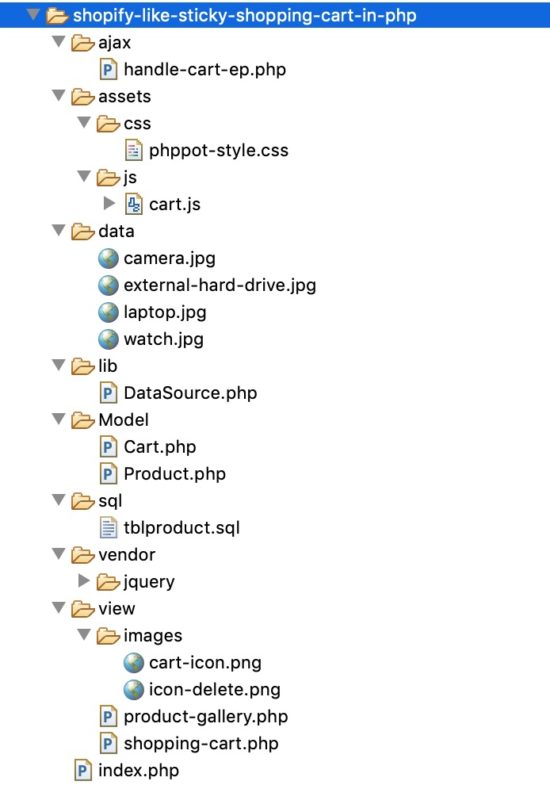
The below screenshot shows the file structure of this example. 

Shopify-Like Sticky Shopping Cart in PHP

  • view/product-gallery.php – It includes a PHP loop to iterate the products to form the gallery.
  • view/shopping-cart.php – It contains a HTML table to display the cart item from the PHP session.
  • css/style.css – It has the styles to showcase product gallery. It helps in shopping cart software design containing appropriate cart action controls.
  • cart.js – This JavaScript file contains action handlers to process requests via AJAX. It also contains code to fix the shopping cart panel in a fixed position while scrolling.
  • handle-cart-ep.php – This is the PHP endpoint invoked from AJAX code to add, edit, remove cart items.
  • tblproduct.sql – This SQL contains product database CREATE and INSERT statements.
  • DataSource.php – This is a generic file we used for our examples requires a database.
  • data – This directory is the product image source used while creating the gallery.

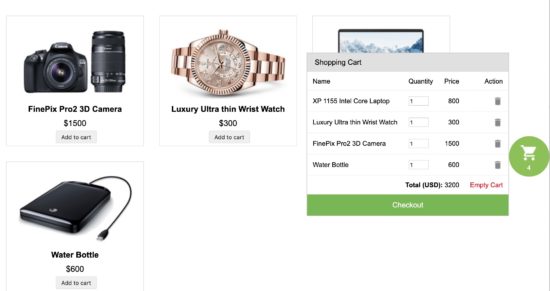
This HTML code includes the PHP source to render product gallery, shopping cart software pagee. It also shows a sticky cart icon with the current cart items count.

By clicking this icon, a script will toggle the shopping cart window.

This HTML includes cart.js JavaScript file. It contains all the jQuery AJAX code needed for performing cart actions and UI update.

<?php namespace Phppot; use \Phppot\Cart; session_start(); require_once 'Model/Cart.php'; $cartModel = new Cart(); ?> <HTML> <HEAD> <TITLE>Shopify like sticky shopping cart in PHP</TITLE> <link href="./assets/css/phppot-style.css" type="text/css" rel="stylesheet" /> <script src="./vendor/jquery/jquery.min.js" type="text/javascript"></script> <script src="./vendor/jquery/jquery-ui.js"></script> </HEAD> <BODY> <?php require_once './view/product-gallery.php'; ?> <div id="floating-cart-container"> <div id="cart-icon-container"> <img id="cart-icon" src="./view/images/cart-icon.png" alt="cartimg"> <div id="count"> <?php echo $cartModel->cartSessionItemCount; ?> </div> </div> <div id="shopping-cart"> <div id="tbl-cart"> <div id="txt-heading"> <div id="cart-heading">Shopping Cart</div> <div id="close"></div> </div> <div id="cart-item"> <?php require_once './view/shopping-cart.php'; ?> </div> </div> </div> </div> <script src="./assets/js/cart.js"></script> </BODY> </HTML> 

The product gallery is a HTML container embedded with PHP-MySQL script. The PHP code prepares MySQL select statement to get the product result in an array.

By iterating this array result with a PHP foreach statement, it reads the database row data. With this product data, it forms the gallery tile on each loop iteration.

The gallery tile shows products name, price and a preview image in a card-like view. Also, it contains an add-to-cart button.

This’s button’s click event invokes AJAX to add the particular product to the cart session. Each product has a unique code which is the reference to create and manage each cart session index.

Below code shows the HTML used to show a gallery view for this shopping cart software example.

<?php require_once __DIR__ . './../Model/Product.php'; $productModel = new Product(); ?> <div id="product-grid"> <div class="txt-heading">Products</div> <?php $productResult = $productModel->getAllProduct(); if (! empty($productResult)) { foreach ($productResult as $key => $value) { ?> <div class="product-item" data-name="<?php echo $productResult[$key]["name"]; ?>" data-price="<?php echo "$" . $productResult[$key]["price"]; ?>"> <div class="product-image"> <img src="<?php echo $productResult[$key]["image"]; ?>" id="<?php echo $productResult[$key]["code"]; ?>"> </div> <div> <strong><?php echo $productResult[$key]["name"]; ?></strong> </div> <div class="product-price"><?php echo "$" . $productResult[$key]["price"]; ?></div> <input type="button" id="add_<?php echo $productResult[$key]["code"]; ?>" value="Add to cart" class="btnAddAction" onClick="cartAction('add', '<?php echo $productResult[$key]["code"]; ?>')" /> </div> <?php } } ?> </div> 

Add-to-Cart from Product Gallery

The add-to-cart button in each product tile is the trigger to add a cart item into the PHP session. When the user clicks on the ‘Add to Cart’ button, it calls the cartAction() function to execute the add action via AJAX.

In this function call, it has the product id as an argument. In PHP the code fetches the product code, price to add to the cart session.

In this example, the switch case handles cart actions. It request and process add, edit (item quantity), remove (single cart item) and empty cart.

In the “add” case I checked if the current cart item already exists in the cart session. If so, I will update its quantity, otherwise, I will push the entire item array into the session index. The product code is the session index of each cart item to keep the uniqueness. The addToCart function has the code to add the cart item into the PHP session.

case "add": $cartModel->addToCart(); break; 

Model/Product.php

<?php use \Phppot\DataSource; class Product { private $ds; function __construct() { require_once __DIR__ . './../lib/DataSource.php'; $this->ds = new DataSource(); } function getAllProduct() { $query = "SELECT * FROM tblproduct ORDER BY id ASC"; $result = $this->ds->select($query); return $result; } } 

Display shopping cart items from PHP Session

This code shows the HTML table containing the list of cart items added by the user. The cart data is dynamic from the PHP session.

In shopping-cart.php file, it iterates the $_SESSION[“cart”] array and displays the cart row. Each row has data like product title, price, quantity. It also has the option to edit the item quantity and to delete a single item from the cart.

This cart window is sticky that lets the users access the cart and see the status at any time. Also, it shows the total item price by summing up the individual cart items.

<?php namespace Phppot; use \Phppot\Cart; require_once __DIR__ . './../Model/Cart.php'; $cartModel = new Cart(); ?> <input type="hidden" id="cart-item-count" value="<?php echo $cartModel->cartSessionItemCount; ?>"> <?php if ($cartModel->cartSessionItemCount > 0) { ?> <table width="100%" id="cart-table" cellpadding="10" cellspacing="1" border="0"> <tbody> <tr> <th>Name</th> <th>Quantity</th> <th class="text-right">Price</th> <th class="text-right">Action</th> </tr> <?php $item_total = 0; $i = 1; foreach ($_SESSION["cart_item"] as $item) { ?> <tr> <td><?php echo $item["name"]; ?></td> <td><input type="number" name="quantity" class="quantity" value="<?php echo $item['quantity']; ?>" data-code='<?php echo $item["code"]; ?>' size=2 onChange="updatePrice(this)" /> <input type="hidden" class='total' name="total" value="<?php echo $item["price"]; ?>" /></td> <td align=right class="prc" id="price" <?php echo $i;?>><?php echo $item["price"]; ?></td> <?php $i++; ?> <td class="text-right"><a onClick="cartAction('remove','<?php echo $item["code"]; ?>')" class="btnRemoveAction"><img src="./view/images/icon-delete.png" alt="Remove Item" /></a></td> </tr> <?php $item_total += ($item["price"] * $item['quantity']); } ?> <tr id="tot"> <td colspan="3" align=right><strong>Total (USD): </strong> <span id="total"><?php echo $item_total;?></span></td> <td align="right"><a id="btnEmpty" onClick="cartAction('empty', '');">Empty Cart</a></td> </tr> </tbody> </table> <div id="checkout">Checkout</div> <?php } else { ?> <div id="empty-cart">Your cart is empty</div> <?php } ?> 

Handle shopping cart actions edit, remove, empty on checkout page

In each row of the showing cart tabular window, it displays editable quantity with an input box. Users can increment or decrement the cart item quantity of a particular item.

On changing the quantity, and AJAX code will send the data to get the calculated price based on the new quantity. Then, it will update the price in the row.

There is a remove option for each cart item. By clicking the remove action, an ajax call will request PHP code to perform the remove action. It will pass the product code as an argument to clear the particular cart session index.

Also, the shopping cart window has the option to empty the cart with one single click.

The below code shows the switch cases created to trigger and perform cart actions.

cart.js

function cartAction(action, product_code) { var queryString = ""; if (action != "") { switch (action) { case "add": queryString = 'action=' + action + '&code=' + product_code + '&quantity=' + $("#qty_" + product_code).val(); break; case "remove": queryString = 'action=' + action + '&code=' + product_code; break; case "empty": queryString = 'action=' + action; break; } } jQuery.ajax({ url: "ajax/handle-cart-ep.php", data: queryString, type: "POST", success: function (data) { $("#cart-item").html(data); $("#count").text($("#cart-item-count").val()); }, error: function () {} }); } function updatePrice(obj){ var quantity = $(obj).val(); var code = $(obj).data('code'); queryString = 'action=edit&code=' + code + '&quantity=' + quantity; $.ajax({ type: 'post', url: "ajax/handle-cart-ep.php", data: queryString, success: function(data) { $("#total").text(data); } }); } $(document).ready(function () { $("#cart-icon-container").click(function () { $("#shopping-cart").toggle(); }); var top = parseInt($("#shopping-cart").height())/2; $("#shopping-cart").css("margin-top", "-" + top + "px"); }); 

ajax/handle-cart-ep.php

<?php namespace Phppot; use \Phppot\Cart; require_once __DIR__ . './../Model/Cart.php'; $cartModel = new Cart(); session_start(); if (! empty($_POST["action"])) { switch ($_POST["action"]) { case "add": $cartModel->addToCart(); break; case "edit": $totalPrice = $cartModel->editCart(); print $totalPrice; exit; break; case "remove": $cartModel->removeFromCart(); break; case "empty": $cartModel->emptyCart(); break; } } require_once '../view/shopping-cart.php'; ?> 

Model/Cart.php

This is the model class used to create, edit and clear cart sessions.

<?php namespace Phppot; use \Phppot\DataSource; class Cart { private $ds; public $cartSessionItemCount = 0; function __construct() { require_once __DIR__ . './../lib/DataSource.php'; $this->ds = new DataSource(); if (! empty($_SESSION["cart_item"]) && is_array($_SESSION["cart_item"])) { $this->cartSessionItemCount = count($_SESSION["cart_item"]); } } function addToCart() { $query = "SELECT * FROM tblproduct WHERE code = ?"; $paramType = "s"; $paramArray = array($_POST["code"]); $productByCode = $this->ds->select($query, $paramType, $paramArray); $itemArray = array( $productByCode[0]["code"] => array( 'name' => $productByCode[0]["name"], 'code' => $productByCode[0]["code"], 'quantity' => '1', 'price' => $productByCode[0]["price"] ) ); if (! empty($_SESSION["cart_item"])) { if (in_array($productByCode[0]["code"], $_SESSION["cart_item"])) { foreach ($_SESSION["cart_item"] as $k => $v) { if ($productByCode[0]["code"] == $k) $_SESSION["cart_item"][$k]["quantity"] = $_POST["quantity"]; } } else { $_SESSION["cart_item"] = array_merge($_SESSION["cart_item"], $itemArray); } } else { $_SESSION["cart_item"] = $itemArray; } if (! empty($_SESSION["cart_item"]) && is_array($_SESSION["cart_item"])) { $this->cartSessionItemCount = count($_SESSION["cart_item"]); } } function editCart() { if (! empty($_SESSION["cart_item"])) { $total_price = 0; foreach ($_SESSION["cart_item"] as $k => $v) { if ($_POST["code"] == $k) { $_SESSION["cart_item"][$k]["quantity"] = $_POST["quantity"]; } $total_price = $total_price + ($_SESSION["cart_item"][$k]["quantity"] * $_SESSION["cart_item"][$k]["price"] ); } return $total_price; } if (! empty($_SESSION["cart_item"]) && is_array($_SESSION["cart_item"])) { $this->cartSessionItemCount = count($_SESSION["cart_item"]); } } function removeFromCart() { if (! empty($_SESSION["cart_item"])) { foreach ($_SESSION["cart_item"] as $k => $v) { if ($_POST["code"] == $k) unset($_SESSION["cart_item"][$k]); if (empty($_SESSION["cart_item"])) unset($_SESSION["cart_item"]); } } if (! empty($_SESSION["cart_item"]) && is_array($_SESSION["cart_item"])) { $this->cartSessionItemCount = count($_SESSION["cart_item"]); } } function emptyCart() { unset($_SESSION["cart_item"]); $this->cartSessionItemCount = 0; } } 

Product database table SQL script

The following SQL script has the CREATE and the INSERT query. It will help to put the product table in your development environment.

CREATE TABLE IF NOT EXISTS `tblproduct` ( `id` int(8) NOT NULL AUTO_INCREMENT, `name` varchar(255) NOT NULL, `code` varchar(255) NOT NULL, `image` text NOT NULL, `price` double(10,2) NOT NULL, PRIMARY KEY (`id`), UNIQUE KEY `product_code` (`code`) ) ENGINE=InnoDB DEFAULT CHARSET=latin1 AUTO_INCREMENT=14 ; -- -- Dumping data for table `tblproduct` -- INSERT INTO `tblproduct` (`id`, `name`, `code`, `image`, `price`) VALUES (1, 'FinePix Pro2 3D Camera', '3DcAM01', 'product-images/camera.jpg', 1500.00), (2, 'Luxury Ultra thin Wrist Watch', 'wristWear03', 'product-images/watch.jpg', 300.00), (3, 'XP 1155 Intel Core Laptop', 'LPN45', 'product-images/laptop.jpg', 800.00), (4, 'Water Bottle', 'wristWear02', 'product-images/external-hard-drive.jpg', 600.00); 

Shopify-Like Floating Shopping Cart Output

Download

↑ Back to Top

Posted on Leave a comment

Double Opt-In Subscription Form with Secure Hash using PHP

Last modified on September 24th, 2019 by Vincy.

Do you know that the opening rate of emails by double opt-in confirmed subscribers is a staggering 40%? According to CampaignMonitor, email marketing generates $38 in ROI for every $1 spent.

Email marketing delivers the highest among any channel for marketing. Even in comparison with channels like print, TV and social media.

Double Opt-In Subscription Form with Secure Hash using PHP

Email marketing is the way to go. The primary mode to build your list is using a double opt-in subscription form.

What is inside?

  1. Why do we need double opt-in?
  2. What is the role of secure hash?
  3. Double opt-in subscription form in PHP
  4. Sequence flow for double opt-in subscription
  5. Double opt-in Subscription form UI
  6. PHP AJAX for subscription form submission
  7. URL with secure hash
  8. A PHP utility class for you
  9. Store subscription information to database
  10. A database abstraction layer for you
  11. Send confirmation email to users
  12. Subscription confirmation
  13. Conclusion

Use a double opt-in subscription form to signup to a newsletter, blog or a similar service. It has a two-step subscription process.

In the first step, the user will submit his name and email. Then the site will send an email to the user.

In the second step, the user will click the link in the received email. This will confirm his subscription to the site or service.

We call it the double opt-in because the users consent to the subscription twice. First by submitting the information and second by confirming to in by clicking the link in email.

Why do we need double opt-in?

It is the mechanism used to verify if the subscriber owns the input email. You need to do this verification because there is a chance for misuse by submitting emails that they do not own.

Double opt-in vs single opt-in is well debated and results arrived at. Double opt-in wins hands-on in every critical aspect.

What is the role of a secure hash?

In the confirmation email received by the user, there will be a link. This is the second and important step in the opt-in process. The link should be secure.

  • It should be unique for every user and request.
  • It should not be predictable.
  • It should be immune to a brute-force attack.

Double opt-in subscription form in PHP

I will present you a step by step detail on how to build a double opt-in subscription form with a secure hash using PHP.
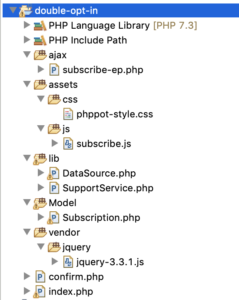
You will get a production-grade code which you can use real-time in your live website. You can use this to manage your newsletter subscription.

I am releasing this code to you under MIT license. You can use it free even in commercial projects.

Sequence flow for double opt-in subscription

  1. Show a subscription form to the user.
  2. On AJAX submit, insert a new record in the database.
  3. Send an email to the user with a secure hash link.
  4. On click, the of the link, update the subscription status.
  5. On every step, there will be appropriate validations in place.

Double opt-in Subscription form UI

This is where developers get it wrong. Keep it simple and unobtrusive. For the high conversion, you must keep in minimal.

One field email is enough for the subscription. To address the user in a personal way, you need their name. That’s it. Do not ask for much information on a subscription form.

<!doctype html> <html lang="en"> <head> <meta charset="utf-8"> <meta name="viewport" content="width=device-width, initial-scale=1, shrink-to-fit=no"> <meta name="author" content="Vincy"> <link rel="stylesheet" type="text/css" href="assets/css/phppot-style.css"> <title>Double Opt-In Subscription Form with Secure Hash using PHP</title> </head> <body> <div class="phppot-container"> <h1>Double Opt-in Subscription</h1> <form class="phppot-form" action="" method="POST"> <div class="phppot-row"> <div class="label"> Name </div> <input type="text" id="pp-name" name="pp-name" class="phppot-input"> </div> <div class="phppot-row"> <div class="label"> Email * <div id="email-info" class="validation-message" data-required-message="required." data-validate-message="Invalid email."></div> </div> <input type="text" id="pp-email" name="pp-email" class="required email phppot-input" onfocusout="return validateEmail();"> </div> <div class="phppot-row"> <button type="Submit" id="phppot-btn-send">Subscribe</button> <div id="phppot-loader-icon">Sending ...</div> <div id="phppot-message"></div> </div> </form> </div> <script src="vendor/jquery/jquery-3.3.1.js"></script> <script src="assets/js/subscribe.js"></script></body> </body> </html> 

If you ask for much information, it will drive your users away. The same principle applies when you build a contact form. More or less these two behave in a similar aspect. Check how to build a contact form to know more on it.
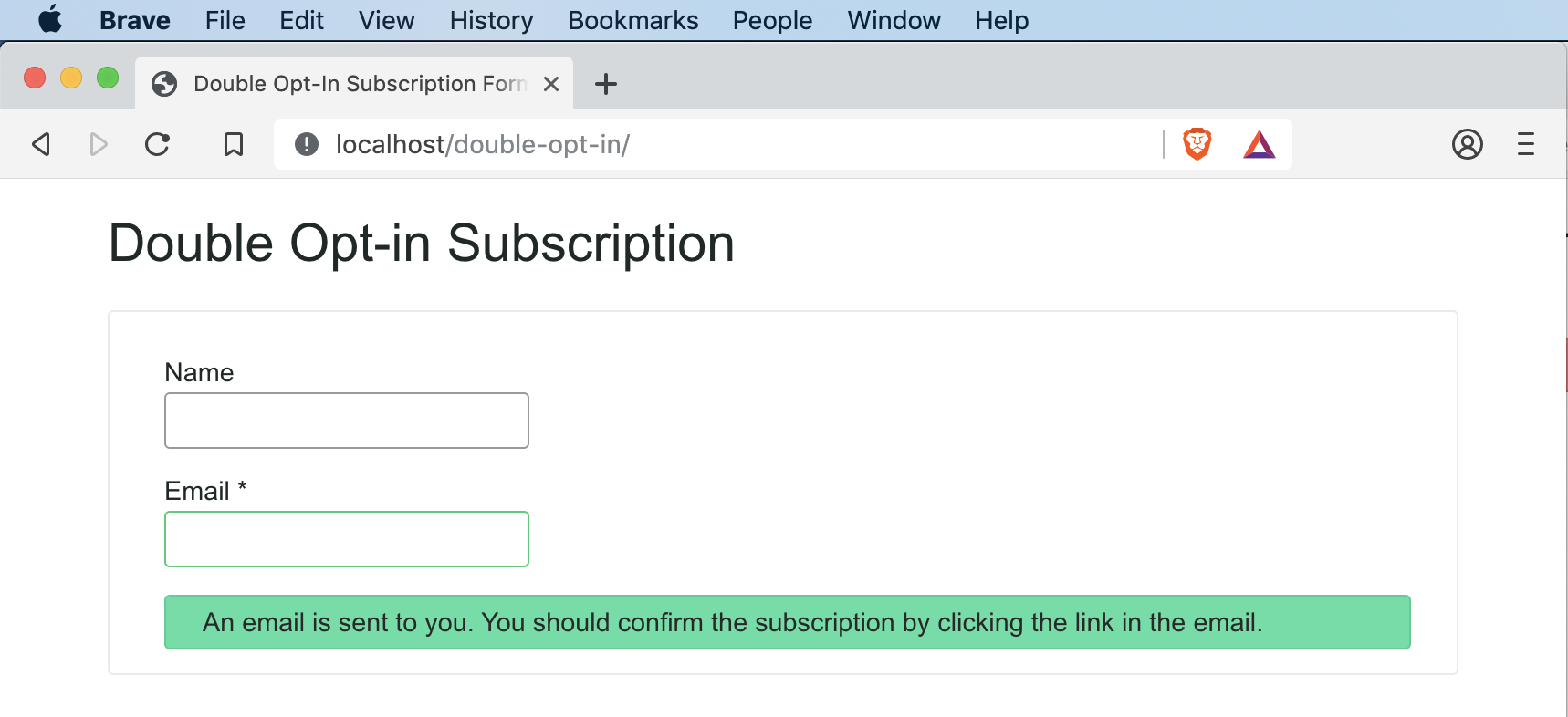
Double Opt-in subscription form UI

You should leave the name field can as optional and only the email field should be as required. This will encourage the user to submit the form and subscribe for the newsletter.

Needless to say, the form should be responsive. Any page or form you build should work in mobile, tablet, laptop and desktop devices. You should optimize to work on any viewport.

Google parses webpages in mobile mode for indexing in the search result. The desktop is an old story and gone are those days. You should always design for the mobile. Make it mobile-first!

PHP AJAX for subscription form submission

I have used AJAX to manage the submission. This will help the user to stay on the page after subscription. You can position this subscription form in a sidebar or the footer.
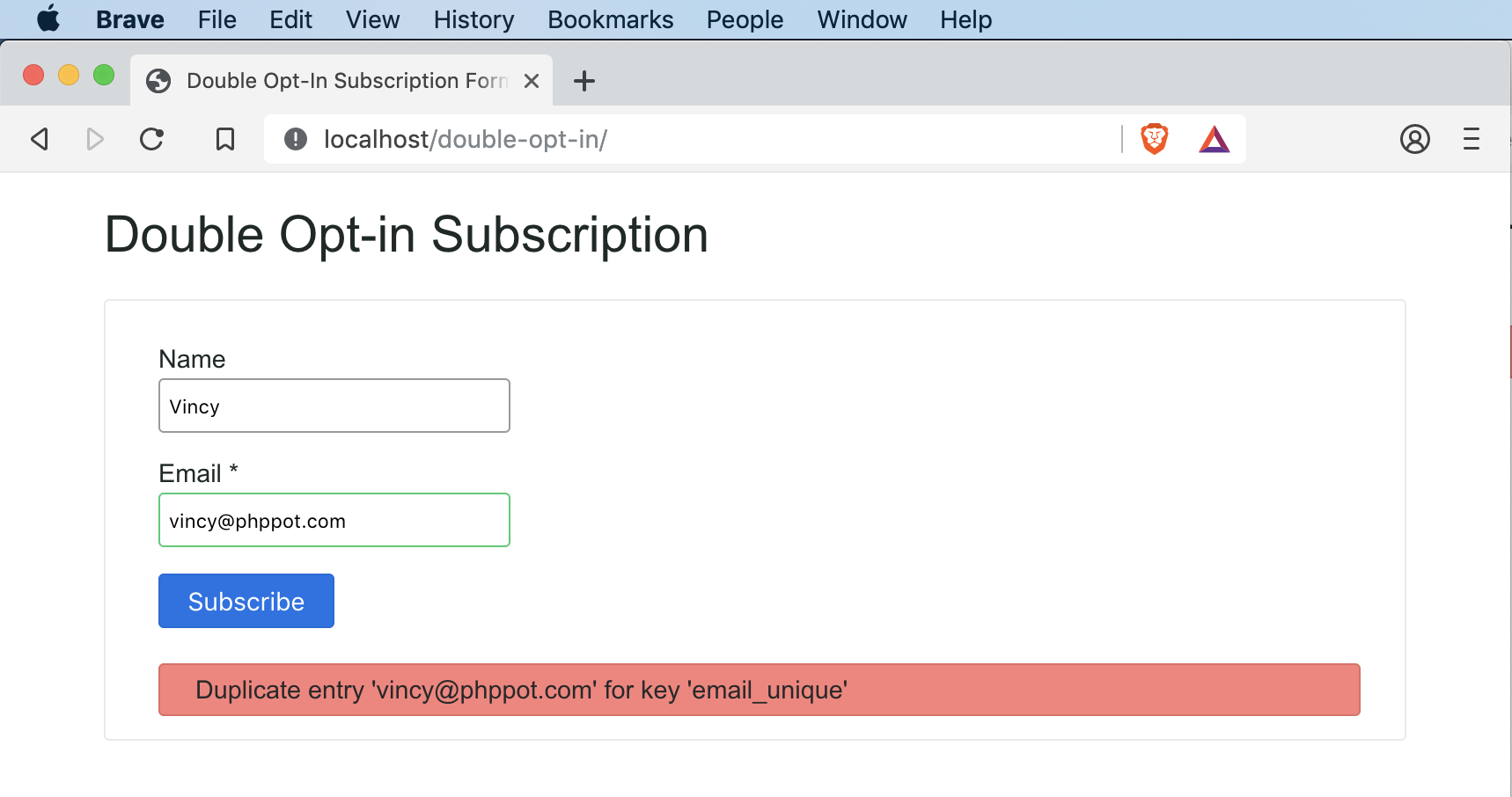
Double Opt-in Subscription Form AJAX Submission

This is a classic example of where you should use the AJAX. I have seen instances where people use AJAX in inappropriate places, for the sake of using it.

Subscription AJAX endpoint

The AJAX endpoint has three major steps:

  1. Verify the user input.
  2. Insert a record in the database.
  3. Send an email with a link for subscription.

subscribe-ep.php is the AJAX endpoint. It starts with an if condition to check if the submit is via the POST method. It is always good to program for POST instead of the GET by default.

<?php use Phppot\Subscription; use Phppot\SupportService; /** * AJAX end point for subscribe action. * 1. validate the user input * 2. store the details in database * 3. send email with link that has secure hash for opt-in confirmation */ session_start(); // to ensure the request via POST if ($_POST) { require_once __DIR__ . './../lib/SupportService.php'; $supportService = new SupportService(); // to Debug set as true $supportService->setDebug(false); // to check if its an ajax request, exit if not $supportService->validateAjaxRequest(); require_once __DIR__ . './../Model/Subscription.php'; $subscription = new Subscription(); // get user input and sanitize if (isset($_POST["pp-email"])) { $userEmail = trim($_POST["pp-email"]); $userEmail = filter_var($userEmail, FILTER_SANITIZE_EMAIL); $subscription->setEmail($userEmail); } else { // server side fallback validation to check if email is empty $output = $supportService->createJsonInstance('Email is empty!'); $supportService->endAction($output); } $memberName = ""; if (isset($_POST["pp-name"])) { $memberName = filter_var($_POST["pp-name"], FILTER_SANITIZE_STRING); } $subscription->setMemberName($memberName); // 1. get a 12 char length random string token $token = $supportService->getToken(12); // 2. make that random token to a secure hash $secureToken = $supportService->getSecureHash($token); // 3. convert that secure hash to a url string $urlSecureToken = $supportService->cleanUrl($secureToken); $subscription->setSubsriptionKey($urlSecureToken); $subscription->setSubsciptionSatus(0); $currentTime = date("Y-m-d H:i:s"); $subscription->setCreateAt($currentTime); $result = $subscription->insert(); // check if the insert is success // if success send email else send message to user $messageType = $supportService->getJsonValue($result, 'type'); if ('error' != $messageType) { $result = $subscription->sendConfirmationMessage($userEmail, $urlSecureToken); } $supportService->endAction($result); } 

I have used the SupportService class to perform common functions.

Input sanitisation is a must. When you collect information using a public website, you should be careful. You could get infected without your knowledge. There are many bots foraging around the Internet and they click on all links and buttons.

To sanitise, do not invent a new function. Use the function provided by PHP and that is safe to use.

URL with secure hash

Generate a unique url for each user subscription. Use this url to confirm the user’s subscription in the second step. Remember, that’s why we call this double opt-in.

I have used a three step process:

  1. Generate a random string token.
  2. Convert the token to secure hash.
  3. Convert the secure hash to safe url.

I have used hexdec, bin2hex and openssl_random_pseudo_bytes to generate random bits. Which forms a random string.

Then to make the random string a secure hash, I have used the PHP’s built-in password_hash function. Never every try to do something on your own. Go with the PHP’s function and it does the job very well.

Before PHP 7, we had the option to supply a user generated salt. Now PHP 7 release has deprecated it. It is a good move because, PHP can generate a better salt than what you will generate. So stick to PHP 7 and use it without supplying your own salt.

The secure hash will contain all sort of special characters. . You can keep those special characters but need to url encode it. But I always wish to keep urls clean and the encoded chars do not look nice.

So no harm in removing them. So I cleanup those and leave only the safe characters. Then as a secondary precaution, I also encode the resultant string.

Thus after going through multi step process, we get a random, hash secure, safe, encoded URL token. Save the user submitted information in database record along with this token.

A PHP utility class for you

This is a utility class which I use in my projects. I am giving it away free for you all. It has functions that I reuse quite often and will be handy in situations. Every method has detailed comments that explain their purpose and usage method.

<?php /** * Copyright (C) 2019 Phppot * * Distributed under MIT license with an exception that, * you don’t have to include the full MIT License in your code. * In essense, you can use it on commercial software, modify and distribute free. * Though not mandatory, you are requested to attribute this URL in your code or website. */ namespace Phppot; class SupportService { /** * Short circuit type function to stop the process flow on validation failure. */ public function validateAjaxRequest() { // to check if its an ajax request, exit if not $http_request = $_SERVER['HTTP_X_REQUESTED_WITH']; if (! isset($http_request) && strtolower($http_request) != 'xmlhttprequest') { $output = $this->createJsonInstance('Not a valid AJAX request!'); $this->endAction($output); } } /** * Last point in the AJAX work flow. * Clearing tokens, handles and resource cleanup can be done here. * * @param string $output * @param boolean $clearToken */ public function endAction($output) { die($output); } public function setDebug($mode) { if ($mode == true) { ini_set('display_errors', 1); set_error_handler(function ($severity, $message, $file, $line) { if (error_reporting() & $severity) { throw new \ErrorException($message, 0, $severity, $file, $line); } }); } } /** * encodes a message string into a json object * * @param string $message * @param string $type * @return \JsonSerializable encoded json object */ public function createJsonInstance($message, $type = 'error') { $messageArray = array( 'type' => $type, 'text' => $message ); $jsonObj = json_encode($messageArray); return $jsonObj; } public function getJsonValue($json, $key) { $jsonArray = json_decode($json, true); return $jsonArray[$key]; } /** * If you are using PHP, this is the best possible secure hash * do not try to implement somthing on your own * * @param string $text * @return string */ public function getSecureHash($text) { $hashedText = password_hash($text, PASSWORD_DEFAULT); return $hashedText; } /** * generates a random token of the length passed * * @param int $length * @return string */ public function getToken($length) { $token = ""; $codeAlphabet = "ABCDEFGHIJKLMNOPQRSTUVWXYZ"; $codeAlphabet .= "abcdefghijklmnopqrstuvwxyz"; $codeAlphabet .= "0123456789"; $max = strlen($codeAlphabet) - 1; for ($i = 0; $i < $length; $i ++) { $token .= $codeAlphabet[$this->cryptoRandSecure(0, $max)]; } return $token; } public function cryptoRandSecure($min, $max) { $range = $max - $min; if ($range < 1) { return $min; // not so random... } $log = ceil(log($range, 2)); $bytes = (int) ($log / 8) + 1; // length in bytes $bits = (int) $log + 1; // length in bits $filter = (int) (1 << $bits) - 1; // set all lower bits to 1 do { $rnd = hexdec(bin2hex(openssl_random_pseudo_bytes($bytes))); $rnd = $rnd & $filter; // discard irrelevant bits } while ($rnd >= $range); return $min + $rnd; } /** * makes the passed string url safe and return encoded url * * @param string $str * @return string */ public function cleanUrl($str, $isEncode = 'true') { $delimiter = "-"; $str = str_replace(' ', $delimiter, $str); // Replaces all spaces with hyphens. $str = preg_replace('/[^A-Za-z0-9\-]/', '', $str); // allows only alphanumeric and - $str = trim($str, $delimiter); // remove delimiter from both ends $regexConseqChars = '/' . $delimiter . $delimiter . '+/'; $str = preg_replace($regexConseqChars, $delimiter, $str); // remove consequtive delimiter $str = mb_strtolower($str, 'UTF-8'); // convert to all lower if ($isEncode) { $str = urldecode($str); // encode to url } return $str; } /** * to mitigate XSS attack */ public function xssafe($data, $encoding = 'UTF-8') { return htmlspecialchars($data, ENT_QUOTES | ENT_HTML401, $encoding); } /** * convenient method to print XSS mitigated text * * @param string $data */ public function xecho($data) { echo $this->xssafe($data); } } 

Store subscription information to the database

Insert a record to the database on submission of the subscription form. We get the user’s name, email, generate a secure hash token, current time, subscription status.

<?php /** * Copyright (C) 2019 Phppot * * Distributed under MIT license with an exception that, * you don’t have to include the full MIT License in your code. * In essense, you can use it on commercial software, modify and distribute free. * Though not mandatory, you are requested to attribute this URL in your code or website. */ namespace Phppot; use Phppot\DataSource; class Subscription { private $ds; private $memberName; private $email; private $subsriptionKey; private $subsciptionSatus; private $createAt; private $supportService; function __construct() { require_once __DIR__ . './../lib/DataSource.php'; $this->ds = new DataSource(); require_once __DIR__ . './../lib/SupportService.php'; $this->supportService = new SupportService(); } public function getMemberName() { return $this->memberName; } public function getEmail() { return $this->email; } public function getSubsriptionKey() { return $this->subsriptionKey; } public function getSubsciptionSatus() { return $this->subsciptionSatus; } public function getCreateAt() { return $this->createAt; } public function setMemberName($memberName) { $this->memberName = $memberName; } public function setEmail($email) { $this->email = $email; } public function setSubsriptionKey($subsriptionKey) { $this->subsriptionKey = $subsriptionKey; } public function setSubsciptionSatus($subsciptionSatus) { $this->subsciptionSatus = $subsciptionSatus; } public function setCreateAt($createAt) { $this->createAt = $createAt; } /** * to get the member record based on the subscription_key * * @param string $subscriptionKey * @return array result record */ public function getMember($subscriptionKey, $subscriptionStatus) { $query = 'SELECT * FROM tbl_subscription where subscription_key = ? and subscription_status = ?'; $paramType = 'si'; $paramValue = array( $subscriptionKey, $subscriptionStatus ); $result = $this->ds->select($query, $paramType, $paramValue); return $result; } public function insert() { $query = 'INSERT INTO tbl_subscription (member_name, email, subscription_key, subscription_status, create_at) VALUES (?, ?, ?, ?, ?)'; $paramType = 'sssis'; $paramValue = array( $this->memberName, $this->email, $this->subsriptionKey, $this->subsciptionSatus, $this->createAt ); $insertStatus = $this->ds->insert($query, $paramType, $paramValue); return $insertStatus; } public function updateStatus($subscriptionKey, $subscriptionStatus) { $query = 'UPDATE tbl_subscription SET subscription_status = ? WHERE subscription_key = ?'; $paramType = 'is'; $paramValue = array( $subscriptionStatus, $subscriptionKey ); $this->ds->execute($query, $paramType, $paramValue); } /** * sends confirmation email, to keep it simple, I am just using the PHP's mail * I reccommend serious users to change it to PHPMailer and set * appropriate headers */ public function sendConfirmationMessage($mailTo, $urlSecureToken) { // following is the opt-in url that will be sent in email to // the subscriber. Replace example.com with your server $confirmOptInUrl = 'http://example.com/confirm.php?q=' . $urlSecureToken; $message = '<p>Howdy!</p> <p>This is an automated message sent for subscription service. You must confirm your request to subscribe to example.com site.</p> <p>Website Name: example</p> <p>Website URL: http://example.com</p> <p>Click the following link to confirm: ' . $confirmOptInUrl . '</p>'; $isSent = mail($mailTo, 'Confirm your subscription', $message); if ($isSent) { $message = "An email is sent to you. You should confirm the subscription by clicking the link in the email."; $result = $this->supportService->createJsonInstance($message, 'message'); } else { $result = $this->supportService->createJsonInstance('Error in sending confirmation email.', 'error'); } return $result; } } 

The reason for storing the current time is to have an expiry for every link. We can set a predefined expiry for the double opt-in process.
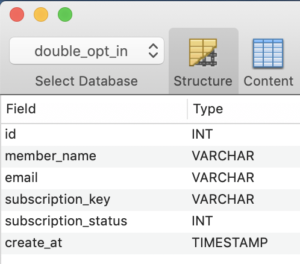
For example, you can set one week as expiry for a link from the moment you generate it. The user has to click and confirm before that expiry period.

Subscription status is by default stored as ‘0’ and on confirmation changed to ‘1’.

A database abstraction layer for you

It is my PHP abstraction for minor projects. This works as a layer between controller, business logic and the database. It has generic methods using which we can to the CRUD operations. I have bundled it with the free project download that is available at the end of this tutorial.

Send confirmation email to users

After you insert the record, send an email will to the user to perform the double opt-in confirmation. The user will have a link in the email which he has to click to confirm.

Keep the email simple. It is okay to have text instead of fancy HTML emails. PHP is capable of generating any email and you can code complex email templates. But the spam engines may not like it.

Subscription information database record with secure hash

If you wish to go with HTML emails, then keep the HTML code ratio to as least as possible. As this is also one factor using which the spam engines flag the emails.

Then remember not to use the spam stop words. There are words like “free”, “win”, “cash”, “promo” and “income”. There is a long list and you can get it on the Internet by searching for “email spam filter word list”.

I have used PHP’s mail() function to send the email. I recommend you to change it to PHPMailer to send SMTP based email if you plan to use this code in production.

Subscription confirmation

Create a public landing page and you may use .htaccess for a neat URL mapping. This URL should map with the URL sent to the user and the PHP file that is going to process the request.

As a first step, GET the token and to verify the user against the database. Check,

  1. if such a token exists,
  2. it is not expired,
  3. the user is not already subscribed
  4. add more validation as you deem fit.
<?php use Phppot\Subscription; use Phppot\SupportService; /** * For confirmation action. * 1. Get the secure has from url * 2. validate it against url * 3. update the subscription status in database accordingly. */ session_start(); // to ensure the request via POST require_once __DIR__ . '/lib/SupportService.php'; $supportService = new SupportService(); // to Debug set as true $supportService->setDebug(true); $subscriptionKey = $_GET['q']; require_once __DIR__ . '/Model/Subscription.php'; $subscription = new Subscription(); $result = $subscription->getMember($subscriptionKey, 0); if (count($result) > 0) { // member found, go ahead and update status $subscription->updateStatus($subscriptionKey, 1); $message = $result[0]['member_name'] . ', your subscription is confirmed.'; $messageType = 'success'; } else { // securiy precaution: do not reveal any information here // play subtle with the reported message $message = 'Invalid URL!'; $messageType = 'error'; } ?> <!doctype html> <html lang="en"> <head> <meta charset="utf-8"> <meta name="viewport" content="width=device-width, initial-scale=1, shrink-to-fit=no"> <meta name="author" content="Vincy"> <link rel="stylesheet" type="text/css" href="assets/css/phppot-style.css"> <title>Double Opt-In Subscription Confirmation</title> </head> <body> <div class="phppot-container"> <h1>Double Opt-in Subscription Confirmation</h1> <div class="phppot-row"> <div id="phppot-message" class="<?php echo $messageType; ?>"><?php echo $message;?></div> </div> </div> </body> </body> </html> 

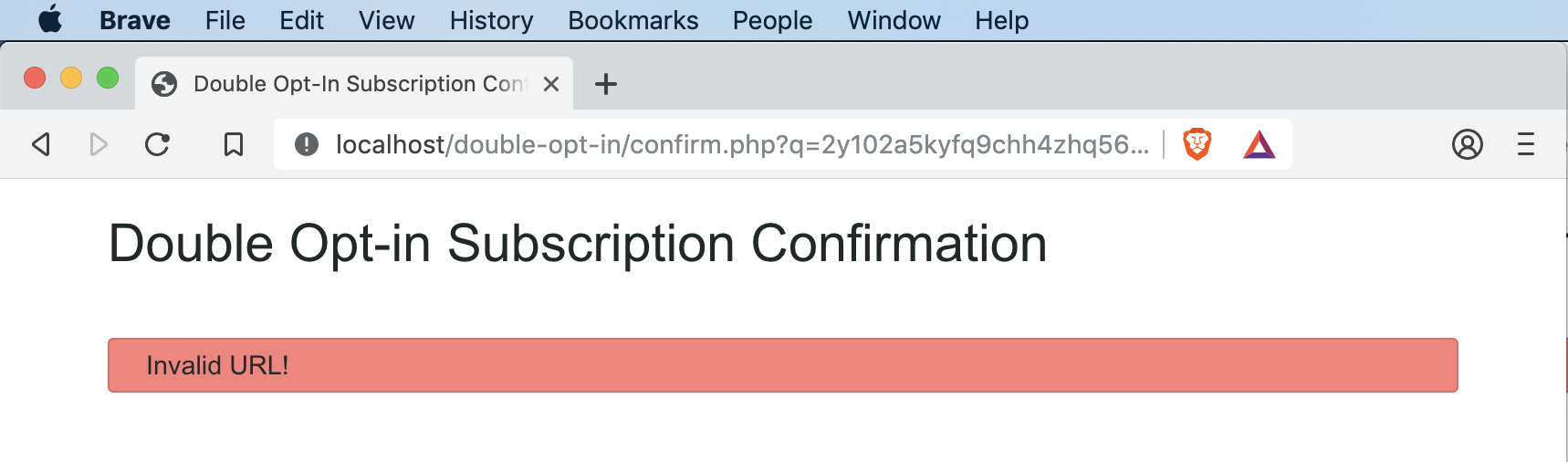
If validation fails, do not reveal any information to the user. You should only say that it has failed.
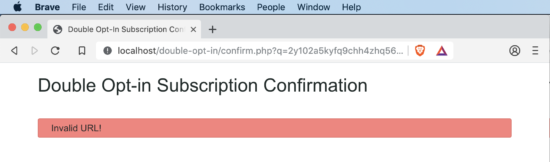
Subscription double opt-in confirmation url verification

More important do not say, not such email found. This will allow finding who has subscribed to your service. Whenever a validation fails, the displayed message should not reveal internal information.

On validation success, update the subscription status. Then show a happy success message to the user.

Conclusion

I have presented you with a production-grade double opt-in subscription form. I have followed a most secure hash generation method for confirmation URL email. I present it to you under the MIT license. The intention is to be the most permissible. You can download it free and change the code. You can even use it in your commercial projects. I have used the most secure code as possible. You can use this in your live site to manage newsletter subscription. In the coming part, I will include unsubscribe and enhance it further. Leave your comments below with what sort of enhancements you are looking for.

Download

↑ Back to Top

Posted on Leave a comment

Setting HTTP header attributes to enable Azure authentication/authorization using HTTPRepl

Angelos Petropoulos

Angelos

Posted on behalf of Ahmed Metwally

The HTTP Read-Eval-Print Loop (REPL) is a lightweight, cross-platform command-line tool that’s supported everywhere .NET Core is supported. It’s used for making HTTP requests to test ASP.NET Core web APIs and view their results. You can use the HTTPRepl to navigate and interrogate any API in the same manner that you would navigate a set of folders on a file system. If the service that you are testing has a swagger.json file, specifying that file to HTTPRepl will enable auto-completion.
To install the HTTP REPL, run the following command:

>dotnet tool install -g Microsoft.dotnet-httprepl


For more information on how to use HTTPRepl, read Angelos’ post on the ASP.NET blog. As we continue to improve the tool, we look to add new commands to facilitate the use of HTTPRepl with different types of secure API services. As of this release, HTTPRepl supports authentication and authorization schemes achievable through header manipulation, like basic, bearer token, and digest authentication. For example, to use a bearer token to authenticate to a service, use the command “set header”. Set the “Authorization” header to the bearer token value using the following command:

>set header Authorization “bearer <token_value>”

And replace <token_value> with your authorization bearer token for the service. Don’t forget to use the quotation marks to wrap the word bearer along with the <token_value> in the same literal string. Otherwise, the tool will treat them as two different values and will fail to set the header properly. To ensure that the header in the HTTP request is being formatted as expected, enable echoing using the “echo on” command.
Using the “set header” command, you can leverage HTTPRepl to test and navigate any secure REST API service including your Azure-hosted API services or the Azure Management API. To access a secure service hosted on Azure, you need a bearer token. Get a bearer token for your Azure subscription, using the Azure CLI to get an access token for the required Azure subscription:

>az login

Copy your subscription ID from the Azure portal and paste it in the “az account set” command:

>az account set --subscription "<subscription ID>" >az account get-access-token { "accessToken": "<access_token_will_be_displayed_here>", "expiresOn": "<expiry date/time will be displayed here>", "subscription": "<subscription ID>", "tenant": "<tenant ID>", "tokenType": "Bearer" } 

Copy the text that appears in place of <access_token_will_be_displayed_here>. This is your access token. Finally, run HTTPRepl:

>httprepl
(disconnected)~ connect https://management.azure.com
Using a base address of https://management.azure.com/
Unable to find a swagger definition
https://management.azure.com/~ set header Authorization "bearer <em>&lt;paste_token_here&gt;</em>"
https://management.azure.com/~ cd subscriptions
https://management.azure.com/subscriptions/~ cd <subscription_ID>

For example, to search for a list of your Azure app services, issue the “get” command for the list of sites through the Microsoft web provider:

 https://management.azure.com/subscriptions/<subscription_ID>/~ get providers/Microsoft.Web/sites?api-version=2016-08-01 HTTP/1.1 200 OK Cache-Control: no-cache Content-Length: 35948 Content-Type: application/json; charset=utf-8 Date: Thu, 19 Sep 2019 23:04:03 GMT Expires: -1 Pragma: no-cache Strict-Transport-Security: max-age=31536000; includeSubDomains X-Content-Type-Options: nosniff x-ms-correlation-request-id: <em>xxxxxxxx-xxxx-xxxx-xxxx-xxxxxxxxxxxx</em> x-ms-original-request-ids: <em>xxxxxxxx-xxxx-xxxx-xxxx-xxxxxxxxxxxx;xxxxxxxx-xxxx-xxxx-xxxx-xxxxxxxxxxxx</em> x-ms-ratelimit-remaining-subscription-reads: 11999 x-ms-request-id: xxxxxxxx-xxxx-xxxx-xxxx-xxxxxxxxxxxx x-ms-routing-request-id: WESTUS:xxxxxxxxxxxxxxxx:xxxxxxxx-xxxx-xxxx-xxxx-xxxxxxxxxx { "value": [
<list of azure resources> ] } https://management.azure.com/subscriptions/<subscription_ID>/~

You can use the full list of Azure REST APIs to browse and manage services in your Azure subscriptions. For more details on how HTTPRepl works, please check the ASPNET blog. To use HTTPRepl, download and install the global tool from the .NET Core CLI.

Give us feedback

It’s not HTTPie, it’s not Curl, but it’s also not PostMan. It’s something that you run and stays running and its aware of its current context. We find this experience valuable, but ultimately what matters the most is what you think. Please let us know your opinion by leaving comments below or on GitHub.


Ahmed Metwally, Sr. Program Manager, .NET dev tools @ahmedMsftAhmed is a Program Manager on the .NET tooling team focused on improving web development for .NET developers.

Angelos Petropoulos

Posted on Leave a comment

ASP.NET Core and Blazor updates in .NET Core 3.0

Daniel Roth

Daniel

Today we are thrilled to announce the release of .NET Core 3.0! .NET Core 3.0 is ready for production use, and is loaded with lots of great new features for building amazing web apps with ASP.NET Core and Blazor.

Some of the big new features in this release of ASP.NET Core include:

  • Build rich interactive client-side web apps using C# instead of JavaScript using Blazor).
  • Create high-performance backend services with gRPC.
  • SignalR now has support for automatic reconnection and client-to-server streaming.
  • Generate strongly typed client code for Web APIs with OpenAPI documents.
  • Endpoint routing integrated through the framework.
  • HTTP/2 now enabled by default in Kestrel.
  • Authentication support for Web APIs and single-page apps integrated with IdentityServer
  • Support for certificate and Kerberos authentication.
  • Integrates with the new System.Text.Json serializer.
  • New generic host sets up common hosting services like dependency injection (DI), configuration, and logging.
  • New Worker Service template for building long-running services.
  • New EventCounters created for requests per second, total requests, current requests, and failed requests.
  • Startup errors now reported to the Windows Event Log when hosted in IIS.
  • Request pipeline integrated with with System.IO.Pipelines.
  • Performance improvements across the entire stack.

You can find all the details about what’s new in ASP.NET Core in .NET Core 3.0 in the What’s new in ASP.NET Core 3.0 topic.

See the .NET Core 3.0 release notes for additional details and known issues.

Get started

To get started with ASP.NET Core in .NET Core 3.0 install the .NET Core 3.0 SDK.

If you’re on Windows using Visual Studio, install Visual Studio 2019 16.3, which includes .NET Core 3.0.

Note: .NET Core 3.0 requires Visual Studio 2019 16.3 or later.

There is also a Blazor WebAssembly preview update available with this release. This update to Blazor WebAssembly still has a Preview 9 version, but carries an updated build number. Blazor WebAssembly is still in preview and is not part of the .NET Core 3.0 release.

To install the latest Blazor WebAssembly template run the following command:

dotnet new -i Microsoft.AspNetCore.Blazor.Templates::3.0.0-preview9.19465.2

Upgrade an existing project

To upgrade an existing ASP.NET Core app to .NET Core 3.0, follow the migrations steps in the ASP.NET Core docs.

See the full list of breaking changes in ASP.NET Core 3.0.

To upgrade an existing ASP.NET Core 3.0 RC1 project to 3.0:

  • Update all Microsoft.AspNetCore.* and Microsoft.Extensions.* package references to 3.0.0
  • Update all Microsoft.AspNetCore.Blazor.* package references to 3.0.0-preview9.19465.2

That’s it! You should now be all set to use .NET Core 3.0!

Join us at .NET Conf!

Please join us at .NET Conf to learn all about the new features in .NET Core 3.0 and to celebrate the release with us! .NET Conf is a live streaming event open to everyone, and features talks from many talented speakers from the .NET team and the .NET community. Check out the schedule and attend a local event near you. Or join the Virtual Attendee Party for the chance to win prizes!

Give feedback

We hope you enjoy the new features in this release of ASP.NET Core and Blazor in .NET Core 3.0! We are eager to hear about your experiences with this latest .NET Core release. Let us know what you think by filing issues on GitHub.

Thanks for using ASP.NET Core and Blazor!

Daniel Roth
Daniel Roth

Principal Program Manager, ASP.NET

Follow Daniel   

Posted on Leave a comment

ASP.NET Core and Blazor updates in .NET Core 3.0 Release Candidate 1

Daniel Roth

Daniel

.NET Core 3.0 Release Candidate 1 (RC1) is now available. This release contains only a handful of bug fixes and closely represents what we expect to release for .NET Core 3.0.

Please see the release notes for additional details and known issues.

Get started

To get started with ASP.NET Core in .NET Core 3.0 RC1 install the .NET Core 3.0 RC1 SDK.

If you’re on Windows using Visual Studio, install the latest preview of Visual Studio 2019.

.NET Core 3.0 RC1 requires Visual Studio 2019 16.3 Preview 4 or later.

There is also a Blazor WebAssembly preview update available with this release. This update to Blazor WebAssembly still has a Preview 9 version, but carries an updated build number. This is not a release candidate for Blazor WebAssembly. Blazor WebAssembly isn’t expected to ship as a stable release until some time after .NET Core 3.0 ships (details coming soon!).

To install the latest Blazor WebAssembly template run the following command:

dotnet new -i Microsoft.AspNetCore.Blazor.Templates::3.0.0-preview9.19457.4

Upgrade an existing project

To upgrade an existing ASP.NET Core app to .NET Core 3.0 Preview 9, follow the migrations steps in the ASP.NET Core docs.

Please also see the full list of breaking changes in ASP.NET Core 3.0.

To upgrade an existing ASP.NET Core 3.0 Preview 9 project to RC1:

  • Update all Microsoft.AspNetCore.* package references to 3.0.0-rc1.19457.4
  • Update all Microsoft.AspNetCore.Blazor.* package references to 3.0.0-preview9.19457.4

That’s it You should now be all set to use .NET Core 3.0 RC1!

Give feedback

We hope you enjoy the new features in this preview release of ASP.NET Core and Blazor! Please let us know what you think by filing issues on GitHub.

Thanks for trying out ASP.NET Core and Blazor!

Daniel Roth
Daniel Roth

Principal Program Manager, ASP.NET

Follow Daniel   

Posted on Leave a comment

How to Create Popup Contact Form Dialog using PHP and jQuery

Last modified on September 5th, 2019 by Vincy.

Contact form is an important element in your website. It encourages communication and acts as a bridge between you and your users. It allows users to post their feedback, comments, questions and more.

It helps you to get ideas and opinions that lead your business to growth. It is one among the important aspects that will decide your success.

There are many popup contact form plugins available online. These plugins help to add a contact form in your application with a modern outlook. You should choose them with care.

I have developed a light-weight contact form component named Iris. It is an interactive, integrative component. You can plug-in this component with your application without putting much effort. If you are searching for a secured simple contact form component, then Iris is the one you are looking for.

You should also read through the simple secure spam-free contact form. It details on the critical elements of a contact form and how they should be designed. It is a highly recommended read from me.

How Display PHP Contact Form Dialog using jQuery

View Demo

Developing a PHP contact form is a simple job. We have seen so many examples for creating a contact form in PHP. The simple contact form example has the basic code skeleton. It has minimal fields and a simple mail sending script.

Generally, the contact form has the name, email, message and more fields. The fields may vary based on the application’s nature or its purpose. 

In some application there may be a lengthy contact form with elaborate list of fields phone, fax and more. But, sleek forms with minimal inputs encourage users to interact.

If you want to get more information, then make it via optional custom fields. Contact form with custom fields will help users who have no objection to give extra data.

In this article, we are going how to code for showing a PHP contact form as a popup dialog. I used the jQuery core to display a popup dialog with the contact form HTML.

What is inside?

  1. Purpose of the contact form on a web application
  2. Things to remember while creating a contact form
  3. About this example
  4. File structure
  5. Create HTML interface for the contact form
  6. PHP script to send contact email
  7. PHP contact form popup with jQuery Output
  8. Conclusion

There are various ways to allow users to contact you via your application interface. Contact form is one of a popular component of an application. It lets users contact the website owner or admin.

Generally, contact forms help the users to send their thoughts, doubts. Some of the main purposes of this contact form interface are here as listed below.

  • To collect feedback, comments from the users or customers.
  • For getting the advantages of user interaction with your application.
  • To receive user’s support request.
  • To allow users to send inquiries for paid services or customization.
  • To get biodata, proof and more references as attachments.

While creating a contact form in your application, you have to remember the following. These points will help to create a safe contact for an interface for your application.

IMPORTANT – Read this!

  • Secure your platform from the bots. Yes! Internet is full of automated bots hungry for spreading spam.
  • Prevent abnormal frequent hits which may stress your server.
  • Ensure data sanitization before processing user data
  • Check request origin to prevent automated software to post the form data.
  • Validate on both client and server side.
  • No design is design. Do not thrust the UI upon the users, let its focus be on good communication and ease of use.

As the internet is an open world, it allows anonymous users. So, there is the possibility of malicious access. So, this kind of safety measures will reduce the risk.

It is not only applicable for the contact form but also for all the interfaces that get data from the end-user.

The contact form pops up to collect name, email, subject and message from the users. While running this example, the landing page will not show the popup on page load. Rather, it shows a clickable contact icon.

By clicking this icon, a contact form will popup with the name, email and more fields. For displaying the popup interface, I used jQuery library functions. It will add an overlay on top of the webpage while showing the popup.

In this example, all the contact details are mandatory. I have added a minimal validation script in JavaScript to validate the form data. This script is to check the availability of the contact data before posting it to the server-side.

When the user submits the form, the PHP code will receive the posted form data. Then, it processes the mail function with this contact information.

In this example, I have used the PHP mail function to send the contact email. If you want to send email using SMPT, the linked article has the code for implementing it.

Merits and demerits of a popup contact form dialog

There are both advantages and disadvantages of showing a popup contact form dialog.

The advantage is to let the user stay on his current page with any navigation or page refresh. The popup dialog interface will give a modern outlook for your application

Some web users hate popups. This is the main disadvantages. Also, it is a little bit of effort taking work to make a popup interface mobile friendly.

File Structure

Below screenshot shows the file structure of this PHP contact form example. It shows the custom files and libraries used in this code.

It has a very minimal amount of dynamic code that is for sending the contact email. Other than that, it has more of the HTML, CSS, JavaScript code.

Contact Form Popup File Structure

The index.php is the landing page which contains HTML to display clickable contact icon. It also has a hidden contact form container and a jQuery script to popup the form.

The vendor directory contains the jQuery library source.

This section is to learn how to create HTML to display the contact form interface in a jQuery popup.

It has the code to show the contact icon which popups contact form on its click event. The click event on the outside of the contact form layout will close the popup dialog.

I have added CSS and jQuery script to reflect the appropriate UI changes based on the user’s click action event. It helps to toggle the contact form popup dialog and acknowledge the user accordingly.

<!DOCTYPE html> <html> <head> <title>How to display PHP contact form popup using jQuery</title> <script src="./vendor/jquery/jquery-3.2.1.min.js"></script> <link rel="stylesheet" href="./css/style.css" /> </head> <body> <div id="contact-icon"> <img src="./icon/icon-contact.png" alt="contact" height="50" width="50"> </div> <!--Contact Form--> <div id="contact-popup"> <form class="contact-form" action="" id="contact-form" method="post" enctype="multipart/form-data"> <h1>Contact Us</h1> <div> <div> <label>Name: </label><span id="userName-info" class="info"></span> </div> <div> <input type="text" id="userName" name="userName" class="inputBox" /> </div> </div> <div> <div> <label>Email: </label><span id="userEmail-info" class="info"></span> </div> <div> <input type="text" id="userEmail" name="userEmail" class="inputBox" /> </div> </div> <div> <div> <label>Subject: </label><span id="subject-info" class="info"></span> </div> <div> <input type="text" id="subject" name="subject" class="inputBox" /> </div> </div> <div> <div> <label>Message: </label><span id="userMessage-info" class="info"></span> </div> <div> <textarea id="message" name="message" class="inputBox"></textarea> </div> </div> <div> <input type="submit" id="send" name="send" value="Send" /> </div> </form> </div> </body> </html> 

Below code shows the styles created for this PHP contact form UI. I have used very less CSS for this example to make it generic for any theme. You can override the below style to customize the form design for your website theme.

body { color: #232323; font-size: 0.95em; font-family: arial; } div#success { text-align: center; box-shadow: 1px 1px 5px #455644; background: #bae8ba; padding: 10px; border-radius: 3px; margin: 0 auto; width: 350px; } .inputBox { width: 100%; margin: 5px 0px 15px 0px; border: #dedede 1px solid; box-sizing: border-box; padding: 15px; } #contact-popup { position: absolute; top: 0px; left: 0px; height: 100%; width: 100%; background: rgba(0, 0, 0, 0.5); display: none; color: #676767; } .contact-form { width: 350px; margin: 0px; background-color: white; font-family: Arial; position: relative; left: 50%; top: 50%; margin-left: -210px; margin-top: -255px; box-shadow: 1px 1px 5px #444444; padding: 20px 40px 40px 40px; } #contact-icon { padding: 10px 5px 5px 12px; width: 58px; color: white; box-shadow: 1px 1px 5px grey; border-radius: 3px; cursor: pointer; margin: 60px auto; } .info { color: #d30a0a; letter-spacing: 2px; padding-left: 5px; } #send { background-color: #09F; border: 1px solid #1398f1; font-family: Arial; color: white; width: 100%; padding: 10px; cursor: pointer; } #contact-popup h1 { font-weight: normal; text-align: center; margin: 10px 0px 20px 0px; } .input-error { border: #e66262 1px solid; } 

jQuery Script to show Contact form popup and validate form fields

Below script shows the jQuery callback function added for the document ready event.

It has two event handling functions. One is to show contact form popup dialog on the click event of the contact icon.

The other is to handle the form submit to validate contact data entered by the user.

The validation script focuses on minimalistic filter appliances. It helps to prevent users from sending the form with an empty data or with invalid data (email) format.

<script> $(document).ready(function () { $("#contact-icon").click(function () { $("#contact-popup").show(); }); //Contact Form validation on click event $("#contact-form").on("submit", function () { var valid = true; $(".info").html(""); $("inputBox").removeClass("input-error"); var userName = $("#userName").val(); var userEmail = $("#userEmail").val(); var subject = $("#subject").val(); var message = $("#message").val(); if (userName == "") { $("#userName-info").html("required."); $("#userName").addClass("input-error"); } if (userEmail == "") { $("#userEmail-info").html("required."); $("#userEmail").addClass("input-error"); valid = false; } if (!userEmail.match(/^([\w-\.]+@([\w-]+\.)+[\w-]{2,4})?$/)) { $("#userEmail-info").html("invalid."); $("#userEmail").addClass("input-error"); valid = false; } if (subject == "") { $("#subject-info").html("required."); $("#subject").addClass("input-error"); valid = false; } if (message == "") { $("#userMessage-info").html("required."); $("#message").addClass("input-error"); valid = false; } return valid; }); }); </script> 

There are many ways of sending email in PHP. In this example, I used the in-built mail function to send the contact email.

Before sending the mail, we have to set the header, recipient, and the other parameters.

Below PHP script gets the posted contact form data using $_POST request array. In PHP, it sets the From data with mail header using the name, email posted via the form.

In this code, we can see the PHP filter_var() applied to sanitize the form data before processing.

Once the email sent, the PHP mail() function will return boolean true. If so, it shows a success message to the user.

<?php if (! empty($_POST["send"])) { $name = filter_var($_POST["userName"], FILTER_SANITIZE_STRING); $email = filter_var($_POST["userEmail"], FILTER_SANITIZE_EMAIL); $subject = filter_var($_POST["subject"], FILTER_SANITIZE_STRING); $message = filter_var($_POST["message"], FILTER_SANITIZE_STRING); $toEmail = "to_email@gmail.com"; $mailHeaders = "From: " . $name . "<" . $email . ">\r\n"; if (mail($toEmail, $subject, $message, $mailHeaders)) { ?> <div id="success">Your contact information is received successfully!</div> <?php } } ?> 

In a previous article, we have seen an example to send an email with Gmail SMTP using PHPMailer library.

PHP contact form popup with jQuery Output

The figure shows the screenshot of the contact form popup dialog. You can see the clickable icon that is behind the overlay.

I have taken this screenshot by sending the form with an empty message and invalid email format. In the following screenshot, you can see the corresponding error message in the popup dialog. This is how this form alerts users about the improper data entered by them.

Contact Form Popup Output

After sending the contact email, this message helps to acknowledge the user. This acknowledgment will toggle off the contact form popup.

Contact Mail Success

Conclusion

Contact form in your application will help to gather information from the user. It will give you valuable feedback, ideas from the end-user to grow your business.

We have seen the advantages and disadvantages of having a popup contact form interface in an application. Also, we have seen lot of information about the purposes, basic need to integrate a contact form in an application.

The example code we have created for this article will reduce your effort to create a contact form for your application. It is a basic solution for the one who wants to deploy a medium to interact with the site users.

View Demo Download

↑ Back to Top