Posted on Leave a comment

LDtk The Level Designer Toolkit

LDtk, or Level Designer Toolkit, is an open source MIT licensed Haxe based 2D level editor from the creator of Dead Cells. If it looks familiar that is because we recently covered it when it was known as LEd. In just a few short months though, LDtk has come a long way, including community ports to Linux and MacOS. With the 0.5 release (the re-brand version number), tons of new features were added to LDtk including:

  • Tiles flipping: in Tile Layers, you can mirror tiles before painting them by pressing X or Y (or Z). This also works from group of tiles.
  • Tiles stacking: you can now optionaly stack multiple tiles in a single cell of a Tile layer, reducing the need for multiple layers. For example, you could paint a brick wall, then enable stack mode (T), and add details like cracks or vines over the same wall. Be careful though: erasing of stacked elements can be tricky, so you should use a mix of multiple layers and stacking to get the best results.
  • New editing options barGrid lockingSingle layer mode and Empty space selection moved to a new more streamlined button bar.
  • File association: project files now use the extension *.ldtk instead of *.json. Therefore, on Windows, double-clicking such files will open the app accordingly. If you prefer the .json extension, you can force it in each project settings (but will lose benefit of the file association).
  • Auto-layer rule preview: when you move your mouse over a rule, you will now see which cells in the current layer are affected, making their testing MUCH easier.
  • Tiled (TMX) export: this optional export now generates proper standard tile layers. However, to support LDtk stacked tiles feature (see above), multiple Tiled layers might be generated per single LDtk layer. Also, IntGrid layers are now properly exported to Tiled (as standard tile layers, with an auto-generated tileset image).
  • New color picker: it supports copy/paste, manual hex value editing and a much better UI (thanks to simple-color-picker).
  • Flood-fill fixes: if you hold SHIFT while clicking in a Tile layer, it will flood-fill the area using currently selected tiles (randomly, or by stamping group of tiles, depending on the current mode).
  • Flood-fill erasing: just use SHIFT+Right click to erase a whole contiguous area.
  • The layer Rule editor now overlaps left panel and allows level editing while being open (makes rule testing much easier). Press Escape to close it.
  • In Tile layers, you can press L to load a saved tileset selection (using S key)
  • Renamed the Level panel to World (for the 0.6.x future update).
  • It’s now possible to change the tileset or even the source layer of an Auto-Layer without loosing your rules.
  • Auto-layer baking: turn a complex Auto-Layer into a standard Tile layer (think of it as the flatten feature in Photoshop). Be careful, it’s a one-way operation.
  • Unified “Show/hide grid” and “Grid locking” options. You can now just press G to toggle grid (which also implies “grid locking” in supported layer types).
  • All options (such as “Grid on/off”, or “Compact panel mode”) are now saved to a JSON file in your app folder, in userSettings/.
  • Help window is now a side panel.
  • Opaque tiles are detected in tilesets for use in various optimizations (mostly related to the new tile stacking feature).
  • Fixed a crash when deleting IntGrid layer while an AutoLayer uses it as source.
  • Added some colors to UI buttons
  • New exit button icon.

You can learn more about LDtk releases here, including an even newer 0.5.1 beta release. As mentioned earlier the project is open source with the code released under the MIT license and available on GitHub. You can learn more about LDtk here with downloads available on Itch.io. You can learn more about LDtk and see it in action in the video below.

[youtube https://www.youtube.com/watch?v=O1pmIImzEts?feature=oembed&w=1500&h=844]
Posted on Leave a comment

Spending reaches $384 million in post-apocalyptic games this year

The latest Sensor Tower report has revealed that post-apocalyptic mobile games have performed exceptionally well this year. Despite the global pandemic currently plaguing the world, games featuring a post-apocalyptic setting have seen the fastest growth in the U.S. for Q1 to Q3.

Player spending in these games has risen by 106%, reaching approximately $384 million. The standout post-apocalyptic games that saw the fastest growth across all game settings were State of Survival from FunPlus and Last Shelter: Survival from Long Tech. If people are playing these games because of our current global climate, there’s almost no doubt this trend will continue into next year.

Plague Inc. became one of the top-selling iOS games in January when news about the coronavirus outbreak started to become more widespread. The game’s sales prompted Ndemic Creations, the developers behind Plague Inc. to release a statement: “We specifically designed the game to be realistic and informative, while not sensationalising serious real-world issues. However, please remember that Plague Inc. is a game, not a scientific model and that the current coronavirus outbreak is a very real situation which is impacting a huge number of people.”

Unsurprisingly, the fastest growing art style during the same Q1 to Q3 period was Retro – Low Poly, accounting for games like Minecraft and Roblox. As two of the biggest games in the world, we aren’t surprised to see this category make large gains as these games continue to grow extensively.

If you’d like to brush up on your Plague Inc. skills, be sure to check out our Plague Inc. tips which highlights everything you’ll need on your virus spreading quest. Looking for something a little more strategic? Head on over to our best mobile strategy games list for all the tactical challenges you could ask for.

Posted on Leave a comment

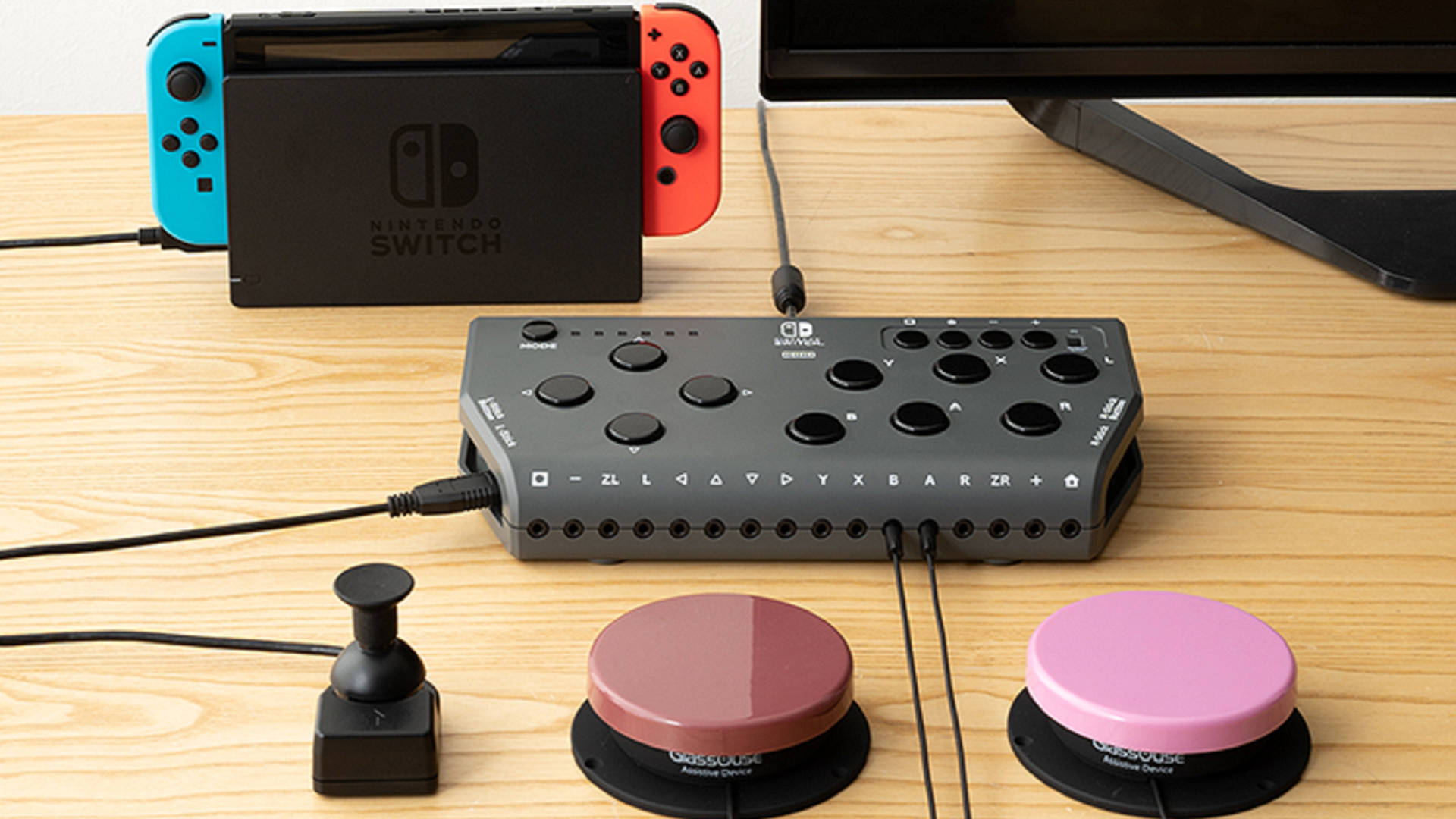
Hori Flex controller improves accessibility for disabled Nintendo Switch players

The Nintendo Switch has come under a lot of fire from disabled gamers for its lack of accessibility options, but Nintendo is slowly adding aids to help more people play its flagship console. This year has seen the release of software updates that allow for button remapping – which will help many players who can’t push in the joysticks – and a zoom function to aid partially-sighted gamers.

While the software updates are certainly an improvement, Nintendo still trails behind Sony and Microsoft in many other accessibility areas. Both rival companies have screen reading software to aid partially sighted and blind gamers, and Microsoft released the Xbox Adaptive Controller – compatible with any console or PC, its interface aims to make gaming accessible for all.

This interview with a visually-impaired Pokémon player on Eurogamer highlights a lot of the issues he faces while playing, but Nintendo is continuing to improve, slowly but surely. The officially licensed Hori Flex controller is designed to help players with all manner of disabilities play on the Switch and PC. According to a translation of the Hori website, the Flex controller is “specially developed and sold for those who cannot use a controller with a standard shape.”

As such, it is suggested that you don’t buy one other than for its standard use i.e. if you can’t use a regular controller. As you can see, the Hori Flex has an array of large buttons and links to your Switch or PC via USB. You can also connect your current joysticks and other buttons if they are more comfortable. The Flex controller is currently only available in Japan and costs around $230 USD (£180), however we expect it to release internationally in the future.

All the buttons can be remapped with software, and the whole controller can be mounted on a stand by ¼ inch screw – the standard size for most tripods etc. In a statement to Motherboard, Nintendo explained that their “software and hardware developers continue to evaluate different technologies to expand this accessibility,” committing to further accessibility improvements.

For the Flex, Hori worked with “rehabilitation professionals” to create the controller, which also supports “eye-gaze” eye tracking technology, although you’ll need a Windows PC, eye tracker, and video capture unit to utilise this.

This is an important step forward in Nintendo Switch accessibility, but there is always more to be done. However, it seems like many players will be able to dive into the best Switch RPGs or one of the many Switch multiplayer games where they couldn’t before – which is definitely something to celebrate.

Posted on Leave a comment

Six Great Game Development YouTube Channels

YouTube is an incredible resource for game developers, but sorting the gems out can be a challenge. Today we are going to highlight 6 excellent game development channels, especially if you are a Godot developer, as well as general game development guides, Blender, GameMaker and more.

AskGameDev

AskGameDev is a collection of game developers that set out to answer your questions about game development. They cover many of aspects of gamedev that are often not covered, such as how to run a Kickstarter, how to get or deal with a publisher, as well as several game development themed compilations. AskGameDev also have a website available here.

GDQuest

GDQuest are home to dozens of Godot tutorials, in fact Nathan from GDQuest is a member of the Godot documentation team. In addition to Godot coverage, GDQuest has tutorials on all kinds of FOSS software such a Blender and Krita. The GDQuest website is available here.

HeartBeast

HeartBeast started out as a GameMaker tutorial channel, of which there are dozens of high quality long form tutorial series. In more recent years, Heartbeast has been instead creating high quality multipart and stand-alone tutorials on Godot. HeartBeast also has a website available here.

BornCG

BornCG has been making high quality Blender YouTube tutorials on his channel created in 2008! In more recent years BornCG has been increasingly covering the Godot game engine, as well as creating modern Blender tutorials as well.

DevDuck

DevDuck is the newest channel on this list, less than two year old and already over 100K subscribers, an impressive feat! DevDuck is a professional developer that is documenting his indie game development experience on the side. He started off with Unity but switched to Godot and of course did videos explaining why and how.

KidsCanCode

KidsCanCode have the project mission to get kids started in coding as young as possible, often through the process of creating games. Early on they did mostly Python and PyGame tutorials but then switched to Godot in recent years. They also run the Godot Recipes on their site, a collection of snippets on how to accomplish specific tasks in Godot and GDScript.

You can learn more about all the above channels in the video below.

[youtube https://www.youtube.com/watch?v=iyBqcfRbt9s?feature=oembed&w=1500&h=844]
Posted on Leave a comment

Win a free copy of side-scrolling vehicular adventure, Far: Lone Sails!

There’s something kind of enchanting about side-scrollers, as characters travel along fixed paths towards unknown destinations, with every slide of the screen unveiling more of the world and its mysteries. It’s a formula that’s used to fantastic effect in indie games like Playdead’s Limbo and Inside, or even to some degree in Videocult’s Rainworld. But Far: Lone Sails adds its own twist to this famous formula, as you set sail on your landship and work to keep it running as you make the journey across a lonely, post-apocalyptic world.

If you look at our Far: Lone Sails review, you can see how much we enjoyed the game! So much, in fact, that we decided to partner with Mixtvision to give away some Android and iOS copies of the side-scrolling adventure.

So if hoisting up the sails, shoveling fuel into the engine, and watching the land roll by beneath you sounds like the easy life, be sure to enter the giveaway below for a chance to win yourself a copy on your platform of choice.

In order to enter the giveaway, all you have to do is choose your platform, and enter in the appropriate box. Please do have a glance at our terms and conditions first, though.

ios

Far: Lone Sails iOS giveaway

android

Far: Lone Sails Android giveaway

Alternately, if you can’t wait to play the game, you can find Far: Lone Sails on Google Play and the App Store. The game is also on Steam.

Posted on Leave a comment

Unreal Engine Free Content for November 2020

Every month for the last couple years Epic Games have given away several assets for Unreal Engine with today being no exception. While the assets are completely free, they are only free until the first Tuesday of December. Once “purchased” the assets are yours forever.

This months free assets include:

Permanently Free Additions:

Unfortunately there is no video yet as YouTube Studio for creators is currently down and nobody can upload or edit videos right now. Once YouTube errors are fixed we will upload a video.

Posted on Leave a comment

Mastering Animation by CRC Press Humble Bundle

There is another Humble Bundle of interest to game developers, the Mastering Animation by CRC Press bundle. This is a collection of e-books around the concept of animation, from traditional to digital, comics, manga and anime, as well as animation related subjects such as legal and writing. The bundle is organized into the following tiers:

1$

  • Dream Worlds: Production Design for Animation
  • Animate to Harmony: The Independent Animator’s Guide to Toon Boom
  • Voice Over for Animation
  • Layout and Composition for Animation
  • Frame by Frame Stop Motion
  • How to Make Animated Films

8$

  • Animation from Pencils to Pixels
  • Designing Sound for Animation
  • The Art of Fluid Animation
  • Hybrid Animation: Integrating 2D and 3D Assets
  • Reel Success: Creating Demo Reels and Animation Portfolios
  • Acting and Performance for Animations
  • Animated Life
  • Making Toons That Sell without Selling Out

15$

  • Writing for Animation, Comics and Games
  • Directing for Animation
  • Acting and Character Animation
  • Animation in China
  • The Pocket Lawyer for Comic Book Creators
  • Animation: From Concept to Production
  • Independent Animation
  • Comics for Film, Games and Animation
  • Japanese Visual Culture
  • Lighting for Animation

All books are provided in PDF, EPUB and PRC(?) formats. As with all Humble Bundles you can decide how the proceeds are allocated between Humble, the Publisher, charity and if you so choose (and thanks if you do!) to support GFS using this link. You can learn more about the bundle in the video below.

[youtube https://www.youtube.com/watch?v=ECULX_nPf6c?feature=oembed&w=1500&h=844]
Posted on Leave a comment

Explore haunted space ruins in EVE Echoes’ Halloween event

Grab your broomsticks and ready your cauldrons – Halloween may be over, but the spooky season is only just beginning for EVE Echoes. The mobile game is running a Halloween event, The Crimson Harvest, which sees players investigate themed Festive Anomalies which appear throughout the universe. Developer NetEase is also shifting module designs in this update thanks to player feedback, but most players will want to get their spook on in the limited-time mode.

While many games have finished their Halloween events, and many players are looking forward to Chr*stmas (it’s still too early to mention it in our house), Echoes is continuing the Halloween tradition for as long as possible. From October 31 to November 10, EVE Echoes players can stumble across Crimson Harvest Anomalies such as the Haunted Ruins and Carnival at Cemetery. It’s unclear exactly what these anomalies do, but finding out and exploring is part of the fun, right?

You’ll also be able to get your hands on Haunted Supply Boxes, which could hold Halloween-exclusive skins (some of which could be permanent) and new modules. Keep your eyes peeled for Haunted Supply Box III, as this will be the one that offers new storyline Modules and permanent Halloween Skins. The seven new modules will be available through regular methods from November 11, when the event ends.

There are also some Limited-Time Crimson Harvest skins available in the New Eden Store, which are available by any other means. There are also four new skin boxes, which offer discounts if you were after a few different options.

The skins themselves are pumpkin-inspired, as you can probably tell by the orange and black colours and the flame-like effect.

[youtube https://www.youtube.com/watch?v=OKXoMF3m6g8?modestbranding=1&rel=0&feature=oembed]

If Halloween isn’t your thing and you’re more interested in the module designs, the 7 new Electronic Warfare Modules are as follows: Interdiction Sphere Launcher, Warp Disruption Field Generator, Warp Scrambler, Sensor Dampening, Target Painter, Tracking Disruptor, and Guidance Disruptor. You can find the full details of what they offer on the EVE Echoes update blog.

If you’re just getting started – or want a refresher – here’s our guide to the best EVE Echoes ships and our tips for EVE Echoes mining. Of course, if you still need convincing whether or not to pick the game up, check out our review, where we said that it “succeeds in channeling the classic Eve experience, while also streamlining for new players.”

Posted on Leave a comment

Nomad Sculpt

If you’ve ever dreamed of doing 3D modelling on the go, today’s product Nomad Sculpt may be perfect for you. Nomad Sculpt is a 3D sculpting application designed from the ground up to be mobile first. It brings all the functionality you would expect from a modern 3D sculpting application like ZBrush, Mudbox or Blender but it runs on your Android or iOS mobile device!

Key features of Nomad Sculpt include:

  • Clay, Crease, Trim, Smooth, Mask and many other brushes
  • Stroke customization with falloff, alpha and other options
  • Matcap rendering or Physically Based Rendering
  • Vertex painting, with roughness/metalness control
  • Multiresolution sculpting
  • Voxel Uniform Remeshing, along with subtractive boolean
  • Dynamic Topology, to refine locally your mesh
  • Robust layers that supports topology change
  • Designed from the ground up for a mobile experience
  • Support pencil pressure (Apple Pencil, Samsung S Pen, etc)
  • OBJ, STL and glTF support

Nomad Sculpt is available on the App Store and the Android Store. It is $15 for the complete version, but there is a reasonably full functioning, export disabled trial version available. You can also see Nomad Sculpt in action in the hands-on review below.

[youtube https://www.youtube.com/watch?v=6xr_DyiIQ7g?feature=oembed&w=1500&h=844]
Posted on Leave a comment

Ultimate Fantasy Bundle Giveaway

We have teamed up with the folks at Infinity PBR to run a giveaway of the currently running Ultimate Fantasy Game Development Bundle. There are two ways to enter the bundle. You can either tweet a response to this thread on Twitter or you can leave a comment in the #contests thread on the GFS Discord server.

Even if you already have the bundle we have you covered as there is a bonus draw containing 5 additional asset packs that are not part of the bundle. Be sure to specify which bundle you are interested in entering for when you enter. On Monday we will randomly select two winners who will receive the highest tier of the Ultimate Fantasy bundle and one winner of the bonus bundle. Good luck!

You can learn more about the Fantasy Bundle here and learn more about the giveaway and see additional bundle assets in action in the video below.

[youtube https://www.youtube.com/watch?v=GskCed6DVpw?feature=oembed&w=1500&h=844]