Posted on Leave a comment

Unreal Engine Free Stuff For May 2019

Starting toward the end of 2018, Epic Games started giving away free developer content from the Unreal Engine marketplace, free for that month.  This May is no exception, with several new assets available for free during the month, as well as a couple more assets now available indefinitely free.

This Months assets include:

With the following assets free forever:

Be sure to “purchase” the assets from the marketplace before April 1, 2019 to get them for free.  If you are interested in a hands-on video with a particular asset, please let me know and I will see what I can do.

    [youtube https://www.youtube.com/watch?v=mCRQE3WxYPw&w=853&h=480]

GameDev News


Posted on Leave a comment

PixiJS v5 Released

The PixiJS HTML5 2D rendering library just had their first release in almost 2 years, with the release of PixiJS v5.  PixiJS is an open source, MIT licenses library available here on Github.

The v5 release experienced a great deal of internal refactoring to improve modularity and performance but also resulted in a 20% reduction in size compared to v4.  The API however stayed relatively uniform so migration shouldn’t be difficult, with a supporting migration guide available here.  The new version includes new sprite batching support that should have a pretty profound effect on drawing several different sprites.  The Graphics object also received a few new tricks such as now being cloneable, supporting holes, texture fills and more.

Perhaps the biggest new feature is the new mid level API that has been added, that Pixi itself builds on top of.  Describe in the announcement blog like such:

Ok so I saved the best till last as I think this isn’t far the coolest part of v5. The midlevel API. We created an API that basically abstracts as much of WebGL as possible but still keeping all the power, giving you guys the power to create awesome WebGL that is automatically optimised for you!

In fact all of v5 is built on top of this API. Expect a more detailed post and examples for this one soon.

Additionally, the community created an excellent new tool in the form of the browser based Pixi Playground, a complete editor and runtime environment for playing with Pixi applications.

[youtube https://www.youtube.com/watch?v=GKCFvcSyhP8&w=853&h=480]

GameDev News


Posted on Leave a comment

Cocos Creator 2.1.1 Released

When Cocos Creator 2 was released, a major new feature was the new 3D renderer under the hood.  The 2.1.1 release starts to take advantage of that new functionality with a new 3D scene editor, a game preview panel, new lighting and 3d primitive support and more.  If you are interested in learning Cocos Creator, be sure to check out our tutorial series available here.

Details of the release from the Cocos Creator forum:

Cocos Creator v2.1.1 released!

Since the release of Cocos Creator 2.1.0, we have received a lot of valuable suggestions from users. Based on previously announced plans, we will continue to speed up the iteration of the v2.1 series to implement user suggestions as quickly as possible. At the same time, in order to prevent these changes from affecting the stability of old projects, we only recommend upgrading projects with 3D requirements to v2.1. Other projects can continue to use v2.0, and wait until v2.2 is released before upgrading. This v2.1.1 upgrade mainly supports 3D scene editing, camera preview, lighting system, and also incorporates the latest 2.0.x changes.

What’s New

Support 3D scene editing

The Scene Editor allows you to switch to 3D editing mode with one click, making it easy to edit 3D objects, cameras, and lights. See the 3D Scenes document 4 for details.

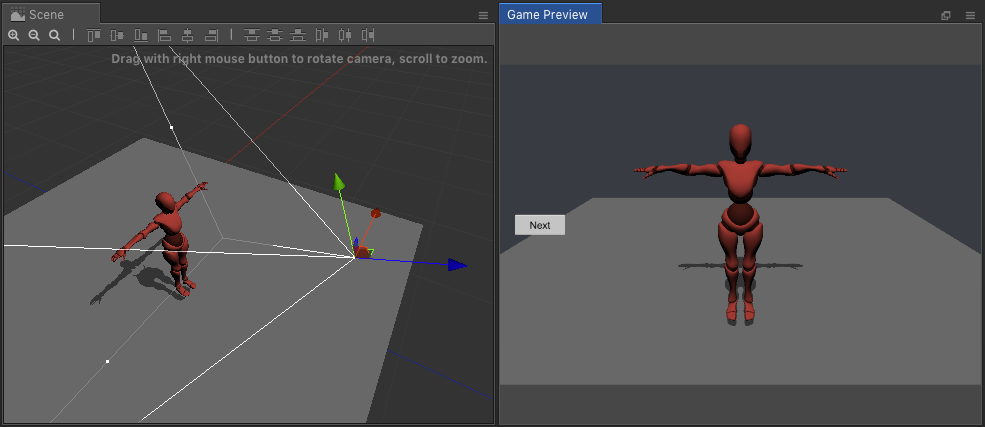
Add game preview panel

A separate preview panel has been added to visually preview the images seen by the camera during scene editing. Panel Open: Main Menu → Panel → Game Preview, the preview panel can be placed in a separate window or dragged into the main editor window.

s_4A04B2733C58C3785BF9DAB70F7114F68401A06E2E8478F24E9A8254F94C36DB_1553237527640_image

s_4A04B2733C58C3785BF9DAB70F7114F68401A06E2E8478F24E9A8254F94C36DB_1553237527640_image.png985×427 40.6 KB

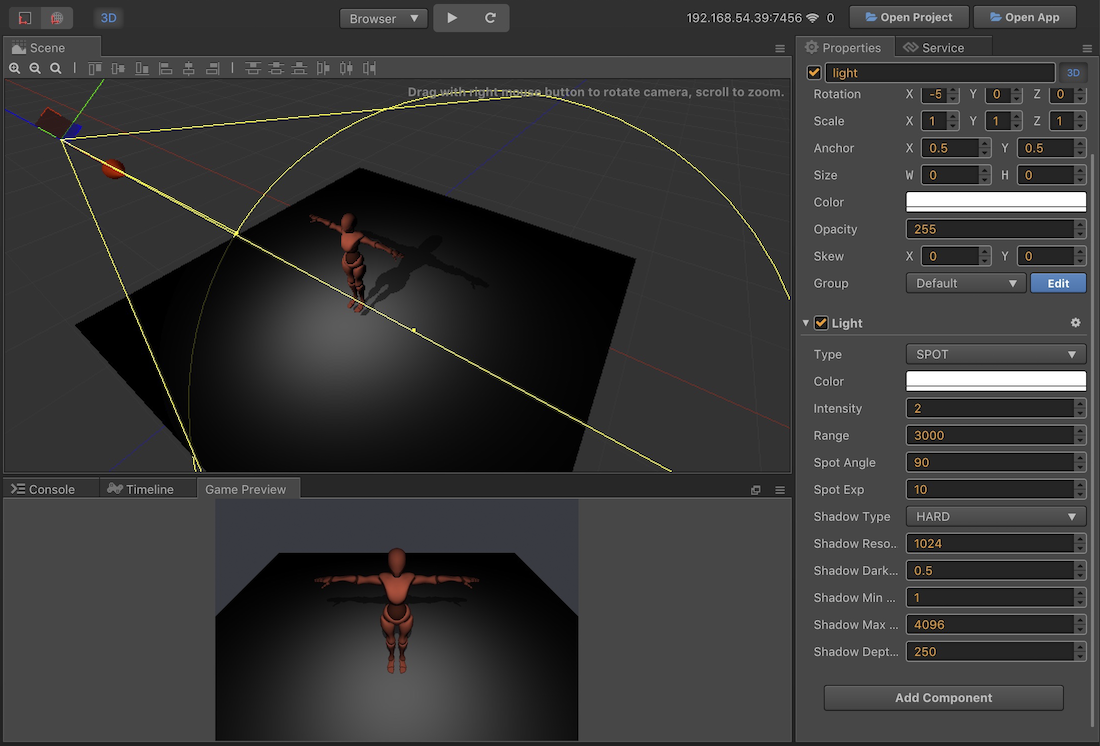
Add 3D lighting and shadows

A Light component has been added to lay out lights in the scene, and a shadow effect can be set in conjunction with MeshRenderer. See the Light Source Component Reference 2 documentation.

s_4A04B2733C58C3785BF9DAB70F7114F68401A06E2E8478F24E9A8254F94C36DB_1553235837568_image

s_4A04B2733C58C3785BF9DAB70F7114F68401A06E2E8478F24E9A8254F94C36DB_1553235837568_image.png1100×746 307 KB

Upgraded EditBox component

Now, developers can set the Text Label, Placeholder Label and Background nodes separately, making them more flexible, simple, and more in line with the component development. See the EditBox Component Reference documentation.

Add text shadow rendering component

A new LabelShadow component has been added to add a shadow effect to the Label component, similar to the LabelOutline usage. See the Label Component Reference documentation.

Support for dynamically creating 3D Primitive models

Added cc.primitive module to dynamically create 3D models at runtime, including: box, cone, cylinder, plane, etc. See the Basic 3D Objects documentation.

Integrated Material System (Beta)

Added support for material systems, allowing users to create Material and Effect (Shader) resource types. It should be noted that the current material system is mainly provided to the internal use of the engine and is only for developer preview. We plan to upgrade the material system in v2.1.2, however it will not be back-ported to this version.

Improved features

Editor improvements
  • Added shortcut Ctrl/Cmd + Shift + F to align the currently selected node to the perspective of the scene editor.

  • When you click in the scene editor, you can hold down Ctrl/Cmd for multiple selections at the same time.

  • Improve fault tolerance processing for custom engines to avoid editor startup failure

  • Improve the search performance of the resource manager under very large projects

  • Add menu File -> Open project in new window to support simultaneous opening of multiple projects on Mac

  • Hide the component’s enabled checkbox when the component does not define the enabled associated lifecycle function

  • Upgrade the TypeScript version to 3.3.3333

Engine improvements
  • Make cc.Vec3 compatible with related APIs of cc.Vec2

  • Improved Label positioning accuracy in the editor and on different browsers (thanks to “Dacheng Xiaopeng” for advice)

  • Optimization 3D skeletal animation performance and volume

  • The cc.macro.CLEANUP_IMAGE_CACHE flag is enabled by default on the native platform to reduce texture memory usage

  • Native platform automatically verifies the maximum supported texture size of the current device

  • Add WeChat Mini game XMLHttpRequest support for timeout event [#87]

  • Added cc.sys.HUAWEI_GAME enumeration to determine if it is currently Huawei’s fast game platform

  • Optimized Android 5 system’s WebView compatibility

  • Allow iOS browser to play automatically when VideoPlayer is muted

Bug Fixes

Editor Fix List
  • Fixed an issue where BuildResults.getNativeAssetPath might not get the texture path

  • Fixed removal animation editor error message caused by the Animation Clip being edited

  • Fixed an object already destroyed warning that appears when you repeatedly enter Prefab edit mode

Engine Repair List
  • Fixed an issue where enabledInHierarchy is always false when the component does not define onEnable

  • Fixed an issue where ToggleGroup is not fully disabled when the active node is false

  • Fix Label’s opacity is not working

  • Fix Slider’s anchor settings will affect clicks [#4163]

  • Fix Particle System after playing, hide the node and display the problem of residual particles [#4243] 1

  • Fixed a memory leak issue that could be caused by too many particles in the particle system [#4256]

  • Fix native platform resources Download, XMLHttpRequest, WebSocket, SocketIO possible crash after request [#1721] [#1716]

  • Fix native platform XMLHttpRequest may crash due to timeout [#1724]

  • Fix native platform loading via IPV6 under the telecom network (WeChat avatar) file may fail [[#1713]] (https://github.com/cocos-creator/cocos2d-x-lite/pull/1715)

  • Fix native platform OpenGL draw error #4017

  • Fix native platform Label there may be black border issues when rendering system text [#130]

  • Fixed an issue where the audio file on the Android platform could not be loaded when it was not in OBB[#1611]

  • Fixed an issue where the Android platform received a touch event before the engine initialization was completed could cause a crash [#1715]

  • Fix Windows platform window may report an error when minimizing restore [#129]

  • Fixed Windows platform error when opening window [#1732]

  • Fixed an issue where the volume setting to 0 is invalid on Browser

  • Fix 3D Project incompatibleWeChat game Open Data Domain issue

  • Fix 3D model bone penetration problem [#4188]

Removed

  • Removed the creation entry for the CoffeeScript script. CoffeeScript scripts can still be created manually, and we plan to remove full support for CoffeeScript in v3.0.

See the new 3D functionality in action in the video below.

[youtube https://www.youtube.com/watch?v=yzZUO8PdkrQ&w=853&h=480]

GameDev News


Posted on Leave a comment

Review: Zombicide: Tactics & Shotguns

Zombies are a bit like Heinz, in that they come in a variety of different types (and generally go well with jacket potatoes-ED). There are the classic slow-moving shamblers made famous by George A Romero. The fast-moving ones from the 28 Days series of films, and the mutated abominations of Resident Evil fame. There’s also sometimes toxic ones and fat ones, who, I guess, have no self-control when it comes to eating brains.

Inside the Zombicide physical box is an impressive total of 70 miniatures, which represent the spectrum of zombiekind in addition to the unfortunate survivors themselves. It is enough to put the fear of God into any self-respecting gamer, especially if you plan on painting them all. Thankfully, we digital gamers do not have to concern ourselves with such issues, leaving us free to concentrate on the business in hand, namely hacking our way through wave after wave of the restless undead.

Zombicide 1

Zombicide: Tactics & Shotguns isn’t a direct conversion of the boardgame. It has evolved from the multiplayer cooperative set-up into a campaign-driven single-player experience. The basics, however, remain the same; a group of survivors travel across the devastated city completing objectives and polishing off a few zombies along the way. The game explains the basics by handing the player control of Doug, an SMG touting ex-office worker. Doug is hungry; unfortunately, the only food worth foraging appears to be canned dog food. The zombie apocalypse means that beggars can’t be choosers but at least Doug will be sure of a lovely glossy coat and a healthy wet nose.

On each turn, every survivor will have three action points to spend. It takes a single action point to move to an adjacent space or room. If zombies hem you in then your movement options will be further limited. Other actions include picking up a new weapon or breaking down a locked door but be prepared for the possibility of a nasty surprise. Combat also requires the expenditure of action points. The survivor’s abilities, alongside the characteristics of the weapon, will determine the range, the number of attacks, accuracy and amount of damage inflicted. Another thing to bear in mind is the amount of noise that the weapon makes. The sound of a shotgun blast is obviously going to alert any nearby zombies and get them heading in your direction.

Zombicide 2

Most zombies will only have a single action point, which means that any survivors will only come under attack if they end their turn in a space occupied by the enemy. Be careful though because the fast zombies have extra action points and the survivors’ health points are strictly limited. The big difference between melee and ranged combat is that in close combat the survivor gets to select individual targets. Ranged combat usually results in the survivor, firing into an area without a specific target in mind. The problem is that each miss has a chance of hitting any unfortunate survivors that may also be in the same space. Every time that you defeat an enemy you will be awarded additional tins of pet food and the danger level increases. This means that more or tougher zombies are likely to spawn into play. It also means that your survivors may be able to trigger their skills, this may make them more effective in combat, allow them to travel further or permit them to heal wounded team members.

It’s a nice simple system that works really well and still requires some thought. Zombies may be stupid and predictable but they definitely have numbers on their side. You will want to try and keep your party together and stay on the move, otherwise you face being overwhelmed by hoards of the undead. The threat of friendly fire and the range of different enemies add some much needed variety. It is just a pity that the sound-alerting mechanic isn’t used to its full potential. There isn’t that much point in sneaking around when a few blasts from a shotgun gets the job done. Indeed, alerting enemies often makes things easier by drawing more cannon fodder into your sights. The line of sight system is instinctive, although when battling a mass of zombies, targeting an individual enemy can be rather hit or miss.

Zombicide 3

At the end of each level, cans of dog food can be used to upgrade the survivors or their weapons. As they advance, their abilities improve and they may learn new skills. Get to level five and you will have the option to equip a weapon in each hand. This is especially fun when you kit out a pair of the same weapon as you can use both simultaneously. The site of a dual machete-wielding roller-skating waitress is sure to strike fear into the unbeating heart of any self-respecting zombie.

The survivors themselves fall into one of four classes, each with their own preferred weapons and unique skills. Butchers inflict minor damage but hit a lot of targets; in contrast, assassins cause a lot of damage to only a few targets. Hunters have great long-range accuracy; finally, scouts are fearsome wielders of melee weapons. Some fellow survivors soon join Doug in his quest and there is also the option to use cash to purchase new members for your team. Although by no means essential, it is going to cost over double the price of the game itself to acquire them all which feels like a bit of a cynical cash grab.

Zombicide 4

The day-glo comic book graphics and raucous guitar-led backing track do a grand job of evoking 1980’s horror films. There are eight different zones, each of which has five stages. This means that in spite of the low difficulty curve, getting through to the end is still going to take a considerable amount of effort. It is a pity that a lot of environments just reuse the same graphics. It reinforces the repetitiveness of the missions, which usually require the player to reach specific points on the map or destroy a set number of zombies. Another minor niggle is the monotonous comments that the characters make; Yes, Doug, I know you need new shoes; you’ve told me one hundred times already.

The developers get a thumbs-up for producing a game that isn’t just a straight conversion of the board game. They have instead created a solo campaign that is a much better fit for mobile platforms. It is just a shame that the constraints of the board game appear to have prevented them from going even further by way of adding a little more variety to proceedings.

Posted on Leave a comment

Humble Python Books by O’Reilly Bundle

There is another Humble Bundle of interest to developers, especially those interested in learning or using the Python programming language.  The Humble Book Bundle: Python by O’Reilly is a collection of Python programming books from O’Reilly press, generally one of the best publishers out there.  As always the bundle is structured into tiers.  The current tiers are:

1$

  • Introducing Python
  • The Hitchhikers Guide to Python
  • Elegant SciPy
  • Natural Language Processing with Python

8$

  • Think Python
  • Think Bayes
  • Python Data Science Handbook
  • Thoughtful Machine Learning with Python

15$

  • Fluent Python
  • Web Scraping with Python
  • Test-Driven Development With Python
  • Flask Web Development
  • Twisted Networking Programming Essentials

You can decide how you funds are allocated, split between the publisher, Humble, this channel (thanks!) and charity, including Code For America and appropriately enough the Python Software Foundation.  The bundle can be had here and expires in 14 days (@May 12th/2019).

[youtube https://www.youtube.com/watch?v=v8qcyT9CT_w&w=853&h=480]

GameDev News


Posted on Leave a comment

What To Expect in Godot 3.2

Several weeks ago, Godot 3.1 finally shipped after a year of development.  Since then, several details and hints about what are coming in the 3.1 release have become available.  This post is gathering all of those details together in a single place.

There have been a few posts on the Godot website detailing 3.1 features:

In addition to these announced features, several more have been discussed on Twitter.

image

image

image

image

Now what’s not happening in Godot 3.2:

image

Godot 4.0 is a release much further down the road and will include the Vulkan renderer and other improvements.  For details on the 4.0 release check out this previous post.

Programming General


Posted on Leave a comment

The Weekender: Guns & Games Edition

We’re starting to get a bit inundated with interesting review projects again – we managed to cover off a few like Solar Settlers & Egypt: Old Kingdom this week, but there are more on the horizon and already out that we’ll try to keep on top off.

Generally it feels like it’s been a good month for releases, so hopefully it’s a trend that continues through to May.

Meanwhile, in mobile gaming…

Out Now

Zombicide: Tactics & Shotguns (iOS & Android) – Full Review Coming Soon!

Do you like board games? Do you like Zombies? Then it’s highly likely you’ve at least heard of, if not played, Zombicide. It’s been enjoying the fruits of several successive Kickstarters to release many seasons and spin-off physical games, and now it’s ready to take on digital platforms thanks to Asmodee Digital.

Tactics & Shotguns seems to have gone down the solitaire route for this game, with a 40 mission-long campaign that allows you to unlock up to four characters. It’s a shame, but then Zombicide’s co-op qualities could be considered fairly superficial, as there’s not as much about its design that demands more than one person run the team. Those looking for another way to play this game with friends via mobile devices will be disappointed, but if you need something to bide your time on a long-journey, this may fit the bill. The animation looks slick as least, and it seems to follow the rules quite closely.

There are also IAPs for additional scenarios/heroes.

[youtube https://www.youtube.com/watch?v=Ikiu0nG_TmY?controls=0]

Nomads of the Fallen Star (iOS & Android) – Full review coming soon!

Now this is something we can really sink our teeth into. This sci-fi fuelled cross between Mount & Blade & Battle Brothers seems like the perfect thing to whittle away those hours, from the same studio that brought us Star Nomad 2 a couple of years ago.

You are the leader of band of mercenaries/scavengers trying to eek out an existence in the harsh reality of a floundering colony, cut off from the rest of the galaxy. You’ve got to hire soldiers and do what needs to be done to survive, and reportedly there’s a very robust economic system that reacts to the player’s actions and decisions.

It seems like an excellent sandbox game for mobile, and we’ll bring you our full thoughts on the game as soon as we can.

[youtube https://www.youtube.com/watch?v=fGt-AEEP4m8?controls=0]

Mini Gal4Xy (iOS & Android) – Full review coming soon!

Jerome Bodin gave us the rather excellent Frost back in 2016, and now he’s finally returned to the mobile stage with an altogether different proposition. Mini Galaxy is a ‘light’ 4X strategy game that offers some good, clean 4X fun. The systems are simple, yet robust, and the world is colourful and engaging enough to see you through to victory.

Every galaxy you spawn is procedurally generated, and this is meant to be a more accessible distillation of the genre, although it should offer enough for veterans to scratch that itch while they’re on the move.

[youtube https://www.youtube.com/watch?v=02Rg5KiEn9A?controls=0]

The final game to catch our eye this week was The Monster Game, which is a card-based RPG that’s only on iOS but seemed interesting. There’s a danger it could be just like every other card/rpg game that’s released recently, but we’ll check it out when we can.

Updates

There’s not been many headline updates that we’ve seen, but Star Traders: Frontiers, Evolution: The Video Game and Stardew Valley have all had minor patches pushed out over the last week or so.

Last week will told you about the impending update for Star Traders involving carriers. At the time of writing, it hadn’t hit mobile yet, but in case you weren’t aware both iOS and Google Play versions of the game now have carriers, so enjoy!

Sales

As with updates, there’s nothing really that’s taken our fancy that stands-out – a couple of usual suspects are on sale again, but not at prices that are any better than what’s been done previously. If you see anything you feel should be added, let us know!

Enjoy your weekends!

Posted on Leave a comment

Unreal Engine 4.22.1 Released

Epic Games have released a hotfix version of Unreal Engine, the first since the release of Unreal 4.22.  This version is composed entirely of bug fixes.  For details of the new features that were added in the 4.22 release, be sure to check our earlier post or video here.

The complete list of fixes taken from the Unreal Engine forums:

Fixed! UE-66389 [CrashReport] UE4Editor_CoreUObject!CastLogError() [casts.cpp:11]
Fixed! UE-72732 [CrashReport] UE4Editor-Engine!USkeletalMesh::GetMappableNodeData(TArray<FName,FDefaultAllocator> &,TArray<FNodeItem,FDefaultAllocator> &) [SkeletalMesh.cpp:3104]
Fixed! UE-72731 [CrashReport] UE4Editor-Engine!UAnimSequence::BakeOutVirtualBoneTracks() [AnimSequence.cpp:2866]
Fixed! UE-72757 Audio: LibSoundFile is not included in binary
Fixed! UE-72698 Editor crashes when entering and exiting PIE multiple times
Fixed! UE-71864 Crash when loading statistics into Session Frontend Profiler.
Fixed! UE-72236 Pkginfo commandlet is crashing when running with -properties parameter or when specifying a file that doesn’t exist or can’t be loaded
Fixed! UE-72230 Cannot create a C++ project with Visual Studio 2019 in a source build – Failed to open selected source code accessor ‘Visual Studio’
Fixed! UE-72524 Live Coding console appears when invoking RunUAT from command line
Fixed! UE-72324 Live coding fails on machine with only Visual Studio Express installed
Fixed! UE-73027 Cannot interact with the scrollbar at the bottom of the Live Coding Console window
Fixed! UE-72487 UE4Editor modules file is not written to properly when packaging a plugin
Fixed! UE-72305 Prefer non-express versions of Visual Studio
Fixed! UE-72765 Errors making installed engine build using remote Mac
Fixed! UE-73075 UE4 source in binary build has lots of Intellisense squiggles
Fixed! UE-71031 UnrealHeaderTool is always executed if the UBT makefile is invalidated
Fixed! UE-72711 Navmesh tiles fail to generate
Fixed! UE-72559 Timelines in ActorBPs no longer function when packaged with Nativization
Fixed! UE-72424 [CrashReport] UE4Editor-BlueprintGraph!FBlueprintActionDatabase::Tick(float) [BlueprintActionDatabase.cpp:1165]
Fixed! UE-72110 Crash using Find Actor in Level Blueprint action while in PIE
Fixed! UE-72047 Move recent BP component optimization ensure() fix into 4.22.1 hotfix
Fixed! UE-72727 [CrashReport] UE4Editor-Kismet!DispatchCheckVerify<void,<lambda_c743deafb79ebecab857062cedb0f2a7> >(<lambda_c743deafb79ebecab857062cedb0f2a7> &&) [AssertionMacros.h:162]
Fixed! UE-73194 Struct does not appear to save changes after compiling and saving it resets to null
Fixed! UE-72316 Crash when duplicating multiple components at once
Fixed! UE-72252 [CrashReport] UE4Editor-Engine!ParallelForWithPreWork(int,TFunctionRef<void >,TFunctionRef<void >,bool) [ParallelFor.h:221]
Fixed! UE-72235 Crash recompiling blueprints with subobjects that are also blueprints
Fixed! UE-47471 Components tree is ending up with duplicate entries (same pointer added to the list view more than once), causing an assert
Fixed! UE-72357 Crash hovering mouse over text variable on blueprint breakpoint
Fixed! UE-73108 [CrashReport] UE4Editor-Kismet!SSCSEditor::AddNewComponent(UClass *,UObject *,bool,bool) [SSCSEditor.cpp:5121]
Fixed! UE-72605 Component names do not increment correctly when duplicating a component whose name ends with a number
Fixed! UE-72604 Duplicating a component can result in a broke component that generates a compile error
Fixed! UE-72366 Render on Media Output creates an assertions: Assertion failed: IsValid() [File:d:\perforce\release-4.22\engine\source\runtime\core\public\Templates/SharedPointer.h]
Fixed! UE-72334 AJA IO 4k plus card displays QUAD link 5-8 available as media output while this card does not support it
Fixed! UE-73037 Loading screen widgets no longer display if no movies are present
Fixed! UE-72816 BlackMagic Media Output crashes on Capture Media: UE4Editor_MediaIOCore!UMediaCapture::CacheOutputOptions() [d:\perforce\release-4.22\engine\plugins\media\mediaioframework\source\mediaiocore\private\mediacapture.cpp:264]
Fixed! UE-72984 Crash due to LAN beacon packet incompatibility in 4.22
Fixed! UE-71586 Unable to compile code projects from installed build on Linux
Fixed! UE-71873 Launch on Linux to HTML5 fails due to undefined symbol: tzname
Fixed! UE-71735 Crash Files aren’t being generated from debug crash with a Linux Cooked Server
Fixed! UE-71188 [ShooterGame] LogFileManager warning seen when launching packaged game
Fixed! UE-72278 FOCUS OUT Events Cause Hitch in the Editor
Fixed! UE-72949 Crash in FVulkanLinuxPlatform
Fixed! UE-72416 ActionRPG crashes when packaged for Linux
Fixed! UE-72446 Deployment server crashes in DeploymentServer.Program.ClientLoop
Fixed! UE-71899 Error on tvOS app start: Error excluding PersistentDownloadDir from backup
Fixed! UE-71919 tvOS banner and App thumbnail do not appear on device; errors during app upload to Apple
Fixed! UE-71886 FireFox Quantum 67.0b3 fails to launch on correctly
Fixed! UE-71977 Crash when changing Preview Rendering Level in ARPG.
Fixed! UE-72058 tvOS: Project Packaged with CloudKit Support Crashes on Launch Due to Malformed Value in the Entitlement
Fixed! UE-66627 Full Screen Native Resolution not supported on new iPad Pro 11-inch and iPad Pro 12.9 inch (3rd generation)
Fixed! UE-72638 iOS iCloud app fails to upload to App Store — entitlements that are not supported; value ‘*’
Fixed! UE-73067 iOS blueprint apps are named “UE4Game” regardless of project name when packaged from Mac
Fixed! UE-73066 iOS app icons appear blank on device for C++ projects packaged from Mac
Fixed! UE-73073 tvOS blueprint project names display incorrectly on device
Fixed! UE-72410 [CrashReport] UE4Editor-MetalRHI!FMetalStateCache::SetRenderTargetsInfo(FRHISetRenderTargetsInfo const&, FMetalQueryBuffer*, bool) [MetalStateCache.cpp:485]
Fixed! UE-72404 Translucent Elements of an Invisible StaticMesh are Visible If Hidden Shadow is Enabled
Fixed! UE-71877 Crash on Mac while packaging TM-Decals with Forward Shading enabled
Fixed! UE-71827 Mac and Linux RHI does not update in Editor information ProjectName panel
Fixed! UE-71706 Textures created for Static Mesh LODs during level LOD generation are incorrect
Fixed! UE-70628 Ensure: ReflectionCaptureBuffer.IsBound occurs when building texture streaming for the first time
Fixed! UE-70591 Toggling the Shader Complexity viewmode requires missing viewmode shaders to be compiled
Fixed! UE-70473 GitHub 5572 : C4800 raised by vs2019 preview3
Fixed! UE-72279 Paper2D Tilemap doesn’t render tiles correctly when more than one layer is added.
Fixed! UE-72184 Ensure when enabling Simple Collision and Material Highlight in the static mesh editor
Fixed! UE-72174 Sliced procedural mesh causes blocky unexpected shadows
Fixed! UE-72123 Assertion failed: !BatchElement.IndexBuffer || (BatchElement.IndexBuffer && BatchElement.IndexBuffer->IsInitialized() && BatchElement.IndexBuffer->IndexBufferRHI)
Fixed! UE-72116 Assertion failed: !Elements[ElementIndex].PrimitiveUniformBuffer in GeometryCollectionSceneProxy
Fixed! UE-72052 Editor Crashes after enabling TemporalAA Upsampling with lower Screen Percentages – Referencing PostProcessTemporalAA.cpp Line: 799
Fixed! UE-72050 Shaders Appear to have Less Complexity
Fixed! UE-72893 Creating a VolumeTexture from an asset source not in RGBA8 crashes the engine
Fixed! UE-72724 Move HLR race condition fix to 4.22.1
Fixed! UE-72723 [CrashReport] UE4Editor-MetalRHI!FMetalRHICommandContext::RHISetShaderUniformBuffer(FRHIVertexShader*, unsigned int, FRHIUniformBuffer*) [MetalCommands.cpp:524]
Fixed! UE-72679 Shadows are Heavily Aliased with PCSS Enabled
Fixed! UE-72650 Editor crashes when connecting Eye Adaptation to Base Color
Fixed! UE-67825 TM-ShaderModels -game running about 20 FPS
Fixed! UE-70514 [CrashReport] UE4Editor-D3D11RHI!VerifyD3D11Result(long,char const *,char const *,unsigned int,ID3D11Device *) [D3D11Util.cpp:249] – FD3D11DynamicRHI::RHICreateStructuredBuffer
Fixed! UE-60339 [CrashReport] UE4Editor_D3D11RHI!FD3D11DynamicRHI::RHICreateUniformBuffer() [d3d11uniformbuffer.cpp:218]
Fixed! UE-72440 Assert When Changing Scalability Levels
Fixed! UE-73115 Denoisers are not reprojecting history correctly with dedicated velocity pass.
Fixed! UE-72833 Assertion failed when attempting Android/HTML5 launch on of TM-ShaderModels referencing OpenGLUniformBuffer.cpp:746
Fixed! UE-71643 [CrashReporter] UE4Editor-Engine!FMaterialRenderProxy::EvaluateUniformExpressions(FUniformExpressionCache &,FMaterialRenderContext const &,FRHICommandList *) [MaterialShared.cpp:2039]
Fixed! UE-73090 [CrashReport] UE4Editor-Renderer!FMaterialShader::VerifyExpressionAndShaderMaps(FMaterialRenderProxy const *,FMaterial const &,FUniformExpressionCache const *) [ShaderBaseClasses.cpp:165]
Fixed! UE-71514 AMD Vega 64 – Editor crash running with -vulkan
Fixed! UE-71361 EngineTest: Screenshot ‘LODCurveLinkingTest1’ test failed, Screnshots were different!
Fixed! UE-73141 Assertion failed when attempting Lumin launch on TM-ShaderModels, referencing VulkanUniformBuffer.cpp
Fixed! UE-72356 Changing particle system template via Blueprints crashes Editor and packaged game
Fixed! UE-72431 Crash in Niagara SetExecutionState
Fixed! UE-72970 Correct Niagara’s “collision” module’s metadata
Fixed! UE-71662 [CrashReport] UE4Editor-D3D12RHI!FD3D12RayTracingDescriptorCache::GetDescriptorTableBaseIndex(D3D12_CPU_DESCRIPTOR_HANDLE const *,unsigned int,D3D12_DESCRIPTOR_HEAP_TYPE) [D3D12RayTracing.cpp:521]
Fixed! UE-72133 Some alpha-masked materials are not rendered correctly in Path Tracing view mode
Fixed! UE-72903 IES profiles are not working in Ray Tracing reflections nor translucency
Fixed! UE-72837 StochasticRectLight does not respect Light “samples per pixel” control
Fixed! UE-72720 Enable two sided geometry by default for ray tracing shadows
Fixed! UE-72619 Computation on how many view descriptors to allocate for ray tracing resource descriptor heaps is not accurate enough.
Fixed! UE-72620 Wrong composition between RT reflection and cubemap/sky when pre-exposition is enabled.
Fixed! UE-72613 The Path tracer is using invalid ray flags
Fixed! UE-72759 PrepareRayTracingShadows is missing some denoiser requirements
Fixed! UE-72623 Added basic resource usage stats for ray tracing
Fixed! UE-72621 Path tracing invalidation buffer issues
Fixed! UE-72693 Path tracing pure specular brdf renders black
Fixed! UE-71313 GitHub 5610 : Ansel photography: raytracing boosts for ‘high quality’ mode (4.22-ansel53)
Fixed! UE-72521 Compile fixes when enabling VULKAN_ENABLE_DUMP_LAYER
Fixed! UE-71894 Crash opening TM-ShaderModels with Intel’s RHI Thread changes: D3D device being lost.
Fixed! UE-71262 Vulkan’s RHIPushEvent/PopEvent allocate heap memory even when the event is unused
Fixed! UE-72118 [CrashReport] UE4Editor-D3D12RHI!D3D12RHI::FD3DGPUProfiler::UnregisterCommandList(GFSDK_Aftermath_ContextHandle__ *) [D3D12Stats.cpp:383]
Fixed! UE-72983 stat GPU not working on D3D12
Fixed! UE-70143 [CrashReport] UE4Editor-Core!FDebug::CheckVerifyFailedImpl(char const *,char const *,int,wchar_t const *,…) [AssertionMacros.cpp:418]
Fixed! UE-69956 Crash occurs while simulating blueprint after triggering a breakpoint and clicking Step Over
Fixed! UE-71291 Assertion failed in DX12 RHI after instancing actors
Fixed! UE-72471 Crash trying to play audio when no audio asset
Fixed! UE-72428 Niagara: Losing focus when editor is open
Fixed! UE-72362 GitHub 5681 : Fix command line sequence render
Fixed! UE-72198 CLONE – Sequencer Batch Rendering cannot output multiple render passes in CLI
Fixed! UE-72197 Infinite sections when upgrading past 4.19 can be non-infinite
Fixed! UE-72097 Entering a text value in the Properties Context Menu closes the context window
Fixed! UE-72862 Sequencer set_interpolation_mode erroneously outputs an error
Fixed! UE-72675 Flattening a weighted tangent causes the tangent handle to go outside of playback range
Fixed! UE-73000 Crash after Undo and garbage collection on sequencer track
Fixed! UE-72417 [CrashReport] UE4Editor-Blutility!FBlutilityModule::OnMapChanged(UWorld *,EMapChangeType) [BlutilityModule.cpp:150]
Fixed! UE-72240 Port Reduction fixes to 4.22.1
Fixed! UE-72239 Port HLOD fixes to 4.22.1
Fixed! UE-68121 Ensure deleting StarterContent folder while having StarterMap open
Fixed! UE-67607 Crash when deleting map that is open in the level editor ([CrashReport] UE4Editor_Engine!AActor::IncrementalRegisterComponents() [actor.cpp:4173])
Fixed! UE-72863 [ActionRPG] Crash when Selecting Vulkan Targeted RHI for Windows
Fixed! UE-73150 Crash while holding a window Tab during Auto Save
Fixed! UE-72507 Crash occurs when adding an array element to Landscape Materials Override
Fixed! UE-59256 Foliage: when applying a scale to either painted instance or spawned from a procedural volume the LOD do not take it into consideration
Fixed! UE-72338 Literal text values on BP function return nodes aren’t gathered for localization
Fixed! UE-72314 Unable to save Blueprint Function Library if it references a string table entry
Fixed! UE-72205 Creating a new material instance and exposing lightmass settings causes crash
Fixed! UE-72853 Sequential Level Loading in Python causes Crash
Fixed! UE-71865 UMG Slider continues to move beyond the slider’s limits on short tracks
Fixed! UE-72729 [CrashReport] UE4Editor-Engine!ULevel::IsCurrentLevel() [Level.cpp:2096]
Fixed! UE-72183 Exeption or Freeze when disabling Audio Tracks while GPU Hardware Acceleration is activated
Fixed! UE-72511 Cooked project assert crash on exit with Oculus splash screens
Fixed! UE-71104 SteamVR Stereo layers are using incorrect orientation conversion
Fixed! UE-71034 Stereo layer appears to move opposite the HMD when using Vive
Fixed! UE-73022 Crash entering VR Preview while using a Stereo Layer – Assertion failed: XRCamera.IsValid() in SteamVRStereoLayers.cpp
Fixed! UE-72717 FParallelMeshDrawCommandPass::DispatchPassSetup causes out-of-bounds read
Fixed! UE-72648 Disable Oculus Audio on Android
Fixed! UE-70061 Integrate new Open XR API plugin for 4.22.1
Fixed! UE-72026 steamVR: Crash exiting through steamVR overlay with stereo layers enabled
Fixed! UE-73006 OpenXR ensure occurs when opening a project with OpenXR plugin enabled
Fixed! UE-73011 Packaging fails with OpenXR plugin enabled
Fixed! UE-71909 Missing receipt error packaging blueprint projects with ARCore plugin enabled
Fixed! UE-72406 Audio Capture Timecode Provider asserts if no source device can be found.

GameDev News


Posted on Leave a comment

Humble Full-Stack Web Development Bundle

The folks over at Humble are running another bundle of interest to developers, especially those working on web games.  They are running the Humble Full-Stack Web Development Bundle, a collection of courses from Zenva.  The courses cover the gamut of web development, both on the front end as well as back end systems and it includes a couple courses specific to developing games.  As always the Humble Bundle is organized into tiers, buy a higher tier and you get all the lower tiers included.  The contents of this bundle include:

1$ Tier

  • Intro to Bootstrap
  • Intro to Next.js
  • Bite-Sized HTML
  • Bite-Sized CSS
  • Bite-Sized JavaScript

19$ Tier

  • Create Interactive Pages with JavaScript and the DOM API
  • Advanced JavaScript and ES6
  • Express for Beginners
  • TypeScript for Beginners
  • Bite-Sized jQuery
  • Bite-Sized HTML5 Game Development
  • The Complete Responsive Web Design Course
  • Learning Angular by Creating a Web Application

25$ Tier

  • Responsive Admin Pages with Semantic UI
  • Node.js for Beginners
  • MongoDB for Beginners
  • Server-Side Rendered Webapps with Node.js, Express and MongoDB
  • Create REST APIs with Express and MongoDB
  • Build Web Applications with React
  • Intermediate React and Redux
  • Introduction to GraphQL
  • Git and GitHub Version Control and Collaboration
  • AWS Deployment for Node.js Applications
  • Azure Deployment for Node.js Applications
  • Project Based Next.js Games Website

As with all Humble Bundles, you get to decide how your money is allocated, between the creator, Humble, charity (the World Wildlife Foundation or The V Foundation are featured this bundle)  or using this link even supporting GFS (thanks!).  Check out the video below to see how the bundle works, how to redeem your code and hands-on with a sample lesson from the courses.

[youtube https://www.youtube.com/watch?v=2Br9txXdUwo&w=853&h=480]

GameDev News


Posted on Leave a comment

Review: SFD: ROGUE

Sigma Finite Dungeon is a difficult game to hate, if you have any affinity for tactical turn-based rpgs. As a focused expression of mechanics, it’s a no-frills dose of gridded goodness. As literally anything else – something visually impressive or narratively curious – it fails.

Part of the initial disconnect in my first several runs was just getting over the fact that there was no story. TRPGs are well known for them, and some of the best are often hoisted among some of the best video game stories ever told. That there really was nothing here but a basic “kill the guy at the end of the dungeon” trick felt weird. You definitely get over it, but not before reminiscing over the Final Fantasy Tactics and Ogre Battles of yesteryear.

SFD1

There is a certain brilliance in stripping the genre down to its basics. As the best roguelikes are want to do, you start to gain a real appreciation for the core pillars of the genre’s they help deconstruct. TRPGs, even with rousing narratives, tend to be very systems-forward engagements, so I was surprised to find that they could even be isolated and manipulated the way they are in SFD.

Starting with a hero character with its own special class, you’re tasked with delving through eight floors of procedurally-generated dungeon in order to slay the dark elven god at the very bottom. On your way, you will hire allies, collect weapons and armor, fight various types of enemies, and try not to die. If you, the hero, is killed in battle, then the game is over.

None of this sounds all that new, but every system you interact with is both completely transparent and almost fully customizable or interactable. All of the six classes of characters you’ll run into can be upgraded into higher, more specialized forms. There are no gear restrictions to each class, but the sorts of special abilities you’ll learn while using certain weapons will be limited. Sometimes, it’s not a terrible strategy to deck out one character in heavy armor and a shield, while giving the rest of the squad bows to attack monsters from a distance. It encourages you to try something weird to fit a playstyle, or to discover a whole new one.

SFD6

For all of its freedom, it could be more forthcoming as far as guidance and tutorialization. There are a set of screens that point out important HUD and menu options that serve as a help guide, but most of the nitty gritty you’ll learn by doing. As a game reliant on replaying it a bunch to learn how it ticks, there’s still a limit to what you should know going in and have to learn on the fly. And even speaking to what they do outline, I wished SFD found a more engaging way to teach you the ropes, instead of sending you the equivalent of PDF files to study yourself.

How characters are geared largely determines the abilities they can learn by leveling up, but for the main hero, you can find many opportunities to teach him things he wouldn’t have normal access to, even further diversifying your team’s capabilities. This doesn’t extend to your hirelings, which is a bummer. You buy their attendance from one of the assortment of shops you may find on your journey, where they are populated at random. You’ll have a hard time having back to back runs with identical team composition, which is par for the rogue-like course.

SFD5

Navigating any giving dungeon floor involves a lot of tapping. You tap on the floor. You tap on crates. You tap on lanterns. Exploration is very mind numbing, as you spend much of the time just touching stuff and hoping gold falls out. The randomized rooms don’t even bother making much of a labyrinth to navigate. Rooms are often full of objects that look like someone reached into a bag and just tossed whatever was in their hands at it. I found myself wishing there was no exploration at all. If 70% of the rooms are going to just be empty, why even let me aimlessly tap around them?

The ones that aren’t empty are full of monsters. This is where the real action happens, and where the game most resembles every other member of the genre. Characters all have movement ranges (in squares) determined by their class. There are action points, magic points, attack templates determined by weapon, etc. The things this game does like all the others isn’t the interesting part. It’s the goofy stuff SFD lets you do outside of it that’s cool.

For me this usually starts and ends with the push mechanic. Any character and shove moveable objects or units into squares or obstacles next to them. If I want a character who would otherwise be a square away from range on an enemy to get in close, I might have the previous guy in line push them. If I want to hit an enemy on the other side of a friendly without risking full weapon damage on them, I push my buddy into him. Push monsters into spike traps, or on buttons that activate flame traps on their own friends. Push crates into unwitting skeletons and watch them explode. I can’t tell you how much mileage I got out of such a little mechanic.

SFD7

This is mostly to do with how so much of the map can interact with each other. In small ways, of course, but all the small ways equal a menu of big ways that make every battle a tactical smorgasbord. SFD doesn’t have unlockable secrets that change the gameplay or add options to some sort of meta tally like other roguelikes – these little encounters are the reason you re-roll and start again after an untimely death.

That said, the replayability of SFD suffers because of its severe lack of goals to reach outside of the main line. As roguelikes have evolved over the years, they’ve all found ways to keep you playing that don’t involve just beating the game. It’s disappointing to see SFD not heed this pattern, and it might be hard to see anyone staying engaged after finally beating the last floor.

There are some elements of other tactics games that are whole missing from this one, as well. Backstabbing is a thing, but that’s one of the few ways to gain any positional advantage over the enemy. There’s no elevation or flanks to use to your advantage. Nor is there cover options to mitigate ranged attacks. The numbers and chances to hit on your profile are, more often than not, the only sort of damage you’ll do.

SFD3

People won’t be sharing screen shots of the game either. As the hand drawn sprites are individually cool, the sum-of-their-parts areas they create are visually bland. The menus are basic and ugly. Character sprites are pretty one note no matter what gear you deck them out in. Monster sprites, on the other hand, look great and are easily the best visual elements in SFD.

As a whole package, Sigma Finite Dungeon feels like an illuminating, if unfinished, experiment. There is a very good set of basic tactical elements that make playing the game a good time. I just wish there was more here that would keep me playing for a long time, or a presentation that didn’t make me feel like I was QCing the thing instead of playing it.