Posted on Leave a comment

Poll: Box Art Brawl – Duel: Pokémon Stadium

Pokémon Stadium - Box Art Brawl
Image: Nintendo Life

It’s time for another clash of cover art as we dive into this week’s edition of Box Art Brawl!

Last time things got NESsy, as we pitted three different cover designs for the original The Legend of Zelda against each other and oh boy was it a close one. The classic gold North American / European art just sealed the victory with 36% of the vote, while the Japanese Famicom and FDS releases followed closely behind on 33% and 31% respectively.

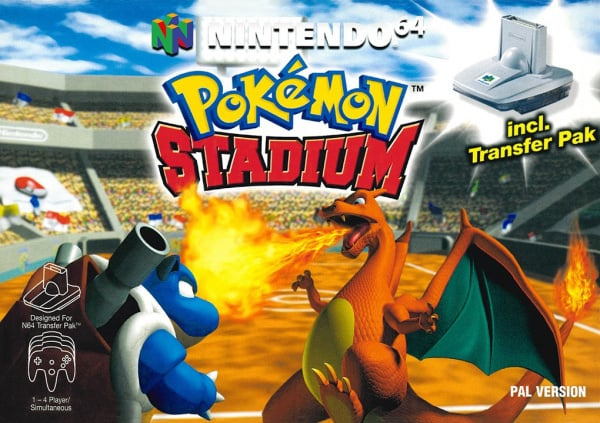
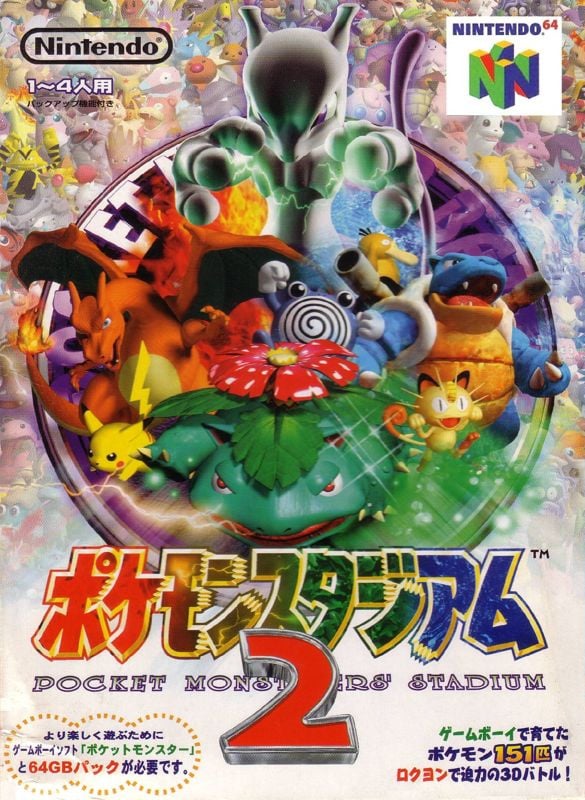
After a week of Pokémon news (or lack of it) this week, we are matching up two regional covers for the Nintendo 64’s Pokémon Stadium. This was technically the second entry in the series for Japan after the original never received a global release, but 1999’s title was the first time that Western audiences got their hands on a different type of ‘mon mash-up.

Europe and North America opted for near-identical designs on this one, so we have combined them together to face off against the very different Japanese cover. Let’s get this duel on the road…

Be sure to cast your votes in the poll below; but first, let’s check out the box art designs themselves.

Europe / North America

Pokémon Stadium - NA/EU
Image: Nintendo

The European and North American cover might not match up to the sprite visuals that we are used to today, but there is no denying that this design shows you everything that you need to know about the game. Charizard and Blastoise face off in the foreground (note the absence of all trainers) while a packed arena stretches out behind them. It’s got Pokémon and it’s got a stadium — what more do you need?

Japan

Pokémon Stadium - JP
Image: Nintendo

The Japanese cover, on the other hand, takes a very different approach. As we noted, this was the second game in the series for Japan, hence the large “2” on the logo, but numbering is perhaps the least-significant change here. Gone are the images of the stadium itself and indeed the fighting, replaced by way more Pokémon taking centre stage. Aside from Pikachu, Venusaur, Mewtwo and co. in the central image, the background is absolutely swimming in images of the full 151 ‘mon that appear in the game in some form.


Thanks for voting! We’ll see you next time for another round of the Box Art Brawl.

Posted on Leave a comment

New Pokémon Scarlet & Violet DLC Trailer Reveals Past-Gen Starters & Much More

Update [Sun 13th Aug, 2023 10:40 BST]:

As promised, we’ve got some Pokémon Scarlet and Violet DLC news at the closing ceremony of the 2023 World Championships. It’s focused on the second DLC for The Hidden Treasure of Area Zero, The Indigo Disk. Apart from the return of past-generation starters, here’s a bit else about what’s featured (via Serebii.net):

– A new move has been revealed, Psycic Noise which prevents the target healing
– The move Upper Hand strikes before a target’s priority move
– Raging Bolt is Electric/Dragon-type. It has the move Thundercalp that is a priority move
– Iron Crown is Steel/Psychic-type. It has the move Tachyon Cutter which hits twice in a row
– A new element of Terastallisation featuring all 18 types has also been teased

One other thing towards the end is the appearance of Shaymin in a slide focused on Pokémon HOME:

Pokémon Scarlet and Violet

It’s also been confirmed the 2024 World Championships will be taking place in Honolulu, Hawaii.


Original [Fri 11th Aug, 2023 08:15 BST]:

Although we’ve already had a massive dose of Pokémon news this week, it seems there’s more on the way. The Pokémon Company reportedly has some news to share at the Pokémon 2023 World Championships this weekend.

According to Serebii.net, fans can look forward to some news for Pokémon Scarlet & Violet as well as the Pokémon Trading Card Game at the end of the event’s closing ceremony, which takes place this Sunday on 13th August.

The same source has shared a seperate update on social media, mentioning how there will apparently be even more news about the upcoming DLC ‘The Hidden Treasure of Area Zero‘ shared later this month on 22nd August.

At last year’s 2022 event, The Pokémon Company president Tsunekazu Ishihara shared a brand new “competitive play” video for Scarlet and Violet. This also included the reveal of the Dragon/Normal-type Cyclizar. When we hear more, we’ll let you know. You can catch up on everything about the upcoming DLC in our guide.

What else would you like to see announced for Scarlet and Violet? What do you think these teasers could be for? Leave your thoughts below.

Posted on Leave a comment

Super Mario Bros. Live-Action Movie Getting 4K Anniversary Screening (Japan)

Super Mario Bros. Movie
Image: via IMDB / Buena Vista Pictures

Long before Nintendo and Illumination’s record-breaking Super Mario Bros. animated movie, there was the infamous live-action film starring Bob Hoskins and John Leguizamo, which has since gone on to become a cult hit.

Now, to celebrate this movie’s 30th anniversary on 15th September 2023, a 4K theatrical re-release of Super Mario Bros. will be aired across cinemas in Japan. Here’s a look at the promotional poster for this special re-release:

Super Mario Bros. Movie
Image: via Oricon News

In Japan, this movie was known as Super Mario: Goddess of the Demon Empire. If you are curious to revisit this live-action version yourself to celebrate 30 years, you can always check it out via the digital, DVD and Blu-ray release.

If we hear anything about an international screening, we’ll be sure to let you know. Otherwise, you can always settle with Illumination’s animated movie, which has now pulled in over 168 million viewers at the box office.

Posted on Leave a comment

Bethesda Celebrates QuakeCon 2023 With Free In-Game Bundle

Get some goodies for Doom Eternal & more

DOOM Eternal

QuakeCon 2023 is back this year and to kick things off a remaster of id Software’s 1997 first-person shooter classic Quake II was shadow dropped on the Switch eShop and multiple other platforms.

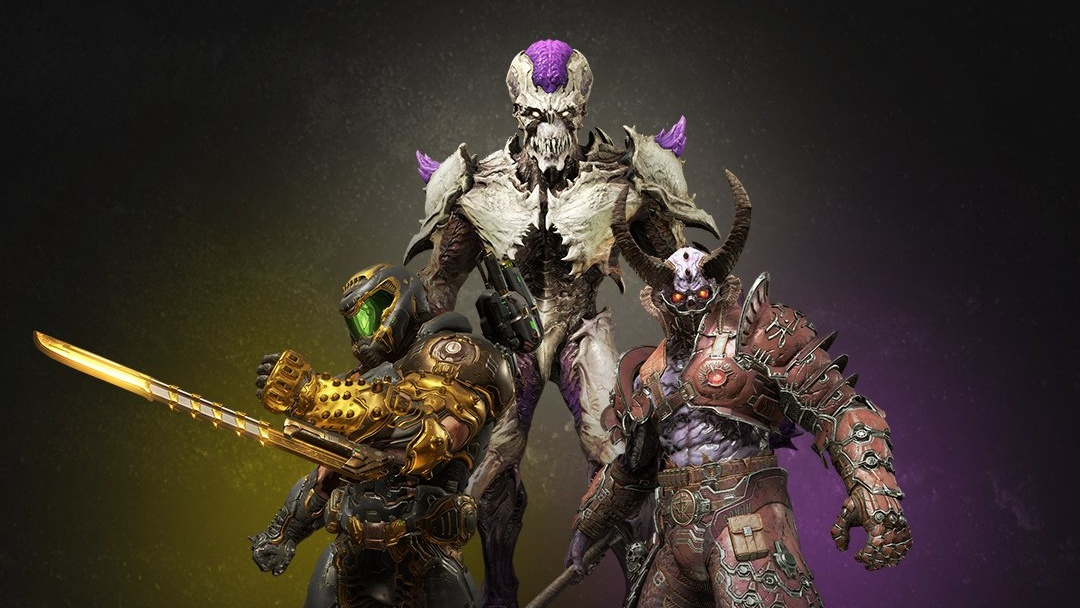
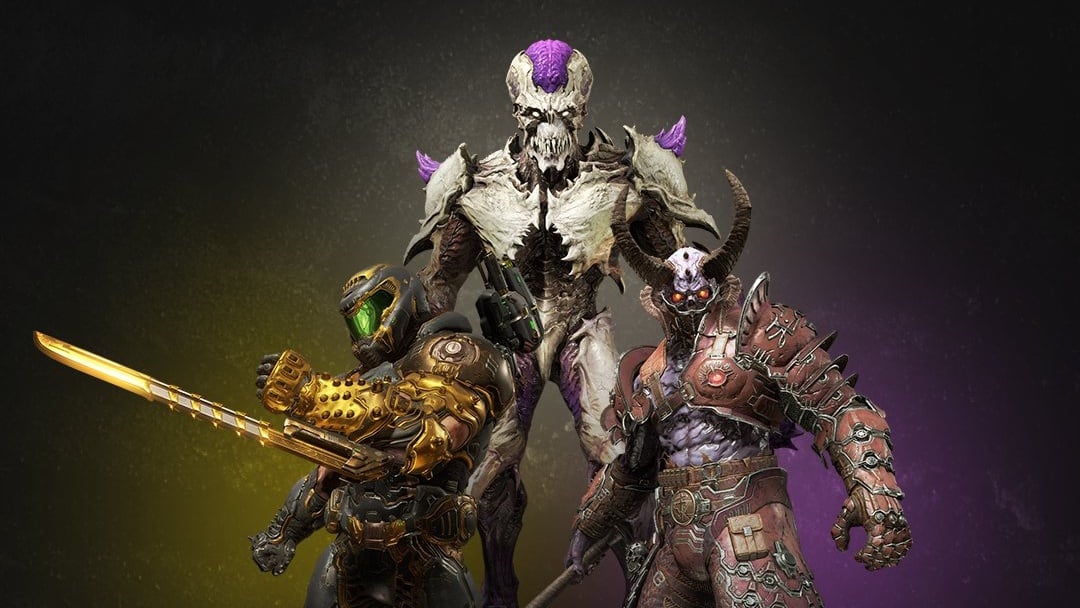
If this wasn’t already enough, Bethesda is currently offering a “free in-game bundle” when fans log in or create an account and opt into email communications. When you’ve done that, you can then select the “claim now” button to unlock the rewards in a number of games. Here’s what’s up for grabs:

DOOM Eternal:
– Lux Slayer Special Edition Set
– Majestic Archvile Special Edition Set
– Nightmare Marauder Special Edition Set

Wolfenstein: Youngblood:
– Legacy Pack

Rage 2:
– Golden Weapon Bundle
– Doombringer Bundle
– Apocalypse Weapon Bundle

Along with this, there’s also a QuakeCon 2023 sale currently taking place on the Switch eShop. You can check it out in our previous coverage here on Nintendo Life. Be sure to also take a look at our Quake II remaster review while you’re at it!

Are you celebrating QuakeCon this weekend? Have you tried out Quake II on the Switch yet? Leave a comment below.

[source freebundle.bethesda.net]

Posted on Leave a comment

Daily deals Aug. 12: $150 off M2 Mac mini, $300 off 49-inch Samsung Odyssey G9 OLED display, more

Get $150 off an open-box M2 Mac mini

Today’s top deals include saving $200 off an Arlo Essential Spotlight camera four-pack. 30% off floor care, $150 off a Corsair Xeneon 27-inch OLED monitor, and more.

The AppleInsider editorial team scours the web for unbeatable deals at ecommerce stores to develop a list of amazing bargains on popular tech products, including discounts on Apple products, TVs, accessories, and other gadgets. We share the hottest deals daily to help you get more bang for your buck.

There are plenty of additional bargains going on, knocking double and triple digits off Mac Studio hardware, software, iPads and more. Here’s a sampling of some of the deals, with hundreds of items on sale in our Apple Price Guide.

Posted on Leave a comment

Measure Execution Time with timeit() in Python

5/5 – (1 vote)

Understanding Timeit in Python

The timeit module is a tool in the Python standard library, designed to measure the execution time of small code snippets. It makes it simple for developers to analyze the performance of their code, allowing them to find areas for optimization.

⏱ The timeit module averages out various factors that affect the execution time, such as the system load and fluctuations in CPU performance. By running the code snippet multiple times and calculating an average execution time, it provides a more reliable measure of your code’s performance.

To get started using timeit, simply import the module and use the timeit() method. This method accepts a code snippet as a string and measures its execution time. Optionally, you can also pass the number parameter to specify how many times the code snippet should be executed.

Here’s a quick example:

import timeit code_snippet = '''
def example_function(): return sum(range(10)) example_function() ''' execution_time = timeit.timeit(code_snippet, number=1000)
print(f"Execution time: {execution_time:.6f} seconds")

Sometimes, you might want to evaluate a code snippet that requires additional imports or setup code. For this purpose, the timeit() method accepts a setup parameter where you can provide any necessary preparation code.

For instance, if we adjust the previous example to include a required import:

import timeit code_snippet = '''
def example_function(): return sum(range(10)) example_function() ''' setup_code = "import math" execution_time = timeit.timeit(code_snippet, setup=setup_code, number=1000)
print(f"Execution time: {execution_time:.6f} seconds")

Keep in mind that timeit is primarily intended for small code snippets and may not be suitable for benchmarking large-scale applications.

Measuring Execution Time

The primary method of measuring execution time with timeit is the timeit() function. This method runs the provided code repeatedly and returns the total time taken. By default, it repeats the code one million times! Be careful when measuring time-consuming code, as it may take a considerable duration.

import timeit code_to_test = '''
example_function() ''' elapsed_time = timeit.timeit(code_to_test, number=1000)
print(f'Elapsed time: {elapsed_time} seconds')

When using the timeit() method, the setup time is excluded from execution time. This way, the measurement is more accurate and focuses on the evaluated code’s performance, without including the time taken to configure the testing environment.

Another useful method in the timeit module is repeat(), which calls the timeit() function multiple times and returns a list of results.

results = timeit.repeat(code_to_test, repeat=3, number=1000)
averaged_result = sum(results) / len(results)
print(f'Average elapsed time: {averaged_result} seconds')

Sometimes it’s necessary to compare the execution speeds of different code snippets to identify the most efficient implementation. With the time.time() function, measuring the execution time of multiple code sections is simplified.

import time start_time = time.time()
first_example_function()
end_time = time.time() elapsed_time_1 = end_time - start_time start_time = time.time()
second_example_function()
end_time = time.time() elapsed_time_2 = end_time - start_time print(f'First function elapsed time: {elapsed_time_1} seconds')
print(f'Second function elapsed time: {elapsed_time_2} seconds')

In conclusion, using the timeit module and the time.time() function allows you to accurately measure and compare execution times in Python.

The Timeit Module

To start using the timeit module, simply import it:

import timeit

The core method in the timeit module is the timeit() method used to run a specific code snippet a given number of times, returning the total time taken.

For example, suppose we want to measure the time it takes to square a list of numbers using a list comprehension:

import timeit code_to_test = """
squared_numbers = [x**2 for x in range(10)] """ elapsed_time = timeit.timeit(code_to_test, number=1000)
print("Time taken:", elapsed_time)

If you are using Jupyter Notebook, you can take advantage of the %timeit magic function to conveniently measure the execution time of a single line of code:

%timeit squared_numbers = [x**2 for x in range(10)]

In addition to the timeit() method, the timeit module provides repeat() and autorange() methods.

  • The repeat() method allows you to run the timeit() method multiple times and returns a list of execution times, while
  • the autorange() method automatically determines the number of loops needed for a stable measurement.

Here’s an example using the repeat() method:

import timeit code_to_test = """
squared_numbers = [x**2 for x in range(10)] """ elapsed_times = timeit.repeat(code_to_test, number=1000, repeat=5)
print("Time taken for each run:", elapsed_times)

Using Timeit Function

To measure the execution time of a function, you can use the timeit.timeit() method. This method accepts two main arguments: the stmt and setup. The stmt is a string representing the code snippet that you want to time, while the setup is an optional string that can contain any necessary imports and setup steps. Both default to 'pass' if not provided.

Let’s say you have a function called square() that calculates the square of a given number:

def square(x): return x ** 2

To measure the execution time of square() using timeit, you can do the following:

results = timeit.timeit('square(10)', 'from __main__ import square', number=1000)

Here, we’re asking timeit to execute the square(10) function 1000 times and return the total execution time in seconds. You can adjust the number parameter to run the function for a different number of iterations.

Another way to use timeit, especially for testing a callable function, is to use the timeit.Timer class. You can pass the callable function directly as the stmt parameter without the need for a setup string:

timer = timeit.Timer(square, args=(10,))
results = timer.timeit(number=1000)

Now you have your execution time in the results variable, which you can analyze and compare with other functions’ performance.

Examples and Snippets

The simplest way to use timeit.timeit() is by providing a statement as a string, which is the code snippet we want to measure the execution time for.

Here’s an example:

import timeit code_snippet = "sum(range(100))"
elapsed_time = timeit.timeit(code_snippet, number=1000)
print(f"Execution time: {elapsed_time:.6f} seconds")

In the example above, we measure the time it takes to execute sum(range(100)) 1000 times. The number parameter controls how many repetitions of the code snippet are performed. By default, number=1000000, but you can set it to any value you find suitable.

For more complex code snippets with multiple lines, we can use triple quotes to define a multiline string:

Python Timeit Functions

The timeit module in Python allows you to accurately measure the execution time of small code snippets. It provides two essential functions: timeit.timeit() and timeit.repeat().

⏱ The timeit.timeit() function measures the execution time of a given statement. You can pass the stmt argument as a string containing the code snippet you want to time. By default, timeit.timeit() will execute the statement 1,000,000 times and return the average time taken to run it.

However, you can adjust the number parameter to specify a different number of iterations.

For example:

import timeit code_to_test = "sum(range(100))" execution_time = timeit.timeit(code_to_test, number=10000)
print(execution_time)

⏱ The timeit.repeat() function is a convenient way to call timeit.timeit() multiple times. It returns a list of timings for each repetition, allowing you to analyze the results more thoroughly. You can use the repeat parameter to specify the number of repetitions.

Here’s an example:

import timeit code_to_test = "sum(range(100))" execution_times = timeit.repeat(code_to_test, number=10000, repeat=5)
print(execution_times)

In some cases, you might need to include additional setup code to prepare your test environment. You can do this using the setup parameter, which allows you to define the necessary setup code as a string. The execution time of the setup code will not be included in the overall timed execution.

import timeit my_code = '''
def example_function(): return sum(range(100)) example_function() ''' setup_code = "from __main__ import example_function" result = timeit.timeit(my_code, setup=setup_code, number=1000)
print(result)

Measuring Execution Time of Code Blocks

The timeit module provides a straightforward interface for measuring the execution time of small code snippets. You can use this module to measure the time taken by a particular code block in your program.

Here’s a brief example:

import timeit def some_function(): # Your code block here time_taken = timeit.timeit(some_function, number=1)
print(f"Time taken: {time_taken} seconds")

In this example, the timeit.timeit() function measures the time taken to execute the some_function function. The number parameter specifies the number of times the function will be executed, which is set to 1 in this case.

For more accurate results, you can use the timeit.repeat() function, which measures the time taken by the code block execution for multiple iterations.

Here’s an example:

import timeit def some_function(): # Your code block here repeat_count = 5
time_taken = timeit.repeat(some_function, number=1, repeat=repeat_count)
average_time = sum(time_taken) / repeat_count
print(f"Average time taken: {average_time} seconds")

In this example, the some_function function is executed five times, and the average execution time is calculated.

Besides measuring time for standalone functions, you can also measure the time taken by individual code blocks inside a function. Here’s an example:

import timeit def some_function(): # Some code here start_time = timeit.default_timer() # Code block to be measured end_time = timeit.default_timer() print(f"Time taken for code block: {end_time - start_time} seconds")

In this example, the timeit.default_timer() function captures the start and end times of the specified code block.

Using Timeit with Jupyter Notebook

Using Timeit with Jupyter Notebook

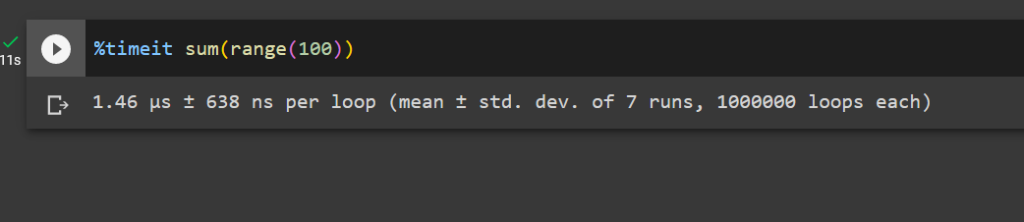
Jupyter Notebook provides an excellent environment for running and testing Python code. To measure the execution time of your code snippets in Jupyter Notebook, you can use the %timeit and %%timeit magic commands, which are built into the IPython kernel.

⏱ The %timeit command is used to measure the execution time of a single line of code. When using it, simply prefix your line of code with %timeit.

For example:

%timeit sum(range(100))

This command will run the code multiple times and provide you with detailed statistics like the average time and standard deviation.

⏱ To measure the execution time of a code block spanning multiple lines, you can use the %%timeit magic command. Place this command at the beginning of a cell in Jupyter Notebook, and it will measure the execution time for the entire cell.

For example:

%%timeit
total = 0
for i in range(100): total += i

Managing Garbage Collection and Overhead

When using timeit in Python to measure code execution time, it is essential to be aware of the impact of garbage collection and overhead.

🚯 Garbage collection is the process of automatically freeing up memory occupied by objects that are no longer in use. This can potentially impact the accuracy of timeit measurements if left unmanaged.

By default, timeit disables garbage collection to avoid interference with the elapsed time calculations. However, you may want to include garbage collection in your measurements if it is a significant part of your code’s execution, or if you want to minimize the overhead and get more realistic results.

To include garbage collection in timeit executions, you can use the gc.enable() function from the gc module and customize your timeit setup.

Here’s an example:

import timeit
import gc mysetup = "import gc; gc.enable()"
mycode = """
def my_function(): # Your code here pass
my_function() """ elapsed_time = timeit.timeit(setup=mysetup, stmt=mycode, number=1000)
print(elapsed_time)

Keep in mind that including garbage collection will likely increase the measured execution time. Manage this overhead by balancing the need for accurate measurements with the need to see the impact of garbage collection on your code.

Additionally, you can use the timeit.repeat() and timeit.autorange() methods to measure execution time of your code snippets multiple times, which can help you capture the variability introduced by garbage collection and other factors.

Choosing the Best Timer for Performance Measurements

Measuring the execution time of your Python code is essential for optimization, and the timeit module offers multiple ways to achieve this. This section will focus on selecting the best timer for measuring performance.

When using the timeit module, it is crucial to choose the right timer function. Different functions may provide various levels of accuracy and be suitable for different use cases. The two main timer functions are time.process_time() and time.perf_counter().

time.process_time() measures the total CPU time used by your code, excluding any time spent during the sleep or wait state. This is useful for focusing on the computational efficiency of your code. This function is platform-independent and has a higher resolution on some operating systems.

Here is an example code snippet:

import time
import timeit start = time.process_time() # Your code here end = time.process_time()
elapsed = end - start
print(f"Execution time: {elapsed} seconds")

On the other hand, time.perf_counter() measures the total elapsed time, including sleep or wait states. This function provides a more accurate measurement of the total time required by your code to execute. This can help in understanding the real-world performance of your code.

Here’s an example using time.perf_counter():

import time
import timeit start = time.perf_counter() # Your code here end = time.perf_counter()
elapsed = end - start
print(f"Execution time: {elapsed} seconds")

In addition to measuring execution time directly, you can also calculate the time difference using the datetime module. This module provides a more human-readable representation of time data.

Here’s an example code snippet that calculates the time difference using datetime:

from datetime import datetime start = datetime.now() # Your code here end = datetime.now()
elapsed = end - start
print(f"Execution time: {elapsed}")

Frequently Asked Questions

How to measure function execution time using timeit?

To measure the execution time of a function using the timeit module, you can use the timeit.timeit() method. First, import the timeit module, and then create a function you want to measure. You can call the timeit.timeit() method with the function’s code and the number of executions as arguments.

For example:

import timeit def my_function(): # Your code here execution_time = timeit.timeit(my_function, number=1000)
print("Execution time:", execution_time)

What is the proper way to use the timeit module in Python?

The proper way to use the timeit module is by following these steps:

  1. Import the timeit module.
  2. Define the code or function to be timed.
  3. Use the timeit.timeit() method to measure the execution time, and optionally specify the number of times the code should be executed.
  4. Print or store the results for further analysis.

How to time Python functions with arguments using timeit?

To time a Python function that takes arguments using timeit, you can use a lambda function or functools.partial(). For example:

import timeit
from functools import partial def my_function(arg1, arg2): # Your code here # Using a lambda function
time_with_lambda = timeit.timeit(lambda: my_function("arg1", "arg2"), number=1000) # Using functools.partial()
my_function_partial = partial(my_function, "arg1", "arg2")
time_with_partial = timeit.timeit(my_function_partial, number=1000)

What are the differences between timeit and time modules?

The timeit module is specifically designed for measuring small code snippets’ execution time, while the time module is more generic for working with time-related functions. The timeit module provides more accurate and consistent results for timing code execution, as it disables the garbage collector and uses an internal loop, reducing the impact of external factors.

How to use timeit in a Jupyter Notebook?

In a Jupyter Notebook, use the %%timeit cell magic command to measure the execution time of a code cell:

%%timeit
# Your code here

This will run the code multiple times and provide the average execution time and standard deviation.

What is the best practice for measuring execution time with timeit.repeat()?

The timeit.repeat() method is useful when you want to measure the execution time multiple times and then analyze the results. The best practice is to specify the number of repeats, the number of loops per repeat, and analyze the results to find the fastest, slowest, or average time. For example:

import timeit def my_function(): # Your code here repeat_results = timeit.repeat(my_function, number=1000, repeat=5)
fastest_time = min(repeat_results)
slowest_time = max(repeat_results)
average_time = sum(repeat_results) / len(repeat_results)

Using timeit.repeat() allows you to better understand the function’s performance in different situations and analyze the variability in execution time.

💡 Recommended: How to Determine Script Execution Time in Python?

The post Measure Execution Time with timeit() in Python appeared first on Be on the Right Side of Change.


Posted on Leave a comment

Review: Toaplan Arcade Garage: Zero Fire – M2 Tackles Gaming’s Greatest Meme In A Fine, If Stingy, Collection

Toaplan Arcade Garage: Zero Fire Review - Screenshot 1 of 4
Captured on Nintendo Switch (Handheld/Undocked)

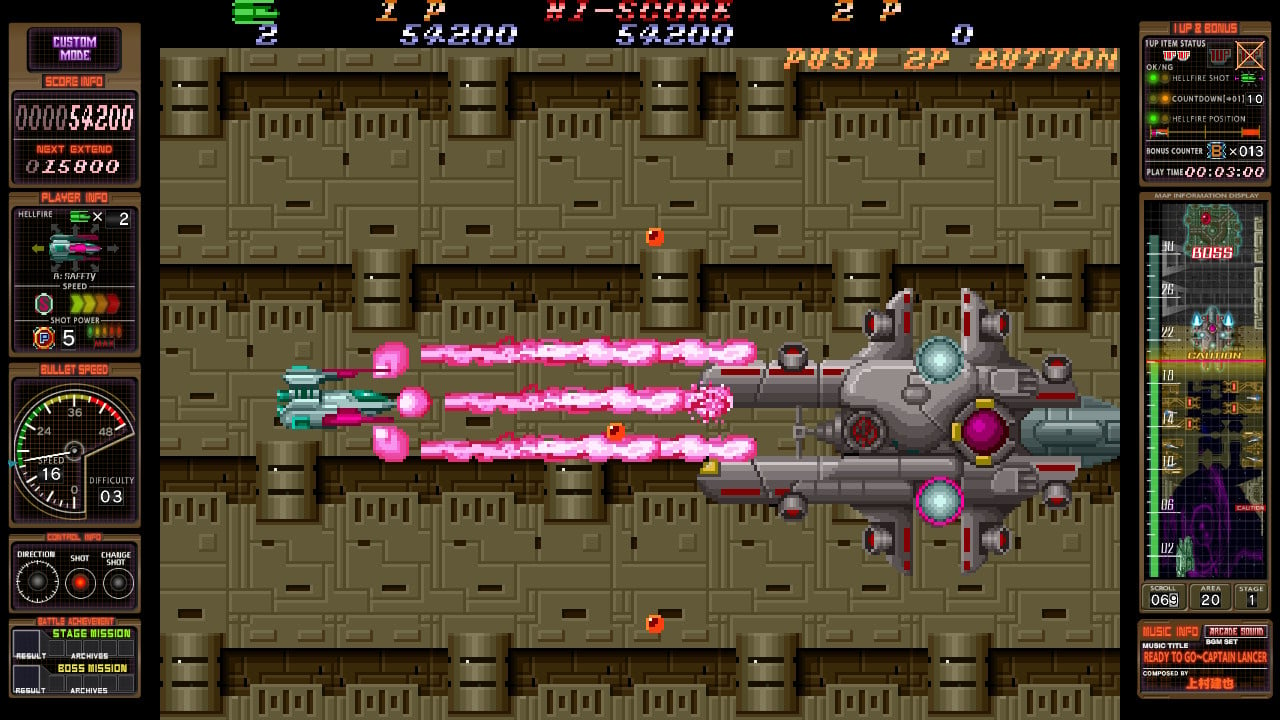
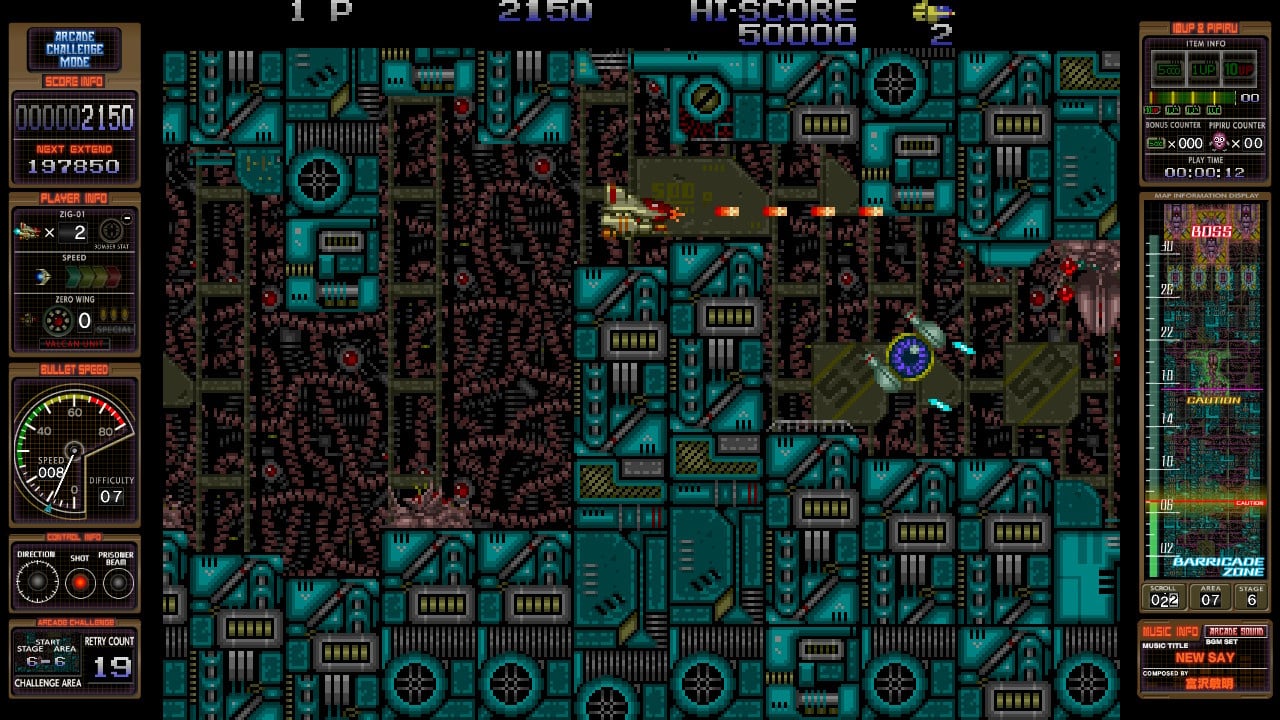
M2’s garage doors are open for business again, continuing to pay homage, and in fastidious attention to detail, to the shoot ’em ups of yesteryear. Zero Fire, a portmanteau of collected titles Zero Wing (1989) and Hellfire (1989) represents Toaplan during the height of its glorious arcade tenure.

Although released just four months apart, Hellfire is chronologically the first in this collection, a side-on horizontal scrolling shoot ’em up that was borne from the instruction to make a game like Konami’s Gradius. Hellfire was the company’s first horizontal foray, and its production was particularly problematic. Director Tatsuya Uemura cited it as being “extremely difficult to make” in an interview for the Toaplan Shooting Chronicle, a music collection, and that it was memorable only for the struggle he and his team experienced during its manufacture.

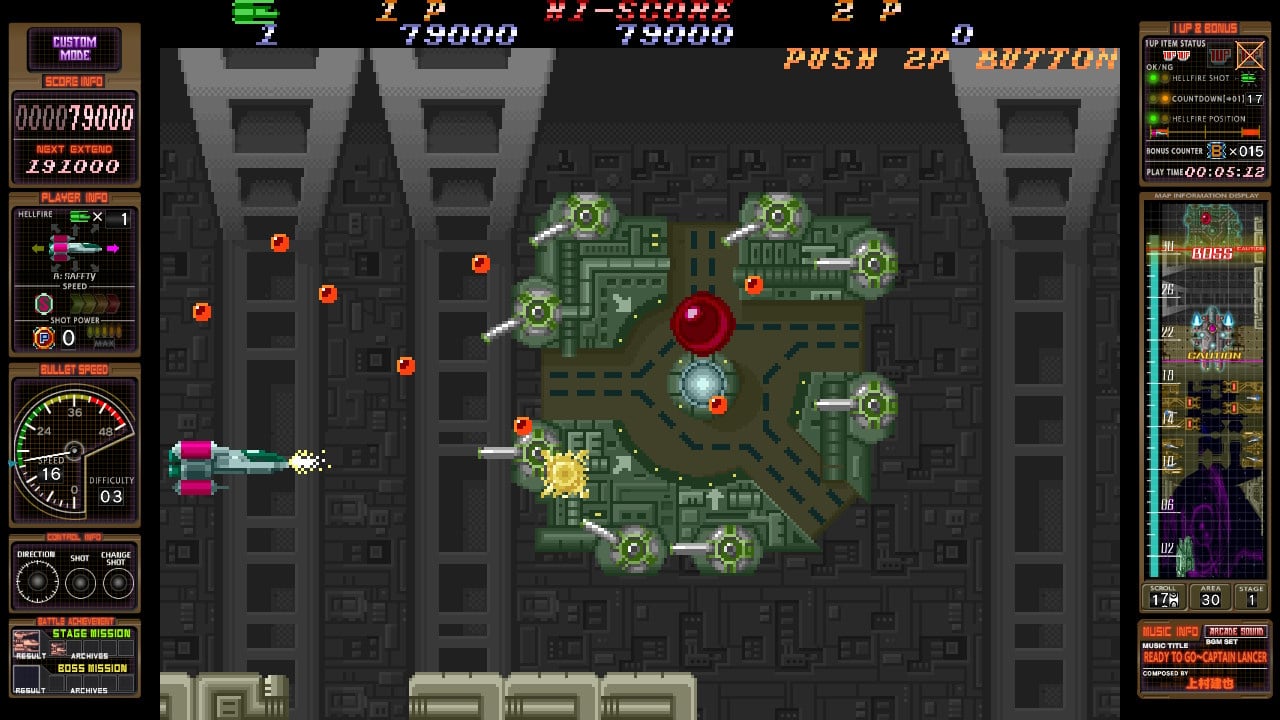
Typically ’80s sci-fi, Hellfire takes place in the year 2998 where a robot overlord is invading human-occupied space colonies. Playing as Captain Lancer, it’s your mission to overthrow the threat with the Space Federation’s newly designed fighter craft and its super weapon, the CNCS1. Hellfire features six stages and an equal number of bosses to work through. Graphically, it’s bold and Toaplan-gritty, with a large ship sprite navigating vast enemy bases, odd Egyptian-themed landscapes, and otherworldly rainforests. The four directional lasers attached to your craft, rotatable with the press of a button, are Hellfire’s primary gimmick. Each weapon type is steadily enhanced by grabbing ‘P’ icons until your CNCS1 is blasting neon about the screen, while ‘B’ icons reap points that net score-based extra lives. There are also drops that will increase your ship’s speed, although you may want to limit the number you pick up lest it becomes too fast to handle.

Toaplan Arcade Garage: Zero Fire Review - Screenshot 2 of 4
Captured on Nintendo Switch (Handheld/Undocked)

Hellfire is big, chunky, fantastic fun, its directional weaponry making for an engrossing and immediately tactical experience, buoyed by a traditionally fantastic soundtrack. It’s simple and easy to adjust to, and entertaining to figure out how to best use your array to take out enemies and destructible scenery in search of bonus items. Hellfire’s creative merit lies in its layout revolving around your multi-directional fire. Stripping away the layering of bosses is all very cleverly arranged, forcing you into situation after situation where weapon adjustment is paramount. Within just a handful of attempts, it all becomes second nature, especially as you see your lasers climb the power scale against increasing rank. It may have been tough for Uemura and co. to figure out the horizontal format, but what they came up with — bar perhaps the oversizing of the player ship — is a grand space adventure that’s not only softer in makeup and therefore more approachable than the likes of Kyukyoku Tiger, but has novel ideas that feel fun to toy with.

A death, however — and much like in Gradius — is doom-spelling, especially by the third stage, as it reduces your power to the lowest rung of the ladder. This pushes you to go the entire six stages unscathed and finish the game on a single life. Should you topple its 30-minute length, a second loop awaits, a purely expert-only affair that considerably ramps up the number of bullets and their speed.

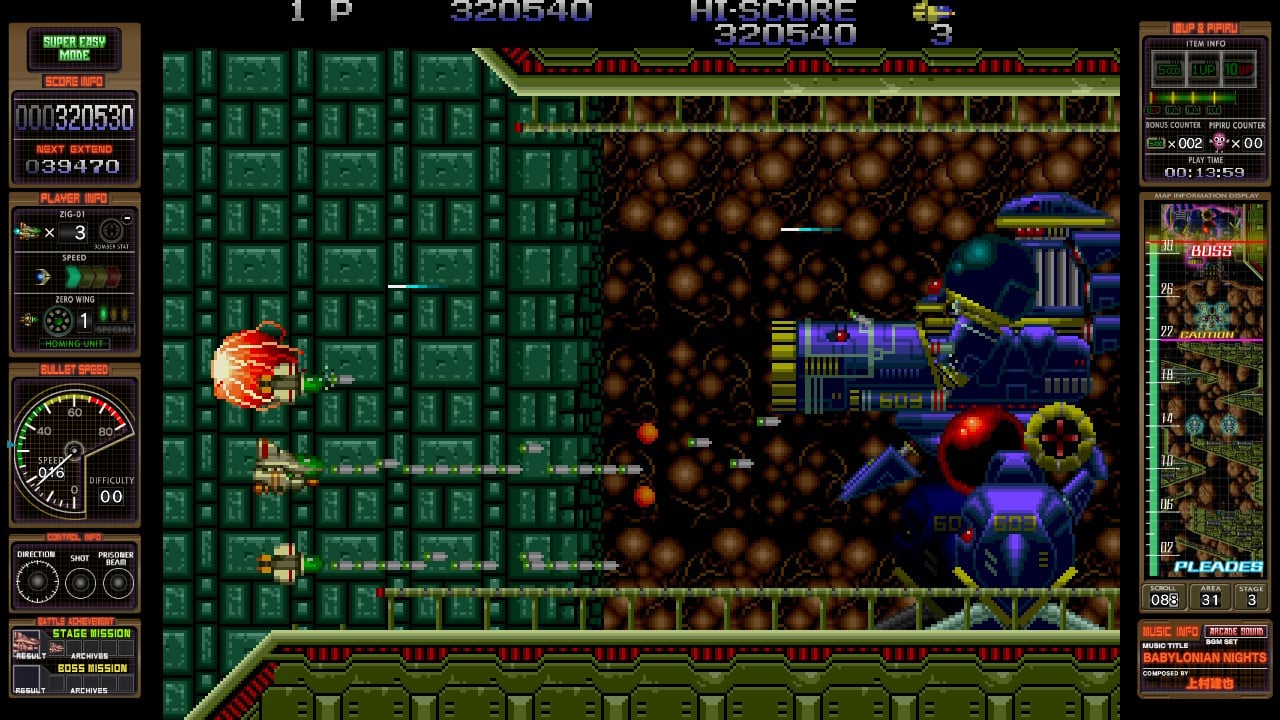
Zero Wing is best remembered for the meme-worthy ‘Engrish’ present in the Mega Drive home release, specifically “All your base are belong to us”, a phrase so infamous that the US town of Sturgis, Michigan, issued a terrorist threat alert after local pranksters picketed signs bearing the slogan about the streets. It reuses the Hellfire engine, making it another horizontal scroller, but one more formulaic in nature. There are three weapon types to collect: a spread gun, a straight laser, and a homing shot, their power increased by grabbing the same coloured icons on repeat. Zero Wing’s key element is a small tractor beam that can be used to snatch certain enemies to be used as a shield or fired off as a missile.

Toaplan Arcade Garage: Zero Fire Review - Screenshot 3 of 4
Captured on Nintendo Switch (Docked)

Although visually less bright and bold than Hellfire, it plays beautifully thanks to that magical Toaplan flavour, where tones of brown and beige form spectacular worlds, and the soundtrack is expectedly fantastic. And while Zero Wing isn’t the best of its ilk, it’s still a robust and enjoyable shoot ’em up with huge stages and more of a fair opportunity to get back into the game after a death. Figuring out when to acquire a particular weapon is part of the strategy, and while the game is tough, and its restart points occasionally infuriating, it’s still a highly beguiling space adventure for those who enjoy a challenge. (As a side-note, Zero Wing’s Super Easy Mode allows enemies captured with the tractor beam to be detonated as projectile bombs, which is not only really good fun, but works on its own as a clever scoring game.)

M2 has softened the pain of finger tapping by adding optional auto fire to the control setup, fixed at 30hz so as not to break the game. The usual ShotTriggers bonuses are present, including the M2 gimmicks that allow you to configure scoring and extra life information that borders the screen. There are nice, adjustable CRT scanline filters too, and online scoring is expectedly part of the package. Being horizontal too, they look great in a handheld format, making good use of the Switch’s screen, even in a 4:3 aspect ratio. The menus in this import release are in Japanese only, but not too hard to figure out. In terms of modes, you get Arcade, a Super Easy mode that’s plenty of fun to wade through, and a Custom Mode that allows you to tailor your practice runs. Each title also has a Challenge Mode that allows you to take on selected stages or areas under compellingly tough conditions. We played the ports alongside the arcade originals and from what we can tell, emulation quality seems impeccable in every respect. There are also replays and a Visual Gallery feature that collects much of the materials related to the original arcade games, from manuals to PCB boards.

Toaplan Arcade Garage: Zero Fire Review - Screenshot 4 of 4
Captured on Nintendo Switch (Docked)

What we take exception to is M2’s constant nickel and diming, locking everything else behind DLC paywalls. For the price of the package, there’s no good reason not to include the other ports on board, some of which feature very unique additions. The PC-Engine version of Hellfire features nice anime story interludes and an original soundtrack, while the Mega Drive port adds a helper droid, a shield, and a laser bomb. If you’re buying Zero Fire’s physical release, you also get Demon’s World as a bonus, a neat, forced-scrolling Toaplan run ‘n’ gun, while digital adopters will need to cough up extra for it.

Conclusion

It’s hard to fault the presentation and delivery of M2’s ShotTriggers collections. Hellfire and Zero Wing are both excellent old-school shoot ’em ups, representative of Toaplan’s then-burgeoning creativity. They look good, sound great, and are super fun to learn. Emulation quality is on point, and the little extras, like the visual gallery, are very welcome. But again, it’s lamentable that this can’t just be a complete collection of Hellfire and Zero Wing, with all its home console port variations, without requiring people to pay for them as DLC. It’s the one thing that feels wrong about the way M2 have handled their ShotTriggers releases, and it’s not particularly fair to fans.


Posted on Leave a comment

Feature: The Rise Of ‘Scam Games’ And ‘Keyword Bingo’ Firms Flooding Switch eShop

Scam Games
Image: Sony. Hang on… VG Games?

It’s difficult now to remember a time when the Switch eShop wasn’t rammed with low-cost, low-quality games making it laborious to find the great new releases amongst all the dross. What began as an immaculately clean, functional store back in 2017 quickly ballooned and before long Nintendo was inundated with software submissions vying for visibility on a crowded digital marketplace. Inevitably, these included titles from less-than-scrupulous developers and publishers looking to make a quick buck.

In recent months, the number of quick-and-dirty ‘clone’ games seems to have exploded, though. The Last Hope – Dead Zone Survival is a notable example which is no longer on the eShop after it caught the attention of Sony’s copyright lawyers. That was an open-close case, perhaps, but the underhand tactics being employed by select publishers make a handful of PC-based bullshots look like quaint, small-fry false advertising.

For seasoned, savvy gamers, this calibre of game is an eShop irritation more than a genuine threat to your wallet, but not everyone will catch the warning signs, and the problem is growing. Luke Wild from YouTube channel SwitchStars has been investigating these ‘scam’ games for some time now, sifting through them so you don’t have to.

“My first encounter with a scam game was with Midnight Works’ Cop Car Police Simulator Chase – Car games simulator & driving in January 2022,” Wild tells us via email. “I noted right away that the screenshots appeared too good to be true and after playing the game, I found the description to be highly embellished and had for the most part just been copied and pasted from a Steam game called Police Simulator: Patrol Duty. After a spot of investigative work, I found that the screenshots were mock-ups and one of them was taken directly from a unity asset.”

Cop Car Police Simulator Chase - Car games simulator & driving
An eShop screenshot from Cop Car Police Simulator Chase – Car games simulator & driving — Image: Midnight Works

Thanks to his videos, Wild recently found himself on the receiving end of a copyright claim from that game’s prolific publisher. Midnight Works is a Moldovan company and purveyor of such snappily titled releases as Street Drag Racing Car Driving Simulator 2022 Games, Zombies Killer Machine – Car Games,Driving,Dead Mechanic Simulator, and Crypto Mining Simulator – Ultimate Trading Strategy Tycoon Craft & Idle Game 3D.

What constitutes a ‘scam’ game?

Terms such as ‘clone’, ‘shovelware’, and ‘asset flip’ can carry different meanings for different people, so it’s worth getting on the same page about what exactly a ‘scam’ game is. ‘Zelda-clone’, for example, can be used affectionately (as we do). Likewise, the term ‘shovelware’ is often thrown around carelessly. We may disagree, but one person’s Elves Christmas Hentai Puzzle is another person’s Puzzle & Dragons.

“Scam games are a whole other kettle of fish,” says Wild. “As with asset flips, these games are usually created using store-bought assets but some amount of effort has been put into modifying them beyond their original design (though usually minimal). Their eShop listings, more often than not, feature fake screenshots – either pre-rendered mock-ups taken from another platform or, in many instances, stolen from other games, as was the case with Instamarketingandgame’s Motorcycle Driving Simulator which featured screenshots stolen from GTA 5 and Cyberpunk 2077.”

The game descriptions can also be misleading. “They embellish the content and mechanics and often include a plethora of features that are not actually present in the game. [With scam games] we are receiving a product which does not match its screenshots or description, like buying a burger only to receive some chicken nuggets.”

Bottom of the barrel

Looking at publishers like Instamarketingandgame’s software catalogue, it doesn’t make for encouraging reading. Having surveyed the eShop, Wild has plumbed the depths of around 25 ‘scam’ titles so far on his channel. We asked if any struck him as particularly egregious.

Demolish Derby Nitro-Battle Driving Car Games 2022 Deluxe Driver stands out as being one of the worst examples. Being a huge fan of Destruction Derby I had expected at least a passing resemblance to that game given the screenshots and description. The game is little more than a series of straight jump or point-to-point races, with zero opportunity to ‘demolish’ as the single level which features another vehicle results in a game over if you crash into it.”

Demolition Derby Nitro-Battle
Image: INSTAMARKETINGANDGAME

“The screenshots are all completely fake, the description weighs in heavily on the simulated destructive elements and realistic physics despite there being none, and about the only genuine line in it was ‘Experience realistic vehicle physics in a mobile game!’ – not for the realistic vehicle physics, but the fact they forgot to remove the ‘mobile game’ part.”

Where are these games coming from?

Midnight Works is a holding comapny
A screenshot from Midnight Works’ website (June 2023)

While it seems there are several publishers flooding the eShop with similarly suspect games, Wild believes that many of them are linked, with “five main players” operating, including the aforementioned Midnight Works. Previously describing itself as a holding company with investments in firms such as INSTAshop (which specialises in selling Instagram Likes, followers, and comments), other companies such as INSTAMARKETINGANDGAME and VG GAMES appear to be linked.

“Instamarketing & Game S.R.L. has the same listed address on their company profile as Midnight Works. VG Games (West Connection Limited in the US) — Virtual Global Games S.R.L — [is also] linked to Midnight Works as one of the studios they have invested in [and is] also based in Chisinau, Republic of Moldova.”

GoGame Console Publisher West Connection Ltd Websites 9th August 2023
“Our motto is the ability to listen to each other!”

GOGAME CONSOLE PUBLISHER is apparently headquartered in London but with possible links to West Connection: “Their single employee and CEO is listed as Romanian-born Mrs. Maria Caraus. Their website contains text copied and pasted from VG Games West Connection Limited website.”

Romania-based Dezvolt Games is also on Wild’s list of potentially affiliated companies. We’ve contacted Midnight Works for clarification regarding its exact relationship with these seemingly satellite firms. We’ll update this article should we receive a response.

The only communication Wild has had with these companies came indirectly via the complaint submitted to YouTube. The platform reviewed Wild’s videos and judged in his favour, and he documented the entire episode in a recent video (below).

It seems like a cut-and-dry case to any sensible onlooker, but we wondered if this lingering threat of claims against him affected his approach to producing videos on his channel in a sustainable way.

“In the past, I have had smaller developers comment on my videos, so taking on a bigger dog it was inevitable that sooner or later there would be a response. From a legal standpoint, there are three primary defences against slander, those being Truth, Honest Opinion and Public Interest, all of which I believe apply here in one form or another.”

Potential demonetisation of his videos isn’t something he’s too worried about. “I’m covered by fair usage on the content I produce unless they somehow try to get me for using their trailers, but they can have the cash, as long as word still gets out. These lingering threats only spur me on. I don’t like being threatened or coerced, especially when I believe I’m doing the right thing and operating for the greater good.”

eShop visibility tricks

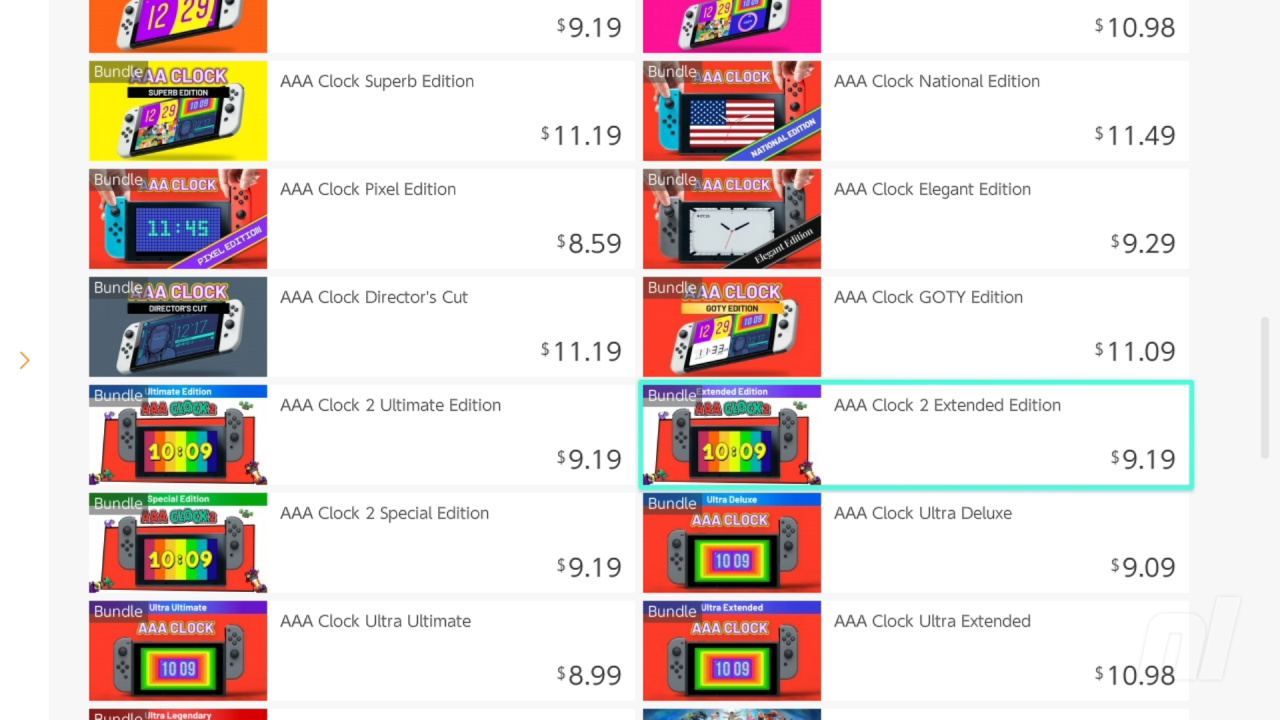
Publishers have struggled for visibility as the eShop ballooned in size since 2017, and many have employed various tactics to ‘game’ the system, including steep, near-permanent discounts, releasing multiple versions of essentially the same game, or ‘bundles’ of several games. It’s loopholes like this which result in separate listings for some 37 versions of RedDeer’s AAA Clock and its sequel.

AAA (Clock) gaming
AAA gaming — Image: Nintendo Life

With rumours of Nintendo’s next console doing the rounds once more, thoughts turn inevitably to how the platform holder can do a better job on its next storefront and avoid this race to the bottom. Wild has several ideas for how Nintendo can switch things up.

“Allow people to filter ALL of the menus, not just the search menu,” he suggests. “Add additional genres to sort by, year of release, number of players, publisher, price range, etc.” A user-based rating system could be beneficial — something that the 3DS eShop had with its star ratings — albeit while opening up the door to potential ‘review bombing’. It’s a risk Wild believes is worth it, as a rating system would mean that “quality games wouldn’t be lost amongst the ‘best-selling’ scam games.”

The ability to ‘favourite’ or mute publishers is another possibility. “Allow[ing] people to blacklist certain developers so they don’t show in the listings and search results would strike an instant blow at the scam game sellers.”

Nintendo Switch eShop
Image: Nintendo Life

However, Wild believes that it’s Nintendo’s failure to properly vet these releases which is the main problem to be addressed.

“From my understanding, Nintendo currently operates under a ‘Partner Management System’ for both AAA and third-party developers. It appears the Developer Relations manager at Nintendo liaises with verified publishing companies to bring these games to market without the need to go through a lengthy greenlight process. There is some kind of centralised submission and certification process involved which apparently ensures the games are reviewed and have passed their legal requirements, but this is clearly failing. Currently, it appears they are relying on the honesty and integrity of the publishers themselves, which clearly doesn’t work.”

How to avoid ‘scam’ games

While some players might suggest that nefarious titles like these are easy for any halfway-informed gamer to avoid, it’s sometimes easy to forget just how broad and varied the Switch’s player base is. Having spent more than his fair share of time wading through them, we wondered if Wild has any advice for people who might not have the gaming knowledge to catch key art plagiarising The Last of Us, for instance.

An abundance of words in the title can be a telltale sign when it comes to low-quality or downright dodgy games. “They utilise what I like to call ‘Keyword Bingo’ – slapping as many SEO-optimised keywords in their title as possible, so they’re pretty easy to spot. However, identifying them as a scam is much harder. Beware of overly embellished descriptions, especially those claiming to have fantastic visuals and realistic sound design. My best advice on these is to avoid the big five publishers I’ve already mentioned, and for the most part, any other games which contain more than nine words in their title.”

Scam Games
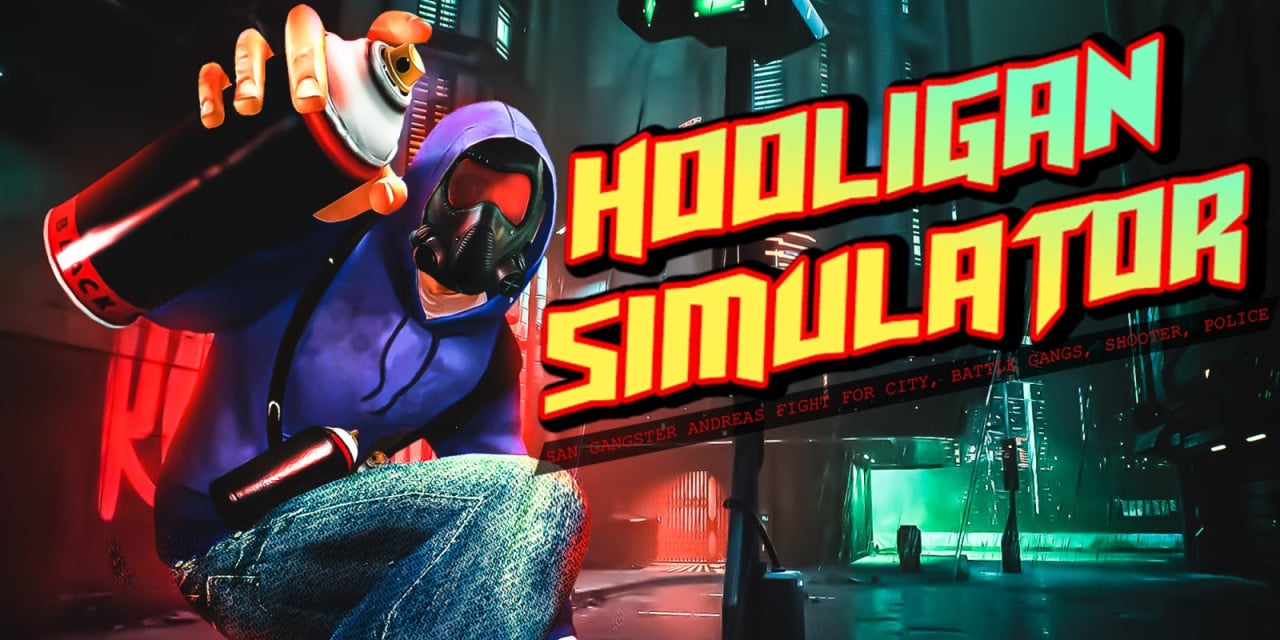
‘Hooligan Simulator – San Gangster Andreas Fight for City, Battle Gangs, Shooter, Police’, £12.99 on Nintendo Switch eShop. Just missing the ‘auto’, ‘grand’, and ‘theft’ in that one — Image: Dezvolt Games

There are exceptions — apologies to Aksys’ upcoming Mon-Yu, a game making a selling point out of its comically enormous title — and video game naming conventions often result in nonsensical, painfully generic titles. But an overly long name is still a useful red flag to watch for.

Wild also highlights asset-flip games typically advertised with low-effort screenshots that “often look exactly like mobile games because most of them are taken from mobile game Unity templates. Their eShop thumbnails often tend to be low quality too, with basic text rather than a stylised logo.”

A mark of quality

Players browsing the eShop may welcome more curation and quality control from Nintendo’s side, but there’s an argument to be made for an open-door Steam-style approach, too. Obvious legal infringements and clone-game examples aside, does Wild think rough-and-ready games with silly SEO-term titles have a place on the eShop?

“I am hugely supportive of indie developers, so I applaud Nintendo for welcoming them in and giving them the opportunity to showcase their creativity, though I have heard from many solo devs who have been rejected when trying to self-publish and it seems the established publishers who are part of the partner management system are the main in-route. I think silly SEO-term titles have a place but only when they are used ironically or for comedic effect.” A reprieve for Mon-Yu, then.

Mon-Yu, Marlene!
Aksys is having some fun with this one — Image: Aksys Games

Ultimately, the responsibility must surely fall to the platform holder to police the content on its store and better curate the games that appear before the experience of navigating the eShop gets worse. As we came to the end of our questioning, Wild highlighted the company’s “awful customer service” as a major roadblock in his investigations.

“[Nintendo] should definitely implement a refund policy similar to Steam’s. Contact is entirely limited to their pre-defined categories and a web form — their ‘call us’ and ‘chat with us’ options are never available. [Replies to my enquiries] felt like AI-generated textbook responses, and they are incredibly evasive, even going so far as directing me to contact the developer themselves about the fake screenshots and descriptions.”

We’ve reached out to Nintendo for comment on its current certification policies. We’ll update this article with any response we receive.

Not-GTA
And another one, which popped up in Nintendo’s eShop email as we were writing this article — a different release from Midnight Works’ Prison Life Simulator 2022 – World FIGHT Battle ULTIMATE, which launched with ‘GTA’ in the title. The trailer for this one on Nintendo’s website carries the text ‘Actual gameplay differs’ throughout — Image: Dezvolt Games

Despite Nintendo’s long-cultivated family-friendly image, Wild believes the company’s disregard for consumer rights and the current state of the Switch eShop demonstrates a misguided focus on profit above all else. “It’s sad to see the same company that practically saved the world from the great video game crash of 1983 now turning its back on gamers and essentially repeating history with their actions, or lack thereof.”

The rise and unchecked proliferation of these games make navigating the eShop an unpleasant experience and a serious issue for Nintendo. Ignoring the problem is a mistake that could have repercussions for the platform holder’s brand and customers if not tackled head-on with the Switch’s successor. Though its infamous ‘Seal of Quality’ in the NES days was used only to label officially licenced software — not as a badge of approval or marker of a game’s subjective merit — perhaps the time has come to bring it back in a new form.


Thanks to Luke for sharing his thoughts on this topic. You can find more information about the Switch games to avoid on his SwitchStars channel — his latest video examines in more detail some of the publishers discussed in this article.