Posted on Leave a comment

Little Nightmares III Announced For Switch, Out 2024

So… I really enjoyed the first Little Nightmares game but was honestly very let down with the second one. A lot of the room layouts felt like they were copied-and-pasted from the first game. Other than the teacher lady who could stretch her neck, none of the monsters were particularly scary. You had a knockoff Slenderman, and then there was like a huntsman with a Looney Tunes looking rifle–the ones with the funnel on the end.

I also hated the fact they added combat. Picking up and swinging an axe that’s as large as your body and trying to swing that heavy piece of equipment at disembodied hands leaping toward you incredibly fast speeds is… not fun. You have to have perfect timing, but there’s such a long delay between pressing the attack button and the time it takes for your character’s tiny little body to swing the dang thing. That handicap didn’t add to the suspense, it just made me angry.

Hoping this game will be better, although it feels too soon. Hard to believe the second game came out over 2 years ago now. Time moves so strangely in a post-COVID world; I feel like the pandemic just started last year. I’m happy about the addition of co-op, as my dad enjoyed watching me play the others. He would actually come up with solutions to a lot of the puzzles before I could. This will give us something to do together.

Posted on Leave a comment

Fantastic to join Judy Faulkner and Sumit Rana today at Epic’s Users Group Meeting to discuss the future of AI in healthcare and our expanded collaboration…

Frontline workers represent the face of organizations and make up the lion’s share of the workforce. But new Work Trend Index data reveals that 1 in 2 frontline workers cite being burned out in their jobs. Investing in technology that supports the frontline is key. Notably, 65% of frontline workers are optimistic that AI will help them in their jobs.  
We are excited to highlight new Microsoft solutions and investments in next-generation AI for the frontline workforce across nearly every business. Frontline managers and workers can optimize their time from work order creation to schedule management with Copilot in Dynamics 365 Field Service and the new Shifts plug-in for Microsoft 365 Copilot. In Viva Connections, frontline workers can stay up-to-date on internal communications. And with shared device mode for Intune, VMware and SOTI, employees can simplify the sign-in experience securely.  
Today’s announcements not only reduce administrative burden and time on spent on manual tasks, but also enable frontline workers to focus on end customer experiences and receive an overall improved employee experience. Learn more here: https://lnkd.in/e9Ash_82

Posted on Leave a comment

Awaken Your Inner Picasso On Switch With Passpartout 2: The Lost Artist

Publisher Flamebait Games has announced that its quaint PC title Passpartout 2: The Lost Artist will be coming to the Nintendo Switch at an undetermined future date.

Boasting some rather charming 3D visuals, Passpartout 2 features point-and-click gameplay along with touchscreen support to allow players to create their own painted masterpieces. You’ll be able to paint on a range of different canvasses and eventually sell your work to buy fancier, more efficient tools.

Here’s a look at the key features:

– Easy point & click gameplay, for a chill time exploring and interacting with the world.
– Literally drawing your own art, unlocking fancier tools along the way.
– Selling your art on the street, or in your studio.
– Doing commissions for the townsfolk of Phénix!
– Easy point-and-click gameplay on the Nintendo Switch.
– Use the Joy-Con Gyro as your brush to paint and play!
– Paint on the touch-screen with your fingers or the Nintendo Switch Pen.
– Or play and paint with the familiar stick controls!

Are you interested in picking up Passpartout 2: The Lost Artist? Let us know with a comment below, Michelangelo.

Posted on Leave a comment

The Next Xenoblade Will Be “Vastly Different” Says Monolith Soft Director

Xenoblade Chronicles 3 Noah
Image: Nintendo Life / Nintendo

Developer notes from Xenoblade series creator and Monolith Soft director Tetsuya Takahashi have been translated and shared online, and they reveal an interesting take on the future of the series — that the next game will be “vastly different” from previous entries.

The message comes from the Xenoblade Chronicles 3 Limited Edition soundtrack and has been translated by Mira (via My Nintendo News), a blog dedicated to translating and looking into the Xeno meta-series, which includes Xenosaga and Xenogears — both also created by Takahashi.

The soundtrack comes with a booklet that includes the message from Takahashi, but unlike the Trinity Box, the notes here are only included in Japanese. Mira’s translation, then, shares some insights on the music of Xenoblade Chronicles 3. Specifically, the director talks about this when he’s reflecting on the game’s “big” song — ‘Carrying the Weight of Life’ — and the game’s theme of “‘not be afraid of change and walk into the future,'”. He talks about why he chose to use the iconic track only twice in the game, “when it was fitting for the situation, and when it felt suitable to me, personally. It’s a compromise between “service” and “goal,”… “

Takahashi then follows up these comments by looking ahead, and using that theme of change to look into the future of the series he’s worked on for over ten years:

“Rather than playing on defense, going on the offense; change rather than maintain. This is a stance that I have continued to hold for thirty years. If there is another “Xenoblade,” it will likely be something vastly different from what came before. In style and in music, I would like to make my next goal something that will betray everyone’s expectations, in a good way.”

What could “vastly different” mean for the Xenoblade series? There’s a consistent look and feel across all three mainline games, with an MMORPG-style take on turn-based combat, so perhaps Monolith Soft will change the direction of the gameplay? More action-oriented? It’s hard to say.

Takahashi admits that striking a balance between “a way to reveal your work [and] a way to service users” is one of the most challenging parts of game development, and his reflections on Xenoblade 3’s themes reveal his thoughts on that.

Regardless, what we can take from this message is that if Xenoblade is to continue — on the Switch 2 or whatever it ends up being called — it’ll be a big change for the series. With Monolith Soft’s vast experience (working on other Nintendo titles such as Splatoon 3 and Tears of the Kingdom) we’re sure it will turn out to be an incredible experience.

What would you like to see from the next Xenoblade game? Let us know in the comments.

[Thanks for the tip, Greatsong1!]

Posted on Leave a comment

Retro RPG ‘Sea Of Stars’ Approaches Release With Another Stunning Trailer

Sea of Stars is so close — and if you’re not excited about the game’s release next week, then this launch trailer will definitely help.

Sabotage Studio’s follow-up to the 2018 platformer The Messenger has showcased its incredible pixel art and turn-based combat from the get-go, and it never gets old. And with this brand new trailer, we’ve got a look and a new character who will be joining Solstice Warriors Valere and Zale — along with their friend Garl — on their adventure.

Seraï is a “Portal Assassin” who wields dual knives and can create portals to sneak up on enemies, and her attacks seem much quicker than her companions. The game’s official website confirms there will be “six playable unique characters”, so we wonder who else will be tagging along with Seraï.

Sea of Stars launches on 29th August on the Switch eShop. A physical release from Iam8bit will launch in early 2024.

What do you think of this launch trailer? Are you excited to check out new character Seraï? Let us know in the comments.

Posted on Leave a comment

Video: Konami’s Most Exciting New Release Isn’t Metal Gear Solid

Of all the games featured at a recent preview event held by Konami, Super Crazy Rhythm Castle was admittedly not a game that we were frothing at the mouth to play from first impressions. The game is – to us at least – a little unassuming at first glance, but once we actually had a go with it, our mindset shifted just a bit dramatically.

Developed by Second Impact Games, the premise is simple at first. It’s a rhythm game with multiplayer as a focus, but as soon as you get past the tutorial area, it becomes clear that this game is going to seriously mess with you.

We were handed the PS5 version to play, and our first goal was to fill up a meter by playing a simple rhythm game. Not halfway done, we were accosted by a pair of hands that stopped the meter in place, forcing us to drop everything and press enough buttons to shoo them away. Oh, and the music doesn’t stop, either, so there’s a tremendous sense of urgency at play. Then cushions landed all over the tracks, stopping us from being able to see what notes we were required to play.

In our short time with the game we were presented with dozens of these little unexpected wrinkles, from having to swap places with a dog that was handily collecting treasure for us, to flinging broccoli into a vortex summoned around a bag of weedkiller.

It doesn’t really do justice to simply read these bizarre happenings in brief text form, so we highly encourage you to check out the video above where we actually show the chaos in motion. Needless to say, we feel this has the potential to be something rather special; we just need to wait for that ever-important release date to change from ‘TBC’.

Take a look and let us know what you make of it below.

Posted on Leave a comment

Use enumerate() and zip() Together in Python

5/5 – (1 vote)

Understanding enumerate() in Python

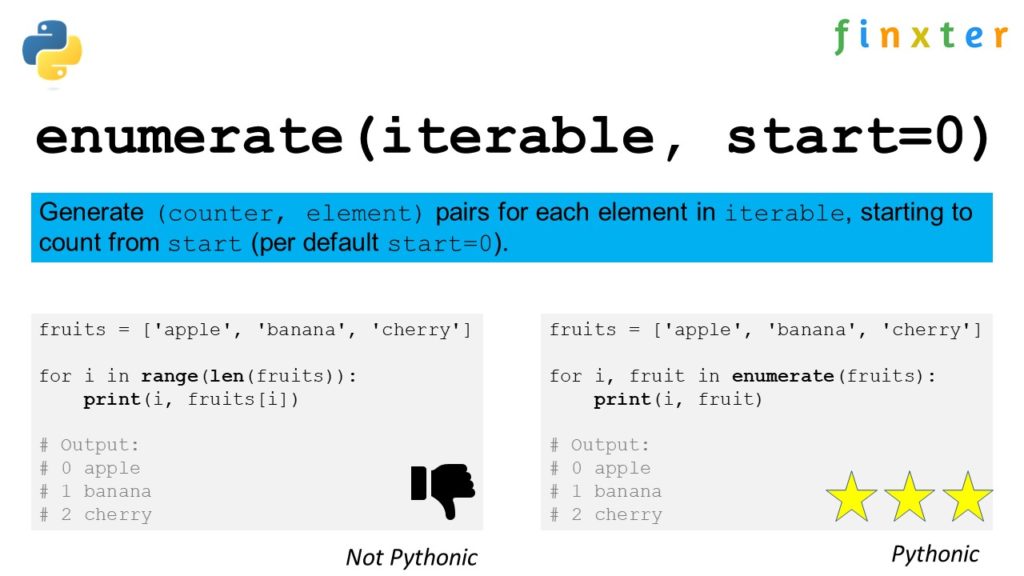
enumerate() is a built-in Python function that allows you to iterate over an iterable (such as a list, tuple, or string) while also accessing the index of each element. In other words, it provides a counter alongside the elements of the iterable, making it possible to keep track of both the index and the value simultaneously.

Here’s a basic example of how the enumerate() function works:

fruits = ['apple', 'banana', 'cherry']
for index, value in enumerate(fruits): print(index, value)

This will output:

0 apple
1 banana
2 cherry

In the example above, the enumerate() function accepts the fruits list as input and returns a tuple containing the index and its corresponding value. The for loop then iterates through these tuples, unpacking them into the variables index and value.

By default, the enumerate() function starts counting the indices from 0. However, you can also specify an optional start argument to change the starting point. For instance, if you want to start counting from 1, you can use the following code:

fruits = ['apple', 'banana', 'cherry']
for index, value in enumerate(fruits, start=1): print(index, value)

This will result in:

1 apple
2 banana
3 cherry

The enumerate() function is particularly useful when you need to modify elements in-place or when working with data that requires you to track the index of elements. It offers a more Pythonic approach to iteration, allowing for cleaner and more concise code compared to using a manual counter variable.

Exploring zip() in Python

The zip() function in Python is a powerful tool for parallel iteration. It takes two or more iterables as arguments and returns an iterator of tuples, each containing elements from the input iterables that share the same index. The size of the resulting zip object depends on the shortest of the input iterables.

Let’s dive into the workings of this useful function. To begin with, consider the following example:

names = ['Alice', 'Bob', 'Charlie']
ages = [25, 30, 35] zipped = zip(names, ages)
print(list(zipped))

The output will be:

[('Alice', 25), ('Bob', 30), ('Charlie', 35)]

Here, the zip() function combines the given lists names and ages element-wise, with the elements retaining their corresponding positions, creating an iterator of tuples.

Another useful feature of zip() is the ability to unpack the zipped iterator back into the original iterables using the asterisk * operator. For instance:

unzipped = zip(*zipped)
names, ages = unzipped

Keep in mind that zip() works with any iterable, not just lists. This includes tuples, strings, and dictionaries (although the latter requires some additional handling).

Use zip() and enumerate() Together

When combining zip() with enumerate(), you can iterate through multiple lists and access both index and value pairs.

The following code snippet demonstrates this usage:

for index, (name, age) in enumerate(zip(names, ages)): print(f"{index}: {name} is {age} years old.")

This results in the output:

0: Alice is 25 years old.
1: Bob is 30 years old.
2: Charlie is 35 years old.

In this example, the enumerate() function wraps around the zip() function, providing the index as well as the tuple containing the elements from the zipped iterator. This makes it easier to loop through and process the data simultaneously from multiple iterables.

To summarize, the zip() function in Python enables you to efficiently iterate through multiple iterables in parallel, creating a zip object of tuples. When used alongside enumerate(), it provides both index and value pairs, making it an invaluable tool for handling complex data structures.

Using For Loops with Enumerate

In Python, you often encounter situations where you’d like to iterate over a list, tuple, or other iterable objects and at the same time, keep track of the index of the current item in the loop. This can be easily achieved by using the enumerate() function in combination with a for loop.

The enumerate() function takes an iterable as its input and returns an iterator that produces pairs of the form (index, element) for each item in the list. By default, it starts counting the index from 0, but you can also specify a different starting index using the optional start parameter.

Here’s a simple example demonstrating the use of enumerate() with a for loop:

fruits = ['apple', 'banana', 'cherry']
for index, fruit in enumerate(fruits): print(f"{index}: {fruit}")

In the code above, the enumerate(fruits) function creates a list of tuples, where each tuple contains the index and the corresponding element from the fruits list. The for loop iterates through the output of enumerate(), allowing you to access the index and element simultaneously.

The output would be:

0: apple
1: banana
2: cherry

The use of enumerate() can be extended to cases when you want to iterate over multiple lists in parallel. One way to achieve this is by using the zip() function. The zip() function combines multiple iterables (like lists or tuples) element-wise and returns a new iterator that produces tuples containing the corresponding elements from all input iterables.

Here’s an example showing how to use enumerate() and zip() together:

fruits = ['apple', 'banana', 'cherry']
prices = [1.2, 0.5, 2.5] for index, (fruit, price) in enumerate(zip(fruits, prices)): print(f"{index}: {fruit} - ${price}")

In this code snippet, the zip(fruits, prices) function creates a new iterable containing tuples with corresponding elements from the fruits and prices lists. The enumerate() function is then used to generate index-element tuples, where the element is now a tuple itself, consisting of a fruit and its price.

The output of the code would be:

0: apple - $1.2
1: banana - $0.5
2: cherry - $2.5

Combining enumerate() and zip()

In Python, both enumerate() and zip() are built-in functions that can be used to work with iterables, such as lists or tuples. Combining them allows you to iterate over multiple iterables simultaneously while keeping track of the index for each element. This can be quite useful when you need to process data from multiple sources or maintain the element’s order across different data structures.

The enumerate() function attaches an index to each item in an iterable, starting from 0 by default, or from a specified starting number. Its syntax is as follows:

enumerate(iterable, start=0)

On the other hand, the zip() function merges multiple iterables together by pairing their respective elements based on their positions. Here is the syntax for zip():

zip(iterable1, iterable2, ...)

To combine enumerate() and zip() in Python, you need to enclose the elements of zip() in parentheses and iterate over them using enumerate(). The following code snippet demonstrates how to do this:

list1 = [1, 2, 3]
list2 = ['a', 'b', 'c'] for index, (value1, value2) in enumerate(zip(list1, list2)): print(index, value1, value2)

The output will be:

0 1 a
1 2 b
2 3 c

In this example, zip() pairs the elements from list1 and list2, while enumerate() adds an index to each pair. This enables you to access both the index and the corresponding elements from the two lists simultaneously, making it easier to manipulate or compare the data.

You can also work with more than two iterables by adding them as arguments to the zip() function. Make sure to add extra variables in the loop to accommodate these additional values:

list1 = [1, 2, 3]
list2 = ['a', 'b', 'c']
list3 = [10, 20, 30] for index, (value1, value2, value3) in enumerate(zip(list1, list2, list3)): print(index, value1, value2, value3)

The output will be:

0 1 a 10
1 2 b 20
2 3 c 30

In conclusion, combining enumerate() and zip() in Python provides a powerful way to iterate over multiple iterables while maintaining the index of each element. This technique can be beneficial when working with complex data structures or when order and positionality are essential.

Iterating Through Multiple Iterables

When working with Python, it is common to encounter situations where you need to iterate through multiple iterables simultaneously. Two essential tools to accomplish this task efficiently are the enumerate() and zip() functions.

To iterate through multiple iterables using both enumerate() and zip() at the same time, you can use the following syntax:

list1 = [1, 2, 3]
list2 = ['a', 'b', 'c']
for index, (elem1, elem2) in enumerate(zip(list1, list2)): print(index, elem1, elem2)

In this example, the zip() function creates tuples of corresponding elements from list1 and list2. The enumerate() function then adds the index to each tuple, allowing you to efficiently loop through both lists while keeping track of the current iteration.

Using enumerate() and zip() together, you can confidently and clearly write concise Python code to iterate through multiple iterables in parallel, making your programming tasks more efficient and readable.

Mapping by Index Using enumerate() and zip()

In Python, enumerate() and zip() are powerful functions that can be used together to iterate over multiple lists while keeping track of the index positions of the items. This can be particularly useful when you need to process and map related data like names and ages in separate lists.

enumerate() is a built-in function in Python that allows you to iterate through a list while generating an index number for each element. The function takes an iterable and an optional start parameter for the index, returning pairs of index and value:

names = ['Alice', 'Bob', 'Charlie']
for index, name in enumerate(names): print(index, name)

Output:

0 Alice
1 Bob
2 Charlie

On the other hand, zip() is used to combine multiple iterables. It returns an iterator that generates tuples containing elements from the input iterables, where the first elements in each iterable form the first tuple, followed by the second elements forming the second tuple, and so on:

names = ['Alice', 'Bob', 'Charlie']
ages = [30, 25, 35]
for name, age in zip(names, ages): print(name, age)

Output:

Alice 30
Bob 25
Charlie 35

By using both enumerate() and zip() together, we can efficiently map and process data from multiple lists based on their index positions. Here’s an example that demonstrates how to use them in combination:

names = ['Alice', 'Bob', 'Charlie']
ages = [30, 25, 35] for index, (name, age) in enumerate(zip(names, ages)): print(index, name, age)

Output:

0 Alice 30
1 Bob 25
2 Charlie 35

In this example, we’ve combined enumerate() with zip() to iterate through both the names and ages lists simultaneously, capturing the index, name, and age in variables. This flexible approach allows you to process and map data from multiple lists based on index positions efficiently, using a clear and concise syntax.

Error Handling and Edge Cases

When using enumerate() and zip() together in Python, it’s essential to be aware of error handling and possible edge cases. Both functions provide a way to iterate over multiple iterables, with enumerate() attaching an index to each item and zip() combining the elements of the iterables. However, issues may arise when not used appropriately.

One common issue when using zip() is mismatched iterable lengths. If you try to zip two lists with different lengths, zip() will truncate the output to the shortest list, potentially leading to unintended results:

list1 = [1, 2, 3]
list2 = ['a', 'b']
zipped = list(zip(list1, list2))
print(zipped)
# Output: [(1, 'a'), (2, 'b')]

To avoid this issue, you can use the itertools.zip_longest() function, which fills the missing elements with a specified value:

import itertools list1 = [1, 2, 3]
list2 = ['a', 'b']
zipped_longest = list(itertools.zip_longest(list1, list2, fillvalue=None))
print(zipped_longest)
# Output: [(1, 'a'), (2, 'b'), (3, None)]

In the case of enumerate(), it’s essential to ensure that the function is used with parentheses when combining with zip(). This is because enumerate() returns a tuple with the index first and the element second, as shown in this example:

list1 = ['a', 'b', 'c']
enumerated = list(enumerate(list1))
print(enumerated)
# Output: [(0, 'a'), (1, 'b'), (2, 'c')]

When combining enumerate() and zip(), proper use of parentheses ensures correct functionality:

list1 = [1, 2, 3]
list2 = ['a', 'b', 'c']
combined = [(i, *t) for i, t in enumerate(zip(list1, list2))]
print(combined)
# Output: [(0, 1, 'a'), (1, 2, 'b'), (2, 3, 'c')]

Frequently Asked Questions

How to use enumerate() and zip() together for iterating multiple lists in Python?

You can use enumerate() and zip() together in Python by combining them within a for loop. enumerate() adds an index to each item, while zip() merges the iterables together by pairing items from each list. Here’s an example:

list1 = [1, 2, 3]
list2 = [4, 5, 6] for i, (a, b) in enumerate(zip(list1, list2)): print(i, a, b)

What is the difference between using enumerate() and zip() individually and together?

enumerate() is designed to add an index to the items in an iterable, while zip() is intended to combine items from two or more iterables. When used together, they allow you to access the index, as well as elements from multiple lists simultaneously. You can achieve this by using them in a for loop.

How can I access both index and elements of two lists simultaneously using enumerate() and zip()?

By combining enumerate() and zip() in a for loop, you can access the index, as well as elements from both lists simultaneously. Here’s an example:

list1 = [1, 2, 3]
list2 = [4, 5, 6] for i, (a, b) in enumerate(zip(list1, list2)): print(i, a, b)

Is there any alternative way to use enumerate() and zip() together?

Yes, you may use a different looping structure, like a list comprehension, to use enumerate() and zip() together:

list1 = [1, 2, 3]
list2 = [4, 5, 6] combined = [(i, a, b) for i, (a, b) in enumerate(zip(list1, list2))]
print(combined)

How can I customize the starting index when using enumerate() and zip() together in Python?

You can customize the starting index in enumerate() by using the start parameter. For example:

list1 = [1, 2, 3]
list2 = [4, 5, 6] for i, (a, b) in enumerate(zip(list1, list2), start=1): print(i, a, b)

What are the performance implications of using enumerate() and zip() together?

Using enumerate() and zip() together is generally efficient, as both functions are built-in and designed for performance. However, for large data sets or nested loops, you may experience some performance reduction. It is essential to consider the performance implications based on your specific use case and the size of the data being processed.

🔗 Recommended: From AI Scaling to Mechanistic Interpretability

The post Use enumerate() and zip() Together in Python appeared first on Be on the Right Side of Change.


Posted on Leave a comment

Sea Of Stars Scores A Physical Release On Switch Early Next Year

Ahead of the digital launch of the retro-inspired RPG Sea of Stars, physical distributor ‘iam8bit’ and Sabotage Studio have announced a hard copy version is coming to the Nintendo Switch. The catch is you’re going to have to hold out until next year.

While the digital version will be released at the end of this month on 29th August, the physical version won’t arrive until “early 2024“. There haven’t been any other details about this physical version revealed just yet, but you can sign up to the ‘iam8bit’ newsletter for updates. When we learn more, we’ll let you know.

Here’s a first look at the stunning box art for the Switch version and multiple other platforms:

Will you be waiting for the physical version of Sea of Stars, or downloading a digital copy at the end of the month? Let us know.

Posted on Leave a comment

Newest XLoader threat targets work environments

Microsoft Word app icon

XLoader is a malware tool that has been around for years, and now it is creeping out of the dark yet again with a focus on work environments.

XLoader is one of the more common tools that attackers utilize to try and gain information from infected systems. When XLoader appeared on macOS in 2021, it was billed as the fourth most-used tool that year.

Unlike in 2021, this latest XLoader variant is not intended strictly for the Java Runtime Environment, which means it has the potential to be much more dangerous. This latest form is written in the C and Objective C programming languages, and as noted by SentinelOne, signed with an Apple developer signature.

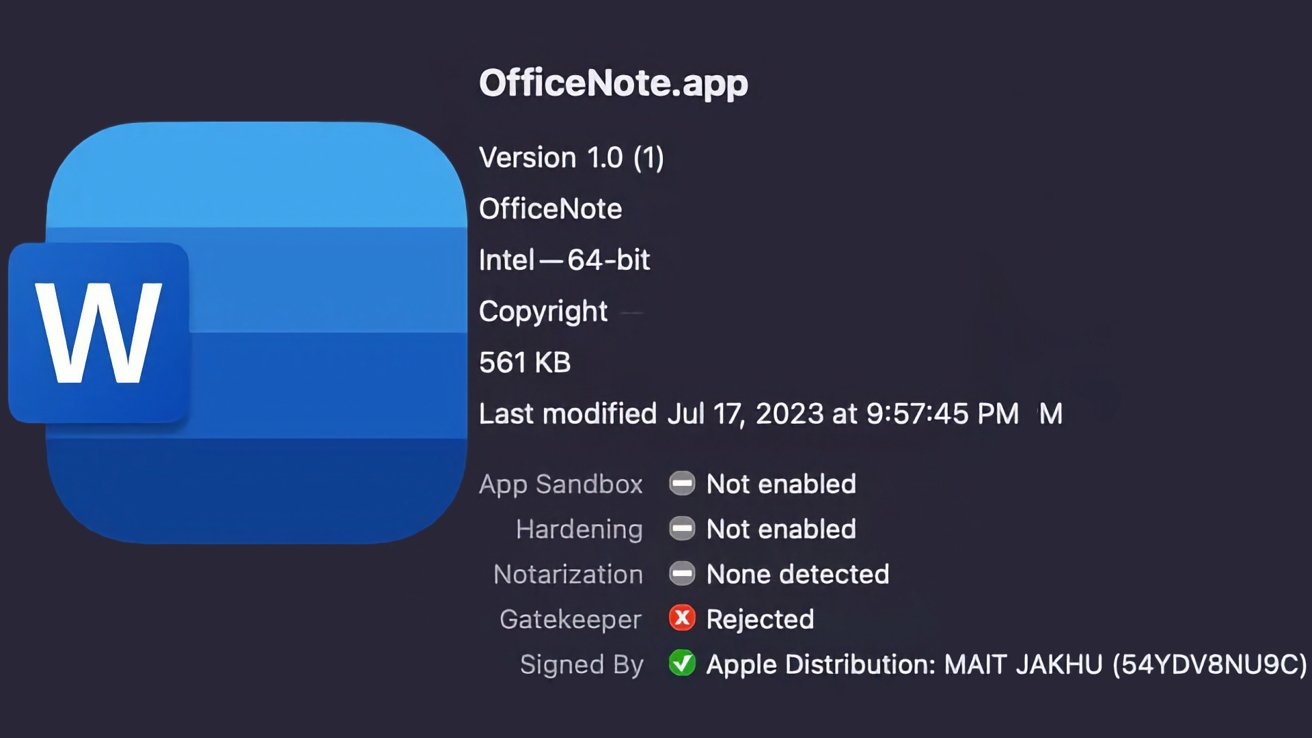
XLoader’s latest cover is a Microsoft-branded Office productivity app called “OfficeNote.” It’s being distributed within a standard Apple disk image named “OfficeNote.dmg,” which is automatically something you should be on the lookout for, especially in a work environment.

The developer signature is “MAIT JAKHU (54YDV8NU9C),” another key detail to be aware of.

According to the original report, Apple has already revoked that particular developer signature. However, SentinelOne says, “Apple’s malware blocking tool, XProtect, does not have a signature to prevent execution of this malware” at the time of publication.

This particular malware tool has apparently been widely distributed as of July of 2023, when it first cropped up.

And macOS malware tools run a premium, based on advertisements found on crimeware forums. Renting this XLoader variant is going for $199 per month, or $299 for three months.

Compare that to the $59 per month, or $129 for three months the Windows-based version typically rents for.

If a person does install the XLoader malware tool onto their system, it will immediately target two popular browsers: Chrome and Firefox. It will then try and steal information that’s stored in the user’s clipboard via Apple’s own API.

XLoader malware tool hiding as

XLoader malware tool hiding as “OfficeNote.app.” Image source: SentinelOne

Apple’s Safari is not targeted with this variant of XLoader.

Once installed, the malware tool will automatically deposit its payload into the user’s home directory and execute. It will then create a hidden directory and a barebones app, while a LaunchAgent is then dropped into the user’s Library.

This variant of XLoader is specifically designed for work environments, and it is advised IT security teams install third-party services designed to identify malware to prevent installations.

How to stay safe

As mentioned above, utilizing a software security service that can identify malware tools such as this one are important, especially for businesses. And of course, another easy way to stay safe and avoid malware tools is to avoid downloading any software or apps that you do not recognize.

macOS is still the safer option when it comes to malware tools like this, but the threats are growing. There are even attacks out there designed for Apple Silicon. Stay vigilant, even if you are on a Mac.

Posted on Leave a comment

Boolean Operators in Python (and, or, not): Mastering Logical Expressions

5/5 – (1 vote)

Understanding Boolean Operators

Boolean operators in Python help you create conditional statements to control the flow of your program. Python provides three basic Boolean operators: and, or, and not. These operators help you construct sophisticated expressions to evaluate the truth or falsity of different conditions.

And Operator

The and operator returns True if both of its operands are true, and False otherwise. You can use it to check multiple conditions at once.

Here is a simple example involving the and operator:

age = 25
income = 50000 if age >= 18 and income >= 30000: print("Eligible for loan")
else: print("Not eligible for loan")

In this example, the condition age >= 18 and income >= 30000 must be True for the program to print "Eligible for loan". If either age is less than 18 or income is less than 30,000, the condition evaluates to False, and the program will print "Not eligible for loan".

Or Operator

The or operator returns True as long as at least one of its operands is true. You can use it to specify alternatives in your code.

Here’s an example of how to use the or operator:

student_score = 80
extra_credit = 5 if student_score >= 90 or extra_credit >= 10: print("Student grade: A")
else: print("Student grade: B")

In this case, if the student_score is 90 or higher, or if the student has completed 10 or more extra credit, the program will print “Student grade: A”. Otherwise, it will print "Student grade: B".

Not Operator

The not operator inverts the truth value of the expression that follows it. It takes only one operand and returns True if the operand is False, and vice versa. The not operator can be used to check if a certain condition is not met.

Here is an example:

message = "Hello, World!" if not message.startswith("Hi"): print("Message does not start with 'Hi'")
else: print("Message starts with 'Hi'")

In this example, the program checks whether the message does not start with the string "Hi". If it doesn’t, the condition not message.startswith("Hi") evaluates to True, and the program prints "Message does not start with 'Hi'". If the condition is False, the program prints "Message starts with 'Hi'".

Boolean Values in Python

In Python, Boolean values represent one of two states: True or False. These values are essential for making decisions and controlling the flow of your program. This section covers the basics of Boolean values, the None value, and how to convert different data types into Boolean values.

True and False Values

Boolean values in Python can be represented using the keywords True and False. They are instances of the bool class and can be used with various types of operators such as logical, comparison, and equality operators.

Here’s an example using Boolean values with the logical and operator:

x = True
y = False
result = x and y
print(result) # Output: False

None Value

In addition to True and False, Python provides a special value called None. None is used to represent the absence of a value or a null value. While it’s not a Boolean value, it is considered falsy when used in a Boolean context:

if None: print("This won't be printed.")

Converting to Boolean Type

In Python, various data types such as numbers, strings, sets, lists, and tuples can also be converted to Boolean values using the bool() function. When converted, these data types will yield a Truthy or Falsy value:

  • Numbers: Any non-zero number will be True, whereas 0 will be False.
  • Strings: Non-empty strings will be True, and an empty string '' will be False.
  • Sets, Lists, and Tuples: Non-empty collections will be True, and empty collections will be False.

Here are a few examples of converting different data types into Boolean values:

# Converting numbers
print(bool(10)) # Output: True
print(bool(0)) # Output: False # Converting strings
print(bool("Hello")) # Output: True
print(bool("")) # Output: False # Converting lists
print(bool([1, 2, 3])) # Output: True
print(bool([])) # Output: False

🔗 Recommended: How to Check If a Python List is Empty?

Working with Boolean Expressions

In Python, Boolean operators (and, or, not) allow you to create and manipulate Boolean expressions to control the flow of your code. This section will cover creating Boolean expressions and using them in if statements.

Creating Boolean Expressions

A Boolean expression is a statement that yields a truth value, either True or False. You can create Boolean expressions by combining conditions using the and, or, and not operators, along with comparison operators such as ==, !=, >, <, >=, and <=.

Here are some examples:

a = 10
b = 20 # Expression with "and" operator
expr1 = a > 5 and b > 30 # Expression with "or" operator
expr2 = a > 5 or b > 15 # Expression with "not" operator
expr3 = not (a == b)

In the above code snippet, expr1 evaluates to True, expr2 evaluates to True, and expr3 evaluates to True. You can also create complex expressions by combining multiple operators:

expr4 = (a > 5 and b < 30) or not (a == b)

This expression yields True, since both (a > 5 and b < 30) and not (a == b) evaluate to True.

Using Boolean Expressions in If Statements

Boolean expressions are commonly used in if statements to control the execution path of your code. You can use a single expression or combine multiple expressions to check various conditions before executing a particular block of code.

Here’s an example:

x = 10
y = 20 if x > 5 and y > 30: print("Both conditions are met.")
elif x > 5 or y > 15: print("At least one condition is met.")
else: print("Neither condition is met.")

In this example, the if statement checks if both conditions are met (x > 5 and y < 30); if true, it prints "Both conditions are met". If that expression is false, it checks the elif statement (x > 5 or y > 15); if true, it prints "At least one condition is met." If both expressions are false, it prints "Neither condition is met."

Logical Operators and Precedence

In Python, there are three main logical operators: and, or, and not. These operators are used to perform logical operations, such as comparing values and testing conditions in your code.

Operator Precedence

YouTube Video

Operator precedence determines the order in which these logical operators are evaluated in a complex expression. Python follows a specific order for logical operators:

  1. not
  2. and
  3. or

Here is an example to illustrate precedence:

result = True and False or True

In this case, and has a higher precedence than or, so it is evaluated first. The result would be:

result = (True and False) or True

After the and operation, it becomes:

result = False or True

Finally, the result will be True after evaluating the or operation.

Applying Parentheses

You can use parentheses to change the order of evaluation or make your expressions more readable. When using parentheses, operations enclosed within them are evaluated first, regardless of precedence rules.

Let’s modify our previous example:

result = True and (False or True)

Now the or operation is performed first, resulting in:

result = True and True

And the final result is True.

Truthy and Falsy Values

💡 Tip: In Python, values can be considered either “truthy” or “falsy” when they are used in a boolean context, such as in an if statement or a while loop. Truthy values evaluate to True, while falsy values evaluate to False. Various data types, like numerics, strings, lists, tuples, dictionaries, sets, and other sequences, can have truthy or falsy values.

Determining Truthy and Falsy Values

When determining the truth value of an object in Python, the following rules apply:

  • Numeric types (int, float, complex): Zero values are falsy, while non-zero values are truthy.
  • Strings: Empty strings are falsy, whereas non-empty strings are truthy.
  • Lists, tuples, dictionaries, sets, and other sequences: Empty sequences are falsy, while non-empty sequences are truthy.

Here are some examples:

if 42: # truthy (non-zero integer) pass if "hello": # truthy (non-empty string) pass if [1, 2, 3]: # truthy (non-empty list) pass if (None,): # truthy (non-empty tuple) pass if {}: # falsy (empty dictionary) pass

Using __bool__() and __len__()

Python classes can control their truth value by implementing the __bool__() or __len__() methods.

👩‍💻 Expert Knowledge: If a class defines the __bool__() method, it should return a boolean value representing the object’s truth value. If the class does not define __bool__(), Python uses the __len__() method to determine the truth value: if the length of an object is nonzero, the object is truthy; otherwise, it is falsy.

Here’s an example of a custom class implementing both __bool__() and __len__():

class CustomClass: def __init__(self, data): self.data = data def __bool__(self): return bool(self.data) # custom truth value based on data def __len__(self): return len(self.data) # custom length based on data custom_obj = CustomClass([1, 2, 3]) if custom_obj: # truthy because custom_obj.data is a non-empty list pass

Comparisons and Boolean Expressions

In Python, boolean expressions are formed using comparison operators such as greater than, less than, and equality. Understanding these operators can help you write more efficient and logical code. In this section, we will dive into the different comparison operators and how they work with various expressions in Python.

Combining Comparisons

Some common comparison operators in Python include:

  • >: Greater than
  • <: Less than
  • >=: Greater than or equal to
  • <=: Less than or equal to
  • ==: Equality
  • !=: Inequality

To combine multiple comparisons, you can use logical operators like and, or, and not. These operators can be used to create more complex conditions with multiple operands.

Here’s an example:

x = 5
y = 10
z = 15 if x > y and y < z: print("All conditions are true")

In this example, the and operator checks if both conditions are True. If so, it prints the message. We can also use the or operator, which checks if any one of the conditions is True:

if x > y or y < z: print("At least one condition is true")

Short-Circuit Evaluation

YouTube Video

Python uses short-circuit evaluation for boolean expressions, meaning that it will stop evaluating further expressions as soon as it finds one that determines the final result. This can help improve the efficiency of your code.

For instance, when using the and operator, if the first operand is False, Python will not evaluate the second operand, because it knows the entire condition will be False:

if False and expensive_function(): # This won't execute because the first operand is False pass

Similarly, when using the or operator, if the first operand is True, Python will not evaluate the second operand because it knows the entire condition will be True:

if True or expensive_function(): # This will execute because the first operand is True pass

Common Applications of Boolean Operations

In Python, Boolean operations are an essential part of programming, with and, or, not being the most common operators. They play a crucial role in decision-making processes like determining the execution paths that your program will follow. In this section, we will explore two major applications of Boolean operations – Conditional Statements and While Loops.

Conditional Statements

Conditional statements in Python, like if, elif, and else, are often used along with Boolean operators to compare values and determine which block of code will be executed. For example:

x = 5
y = 10 if x > 0 and y > 0: print("Both x and y are positive")
elif x < 0 or y < 0: print("Either x or y is negative (or both)")
else: print("Both x and y are zero or one is positive and the other is negative")

Here, the and operator checks if both x and y are positive, while the or operator checks if either x or y is negative. These operations allow your code to make complex decisions based on multiple conditions.

While Loops

While loops in Python are often paired with Boolean operations to carry out a specific task until a condition is met. The loop continues as long as the test condition remains True. For example:

count = 0 while count < 10: if count % 2 == 0: print(f"{count} is an even number") else: print(f"{count} is an odd number") count += 1

In this case, the while loop iterates through the numbers 0 to 9, using the not operator to check if the number is even or odd. The loop stops when the variable count reaches 10.

Frequently Asked Questions

How do you use ‘and’, ‘or’, ‘not’ in Python boolean expressions?

In Python, and, or, and not are used to combine or modify boolean expressions.

  • and: Returns True if both operands are True, otherwise returns False.
  • or: Returns True if at least one of the operands is True, otherwise returns False.
  • not: Negates the boolean value.

Example:

a = True
b = False print(a and b) # False
print(a or b) # True
print(not a) # False

How are boolean values assigned in Python?

In Python, boolean values can be assigned using the keywords True and False. They are both instances of the bool type. For example:

is_true = True
is_false = False

What are the differences between ‘and’, ‘or’, and ‘and-not’ operators in Python?

and and or are both binary operators that work with two boolean expressions, while and-not is not a single operator but a combination of and and not. Examples:

a = True
b = False print(a and b) # False
print(a or b) # True
print(a and not b) # True (since 'not b' is True)

How do I use the ‘not equal’ relational operator in Python?

In Python, the not equal relational operator is represented by the symbol !=. It returns True if the two operands are different and False if they are equal. Example:

x = 5
y = 7 print(x != y) # True

What are the common mistakes with Python’s boolean and operator usage?

Common mistakes include misunderstanding operator precedence and mixing and, or, and not without proper grouping using parentheses.

Example:

a = True
b = False
c = True print(a and b or c) # True (because 'and' is evaluated before 'or')
print(a and (b or c)) # False (using parentheses to change precedence)

How is the ‘//’ floor division operator related to boolean operators in Python?

The // floor division operator is not directly related to boolean operators. It’s an arithmetic operator that performs division and rounds the result down to the nearest integer. However, you can use it in boolean expressions as part of a condition, like any other operator.

Example:

x = 9
y = 4 is_divisible = x // y == 2
print(is_divisible) # True

The post Boolean Operators in Python (and, or, not): Mastering Logical Expressions appeared first on Be on the Right Side of Change.