New Features
- Added Happy Ghast mob
- Added Dried Ghast block
- Added Harness items
- Added the Locator Bar, a new HUD element that shows the direction of other Players in multiplayer
- Added a new Music Disc with the track “Tears” by Amos Roddy
- Added 5 new music tracks by Amos Roddy
- Added new advancements
- Added Old Spelling Indonesian (Indonesian pre-reform) and Cantabrian language support
Happy Ghast
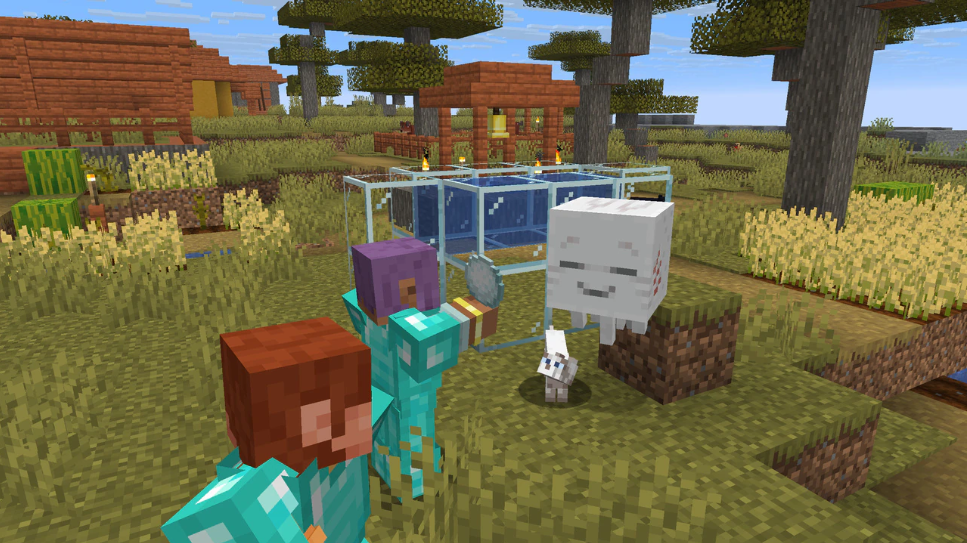
The Happy Ghast is a new mountable flying mob.
Dried Ghast Block
- The Dried Ghast block is found in Nether Fossil structures and is the first stage of the Happy Ghast mob
- Can be crafted with 1 Soul Sand block and 8 Ghast Tears
- When waterlogged, it undergoes 3 hydration level changes over approximately 20 minutes until it spawns a Ghastling mob
- The hydration level decreases when it is no longer waterlogged, using the same timescale
- The hydration level is not preserved when mined
- Makes sounds and shows particles depending on its hydration level
- The Dried Ghast block emits a vibration frequency of 11 when its block state changes
Ghastling Mob
- The Ghastling is a young version of the Happy Ghast mob
- Spawns from a Dried Ghast block that has continuously been waterlogged for about 20 minutes
- After spawning, the Ghastling will try and follow:
- Players within a 16-block radius or
- An adult, non-aquatic passive mob or some of the neutral mobs within a 16-block radius
- If no player or suitable mob is close around, the Ghastling will idle around within 32 blocks from its home position where it spawned or was last interacted with
- It will reset its home position if it is moved more than 16 blocks away from the border of its home position
- Can be tempted and fed using Snowballs
- Will grow up into a Happy Ghast after about 20 minutes, or faster if fed Snowballs
Happy Ghast Mob
- Can be equipped with a Harness and then be mounted by up to four players
- Tempted by Snowballs and Harness
- The Happy Ghast can only be tempted with a Harness when it has no harness equipped
- Slowly regenerates health, with regeneration speeding up during rain, snow or when flying at the same height as clouds
- The first player that mounts the Happy Ghast will control it, sitting above it in the front seat
- When controlled, the goggles of the Happy Ghast flip down to cover its eyes
- Players mounting after the first player are placed in slots on each side of it, starting clockwise from the first player
- Pressing the sneak key dismounts the player on top of the Happy Ghast
- If the Happy Ghast detects players standing on top of it, it ceases all movement and rotates to the closest cardinal direction
- This happens regardless of whether it has a Harness equipped or not
- When mounted on the Happy Ghast, the third-person camera is further away from the player
- When there are no players mounted or walking on the Happy Ghast, it starts its roaming behavior
- If players dismount midair, the Happy Ghast will descend towards the ground before it starts roaming
- The roaming behavior is similar to the Ghastling, except for the radius being 64 blocks
- When wearing a Harness, the Happy Ghast roams closer to the home position, within a 32 block radius
- When leashed, the Happy Ghast has a roaming distance of 10 blocks
- The Happy Ghast will try to stay close to blocks when roaming
- Cannot be bred
- Cannot enter boats
- Has no panic behavior when taking damage
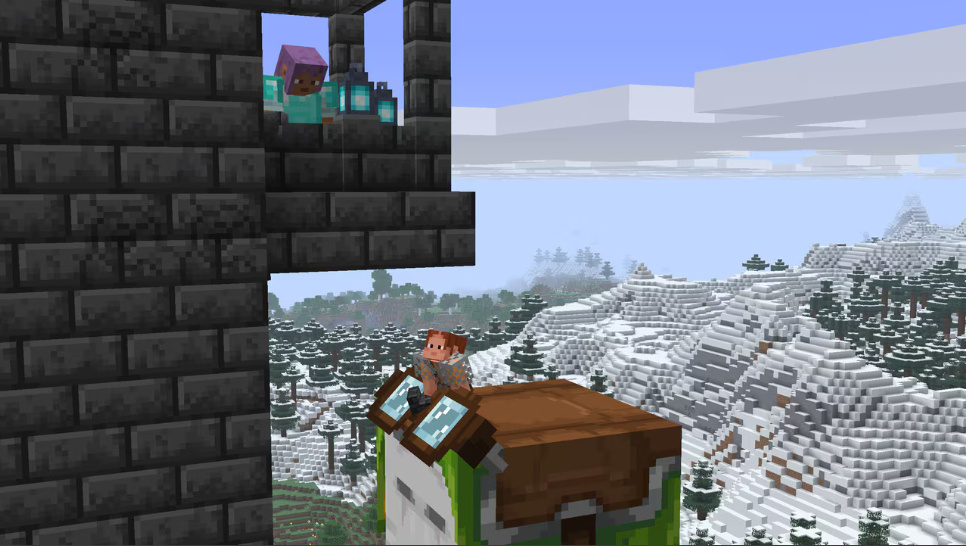
Harness Item
- The Harness is a new item that can be equipped on a Happy Ghast to allow players to ride it
- The Harness comes in 16 different colors
- Can be crafted out of 3 Leather, 2 Glass blocks and 1 Wool block
- The Harness will have the same color as the Wool block used when crafting
- Can be re-dyed in the crafting grid
- Can only be equipped on a Happy Ghast
- Allows up to 4 players to mount the Happy Ghast
- Can be removed from the Happy Ghast using Shears when no players are mounted
Locator Bar
The Locator Bar is a new UI element that displays the direction of other players in the world.
- If another player is in the world (and that player is not hiding) the Locator Bar will display in the same area as experience bar
- When experience is gained the experience bar will appear
- If there are no other players in the world the experience bar will display as normal
- Facing other players within a 120 degree range will display those players as colored indicators on the Locator Bar
- Other players that are above/below the screen will also display an up/down arrow together with their indicator
- The indicator will change to different sized icons depending on how far away the other Player is
- Colored indicators are randomized for each player
- Operators can modify the colors of indicators with the /waypoint command
- e.g.: /waypoint modify @s color red to set an indicator to red
- Players on a team will override their default indicator color with their team color
- Players can hide by crouching, wearing a mob head or a Carved Pumpkin, or using a Potion of Invisibility
- Players in Spectator Mode are not visible on the Locator Bar
- However, spectators are visible to each other
- The Locator Bar can be toggled off by setting the locatorBar game rule to false
Music and Sound
- Added a new music disc:
- “Tears” by Amos Roddy
- Can be obtained by killing a Ghast with a Fireball deflected by a Player
- Has a comparator output of 10 when played in a Jukebox
- Added 5 new background music tracks by Amos Roddy:
- “Below and Above”
- “Broken Clocks”
- “Fireflies”
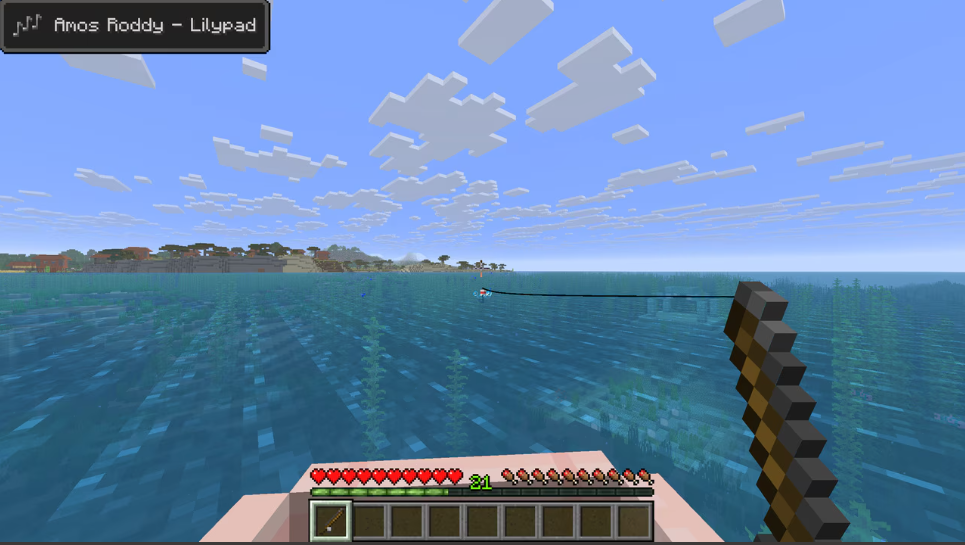
- “Lilypad”
- “O’s Piano”
- Added a new sound for when a Lead snaps
- Added new custom sounds for shearing Saddles, Horse Armor, and Carpets from Llamas
- Added new sound volume category called “UI” for sounds played by UI elements, like button clicks
- Music now plays even when the game is paused
- Added an option to the Music & Sound settings that allows players to change how frequently music plays while in a game world
- Added an option to the Music & Sound settings that enables a music toast to be shown whenever a song starts playing
- With this option enabled, the song that is currently playing will always be seen in the top left corner of the in-game Pause Menu
Advancements
- Added new “Stay Hydrated!” Husbandry Advancement when a Dried Ghast block is placed into Water
- Added “Heart Transplanter” Adventure Advancement that is unlocked when a player places a Creaking Heart with the correct alignment between two Pale Oak Log blocks
Changes
- Changed leash mechanics and updated recipe for Lead
- Saddles are now craftable and shearable
- Updated Ghast texture
- Improvements to fog
- Updates to music and sound
- Improvements to the Realms configuration screen and introduced a region preference setting
- Piglins can now give Dried Ghast blocks when bartered with
- Splash Potions effect strength is now based on the distance of the hitboxes
- The target tolerance margin of projectiles now changes over time
- Changed Elytra so that while gliding, using a Firework Rocket will only be used as a boost even if it could be placed on a block
- Spectators will now teleport together with entities that move to other dimensions, but will stop spectating them
- Increased the third-person camera distance when spectating or riding Ghasts or Ender Dragons
- The fix to MC-3697 has been partially reverted
- Decorative hanging entities such as paintings and item frames are now immune to explosions from submerged TNT while items and armor stands are once again vulnerable to them
- Wolves, Sheep and Pigs now have their legs mirrored
- The test framework will no longer try to restart running tests after a server restart
- Clouds now exist all the way to the horizon, with an option to reduce them
- Updated the pattern of clouds in the sky
- Horses, Donkeys, and Mules can now be fed Carrots to heal, grow, and improve their temper
- Updated the main screen panorama
- Removed Herobrine
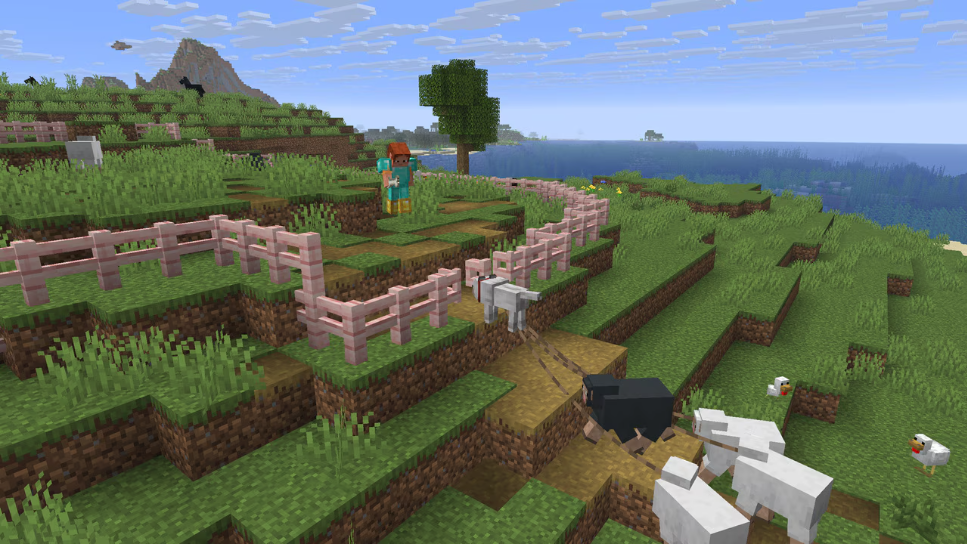
Leash Changes
- The Slime Ball in the Lead recipe has been replaced with a String
- Improved leash mechanics, with reworked leash physics, allowing for more stable leash connection, especially when leashed entities are not on ground
- When dragged on the leash, leashed objects will now orient themselves towards the entity holding the leash
- Using a Firework Rocket when flying with leashed entities will now break the leash connections
- Leashes are now rendered twice as thick, matching Minecraft: Bedrock Edition
- Leashes can now be used to leash two mobs together
- Sneak-interact on any mob while holding leashed mobs will leash these mobs to the entity interacted with
- Re-leashing an entity is prevented if the re-leashing would result in immediate leash snapping due to distance
- Leashes can be snipped from an entity when interacting with them using Shears
- This applies to its own leash connection as well as all entities attached to it
- Dispensers can now snip leashes from entities in front of them when they are equipped with Shears
- When leashing an already leashed mob, their previous leash snaps
- You cannot steal leashed entities from other players
- Interactions with a Leash Knot/Fences:
- Fails for entities that are not in range of the Leash Knot/Fence
- All entities leashed to the player will be leashed to the Leash Knot/Fence
- Transfers all its leashed entities to the player if the player has no entities leashed
- Sneak-interact only ever attaches leashes
- Shearing or punching the Leash Knot will result in all current connections to be broken
- A Leash Knot requires at least one connection to exist
- Boats and large mobs that can be leashed but cannot fit in a Boat (Horses, Donkey, Mule, Camel and Sniffer) can be leashed in a special quad connection to the Happy Ghast
- Happy Ghast will also show a custom layer when it’s leashing something using a quad connection
- Entities leashed in quad connection are now rendered without slack
- Leash snapping distance has been changed from 10 to 12 blocks
- Happy Ghast has a leash snapping distance of 16 blocks
- The distance between two leashed entities is determined based on the center of their bounding boxes, rather than their feet
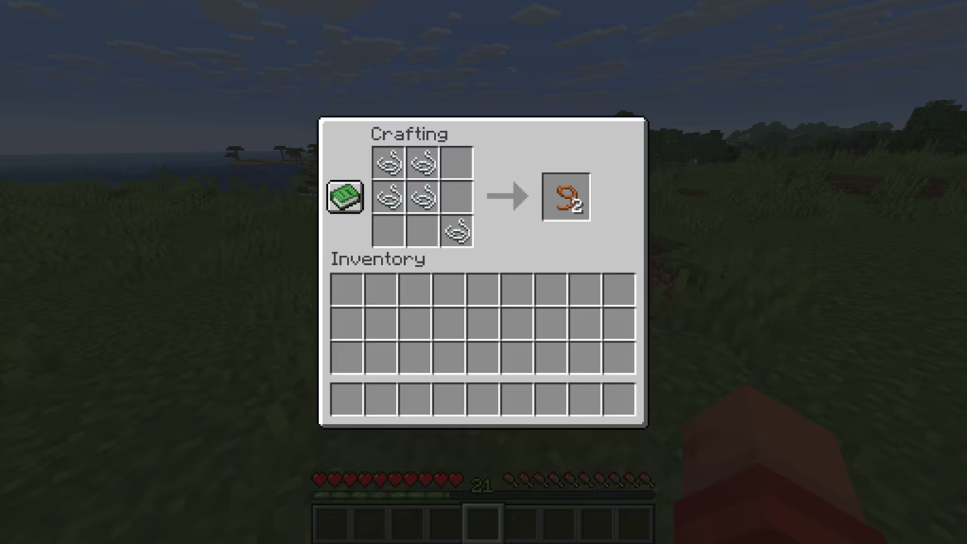
Saddle Changes
Crafting Saddles
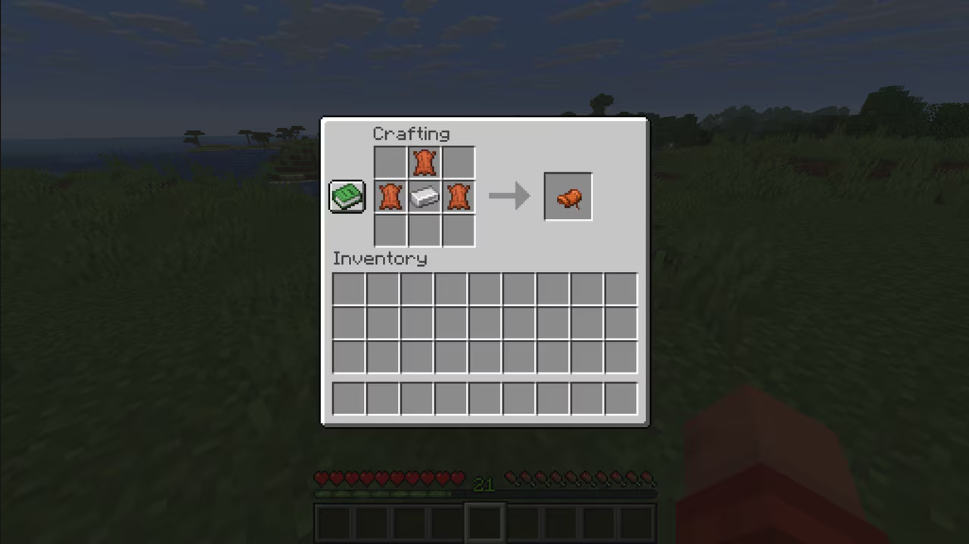
- Saddles can now be crafted with 3 Leather and 1 Iron Ingot
- The recipe is unlocked when a player picks up their first Leather
Removing Saddles and Equipment
- Saddles, Horse Armor, Harnesses and Carpets can now be removed from the mobs by using Shears
- This does not work in case the mob has a rider, or if the player is crouching
- Saddles cannot be removed from Ravagers using Shears
- Dispensers with Shears cannot remove Saddles, Horse Armor, Harnesses or Carpets equipped on mobs
- Shearing Saddles, Horse Armor, and Carpets will emit a vibration frequency of 6, along with the Unequip frequency of 4
Loot Table Changes
The following loot tables have had Saddles removed from them and replaced with 1-5 Leather:
- Monster Room chests
- Ancient City chests
- Desert Pyramid chests
- Jungle Pyramid chests
- Stronghold altar chests
Fog
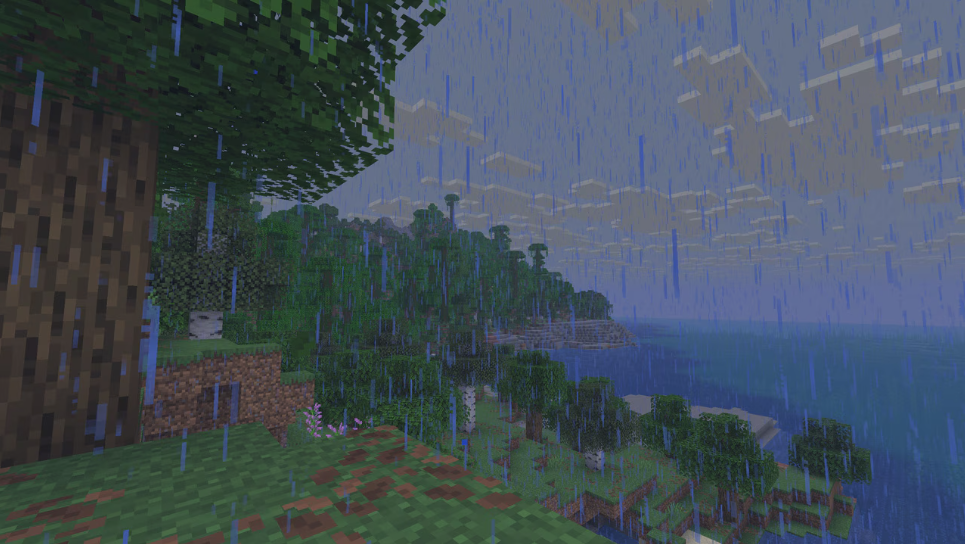
- Fog was tweaked for improved atmospheric perspective
- It now becomes foggier when it rains
- Fog is now applied to 3D HUD elements such as first-person player hands and items in hands
Ambient Desert Block Sounds Changes
- Ambient sand sounds no longer require sky access to play
- Ambient sand sounds now have a slightly decreased chance to play
- Terracotta blocks no longer trigger ambient sand sounds
- Sand blocks no longer trigger ambient wind sounds
- Terracotta blocks no longer trigger ambient wind sounds
- Short Dry Grass and Tall Dry Grass can now trigger ambient wind sounds when above 2 Sand, Red Sand or Terracotta blocks
- Dead Bush ambient sounds now have a slightly increased chance of playing
Music and Sound
- The following sound categories have been renamed:
- Friendly Creatures -> Friendly Mobs
- Hostile Creatures -> Hostile Mobs
- Rules for when ambient desert blocks sounds play have been tweaked
Realms
- Changed the layout of the Realms configuration screen to use tabs
- The Worlds tab allows changes to any of the world slots, creating new worlds and changing their settings
- The Players tab allows management of the players that have access and their level of access to the Realm
- The Subscription tab allows management of the Realms subscription
- The Settings tab allows changing the settings of the Realm
- Introduced a Region Preference setting that allows for more granular control over what region a Realm is hosted in
- Changed wording for Close/Open Realm to Temporarily close/Reopen Realm
- Added the Realms logo to the Realms loading screens
- Added region information when connecting to a Realm

Projectile Targeting
- The target tolerance margin of projectiles now changes over time
- Previously, all projectiles had a target tolerance margin of 0.3 blocks
- Now, all projectiles start with no margin for the first two ticks of their flight
- After that, the target margin will expand by 0.05 blocks per tick until it reaches the previous 0.3 blocks margin
- This allows for better precision close to the shooting player or entity, while still allowing for some collision leeway when the projectile is further away
Splash Potions
- Splash Potions distance to affected entities now depends on the closest distance between the entity hitbox and the splash potion hitbox where it landed
- This means that if an entity is hit directly by the splash potion, it will receive the full effect of the potion
- If the entities are grouped together, they will receive the same effect strength
Technical Changes
- The Data Pack version is now 80
- The Resource Pack version is now 63
- All JSON files (in worlds, packs, configuration, etc.) are now parsed in strict mode
- Pressing F3 + V now prints client-side version information
- “Command Syntax” report now contains information about required permission level
- –quickPlaySingleplayer command line argument can now be used without an identifier to launch into the last played world
Data Pack Versions 72 Through 80
- Dimension Type definitions have a new optional field, cloud_height that indicates on what y-level the clouds start in the dimension
- New version command has been added
- New datapack create subcommand has been added
- Added a way to display very simple dialogs to users
- Added a Server-authoritative Waypoint broadcasting system for controlling the Locator Bar behavior for Players
- Added custom – a new click_event action type for text components
- New optional fields can_be_sheared and shearing_sound have been added to the equippable item component
- Added player_sheared_equipment advancement trigger
Commands
Added version
Prints the current version information on the server side.
- Takes no arguments
- Available in singleplayer or for server operators
Added datapack create
Creates a new empty directory data pack for the current world.
- The supported pack version is always equal to one supported by the game
- Available only to server owners
- Syntax: datapack create <id> <name>
- id – new pack name, must be a valid directory name
- name – text component to be placed in description in pack.mcmeta
Modified playsound
- Added new category ui
- Sounds in this category will continue playing when paused, similarly to music
Added waypoint
This is a new command for querying and modifying waypoints.
waypoint list waypoint modify <entity-selector> color <color>
waypoint modify <entity-selector> color hex <hex-color>
waypoint modify <entity-selector> color reset
waypoint modify <entity-selector> style <waypoint_style/resource>
waypoint modify <entity-selector> style reset
Arguments:
- entity-selector: For selecting entities that are transmitting as waypoints (see waypoint_transmit_range attribute)
- color: Overrides the Locator Bar icon color for this waypoint
- hex <hex-color> arguments are in web format (RRGGBB)
- Red is either hex F00 or hex FF0000
- Cornflower blue is hex 6495ED
- style: For changing the icon spriteset and selection distances
- set <waypoint_style/resource> changes the style to a specific asset under waypoint_style/ (see Waypoint Styles section below)
- reset will restore the default icon behavior of the Locator Bar
Waypoint Broadcasting
The Locator Bar works through a server-controlled Waypoint system. Waypoints are received by Players, and connections between Waypoints and Players are managed by the multiplayer server.
- By default, all Players transmit a Waypoint from themselves, and all Players receive all Waypoints
- Individual Players can have their transmission and receive ranges controlled by the waypoint_transmit_range and waypoint_receive_range attributes
Dialogs
- Added a way to display simple modal dialogs to a user
- Dialogs are stored in a minecraft:dialog registry, but can also be defined inline
- Dialogs are an experimental feature
- To avoid user confusion, dialog screens are marked with a warning sign next to the title
- Clicking on this warning leads to a screen that explains to user that this screen is provided by custom content
- It also gives the user an option to leave the current world to avoid them being locked in an infinite loop of dialogs
- If a new dialog is received by the client while warning screen is visible, it will not replace it, but when user clicks the “Back” button, the new dialog will be restored instead
- Dialogs can be displayed by server in play and configuration connection phases
- However, only inline registries are allowed in configuration, since registries are not yet available in that phase
- Additionally, run_command click event is not available in configuration phase
- Dialogs by default will close after the Escape key is pressed
- When this happens, dialog will run action specific to dialog type described as “exit action” below
- This behavior is configurable
- When the dialog screen is closed, the game goes back to previously displayed non-dialog screen or back to gameplay
- That means that new dialogs always replace already opened ones, if any
- Dialogs can be configured to be accessible from Pause menu
- This replaces and expands the “Server Links” button added in previous versions
- New key bind called “Quick Actions” has been added to allow accessing content-configured dialogs
- Most dialogs follow a common layout, however exact contents depend on type:
- Header with title and warning button
- Body elements, scrollable if needed:
- messages and items
- inputs
- actions buttons
- Optional footer, contains main buttons and submit actions
Developer’s Note: Dialogs are not supposed to fully describe any in-game UI, but just to allow custom content to display simple messages and get input from users. This feature is intentionally limited to match that use case.
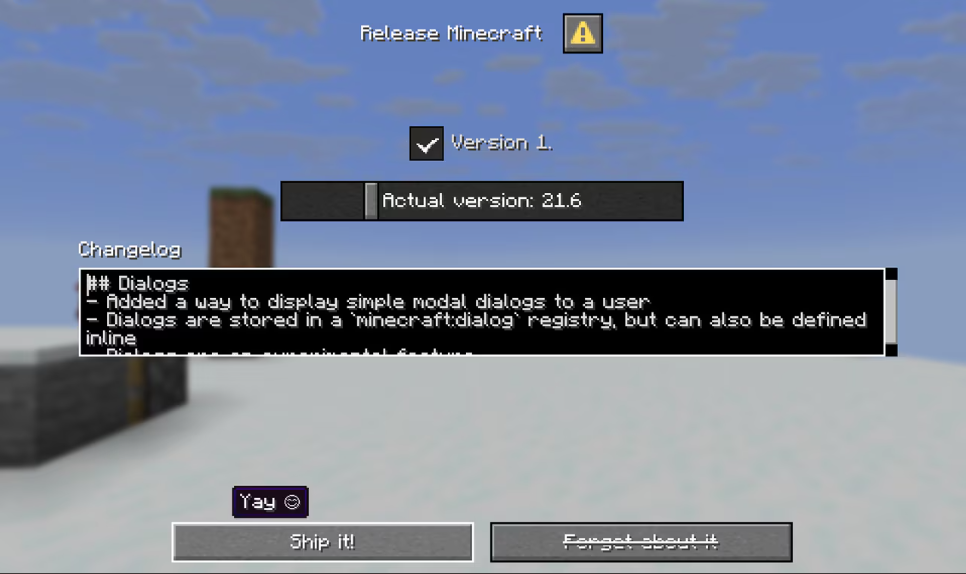
Dialog Description Format
- Dialogs are stored in minecraft:dialog registry that can be provided by a datapack
Fields:
- type – one of dialog types from minecraft:dialog_type registry
- <type-specific> – see below
Common Dialog Fields
- Most dialog types share some fields. To avoid duplication, they are listed in this section
Fields:
- title – screen title, text component
- Should be always visible on screen, no matter the specific type
- external_title – name to be used for a button leading to this dialog (for example from Pause screen), optional text component
- If not present, title will be used instead
- body – optional list of body elements or a single element, see below
- inputs – optional list of inputs, see below
- can_close_with_escape – can dialog be dismissed with Escape key, default true
- pause – should the dialog screen pause the game in single-player mode, default: true
- after_action – additional operation performed on dialog after click or submit actions, default: close
- close – closes dialog and returns to previous non-dialog screen (if any)
- none – do nothing, i.e., keep the current screen open
- only available if pause is false to avoid locking the game in single-player mode
- wait_for_response – replace the current dialog with a “Waiting for Response” screen
- this option is intended to prevent users from sending multiple actions on laggy connections
- servers are expected to eventually replace this screen with a new dialog
- to avoid accidental locking, a “Back” button will become active after 5 seconds
- clicking this button will continue as if the dialog was closed (i.e., game returns to the previous non-dialog screen, if any)
- “Waiting for Response” screen will unpause the game in single-player mode to avoid locking the game
Dialog Types
minecraft:notice
- A simple screen with one action in footer
- Exit action: same as action
Fields:
- Common dialog fields (see above)
- action – main action (see below), defaults to a button with gui.ok label and no action or tooltip
minecraft:confirmation
- A simple screen with two actions in footer
- Exit action: same as no action
Fields:
- Common dialog fields (see above)
- yes – action (see below) for positive outcome
- no – action (see below) for negative outcome
minecraft:multi_action
- A scrollable list of actions arranged in columns
- Screen can have optional exit action that will appear in footer
- Exit action: same as exit_action, if present
Fields:
- Common dialog fields (see above)
- actions – non-empty list of actions (see below)
- exit_action – optional action (see below) in footer
- columns – positive integer describing number of columns, default: 2
minecraft:server_links
- A scrollable list of links received from server in minecraft:server_links packet, arranged in columns
- Note: this is a replacement for the previous Server Links screen, but now with an additional body
- Exit action: same as exit_action, if present
Fields:
- Common dialog fields (see above)
- exit_action – optional action (see below) in footer
- columns – positive integer describing number of columns, default: 2
- button_width – width of buttons in the list, integer from 1 to 1024 (inclusive) with default 150
minecraft:dialog_list
- A scrollable list of buttons leading directly to other dialogs, arranged in columns
- Titles of those buttons will be taken from external_title fields of targeted dialogs
- Exit action: same as exit_action, if present
Fields:
- Common dialog fields (see above)
- dialogs – dialog, a list of dialogs or a dialog tag
- exit_action – optional action (see below) in footer
- columns – positive integer describing number of columns, default: 2
- button_width – width of buttons in the list, integer from 1 to 1024 (inclusive) with default 150
Dialog Body Types
- All dialogs have a list of body elements describing contents between title and actions or inputs
- Hover and click events on text components within bodies function as expected
- Click events are handled by dialog screen like any other action – that means it will also run after_action
Fields:
- type – one of dialog body types from minecraft:dialog_body_type registry
- <type-specific> – see below
minecraft:plain_message
Fields:
- contents – text component
- width – maximum width of message, integer from 1 to 1024 (inclusive) with default 200
minecraft:item
- Item with optional description
- If a description is present, it will be rendered to the right of item
- The Item will be rendered as if it was in inventory slot
- The Item is not scaled even if width and height are set to values other than default
Fields:
- item – item stack with count
- description – optional object with fields:
- contents – text component
- width – maximum width of contents, integer from 1 to 1024 with default 200
- Can also just be text component
- show_decorations – if true, count and damage bar will be rendered over the item, default: true
- show_tooltip – if true, item tooltip will show up when item is hovered, default: true
- width – horizontal size of element, integer from 1 to 256 (inclusive) with default: 16
- height – vertical size of element, integer from 1 to 256 (inclusive) with default: 16
Input Control Types
- Dialog can contain a set of controls that accept user input
- When submitted, the current value of the input will be used to build response to the server according to action selected by user (see below)
- When a value is inserted into a macro, template substitution form is used
- When a value is sent as a tag, tag form is used
Fields:
- type – one of input control types from minecraft:input_control_type registry
- key – string identifier of value used when submitting data, must be a valid template argument (letters, digits and _)
- <type-specific> – see below
minecraft:text
- A simple text input
- Output values:
- As template substitution: contents with special characters escaped to fit in a SNBT literal (note: both ‘ and “ are escaped)
- As tag: a string tag with contents without modification
Fields:
- width – width of the text input, integer from 1 to 1024 (inclusive) with default: 200
- label – a text component to be displayed to the left of control
- label_visible – controls label visibility, default: true
- initial – initial contents, default: “” (empty)
- max_length – maximum length of the text input, positive integer with default of 32
- multiline – if present, allows users to input multiple lines, optional object with fields:
- max_lines – if present, limits maximum lines, optional positive integer
- height – height of input, optional integer in range 1 to 512
- If this field is omitted, but max_lines is present, the height will be chosen to fit the maximum number of lines (but can’t exceed 512)
- If this and max_lines are both omitted, it will default to a height that fits 4 lines
minecraft:boolean
- A plain checkbox with a label
- Output values:
- As template substitution: on_true when checked, on_false when unchecked
- As tag: 1b when checked, 0b when unchecked
Fields:
- label – a text component to be displayed to the right of control
- initial – an initial value, default: false (i.e., unchecked)
- on_true – a string value to send when control is checked, default: true
- on_false – a string value to send when control is unchecked, default: false
minecraft:single_option
- A button that cycles between a set of options when clicked
- Output values:
- As template substitution: contents of id field of currently selected option
- As tag: a string tag with contents of id field of currently selected option
Fields:
- label – a text component to be displayed on the button
- label_visible – if true, label will be incorporated into button text, default: true
- width – width of the button, integer from 1 to 1024 (inclusive) with default: 200
- options – a list of objects with fields:
- id – a string value to send on submit
- display – a text component to display on button, optional (if not present, id is used)
- initial – an optional boolean flag that selects initial option (only one option can have this be set to true)
- Additionally, the list might also contain a plain string – in that case it’s equivalent to a single entry with field id set to that string and other fields set to default
minecraft:number_range
- A slider for picking a numeric value out of some range
- Sends currently selected value
- Output values:
- As template substitution: text representation of current value
- Whole numbers will be sent without decimal point
- As tag: a float tag with current value
Fields:
- label – a text component to be used as a slider label
- label_format – a translation key to be used for building label (first argument is contents of label field, second argument is current value), default: options.generic_value
- width – width of input, integer from 1 to 1024 (inclusive) with default: 200
- start – start value (when slider is in leftmost position) (inclusive), float
- end – end value (when slider is in rightmost position) (inclusive), float
- initial – initial value of the slider, float, defaults to the middle of slider range
- step – step size, optional positive float
- If present, only values of initial + <any integer> * step will be allowed
- If absent, any value from range the is allowed
Actions
Dialogs have at least one action, presented to the user as a button. After every action dialog will always evaluate contents of after_action field (see above).
Fields:
- label – a button label, text component
- tooltip – an optional text component to display when the button is hovered or focused
- width – the width of the button, integer from 1 to 1024 (inclusive) with default 150
- action – an action to perform when the button is clicked, optional object with fields:
- type – value from minecraft:dialog_action_type registry
- <type-specific> – see below, depends on type
Static Dialog Action Types
All existing click_event actions (except for open_file) are included as dialog action types.
Uses same format as click_event on text components (but with action replaced with type) For example, when using show_dialog, the entry for action button will look like this:
{ "label": "some label", "action": { "type": "show_dialog", "dialog": "some:id" }
}
minecraft:dynamic/run_command Action Type
- This action will build a run_command event using a provided macro template
- The macro will be expanded with string values from inputs
- For example, if the macro template is some_command $(some_input), the string value from input with key of some_input parameter will be used for the template expansion
- Inputs not used in macro will be ignored, while macro parameters not matching any inputs will be replaced with an empty string
Fields:
- template – a string with a macro template to be interpreted as a command
minecraft:dynamic/custom Action Type
- This method will build a minecraft:custom event using all input values
- All input contents will be sent together inside a compound tag, with tag value of each input put under id from key field of that input
- Additional static fields can be added to payload
Fields:
- additions – fields to be added to payload, optional compound tag
- id – namespaced ID
Built-in Dialogs
The built-in datapack contains some custom dialogs to provide customization of specific screens used by the client.
minecraft:server_links
- Replacement for the previously existing “Server Links” screen
- Meant to simplify migration for servers that previously used this feature
minecraft:custom_options
- Shows contents of minecraft:pause_screen_additions tag (see below)
- Allows the user to select a specific dialog if this tag contains multiple entries
- Note: Since this tag is meant for interoperability, any content that replaces this dialog should be careful not to hide other dialog providers
Dialog Command
- New command has been added to show dialog to clients
Syntax:
- dialog show <targets> <dialog> – show dialog to player(s)
- <targets> – player name, UUID or a player selector
- <dialog> – a namespaced ID from minecraft:dialog registry or inline dialog value as described above
- Returns the number of players in targets argument
- dialog clear <targets> – clean dialog for player(s), if they have any visible
- <targets> – player name, UUID or a player selector
- Returns the number of players in targets argument
Pause Screen Configuration
- A data pack can request some of the available dialogs to be accessible from Pause screen
- This feature replaces the “Server Links” button and is placed on Pause screen according to the same rules
- Buttons leading to dialogs exposed in this way will use label described in external_title field
- This feature is configured by minecraft:pause_screen_additions dialog tag:
- If this tag is not specified or is empty but the server has sent server_links packet, the tag will be handled as if it contained minecraft:server_links dialog
- Note: this matches previous Server Links feature behavior
- If this dialog is removed, the tag remains empty
- If this tag is still empty, the button will not be visible (“Send Feedback” and “Report Bugs” buttons are visible instead)
- If this tag has a single element, the pause screen button will lead directly to that dialog
- If this tag has multiple elements, the pause screen button will lead to a minecraft:custom_options dialog which (by default) lets user select one of the tag elements
- If this dialog is removed, the button is will not be visible
Quick Actions Key Bind
- A new key bind has been added that allows users to access a set of dialogs
- Default key: G
- This feature is configured by minecraft:quick_actions dialog tag
- If this tag is empty, the key bind will do nothing
- If this tag has a single element, the key bind will open that dialog
- If this tag has multiple elements, the key bind will lead to minecraft:quick_actions dialog which (by default) lets user select one of the tag elements
- If this dialog is removed, the key bind will do nothing
- This option is intended for use in custom content and by servers, so this tag is empty in the Vanilla pack
Text Components
Click Events
- Users will now be prompted for confirmation before executing a command from the run_command click action in books and chat if the command can’t be parsed or requires elevated permissions (i.e., higher than 0)
Added minecraft:custom
- A new click action called minecraft:custom has been added
- When user clicks a component with this click action, the client will send a dedicated packet minecraft:custom_click_action to a server
- The intended use is as an alternative for run_command to be used by modded servers without worrying about having to add custom commands
- This packet has no functionality on Vanilla servers
- Fields:
- id – namespaced ID
- payload – optional tag field
Added minecraft:show_dialog
- A new action called show_dialog has been added
- When user clicks this component, a dialog will be opened for them
- Fields:
- dialog – a namespaced ID from minecraft:dialog registry or inline dialog value as described above
Game Rules
Added locatorBar
- Default is true: enabling the Locator Bar
- Changing to false will remove all existing Waypoints from all players
Attributes
Added camera_distance
- Default value: 4.0
- Modifies the distance at which the camera is placed away from the player or spectated entity when in a third-person view
- If the entity being ridden has a larger camera_distance attribute, that distance will be used
- This distance is multiplied by the scale attribute to get a final target camera distance
Added waypoint_transmit_range and waypoint_receive_range
-
Default: 0.0, Minimum: 0.0, Maximum: 60000000.0
-
Players have a default transmission and reception range of 60,000,000
-
Mobs with a transmission range above zero will send waypoint packets to nearby receivers that are within that range
-
Similarly, receivers only receive waypoints that are inside their reception range (and receive nothing if that range is zero) Examples:
-
/attribute @s minecraft:waypoint_transmit_range base set 0 will prevent a player from transmitting (hiding them)
-
/attribute @s minecraft:waypoint_transmit_range base set 80 will only let a player transmit up to 80 blocks (hiding them from players further than that)
-
/attribute @s minecraft:waypoint_receive_range base set 0 will prevent a player from receiving (turns off their Locator Bar)
-
/attribute @s minecraft:waypoint_receive_range base set 120 will only let a player see Locator Bar dots that are within 120 blocks (hiding all players further than that)
Changed flying_speed
- The flying_speed attribute now also applies to Ghasts and Happy Ghasts
Data Components
equippable Item Component
- Added a new optional field: can_be_sheared (boolean)
- If true, players can use Shears to remove this equippable item from a target mob by right-clicking, provided all other shearing conditions are satisfied
- If not specified, it defaults to false
- Added a new optional field: shearing_sound (sound event)
- It’s a sound event that plays when the equippable item is sheared
- If not specified, it defaults to the item.shears.snip sound event
attribute_modifiers Item Component
- Added an optional display field to attribute_modifiers entries
- There are 3 display types:
- default – Current behavior of showing the calculated attribute modifier values on the tooltip
- hidden – Does not show the attribute modifier entry
- override – Replaces the shown attribute modifier text
- Contains a single field value for the text contents to show for this attribute modifier entry
painting/variant Item Component
- No longer accepts inline variants
Entity Data
- Added the home_pos and home_radius fields to all mobs
- Mobs with set home position will limit their pathfinding to stay within the indicated area
- Some mobs, such as Bats, Slimes, Magma Cubes, Phantoms and Ender Dragons may ignore it
- Interacting with leashes or riding may change the home position of the mob
area_effect_cloud
- The Particle field has been renamed to custom_particle, and now always functions as an exact override for the default colored entity_effect particle
- The field will not be written if no override is specified
- The color will no longer be inherited from the potion contents when specifying the entity_effect or tinted_leaves particle types
tnt
- The entity that primed the TNT is now stored in an optional owner field (UUID of Living entity)
vex
- The owner of a Vex is now stored in an optional owner field (UUID of mob)
Advancements
Added minecraft:player_sheared_equipment trigger
- Can Trigger when a player shears off a shearable equipment from an Entity
- Conditions:
- item – Item that is sheared
- entity – The entity that was sheared
Tags
Block Tags
- Added #triggers_ambient_desert_dry_vegetation_block_sounds – blocks that can trigger ambient desert dry vegetation sounds to play from blocks above
- Added #happy_ghast_avoids – blocks that Happy Ghasts avoid getting close to
- #plays_ambient_desert_block_sounds has been renamed to #triggers_ambient_desert_sand_block_sounds
- Added triggers_ambient_dried_ghast_block_sounds – blocks that can trigger ambient Dried Ghast sounds to play when a Dried Ghast block is placed on them
Item Tags
- Added #happy_ghast_food – items that can be used to feed Happy Ghasts
- Added #happy_ghast_tempt_items – items that can be used to tempt Happy Ghasts
Entity Tags
- Added #can_equip_harness – entities that can equip the Harness items
- Added #followable_friendly_mobs – non-baby entities that will be followed by Baby Happy Ghasts
Resource Pack Versions 56 Through 63
- The game will now consistently respect the blur texture parameter in .png.mcmeta files
- All core shader uniforms are now uniform blocks
- The cloud texture (clouds.png) can no longer be colored
- Cube rotations in block models are no longer limited to multiples of 22.5 degrees
- Updated Unifont to 16.0.03
- Panorama textures must now all be the same size, and square
- Added oversized_in_gui item model field
- Added new player head special model type
Waypoint Styles
These define custom icons to be displayed on the Locator Bar and are within the waypoint_style/ asset directory.
- near_distance and far_distance are optional and default to the values 128 and 332 respectively
- far_distance distance must be greater than near_distance
- sprites is a list of at least one sprite IDs within the prefix of hud/locator_bar_dot/ (the directory textures/gui/sprites/hud/locator_bar_dot)
- An example “bowtie” waypoint style is provided and accessible via the command:
- /waypoint modify <entity-selector> style set bowtie
- When the distance to the waypoint is less than near_distance, the first sprite in the list will be selected
- When the distance to the waypoint is greater than far_distance, the last sprite in the list will be selected
- Between this range, sprites will be selected based on the linear progress between the near and far distances
Sounds
- Changed location on the sounds for Glow Squid, Squid, Guardian, Horse, Rabbit and Pufferfish from entity folder to the mob folder
- Added entity/leashknot/break for when a Lead snaps
- The following sounds have been renamed:
- entity/leashknot/break1 -> entity/leashknot/unleash1
- entity/leashknot/break2 -> entity/leashknot/unleash2
- entity/leashknot/break3 -> entity/leashknot/unleash3
- entity/leashknot/place1 -> entity/leashknot/leash1
- entity/leashknot/place2 -> entity/leashknot/leash2
- entity/leashknot/place3 -> entity/leashknot/leash3
- The following sounds have been added for shearing Saddles, Horse Armor, and Carpets
- mob/horse/armor_unequip
- mob/horse/saddle_unequip
- mob/llama/unequip
Sound Events
- block.sand.wind has been renamed to block.dry_grass.ambient
- entity.leash_knot.break had been replaced with item.lead.break and item.lead.untied
- entity.leash_knot.place has been renamed to item.lead.tied
- The following sound events have been added:
- block.dried_ghast.break
- block.dried_ghast.step
- block.dried_ghast.fall
- block.dried_ghast.ambient
- block.dried_ghast.ambient_water
- block.dried_ghast.place
- block.dried_ghast.place_in_water
- block.dried_ghast.transition
- entity.ghastling.ambient
- entity.ghastling.death
- entity.ghastling.hurt
- entity.ghastling.spawn
- entity.happy_ghast.ambient
- entity.happy_ghast.death
- entity.happy_ghast.hurt
- entity.happy_ghast.riding
- entity.happy_ghast.equip
- entity.happy_ghast.unequip
- entity.happy_ghast.harness_goggles_up
- entity.happy_ghast.harness_goggles_down
- item.horse_armor.unequip
- item.llama_carpet.unequip
- item.shears.snip
- item.saddle.unequip
UI Sprites
- The mob effect atlas has been removed, and sprites in the textures/mob_effect/ folder are now included within the GUI atlas
- This means mob effect sprites now support GUI sprite scaling properties
- Added icon/music_notes and toast/now_playing sprites
Font
Unifont
- Updated Unifont to 16.0.03
- Added previously omitted Unifont glyphs for Private Use Areas
- Those glyphs are loaded as a separate sub-font minecraft:include/unifont_pua and are not included in any normally used font
- Characters in those areas are managed by Under-CSUR (Under-ConScript Unicode Registry), which adds various scripts not present in official Unicode set, like Tengwar or Sitelen Pona
unihex Font Provider
- The size_overrides field is now optional (defaults to empty list)
Equipment Assets
- Added new happy_ghast_body layer type, rendering in the body slot of the Happy Ghast
Item Models
- Item model definitions now have a boolean field oversized_in_gui which is false by default
- If true, the item model will be allowed to be bigger than its item slot
- If false, the item model will be clipped to the item slot size when being rendered in gui
- This ability of items being rendered outside their slots should not be considered officially supported, it was temporarily restored as an exception since many servers are relying on it
- At some point in the future we hope to replace it with an officially supported way of achieving similar functionality
- Introduced new item model minecraft:player_head to handle player profile texture loading and rendering
- Removed support for minecraft:profile from minecraft:head
minecraft:player_head Special Model Type
- Renders a player head
- Uses profile from minecraft:profile component to load a texture. Renders a default texture until the profile texture is fully loaded
- No fields
minecraft:head Special Model Type
- No longer supports profile from minecraft:profile component to load a player texture
- Renders a default player texture when kind is player and no texture override is supplied
- Fields remain unchanged
Block Models
- elements[].rotation.angle value in block models is no longer limited to multiplies of 22.5 degrees and can now be any angle from -45 to +45
Shaders & Post-process Effects
Developer’s Note: Although it is possible in Resource Packs, overriding Core Shaders is considered as unsupported and not an intended Resource Pack feature. These shaders exist as part of the internal implementation of the game, and as such, may change at any time as the game’s internals evolve. We understand that overriding Core Shaders is used for very cool Resource Pack features, many of which lack supported alternatives. We would like to provide better, supported alternatives in the future.
- All built-in uniforms are now uniform blocks instead of opaque loose uniforms
- Custom uniforms provided to post-process shaders are now uniform blocks
- Uniform definitions inside json files are now per-block
Post-process Effect Definitions
- Entries in the targets map have been expanded to support new properties
- New optional boolean field: persistent (default: false)
- If true, this render target will be persistent across frames
- The contents of the target will be cleared when the screen is resized
- New optional field: clear_color (default: [0, 0, 0, 0])
- Format: integer ARGB value, or float array in order [R, G, B, A]
- When this target is created or cleared, it will be filled with this color
- The uniforms values is now a list-per-block, instead of a global list
- e.g. uniforms: { “UniformBlockName”: [ { “type”: “vec2”, “value”: […] } ] }
- The order of uniforms in a block must match the order in the shader
- name as part of a uniform definition is no longer used
- We encourage setting it to help keep the json file organized/readable, but the game won’t use it
- value as part of a uniform definition replaces the old values, and the type depends on the type field
- This field is required
- “type”: “int” needs “value”: 123 (a single int)
- “type”: “float” needs “value”: 123.4 (a single float)
- “type”: “vec2” needs “value”: [1.2, 3.4] (two floats)
- “type”: “vec3” needs “value”: [1.2, 3.4, 5.6] (three floats)
- “type”: “ivec3” needs “value”: [1, 2, 3] (three ints)
- “type”: “vec4” needs “value”: [1.2, 3.4, 5.6, 7.8] (four floats)
- “type”: “matrix4x4” needs “value”: [1.0, 2.0, 3.0, 4.0, 5.0, 6.0, 7.0, 8.0, 9.0, 10.0, 11.0, 12.0, 13.0, 14.0, 15.0, 16.0] (four rows of four columns of floats)
- We do not validate that the uniform block is valid for a given shader, giving incorrect information will cause undefined and funky behavior
Post-process Effect Shaders
- Instead of every uniform being an individual opaque type, they are now grouped in uniform blocks
- They will be set according to the pass definition in the json file, and may be shared across both vertex and fragment shaders
- The list of sizes (all vec2 *Size uniforms) are now replaced with a single SamplerInfo uniform block
- This contains, in order, the size of the output texture followed by the size of every input texture
- The order of textures in the definition file will dictate the order of samplers in this uniform
- For most post chains this is just OutSize and InSize as before
- All sizes are vec2
post/bits.fsh
- Expects a BitsConfig of float Resolution and float MosaicSize
post/blit.fsh
- Expects a BlitConfig of vec4 ColorModulate
post/blur.vsh and post/box_blur.fsh
- Expects a BlurConfig of vec2 BlurDir and float Radius
post/color_convolve.fsh
- Expects a ColorConfig of vec3 RedMatrix, vec3 GreenMatrix and vec3 BlueMatrix
post/invert.fsh
- Expects a InvertConfig of float InverseAmount
post/rotscale.vsh
- Expects a RotScaleConfig of vec2 InScale, vec2 InOffset and float InRotation
post/spiderclip.fsh
- Expects a SpiderConfig of vec4 Scissor and vec4 Vignette
Shader Fog Changes
- The fog is now split into environmental and render-distance-based fog
- Previously both those concepts were mixed in the same uniforms
- Environmental fog is supposed to represent the “fogginess” of the environment the player is in
- e.g. lava, water, and now also atmosphere
- Render distance fog is supposed to obscure the border of visible terrain
- Environmental fog uses spherical distance to determine its intensity, render distance fog uses cylindrical distance
- The resulting fog value for any given vertex is the maximum of both
Globals Uniform Block
- Available through #moj_import <minecraft:globals.glsl> for convenience
- Most shaders are able to receive this uniform block, even if they don’t normally use it
- Contains ScreenSize, GlintAlpha, GameTime and MenuBlurRadius (new)
- MenuBlurRadius is the blur radius of the background when a menu is open
Fog Uniform Block
- Available through #moj_import <minecraft:fog.glsl> for convenience
- Most shaders are able to receive this uniform block, even if they don’t normally use it
- Contains FogColor, FogEnvironmentalStart (new), FogEnvironmentalEnd (new), FogRenderDistanceStart (renamed from FogStart), FogRenderDistanceEnd (renamed from FogEnd), FogSkyEnd (new) and FogCloudsEnd (new)
- FogSkyEnd is new and represents where the fog should end when drawing for the sky
- FogCloudsEnd is new and represents where the fog should end when drawing the clouds
- FogRenderDistanceStart is the render distance fog start
- FogRenderDistanceEnd is the render distance fog end
- FogEnvironmentalStart is new and represents the start of environment-based fog
- FogEnvironmentalEnd is new and represents the end of environment-based fog
- FogShape was removed. Render distance fog is now cylindrical and environmental fog is spherical
Projection Uniform Block
- Available through #moj_import <minecraft:projection.glsl> for convenience
- Most shaders are able to receive this uniform block, even if they don’t normally use it
- Contains ProjMat with no changes
DynamicTransforms Uniform Block
- Available through #moj_import <minecraft:dynamictransforms.glsl> for convenience
- Is no longer available to shaders that do not normally use it
- Contains ModelViewMat, ColorModulator, ModelOffset, TextureMat, LineWidth
- These are very likely to change in the near future
- The values of some of these are often hard coded and may not make sense for a given shader, i.e., LineWidth in any non-line based pipeline
Lighting Uniform Block
- Available through #moj_import <minecraft:light.glsl> for convenience
- Most shaders are able to receive this uniform block, even if they don’t normally use it
- The values may not make sense if the shader wouldn’t normally expect it, however
- Contains Light0_Direction and Light1_Direction
CloudInfo Uniform Block
- Only available to the cloud shaders (rendertype_clouds.vsh/rendertype_clouds.fsh)
- Contains CloudColor, CloudOffset and CellSize (new)
- CellSize contains the size of an individual cloud cell
LightmapInfo Uniform Block
- Only available to the lightmap shader (lightmap.fsh)
- Contains AmbientLightFactor, SkyFactor, BlockFactor, UseBrightLightmap, NightVisionFactor, DarknessScale, DarkenWorldFactor, BrightnessFactor, SkyLightColor with no change in behavior
Fixed bugs in 1.21.6
- MC-36696 – Clicking on the statistics button on the menu screen advances the game by 1 tick
- MC-69821 – TNT “forgets” the player that ignited it when the world is reloaded
- MC-94800 – URL shown in open URL dialog is not shortened
- MC-97423 – Horse temporarily stuck in jump animation if dismounted
- MC-103511 – Sound/Song stops playing after adjusting the volume
- MC-104231 – Loading a custom structure doesn’t load rails correctly
- MC-112730 – Beacon beam and structure block render twice per frame
- MC-118081 – Sounds don’t pause when game is paused on some UI screens
- MC-118430 – Vex summoner is not stored in NBT despite being used for AI task
- MC-118432 – Vex summoner is not reset once it is dead
- MC-140819 – Lectern model extends past inventory slot
- MC-147260 – Map icons are not displayed in the cartography table
- MC-148278 – You can select multiple buttons at once in the book editing GUI by repeatedly pressing Tab
- MC-189246 – Unable to copy and paste on title page of a Book & Quill
- MC-191306 – Sounds played using /playsound are played in all dimensions
- MC-200092 – /setworldspawn seems to ignore the ‘angle’ parameter
- MC-200925 – Ghasts are not affected by potions thrown on their head
- MC-217887 – Unsigned books written in 1.9-pre1 or earlier don’t upgrade properly
- MC-224704 – Block cracks are not affected by the fog from powder snow or lava
- MC-228451 – You cannot move the cursor around on the title page of a book and quill
- MC-229483 – Withers are not affected by instant harming and healing splash potions thrown above their heads
- MC-230902 – Black shapes sometimes appear in the end sky at low render distance
- MC-236464 – Beacon beams emitted from below the player are invisible after reloading chunks
- MC-237015 – The cursor in the book signing GUI doesn’t turn fully invisible when blinking
- MC-238931 – Clouds stop rendering before they are hidden by fog
- MC-239701 – Rendering issue when breaking ice and flying with “Chunk Builder” set to Threaded
- MC-240121 – “1x1_b5.nbt” piece does not generate in woodland mansions
- MC-248682 – Translucent blocks moved by pistons aren’t affected by fog correctly
- MC-248688 – Falling translucent blocks aren’t affected by fog correctly
- MC-256411 – Clouds not fully rendered depending on angle
- MC-257532 – Clouds don’t fill the sky after 1.18 height change
- MC-258336 – Frost Walker causes frequent visual corruption near chunk borders on Threaded and Semi-Blocking Chunk Builder
- MC-262268 – Keyboard navigation does not work in the book and quill GUI
- MC-264431 – #minecraft:sand tag has two minecraft:suspicious_sand
- MC-266318 – Trapdoors and doors have inconsistent subtitles for being opened and closed
- MC-269744 – Out of memory crash when using a preset with a large layer
- MC-270279 – Disabled item cooldown overlay renders incorrectly over stack size number
- MC-272825 – Custom filled maps from 23w31a and earlier do not upgrade properly in later versions
- MC-275374 – Drowneds with CanBreakDoors:1b don’t break doors
- MC-276264 – Advancement screen shadow renders below item icons
- MC-276665 – Music is never turning on when it’s toggled in the menu
- MC-277369 – The draft report icon isn’t initially visible when saving a report as a draft
- MC-277370 – The draft report icon doesn’t initially disappear when a report is discarded
- MC-277486 – Mob effect icons ignore “scaling” parameter in mcmeta files
- MC-277903 – Creative inventory tab icons can display item cooldown overlay
- MC-277991 – The 2 brightest pixel colors on pale oak boat items are still switched
- MC-277992 – 1 color in the pale chest boat item is incorrect
- MC-278231 – Space characters at the end of a line in book and quill are invisible even if given a texture
- MC-278459 – unifont.json contains trailing comma
- MC-278466 – Bundle experiment data pack related strings are not in deprecated.json
- MC-278873 – The data fixer regenerates chunks containing items obtained from flower pots using Ctrl + Pick Block before version 1.13, or it crashes the game if the item is in the player’s inventory
- MC-279284 – Experience orbs from thrown bottles o’ enchanting are very prone to getting stuck inside blocks
- MC-279417 – Luring mobs onto blocks at Y=-64 will instead make them pathfind to the highest elevation
- MC-279515 – The game stalls when running the “/test clearall” command with large radiuses
- MC-279875 – Cannot diagonally climb slab through suspended scaffolding
- MC-280047 – Temperate cows use their 1.14 texture with the Programmer Art resource pack enabled
- MC-280266 – Firefly bushes don’t produce as many, or as constant, amounts of particles as on Bedrock Edition
- MC-280268 – Blazes and breezes use “large” spawn eggs despite mobs of a similar size using “medium”
- MC-280276 – Some item models can still clip into the block below when hovering on the ground
- MC-280281 – Fishing bobbers rapidly jitter when attached to entities that are moving
- MC-280297 – The volume level between grass and dirt is inconsistent
- MC-280471 – The Particle.color field in area effect clouds is read-only
- MC-280502 – Translation key snbt.parser.undescore_not_allowed has a typo
- MC-293619 – The chicken spawn egg texture in Programmer Art is missing pixels that match the inventory slot background color
- MC-293754 – Minecraft causes OpenGL errors occasionally
- MC-295395 – Entities interact differently with nether portals
- MC-295677 – Title screen fades in from black after closing the “Welcome to Minecraft” screen
- MC-295681 – Leaf litter can generate inside of woodland mansions
- MC-295690 – Players stay on fire for a while after barely touching fire
- MC-295850 – Done and Cancel buttons on the world creation Edit Game Rules screen do the same thing
- MC-295866 – The /setblock and /fill commands no longer update redstone power in some situations
- MC-295867 – Structures from previous versions fail with DataFixerUpper
- MC-295879 – Sprint-hitting boats and then getting in them causes the boat to fall through the block underneath
- MC-295895 – 1.21.5 breaks minecart behavior when travelling through nether portals
- MC-295914 – Loot table files accept invalid JSON
- MC-295944 – Reloading a professionless zombie villager causes it to gain random profession clothing
- MC-296035 – Two pixels from “mooshroom_spawn_egg” are the same as “cow_spawn_egg”
- MC-296099 – Nether portal collision is or isn’t working depending on the cardinal direction
- MC-296121 – ClientboundLevelChunkPacketData buffer size is too big
- MC-296311 – TNT touching water will destroy blocks and damage entities but will ignore decorative entities
- MC-296337 – Minecarts cause memory usage increases and crashes
- MC-296348 – NoAI:1b mobs cannot be ridden in 1.21.5+
- MC-296624 – Old Brown Mooshroom texture is missing from Programmer Art
- MC-296638 – Clocks, compasses, and lodestone compasses do not render enchantment glint in certain display contexts when using Fabulous! graphics
- MC-296701 – Transformed entities do not retain their custom_data component
- MC-296709 – All non-default jukebox_playable components are deleted from existing items when updating past 1.21.4
- MC-296784 – The “Welcome to Minecraft” screen is missing its fade out
- MC-296866 – Predicates of particular namespaces failed to be accessed on /execute
- MC-297264 – Cat breeds are not seed based anymore
- MC-297347 – Tamed animals no longer sit when their owner changes dimension
- MC-297461 – Equipment and sleeping pos data cannot be loaded in 1.21.4, but can be loaded in 1.21.5 to bees spawned from bee nest and bee hive
- MC-297524 – Connection with realm gives weird HTML text
- MC-297537 – Extra “entity.wolf_whine.whine” sound event exists in sounds.json
- MC-297591 – Ender pearls can unexpectedly come to a halt
- MC-297614 – Area effect clouds with duration greater than or equal to 2147483628 disappear after a tick
- MC-297868 – Items in the armor.body and saddle slots are not kept when dying while the game rule keepInventory is set to true
- MC-297893 – prevent_equipment_drop enchantment effect does not work with armor.body and saddle slots
- MC-297894 – /clear command does not clear armor.body and saddle slots