Posted by: xSicKxBot - 04-18-2020, 03:32 AM - Forum: Python
- No Replies
Python Lists filter() vs List Comprehension – Which is Faster?
[Spoiler] Which function filters a list faster: filter() vs list comprehension? For large lists with one million elements, filtering lists with list comprehension is 40% faster than the built-in filter() method.
To answer this question, I’ve written a short script that tests the runtime performance of filtering large lists of increasing sizes using the filter() and the list comprehension methods.
My thesis is that the list comprehension method should be slightly faster for larger list sizes because it leverages the efficient cPython implementation of list comprehension and doesn’t need to call an extra function.
I used my notebook with an Intel® Core™ i7-8565U 1.8GHz processor (with Turbo Boost up to 4.6 GHz) and 8 GB of RAM.
Try It Yourself:
import time # Compare runtime of both methods

list_sizes = [i * 10000 for i in range(100)]

filter_runtimes = []

list_comp_runtimes = [] for size in list_sizes: lst = list(range(size)) # Get time stamps time_0 = time.time() list(filter(lambda x: x%2, lst)) time_1 = time.time() [x for x in lst if x%2] time_2 = time.time() # Calculate runtimes filter_runtimes.append((size, time_1 - time_0)) list_comp_runtimes.append((size, time_2 - time_1)) # Plot everything

import matplotlib.pyplot as plt

import numpy as np f_r = np.array(filter_runtimes)

l_r = np.array(list_comp_runtimes) print(filter_runtimes)

print(list_comp_runtimes) plt.plot(f_r[:,0], f_r[:,1], label='filter()')

plt.plot(l_r[:,0], l_r[:,1], label='list comprehension') plt.xlabel('list size')

plt.ylabel('runtime (seconds)') plt.legend()

plt.savefig('filter_list_comp.jpg')

plt.show()
The code compares the runtimes of the filter() function and the list comprehension variant to filter a list. Note that the filter() function returns a filter object, so you need to convert it to a list using the list() constructor.
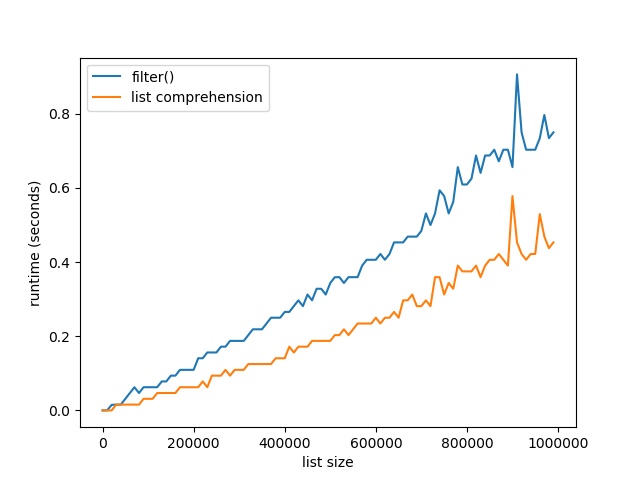
Here’s the resulting plot that compares the runtime of the two methods. On the x axis, you can see the list size from 0 to 1,000,000 elements. On the y axis, you can see the runtime in seconds needed to execute the respective functions.
The resulting plot shows that both methods are extremely fast for a few tens of thousands of elements. In fact, they are so fast that the time() function of the time module cannot capture the elapsed time.
But as you increase the size of the lists to hundreds of thousands of elements, the list comprehension method starts to win:
For large lists with one million elements, filtering lists with list comprehension is 40% faster than the built-in filter() method.
The reason is the efficient implementation of the list comprehension statement. An interesting observation is the following though. If you don’t convert the filter function to a list, you get the following result:
Suddenly the filter() function has constant runtime of close to 0 seconds—no matter how many elements are in the list. Why is this happening?
The explanation is simple: the filter function returns an iterator, not a list. The iterator doesn’t need to compute a single element until it is requested to compute the next() element. So, the filter() function computes the next element only if it is required to do so. Only if you convert it to a list, it must compute all values. Otherwise, it doesn’t actually compute a single value beforehand.
Where to Go From Here
This tutorial has shown you the filter() function in Python and compared it against the list comprehension way of filtering: [x for x in list if condition]. You’ve seen that the latter is not only more readable and more Pythonic, but also faster. So take the list comprehension approach to filter lists!
If you love coding and you want to do this full-time from the comfort of your own home, you’re in luck:
I’ve created a free webinar that shows you how I started as a Python freelancer after my computer science studies working from home (and seeing my kids grow up) while earning a full-time income working only part-time hours.
Scratchy Spring Sale Day 3: Curve Digtial Spring Sale, up to -90%
[www.indiegala.com]The Massive Gameplay Giveaway has been reinvigorated with fresh new updates and even more chances to earn your own Steam keys. [www.indiegala.com]Be on the look-out for some huge discounts on your favorite games + a Scratch Card with a FREE secret Steam game for every store purchase.
We are welcoming everyone to join our discord[discord.gg]. We are more active there on finding giveaways, small or large, and there are daily raffles you can participate.
Posted by: xSicKxBot - 04-18-2020, 03:32 AM - Forum: Windows
- No Replies
Educators: Join the April 21 TweetMeet on remote learning
In today’s reality of distance learning, educators around the world are rapidly modifying their lessons for use in digital classrooms. At Microsoft, we want to support you as you’re making this transition to inclusive, online learning. What practices and solutions are working best for you? How are you making it all happen? What keeps your students engaged? How do you provide a socially and emotionally supportive environment for everyone involved?
For this month’s special-edition TweetMeet, we’ve invited 200 former hosts back to guide the conversation in many different languages. We look forward to welcoming you to a 75-minute discussion on Tuesday, April 21 at 10:00 AM Pacific Time about the topic Remote Learning.
We have five discussion questions lined up this month, allowing 14 minutes of discussion time each:
Pacific Time
#
#MSFTEduChat TweetMeet question timings
10:00 AM
Event begins
Welcome. Please introduce yourself. Use #MSFTEduChat and #TweetMeetEN or #TweetMeetXX for non-English languages.
10:04
1
How are you making the transition to remote learning? Share stories.
10:18
2
How do you ensure that all your students are engaged?
10:32
3
How do you care for the well-being of your students, colleagues and community?
10:46
4
What are your best tips and resources to support remote learning?
11:00
5
What lessons can be learned from teaching and learning under the present circumstances?
11:15
Event closes
Participant Survey and announcing the next event.
Even if you’re conducting a class at the time of the event, busy doing other things, or asleep—no problem! All educators are welcome to participate any time after the event. Simply look at the questions and respond to them at a day and time that suits you best.
You can also schedule your tweets in advance. In that case, be sure to include the entire question in your tweet and the hashtag #MSFTEduChat, so that everyone knows how your responses align to the event questions and conversations.
Your Remote Learning Stories – a new, special-edition Wakelet
We’ve invited this month’s hosts to send us their personal stories about their transition to remote learning. We proudly present these in our new Your Remote Learning Stories Wakelet, live-embedded here:
Introducing our hosts – Twitter List
We’re very grateful to all the former hosts who have accepted our invitation to lead the conversation on April 21. Check out their profiles, consider following them, and engage with their tweets through this month’s Twitter List.
Language tracks offered this month
We offer this month’s TweetMeet in 14 language tracks: English, Arabic, Croatian, Finnish, French, Italian, Macedonian, Polish, Portuguese, Romanian, Serbian, Spanish, Swedish, and Welsh.
Want to help promote the TweetMeet?
Our PowerPoint Templates provide three easy ways for you to announce the TweetMeet to your friends and followers:
Add an “I ? #MSFTEduChat” banner to your Twitter profile picture
Create a TweetMeet Friend Card
Add our TweetMeet Sticky Note ? to your existing Twitter Header Photo
Each of our templates contains the step-by-step instructions on how to create these for yourself. If you need help, just reach out to us via @TweetMeet Twitter DM.
Here’s an example of a TweetMeet Friend Card:
Welcoming TweetMeet newcomers
Do you know someone who’s new to TweetMeets? Our TweetMeet Ultimate Wakelet collection is created especially for newcomers, so please share it with friends and colleagues who might be interested in joining.
Why join the #MSFTEduChat TweetMeet?
TweetMeets are monthly recurring Twitter conversations about themes relevant to educators, facilitated by Microsoft Education. The purpose of these events is to help professionals in education learn from each other and inspire their students while they are preparing for their future. TweetMeets also nurture personal learning networks among educators from across the globe.
Be sure to double-check your own local event time. You can find the event time for 215 countries with this time zone announcer.
Our next recommendation for you is to set up Twitter dashboard TweetDeck and add columns for the hashtags and for your favorite hosts. When a tweet appears that you want to respond to, press the retweet button and type your comments. Additional tips are offered in this animated GIF that you’re welcome to share with newcomers:
Got questions about the #MSFTEduChat TweetMeet?
Please connect with TweetMeet organizer Marjolein Hoekstra @TweetMeet on Twitter if you have any questions about the TweetMeet or about what it takes to be a host on a future event!
Posted by: xSicKxBot - 04-18-2020, 03:32 AM - Forum: Windows
- No Replies
Top 5 ways teachers can use Microsoft Teams during remote learning
Average full article read:
Share this article:
Teachers are on the frontlines of enabling the sudden shift to remote learning. Within a matter of weeks, educators have had to quickly adapt their engaging, aligned, in-person lessons into online learning for their students. This incredible change has shed light on the inspiring ingenuity, passion, and commitment of those who support our communities.
What we hear from educators is that they need to be able to transition to remote learning quickly, to connect in a community to share best practices, and to learn from each other.
Based on feedback from our Remote Learning Educator Community, we’ve outlined five ways to help you get the most out of Microsoft Teams, a digital hub for communication and collaboration, during remote learning:
Connection and collaboration: Use the Teams built-in meetings features to effectively hold classroom meetings, collaborate on virtual whiteboards, and share documents. With assignments, conversations, files, notes, and video calls all pulled together, Teams is a great all-in-one hub for the collaborative classroom. Here is a great Teams for Education Quick Start Guide, and we have new updates rolling out regularly with improvements that have been inspired by educators.
Inclusion: In order to ensure learners of all abilities are included, understanding which tools and technologies improve accessibility and foster an inclusive classroom becomes critical. With built-in capabilities like the Immersive Reader, message translation, and Live Captions for meetings, Teams is a non-stigmatizing platform.
Meaningful feedback with rubrics: An important part of remote learning is good teaching practice. Teams Assignments have built-in rubrics. Rubric grading helps increase assignment transparency for students and allows you to give more meaningful feedback. These feedback mechanisms not only help students learn and improve their work, but they’re also a consistent and transparent way for teachers to grade. This has been an incredibly popular feature with both educators and students, and with rubrics now easily sharable, we have seen this practice take off in Teams.
Staff and learning communities: Saving time, being more organized, and collaborating more effectively during remote learning is critical. With Teams being a hub for education, a core part of this also includes built-in Staff teams and Professional Learning Community (PLC) teams to go along with Class Teams. This provides a one-stop shop for educators. Staff Teams and PLC teams allow educators and staff to easily communicate and collaborate during remote learning. We’ve seen many three-ring binders tossed with the paperless use of Staff and PLC teams in schools.
OneNote Class Notebooks, built into Teams: OneNote is a multifaceted note-taking tool that is built into Teams and can be used for a variety of lessons and activities. With OneNote Class Notebooks, you have a personal workspace for every student, a content library for handouts, and a collaboration space for lessons and creative activities. You can also embed all sorts of interactive apps, lessons, and content onto the OneNote page. Especially with remote learning, paper notes and handouts are difficult to work with, and having a digital notebook for the class is a natural fit.
Remote learning is a journey for all of us, and we are grateful to the diligence and creativity of educators during this time. Please visit our Remote Learning Page (higher education here) and (K-12 here) for all of our resources. Thank you for all you have done for students around the world. We are looking forward to continuing to work with you.
[embedded content]
We welcome your feedback
Let us know if you enjoyed this article and we’ll share similar content
Related Stories
For weeks now, students and teachers have been settling into the uncharted routine of distance learning. Today I…
Popular YouTube user ClayClaim has gone ahead and recreated his entire in-game island on a revolving empty toilet roll – you just don’t expect to be writing sentences like these when you go for the job interview, you know?
It’s a seriously impressive effort, with buildings, trees, the Dodo Airlines plane and more all represented. Each little part is painstakingly made out of polymer clay and stuck on to the toilet roll, allowing the island to roll around like it does in the actual game. You can see it being made in the video above – just look at how amazing it all is.
We’re pretty nifty at building things out of clay in the game itself, but we doubt we’d manage anything quite like this in real life. Great job, ClayClaim!
Create Your Own Games On Switch With SmileBASIC 4, Available Next Week
Launching next week on Nintendo Switch is SmileBASIC 4, a programming application that lets you play and design your very own games on the console.
Using its very own ‘SmileBASIC’ programming language, the tool is said to be easy to understand even for beginners. It includes various materials and tools to help you jump into development and, once you’re done, you can upload your finished games to the server for others to check out.
An earlier edition of the app actually made its way to 3DS a few years back – we were pretty impressed with it at the time – and this new release seems to expand upon that quite significantly. Check out this lengthy feature list if you’re interested:
High speed and powerful programming language “SmileBASIC 4” is installed
Supports high-resolution display of up to 1280×720 and 16.77 million colours
2048×2048 huge graphic screen
Drawing commands such as lines, circles and fills
Compose with a full range of sound commands
Make full use of Joy-Con features
Supports various Toy-Con
USB keyboard and mouse can be used
Useful trace function for debugging Extensive materials, tools, and samples that support programming
Guide for program beginners
Equipped with keyword completion function in the command help and the editor
Lots of characters and background images that can be used in various scenes
More than 100 sound effects and more than 40 background music
Smile Tool (SE and character number can be confirmed)
Paint Tool (drawing characters and backgrounds, creating animations)
Simple sample programs to learn BASIC
Technical samples for checking execution results for each command
Game samples that show the actual game structure Share your works with users around the world
Publish your works to the server with icons and descriptions
Easily download works published by other users
Evaluation function that allows you to send “Like” to your favorite works
Favorite works can be registered in the top menu and started immediately
Download “SmileBASIC” Nintendo 3DS version of public programs
Here’s a closer look at some of the screens you’ll be working with:
It’ll be available to download from the Switch eShop from 23rd April for £19.99 / $24.99. It may well be worth a look just to play other user’s creations, never mind making your own games.
What do you think? Are you intrigued by this one? Share your thoughts with us in the comments.
Posted by: xSicKxBot - 04-18-2020, 03:31 AM - Forum: Lounge
- No Replies
Ninjala, The Switch-Exclusive Multiplayer Brawler, Will Host An Open Beta
Ninjala, the fun-looking online brawler that was recently announced as a Switch exclusive, will be available widely soon enough--it's a free-to-play title, due on May 27. But you'll be able to check it out even sooner than that, as an open beta has been announced.
The beta will run across three one-hour slots, spread across a 17-hour period, and it's not clear how much of the game will be playable--the game's site does not give much in the way of information. Here are the start and end times for each beta.
PDT
Apr. 28, 2020, 12:00-12:59
Apr. 28, 2020, 20:00-20:59
Apr. 29, 2020, 04:00-04:59
BST
28 Apr. 2020, 20:00-20:59
29 Apr. 2020, 04:00-04:59
29 Apr. 2020, 12:00-12:59
AEST
29 Apr. 2020, 05:00-05:59
29 Apr. 2020, 13:00-13:59
29 Apr. 2020, 21:00-21:59
These dates come alongside a new developer diary, embedded below. The game is being created by Gung-Ho Entertainment (Teppen, Let It Die) and will, according to the video, receive a season pass after release.
Inskscape, the open source cross platform vector graphics application, just released the first release candidate on the way to a full 1.0 release. Along side the RC1 release, they also released version 0.92.5 of the stable branch.
Details of the two releases from the Inkscape news pages:
Inkscape 0.92.5
While we are working to release Inkscape 1.0 in the very near future, we have addressed some bugs in the stable 0.92 series. Most notably, an issue for Windows 10 users that prevented Inkscape from discovering fonts that have not been installed system-wide has now been fixed. Inkscape extensions written in Python will now also run with Python 3, while compatibility with the (deprecated) Python 2 is maintained.
For macOS, the 1.0 will feature the easiest installation and best macOS integration that Inkscape has ever offered. There are, however, unique issues that will require additional testing and improvement for our Apple fans.
If you run into any bugs, especially with the Release Candidate, please help us by reporting them promptly, so we can try to fix them before we release the final 1.0 version.
You can learn more about Inkscape RC 1.0 in the video below. The car SVG graphic used in the demo is available here if you want to compare performance results.
Blazor WebAssembly 3.2.0 Preview 4 release now available
Daniel
April 16th, 2020
A new preview update of Blazor WebAssembly is now available! Here’s what’s new in this release:
Access host environment during startup
Logging improvements
Brotli precompression
Load assemblies and runtime in parallel
Simplify IL linker config for apps
Localization support
API docs in IntelliSense
Get started
To get started with Blazor WebAssembly 3.2.0 Preview 4 install the latest .NET Core 3.1 SDK.
NOTE: Version 3.1.201 or later of the .NET Core SDK is required to use this Blazor WebAssembly release! Make sure you have the correct .NET Core SDK version by running dotnet --version from a command prompt.
Once you have the appropriate .NET Core SDK installed, run the following command to install the updated Blazor WebAssembly template:
dotnet new -i Microsoft.AspNetCore.Components.WebAssembly.Templates::3.2.0-preview4.20210.8
If you’re on Windows using Visual Studio, we recommend installing the latest preview of Visual Studio 2019 16.6. For this preview you should still install the template from the command-line as described above to ensure that the Blazor WebAssembly template shows up correctly in Visual Studio and on the command-line.
That’s it! You can find additional docs and samples on https://blazor.net.
Upgrade an existing project
To upgrade an existing Blazor WebAssembly app from 3.2.0 Preview 3 to 3.2.0 Preview 4:
Update all Microsoft.AspNetCore.Components.WebAssembly.* package references to version 3.2.0-preview4.20210.8.
Update any Microsoft.AspNetCore.Components.WebAssembly.Runtime package references to version 3.2.0-preview5.20210.1
Replace package references to Microsoft.AspNetCore.Blazor.HttpClient with System.Net.Http.Json and update all existing System.Net.Http.Json package references to 3.2.0-preview5.20210.3.
Add @using System.Net.Http.Json to your _Imports.razor file and update your code as follows:
Microsoft.AspNetCore.Blazor.HttpClient
System.Net.Http.Json
GetJsonAsync
GetFromJsonAsync
PostJsonAsync
PostAsJsonAsync
PutJsonAsync
PutAsJsonAsync
Calls to PostAsJsonAsync and PutAsJsonAsync return an HttpResponseMessage instead of the deserialized response content. To deserialize the JSON content from the response message, use the ReadFromJsonAsync<T> extension method: response.content.ReadFromJsonAsync<WeatherForecast>().
Replace calls to AddBaseAddressHttpClient in Program.cs with builder.Services.AddSingleton(new HttpClient { BaseAddress = new Uri(builder.HostEnvironment.BaseAddress) });.
You’re all set!
Access host environment during startup
The WebAssemblyHostBuilder now exposes IWebAssemblyHostEnvironment through the HostEnvironment property, which surfaces details about the app environment (Development, Staging, Production, etc.) during startup. If the app is hosted in an ASP.NET Core app, the environment reflects the ASP.NET Core environment. If the app is a standalone Blazor WebAssembly app, the environment is specified using the blazor-environment HTTP header, which is set to Development when served by the Blazor dev server. Otherwise, the default environment is Production.
New convenience extension methods on IWebAssemblyHostEnvironment make it easy to check the current environment: IsProduction(), IsDevelopment(), IsStaging(). We’ve also added a BaseAddress property to IWebAssemblyHostEnvironment for getting the app base address during startup when the NavigationManager service isn’t yet readily available.
Logging improvements
The WebAssemblyHostBuilder now exposes a Logging property of type ILoggingBuilder that can be used to configure logging for the app, similar to how you would configure Logging in an ASP.NET Core app on the server. You can use the ILoggingBuilder to set the minimum logging level and configure custom logging providers using extension methods in the Microsoft.Extensions.Logging namespace.
Brotli precompression
When you publish a Blazor WebAssembly app, the published and linked output is now precompressed using Brotli at the highest level to further reduce the app size and remove the need for runtime compression. ASP.NET Core hosted apps seamlessly take advantage of these precompressed files. For standalone apps, you can configure the host server to redirect requests to the precompressed files. Using the precompressed files, a published Blazor WebAssembly is now 1.8MB, down from 2MB in the previous preview. A minimal app without Bootstrap CSS reduces to 1.6MB.
Load assemblies and runtime in parallel
Blazor WebAssembly apps now load the assemblies and runtime in parallel saving some precious milliseconds off the app load time.
Simplify .NET IL linker config for apps
You can optionally provide a .NET IL linker config file for a Blazor WebAssembly app to customize the behavior of the linker. Previously, specifying a linker config file for your app would override the customizations built into Blazor that are necessary for apps to function property. App specific linker configuration is now treated as additive to the linker configuration provided by Blazor.
Localization support
Blazor WebAssembly apps now support localization using .NET resource files (.resx) and satellite assemblies. Blazor WebAssembly apps set the current culture using the user’s language preference. The appropriate satellite assemblies are then loaded from the server. Components can then be localized using the ASP.NET Core localization APIs, like IStringLocalizer<TResource> and friends. For more details on localizing Blazor WebAssembly apps, see Globalization and localization.
API docs in IntelliSense
The API docs for the various Blazor WebAssembly APIs are now available through IntelliSense:
Known issues
Debugging limitations
Thank you everyone who has been trying out the new Blazor WebAssembly debugging support and sending us your feedback! We’ve made some progress in this release, but there are still a number of limitations with the current debugging experience in Visual Studio and Visual Studio Code. The following debugging features are still not yet fully implemented:
Inspecting arrays
Hovering to inspect members
Step debugging into or out of managed code
Full support for inspecting value types
Breaking on unhandled exceptions
Hitting breakpoints during app startup
We expect to continue to improve the debugging experience in future releases.
Help improve the Blazor docs!
We’ve received a some feedback from the in-product Blazor survey that the Blazor docs could use some improvement. Thank you for this feedback! We know that docs are a critical part of any software development framework, and we are committed to making the Blazor docs as helpful as we can.
We need your help to understand how to best improve the Blazor docs! If you’d like to help make the Blazor docs better, please do the following:
As you read the Blazor docs, let us know where we should focus our efforts by telling us if you find a topic helpful or not using the helpfulness widget at the top of each doc page:
Use the Feedback section at the bottom of each doc page to let us know when a particular topic is unclear, inaccurate, or incomplete.
Comment on our Improve the Blazor docs GitHub issue with your suggestions for new content and ways to improve the existing content.
Feedback
We hope you enjoy the new features in this preview release of Blazor WebAssembly! Please let us know what you think by filing issues on GitHub.