The Ultimate Guide to Data Cleaning in Python and Pandas
5/5 – (1 vote)
What is Data Cleaning?
Data cleaning describes the process of turning messy data into clean datasets that can be used for research and data science purposes. For example, tidy data will be in a wide format: every column contains a variable, and every row contains one case. Also, data cleaning means getting rid of corrupt data with very little utility.
Most data in the real world is messy and unstructured or semi-structured. Working in data science, most of your time will be spent on cleaning and structuring data.
In research, data from surveys or experiments is mostly already structured into Excel or CSV tables.
In companies, data can be stored in databases, Excel files, or distributed all over the company. This data can be in emails, documents, folders, images, and note apps.
This study shows, that most companies are having problems handling unstructured or semi-structured data, and almost half of them don’t even know where their data is located.
Unstructured data includes videos, images, and text or speech messages. Unstructured data from the web is mainly acquired by web scraping.
Semi-structured data is data found in documents, emails, social media posts, and if acquired from the web, it can be in HTML, JSON, or any other web format.
Is Web Scraping Legal?
Important: Even though web scraping is possible does not mean it is always legal!
If the data is publicly available and not copyrighted, it is mostly safe to scrape. But also pay attention to data privacy laws and do not scrape personal data.
Scraping data from social media websites, for example, is mostly illegal, as it is not publicly available without logging in and contains personal data.
There are also many services to get data via an API. To be safe, refer to this guide about what is legal when web scraping:
The goal of data cleaning and cleaning unstructured or semi-structured data is to create tidy data with which you can work. Tidy data will be in a wide format: every column contains a variable, and every row contains one case.
To demonstrate both perspectives, this article is divided into two parts:
First, we will scrape, load, and wrangle some semi-structured data from the web.
Second, we will clean this data. This second step is also valid for structured data as it is about finding missing, outliers and duplicates.
I recommend doing an exploratory data analysis before or during cleaning data to get a good feeling of the data you have. You can easily combine exploring and cleaning.
import pandas as pd # pandas for data wrangling, cleaning, and analysis

import requests # for http requests

from bs4 import BeautifulSoup # html reading
The wiki page that holds the table we are looking for can be found here:
We pass this URL into requests. The table in the HTML page is within <table class> , and the tables in wiki pages are called wiki tables. We can check this by looking at the HTML page in our browser or the HTML text file later to confirm we pulled the right table.
With requests.get(url).text, we pull the HTML from the page.
BeautifulSoup will pull the data table from the HTML file and save us time. We will pass the url_response from our request into the html.parser. With soup.find() we can tell it to look exactly for the wikitable. The output also tells us the name of the table.
I will drop the columns of the metropolitan area and the urban area because I am just interested in the population of the actual city. This can be done in several ways.
The heading looks clean. Now we explore the dataset to find information to clean.
With df.info() and df.describe() we get a quick overview of the data we scraped.
cities.info()
Output:
cities.describe()
Output:
It is immediately clear that the city_density/km2 is not a float even though it is supposed to be numerical.
Inspecting the data frame, you might have already noticed that the columns contain numbers following numbers in brackets, like [12]. This turns this data into an object, so we will have to get rid of this.
However, this would not work if some of our data points do not have the brackets at the end or more than that. So we’ll use the slicing method str.partition() to cut the brackets from our numbers.
First, we make sure our object type is a string that we can work string operations on. Then we apply the str.partition() method and advise the function to cut off at the first bracket [.
The commas in the variable will prevent us from converting the string into a float, so we’ll remove the comma with str.replace() before turning the string to a float with s.astype('float') and assigning it back to our data frame.
The variable now shows up when we look at df.describe() and we’ll want the results rounded for better readability:
cities.describe().round(1)
Output:
Cleaning Structured Data in Python
Following the cleaning of the scraped data we can now use it like a structured data frame with data we collected or downloaded.
This also can be cleaned of missing data, outliers and duplicates but does not always need data wrangling. However, with a data frame with many strings the cleaning process also often involves a lot of string manipulation.
Important note:
If you want to apply machine learning algorithms to your data, do split your dataset before feature engineering and data transformation as this can create data leakage!
There didn’t seem to be duplicates in our df, as the size remained the same.
When dealing with missing values, we must decide how to handle them based on our data.
We can either
Drop missing values
Replace or impute the values
Leave missing values in the dataset
Transform the information that they’re missing into a new variable
First, we inspect our missing data. The function df.isnull() is a boolean function, that tells us for the whole data frame if data is missing or not.
We can sum it up to determine, how many values are missing in each column.
cities.isnull().sum()
Output:
We can drop rows with missing values completely.
This will cause us to lose useful information in other columns. But as the first row is completely empty anyway, we can drop this one.
The df.dropna() function has useful features that help us pick what missing data we want to remove. So, I just want to remove the one row, or all of them if there are more, with all missing values.
cities = cities.dropna(how='all')
This will look like this:
What is left are the missing values for 8 cities for population, area and density. We will replace those.
Of course, you can look up the data on Wikipedia and reinsert them. For the sake of the exercise and because most of the time it is not possible to look up missing data, we will not do this.
The dataset now contains the data of the 73 biggest cities in the world, using the average of these to impute the missing values in the other 8 is the only and closest guess we have. This does not create much more information but keeps us from losing other information from these 8 cities.
The alternative option would be to drop those 8 cities completely.
So, we’ll replace the missing values in the area column with the average area size of all the other cities. First, we create the mean of the city area sizes, then we fill the missing values in the column with this value.
Pandas has the right function for this: df.fillna()
We can check back our missing values and the description of our dataset.
cities.isnull().sum()
cities.describe().round(1)
There is still one value missing in our city definition. Let’s have a look at these categories.
cities['city_definition'].value_counts()
Output:
As we don’t know if the missing city is a municipality or a capital, we could just replace the missing value with the generic description of “city”, as we know they all are cities.
If you’d want to calculate the differences between these categories, it would be useful to categorize and merge these single entries into bigger categories.
For now, we will just replace the missing value with “city”, as I am more interested in the size of the cities than the category.
Info: For many statistical operations, missing values will be dropped by default and don’t create a problem. For machine learning algorithms missing values must be removed before modelling.
We can also create dummy variables (information is missing/ not missing) as the fact that the data is missing might be useful information. This way, the fact that they’re missing can be included in the data analysis process.
Visualization
Now we visualize our data and check for outliers with a seaborn scatterplot.
import seaborn as sns

sns.scatterplot(data=cities, x="city_population", y="city_area_km2", size="city_population")
Output:
The city in the right top corner is clearly an outlier, but not one we would want to remove or equalize as it is not a measurement error. It is just the biggest city (or metropolitan area) in the world!
Let’s find out which one it is with df.sort_values(), using ascending=False to sort the city population from high to low.
[www.indiegala.com] Cashback is back, baybee. This traditional promotion of ours gives you 5% of your purchase to spend later on any game on the site. Buy now and save more. If you were planning on getting multiple games, it's worth checking it out
Conquer the continent in this grand strategy simulation game. The continent of Runersia is home to six major powers with more than 40 bases, 100 knights, and 50 types of monsters. Select a ruler, compose your platoons of knights and monsters, and march to claim enemy bases. The player chooses how they will battle, so devise the best strategy to lead your nation toward continental conquest. How will your legend unfold?
PSVR 2: Specs, Features, Games, And Everything We Know So Far
PlayStation VR 2 was announced in 2021, and since that reveal, Sony has periodically delivered small details about its virtual reality hardware follow-up. We know what it looks like, we know what its controllers look like, and we basically know how it will work, but we still have no idea when it will release and how much it will cost. Outside of those admittedly crucial details, Sony has offered a surprising amount of information about PSVR 2 and we have rounded everything we know right here.
This isn't the first time that Sony has offered virtual reality technology, as its first PSVR headset was released all the way back in 2016 for the PS4. On the surface, the original PSVR was a peripheral that provided an entry-level approach to VR, requiring multiple cables as well as a camera and external lights for both head- and controller-tracking.
The successor leverages more powerful technology in its design, as well as several other quality-of-life upgrades for the PS5-exclusive device that could potentially rival other mainstream VR headsets such as the Meta (formerly Oculus) Quest 2 and the Valve Index.
5 Best Ways to Check a List for Duplicates in Python
Rate this post
Problem Formulation and Solution Overview
In this article, you’ll learn how to check a List for Duplicates in Python.
To make it more fun, we have the following running scenario:
The Finxter Academy has given you an extensive list of usernames. Somewhere along the line, duplicate entries were added. They need you to check if their Listcontains duplicates. For testing purposes, a small sampling of this List is used.
Question: How would we write Python code to check a List for duplicate elements?
We can accomplish this task by one of the following options:
Method 1: Use set() and List to return a Duplicate-FreeList
Method 2: Use set(), For loop and List to return a List of Duplicates found.
Method 3: Use a For loop to return Duplicates and Counts
Method 4: Use any() to check for Duplicates and return a Boolean
Method 1: Use set() and List to return a Duplicate-Free List
This method uses set()which removes any duplicate values (set(users)) to produce a Duplicate-Freeset(). This set is then converted to a List (list(set(users))).
This code declares a small sampling of Finxter usernames and saves them to users.
Next, set() is called and users is passed as an argument to the same. Then, the new set is converted to a List and saved to dup_free.
If dup_free was output to the terminal before converting to a List, the result would be a set(), which is not subscriptable. Meaning the elements are inaccessible in this format.
Note: An empty set will result if no argument is passed.
Method 2: Use set(), For loop, and List to return a List of Duplicates Found
This method uses set(), and a For loop to check for and return any Duplicates found (set(x for x in users if ((x in tmp) or tmp.add(x)))) to dups. The set() is then converted to a List (print(list(dups))).
Here’s an example:
users = ['AmyP', 'ollie3', 'shoeguy', 'kyliek', 'ollie3', 'stewieboy', 'csealker', 'shoeguy', 'cdriver', 'kyliek'] tmp = set()

dups = set(x for x in users if (x in tmp or tmp.add(x)))

print(list(dups))
This code declares a small sampling of Finxter usernames and saves them to users.
Next, a new empty set, tmp is declared. A For loop is then instantiated to check each element in users for duplicates. If a duplicate is found, it is appended to tmp. The results save to dups as a set().
Output
In this example, the set() was converted to a List and displays a List of Duplicates values found in the original List, users.
['kyliek', 'ollie3', 'shoeguy']
Method 3: Use a For loop to return Duplicates and Counts
This method uses a For loop to navigate through and check each element of users while keeping track of all usernames and the number of times they appear. A Dictionary of Duplicates, including the Usernames and Counts returns.
Here’s an example:
count = {}

dup_count = {}

for i in users: if i not in count: count[i] = 1 else: count[i] += 1 dup_count[i] = count[i]

print(dup_count)
This code declares two (2) empty sets, count and dup_count respectively.
A For loop is instantiated to loop through each element of users and does the following:
If the element i is not in count, then the count element (count[i]=1) is set to one (1).
If element i is found in count, it falls to else where one (1) is added to count (count[i]+=1) and then added to dup_count (dup_count[i]=count[i])
This code repeats until the end of users has been reached.
At this point, a Dictionary containing the Duplicates, and the number of times they appear displays.
Output
{'ollie3': 2, 'shoeguy': 2, 'kyliek': 2}
Method 4: Use Any to Check for Duplicate Values
This example uses any(), and passes the iterableusers to iterate and locate Duplicates. If found, True returns. Otherwise, False returns. Best used on small Lists.
users = ['AmyP', 'ollie3', 'shoeguy', 'kyliek', 'ollie3', 'stewieboy', 'csealker', 'shoeguy', 'cdriver', 'kyliek'] dups = any(users.count(x) > 1 for x in users)

print(dups)
This code declares a small sampling of Finxter usernames and saves them to users.
Next, any() is called and loops through each element of users checking to see if the element is a duplicate. If found, True is assigned. Otherwise, Falseis assigned. The result saves to dups and the output displays as follows:
Output
True
Method 5: Use List Comprehension to return a List of all Duplicates
This method uses List Comprehension to loop through users, checking for duplicates. If found, the Duplicates are appended to dups.
Here’s an example:
users = ['AmyP', 'ollie3', 'shoeguy', 'kyliek', 'ollie3', 'stewieboy', 'csealker', 'shoeguy', 'cdriver', 'kyliek'] dups = [x for x in users if users.count(x) >= 2]

print(dups)
This code declares a small sampling of Finxter usernames and saves them to users.
Next, List Comprehension extracts and displays duplicate usernames and save them to a List. The duplicate values are output to the terminal
In the last article I wrote about setting up a WooCommerce product enquiry form using existing third-party plugins. There are many WordPress plugins for having an enquiry form on a WordPress site.
As a developer we can build a WooCommerce product enquiry form custom plugin easily. It will be lightweight, good for enhancement and maintenance, above all fun too.
The 3-party plugins give a massive package with voluminous functionalities and features. They have form builders, email template builders and all.
For having an enquiry form with a few fields, it can be customized simply without third party bundles. It helps to have a tiny and self-manageable code which is best.
Send product enquiry via WordPress AJAX on form submit.
Hook wp_ajax to send product enquiry mail.
Create a contact form plugin directory and file
Create a directory named “woocommerce-contact-form” in the WordPress plugin directory.
<wordpress-application-root>/wp-content/plugins/
Then, create a file woocommerce-contact-form.php into it with the following plugin header. The header must have the plugin name, URI, author and more details.
/* Plugin Name: WooCommerce Contact Form Plugin URI: https://phppot.com Description: A simple custom enquiry form plugin to a WooCommerce site. It has name, email and message fields to collect data from the customers. Version: 1.0 Author: Vincy Author URI: https://phppot.com */
Design WooCommerce product enquiry form
Create a template file inside the plugin directory as <woocommerce-contact-form>/templates/contact-form.php.
Put this HTML into the file to display a contact form with Name, Email and Message fields.
This template file is loaded into the product page using a WordPress filter hook via this plugin.
All the fields are required to be entered to send the product enquiry from the WooCommerce page.
Once the conditions return true, then the jQuery AJAX will serialize the form data and post it to the server.
All client-side and server-side responses are sent to UI using jQuery .text().
$(document).ready(function(e) { // WooCommerce product enquiry form submit event handler $("#frmContactForm").on('submit', function(e) { e.preventDefault(); var name = $('#customer_name').val(); var email = $('#customer_email').val(); var message = $('#customer_message').val(); // Validate all fields in client side if (email == "" || message == "" || name == "") { $("#response").show(); $("#response").text("All fields are required."); } else { $("#response").hide(); $('.btn-send').hide(); $('#loader-icon').show(); // Post form via wp-ajax $.ajax({ url: "/wordpress/send-contact-email/", type: "POST", data: $("#frmContactForm").serialize(), success: function(response) { $("#response").show(); $('#loader-icon').hide(); if (!response) { $('.btn-send').show(); $("#response").html("Problem occurred."); } else { $('.btn-send').hide(); $("#response").html("Thank you for your message.") }; }, error: function() { } }); } });

});
The AJAX script points to a URL that is mapped with the wp_ajax endpoint via .htaccess.
The send_contact_email action param hooks the wp_ajax action filter in the plugin file.
# BEGIN Shop
<IfModule mod_rewrite.c>
RewriteRule send-contact-email/ /wordpress/wp-admin/admin-ajax.php?action=send_contact_email [L,QSA]
</IfModule>
# END Shop
WooCommerce product enquiry form plugin file
This is the main file that hooks the required action and filter callback of WordPress. These callbacks are to do the following by activating this plugin.
Load the contact form template using ‘the_content’ filter hook.
Enqueue the form.css and form.js files created for this WooCommerce product enquiry form. (Also enqueued the jQuery CDN path).
Hook the wp_ajax_nopriv_* to execute the send_contact_email callback by listening the AJAX request.
The load_contact_form function reads the template content by using PHP file_get_contents() function. It appends the content to the page content on a condition basic.
Before adding the WooCommerce product enquiry form it checks if it is a product page. If so, is_product() returns boolean true.
<?php function load_contact_form($contactHTML) { // Load the contact form on a single product page if ( is_product() ){ $template_path = plugin_dir_path( __FILE__ ) . 'templates/contact-form.php'; $contactHTML .= file_get_contents( $template_path); } return $contactHTML; }

// add filter to hook 'the_content' with a plugin functions.

add_filter('the_content', 'load_contact_form'); /** * Enqueues scripts and styles for front end. * * @return void */

function woocommerce_contact_form_styles()

{ if (is_product()) { wp_enqueue_style('contact-form-style', plugin_dir_url( __FILE__ ) . 'assets/form.css', array(), null); wp_enqueue_script('contact-form-jquery', 'https://code.jquery.com/jquery-3.6.0.min.js', array(), null); wp_enqueue_script('contact-form-script', plugin_dir_url( __FILE__ ) . 'assets/form.js', array(), null); }

}

add_action('wp_enqueue_scripts', 'woocommerce_contact_form_styles');
Hook wp_ajax action with the contact email sending callback
The below code is part of the woocommerce_contact_form.php plugin file. It defines a callback send_contact_email().
The WooComerce product enquiry form plugin has the action and filter callbacks. It is called when it receives the wp_ajax request from the following URL.
It builds the wp_mail() parameters to send the product enquiry to the shop admin or seller. The $to holds the recipient’s address.
It builds the mail body with the data posted via the WooCommerce product enquiry form.
Using wp_mail() is a simple way of sending email via WordPress. It is as similar to PHP mail as it has a one-line code for sending emails. You may configure SMTP to send email via WordPress.
With all prerequisites and complete coding of the custom plugin, it’s time to enable it.
Go to WordPress admin and navigate via Plugins->Installed Plugins using the left menu.
You may see the ‘WooCommerce Contact Form’ plugin in the installed list. Activate the plugin and visit the product page of the shop.
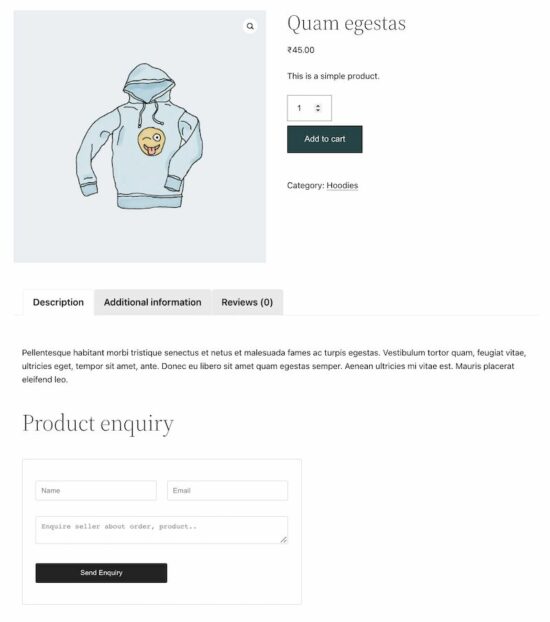
See the screenshot shown at the beginning of the article. It displays the WooCommerce product enquiry form on a product page.
Conclusion
Thus, we have created a plugin for a WooCommerce product enquiry form with simple code. If you want any customization with this plugin, please let me know in the comments section.
Let us see the other methods of displaying a contact form on a WooCommerce site in the upcoming article.
Former Xbox Exec Ed Fries Is Worried About Game Pass, Here's Why
Former Xbox executive Ed Fries has reacted to Xbox Game Pass, saying what Microsoft is doing with the subscription service makes him feel "nervous" about its potential impact to negatively impact the gaming landscape in general.
He told Xbox Expansion Pass because he sees Game Pass as being similar to Spotify, and not necessarily in a good way. "The one thing that they're doing that makes me nervous is Game Pass," Fries said, as reported by VGC. "Game Pass scares me because there's a somewhat analogous thing called Spotify that was created for the music business."
Fries said Spotify "destroyed" the music business--which not all experts agree with--saying Spotify changed listener habits such that people don't buy music anymore.
Crowns and Pawns, a modern-day point and click adventure, inspired by classics such as Broken Sword, Monkey Island, Still Life, Syberia and others. Experience the legendary stories of the Grand Duchy of Lithuania, bring to light the villainous branch of the KGB, solve puzzles and follow hints to reveal the secrets of the King who was never crowned.
The story follows a girl from Chicago, Milda, who unexpectedly receives an inheritance from her grandfather - a house in Lithuania. She sets off to Europe, but upon arrival she is threatened by an unknown man, demanding that she gives up her inheritance.
Determined and intrigued, she explores the run-down house, discovering old documents and clues dating back to the 15th century. Before long, Milda gets dragged into a dangerous search for a long-lost mysterious relic...



 Related Tutorial:


 Important: Even though web scraping is possible does not mean it is always legal!


 Info: For many statistical operations, missing values will be dropped by default and don’t create a problem. For machine learning algorithms missing values must be removed before modelling.





 Question: How would we write Python code to check a