Source of Madness is a side-scrolling dark action roguelite set in the Loam Lands, a twisted Lovecraftian inspired world powered by procedural generation and AI machine learning.
Take on the role of a new Acolyte as they embark on a nightmarish odyssey. Uncover the cosmic secrets of the Loam Lands and The Tower of Madness, the moon's mysterious Citadel.
The horrific monsters you face are never the same, concocted with procedural generation and animated using a neural network AI
Explosive close-combat magic, labyrinthine environmental exploration, powerful loot management and a skill tree filled with abilities, classes, and spells
Rendered in a beautiful AI assisted art style, the fascinating world of the Loam Lands reveals a deep arcane lore as players uncover its many secrets
Tableau is a visual data analytics platform focused on the business analytics use case that helps you use data to solve problems. It is great to visualize data (e.g., using dashboards) and perform complex data analytics tasks with relatively simple-to-use operations.
I recommend you watch the following 10-minute video at 1.5x speed to get a first intuition of the platform quickly:
Here’s a screenshot of the video that shows the data analysis process relevant for Tableau:
And here’s a screenshot of all the subproducts of the Tableau platform—all of them may be a potential specialization for a Tableau Developer:
So, Tableau helps you accomplish all five steps of business process and business intelligence:
Storing transactions
Analyse data
Data preparation
Data analysis
Sharing insights
Making decisions
Monitoring outcomes and results
What is a Tableau Developer?
A Tableau Developer analyzes data, develops software, and creates data visualizations using Tableau to make businesses more efficient and effective.
Tableau developers routinely generate Tableau dashboards, business intelligence (BI) reports, and data visualizations to improve decision making in a data-driven organization.
Now that you know about what it is, let’s have a look at what it earns next!
Annual Income of Tableau Developer (US)
Question: How much does a Tableau Developer in the US make per year?
Figure: Average Income of a Tableau Developer in the US by Source. [1]
The expected annual income of a Tableau Developer in the United States is between $71,807 and $114,559, with an average annual income of $93,564 and a median income of $93,460 per year.
This data is based on our meta-study of 8 salary aggregators sources such as Glassdoor, ZipRecruiter, and PayScale.
If you decide to go the route as a freelance Tableau Developer, you can expect to make between $40 and $80 per hour on Upwork (source). Assuming an annual workload of 2000 hours, you can expect to make between $80,000 and $160,000 per year.
Note: Do you want to create your own thriving coding business online? Feel free to check out our freelance developer course — the world’s #1 best-selling freelance developer course that specifically shows you how to succeed on Upwork and Fiverr!
But don’t wait too long to acquire practical experience!
Even if you have little skills, it’s best to get started as a freelance developer and learn as you work on real projects for clients — earning income as you learn and gaining motivation through real-world feedback.
Tip: An excellent start to turbo-charge your freelancing career (earning more in less time) is our Finxter Freelancer Course. The goal of the course is to pay for itself!
Related Video
You can find more job descriptions for coders, programmers, and computer scientists in our detailed overview guide:
The following statistic shows the self-reported income from 9,649 US-based professional developers (source).
The average annual income of professional developers in the US is between $70,000 and $177,500 for various programming languages.
Question: What is your current total compensation (salary, bonuses, and perks, before taxes and deductions)? Please enter a whole number in the box below, without any punctuation. If you are paid hourly, please estimate an equivalent weekly, monthly, or yearly salary. (source)
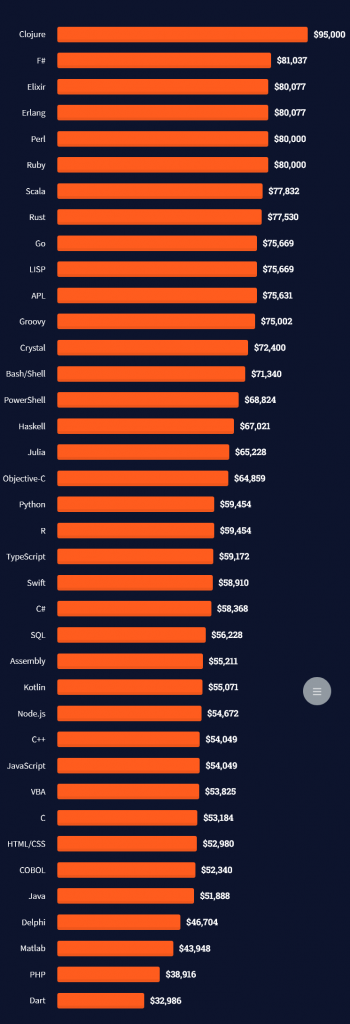
The following statistic compares the self-reported income from 46,693 professional programmers as conducted by StackOverflow.
The average annual income of professional developers worldwide (US and non-US) is between $33,000 and $95,000 for various programming languages.
Here’s a screenshot of a more detailed overview of each programming language considered in the report:
Here’s what different database professionals earn:
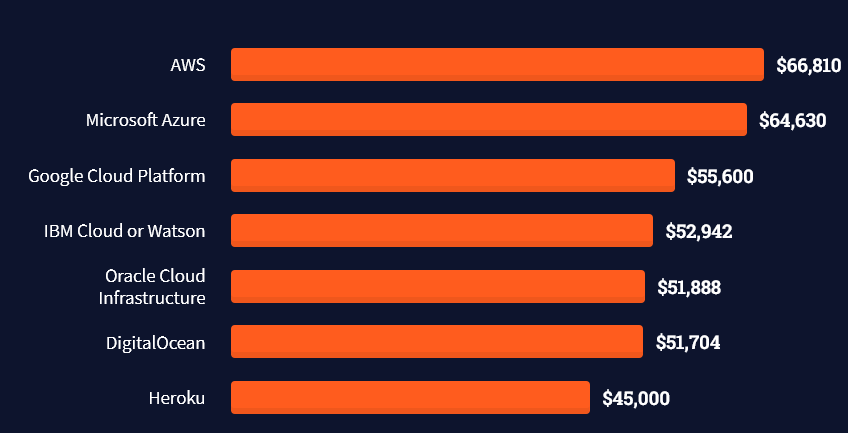
Here’s an overview of different cloud solutions experts:
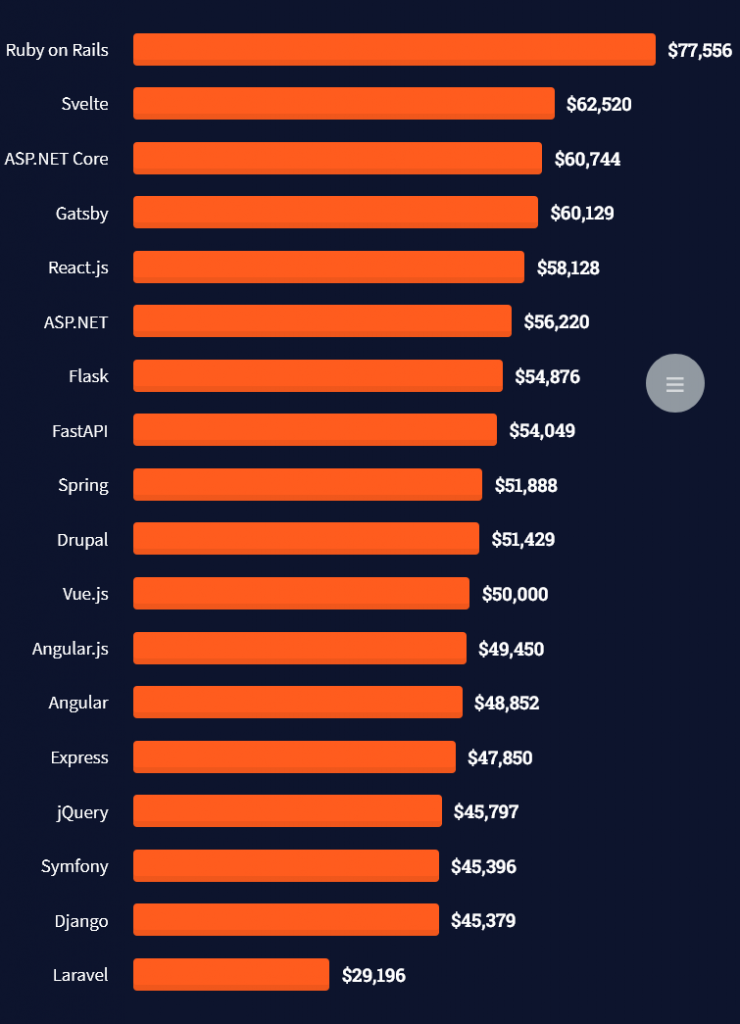
Here’s what professionals in web frameworks earn:
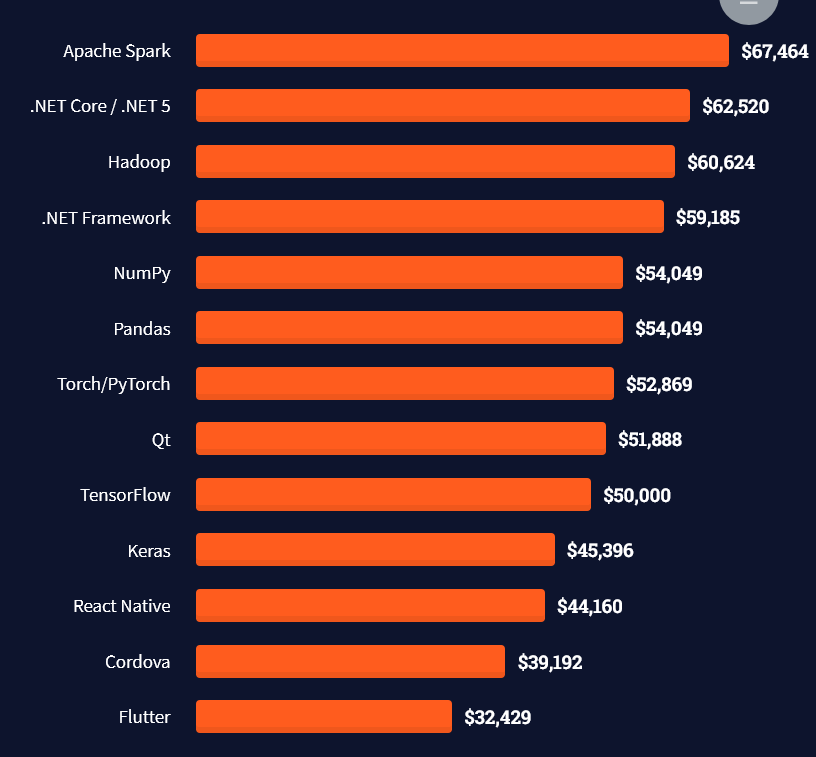
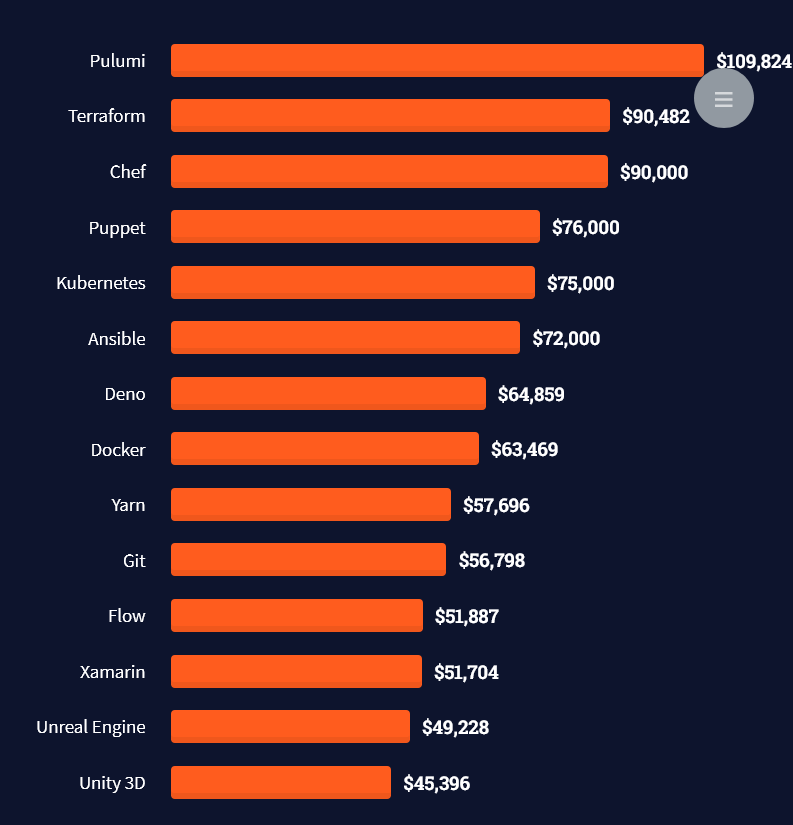
There are many other interesting frameworks—that pay well!
Look at those tools:
Okay, but what do you need to do to get there? What are the skill requirements and qualifications to make you become a professional developer in the area you desire?
Let’s find out next!
General Qualifications of Professionals
StackOverflow performs an annual survey asking professionals, coders, developers, researchers, and engineers various questions about their background and job satisfaction on their website.
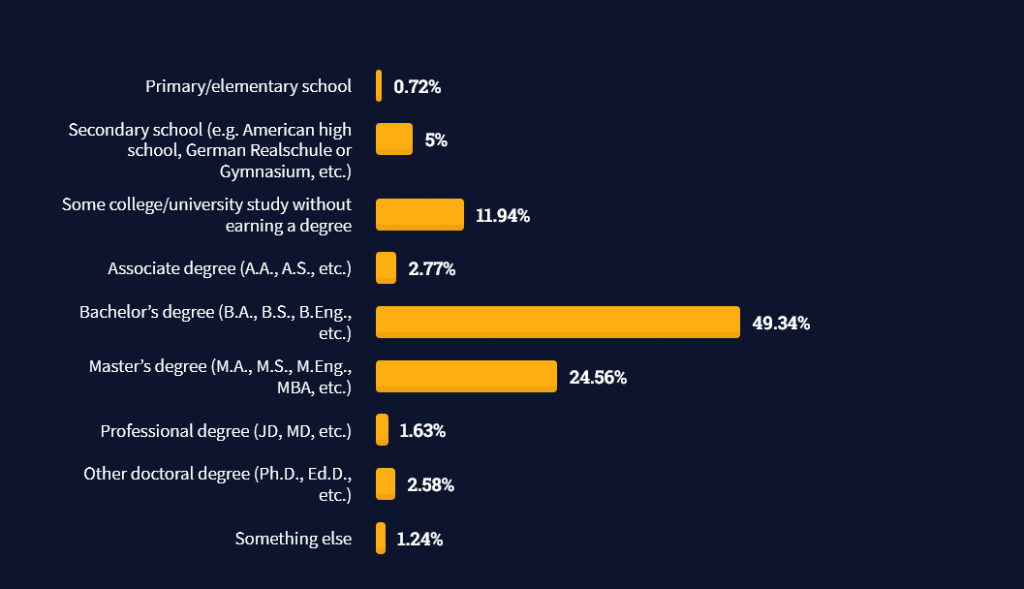
Interestingly, when aggregating the data of the developers’ educational background, a good three quarters have an academic background.
Here’s the question asked by StackOverflow (source):
Which of the following best describes the highest level of formal education that you’ve completed?
However, if you don’t have a formal degree, don’t fear! Many of the respondents with degrees don’t have a degree in their field—so it may not be of much value for their coding careers anyways.
Also, about one out of four don’t have a formal degree and still succeeds in their field! You certainly don’t need a degree if you’re committed to your own success!
Freelancing vs Employment Status
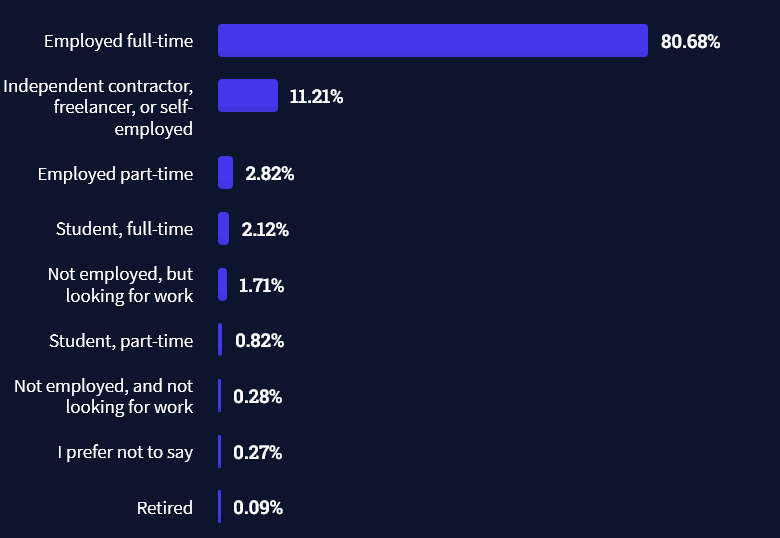
The percentage of freelance developers increases steadily. The fraction of freelance developers has already reached 11.21%!
This indicates that more and more work will be done in a more flexible work environment—and fewer and fewer companies and clients want to hire inflexible talent.
Here are the stats from the StackOverflow developer survey (source):
Do you want to become a professional freelance developer and earn some money on the side or as your primary source of income?
Resource: Check out our freelance developer course—it’s the best freelance developer course in the world with the highest student success rate in the industry!
Other Programming Languages Used by Professional Developers
The StackOverflow developer survey collected 58000 responses about the following question (source):
Which programming, scripting, and markup languages have you done extensive development work in over the past year, and which do you want to work in over the next year?
These are the languages you want to focus on when starting out as a coder:
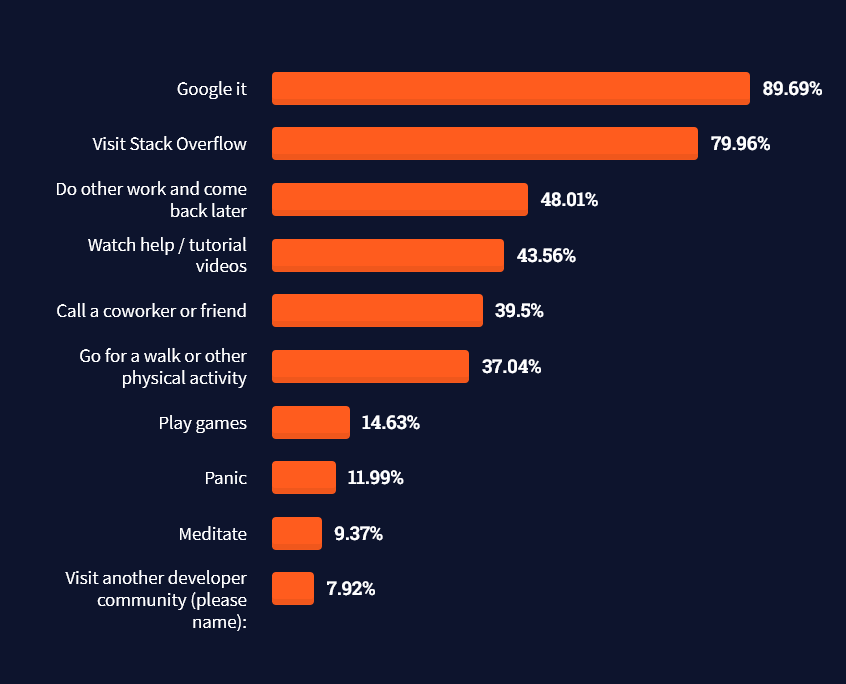
And don’t worry—if you feel stuck or struggle with a nasty bug. We all go through it. Here’s what SO survey respondents and professional developers do when they’re stuck:
What do you do when you get stuck on a problem? Select all that apply. (source)
Related Tutorials
To get started with some of the fundamentals and industry concepts, feel free to check out these articles:
Coders get paid six figures and more because they can solve problems more effectively using machine intelligence and automation.
To become more successful in coding, solve more real problems for real people. That’s how you polish the skills you really need in practice. After all, what’s the use of learning theory that nobody ever needs?
You build high-value coding skills by working on practical coding projects!
Do you want to stop learning with toy projects and focus on practical code projects that earn you money and solve real problems for people?
If your answer is YES!, consider becoming a Python freelance developer! It’s the best way of approaching the task of improving your Python skills—even if you are a complete beginner.
If you just want to learn about the freelancing opportunity, feel free to watch my free webinar “How to Build Your High-Income Skill Python” and learn how I grew my coding business online and how you can, too—from the comfort of your own home.
The Secret Weapon of Top Performing Companies? It’s All in Who You Ask.
William Blake once said, “What is now proved was once only imagined.” Java has been the platform of choice for millions of developers over the past 25 years to take what’s imagined and make it real. In his new book, “Ask Your Developer: How to harness the power of software development to win the 21s...
Harem Academy Bundle, Risk of Rain 2, Gearbox & All In Sales
Harem Academy Bundle featuring Adult eBooks at 97% OFF
[www.indiegala.com] What better place to discover higher culture than at the Harem Academy and its vast & comprehensive curriculum of captivating adult literature? A new ero-eBook bundle is out!
Posted by: xSicKxBot - 05-28-2022, 11:20 AM - Forum: Lounge
- No Replies
Stranger Things Season 4: Everything You Need To Know About Vecna, Explained
Stranger Things is finally back with Season 4 of the Netflix show. However, the latest season will be split into two parts, with the first seven episodes arriving on May 27. In those seven episodes, everything is a bit upside down--pun intended--as the friends from Hawkins are pitted against a brand-new villain.
And the big baddie's name is Vecna, another Upside Down villain named after a Dungeons & Dragons monster. More than any other season of the show so far, this is the most complex and layered villain of the series. So we're giving a breakdown of who Vecna is and what he might want.
Warning: There are a lot of spoilers coming for Part 1 of Season 4 of Stranger Things.
Endless Space 2 on Relic[community.companyofheroes.com] Subscribe to the newsletter and link your Steam account. Then you can add the game to your account.
We are welcoming everyone to join our discord[discord.gg]. We are more active there on finding giveaways, small or large, and there are daily raffles you can participate.
Eiyuden Chronicle: Rising combines a thrilling adventure through ancient ruins with the tale of one town’s rise from the ashes. Drawn by lenses and other treasure in the nearby Runebarrows, our heroes learn that the town is struggling to rebuild after an earthquake and decide to help. Along the way, they’ll resolve disputes between eager adventurers and wary locals who don’t think the Barrows should be disturbed. And they’ll learn more about each other’s reasons for seeking treasure, deepening their bonds in the process. As you will learn, these Runebarrows hide a great secret that has fateful implications for one of the characters. What begins as a simple treasure hunt turns into a dark conspiracy that will shake the world and plant seeds that carry over into the main story of Eiyuden Chronicle: Hundred Heroes. The game will introduce a portion of Eiyuden Chronicle’s cast of characters in an original story with thrilling action and engaging town-upgrading elements.
Posted by: xSicKxBot - 05-27-2022, 01:54 AM - Forum: Python
- No Replies
Your Python Regex Pattern Doesn’t Match? Try This!
5/5 – (1 vote)
Problem Formulation
Say, you want to find a regex pattern in a given string. You know the pattern exists in the string. You use the re.match(pattern, string) function to find the match object where the pattern matches in the string.
Problem: The Python regular expression pattern is not found in the string. The pattern doesn’t match anything, and, thus, the match object is None. How to fix this?
Here’s an example in which you’re searching for the pattern 'h[a-z]+' which should match the substring 'hello'.
But it doesn’t match!
import re my_string = 'hello world'

pattern = re.compile('h[a-z]+') match = re.match(pattern, my_string) if match: print('found!')

else: print('not found!')
Output:
not found!
Where is the bug? And how to fix it, so that the pattern matches the substring 'hello'?
Learn More: Improve your regex superpower by studying character classes used in the example pattern 'h[a-z]+' by visiting this tutorial on the Finxter blog.
Solution: Use re.search() instead of re.match()
A common reason why your Python regular expression pattern is not matching in a given string is that you mistakenly used re.match(pattern, string) instead of re.search(pattern, string) or re.findall(pattern, string). The former attempts to match the pattern at the beginning of the string, whereas the latter two functions attempt to match anywhere in the string.
Here’s a quick recap of the three regex functions:
re.match(pattern, string) returns a match object if the pattern matches at the beginning of the string. The match object contains useful information such as the matching groups and the matching positions.
re.findall(pattern, string) scans string from left to right, searching for all non-overlapping matches of the pattern. It returns a list of strings in the matching order when scanning the string from left to right.
Thus, the following code uses re.search() to fix our problem:
import re my_string = 'hello world'

pattern = re.compile('h[a-z]+') match = re.search(pattern, my_string) if match: print('found!')

else: print('not found!')
Output:
found!
Finally, the pattern 'h[a-z]+' does match the string 'hello world'.
Note that you can also use the re.findall() function if you’re interested in just the string matches of your pattern (without match object). We’ll explain all of this — re.match(), re.search(), re.findall(), and match objects — in a moment but first, let’s have a look at the same example with re.findall():
import re my_string = 'hello world'

pattern = re.compile('h[a-z]+') match = re.findall(pattern, my_string) print(match)

# ['hello'] if match: print('found!')

else: print('not found!')
Output:
['hello']
found!
Understanding re.match()
The re.match(pattern, string) method returns a match object if the pattern matches at the beginning of the string. The match object contains useful information such as the matching groups and the matching positions. An optional argument flags allows you to customize the regex engine, for example to ignore capitalization.
Specification:
re.match(pattern, string, flags=0)
The re.match() method has up to three arguments.
pattern: the regular expression pattern that you want to match.
string: the string which you want to search for the pattern.
The re.match() method returns a match object. You may ask (and rightly so):
Learn More: Understanding re.match() on the Finxter blog.
What’s a Match Object?
If a regular expression matches a part of your string, there’s a lot of useful information that comes with it: what’s the exact position of the match? Which regex groups were matched—and where?
The match object is a simple wrapper for this information. Some regex methods of the re package in Python—such as search()—automatically create a match object upon the first pattern match.
At this point, you don’t need to explore the match object in detail. Just know that we can access the start and end positions of the match in the string by calling the methods m.start() and m.end() on the match object m:
In the first line, you create a match object m by using the re.search() method. The pattern 'h...o' matches in the string 'hello world' at start position 0.
You use the start and end position to access the substring that matches the pattern (using the popular Python technique of slicing).
Now that you understood the purpose of the match object, let’s have a look at the alternative to the re.match() function next!
Understanding re.search()
The re.search(pattern, string) method matches the first occurrence of the pattern in the string and returns a match object.
Specification:
re.search(pattern, string, flags=0)
The re.search() method has up to three arguments.
pattern: the regular expression pattern that you want to match.
string: the string which you want to search for the pattern.
The re.search() method returns a match object. You may ask (and rightly so):
Learn More: Understanding re.search() on the Finxter blog.
Understanding re.findall()
The re.findall(pattern, string) method scans string from left to right, searching for all non-overlapping matches of the pattern. It returns a list of strings in the matching order when scanning the string from left to right.
Specification:
re.findall(pattern, string, flags=0)
The re.findall() method has up to three arguments.
pattern: the regular expression pattern that you want to match.
string: the string which you want to search for the pattern.
Google engineers are regular expression masters. The Google search engine is a massive text-processing engine that extracts value from trillions of webpages.
Facebook engineers are regular expression masters. Social networks like Facebook, WhatsApp, and Instagram connect humans via text messages.
Amazon engineers are regular expression masters. Ecommerce giants ship products based on textual product descriptions. Regular expressions rule the game when text processing meets computer science.
Now, this was a lot of theory! Let’s get some practice.
In my Python freelancer bootcamp, I’ll train you on how to create yourself a new success skill as a Python freelancer with the potential of earning six figures online.
The next recession is coming for sure, and you want to be able to create your own economy so that you can take care of your loved ones.
Follow OpenJDK on Twitter 2020 proved to be a memorable year for Java as we celebrated its 25th birthday. With over two decades of innovation, Java has continued to be: Flexible by adapting to the changing technology landscape while remaining platform independent. Reliable by retaining backwards com...
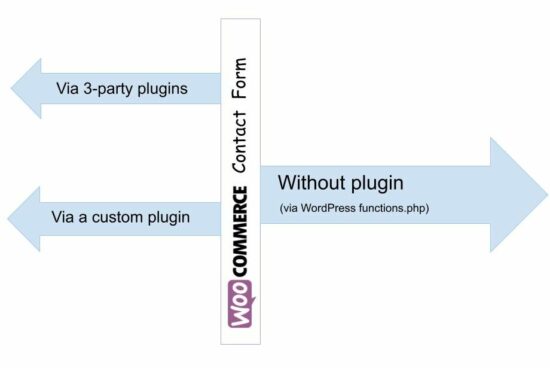
Creating a WordPress contact form without plugins is easy. In the last two articles, we have seen how to build a WooCommerce contact form with the use of plugins.
Plugins are the right placeholders for having add-on features to a WordPress website. And they have global references that enable/disable the add-ons with configurable directives.
Though WordPress plugins are systematic solutions, beginners may prefer an easy way. When I was a beginner, I felt it difficult to understand WordPress plugins initially.
This article is for displaying the WordPress contact form without plugins on a product page. It uses the function.php file of the active WordPress theme.
Steps to create WordPress contact form without plugin
Creating a WordPress contact form without plugins is simple only with 3 steps. These steps render the contact form on the WordPress shop and enable mail sending. The simplicity and the less code are the main advantages of this example.
Create a child theme for the active WordPress theme. Then, have a copy of the parent theme assets be overridden.
Put the contact form HTML, CSS and JavaScript into the child theme.
Hook WordPress action/filter hooks from functions.php. It is to enable the WordPress contact form without plugin.
Step 1: Create a WordPress child theme to have contact form files
The functions.php is the right place to initiate WordPress actions without a plugin. In this example, the WordPress contact two major actions are initiated via this file.
Form rendering by loading the templates and assets.
Mail sending on listening WordPress AJAX request.
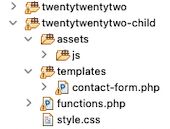
The functions.php file is in the WordPress theme directory. Having a child theme is a good practice, instead of changing the parent theme files.
Step 1 shows the file structure of the child theme directory. It contains the contact form HTML with “templates” directory. And also, it contains the cloned files functions.php and style.css.
The style.css has the WordPress contact form styles with the standard style sheet header. And the CSS header includes the following.
A unique “Theme Name”.
Parent theme reference with “Template” information.
The JavaScript assets are not a huge bundle, but rather a single file with a single function. It simply handles the form validation to let all the fields be mandatory.
After validation, it calls the WordPress endpoint URL via AJAX. This URL maps the WordPress AJAX endpoint URL by using a .htaccess rule.
$(document).ready(function(e) { // WooCommerce product enquiry form submit event handler $("#frmContactForm").on('submit', function(e) { e.preventDefault(); var name = $('#customer_name').val(); var email = $('#customer_email').val(); var message = $('#customer_message').val(); // Validate all fields in client side if (email == "" || message == "" || name == "") { $("#response").show(); $("#response").text("All fields are required."); } else { $("#response").hide(); $('.btn-send').hide(); $('#loader-icon').show(); // Post form via wp-ajax $.ajax({ url: "/wordpress/send-contact-email/", type: "POST", data: $("#frmContactForm").serialize(), success: function(response) { $("#response").show(); $('#loader-icon').hide(); if (!response) { $('.btn-send').show(); $("#response").html("Problem occurred."); } else { $('.btn-send').hide(); $("#response").html("Thank you for your message.") }; }, error: function() { } }); } });

});
Step 3: Hook WordPress filters and actions from functions.php
The functions.php initiates the WordPress action/filter hooks with the callback functions. It is as similar as we did with the plugins.
It prefixed the WordPress template URI to load the contact form HTML and en-queue the scripts. It uses get_stylesheet_directory_uri() to get the child-theme directory path.
By using get_template_directory_uri() , it will refer to the parent theme directory path. Then, it will return 404 error on the developer console. It happens on loading the child theme templates and assets with the parent path.
It has three hooks to enable the WordPress contact form without plugin on a WordPress store. Those are,
Hook name
Type
Function
the_content
Filters
Receives the current page content and appends the WordPress contact form HTML into it.
wp_enqueue_scripts
Actions
Enqueues the child theme styles, validation script and jQuery library via CDN.
wp_ajax_nopriv_send_contact_email
Actions
Calls mail sending script by listening the request with the URL wp-admin/admin-ajax.php?action=send_contact_email
<?php function load_contact_form($contactHTML) { // Load the contact form on a single product page if ( is_product() ){ $template_path = get_stylesheet_directory_uri() . '/templates/contact-form.php'; $contactHTML .= file_get_contents( $template_path); } return $contactHTML; }

// add filter to hook 'the_content' with a plugin functions.

add_filter('the_content', 'load_contact_form'); /** * Enqueues scripts and styles for front end. * * @return void */

function woocommerce_contact_form_styles()

{ if (is_product()) { wp_enqueue_style( 'theme-style', get_stylesheet_directory_uri() . '/style.css' ); wp_enqueue_script('contact-form-jquery', 'https://code.jquery.com/jquery-3.6.0.min.js', array(), null); wp_enqueue_script('contact-form-script', get_stylesheet_directory_uri() . 'assets/js/form.js', array(), null); }

}

add_action('wp_enqueue_scripts', 'woocommerce_contact_form_styles'); function send_contact_email()

{ $customerName = filter_var($_POST["customer_name"], FILTER_SANITIZE_STRING); $customerEmail = filter_var($_POST["customer_email"], FILTER_SANITIZE_STRING); $customerMessage = filter_var($_POST["customer_message"], FILTER_SANITIZE_STRING); $to = 'Recipient email here'; $subject = 'Product enquiry'; $body = 'The customer details: <br/><br/>'; if(!empty($customerName)) { $body = 'Customer Name:' . $customerName . '<br/>'; $body .= 'Customer Email:' . $customerEmail . '<br/>'; $body .= 'Customer Message:' . '<br/>'; $body .= $customerMessage . '<br/>'; } $headers = array('Content-Type: text/html; charset=UTF-8'); $emailSent = wp_mail( $to, $subject, $body, $headers ); print $emailSent; exit;

}

add_action("wp_ajax_nopriv_send_contact_email", "send_contact_email");
Conclusion
Thus, we have created a WordPress contact form without any 3rd-party or custom plugins. We have seen how to hook the WordPress filter callbacks. It helped to make the changes in WordPress core behavior.
The hooks made changes to the product page of the shop. It appends a WordPress contact form without plugin using the functions.php file.
The child theme via implementation will give you an idea to repeat the same for any components. For example, member subscription form, social share and more components.



 Question: How much does a Tableau Developer in the US make per year?
 Note: This is the most comprehensive salary meta-study of tableau developer income in the world, to the best of my knowledge!
 Note: Do you want to create your own thriving coding business online? Feel free to check out our

 Tip: An excellent start to turbo-charge your freelancing career (earning more in less time) is our