The games are free to keep until July 28th 2022 - 15:00 UTC.
Next week's freebie: Lawn Mowing Simulator
We are welcoming everyone to join our discord[discord.gg]. We are more active there on finding giveaways, small or large, and there are daily raffles you can participate.
Welcome to the cyberpunk future of Neon Blight. As the new owner of a cyberpunk gun shop, it's your job to provide the throng of wannabe heroes with the weapons they need to succeed in the fight against the megacorporations that rule the world.
Operate your very own gun store, fight through seemingly endless waves of enemies, and acquire the ultimate weapon by making your way through the Outer Border and the throng of enemies bent on keeping you away from your ultimate goal.
These are the eight best ways to check the installed version of the Python module abc:
Method 1: pip show abc
Method 2: pip list
Method 3: pip list | findstr abc
Method 4: library.__version__
Method 5: importlib.metadata.version
Method 6: conda list
Method 7: pip freeze
Method 8: pip freeze | grep abc
Before we go into these ways to check your abc version, let’s first quickly understand how versioning works in Python—you’ll be thankful to have spent a few seconds on this topic, believe me!
A Note on Python Version Numbering
Python versioning adds a unique identifier to different package versions using semantic versioning. Semantic versioning consists of three numerical units of versioning information in the format major.minor.patch.
In this tutorial, we’ll use the shorthand general version abbreviation like so:
x.y.z
Practical examples would use numerical values for x, y, and z:
1.2.3
4.1.4
1.0.0
This is shorthand for
major.minor.patch
Major releases (0.1.0 to 1.0.0) are used for the first stable release or “breaking changes”, i.e., major updates that break backward compatibility.
Minor releases (0.1.0 to 0.2.0) are used for larger bug fixes and new features that are backward compatible.
Patch releases (0.1.0 to 0.1.1) are used for smaller bug fixes that are backward compatible.
Let’s dive into the meat of this article:
Question: How to check the (major, minor, patch) version of abc in your current Python environment?
Method 1: pip show
To check which version of the Python library abc is installed, run pip show abc or pip3 show abc in your CMD/Powershell (Windows), or terminal (macOS/Linux/Ubuntu).
This will work if your pip installation is version 1.3 or higher—which is likely to hold in your case because pip 1.3 was released a decade ago in 2013!!
Here’s an example in my Windows Powershell: I’ve highlighted the line that shows that my package version is a.b.c:
In some instances, this will not work—depending on your environment. In this case, try those commands before giving up:
python -m pip show abc

python3 -m pip show abc

py -m pip show abc

pip3 show abc
Next, we’ll dive into more ways to check your abc version.
But before we move on, I’m excited to present you my new Python book Python One-Liners (Amazon Link).
If you like one-liners, you’ll LOVE the book. It’ll teach you everything there is to know about a single line of Python code. But it’s also an introduction to computer science, data science, machine learning, and algorithms. The universe in a single line of Python!
The book was released in 2020 with the world-class programming book publisher NoStarch Press (San Francisco).
To check the versions of all installed packages, use pip list and locate the version of abc in the output list of package versions sorted alphabetically.
This will work if your pip installation is version 1.3 or higher.
Here’s a simplified example for Windows Powershell, I’ve highlighted the line that shows the package version is 1.2.3:
PS C:\Users\xcent> pip list

Package Version

--------------- ---------

aaa 1.2.3

...

abc 1.2.3

...

zzz 1.2.3
In some instances, this will not work—depending on your environment. Then try those commands before giving up:
python -m pip list

python3 -m pip list

py -m pip list

pip3 list
Method 3: pip list + findstr on Windows
To check the versions of a single package on Windows, you can chain pip list with findstr abc using the CMD or Powershell command: pip3 list | findstr abc to locate the version of abc in the output list of package versions automatically.
Here’s an example for abc:
pip3 list | findstr abc 1.2.3
Method 4: Module __version__ Attribute
To check which version is installed of a given library, you can use the library.__version__ attribute after importing the library (package, module) with import library.
Here’s the code:
import my_library

print(my_library.__version__)

# x.y.z for your version output
Here’s an excerpt from the PEP 8 docs mentioning the __version__ attribute.
“PEP 8 describes the use of a module attribute called __version__ for recording “Subversion, CVS, or RCS” version strings using keyword expansion. In the PEP author’s own email archives, the earliest example of the use of an __version__ module attribute by independent module developers dates back to 1995.”
You can also use the following one-liner snippet to run this from your terminal (macOS, Linux, Ubuntu) or CMD/Powershell (Windows):
However, this method doesn’t work for all libraries, so while simple, I don’t recommend it as a general approach for that reason.
Method 5: importlib.metadata.version
The importlib.metadata library provides a general way to check the package version in your Python script via importlib.metadata.version('abc') for library abc. This returns a string representation of the specific version such as 1.2.3 depending on the concrete version in your environment.
If you have created your Python environment with Anaconda, you can use conda list to list all packages installed in your (virtual) environment. Optionally, you can add a regular expression using the syntax conda list regex to list only packages matching a certain pattern.
How to list all packages in the current environment?
conda list
How to list all packages installed into the environment 'xyz'?
conda list -n xyz
Regex: How to list all packages starting with 'abc'?
conda list '^abc'
Method 7: pip freeze
The pip freeze command without any option lists all installed Python packages in your environment in alphabetically order (ignoring UPPERCASE or lowercase). You can spot your specific package abc if it is installed in the environment.
pip freeze
Output example (depending on your concrete environment/installation):
To check the versions of a single package on Linux/Ubuntu/macOS, you can chain pip freeze with grep abc using the CMD or Powershell command: pip freeze | grep abc to programmatically locate the version of your particular package abc in the output list of package versions.
Here’s an example for abc:
pip freeze | grep abc

abc==1.2.3
Related Questions
Check abc Installed Python
How to check if abc is installed in your Python script?
To check if abc is installed in your Python script, you can run import abc in your Python shell and surround it by a try/except to catch a potential ModuleNotFoundError.
How to check the package version of abc in Python?
To check which version of abc is installed, use pip show abc or pip3 show abc in your CMD/Powershell (Windows), or terminal (macOS/Linux/Ubuntu) to obtain the output major.minor.patch.
pip show abc # or pip3 show abc

# 1.2.3
Check abc Version Linux
How to check my abc version in Linux?
To check which version of abc is installed, use pip show abc or pip3 show abc in your Linux terminal.
pip show abc # or pip3 show abc

# 1.2.3
Check abc Version Ubuntu
How to check my abc version in Ubuntu?
To check which version of abc is installed, use pip show abc or pip3 show abc in your Ubuntu terminal.
pip show abc # or pip3 show abc

# 1.2.3
Check abc Version Windows
How to check my abc version on Windows?
To check which version of abc is installed, use pip show abc or pip3 show abc in your Windows CMD, command line, or PowerShell.
pip show abc # or pip3 show abc

# 1.2.3
Check abc Version Mac
How to check my abc version on macOS?
To check which version of abc is installed, use pip show abc or pip3 show abc in your macOS terminal.
pip show abc # or pip3 show abc

# 1.2.3
Check abc Version Jupyter Notebook
How to check my abc version in my Jupyter Notebook?
To check which version of abc is installed, add the line !pip show abc to your notebook cell where you want to check. Notice the exclamation mark prefix ! that allows you to run commands in your Python script cell.
!pip show abc
Output: The following is an example on how this looks for abc in a Jupyter Notebook cell:
How to check the abc version in my conda installation?
Use conda list 'abc' to list version information about the specific package installed in your (virtual) environment.
conda list 'abc'
Check abc Version with PIP
How to check the abc version with pip?
You can use multiple commands to check the abc version with PIP such as pip show abc, pip list, pip freeze, and pip list.
pip show abc

pip list

pip freeze

pip list
The former will output the specific version of abc. The remaining will output the version information of all installed packages and you have to locate abc first.
Check Package Version in VSCode or PyCharm
How to check the abc version in VSCode or PyCharm?
Integrated Development Environments (IDEs) such as VSCode or PyCharm provide a built-in terminal where you can run pip show abc to check the current version of abc in the specific environment you’re running the command in.
pip show abc

pip3 show abc pip list

pip3 list pip freeze

pip3 freeze
You can type any of those commands in your IDE terminal like so:
Summary
In this article, you’ve learned those best ways to check a Python package version:
Method 1: pip show abc
Method 2: pip list
Method 3: pip list | findstr abc
Method 4: library.__version__
Method 5: importlib.metadata.version
Method 6: conda list
Method 7: pip freeze
Method 8: pip freeze | grep abc
Thanks for giving us your valued attention — we’re grateful to have you here!
Programmer Humor
There are only 10 kinds of people in this world: those who know binary and those who don’t. ~~~
There are 10 types of people in the world. Those who understand trinary, those who don’t, and those who mistake it for binary.
[www.indiegala.com] For the next 4 days, any purchase made on IndieGala (be it store deals or bundles) will be rewarding you instantly and handsomely, directly into your IndieGala account, with 5% of your final purchase (in the form of GalaCredit).
A new stage, a new adventure... The curtain rises on the next chapter in the Rune Factory series.
Set off on a grand adventure in a fantasy world with the latest entry in the Rune Factory simulation RPG series. After losing their memory, the hero lands in a small town blessed by nature. There, they are recruited into a band of peacekeeping rangers, and their new life begins. In addition to their normal duties, the hero can farm the land, cast a line into the nearby river, and so much more! Team up with townsfolk to battle monsters and unleash powerful combination attacksjust one of the features new to the series. The stage is set, and the curtain rises on an exciting new adventure in Rune Factory 5!
Features:
* Tame monsters or team up with townsfolk to explore a massive world
* Defend the frontier and support your community as a member of a peacekeeping ranger
* Unleash uniquely powerful combo attacks with your teammates
* Cultivate crops in the fields
* Find friendship, love, and family with a colorful cast of characters
Top 18 Database Jobs to Make Six Figures Easily (2023)
5/5 – (1 vote)
Do you want to go deep into databases?
The following career paths for coders interested in the broad database space are ordered alphabetically. The table shows the annual income of different job descriptions in the database space:
Job/Career Description
Annual Income $USD (Lower)
Annual Income $USD (Higher)
Cassandra Developer
110,000
145,000
Couchbase Developer
87,000
212,000
Database Administrator
83,000
131,000
Database Developer
72,000
135,000
DynamoDB Developer
70,000
160,000
IBM DB2 Developer
90,000
132,000
MariaDB Developer
70,000
100,000
Microsoft SQL Server Developer
74,000
137,000
MongoDB Developer
59,000
146,000
MS Access Developer
45,000
75,000
MySQL Developer
87,000
149,000
Oracle Developer
86,000
107,000
PL-SQL Developer
72,000
103,000
PostgreSQL Developer
104,000
133,000
RavenDB Developer
101,000
130,000
Redis Developer
100,000
126,000
SQL Developer
76,000
87,000
SQLite Developer
49,000
107,000
Table: Annual income in the US ($) of different job descriptions in the database space
Let’s dive into each of those job descriptions next!
Cassandra Developer
Cassandra is a free, open-source, distributed, NoSQL database management system (DBMS) for large amounts of data that may be distributed across many commodity servers.
A Cassandra developer manages the Cassandra system and integrates applications with the database storage solution and API.
The average annual income of a Cassandra Developer is between $110,000 and $145,500, according to Glassdoor (source).
Do you want to become a Cassandra Developer? Here’s a learning path I’d propose in five steps to get started:
Couchbase is an open-source, distributed NoSQL database infrastructure for interactive applications to serve concurrent users.
A Couchbase developer creates applications using this infrastructure—mostly for business clients.
The average Couchbase salary ranges from approximately $87,504 per year for an Inside Sales Representative to $212,621 per year for a Senior Software Engineer (source).
A database administrator (DBA) is an IT professional responsible for maintaining the reliable, efficient, and secure execution of a database management system (DBMS).
In this way, a database administrator is responsible for providing the data infrastructure of a company or organization. This involves installing, configuring, debugging, optimizing, securing, troubleshooting, and managing database systems.
DBAs can either work as employees or as freelancers remotely or onsite.
Figure: Average Income of a Database Admin in the US by Source. [1]
The average annual income of a Database Administrator in the United States is between $83,533 and $131,056, with an average of $100,920 and a statistical median of $98,860 per year.
A database engineer is responsible for providing the data infrastructure of a company or organization. This involves designing, creating, installing, configuring, debugging, optimizing, securing, and managing databases.
Database engineers can either work as employees or as freelancers remotely or onsite.
A database engineer has the following responsibilities:
Creating a new database system.
Finding a database system tailored to the needs of an organization.
Designing the data models.
Accessing the data with scripting languages including SQL-like syntax.
Installing an existing database software system onsite.
Configuring a database system.
Optimizing a database management system for performance, speed, or reliability.
Consulting management regarding data management issues.
Keeping databases secure and providing proper access control to users.
Monitoring and managing an existing database system to keep it running smoothly.
Debugging potential bugs, errors, and security issues detected at runtime.
Testing and deploying a database system on a public cloud infrastructure such as AWS.
Handling distribution issues in the case of a distributed database management system.
Ensuring budget adherence when running on a public cloud and estimating costs for private database solutions.
Communicating and negotiating with salespeople (e.g., from Oracle).
The average annual income of a Database Engineer in the United States is between $72,536 and $135,000, with an average of $103,652 and a statistical median of $106,589 per year.
Figure: Average Income of a Database Engineer in the US by Source. [1]
Amazon’s DynamoDB is a NoSQL, serverless, key-value database for high-performance applications. It is fully managed so a DynamoDB developer usually helps clients set up and connect to the database—and provides minimal maintenance support.
As a DynamoDB Developer, you can expect to earn between $70,000 and $160,000 per year according to Google (source).
Do you want to become a DynamoDB Developer?
Here’s a learning path I’d propose in five steps to get started:
Note: If I may be so blunt—I don’t recommend this career path anymore due to the “dying” interest in IBM DB2 technology.
IBM DB2 is a data processing and storage solution that helps developers quickly build and deploy applications such as natural language querying and AI. An IBM DB2 developer creates apps for and integrates them into this system.
The average annual income of an IBM DB2 Developer is $132,000 according to Glassdoor (source).
MariaDB is a database framework focusing on relational databases that are compatible with Oracle. MariaDB developers provide value to clients by integrating their applications with new or existing MariaDB databases. (Source)
The average annual income of a MariaDB Developer is $85,000 according to Payscale (source).
Microsoft SQL Server is a relational database management system (RDBMS) to store and retrieve data on the same computer or across a network. A Microsoft SQL Server Developer creates and connects applications that access the Microsoft SQL Server API. (Source)
The average annual income of a Microsoft SQL Server Developer is between $74,000 and $137,500 according to Ziprecruiter (source):
The average annual income of a MongoDB Developer is $92,414 with a most likely range between $59,000 and $146,000 and a top earner income of $222,000 according to Glassdoor (source).
MongoDB is a source-available cross-platform document-oriented database program. As a NoSQL database program, MongoDB uses JSON-like documents with optional schemas.
A MongoDB developer implements, maintains, and designs MongoDB database applications. (Source)
The average annual income of an MS Access Developer is between $45,000 (25th percentile) and $75,000 (75th percentile) according to Ziprecruiter with top developers making $122,000 and more (source).
A Microsoft Access Developer developer creates, edits, analyzes, debugs, and supervises the development of software written in the MS Access programming language.
MS Access is a database system. Although it isn’t used that much anymore, it is still a great tool for small projects. And there is a huge number of legacy systems that depend upon MS Access. (Source)
A MySQL Developer is responsible for database administration, such as performance optimization, troubleshooting, problem-solving, and customer support.
The average annual income of a MySQL Developer is between $87,828 and $149,975, according to Glassdoor (source).
An Oracle developer creates or maintains the database components of an Oracle application. They often develop new applications or convert existing applications to run in an Oracle Database environment. (Source)
The average annual income of an Oracle Developer in the United States is between $86,074 and $107,675, according to Salary.com, with an average of $97,941. (source)
PostgreSQL calls itself “The World’s Most Advanced Open Source Relational Database”.
A PostgreSQL database developer works on the PostgreSQL project whereas a PostgreSQL developer works with PostgreSQL on a third-party application. Most will take the second route, for which you need to know how to access the API. (Source)
Do you want to become a PostgreSQL developer? Here’s a learning path I’d propose in five steps to get started:
According to ZipRecruiter, the annual income of PostgreSQL developers is between $104,000 for the bottom 25th percentile, $133,000 for the 75th Percentile, and $171,500 for the top earners.
The monthly pay ranges from $8,666 to $14,291 with an average monthly income of $10,052.
The average annual income of a RavenDB Developer is hard to estimate given the limited data availability. However, RavenDB developers are NoSQL developers who earn between $101,000 (25th percentile) and $130,500 (75th percentile) with an average of $119,105 per year in the US according to Ziprecruiter (source).
A RavenDB Developer developer creates, edits, analyzes, debugs, and supervises the development of software written in the RavenDB programming language. RavenDB is a NoSQL document-oriented database written especially for the .NET framework. (Source)
Redis (Remote Dictionary Server) is a fast, open source, in-memory, key-value data store.
As a Redis developer, you will apply and develop Redis solutions for databases, caches, message brokers, and queues.
Other use cases are chat apps, gaming leaderboards, session stores, streaming apps, and handling geospatial data sources — to name just a few. (Source)
The average annual income of a Redis developer is $113,000 in the US according to PayScale (source).
An SQL Developer creates, among other things, SQL code for database access. SQL is short for Structured Query Language that is designed to manage data stored in relational databases. (Source)
The average annual income of a SQL Developer in the US is $76,110 according to PayScale and $87,489 according to Indeed.com.
SQLite is the most used database engine in the world. SQLite implements a small, fast, self-contained, high-reliability, full-featured, SQL database engine.
SQLite developers help clients set up, maintain, and manage an SQLite database for their applications. (Source)
The average annual income of a SQLite Developer is between $49,000 and $107,000 with an average of $64,977 per year according to PayScale (source).
FREE Fly in the House, Bandai, Ubisoft, Kalypso Ending
Fly in the House FREEbie
[freebies.indiegala.com] Latest FREEbie buzz is in: There’s a fly in your apartment! Hunt it down and catch it in the newest chaotic fly hunting simulator experience.
The official PlayStation Store page for God of War: Ragnarok has been updated, and it includes what appears to be new story details on the long-awaited PlayStation exclusive.
The story description, as spotted by TheGamer, reveals that Kratos and Atreus will visit all Nine Realms as they seek out clues about a battle that could end the world. The full description follows below:
"Fimbulwinter is well underway. Kratos and Atreus must journey to each of the Nine Realms in search of answers as Asgardian forces prepare for a prophesied battle that will end the world. Along the way they will explore stunning, mythical landscapes, and face fearsome enemies in the form of Norse gods and monsters. The threat of Ragnarok grows ever closer. Kratos and Atreus must choose between their own safety and the safety of the realms."
You've just arrived at Escape Academy, a school where promising students train to become the ultimate Escape Room Master. Play over a dozen masterfully hand crafted rooms, designed by experienced experts in the field of REAL LIFE escape rooms. Experience the entirety of Escape Academy alone in single player OR through two player co-operative play. Available in local or online splitscreen. Explore the campus of Escape Academy and get to know the faculty, a colorful cast of characters, each an expert in the art of Escape. And some with secrets yet to be uncovered...
Python Slice Remove First and Last Element from a List
5/5 – (1 vote)
Problem Formulation
Question: Given a Python list stored in a variable lst. How to remove the first and last elements from the list lst?
Example: The list ['Alice', 'Bob', 'Carl', 'Dave'] stored in variable lst becomes ['Bob', 'Carl'].
Method 1: Slicing List[1:-1]
To remove the first and last elements from a Python list, use the expression lst = lst[1:-1] that uses a Python feature called slicing with the syntax variable[start:stop] to iterate over a sequence starting from the start index (included) and ending in the element at stop index (excluded). If stop is a negative integer such as -i, Python takes the i-th right-most element.
To remove the first and last elements from a Python list, you can also use the slightly more complex expression lst = lst[1:len(lst)-1] that assigns the result of the slicing operation to the list and, thereby, overwrites the original longer list. We decrement the len() function result to obtain the index of the last element that is excluded from the slice.
To remove the first element of a Python list, you can use the list.pop(0) method. To remove the last element of a Python list, you can use the list.pop() method without argument. You can call both to remove the first and the last elements if the list has at least two elements.
Here’s a minimal example:
lst = ['Alice', 'Bob', 'Carl', 'Dave']

lst.pop() # remove last

lst.pop(0) # remove first

print(lst)

# ['Bob', 'Carl']
However, for a list with less than two elements, this will raise an IndexError: pop from empty list. A simple if check can make sure that the list has at least two elements—and otherwise simply override it with the empty list.
Here’s some background info in case you want to dive deeper into this approach:
The list.pop() method removes and returns the last element from an existing list. The list.pop(index) method with the optional argument index removes and returns the element at the position index.



 How to
  Python versioning adds a unique identifier to different package versions using semantic versioning. Semantic versioning consists of three numerical units of versioning information in the format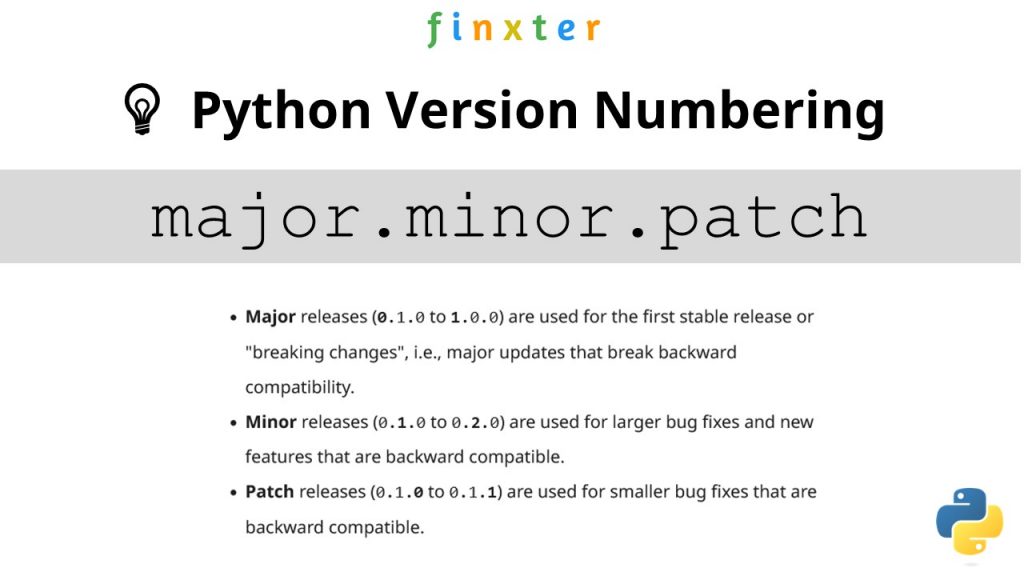





 Do you want to go deep into databases?
 Learn More: Feel free to read my full guide on this career role on


