Calling all daredevil drivers and creators! Blast off to the visually stunning, exhilarating new Horizon Hot Wheels Park in the clouds high above Mexico.
Experience the fastest, most extreme tracks ever devised. Design, build, and share your own Hot Wheels adventure with 80 distinct, snappable track pieces. Race 10 amazing new cars including the lightning fast 2021 Hennessey Venom F5 and the iconic 2000 Hot Wheels Deora II.
Solution: There are four simple ways to convert a list of lists to a CSV file in Python.
CSV: Import the csvmodule in Python, create a csv writer object, and find a list lst of elements representing each object as a row, that is then written into the CSV using writer.writerow(lst).
Pandas: Import the pandas library, convert each object to a list to obtain a list of lists, create a Pandas DataFrame out of the list of lists, and write the DataFrame to a file using the DataFrame method DataFrame.to_csv('file.csv').
NumPy: Import the NumPy library, convert each object to a list to obtain a list of lists, create a NumPy array, and write the output to a CSV file using the numpy.savetxt('file.csv', array, delimiter=',') method.
Python: Use a pure Python implementation that doesn’t require any library by using the Python file I/O functionality.
Finxter Favorite: My preference is Method 4 (Vanilla Python) because it’s simplest to use, efficient, and most robust for different input types (numerical or textual) and doesn’t require external dependencies and data wrangling.
Method 1: Python’s CSV Module
You can convert a list of lists to a CSV file in Python easily—by using the csv library. This is the most customizable of all four methods.
class Employee(object): def __init__(self, name, description, salary): self.name = name self.description = description self.salary = salary employees = [Employee('Alice', 'Data Scientist', 122000), Employee('Bob', 'Engineer', 77000), Employee('Ann', 'Manager', 119000)] # Method 1

import csv

with open('my_file.csv', 'w', newline='') as f: writer = csv.writer(f) for x in employees: writer.writerow([x.name, x.description, x.salary])
In the code, you first open the file using Python’s standard open() command. Now, you can write content to the file object f.
Next, you pass this file object to the constructor of the CSV writer that implements some additional helper method—and effectively wraps the file object providing you with new CSV-specific functionality such as the writerow() method.
You now iterate over the objects and convert each object to a list.
The list representing one row is then passed in the writerow() method of the CSV writer. This takes care of converting the list of objects to a CSV format.
You can customize the CSV writer in its constructor (e.g., by modifying the delimiter from a comma ',' to a whitespace ' ' character). Have a look at the specification to learn about advanced modifications.
Method 2: Pandas DataFrame to_csv()
This method converts a list of objects to a CSV file in two steps:
First, convert the list of objects to a list of lists.
You can convert a list of lists to a Pandas DataFrame that provides you with powerful capabilities such as the to_csv() method.
This is a super simple approach that avoids importing yet another library (I use Pandas in many Python projects anyways).
class Employee(object): def __init__(self, name, description, salary): self.name = name self.description = description self.salary = salary employees = [Employee('Alice', 'Data Scientist', 122000), Employee('Bob', 'Engineer', 77000), Employee('Ann', 'Manager', 119000)] # Method 2

import pandas as pd # Step 1: Convert list of objects to list of lists

lst = [[x.name, x.description, x.salary] for x in employees] # Step 2: Convert list of lists to CSV

df = pd.DataFrame(lst)

df.to_csv('my_file.csv', index=False, header=False)
You convert a list of objects to a CSV file in three main steps.
First, convert the list of objects to a list of lists by using list comprehension to iterate over each object and convert each object to an inner list using your custom expression.
Second, create a Pandas DataFrame, Python’s default representation of tabular data.
Third, the DataFrame is a very powerful data structure that allows you to perform various methods. One of those is the to_csv() method that allows you to write its contents into a CSV file.
You set the index and header arguments of the to_csv() method to False because Pandas, per default, adds integer row and column indices 0, 1, 2, ….
Think of them as the row and column indices in your Excel spreadsheet. You don’t want them to appear in the CSV file so you set the arguments to False.
If you want to customize the CSV output, you’ve got a lot of special arguments to play with. Check out this article for a comprehensive list of all arguments.
You can convert a list of objects to a CSV file by first converting it to a list of lists which is then converted to a NumPy array, and then using NumPy’s savetext() function by passing the NumPy array as an argument.
This method is best if you can represent the numerical data only—otherwise, it’ll lead to complicated data type conversions which are not recommended.
class Employee(object): def __init__(self, name, description, salary): self.name = name self.description = description self.salary = salary employees = [Employee('Alice', 'Data Scientist', 122000), Employee('Bob', 'Engineer', 77000), Employee('Ann', 'Manager', 119000)] # Method 3

import numpy as np # Convert list of objects to list of lists

lst = [[hash(x.name), hash(x.description), x.salary] for x in employees] # Convert list of lists to NumPy array

a = np.array(lst) # Convert array to CSV

np.savetxt('my_file.csv', a, delimiter=',')
In the code, we use the hash() function to obtain a numerical value for the string attributes name and description of the Employee class.
The output doesn’t look pretty: it stores the values as floats. But no worries, you can reformat the output using the format argument fmt of the savetxt() method (more here). However, I’d recommend you stick to method 2 (Pandas) to avoid unnecessary complexity in your code.
Method 4: Pure Python Without External Dependencies
If you don’t want to import any library and still convert a list of objects into a CSV file, you can use standard Python implementation as well: it’s not complicated but very efficient.
The idea is simple, iterate over the list of object and write a comma-separated representation of each object into the CSV file using a combination of the built-in open() function to create a file object and the file.write() method to write each row.
This method is best if you won’t or cannot use external dependencies.
class Employee(object): def __init__(self, name, description, salary): self.name = name self.description = description self.salary = salary employees = [Employee('Alice', 'Data Scientist', 122000), Employee('Bob', 'Engineer', 77000), Employee('Ann', 'Manager', 119000)] # Method 4

with open('my_file.csv', 'w') as f: for x in employees: f.write(f'{x.name},{x.description},{x.salary}\n')
In the code, you first open the file object f. Then you iterate over each object and write a custom comma-separated string representation of this object to the file using the file.write() method.
We use Python’s f-string functionality to do that in a concise way. At the end of each row, you place the newline character '\n'.
Method 5 – Bonus: Python One-Liner
The previous method is a one-linerized variant of Method 4. If you’re part of the Finxter community, you know how I love one-liners.
# Method 5

open('my_file.csv', 'w').writelines([f'{x.name},{x.description},{x.salary}\n' for x in employees])
Concise, isn’t it? The output is the same as before.
If you’re interested in the art of crafting beautiful one-liners, check out my book on the topic!
Python One-Liners Book: Master the Single Line First!
Python programmers will improve their computer science skills with these useful one-liners.
Python One-Linerswill teach you how to read and write “one-liners”: concise statements of useful functionality packed into a single line of code. You’ll learn how to systematically unpack and understand any line of Python code, and write eloquent, powerfully compressed Python like an expert.
The book’s five chapters cover (1) tips and tricks, (2) regular expressions, (3) machine learning, (4) core data science topics, and (5) useful algorithms.
Detailed explanations of one-liners introduce key computer science concepts and boost your coding and analytical skills. You’ll learn about advanced Python features such as list comprehension, slicing, lambda functions, regular expressions, map and reduce functions, and slice assignments.
You’ll also learn how to:
Leverage data structures to solve real-world problems, like using Boolean indexing to find cities with above-average pollution
Use NumPy basics such as array, shape, axis, type, broadcasting, advanced indexing, slicing, sorting, searching, aggregating, and statistics
Calculate basic statistics of multidimensional data arrays and the K-Means algorithms for unsupervised learning
Create more advanced regular expressions using grouping and named groups, negative lookaheads, escaped characters, whitespaces, character sets (and negative characters sets), and greedy/nongreedy operators
Understand a wide range of computer science topics, including anagrams, palindromes, supersets, permutations, factorials, prime numbers, Fibonacci numbers, obfuscation, searching, and algorithmic sorting
By the end of the book, you’ll know how to write Python at its most refined, and create concise, beautiful pieces of “Python art” in merely a single line.
Graffiti Rebel 4 Bundle, THQ Racing Deals, Bandai Giveaways
Graffiti Rebel 4 Bundle | 5 Steam Games | 94% OFF
[www.indiegala.com] Turnip Boy Commits Tax Evasion, Lila's Sky Ark, Nira, Blue Fire, REZ PLZ are the fantastic indie Steam games you must discover with the help of the fourth Graffiti Rebel Bundle.
The games are free to keep until August 04 2022 - 15:00 UTC.
Next week's freebie: Unrailed!
We are welcoming everyone to join our discord[discord.gg]. We are more active there on finding giveaways, small or large, and there are daily raffles you can participate.
Fans will experience WARRIORS OROCHI 3 in a brand new light as they enter the fray with the implementation of new generation console features, new storylines and scenarios.
Posted by: xSicKxBot - 07-27-2022, 10:25 AM - Forum: Python
- No Replies
Top 8 Profitable Python Packages to Learn in 2023
5/5 – (1 vote)
Are you interested in Python but you don’t know which Python library is most attractive from a career point of view?
Well, you should focus on the library you’re most excited about.
But if you’re generally open because you have multiple passions, it would be reasonable to also consider annual and hourly income.
These are the most profitable Python libraries, frameworks, modules, or packages:
Python Library (Dev)
Annual Income (USD)
Hourly Income (USD)
Python Developer
$82,000
$55
Keras Developer
$95,000
$63
Django Developer
$117,000
$78
Flask Developer
$103,000
$69
NumPy Developer
$105,000
$70
Pandas Developer
$87,000
$58
TensorFlow Developer
$148,000
$99
PyTorch Developer
$109,000
$73
Table: Annual and Hourly Income of a developer focusing on different Python libraries/frameworks/packages/modules.
What is the most profitable Python library?
The most profitable Python library is TensorFlow. TensorFlow developers make $148,000 per year on average (US) which roughly translates to $99 per hour assuming an annual workload of 1500 hours.
Let’s dive into each Python library from the table, one by one.
#0 – General Python Developer
A Python developer is a programmer who creates software in the Python programming language. Python developers are often involved in data science, web development, and machine learning applications.
A Python developer earns $65,000 (entry-level), $82,000 (mid-level), or $114,000 (experienced) per year in the US according to Indeed. (source)
Do you want to become a Python Developer? Here’s a step-by-step learning path I’d propose to get started with Python:
“Keras is an API designed for human beings, not machines. Keras follows best practices for reducing cognitive load: it offers consistent & simple APIs, it minimizes the number of user actions required for common use cases, and it provides clear & actionable error messages. It also has extensive documentation and developer guides.”
A Keras Developer developer creates, edits, analyzes, debugs, and supervises the development of software written in the Keras deep learning framework. Keras developers create machine learning apps using deep learning.
The average annual income of a Keras Developer in the United States is $95,000 per year, according to PayScale (source). Top earners make $156,000 and more in the US!
Do you want to become a Keras Developer? Here’s a step-by-step learning path I’d propose to get started with Keras:
What is Django? Let’s have a look at the definition from the official website (highlights by me):
“Django is a high-level Python web framework that encourages rapid development and clean, pragmatic design. Built by experienced developers, it takes care of much of the hassle of web development, so you can focus on writing your app without needing to reinvent the wheel. It’s free and open source.”
A Django Developer developer creates, edits, analyzes, debugs, and supervises the development of software written in the Python programming language using the Django web development framework. You need to have good Python, HTML, and CSS skills.
The average annual income of a Django Developer in the United States is between $101,000 (25th percentile) and $137,000 (75th percentile) with an average of $117,000 per year according to Ziprecruiter (source) and $90,000 per year according to PayScale (source). Top earners make $150,000 and more in the US!
Do you want to become a Django Developer? Here’s a step-by-step learning path I’d propose to get started with Django:
A Flask Developer developer creates, edits, analyzes, debugs, and supervises the development of software written in the Flask programming language. You should have a basic understanding of web technologies such as HTML, CSS, JavaScript, and of course Python.
Let’s have a look at the definition from the Flask wiki page (highlights by me):
“Flask is a micro web framework written in Python. It is classified as a microframework because it does not require particular tools or libraries.
It has no database abstraction layer, form validation, or any other components where pre-existing third-party libraries provide common functions.
However, Flask supports extensions that can add application features as if they were implemented in Flask itself. Extensions exist for object-relational mappers, form validation, upload handling, various open authentication technologies and several common framework related tools.”
The average annual income of a Flask Developer in the United States is between $79,000 (25th percentile) and $123,000 (75th percentile) with an average of $103,000 per year according to Ziprecruiter (source). Top earners make $151,000 and more in the US!
Do you want to become a Flask Developer? Here’s a step-by-step learning path I’d propose to get started with Flask:
“Nearly every scientist working in Python draws on the power of NumPy. NumPy brings the computational power of languages like C and Fortran to Python, a language much easier to learn and use. With this power comes simplicity: a solution in NumPy is often clear and elegant.”
The average annual income of a NumPy Developer in the United States is $105,000 per year according to PayScale (source). Top earners make $149,000 and more in the US!
Do you want to become a NumPy Developer? Here’s a step-by-step learning path I’d propose to get started with NumPy:
“pandas is a fast, powerful, flexible and easy to use open source data analysis and manipulation tool, built on top of the Python programming language.”
You may also want to check out our Pandas resources on the Finxter blog:
The average annual income of a Pandas Developer in the United States is $87,000 per year according to Ziprecruiter (source). Top earners make $125,000 and more in the US!
Do you want to become a Pandas Developer? Here’s a step-by-step learning path I’d propose to get started with Pandas:
A TensorFlow Developer creates, edits, analyzes, debugs, and supervises the development of code written with the TensorFlow library that is accessed mostly via the Python API. Because a TensorFlow developer is a deep learning engineer, they design and create machine learning models, train them, and improve them to reach high level of model accuracy and robustness.
TensorFlow is “An end-to-end open source machine learning platform. The core open source library to help you develop and train ML models. TensorFlow makes it easy for beginners and experts to create machine learning models for desktop, mobile, web, and cloud. See the sections below to get started.”
The average annual income of a TensorFlow Developer in the United States is between $104,000 (25th percentile) and $187,000 (75th percentile) with an average of $148,000 per year according to Ziprecruiter (source). Top earners make $197,000 and more in the US!
Do you want to become a TensorFlow Developer? Here’s a step-by-step learning path I’d propose to get started with TensorFlow:
A PyTorch Developer writes code using in Python’s PyTorch library to analyze data, create machine learning models, or runs deep learning algorithms on various hardware devices such as GPUs.
“An open source machine learning framework that accelerates the path from research prototyping to production deployment. More specifically, PyTorch is an optimized tensor library for deep learning using GPUs and CPUs.”
The average annual income of a PyTorch Developer in the United States is $109,000 per year according to PayScale (source). Top earners make $131,000 and more in the US!
Do you want to become a PyTorch Developer? Here’s a step-by-step learning path I’d propose to get started with PyTorch:
Will the last mother fox on Earth be able to save its three little cubs? Experience how life would be in a world ravaged by mankind through the eyes of the last fox on Earth in this eco-conscious adventure. Discover the destructive eect of the human race, which corrupts day after day the most precious and needed resources of the natural environments. Explore Endling's 3D side-scrolling world and defend your cubs, three tiny and defenseless fur balls, feed them, see how they grow up level after level, notice their unique personalities and fears, and most importantly, make them survive. Use the cover of night to sneak with your litter towards a safer place. Spend the day resting in an improvised shelter and plan for your next movement carefully since it could be the last one for you or your cubs.
Posted by: xSicKxBot - 07-27-2022, 10:25 AM - Forum: Lounge
- No Replies
GTA Online Update: How To Start Operation Paper Trail Mission
One of the biggest content drops of the year just arrived in GTA Online. The Criminal Enterprises update was released on July 26 and it delivers a plethora of content to the online world of Los Santos.
Among the content that arrived with The Criminal Enterprises update is a new IAA mission for players to undertake. Called "Operation Paper Trail," this mission allows players to go undercover to figure out why the oil prices have skyrocketed in Los Santos. Players can expect espionage, criminal conspiracies, and high-speed action every step of the way in this operation. However, there's been some confusion as to how actually start Operation Paper Trail in GTA Online. Below, we lay out all of the details you need to know about the new IAA mission.
Starting Operation Paper Trail
As with most IAA missions in GTA Online, Operation Paper Trail begins with Agent ULP. This agent is the player's liaison for the IAA in Los Santos. This time around, Agent ULP has caught wind of a conspiracy behind the rising oil prices in Los Santos. The agent believes that the Duggan family and the FIB are in cahoots to drive up the price of oil. For what reason is unclear, but that's where you come into play. Agent ULP needs your help to get to the bottom of the conspiracy.
Question: How to convert the string to a CSV file in Python?
The desired output is the CSV file:
'my_file.csv':
a,b,c
1,2,3
9,8,7
Simple Vanilla Python Solution
To convert a multi-line string with comma-separated values to a CSV file in Python, simply write the string in a file (e.g., with the name 'my_file.csv') without further modification.
This works if the string is already in the correct CSV format with values separated by commas.
The following code uses the open() function and the file.write() functions to write the multi-line string to a file without modification.
my_string = '''a,b,c

1,2,3

9,8,7''' with open('my_file.csv', 'w') as out: out.write(my_string)
The result is a file 'my_file.csv' with the following contents:
a,b,c
1,2,3
9,8,7
Parsing and Modifying Text to CSV
The string may not be in the correct CSV format.
For example, you may want to convert any of the following strings to a CSV file—their format is not yet ready for writing it directly in a comma-separated file (CSV):
Example 1: 'abc;123;987'
Example 2: 'abc 123 987'
Example 3: 'a=b=c 1=2=3 9=8=7'
…
To parse such a string and modify it before writing it in a file 'my_file.csv', you can use the string.replace() and string.split() methods to make sure that each value is separated by a comma and each row has its own line.
Let’s go over each of those examples to see how to parse the string effectively to bring it into the CSV format:
Example 1
# Example 1:
my_string = 'abc;123;987' with open('my_file.csv', 'w') as out: lines = [','.join(line) for line in my_string.split(';')] my_string = '\n'.join(lines) out.write(my_string)
I’ve higlighted the two code lines that convert the string to the CSV format.
The first highlighted line uses list comprehension to create a list of three lines, each interleaved with a comma.
The second highlighted line uses the string.join() function to bring those together to a CSV format that can be written into the output file.
The output file 'my_file.csv' contains the same CSV formatted text:
a,b,c
1,2,3
9,8,7
Example 2
The following example is the same as the previous code snippet, only that the empty spaces ' ' in the input string should be converted to new lines to obtain the final CSV:
# Example 2:
my_string = 'abc 123 987' with open('my_file.csv', 'w') as out: lines = [','.join(line) for line in my_string.split(' ')] my_string = '\n'.join(lines) out.write(my_string)
The output file 'my_file.csv' contains the same CSV formatted text:
a,b,c
1,2,3
9,8,7
Example 3
If the comma-separated values are not yet comma-separated (e.g., they may be semicolon-separated 'a;b;c'), you can use the string.replace() method to replace the symbols accordingly.
This is shown in the following example:
# Example 3:

my_string = 'a=b=c 1=2=3 9=8=7' with open('my_file.csv', 'w') as out: my_string = my_string.replace('=', ',').replace(' ', '\n') out.write(my_string)
Thanks for reading this article! I appreciate the time you took to learn Python with me.
If you’re interested in writing more concise code, feel free to check out my one-liner book here:
Python One-Liners Book: Master the Single Line First!
Python programmers will improve their computer science skills with these useful one-liners.
Python One-Linerswill teach you how to read and write “one-liners”: concise statements of useful functionality packed into a single line of code. You’ll learn how to systematically unpack and understand any line of Python code, and write eloquent, powerfully compressed Python like an expert.
The book’s five chapters cover (1) tips and tricks, (2) regular expressions, (3) machine learning, (4) core data science topics, and (5) useful algorithms.
Detailed explanations of one-liners introduce key computer science concepts and boost your coding and analytical skills. You’ll learn about advanced Python features such as list comprehension, slicing, lambda functions, regular expressions, map and reduce functions, and slice assignments.
You’ll also learn how to:
Leverage data structures to solve real-world problems, like using Boolean indexing to find cities with above-average pollution
Use NumPy basics such as array, shape, axis, type, broadcasting, advanced indexing, slicing, sorting, searching, aggregating, and statistics
Calculate basic statistics of multidimensional data arrays and the K-Means algorithms for unsupervised learning
Create more advanced regular expressions using grouping and named groups, negative lookaheads, escaped characters, whitespaces, character sets (and negative characters sets), and greedy/nongreedy operators
Understand a wide range of computer science topics, including anagrams, palindromes, supersets, permutations, factorials, prime numbers, Fibonacci numbers, obfuscation, searching, and algorithmic sorting
By the end of the book, you’ll know how to write Python at its most refined, and create concise, beautiful pieces of “Python art” in merely a single line.





 Question: How to convert a list of custom objects to a
  Finxter Favorite: My preference is Method 4 (Vanilla Python) because it’s simplest to use, efficient, and most robust for different input types (numerical or textual) and doesn’t require external dependencies and data wrangling.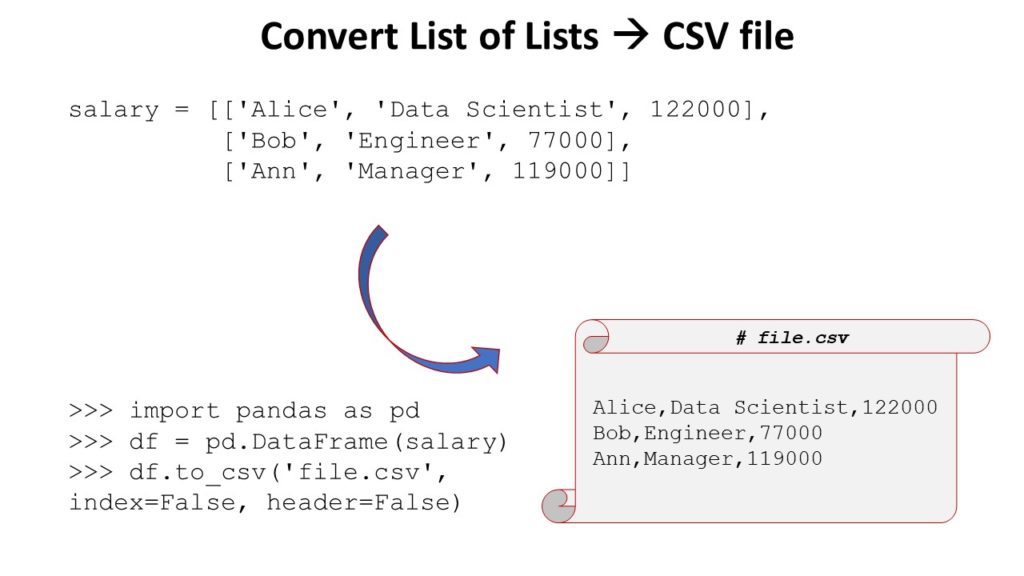

 Related article:


 A Python developer earns $65,000 (entry-level), $82,000 (mid-level), or $114,000 (experienced) per year in the US according to Indeed. (

