Welcome to Meow Meow Furrington, capital city of cats, home of the world's biggest ball of yarn...and hotbed of crime. You are Cuddles Nutterbutter, feline private investigator and owner of two perfectly normal-sized paws, the doctor said so.
After agreeing to take on a last-minute case for the Chief of Police, you and your plucky assistant find yourselves investigating a murder that risks upsetting the careful balance between the city's two most powerful crime families: the Montameeuws and the Catulets.
Cuddles will need to use every skill he's learned - as well as his definitely-not-smaller-than-average paws - to poke, lick and talk his way through to the heart of the mystery...before some very dangerous cats decide to take matters into their own paws. Which, to clarify, are absolutely regular-sized.
Stretch your legs, clean your whiskers, and dive into Nine Noir Lives. Enjoy a "point-and-lick" comedy-noir adventure, full of humour, crazy characters, and intriguing locations. Solve challenging puzzles and answer the immortal question: how many things need to be licked to solve a murder in this town?
Posted by: xSicKxBot - 09-18-2022, 10:22 AM - Forum: Lounge
- No Replies
CoD: Warzone 2.0 Overhauls The Gulag -- Here's How It Works
The sequel to Call of Duty: Warzone was officially revealed during Call of Duty Next on September 15, featuring the brand-new Al Mazrah map and a reinvented Gulag. Here we highlight everything we learned about Warzone 2.0's updated Gulag experience.
The Gulag, Warzone's home for second chances, was originally a 1v1 arena for eliminated players to go head-to-head for the chance to return to the match. The arena itself received a few different map layouts since the original Gulag Showers arena was introduced with the launch of Verdansk, but now the rules are completely changing for Warzone 2.0.
Al Mazrah's Gulag is no longer a 1v1 arena, and eliminated players will be transported to a larger Gulag, which is set at a prison's live fire training complex. This is a multi-level arena played out in 2v2 matches, so players are temporarily paired up with another eliminated player. Players no longer spawn into the fight with a gun in hand. Everyone spawns in with their fists, weapons must now be looted, and the surviving duo will return to the match. There will be proximity chat for Al Mazrah, so players can communicate with their temporary duo partner.
Posted by: xSicKxBot - 09-17-2022, 09:33 AM - Forum: Python
- No Replies
Solidity Example – Safe Remote Purchase
5/5 – (1 vote)
This article continues on the Solidity Smart Contract Examples series, which implements a simple, but the useful process of safe remote purchase.
Here, we’re walking through an example of a blind auction (docs).
We’ll first lay out the entire smart contract example without the comments for readability and development purposes.
Then we’ll dissect it part by part, analyze it and explain it.
Following this path, we’ll get a hands-on experience with smart contracts, as well as good practices in coding, understanding, and debugging smart contracts.
Smart Contract – Safe Remote Purchase
// SPDX-License-Identifier: GPL-3.0

pragma solidity ^0.8.4;

contract Purchase { uint public value; address payable public seller; address payable public buyer; enum State { Created, Locked, Release, Inactive } State public state; modifier condition(bool condition_) { require(condition_); _; } error OnlyBuyer(); error OnlySeller(); error InvalidState(); error ValueNotEven(); modifier onlyBuyer() { if (msg.sender != buyer) revert OnlyBuyer(); _; } modifier onlySeller() { if (msg.sender != seller) revert OnlySeller(); _; } modifier inState(State state_) { if (state != state_) revert InvalidState(); _; } event Aborted(); event PurchaseConfirmed(); event ItemReceived(); event SellerRefunded(); constructor() payable { seller = payable(msg.sender); value = msg.value / 2; if ((2 * value) != msg.value) revert ValueNotEven(); } function abort() external onlySeller inState(State.Created) { emit Aborted(); state = State.Inactive; seller.transfer(address(this).balance); } function confirmPurchase() external inState(State.Created) condition(msg.value == (2 * value)) payable { emit PurchaseConfirmed(); buyer = payable(msg.sender); state = State.Locked; } function confirmReceived() external onlyBuyer inState(State.Locked) { emit ItemReceived(); state = State.Release; buyer.transfer(value); } function refundSeller() external onlySeller inState(State.Release) { emit SellerRefunded(); state = State.Inactive; seller.transfer(3 * value); }

}
The state variables for recording the value, seller, and buyer addresses.
uint public value; address payable public seller; address payable public buyer;
For the first time, we’re introducing the enum data structure that symbolically defines the four possible states of our contract. The states are internally indexed from 0 to enum_length - 1.
enum State { Created, Locked, Release, Inactive }
The variable state keeps track of the current state. Our contract starts by default in the created state and can transition to the Locked, Release, and Inactive state.
State public state;
The condition modifier guards a function against executing without previously satisfying the condition, i.e. an expression given alongside the function definition.
The constructor is declared as payable, meaning that the contract deployment (synonyms creation, instantiation) requires sending a value (msg.value) with the contract-creating transaction.
constructor() payable {
The seller state variable is set to msg.sender address, cast (converted) to payable.
seller = payable(msg.sender);
The value state variable is set to half the msg.value, because both the seller and the buyer have to put twice the value of the item being sold/bought into the contract as an escrow agreement.
Info: “Escrow is a legal arrangement in which a third party temporarily holds money or property until a particular condition has been met (such as the fulfillment of a purchase agreement).” (source)
In our case, our escrow is our smart contract.
value = msg.value / 2;
If the value is not equally divided, i.e. the msg.value is not an even number, the function will terminate. Since the seller will always
if ((2 * value) != msg.value) revert ValueNotEven(); }
Aborting the remote safe purchase is allowed only in the Created state and only by the seller.
The external keyword makes the function callable only by other accounts / smart contracts. From the business perspective, only the seller can call the abort() function and only before the buyer decides to purchase, i.e. before the contract enters the Locked state.
function abort() external onlySeller inState(State.Created) {
Emits the Aborted event, the contract state transitions to inactive, and the balance is transferred to the seller.
emit Aborted(); state = State.Inactive;
Note: “Prior to version 0.5.0, Solidity allowed address members to be accessed by a contract instance, for example, this.balance. This is now forbidden and an explicit conversion to address must be done: address(this).balance.” (docs).
In other words, this keyword lets us access the contract’s inherited members.
Every contract inherits its members from the address type and can access these members via address(this).<a member> (docs).
seller.transfer(address(this).balance); }
The confirmPurchase() function is available for execution only in the Created state.
It enforces the rule that a msg.value must be twice the value of the purchase.
The confirmPurchase() function is also declared as payable, meaning the caller, i.e. the buyer has to send the currency (msg.value) with the function call.
The eventPurchaseConfirmed() is emitted to mark the purchase confirmation.
emit PurchaseConfirmed();
The msg.sender value is cast to payable and assigned to the buyer variable.
Info: Addresses are non-payable by design to prevent accidental payments; that’s why we have to cast an address to a payable before being able to transfer a payment.
buyer = payable(msg.sender);
The state is set to Locked as seller and buyer entered the contract, i.e., our digital version of an escrow agreement.
state = State.Locked; }
The confirmReceived() function is available for execution only in the Locked state, and only to the buyer.
Since the buyer deposited twice the value amount and withdrew only a single value amount, the second value amount remains on the contract balance with the seller’s deposit.
function confirmReceived() external onlyBuyer inState(State.Locked) {
Emits the ItemReceived() event.
emit ItemReceived();
Changes the state to Release.
state = State.Release;
Transfers the deposit to the buyer.
buyer.transfer(value); }
The refundSeller() function is available for execution only in the Release state, and only to the seller.
Since the seller deposited twice the value amount and earned a single value amount from the purchase, the contract transfers three value amounts from the contract balance to the seller.
function refundSeller() external onlySeller inState(State.Release) {
Emits the SellerRefunded() event.
emit SellerRefunded();
Changes the state to Inactive.
state = State.Inactive;
Transfers the deposit of two value amounts and the one earned value amount to the seller.
 seller.transfer(3 * value); }

}
Our smart contract example of a safe remote purchase is a nice and simple example that demonstrates how a purchase may be conducted on the Ethereum blockchain network.
The safe remote purchase example shows two parties, a seller and a buyer, who both enter a trading relationship with their deposits to the contract balance.
Each deposit amounts to twice the value of the purchase, meaning that the contract balance will hold four times the purchase value at its highest point, i.e. in the Locked state.
The height of deposits is intended to stimulate the resolution of any possible disputes between the parties, because otherwise, their deposits will stay locked and unavailable in the contract balance.
When the buyer confirms that he received the goods he purchased, the contract will transition to the Release state, and the purchase value will be released to the buyer.
The seller can now withdraw his earned purchase value with the deposit, the contract balance drops to 0 Wei, the contract transitions to the Inactive state, and the safe remote purchase concludes with execution.
The Contract Arguments
This section contains additional information for running the contract. We should expect that our example accounts may change with each refresh/reload of Remix.
Our contract creation argument is the deposit (twice the purchase value). We’ll assume the purchase value to be 5 Wei, making the contract creation argument very simple:
10
Contract Test Scenario
Account 0x5B38Da6a701c568545dCfcB03FcB875f56beddC4 deploys the contract with a deposit of 10 Wei, effectively becoming a seller.
Account 0xAb8483F64d9C6d1EcF9b849Ae677dD3315835cb2 confirms the purchase by calling the confirmPurchase() function and enters the trade with a deposit of 10 Wei, effectively becoming a buyer.
The buyer confirms receiving the order by calling the confirmReceived() function.
The seller concludes the trade by calling the refundSeller() function.
Conclusion
We continued our smart contract example series with this article that implements a safe remote purchase.
First, we laid out clean source code (without any comments) for readability purposes.
Second, we dissected the code, analyzed it, and explained each possibly non-trivial segment.
Posted by: xSicKxBot - 09-17-2022, 09:33 AM - Forum: Lounge
- No Replies
Today's Wordle Answer (#454) - September 16, 2022
There's no better way to end the week than by getting the Wordle correct. If you're here, then you might be struggling to accomplish that goal. Luckily for you, we're here to make sure that you end the week with a bang and continue your streak into the weekend. Of course, it might prove difficult today, as the answer to the September 16 Wordle is quite tricky. We wouldn't be surprised if players didn't even know the answer was a word itself once they see it. If you haven't started the Wordle yet, though, you can check out our list of recommended starting words to give yourself an advantage before you've begun.
However, if you're a few guesses deep, then it might be time to seek some helpful advice. We have exactly that just below. There are two hints that should help players at least come up with guesses for today's puzzle on September 16. We will also spell out the full answer further down in the guide if players simply want to escape today unscathed with no trouble.
Today's Wordle Answer - September 16, 2022
We'll begin with two hints that directly relate to the Wordle answer, but won't immediately give the word away.
When everyday Londoners mysteriously turn into vicious killers, only the circus' lineup of Strongmen, Fire Blowers, Clowns and other performers possess the unique talents necessary to save the city.
Circus Electrique is part story-driven RPG, part tactics, part circus management, and completely enthralling - all with a steampunk twist.
Through tactical turn-based battles, these unlikely heroes face Bobbies, British Sailors gone bad, aggressive Posh Girls, and other Victorian-era archetypes stand in their way - not to mention the occasional menacing Mime or Robobear.
The game's innovative Devotion morale system affects characters' performance not only in battles, but also for actual circus shows, dutifully managed between heroic jaunts through six sprawling districts.
Challenge: Given a string. How to find all palindromes in the string?
For comprehensibility, allow me to quickly add a definition of the term palindrome:
Definition: A palindrome is a sequence of characters that reads the same backward as forward such as 'madam', 'anna', or '101'.
This article wants to give you a quick and easy solution in Python. First, we’ll solve the easier but important problem of checking if a substring is a palindrome in the first place:
How to Check If String is Palindrome
You can easily check if a string is a palindrome by using the slicing expression word == word[::-1] that evaluates to True if the word is the same forward and backward, i.e., it is a palindrome.
Next, we’ll explore how to find all substrings in a Python string that are also palindromes. You can find our palindrome checker in the code solution (highlighted):
Find All Substrings That Are Palindrome
The brute-force approach to finding all palindromes in a string is to iterate over all substrings in a nested for loop. Then check each substring if it is a palindrome using word == word[::-1]. Keep track of the found palindromes using the list.append() method. Return the final list after traversing all substrings.
Here’s the full solution:
def find_palindromes(s): palindromes = [] n = len(s) for i in range(n): for j in range(i+1,n+1): word = s[i:j] if word == word[::-1]: palindromes.append(word) return palindromes print(find_palindromes('locoannamadam'))

# ['l', 'o', 'oco', 'c', 'o', 'a', 'anna',

# 'n', 'nn', 'n', 'a', 'ama', 'm', 'madam',

# 'a', 'ada', 'd', 'a', 'm'] print(find_palindromes('anna'))

# ['a', 'anna', 'n', 'nn', 'n', 'a'] print(find_palindromes('abc'))

# ['a', 'b', 'c']
Runtime Complexity
This has cubic runtime complexity, i.e., for a string with length n, we need to check O(n*n) different words. Each word may have up to n characters, thus the palindrome check itself is O(n). Together, this yields runtime complexity of O(n*n*n) = O(n³).
Quadratic Runtime Solutions
Is this the best we can do? No! There’s also an O(n²) time solution!
Here’s a quadratic-runtime solution to find all palindromes in a given string that ignores the trivial one-character palindromes (significantly modified from source):
def find_palindromes(s, j, k): ''' Finds palindromes in substring between indices j and k''' palindromes = [] while j >= 0 and k < len(s): if s[j] != s[k]: break palindromes.append(s[j: k + 1]) j -= 1 k += 1 return palindromes def find_all(s): '''Finds all palindromes (non-trivial) in string s''' palindromes = [] for i in range(0, len(s)): palindromes.extend(find_palindromes(s, i-1, i+1)) palindromes.extend(find_palindromes(s, i, i+1)) return palindromes print(find_all('locoannamadam'))

# ['oco', 'nn', 'anna', 'ama', 'ada', 'madam'] print(find_all('anna'))

# ['nn', 'anna'] print(find_all('abc'))

# []
Feel free to join our community of ambitious learners like you (we have cheat sheets too):
YouTube is almost the numero uno platform for hosting videos. It allows users to publish and share videos, more like a social network.
Downloading YouTube videos is sometimes required. You must read through the YouTube terms and conditions before downloading videos and act according to the permissions given. For example you may wish to download to have a backup of older videos that are going to be replaced or removed.
This quick example provides a YouTube Video downloader script in PHP. It has a video URL defined in a PHP variable. It also establishes a key to access the YouTube video meta via API.
Configure the key and store the video URL to get the video downloader link using this script.
This example code works in the following flow to output the link to download the YouTube video.
Get the unique id of the YouTube video from the input URL.
Request YouTube API via PHP cURL post to access the video metadata.
Get video title, data array in various formats, and MIME type by parsing the cURL response.
Pass the video links, title and mime types to the video downloader script.
Apply PHP readfile() to download the video file by setting the PHP headerContent-type.
The below video downloader script is called by clicking the “Download video” link in the browser.
It receives the video title, and extension to define the output video file name. It also gets the video link from which it reads the video to be downloaded to the browser.
This script sets the content header in PHP to output the YouTube video file.
video-downloader.php
<?php

// this PHP script reads and downloads the video from YouTube

$downloadURL = urldecode($_GET['link']);

$downloadFileName = urldecode($_GET['title']) . '.' . urldecode($_GET['type']);

if (! empty($downloadURL) && substr($downloadURL, 0, 8) === 'https://') { header("Cache-Control: public"); header("Content-Description: File Transfer"); header("Content-Disposition: attachment;filename=\"$downloadFileName\""); header("Content-Transfer-Encoding: binary"); readfile($downloadURL);

}

?>
Collect YouTube video URL via form and process video downloader script
In the quick example, it has a sample to hardcode the YouTube video URL to a PHP variable.
But, the below code will allow users to enter the video URL instead of the hardcode.
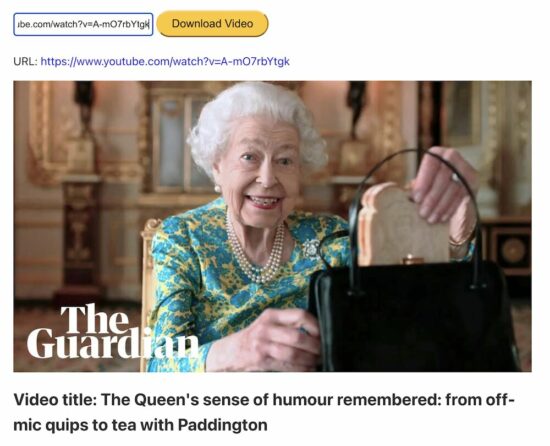
An HTML form will post the entered video URL to process the PHP cURL request to the YouTube API.
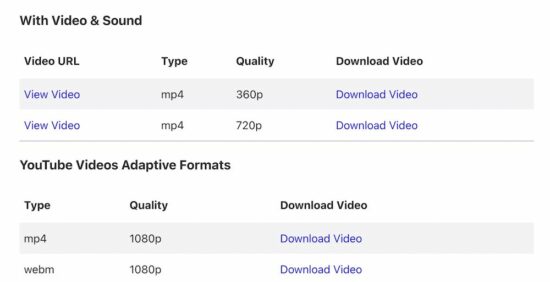
After posting the video URL, the PHP flow is the same as the quick example. But, the difference is, that it displays more links to download videos in all the adaptive formats.
This program will output the following once it has the video downloader response.
PHP cURL script to get the video metadata
The PHP cURL script used to access the YouTube endpoint to read the file meta is already seen in the quick example.
The above code snippet has a PHP require_once statement for having the cURL post handler.
The youtube-video-meta.php file has this handler to read the video file meta. It receives the unique id of the video and the key used in the PHP cURL parsing.
Call of Duty: Modern Warfare 2's New Invasion Mode Features AI Teammates
Call of Duty: Modern Warfare 2 is getting a ton of new game modes and changes, including the rumored third-person mode. Among those is a very different kind of Ground War match called Invasion, which will augment your regular human teammates and opponents with AI bots to make for a sprawling combat experience.
The Call of Duty blog says each team starts with multiple squads of Operators, fighting alongside AI combatants, all pursuing objectives from within their respective headquarters. Each team will be pushing forward to the front line, which shifts your respawn locations. And due to the AI teammates, it promises "more troops than any previous Ground War experience," and the maps will be larger to facilitate the huge team size.
This game will also reintroduce third-person multiplayer playlists, giving you a little more situational awareness as you survey the battlefield. It will also include vehicular combat so you can lean out of your vehicles while firing at enemies. Ricochet anti-cheat tech will once again be included with both Modern Warfare 2 and the new Warzone 2.0.
Jonathan Joestar, Jotaro Kujo, DIO, Jolyne Cujoh, and other characters from JoJo's Bizarre Adventure gather across multiple generations! With 50 playable characters from all arcs, you can experience popular battles from each story, and see characters from different universes interact for the first time!
This title is based on the All Star Battle fighting system that was released in 2012. The game design of JoJo's Bizarre Adventure: All Star Battle R reinvigorates the experience with adjustments to the fighting tempo and the addition of hit stops and jump dashes.
With new audio recordings from the Part 6 anime voice actors, the full atmosphere of the animated series is realized. Both fans who have played the original All Star Battle and newcomers will be able to enjoy the experience.
How to Get a Random Entry from a Python Dictionary
5/5 – (1 vote)
Problem Formulation and Solution Overview
This article will show you how to get a random entry from a Dictionary in Python.
To make it more interesting, we have the following running scenario:
The Plot: Mr. Sinclair, an 8th great Science Teacher, is giving his students a quiz on the first 25 Periodic Table elements. He has asked you to write a Python script so that when run, it generates a random key, value, or key:value pair from the Dictionary shown below to ask his students.
The above code converts the Dictionary of Periodic Table Elements to a List of Tuples and saves it to el_list. If output to the terminal, the contents of el_list contains the following.
Before moving forward, please ensure the NumPy library is installed. Click here if you require instructions.
import numpy as np random_el = np.random.choice(list(els), 1)

print(random_el)
This code imports the NumPy library installed above.
Then, np.random.choice() is called and passed two (2) arguments: els converted to a List of Tuples and the number of random keys to return.
The results save to random_el and is output to the terminal.
['Chromium' 'Silicon' 'Oxygen']
Note: np.random.choice() has an additional parameter that can be passed. This parameter is a List containing associated probabilities.
Bonus:
This code generates a random key:value pair from a list of tuples. When the teacher runs this code, a random question displays on the screen and waits for a student to answer. Press 1 to display the answer, 2 to quit.
import keyboard

import random

import time els = {'Hydrogen': 'H', 'Helium': 'He', 'Lithium': 'Li', 'Beryllium': 'Be', 'Boron': 'B', 'Carbon': 'C', 'Nitrogen': 'N', 'Oxygen': 'O', 'Fluorine': 'F', 'Neon': 'Ne', 'Sodium': 'Na', 'Magnesium': 'Mg', 'Aluminum': 'Al', 'Silicon': 'Si', 'Phosphorus': 'P', 'Sulfur': 'S', 'Chlorine': 'Cl', 'Argon': 'Ar', 'Potassium': 'K', 'Calcium': 'Ca', 'Scandium': 'Sc', 'Titanium': 'Ti', 'Vanadium': 'V', 'Chromium': 'Cr', 'Manganese': 'Mn'} print('1 Answer 2 quit')

def quiz(): while True: k, v = random.choice(list(els.items())) print(f'\nWhat is the Symbol for {k}?') pressed = keyboard.read_key() if pressed == '1': print(f'The answer is {v}!') elif pressed == '2': print("Exiting\n") exit(0) time.sleep(5)

quiz()
Finxter Challenge! Write code to allow the teacher to enter the answer!
Summary
This article has provided five (5) ways to get a random entry from a Dictionary to select the best fit for your coding requirements.
Good Luck & Happy Coding!
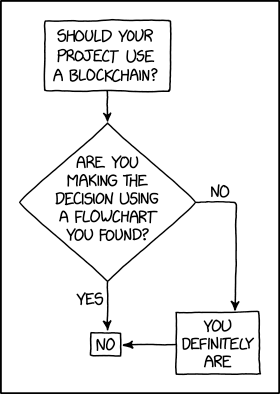
Programmer Humor – Blockchain
“Blockchains are like grappling hooks, in that it’s extremely cool when you encounter a problem for which they’re the right solution, but it happens way too rarely in real life.”source – xkcd



 Info: “Escrow is a legal arrangement in which a third party temporarily holds money or property until a particular condition has been met (such as the fulfillment of a purchase agreement).” (
 Challenge: Given a string. How to find all
  Recommended Tutorial:

 The Plot: Mr. Sinclair, an 8th great Science Teacher, is giving his students a quiz on the first 25


 Finxter Challenge!