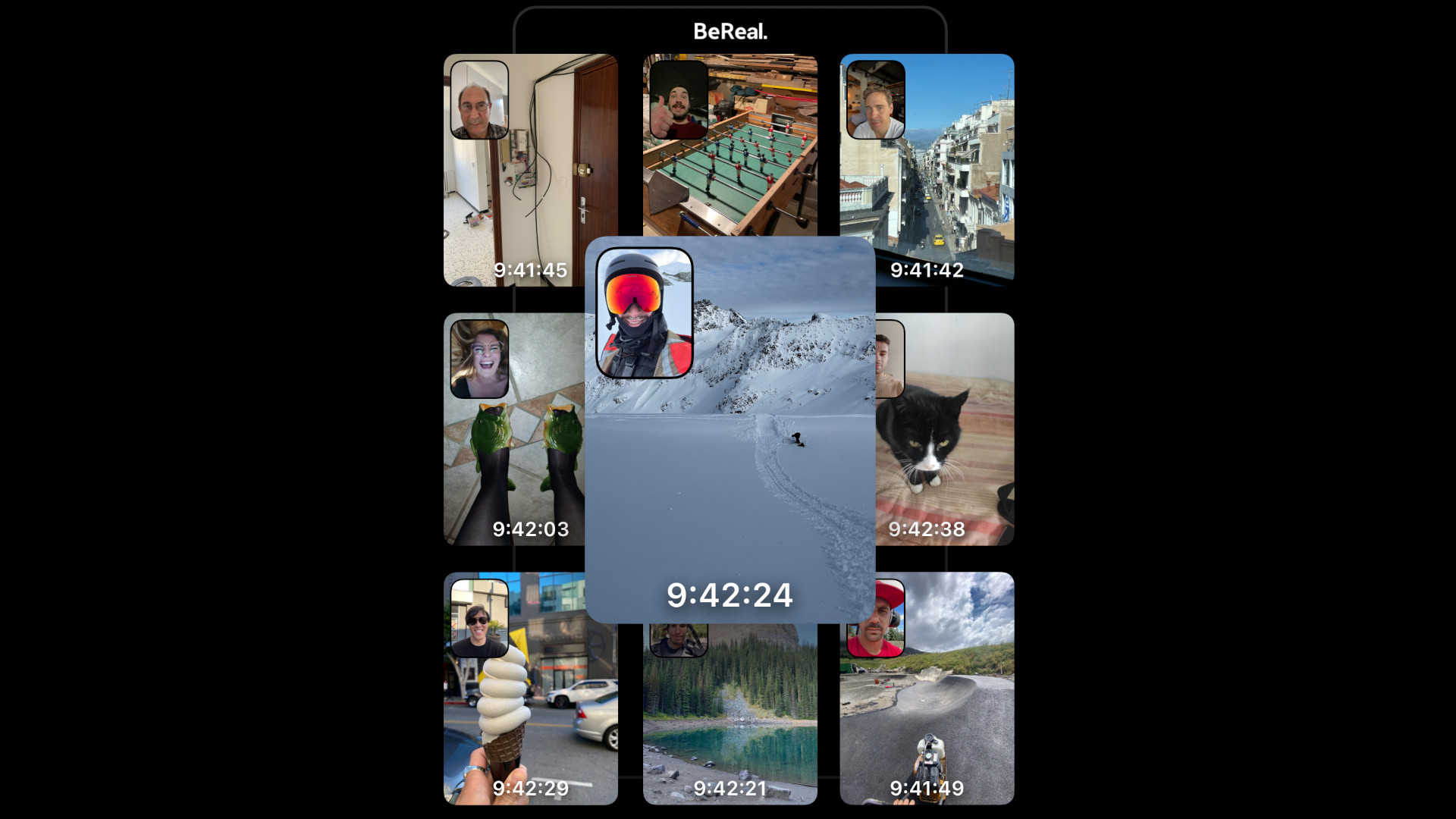
Be Real is a recent social media phenomenon that’s supposed to help you live in the moment, but instead keeps timing its notifications exactly as you’re using the toilet. The Be Real time changes every day and depends on your region, so keep reading to find out about today’s Be Real time.
Be Real is a French social media app that encourages you to ‘be real’ by giving you two minutes to post a photo of yourself and your surroundings at a specific time each day. You can still post after the time period, but your friends will know that you posted late. It focuses on authenticity and rewards you for posting on time by letting you post twice more that day.
What is the Be Real time today?
The US Be Real time for September 3, 2023, is yet to happen. The UK Be Real time for September 3, 2023, was 16:05:09.
Past Be Real times
Here’s a list of the most recent Be Real times:
Date
US Be Real time (CDT)
UK Be Real time (BST)
September 2, 2023
14:25:22
12:54:19
September 1, 2023
20:45:49
16:47:56
August 31, 2023
20:15:56
09:05:31
August 30, 2023
19:47:43
19:37:22
August 29, 2023
19:14:57
17:57:11
August 28, 2023
10:32:52
20:14:12
August 27, 2023
19:56:16
14:02:57
August 26, 2023
21:00:11
09:23:57
August 25, 2023
17:22:14
08:09:06
August 24, 2023
17:45:12
14:46:31
August 23, 2023
11:29:07
20:12:39
August 22, 2023
12:49:10
09:52:24
That’s everything you need to know about Be Real time. If you want to learn about other platforms, check out our guides covering what is Skype and what is Bixby. We also have a guide to all the latest Wordle answers.
ASP.NET Core updates in .NET 5 Release Candidate 2
Daniel
October 13th, 2020
.NET 5 Release Candidate 2 (RC2) is now available and is ready for evaluation. .NET 5 RC2 is a “go live” release, meaning it’s supported in production. This prerelease of .NET 5 is very close to what we expect to ship for the .NET 5 release.
Here’s what’s new in this RC2 release:
CSS isolation improvements
Blazor WebAssembly debugging improvements
Browser platform compatibility tooling
ASP.NET Core in .NET 5 contains lots of great new functionality and improvements! The list below summarizes the many improvements we’ve made in ASP.NET Core for .NET 5 that you can try out in this release:
To upgrade an existing ASP.NET Core app from .NET 5 RC1 to .NET 5 RC2:
Update all Microsoft.AspNetCore.* package references to 5.0.0-rc.2.*.
Update all Microsoft.Extensions.* package references to 5.0.0-rc.2.*.
Update System.Net.Http.Json package references to 5.0.0-rc.2.*.
Update Microsoft.AspNetCore.Components.Web.Extensions package references to 5.0.0-preview9.20513.1.
Remove any package references to Microsoft.AspNetCore.Components.ProtectedBrowserStorage
Update Microsoft.AspNetCore.Components.ProtectedBrowserStorage namespace to Microsoft.AspNetCore.Components.Server.ProtectedBrowserStorage.
Remove unnecessary service registrations for ProtectedLocalStorage and ProtectedSessionStorage.
Rename JSObjectReference to IJSObjectReference.
In Blazor apps, replace CSS references to _framework/scoped.styles.css and _content/{project_name}/_framework/scoped.styles.css with {project_name}.styles.css.
That’s it! You should be all ready to go.
See also the full list of breaking changes in ASP.NET Core for .NET 5.
What’s new?
Blazor CSS isolation improvements
In .NET 5 Preview 8 we introduced support for CSS isolation for Blazor components. Based on user feedback, we’ve made a number of improvements to CSS isolation in this release.
Previously, all component scoped CSS files including files from referenced projects or packages were compiled into a single bundle, scoped.styles.css. We now produce one bundle per referenced project or package and include those bundles into the app bundle through CSS @import statements.
The bundle names are now based on the project names: {project_name}.styles.css. Each bundle can be referenced from the root path of the app by default. This makes the path of the app bundle the same for both Blazor Server and Blazor WebAssembly projects:
Component specific styles can also now use normal wwwroot-relative paths to refer to related assets, like images. We’ve updated Razor Class Library template to make use of component specific styles following this pattern.
We also fixed some issues with how scoped CSS styles get built so that changes are correctly picked up with each build in Visual Studio instead of requiring a full rebuild.
Blazor WebAssembly debugging improvements
.NET 5 includes a variety of improvements to Blazor WebAssembly debugging:
Various reliability improvements, including fixing the port conflict issue from RC1
Improved support for stepping over and out of async methods
Inspect locals or object properties in many previously unsupported situations:
For inherited members
For multicast delegates
For boxed values
For Nullable<T> values
Within reflection based calls
Support for debugging lazy loaded assemblies
Browser platform compatibility tooling
The core framework libraries in .NET 5 have now been annotated to indicate which APIs are supported in browser scenarios. The platform compatibility analyzer uses this data to give appropriate warnings when using APIs from a Blazor WebAssembly app that are not supported when running in a browser on WebAssembly.
We hope you enjoy this release of ASP.NET Core in .NET 5! We are eager to hear about your experiences with this latest .NET 5 release. Let us know what you think by filing issues on GitHub.
AppleInsider - This M1 Max MacBook Pro 16-inch with 64GB RAM is in stock for $2,299
The Labor Day blowout deal slashes the price of a loaded M1 Max 16-inch MacBook Pro to $2,299, the lowest price on record, with $1,400 in savings on the laptop and a bonus discount on AppleCare.
Save $1,400 on an M1 Max MacBook Pro
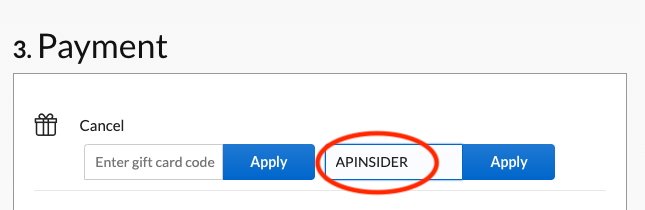
Using promo code APINSIDER at Apple Authorized Reseller Adorama, you can save $200 on top of the $1,200 instant rebate already in place, resulting in a staggering $1,400 off MSRP on the premium model that features Apple’s M1 Max chip with a 24-core GPU.
This laptop in the sleek silver finish also has 64GB of memory, double the amount found in the baseline M1 Max config. Storage comes in at a respectable 1TB, making this high-end configuration a great option for business professionals and students alike.
In addition to the $1,400 markdown on the laptop itself, the same APINSIDER coupon code drops three years of AppleCare down to $319, a discount of $80 off MSRP.
If you need help activating the APINSIDER promo code at Adorama, here are step-by-step instructions to redeem the discount:
Shop through this pricing link and add the MacBook Pro to your cart.
Proceed to checkout and when you get to step 3 (Payment), look for a link with a gift icon that says: “Do you have a gift card or promo code?”
Click that link to bring up the coupon code field and enter APINSIDER. Here’s what it looks like:
More great deals to help you save big
There are plenty of additional bargains on hundreds of Apple products in our Price Guide. Find exclusive savings on everything from MacBook Air computers to the Apple Watch Ultra. Here are a few top offers in effect now:
Posted by: xSicKxBot - 09-07-2023, 10:28 AM - Forum: Windows
- No Replies
Microsoft - Microsoft Azure meets growing needs of healthcare organizations, such as
New Azure Large Instances allows healthcare providers to manage large EHR database loads using public cloud-hosted infrastructure
REDMOND, Wash. — Aug. 10, 2023 — Microsoft Corp. on Thursday announced that Epic clients, starting with Mount Sinai Health System (Mount Sinai), one of New York City’s largest academic medical systems, can use Microsoft Azure Large Instances, a solution designed to achieve the scale needed to run the large Epic electronic health record (EHR) database — up to 50 million database accesses per second. Azure Large Instances leverages dedicated resources, which allows Mount Sinai and other Epic clients to scale beyond the previous limits of shared public cloud infrastructure solutions.
Through close collaboration with Accenture, Mount Sinai continues to migrate many of its workloads to Azure and now has the largest production instance of Epic running on Azure in the world. “We are very excited about this move as it further enables digital transformation, accelerates artificial intelligence (AI) and innovation, provides scalability and flexibility, and reduces upfront infrastructure costs, ultimately leading to improved care and discovery as well as streamlined operations,” said Kristin Myers, executive vice president, chief digital and information officer, and dean for digital and information technology at Mount Sinai.
At the core of healthcare provider organizations and care delivery is the EHR, a real-time, patient-centered record that contains the medical and treatment history of a patient, giving providers a broad view of a patient’s care. As healthcare organizations manage an increasingly complex care landscape and challenging economic conditions, there is a growing desire to consolidate and exit on-premises data centers and build for further innovation. “Going through this digital transformation requires partners who understand our health system’s mission and the criticality of patient care,” said Joseph Gimigliano, chief technology officer at Mount Sinai. Microsoft’s long-standing collaboration with Epic includes enabling the migration of Epic EHR environments to Azure through ongoing joint testing and engineering.
“Our mission is to empower the healthcare industry to achieve more, helping to deliver the best experiences for providers and patients,” said Tom McGuinness, corporate vice president, global healthcare & life sciences at Microsoft. “Through our collaboration with Epic, we are delivering innovation for customers on Azure that will help healthcare organizations reduce the complexity of infrastructure management and control costs with a secure, scalable and agile public cloud solution. These benefits are key to helping healthcare organizations succeed, particularly as they navigate through today’s economic landscape.”
Moving to a cloud-first computing model is essential for many healthcare providers looking to implement a digital transformation strategy to enable better care at lower costs. Healthcare organizations are faced with the increased costs of hardware, software, installation, maintenance and management of healthcare IT landscapes on-premises as well as with the difficulty of finding and retaining staff to build and manage highly available, secure and compliant environments. Azure offers opportunities for agility, cost management and risk reductions by offloading the data center and hardware management to Microsoft. With faster time to value from current investments in the cloud and opportunities to innovate quickly, organizations can rethink how they utilize data and AI and take a digital health platform approach.
For more information on Epic on Azure, visit Epic on Azure.
Microsoft (Nasdaq “MSFT” @microsoft) enables digital transformation for the era of an intelligent cloud and an intelligent edge. Its mission is to empower every person and every organization on the planet to achieve more.
For more information, press only:
Microsoft Media Relations, WE Communications, (425) 638-7777,
Note to editors: For more information, news and perspectives from Microsoft, please visit the Microsoft News Center at http://news.microsoft.com. Web links, telephone numbers and titles were correct at time of publication but may have changed. For additional assistance, journalists and analysts may contact Microsoft’s Rapid Response Team or other appropriate contacts listed at https://news.microsoft.com/microsoft-public-relations-contacts.
Google added virtual machine (VM) types on Google Compute Engine including second-generation Intel Xeon scalable processor machines and new VMs for compute- and memory-heavy applications. The former, available in beta, are general-purpose VMs. They provide greater than 20% price-performance improvement for many workloads and support up to 25% more memory per virtual CPU compared with first-generation machines, according to Google. These N2 VMs offer a balance of compute, memory, storage, and network resources for general-purpose workloads such as web and application servers, enterprise applications, gaming servers, content and collaboration systems, and most databases. They are available in Google’s U.S.-Central, Europe-West, and Asia-Southeast region now and will be available in most Google Cloud Platform (GCP) regions in the next few months. (Source: SDX Central)
Fedora - Using Cockpit to graphically manage systems, without installing Cockpit on
It probably sounds too good to be true: the ability to manage remote systems using an easy to use, intuitive graphical interface – without the need to install extra software on the remote systems, enable additional services, or make any other changes on the remote systems. This functionality, however, is now available with a combination of the recently introduced Python bridge for Cockpit and the Cockpit Client Flatpak! This allows Cockpit to manage remote systems, assuming only SSH access and that Python is installed on the remote host. Read on for more information on how this works and how to get started.
If you are not familiar with Cockpit, it is described on the project’s web site as a web-based graphical interface for servers. Cockpit is intended for everyone, especially those who are:
new to Linux (including Windows admins)
familiar with Linux and want an easy, graphical way to administer servers
expert admins who mainly use other tools but want an overview on individual systems
You can easily and intuitively complete a variety of tasks from Cockpit. These including tasks such as:
expanding the size of a filesystem
creating a network bond
modifying the firewall
viewing log entries
viewing real time and historical performance information
managing Podman containers
managing KVM virtual machines
and many additional tasks.
Objections to using Cockpit on systems
In the past, I’ve heard two main objections to using Cockpit on systems:
I don’t want to run the Cockpit web server on my systems. Additional network services like this increase the attack surface. I don’t want to open another port in the firewall. I don’t want more HTTPS certificates in my environment to manage and maintain.
I don’t want to install additional packages on my systems. I don’t even have access to install additional packages). The more packages installed, the larger my footprint is, and the more attack surface there is. For me to install additional packages in a production environment, I have to go through a change management process, etc. What a hassle!
Let’s address these one at a time. For the first concern, you have actually had several options for connecting to Cockpit over SSH, without running the Cockpit web server, for quite some time. These options include:
The ability to set up a bastion host, which is a host that has the Cockpit web server running on it. You can then connect to Cockpit on the bastion host using a web browser. From the Cockpit login screen on the bastion host you can use the Connect tooption to specify an alternate host to login to (refer to the LoginTo cockpit.conf configuration option). Another option is to authenticate to Cockpit on the bastion host, and use the Add new host option. In either case, the bastion Cockpit host will connect to these additional remote hosts over SSH (so only the bastion host in your environment needs to be running the Cockpit web server).
You can use the Cockpit integration available with the upstream Foreman, or downstream Red Hat Satellite, to connect to Cockpit on systems in your environment over SSH.
You can use the cockpit/ws container image. This is a containerized version of the Cockpit web server that acts as a containerized bastion host
For more information on these options, refer to the Connecting to the RHEL web console, part 1: SSH access methods blog post. This blog post focuses on the downstream RHEL web console, however, the information also applies to the upstream Cockpit available in Fedora.
This brings me to the second concern, and the main focus of this article. This is the concern that I don’t want to install additional packages on the remote systems I am managing. While there are several options for using the web console without the Cockpit web server, all of these options previously had a prerequisite that the remote systems needed to have at least the cockpit-system package installed. For example, previously if you tried to use the Cockpit Client Flatpak to connect to a remote system that didn’t have Cockpit installed, you’d see an error message stating that the remote system doesn’t have cockpit-bridge installed.
The Cockpit team has replaced the previous Cockpit bridge (implemented using C) with a new bridge written in Python. For a technical overview of the function of the Cockpit bridge, and how the new Python bridge was implemented, refer to the recent Monty Python’s Flying Cockpit DevConf presentation by Allison Karlitskaya and Martin Pitt.
This new Python bridge overcomes the previous limitation requiring Cockpit to be installed on the remote hosts.
Using the Cockpit Client Flatpak
With the Cockpit Client Flatpak application installed on a workstation, we can connect to remote systems over SSH and manage them using Cockpit.
Installation
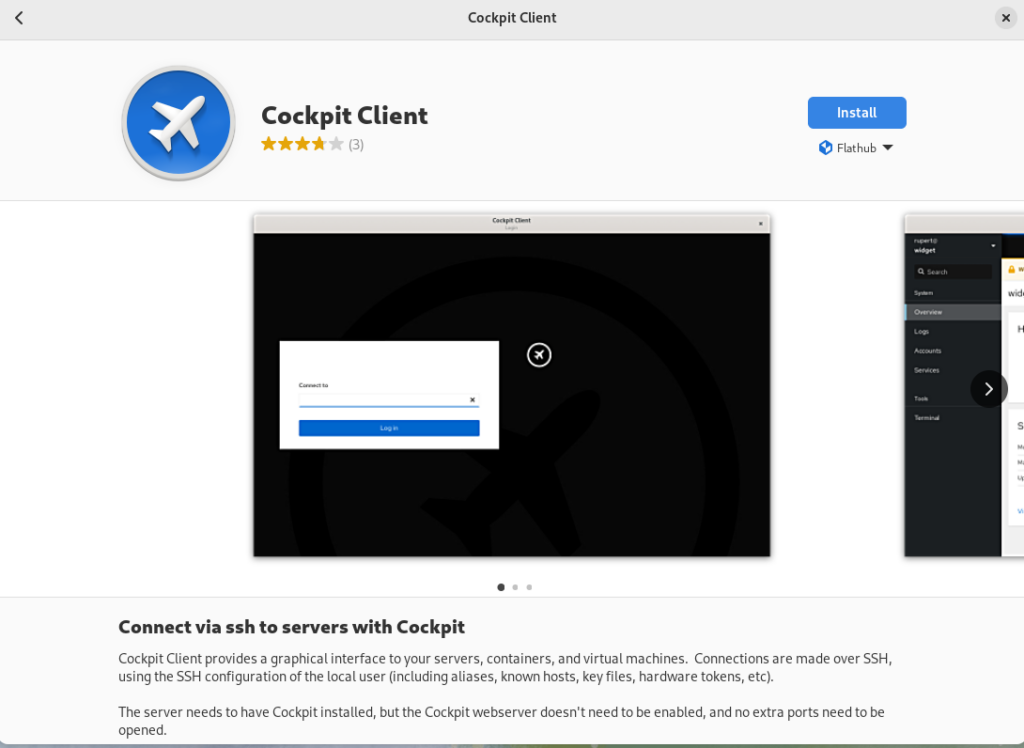
In the following example, I’m using a Fedora 38 workstation. Install the Cockpit Client Flatpak by simply opening the GNOME Software application and searching for Cockpit. Note that you’ll need to have Flathub enabled in GNOME Software.
Using the Cockpit Client
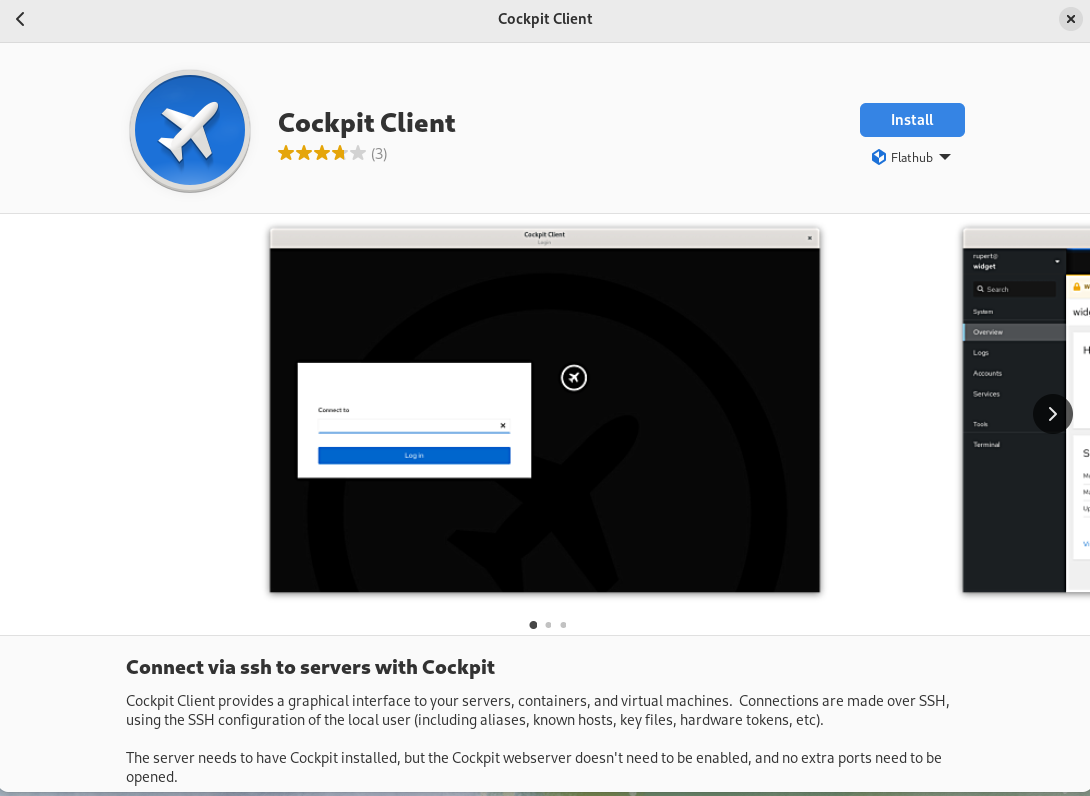
Once installed, you’ll see the following when opening the Cockpit Client:
You can type in a hostname or IP address that you would like to connect to. To authenticate as a user other than the user you are currently using, you can use the user@hostname syntax. A list of recent hosts that you’ve connected to will appear, if this is not the first time using the Cockpit Client. In that case, you can simply click on a host name to reconnect
If you have SSH key based authentication setup, you’ll be logged in to the remote host using the key based authentication. With out SSH keys setup, you’ll be prompted to authenticate with a password. In either case, if it is your first time connecting to the host over SSH, you’ll be prompted to accept the host key fingerprint.
As a special case, you can log into your currently running local session by connecting to localhost, without authentication.
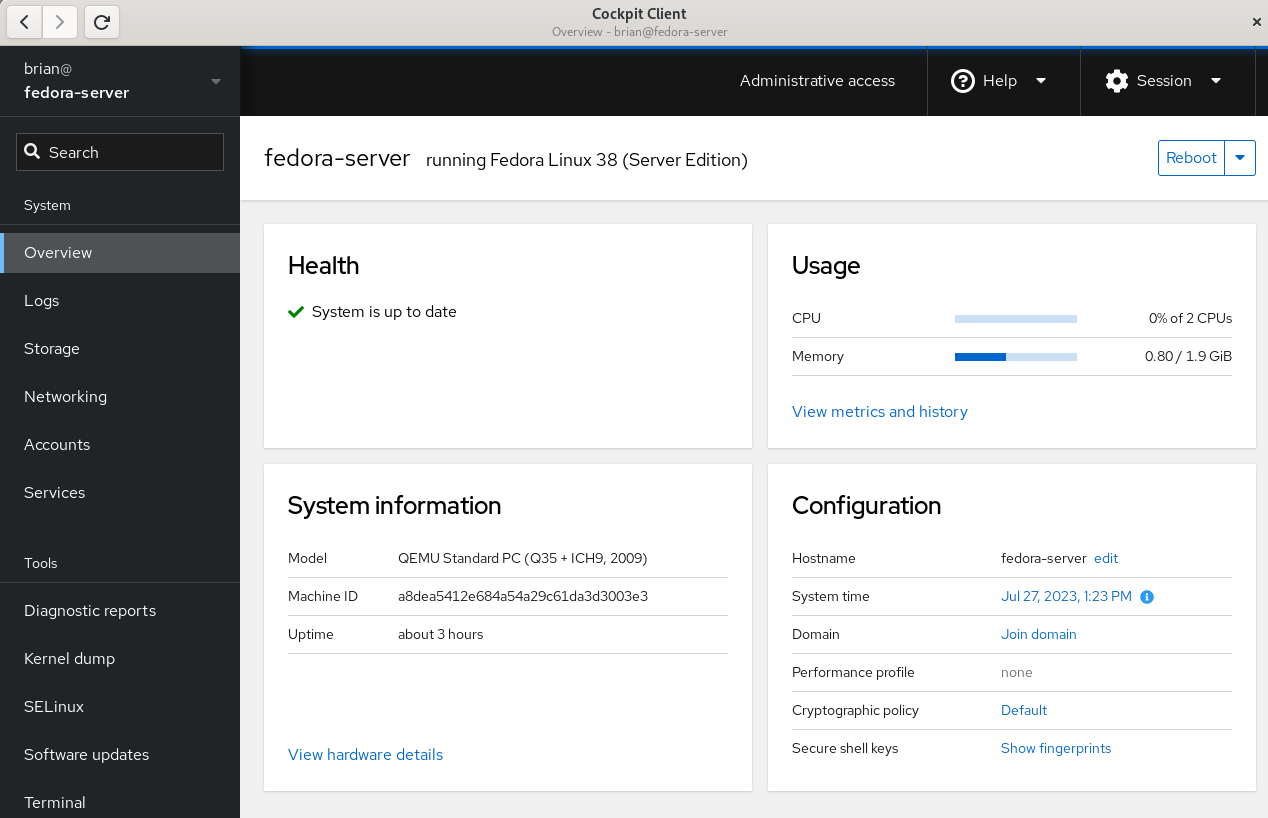
Once connected, you’ll see the Cockpit Overview page:
Cockpit overivew menu
Select the Terminal menu item in Cockpit to show that the remote system that I’m logged in to does not have any Cockpit packages installed:
Cockpit Terminal view
Prerequisites for connecting to systems with Cockpit Client
There are several prerequisites for utilizing Cockpit Client to connect to a remote system. If you are familiar with managing remote hosts with Ansible, you’ll likely already be familiar with the prerequisites. They are the same:
You must have connectivity to the remote system over SSH.
You must have a valid user account on the remote system that you can authenticate with.
If you need the ability to complete privileged operations in Cockpit, the user account on the remote system will need sudo privileges.
If you are connecting to a remote system that doesn’t have Cockpit installed, there are a couple of additional prerequisites:
Python 3.6 or later must be installed on the remote host. This is not usually an issue, with some exceptions, such as Fedora CoreOS which does not include Python by default.
An older version of Cockpit Client can not be used to connect to a newer operating system version. For example, if I installed Cockpit Client on my Fedora 38 workstation today and never updated it, it may not work properly to manage a Fedora 39 or Fedora 40 server in the future.
Frequently asked questions
Here are some frequently asked questions about this functionality:
Question: Cockpit is extendable via additional Applications. Which Cockpit applications are available if I use the Cockpit Client to connect to a remote system that doesn’t have Cockpit installed?
Answer: Currently, Cockpit Client includes
cockpit-machines (virtual machine management)
cockpit-podman (Podman container management)
cockpit-ostree (used to manage rpm-ostree based systems)
The Cockpit team is looking for feedback on what Cockpit applications you’d like to see included in the Cockpit Client. Post a comment below with your feedback.
Question: I connected to a remote system that doesn’t have Cockpit installed, but I don’t see Virtual Machines or one of the other applications listed in the menu. I thought you just said these were included in the Cockpit Client Flatpak?
Answer: When you login to a remote system that doesn’t have Cockpit packages installed, you’ll only see the menu options for underlying functionality available on the remote system. For example, you’ll only see Virtual Machines in the Cockpit menu if the remote host has the libvirt-dbus package installed.
Question: Can Cockpit applications available in the Cockpit Client be used with locally installed Cockpit applications on the remote host? In other words, if I need a Cockpit application not included in the Cockpit Client, can I install just that single package on the remote host?
Answer: No, you cannot mix and match applications included in the Cockpit Client flatpak and those installed locally on the remote host. For a remote host that has thecockpit-bridge package installed, Cockpit Client will exclusively use the applications that are installed locally on the remote host. If the remote host does not have the cockpit-bridge package installed, Cockpit Client will exclusively use the applications bundled in the Cockpit Client Flatpak.
Question: Can I use Cockpit Client to connect to the local host?
Answer: Yes! Simply open Cockpit Client and type in localhost and you’ll be able to manage the local host. You don’t need to have any Cockpit packages installed on the local host if you use this method. You only need the Cockpit Client Flatpak.
Question: What Linux distributions can I connect to using the Cockpit Client?
Answer: Cockpit is compatible with a number of different Linux distributions. For more information, see the Running Cockpit page. If connecting to a remote system that doesn’t have Cockpit installed, keep in mind the previously mentioned requirements regarding not connecting to newer OS’s from an older Cockpit Client.
Question: Does the Cockpit team have any future plans regarding this functionality?
Answer: The Cockpit team is planning on adding the ability to connect to remote hosts without Cockpit packages installed to the cockpit-ws container image. See COCKPIT-954 ticket for more info.
Have more questions not covered here? Ask them in the comments section below!
Conclusion
The new Python bridge, and the corresponding ability to use the Cockpit Client to connect to remote systems without installing Cockpit, makes it incredibly easy to use Cockpit in almost any circumstance.
Try this out! It’s easy to do. Simply install the Cockpit Client Flatpak, and use it to connect to either your localhost or a remote system. Once you’ve tried it, let us know what you think in the comments below.
Posted by: xSicKxBot - 09-07-2023, 10:28 AM - Forum: Minecraft
- No Replies
News - Minecraft – 1.19.70
1.19.70 Patch Notes
The Sniffer and Archaeology are now available for players to test with this update. Keep in mind that these features are not complete and are considered unfinished. To enable these work-in-project features enable the “Next Major Update” toggle in your world settings.
The update will be released later on the Switch console.
Fixed multiple crashes that could occur during gameplay
When breeding horses, the baby horse now has a chance of being better than its parents in speed, jump strength, and health
Improvements to player emotes
Take an early look at archaeology and the sniffer mob with experimental features
Fixes to over 30 community-reported issues
Changes
Player Emotes
Several improvements have come to the emote system in Bedrock Edition!
Emote usage now appears in the chat
The emote wheel now has four slots with an improved interface
Quick emoting with new hotkeys
Easier sorting of emotes
Creating a new character now automatically applies four default emotes
Vanilla Parity
Improvements have been made with vanilla parity to align with Java Edition, especially with horse breeding, mobs, and blocks.
Gameplay
Fixed an issue where the night could not be skipped if one or more players were on the death screen
Eating and drinking animations are now always centered, regardless of screen aspect ratio
Mobs
Breeding horses can now produce random variants (MCPE-129071)
When breeding horses, the baby Horse now has a chance of being better than its parents in speed, jump strength, and health. This change is intended to make Horse breeding a viable way of getting great Horses if a player starts with good parents and puts in enough time and Golden Carrots
Horses cannot be pushed over Fences covered by Carpets anymore (MCPE-164717)
Ghasts’ sound volume will now fade the further they are from the player (MCPE-35222)
Villagers will now emit anger particles when hit by a player outside of a village
Fixed a bug where Zombified Piglins would spawn in the Nether in light levels above 11
Minecarts can now eject mobs into liquid blocks (MCPE-120078)
Witches will now drink a Fire Resistance Potion when standing on a Campfire
Blocks
Bells that are connected to multiple blocks no longer drop when one block is broken
Note Block sound attenuation over a distance is now linear (MCPE-164935)
Impact sounds of projectiles on Amethyst blocks and clusters are now audible
Dead Bush will now drop Sticks when broken with any tool except Shears, even those with the Silk Touch enchantment. Vines will drop nothing in the same situation (MCPE-163246)
Experimental Features
Archaeology
Added the Brush item
Added the Decorated Pot block
Added four Pottery Shards (Arms Up, Skull, Prize, and Archer)
Added the Suspicious Sand block
Added Suspicious Sand to the Desert Temple
Added Suspicious Sand to the Desert Well
Brush
The Brush is a craftable item you can use to brush things
Pottery Shards and Decorated Pots
Pottery Shards have pictures on them. They cannot be crafted and must be found in the world. Hint: you will need a Brush! By crafting four of these together you can create a Decorated Pot with a picture on each side.
You can also use Brick items instead of Pottery Shards in the crafting recipe. The sides that were made from Brick items will not have pictures.
Smash a Decorated Pot with any block-breaking tool to break it apart and get the Pottery Shards back! Or hit it with your fist to pick up the pot without breaking it.
Suspicious Sand
Desert Temples and Desert Wells now contain Suspicious Sand. This fragile block is hard to spot and easy to destroy, so be careful!
If you manage to find the Suspicious Sand and brush it with your Brush, you will extract objects that were buried long ago.
We’re giving you an early look at these Archaeology features. We want to spend more time developing them. Please let us know where you think we can improve or expand!
Sniffer
The Sniffer is the mob vote winner of Minecraft Live 2022 and the first [HS1] extinct mob brought to life and added to the game
Sniffers cannot be tempted or tamed
Sniffers are passive friendly mobs
Sniffer sniffs in the air and occasionally digs for seeds
Torchflower
The Torchflower seed can be planted on farmland and grows into a flower
The seed can be used to breed two Sniffers
The full-grown flower can be harvested and replanted but can also be crafted into a dye
Fixes
Stability and Performance
Fixed an issue where simultaneously pressing the “Mine” and “Place” buttons on any input device while targeting a Structure Block could cause the game to crash (MCPE-155689)
Fixed a crash on Nintendo Switch when attempting to log in while set to local network mode
Fixed a crash that could occur when entering a 1.7.1.0 world in 1.8 or above (MCPE-165564)
Gameplay
The player’s crosshair now properly mines/interacts with items in front of them while swimming/gliding, rather than 1 block above their position (MCPE-57257)
Players no longer take rapid damage when touching damaging blocks (MCPE-165347)
Projectiles shot while swimming/gliding no longer spawn from above the player’s position (MCPE-31896)
Items dropped while swimming/gliding, manually or on death, no longer spawn from above the player’s position (MCPE-31896)
Mobs
Fixed a bug where an Allay holding a Lead wasn’t able to be leashed unless the player held a full stack of 64 Leads in hand
Parrots will no longer shake while on a player riding a Horse that is turning mid-jump
Fixed a bug causing global entities (e.g. Ender Dragon and projectiles) to stop rendering when out of normal entity render distance (MCPE-161136)
Blocks
Sounds from all Button types and Lever are now controlled by the “Blocks” slider in Audio Settings (MCPE-166420)
Redstone source can now power a single block from different sides at the same time (MCPE-163651)
Destroying Mangrove Log or Mangrove Wood now properly cause leaves to decay
End Crystals occupying the same space as a block will no longer cause that block to disappear
Players are now able to place top Slabs in blocks that are only partially blocked by an entity (MCPE-155016)
Players can no longer see through partial blocks when sneaking or riding in third person (MCPE-156273)
Composter now always consumes an item when becoming full (MCPE-162020)
Importing experimental blocks into a non-experimental world using the Structure Block will now correctly place unknown blocks, which are not interactable
Error messages about building outside the world height limit no longer appear when simply interacting with blocks at the world height limit from certain angles (MCPE-152935)
Fixed a bug where Observers would not detect changes due to corrupted data (MCPE-150506)
Hoppers now pull in items from above them through all blocks that have a lower height than a full block (MCPE-55824)
Items
Crossbows now shake while charging arrows (MCPE-152952)
Spawn eggs for Snow Golem, Wither, and Trader Llama now appear correctly in the inventory and hotbar
Written Books can now be moved in the inventory even when the player has identical Written Books
Touch Controls
Updated the How to Play screen with information on new touch controls
Changing input modes from Gamepad to Touch while an item is selected will return the selected to the inventory or drop it
Fixed an issue on the Furnace screen where double-tapping the output window caused other slots to become unselectable (MCPE-164589)
Fixed a bug where stack splitting was automatically initiated on the first slot when opening a small Chest
Allowed left and right D-pad buttons to keep input when the forward button is pressed (MCPE-155199)
Added the leave Boat button when the player falls from a height within the Boat (MCPE-158489)
Fixed an issue that prevented players from removing equipped armor by tapping on an item or block in the Creative inventory (MCPE-165790)
Tweaked the keyboard interaction on Android devices for text input fields
User Interface
Fixed an issue where the “Mine” tooltip was appearing when targeting a block with a Trident in Creative game mode (MCPE-44846)
Navigating right with the controller left stick on the Marketplace sidebar now collapses it
Added a new ‘Marketplace’ icon to the Marketplace screen sidebar
Ocean Explorer, Woodland Explorer, and Treasure Maps now show the proper icon in the inventory (MCPE-163464)
Fixed a bug where mouse scrolling on the Friend Options dropdown would not scroll the dropdown contents
Resolved an issue where graphical elements of the Sign-In/Sign-Up screen could extend beyond the bounds of the dialog container
When starting a new world in Pocket UI, removed the “Press Open Chat to open chat” message for players with text-to-speech turned off
Double-clicking on the Furnace output slot will no longer drop the item (MCPE-165079)
Fixed a bug where moving the player or camera with a controller while text-to-speech for UI was turned on would cause the narrator to say “X of Y”
Fixed a bug where the Edit World screen couldn’t be opened for a world if the corresponding world directory had a space in it (MCPE-166763)
The loading screen no longer flickers when entering the Nether in immersive VR mode
The swap item animation now plays when switching hotbar items of the same type with the same durability
Spectator Mode
Phasing through blocks in third-person view no longer makes the camera zoom in and out towards the player’s head (MCPE-160467)
End Gateways can no longer be used in Spectator Mode (MCPE-165689)
Realms
Added a Sign In button on the Realms screen if the player is not yet signed in
Fixed the issue that the “Find Friends” button and the “Close Realm” buttons would be autofocused when the “Members” or “Subscription” tab was clicked
Fixed a bug where players were not able to create another world on Realms if the first Create World on Realms attempt was interrupted
Fixed a bug where players could see duplicate applied packs with unknown titles the first time they entered the Realms settings screen
Resetting a Realms World now correctly updates the World settings
Removed the Close button in the Play on Realm popup dialog when using controllers
Updated the reset/replace world confirmation text to make it clearer what each function does
Fixed the world list not updating with a new Realm immediately after accepting an invite
In Realms Settings->Members, the dropdown ‘…’ menu can now be opened/closed with the Enter key and navigated with arrow keys
Technical Updates
Updated Add-On Template Packs
Updated Add-On templates for 1.19.70 with new resources, behaviors, and documentation are available to download at aka.ms/MCAddonPacks
General
Behavior packs with scripts can now be removed from worlds
Item loot table conditions are no longer ignored in-game when used inside functions (MCPE-164582)
Carrots now display the proper name in item tooltips when used in can_place_on and can_destroy item components (MCPE-160838)
In JSON formats 1.19.70 and later, blocks fail to load if the “condition” field in Block Permutations is not a valid Molang string
Crafting Table component no longer appends “tile.” when defaulting to use block name for crafting table label
Wool Blocks
Wool has been flattened into separate blocks, namely:
white_wool
orange_wool
magenta_wool
light_blue_wool
yellow_wool
lime_wool
pink_wool
gray_wool
light_gray_wool
cyan_wool
purple_wool
blue_wool
brown_wool
green_wool
red_wool
black_wool
Commands, recipes, loot tables, etc. will still work with wool and an aux value or color state, but wool will not be suggested in the command prompt. Instead, the new wool block names will.
Commands
Fixed a crash with deferred command execution when the executing actor is removed before execution (MCPE-165374)
Summon command no longer causes some entities to be spawned at an angle
Removed support for field “data” in commands /clone, /execute, /fill, /setblock, and /testforblock beyond version 1.19.70, eg. /setblock ~ ~ ~ minecraft:wool 1 will only have its equivalent /setblock ~ ~ ~ minecraft:wool [“color”:”orange”] supported
Here are some additional examples[JW1] [JW2] [JW3] :
/setblock ~~~ green_wool [] [] is equivalent to the old 0
More information about commands can be found at learn.microsoft.com/minecraft/creator/commands
Volume arguments no longer floor the selector’s position (MCPE-162237)
Selecting targets by volume will now select all entities whose hitbox collides with the volume box. This is versioned for 1.19.70 and later (MCPE-162237)
Previous behavior works as expected on versions less than 1.19.70
Volume arguments for selectors (dx, dy, dz) now support float values (MCPE-163863)
Replaceitem and loot replace block commands no longer place items in Cauldrons (MCPE-129472)
Rotation in the teleport command is now relative to the executor of the command instead of the target. Old usage of rotations in commands will stay relative to the target mob for backward compatibility
Entity Properties
Fixed an issue where Entity Property value changes could be discarded if done by events fired as part of the removal of active behaviors caused by other events
Mobs
Witch potion drinking and ranged attack behavior is now defined in its .json file
The game will no longer create a content error when Bee spawn eggs are used on a Mob Spawner
Added assertEntityInstancePresentInArea(entity: Entity, isPresent?: boolean) to check if an entity instance is present in the test area
Made the searchDistance parameter optional in assertItemEntityPresent
API (Experimental)
IMPORTANT BREAKING CHANGE: The classes Location and BlockLocation no longer exist in the beta script API. All usages of these classes have been changed to use the Vector3 interface (that is, { x: 1, y: 2, z: 3} objects)
Also, note that several changes were made to properties and get/set methods across objects (listed below) to make them more consistent in calling structure
World Events
Added event entityDie – It is fired when an entity dies
Modified projectileHit to be a readOnly property on the Events class
Player
Added method getSpawnPosition – Gets the spawnPointposition
Added property spawnDimension – Gets the spawnPointdimension
Added method setSpawn(spawnPosition : Vec3, spawnDimension : Dimension) i Sets spawnPoint with a position and dimension
Added method clearSpawn – Sets the spawnPoint position and dimension to undefined
Renamed function tell to sendMessage
World
Renamed function say to sendMessage
Added method ‘getDefaultSpawnPosition’ – Gets the spawnPoint position
Added method ‘setDefaultSpawn'(spawnPosition : Vec3) – Sets the spawnPoint position within ‘overworld’ dimension
BeforeChatEvent
Added function getTargets(): Player[] – Gets chat Player targets
Added function setTargets(players: Player[]) – Sets chat Player targets
Removed property targets
BeforeDataDrivenEntityTriggerEvent
Added function getModifiers(): DefinitionModifier[] – Gets entity definition modifiers
Added function setModifiers(modifiers: DefinitionModifier[]) – Sets entity definition modifiers
Removed property modifiers
BoolBlockProperty
Added function getValidValues(): boolean[] – Gets all valid boolean values for the BoolBlockProperty
Removed property validValues
Converted BlockHitInformation to an interface
ChatEvent
Added function getTargets(): Player[] – Gets chat Player targets
Removed property targets
Converted Color to an interface
DataDrivenEntityTriggerEvent
Added function getModifiers(): DefinitionModifier[] – Gets Entity definition modifiers
Removed property modifiers
DefinitionModifier
Added function getComponentGroupsToAdd(): string[] – Gets component groups that will be added with the DefinitionModifier
Added function setComponentGroupsToAdd(newGroups: string[]): void – Sets component groups that will be added with the DefinitionModifier
Added function getComponentGroupsToRemove(): string[] – Gets component groups that will be removed with the DefinitionModifier
Added function setComponentGroupsToRemove(removedGroups: string[]): void – Sets component groups that will be removed with the DefinitionModifier
Added function getTriggers(): Trigger[] – Gets event triggers of the DefinitionModifier
Added function setTriggers(newTriggers: Trigger[]): void – Sets event triggers of the DefinitionModifier
Removed property componentGroupsToAdd
Removed property componentGroupsToRemove
Removed property triggers
DirectionBlockProperty
Added function getValidValues(): Direction[] – Gets all valid direction enum values for the DirectionBlockProperty
Removed property validValues
Entity
Added function getViewDirection(): Vector3 – Gets view direction of the Entity
Added function getRotation(): XYRotation – Gets rotation of the Entity
Added function getVelocity(): Vector – Gets velocity of the Entity
Removed property viewDirection
Removed property rotation
Removed property velocity
Added function playAnimation(animationName: string, options?: PlayAnimationOptions)
Plays the specified animation for an entityReplaced general setVelocity call with methods to apply impulses to entities:
Added function clearVelocity(): void – Sets the current velocity of the Entity to zero
Added function applyImpulse(vector: Vector3): void – Applies impulse vector to the current velocity of the Entity
Added function applyKnockback(directionX: number, directionZ: number, horizontalStrength: number, verticalStrength: number): void – Applies knockback to the Entity in a specified direction based on vertical and horizontal strength
Removed function setVelocity
EntityAgeableComponent
Added function getDropItems(): string[] – Gets items that drop when entity grows
Added function getFeedItems(): EntityDefinitionFeedItem[] – Gets items that can be fed to the entity
Removed property dropItems
Removed property feedItems
EntityBreathableComponent
Added function getBreatheBlocks(): BlockPermutation[] – Gets blocks entity can breathe in
Added function getNonBreatheBlocks(): BlockPermutation[] – Gets blocks entity can’t breathe in
Removed property breatheBlocks
Removed property nonBreatheBlocks
EntityHealableComponent
Added function getFeedItems(): FeedItem[] – Gets healing items for the EntityHealableComponent
Removed property items
Converted EntityHitInformation to an interface
EntityRideableComponent
Added function getFamilyTypes(): string[] – Gets supported rider entity types
Added function getSeats(): Seat[] – Gets rider information for each seat
Removed property familyTypes
Removed property seats
EntityTameableComponent
Added function getTameItems(): string[] – Gets tame items of the EntityTameableComponent
Removed property tameItems
FeedItem
Added function getEffects(): FeedItemEffect[] – Gets effect of the FeedItem
Removed property effects
IntBlockProperty
Added function getValidValues(): number[] – Gets all valid integer values for the IntBlockProperty
Removed property validValues
ItemDurabilityComponent
Added function getDamageRange(): NumberRange – Gets the range of numbers that describes the chance of the item losing durability
Removed property damageRange
Converted NumberRange to an interface
ProjectileHitEvent
Added function getBlockHit(): BlockHitInformation – Gets block hit information from the ProjectileHitEvent
Added function getEntityHit(): EntityHitInformation – Gets entity hit information from the ProjectileHitEvent
Removed property blockHit
Removed property entityHit
StringBlockProperty
Added function getValidValues(): string[] – Gets all valid string values for the StringBlockProperty
Removed property validValues
ItemStack
ItemStack can now be constructed using a string identifier
Removed constructor parameter data
Removed property data
Removed function clearLore – To clear lore, call setLore with an empty array or undefined
Setting nameTag to an empty string will now clear the name tag
Setting nameTag to a string longer than 255 characters will now result in an exception
Setting amount greater than the maximum stack size will now clamp the value to the maximum stack size
Setting amount to a value less than 1 will now result in an exception
Item lore can now be cleared by calling setLore(undefined) or setLore([])
Fixed a bug where calling function ItemStack.getComponent or ItemStack.getComponents would fail on ItemStacks returned from EntityItemComponent.itemStack
Added read-only property getMaxAmount: number – Returns the maximum stack size for the item
Added read-only property isStackable: bool – Returns whether the item is stackable
Added function isStackableWith(itemStack: ItemStack): bool – Returns whether the item can be stacked with the given item
Added read-only property type: ItemType – Returns the type of the item
Added function clone(): ItemStack – Returns a copy of the item stack
Added property keepOnDeath: bool – Sets whether the item is kept on death
Added property lockMode: ItemLockMode – Sets whether the item can be moved or dropped
Added function setCanPlaceOn(blockIdentifiers?: string[]) – Sets which blocks the item can be placed on
Added function setCanDestroy(blockIdentifiers?: string[]) – Sets which blocks this item can destroy
ContainerSlot
Removed function clearItem – To clear the item, call setItem with undefined
Removed function clearLore – To clear lore, call setLore with an empty array or undefined
General changes to more consistently use methods when working with simple data-only objects vs. properties:
BeforeExplosionEvent
Added function getImpactedBlocks(): Vector3[] – Gets the blocks locations that are impacted by the explosion
Added function setImpactedBlocks(blocks: Vector3[]): void – Sets the blocks locations that are impacted by the explosion
Removed property impactedBlocks
BeforeItemUseOnEvent
Added function getBlockLocation(): Vector3 – Gets the location of the block being impacted
Removed property blockLocation
BlockInventoryComponent
Removed property location
BlockLavaContainerComponent
Removed property location
BlockPistonComponent
Added function getAttachedBlocks(): Vector3[] – Gets the blocks locations that are impacted by the activation of this piston
Removed property attachedBlocks
Removed property location
BlockPotionContainerComponent
Removed property location
BlockRecordPlayerComponent
Removed property location
BlockSignComponent
Removed property location
BlockSnowContainerComponent
Removed property location
BlockWaterContainerComponent
Removed property location
Added function getHeadLocation(): Vector3 – Gets the head location of the Entity
Removed property headLocation
ExplosionEvent
Added function getImpactedBlocks(): Vector3[] – Gets the blocks locations that are impacted by the explosion
Removed property impactedBlocks
ItemStartUseOnEvent
Added function getBlockLocation(): Vector3 – Gets the location of the block being impacted
Added function getBuildBlockLocation(): Vector3 – Gets the location of the resulting build block
Removed property blockLocation
Removed property buildBlockLocation
ItemStopUseOnEvent
Added function getBlockLocation(): Vector3 – Gets the location of the block being impacted
Removed property blockLocation
ItemUseOnEvent
Added function getBlockLocation(): Vector3 – Gets the location of the block being impacted
Removed property blockLocation
NavigationResult
Added function getPath(): Vector3[] – Gets the locations of the blocks that comprise the navigation route
Removed property path
Player
Added function getHeadLocation(): Vector3 – Gets the head location of the Player
Removed property headLocation
Block
Added function isAir – Returns if the block is an air block (i.e. empty space)
Added function isLiquid – Returns if the block is a liquid (e.g., a water block and a lava black are liquid, while an air block and a stone block are not)
Added function isSolid – Returns if the block is solid (e.g., a cobblestone block and a diamond block are solid, while a ladder block and a fence block are not)
The following blocks now have an inventory component:
Barrel
Beacon
Blast Furnace
Brewing Stand
Dispenser
Dropper
Furnace
Hopper
Jukebox
Lectern
Smoker
BlockPermutation
BlockPermutation has been significantly refactored! Every BlockPermutation now share a unique JavaScript handle so exact equality (===) will work for permutations that share exactly the same state values. We’ve also added utility methods that make interacting with permutations easier, which includes the removal of the XBlockProperty classes and now directly return properties (boolean | number | string) or a while collection of properties ( Record<string, boolean | number | string>)
Added method matches(blockName: string, properties?: BlockProperties): boolean which is used to match a block with optional states against a BlockPermutation
Added method withProperty(name: string, value: boolean | number | string): BlockPermutation; which returns a new block permutation with a given property set to a specific value. Throws if the provided data cannot be resolved as a valid block permutation
Added function static resolve(blockName: string, properties?: BlockProperties): BlockPermutation which resolves a BlockPermutation from a block name and optional states. Throws if the provided data cannot be resolved as a valid block permutation
Updated methods getProperty and getAllProperties to return values directly instead of wrapped into class objects. Example code:
Posted by: xSicKxBot - 09-07-2023, 10:28 AM - Forum: Lounge
- No Replies
Activision News - First Call of Duty: WWII DLC Pack The Resistance Emerges Today
Epic, Highly-Anticipated First DLC Pack Offers Fans New Multiplayer Maps, War Mode Mission and Nazi Zombies Experience
Global Call of Duty Community Event Featuring New Content, New Gear and Return of Fan-Favorite Game Modes Continues for Fans
SANTA MONICA, Calif.–(BUSINESS WIRE)– Players can join the Resistance starting today as Call of Duty®: WWII– The Resistance, the first DLC pack for the No. 1 top-selling console video game of 2017 in North America, is out now, available first on PlayStation®4. Packed with new multiplayer content, The Resistance DLC pack delivers three new Multiplayer maps and an all-new War Mode multiplayer mission themed to reflect the spirit of the citizen soldiers who fought for freedom during World War II. The DLC pack also features The Darkest Shore, the terrifying new chapter in the twisted Nazi Zombies saga. In addition, this first DLC pack from Call of Duty: WWII, lands during TheResistance community event (January 23 through February 27), a five-week celebration that features new gear, game modes and Supply Drop content available to all players.
In The Resistance DLC pack, players will fight in iconic World War II locations, from Paris to Prague, all centered around historic uprisings in three new Multiplayer maps and an all-new high-octane War Mode map.
Valkyrie – Located in the Masurian Woods, East Prussia, this map was inspired by The Wolf’s Lair – The Fuhrer’s Eastern-front headquarters during Operation Barbarossa – the Nazi invasion of the Soviet Union. This is a medium-sized map with multiple overwatch positions and mounted machine guns.
Anthropoid – Based in Prague, Czechoslovakia, this map is inspired by Operation Anthropoid – the famous assassination attempt on a high-ranking German officer during World War II. This map is divided by a river, with long-flanking paths that can be used by snipers for ranged attacks.
Occupation – In this remake of a classic Call of Duty® map, players battle through the streets and shops of German-occupied Paris during WWII. Nearby homes and storefronts lend defensive positions for ambush and recovery.
Operation Intercept – Outside of St Lo, France, the next War Mode experience, developed in partnership with Raven Software, leads you on an urban rescue mission to save Resistance fighters being transported by train. The first objective on the Allied side is freeing the fighters, followed by the destruction of key communication equipment, and ends with stopping a train.
The Resistance DLC pack also features the newest horror-filled chapter in the co-operative Nazi Zombies saga, The Darkest Shore. Only days after the horrific disaster of Mittelburg, the crew has received intel that suggests Doktor Straub is on an island just north of Germany. Blanketed in fog, this island is surrounded by enemy air and sea power – and crawling with the Undead. Marie, Drostan, Olivia and Jefferson will need to battle all this and more to uncover the mysteries hidden within.
As part of The Resistance community event, which kicked off on Jan. 23 and runs through Feb. 27, all Call of Duty: WWII players will have access to the new “Resistance Division.” The new Resistance Division embodies the skills and experience of citizen soldiers from across Europe, and features the new Tactical Knife Skill, a new Division-specific 9mm SAP Pistol, as well as perks that can alter the tide of battle, such as the ability to scramble enemy maps.
The Resistance community event offers players new Supply Drop content and new weapons and uniforms used in Resistance uprisings across war-torn Europe during World War II. Fans can also participate in new game mode events, including the limited-time return of Prop Hunt and Demolition game modes, along with rotating 2XP playlists across Multiplayer, War Mode and Zombies. Resistance Supply Drops can be earned for free simply by playing Call of Duty: WWII during the event. Players can return to Headquarters each week of the event for a free Resistance Supply Drop, as well as receive special Orders and Contracts that grant new weapons, Supply Drops, XP boosts, Armory Credits and more. Players can also purchase Resistance Supply Drops using Call of Duty Points in-game currency. The Resistance community event features all-new, limited-time Resistance-themed Collection Rewards.
Call of Duty: WWII – The Resistance DLC pack is available now, first on PlayStation®4 for a suggested retail price of $14.99. The Resistance DLC Pack is also included in Call of Duty: WWII DLC Season Pass*, featuring all four DLC Packs planned for the year, as part of the discounted bundle offered at a suggested retail price of $49.99 – a discount of $10 off the individual purchase of all four DLC Map Packs. Season Pass content is available first on PlayStation®4.
*Season Pass purchasers receive 2018 Call of Duty: WWII Season Pass content.Season Pass content is not final, is subject to change, and may not include all downloadable content available for the game. Season Pass content may not be available in all countries, and pricing and release dates may vary by platform. Season Pass content should be downloaded from the in-game store only; do not purchase separately, or you will be charged again. Season Pass content may be sold separately.
Headquartered in Santa Monica, California, Activision Publishing, Inc. is a leading global producer and publisher of interactive entertainment. Activision maintains operations throughout the world and is a division of Activision Blizzard (NASDAQ: ATVI), an S&P 500 company. More information about Activision and its products can be found on the company’s website, www.activision.com or by following @Activision.
Cautionary Note Regarding Forward-looking Statements: Information in this press release that involves Activision Publishing’s expectations, plans, intentions or strategies regarding the future, including statements about the dates and features of the Resistance community event, the WWII DLC Season Pass and The Resistance DLC Pack, are forward-looking statements that are not facts and involve a number of risks and uncertainties. Factors that could cause Activision Publishing’s actual future results to differ materially from those expressed in the forward-looking statements set forth in this release include unanticipated product delays and other factors identified in the risk factors sections of Activision Blizzard’s most recent annual report on Form 10-K and any subsequent quarterly reports on Form 10-Q. The forward-looking statements in this release are based upon information available to Activision Publishing and Activision Blizzard as of the date of this release, and neither Activision Publishing nor Activision Blizzard assumes any obligation to update any such forward-looking statements. Forward-looking statements believed to be true when made may ultimately prove to be incorrect. These statements are not guarantees of the future performance of Activision Publishing or Activision Blizzard and are subject to risks, uncertainties and other factors, some of which are beyond its control and may cause actual results to differ materially from current expectations.