(Xbox 360) How to change the speed of your fans 'WITHOUT OPENING OR SOLDE… (Tutorial)

09-10-2013, 07:45 AM · Forum: Xbox Discussion - No Replies
How to change the speed of your fans 'WITHOUT OPENING OR SOLDERING'

System: Xbox 360

Description

Hey 7s,

File Needed,

Fan Speed Changer (Folder Link)

https://mega.co.nz/#F!WpZhVD4I!TJtz92H3WbJ3Cf1VfZLpnQ

Text Tutorial:

1. Add the folder with the different fan speeds to your usb

2. Turn on your jtag and plug your usb into your jtag

3. Copy and paste the folder from your usb to your jtag HDD

4. Go into the folder with the different fan speeds and choose which fan speed you would like (DO NOT USE 0 OR IT WILL TURN YOUR FANS OFF AND CAUSE RROD!!!)

5. It should take you back to the dashboard but it WILL NOT change your fan speed

6. Power your jtag OFF

7. Power your jtag ON

8. if you followed the tutorial right then your fan speed should increase to your chosen speed

  (Xbox 360) How To Put a Game Into XeX Menu! (Tutorial)

09-10-2013, 07:32 AM · Forum: Xbox Discussion - No Replies
How To Put a Game Into XeX Menu!

System: Xbox 360

Description

Step 1.Open XeX Menu Step 2.Create a Folder Called "Games" Step 3.Go Inside That Folder Crate Another On Inside Games Name It The Game You Are Installing. Step 4.Press Y Copy Dvd Put Disk In Count To 10 Manually Push The Tray Shut Then Wait For It To Install. NoteTo Load Up The Game Go In To The Game Folder Then The Game You Copied Press Down "Ls" Click Default_mp.xex Success!

  (Xbox 360) How to uncorrupt profile from banned xbox360 (Tutorial)

09-10-2013, 07:19 AM · Forum: Xbox Discussion - No Replies
How to uncorrupt profile from banned xbox360

System: Xbox 360

Description

What you need: -A Data Transfer Cable for Xbox 360 or disassemble your hard drive. -CON Flag Remover -Xplorer360 -Hash Block Calculator Step 1: First thing you want to do is get a back-up of your current profile. You can skip this step and go to Step 3 B if you already have achievements on your banned console you wish to transfer to an unbanned. This is also just a precaution and can be skipped if you don't wish to make a back up.Either connect your hard drive to your PC through the Data Cable or disassemble the hard drive and connect using normal Sata connections. Next open "Xplorer360". Click "Drive>Open>Harddrive or Memory-card". Select "Partition 3", then expand "Content" Under this will be several folders Starting with "E". These folder names are your profile ID so I can't say for sure they name of yours but if there is only one profile it will be easiest. Expand your E folder, "FFFE07D1", then "000100000" Now you will see you Profile file Drag this file onto your desktop or any where you can find it. Step 2. Now make a back up just in case. right click on the file you just dragged from the hard drive. Click copy. right click again and click paste. you can then rename this file what ever you want just remember it is the Original. I would suggest just adding ORG or BAK to the end of the file name. Step 3. A:For use with a previously recovered Gamertag that is not corrupted You can now put your Hard drive onto your banned console. I would suggest either just playing a game a or getting an easy achievement to test. Then move on to Step 4. B: For those with a still corrupted Gamertag If you have a Corrupted Gamertag that you have received addition Achievements you can uncorrupt that gamertag and have it add those achievements to your online Gamerscore. Just remember not to recover your tag from Live unto after you have fixed this original corrupted one. Doing so will prevent you from ever being able to add those achievements to your gamerscore. Step 4: Once you are ready to move your Profile back to a Unbanned Console hook the hard drive back up to the PC. Repeat steps 1 & 2. This new profile will have all the achievements you just obtained on it. Step 5: Open "CON Flag Remover" Click "Open Profile". Browse for the file you just got in Xplorer360. Click "Remove Flags". Step 6: Open "Xbox 360 Hash Block Calculator" Click "File>Open" Open the file you just removed CON Flags From Click "Tools>Calculate Hash Blocks" Step 7: Open Xplorer360, open you hard drive. Navigate to where your profile is stored. Drag the file you you have edited onto the Xplorer360 window. Tell it to replace the file if asked. Disconnect hard drive from PC and reconnect to Xbox. It may take up to 30 minutes before your new score is seen by friends or on XBOX.com. This must be done each time hard drive is connected to a banned console. Its a bit of a pain but does make it so you can continue to get achievements on a banned console.

  [Team Fortress 2] TF2 Wallhack Undetected Forever v5 (Download)

09-07-2013, 01:07 AM · Forum: PC Mods - No Replies
TF2 Wallhack Undetected Forever v5

Game: Team Fortress 2

Details

Hey everyone, this is v5 of my undetectable hack! In this version, everything is uncolored and is able to be seen through walls. Anyone that wants to use a color aimbot with this can use v4. Also, I'm now working on an external TF2 hack with esp and aimbot and it should work well with this

This hack will always be undetected because it doesn't inject anything into the game and has no external programs you need to run.

Features:

Wallhacked:

Players

MvM Bots

Sentries

Dispencers

Teleporters

Health and Ammo

Stickybombs

and the Intelligence

Screenshot:


How to Install:

1. Download the file and extract the folder to your desktop (or anywhere)

2. Start the Installer in the TF2Hack folder

3. Click install and wait until it says it has been successfully installed

How to Use:

Start up TF2 and join a game.

Then, go into the options menu and change your shadow setting to anything you want, afterwards you can change it back.

How to Uninstall:

Just start the installer that came in the TF2Hack folder and click uninstall.

Troubleshooting:

If the installer or uninstaller doesn't work, just put the folder that is inside the "files" folder into "C: (or whatever drive you use)/Program Files/steam/steamapps/common/team fortress 2/tf/custom" directory.

If the wallhack didn't work after changing your shadow setting, try joining a server or start a practice match and open the console. Then type these commands in this order:

sv_cheats 1

mat_reloadallmaterials

sv_cheats 0

If the hack still does not work, the server does not support custom materials and you have to join a different one.

Virus Scans:

TF2Hackv5.rar - Jotti's malware scan

TF2Hackv5.rar - VirusTotal Scan

Download:
Hidden Content


Reply to this thread to unlock the contents

As always, use caution. This file is provided for archival purposes. SickGaming cannot be held liable.

Attached Files

.rar
TF2Hackv5_sickgaming.net.rar

  Xbox 360 - [State of Decay] Character Model Images (Download)

08-22-2013, 03:11 PM · Forum: Xbox Mods - No Replies
[b]

I NEED HELP HOSTING

The images are going to go down from time-to-time because of Photobucket's bandwidth issues. If that's the case, then just download the SOD.rar which contains all of the images.[/b]

Please PM me free and reliable image hosting websites so that I can re-upload them!

Introduction

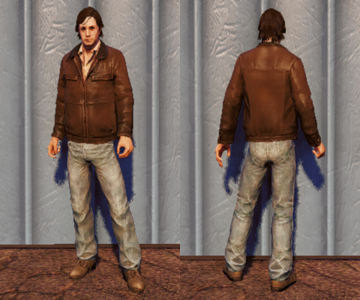
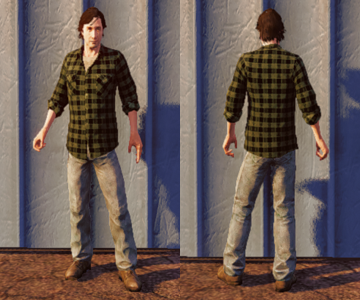
I took the time to capture and crop screenshots of each and every character model available in the Horizon State of Decay Save Editor. Hopefully this list will help shed some light on the State of Decay Save Editor and motivate others, possibly those who are not already, to go Diamond and support the staff and website.

Each category contains .cdf paths pertaining to character models, which you can input into the State of Decay Editor. The .cdf paths are supplemented with images so that you can preview the character model that you wish use to mod your save file with.

The list is alphabetically organized by category and gender.

I uploaded my SOD.rar, under the Downloads section below, which is a compressed compilation of all of the images that I put together for this thread. I also included a “.CDF Paths.txt” file which displays every .cdf path listed as well.

Current Progress: Complete 100%

[100%] Story Male Characters

[100%] Story Female Characters

[100%] Male Characters

[100%] Female Characters

Character Model Images

Story Male Characters

[details=Open Me]characters/male/human/story_characters/alan_gunderson.cdf

Open Me
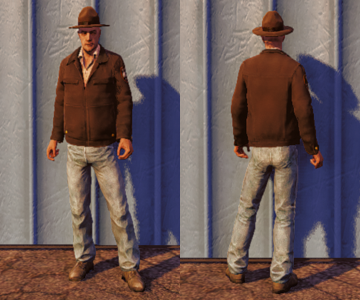
[Image: attachment.php?aid=2525]

characters/male/human/story_characters/andy_pimms.cdf

Open Me
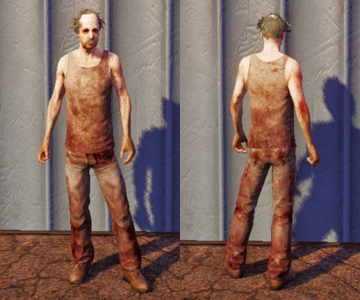
[Image: attachment.php?aid=2526]

characters/male/human/story_characters/carl_parsons.cdf

Open Me
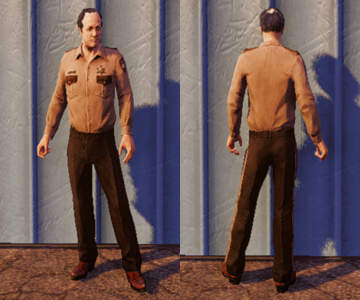
[Image: attachment.php?aid=2527]

characters/male/human/story_characters/doc_hanson.cdf

Open Me
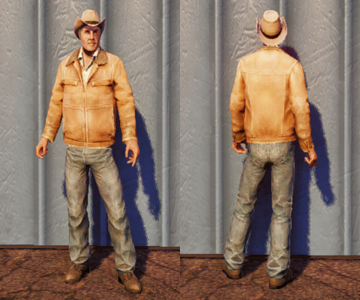
[Image: attachment.php?aid=2528]

characters/male/human/story_characters/ed_jones.cdf

Open Me
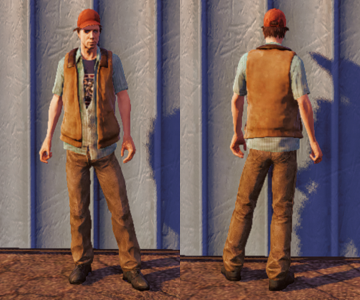
[Image: attachment.php?aid=2529]

characters/male/human/story_characters/eli_sick.cdf

Open Me
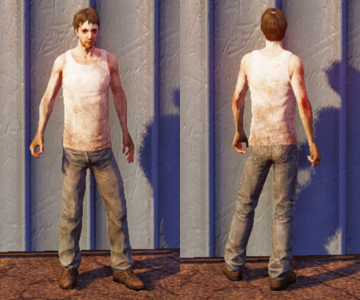
[Image: attachment.php?aid=2530]

characters/male/human/story_characters/eli_wilkerson.cdf

Open Me
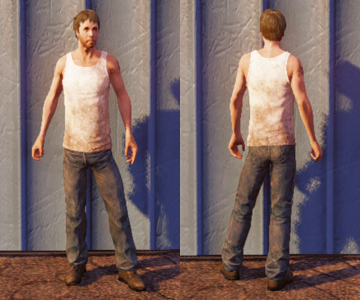
[Image: attachment.php?aid=2531]

characters/male/human/story_characters/eric_tan.cdf

Open Me
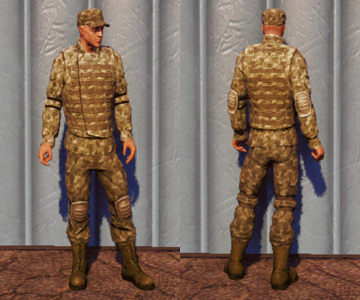
[Image: attachment.php?aid=2532]

characters/male/human/story_characters/jacob_ritter.cdf

Open Me
[Image: attachment.php?aid=2533]

characters/male/human/story_characters/job_wilkerson.cdf

Open Me
[Image: attachment.php?aid=2534]

characters/male/human/story_characters/marcus_campbell.cdf

Open Me

characters/male/human/story_characters/mickey_wilkerson.cdf

Open Me

characters/male/human/story_characters/pastor_william.cdf

Open Me

characters/male/human/story_characters/quentin_barnes.cdf

Open Me

characters/male/human/story_characters/ray_santos.cdf

Open Me

characters/male/human/story_characters/swat01.cdf

Open Me

characters/male/human/story_characters/thomas_ritter.cdf

Open Me

[/details]

Story Female Characters

[details=Open Me]characters/female/human/story_characters/becca_collins.cdf

Open Me

characters/female/human/story_characters/diane_montressor.cdf

Open Me

characters/female/human/story_characters/judge_lawton.cdf

Open Me

characters/female/human/story_characters/lilly_ritter.cdf

Open Me

characters/female/human/story_characters/maya_torres.cdf

Open Me

characters/female/human/story_characters/sam_hoffman.cdf

Open Me

[/details]

Male Characters

[details=Open Me]characters/male/human/body/army/variant/v01.cdf

Open Me

characters/male/human/body/army/variant/v02.cdf

Open Me

characters/male/human/body/army/variant/v03.cdf

Open Me

characters/male/human/body/army/variant/v04.cdf

Open Me

characters/male/human/body/buttons_nicepants/variant/v01.cdf

Open Me

characters/male/human/body/buttons_nicepants/variant/v02.cdf

Open Me

characters/male/human/body/buttons_style01/variant/v03.cdf

Open Me

characters/male/human/body/buttons_style01/variant/v04.cdf

Open Me

characters/male/human/body/buttons_style01/variant/v05.cdf

Open Me

characters/male/human/body/buttons_style01/variant/v06.cdf

Open Me

characters/male/human/body/campshirt_khaki/variant/v01.cdf

Open Me

characters/male/human/body/campshirt_khaki/variant/v02.cdf

Open Me

characters/male/human/body/campshirt_khaki/variant/v03.cdf

Open Me

characters/male/human/body/campshirt_khaki/variant/v04.cdf

Open Me

characters/male/human/body/campshirt_khaki/variant/v05.cdf

Open Me

characters/male/human/body/campshirt_khaki/variant/v06.cdf

Open Me

characters/male/human/body/denimjacket_jeans/variant/v01.cdf

Open Me

characters/male/human/body/denimjacket_jeans/variant/v02.cdf

Open Me

characters/male/human/body/denimjacket_jeans/variant/v03.cdf

Open Me

characters/male/human/body/denimjacket_jeans/variant/v04.cdf

Open Me

characters/male/human/body/denimjacket_jeans/variant/v05.cdf

Open Me

characters/male/human/body/denimjacket_jeans/variant/v06.cdf

Open Me

characters/male/human/body/denimjacket_jeans/variant/v07.cdf

Open Me

characters/male/human/body/flannel_jeans/variant/v01.cdf

Open Me

characters/male/human/body/flannel_jeans/variant/v02.cdf

Open Me

characters/male/human/body/flannel_jeans/variant/v03.cdf

Open Me

characters/male/human/body/flannel_jeans/variant/v04.cdf

Open Me

characters/male/human/body/flannel_jeans/variant/v05.cdf

Open Me

characters/male/human/body/flannel_jeans/variant/v06.cdf

Open Me

characters/male/human/body/hazmat/hazmat.cdf

Open Me

characters/male/human/body/hoodie_shorts/variant/v01.cdf

Open Me

characters/male/human/body/hoodie_shorts/variant/v04.cdf

Open Me

characters/male/human/body/hoodie_shorts/variant/v05.cdf

Open Me

characters/male/human/body/hoodie_shorts/variant/v06.cdf

Open Me

characters/male/human/body/hoodiejacket_jeans/variant/v01.cdf

Open Me

characters/male/human/body/hoodiejacket_jeans/variant/v02.cdf

Open Me

characters/male/human/body/hoodiejacket_jeans/variant/v03.cdf

Open Me

characters/male/human/body/hoodiejacket_jeans/variant/v04.cdf

Open Me

characters/male/human/body/hoodiejacket_jeans/variant/v05.cdf

Open Me

characters/male/human/body/hoodiejacket_jeans/variant/v06.cdf

Open Me

characters/male/human/body/hoodiejacket_jeans/variant/v07.cdf

Open Me

characters/male/human/body/hoodiejacket_jeans/variant/v08.cdf

Open Me

characters/male/human/body/jacket01/variant/v01.cdf

Open Me

characters/male/human/body/jacket01/variant/v02.cdf

Open Me

characters/male/human/body/jacket01/variant/v03.cdf

Open Me

characters/male/human/body/jacket01/variant/v04.cdf

Open Me

characters/male/human/body/lightjacket_jeans/variant/v02.cdf

Open Me

characters/male/human/body/lightjacket_jeans/variant/v03.cdf

Open Me

characters/male/human/body/lightjacket_jeans/variant/v04.cdf

Open Me

characters/male/human/body/lightjacket_jeans/variant/v05.cdf

Open Me

characters/male/human/body/lightjacket_jeans/variant/v06.cdf

Open Me

characters/male/human/body/lightjacket_jeans/variant/v07.cdf

Open Me

characters/male/human/body/lightjacket_jeans/variant/v08.cdf

Open Me

characters/male/human/body/merc_sharpshooter/merc_sharpshooter.cdf

Open Me

characters/male/human/body/shark_combat/variant/v01.cdf

Open Me

characters/male/human/body/sweater/variant/v01.cdf

Open Me

characters/male/human/body/sweater/variant/v02.cdf

Open Me

characters/male/human/body/sweater/variant/v03.cdf

Open Me

characters/male/human/body/sweater/variant/v04.cdf

Open Me

characters/male/human/body/sweater/variant/v05.cdf

Open Me

characters/male/human/body/tshirt_jeans/variant/v01.cdf

Open Me

characters/male/human/body/tshirt_jeans/variant/v04.cdf

Open Me

characters/male/human/body/tshirt_jeans/variant/v05.cdf

Open Me

characters/male/human/body/tshirt_jeans/variant/v09.cdf

Open Me

characters/male/human/body/tshirt_jeans/variant/v11.cdf

Open Me

characters/male/human/body/tshirt_jeans/variant/v12.cdf

Open Me

characters/male/human/body/tshirt_jeans/variant/v13.cdf

Open Me

characters/male/human/body/tshirt_jeans/variant/v16.cdf

Open Me

characters/male/human/body/vestjacket_jeans/variant/v01.cdf

Open Me

characters/male/human/body/vestjacket_jeans/variant/v02.cdf

Open Me

characters/male/human/body/vestjacket_jeans/variant/v03.cdf

Open Me

characters/male/human/body/vestjacket_jeans/variant/v04.cdf

Open Me

characters/male/human/body/vestjacket_jeans/variant/v05.cdf

Open Me

characters/male/human/body/vestjacket_jeans/variant/v06.cdf

Open Me

characters/male/human/body/vestjacket_jeans/variant/v07.cdf

Open Me

characters/male/human/body/vestjacket_jeans/variant/v08.cdf

Open Me

characters/male/human/body/vestjacket_jeans/variant/v09.cdf

Open Me

characters/male/human/body/vestjacket_jeans/variant/v10.cdf

Open Me

[/details]

Female Characters

[details=Open Me]characters/female/human/body/buttons/variant/v01.cdf

Open Me

characters/female/human/body/buttons/variant/v02.cdf

Open Me

characters/female/human/body/buttons/variant/v03.cdf

Open Me

characters/female/human/body/buttons/variant/v04.cdf

Open Me

characters/female/human/body/buttons/variant/v05.cdf

Open Me

characters/female/human/body/buttons/variant/v06.cdf

Open Me

characters/female/human/body/buttons/variant/v07.cdf

Open Me

characters/female/human/body/hoodie_combat/variant/v01.cdf

Open Me

characters/female/human/body/hoodie_combat/variant/v02.cdf

Open Me

characters/female/human/body/leatherjacket_hoodie/variant/v01.cdf

Open Me

characters/female/human/body/leatherjacket_hoodie/variant/v02.cdf

Open Me

characters/female/human/body/leatherjacket_hoodie/variant/v03.cdf

Open Me

characters/female/human/body/leatherjacket_hoodie/variant/v04.cdf

Open Me

characters/female/human/body/leatherjacket_hoodie/variant/v05.cdf

Open Me

characters/female/human/body/leatherjacket_hoodie/variant/v06.cdf

Open Me

characters/female/human/body/leatherjacket_leggings/variant/v01.cdf

Open Me

characters/female/human/body/leatherjacket_leggings/variant/v02.cdf

Open Me

characters/female/human/body/leatherjacket_leggings/variant/v03.cdf

Open Me

characters/female/human/body/leatherjacket_leggings/variant/v04.cdf

Open Me

characters/female/human/body/leatherjacket_leggings/variant/v05.cdf

Open Me

characters/female/human/body/leatherjacket_leggings/variant/v06.cdf

Open Me

characters/female/human/body/leatherjacket_leggings/variant/v07.cdf

Open Me

characters/female/human/body/tshirt_jeans/variant/v01.cdf

Open Me

characters/female/human/body/tshirt_jeans/variant/v02.cdf

Open Me

characters/female/human/body/tshirt_jeans/variant/v03.cdf

Open Me

characters/female/human/body/tshirt_jeans/variant/v04.cdf

Open Me

characters/female/human/body/tshirt_jeans/variant/v05.cdf

Open Me

characters/female/human/body/tshirtvest_jeans/variant/v01.cdf

Open Me

characters/female/human/body/tshirtvest_jeans/variant/v02.cdf

Open Me

characters/female/human/body/tshirtvest_jeans/variant/v03.cdf

Open Me

characters/female/human/body/tshirtvest_jeans/variant/v04.cdf

Open Me

characters/female/human/body/turtleneck_jeans/variant/v03.cdf

Open Me

characters/female/human/body/turtleneck_jeans/variant/v04.cdf

Open Me

[/details]

Downloads

Hidden Content


Reply to this thread to unlock the contents
(22.7 MB via Dropbox)

You Can Contribute

Please feel free to help with the following:

-Wrong or Incorrect Images

-Down or Offline Images (because of Photobucket bandwidth)

-Missing Models (that are available in Horizon)

-Suggest better or longer lasting image hosting website

Big Thanks and Credits

Unknown V2

HORIZONMB Staff

HORIZONMB Community

Attached Files

Attached images

  [Minecraft] Cracked Minecraft for Windows/OSX/Linux (Download)

08-21-2013, 12:35 PM · Forum: PC Discussion - No Replies
Cracked Minecraft for Windows/OSX/Linux

Game: Minecraft

Details

It seems that the cracked client I had released as of two years ago is now outdated.

Hence, I bring about the release of another automatically updating client11!!1!!!!

INSTALLATION

After hitting ok to the first installation dialog box (You can change the directory of the installation later. It seems that the launcher doesn't function if you change the installation directory in the first dialog box.)

Below is the main screen of the launcher. From here, you can alter the installation directory and the arguments with which minecraft will launch.


After installing the files, you can log in (with a spoofed name albeit) and you should see some activity from the console.


PROOF OF FUNCTIONALITY AND UP TO DATE-NESS


ADVANCED SETTINGS

If you click on the "Edit Profile" button located on the launcher, you can alter the ways in which your minecraft will launch.

You can have the launcher download the bleeding edge developer snapshot versions of minecraft so you can see what's currently in development for the game.

You can also set launch arguments so that those of you with those crazy graphics cards and 256x256 texture packs can enjoy more memory.


LITERALLY MILLIONS OF TROJANS

https://www.virustotal.com/en/file/3...is/1374420133/

Minecraft.rar - Jotti's malware scan

NOTE: ALL CREDITS GO TO THE KEINETT TEAM FOR THIS LAUNCHER.

Download:
Hidden Content


Reply to this thread to unlock the contents

As always, use caution. This file is provided for archival purposes. SickGaming cannot be held liable.

Attached Files

.rar
Minecraft_sickgaming.net.rar

  [Xbox 360] Xbox 360 Dashboard / System Update 2.0.16525.0 Beta With Avatar (Download)

08-20-2013, 11:51 AM · Forum: Xbox Mods - No Replies
Xbox 360 Dashboard / System Update 2.0.16525.0 Beta Download With Avatars

Description

THIS WILL DISABLE XBL / KINECT UNTIL PUBLICLY AVAILABLE YOU HAVE BEEN WARNED SO DONT MOAN IF U CANT READ!

Download:
Hidden Content


Reply to this thread to unlock the contents

Unzip the download and copy the $SystemUpdate folder to the root of a FAT32 USB stick.
The Xbox 360 will ask your console to update when the USB drive is inserted (providing your 360 is on an older dashboard version)

Use at your own risk.

Attached Files

.zip
SystemUpdate_16525.zip

  PS3 News: 3DS Castlevania Coming to Xbox 360 & PS3

08-19-2013, 02:53 PM · Forum: Sony Discussion - No Replies
3DS Castlevania Coming to Xbox 360 & PS3

Konami is bringing the 3DS game to consoles later this year. PC version possible.

Castlevania: Lords of Shadow – Mirror of Fate, which originally came out on Nintendo 3DS earlier this year, is being re-released in HD on Xbox 360 and PlayStation 3.

The game's publisher Konami announced the news on the game's official Facebook page. The game is a direct sequel to Lords of Shadow, which came out on current-gen consoles in 2010 and was something of a reboot for the long-running gothic adventure series. The HD version will be coming to PSN and Xbox Live Arcade, rather appropriately, on October 31st.

[Image: 1170907_10153128842050697_344420760_n.jpg]

Does this mean we could see the game coming to other platforms in the future? When asked about the possibility of a PC version, the producer of the franchise, Dave Cox, said on Twitter, "No announcement today but we are seriously looking into it." But he seemed less optimistic about a possible Vita version, adding "we have no plans for a Vita version."

Castlevania: Lords of Shadow 2 is expected for PS3, Xbox 360, and PC in November.

  PC News: Oculus VR Launches a Marketplace for Rift Demos and More

08-19-2013, 02:53 PM · Forum: PC Discussion - No Replies
Oculus VR Launches a Marketplace for Rift Demos and More

Now in beta, Oculus Share will one day be the place to download all your Oculus Rift content.

Someday, in the (hopefully near) future, Oculus VR will bring its impressive headset to the consumer market. But for the time being, the company is also focused on helping developers to learn the hardware and start creating compatible software. On Monday, Oculus announced the beta version of Oculus Share, a place to publish and download Oculus Rift demos and games.

[Image: oculusshare-610x343.jpg]

Currently, Share is a way for Oculus Rift developers to share content and collect feedback from the community. But going forward, Oculus VR has made it clear the platform will function as a sort of marketplace, like Xbox Live or Apple's App Store. "Oculus Share is the first of many steps we’re taking to build the ultimate virtual reality platform," reads a post on the Oculus blog. "While Share is simply a sharing service today, over the coming months we’ll work toward making it an incredible marketplace for Oculus-ready games, experiences, and applications."

Submissions to Oculus Share will apparently undergo some type of approval process from Oculus VR, in an attempt to "make sure content isn't offensive or malicious." Recently, id Software co-founder John Carmack joined Oculus as Chief Technology Officer, and while there's still no solid date on a consumer Rift headset, be sure to check out IGN's impressions of the latest 1080p prototype.
