Posted by: xSicKxBot - 08-26-2018, 09:11 AM - Forum: Lounge
- No Replies
Pokemon Go: Ho-Oh Returning For A Very Limited Time
Pokemon Go is in the midst of a Gen 2 celebration following the arrival of Celebi earlier this week, and now another Legendary from the Johto region is returning to the game for a limited time. From now until the end of the Johto Week event, players around the world will once again be able to encounter the Rainbow Pokemon Ho-Oh.
Just as during its initial run, Ho-Oh will appear as a Raid Battle at Gyms. To catch it, you'll first need to team up with other players at a Gym where a Ho-Oh Raid is taking place and challenge the Legendary to a battle; once it's been defeated, you'll be rewarded with Premier Balls and a chance to capture it.
Ho-Oh is a dual Fire/Flying-type, so you'll want to bring along strong Rock Pokemon like Golem, Tyranitar, and the game's newest Legendary, Regirock, to battle it. This time around, Niantic teases that you'll also have a chance of encountering a Shiny Ho-Oh, making that a good incentive to visit a nearby Raid even if you already have the Legendary in your collection.
Ho-Oh will only be available until August 27, while the Johto Week event is scheduled to end at 1 PM PT / 4 PM ET on August 28. As part of the event, Pokemon that originally appeared in the Johto region have been spawning in Pokemon Go much more frequently. Niantic also introduced six new Shiny Gen 2 Pokemon to the game.
Ho-Oh isn't the only Johto Legendary making a comeback. Next month, Niantic is rolling out a new batch of Field Research tasks related to Fire Pokemon. If you manage to complete enough of them to achieve a Research Breakthrough, you'll be rewarded with another encounter with Entei, one of the three Legendary dogs from Pokemon Gold and Silver.
The aforementioned Regirock will appear in Raid Battles until September 20. Shortly after that, Niantic will host the next Pokemon Go Community Day, which will feature the Gen 2 starter Chikorita.
Posted by: xSicKxBot - 08-26-2018, 02:47 AM - Forum: Lounge
- No Replies
Dominic Monaghan Cast In Star Wars Episode IX
Star Wars: Episode IX just picked up Lost and Lord of the Rings alum Dominic Monaghan for an unspecified role in the 2019 film.
JJ Abrams--who also directed The Force Awakens--reunites with Monaghan for the Episode IX, according to Deadline, and this will be the first time the two have worked together since the 2004 ABC series Lost, in which Monaghan played Charlie Pace. The actor is also well known for his work in the Lord of the Rings trilogy where he played the hobbit Meriadoc Brandybuck.
Things are slowly coming together for the next installment in the Star Wars saga, with filming already underway in the UK, as recent set pictures revealed Finn (John Boyega), Poe (Oscar Isaac), and Chewbacca (Joonas Suotamo) climbing a hill in front of some horse-looking creatures. Abrams tweeted the first set picture at the beginning of August which showed Boyega in a ship cockpit, but it's a bit hard to make out, since the background is blurred out.
Monaghan joins the ensemble cast which also features Daisy Ridley (Rey), Adam Driver (Kylo Ren), Lupita Nyong'o (Maz Kanata), Domhnall Gleeson (General Hux), Kelly Marie Tran (Rose Tico), Mark Hamill (Luke Skywalker), Anthony Daniels (C-3PO), Billy Dee Williams (Lando Calrissian), Billie Lourd (Lieutenant Connix), and Carrie Fisher, as Abrams will utilize unused footage from previous films. Additionally, newcomers Keri Russell, Naomi Acki, and Richard E. Grant join Episode IX as well, and like Monaghan, their roles are also unknown as of this writing.
Tran recently left social media due to online harassment and recently discussed this in a New York Times piece about her experiences and said, "I am the first woman of color to have a leading role in a Star Wars movie. I am the first Asian woman to appear on the cover of Vanity Fair. My real name is Loan. And I am just getting started."
There's still a long wait for the next Star Wars movie to come to theaters. Episode IX is slated to come out on December 20, 2019.
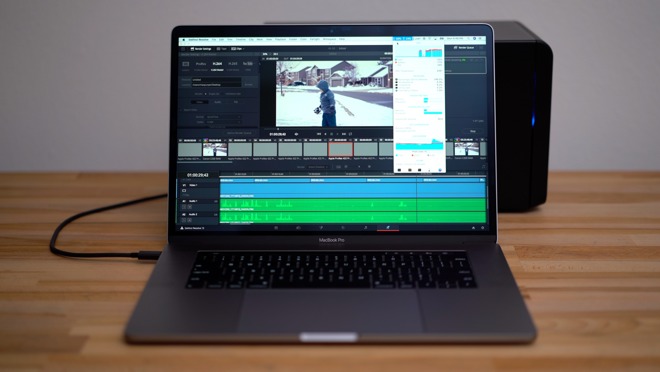
Testing an AMD WX 9100 eGPU with the 15-inch i9 MacBook Pro
Apple’s eGPU support extends beyond consumer-grade cards. AppleInsider takes a look at the AMD Radeon Pro WX 9100 GPU workstation card, inside a Sonnet eGFX 650 Breakaway Box.
[embedded content]
The WX 9100 is a high-end professional workstation card that supports ECC memory is intended for large computing jobs or a high volume of them in a zero-fault environment.
To support this goal, the WX 9100 comes with 16GB of HBM2 memory, 4096 stream processors and is based on AMD’s latest 12nm Vega architecture. For outputs, the card has six Mini-DisplayPort 1.4 connections supporting 10-bit output.
All of these features add to a graphics card costing $1500 which will definitely seem high for the consumer market, now that the BitCoin squeeze on pricing is over. But, to those needing that kind of computational heft, it’s not a bad buy even when you add the eGPU enclosure.
We’ll be comparing the WX 9100 and Sonnet combo to the best graphics card available in our 2018 15-inch i9 MacBook Pro, the 4GB Radeon Pro 560X. We’ll also be connecting that machine to the AMD 580 Pro Blackmagic eGPU which houses a Radeon Pro 580 graphics chip with 8GB of memory.
We used the Set-eGPU script to force all applications to use the eGPU, but this shouldn’t be required with MacOS Mojave.
Starting off with Geekbench 4’s OpenCL test, the WX 9100 scored more than double that of our MacBooks internal graphics and a bit higher than Blackmagic’s unit.
Doing a quick benchmark run in Unigine’s Heaven benchmark which tests gaming graphics performance, the WX 9100 once again performs more than twice as good as the 560X and about 45% faster than the Blackmagic eGPU.
MacBook Pro 560X
Blackmaic 580 eGPU
WX 9100 eGPU
GB4 OpenCL
52,499
110,423
131,102
Unigine Heaven FPS
21.1
36.3
51.6
Unigine Heaven Score
532
915
1,300
Moving on to video editing tasks, we first ran the Bruce X benchmark for Final Cut Pro which mostly taxes the graphics cards.
Running the Final Cut X stabilization filter on a 20-second 4K video clip, the WX 9100 eGPU performed the task in just 7 seconds, compared to 13 with both the integrated 560X and Blackmagic’s eGPU.
In Davinci Resolve, this task went from 28 seconds to 17 seconds with Black Magics eGPU and then to 14 seconds.
MacBook Pro 560X
Blackmaic 580 eGPU
WX 9100 eGPU
Bruce X – FCX
0:46
0:30
0:22
FCX Stabilization
0:13
0:13
0:07
Resolve Stabilization
0:28
0:17
0:14
We do video editing tasks daily, obviously —a task that many are looking to improve with an eGPU. Starting with rendering a 5 minute 4K project using standard h.264 footage with color correction and effects, we didn’t see any improvement in Final Cut X, with the Blackmagic eGPU actually slowing it down.
We suspect that the highest-end graphics available in the 2018 15-inch MacBook Pro is already fast enough at rendering this footage with effects to the point that CPU isn’t limited. On top of that, there is some bandwidth constraints made worse by having to send the data through Thunderbolt 3 not only to the GPU to be rendered, but also back to our software.
MacBook Pro 560X
Blackmaic 580 eGPU
WX 9100 eGPU
H.264 4K – FCX
3:44
4:06
3:46
H.264 4K – Resolve
4:53
5:56
8:24
As we move on to much tougher codecs like Canon Cinema RAW Lite where internal graphics are a huge bottleneck, we see some major improvement even with a short one-minute timeline. Not only did our render go from almost four times longer than the project itself to less than half that time, but our timeline performance went from and unusable 20 frames per second, to 55 frames per second which is a massive improvement.
In Davinci Resolve, we went from 20 minutes with the internal 560X, to 15 minutes with the Blackmagic eGPU, and just 8 minutes with the WX 9100.
MacBook Pro 560X
Blackmaic 580 eGPU
WX 9100 eGPU
Canon 4K 60 RAW – FCX
3:42
2:17
1:41
FCX Playback FPS
20
36
55
Canon 4K 60 RAW – Resolve
20:02
15:16
8:09
Resolve Playback FPS
27
32
45
Taking a look at a 1 minute 4.5K RED RAW project with color correction and effects, we don’t see much change in Final Cut Pro because our CPU is the bottleneck. Davinci Resolve uses the graphics cards more so we see about 60 percent faster speeds with the WX 9100.
Applying noise reduction is often needed with RAW footage, and it usually makes anything but the highest end computers like a higher spec iMac Pro choke. With temporal noise reduction added in Resolve, our WX 9100 finished the job in nearly one-third of the time than the 560X and the timeline had very few dropped frames making it workable where the MacBook wasn’t.
MacBook Pro 560X
Blackmaic 580 eGPU
WX 9100 eGPU
4.5K Red RAW – FCX
2:22
2:18
2:05
4.5K Red RAW – Resolve
1:14
1:19
0:46
Resolve – 4.5K Noise Reduction
5:46
Not tested
2:16
To finish off this first round of testing, we used Blender to test the 3D Rendering capabilities of the Radeon Pro WX 9100 vs the internal Radeon Pro 560X. We used the 1225 BMW test Project available on Blender’s website and used the graphics cards to render. Here, the WX 9100 completed the task at just 5 minutes vs close to 27 minutes on the MacBook Pro alone.
MacBook Pro 560X
WX 9100 eGPU
Blender BMW GPU Render (1225)
26:48
5:02
In Conclusion, the WX 9100 is a very powerful card that can greatly speed some professional tasks. On top of that, tasks that require dual precision GPU’s and ECC memory are now possible, without purchasing a dedicated workstation computer capable of this.
We at AppleInsider are very excited about the possibilities that eGPU’s offer and are looking forward to even better support in MacOS Mojave.
Where to buy
AMD’s Radeon Pro WX 9100 Graphics Card is currently available from third-party sellers on Amazon for $1,449.99. B&H also has the video card in stock for $1,499.99 with free expedited shipping and no tax collected outside New York and New Jersey*.
Both Amazon and B&H also carry Sonnet’s eGFX 650 Breakaway Box for $399.00 with free shipping.
A quick news bulletin for you this morning – those of you who were excited by the prospect of playing quirky city-builder Tropico on your iPad will definitely be interested in what we’ve got to share with you.
Feral Interactive have put out a gameplay video showing a direct iPad feed. You get a good look at the menu, the graphics and how the interface handles – especially with the touch inputs registering as little circles – which is cool. It’s just shy of fifteen minutes in length, and we’ve embedded it below for you:
[embedded content]
Yesterday, the developers released the long awaited iPhone port for Rome: Total War, making that a fully universal iOS game. Unfortunately Nick wasn’t able to get the iPhone version to download in time for today’s Weekender, so we’ve got no hands-on impressions for you.
Tropico for iPad is due out later this year, before the end of Autumn.
Just northeast from Aleft (area of interest), west from Nilthog’s Hollow, northwest from Balmora.
This is probably the easiest one to find, thanks to the wealth of information on the treasure picture. The structure placed on what seems like a small island, just next to the water, is actually the Aleft ruin. Once you are there, go to the northeastern tower and dig out the treasure at its bottom, close to the ruins.
The Nintendo Switch is a unique gaming machine that does double duty as a home console and a handheld without breaking a sweat. Despite its all-in-one approach to gaming, the Switch doesn't come with everything that would be useful to owners. In fact, its versatility makes a whole array of accessories all but necessary if you want to get the most out of Nintendo's flagship hardware. Below, we highlight all the Switch accessories that might come in handy no matter how you use it.
Carrying Case
The ability to take the Nintendo Switch on the go with you is one of the console's main selling points. Unfortunately, the Switch is a fragile machine that can break or scratch easily if left loose in a bag. That's why a carrying case is essential for keeping your Switch in tip-top condition. This one from Orzly is tough enough to keep your Switch secure, and it comes with enough pockets to store all the cables and games you'll want to bring along with you.
The onboard storage that comes in a Nintendo Switch doesn't get you very far in the age of HD gaming. That's not a problem if you install a microSD card to give your Switch more storage space. Here are several options so you can pick one that suits your storage needs.
The Nintendo Switch comes with two Joy-Cons and a Joy-Con Grip you can slide them into to create a, well, controller-like device. But nothing beats a real controller, and that's what you get with the Nintendo Switch Pro Controller. It even has a true D-pad.
Even the most careful Switch owners can wind up getting scratches on their screen. A screen protector like this high-rated glass one is cheap and easy to apply. And if you do get a scratch on it, just remove it and apply the other one that comes in the package.
If you've ever used your Switch's kickstand, you know how thin, breakable, and unadjustable it is. Nearly anyone who spends serious time gaming in tabletop mode would prefer something a little sturdier that can tilt for maximum comfort. This stand does both, and as a bonus, it can charge your Switch while you play.
It can be a major pain when your controller runs out of batteries. To keep your Joy-Cons powered up with this charging station all you have to do is drop them in, and they'll go from zero to fully charged in four hours. It holds up to four Joy-Cons at a time, so you'll always be ready to get your game on.
Before traveling with your Switch, you could try to remember to disconnect your AC adapter from the dock--if you can even reach it in the tangled cables behind your entertainment stand. Or you could just buy an extra charging cable and keep it in your bag at all times.
Playing on the go is all fun and games--until your Switch's battery dies. If you have an extra battery pack, you can keep the fun going. It can even charge your phone or tablet whenever they need juice and an outlet is nowhere in sight.
Many Switch games have fantastic soundtracks and audio effects, but if you rely on the Switch's tiny built-in speakers to hear your games, you'll miss out on a lot. These highly recommended headphones from Mpow sound great and come in a variety of colors.
In this GDC 2018 talk, developers JC Lau, Leah Hoyer, Elaine Chase, Mary Olson and Kelly Snyder discuss their unique perspectives, struggles, and available tools as they work to improve diversity in games.
Games are a unique medium with power to unite. They create a common ground for people from diverse ethnicities, cultures, genders, and political views to connect with one another in an experience they all enjoy.
However, the percentage of women and people of color remains shockingly low, and there is much to be done within gaming companies themselves as well as within gaming culture to shift this status quo.
The talk dives into how the video games industry has struggled to develop and retain a workforce that reflects the people playing their games, and what work can be done to improve diversity in games.
In addition to this presentation, the GDC Vault and its accompanying YouTube channel offers numerous other free videos, audio recordings, and slides from many of the recent Game Developers Conference events, and the service offers even more members-only content for GDC Vault subscribers.
Those who purchased All Access passes to recent events like GDC or VRDC already have full access to GDC Vault, and interested parties can apply for the individual subscription via a GDC Vault subscription page. Group subscriptions are also available: game-related schools and development studios who sign up for GDC Vault Studio Subscriptions can receive access for their entire office or company by contacting staff via the GDC Vault group subscription page. Finally, current subscribers with access issues can contact GDC Vault technical support.
Gamasutra and GDC are sibling organizations under parent UBM Americas.
10 Insider Tips for Airheart’s Colorful Airplane World Above the Clouds
In Airheart, your goal is to get to the top of the skies and catch the legendary skywhale. To succeed, you’ll need to battle pirates and drones, catch lots of fish and most importantly: stay alive!
You play as Amelia, a young pilot, and fisherwoman wishing to reach the edge of the world and make the big catch. But since you’re living on the poor underside of Granaria, a flying city in the clouds, your way to the top will be especially hard.
I played a couple of hundred hours of Airheart during development and I think I’ve got some nice tips for you for making the life of a fisherwoman easier.
Don’t shoot the friendlies, or don’t be caught doing it
On the first few levels, there are a lot of neutral NPCs, fishermen and -women that are just making a living by catching fish. They are not armed, so it may be tempting to shoot them down for loot, but I’d advise against it. Shooting them will call the police, and they are not kidding around. There is no prison or fine for being hostile to the friendlies but being shot down and thus losing all your catches is probably punishment enough.
Better safe than sorry
It’s easy to get greedy with all the fish and loot, but at one point you must return to Granaria to craft some new weapons or buy better gear. Lots of times I got shot down because I just wanted to catch the next extremely valuable fish while already having low health. So, this one is very important and will help you a lot: when you see the warning of low health on the screen, return back home as soon as possible. Just do it. You’ll thank me.
Listen well when looking for a big catch
While the legendary skywhale is at the very top of Airheart’s world, there may be smaller whales in the skies between Granaria and the top. But how can you find one? I can tell you that there will not always be one of them flying around, but if there is, you’ll hear it, so listen well!
A little boost would be nice
There is a fixed speed to most of the airplanes in Airheart, but there are times when you want to fly a little bit faster – for example when you want to catch the speedy valuable skyfish. Do you see that weapon on top of your airplane? How about using its recoil? Of course, some guns give you a little bit more of it and some none. Personally, I use the machine gun for this all the time.
Good fisherwomen use the harpoon
Fast fish are maybe too fast for your airplane, but just use your harpoon and they will not be able to escape you. Also, when you get to the higher layers of Airheart’s world there will be much bigger fish which can’t be caught by just flying into them – but if you harpoon & drag them down to Granaria, you’ll get a nice reward.
A harpoon is not only made for fishing: Part 1
At the beginning of Airheart, your airplane will only have a small and pretty weak Bolt Caster as its main weapon. But it also has a very useful tool: the harpoon! While you can’t destroy enemies with it, it can make it a lot easier. Small enemies care stunned when harpooned and become very vulnerable. If you’re returning to Granaria with them, you can drag them down and will get part of their weapon as material for crafting!
A harpoon is not only made for fishing: Part 2
While most of the airplanes in Airheart are always in motion, the harpoon can be used to slow down the momentum. Whenever I need a moment to figure things out or I want to take a clean, precise shot at enemies, I just harpoon a rock and stand still. Be aware that this will also make you an easier target for your enemies!
The additional skins for the airplanes are very pricey, but…
If you’re short on cash, but really want one of the expensive skins for your airplane, you could try to shoot down some of your competition. Sometimes you’ll see airplanes which look like yours flying around. These are neutral NPCs we call Fortune Hunters. They have the same goal as you but are usually better equipped. There’s a small chance you’ll get a nice skin from them as loot if you ask them nicely…
Take a photo if you’re feeling lost
Sometimes during playtesting, we used this little trick when we badly needed to find the next portal but forgot where it was; taking a photo with the photo mode. It sounds strange but once you try it, you’ll understand.
Don’t get too greedy
There is a lot of fish in Airheart’s skies, and you could catch all of them for a lot of money. But when you do this, like in real life, there probably won’t be any new fish anymore – which means no new money. Make sure to let some fish life on every layer to be able to get more money on your next run. Personally, I make sure to not to fish more than about half of the fish on any layer to have enough fish every time.
Take on the role of a modern farmer in Farming Simulator 17! Explore farming possibilities in a new North American environment. Drive over 250 farming vehicles and equipment from over 75 manufacturers, including new brands such as Challenger, Fendt, Valtra or Massey Ferguson.





![[Image: ESO_Expansion_Morrowind_Vvardenfell_CE_T...89x300.jpg]](http://teso.mmorpg-life.com/wp-content/uploads/2017/05/ESO_Expansion_Morrowind_Vvardenfell_CE_Treasure_Map_3-289x300.jpg)